THE #1 NO CODE DRAG & DROP WORDPRESS WEBSITE BUILDER POWERING 22M+ WEBSITES WORLDWIDE, NOW WITH AI.
Elementor, the leading WordPress website creation platform, empowers you to build professional, pixel-perfect websites seamlessly with its no-code, drag-and-drop Atomic Editor.
Supporting the full website lifecycle, Elementor enables you to confidently build, optimize, and manage your website with extended capabilities such as AI-powered creation, image optimization, transactional email delivery, accessibility tools, performance boosters, and more.
Now in version 4 – the Atomic Editor! Introducing a new generation of performance-first atomic building blocks that allow you to control every atomic part with no limits or locked layouts. Define your global design systems and reusable components once, and they apply everywhere instantly – turning hours or even days of work into single clicks.
Unlock all features with Elementor One.
Need fast and secure cloud hosting for your Elementor site? Try out Elementor Host Powered by Google Cloud & Cloudflare. 4.9/5 TrustPilot score.
🌟 Create Professional Stunning Websites
Intuitive Drag & Drop Builder: Build any website with our no-code, drag-and-drop Editor. Achieve design precision with full control over layout and style.
Pixel-Perfect Design Tools: Upload SVGs, apply masks, gradients, box shadows, headline effects, shape dividers, and use built-in CSS controls for advanced customization.
Template Library: Apply complete website kits for instant setups, or choose from a vast library of single pages, blocks, and pop-up templates.
Advanced Widgets: Access over 40 FREE widgets, including heading, image, text editor, video, button, gallery, carousels, and more.
AI Capabilities: Revolutionize your design and content creation process with native AI integration. Instantly create sections, text, code, and images.
🗝️ Key features:
Design System: Use Variables and Classes for consistent colors, typography, and design elements, ensuring a cohesive, professional look that updates everywhere globally.
Responsive Design: Optimize your design for every device with custom breakpoints, ensuring a seamless desktop, tablet, and mobile experience.
Mask Shapes: Turning any element, like an image or video, into whatever shape you desire to create standout designs.
CSS Transform: Use CSS Transform to rotate, scale, and skew elements, adding dynamic styling to your site.
Entrance Animations: Add entrance animations to elements to create engaging and interactive user experiences.
Revision History: Elementor’s Revision History feature enables users to track and revert to previous versions of their designs, providing peace of mind and flexibility during the creative process.
Developer-Friendly: Equipped with extensive documentation, API, developer tools, and custom code areas, Elementor offers a conducive environment for developers to extend its capabilities and create custom solutions.
Floating Buttons: Enhance user interaction with customizable, floating action buttons that stay in view as users scroll.
Components [Pro]: Reuse the same building blocks across pages and sites, and update them everywhere they appear. Including controlled content editing, allowing collaborators and clients to update only exposed content properties without breaking layout or styling.
Theme Builder [Pro]: Design every part of your site—headers, footers, posts, and archives—for complete control over appearance.
Popup Builder [Pro]: Create eye-catching popups with Elementor’s Popup Builder, equipped with advanced targeting and triggering options to optimize user engagement and conversions.
Forms [Pro]: Design and integrate custom forms, utilizing advanced features and integrations to capture and manage submissions effectively.
WooCommerce Builder [Pro]: Integrate Elementor with WooCommerce to design custom product pages, shop layouts, archives, carts, checkout pages, my account, and more, enhancing your store’s visual appeal and functionality.
Dynamic Content [Pro]: Leverage dynamic content capabilities to create personalized and interactive web experiences by connecting your designs to various data sources.
Notes [Pro]: Enhance team collaboration by using Elementor’s Notes feature to leave feedback and comments directly on the design interface.
Custom Code [Pro]: Insert custom code to extend the functionality of your site, offering flexibility for advanced customizations.
Custom CSS [Pro]: Apply Custom CSS to fine-tune the styling of elements, ensuring precise control over the design aspects.
Motion Effects [Pro]: Add advanced motion effects to elements for a more dynamic and engaging user experience.
Custom Fonts & Icons [Pro]: Upload and use custom fonts and icons to match your brand’s identity.
😍 Elementor FREE widgets
Unlock the potential of Elementor with our comprehensive suite of free widgets and tools, designed to empower your website creation process and elevate your design capabilities:
Heading. Add eye-catching headlines.
Image. Control the size, opacity and more.
Text Editor. Just like the WordPress text editor.
Video. Add YouTube, Vimeo, VideoPress, Dailymotion or self-hosted videos.
Button. Create interactive buttons.
Link in Bio. Build link in bio components to promote your business / services.
Image Box. A box with image, headline and text.
Testimonials. Customer testimonials.
Icon. Place one or more of 600+ icons available.
Icon Box. An icon, headline, and text with one widget.
Social Icons. Link to your social pages with the Facebook/X (formerly Twitter) icons.
Image Gallery. Display your images in a grid.
Image Carousel. Create rotating carousels or sliders for chosen images.
Icon List. Use any icon to create a bullet list.
Counter. Show numbers in an escalating manner.
Progress Bar. Include an escalating progress bar.
Nested Tabs. Display content in vertical or horizontal tabs.
Nested Accordion. Display any type of content in collapsible sections.
Rating. Display how many stars (or another icon) other visitors gave.
Alert. Include a colored alert box to draw visitor’s attention.
HTML. Insert code into the page.
Shortcode. Insert shortcodes from any plugin into the page.
Menu Anchor. Link any menu to this anchor.
Read More. Set the Read More cut-off for the excerpt in archive pages.
Sidebar. Add sidebars onto the page.
Google Maps. Embed maps into the page.
SoundCloud. Add SoundCloud audio bits.
Divider. Separate content with a designed divider.
Spacer. Add space between elements.
Text Path. Attach your text to a path.
And counting…
🚀 Enhance Your Website
Website performance impacts your visitor’s experience and search result ranking. Elementor, in partnership with Google Chrome, continuously enhances performance without compromising design.
Key features include:
- Reduced DOM Output: Streamlined HTML structure for faster rendering.
Improved Media File Loading: Optimized loading of images, videos, and other media assets.
- Reduced CSS and JS Files: Minimized stylesheets and scripts individually loaded only on demand for quicker loading times.
- Lazy Loading: Deferred loading of non-critical resources to improve initial page load speed.
- Faster Font Loading: Efficient delivery of web fonts to enhance text rendering speed.
- Optimized Front-End Asset Loading: Efficient loading of assets like JavaScript and CSS to minimize render-blocking.
- Element Caching: Cache frequently accessed design elements to reduce server response time and enhance overall performance.
🔥 Elementor Editor Pro Features
Create unparalleled websites while saving time, money and resources with Elementor Editor Pro’s full website builder. Get access to 100+ professional widgets, features, and tools.
Editor Pro Design Widgets:
- Posts: Display your blog posts with customizable layouts and styles.
- Share Buttons: Allow visitors to easily share your content on various social media platforms.
- Portfolio: Showcase your work or projects with stunning portfolio layouts.
- Slides: Create dynamic slideshows with custom animations and transitions.
- Form: Design and customize advanced forms for user interaction and data collection.
- Login: Add a login form or user registration module to your website.
- Nav Menu: Customize and style your website’s navigation menu for better user experience.
- Animated Headline: Create attention-grabbing headlines with animated effects.
- Price Table: Display pricing plans or packages in a structured and visually appealing format.
- Price List: Showcase a list of prices or services with customizable styling options.
- Gallery: Create beautiful image galleries with various layout options and lightbox support.
- Flip Box: Add interactive flip animations to highlight content or features.
- Call to Action: Encourage user interaction and conversions with compelling call-to-action sections.
- Media Carousel: Showcase a carousel of media files such as images or videos.
- Testimonial Carousel: Display client testimonials in a carousel format for social proof.
- Nested Carousel: Create nested carousels for more complex content organization.
- Loop Carousel: Display content in a looped carousel for continuous viewing.
- Table Of Content: Generate a table of contents for longer articles or guides to improve navigation.
- Countdown: Add countdown timers to create urgency for promotions or events.
- Facebook Page: Embed your Facebook page feed or content onto your website.
- Blockquote: Highlight quotes or testimonials with stylish formatting options.
- Template: Save and reuse design templates for consistent branding and layout.
- Reviews: Showcase customer reviews and ratings to build trust and credibility.
- Facebook Button: Add buttons to promote interactions with your Facebook page or content.
- Facebook Embed: Embed Facebook posts or content onto your website.
- Facebook Comments: Enable Facebook comments on your website’s pages or posts.
- PayPal Button: Integrate PayPal buttons for easy online payments.
- Stripe Button: Integrate Stripe payment buttons to facilitate secure online transactions.
- Lottie Widget: Add Lottie animations to enhance visual appeal and engagement.
- Code Highlight: Display code snippets with syntax highlighting for better readability.
- Video Playlist: Create and customize playlists for video content on your website.
- Mega Menu: Customize advanced menus for better navigation and displaying complex content.
- Off Canvas: Create off-canvas areas that slide in to show extra info or menus without cluttering the main layout.
Editor Pro Theme Widgets: Build and customize all the key parts of your website including headers, footers, 404 page, global archives, and more…
- Post Title: Customize the title of individual blog posts or pages.
- Post Excerpt: Display a brief summary or teaser of your blog posts.
- Post Content: Customize the main content area of your blog posts or pages.
- Featured Image: Set and customize featured images for blog posts or pages.
- Author Box: Display author information and bios on blog posts.
- Post Comments: Customize the appearance and functionality of comments sections on your website.
- Post Navigation: Add navigation links to adjacent posts for easy browsing.
- Post Info: Display additional information about blog posts, such as author and date.
- Site Logo: Upload and customize your website’s logo for branding purposes.
- Site Title: Customize the title of your website.
- Page Title: Customize the title of individual pages.
- Search Bar: Add a search bar to allow users to search your website’s content.
- Breadcrumbs: Display hierarchical navigation paths for better user navigation.
- Sitemap: Generate a sitemap for better search engine indexing and user navigation.
- Loop Grid: Design and customize grid layouts for blog post archives or product listings.
Editor Pro WooCommerce Widgets: Design and customize a complete online shopping experience across your entire website.
- Product: Display individual products with customizable layouts and styles.
- Breadcrumbs: Display hierarchical navigation paths for better user navigation within your store.
- Product Title: Customize the title of individual products.
- Product Images: Set and customize images for product listings.
- Product Price: Display the price of individual products.
- Add To Cart: Add customizable add to cart buttons for easy purchasing.
- Product Rating: Display ratings and reviews for products.
- Product Stock: Display stock availability for products.
- Product Meta: Display additional information about products, such as SKU and categories.
- Product Content: Customize the main content area of product descriptions.
- Short Description: Display brief summaries or teasers of products.
- Product Data Tabs: Organize product information into tabbed sections for better organization.
- Additional Information: Display additional details about products, such as dimensions and weight.
- Product Related: Showcase related products to encourage additional purchases.
- Upsells: Promote upsell products to increase average order value.
- Products: Display a grid or list of products with customizable settings.
- Custom Add To Cart: Customize the add to cart button for specific products.
- WooCommerce Pages: Design and customize WooCommerce-specific pages, such as the cart and checkout pages.
- Product Categories: Display product categories for easy navigation within your store.
- Menu Cart: Display a cart icon in your navigation menu for easy access to the shopping cart.
- Cart: Customize the appearance and functionality of the shopping cart page.
- Checkout: Customize the appearance and functionality of the checkout page.
- My Account: Customize the appearance and functionality of the customer account area.
- Purchase Summary: Display a summary of purchases during the checkout process.
- WooCommerce Notices: Customize the appearance and functionality of WooCommerce notices, such as order confirmation messages.
Build professional websites with Elementor Editor Pro!
🔒 SECURITY AND COMPLIANCE
Elementor places a paramount focus on security, evident through our acquisition of industry certifications such as ISO/IEC 27001, ISO/IEC 27017, ISO/IEC 27018, ISO/IEC 27701, and SOC 2 Type II. These certifications underscore our commitment to implementing robust security measures, and highlight our dedication to adhering to recognized industry standards.
We encourage ethical security research through our Bug Bounty program. We collaborate with leading bug bounty services to provide opportunities for researchers to report vulnerabilities in our services. Our bounty programs include a triage team available 24/7/365.
For more information: Trust Center.
♿ Accessibility Best Practices
Elementor offers accessibility tools and enhancements to help you provide a better experience for all users. Including HTML 5 semantic, full keyboard navigation menu, ongoing improvement of features, widget, and more.
🌐 Translated to 63+ languages, includes RTL support
Elementor supports multiple languages, typographies, and RTL, with editor translations in over 63 languages.
It’s also compatible with WPML, Polylang, TranslatePress, Weglot, and more. To contribute, add a new language via translate.wordpress.org. See our guide on how to translate and localize the plugin.
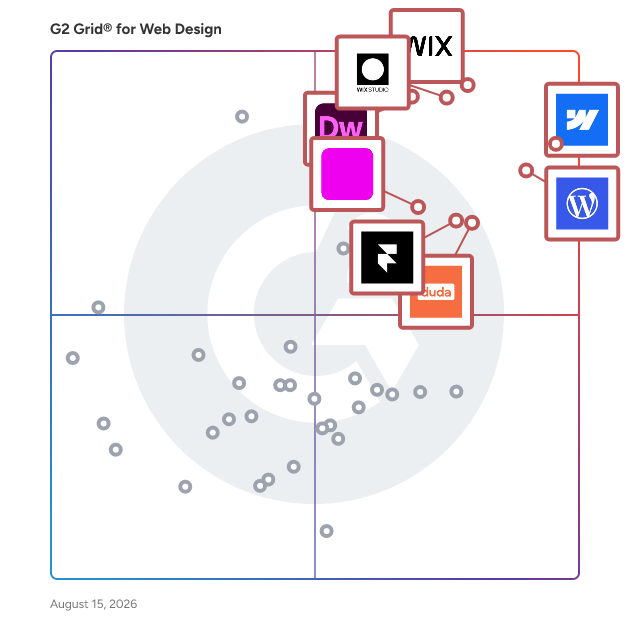
Average Rating: 4.4/5.0
Total Reviews: 411
How Do G2 Users Rate Elementor?
-
Has the product been a good partner in doing business?: 8.3/10 (Category avg: 8.9/10)
-
Marketing Tools Integrations: 9.4/10 (Category avg: 8.6/10)
-
HTML and CSS Editors: 9.4/10 (Category avg: 8.8/10)
-
Content Elements Libraries: 9.4/10 (Category avg: 8.8/10)
Who Is the Company Behind Elementor?
-
Seller: Elementor
-
Company Website:
-
Year Founded: 2016
-
HQ Location: Ramat Gan, Tel Aviv District, Israel
-
Twitter: @elemntor
29,101 Twitter followers
-
LinkedIn® Page: www.linkedin.com
484 employees on LinkedIn®
Who Uses This Product?
-
Who Uses This: Owner, Web Developer
-
Top Industries: Marketing and Advertising, Information Technology and Services
-
Company Size: 86% Small, 13% Medium
What Do G2 Reviewers Say About Elementor?
AI-generated summary from verified user reviews
Pros
- Users love the ease of use with Elementor, finding it simple to create stunning, mobile-friendly websites effortlessly.
- Users find Elementor's intuitive interface exceptionally easy for quickly designing professional websites without any coding skills.
- Users love the intuitive drag-and-drop functionality of Elementor, allowing for quick and easy website design without coding.
- Users love the customizability of Elementor, finding it easy to create professional websites with extensive options.
- Users love Elementor's extensive customization options, enabling effortless design of professional-looking websites with ease and flexibility.
Cons
- Users experience plugin issues leading to compatibility challenges and reliance on external plugins for additional features.
- Users find Elementor's performance to be slow loading, which can hinder their experience and efficiency.
- Users find Elementor expensive due to tier updates, with frustrations over limitations and costs for necessary features.
- Users experience limited features with Elementor's free version, often requiring additional purchases for better functionality.
- Users report poor customer support from Elementor, with unresolved ticket issues and unhelpful responses from the team.
What Are G2 Users Discussing About Elementor?