






Tired of endless paperwork and slow, inefficient processes?
Getting documents signed quickly and securely is essential, but juggling paper contracts, chasing down signatures, and worrying about document security is a headache.
That's where e-signature tools come in. By digitizing the signing process, they simplify workflows, boost productivity, and improve security. But with countless options available, choosing the right e-signature service can be overwhelming.
I teamed up with Blue Bowen, our resident expert on e-signature software, to test 30+ solutions. Our hands-on test will help you pick the e-signature software best for your use case, including sales contracts, vendor agreements, customer forms, employee onboarding, and more.
After thoroughly testing each product and its features, here are the 10 best free e-signature software you should try in 2026.
10 best free e-signature software for 2026
-
Xodo Sign: Best for scalable multi-user signing workflows
Supports bulk sending, team management, and real-time signature tracking for growing teams and enterprises. -
PandaDoc: Best for automated e-signature workflows
Streamlines document creation, tracking, and signing with integrated automation for contracts, quotes, and proposals. -
Docusign: Best for secure and compliant e-signatures
Trusted for encrypted, legally binding signatures with customizable workflows and advanced identity verification. -
Dropbox Sign: Best for simple and fast document signing
Offers intuitive templates, reminders, and audit trails for quick, hassle-free e-signature collection. -
SignNow: Best for flexible e-signatures with mobile access
Provides legally binding e-signatures with a strong mobile app, reusable templates, and offline signing options -
Box Sign: Best for e-signatures in cloud content workflows
Built into Box’s cloud platform, it enables secure e-signatures with native file access, version control, and collaboration -
Foxit eSign: Best for compliant and embedded e-signature workflows
Supports secure document signing with tamper-proof audit trails, bulk sending, and website embedding -
Foxit PDF Editor: Best for combining PDF editing with e-signatures
Offers full PDF editing plus embedded signing, audit trails, and branding options within a unified platform. -
Jotform Sign: Best for customizable online signature forms
Ideal for collecting signatures through web-embedded forms with drag-and-drop fields and workflow automation. -
Adobe Acrobat: Best for e-signatures within PDF workflows
Enables secure, legally binding e-signatures directly in PDFs, with bulk sending, mobile signing, and signer authentication.
How do we select and evaluate the best e-signature services?
At G2, we rank software solutions using a proprietary algorithm that considers customer satisfaction and market presence based on authentic user reviews. Our market research analysts and writers (Blue and me in this case) spend weeks testing solutions against multiple criteria set for a software category. We give you unbiased software evaluations — that's the G2 difference! We don’t accept payment or exchange links for product placements on our list. Please read our G2 Research Scoring Methodology for more details.
Top 10 free e-signature tools for 2026
The list below contains real user reviews from the best free e-Signature Software category page. It’s important to note that in the context of this list, vendors offering a free trial are also considered free.
To be included in this category, a solution must:
- Allow both sender and recipient users to sign documents on a variety of devices and operating systems
- Encrypt and secure communications and shared documents between the users of the solution
- Track document status and notify users when actions are required (sign, approve, etc.)
- Enable users to define user roles and permission rights both internally as well as for external users (contractors, partners, customers, etc.)
- Offer built-document creation and storage capabilities or integrate with third-party software solutions that provide document creation or storage features
*This data was pulled from G2 in December 2025. Some reviews may have been edited for clarity.
Möchten Sie mehr über E-Signatur-Software erfahren? Erkunden Sie E-Signatur Produkte.
1. Xodo Sign: Best for scalable multi-user signing workflows
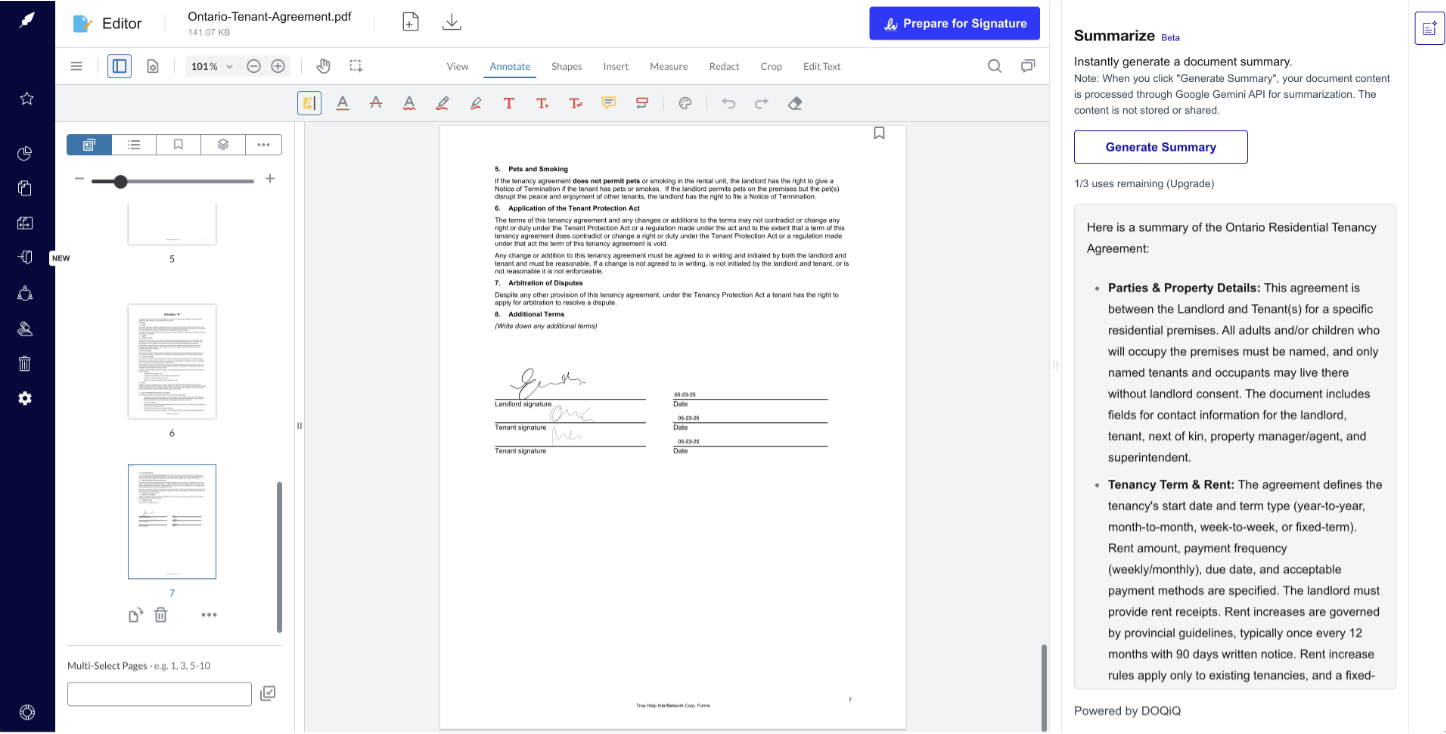
Xodo Sign, formerly known as Eversign, is an electronic signature software suitable for businesses of all sizes. You can upload any document, use pre-built formats or templates, or design your own with drag-and-drop signature fields. Xodo Sign ensures legally binding signatures and keeps track of the signing process. It integrates with popular apps and offers features like in-person signing and document editing for a complete e-signature solution.
Xodo Sign features
- Signature workflow: Senders and admins can easily set up and track documents through multi-step signing processes.
- Reminders and expirations: Automatically notifies signers of pending documents and alerts for approaching expiration dates.
- Document signing: Delivers an intuitive signing experience that makes it easy for recipients to complete signatures across devices.
Blue and I liked how Xodo Sign offers scalability and supports the needs of large organizations with features for user management, team collaboration, and bulk sending.
Xodo Sign pricing
- Free: Free plan available
- Basic: $10
- Professional: $16
- Enterprise: Available on request
All plans are per user per month, and billed annually.
What G2 users like best:
“I can't believe I went so long without Xodo Sign! It's transformed how I handle signing documents. The interface is incredibly user-friendly, making it a breeze to send, sign, and track everything. What I love best is the flexibility – I can sign on my laptop, tablet, or phone, a total lifesaver when I'm on the go. Plus, their customer service is top-notch. If you're tired of the paperwork shuffle, Xodo Sign is the answer. Highly, highly recommended!”
- Xodo Sign review, Jaco P.
What G2 users dislike:
“It takes a bit of trial and error to figure out the document edits within the software - placing dates, names, etc. It would also be good to check how the document looks to the end user before sending it out. Our customers got a little confused about the ability to re-assign the documents to someone else (not all of our contacts have the right to sign on behalf of the company). Also, a flow to suggest edits would be good. When the customer wants to make a small edit, I have to retract the whole document, edit it, and restart the whole flow again.”
- Xodo Sign review, Alex P.
See how Xodo Sign compares to other options. Explore the top 10 alternatives to Xodo Sign.
2. PandaDoc: Best for automated e-signature workflows
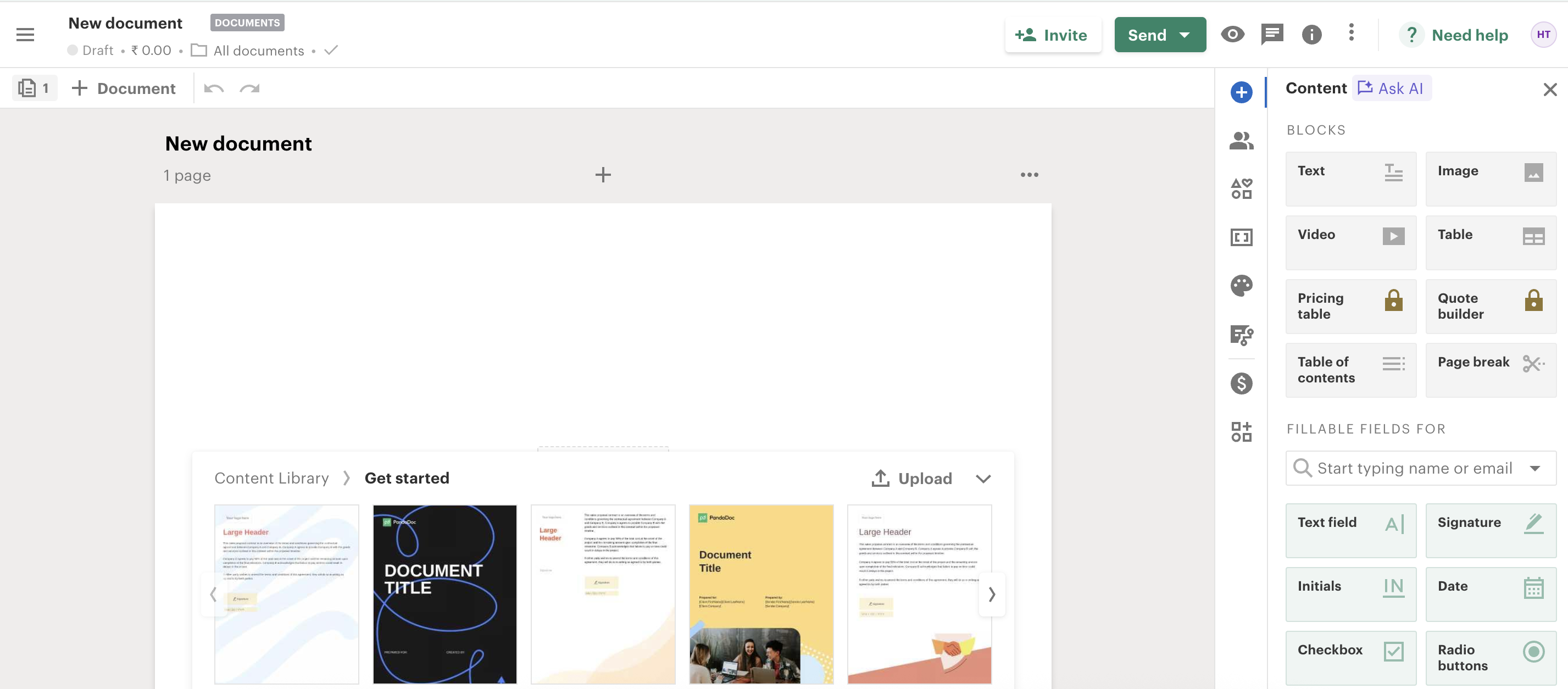
PandaDoc supports your agreements with secure electronic signatures and a centralized workflow. It tracks the entire process so you can see when recipients open and sign the contracts. This real-time transparency and legally binding electronic signatures ensure a smooth and secure process. PandaDoc’s digitized and centralized platform minimizes inefficiencies and increases productivity.
PandaDoc features
- Signature document creation: Easily create and customize signature blocks for contracts, quotes, and proposals.
- Bulk digital signatures: Send documents for signatures to hundreds at once, perfect for high-volume agreements and scaled workflows.
- E‑signature integration: Connects proposal acceptance and contract signing into one workflow, reducing handoffs and speeding approvals.
We appreciated PandaDoc’s automated reminders that keep signers on track. With expiration dates displayed, you can prevent delays and ensure a smooth workflow, never missing a deadline.
PandaDoc pricing
- Free: Free plan available
- Starter: $19
- Business: $49
- Enterprise: Available on request
All plans are per user per month, and billed annually.
What G2 users like best:
“There are so many great things about PandaDoc - the fair price, the countless useful features, the ability to convert and edit documents within the platform, and its interaction with other apps are just a few of my favorites! Plus, the ability to send a link rather than an email has made our lives so much easier. My company uses it multiple times daily, and converting from our previous signing platform was a breeze. We have also been very impressed with the customer support we received when reaching out for assistance.”
- PandaDoc review, Charlie S.
What G2 users dislike:
“I've encountered issues with signers forwarding the email notification to another user. This creates a problem because the forwarded recipient might sign under the wrong identity. To prevent this, it would be helpful to implement a system that prompts the recipient to request a signer change if needed.”
- PandaDoc review, Madison W.
Confused between PandaDoc and Xodo Sign? Check out our detailed comparison of PandaDoc and Xodo Sign to find what’s best for you.
3. Docusign: Best for secure and compliant e-signatures
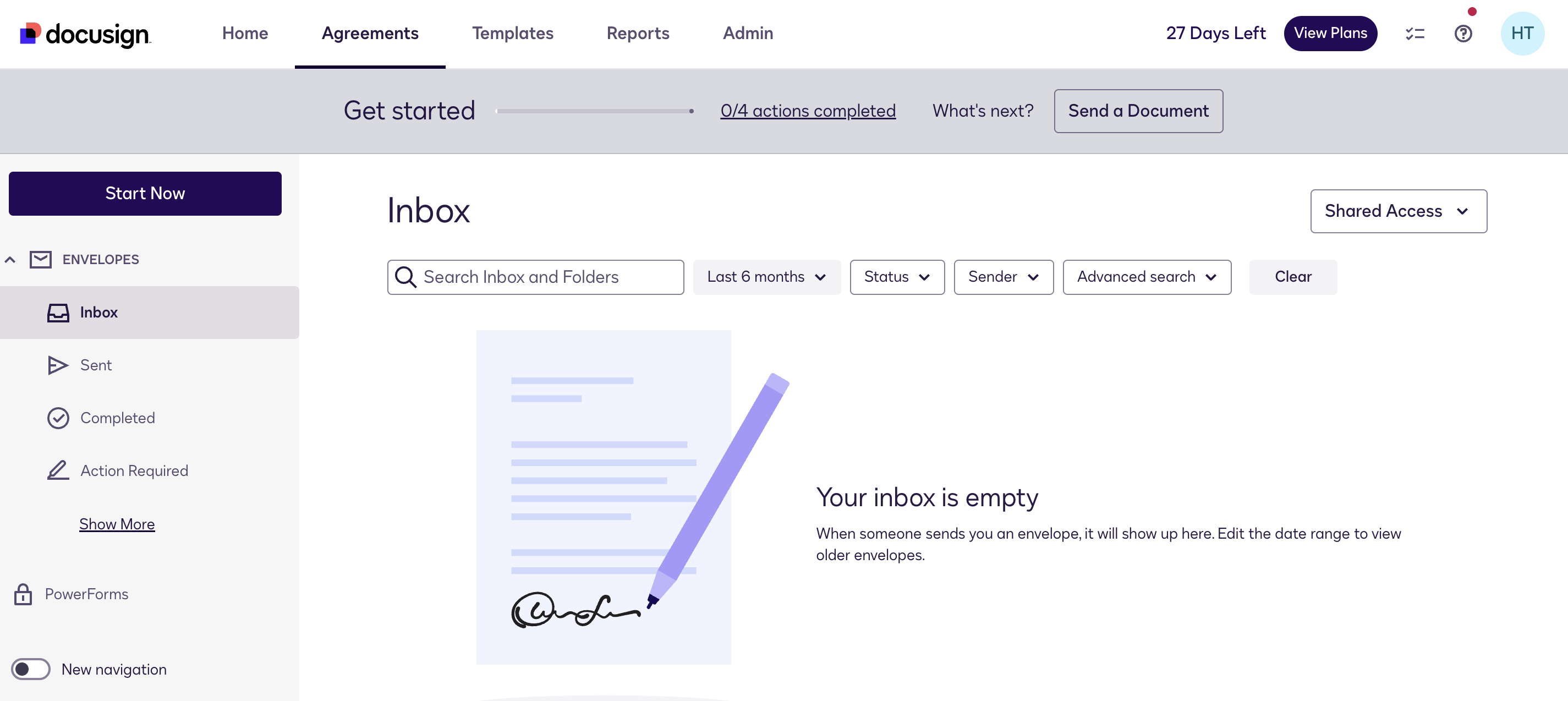
Docusign helps organizations connect and automate how they prepare, sign, act on, and manage agreements. This cloud-based service simplifies agreements with its intelligent agreement management (IAM) system. It allows signers to review and sign electronically on any device, almost anywhere, at any time. Docusign ensures maximum security with features like document encryption and signer authentication.
Docusign features
- Regulatory compliance: Meets key global digital signature standards like HIPAA, eIDAS, and ESIGN, suitable for regulated industries.
- Signature history and audit: Tracks every step of signing with tamper-proof audit trails for legal and compliance support.
- Enterprise scalability: Built supports large organizations with advanced controls, integrations, and multi-region deployment.
What stands out to us is Docusign’s custom branding feature, which businesses and individuals can create and apply during their signing process.
Docusign pricing
- Free: 28-day free trial
- Personal: $10
- Standard: $25
- Business Pro: $40
All plans are per user per month and billed annually.
What G2 users like best:
“I really like that it is very easy to use. You have a lot of fonts and a great variety of templates. You can also send people documents to sign directly from the app, just add their email and a message, and you can get their signature in a document online when needed. You have a lot of personalization for your profile, so you can be easily recognized when sending signature requests. Tried customer support, and they have a bot with some answers if you need support.”
- Docusign review, Danny P.
What G2 users dislike:
“The thing I hate about Docusign is when the system gets slow, especially regarding document loading, which is a big problem. The drag and drop integration is somewhat limited, thus reducing the possibilities to make my workflow even more efficient.”
- Docusign review, Jesus A.
See how Docusign stacks up to the competition. Check out the top 10 Docusign alternatives.
4. Dropbox Sign: Best for simple and fast document signing
Dropbox Sign (formerly HelloSign) makes e-signatures easy to use for all types of documents and agreements. Send contracts, nondisclosure agreements (NDAs), or new-hire paperwork for signing in minutes, not days. Its intuitive interface and robust security exceed pen-and-paper methods, providing a smooth experience for all. You can track documents, set up reminders, and manage users with ease.
Dropbox Sign features
- Sign-in experience: Enables recipients to access and complete signature requests quickly, without complex authentication steps or account setup.
- Reporting: Includes built-in standard and customizable reports to monitor document status and signature completion across teams.
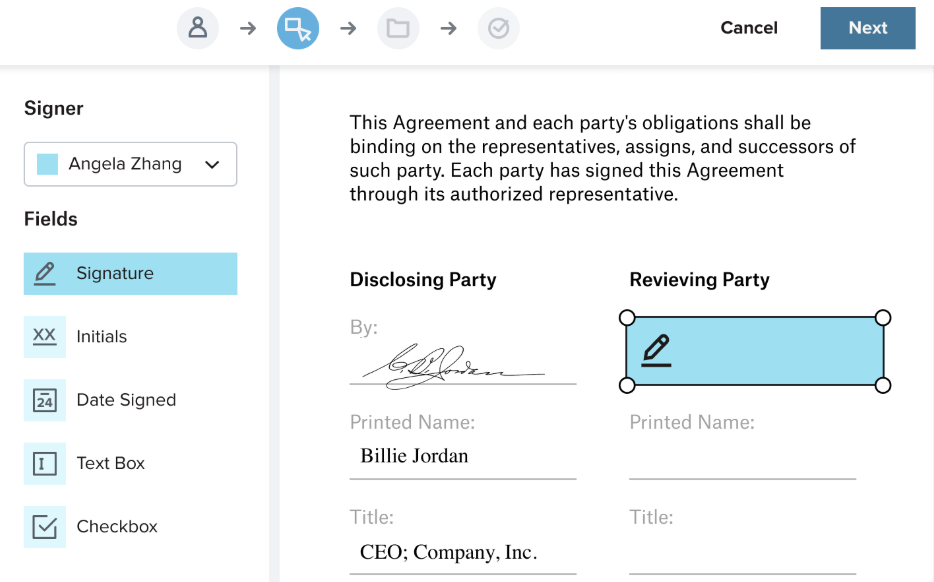
- Drag-and-drop field setup: Simplifies document preparation by allowing users to place signature and form fields precisely where needed.
Blue and I really liked how Dropbox Sign helps you gain insights with comprehensive standard reports and effortlessly create custom reports to optimize your signature workflow.
Dropbox Sign pricing
- Free: 30-day free trial
- Essentials: $15.69
- Standard: $26.89
- Premium: Custom quote available
All plans are per user per month, and billed annually.
What G2 users like best:
“We chose Dropbox Sign over similar applications because of its straightforward approach to templating PDFs and collecting document signatures. In particular, we wanted multiple users to quickly get our legal documents signed without much hassle or management. Dropbox Sign has allowed us to manage our signatures effectively, and we can't ask for much more! We use it about 3-4 times monthly for external signatures from our clients and partners. We also trust that the signatures are verifiable and secure.”
- Dropbox Sign review, Benjamin B.
What G2 users dislike:
“The Google Docs plugin has been improved, but it still isn't up to par. It doesn't remember past contacts for signature, so it's cumbersome to use for quick revisions, which is the entire point of a plugin vs the website.”
- Dropbox Sign review, Gary P.
Want to compare Dropbox sign and Docusign? Check out our detailed comparison of Dropbox sign and Docusign to find what’s best for you.
5. SignNow: Best for flexible e-signatures with mobile access
With SignNow, you can upload documents, build templates, and set up role-based signing workflows with drag-and-drop ease. Designed for speed and flexibility, it supports both in-person and remote signing, integrates with major tools such as Salesforce and Google Workspace, and offers bulk sending for high-volume needs. Its mobile app and robust API access make it a strong fit for teams that need reliable signatures on the go.
SignNow features
- Mobile-optimized signing: Users can prepare, send, and complete signature requests on any device, in the office or on the go, with offline access.
- High-volume distribution: Send signature requests to multiple recipients in one batch, ideal for bulk agreements.
- Branded document flows: Customize the appearance of your signing process with company logos, color schemes, and messaging that strengthen your branding.
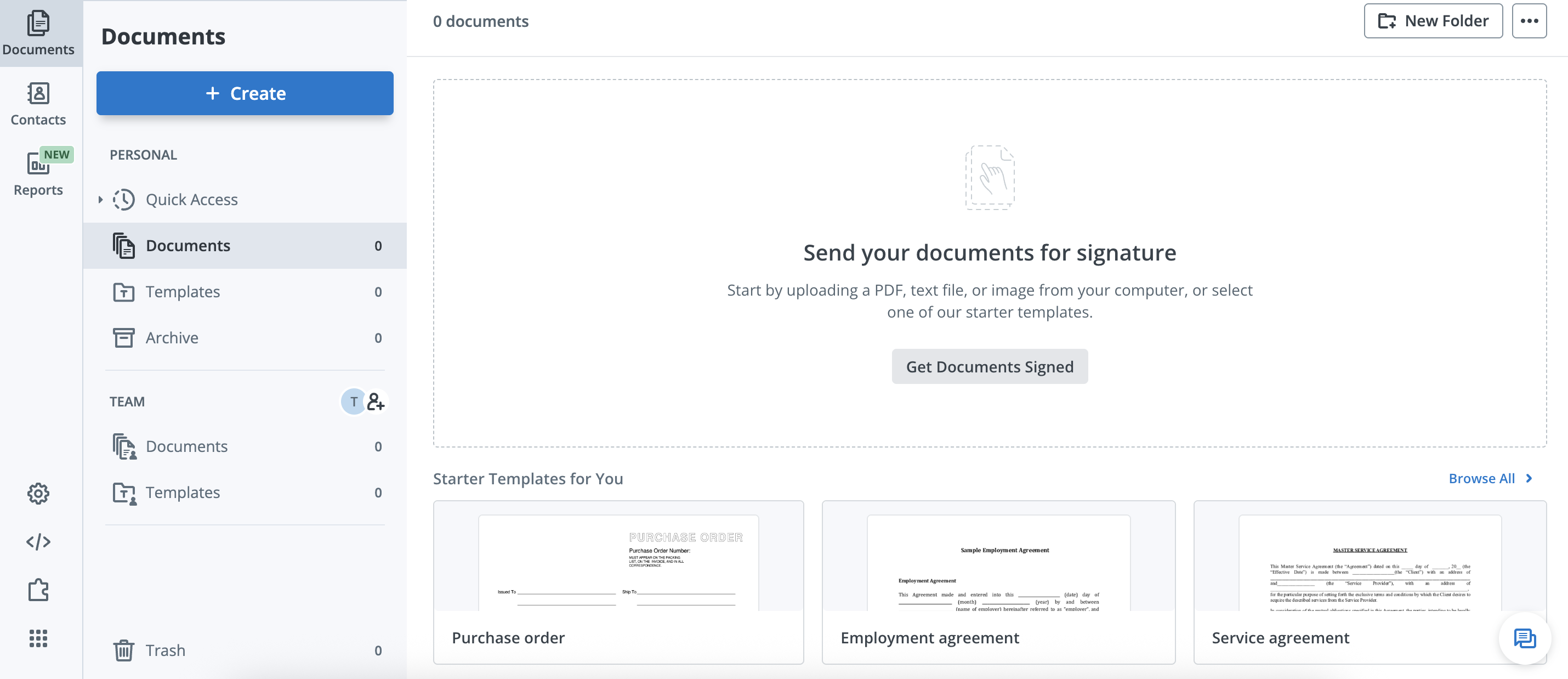
Blue and I really liked the content creation feature of SignNow. Users can create new contracts within the platform using built-in document creation features.
SignNow pricing
- Free: Free trial available
- Business: $8
- Business premium: $15
- Enterprise: $30
- Site license: $1.50 per signature invite
All plans are per month, and billed annually.
What G2 users like best:
“We use SignNow in our law firm, and it is easy to use and makes life easier for all parties involved. We usually have very tight deadlines for completing our Agreements, and this helps speed up the process. SignNow is very easy to set up for the signature process. I have contacted customer service on a few occasions, and they have been very helpful and quick to resolve any issues. We use SignNow almost daily in our workdays.”
- SignNow review, Shaelah B.
What G2 users dislike:
“Some of my clients are confused when they click on the link on their phone, as it asks them to sign up, and they miss the option to click the button that says sign in with the mobile browser. A few have been upset as they thought they were being asked to sign up for a service. I would like to see the link go smoothly to my waiver form without those complications or potential misdirections for my clients.”
- SignNow review, Eric G.
Want to compare SignNow and Dropbox Sign? Check out our detailed comparison of SignNow and Dropbox Sign to find what’s best for you.
6. Box Sign: Best for e-signatures in cloud content workflows
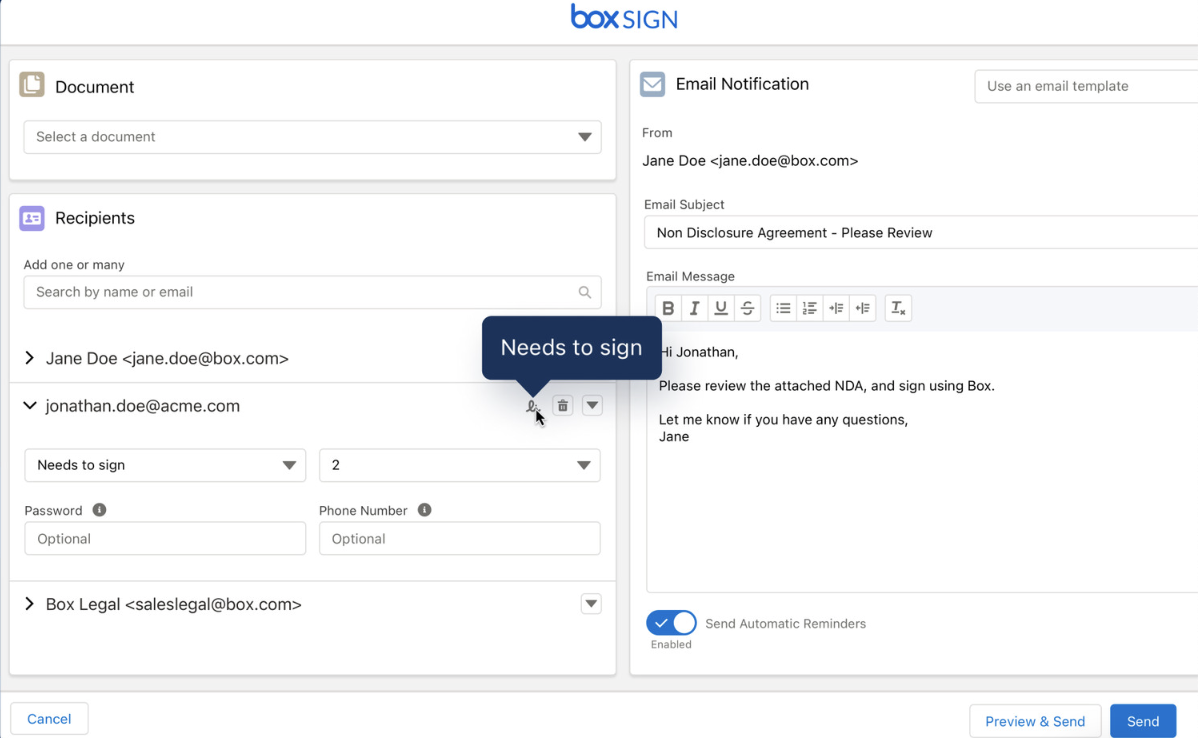
With Box Sign, you can request, collect, and manage e-signatures directly within the Box content cloud. The platform enables users to send documents for signing with just a few clicks, track the status in real-time, and ensure compliance through secure audit trails. Tight integrations with Box’s file storage, sharing, and collaboration tools make it especially useful for teams already working in the Box ecosystem.
Box Sign features
- Integrated cloud-based signing: Send, sign, and manage documents directly within Box, avoiding platform switches or workflow disruptions.
- Live status visibility: Track signature progress as it happens, with real-time updates and automated alerts that keep teams in sync.
- Built-in enterprise security: Provides audit logs, granular permissions, and data residency controls to meet the demands of highly regulated industries.
What stood out to us was how effortlessly it brings e-signatures into existing content workflows.
Box Sign pricing
- Free: Free plan available
- Starter: $4.55
- Personal Pro: $8.70
- Business: $12.86
- Business Plus: $21.95
- Enterprise: $30.27
- Enterprise Plus: $43.24
All plans are per user (except Personal Pro) per month, and paid annually.
What G2 users like best:
“I use Box Sign to secure, process, track, and send a variety of documents like SOWs, IOs, and NDAs for signature in a secure environment. I appreciate how it solves the problem of streamlining the contract signature process, allowing me to effortlessly manage documents and maintain audit trails. I like that everything lives in one place, whether it's drafts, sending for signature, or storing, which makes managing the workflow very convenient. I also appreciate its security and reliability.”
- Box Sign review, Steven M.
What G2 users dislike:
“I think that it can be slightly more intuitive for somebody who is not tech savvy, but overall it's excellent."
- Box Sign review, Ivan P.
Between Box Sign and SignNow? Check out our detailed Box Sign and SignNow comparison to find what’s best for you.
7. Foxit eSign: Best for compliant and embedded e-signature workflows
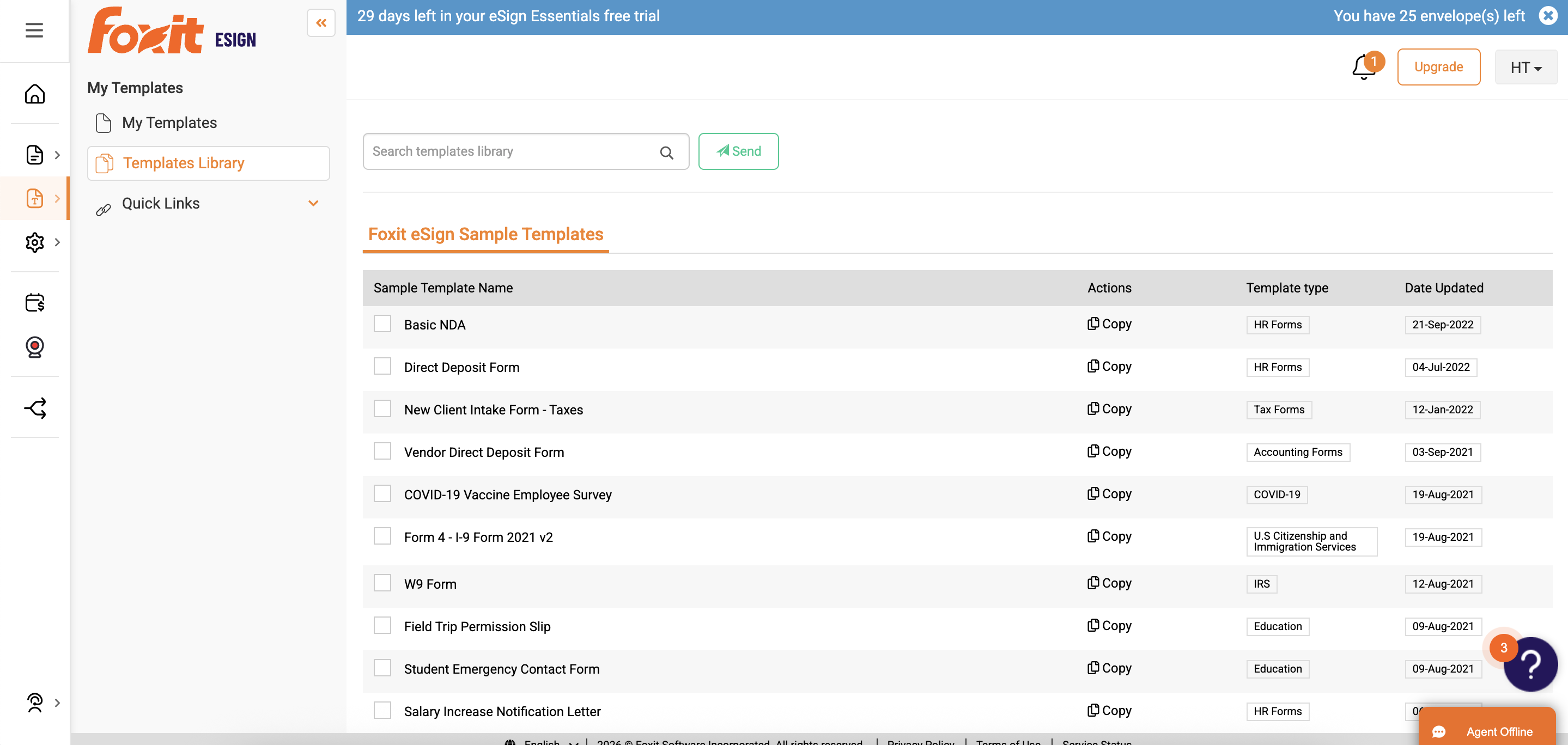
With Foxit eSign, you can upload PDFs, use built-in templates, or create your own templates. You can also drag and drop signature fields for contracts, quotes, or approvals. You can send documents for signature via a link or embed them on your website. Foxit tracks progress in real-time and ensures legally binding signatures. It integrates with popular business tools and offers features such as bulk sending and tamper-proof audit trails for a robust e-signature solution accessible from any device.
Foxit eSign features
- Compliance-ready infrastructure: Built to meet global e-signature standards like ESIGN, UETA, and GDPR.
- Branded signer experience: Enables full customization of the signing interface with your company’s logo, colors, and messaging.
- Granular access controls: Let's admins assign permissions by role or user group, ensuring the right people access the right documents
What we like about Foxit eSign is that it simplifies workflows with online forms and embeddable code for seamless website integration.
Foxit eSign pricing
- Free: 30-day free trial available
- eSign Essentials: $120/year for 1 license
- eSign Business: $300/year for 5 licenses
What G2 users like best:
“In my experience working with various e-signature services, Foxit eSign stands out for its speed. Once a document is uploaded, the system operates very smoothly. The customer support is particularly commendable, as they respond promptly to any technical issues. Additionally, I appreciate the ability to customize labels and some document aspects, allowing us to tailor each signing experience to our specific needs.”
- Foxit eSign review, Johnny X.
What G2 users dislike:
“A potential downside of Foxit eSign is its dependency on internet connectivity. Since it operates online, users need a stable and reliable internet connection to access and use its features effectively. This reliance can be a limitation in areas with poor internet infrastructure or during connectivity issues, potentially hindering urgent document signing processes. Lastly, while Foxit eSign offers robust security features, the inherent risks of handling sensitive documents online cannot be eliminated entirely. ”
- Foxit eSign review, Bernd R.
Side-by-side: Foxit eSign and Box Sign. Check out our detailed comparison of Foxit eSign and Box Sign to find what’s best for you.
8. Foxit PDF Editor: Best for combining PDF editing with e-signatures
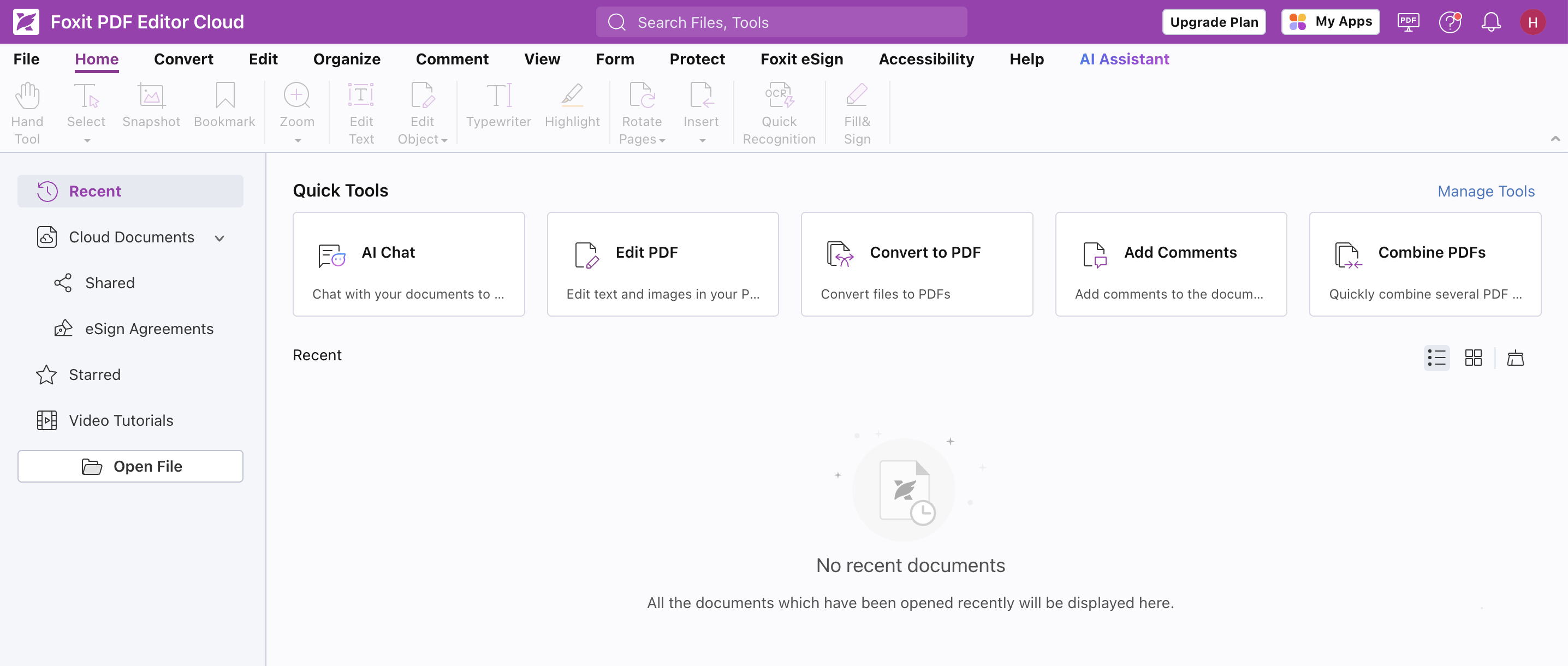
Foxit PDF Editor goes beyond editing PDFs by seamlessly integrating with Foxit eSign to provide a powerful electronic signature solution. You can create or upload documents and then drag and drop signature fields for contracts, quotes, or approvals. Foxit ensures legally binding signatures and tracks progress in real-time. The software provides a complete e-signature workflow that is accessible from any device. You can send documents for signature via a link, embed them on your website, or use Foxit PDF Editor's cloud features for collaborative editing.
Foxit PDF editor features
- Integrated PDF editing and signing: Enables users can edit, prepare, and e-sign documents in one workflow without switching platforms.
- Custom field creation: Let users build dynamic forms with fields like checkboxes, initials, or dropdowns, ideal for contracts and form-based documents.
- Revision history tracking: Keeps a comprehensive audit trail of document changes, ensuring transparency and version control throughout the signing process.
We love that you can personalize your signing experience with custom branding on the Foxit PDF editor.
Foxit PDF Editor pricing
- Free: 14-day free trial available
- PDF Editor: $10.99
- PDF Editor+: $13.99
All plans are billed per month.
What G2 users like best:
“The functionality is remarkably seamless. The variety and ease of use of the tools are fantastic. There's practically no learning curve after installation. Foxit has replaced the three separate PDF programs I previously relied on.”
- Foxit PDF Editor review, Faith H.
What G2 users dislike:
“The major issues I've encountered so far are crashes while trying to secure PDF documents. To resolve this, I've had to uninstall and reinstall the program each time.”
- Foxit PDF Editor review, Amaya F.
See how Foxit PDF Editor stacks up to the competition. Check out the top 10 Foxit PDF Editor alternatives.
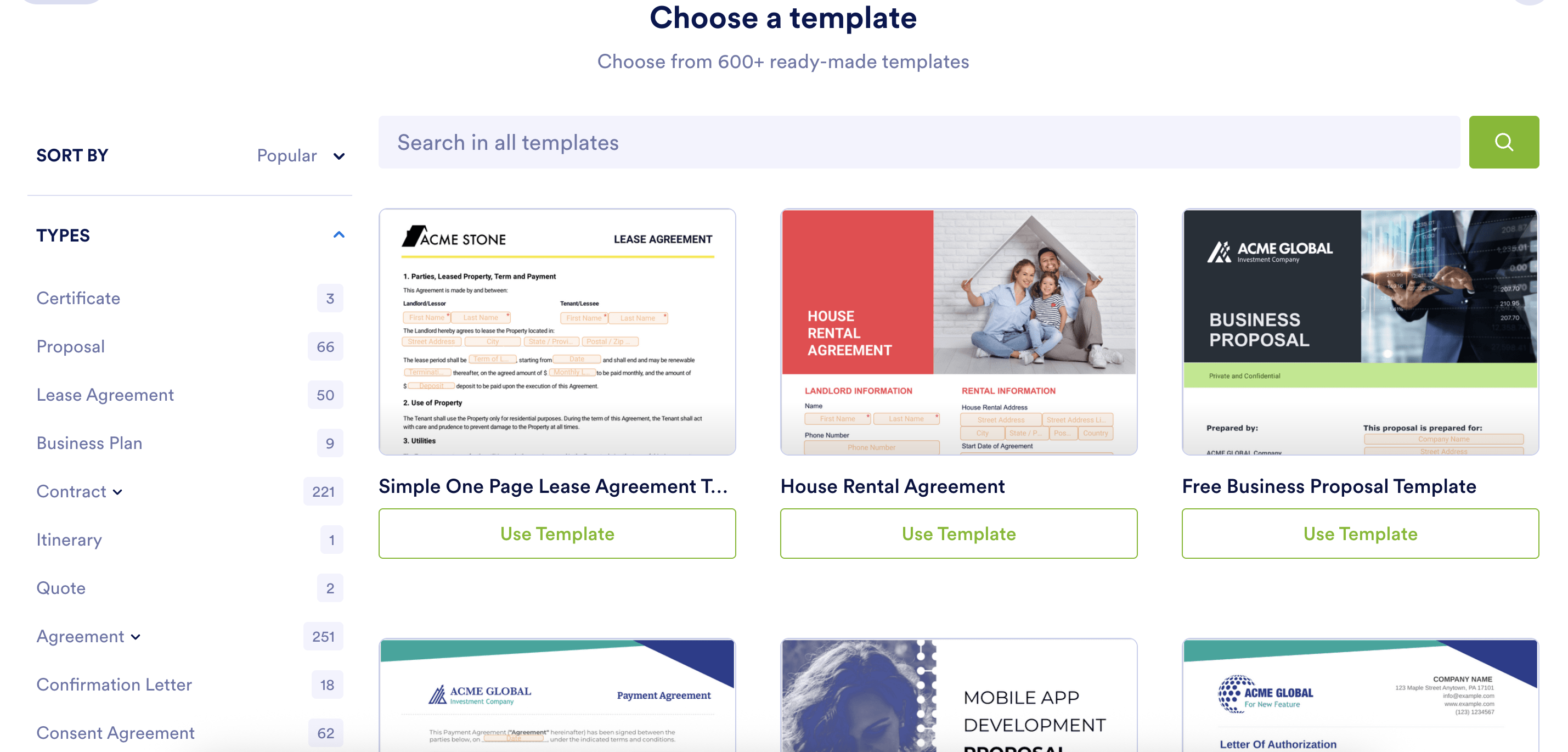
9. Jotform Sign: Best for customizable online signature forms
Jotform Sign simplifies digital signatures for any document. It can track the progress, let you send reminders, and ensure legally binding document signatures. You can create or upload PDFs from scratch or choose from their library of 600+ templates with this e signature service. Whether you are collecting waivers, lease agreements, or consent forms, customizing your document design is easy with Jotform Sign’s drag-and-drop signature fields. The document can then be sent for signing with a link or embedded on your website.
Jotform Sign features
- Customizable signature forms: Create personalized, drag-and-drop documents with flexible fields, perfect for waivers, onboarding forms, and client agreements.
- Branded signing experience: Apply your logo, colors, and messaging throughout the signing flow to boost trust and brand consistency.
- Multi-step approval routing: Easily configure workflows to send documents to the right people in order, with automatic notifications.
We were impressed by how Jotform Sign helps senders and admins design workflows with multi-step signing. This allows you to easily track progress and ensure each party signs in the right order.
Jotform Sign pricing
- Free: Free plan available
- Bronze: $34
- Silver: $39
- Gold: $99
- Enterprise: Available on request
All plans are per month, and billed annually.
What G2 users like best:
“They have pre-made forms that you can use if you like, and you can edit those to personalize them, or you can entirely create your own! Even though there are many features to create a form to collect all of the information you need, it is very intuitive. When you want to attach a form to your website, it is ridiculously easy to do, and you can make it color-coordinated to your site, include your logo, and increase your brand recognition. Just an all-around great product!”
- Jotform Sign review, Roseanne D.
What G2 users dislike:
“I dislike customer service. No one was rude, but I had a very specific question about a feature and was just given cut-and-paste answers, making it seem like I was talking to AI or something. My question was unanswered, so I tried to explain it to them, but then I was given a different rep with the same cut-and-paste answer. There are also no customer service numbers where I can speak to a live representative to explain things better on the phone. Left no room for nuance.”
- Jotform Sign review, Taylor D.
Head-to-head: Jotform Sign and Foxit PDF Editor. Check out our detailed comparison of Jotform Sign and Foxit PDF Editor to find what’s best for you.
10. Adobe Acrobat: Best for e-signatures within PDF workflows
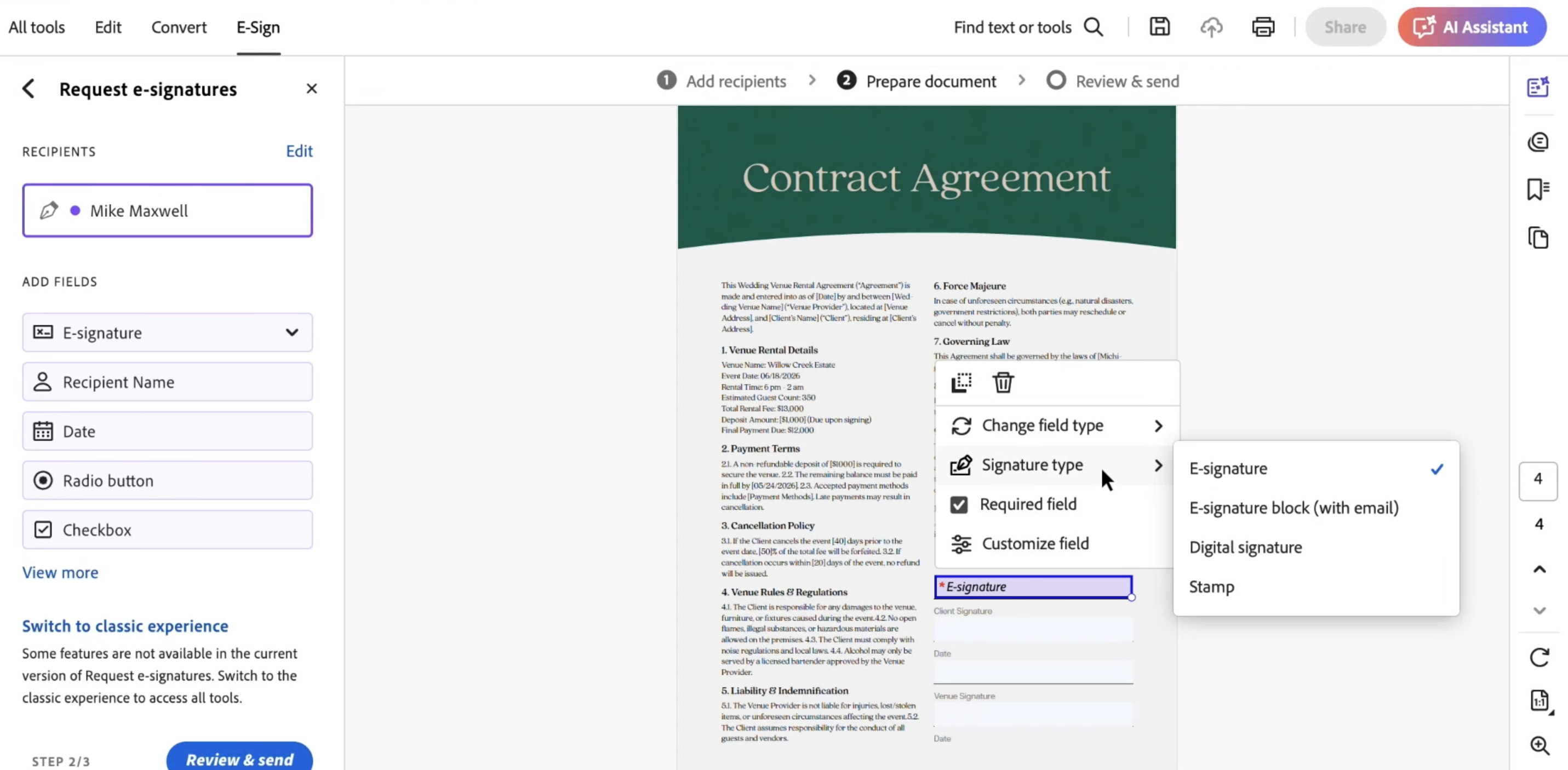
Adobe Acrobat is an online e-signature service for creating, editing, and managing PDFs. It also offers robust e-signing capabilities through its integration with Adobe Sign. You can upload documents, designate signing fields, and send them for electronic signatures. Acrobat Sign tracks the process, allows you to send reminders, and works seamlessly on both desktops and mobile devices.
Adobe Acrobat features
- Built-in PDF signing tools: Enables users to prepare, send, and electronically sign documents directly within the PDF interface.
- Bulk send capabilities: Allows users to send signature requests to multiple recipients simultaneously.
- Document version tracking: Maintains a clear history of changes and revisions throughout the signing process for better compliance and auditability.
Adobe Acrobat's bulk sending for e-signatures is a game-changer for Blue and me. You can easily send documents to thousands of signers at once, saving tons of time and effort.
Adobe Acrobat pricing
- Free: Free trial available
- Acrobat Standard: $12.99
- Acrobat Pro: $19.99
- Acrobat Studio: $24.99
All plans are annual and billed monthly.
What G2 users like best:
Ease of use is provided by tutorials that come with the subscription to make the learning curve seamless, and the diversity of choices regarding tools for creating designs, web development, editing photography, and videos with computers. I love the ease of Adobe Acrobat for editing and e-signing documents for professional use, as well as for filling out forms. This software also has great photo editing software for professionals like Photoshop and one of the best in-class video editing software, Premiere Pro.”
- Adobe Acrobat review, Kevin A.
What G2 users dislike:
“Reliance on Adobe Document Cloud may cause compatibility or interoperability problems with other solutions in scenarios where many document platforms and standards are employed.”
- Adobe Acrobat review, Gael S.
Want to compare Adobe Acrobat and Jotform Sign? Check out our detailed comparison of Adobe Acrobat and Jotform Sign to find what’s best for you.
Frequently asked questions about e-signature services
Got more questions? We have the answers.
Q1. Is free e-signature software secure?
Yes, most free tools use encryption, audit trails, and meet standards like ESIGN, UETA, and eIDAS. Just ensure your provider includes these in their free plan, particularly if you're handling sensitive or regulated data.
Q2. Which free e-signature tool is best for small businesses?
According to G2 Data, Xodo Sign is a top pick, with 91% of reviewers from small businesses. Jotform Sign and Box Sign also cater well to this group, with 81% small business reviewers each. These tools are user-friendly and offer solid free plans for growing teams.
Q3. Are free e-signatures legally binding?
Yes, as long as the platform complies with digital signature laws and includes features such as signer authentication and audit trails, signatures are valid and legally enforceable.
Q4. What should I consider when picking an e-signature tool?
Choose tools with encryption, audit trails, and security compliance. Then, assess platform usability, mobile signing, document volume handling, and integration with existing tools.
Q5. Can I integrate e-signature tools with my CRM or cloud storage?
Many e-signature tools offer free or paid integrations with platforms like Google Drive, Salesforce, Dropbox, and Box. If integration matters, check compatibility before you commit.
Find the best free e-signature software for your use case
When choosing e-signature software, Blue and I agree that you must consider security, ease of use, and features. Your data and sensitive documents need robust protection, digital signatures should be intuitive for both you and your recipients, and the software should offer the specific tools you need to streamline your workflow.
By carefully considering these factors and using our in-depth testing, you'll be well-equipped to select an e-signature solution that perfectly aligns with your business needs and drives efficiency.
We hope this list of the best free e-signature software takes you one step closer to finding the right solution!
Ready to take your document workflows even further? Explore the best contract management software to organize, track, and optimize every agreement after it’s signed.
This article was originally published in 2024. It has been updated with new information.
Edited by Monishka Agrawal

Samudyata Bhat
Samudyata Bhat is a former Content Marketing Specialist at G2. With a Master's degree in digital marketing, she specializes her content around SaaS, hybrid cloud, network management, and IT infrastructure. She aspires to connect with present-day trends through data-driven analysis and experimentation and create effective and meaningful content. In her spare time, she can be found exploring unique cafes and trying different types of coffee.

