Best Software Testing Tools

How Many Software Testing Tools Products Does G2 Track?

Total Products under this Category: 333

Category Stats (Sep 2026)

  • Average Rating: 4.44/5 The average rating of products in this category, based on all submitted ratings
  • Top Trending Product: TASKING Test & Verification Tools (+10.99%) - Among all products in this category, TASKING Test & Verification Tools recorded the largest rating increase compared to last month

Last updated: September 01, 2026

How Does G2 Rank Software Testing Tools Products?

Why You Can Trust G2's Software Rankings:

  • 30 Analysts and Data Experts
  • 20,200+ Authentic Reviews
  • 333+ Products
  • Unbiased Rankings

G2's software rankings are built on verified user reviews, rigorous moderation, and a consistent research methodology maintained by a team of analysts and data experts. Each product is measured using the same transparent criteria, with no paid placement or vendor influence. While reviews reflect real user experiences, which can be subjective, they offer valuable insight into how software performs in the hands of professionals. Together, these inputs power the G2 Score, a standardized way to compare tools within every category.

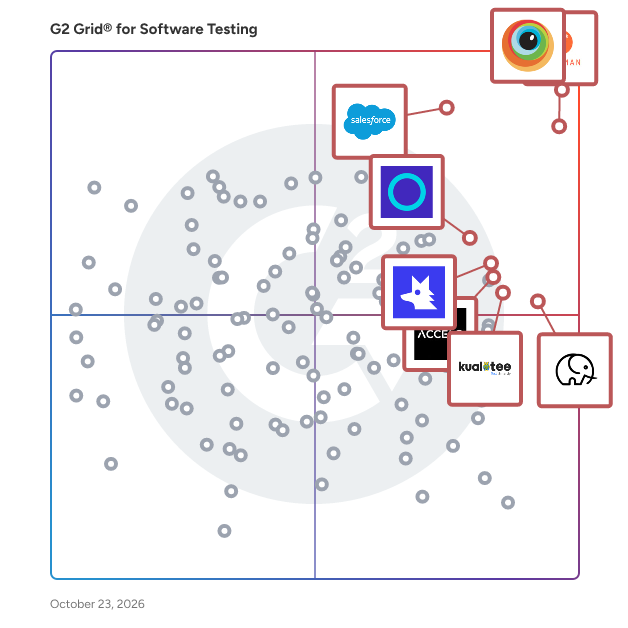
G2 Grid® for Software Testing Tools

G2 Grid® for Software Testing Tools plotting products by satisfaction and market presence

Highlighted products: BrowserStack, Postman, Salesforce Headless 360 Platform (formerly Salesforce Platform), Tuskr, QA Wolf, ACCELQ, Qase, and Panaya Smart Testing and Change Intelligence.

Underlying data: [Grid® JSON](https://www.g2.com/categories/software-testing/grids.json?focus%5B%5D=browserstack&focus%5B%5D=postman&focus%5B%5D=agentforce-360-platform-formerly-salesforce-platform&focus%5B%5D=tuskr&focus%5B%5D=qa-wolf&focus%5B%5D=accelq&focus%5B%5D=qase&focus%5B%5D=panaya-smart-testing-and-change-intelligence)

BrowserStack

BrowserStack is the world’s leading cloud-based testing platform, trusted by 50,000+ Dev and QA teams to deliver fast, reliable, and high-quality software. From manual to automated, visual to accessibility testing, BrowserStack brings every layer of the QA process onto a single, integrated platform, so you can ship confidently at scale. Our Products: Manual Testing Live: Cross-browser testing App Live: Real device testing Testing Toolkit: Essential manual testing tools Test Automation Automate: Browser automation cloud App Automate: Mobile app automation cloud Percy: Visual testing & review App Percy: Visual testing & review Management & Optimization Test Management: Plan, track, and manage tests Test Management for Jira: Manage tests inside Jira Test Reporting & Analytics: Monitor & optimize all tests Automation without coding Low Code Automation: AI-driven automated tests Website Scanner: All-in-one website checker

Average Rating: 4.4/5.0

Total Reviews: 3,320

How Do G2 Users Rate BrowserStack?

  • Has the product been a good partner in doing business?: 8.8/10 (Category avg: 9.0/10)
  • Ease of Use: 8.9/10 (Category avg: 8.7/10)
  • Quality of Support: 8.7/10 (Category avg: 8.7/10)
  • Ease of Admin: 8.8/10 (Category avg: 8.8/10)

Who Is the Company Behind BrowserStack?

  • Seller: BrowserStack
  • Company Website:
  • Year Founded: 2011
  • HQ Location: Dublin, Dublin
  • Twitter: @browserstack
    11,547 Twitter followers
  • LinkedIn® Page: www.linkedin.com
    1,731 employees on LinkedIn®

Who Uses This Product?

  • Who Uses This: Software Engineer, QA Engineer
  • Top Industries: Computer Software, Information Technology and Services
  • Company Size: 40% Small, 38% Medium

What Do G2 Reviewers Say About BrowserStack?

AI-generated summary from verified user reviews

Pros
  • Users find BrowserStack's interface easy to use, facilitating seamless access to real device testing across multiple platforms.
  • Users value the real device testing feature of BrowserStack, enhancing compatibility across diverse platforms without physical hardware.
  • Users value the wide coverage of real devices on BrowserStack, ensuring comprehensive product testing across different environments.
  • Users appreciate the extensive device and browser combinations in BrowserStack, significantly enhancing testing efficiency and compatibility.
  • Users find BrowserStack's easy testing capabilities invaluable for efficient cross-platform and UI-specific testing.
Cons
  • Users often experience slow performance with BrowserStack, impacting testing efficiency and reliability of results.
  • Users experience slow loading times with BrowserStack, leading to frustrating delays during tests and setup.
  • Users feel that the pricing of BrowserStack is expensive and suggest more affordable package options.
  • Users often face slow speed during peak hours, impacting performance and complicating debugging efforts.
  • Users report testing difficulties due to inconsistencies and lag, making reliable results hard to achieve.

What Are Recent G2 Reviews of BrowserStack?

What Are G2 Users Discussing About BrowserStack?

Postman

Postman is the world’s leading API platform, used by more than 40 million developers and 500,000 organizations to build, test, and manage APIs at scale. With Postman, teams collaborate efficiently across the entire API lifecycle, including design, development, testing, security, documentation, and governance. The platform helps ensure consistency, quality, and enterprise-grade control. Postman also offers Agent Mode (beta), built on AWS Bedrock and trained with AWS SageMaker. Agent Mode enables developers to use natural language to debug requests, organize collections, document APIs, and automate workflows without switching tools or writing custom scripts.

Average Rating: 4.6/5.0

Total Reviews: 1,753

How Do G2 Users Rate Postman?

  • Has the product been a good partner in doing business?: 9.0/10 (Category avg: 9.0/10)
  • Ease of Use: 9.1/10 (Category avg: 8.7/10)
  • Quality of Support: 8.7/10 (Category avg: 8.7/10)
  • Ease of Admin: 8.9/10 (Category avg: 8.8/10)

Who Is the Company Behind Postman?

  • Seller: Postman
  • Year Founded: 2014
  • HQ Location: San Francisco, CA
  • Twitter: @getpostman
    55,430 Twitter followers
  • LinkedIn® Page: www.linkedin.com
    3,554 employees on LinkedIn®

Who Uses This Product?

  • Who Uses This: Software Engineer, Software Developer
  • Top Industries: Computer Software, Information Technology and Services
  • Company Size: 39% Medium, 35% Small

What Do G2 Reviewers Say About Postman?

AI-generated summary from verified user reviews

Pros
  • Users appreciate the ease of use of Postman for testing APIs, enabling quick requests and seamless collaboration.
  • Users appreciate the ease of API testing with Postman, enabling quick requests, responses, and debugging without extra code.
  • Users value the ease of API testing with Postman, appreciating its intuitive interface and comprehensive features.
  • Users appreciate the ease of testing APIs with Postman, benefiting from its intuitive interface and collaboration features.
  • Users value the testing efficiency of Postman, enjoying quick debugging and seamless API management across environments.
Cons
  • Users often face slow performance with Postman, especially when dealing with large projects or validation processes.
  • Users often face performance issues with Postman, experiencing slowdowns and unexpected bugs that disrupt their workflow.
  • Users find Postman slow to load at times, especially with large collections and multiple tabs open, affecting performance.
  • Users experience resource limitations with Postman, as the app can slow down and consume significant memory during use.
  • Users find the limited features in Postman's free tier challenging, especially for smaller teams needing advanced tools.

What Are Recent G2 Reviews of Postman?

What Are G2 Users Discussing About Postman?

Salesforce Headless 360 Platform (formerly Salesforce Platform)

Salesforce's Agentforce 360 Platform helps IT and security teams innovate fast, deploy securely, and protect their data. With our development and security tools built into the entire agent and app lifecycle on Salesforce, organizations can dive into AI innovation without compromising on security and compliance. And by building on Salesforce, development teams get a head start on AI projects by using the apps, workflows, data streams, and agents they've already built. Developers can develop agents and apps quickly, securely, and reliably, and IT can customize and extend Salesforce across the enterprise. And every customer can protect their data with security and compliance.

Average Rating: 4.5/5.0

Total Reviews: 3,773

How Do G2 Users Rate Salesforce Headless 360 Platform (formerly Salesforce Platform)?

  • Has the product been a good partner in doing business?: 8.8/10 (Category avg: 9.0/10)
  • Ease of Use: 8.5/10 (Category avg: 8.7/10)
  • Quality of Support: 8.5/10 (Category avg: 8.7/10)
  • Ease of Admin: 8.5/10 (Category avg: 8.8/10)

Who Is the Company Behind Salesforce Headless 360 Platform (formerly Salesforce Platform)?

  • Seller: Salesforce
  • Company Website:
  • Year Founded: 1999
  • HQ Location: San Francisco, CA
  • Twitter: @salesforce
    579,511 Twitter followers
  • LinkedIn® Page: www.linkedin.com
    89,711 employees on LinkedIn®

Who Uses This Product?

  • Who Uses This: Salesforce Developer, Account Executive
  • Top Industries: Computer Software, Information Technology and Services
  • Company Size: 45% Medium, 34% Large

What Do G2 Reviewers Say About Salesforce Headless 360 Platform (formerly Salesforce Platform)?

AI-generated summary from verified user reviews

Pros
  • Users find Salesforce Headless 360 Platform to be easy to use with clear layouts and useful features, enhancing efficiency.
  • Users value the exceptional scalability and customization of Salesforce, enabling tailored solutions for diverse business needs.
  • Users love the easy customization of Salesforce Headless 360 Platform, perfectly adapting to various educational needs.
  • Users appreciate the ease of customizability in Salesforce Headless 360 Platform, tailored perfectly for diverse needs.
  • Users value the extensive customization options in Salesforce Headless 360 Platform, enabling tailored solutions for diverse business needs.
Cons
  • Users find the learning curve steep with Salesforce Headless 360 Platform, requiring significant training to navigate effectively.
  • Users find Salesforce Headless 360 Platform has a complex configuration that can hinder implementation and customization for some businesses.
  • Users find the high cost of ownership and complexity of Salesforce challenging, impacting access and usability.
  • Users find Salesforce Headless 360 Platform difficult to learn, requiring significant time to grasp its complex interface.
  • Users feel the missing features in Salesforce Headless 360 Platform make navigation and usability challenging and overwhelming.

What Are Recent G2 Reviews of Salesforce Headless 360 Platform (formerly Salesforce Platform)?

What Are G2 Users Discussing About Salesforce Headless 360 Platform (formerly Salesforce Platform)?

Tuskr

Tuskr is a cloud-based test management platform built for modern QA teams. It centralizes test case management, test planning, test execution, issue tracking, reporting, and collaboration so teams can manage testing without relying on disconnected spreadsheets or separate systems. Teams can create and organize test cases with a rich-text editor, tables, images, custom fields, and spreadsheet imports. Tuskr supports manual and automated testing in the same platform, helping teams view execution results and testing progress in one place. Test Plans make recurring testing easier by grouping related Test Runs and allowing teams to reuse structured setups. Tuskr AI supports natural-language test management. It can help create and update test cases, modify test cases in bulk, build focused test runs, analyze testing trends, and generate charts for faster insight. Built-in reporting includes dashboards, burndown charts, project and test-run metrics, and PDF status reports for clients and stakeholders. Teams can create, assign, prioritize, and track issues in Tuskr, and link failed test cases to them with one click. For external tracking, integrations connect Tuskr with issue trackers, project management tools, communication platforms, automation frameworks, and CI/CD workflows. A platform-independent REST API, webhooks, Zapier, and Make provide additional integration options. Administration and security capabilities include audit trails, two-factor authentication, single sign-on, role-based access controls, version history, and customizable fields and workflows. Tuskr offers a free plan for teams of up to five users and a free 15-day trial for paid plans, with no credit card required.

Average Rating: 4.6/5.0

Total Reviews: 656

How Do G2 Users Rate Tuskr?

  • Has the product been a good partner in doing business?: 9.1/10 (Category avg: 9.0/10)
  • Ease of Use: 9.3/10 (Category avg: 8.7/10)
  • Quality of Support: 9.1/10 (Category avg: 8.7/10)
  • Ease of Admin: 9.3/10 (Category avg: 8.8/10)

Who Is the Company Behind Tuskr?

Who Uses This Product?

  • Who Uses This: Software Engineer, QA Engineer
  • Top Industries: Computer Software, Information Technology and Services
  • Company Size: 44% Small, 36% Medium

What Do G2 Reviewers Say About Tuskr?

AI-generated summary from verified user reviews

Pros
  • Users enjoy the streamlined ease of use of Tuskr, facilitating quick onboarding and efficient testing processes.
  • Users value the organization capabilities of Tuskr, enhancing clarity and efficiency in managing test cases and QA activities.
  • Users appreciate the simplicity and organization of Tuskr, enhancing test case management and saving time effectively.
  • Users value the clean and intuitive interface of Tuskr, making QA tasks streamlined and efficient.
  • Users appreciate the intuitive interface of Tuskr, making QA tasks and content creation smooth and efficient.
Cons
  • Users find the limited customization options insufficient for specific developer needs, hindering their overall experience.
  • Users find Tuskr's poor reporting and limited customization options restrict their ability to manage complex QA workflows effectively.
  • Users note integration issues with Tuskr, wishing for improved connections and customization for a smoother experience.
  • Users experience slow performance in Tuskr, particularly during heavy testing, which disrupts workflow and causes frustration.
  • Users note a learning curve with Tuskr, impacting efficiency when adapting to its features and structure.

What Are Recent G2 Reviews of Tuskr?

What Are G2 Users Discussing About Tuskr?

QA Wolf

QA Wolf is the fastest path to deterministic
end-to-end test coverage for web and mobile apps. In one platform, teams can manage the entire testing lifecycle: Map out your workflows and coverage gaps, automate your tests in Playwright or Appium, and run your suite fully in parallel. - Build and maintain E2E tests 10x faster than agentic CLIs. - Run tests 12x faster than non-deterministic computer-use agents. - Release 5x more often with faster testing. Want all your testing done for you? QA Wolf’s Coverage as a Service delivers 80%+ test coverage in 4 months with 24-hour failure investigation, test maintenance, and guaranteed zero flakes.

Average Rating: 4.8/5.0

Total Reviews: 192

How Do G2 Users Rate QA Wolf?

  • Has the product been a good partner in doing business?: 9.8/10 (Category avg: 9.0/10)
  • Ease of Use: 9.2/10 (Category avg: 8.7/10)
  • Quality of Support: 9.9/10 (Category avg: 8.7/10)
  • Ease of Admin: 9.3/10 (Category avg: 8.8/10)

Who Is the Company Behind QA Wolf?

  • Seller: QA Wolf
  • Company Website:
  • Year Founded: 2019
  • HQ Location: Seattle, US
  • Twitter: @QAWolfHQ
    864 Twitter followers
  • LinkedIn® Page: www.linkedin.com
    237 employees on LinkedIn®

Who Uses This Product?

  • Who Uses This: Engineering Manager, Product Manager
  • Top Industries: Computer Software, Marketing and Advertising
  • Company Size: 56% Medium, 43% Small

What Do G2 Reviewers Say About QA Wolf?

AI-generated summary from verified user reviews

Pros
  • Users appreciate the helpful support from QA Wolf, ensuring fast, reliable testing while allowing focus on development.
  • Users appreciate the responsive customer support of QA Wolf, highlighting their quick and attentive communication.
  • Users value the automation capabilities of QA Wolf, enhancing testing efficiency and improving product release quality.
  • Users find that QA Wolf offers time-saving solutions, achieving 99% test coverage with minimal ongoing investment needed.
  • Users praise the ease of use of QA Wolf, highlighting its user-friendly interface and streamlined setup process.
Cons
  • Users find the costly nature of QA Wolf challenging, especially as testing needs grow beyond budget limits.
  • Users find pricing issues with QA Wolf, noting unexpected test charges and budget limitations as challenges.
  • Users experience slow performance with QA Wolf, noting lengthy test runs and optimization issues that hinder efficiency.
  • Users experience slow testing execution that hampers efficiency and adds frustration to the testing process.
  • Users face challenges with testing difficulties, noting slow test updates and longer execution times than anticipated.

What Are Recent G2 Reviews of QA Wolf?

ACCELQ

ACCELQ offers AI-powered No-Code test automation and management built on a cloud-native platform. ACCELQ provides a unified platform for web, mobile, API, database, and packaged apps. Automation-first, codeless capabilities make it easy to use for testing teams without deep programming expertise. ACCELQ allows businesses to achieve 7.5x productivity and over 72% savings with its industry-first autonomics-based automation platform. ACCELQ was named a leader in The Forrester Wave™: Continuous Automation Testing Platforms, Q4 2022.

Average Rating: 4.8/5.0

Total Reviews: 113

How Do G2 Users Rate ACCELQ?

  • Has the product been a good partner in doing business?: 9.4/10 (Category avg: 9.0/10)
  • Ease of Use: 9.6/10 (Category avg: 8.7/10)
  • Quality of Support: 9.3/10 (Category avg: 8.7/10)
  • Ease of Admin: 8.8/10 (Category avg: 8.8/10)

Who Is the Company Behind ACCELQ?

  • Seller: ACCELQ
  • Company Website:
  • Year Founded: 2014
  • HQ Location: Dallas, US
  • Twitter: @accelq
    1,677 Twitter followers
  • LinkedIn® Page: www.linkedin.com
    233 employees on LinkedIn®

Who Uses This Product?

  • Top Industries: Information Technology and Services, Computer Software
  • Company Size: 40% Medium, 35% Large

What Do G2 Reviewers Say About ACCELQ?

AI-generated summary from verified user reviews

Pros
  • Users value the ease of use of ACCELQ, enabling rapid implementation and efficient automation without deep technical knowledge.
  • Users praise the ease of automation with ACCELQ, enabling rapid development of comprehensive testing suites.
  • Users value the codeless automation of ACCELQ, enabling easy collaboration and effective testing for all team members.
  • Users appreciate the time-saving features of ACCELQ, enabling efficient backend testing and quicker bug detection.
  • Users appreciate the automation ease of ACCELQ, streamlining testing processes and enhancing efficiency from day one.
Cons
  • Users find the learning curve steep for desktop automation compared to web and mobile testing, impacting user experience.
  • Users find integration issues with ACCELQ, noting limited options and complexities in learning the platform effectively.
  • Users mention poor reporting, noting the dashboard becomes congested when handling many test cases and scenarios.
  • Users face a difficult learning curve in ACCELQ, particularly when trying to grasp advanced features and setup.
  • Users feel the missing features in ACCELQ hinder productivity and limit effective test management and reporting.

What Are Recent G2 Reviews of ACCELQ?

What Are G2 Users Discussing About ACCELQ?

Qase

Qase is a test management platform for QA and development teams responsible for quality. It brings CI results, automated test runs, and manual test cases into one system of record, so you can tell whether a release is ready from the data, not from a Slack thread or a judgment call. As a product grows, test results spread out. They sit across CI pipelines, spreadsheets, and issue trackers, with no single view tying them together. Requirements lose their link to test outcomes, so when something breaks in production it's hard to reconstruct what was tested. That's a tooling problem, not a team problem, and it's what Qase is built to fix. What you get: - A unified results view: Automated and manual results from CI/CD, test frameworks, and manual runs in one place, with requirements linked to test cases so coverage gaps are visible. - Release readiness reporting: Pass rates, coverage gaps, and open blockers in a shared dashboard, so the go/no-go call comes from one view instead of informal consensus. - Automation that keeps pace: Qase connects to Playwright, Cypress, and Selenium, and uses AI to convert manual test cases into automated scripts. You review what it drafts before anything runs. - Core test management: Test cases, test plans, test runs, defect management, a rich REST API, and webhooks to trigger builds in your CI. - MCP Server: The AI tools in your development stack can connect to Qase and work with your test data, cases, runs, coverage, and defects, as part of how your team already builds. - 35+ bidirectional integrations with the tools you already use, including Jira and Slack. Create an issue without leaving the app; get notified in Slack when a run starts. Qase also offers an MCP server, so AI assistants and coding agents can read and write your test data directly. Qase fits teams with a dedicated QA function and teams where developers write and own tests alongside their code. Both are valid ways in. Organizations use it to make quality visible and ship with more confidence.

Average Rating: 4.7/5.0

Total Reviews: 309

How Do G2 Users Rate Qase?

  • Has the product been a good partner in doing business?: 9.2/10 (Category avg: 9.0/10)
  • Ease of Use: 9.3/10 (Category avg: 8.7/10)
  • Quality of Support: 9.6/10 (Category avg: 8.7/10)
  • Ease of Admin: 9.3/10 (Category avg: 8.8/10)

Who Is the Company Behind Qase?

  • Seller: Qase Inc
  • Company Website:
  • Year Founded: 2018
  • HQ Location: San Francisco, California
  • Twitter: @qase_io
    364 Twitter followers
  • LinkedIn® Page: www.linkedin.com
    68 employees on LinkedIn®

Who Uses This Product?

  • Who Uses This: QA Engineer, QA Lead
  • Top Industries: Computer Software, Information Technology and Services
  • Company Size: 57% Small, 33% Medium

What Do G2 Reviewers Say About Qase?

AI-generated summary from verified user reviews

Pros
  • Users find Qase to have a clean and intuitive interface that simplifies test management and collaboration.
  • Users rave about the excellent customer support of Qase, praising its responsiveness and effective resolutions.
  • Users appreciate the exceptional customer support of Qase, praising its quick responses and effective problem resolution.
  • Users love the easy integration with other applications, enhancing their test management and workflow efficiency.
  • Users appreciate the conditional test cases in Qase, making it easy to manage similar scenarios efficiently.
Cons
  • Users find the limited customization of Qase restrictive, particularly for test reports and organizational features.
  • Users face testing difficulties, such as a cumbersome CSV import process and repetitive confirmation for deletions.
  • Users highlight integration issues with GitLab, affecting customization and report generation capabilities.
  • Users note the missing features in Qase, highlighting the need for more advanced testing options and app integrations.
  • Users note the limited features of Qase, wishing for more advanced testing options and functionalities.

What Are Recent G2 Reviews of Qase?

What Are G2 Users Discussing About Qase?

Panaya Smart Testing and Change Intelligence

Panaya is a SaaS-based company certified by SAP, Oracle, and Salesforce.com. It offers an all-in-one platform for Smart Testing solutions and Change Intelligence tailored for ERP, CRM, and cloud business applications. Panaya accelerates and de-risks digital landscapes with AI-powered Test Automation, Test Management, and Impact Analysis. Panaya's focus on ease of use and an intuitive interface ensures seamless collaboration between business and IT, empowering business users and IT professionals to gain real-time visibility and control over their projects. This capability enables faster releases and continuous delivery of high-quality software. Since its founding in 2006, over 3,000 companies across 62 countries, including a third of the Fortune 500, have trusted Panaya to drive rapid, quality testing and change management in their enterprise business applications.

Average Rating: 4.5/5.0

Total Reviews: 534

How Do G2 Users Rate Panaya Smart Testing and Change Intelligence?

  • Has the product been a good partner in doing business?: 9.0/10 (Category avg: 9.0/10)
  • Ease of Use: 8.8/10 (Category avg: 8.7/10)
  • Quality of Support: 8.9/10 (Category avg: 8.7/10)
  • Ease of Admin: 8.7/10 (Category avg: 8.8/10)

Who Is the Company Behind Panaya Smart Testing and Change Intelligence?

  • Seller: Panaya LTD
  • Company Website:
  • Year Founded: 2006
  • HQ Location: Hod Hasharon, Center
  • Twitter: @panaya
    4,478 Twitter followers
  • LinkedIn® Page: www.linkedin.com
    204 employees on LinkedIn®

Who Uses This Product?

  • Who Uses This: Consultant, Project Manager
  • Top Industries: Information Technology and Services, Electrical/Electronic Manufacturing
  • Company Size: 57% Large, 27% Medium

What Do G2 Reviewers Say About Panaya Smart Testing and Change Intelligence?

AI-generated summary from verified user reviews

Pros
  • Users praise the ease of use of Panaya Smart Testing, enhancing efficiency in managing testing and documentation tasks.
  • Users value the efficient testing capabilities of Panaya Smart Testing, enhancing project speed and reducing manual efforts.
  • Users value the time-saving features of Panaya Smart Testing, enhancing productivity during data validation and testing processes.
  • Users value the efficiency of automation in Panaya Smart Testing, significantly reducing effort and project timelines.
  • Users appreciate the responsive support and intuitive platform of Panaya Smart Testing and Change Intelligence for effective collaboration.
Cons
  • Users face significant testing difficulties due to non-deletable data and the inability to easily manage test results.
  • Users find the learning curve steep, requiring time and effort to become proficient with the tool's navigation.
  • Users report slow performance with Panaya Smart Testing, experiencing lag and issues with the recorder functionality.
  • Users note the missing features in Panaya, highlighting a need for improved recording and evidence management.
  • Users face challenges with recording issues, including complicated interfaces and bugs that slow down testing processes.

What Are Recent G2 Reviews of Panaya Smart Testing and Change Intelligence?

What Are G2 Users Discussing About Panaya Smart Testing and Change Intelligence?

Kualitee

Kualitee is an AI-powered test management platform designed to assist software testing teams in streamlining their testing processes and delivering high-quality software more efficiently. Kualitee caters to organizations looking to enhance their software quality assurance practices by providing a robust set of tools that facilitate test case management, test execution, defect management, and comprehensive reporting and analytics. The target audience for Kualitee includes software development & testing teams, quality assurance professionals, and project managers across various industries. By addressing the complexities of software testing, Kualitee is particularly beneficial for teams that require a structured approach to manage their testing workflows. The platform is designed to accommodate both small teams and large enterprises, ensuring that users can scale their testing efforts as needed. Specific use cases include managing test cases for new software features, tracking defects throughout the development lifecycle, and generating insightful reports to inform stakeholders about testing progress and software quality. One of the standout features of Kualitee is its Gen AI engine, Hootie, which generates test cases based on user stories and test scenarios. This functionality not only saves time but also enhances the accuracy of test case creation, allowing teams to focus on more strategic testing activities. Additionally, Kualitee offers strong traceability, making it easier for teams to track requirements and identify bugs. This traceability ensures that any issues can be quickly located and addressed, ultimately leading to a more polished final product. Kualitee also provides flexibility in deployment options, allowing users to choose between cloud-based or on-premise plans based on their specific needs. The platform's ability to integrate with a wide range of leading software tools further enhances its usability, enabling teams to incorporate Kualitee into their existing workflows seamlessly. Its scalability and customization options make it suitable for organizations of all sizes, ensuring that users can tailor the platform to fit their unique testing requirements. By leveraging Kualitee's comprehensive suite of features, teams can enhance their testing efficiency, improve collaboration, and ultimately deliver higher-quality software products. The combination of AI-driven capabilities and a user-friendly interface positions Kualitee as a valuable asset for any organization committed to excellence in software development and quality assurance.

Average Rating: 4.6/5.0

Total Reviews: 238

G2 Deal: 20% Discount

Get 20% discount on Kualitee's comprehensive test management platform doesn’t have to break your budget

Price: ~~$15/user/month~~ → $12/user/month

View this exclusive G2 deal

How Do G2 Users Rate Kualitee?

  • Has the product been a good partner in doing business?: 9.1/10 (Category avg: 9.0/10)
  • Ease of Use: 9.2/10 (Category avg: 8.7/10)
  • Quality of Support: 9.2/10 (Category avg: 8.7/10)
  • Ease of Admin: 8.9/10 (Category avg: 8.8/10)

Who Is the Company Behind Kualitee?

  • Seller: Kualitatem
  • Company Website:
  • Year Founded: 2010
  • HQ Location: New York, US
  • Twitter: @Kualitee
    375 Twitter followers
  • LinkedIn® Page: www.linkedin.com
    178 employees on LinkedIn®

Who Uses This Product?

  • Who Uses This: Software Engineer, Senior Software Engineer
  • Top Industries: Computer Software, Information Technology and Services
  • Company Size: 49% Small, 44% Medium

What Do G2 Reviewers Say About Kualitee?

AI-generated summary from verified user reviews

Pros
  • Users find Kualitee's ease of use exceptional, with a user-friendly interface and seamless integrations enhancing their workflow.
  • Users love the user-friendly interface and seamless management of test cases and defects in Kualitee.
  • Users value the flexible tracking features of Kualitee, enhancing their bug management and reporting processes effectively.
  • Users value the intuitive organization of Kualitee, enhancing productivity and saving time in test management.
  • Users appreciate the ease of team collaboration in Kualitee, enhancing workflow and reducing communication barriers.
Cons
  • Users desire more customization options in Kualitee, particularly for dashboards and defect list views.
  • Users face a steep learning curve when navigating Kualitee, making it challenging for beginners to adapt.
  • Users find Kualitee lacks insufficient information in data handling and flexible bug report filters for better insights.
  • Users face a filtering issues challenge in Kualitee, complicating report setup and customization for large projects.
  • Users experience slow performance when using Kualitee with larger datasets, which can hinder productivity.

What Are Recent G2 Reviews of Kualitee?

What Are G2 Users Discussing About Kualitee?

testRigor

Software QA testers use testRigor codeless testing tool to create robust end-to-end functional tests. Software testing made easy: create cross-platform tests using no code for web, native and hybrid mobile applications, desktop, and API. Utilize email testing, visual testing and audio testing built-in features. Create your automated tests 15x faster and with 95% less test maintenance than traditional automation testing tools. Execute tests in parallel and receive results in minutes, not hours. Easily integrate with your favorite issue management tools, CI/CD tools, and so on. It’s easy to scale your software testing with testRigor. Best for: Software teams who want to rapidly increase their test automation coverage while also spending much less time on maintenance. testRigor aims to be the only automation tool needed - with broad support, cross-platform and cross-browser testing, reporting and screenshots for every step

Average Rating: 4.7/5.0

Total Reviews: 40

How Do G2 Users Rate testRigor?

  • Has the product been a good partner in doing business?: 9.7/10 (Category avg: 9.0/10)
  • Ease of Use: 9.2/10 (Category avg: 8.7/10)
  • Quality of Support: 9.9/10 (Category avg: 8.7/10)
  • Ease of Admin: 9.2/10 (Category avg: 8.8/10)

Who Is the Company Behind testRigor?

  • Seller: TestRigor
  • Year Founded: 2022
  • HQ Location: Brooklyn, US
  • Twitter: @testrigor
    909 Twitter followers
  • LinkedIn® Page: www.linkedin.com
    330 employees on LinkedIn®

Who Uses This Product?

  • Top Industries: Computer Software, Information Technology and Services
  • Company Size: 51% Small, 49% Medium

What Do G2 Reviewers Say About testRigor?

AI-generated summary from verified user reviews

Pros
  • Users commend the ease of use of testRigor, enabling fast implementation and effective software testing across platforms.
  • Users admire the superior automation capabilities of testRigor, enabling fast and easy test suite development without coding.
  • Users value the time-saving capabilities of testRigor, enabling quick test automation without coding skills.
  • Users appreciate the exceptional 24/7 customer support of testRigor, enhancing their experience and efficiency in testing.
  • Users love the automation ease of testRigor, enabling fast test creation without the need for coding skills.
Cons
  • Users experience testing difficulties due to occasional crashes and inconsistencies in test input processes.
  • Users experience testing issues with testRigor, including slow mobile tests and occasional tool crashes impacting reliability.
  • Users experience bug issues with testRigor, leading to incorrect inputs and occasional app crashes that disrupt testing.
  • Users experience technical issues with unsynchronized suites and problematic input fields, impacting their workflow and usability.
  • Users note that the only concern is the high cost of servers, which may hinder some businesses from using testRigor.

What Are Recent G2 Reviews of testRigor?

What Are G2 Users Discussing About testRigor?

BlazeMeter Continuous Testing Platform

BlazeMeter, a comprehensive continuous testing platform that boosts your software delivery speed and quality, specializes in performance testing, functional UI testing, API testing and monitoring, along with AI-driven test data generation and service virtualization. It enables swift and scalable simulations of user activity, ensuring robust performance and seamless functionality across applications. Integrating with CI/CD pipelines for both development and operations, BlazeMeter provides detailed, real-time analytics to optimize performance and meet stringent SLAs. Its service virtualization capabilities allow for uninterrupted testing and agile delivery, establishing it as the ideal solution for high-velocity software development teams focused on delivering superior user experiences. Learn more at blazemeter.com.

Average Rating: 4.0/5.0

Total Reviews: 24

How Do G2 Users Rate BlazeMeter Continuous Testing Platform?

  • Has the product been a good partner in doing business?: 8.3/10 (Category avg: 9.0/10)
  • Ease of Use: 8.4/10 (Category avg: 8.7/10)
  • Quality of Support: 8.3/10 (Category avg: 8.7/10)
  • Ease of Admin: 8.6/10 (Category avg: 8.8/10)

Who Is the Company Behind BlazeMeter Continuous Testing Platform?

  • Seller: Perforce
  • Year Founded: 1995
  • HQ Location: Minneapolis, MN
  • Twitter: @perforce
    5,090 Twitter followers
  • LinkedIn® Page: www.linkedin.com
    2,009 employees on LinkedIn®

Who Uses This Product?

  • Top Industries: Information Technology and Services, Computer Software
  • Company Size: 52% Medium, 36% Large

What Do G2 Reviewers Say About BlazeMeter Continuous Testing Platform?

AI-generated summary from verified user reviews

Pros
  • Users appreciate the ease of use of BlazeMeter, enabling smooth collaboration across QA, developers, and DevOps teams.
  • Users appreciate the efficiency and functionality of BlazeMeter, which streamlines the testing process for various teams.
  • Users commend BlazeMeter for its excellent performance testing capabilities, enhancing efficiency and automation across teams.
  • Users value the team collaboration features of BlazeMeter, facilitating seamless automation and testing across various teams.
  • Users find BlazeMeter's efficiency and ease of use invaluable for streamlining and automating the testing process.
Cons
  • Users find BlazeMeter to be expensive for its offerings, seeking better pricing options and package plans.
  • Users find the complex integration with CI/CD tools time-consuming and often require extensive troubleshooting.
  • Users find the data limitations of BlazeMeter, particularly with non-ASCII files, somewhat frustrating despite its ease of use.
  • Users find the inaccuracy with non-ASCII character files to be a significant drawback despite its ease of use.
  • Users experience complex integration issues with BlazeMeter, leading to time-consuming troubleshooting with existing CI/CD tools.

What Are Recent G2 Reviews of BlazeMeter Continuous Testing Platform?

What Are G2 Users Discussing About BlazeMeter Continuous Testing Platform?

Testsigma

Testsigma is an agentic test automation platform that runs the full testing lifecycle: generating, executing, healing, and diagnosing tests, then filing the bugs, in one platform, on web, mobile, API, desktop, and Salesforce. At the end of that loop, it scores your release: a confidence number, backed by evidence, that tells you whether you're actually safe to ship, not just whether the build is green. Used by Nestlé, KFC, DHL, Samsung, Cisco, and more, Testsigma empowers quality engineering teams to speed up their testing effortlessly, thus ensuring high-quality software delivery with confidence.

Average Rating: 4.4/5.0

Total Reviews: 138

How Do G2 Users Rate Testsigma?

  • Has the product been a good partner in doing business?: 9.3/10 (Category avg: 9.0/10)
  • Ease of Use: 9.0/10 (Category avg: 8.7/10)
  • Quality of Support: 9.0/10 (Category avg: 8.7/10)
  • Ease of Admin: 9.4/10 (Category avg: 8.8/10)

Who Is the Company Behind Testsigma?

  • Seller: Testsigma
  • Year Founded: 2019
  • HQ Location: Bangalore, Karnataka
  • Twitter: @testsigmainc
    1,796 Twitter followers
  • LinkedIn® Page: www.linkedin.com
    237 employees on LinkedIn®

Who Uses This Product?

  • Who Uses This: QA Engineer, Software Engineer
  • Top Industries: Computer Software, Information Technology and Services
  • Company Size: 43% Medium, 43% Small

What Do G2 Reviewers Say About Testsigma?

AI-generated summary from verified user reviews

Pros
  • Users appreciate the ease of use of Testsigma, making automation and collaboration simple and effective for teams.
  • Users appreciate the ease of creating automation tests without coding experience, enhancing their testing efficiency.
  • Users appreciate the excellent customer support provided by Testsigma, enhancing their overall user experience.
  • Users praise the exceptional automation support of Testsigma, enhancing their transition from manual to automated testing.
  • Users benefit from time-saving features in Testsigma, enabling quick script development and an easy learning curve.
Cons
  • Users occasionally face slow performance with larger test suites, leading to longer wait times for results and execution.
  • Users face testing difficulties with TestSigma due to challenges in API testing and slow test completion times.
  • Users face testing issues with TestSigma, including errors with mobiledriver and lack of download options for tests.
  • Users find complexity issues with TestSigma, especially in automating challenging scenarios and achieving desired customization.
  • Users find the insufficient training leads to a steep learning curve for new TestSigma users, impacting initial setup.

What Are Recent G2 Reviews of Testsigma?

What Are G2 Users Discussing About Testsigma?

Keysight Eggplant

Keysight Eggplant is a leading intelligent test automation platform that uses ML/AI to test the entire user journey — identifying and predicting any potential defects along the way. Unlike other testing tools, Eggplant can test any technology, platform, or device, no matter the complexity. Because Eggplant is non-invasive, it does not require access to source code, making it the best solution for black box testing in secure environments. Eggplant delivers the coverage you need to optimize the user experience, speed up release cycles, and improve your quality assurance process. Discover a fast, secure, and easy-to-use solution that tests any software on any platform or device.

Average Rating: 4.2/5.0

Total Reviews: 87

How Do G2 Users Rate Keysight Eggplant?

  • Has the product been a good partner in doing business?: 8.8/10 (Category avg: 9.0/10)
  • Ease of Use: 8.9/10 (Category avg: 8.7/10)
  • Quality of Support: 8.6/10 (Category avg: 8.7/10)
  • Ease of Admin: 7.7/10 (Category avg: 8.8/10)

Who Is the Company Behind Keysight Eggplant?

  • Seller: Keysight Technologies
  • Year Founded: 2014
  • HQ Location: Santa Rosa, California, United States
  • Twitter: @Keysight
    13,585 Twitter followers
  • LinkedIn® Page: www.linkedin.com
    13,900 employees on LinkedIn®
  • Ownership: NYSE: KEYS

Who Uses This Product?

  • Who Uses This: Software Engineer, Test Automation Engineer
  • Top Industries: Computer Software, Information Technology and Services
  • Company Size: 44% Large, 35% Small

What Do G2 Reviewers Say About Keysight Eggplant?

AI-generated summary from verified user reviews

Pros
  • Users find Eggplant's ease of use remarkable, with a low learning curve and intuitive interface enhancing automation efforts.
  • Users value the ease of automation with Eggplant, appreciating its user-friendly interface and quick implementation.
  • Users value the ease of use in automation support of Keysight Eggplant, facilitating quick and effective test implementation.
  • Users find automation easy with Keysight Eggplant, appreciating its quick setup and low learning curve for scripting.
  • Users value the outstanding customer support from Keysight Eggplant, enhancing the overall user experience significantly.
Cons
  • Users face challenges with browser compatibility, which can hinder testing effectiveness across various platforms.
  • Users face compatibility challenges with various technologies and applications, impacting the effectiveness of Eggplant Functional.
  • Users face recurring OCR issues in Keysight Eggplant, leading to frequent test case failures during complex scenarios.
  • Users often face significant compatibility challenges with various technologies and specific applications when using Keysight Eggplant.
  • Users find the complexity of Keysight Eggplant challenging, particularly in managing logs and file conversions effectively.

What Are Recent G2 Reviews of Keysight Eggplant?

What Are G2 Users Discussing About Keysight Eggplant?

Userfeel

Make everything click. See where users get stuck. Gather feedback from real users on your prototype, app, or website. With a global panel of over 7 million participants, you can understand how your users feel and capture their genuine first impressions. Whether you are running a survey, A/B test, user test, tree test, or card sort, Userfeel helps you understand exactly how users interact with your product. We provide tools to support your research from start to finish: - Test Creation: Use our AI assistant to generate effective test scenarios and tasks in seconds. - AI Analysis: Automatically analyze sessions to generate sentiment maps and prioritized recommendations for improvement. - Seamless Sharing: Easily share highlight reels and narrative reports with your board or clients to align teams faster. Userfeel helps your team build with clarity and decide with confidence, all while maintaining compliance.

Average Rating: 4.5/5.0

Total Reviews: 94

How Do G2 Users Rate Userfeel?

  • Has the product been a good partner in doing business?: 9.1/10 (Category avg: 9.0/10)
  • Ease of Use: 9.3/10 (Category avg: 8.7/10)
  • Quality of Support: 9.3/10 (Category avg: 8.7/10)
  • Ease of Admin: 9.1/10 (Category avg: 8.8/10)

Who Is the Company Behind Userfeel?

  • Seller: Userfeel
  • Year Founded: 2010
  • HQ Location: London, GB
  • Twitter: @userfeel
    548 Twitter followers
  • LinkedIn® Page: www.linkedin.com
    175 employees on LinkedIn®

Who Uses This Product?

  • Who Uses This: CEO
  • Top Industries: Computer Software, Retail
  • Company Size: 64% Small, 29% Medium

What Do G2 Reviewers Say About Userfeel?

AI-generated summary from verified user reviews

Pros
  • Users appreciate the ease of use of Userfeel, benefiting from quick access to remote usability testing participants.
  • Users find setup ease exceptional, allowing effortless initiation of usability tests and quick access to diverse participants.
  • Users find the easy setup of Userfeel invaluable for quick usability tests and diverse participant access.
  • Users highly value the easy access to a diverse panel and effective tools for diverse user research needs.
  • Users value the diverse contributor access on Userfeel, enhancing research efficiency with insightful analytics and fast feedback.
Cons
  • Users find the pricing steep, especially smaller teams that struggle to justify the cost.
  • Users express concerns about credit issues, finding the transfer process unclear and hoping for lower costs.
  • Users express concern over the inadequate feedback mechanism, noting a decline in contributor quality affecting results.
  • Users find the insufficient information regarding credit transfer processes confusing and frustrating during project management.
  • Users find the lack of guidance on transferring credits between projects to be confusing and frustrating.

What Are Recent G2 Reviews of Userfeel?

What Are G2 Users Discussing About Userfeel?

BMC AMI DevX

BMC AMI DevX is a mainframe DevOps platform for IBM Z environments that helps development and platform engineering teams increase release velocity, reduce change risk, and build a sustainable mainframe developer workforce. Whether the priority is attracting the next generation of mainframe talent, safely evolving decades of business-critical code, accelerating release velocity, or demonstrating development ROI to leadership — BMC AMI DevX is designed to address all on a single platform. Teams can connect existing tools and adopt capabilities incrementally using an open-borders integration approach. A 2025 Forrester Total Economic Impact study found that customers using BMC AMI DevX onboarded developers 50% faster, completed code changes 33% faster, increased release frequency by 50%, and reduced change failure rate by 33%. Key capabilities: - Modern IDE integration (VS Code, Eclipse) with a unified development environment that reduces context switching - AI-powered code analysis including dependency mapping, impact analysis, and runtime execution path visualization - Automated unit, functional, integration, and performance testing with code coverage analysis - Git-compatible CI/CD integration with event-driven webhooks and an open plug-in library - DORA metrics and DevOps KPI tracking with AI/ML anomaly detection across the mainframe SDLC

Average Rating: 4.2/5.0

Total Reviews: 64

How Do G2 Users Rate BMC AMI DevX?

  • Has the product been a good partner in doing business?: 8.9/10 (Category avg: 9.0/10)
  • Ease of Use: 8.3/10 (Category avg: 8.7/10)
  • Quality of Support: 8.3/10 (Category avg: 8.7/10)
  • Ease of Admin: 8.5/10 (Category avg: 8.8/10)

Who Is the Company Behind BMC AMI DevX?

  • Seller: BMC Software
  • Company Website:
  • Year Founded: 1980
  • HQ Location: Houston, TX
  • Twitter: @BMCSoftware
    47,946 Twitter followers
  • LinkedIn® Page: www.linkedin.com
    8,646 employees on LinkedIn®

Who Uses This Product?

  • Top Industries: Information Technology and Services, Computer Software
  • Company Size: 49% Large, 31% Medium

What Do G2 Reviewers Say About BMC AMI DevX?

AI-generated summary from verified user reviews

Pros
  • Users appreciate the ease of use of BMC AMI DevX, navigating data and edits effortlessly with intelligent features.
  • Users value the industry benchmarking feature in BMC AMI DevX for its insightful performance comparisons and reporting assistance.
  • Users find bug detection features in BMC AMI DevX vital for tracking and improving software quality over time.
  • Users appreciate the excellent customer support provided by BMC AMI DevX, enhancing their overall experience.
  • Users value the smooth integration of Machine Learning in BMC AMI DevX, enhancing KPI management effectively.
Cons
  • Users face complexity and limitations in customization with BMC AMI DevX, hindering their ability to tailor experiences.
  • Users find the limited customization of BMC AMI DevX frustrating, hindering tailored experiences for unique organizational needs.
  • Users face compatibility issues when using BMC AMI DevX with non-BMC tools, limiting its effectiveness and integration.
  • Users find the complex setup of BMC AMI DevX challenging, facing difficulties with customization and understanding data schemas.
  • Users experience configuration issues due to limited customization options and a steep learning curve for tailoring dashboards.

What Are Recent G2 Reviews of BMC AMI DevX?

What Are G2 Users Discussing About BMC AMI DevX?

Adam Crivello
AC
Researched and written by Adam Crivello
Updated October 3, 2024

Learn More About Software Testing Tools

What is Software Testing Software?

Software testing tools help users gain information about their software’s functionality, usability, and performance. Quality assurance is one of the greatest benefits to software testing solutions. Users can diagnose issues, track bugs, manage development timelines, and improve their overall product.

Quality Assurance Planning — Quality assurance is one of the largest components of the application lifecycle and can be assisted through software testing features like project statuses and quality reporting. Reporting tools can outline the project work scope, while project status features help alert users of issues, schedule tests, and meet deadlines. Planning tools can be greatly beneficial when working in agile structures, as schedules can change rapidly.

Customizability can also be crucial to ensuring your application meets your specific functionality and performance specifications. Software testing products are better suited for resolving specific issues, but general add-on tools may help track bugs and diagnose issues. Some users reported great benefits when working with custom products they’d created for clients. Each individual application can have different metrics, standards, and assessments.

Manual and Automated Testing — Manual software testing and issue tracking can be tedious but are often necessary. Aside from tasks easily solved by testing scripts, instances may demand ad hoc ticketing, end-to-end situational analysis, or manual security audits. Users have reported benefits from being able to manually assign tests or resolutions to individual specialists. Software testing users have also described benefits in planning and executing user tests with random and in-house individuals.

However, users often want to limit the need for manual testing, which is far and away the most commonly cited business problem solved using software testing solutions. These products can usually automate test runs or scripts to continuously examine a product’s functionality. This often reduces testing time and frees up developers to find solutions, resolve issues, and develop new features or products.

In the end, a hybrid approach tends to be the most common. Ideal solutions allow users to expedite and optimize their processes by managing and separating manual and automatable tasks. This allows teams to tailor their process to team and project needs. Once that organization is concrete, automating iterative tasks can take place while individuals manually sift through and test issues requiring manual effort.

Other Business Problems Solved with Software Testing Products

Regardless of your product’s audience or basic functionality, all development teams desire performance optimization. Software testing solutions can keep products running more swiftly while simultaneously monitoring and testing them as new issues arise.

Some of the other business problems solved with software testing products include:

  • Reporting and documenting performance data and trends
  • Maintaining performance over extended periods of time
  • Managing software requirements or standards
  • Tracking time, managing cases, and optimizing performance

Key Benefits of Software Testing Software

  • Build software faster with automated test management
  • Enhance overall quality of the product with continuous application testing
  • Ensure that software works correctly and focuses on the tasks it is meant to achieve
  • Discover faults early before they manifest into larger issues
  • Demonstrate to stakeholders and potential buyers that the product works

Why Use Software Testing Software?

Quality assurance — Nobody likes running across functionality issues in their software, especially software that they might have just spent money on. Software testing tools help minimize these occurrences. Breaks shouldn’t occur in finalized products, and software testing software helps ensure breaks don’t happen.

Customer satisfaction — Software stability helps to bring in customers and keep them. The more often your software functions without a hitch, the more likely your customers will keep coming back for more, and more importantly, the more likely they are to recommend your products to others. Software testing software helps your company create quality software that makes customers happy.

Costs saved — Hotfixes and software updates after a product’s release are costly in both labor hours and resource needs. Software testing software helps to minimize the need for post-production tweaks, letting your teams focus on new projects instead of correcting old ones.

Who Uses Software Testing Software?

Testing software is an integral part of the development lifecycle. Understanding what functionalities are and are not working, as well as identifying potential snags or missed opportunities, is critical to a successful product release.

No matter the development framework, the target platform, or the software type, every development team should have access to and be using software testing software in some form during development. This helps developers stay on top of potential issues in code, and they can identify potential breakpoints that only happen during nonstandard application use.

User experience (UX) teams also can benefit from utilizing software testing software. By combining software testing with evaluations of the user experience, teams can create more fluid software that fits and functions to the consumer’s exact needs.

Kinds of Software Testing Software

Static vs. dynamic testing — Static testing focuses more on implicit testing, like when a programmer edits software. Dynamic testing involves running a software project against a set of tests to determine if it will pass the testing. Development teams may implement both methods when creating a project, but it is important to understand which testing method a team will use when selecting a software testing product.

White-box vs. black-box testing — White-box testing involves programmers testing a project from the inside. The white-box method tests how software is performing its function. The black box tests software only for functionality to see if a project performs the tasks it’s designed for. Software testing tools may be designed for a specific method. Development teams should consider this when choosing a software testing tool.

Suite vs. best-of-breed — Some software testing tools incorporate many solutions into one suite product. These suite products often combine features like software testing, version control, bug tracking, test automation, project management, and more. Best-of-breed products, on the other hand, focus on only one of these solutions. Software teams should consider which model is best for them when choosing a software testing product.

Software Testing Software Features

Test case management — Lay out the test cases your teams need, create new ones, or remove cases that are no longer valid.

Issue tracking — Identify issues in the application’s function, track those issues through resolution, and verify that issue resolution did not cause any other incidental issues.

Variable testing methods and types — Whether worried about scalability, performance under stress, or general functionality, software testing software should have the capability to run tests on any areas of concern.

Reporting and metrics — Software testing software can keep track of all testing results, revealing metrics around tests and generating reports or dashboards for any testing your team runs.

Third-party integration — As an integral part of the development lifecycle, software testing tools can integrate into other development lifecycle tools to centralize all relevant information.

Potential Issues with Software Testing Software

Software testing tools greatly increase efficacy and quality during the development process, but there are some considerations that should be kept in mind when seeking out the right testing tool for your team.

Development models — Development teams build software projects from a number of different models (e.g., agile, lean, scrum, and waterfall). Software testing tools can be designed for a specific development method. The methodology development teams implement for their projects will also affect when they will need software testing tools in the project’s lifecycle. Development teams should consider these factors when choosing a software testing tool.

Frameworks — Development teams have choices in frameworks when building software. Frameworks allow developers to focus on building their software without needing to also build their development environment. Software testing tools can be designed with a specific framework in mind, so consider your team’s framework(s) when searching for a new product.

Integrations — Some software testing products allow for integrations with other existing software tools. Many software testing best-of-breed products have integration features (e.g., bug tracking) with best-of-breed solutions. Development teams should consider their current software solutions and whether they will be compatible with a potential new software testing tool.