Best AI Code Documentation Tools

Last updated: October 6, 2026

How Many AI Code Documentation Tools Products Does G2 Track?

Total Products under this Category: 39

Category Stats (Nov 2026)

  • Average Rating: 4.44/5 The average rating of products in this category, based on all submitted ratings
  • Top Trending Product: SoftSpell (+0.34%) - Among all products in this category, SoftSpell recorded the largest rating increase compared to last month

Last updated: November 20, 2026

How Does G2 Rank AI Code Documentation Tools Products?

Why You Can Trust G2's Software Rankings:

  • 30 Analysts and Data Experts
  • 6,900+ Authentic Reviews
  • 39+ Products
  • Unbiased Rankings

G2's software rankings are built on verified user reviews, rigorous moderation, and a consistent research methodology maintained by a team of analysts and data experts. Each product is measured using the same transparent criteria, with no paid placement or vendor influence. While reviews reflect real user experiences, which can be subjective, they offer valuable insight into how software performs in the hands of professionals. Together, these inputs power the G2 Score, a standardized way to compare tools within every category.

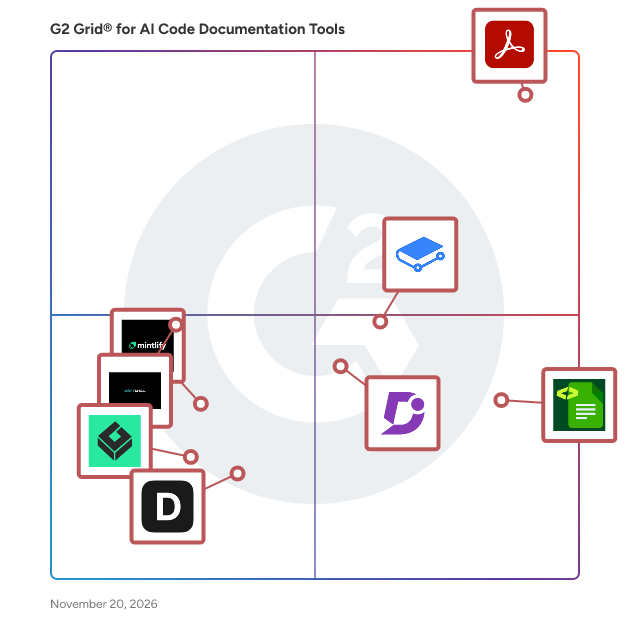
G2 Grid® for AI Code Documentation Tools

G2 Grid® for AI Code Documentation Tools plotting products by satisfaction and market presence

Highlighted products: Adobe Acrobat, DocuWriter.ai, GitBook, Document360, SoftSpell, Mintlify, Documentation AI, and Greptile.

Underlying data: [Grid® JSON](https://www.g2.com/categories/ai-code-documentation-tools/grids.json?focus%5B%5D=adobe-acrobat&focus%5B%5D=docuwriter-ai&focus%5B%5D=gitbook&focus%5B%5D=document360&focus%5B%5D=softspell&focus%5B%5D=mintlify&focus%5B%5D=documentation-ai&focus%5B%5D=greptile)

Adobe Acrobat

Acrobat: Trusted for documents. Now built for how work really happens. For more than 30 years, Acrobat has been the trusted name in document workflow — helping businesses create, sign, and share with confidence. As one of the leading enterprise document platforms that scales for global teams, Acrobat has evolved beyond the PDF. Now with Acrobat Studio, it has been reimagined for how modern teams work: smarter, more collaborative, and powered by AI. Acrobat Studio builds on everything professionals know from Acrobat Pro — powerful PDF editing, signing, and reviewing — and expands it into a connected workspace where teams can create, collaborate, and communicate in entirely new ways. While Acrobat Pro focuses on the PDF itself, Acrobat Studio connects the full document journey, from insight to action. With PDF Spaces, teams can bring related documents together, chat with AI Assistants that summarize content or surface key takeaways, and keep everyone aligned without endless versions or email threads. Express Premium tools make it easy to remix or reuse that same content into branded presentations, visuals, or reports — helping teams communicate ideas faster and more confidently. Security remains a constant. Acrobat follows Adobe's Secure Product Lifecycle to safeguard data at every stage, with encryption, access controls, and enterprise-grade compliance. For organizations evaluating document automation tools suitable for multi-region, multi-team deployments, Acrobat Studio delivers the scale, security, and integrations to support it. From small teams to large enterprises, it turns everyday PDFs into powerful, intelligent workspaces — helping people move ideas forward and communicate with greater clarity and impact.

Average Rating: 4.5/5.0

Total Reviews: 4,974

Who Is the Company Behind Adobe Acrobat?

  • Seller: Adobe
  • Company Website:
  • Year Founded: 1982
  • HQ Location: San Jose, CA
  • LinkedIn® Page: www.linkedin.com
    42,975 employees on LinkedIn®
  • Ownership: NASDAQ:ADBE

Who Uses This Product?

  • Who Uses This: Graphic Designer, Software Engineer
  • Top Industries: Information Technology and Services, Computer Software
  • Company Size: 42% Small, 32% Medium

What Do G2 Reviewers Say About Adobe Acrobat?

AI-generated summary from verified user reviews

Pros
  • Users appreciate the ease of use of Adobe Acrobat, simplifying PDF management and enhancing productivity seamlessly.
  • Users appreciate the easy editing features of Adobe Acrobat, which streamline PDF handling and enhance productivity.
  • Users value the versatile PDF editing capabilities of Adobe Acrobat, making document management seamless and efficient.
  • Users value the robust editing capabilities of Adobe Acrobat, enhancing their efficiency in managing PDF documents.
  • Users value the centralized management of PDFs in Adobe Acrobat, appreciating its all-in-one platform for various tasks.
Cons
  • Users feel that Adobe Acrobat is expensive, particularly due to limited free features and a restrictive subscription model.
  • Users experience slow performance with Adobe Acrobat, noting lag and loading issues despite having high-end systems.
  • Users often face PDF issues with Acrobat, including difficulty compressing, slow performance, and challenging editing experiences.
  • Users find Adobe Acrobat not user friendly, especially when trying to navigate its complex features and tools.
  • Users find the learning curve steep, with advanced tools often overwhelming and hidden, causing initial difficulties in usage.

What Are Recent G2 Reviews of Adobe Acrobat?

What Are G2 Users Discussing About Adobe Acrobat?

DocuWriter.ai

DocuWriter is an AI-powered platform for creating and managing complete, structured documentation for entire codebases. Teams can connect repositories and generate documentation covering architecture, modules, services, classes, functions, dependencies, APIs, diagrams, READMEs, and other technical components. It supports both individual repositories and larger multi-repository systems. The platform produces one centralized, connected documentation system rather than a collection of isolated outputs. It turns repository knowledge into an organized documentation Space where the architecture, implementation, relationships, APIs, diagrams, setup, workflows, and reference material are generated in context, searchable, editable, publishable, and maintainable. Focused generators remain available when a specific artifact is needed, but they support the complete documentation workflow rather than defining separate products.

Average Rating: 4.4/5.0

Total Reviews: 103

Who Is the Company Behind DocuWriter.ai?

Who Uses This Product?

  • Top Industries: Information Technology and Services, Computer Software
  • Company Size: 49% Medium, 35% Small

What Do G2 Reviewers Say About DocuWriter.ai?

AI-generated summary from verified user reviews

Pros
  • Users love the time-saving auto-generation of API documentation and test cases, enhancing their productivity significantly.
  • Users value the ease of use of DocuWriter.ai, as it efficiently auto-generates API docs and test cases.
  • Users love the time-saving features of DocuWriter.ai, enabling quick auto-generation of API docs and test cases.
Cons
  • Users report inaccuracy in generated documents and find the subscription cancellation policy confusing.
  • Users experience inaccuracy in document generation, which hinders their overall satisfaction with DocuWriter.ai.

What Are Recent G2 Reviews of DocuWriter.ai?

GitBook

GitBook enables teams to easily manage, share and publish their knowledge through a documentation platform designed for the entire organization. Packed with powerful features, GitBook supports any form of rich text, programming languages and visual assets. - Easily create and publish beautiful looking docs without any design or code required - Organize your knowledge and have your team working from a central place - Keep your GitHub workflows in sync with our native integration - Support for both save / merge (async) and real-time collaboration on any doc. GitBook is free for open-source projects, non-profit orgs and students.

Average Rating: 4.7/5.0

Total Reviews: 207

Who Is the Company Behind GitBook?

  • Seller: GitBook
  • Year Founded: 2014
  • HQ Location: Covina, US
  • LinkedIn® Page: www.linkedin.com
    50 employees on LinkedIn®

Who Uses This Product?

  • Who Uses This: CEO
  • Top Industries: Computer Software, Information Technology and Services
  • Company Size: 79% Small, 15% Medium

What Do G2 Reviewers Say About GitBook?

AI-generated summary from verified user reviews

Pros
  • Users appreciate the ease of use of GitBook, enabling seamless collaboration and efficient document management.
  • Users find GitBook's intuitive interface and ease of use essential for organizing and sharing content effortlessly.
  • Users value the super responsive support and user-friendly design of GitBook, enhancing productivity for community organizations.
  • Users appreciate the modern UI and collaborative features of GitBook, making documentation easy and professional for all.
  • Users appreciate the seamless collaboration features of GitBook, enhancing teamwork and productivity across all members.
Cons
  • Users experience software bugs that can lead to navigation difficulties and hinder customization options.
  • Users express concern over high pricing, particularly for those without open source software support.
  • Users find GitBook to have a complex initial setup, but overall, it is a great product.
  • Users find the difficult automation aspect of GitBook cumbersome, needing manual updates for code changes to documentation.
  • Users desire more advanced formatting options in GitBook to enhance their writing experience and flexibility.

What Are Recent G2 Reviews of GitBook?

What Are G2 Users Discussing About GitBook?

AI can help you find the answers. G2 helps you trust them.

Connect G2 to Claude or ChatGPT for answers grounded in G2's trusted reviews, comparisons, and pricing from real user insights.

How it works

Document360

Document360 is an AI-powered knowledge base platform for enterprises needing secure, scalable documentation. It centralizes organizational knowledge into one workspace, including public help centers, internal wikis, SOPs, user manuals, API docs, or product playbooks. Who It's For By Role: Support teams (deflect tickets), technical writers (publish faster), product managers (align teams), engineers (document APIs and workflows). By Industry: SaaS, IT & consulting, finance, healthcare, education, manufacturing. Key Capabilities: 1. Editors: Markdown and WYSIWYG with real-time previews and drag-and-drop media. 2. Step-by-Step Guides: Capture on-screen actions to create editable interactive guides. 3. Category Manager: Drag-and-drop content organization. 4. Interactive Demos: Clickable walkthroughs embedded in articles. 5. Custom Workflows: Automate reviews, roles, and approvals. 6. Pro Analytics: Track performance, engagement, search trends, and ticket deflection. 7. Brand Customization: Tailor design, layout, and themes. 8. Security: SOC 2 and GDPR-aligned; SSO, JWT, SAML, IP restriction. 9. Localization: 50+ languages. Powered by Eddy AI: 1. AI Search: ChatGPT-style answers from your docs for instant self-service. 2. AI Writing Agent: Generate structured docs from video, audio, text, or prompts. 3. AI Chatbot: 24/7 documentation-driven support that cuts costs. 4. AI Glossary Generator: Auto-creates glossaries for complex terms. 5. Article Summarizer: Condenses long docs into bite-sized summaries. 6. MCP Server: Connects your knowledge base to LLMs. 7. Duplicate Content Detection: Flags redundancy with precision. 8. SEO Automation: Auto-generates titles, tags, and glossaries for discoverability. Document360 is shortlisted for Best AI Assistant in the 2026 A.I. Awards, run by the Cloud Awards. Whether scaling support, streamlining internal knowledge, or building world-class product docs, Document360 brings it all together in one platform.

Average Rating: 4.7/5.0

Total Reviews: 554

Who Is the Company Behind Document360?

  • Seller: Kovai Limited
  • Company Website:
  • Year Founded: 2009
  • HQ Location: London
  • LinkedIn® Page: www.linkedin.com
    321 employees on LinkedIn®

Who Uses This Product?

  • Who Uses This: Technical Writer, Senior Technical Writer
  • Top Industries: Computer Software, Information Technology and Services
  • Company Size: 44% Medium, 39% Small

What Do G2 Reviewers Say About Document360?

AI-generated summary from verified user reviews

Pros
  • Users highlight the ease of use of Document360, appreciating its intuitive design and quick learning curve.
  • Users appreciate the feature-rich platform of Document360, highlighting its intuitive UI and powerful AI capabilities.
  • Users value the excellent customer support of Document360, enhancing their overall experience with quick and efficient assistance.
  • Users appreciate Document360's helpful AI features and intuitive interface, enhancing efficiency and reducing support costs.
  • Users appreciate Document360's user-friendly interface and intuitive navigation, enhancing efficiency and collaboration in documentation.
Cons
  • Users find the missing features frustrating, citing limitations like lag and a crowded interface when managing documents.
  • Users face editing difficulties with slow performance and a need for improved visual editing tools in Document360.
  • Users feel that editing limitations hinder their ability to efficiently manage content and enhance document visuals.
  • Users find Document360's pricing to be expensive, particularly for small teams needing advanced features and optimal performance.
  • Users express frustration over limited customization options, making design adjustments cumbersome and unintuitive for non-developers.

What Are Recent G2 Reviews of Document360?

What Are G2 Users Discussing About Document360?

SoftSpell

SoftSpell is an AI-powered platform that accelerates software delivery and simplifies legacy modernization. It transforms unstructured requirements and existing codebases into structured outputs, enabling faster development with clarity and control. By combining intelligent requirement analysis, context-aware code generation, and automated testing, it ensures end-to-end traceability while reducing manual effort and rework. SoftSpell integrates seamlessly into existing workflows, helping teams deliver high-quality software faster.

Average Rating: 4.4/5.0

Total Reviews: 47

Who Is the Company Behind SoftSpell?

Who Uses This Product?

  • Who Uses This: Senior Software Engineer, Software Engineer
  • Top Industries: Computer Software, Program Development
  • Company Size: 47% Small, 40% Large

What Do G2 Reviewers Say About SoftSpell?

AI-generated summary from verified user reviews

Pros
  • Users appreciate the time-saving features of SoftSpell, significantly simplifying the coding process and improving efficiency.
  • Users value the coding assistance of SoftSpell, as it enhances efficiency and simplifies the coding process significantly.
  • Users value the automation capabilities of SoftSpell, significantly enhancing productivity with real-time code suggestions and time-saving features.
  • Users appreciate the quality improvement offered by SoftSpell, making coding smoother, faster, and more efficient.
  • Users value the ease of use of SoftSpell, enhancing their coding experience and simplifying problem-solving.
Cons
  • Users experience slow performance with SoftSpell, often facing delays and failures during usage.
  • Users report frequent prompt issues that lead to delays and distractions during coding, hindering overall productivity.
  • Users experience limited multimedia support, facing challenges with tech stack compatibility that may affect functionality.
  • Users find the UX improvement necessary, citing cluttered interfaces and confusing prompts that hinder efficient workflow.
  • Users face browser compatibility issues with SoftSpell, but hope for improvements in future updates.

What Are Recent G2 Reviews of SoftSpell?

Mintlify

Mintlify is a software designed to help teams and organizations generate and maintain documentation for their projects and products. The software provides tools for building, editing, and updating technical documentation, integrating with various code repositories and development workflows to automate document generation from code comments and markdown files. Mintlify supports features such as collaborative editing, real-time preview, version control, analytics reporting, and search, allowing users to organize and update documentation efficiently. The software addresses challenges related to keeping documentation up to date, ensuring accuracy, and improving knowledge sharing within development environments. Mintlify aims to streamline documentation processes for engineering teams by offering a user interface that simplifies publishing and maintaining technical resources.

Average Rating: 4.6/5.0

Total Reviews: 19

Who Is the Company Behind Mintlify?

  • Seller: Mintlify
  • Company Website:
  • Year Founded: 2022
  • HQ Location: San Francisco, US
  • LinkedIn® Page: www.linkedin.com
    85 employees on LinkedIn®

Who Uses This Product?

  • Top Industries: Computer Software
  • Company Size: 50% Small, 35% Medium

What Do G2 Reviewers Say About Mintlify?

AI-generated summary from verified user reviews

Pros
  • Users appreciate the customization options of Mintlify, adapting the app easily to their needs for enhanced productivity.
  • Users love the clean and easy-to-use editing features of Mintlify, enhancing teamwork and efficiency in document creation.
  • Users appreciate the ease of creation with Mintlify, finding its interface intuitive and features helpful for productivity.
  • Users appreciate the clean and easy-to-use interface of Mintlify, making it accessible for everyone.
  • Users value the efficiency of Mintlify, appreciating how it streamlines teamwork and enhances productivity.

What Are Recent G2 Reviews of Mintlify?

What Are G2 Users Discussing About Mintlify?

Documentation AI

Documentation.AI is an AI-native documentation platform for developer docs, API references and help centers. Teams write in a visual editor or in Git, publish a fast, searchable site, and let AI keep it accurate as the product changes. Most docs go stale because updating them is manual work nobody owns. Documentation.AI gives that work to an AI agent. Describe the change, or connect a repo or issue tracker, and the Documentation Agent finds every affected page, drafts the edits, and saves them to a branch for review. AI automations keep running those updates, so docs keep pace with each release. Readers get answers instead of search results. The built-in AI Assistant answers questions from your published pages and cites the exact pages it used. AI answer analytics show every question asked and how confident each answer was, so you know which pages to fix next. Your docs also work for AI tools. Every site publishes llms.txt and a Docs MCP server, so ChatGPT, Claude, Cursor and other assistants can search your documentation directly. An Authoring MCP server lets your team edit docs from those same tools. Key features 1. Visual web editor with live preview, reusable snippets and a built-in components library 2. Docs as code with two-way Git sync and preview deployments for every branch 3. Documentation Agent and automations that draft and apply docs updates 4. AI Assistant with cited answers, embeddable outside your docs 5. Auto-generated API reference from OpenAPI, with an interactive playground 6. llms.txt, a Docs MCP server and an Authoring MCP server on every plan 7. Search analytics, AI answer analytics and reader feedback 8. Custom domain, custom navigation, custom CSS and JS, and custom React components 9. Password-protected docs, private docs with JWT or OAuth login, and role-based permissions 10. SSO with SAML or OIDC and SCIM provisioning on Enterprise Who uses it Developer tools and API companies, SaaS product teams, technical writers and support teams who need documentation that stays current without a dedicated docs engineer. Getting started The free Starter plan includes five editor seats, a custom domain, the AI Assistant, the Documentation Agent and both MCP servers, with 10,000 one-time AI credits. Teams moving from Mintlify, GitBook, ReadMe, Document360 or another platform can migrate existing content, with migration services included on Pro.

Average Rating: 4.5/5.0

Total Reviews: 27

Who Is the Company Behind Documentation AI?

Who Uses This Product?

  • Top Industries: Computer Software
  • Company Size: 100% Small

What Are Recent G2 Reviews of Documentation AI?

Greptile

Greptile is an AI code reviewer that helps software teams catch bugs before merge. It reviews and tests pull requests with full codebase context, providing independent validation for code written by developers and coding agents. Its knowledge base tracks architecture, conventions and past bugs, helping reviews identify issues beyond the changed code. Coding agents can access the same knowledge through Greptile’s Knowledge Base MCP to follow existing patterns and avoid repeating known mistakes. Teams can define review rules in plain English and connect Jira, Linear and Notion for requirements and project context. Greptile learns from engineers’ PR comments and feedback so reviews reflect the team’s standards. Teams can choose Base, Plus or Apex reviews, or let Greptile select the depth based on each PR’s size, risk and complexity. TREX adds end-to-end testing by running the app in a configured sandbox and exercising the flows a change affects. It posts findings with video recordings so developers can see what happened. Security review combines static scanning and dependency checks with an AI security agent. Developers can use Greptile MCP to pull review findings into Claude Code, Cursor, Codex or Devin and implement fixes. They can also use the Greptile CLI to review local branches before pushing code or opening a pull request. Try Greptile on your next pull request with a 14-day free trial.

Average Rating: 4.0/5.0

Total Reviews: 27

Who Is the Company Behind Greptile?

  • Seller: Greptile
  • Company Website:
  • Year Founded: 2024
  • HQ Location: San Francisco, California, United States
  • LinkedIn® Page: www.linkedin.com
    39 employees on LinkedIn®

Who Uses This Product?

  • Top Industries: Computer Software, Information Technology and Services
  • Company Size: 71% Small, 25% Medium

What Are Recent G2 Reviews of Greptile?

gjalla

gjalla is the quality and control layer for adopting AI-assisted development workflows. AI writes code faster than humans can understand it, but speed without context results in messy, uncontrolled drift and frustration. gjalla captures your system's architecture, intent, and constraints, grounded by input from your team. Your agents query this source of truth to govern development, resulting in 89% fewer architectural violations, quality that does not degrade as complexity increases, and up to 27% speed and cost reduction on complex tasks.

Average Rating: 4.2/5.0

Total Reviews: 27

Who Is the Company Behind gjalla?

Who Uses This Product?

  • Top Industries: Computer Software
  • Company Size: 44% Small, 30% Large

What Do G2 Reviewers Say About gjalla?

AI-generated summary from verified user reviews

Pros
  • Users find Gjalla's insightful information essential for navigating their product development, especially for non-technical founders.
Cons
  • Users report small bugs in gjalla, but the founder swiftly resolves any minor issues with excellent customer service.

What Are Recent G2 Reviews of gjalla?

Swimm

Swimm is an AI coding assistant that helps developers quickly understand big, complex codebases—and seamlessly captures knowledge to fill in any documentation gaps

Average Rating: 4.4/5.0

Total Reviews: 27

Who Is the Company Behind Swimm?

Who Uses This Product?

  • Top Industries: Computer Software, Computer & Network Security
  • Company Size: 67% Medium, 33% Small

What Do G2 Reviewers Say About Swimm?

AI-generated summary from verified user reviews

Pros
  • Users praise the contextual AI assistance of Swimm, significantly enhancing team productivity and codebase understanding.
  • Users highlight the contextualized and accurate AI assistance of Swimm, enhancing developer productivity and documentation effortlessly.
  • Users find Swimm's contextual AI assistance transformative, enhancing code interaction and documentation efficiency for developers.
  • Users value the contextualized code interaction provided by Swimm, enhancing collaboration and productivity among development teams.
  • Users find Swimm's ease of use remarkable, enabling effective code interaction and documentation creation effortlessly.
Cons
  • Users wish for chat functionality in the web interface to improve accessibility and communication.

What Are Recent G2 Reviews of Swimm?

What Are G2 Users Discussing About Swimm?

Amp

Sourcegraph’s AI code assistant goes beyond individual dev productivity, helping enterprises achieve consistency and quality at scale with AI. Sourcegraph accelerates the entire workflow for developers by providing them a more natural and intuitive way to work. Searching code, chatting with AI, invoking prompts, and using agents can now all be performed in one place with the best models available. Features: 🤖 Agentic chat: Designed to simplify and accelerate developer workflows, Sourcegraph uses a combination of search, AI chat, and prompts in a single interface to streamline how you explore, understand, and generate code. ✨ Auto-edit: Autocompletes single lines, or whole functions, in any programming language, configuration file, or documentation. It’s powered by the latest instant LLM models, for accuracy and performance. 📚 Prompt Library: Streamline your development process by using prompts to understand, improve, fix, document, and generate unit tests for your code. You can also create your own prompts and save them in the Prompt Library to tailor Sourcegraph to your workflow. Cody works with major code hosts like GitHub, GitLab, and Bitbucket, and offers industry-leading LLM flexibility with support for the most powerful models from OpenAI, Anthropic, and more. 🧠 The Best Context: When tools focus solely on individual productivity, teams face inconsistent and poor-quality results. Sourcegraph focuses on team productivity using whole codebase context and shared prompts to ensure quality and consistency across your enterprise.

Average Rating: 4.5/5.0

Total Reviews: 91

Who Is the Company Behind Amp?

Who Uses This Product?

  • Who Uses This: Software Engineer
  • Top Industries: Computer Software, Information Technology and Services
  • Company Size: 70% Small, 21% Medium

What Do G2 Reviewers Say About Amp?

AI-generated summary from verified user reviews

Pros
  • Users find Amp's ease of use impressive, with intuitive features facilitating coding and task execution seamlessly.
  • Users praise the coding assistance of Amp, noting its ease in finding issues and enhancing coding efficiency.
  • Users appreciate AMP for its fast performance and seamless integration, enhancing productivity and user experience significantly.
  • Users appreciate the blazing fast speed and user-friendly features of AMP, enhancing both performance and SEO.
  • Users appreciate the easy integrations of Amp, which enhance productivity and streamline workflows across various tools.
Cons
  • Users find the poor coding in AMP limits design customisation and affects performance and scalability for their applications.
  • Users experience slow performance with Amp, especially when handling larger projects, impacting overall efficiency.
  • Users often find context understanding lacking, as it influences accuracy and effectiveness in discussions with Amp.
  • Users note that customization options are limited, making it challenging for teams with unique requirements to tailor the tool.
  • Users find the missing features in Amp frustrating, particularly regarding model selection and edit control.

What Are Recent G2 Reviews of Amp?

What Are G2 Users Discussing About Amp?

ARCAD Transformer RPG

ARCAD Transformer RPG is an automated IBM i source code modernization solution designed to convert legacy RPG IV (RPGLE) applications to modern RPG Free Form. The solution automates the conversion of RPG IV code, including calculation specifications (C), declaration specifications (H, F, D, P), and GOTO statements. It supports both individual and mass conversions, with conversion rates close to 100%. ARCAD Transformer RPG also provides a visual comparison between the original RPG IV code and the converted RPG Free Form code, helping development teams review and validate the transformation. By automating RPG modernization while retaining the existing IBM i architecture and execution performance, ARCAD Transformer RPG helps organizations improve code readability and maintainability, reduce the effort and risk associated with manual conversion, accelerate developer onboarding, and extend the life of business-critical IBM i applications.

Who Is the Company Behind ARCAD Transformer RPG?

Auteng

Auteng is an AI-driven platform designed to streamline and enhance the software development lifecycle. By integrating advanced artificial intelligence technologies, Auteng automates various stages of development, from initial design to deployment, thereby reducing manual effort and increasing efficiency. Key Features and Functionality: - Automated Code Generation: Utilizes AI to generate code snippets and modules, accelerating the development process. - Intelligent Bug Detection: Employs machine learning algorithms to identify and suggest fixes for potential code errors. - Continuous Integration and Deployment: Facilitates seamless integration and deployment pipelines, ensuring consistent and reliable software releases. - Collaborative Tools: Provides a suite of tools that enhance team collaboration, including version control and real-time code reviews. Primary Value and User Solutions: Auteng addresses common challenges in software development by automating repetitive tasks, reducing human error, and accelerating project timelines. This leads to higher-quality software products, improved team productivity, and faster time-to-market for businesses.

Who Is the Company Behind Auteng?

Autify Genesis

Autify Genesis is an AI-powered tool designed to automate the generation of test cases and scripts from various product specifications. By analyzing documents such as Word, Excel, PDFs, Figma files, and JIRA tickets, Genesis produces editable Gherkin test cases, which can then be transformed into Playwright code or Autify NoCode scenarios. This process streamlines software testing by reducing manual effort and accelerating development cycles.

Who Is the Company Behind Autify Genesis?

  • Seller: Autify
  • Year Founded: 2016
  • HQ Location: Chuo-ku, Tokyo
  • LinkedIn® Page: www.linkedin.com
    76 employees on LinkedIn®

Autocodedocs

AutoCodeDocs is an AI-powered tool designed to automate the creation of professional, structured documentation directly from your source code. By analyzing your codebase, it generates clear and concise documentation, including README files and API references, in a matter of seconds. This allows developers to focus more on coding and less on the time-consuming task of manual documentation. Key Features: - Instant AI-Generated Documentation: Upload your code, and AutoCodeDocs will produce structured documentation, README files, and API references almost immediately. - Plain English Code Explanations: The AI provides summaries, logic explanations, and inline comments to help you understand your code faster. - Automated Code Commenting: Generates clear, professional inline comments that describe functions, logic, and best practices. - API Documentation in Multiple Formats: Creates detailed API documentation with parameters, return types, and usage examples, exportable in Markdown, PDF, and more. - Language Versatility: Supports over 20 programming languages, including JavaScript, Python, Java, and Go. Primary Value: AutoCodeDocs addresses the common challenge of maintaining up-to-date and comprehensive code documentation. By automating this process, it saves developers significant time and effort, ensures consistency across documentation, and facilitates better collaboration and onboarding within development teams. This leads to more organized projects and a more efficient development workflow.

Who Is the Company Behind Autocodedocs?

Reviews of AI Code Documentation Tools products
Adam Crivello
AC
Researched and written by Adam Crivello