Best Unified Workspaces Software - Page 2

How Many Unified Workspaces Software Products Does G2 Track?

Total Products under this Category: 191

Category Stats (Sep 2026)

  • Average Rating: 4.59/5 (↓0.01 vs Aug 2026) The average rating of products in this category, based on all submitted ratings
  • Top Trending Product: TSplus (+0.04%) - Among all products in this category, TSplus recorded the largest rating increase compared to last month

Last updated: September 05, 2026

How Does G2 Rank Unified Workspaces Software Products?

Why You Can Trust G2's Software Rankings:

  • 30 Analysts and Data Experts
  • 59,600+ Authentic Reviews
  • 191+ Products
  • Unbiased Rankings

G2's software rankings are built on verified user reviews, rigorous moderation, and a consistent research methodology maintained by a team of analysts and data experts. Each product is measured using the same transparent criteria, with no paid placement or vendor influence. While reviews reflect real user experiences, which can be subjective, they offer valuable insight into how software performs in the hands of professionals. Together, these inputs power the G2 Score, a standardized way to compare tools within every category.

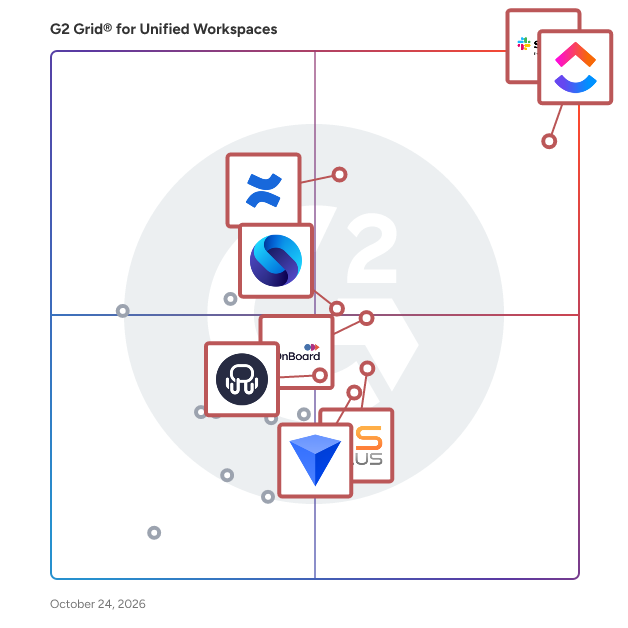
G2 Grid® for Unified Workspaces Software

G2 Grid® for Unified Workspaces Software plotting products by satisfaction and market presence

Highlighted products: Slack, ClickUp, Confluence, Shift, Workona, BlackBerry UEM, Rambox, and MangoApps.

Underlying data: [Grid® JSON](https://www.g2.com/categories/unified-workspaces/grids.json?focus%5B%5D=slack&focus%5B%5D=clickup&focus%5B%5D=confluence&focus%5B%5D=redbrick-shift&focus%5B%5D=workona&focus%5B%5D=blackberry-uem&focus%5B%5D=rambox&focus%5B%5D=mangoapps)

TSplus

TSplus is the ideal alternative to Microsoft RDS and Citrix to web-enable your legacy apps, create SaaS solutions or remotely access your centralized corporate tools and files. TSplus Remote Access offers a reliable and scalable way to web-enable your Windows Applications hosted on premise or in the cloud. TSplus empowers users with instant, intuitive and seamless access to Windows-based applications and desktops, from any browser on any device, including PCs, Macs, smartphones and tablets. Connect from any device, customize your Web Portal, Print anywhere with the Universal Printer, Use the Gateway for larger structures and simply manage your farm of servers, all from one intuitive, modern Admin tool. Add powerful add-ons to keep your remote connections secure and your servers healthy: 2FA, Advanced Security or Server Monitoring.

Average Rating: 4.9/5.0

Total Reviews: 64

How Do G2 Users Rate TSplus?

  • Ease of Use: 9.4/10 (Category avg: 9.0/10)
  • Password Saver: 7.7/10 (Category avg: 8.2/10)
  • Multiple Workspaces: 7.0/10 (Category avg: 9.2/10)
  • Single Sign-On (SSO): 7.7/10 (Category avg: 8.8/10)

Who Is the Company Behind TSplus?

  • Seller: TSplus
  • Year Founded: 2005
  • HQ Location: Lyon, Rhône-Alpes
  • Twitter: @TSplusSoftware
    151 Twitter followers
  • LinkedIn® Page: www.linkedin.com
    80 employees on LinkedIn®

Who Uses This Product?

  • Top Industries: Computer Software, Information Technology and Services
  • Company Size: 73% Small, 21% Medium

What Do G2 Reviewers Say About TSplus?

AI-generated summary from verified user reviews

Pros
  • Users commend the ease of use with TSplus, noting quick setup and intuitive management tools for resources.
  • Users highlight the easy setup of TSplus, praising its straightforward installation and centralized resource management.
  • Users commend the responsive customer support of TSplus, highlighting fast assistance and effective issue resolution.
  • Users value the enhanced security features of TSplus, ensuring safe access to applications and resources.
  • Users value the high performance and reliability of TSplus, enhancing productivity and ensuring a smooth remote desktop experience.
Cons
  • Users indicate that the poor interface design detracts from the overall efficiency and user experience of TSplus.
  • Users find remote access configuration difficult, experiencing frequent server lag and service corruption issues.
  • Users find the admin portal's design lacking and experience challenges with software integration.
  • Users find the setup and configuration complex, especially those who are not very tech-savvy.
  • Users desire better mobile device support, as current options are limited compared to PC and MAC compatibility.

What Are Recent G2 Reviews of TSplus?

What Are G2 Users Discussing About TSplus?

Citrix DaaS

Citrix Virtual Apps and Desktops provides the most comprehensive desktop as a service (DaaS) and VDI options, optimized to provide today’s flexible workforce with secure, high-performance experiences. IT can deliver Windows, Linux, and web business applications, or full virtual desktops, to scale their environments quickly and easily. Deploy from any cloud or datacenter to meet global business needs.

Average Rating: 4.1/5.0

Total Reviews: 520

How Do G2 Users Rate Citrix DaaS?

  • Ease of Use: 8.5/10 (Category avg: 9.0/10)
  • Password Saver: 8.4/10 (Category avg: 8.2/10)
  • Multiple Workspaces: 9.2/10 (Category avg: 9.2/10)
  • Single Sign-On (SSO): 9.4/10 (Category avg: 8.8/10)

Who Is the Company Behind Citrix DaaS?

  • Seller: Citrix
  • Year Founded: 1989
  • HQ Location: Fort Lauderdale, FL
  • Twitter: @citrix
    197,812 Twitter followers
  • LinkedIn® Page: www.linkedin.com
    4,236 employees on LinkedIn®
  • Ownership: NASDAQ:CTXS

Who Uses This Product?

  • Who Uses This: Analyst, Software Engineer
  • Top Industries: Information Technology and Services, Hospital & Health Care
  • Company Size: 59% Large, 29% Medium

What Do G2 Reviewers Say About Citrix DaaS?

AI-generated summary from verified user reviews

Pros
  • Users appreciate the user-friendly interface of Citrix DaaS, enjoying a smooth and efficient experience.
  • Users appreciate the smooth performance of Citrix DaaS, enjoying its user-friendly interface and efficient functionality.
  • Users appreciate the user-friendly interface of Citrix DaaS, highlighting its smooth performance and efficiency.
  • Users value the cross-platform integration capabilities of Citrix DaaS, enhancing management across diverse environments.
  • Users value the seamless integrations of Citrix DaaS with various platforms, enhancing management of virtual infrastructure.
Cons
  • Users find Citrix DaaS has limited compatibility due to specific configurations and integration challenges with other platforms.
  • Users note that audio issues during Teams calls in Citrix DaaS hinder their overall experience significantly.
  • Users face connection issues with Citrix DaaS, affecting performance and application responsiveness, especially after updates.
  • Users face connectivity issues with Citrix DaaS, affecting performance and causing applications to become unresponsive post-updates.
  • Users note that Citrix DaaS has expensive premiums compared to other solutions, impacting their overall budget.

What Are Recent G2 Reviews of Citrix DaaS?

What Are G2 Users Discussing About Citrix DaaS?

Inuvika OVD Enterprise

Migrating from Citrix or VMware Horizon (Omnissa) could not be easier. Inuvika OVD Enterprise is a secure and cost-effective alternative that reduces your TCO by over 60%. More users on a server, fewer Windows server licenses, no SQL server license, built in secure gateway, concurrent user subscriptions and 2FA will all lower your costs substantially. Inuvika OVD Enterprise is an efficient, desktop virtualization solution that delivers Windows and Linux virtual apps and virtual desktops to any device. It deploys on any hypervisor (KVM, vSphere, ProxmoxVE, Nutanix AHV, Verge.OS, etc) and can be installed on-premise, on public or private clouds, and can also be purchased as a Desktop as a Service (DaaS) from our hosting partners around the world. The on-premises version of the product is available starting with 20 concurrent users. DaaS is available starting at 10 concurrent users. Inuvika OVD Enterprise offers an easy-to-use admin console, a fast user experience, and requires less infrastructure overhead compared to traditional virtual desktop solutions. OVD Enterprise serves enterprise, financial, healthcare, education and government organizations and we are happy to work with SMEs who are struggling with price increases at Citrix and vendor lock-in at VMware/Omnissa. Inuvika also has its own thin client software called ResoluteOS that allows you to repurpose existing hardware to extend the life of it and securely access Inuvika OVD Enterprise. Available in over 60 countries.

Average Rating: 4.7/5.0

Total Reviews: 19

How Do G2 Users Rate Inuvika OVD Enterprise?

  • Ease of Use: 9.6/10 (Category avg: 9.0/10)
  • Password Saver: 9.2/10 (Category avg: 8.2/10)
  • Multiple Workspaces: 9.2/10 (Category avg: 9.2/10)
  • Single Sign-On (SSO): 9.2/10 (Category avg: 8.8/10)

Who Is the Company Behind Inuvika OVD Enterprise?

  • Seller: Inuvika
  • Year Founded: 2014
  • HQ Location: Toronto, Canada
  • Twitter: @InuvikaInc
    311 Twitter followers
  • LinkedIn® Page: www.linkedin.com
    17 employees on LinkedIn®

Who Uses This Product?

  • Top Industries: Information Technology and Services
  • Company Size: 53% Small, 47% Medium

What Are Recent G2 Reviews of Inuvika OVD Enterprise?

WorkJam

WorkJam is the complete frontline operations platform for deskless employees. It connects employees to each other, headquarters, and the systems that run their business. The platform combines targeted employee communications, task management and audits, learning, flexible scheduling, employee self-service, and AI-powered workflow automation as part of a modular platform that scales with the business. The world’s most iconic brands in retail, manufacturing, hospitality, and distribution trust WorkJam to drive productivity, strengthen employee retention, and run more consistent operations at scale. WorkJam integrates directly with existing WFM, HRIS, and LMS platforms via open APIs and pre-built connectors. It offers flexible deployment options, running natively on iOS and Android, web browsers, shared devices or kiosks, and embedded directly within Microsoft Teams. Core Platform Modules • Task Management: A centralized system for deploying, assigning, and verifying frontline tasks. Managers can require real-time proof of completion via photo, video, or digital sign-offs to standardize execution across locations. • Communications: A targeted digital workspace offering channels, secure 1-to-1 messaging, and live streaming. A proprietary Target Audience engine ensures updates reach specific employees based on dynamic attributes like role, location, or shift status. • Scheduling & Labor Orchestration: Employee self-service tools for managing availability, shift swaps, and time-off requests. Includes an Open Shift Marketplace where workers can bid on available shifts based on their specific qualifications. • Learning: Delivers SCORM-compliant microlearning, assessments, and role-based training directly to mobile devices. Completing certifications can automatically unlock eligibility for picking up new shifts. • Surveys & Feedback: Captures employee sentiment, operational feedback, and mandatory policy attestations. Surveys can be gated by shift or IP/geofencing to ensure compliance. • AI Agent: An embedded, conversational assistant providing 24/7 answers to HR questions, policy lookups, and step-by-step task guidance. The AI agent respects shift-fencing, ensuring compliance by restricting off-clock interactions. Proven Business Impact A 2023 study by Forrester Consulting evaluated WorkJam's financial impact, finding that organizations deploying the platform achieved a 410% ROI and a payback period of less than six months. WorkJam is trusted to power frontline operations for global enterprise brands including Ulta Beauty and JCPenney. Real Impact for Real Frontlines: • Shell utilized WorkJam to unify operational standards across 43,000+ retail sites, moving away from robotic execution to genuine hospitality. • Ulta Beauty revolutionized their in-store experience, giving associates the digital tools to succeed without ever leaving the sales floor. • Safety Leaders achieved a 64% reduction in health & safety incidents by crowdsourcing safety culture directly from the frontline.

Average Rating: 4.5/5.0

Total Reviews: 59

How Do G2 Users Rate WorkJam?

  • Ease of Use: 9.1/10 (Category avg: 9.0/10)
  • Password Saver: 3.9/10 (Category avg: 8.2/10)
  • Multiple Workspaces: 10.0/10 (Category avg: 9.2/10)
  • Single Sign-On (SSO): 7.2/10 (Category avg: 8.8/10)

Who Is the Company Behind WorkJam?

  • Seller: WorkJam
  • Company Website:
  • Year Founded: 2014
  • HQ Location: Montreal, CA
  • Twitter: @WorkJam
    695 Twitter followers
  • LinkedIn® Page: www.linkedin.com
    234 employees on LinkedIn®

Who Uses This Product?

  • Top Industries: Retail
  • Company Size: 43% Large, 27% Medium

What Do G2 Reviewers Say About WorkJam?

AI-generated summary from verified user reviews

Pros
  • Users love the ease of use of WorkJam, appreciating its seamless integration for effective communication and scheduling.
  • Users value the communication efficiency of WorkJam, enjoying seamless connections and enhanced collaboration among remote staff.
  • Users value the effective communication features of WorkJam, streamlining updates and collaboration across teams seamlessly.
  • Users value the efficient scheduling and integration of WorkJam, enhancing employee engagement and operational agility.
  • Users praise WorkJam for its intuitive design, making implementation and daily use highly efficient and user-friendly.
Cons
  • Users frequently experience app glitches that hinder performance, including loading issues and video lagging during training sessions.
  • Users experience scheduling issues with WorkJam, finding the in-app scheduler clunky and not tailored to their needs.
  • Users face integration issues with WorkJam, particularly when connecting to existing systems and using the in-app scheduler.
  • Users experience a learning curve with WorkJam, finding some features challenging to understand initially.
  • Users experience complexity in WorkJam, facing glitches and a learning curve during initial adoption and integration.

What Are Recent G2 Reviews of WorkJam?

What Are G2 Users Discussing About WorkJam?
Slapdash

A rethink of how we work, with a focus on speed, ergonomics and fun.

Average Rating: 4.3/5.0

Total Reviews: 5

How Do G2 Users Rate Slapdash?

  • Ease of Use: 7.9/10 (Category avg: 9.0/10)
  • Password Saver: 6.7/10 (Category avg: 8.2/10)
  • Multiple Workspaces: 8.3/10 (Category avg: 9.2/10)
  • Single Sign-On (SSO): 6.1/10 (Category avg: 8.8/10)

Who Is the Company Behind Slapdash?

  • Seller: Slapdash
  • Year Founded: 2019
  • HQ Location: San Francisco, US
  • Twitter: @slapdash_app
    518 Twitter followers
  • LinkedIn® Page: www.linkedin.com
    7 employees on LinkedIn®

Who Uses This Product?

  • Company Size: 60% Small, 20% Large

What Are Recent G2 Reviews of Slapdash?

Upbase

Upbase is project management software built specifically for small agencies running client work. Most project management tools are built for internal teams. They treat clients as an afterthought: invite a client to a project and they see everything or nothing. Work for one client is scattered across projects, with no single place to see it all. And you don't find out if a project was profitable until it's too late. Upbase is built around the client, not the project. That means: - Profit tracking by project and by client, updating as your team logs time — so you catch margin problems before they eat your profit - Client-level dashboards that show every project, deliverable, and open item for a client in one place - Granular client sharing — share individual tasks or files with clients instead of opening up the whole project - Time tracking with timesheets by client, making invoicing and reporting effortless - Built-in daily planner that keeps each team member focused on today's work - Everything lives in one clean workspace: projects, tasks, docs, files, chat, and client collaboration. No bloat. No nested menus. No three-month onboarding. Built for agencies of 1–20 people.

Average Rating: 4.3/5.0

Total Reviews: 18

How Do G2 Users Rate Upbase?

  • Ease of Use: 9.0/10 (Category avg: 9.0/10)

Who Is the Company Behind Upbase?

Who Uses This Product?

  • Company Size: 95% Small, 5% Medium

What Do G2 Reviewers Say About Upbase?

AI-generated summary from verified user reviews

Pros
  • Users value the ease of use of Upbase, highlighting its simplicity and well-thought-out features for productivity.
  • Users appreciate the thoughtfully designed features of Upbase, enhancing productivity while maintaining simplicity and ease of use.
  • Users appreciate the flexibility of Upbase, allowing them to tailor their productivity approach to their needs.
  • Users love the intuitive interface of Upbase, finding it enhances their productivity and simplifies task management.
  • Users find Upbase helpful for task organization, allowing easy management of customer tickets and team communication.
Cons
  • Users find limited customization in Upbase, struggling with insufficient features and integration options for their needs.
  • Users often experience lack of notifications for tasks and chats, affecting their engagement and awareness.
  • Users find Upbase has limited features and insufficient integration options, impacting its effectiveness for regular use.
  • Users find the lack of subtask hierarchy in Upbase limiting for effective project management.
  • Users experience performance issues with Upbase, noting glitches that slow down the application significantly.

What Are Recent G2 Reviews of Upbase?

Bella

Managing multiple platforms, email accounts, and SaaS software has never been easier. A time saving and user-friendly desktop application, Bella simplifies your life by allowing you to create your own organized workspaces that provide instant access to your online accounts, documents, and websites with one click. Save websites, files, and logins pertaining to any subject or project on a workspace and you’ll never need to search again.

Average Rating: 4.6/5.0

Total Reviews: 4

How Do G2 Users Rate Bella?

  • Ease of Use: 10.0/10 (Category avg: 9.0/10)
  • Password Saver: 8.3/10 (Category avg: 8.2/10)
  • Multiple Workspaces: 10.0/10 (Category avg: 9.2/10)
  • Single Sign-On (SSO): 10.0/10 (Category avg: 8.8/10)

Who Is the Company Behind Bella?

Who Uses This Product?

  • Company Size: 50% Medium, 25% Large

What Are Recent G2 Reviews of Bella?

HulerHub

HulerHub is the world's most engaging, fully personalised employee experience platform. A modern day Intranet alternative; out of the box, easy to set-up and no I.T or design resource required. Offering a customer-grade user experience, the software brings together an organization's cloud-based systems, software, and content, enabling better control and insight into employee interactions and experiences in the digital workplace. - Build Better Employee Experiences From internal branding to personalisation and dynamic audience management, HulerHub makes building employee experiences easy, so you can focus on cultivating a people-first culture. - Collaborate From Anywhere Make working together effortless. HulerHub is accessible from any device, any time, any place, and enables users to quickly and securely share information both internally with colleagues and externally with customers and partners. - Maximise ROI & Engagement We have developed a software solution that works seamlessly with all cloud-based software and content regardless of vendor or provider to help organisations leverage the right content and tools at the right time, maximise ROI on existing and future tech investments, and engage employees.

Average Rating: 4.6/5.0

Total Reviews: 4

How Do G2 Users Rate HulerHub?

  • Ease of Use: 8.8/10 (Category avg: 9.0/10)
  • Password Saver: 7.5/10 (Category avg: 8.2/10)
  • Multiple Workspaces: 8.3/10 (Category avg: 9.2/10)
  • Single Sign-On (SSO): 7.5/10 (Category avg: 8.8/10)

Who Is the Company Behind HulerHub?

  • Seller: Huler
  • HQ Location: Stoke on Trent, GB
  • LinkedIn® Page: www.linkedin.com
    21 employees on LinkedIn®

Who Uses This Product?

  • Company Size: 75% Small, 25% Medium

What Do G2 Reviewers Say About HulerHub?

AI-generated summary from verified user reviews

Pros
  • Users value the user-friendly interface of HulerHub, finding it easy to access and navigate.
  • Users commend HulerHub for its excellent customer support, enhancing their experience with this powerful data analysis tool.
  • Users find HulerHub to be very easy to use, enhancing their experience with powerful data analysis capabilities.
  • Users appreciate the easy access of HulerHub due to its user-friendly interface, enhancing their overall experience.
  • Users appreciate the user-friendly interface of HulerHub, finding it very easy to access and navigate.
Cons
  • Users find HulerHub's slow application performance frustrating, especially in a fast-paced environment where time is essential.
  • Users find HulerHub's performance to be quite slow, which hampers efficiency in a fast-paced environment.

What Are Recent G2 Reviews of HulerHub?

Airdesk

Airdesk is a shared workspace that adapts to any team, whether working in the office or remotely. The platform analyzes service data and provides real-time prioritized insights and actionable suggestions to boost the performance of any business!

Average Rating: 5.0/5.0

Total Reviews: 1

Who Is the Company Behind Airdesk?

What Are Recent G2 Reviews of Airdesk?

What Are G2 Users Discussing About Airdesk?

Arpixa

Arpixa is an AI-powered agency operating system designed to run entire client-service businesses within a single workspace. Instead of forcing digital agencies to jump between dozens of loose applications, it consolidates core operations into a cohesive platform. Key Features of Arpixa Branded Client Portal: Provides clients with a custom dashboard to track timelines, projects, invoices, deliverables, and documents in one shared space. Unified Workspace CRM: Connects customer relationship data with project context, contract files, and account history. Proposal & Contract Workflows: Convert approved client proposals directly into active operational projects without losing details. Shared Operating Inbox: Brings client feedback, project updates, billing alerts, and team conversations into one location. Lead Intake Automation: Gathers incoming project details, service requests, and schedule dates in a dedicated Lead Inbox. Integrated Operations Layer: Syncs internal task management, active project timelines, calendar bookings, and invoicing systems.

Average Rating: 5.0/5.0

Total Reviews: 1

How Do G2 Users Rate Arpixa?

  • Ease of Use: 6.7/10 (Category avg: 9.0/10)

Who Is the Company Behind Arpixa?

  • Seller: Arpixa
  • Year Founded: 2026
  • HQ Location: Mumbai, IN
  • LinkedIn® Page: www.linkedin.com
    1 employees on LinkedIn®

Who Uses This Product?

  • Company Size: 200% Small

What Are Recent G2 Reviews of Arpixa?

Collabase

Collabase is a self-hosted collaboration platform that combines project management, documentation, and team workspaces in a single application. It provides task and workflow management, a structured knowledge base, and shared team spaces with role-based access control. Collabase can be deployed on customer-owned infrastructure or in an isolated cloud environment with per-customer isolation hosted in Switzerland. The platform supports data residency requirements, audit logging, and permission models used in regulated sectors such as finance, insurance, healthcare, and public administration.

Average Rating: 4.0/5.0

Total Reviews: 1

How Do G2 Users Rate Collabase?

  • Ease of Use: 10.0/10 (Category avg: 9.0/10)
  • Multiple Workspaces: 10.0/10 (Category avg: 9.2/10)
  • Single Sign-On (SSO): 10.0/10 (Category avg: 8.8/10)

Who Is the Company Behind Collabase?

Who Uses This Product?

  • Company Size: 100% Small

What Are Recent G2 Reviews of Collabase?

DailyBuddy

DailyBuddy is an all-in-one productivity platform designed to streamline daily workflows for teams and freelancers. It integrates essential tools such as project planning, task management, secure file transfers, and bookmark organization into a single, user-friendly interface. By consolidating these functionalities, DailyBuddy eliminates the need for multiple disparate applications, enabling users to start their day focused and stress-free. Key Features and Functionality: - Projects: Offers shared boards and timeline views for efficient project planning tailored to small teams, emphasizing practicality over feature overload. - Tasks: Provides intuitive task management with support for subtasks, due dates, reminders, and priorities, facilitating organized and timely task completion. - Send: Ensures secure file transfers through strong encryption and a data protection-first policy, making it ideal for handling confidential documents. - Favorites: Allows users to organize important links, tools, and applications within personalized workspaces using folders and tags for quick access. - WordPress Plugin: Includes a modular collection of essential WordPress functions, such as post duplication, maintenance mode, media organization, custom widgets, and Elementor extensions, all consolidated in one place. - Game Sheet: Enables efficient management of detailed game information, creation of ratings for various groups, and determination of player rankings, providing a clear overview of current standings. Primary Value and User Solutions: DailyBuddy addresses the common challenges of tool overload and complexity by offering a streamlined, all-in-one solution that focuses on essential functionalities without unnecessary features. Its quick setup and clear user guidance ensure that teams can onboard in minutes, enhancing productivity without the steep learning curves associated with more complex systems. With robust security measures, including end-to-end encryption and GDPR compliance, DailyBuddy prioritizes data protection and privacy. Its transparent and scalable pricing model makes it an ideal choice for agencies, startups, and efficiency-conscious teams seeking a cost-effective productivity solution.

Average Rating: 4.5/5.0

Total Reviews: 1

How Do G2 Users Rate DailyBuddy?

  • Ease of Use: 8.3/10 (Category avg: 9.0/10)

Who Is the Company Behind DailyBuddy?

  • Seller: SB Code
  • HQ Location: 77743 Neuried-Ichenheim, DE
  • LinkedIn® Page: www.linkedin.com
    1 employees on LinkedIn®

Who Uses This Product?

  • Company Size: 100% Small

What Are Recent G2 Reviews of DailyBuddy?

Greentiq

Greentiq is an all-in-one CRM and customer communication platform designed to help businesses manage sales, marketing, and customer support from one place. It brings lead management, WhatsApp and multi-channel communication, campaign management, workflow automation, AI chatbots, analytics, landing pages, and advertising tools into a connected platform. With Greentiq, businesses can capture and organize leads, automate repetitive workflows, engage customers across channels, manage campaigns, and track performance through centralized analytics. The platform is designed for businesses that want to reduce fragmented tools and create a more structured customer journey from lead generation and communication to sales follow-up and customer support. Key capabilities: Lead and customer management WhatsApp and multi-channel communication Campaign creation and scheduling Workflow automation AI and no-code chatbots Sales and marketing automation Analytics and reporting Landing page creation Facebook and Instagram ad management Best for: Businesses looking to centralize customer communication, lead management, sales processes, marketing automation, and support in a single platform.

Average Rating: 4.5/5.0

Total Reviews: 1

How Do G2 Users Rate Greentiq?

  • Ease of Use: 8.3/10 (Category avg: 9.0/10)

Who Is the Company Behind Greentiq?

Who Uses This Product?

  • Company Size: 100% Small

What Are Recent G2 Reviews of Greentiq?

Integrity

Integrity is an AI-native workspace that brings notes, canvases, and AI chats into one connected environment. Knowledge workers get a unified space where documents, visual canvases, and AI conversations work as connected layers of a single project brain. Key capabilities: - Notes and documents for structured writing - Infinite canvases for visual thinking - AI chats grounded in your workspace context — powered by multiple leading AI models - Seamless movement of content between surfaces without copy-pasting Built for founders, product managers, researchers, consultants, and creatives who want to think, organize, and execute without switching between tools.

Average Rating: 5.0/5.0

Total Reviews: 1

How Do G2 Users Rate Integrity?

  • Ease of Use: 10.0/10 (Category avg: 9.0/10)

Who Is the Company Behind Integrity?

Who Uses This Product?

  • Company Size: 100% Small

What Are Recent G2 Reviews of Integrity?

Loveley Desk

A workspace for small teams — tasks, reminders, files and a daily journal. Lists, boards, and calendars all pretend the workday is a spreadsheet. Loveley Desk gives your team a warm, spatial home base — a desk, a file cabinet, a corkboard, a phone. Everything you do all day, in a room that feels like yours.

Average Rating: 5.0/5.0

Total Reviews: 1

How Do G2 Users Rate Loveley Desk?

  • Ease of Use: 10.0/10 (Category avg: 9.0/10)
  • Password Saver: 10.0/10 (Category avg: 8.2/10)
  • Multiple Workspaces: 10.0/10 (Category avg: 9.2/10)
  • Single Sign-On (SSO): 10.0/10 (Category avg: 8.8/10)

Who Is the Company Behind Loveley Desk?

Who Uses This Product?

  • Company Size: 100% Small

What Are Recent G2 Reviews of Loveley Desk?

Neeraja Prakash
NP
Researched and written by Neeraja Prakash
Updated October 3, 2024