Best Enterprise Time & Attendance Software - Page 4

How Many Time & Attendance Software Products Does G2 Track?

Total Products under this Category: 966

Category Stats (Nov 2026)

  • Average Rating: 4.42/5 The average rating of products in this category, based on all submitted ratings
  • Top Trending Product: InStaff (+3.71%) - Among all products in this category, InStaff recorded the largest rating increase compared to last month

Last updated: November 01, 2026

How Does G2 Rank Time & Attendance Software Products?

Why You Can Trust G2's Software Rankings:

  • 30 Analysts and Data Experts
  • 130,900+ Authentic Reviews
  • 966+ Products
  • Unbiased Rankings

G2's software rankings are built on verified user reviews, rigorous moderation, and a consistent research methodology maintained by a team of analysts and data experts. Each product is measured using the same transparent criteria, with no paid placement or vendor influence. While reviews reflect real user experiences, which can be subjective, they offer valuable insight into how software performs in the hands of professionals. Together, these inputs power the G2 Score, a standardized way to compare tools within every category.

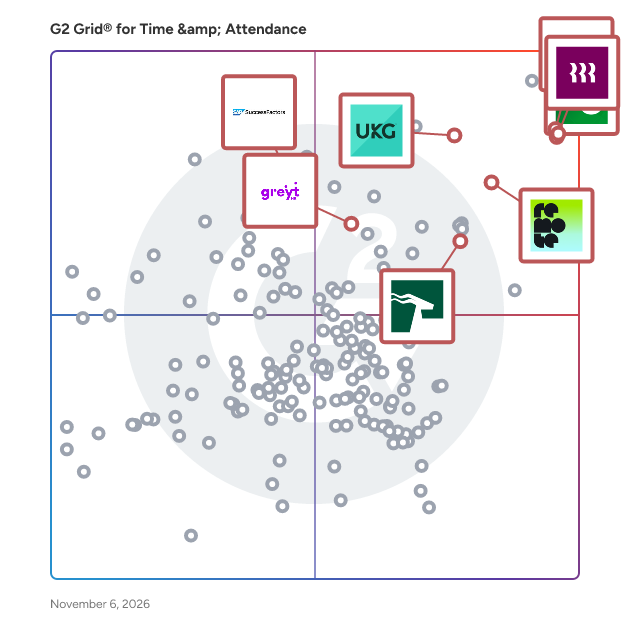
G2 Grid® for Time & Attendance Software

G2 Grid® for Time & Attendance Software plotting products by satisfaction and market presence

Highlighted products: Paycom, Rippling, UKG Ready, BambooHR, SAP SuccessFactors HCM, HROne, Remote, and greytHR.

Underlying data: [Grid® JSON](https://www.g2.com/categories/time-attendance/grids.json?focus%5B%5D=paycom&focus%5B%5D=rippling&focus%5B%5D=ukg-ready&focus%5B%5D=bamboohr&focus%5B%5D=sap-sap-successfactors-hcm&focus%5B%5D=uneecops-hrone&focus%5B%5D=remote&focus%5B%5D=greythr&segment=enterprise)

TimeCamp

Know what every project earns. You bill by the hour and only find out how fruitful the project is after it's done? We change that – TimeCamp logs your team hands-free, in the background, and with AI suggestions, so the profit you see is based on what actually happened, not what someone remembered on Friday. - Hours log themselves in the background, no timers, no timesheet chasing - Real-time margin on every client and project - Time, attendance, reporting, and capacity planning in one login Automatic capture, not clock-watching. For teams who are done guessing. TimeCamp is the time tracking software teams use to record work hours, create accurate timesheets, and bill with confidence. Designed for remote, hybrid, and in-office environments, it delivers granular, up-to-date insights into team performance, employees’ daily activity, project progress, and billable vs. non-billable time. Track hours by project and client, streamline employee time tracking, and simplify timesheet submission so managers get reliable data without the back-and-forth. With billable hours tracking and clear time reports, you can improve productivity, stay on budget, and keep work on schedule while ensuring accurate invoicing and better forecasting. If you need dependable timesheet software that makes project time tracking effortless and provides real-time team insights, TimeCamp brings everything together in one place. Start your free trial or book a demo to see how TimeCamp can help your team track hours, bill accurately, and make smarter decisions faster. TimeCamp is a perfect fit for mid-market services firms, agencies, software houses, and consultancies in the 51–1,000-employee range that bill by the hour and need to see real project margins. Larger enterprise teams (1,000+) are also a strong fit, especially where a high volume of time and project data, as well as a self-hosted deployment, are important for scaling. Still weighing your options? We've put together honest, side-by-side breakdowns of how TimeCamp stacks up against the tools you're probably evaluating: TimeCamp vs Clockify (https://www.timecamp.com/blog/timecamp-vs-clockify/), TimeCamp vs Toggl (https://www.timecamp.com/blog/timecamp-vs-toggl/), TimeCamp vs Harvest (https://www.timecamp.com/blog/timecamp-vs-harvest/), TimeCamp vs Hubstaff (https://www.timecamp.com/blog/timecamp-vs-hubstaff/), TimeCamp vs Everhour (https://www.timecamp.com/blog/timecamp-vs-everhour/), TimeCamp vs Time Doctor (https://www.timecamp.com/blog/timecamp-vs-time-doctor/), and TimeCamp vs Jibble (https://www.timecamp.com/blog/timecamp-vs-jibble/). Feature-by-feature comparisons so you can pick what actually fits your team. 1. Native Integrations (Account-Level API Sync) These integrations import project/task structure, synchronize data bidirectionally, or export time to the connected tool. Each is configured in the TimeCamp Integrations panel by an Administrator. Jira (Cloud + Self-hosted) Asana Trello Monday.com ClickUp Notion Smartsheet Wrike Basecamp (2 + 3) Teamwork Podio Redmine ActiveCollab MeisterTask Breeze Targetprocess Dropbox Paper Todoist Azure DevOps GitHub GitLab Slack Microsoft Teams Salesforce Insightly Zendesk Freshdesk QuickBooks (Online only) Xero Google Calendar Outlook Calendar iCal / Calendar (ICS feed) Microsoft Entra (Azure AD) LDAP BambooHR Sage HRIS Zapier Toggl (migration tool) Global Holidays Custom Attendance Day Types 2. Browser Extension Timer Buttons (Chrome / Edge) These integrations add a one-click "Start timer" button directly into the interface of third-party web applications via the TimeCamp Chrome Extension or Microsoft Edge Extension. They do NOT sync project structure – they only provide a timer button that logs time to the currently selected project in TimeCamp. Requirement: TimeCamp Chrome Extension or Microsoft Edge Extension installed and logged in. Project Management Asana Trello ClickUp Monday.com Notion Wrike Todoist Podio Teamwork Projects OpenProject YouTrack Redbooth Fibery DokuWiki Unfuddle CodebaseHQ Zube Kantree Sprintly CRM & Sales HubSpot Pipedrive Insightly MiniCRM Bitrix24 Helpdesk & Support Zendesk Freshdesk osTicket Zammad Google Workspace Google Docs Google Keep Google Mail (Gmail) Productivity & Other TickTick Habitica Odoo Remember The Milk Toodledo PagerDuty Sifterapp Spidergap Focuster Husky Marketing Planner Engineering & CAD Onshape 3. Tools with Both Native Integration + Browser Extension These tools appear in both categories – they have a native account-level integration AND a dedicated Chrome extension timer button for quick access: Asana Trello ClickUp Monday.com Notion Wrike Todoist Insightly Zendesk Podio Teamwork Summary: 40 native integrations, 42 browser extension timer integrations, 11 tools available in both categories.

Average Rating: 4.7/5.0

Total Reviews: 388

How Do G2 Users Rate TimeCamp?

  • Has the product been a good partner in doing business?: 9.1/10 (Category avg: 8.9/10)
  • Dashboards & Reporting: 7.4/10 (Category avg: 8.7/10)
  • Process Automation: 6.8/10 (Category avg: 8.7/10)
  • Data Collection: 6.7/10 (Category avg: 8.7/10)

Who Is the Company Behind TimeCamp?

  • Seller: TimeCamp
  • Company Website:
  • Year Founded: 2010
  • HQ Location: Covina, CA
  • LinkedIn® Page: www.linkedin.com
    38 employees on LinkedIn®

Who Uses This Product?

  • Who Uses This: Owner, Founder
  • Top Industries: Marketing and Advertising, Information Technology and Services
  • Company Size: 80% Small, 15% Medium

What Do G2 Reviewers Say About TimeCamp?

AI-generated summary from verified user reviews

Pros
  • Users find TimeCamp's ease of use enhances efficiency in tracking tasks and managing client billing seamlessly.
  • Users love the accurate time tracking features of TimeCamp, enhancing productivity and client billing management significantly.
  • Users love TimeCamp's tracking capabilities, enabling effortless project management and accurate time allocation for various tasks.
  • Users appreciate the versatile task tracking features of TimeCamp, allowing for precise client and project management.
  • Users appreciate the efficient task management in TimeCamp, enhancing client tracking and improving overall productivity.
Cons
  • Users face time tracking issues due to poor synchronization and difficulty in manual entry, complicating their workflow.
  • Users find the limited functionality of TimeCamp frustrating, especially regarding reporting and bulk action capabilities.
  • Users often face software bugs that complicate task management and create frustration during usage of TimeCamp.
  • Users find missing features like limited reporting and filtering options, software glitches, and absence of essential input boxes frustrating.
  • Users experience slow loading issues with TimeCamp, causing frustration and inefficient time tracking across devices.

What Are Recent G2 Reviews of TimeCamp?

What Are G2 Users Discussing About TimeCamp?

Rotageek

Put simply, we provide app-based workforce management and scheduling solutions that help you plan labour to demand more efficiently. Whether you're scheduling staff on the shop floor or rostering doctors, we’ll help you create the perfect workforce schedule every time, broadcast it to your employees, fill and mitigate shift gaps, improve your labour to demand match and increase your sales or patient care. Our workforce management solutions range from intuitive digital schedules to AI optimised rotas using forecasts from data points at your locations. And with tools to book leave, track time and attendance, clock in and out for shifts, a self-serve employee app and integrations into HR & Payroll integration, we can provide an all-in-one workforce management solution.

Average Rating: 4.6/5.0

Total Reviews: 27

How Do G2 Users Rate Rotageek?

  • Has the product been a good partner in doing business?: 9.8/10 (Category avg: 8.9/10)
  • Dashboards & Reporting: 8.6/10 (Category avg: 8.7/10)
  • Process Automation: 8.6/10 (Category avg: 8.7/10)
  • Data Collection: 8.3/10 (Category avg: 8.7/10)

Who Is the Company Behind Rotageek?

Who Uses This Product?

  • Top Industries: Retail
  • Company Size: 54% Large, 32% Small

What Are Recent G2 Reviews of Rotageek?

What Are G2 Users Discussing About Rotageek?

Timesheets.com

Timesheets.com is a user-friendly and affordable employee time tracking solution for businesses who want to save on payroll costs or increase billing. Employees can track their time with our mobile site or admins can restrict where employees clock in to just certain office locations. Our DCAA compliant system has a full audit trail and permissions architecture ensuring security and accountability. Reports can be exported to a number of payroll and accounting software platforms including QuickBooks.

Average Rating: 4.2/5.0

Total Reviews: 450

How Do G2 Users Rate Timesheets.com?

  • Has the product been a good partner in doing business?: 9.0/10 (Category avg: 8.9/10)
  • Dashboards & Reporting: 8.2/10 (Category avg: 8.7/10)
  • Process Automation: 8.7/10 (Category avg: 8.7/10)
  • Data Collection: 8.7/10 (Category avg: 8.7/10)

Who Is the Company Behind Timesheets.com?

Who Uses This Product?

  • Who Uses This: President, Administrator
  • Top Industries: Education Management, Hospital & Health Care
  • Company Size: 52% Small, 29% Medium

What Do G2 Reviewers Say About Timesheets.com?

AI-generated summary from verified user reviews

Pros
  • Users appreciate the friendly customer support of Timesheets.com, enhancing their experience with simplicity and flexibility.
  • Users enjoy the ease of use of Timesheets.com, appreciating its simplicity and flexible accessibility.
  • Users appreciate the flexibility of Timesheets.com, allowing seamless adaptation to their unique business needs.
  • Users value the simplicity and flexibility of Timesheets.com, along with friendly support and affordable pricing.
  • Users value the simplicity and flexibility of Timesheets.com, along with its friendly support and affordable pricing.
Cons
  • Users experience integration issues with Timesheets.com, impacting customization and reporting functionalities.
  • Users find limited customization and reporting options a drawback, desiring better integration with other platforms.
  • Users find the limited customization and reporting options to be a significant drawback in Timesheets.com.
  • Users find the limited customization and reporting options of Timesheets.com restrict their experience and effectiveness.
  • Users face missing features like limited customization and integration, impacting the overall functionality of Timesheets.com.

What Are Recent G2 Reviews of Timesheets.com?

What Are G2 Users Discussing About Timesheets.com?

AI can help you find the answers. G2 helps you trust them.

Connect G2 to Claude or ChatGPT for answers grounded in G2's trusted reviews, comparisons, and pricing from real user insights.

How it works

PurelyHR

PurelyHR is powerful modular HR software for small to medium-sized businesses. Since 2010, we've helped thousands of companies worldwide save hours a week on everyday HR tasks like leave management, employee file management and onboarding, time tracking, performance management, infraction tracking, and certification management. Choose the modules you need and the number of users for an HRIS that fits your business needs and budget. Get started today with a free 21-day trial (www.purelyhr.com/trial) or a live demo.

Average Rating: 4.5/5.0

Total Reviews: 284

How Do G2 Users Rate PurelyHR?

  • Has the product been a good partner in doing business?: 9.5/10 (Category avg: 8.9/10)
  • Dashboards & Reporting: 9.2/10 (Category avg: 8.7/10)
  • Process Automation: 8.5/10 (Category avg: 8.7/10)
  • Data Collection: 10.0/10 (Category avg: 8.7/10)

Who Is the Company Behind PurelyHR?

  • Seller: SherWeb
  • Year Founded: 1998
  • HQ Location: Sherbrooke, Quebec, Canada
  • LinkedIn® Page: www.linkedin.com
    935 employees on LinkedIn®

Who Uses This Product?

  • Top Industries: Non-Profit Organization Management, Marketing and Advertising
  • Company Size: 55% Small, 38% Medium

What Are Recent G2 Reviews of PurelyHR?

What Are G2 Users Discussing About PurelyHR?

Netchex

Netchex is a comprehensive HR and payroll software solution designed specifically for businesses that form the backbone of the American economy, including hotels, restaurants, health clinics, dealerships, and manufacturing plants. This platform addresses the unique needs of organizations where the workforce is primarily on the floor rather than behind a desk. By integrating payroll, human resources, benefits administration, time and attendance, onboarding, and compliance into a single platform, Netchex eliminates the need for manual data entry and reconciliation, streamlining operations for its users. Targeting small to mid-sized businesses, Netchex is particularly beneficial for industries that require a mobile-first approach to workforce management. Managers and employees who are constantly on the move can access the platform from their mobile devices, ensuring they can manage HR tasks and payroll processes without being tethered to a desk. This flexibility is crucial for businesses that operate in dynamic environments, allowing them to maintain productivity while ensuring that essential HR functions are handled efficiently. Key features of Netchex include accurate payroll processing that is audit-ready, which alleviates the burden of double-checking calculations, taxes, and compliance. The software is designed to run payroll seamlessly, providing peace of mind to business owners and HR professionals. Additionally, Netchex offers dedicated account management, ensuring that each client has access to personalized support. Clients benefit from project-managed implementations, free data imports, and coaching from FPC-certified payroll professionals, which enhances the onboarding experience and ensures that users can maximize the platform's capabilities. One of the standout aspects of Netchex is its commitment to customer service. When clients reach out for assistance, they are connected with a knowledgeable representative who understands their specific account and industry needs, rather than being assigned a generic ticket number. This level of personalized service fosters strong relationships and ensures that businesses receive the support they need to navigate the complexities of HR and payroll management effectively. By focusing on delivering dependable technology alongside exceptional service, Netchex positions itself as a valuable partner for businesses striving to enhance their HR operations.

Average Rating: 4.8/5.0

Total Reviews: 792

How Do G2 Users Rate Netchex?

  • Has the product been a good partner in doing business?: 8.9/10 (Category avg: 8.9/10)
  • Dashboards & Reporting: 8.4/10 (Category avg: 8.7/10)
  • Process Automation: 8.0/10 (Category avg: 8.7/10)
  • Data Collection: 8.5/10 (Category avg: 8.7/10)

Who Is the Company Behind Netchex?

  • Seller: Netchex
  • Company Website:
  • Year Founded: 2003
  • HQ Location: Covington, LA
  • LinkedIn® Page: www.linkedin.com
    388 employees on LinkedIn®
  • Phone: (985)220-1410

Who Uses This Product?

  • Who Uses This: HR Manager, Controller
  • Top Industries: Automotive, Hospitality
  • Company Size: 55% Medium, 42% Small

What Do G2 Reviewers Say About Netchex?

AI-generated summary from verified user reviews

Pros
  • Users value the ease of use in Netchex, appreciating quick access to features and efficient support.
  • Users value the exceptional customer service of Netchex, appreciating prompt responses and helpful resources for quick solutions.
  • Users commend Netchex for their exceptional customer support, highlighting prompt responses and personalized assistance.
  • Users love the intuitive interface of Netchex, making it user-friendly and efficient for all HR needs.
  • Users appreciate the user-friendly interface of Netchex, which simplifies access to various HR functionalities and support.
Cons
  • Users note the missing features in Netchex, hindering their ability to utilize the product fully and efficiently.
  • Users express dissatisfaction with the limited features of Netchex, feeling workflows and training support are lacking.
  • Users find limited customization in Netchex, especially in reports and user permissions, affecting usability and efficiency.
  • Users experience poor customer support, facing long hold times and delayed responses on product issues and payroll inquiries.
  • Users find Netchex to be not user-friendly, struggling with manual inputs and lack of helpful features for training.

What Are Recent G2 Reviews of Netchex?

What Are G2 Users Discussing About Netchex?

Time Doctor

Managing a distributed workforce without reliable data means making decisions on gut feel. Time Doctor gives leaders the workforce visibility they need to manage performance, capacity, and productivity across remote, hybrid, and in-office teams without defaulting to micromanagement. More than 245,000 people across BPOs, healthcare, financial services, and remote-first companies use Time Doctor to move from reactive management to informed leadership. What Time Doctor Does - Tracks time, projects, and tasks so leaders know where effort is going and what's driving results - Surfaces productivity patterns, app and website usage, and workload signals to catch bottlenecks and disengagement early - Uses built-in AI to benchmark performance, flag trends, and surface issues before they escalate - Supports payroll, billing, and client reporting with accurate, audit-ready time data Deploys privacy-first controls: screenshot blurring, role-based access, employee-facing reports so oversight stays respectful, not invasive. What Sets Time Doctor Apart Most workforce tools force a trade-off between visibility and trust. Time Doctor is built so you don't have to choose. Managers get the data they need. Employees see the same data about their own work. That transparency is what makes adoption stick and what makes the data reliable. Who It's For Operations leaders, HR and people ops, team managers, executives, and IT leaders managing distributed or remote-first workforces.

Average Rating: 4.4/5.0

Total Reviews: 489

How Do G2 Users Rate Time Doctor?

  • Has the product been a good partner in doing business?: 9.0/10 (Category avg: 8.9/10)
  • Dashboards & Reporting: 9.6/10 (Category avg: 8.7/10)
  • Process Automation: 8.3/10 (Category avg: 8.7/10)
  • Data Collection: 7.8/10 (Category avg: 8.7/10)

Who Is the Company Behind Time Doctor?

  • Seller: Time Doctor
  • Company Website:
  • Year Founded: 2010
  • HQ Location: Las Vegas, NV
  • LinkedIn® Page: www.linkedin.com
    535 employees on LinkedIn®

Who Uses This Product?

  • Who Uses This: Owner, CEO
  • Top Industries: Marketing and Advertising, Information Technology and Services
  • Company Size: 63% Small, 31% Medium

What Do G2 Reviewers Say About Time Doctor?

AI-generated summary from verified user reviews

Pros
  • Users value the accurate time tracking of Time Doctor, enhancing performance supervision and task management for remote teams.
  • Users appreciate the time-saving capabilities of Time Doctor, enabling effortless tracking and reporting for maximum productivity.
  • Users find Time Doctor easy to use, appreciating its intuitive design and quick adaptation by new team members.
  • Users value the efficiency of Time Doctor, appreciating its quick time logging and insightful productivity reports.
  • Users appreciate the synchronization across devices and the user-friendly experience of Time Doctor's time-tracking features.
Cons
  • Users struggle with technical issues, including reporting limitations, connectivity problems, and time tracking inaccuracies.
  • Users desire missing features like software integration and better insights, impacting overall efficiency and usability.
  • Users experience software bugs with Time Doctor, including issues with time recording and report navigation glitches.
  • Users experience tracking issues with Time Doctor, including inconsistent time recording and intrusive prompts during meetings.
  • Users feel there is gatekeeping on essential features in Time Doctor, limiting the tool's effectiveness and insights.

What Are Recent G2 Reviews of Time Doctor?

What Are G2 Users Discussing About Time Doctor?

Gaia WFM Suite

GaiaDigits is a professional workforce management solution company in Ontario Canada. Gaia WFM Suite is a cloud-based workforce management suite built to help businesses manage employee time and attendance. This solution includes workforce analytics that provides access to real-time data reports and metrics that intend to improve workforce efficiency. Additionally, the Gaia WFM Smart Scheduler feature helps businesses create effective team schedules with the use of forecasting and scheduling algorithms. Gaia WFM Suite offers an intelligent mobile app that uses Blue Tooth, WiFi, Geo-Fence (GPS) to clock in and out. The app gives employees access to live schedules, shift swap requests, mobile punch in/out methods, available shifts, overtime requests, and company announcements. Managers can use the Gaia WFM mobile app to view and approve requests as needed. Please contact info@gaiadigits.com to book a demo.

Average Rating: 4.4/5.0

Total Reviews: 25

How Do G2 Users Rate Gaia WFM Suite?

  • Has the product been a good partner in doing business?: 9.2/10 (Category avg: 8.9/10)
  • Dashboards & Reporting: 7.7/10 (Category avg: 8.7/10)
  • Process Automation: 8.2/10 (Category avg: 8.7/10)
  • Data Collection: 8.3/10 (Category avg: 8.7/10)

Who Is the Company Behind Gaia WFM Suite?

Who Uses This Product?

  • Top Industries: Retail
  • Company Size: 53% Large, 43% Medium

What Are Recent G2 Reviews of Gaia WFM Suite?

What Are G2 Users Discussing About Gaia WFM Suite?

Akrivia HCM

Akrivia HCM is an AI-powered, Recruitment-to-Retirement platform designed to bridge the gap between operational HR efficiency and business efficacy. The unified suite delivers efficiency by automating core HR processes across the employee lifecycle, including Recruitment, Time and Attendance, Leave, Multi-Country Native Payroll with statutory compliance, and Workflows. This automation enables HR teams to focus on strategic efficacy by leveraging Performance Management, Learning Mangement, and People Analytics modules. Real-time analytics, Configurable Reports, and Employee Self-Service tools provide operational visibility. While embedded AI assists with recommendations, forecasting helps the HR department become a strategic partner to the business. With over 200+ customers globally, this approach is helping enterprises address the needs of their employees and business collectively.

Average Rating: 4.8/5.0

Total Reviews: 68

How Do G2 Users Rate Akrivia HCM?

  • Has the product been a good partner in doing business?: 8.3/10 (Category avg: 8.9/10)
  • Dashboards & Reporting: 8.3/10 (Category avg: 8.7/10)
  • Process Automation: 10.0/10 (Category avg: 8.7/10)
  • Data Collection: 8.6/10 (Category avg: 8.7/10)

Who Is the Company Behind Akrivia HCM?

Who Uses This Product?

  • Top Industries: Information Technology and Services, Construction
  • Company Size: 74% Medium, 15% Large

What Do G2 Reviewers Say About Akrivia HCM?

AI-generated summary from verified user reviews

Pros
  • Users find Akrivia HCM to be extremely user-friendly, streamlining HR processes and enhancing daily operations effortlessly.
  • Users appreciate the great customer support of Akrivia HCM, providing assistance quickly whenever needed.
  • Users love the user-friendly interface of Akrivia HCM, making HR tasks effortless and accessible for all.
  • Users find Akrivia HCM to be simple and user-friendly, making HR tasks more efficient and straightforward.
  • Users value the user-friendly interface of Akrivia HCM, making HR tasks simple and approachable for everyone.
Cons
  • Users feel that the update issues of Akrivia HCM hinder the mobile app's experience compared to the web version.
  • Users find the limited customization in Akrivia HCM necessitates many workarounds, complicating their overall experience.
  • Users note the need for improved reporting and functionality in the PMO module to enhance overall usefulness.
  • Users find the reporting inadequate, noting that updates and improvements are needed for better usability.
  • Users note the lack of mobile app features which limits the overall usability compared to the web experience.

What Are Recent G2 Reviews of Akrivia HCM?

Inia Debnath
ID
Researched and written by Inia Debnath
Updated