Best Task Management Software - Page 29

How Many Task Management Software Products Does G2 Track?

Total Products under this Category: 560

Category Stats (Sep 2026)

  • Average Rating: 4.46/5 (↑0.01 vs Aug 2026) The average rating of products in this category, based on all submitted ratings
  • Top Trending Product: Chaser (+1.82%) - Among all products in this category, Chaser recorded the largest rating increase compared to last month

Last updated: September 01, 2026

How Does G2 Rank Task Management Software Products?

Why You Can Trust G2's Software Rankings:

  • 30 Analysts and Data Experts
  • 118,800+ Authentic Reviews
  • 560+ Products
  • Unbiased Rankings

G2's software rankings are built on verified user reviews, rigorous moderation, and a consistent research methodology maintained by a team of analysts and data experts. Each product is measured using the same transparent criteria, with no paid placement or vendor influence. While reviews reflect real user experiences, which can be subjective, they offer valuable insight into how software performs in the hands of professionals. Together, these inputs power the G2 Score, a standardized way to compare tools within every category.
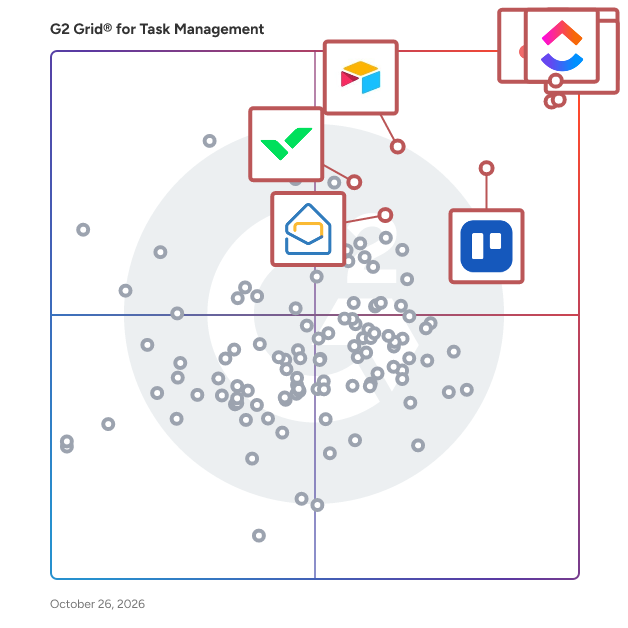
G2 Grid® for Task Management Software

G2 Grid® for Task Management Software plotting products by satisfaction and market presence

Highlighted products: Asana, ClickUp, monday AI Work Platform, Smartsheet, Trello, Airtable, Wrike, and Microsoft Planner.

Underlying data: [Grid® JSON](https://www.g2.com/categories/task-management-software/grids.json?focus%5B%5D=asana&focus%5B%5D=clickup&focus%5B%5D=monday-com&focus%5B%5D=smartsheet&focus%5B%5D=trello&focus%5B%5D=airtable&focus%5B%5D=wrike&focus%5B%5D=microsoft-planner)

PocketOcean

PocketOcean is a workspace solution for organizations and teams in all industries that want to be super productive. The software is made of tools that help you and your team get work done and meet your deadlines. Breakdown projects into detailed tasks and checklist items while collaborating with your team. Create project roadmaps, agile kanban boards and easily see your progress in tasks streams and illustrative graphs. We are bring more accuracy and visibility to the work you do and creating an environment to communicate well.

Who Is the Company Behind PocketOcean?

Portal 360

Portal 360 is an AI‑powered practice management and client portal platform built for accounting firms and bookkeepers seeking a simpler, more connected way to run their practice. It centralises client communication, tasks, workflows and file management into one intelligent system, giving teams full visibility while reducing daily admin. With a unified inbox and secure client portal, every email, document, task and approval stays linked to the right client, minimising lost information and unnecessary follow‑ups. Portal 360 seamlessly integrates with leading accounting software including Xero and MYOB, keeping financial data aligned with workflows and eliminating double handling. Smart workflow tools make it easy to assign tasks, manage approvals, track deadlines and balance workloads. Available on web, iOS and Android, Portal 360 helps firms reclaim 15–20 hours per staff member and achieve 30–50% efficiency gains, enabling better client experiences, lower costs and sustainable growth from one connected platform.

Who Is the Company Behind Portal 360?

Pra Ontem

Pra Ontem turns raw work information into organized, actionable tasks using AI. Instead of manually creating a task and filling in multiple fields, users simply paste or write the information they received, such as an email, message, request, or note. Pra Ontem automatically identifies and structures the relevant details. The AI extracts information such as what needs to be done, who requested it, where the request came from, deadlines, priorities, and other relevant context, transforming unstructured information into a clear task ready to be managed. Pra Ontem is designed for professionals who receive work demands throughout the day from multiple channels and need to keep track of what needs to be done without spending additional time organizing every request manually. Users can prioritize demands, track their progress, and focus on the most important tasks while keeping other requests organized for later.

Who Is the Company Behind Pra Ontem?

Priority-Zero!

Priority-Zero is a project management, time tracking, quoting, invoicing and scheduling platform built for freelancers, solopreneurs, independent professionals and small teams. Everything you're responsible for, client work, personal projects, creative pursuits, side businesses, lives in one place, organised well enough that you can plan all of it around all of it. Most tools are built for teams inside organisations, which means people who work independently have been making do with software that doesn't fit how they actually operate. Priority-Zero was built from the ground up for people who work for themselves or run small operations, and the difference shows in how it handles the specific problems those people face every day. The OCP System Everything in Priority-Zero is organised around OCPs, Organisations, Categories and Personas. An OCP is a distinct identity within your account. Your primary business is one OCP. A side hustle is another. A creative project or personal pursuit is another. Each OCP has its own projects, billing details, logo and optional Directory listing, discoverable independently of your other identities. If you're a consultant who also writes, teaches and runs a product business, all four can exist as separate, clearly defined contexts within a single Priority-Zero account, each visible alongside the others so you can plan everything around everything else. On the free plan, you can create up to two OCPs. During the 14-day free trial, you can create as many as you need without restriction, and they remain yours after the trial converts to a free account. Unlimited OCPs are available from the Professional plan upward. Projects and Deliverables Projects in Priority-Zero come in two forms. A unitary project has no deliverables and is timed and scheduled directly at the project level. A composite project is broken down into deliverables, each of which carries its own time estimate, priority, scheduling and timer. As deliverables are added and time estimates entered, the total project time is calculated automatically from the sum of its parts. Every project and deliverable has its own rich text workspace for instructions, notes, briefs, agreements and specifications. Tables, images, links and formatted content are all supported. Projects are colour-coded for quick visual identification in the project list. Billable deliverables are marked with a gold medallion so you can tell at a glance which projects contain chargeable work. Projects and deliverables can be P-Zeroed, marked as complete and moved out of the active view, without being permanently deleted. Action Stations and The Plan Action Stations is the primary working area in Priority-Zero, where all active projects and deliverables are managed. The Plan panel sits alongside it and shows everything scheduled for today, drawn from both Priority-Zero and any connected external calendar. Between Action Stations and The Plan, you start every day knowing exactly what you're supposed to be working on and why, with no need to reconstruct that picture from separate tools or scattered notes. Time Tracking Anything in Action Stations that displays a timer icon can be timed, including project and deliverable tiles, items in The Plan, and the detail panel of any project or deliverable. Timers are started and stopped with a single click, with optional start and end comments for context. The "What was I up to?" feature shows the details of your most recent timer session so you can pick up exactly where you left off. All recorded time feeds directly into billing, which means the hours you track are the hours you invoice, without having to reconstruct from memory. Quoting and Invoicing The Billing section is where Priority-Zero makes a material difference to the financial side of independent work. For fixed-price projects, the Auto Quote feature generates a fully itemised quote directly from the project scope. Every deliverable marked as billable is pulled in as a line item, your hourly rate is applied, tax is calculated and the total is produced automatically. Your rate, tax settings, currency and payment terms are entered once in Billing Settings and applied to everything from that point on. When the project is complete, the quote converts to an invoice in a single click, with the original quote number preserved as a reference. For hourly billing, you select a client and a date range and Priority-Zero picks up every billable hour recorded in that period automatically. You choose whether to present the invoice as a grouped summary or a full activity-by-activity breakdown. Either way, it's ready in seconds. Manual invoicing is also supported for situations where you need to enter your own descriptions, quantities and rates. Quotes, invoices and credit notes can all be exported to PDF. Scheduling and Workload Management Work can be scheduled from Action Stations or the Activity Calendar. Scheduling an item opens a panel where you select the date, start time, duration and any notes. Scheduled items appear in the Activity Calendar alongside events imported from Google Calendar and Outlook and can be rescheduled by dragging them on the calendar. Reminders can be created for any type of event and converted into full projects with a single click, useful when a client gives a project the go-ahead during a scheduled meeting. The Workload Viewer provides two perspectives on capacity. The Aggregated Workload view shows total estimated time remaining across all active projects as a proportion of the next four rolling weeks, adjusted for your set working days and hours and reduced by time already logged. The Scheduled Hours view shows committed hours against available work hours across the same period, highlighting capacity gaps and overbooked days. Availability Calendar and Meeting Management Priority-Zero generates a shareable availability link that accounts for everything already scheduled, project time, personal commitments, non-work days, before showing anyone a free slot. When someone clicks the link, they see only the times you're genuinely available. The system automatically displays both your timezone and theirs side by side, so there's no confusion across borders. Meeting requests can be sent to one or more people directly from within Priority-Zero, with options for recurring meetings on a daily, weekly, fortnightly or monthly basis. All video meetings are powered by Jitsi, a free and open-source video conferencing system, without requiring any external subscription. Teams and Collaboration Priority-Zero handles external collaboration without per-seat pricing for the people you invite. You invite a collaborator to a specific project by email. They create a free Priority-Zero account, accept the invitation, and a shared workspace opens for both of you. You can assign deliverables to them, which get converted into projects in their Action Stations view. They can add their own notes and files, and shared file storage connects to Google Drive or OneDrive at the project level. The Meeting Manager within the shared workspace handles questions and agenda items between sessions, with the ability to mark items resolved or carry them to the next meeting. The collaborator's account remains free for collaboration purposes for as long as the project runs and beyond. If they find any premium features useful, they can subscribe independently. Collaborators can be found through the Priority-Zero Directory, searchable by skill, occupation, service or product, or invited directly via email through the Teams and Collaboration section. Publishing and Sharing Any project or deliverable in Priority-Zero can be published with a unique public link, accessible to anyone, whether or not they have a Priority-Zero account. Proposals, briefs, agreements, research, creative work, anything written in the rich text workspace can be shared as a clean, read-only page. Publishing multiple deliverables under the same project creates a navigable collection with a left-hand menu. Individual deliverables can be unpublished at any time and the link stops working immediately. If a parent project is unpublished, all its deliverables are unpublished with it. Reports The Reports section provides six views across any date range: a Project Progress Chart comparing estimated to actual time per project; a Project Breakdown Table listing planned and actual time for each project; a Planned vs Actual Activity report comparing scheduled, worked and billed hours; a Day-by-Day Comparison of planned versus completed work; a pie chart showing time distribution across all projects; and a downloadable Activity Detail Report showing every recorded work session with start and end times, duration and notes. Reports can be filtered by team member. Integrations Priority-Zero integrates with Google Calendar, Google Drive, Microsoft Outlook and OneDrive. Xero integration is also available. File storage connects at the project and deliverable level, with files stored in a folder structure that mirrors your projects in your chosen cloud storage account. For shared collaborative projects, a shared folder is created automatically that all team members can access. Forms and Directory The Form Designer lets you build, preview and publish shareable forms linked to any OCP, useful for gathering information from clients, leads or audiences on social media. The Directory is a community space with listings searchable by skill, occupation, service or product, with options to visit websites, view published work or send collaboration invitations. Priority-Zero is available on a free plan with access to core features, and on Professional, Commercial and Collaborative tiers that unlock additional OCPs, features and team capacity. A 14-day free trial gives full access to every feature without requiring a credit card.

Who Is the Company Behind Priority-Zero!?

ProcessGene Task Management

The ProcessGene suite provides a complete solution for task management. The Task Management is implemented within days, immediately enabling automated task management and centralized control.

Who Is the Company Behind ProcessGene Task Management?

procezo

Procezo is an excellent free-for-life task managing tool with several benefits. Procezo allows users to create boards and provide access to users or teams as required, set priority and precedence of the task and allowing for subtasks and discussions to be created. With unlimited tasks, users, projects and free support, Procezo is quickly making its way into businesses from across the world and the ultimate growth hack tool.

Who Is the Company Behind procezo?

  • Seller: ibism
  • Year Founded: 2016
  • HQ Location: Delhi, IN
  • LinkedIn® Page: www.linkedin.com
    1 employees on LinkedIn®

Produck

The project management tool teams use to stay organized, avoid delays, and have time for the work that matters most.

Who Is the Company Behind Produck?

Project and Task Management Software

Looking for a game-changer in project management? Discover the best project management software designed to help managers worldwide streamline their workflows, improve team collaboration, and drive successful outcomes. With powerful features and intuitive design, it’s your ultimate tool for mastering projects of any size.

Who Is the Company Behind Project and Task Management Software?

Projecto.World

Projecto is a Scalable Digital Office for both remote and on-premise teams. Assign, track, negotiate, edit, complete your tasks and projects through Projecto.

Who Is the Company Behind Projecto.World?

Project Planner

Project planner software is best for project management for small, medium and large businesses. You can make sure you are on schedule, on budget and you can effectively organize all aspects of your projects – from initial estimates to final delivery. This software is designed to help you manage time and cost while tracking progress, analyzing risks, streamlining communications and more.

Who Is the Company Behind Project Planner?

ProMaTo

Promato is a complete company management tool which offers you to manage your projects, tasks employees, clients and their activity as well on your system.

Who Is the Company Behind ProMaTo?

Subhransu Sahu
SS
Researched and written by Subhransu Sahu
Updated April 10, 2026