Best Task Management Software - Page 24

How Many Task Management Software Products Does G2 Track?

Total Products under this Category: 562

Category Stats (Sep 2026)

  • Average Rating: 4.46/5 (↑0.01 vs Aug 2026) The average rating of products in this category, based on all submitted ratings
  • Top Trending Product: Chaser (+1.82%) - Among all products in this category, Chaser recorded the largest rating increase compared to last month

Last updated: September 01, 2026

How Does G2 Rank Task Management Software Products?

Why You Can Trust G2's Software Rankings:

  • 30 Analysts and Data Experts
  • 118,800+ Authentic Reviews
  • 562+ Products
  • Unbiased Rankings

G2's software rankings are built on verified user reviews, rigorous moderation, and a consistent research methodology maintained by a team of analysts and data experts. Each product is measured using the same transparent criteria, with no paid placement or vendor influence. While reviews reflect real user experiences, which can be subjective, they offer valuable insight into how software performs in the hands of professionals. Together, these inputs power the G2 Score, a standardized way to compare tools within every category.

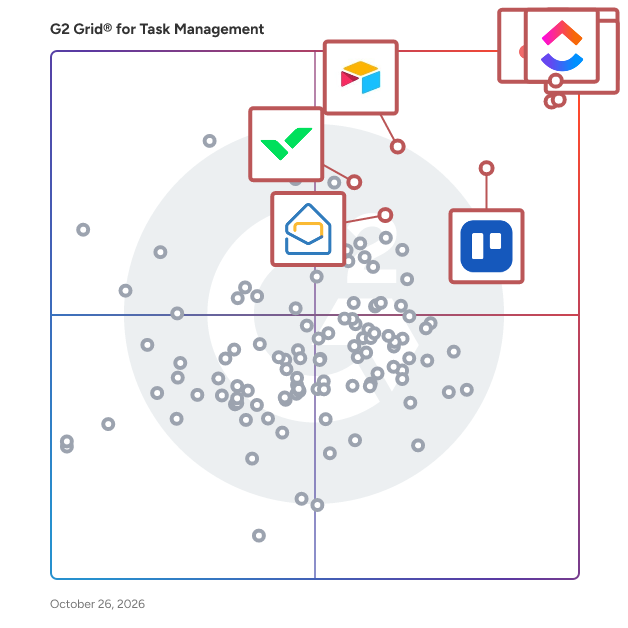
G2 Grid® for Task Management Software

G2 Grid® for Task Management Software plotting products by satisfaction and market presence

Highlighted products: Asana, ClickUp, monday AI Work Platform, Smartsheet, Trello, Airtable, Wrike, and Microsoft Planner.

Underlying data: [Grid® JSON](https://www.g2.com/categories/task-management-software/grids.json?focus%5B%5D=asana&focus%5B%5D=clickup&focus%5B%5D=monday-com&focus%5B%5D=smartsheet&focus%5B%5D=trello&focus%5B%5D=airtable&focus%5B%5D=wrike&focus%5B%5D=microsoft-planner)

GoPanel

GoPanel Free Linux Web Hosting Control Panel

Who Is the Company Behind GoPanel?

goPLIMS

The Integrated Platform for Connected, Compliant, & Collaborative Work Overview goPLIMS is a team-based, integrated project/work management platform that unifies workflows in a secure, dedicated cloud environment, enabling teams to collaborate seamlessly — anytime, anywhere. It connects people, processes, and data into one intuitive system designed to empower teams, foster global collaboration, enable seamless integration, ensure compliance, and keep work on track. Whether managing daily operations or complex projects, goPLIMS delivers real-time visibility, configurable workflows, and role-based access to support transparent, efficient teamwork across departments and geographies. Developed from real-world industry experience, goPLIMS features a modular architecture that allows organisations to adapt, scale, and evolve without compromising data integrity or performance. Why choose goPLIMS • Unified collaboration: Connect projects, tasks, documents, meeting minutes and discussions in one workspace. • Real-time visibility: Track progress across departments, locations, and partners with live dashboards. • Increased productivity: Standardise workflows, automate manual steps, and streamline approvals. • Data-driven decision making: Custom reports provide insights for better planning and faster execution. • Scalable & secure: Cloud-based, role-controlled platform supporting teams of any size and geography. • Data integrity & compliance: Maintain traceable, secure, and audit-ready workflows across all activities. Modules Overview Plan & Execute • ActionR: Assign, track, and complete tasks with clear ownership and accountability. • PunchM: Create, review, and close snags, defects, and punch list items with attachments and sign-offs. • RFI-M: Manage Requests for Information through structured threads, responses, and due dates. • TrackR: Monitor milestones and dependencies with real-time progress and status tracking. Govern & Optimise • EDocM: Secure document management with version control and access permissions. • ESignM: Generate control copies and enable multi-party electronic signatures. • ChangeM: Streamline change requests, approvals, and implementation tracking through automated workflows. • DiscrepM: Log and resolve discrepancies or exceptions with structured routing and approvals. • BatchM: Coordinate and manage recurring or multi-step workflows from a unified control centre. Core Platform Capabilities • Dedicated, cloud-hosted architecture with role-based access control • Centralised, configurable dashboards and email reminders • Workflow automation through custom templates • Multi-program and multi-stream management • Mobile access and multi-device compatibility • Real-time reporting and e-signature integration • Modular design for flexible scaling and rapid onboarding Vision & Mission Vision: To connect people, processes, and projects through a single, transparent platform that drives performance and collaboration. Mission: To simplify complex work management by enabling teams to plan smarter, execute faster, and deliver better outcomes.

Average Rating: 4.0/5.0

Total Reviews: 1

Who Is the Company Behind goPLIMS?

Who Uses This Product?

  • Company Size: 100% Medium

What Are Recent G2 Reviews of goPLIMS?

GoTodo

GoTodo is a task management app that helps you manage your work-life, stay organized, focus on what matters most and be more productive. Login directly with Email OTP, Its FREE, no credit card required. Start creating your to do lists, reminders and notes for any purpose. You can switch between devices, access from anywhere, anytime. Invite your friends, family or colleagues to any of your GoTodo Workspace, share and collaborate tasks, notes and reminders with them. Get more done, Happy Goals! Check https://gotodo.app for more feature details . . . Any questions? Feedback? Support? reach us here support@gotodo.app

Who Is the Company Behind GoTodo?

Grownu

Grownu is workforce management software for companies that manage shift-based, field, mobile, and fixed-location teams. It helps operations managers, business owners, HR teams, and payroll teams plan work, track time, manage attendance, approve records, prepare payroll-ready timesheets, and understand project profitability in one connected workflow. Grownu is built for operational industries where work happens on the floor, in the field, at client sites, across locations, or by shift. Typical users include restaurants, warehouses, manufacturing companies, cleaning companies, construction teams, field service companies, facility service providers, security teams, retail teams, logistics operations, agriculture teams, and other businesses with hourly, mobile, or task-based employees. The platform connects the full workforce workflow: planned schedule or task → employee clock-in or task start → attendance record or project time → GPS location, notes, photos, work type, expenses, and exceptions → manager review and approval → payroll-ready timesheets → billable hours, invoice records, and project profitability. Core capabilities include: Employee scheduling: Grownu helps managers create employee schedules, assign shifts, manage roles, plan coverage, and compare planned hours with actual attendance. This is useful for restaurants, warehouses, manufacturing, retail, cleaning, security, and other shift-based teams. AI shift scheduling: Grownu can support demand-based shift planning, helping managers create better schedule drafts around expected workload, busy periods, coverage needs, availability, and operational demand. Managers stay in control while AI helps reduce manual scheduling work. Employee time tracking: Employees can register working time through mobile, web, terminals, or project records. Managers can track clock-in and clock-out times, worked hours, job site time, project time, task time, and attendance exceptions before payroll. Mobile time clock app: Mobile teams can clock in and out from the field using a mobile app. Grownu can support GPS clock-ins, work location context, comments, photos of completed work, and task-related records. This is useful for field service, cleaning, construction, maintenance, security, agriculture, and mobile employees. Attendance terminals: For fixed workplaces, Grownu supports time attendance terminals where employees can clock in and out using PIN, RFID cards, badges, or other terminal-based methods. Terminals are useful for warehouses, manufacturing, restaurants, facility cleaning, security desks, logistics sites, and other fixed-location teams. RFID and PIN clock-ins: Teams can use RFID cards, badges, fobs, or PIN codes for fast employee identification at the start and end of shifts. This helps reduce manual entry and gives managers clearer attendance records. Photo capture and clock-out records: Depending on workflow, Grownu can support photo capture during clock-in or clock-out, as well as comments and photos showing work done. This helps managers review attendance and completed work with more context. Time clock terminal with breathalyzer: Grownu can support a time clock terminal with breathalyzer for safety-sensitive workplaces. This can connect attendance control with alcohol test records, photo capture, failed-test visibility, and manager notifications where that type of safety workflow is required or appropriate. Employee task management: Managers can assign tasks, jobs, work orders, checklists, and instructions to employees. Employees can receive tasks on mobile, update status, add notes, upload work photos, and record task completion. This is especially useful for field service, cleaning, maintenance, construction, security patrols, facility work, and mobile teams. Employee leave management: Grownu helps manage PTO, vacation, sick leave, approved absences, and employee availability. Leave records can be connected to scheduling so managers avoid assigning unavailable employees and can plan replacements before the schedule is published. Attendance checking and logbook review: Grownu helps managers review attendance records before they become timesheets. Early clock-ins, late clock-outs, missed clock-outs, manual changes, unpaid time, and exceptions can be checked in a logbook before payroll approval. Early clock-in and late clock-out control: Grownu can help identify time registered before a scheduled shift or after a scheduled shift. Outside-schedule time can be held separately as unpaid time until a manager reviews and approves it. Companies can also control whether employees are allowed to clock in too early before their scheduled start time. Payroll-ready timesheets: Registered time is not automatically payroll-ready time. Grownu helps companies check, split, calculate, and approve time records before payroll. Timesheets can include approved work hours, breaks, overtime, PTO, work hour types, unpaid time, manager approvals, and payroll-ready records. Breaks and overtime: Breaks can be handled based on company settings. They may be automatic, manually registered by employees, or reviewed by managers. Overtime can be calculated based on configured rules, company policies, regions, work types, and approved timesheet records. Work hour types: Grownu can help separate different types of work such as regular work, night work, weekend work, public holiday work, emergency work, deep cleaning, special service work, client-specific work, billable time, and non-billable time. Payroll exports and integrations: Approved payroll-ready data can be exported through Excel, custom Excel formats, API integrations, or connected payroll/accounting systems depending on setup. This helps reduce manual copy-paste work and gives payroll teams cleaner approved data. Project records: For project-based and service companies, Grownu connects worked time, tasks, job sites, clients, expenses, and approvals to project records. Managers can understand where labor time was spent and how each project performed. Expenses: Employees or managers can record expenses such as materials, travel, parking, fuel, supplies, equipment rental, subcontractor costs, emergency purchases, and client-specific costs. Expenses can be connected to the right project, client, task, or job site. Billable and non-billable hours: For service companies, not every worked hour should be invoiced to the customer. Grownu helps managers distinguish billable and non-billable time. Billable hours can move toward invoice preparation, while non-billable hours remain visible for cost and profitability analysis. Invoicing: Approved billable hours, expenses, materials, and markups can be selected for invoice preparation. This is useful for field service, cleaning, construction, maintenance, facility services, security, and other companies that sell work time or project work to customers. Markups: Grownu can support markups on selected expenses, materials, subcontractor work, emergency work, special work, night work, weekend work, or other billable project records. This helps companies protect margin instead of simply passing costs through without profit. Project profitability: Grownu helps companies understand whether a project, client, job site, or contract is profitable by connecting labor cost, billable hours, non-billable time, expenses, markups, invoice revenue, and approvals. Managers can see not only whether work was completed, but whether it created healthy margin. Industry examples: Restaurants use Grownu to plan shifts, cover front-of-house and back-of-house roles, manage availability and PTO, track actual hours, review attendance, control labor cost, and prepare payroll-ready timesheets. Warehouses and logistics teams use Grownu for shift scheduling, RFID or PIN clock-ins, terminal attendance, photo capture, demand-based staffing, early clock-in and late clock-out control, logbook review, unpaid outside-schedule time, and payroll-ready records. Manufacturing teams use Grownu for production shifts, fixed-site attendance, terminal clock-ins, overtime visibility, work types, absence planning, and payroll-ready timesheets. Cleaning companies use Grownu for both mobile teams and fixed facility cleaning. Mobile teams can receive tasks, record time by client or site, add notes/photos, track expenses, and prepare invoice records. Facility cleaning teams can use shifts, attendance terminals, PIN/RFID clock-ins, night work tracking, PTO visibility, and payroll-ready timesheets. Construction teams use Grownu to track work by job site, project, task, employee, expense, and approval status. This helps with payroll-ready hours, project cost visibility, invoicing, and profitability. Field service and maintenance companies use Grownu to assign jobs, track time by task or client, record mobile work, add notes and photos, track expenses, mark billable hours, prepare invoices, and review project profitability. Security teams use Grownu to manage post coverage, guard shifts, mobile attendance, fixed-site clock-ins, patrol tasks, night work, weekend work, public holiday work, and payroll-ready records. Retail teams use Grownu to manage store coverage, employee scheduling, attendance, time tracking, leave management, and labor visibility across locations. Agriculture and seasonal teams use Grownu for mobile field work, task scheduling, employee time tracking, seasonal labor planning, work types, and payroll-ready hours. Grownu is designed for companies that need more than a basic time clock or simple scheduling calendar. It brings scheduling, time tracking, attendance, tasks, leave, approvals, payroll records, expenses, invoicing, and profitability into one operational system.

Who Is the Company Behind Grownu?

  • Seller: Grownu
  • Year Founded: 2022
  • HQ Location: N/A
  • LinkedIn® Page: www.linkedin.com
    1 employees on LinkedIn®

Growthh

Growthh is an all-in-one business management platform designed to streamline operations, improve productivity, and drive growth. Built specifically for SMEs, Growthh offers powerful tools like Task Management, Checksheet, and Flow Management systems to simplify daily operations and eliminate inefficiencies. Plan, delegate, and track tasks effortlessly with our Task Management system. Maintain consistency and accuracy in your processes with customizable Checksheet templates. Build and automate workflows with our Flow Management system to enhance collaboration across teams. Gain actionable insights through real-time reporting and analytics, helping you make smarter, data-driven decisions. With role-based permissions, secure data handling, and seamless integration capabilities, Growthh creates a centralized system for efficient management. Plus, we provide onboarding, comprehensive training, and ongoing support to ensure your team maximizes the platform's potential. Whether you're tackling daily firefighting, scaling workflows, or improving accountability, Growthh empowers your business to operate smarter and grow faster. Start transforming your business today!

Who Is the Company Behind Growthh?

Grux

Grux is a Google Workspace task management, shared inbox, and workflow platform that turns Gmail and Google Chat conversations into structured, trackable work. Teams running on Google Workspace often coordinate work through Gmail threads, Google Chat messages, shared Drive folders, and informal conversations. Requests arrive through email or chat, but ownership, status, and workflow are rarely defined. As organizations grow, work becomes harder to track, follow-ups become manual, and execution depends on memory rather than systems. Grux solves this by adding task management and workflow structure directly inside Google Workspace. Using the Grux Chrome extension, teams can convert Gmail messages and Google Chat conversations into trackable tasks, assign ownership, define workflow stages, and maintain shared visibility across projects without switching tools. Instead of moving work into a separate project management platform, Grux enables teams to manage tasks and workflows directly inside Gmail and Google Workspace. Grux also functions as a collaborative shared inbox for teams managing high volumes of communication. Incoming requests from clients, teammates, and partners can be routed through defined workflows, assigned to the right owners, and tracked through completion. This makes Grux useful for operations teams, professional services organizations, and customer support teams looking for a shared inbox for Gmail or a help desk workflow built on Google Workspace. Grux connects execution directly to the files and conversations that created the work. Teams can link Google Drive documents to tasks, collaborate through shared views, annotate screenshots, and record short walkthroughs when additional context is needed. By linking conversations, files, and task tracking together, Grux prevents work from getting lost across inboxes, chat threads, and documents. Many organizations rely on multiple disconnected tools to manage task tracking, shared inboxes, internal coordination, documentation, and customer communication. Over time this creates SaaS sprawl, where different teams adopt overlapping software that increases cost and operational complexity. Grux consolidates these workflows into a single execution system built directly on top of Google Workspace. Organizations often use Grux to replace lightweight task managers, shared inbox software, internal help desk tools, and coordination platforms. By centralizing work inside Gmail, Google Chat, and Google Drive, teams can manage projects, requests, and communication without introducing additional software layers. Designed for organizations running on Google Workspace as their operational backbone, Grux improves visibility, accountability, and coordination by turning everyday communication into structured work.

Who Is the Company Behind Grux?

GTDNext.com

GTDNext.com is a hierarchical task management solution that gives users, control over planning and executing the to do list workflow.

Who Is the Company Behind GTDNext.com?

Gwapit

Avoid unnecessary interruptions with an app made to preserve your productivity. Main features: Fetch notifications from your collaborative apps: Slack, Gmail, JIRA, GitHub and many more. Filter notifications with a service-agnostic thematized logic Pick notification schedule and priority per group Act remotely and in a flash with bulk actions Why do you need Gwapit? With the multiplication of tools and services we use in a professional context, it's getting harder to stay efficient. Some notifications are critical and necessary, but most don't need you to pause what you're currently doing to deal with them. With Gwapit, you can focus on your work without missing essential alerts.

Who Is the Company Behind Gwapit?

  • Seller: Gwapit
  • Year Founded: 2016
  • HQ Location: Paris, FR
  • Twitter: @gwapitapp
    1,019 Twitter followers
  • LinkedIn® Page: www.linkedin.com
    2 employees on LinkedIn®

HappyTodos

You simply assign tasks and estimate effort. The scheduling engine then automatically calculates the most effective order of the entire workload across projects and teams.

Who Is the Company Behind HappyTodos?

  • Seller: Happytodos
  • Year Founded: 2011
  • HQ Location: N/A
  • Twitter: @happytodos
    174 Twitter followers
  • LinkedIn® Page: www.linkedin.com
    2 employees on LinkedIn®

Hashdone

Hashdone is a productivity platform that brings together the best tools for collaboration and project management. With Hashdone, you can organize and manage your tasks no matter where you are in the world. It helps to build better teams by providing everyone with instant access to files, manage tasks, documents, chat sessions, and discussions – all from your preferred device!

Who Is the Company Behind Hashdone?

  • Seller: Hashdone
  • Year Founded: 2018
  • HQ Location: Hyderabad, IN
  • LinkedIn® Page: www.linkedin.com
    6 employees on LinkedIn®

Hoop: The AI-Powered Task Manager

Hoop captures, manages, and updates tasks from email, Slack and meetings creating a central spot for everything you have to do. Hoop exists to take the work out of work so you can focus on what’s important and keep you from missing anything important at work. Hoop automatically captures tasks across all your tools so you never drop a ball…again.

Who Is the Company Behind Hoop: The AI-Powered Task Manager?

  • Seller: Hoop
  • Year Founded: 2022
  • HQ Location: N/A
  • LinkedIn® Page: www.linkedin.com
    9 employees on LinkedIn®

Hylark

Hylark is a modern software platform designed to help people manage and share their projects and hobbies in one place. Built for creators, builders, and curious minds, Hylark combines structured organization with expressive, public-facing pages. The platform is designed to be flexible, intuitive, and powered by AI to help users get started quickly and grow over time. Hylark allows users to create customizable pages for their interests using templates and AI-assisted setup. Behind each page are powerful tools such as custom records, notes, to-dos, calendars, dashboards, and collaboration features. Users can build structured systems for their projects while presenting them beautifully through shareable, public-facing layouts. The primary value of Hylark is helping users turn their passions into organized, shareable spaces without the complexity of traditional productivity tools. It removes the friction between managing something privately and sharing it publicly. Hylark enables people to organize what they love, showcase their work, and connect with others all in one joyful, flexible environment.

Who Is the Company Behind Hylark?

Subhransu Sahu
SS
Researched and written by Subhransu Sahu
Updated April 10, 2026