ActionR
Who Is the Company Behind ActionR?
- Seller: Plimso Software Ltd
-
LinkedIn® Page: www.linkedin.com
1 employees on LinkedIn®
Total Products under this Category: 587
Last updated: October 26, 2026
Why You Can Trust G2's Software Rankings:
G2's software rankings are built on verified user reviews, rigorous moderation, and a consistent research methodology maintained by a team of analysts and data experts. Each product is measured using the same transparent criteria, with no paid placement or vendor influence. While reviews reflect real user experiences, which can be subjective, they offer valuable insight into how software performs in the hands of professionals. Together, these inputs power the G2 Score, a standardized way to compare tools within every category.
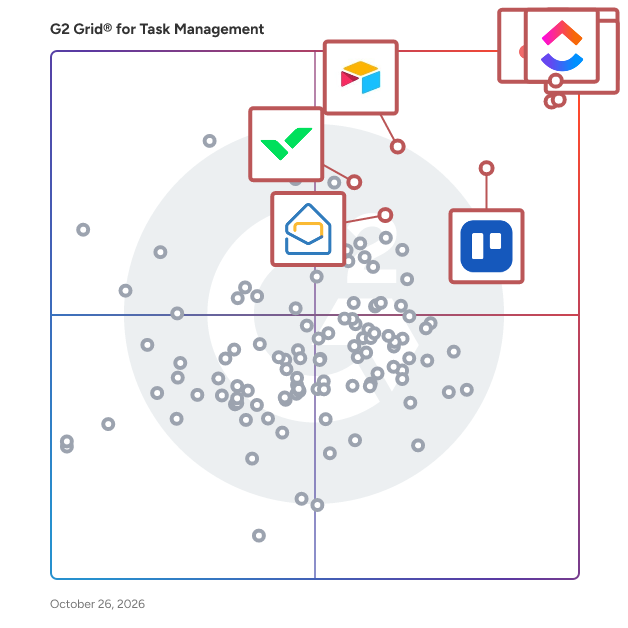
Highlighted products: Asana, ClickUp, monday AI Work Platform, Smartsheet, Trello, Airtable, Wrike, and Zoho Mail.
Underlying data: [Grid® JSON](https://www.g2.com/categories/task-management-software/grids.json?focus%5B%5D=asana&focus%5B%5D=clickup&focus%5B%5D=monday-com&focus%5B%5D=smartsheet&focus%5B%5D=trello&focus%5B%5D=airtable&focus%5B%5D=wrike&focus%5B%5D=zoho-mail)
Aevo is a desktop task manager for work that is too layered for a flat checklist. Your tasks live on a bento board, where two independent signals do the work a list cannot. Position reflects priority, from a scoring model that weighs deadlines, planned dates and how often a task has been postponed — so what you keep avoiding rises instead of sinking. Size reflects effort, so a five-minute call never looks like a two-day project. Every task is also a place you can go into. Zoom in and it opens as its own workspace: group related subtasks, nest them as deep as the work really goes, and keep the links, notes and files that belong to it right there. One-way sync brings your calendar and your emails into the board, so meetings and requests land where the rest of your work already is. No AI decides what you should work on. Aevo keeps your priorities visible and honest. The judgement stays yours. English and German.
AgendaPRO (agendapro.cz) is a Czech cloud system for the day-to-day administration of municipalities, schools, public institutions and small businesses. It consists of independent modules that can be combined as needed: tasks, asset register with QR and barcode labels, small-scale public contracts (VZMR) under Czech Act No. 134/2016 Coll., purchase orders with approval workflow, contracts with Register of Contracts deadlines (Act No. 340/2015 Coll.), invoicing, subscription tracking, vulnerability scan tracking and an AI assistant. Every asset gets a printed QR label and is found in the field with a phone, so the yearly inventory is done on a walk-around instead of in a spreadsheet. Pricing is per module for the whole organization, not per user. The interface is in Czech and data is stored in the EU. The first month is free.
Connect G2 to Claude or ChatGPT for answers grounded in G2's trusted reviews, comparisons, and pricing from real user insights.
Transform your business operations with AGILITY, a comprehensive suite combining project management, time tracking, and CRM capabilities, all in one platform. Designed to adapt and grow with your business, AGILITY offers customizable features to fit any industry, making it simple to manage client projects, track time, invoice, and communicate with clients effectively.
Average Rating: 4.5/5.0
Total Reviews: 1
Rating: 4.5/5.0 stars
— Shivam R.
Allpro SchedulePro automates the time consuming process of maintaining your company's schedule, customers, and managing your tasks.
A simple, easy to use, inexpensive SAAS designed for all types of small Field Service Businesses that need manage job schedules, staff assignments, customer commications receiving online payments and managing documents. The service was created by the owner/operator of a small field service business. He created it for his own service business 13 years. The illustrated user guide is at All3Things.com
ambero.app is workflow management software that transforms standard operating procedures into structured workflows. It centralizes process design and execution, addressing scattered processes across documents, emails, and chats. Streams act as reusable workflow templates, defining how processes should run, while Missions represent live executions of those Streams for operational tasks, ensuring consistency in repeated work. Checkpoints structure workflow stages, providing guidance text, required data inputs, and approval requirements, minimizing external documentation. Approvals embed decision points into workflows with assigned ownership, ensuring accountability. Mission visibility features enable users to search, filter, and monitor active workflows, while progress tracking highlights tasks needing attention and identifies current owners. The Mission timeline records all activities, decisions, and completions chronologically.
AscensIQ Operations Manager ist eine Software für die tägliche Betriebsorganisation in Gastronomie und Hotellerie. Sie verbindet Aufgabenmanagement, digitale Checklisten, Schichtübergaben, betriebliche Standards und einen KI-Wissensassistenten in einer zentralen Anwendung. So behalten Führungskräfte und Mitarbeitende den Überblick darüber, was zu tun ist, wer verantwortlich ist und welche Informationen für die nächste Schicht wichtig sind. Die Lösung richtet sich an Restaurants, Cafés, Hotels und gastronomische Betriebe, die ihre wiederkehrenden Abläufe strukturieren und die Abstimmung zwischen Service, Küche, Housekeeping, Rezeption und Haustechnik vereinfachen möchten. Mitarbeitende sehen ihre persönlichen Aufgaben und Teamaufgaben für den jeweiligen Tag. Filter nach Abteilung, Bereich und Status sowie eine Fortschrittsanzeige helfen dabei, offene und erledigte Aufgaben schnell zu erkennen. Direkt an einer Aufgabe lassen sich der Bearbeitungsstatus aktualisieren, Fotos hochladen und Kommentare ergänzen. Beim Abschluss wird sichtbar, wer die Aufgabe wann erledigt hat. Dadurch bleiben Rückmeldungen mit dem jeweiligen Vorgang verbunden und können bei der Übergabe nachvollzogen werden. Für den Einstieg stehen bereits über 100 sofort nutzbare Vorlagen für Standards, Checklisten und Aufgaben bereit. Sie bieten eine praktische Grundlage, um tägliche Routinen und Arbeitsanweisungen im Betrieb zu organisieren. Der integrierte KI-Wissensassistent macht hochgeladene Betriebsdokumente im Arbeitsalltag zugänglich. Mitarbeitende können Fragen zu internen Abläufen stellen und erhalten KI-gestützte Antworten mit Quellenangaben und passenden Textauszügen. So lassen sich Informationen beispielsweise zur Vorbereitung des Frühstücksservices, zur Zimmerreinigung oder zum Beschwerdemanagement gezielt nachschlagen und anhand der Originalquelle überprüfen. AscensIQ Operations Manager unterstützt die Zusammenarbeit mehrsprachiger Teams und ist über den Webbrowser nutzbar. Der Tarif umfasst alle Module und eine unbegrenzte Anzahl an Mitarbeitenden. Unternehmen können die Software 14 Tage kostenlos testen, ohne eine Kreditkarte anzugeben. Ziel ist ein übersichtlicher Arbeitsalltag mit klaren Zuständigkeiten, zugänglichem Betriebswissen und nachvollziehbaren Abläufen über Schicht- und Abteilungsgrenzen hinweg.
AtlonPManager helps you achieve maximum productiviy while keeping everything organized for you. You can manage complex projects splitting them into tasks and subtasks, where you can add all the details you need and also add hours, attach files, write commentaries, see the task history, add tags to organize them better and more. Furthermore, you can use a tool in the form of a notification provided within the app to keep track of the time while you are working and then assign it to a task or you can start the timer directly from a task so you do not have to look for it after. And either you are using a phone or a computer your data is synchronized across all of your devices so that it is always up to date.
Auto-Scheduler is task scheduling software that integrates with Google Calendar to automate time management. It analyzes calendar commitments and schedules tasks into available slots based on priorities and deadlines. Users input tasks with duration, priority, and deadline, categorizing them as work or personal. The software identifies conflicts, scores tasks by importance, and places them in suitable time slots. Long tasks can be split into sessions, and recurring tasks are scheduled into available windows. It respects defined working hours and separates work and personal tasks into distinct calendars. Fixed-time tasks can be locked, with the algorithm adjusting other items around them. Processing over thirty tasks in under a second, it ensures no conflicts. Operating on desktops, it syncs one-way with Google Calendar, overwriting changes unless tasks are locked. Data is stored securely in individual accounts, and the tool is designed for personal use, not team collaboration.
Task management for iPhone and iPad
