Top Free Screen Sharing Software - Page 3

How Many Screen Sharing Software Products Does G2 Track?

Total Products under this Category: 71

Category Stats (Sep 2026)

  • Average Rating: 4.42/5 The average rating of products in this category, based on all submitted ratings
  • Top Trending Product: Watch and Learn (+0.21%) - Among all products in this category, Watch and Learn recorded the largest rating increase compared to last month

Last updated: September 05, 2026

How Does G2 Rank Screen Sharing Software Products?

Why You Can Trust G2's Software Rankings:

  • 30 Analysts and Data Experts
  • 156,900+ Authentic Reviews
  • 71+ Products
  • Unbiased Rankings

G2's software rankings are built on verified user reviews, rigorous moderation, and a consistent research methodology maintained by a team of analysts and data experts. Each product is measured using the same transparent criteria, with no paid placement or vendor influence. While reviews reflect real user experiences, which can be subjective, they offer valuable insight into how software performs in the hands of professionals. Together, these inputs power the G2 Score, a standardized way to compare tools within every category.

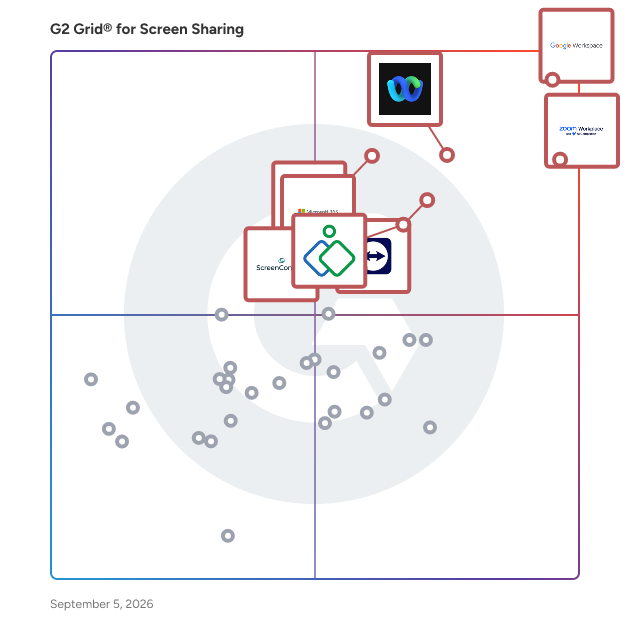
G2 Grid® for Screen Sharing Software

G2 Grid® for Screen Sharing Software plotting products by satisfaction and market presence

Highlighted products: Google Workspace, Zoom Workplace, Webex Suite, TeamViewer, Microsoft 365, Zoho Assist, GoTo Meeting, and ScreenConnect.

Underlying data: [Grid® JSON](https://www.g2.com/categories/screen-sharing/grids.json?focus%5B%5D=google-workspace&focus%5B%5D=zoom-workplace&focus%5B%5D=cisco-webex-suite&focus%5B%5D=teamviewer&focus%5B%5D=microsoft365&focus%5B%5D=zoho-assist&focus%5B%5D=goto-meeting&focus%5B%5D=screenconnect)

Iperius Remote

Remote Desktop Software, for Remote Support, Remote Access, and Online Meetings. Iperius Remote ensures fast and secure remote desktop connections. The software is convenient for both ITPROS and private individuals. Connect from any a PCs or Devices to another easily and stability. Iperius Remote allows connection over the internet. Remote Control Connect in a simple and rapid manner to any computer. Work as if you were present locally, transfer files, make use of chat. Complete Remote Desktop. Unattended access Install Iperius Remote as a service for unattended access. You can keep a list of the computers of your customers and connect to them in order to carry out assistance at any time. Remote Support Software Access the Servers and Computers of your customers and provide technical support in the easiest and most immediate way. You can connect multiple customers simultaneously in separate windows or have multiple operators access the same remote computer. Manage all your tasks remotely from a centralized panel Once you get in your own account, you’ll be able to see a list of all connected computers and therefore obtain an immediately accessible list of customers to whom you can provide support and managing tasks remotely. Check your Detailed Session Reports The Pro versions allow you to quickly view all the statistics relating to remote connections made. These statistics can be grouped by group, computer or operator, and filtered by specific dates. Secure Powerful Universal Iperius Remote ensures the highest possible level of security with end-to-end encryption, compliant with HIPAA and GDPR standards and Two-Factor Authentication. The video transmission technology is among the most powerful available, with a frame rate of up to 60 FPS. Iperius Remote is a multi-platform software, you can use it on Mac, Windows, Linux but also on Android and iOS.

Average Rating: 4.5/5.0

Total Reviews: 25

How Do G2 Users Rate Iperius Remote?

  • Has the product been a good partner in doing business?: 8.6/10 (Category avg: 9.1/10)
  • Video Conferencing: 10.0/10 (Category avg: 8.8/10)
  • Live Preview: 10.0/10 (Category avg: 8.9/10)
  • Audio Conferencing: 10.0/10 (Category avg: 8.9/10)

Who Is the Company Behind Iperius Remote?

  • Seller: Enter
  • HQ Location: Grottammare, AP
  • Twitter: @enter
    2,965 Twitter followers
  • LinkedIn® Page: www.linkedin.com
    29 employees on LinkedIn®

Who Uses This Product?

  • Top Industries: Information Technology and Services
  • Company Size: 85% Small, 15% Medium

What Do G2 Reviewers Say About Iperius Remote?

AI-generated summary from verified user reviews

Pros
  • Users value the automation for unattended access, enabling quick server restarts and efficient remote troubleshooting.
  • Users love the super fast connection speed of Iperius Remote, ensuring quick access for seamless remote troubleshooting.
  • Users appreciate the superior connectivity of Iperius Remote, enabling seamless access and quick troubleshooting for uninterrupted services.
  • Users value the ease of use of Iperius Remote, finding it intuitive for quick and efficient access.
  • Users love the easy access provided by Iperius Remote for quick and seamless remote troubleshooting and service management.
Cons
  • Users often find audio issues during video conferencing, impacting their overall experience with Iperius Remote.
  • Users find the tool great, but it needs improvement for video conferencing capabilities to enhance overall usability.
  • Users find the video quality lacking during conferencing, which impacts their overall experience with Iperius Remote.

What Are Recent G2 Reviews of Iperius Remote?

What Are G2 Users Discussing About Iperius Remote?

ShowMyPC

ShowMyPC provides easy-to-use and secure remote access, remote support, collaboration, and productivity tools for individuals and businesses worldwide. Browser-based, no download HTML5 viewer, blazing-fast Windows RDP support, access and manage unattended PCs.

Average Rating: 4.1/5.0

Total Reviews: 18

How Do G2 Users Rate ShowMyPC?

  • Has the product been a good partner in doing business?: 8.3/10 (Category avg: 9.1/10)
  • Video Conferencing: 8.3/10 (Category avg: 8.8/10)
  • Live Preview: 8.7/10 (Category avg: 8.9/10)
  • Audio Conferencing: 8.3/10 (Category avg: 8.9/10)

Who Is the Company Behind ShowMyPC?

  • Seller: ShowMyPC
  • HQ Location: Santa Clara,CA
  • Twitter: @desktopsharings
    2 Twitter followers
  • LinkedIn® Page: www.linkedin.com

Who Uses This Product?

  • Top Industries: Information Technology and Services
  • Company Size: 56% Small, 22% Medium

What Do G2 Reviewers Say About ShowMyPC?

AI-generated summary from verified user reviews

Pros
  • Users value the ease of use of ShowMyPC, finding it simple and efficient for remote access and support.
  • Users love the easy access of ShowMyPC, enjoying its straightforward setup and reliable remote support.
  • Users love the easy setup of ShowMyPC, finding it straightforward and perfect for quick remote access.
  • Users highlight the reliable remote connectivity of ShowMyPC, enhancing their experience with straightforward access and support.
  • Users commend the reliability of ShowMyPC, enjoying its straightforward functionality for remote access and support.
Cons
  • Users find feature limitations in ShowMyPC, especially compared to advanced remote access tools, somewhat restricting.
  • Users find limited customization options in ShowMyPC, making it less versatile than more advanced remote access tools.
  • Users find ShowMyPC's limited features inadequate for advanced tasks, making it feel basic compared to other tools.
  • Users find missing advanced features in ShowMyPC, feeling it's limited compared to other remote access tools.
  • Users find ShowMyPC not user-friendly, with a limited interface and minimal advanced features affecting overall ease of use.

What Are Recent G2 Reviews of ShowMyPC?

What Are G2 Users Discussing About ShowMyPC?

OnePgr

OnePgr is a complete meeting and collaboration platform, delivered as a single application, fundamentally changing the way sales, customer support, and other teams communicate. From conversations ranging from exchanging emails, scheduling meetings, meeting online, sharing documents, sending video messages, to analyzing recordings, OnePgr helps teams more effectively organize information and communication as well as gain behavioral insights to help improve sales cycle time, ticket & incident resolution time, project efficiency, among other performance metrics. More information at: https://onepgr.com

Average Rating: 4.4/5.0

Total Reviews: 10

How Do G2 Users Rate OnePgr?

  • Has the product been a good partner in doing business?: 8.3/10 (Category avg: 9.1/10)
  • Video Conferencing: 9.3/10 (Category avg: 8.8/10)
  • Live Preview: 9.2/10 (Category avg: 8.9/10)
  • Audio Conferencing: 9.3/10 (Category avg: 8.9/10)

Who Is the Company Behind OnePgr?

  • Seller: OnePgr
  • HQ Location: San Francisco, Bay Area
  • LinkedIn® Page: www.linkedin.com
    13 employees on LinkedIn®

Who Uses This Product?

  • Company Size: 50% Small, 50% Medium

What Do G2 Reviewers Say About OnePgr?

AI-generated summary from verified user reviews

Pros
  • Users love the real-time collaboration features of OnePgr, enhancing communication for sales and business initiatives.
  • Users love the efficient communication features of OnePgr, making meetings and collaborations seamless and easy.
  • Users find OnePgr incredibly helpful for seamless communication and efficient real-time collaboration during meetings and webinars.
  • Users praise the seamless video conferencing features of OnePgr, enhancing client communication and collaboration effortlessly.
  • Users value the efficient virtual meetings capabilities of OnePgr, enhancing client communication and collaboration seamlessly.
Cons
  • Users report connection issues, including poor video and audio quality, affecting their conferencing experience.
  • Users experience connectivity issues with poor video and audio quality affecting their conferencing experience.
  • Users frequently face video issues with poor connection and stability, affecting the overall conferencing experience.
  • Users report poor audio quality during video conferences, leading to frustrating communication difficulties.
  • Users experience call issues with OnePgr, citing poor connection and audio quality during video conferences.

What Are Recent G2 Reviews of OnePgr?

What Are G2 Users Discussing About OnePgr?

Bitrix24

Bitrix24 is an all-in-one business workspace that combines CRM, collaboration, and management tools in a single, easy-to-use platform – free for unlimited users. Whether you're a small team or a growing business, Bitrix24 helps you to: — Track leads and manage customer relationships with a built-in CRM — Stay on top of projects and tasks with Kanban boards, timelines, and time tracking — Communicate easily via team messenger, video calls, and shared calendars — Create and edit documents, manage files, and collect e-signatures — Run marketing campaigns and manage customer interactions through email, calls, and WhatsApp Bitrix24’s AI-powered assistant CoPilot helps automate routine tasks, write emails, analyze data, and suggest next steps, saving time and boosting productivity. What makes Bitrix24 a great solution for businesses: — Free forever for unlimited users, with access to core features and 5 GB storage — No per-user fees – upgrade only when you need more storage or advanced tools — Accessible anywhere via web, desktop, and mobile apps — Scalable – grow your business without switching platforms or juggling tools Over 15 million companies trust Bitrix24 to simplify operations, cut costs, and get more done – all in one place.

Average Rating: 4.1/5.0

Total Reviews: 578

How Do G2 Users Rate Bitrix24?

  • Has the product been a good partner in doing business?: 7.8/10 (Category avg: 9.1/10)
  • Video Conferencing: 7.5/10 (Category avg: 8.8/10)
  • Live Preview: 8.9/10 (Category avg: 8.9/10)
  • Audio Conferencing: 8.3/10 (Category avg: 8.9/10)

Who Is the Company Behind Bitrix24?

  • Seller: Bitrix24
  • Company Website:
  • Year Founded: 1998
  • HQ Location: Alexandria, Virginia
  • LinkedIn® Page: www.linkedin.com
    268 employees on LinkedIn®

Who Uses This Product?

  • Who Uses This: Marketing Manager, Project Manager
  • Top Industries: Information Technology and Services, Marketing and Advertising
  • Company Size: 55% Small, 34% Medium

What Do G2 Reviewers Say About Bitrix24?

AI-generated summary from verified user reviews

Pros
  • Users find Bitrix24 to be easy to use, effectively streamlining business processes and enhancing customer experience.
  • Users appreciate the team collaboration tools in Bitrix24, enhancing communication and streamlining business processes effortlessly.
  • Users value the effective communication capabilities of Bitrix24, enhancing collaboration with teams and customers seamlessly.
  • Users appreciate the flexibility and versatility of Bitrix24, enjoying its comprehensive features for business management.
  • Users find Bitrix24 intuitive, making collaboration and customer management seamless and enhancing overall productivity.
Cons
  • Users find the learning curve steep, requiring time and training to fully utilize Bitrix24's extensive features.
  • Users report performance issues with Bitrix24, experiencing lag and slowdowns, especially during complex workflows.
  • Users express concern over lacking features, with notable omissions affecting value as compared to initial promises.
  • Users find Bitrix24 to be not user-friendly, often struggling to locate tools and navigate the system efficiently.
  • Users experience slow performance with Bitrix24, especially during complex workflows, impacting overall productivity.

What Are Recent G2 Reviews of Bitrix24?

What Are G2 Users Discussing About Bitrix24?

Mingle View

First ever free desktop sharing application with unlimited participants.

Average Rating: 4.1/5.0

Total Reviews: 4

How Do G2 Users Rate Mingle View?

  • Video Conferencing: 7.8/10 (Category avg: 8.8/10)
  • Live Preview: 8.3/10 (Category avg: 8.9/10)
  • Audio Conferencing: 8.9/10 (Category avg: 8.9/10)

Who Is the Company Behind Mingle View?

Who Uses This Product?

  • Company Size: 75% Small, 25% Medium

What Do G2 Reviewers Say About Mingle View?

AI-generated summary from verified user reviews

Pros
  • Users value the good audio quality of Mingle View, enhancing their experience during meetings.
  • Users love the ease of use and cost-effectiveness of Mingle View for daily project discussions and screen sharing.
  • Users value the ease of use of Mingle View, allowing seamless meetings with just a meeting ID.
  • Users find Mingle View’s easy implementation highly beneficial for seamless and real-time project discussions without lag.
  • Users love the easy setup of Mingle View, enabling quick and efficient meetings without personal information requirements.
Cons
  • Users find Mingle View's browser compatibility limited, as it lacks support for MacOS and mobile devices.
  • Users note the lack of frequent updates, leading to dissatisfaction with Mingle View's overall performance and features.
  • Users face integration issues with Mingle View, limiting its compatibility and overall functionality across platforms.
  • Users find Mingle View's limited features restrict functionality and hinder integration with other applications.
  • Users experience poor performance during meetings, with frequent lags and issues while sharing their screens.

What Are Recent G2 Reviews of Mingle View?

Reactiv SUITE

Remote meetings suck! They are exhausting and none of us remembers anything. For hybrid\remote meetings to be effective they have to have an impact, allow the presenter and the content to stand out and be memorable. This tool allows remote meeting presenters to pin their camera, control their image, present any type of content and file format, ink, highlight and draw attention. This allows the participants to focus and pay more attention, which results in greater engagement.

Average Rating: 4.6/5.0

Total Reviews: 5

How Do G2 Users Rate Reactiv SUITE?

  • Video Conferencing: 6.7/10 (Category avg: 8.8/10)
  • Live Preview: 6.7/10 (Category avg: 8.9/10)
  • Audio Conferencing: 6.7/10 (Category avg: 8.9/10)

Who Is the Company Behind Reactiv SUITE?

Who Uses This Product?

  • Company Size: 80% Large, 20% Small

What Are Recent G2 Reviews of Reactiv SUITE?

Dead Simple Screen Sharing

Dead Simple Screen Sharing is a free screen sharing and online meetings solution.

Average Rating: 4.8/5.0

Total Reviews: 3

How Do G2 Users Rate Dead Simple Screen Sharing?

  • Video Conferencing: 10.0/10 (Category avg: 8.8/10)
  • Live Preview: 10.0/10 (Category avg: 8.9/10)
  • Audio Conferencing: 10.0/10 (Category avg: 8.9/10)

Who Is the Company Behind Dead Simple Screen Sharing?

Who Uses This Product?

  • Company Size: 100% Small

What Are Recent G2 Reviews of Dead Simple Screen Sharing?

Vidsell

Vidsell is an AI-powered tool for creating personalized videos, designed specifically for sales and marketing teams that want to boost their pipeline, create connections, and drive revenue. We make it easy to create a single video, add forms, surveys, and buttons, and share a dynamic GIF with unlimited contacts in less than 5 minutes. You can also measure video performance with our advanced analytics.

Average Rating: 4.8/5.0

Total Reviews: 4

How Do G2 Users Rate Vidsell?

  • Has the product been a good partner in doing business?: 10.0/10 (Category avg: 9.1/10)

Who Is the Company Behind Vidsell?

  • Seller: Vidsell
  • Year Founded: 2024
  • HQ Location: Amsterdam, NL
  • Twitter: @vidsell_ai
    26 Twitter followers
  • LinkedIn® Page: www.linkedin.com
    2 employees on LinkedIn®
  • Ownership: Vidsell

Who Uses This Product?

  • Company Size: 75% Small, 25% Medium

What Do G2 Reviewers Say About Vidsell?

AI-generated summary from verified user reviews

Pros
  • Users appreciate the seamless communication through personalized videos, enhancing their outbound sales outreach effectiveness.
  • Users value the ease of creation with Vidsell, noting a quick and seamless onboarding experience for video production.
  • Users love the easy integrations with Vidsell, enhancing their video outreach efforts efficiently and effectively.
  • Users find the easy recording feature of Vidsell enhances their video creation for effective sales outreach.
  • Users value the easy setup of Vidsell, facilitating quick onboarding and seamless video recording for effective outreach.

What Are Recent G2 Reviews of Vidsell?

VoxMeet

VoxMeet is a Made-in-India, simple, secure and seamless video conferencing platform based on the latest WebRTC technologies. Designed for multi-device access and browsers, it supports Android, IOS as well as Windows. VoxMeet features such as high definition audio, video, live streaming and smart productivity add-on provide the best video conferencing experience, so explore new opportunities, collaborate with clients and enhance your digital journey with VoxMeet.

Average Rating: 4.3/5.0

Total Reviews: 12

How Do G2 Users Rate VoxMeet?

  • Has the product been a good partner in doing business?: 6.7/10 (Category avg: 9.1/10)
  • Video Conferencing: 8.9/10 (Category avg: 8.8/10)
  • Live Preview: 7.8/10 (Category avg: 8.9/10)
  • Audio Conferencing: 8.9/10 (Category avg: 8.9/10)

Who Is the Company Behind VoxMeet?

Who Uses This Product?

  • Top Industries: Information Technology and Services
  • Company Size: 50% Small, 42% Medium

What Are Recent G2 Reviews of VoxMeet?

Zoapi

Zoapi Hub is a wireless presentation and collaboration solution for enterprise companies, coworking spaces and education centres. With Zoapi connected to your meeting room projector/TV, you can seamlessly share your screens from any device running Windows, Mac, Linux, Chrome OS, Android or iOS, host video conferences using Zoom, Skype, MS Teams, WebEx or any application of your choice, view your meeting room calendar on the go and manage your meetings. With wireless collaboration, hassle-free video conferencing, Annotation & Whiteboarding, multiple application support and an admin control panel, Zoapi leaves no room for unproductivity.

Average Rating: 4.8/5.0

Total Reviews: 3

How Do G2 Users Rate Zoapi?

  • Has the product been a good partner in doing business?: 10.0/10 (Category avg: 9.1/10)
  • Live Preview: 10.0/10 (Category avg: 8.9/10)

Who Is the Company Behind Zoapi?

Who Uses This Product?

  • Company Size: 67% Medium, 33% Small

What Do G2 Reviewers Say About Zoapi?

AI-generated summary from verified user reviews

Pros
  • Users appreciate the good support team of Zoapi, enhancing their overall experience with prompt assistance.
  • Users praise the ease of use of Zoapi, finding it simple to set up and navigate effectively.
  • Users value the easy integrations with platforms like Zoom and Teams, enhancing their collaborative experience effortlessly.
  • Users find the easy setup of Zoapi straightforward, enabling quick navigation without lengthy training sessions.
  • Users highlight the seamless integrations with Zoom and Teams, enhancing collaboration and ease of use.
Cons
  • Users express frustration with the limitation of booking future meetings beyond 24 hours, impacting their scheduling flexibility.
  • Users experience connectivity issues with Zoapi, as it heavily relies on a stable internet connection.
  • Users find the cost too high for small businesses, limiting their ability to invest in Zoapi.
  • Users note the heavy reliance on Internet connectivity with Zoapi, which can hinder accessibility and performance.
  • Users face meeting issues due to limited booking times, heavy internet reliance, and higher costs for small businesses.

What Are Recent G2 Reviews of Zoapi?

Scoot

Scoot is an experiential meeting and webinar platform that provides new ways for people to interact in a virtual setting. Patented Social Presence® technology promotes connections because meeting attendees can move and mingle, just like they do in real life. Scoot is ideal for meetings and webinars that have more than 25 attendees. When attendees want to engage with each other, company representatives, and subject matter experts, an interactive experience on Scoot provides more value than a broadcast-style meeting or webinar. There are two experience modes in Scoot. Mingle mode enables attendees to move within a customized, branded virtual space. Presentation mode provides presenters to share content and videos. Screen sharing is enabled at three levels: group discussion, entire room, and entire Scootaverse. Smart Badges are populated with attendee data and are searchable. Attendees can enter their Smart Badge data during registration or upon entry. Data can also be loaded in advance or imported from external systems. Smart Badge data can be configured as conditionally viewable. Scoot supports all major browsers and mobile devices. Our client list includes multiple Fortune 500 brands as well as many small and medium-sized organizations.

Average Rating: 4.7/5.0

Total Reviews: 41

How Do G2 Users Rate Scoot?

  • Has the product been a good partner in doing business?: 9.2/10 (Category avg: 9.1/10)

Who Is the Company Behind Scoot?

  • Seller: Scoot
  • Year Founded: 2017
  • HQ Location: Dallas, Texas
  • LinkedIn® Page: www.linkedin.com
    25 employees on LinkedIn®

Who Uses This Product?

  • Top Industries: Information Technology and Services
  • Company Size: 67% Small, 29% Medium

What Do G2 Reviewers Say About Scoot?

AI-generated summary from verified user reviews

Pros
  • Users enjoy the flexibility of Scoot, utilizing it for both video calls and engaging team-building activities.
  • Users value the flexibility of team collaboration in Scoot for various activities, including events and meetings.
  • Users appreciate the flexibility of Scoot for both video conferencing and team-building activities.

What Are Recent G2 Reviews of Scoot?

What Are G2 Users Discussing About Scoot?

Diabolocom

Diabolocom is a leading European provider of AI-first cloud contact center and customer experience solutions. Our platform helps organizations manage omnichannel customer interactions at scale while improving service quality, agent productivity, and operational efficiency. Built on proprietary AI technologies, native telecom infrastructure, and advanced CRM integrations, Diabolocom helps customer service and sales teams deliver faster, smarter, and more personalized interactions. Our all-in-one platform supports inbound and outbound communications, high-volume call management, auto-dialing, workflow automation, real-time monitoring, and AI-powered assistance for agents and supervisors. It helps teams manage every customer interaction more efficiently, from first contact to final resolution. Diabolocom provides the essential features businesses need to manage customer interactions effectively, while continuously innovating with sovereign AI solutions designed for customer service and sales teams. Our AI-powered solutions include: - Interactive Virtual Agent, - Agent Assist, - Augmented Quality Monitoring. Interactive Virtual Agent helps businesses provide 24/7 customer support. It answers customer requests automatically and can be configured easily through Diabolocom’s interface. When human assistance is needed, the interaction can be transferred smoothly to an agent. Agent Assist supports agents in real time during customer conversations. It combines conversation analytics, automated call summaries, next-best-action recommendations, form completion, knowledge base access, and automated workflows. This helps agents save time, reduce manual work, and provide more accurate answers. Augmented Quality Monitoring helps supervisors evaluate customer interactions at scale. With AI, teams can review far more calls than would be possible manually. They can identify coaching opportunities, detect quality trends, and monitor performance through clear dashboards. Together, these capabilities help businesses automate repetitive tasks, improve quality management, strengthen customer engagement, and make faster, data-driven decisions. Diabolocom’s innovation has been recognized by Frost & Sullivan with the 2024 Product Leadership Award and the 2026 European Technology Innovation Leadership Award. For over 20 years, Diabolocom has supported more than 400 clients and now operates in over 60 countries, with 175+ employees across 8 global offices.

Average Rating: 4.2/5.0

Total Reviews: 34

How Do G2 Users Rate Diabolocom?

  • Has the product been a good partner in doing business?: 8.5/10 (Category avg: 9.1/10)

Who Is the Company Behind Diabolocom?

  • Seller: Diabolocom
  • Company Website:
  • Year Founded: 2005
  • HQ Location: Paris, FR
  • LinkedIn® Page: www.linkedin.com
    179 employees on LinkedIn®

Who Uses This Product?

  • Top Industries: Consumer Services
  • Company Size: 58% Medium, 31% Small

What Do G2 Reviewers Say About Diabolocom?

AI-generated summary from verified user reviews

Pros
  • Users appreciate the ease of use of Diabolocom, benefiting from intuitive interfaces and seamless CRM integration.
  • Users value the exceptionally responsive customer support from Diabolocom, ensuring a smooth implementation and ongoing assistance.
  • Users appreciate the customization capabilities of Diabolocom, enabling tailored integrations and seamless adaptation to their needs.
  • Users praise the easy implementation of Diabolocom, benefiting from responsive support and quick integration with existing systems.
  • Users appreciate the efficiency of Diabolocom, seamlessly integrating with systems and enhancing agent productivity.
Cons
  • Users find the missing features in Diabolocom limit integration and hinder the customization of their processes.
  • Users find it challenging to reach customer service support, which hinders their ability to optimize workflows effectively.
  • Users find the delays in updates frustrating, particularly affecting productivity during critical work hours.
  • Users find the rigid pre-configured workflows of Diabolocom limit customization, complicating customer service processes.
  • Users find the limited customization of Diabolocom restricts adapting workflows to their specific customer service needs.

What Are Recent G2 Reviews of Diabolocom?

Switchboard

Keep everyone on the same page. Work in a shareable space that's more actionable than screen recording, flexible than whiteboards, and engaging than video calls. Share with context: Give feedback and make better decisions by keeping tools, docs, and conversations in one place. Show why it matters: Record a walkthrough with instructions and next steps. Viewers can hit pause to jump in to work in the content in the video. Shift from learning to doing: Work and meet in the same shared space equipped with video calls, whiteboarding, and recording. Get more done alone or together, async or live.

Who Is the Company Behind Switchboard?

  • Seller: Switchboard
  • Year Founded: 2020
  • HQ Location: Remote first, Work from anywhere, US
  • LinkedIn® Page: www.linkedin.com
    4 employees on LinkedIn®

Thirdlane Multi Tenant PBX

Thirdlane Multi-Tenant PBX is a white-label UCaaS platform for MSPs, service providers, and telecom resellers who need scale, control, and margin. Launch branded voice, messaging, and collaboration for thousands of tenants from a single platform, with APIs and CRM integrations to automate provisioning, billing, and workflows. Deploy cloud, on-prem, or hybrid to fit your model. Main features: - True multi-tenant architecture with per-tenant isolation, templates, and policies - VoIP calling with IVR, queues, recording, and advanced routing - Branding and white-label controls - APIs, webhooks, and CRM integrations for click-to-call and screen pops - Centralized provisioning, role-based admin, and audit logs - Messaging Queues for inbound SMS and WhatsApp - faster response and smoother workflows - Powerful dashboards on demand - with Grafana integration (optional) - Real-time system dashboards for platform admins - live visibility across the platform - Call analysis reports - clear visuals and quick insights - DID-level outbound message limits - daily and monthly controls for safety and compliance - Flexible deployment options - cloud, on-prem, or hybrid - Thirdlane Connect - white-label softphone, omnichannel messaging, and video app See how Thirdlane helps MSPs, UCaaS providers, resellers, and enterprises deliver white-label multi-tenant communications. Request a live demo today: https://www.thirdlane.com

Average Rating: 3.8/5.0

Total Reviews: 2

How Do G2 Users Rate Thirdlane Multi Tenant PBX?

  • Has the product been a good partner in doing business?: 6.7/10 (Category avg: 9.1/10)

Who Is the Company Behind Thirdlane Multi Tenant PBX?

  • Seller: Thirdlane
  • Year Founded: 2003
  • HQ Location: Fairfax, US
  • Twitter: @thirdlanepbx
    47 Twitter followers
  • LinkedIn® Page: www.linkedin.com
    4 employees on LinkedIn®
  • Ownership: Third Lane Technologies, LLC

Who Uses This Product?

  • Company Size: 100% Medium

What Do G2 Reviewers Say About Thirdlane Multi Tenant PBX?

AI-generated summary from verified user reviews

Pros
  • Users value the efficient communication capabilities of Thirdlane Multi Tenant PBX, making client management seamless and effective.
  • Users commend the helpful customer support from Thirdlane, particularly appreciating the founder's dedication to customer satisfaction.
  • Users find the user-friendly interface of Thirdlane Multi Tenant PBX essential for efficient daily communication across multiple clients.
  • Users find Thirdlane Multi Tenant PBX to be remarkably easy to use, thanks to attentive support from the founder.
  • Users find the easy communication with the helpful founder invaluable for a better experience with Thirdlane.
Cons
  • Users find the interface complicated, leading to dissatisfaction and a perception of being outdated among customers.
  • Users find the interface complex, leading to dissatisfaction and a perception of being outdated among customers.
  • Users find the complex process of Thirdlane Multi Tenant PBX challenging, impacting customer satisfaction and user experience.
  • Users find the interface complicated, leading to dissatisfaction and perceptions of being outdated by customers.
  • Users find the interface overly complicated, leading to dissatisfaction and a perception of being outdated.

What Are Recent G2 Reviews of Thirdlane Multi Tenant PBX?