Best Password Managers - Page 2

How Many Password Managers Products Does G2 Track?

Total Products under this Category: 127

Category Stats (Sep 2026)

  • Average Rating: 4.42/5 (↑0.01 vs Aug 2026) The average rating of products in this category, based on all submitted ratings
  • Top Trending Product: Passwork (+0.13%) - Among all products in this category, Passwork recorded the largest rating increase compared to last month

Last updated: September 01, 2026

How Does G2 Rank Password Managers Products?

Why You Can Trust G2's Software Rankings:

  • 30 Analysts and Data Experts
  • 12,500+ Authentic Reviews
  • 127+ Products
  • Unbiased Rankings

G2's software rankings are built on verified user reviews, rigorous moderation, and a consistent research methodology maintained by a team of analysts and data experts. Each product is measured using the same transparent criteria, with no paid placement or vendor influence. While reviews reflect real user experiences, which can be subjective, they offer valuable insight into how software performs in the hands of professionals. Together, these inputs power the G2 Score, a standardized way to compare tools within every category.

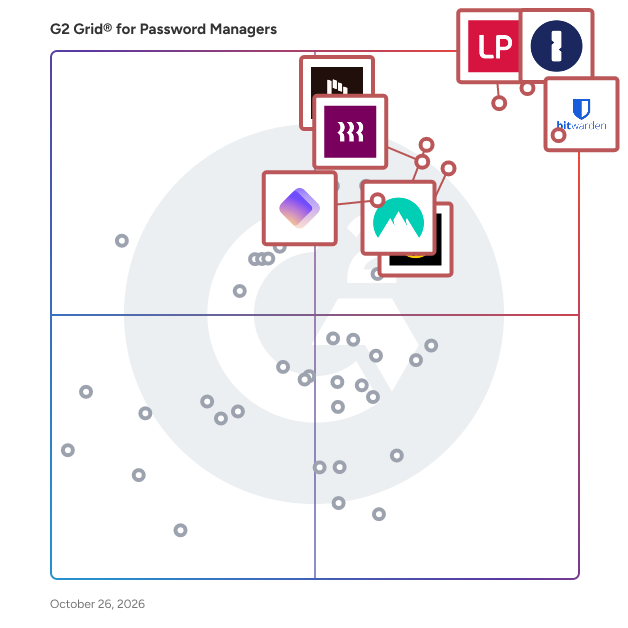
G2 Grid® for Password Managers

G2 Grid® for Password Managers plotting products by satisfaction and market presence

Highlighted products: 1Password, Bitwarden, LastPass, NordPass Business, Keeper Password Manager, Rippling IT, Dashlane Password Manager, and IT Glue.

Underlying data: [Grid® JSON](https://www.g2.com/categories/password-managers/grids.json?focus%5B%5D=1password&focus%5B%5D=bitwarden&focus%5B%5D=lastpass&focus%5B%5D=nordpass-business&focus%5B%5D=keeper-password-manager&focus%5B%5D=rippling-it&focus%5B%5D=dashlane-password-manager&focus%5B%5D=it-glue)

Passwork

Passwork — self-hosted enterprise password manager with zero-knowledge encryption. Passwork is an on-premise corporate password manager built for security-conscious organizations. Developed and headquartered in Europe (Barcelona, Spain), Passwork meets GDPR, NIS2, ENS and other European regulatory requirements by design. All passwords and credentials are stored exclusively on your own server. Double-layer AES-256 encryption (server-side and client-side) with zero-knowledge architecture means your data stays within your infrastructure, fully under the control of your system administrators. Passwork is ISO/IEC 27001 certified. Your data never leaves your infrastructure. Trusted by enterprises across Europe for secure password sharing, privileged access management, and centralized credential governance.

Average Rating: 4.7/5.0

Total Reviews: 30

How Do G2 Users Rate Passwork?

  • Has the product been a good partner in doing business?: 9.4/10 (Category avg: 9.1/10)
  • Admin Management: 9.9/10 (Category avg: 9.0/10)
  • Quick Login: 9.8/10 (Category avg: 9.1/10)
  • Two-Factor Authentication: 10.0/10 (Category avg: 9.1/10)

Who Is the Company Behind Passwork?

  • Seller: Passwork
  • Year Founded: 2017
  • HQ Location: Barcelona, Spain
  • LinkedIn® Page: www.linkedin.com
    8 employees on LinkedIn®

Who Uses This Product?

  • Company Size: 60% Medium, 33% Small

What Are Recent G2 Reviews of Passwork?

What Are G2 Users Discussing About Passwork?

Akeyless Identity Security Platform

Akeyless delivers identity security for an era shaped by automation and AI. The cloud-native platform secures machines, AI agents, and human access across hybrid, multi-cloud, and on-prem environments. It provides a practical path to secretless, identity-based access through secrets management, certificate lifecycle management and PKI, PAM, and unified governance. Akeyless is built on a cryptography foundation that combines encryption, key management, and Distributed Fragments Cryptography to keep sensitive material under customer control and protected from post-quantum threats. With integrations for cloud IAM, Kubernetes, CI/CD, and MCP-based AI agent workflows, teams can adopt and scale AI agents securely without expanding risk. Akeyless Jarvis™ delivers AI-powered identity intelligence to surface risky access and strengthen oversight.

Average Rating: 4.6/5.0

Total Reviews: 90

How Do G2 Users Rate Akeyless Identity Security Platform?

  • Has the product been a good partner in doing business?: 9.6/10 (Category avg: 9.1/10)
  • Admin Management: 8.8/10 (Category avg: 9.0/10)
  • Quick Login: 9.3/10 (Category avg: 9.1/10)
  • Two-Factor Authentication: 9.4/10 (Category avg: 9.1/10)

Who Is the Company Behind Akeyless Identity Security Platform?

  • Seller: Akeyless
  • Company Website:
  • Year Founded: 2018
  • HQ Location: Ramat Gan, Israel
  • Twitter: @akeylessio
    293 Twitter followers
  • LinkedIn® Page: www.linkedin.com
    107 employees on LinkedIn®

Who Uses This Product?

  • Top Industries: Information Technology and Services, Computer Software
  • Company Size: 50% Large, 27% Medium

What Do G2 Reviewers Say About Akeyless Identity Security Platform?

AI-generated summary from verified user reviews

Pros
  • Users find the ease of use of Akeyless Identity Security Platform enhances seamless integration with their existing systems.
  • Users value the robust security features of Akeyless, enhancing their infrastructure and ensuring efficient management.
  • Users praise the great customer support of Akeyless Identity Security Platform, enhancing their overall experience and satisfaction.
  • Users love the easy integrations with tools like Ansible and GCP, enhancing their DevOps efficiency and automation.
  • Users appreciate the ease of implementation of Akeyless Identity Security Platform, simplifying integration with existing systems.
Cons
  • Users find the poor documentation limits their ability to fully leverage the Akeyless Identity Security Platform.
  • Users find the poor UI of Akeyless Identity Security Platform hinders intuitive navigation and requires extra effort to use.
  • Users find the complex setup challenging, often requiring support to interpret issues from logs.
  • Users find the complex usage of Akeyless requires significant time and effort for effective integration into workflows.

What Are Recent G2 Reviews of Akeyless Identity Security Platform?

What Are G2 Users Discussing About Akeyless Identity Security Platform?

N-able Passportal

N-able™ Passportal is a cloud-based, encrypted, and efficient privileged access management solution built for MSPs. N-able Passportal offers: • Credential injection across your systems and files • Thorough reporting and auditing • Password hygiene automation • Top-of-class two-way Active Directory sync • Granular IT documentation capabilities with Documentation Manager • Possibility to rebrand and resell the solution as your own with Passportal Site • Mobile app for password reset in under 60 seconds with Blink • Integration with multiple RMM solutions on the market • N-able Take Control integration for seamless credential injection during remote support sessions Secure your business. Save your technicians' time. Demo Passportal today.

Average Rating: 4.2/5.0

Total Reviews: 40

How Do G2 Users Rate N-able Passportal?

  • Has the product been a good partner in doing business?: 7.7/10 (Category avg: 9.1/10)
  • Admin Management: 8.4/10 (Category avg: 9.0/10)
  • Quick Login: 8.4/10 (Category avg: 9.1/10)
  • Two-Factor Authentication: 9.0/10 (Category avg: 9.1/10)

Who Is the Company Behind N-able Passportal?

  • Seller: N-able
  • HQ Location: Morrisville, North Carolina
  • Twitter: @Nable
    15,859 Twitter followers
  • LinkedIn® Page: www.linkedin.com
    2,307 employees on LinkedIn®
  • Ownership: NYSE: NABL

Who Uses This Product?

  • Top Industries: Information Technology and Services, Computer & Network Security
  • Company Size: 71% Small, 27% Medium

What Do G2 Reviewers Say About N-able Passportal?

AI-generated summary from verified user reviews

Pros
  • Users value the centralized storage of N-able Passportal, ensuring their credentials are always accessible and organized.
  • Users appreciate the convenience of N-able Passportal for efficiently organizing documentation and ease of use.
  • Users value the flexible data storage options in N-able Passportal for passwords, documents, and certificates.
  • Users value the ease of use of N-able Passportal, effectively organizing infrastructure documentation effortlessly.
  • Users value the easy access to credentials in N-able Passportal, ensuring reliable information availability when needed.
Cons
  • Users often face login issues with N-able Passportal, finding the setup process frustrating and repetitive.
  • Users report continuous two-factor authentication requests and limited search functionality in the browser plug-in, leading to frustration.
  • Users find admin control issues frustrating, noting the unfriendly interface and slow access to necessary features.
  • Users find the difficult setup of N-able Passportal challenging, especially during initial login and configuration.
  • Users find folder management cumbersome, wishing for simpler bulk operations and quicker customer support responses.

What Are Recent G2 Reviews of N-able Passportal?

What Are G2 Users Discussing About N-able Passportal?

Securden Password Vault for Enterprises

Securden Password Vault for enterprises is a simple, scalable, and enterprise-grade credential management solution available in both cloud (SaaS) and on-premise (self-hosted) editions. It centralizes credential storage, enforces strong access controls, and simplifies governance for IT teams of all sizes. The software supports secure storage, management, and automated rotation of credentials, along with reports and insights that help administrators maintain oversight. Mobile applications for iOS and Android allow secure access to accounts and secrets when needed. Key Features: - Password Management: Securely store and organize passwords, keys, documents, devops secrets, and identities in a centralized vault with easy sharing and controlled access. - Authentication & MFA: Integrates with AD, Azure AD, LDAP, SAML/SSO, smart cards; supports TOTP, Duo, RADIUS, YubiKey, and certificate-based authentication. - Access Controls & Governance: Role-based permissions, shared folders (“micro-vaults”), and just-in-time access with auto-rotation. - Secure Remote Connections: Launch RDP, SSH, and SQL sessions directly from the vault without exposing credentials. - Strong Encryption & Key Management: AES-256 encryption, isolated keys for on-prem, AWS KMS + CloudHSM with FIPS compliance for cloud. - High Availability: Primary–secondary failover, load balancing, and resilient cloud architecture. - Flexible Deployment: On-premise/self-hosted with complete Windows package (web server + PostgreSQL/MS SQL). Cloud-based SaaS on AWS with full tenant segregation and AES-256 encryption. - Audit & Compliance: Tamper-proof logs, session recordings, real-time alerts, and SIEM integration. - Canned Reporting: Pre-built, audit-ready reports for compliance checks, usage tracking, and security reviews. Integrations: Active Directory, Entra ID (Azure AD), Okta, OneLogin, G Suite, ServiceNow, Zendesk, Freshservice, AWS, Azure, Google Cloud, Jenkins, GitLab, Chef, Ansible, Duo, RSA SecurID, YubiKey, FIDO2/Passkeys, Chrome, Edge, Firefox, Safari, iOS, Android. Securden was included in the GigaOm Radar for Enterprise Password Management 2025 and is used by organizations in different industries to improve credential management and security.

Average Rating: 4.6/5.0

Total Reviews: 59

How Do G2 Users Rate Securden Password Vault for Enterprises?

  • Has the product been a good partner in doing business?: 9.5/10 (Category avg: 9.1/10)
  • Admin Management: 9.5/10 (Category avg: 9.0/10)
  • Quick Login: 9.0/10 (Category avg: 9.1/10)
  • Two-Factor Authentication: 9.2/10 (Category avg: 9.1/10)

Who Is the Company Behind Securden Password Vault for Enterprises?

Who Uses This Product?

  • Who Uses This: IT Manager
  • Top Industries: Computer & Network Security, Information Technology and Services
  • Company Size: 49% Medium, 38% Small

What Do G2 Reviewers Say About Securden Password Vault for Enterprises?

AI-generated summary from verified user reviews

Pros
  • Users find Securden Password Vault extremely easy to use, appreciating its intuitive interface and straightforward implementation.
  • Users find Securden Password Vault easy to implement, appreciating its seamless deployment and user-friendly setup process.
  • Users appreciate the intuitive interface of Securden Password Vault, finding it easy to use and self-explanatory.
  • Users praise the responsive customer support of Securden Password Vault, ensuring quick assistance and ongoing improvements.
  • Users appreciate the smooth integrations of Securden Password Vault, enhancing functionality and user experience effortlessly.
Cons
  • Users find folder management tricky, with challenges in file uploads and inconvenient user ordering affecting organization.
  • Users face copy-paste issues with Securden, complicating TOTP entry and requiring manual copying each time.
  • Users express concern over potential data loss due to vulnerabilities, despite prompt communication from the company.
  • Users express concern over insufficient information about the product roadmap, seeking clarity on future developments.
  • Users find the learning curve challenging at first, making initial organization a bit tricky.

What Are Recent G2 Reviews of Securden Password Vault for Enterprises?

What Are G2 Users Discussing About Securden Password Vault for Enterprises?

Passwd - team password manager for Google Workspace

Passwd is your go-to team password manager for Google Workspace. Designed to seamlessly integrate with your everyday apps like Gmail and Google Calendar, Passwd eliminates security worries and organizational chaos. Secure your entire organization with just one click, powered by Google KMS encryption. No need to manually invite team members—Passwd connects effortlessly through your Google Groups system, and colleagues can log in easily with their Google Accounts.

Average Rating: 4.7/5.0

Total Reviews: 55

How Do G2 Users Rate Passwd - team password manager for Google Workspace?

  • Has the product been a good partner in doing business?: 9.4/10 (Category avg: 9.1/10)
  • Admin Management: 9.0/10 (Category avg: 9.0/10)
  • Quick Login: 9.5/10 (Category avg: 9.1/10)
  • Two-Factor Authentication: 9.1/10 (Category avg: 9.1/10)

Who Is the Company Behind Passwd - team password manager for Google Workspace?

Who Uses This Product?

  • Top Industries: Information Technology and Services, Computer Software
  • Company Size: 55% Small, 36% Medium

What Do G2 Reviewers Say About Passwd - team password manager for Google Workspace?

AI-generated summary from verified user reviews

Pros
  • Users value the ease of use of Passwd, appreciating its simple interface and quick access in Google Workspace.
  • Users commend the easy setup of Passwd, allowing quick and efficient integration with Google Workspace.
  • Users highlight the secure storage features of Passwd, ensuring safety and ease of use in Google Workspace.
  • Users love the easy sharing of Passwd, simplifying secure password management across Google Workspace.
  • Users love the easy password sharing with their teams, especially with its seamless integration with Google Workspace.
Cons
  • Users face autofill issues when managing multiple accounts, which hampers efficiency and accessibility for team members.
  • Users experience occasional slow performance, particularly with loading times and syncing between devices.
  • Users face password issues due to admin visibility limitations, occasional Chrome extension failures, and slower password retrieval.
  • Users find the UX confusing, especially during the sign-up process, suggesting a need for improvement in UI.
  • Users desire more customization options for organizing passwords, as current features can feel limited.

What Are Recent G2 Reviews of Passwd - team password manager for Google Workspace?

Psono Password Manager

Psono is an open souce password manager with enterprise features like SAML or LDAP. It supports client side encryption, second factor and much more. You can host it yourself of use our SaaS offer. All major browsers are supported and also available as app.

Average Rating: 4.7/5.0

Total Reviews: 21

How Do G2 Users Rate Psono Password Manager?

  • Has the product been a good partner in doing business?: 9.7/10 (Category avg: 9.1/10)
  • Admin Management: 9.0/10 (Category avg: 9.0/10)
  • Quick Login: 9.6/10 (Category avg: 9.1/10)
  • Two-Factor Authentication: 9.5/10 (Category avg: 9.1/10)

Who Is the Company Behind Psono Password Manager?

  • Seller: Psono
  • HQ Location: N/A
  • Twitter: @Psono3
    5 Twitter followers
  • LinkedIn® Page: www.linkedin.com
    1 employees on LinkedIn®

Who Uses This Product?

  • Company Size: 71% Small, 43% Medium

What Do G2 Reviewers Say About Psono Password Manager?

AI-generated summary from verified user reviews

Pros
  • Users highlight the strong encryption and data sovereignty of Psono Password Manager, ensuring complete security and trust.
  • Users greatly value the seamless company login integration and robust security features of Psono Password Manager.
  • Users value the secure biometric authentication in Psono Password Manager, ensuring data safety for sensitive information.
  • Users appreciate the excellent customer support of Psono Password Manager, with direct access to the CEO when needed.
  • Users appreciate the ease of use of Psono Password Manager, simplifying their work and enhancing customer service.
Cons
  • Users find the mobile app lacks improvement for field use and feels outdated compared to the browser extension.
  • Users face a difficult setup for their organization structure, leading to frustration and confusion during implementation.
  • Users find the costly pricing for the enterprise version burdensome for larger organizations.
  • Users struggle with the steep learning curve of Psono Password Manager, finding installation challenging for non-technical users.
  • Users find the mobile app's dated UI less appealing compared to the more modern browser extension interface.

What Are Recent G2 Reviews of Psono Password Manager?

Avatier Identity Anywhere

Modernize your digital workforce with Avatier Identity Anywhere integrated Identity Access Governance featuring push notification workflow across all your favorite platforms, and a modern cross-platform SSO solution to connect to all your SAML, oAuth, OpenID, and webform apps. Discover unrivaled self-service IT experience enabling collaboration across the entire enterprise without compromising privacy and security. Avatier native mobile experience for iOS and Android includes real-time collaboration support with mobile push notification and improved security with mobile biometric authentication. Introducing Avatier Identity Anywhere which integrates with the leading MFA solutions in the industry to provide a true-passwordless secure Identity Governance and Administration (IGA) experience. Leverage Avatier OTP SMS/Email or phoneless MFA, Duo Security, Google Authenticator, Okta Verify, Ping Identity, Radius, RSA SecureID, Symantec VIP, and many other FIDO2 WebAuthn compliant solutions. Discover all you can do with Avatier for Microsoft Teams & Outlook, ServiceNow (coming soon), Slack, Chrome Extension, iOS, Andriod, chatbot, and of course web and REST API: * Avatier Self-Service Group Management with integrated Access Governance. Microsoft/Azure group membership is paramount as it controls your role in the company, access to files, and even cloud application access via leading SSO solutions like Avatier. Avatier allows self-service group membership requests with push notification for workflow approval and access certification campaigns. Now you can request creation, deletion, renaming, and even group ownership conveniently from any platform. * Avatier Access Governance. Verifying workforce fine-grain user access has never been this easy. Avatier ensures access governance is continuously being met by empowering managers to approve, deny, allow an exception, return to campaign owner, or re-assign certifications to a co-worker. * Avatier User Lifecycle Management. Turn your IT department into an IT Store allowing your workforce to request fine-grain access, roles, and even assets through a familiar shopping cart experience. Optionally, hook Avatier up to your favorite HR system and automate all of your onboarding and offboarding needs. Never panic when its time to disable or delete user access. Avatier allows you can request disabling user access now and schedule deleting the user later. * Avatier Universal Workflow Approval. Push notification instantly alerts you to urgent matters that require your attention. Using Avatier don't ever miss an important workforce request for roles, access, assets, or even generic change control. Approve/Deny ServiceNow, Workday, SAP, and other leading apps using Avatier's Universal Workflow Platform(TM) across all of your favorite platforms like Microsoft Teams, Outlook, ServiceNow, Slack, and Chrome Extension. * Avatier Self-Service Password Management with Strong Password Policy Enforcement. Your workforce needs self-service password reset and synchronization without requiring an expensive call the help desk. Your service desk needs a secure friendly assisted password reset form anywhere. Avatier gives your workforce the seamless ability to perform these actions wherever they are by securely authenticating with a variety of flexible authentication MFA options. Avatier's Password Policy Manager will also ensure that your password meets the enterprise password policy and maintain strong passwords across all systems. * Avatier Single Sign-on (SSO). Modern SSO solutions need to support a diverse workforce with a choice of how and where they would like to securely gain access to their cloud apps. Avatier SSO enables access when your workforce needs it the most with Just-in-Time (JIT) cloud application user provisioning/deprovisioning. It has never been easier to onboard your workforce across all of your cloud applications. Achieve more together with Avatier. To experience Avatier Identity Anywhere in action, we are offering an exclusive FREE 14 day trial to qualified organizations. Schedule yours today: https://calendly.com/avatier-cloudtrial/avatier-kickoff-meeting

Average Rating: 4.6/5.0

Total Reviews: 30

How Do G2 Users Rate Avatier Identity Anywhere?

  • Has the product been a good partner in doing business?: 9.8/10 (Category avg: 9.1/10)
  • Admin Management: 9.4/10 (Category avg: 9.0/10)
  • Quick Login: 9.4/10 (Category avg: 9.1/10)
  • Two-Factor Authentication: 9.3/10 (Category avg: 9.1/10)

Who Is the Company Behind Avatier Identity Anywhere?

  • Seller: Avatier
  • Year Founded: 1995
  • HQ Location: Pleasanton, CA
  • Twitter: @Avatier
    1,624 Twitter followers
  • LinkedIn® Page: www.linkedin.com
    34 employees on LinkedIn®
  • Phone: 925-217-5170

Who Uses This Product?

  • Company Size: 90% Large, 10% Medium

What Are Recent G2 Reviews of Avatier Identity Anywhere?

What Are G2 Users Discussing About Avatier Identity Anywhere?

KeePass

KeePass is a free, open-source password manager designed to securely store and manage your passwords in an encrypted database. It supports multiple operating systems, including Windows, macOS, and Linux, and offers portability without requiring installation. KeePass employs strong encryption algorithms like AES and ChaCha20 to ensure the safety of your sensitive information. Key Features and Functionality: - Strong Security: KeePass encrypts the entire database, including usernames and notes, using robust algorithms such as AES and ChaCha20. It also utilizes SHA-256 for hashing master key components, providing protection against dictionary and guessing attacks. - Multiple User Keys: Users can secure their databases with a master password, a key file, or a combination of both. Additionally, KeePass 2.x allows locking the database to the current Windows user account for enhanced security. - Portability and Accessibility: KeePass is portable and can run directly from a USB stick without installation. It doesn't store data on the system, leaving no traces after deletion. The software also offers an optimized user interface for screen readers, enhancing accessibility. - Data Import and Export: KeePass supports importing from and exporting to various formats, including TXT, HTML, XML, and CSV, facilitating easy database transfer and integration with other applications. - Password Groups and Management: Users can organize passwords into groups, set expiration dates, and attach files to entries. KeePass also includes a strong random password generator to create secure passwords. - Auto-Type and Drag & Drop: The software features auto-type functionality and global auto-type hotkeys, allowing users to input credentials into other applications seamlessly. Drag & drop support further simplifies the process. - Plugin Architecture: KeePass offers a plugin architecture, enabling users to extend its functionality according to their needs. Primary Value and User Solutions: KeePass addresses the challenge of managing multiple passwords by providing a secure, centralized repository for all credentials. Its strong encryption ensures that sensitive information remains protected, while features like auto-type and password generation enhance user convenience. The portability and cross-platform support make it a versatile solution for users seeking a reliable and accessible password management tool.

Average Rating: 4.5/5.0

Total Reviews: 221

How Do G2 Users Rate KeePass?

  • Has the product been a good partner in doing business?: 8.6/10 (Category avg: 9.1/10)
  • Admin Management: 8.9/10 (Category avg: 9.0/10)
  • Quick Login: 9.2/10 (Category avg: 9.1/10)
  • Two-Factor Authentication: 8.2/10 (Category avg: 9.1/10)

Who Is the Company Behind KeePass?

  • Seller: KeePass
  • HQ Location: N/A
  • Twitter: @KeePass
    4,453 Twitter followers
  • LinkedIn® Page: www.linkedin.com
    1 employees on LinkedIn®

Who Uses This Product?

  • Who Uses This: Software Engineer
  • Top Industries: Information Technology and Services, Computer Software
  • Company Size: 40% Small, 35% Medium

What Do G2 Reviewers Say About KeePass?

AI-generated summary from verified user reviews

Pros
  • Users value the strong password security of KeePass, appreciating its offline functionality and encryption strength.
  • Users find KeePass to be very easy to use, allowing simple management of passwords and credentials efficiently.
  • Users find the easy setup of KeePass highly convenient, allowing quick initiation of secure password management.
  • Users value the completely free and open-source nature of KeePass, providing full control over their passwords.
  • Users find KeePass' password management effortless, ensuring their credentials are secure and easily accessible.
Cons
  • Users face data loss risks with KeePass due to complex sharing and backup processes, complicating password management.
  • Users find the UI outdated, which can hinder the overall experience, especially for beginners navigating its features.
  • Users find the difficult setup of KeePass complicates password sharing and management for larger teams.
  • Users find KeePass to have a steep learning curve, making it challenging for beginners to navigate configurations.
  • Users find password sharing challenging, as it complicates security and requires extensive management for unique credentials.

What Are Recent G2 Reviews of KeePass?

What Are G2 Users Discussing About KeePass?

Kaspersky Password Manager

Kaspersky Password Manager gives an easy access to multiple accounts, plus a secure digital vault for passport, driver's license, bank cards & other personal data.

Average Rating: 4.5/5.0

Total Reviews: 17

How Do G2 Users Rate Kaspersky Password Manager?

  • Has the product been a good partner in doing business?: 10.0/10 (Category avg: 9.1/10)
  • Admin Management: 9.2/10 (Category avg: 9.0/10)
  • Quick Login: 9.7/10 (Category avg: 9.1/10)
  • Two-Factor Authentication: 9.4/10 (Category avg: 9.1/10)

Who Is the Company Behind Kaspersky Password Manager?

  • Seller: Kaspersky
  • Year Founded: 1997
  • HQ Location: Moscow
  • Twitter: @kasperskylabind
    1,291 Twitter followers
  • LinkedIn® Page: www.linkedin.com
    4,616 employees on LinkedIn®
  • Phone: 1-866-328-5700

Who Uses This Product?

  • Company Size: 62% Small, 19% Large

What Are Recent G2 Reviews of Kaspersky Password Manager?

What Are G2 Users Discussing About Kaspersky Password Manager?

Enpass Password Manager

Enpass is the only enterprise password and passkey manager that delivers true data sovereignty without self-hosting. - Complete data sovereignty means zero vendor breach risk Encrypted vaults live inside the customer organization's own Microsoft 365, Google Workspace, or other trusted environment – not on Enpass servers, and not on infrastructure the organization has to maintain. Organizations always control and own their data – legally, architecturally, and operationally – and Enpass never receives, stores, or accesses it. This is what Enpass calls zero possession: going beyond the industry-standard zero knowledge to never holding credentials at all. Even if Enpass servers were ever compromised (and they never have been), customer data couldn't be breached – because Enpass never held it. - Enterprise features that save time and simplify compliance Enpass isn't a personal tool extended to business – it's an enterprise platform for organizations that won't compromise on compliance. The Enpass Admin Console gives IT and security teams full centralized control: policy enforcement, user provisioning and deprovisioning via SCIM, SSO integration, RBAC, SIEM integration, security audit dashboards, MCP server, and event and audit logs. Encrypted credentials automatically inherit the organization's existing security controls and compliance policies. Vaults can be hosted within specific jurisdictions to satisfy regional data sovereignty regulations without exception filings or architectural workarounds. - Passkey leadership Enpass was one of the first password managers to support passkeys across all platforms, and has since implemented WebAuthn Level 3 capabilities ahead of the formal W3C recommendation. All passkeys in Enpass benefit from the same data sovereignty and zero possession as every other credential – stored in the organization's own Microsoft 365, Google Workspace, or other trusted environment and never on Enpass servers. A passkey is only as secure as where it's stored; with Enpass, that's never a centralized vendor target. - Certifications and security Enpass is trusted by Fortune 500 companies and government organizations, with a core strength in regulated industries like financial services, healthcare, and manufacturing. It is independently SOC 2 Type II audited, ISO 27001:2022 accredited, and fully GDPR compliant. It uses industry-standard AES-256 encryption with 320,000 PBKDF2 rounds using the open-source SQLCipher encryption engine.

Average Rating: 4.6/5.0

Total Reviews: 27

How Do G2 Users Rate Enpass Password Manager?

  • Has the product been a good partner in doing business?: 10.0/10 (Category avg: 9.1/10)
  • Admin Management: 9.6/10 (Category avg: 9.0/10)
  • Quick Login: 9.4/10 (Category avg: 9.1/10)
  • Two-Factor Authentication: 9.7/10 (Category avg: 9.1/10)

Who Is the Company Behind Enpass Password Manager?

  • Seller: Enpass Technologies
  • Year Founded: 2019
  • HQ Location: Enpass Technologies Inc. 1201, North Market Street Suite 111 Wilmington, Delaware 19801 USA
  • Twitter: @EnpassApp
    4,765 Twitter followers
  • LinkedIn® Page: www.linkedin.com
    68 employees on LinkedIn®

Who Uses This Product?

  • Top Industries: Information Technology and Services
  • Company Size: 74% Small, 22% Medium

What Do G2 Reviewers Say About Enpass Password Manager?

AI-generated summary from verified user reviews

Pros
  • Users enjoy the convenience of syncing Enpass across devices using preferred cloud storage options or local wifi.
  • Users value the flexible synchronization options in Enpass, ensuring their data remains private and secure.
Cons
  • Users often face app connectivity issues with the Enpass browser plugin, requiring a browser relaunch for functionality.

What Are Recent G2 Reviews of Enpass Password Manager?

What Are G2 Users Discussing About Enpass Password Manager?

PracticeProtect

Practice Protect is The #1 cyber security and password management platform for accountants worldwide. Take control over client logins & sensitive data in the cloud with password protection, login security, email protection, & more.

Average Rating: 4.9/5.0

Total Reviews: 14

How Do G2 Users Rate PracticeProtect?

  • Has the product been a good partner in doing business?: 9.7/10 (Category avg: 9.1/10)
  • Admin Management: 7.5/10 (Category avg: 9.0/10)
  • Quick Login: 9.2/10 (Category avg: 9.1/10)
  • Two-Factor Authentication: 10.0/10 (Category avg: 9.1/10)

Who Is the Company Behind PracticeProtect?

Who Uses This Product?

  • Top Industries: Accounting
  • Company Size: 86% Small

What Do G2 Reviewers Say About PracticeProtect?

AI-generated summary from verified user reviews

Pros
  • Users value the customizability of PracticeProtect, enhancing security and streamlining password management effortlessly.
  • Users value the customizable options of PracticeProtect, enhancing security while maintaining user-friendly accessibility for sensitive data.
  • Users praise the customization options of PracticeProtect, enabling better security tailored to their specific needs.
  • Users value the robust data security of PracticeProtect, ensuring protection for sensitive information and enhancing overall safety.
  • Users find the user-friendly interface of PracticeProtect invaluable for securely managing and remembering passwords effortlessly.

What Are Recent G2 Reviews of PracticeProtect?

What Are G2 Users Discussing About PracticeProtect?

passbolt

Passbolt is an open source credential platform built-first for security-conscious IT teams, yet simple enough for company-wide adoption. A sovereign, adaptable solution that delivers for a team of 5, or an organisation of 5000. Boost collaboration & productivity: - Easily share one password, or a folder with a single user or a group of users. - Use personal or shared tags to identify passwords and secrets. - Give specific access rights to a user or group. - Get detailed reporting on access & change history. Security by design. Audited and certified: - True end-to-end encryption. - Interoperable cryptography based on OpenPGP. - Full control your own encryption key. - Access revocation that actually works. - Regularly audited by independent auditors. - Audited SOC 2 Type II Made in Europe. 
Privacy by default: - Host it in our cloud, located in Europe. - Or self-host it for full data ownership. - No tracker, no strings attached.

Average Rating: 4.3/5.0

Total Reviews: 14

How Do G2 Users Rate passbolt?

  • Has the product been a good partner in doing business?: 9.2/10 (Category avg: 9.1/10)
  • Admin Management: 10.0/10 (Category avg: 9.0/10)
  • Quick Login: 8.1/10 (Category avg: 9.1/10)
  • Two-Factor Authentication: 9.4/10 (Category avg: 9.1/10)

Who Is the Company Behind passbolt?

  • Seller: passbolt
  • HQ Location: Luxembourg, LU
  • Twitter: @passbolt
    1,439 Twitter followers
  • LinkedIn® Page: www.linkedin.com
    41 employees on LinkedIn®

Who Uses This Product?

  • Company Size: 64% Small, 36% Medium

What Do G2 Reviewers Say About passbolt?

AI-generated summary from verified user reviews

Pros
  • Users find sharing passwords easy with Passbolt, allowing seamless collaboration and secure access for team members.
  • Users highlight the easy password sharing and effective team collaboration features of Passbolt for secure storage.
  • Users appreciate the ease of use of Passbolt, enjoying its clear organization and variety of features.
  • Users find management easy in Passbolt, simplifying user and password sharing among team members effortlessly.
  • Users benefit from seamless integrations in Passbolt, allowing easy sharing of passwords and collaboration among team members.
Cons
  • Users face significant challenges with login issues, as losing a password means needing to recreate their account.
  • Users face challenges with password issues, as losing a login password requires recreating the user rather than a reset.
  • Users are frustrated by the mandatory browser plugin for SSO login, complicating access to Passbolt.

What Are Recent G2 Reviews of passbolt?

What Are G2 Users Discussing About passbolt?

TeamPassword

TeamPassword is the most efficient way to manage multiple logins for any business that needs to save time and keep projects moving. It’s a cloud-based platform that helps you manage and share access to the apps, services, and tools your team needs. We make it easy to organize access to individual logins, as well as a collection of logins - perfect for Client Teams and Departments. We make on-boarding new employees and clients, and off-boarding easy. With just 2 steps, TeamPassword saves our clients 120 minutes on average when it comes to on-boarding new staff and clients. Off-boarding takes just a single step. We’ve made it seamless to use TeamPassword with a Google Sign In feature and Browser Extensions that offer one click access to logins without interrupting daily workflow. TeamPassword helps you immediately add more security to your process. The best way to keep secure across multiple tools is to have randomized, unique, complex password for each tool. TeamPassword allows your team to generate strong passwords for each tool with a built in password generator, and does the work to remember the passwords for you, so there’s no extra work in having a different password for each tool. The Admin Dashboard gives you oversight of login access for each Team Member.

Average Rating: 4.6/5.0

Total Reviews: 178

G2 Deal: 60% Off First 6 Months

For a limited time, new customers can get 60% off the first 6 months of any annual plan.

Price: ~~$4.16- $6.34/user/month ~~ → $1.66- $2.54/user/month

View this exclusive G2 deal

How Do G2 Users Rate TeamPassword?

  • Has the product been a good partner in doing business?: 9.5/10 (Category avg: 9.1/10)
  • Admin Management: 8.9/10 (Category avg: 9.0/10)
  • Quick Login: 8.8/10 (Category avg: 9.1/10)
  • Two-Factor Authentication: 8.6/10 (Category avg: 9.1/10)

Who Is the Company Behind TeamPassword?

  • Seller: TeamPassword
  • Year Founded: 2012
  • HQ Location: Las Vegas, NV
  • Twitter: @teampassword
    408 Twitter followers
  • LinkedIn® Page: www.linkedin.com
    4 employees on LinkedIn®

Who Uses This Product?

  • Top Industries: Marketing and Advertising, Computer Software
  • Company Size: 69% Small, 31% Medium

What Do G2 Reviewers Say About TeamPassword?

AI-generated summary from verified user reviews

Pros
  • Users appreciate the easy password sharing across teams, emphasizing its user-friendly and seamless functionality.
  • Users commend the ease of use of TeamPassword, facilitating smooth sharing among teams.
  • Users find password sharing with internal and external teams incredibly easy and efficient using TeamPassword.
  • Users find the intuitive login management of TeamPassword helpful for tracking demo sites and sandbox access.
  • Users find that TeamPassword enhances organization by clarifying which logins to use for demo sites and sandboxes.
Cons
  • Users face frequent login issues with TeamPassword, often being logged out unexpectedly for security measures.
  • Users find the design somewhat complex, leading to challenges in usability and navigation during use.
  • Users find UX issues hinder visibility of URLs, suggesting a need for a multiple URL section for clarity.

What Are Recent G2 Reviews of TeamPassword?

What Are G2 Users Discussing About TeamPassword?

Uniqkey

Uniqkey is Europe’s #1 trusted password and access management platform - purpose-built for companies that demand security, simplicity, and control. Engineered by European cybersecurity experts, our platform combines military-grade encryption with an effortless user experience. We remove complexity from everyday workflows, helping employees stay secure without slowing them down. From auto-filling 2FA codes to streamlining access across your cloud environment, Uniqkey keeps security frictionless and productivity high. With real-time visibility across your entire infrastructure, IT teams gain complete control over access rights, employee activity, and security scores - empowering them to defend against threats and drive compliance with confidence proactively. Seamlessly integrated with Microsoft and other core systems, Uniqkey makes provisioning and offboarding fast, automated, and secure. Built for Europe. Hosted in Europe. Committed to European sovereignty. At Uniqkey, Europe isn’t just where we’re from - it’s who we’re built for. With all data hosted locally on European soil and infrastructure based in Denmark, we guarantee data sovereignty, GDPR compliance, and full alignment with European regulatory frameworks. In a time when EU organisations increasingly prioritise European-made security solutions, Uniqkey delivers peace of mind by keeping your sensitive data secure, private, and fully under European jurisdiction. We proudly help organisations across the continent meet rising demands for trusted, locally developed cybersecurity solutions.

Average Rating: 4.4/5.0

Total Reviews: 138

How Do G2 Users Rate Uniqkey?

  • Has the product been a good partner in doing business?: 9.5/10 (Category avg: 9.1/10)
  • Admin Management: 8.8/10 (Category avg: 9.0/10)
  • Quick Login: 9.0/10 (Category avg: 9.1/10)
  • Two-Factor Authentication: 8.8/10 (Category avg: 9.1/10)

Who Is the Company Behind Uniqkey?

  • Seller: Uniqkey
  • Company Website:
  • Year Founded: 2017
  • HQ Location: Herlev, Hovedstaden
  • Twitter: @uniqkeyofficial
    266 Twitter followers
  • LinkedIn® Page: www.linkedin.com
    35 employees on LinkedIn®

Who Uses This Product?

  • Top Industries: Marketing and Advertising, Accounting
  • Company Size: 61% Small, 38% Medium

What Do G2 Reviewers Say About Uniqkey?

AI-generated summary from verified user reviews

Pros
  • Users commend the fast and helpful customer support from the Uniqkey team, enhancing their overall experience.
  • Users praise the ease of implementation with Uniqkey, highlighting its user-friendly onboarding process and functionality.
  • Users value the implementation ease of Uniqkey, praising its user-friendly onboarding and responsive customer support.
  • Users find the easy setup process of Uniqkey efficient and appreciate the supportive onboarding experience.
  • Users value the robust security features of Uniqkey, including private and company vaults for enhanced protection.
Cons
  • Users find the lack of password management features, such as folder organization and import options, quite limiting.
  • Users feel the lack of password visibility and management options in Uniqkey hinders their experience with the tool.
  • Users find Uniqkey's initial complexity challenging, but appreciate its functionality that improves with time and use.
  • Users find the lack of folder management for passwords limits their organization and ease of access.
  • Users find the learning curve steep, but functionality becomes manageable as they use Uniqkey over time.

What Are Recent G2 Reviews of Uniqkey?

What Are G2 Users Discussing About Uniqkey?

IBM Vault (formerly HashiCorp Vault)

IBM Vault (formerly HashiCorp Vault) tightly controls access to secrets and encryption keys by authenticating against trusted sources of identity such as Active Directory, LDAP, Kubernetes, CloudFoundry, and cloud platforms. Vault enables fine grained authorization of which users and applications are permitted access to secrets and keys. Some of Vault's main use cases include: - Secrets Management - Identity Brokering - Data Encryption

Average Rating: 4.3/5.0

Total Reviews: 52

How Do G2 Users Rate IBM Vault (formerly HashiCorp Vault)?

  • Has the product been a good partner in doing business?: 8.1/10 (Category avg: 9.1/10)
  • Admin Management: 8.8/10 (Category avg: 9.0/10)
  • Quick Login: 8.4/10 (Category avg: 9.1/10)
  • Two-Factor Authentication: 9.3/10 (Category avg: 9.1/10)

Who Is the Company Behind IBM Vault (formerly HashiCorp Vault)?

  • Seller: HashiCorp
  • Company Website:
  • Year Founded: 2012
  • HQ Location: San Francisco, CA
  • Twitter: @hashicorp
    103,221 Twitter followers
  • LinkedIn® Page: www.linkedin.com
    9,110 employees on LinkedIn®

Who Uses This Product?

  • Top Industries: Computer Software, Information Technology and Services
  • Company Size: 38% Large, 36% Medium

What Do G2 Reviewers Say About IBM Vault (formerly HashiCorp Vault)?

AI-generated summary from verified user reviews

Pros
  • Users value the superior security features of IBM Vault, enhancing integration and management capabilities effortlessly.
  • Users appreciate the ease of use of IBM Vault, praising its simplicity and effective management features.
  • Users appreciate the easy integrations and native capabilities of IBM Vault, enhancing their security and usability.
  • Users appreciate the native integrations and capabilities of IBM Vault, enhancing security and ease of use.
  • Users find IBM Vault's easy setup and robust security features invaluable for managing sensitive credentials effectively.
Cons
  • Users find the complexity of IBM Vault challenging, particularly for those who are new to the system.
  • Users find the complex usage of IBM Vault challenging, especially those who are new to the platform.
  • Users find IBM Vault to be expensive when seeking full enterprise capabilities, which can hinder accessibility.
  • Users find the learning curve steep, making it challenging for beginners to understand Vault effectively.
  • Users find that the learning difficulty of IBM Vault can be challenging for beginners to grasp effectively.

What Are Recent G2 Reviews of IBM Vault (formerly HashiCorp Vault)?

What Are G2 Users Discussing About IBM Vault (formerly HashiCorp Vault)?

Brandon Summers-Miller
BS
Researched and written by Brandon Summers-Miller
Updated April 9, 2026