# Best Online Form Builder Software - Page 2

*By [Neeraja Prakash](https://research.g2.com/insights/author/neeraja-prakash)*


Online form builder software allows users to create fillable forms, including surveys, quizzes, and questionnaires, using a drag-and-drop interface, collect responses, and store submission data within the application itself.

### Core Capabilities of Online Form Builder Software

To qualify for inclusion in the Online Form Builder category, a product must:

- Offer a drag-and-drop or simplified interface for building fillable forms
- Provide native form building features without relying on integrations
- Allow users to share forms or embed them on websites for data collection
- Provide analytics on form submission data
- Offer multiple templates for distinct types of fillable forms

### Common Use Cases for Online Form Builder Software

Online form builders are used by teams across functions to quickly gather structured information from internal or external audiences. Common use cases include:

- Collecting lead information from potential customers or clients
- Running internal surveys and feedback forms
- Embedding registration or intake forms on web pages

### How Online Form Builder Software Differs from Other Tools

Some online form builders operate as standalone solutions, while tools like [CRM software](https://www.g2.com/categories/crm), [lead capture software](https://www.g2.com/categories/lead-capture), and [survey software](https://www.g2.com/categories/survey) may include form building as a secondary feature. Dedicated online form builders distinguish themselves through native form creation, robust templating, and broad integration support for sharing and exporting data.

### Insights from G2 on Online Form Builder Software

Based on category trends on G2, ease of use and the variety of available templates stand out as primary strengths. The ability to embed forms directly on websites and quickly analyze submission data is frequently noted as a major productivity benefit.


## Top Online Form Builder Software at a Glance
| # | Product | Rating | Best For | What Users Say |
|---|---------|--------|----------|----------------|
| 1 | [Jotform](https://www.g2.com/products/jotform/reviews) | 4.7/5.0 (5,058 reviews) | Multi-step forms with payment and e-signature | "[Jotform Makes Professional, No-Code Forms Fast with Powerful Customization](https://www.g2.com/survey_responses/jotform-review-13070368)" |
| 2 | [SurveyMonkey](https://www.g2.com/products/surveymonkey/reviews) | 4.4/5.0 (23,188 reviews) | Survey feedback with built-in analytics and AI | "[Easy-to-use survey platform](https://www.g2.com/survey_responses/surveymonkey-review-7682858)" |
| 3 | [Typeform](https://www.g2.com/products/typeform/reviews) | 4.5/5.0 (979 reviews) | Conversational forms with conditional logic and branding | "[Interactive Forms That Improved Our Response Rates](https://www.g2.com/survey_responses/typeform-review-12757331)" |
| 4 | [ClickUp](https://www.g2.com/products/clickup/reviews) | 4.6/5.0 (12,510 reviews) | Form-triggered task automation across connected workflows | "[ClickUp Centralizes Projects and Strategy to Boost Productivity](https://www.g2.com/survey_responses/clickup-review-13075528)" |
| 5 | [Microsoft Forms](https://www.g2.com/products/microsoft-forms/reviews) | 4.4/5.0 (460 reviews) | Microsoft 365-native surveys with Excel integration | "[Simple and Efficient Tool for Surveys and Academic Forms](https://www.g2.com/survey_responses/microsoft-forms-review-12839124)" |
| 6 | [ActiveCampaign](https://www.g2.com/products/activecampaign/reviews) | 4.4/5.0 (14,172 reviews) | Lead-capture forms wired into CRM automations | "[Powerful, Intuitive Automations That Streamline Email and CRM in ActiveCampaign](https://www.g2.com/survey_responses/activecampaign-review-13041580)" |
| 7 | [Adobe Acrobat Sign](https://www.g2.com/products/adobe-acrobat-sign/reviews) | 4.4/5.0 (1,016 reviews) | Multi-party contract signing with Adobe integration | "[Clean UI, Smooth Signing, and Seamless PDF Workflow Integration](https://www.g2.com/survey_responses/adobe-acrobat-sign-review-12770100)" |
| 8 | [Tally](https://www.g2.com/products/tally-forms-tally/reviews) | 4.9/5.0 (135 reviews) | Notion-style form building with conditional logic | "[Flexible Form Builder for Registrations, Surveys and Data Collection](https://www.g2.com/survey_responses/tally-review-12957852)" |
| 9 | [Laserfiche](https://www.g2.com/products/laserfiche/reviews) | 4.7/5.0 (1,206 reviews) | Government forms with automated retention workflows | "[Robust and Reliable](https://www.g2.com/survey_responses/laserfiche-review-10968098)" |
| 10 | [PandaDoc](https://www.g2.com/products/pandadoc/reviews) | 4.7/5.0 (3,427 reviews) | Contract workflows with e-signature and payment collection | "[Intuitive, Reliable Document Workflows with Strong Integrations](https://www.g2.com/survey_responses/pandadoc-review-13054495)" |

---
## What Are the Most Common Questions About Online Form Builder Software?
*AI-generated · Last updated: May 26, 2026*
### What tool provides real-time analytics for form submissions?
Based on G2 reviews, several products in the online form builder software category are praised for helping teams monitor responses as they come in, especially when users mention dashboards, auto-generated charts, summaries, and organized reporting views. According to verified users, Microsoft Forms is often used for real-time response tracking and automatic chart generation, while SurveyMonkey reviewers mention grouped reports and easy-to-track results. G2 reviewers also mention Jotform for organizing responses in one place and automatically routing data into sheets or dashboards. Buyers focused on ongoing visibility into submissions tend to value simple reporting, easy exports, and clear response summaries more than advanced customization alone.


### Which vendor offers advanced conditional logic for form fields?
Based on G2 reviews, Jotform and Typeform are repeatedly described as strong choices for conditional logic. According to verified users, Jotform is often used for conditional logic that guides customers to the right section, supports dynamic forms, and helps with workflows like payments, onboarding, and registrations. G2 reviewers mention Typeform for logic jumps and branching that make forms feel more conversational and easier for respondents to complete. SurveyMonkey reviewers also mention skip logic and more structured survey flows. If advanced field logic is a top priority, buyers should focus on products where reviewers consistently call out branching, conditional paths, and tailored user journeys in real workflows.


### What platform supports payment collection through forms?
Based on G2 reviews, several platforms support payment collection directly through forms, but Jotform stands out because reviewers repeatedly mention using it for payments, bookings, registrations, invoices, and product orders. According to verified users, Jotform is used to collect payments before submission, connect with Stripe or Square, and combine ordering with form completion in one workflow. G2 reviewers also mention built-in product carts, payment-enabled booking flows, and workshop registrations with signed documents. Other products in the broader dataset mention payment workflows too, but in recent online form builder reviews, Jotform is the most consistently referenced for payment collection tied directly to form experiences.


### What is the top online form builder for lead generation campaigns?
Based on G2 reviews, the strongest lead generation theme appears around Typeform, Tally, and Jotform. According to verified users, Typeform is often chosen when teams want conversational forms that feel more engaging and help reduce drop-off, especially for lead generation and customer feedback. G2 reviewers mention Tally for lead capture, audit tools, and fast setup with generous free-tier functionality. Jotform reviewers mention website integrations, branded forms, and workflows that capture inquiries and route them into business systems. For lead generation campaigns, buyers seem to value ease of publishing, strong user experience, and integrations that reduce manual follow-up after a submission.

**Here are some of the top-rated products on G2:**

- [Jotform](https://www.g2.com/products/jotform) – used for branded website forms, intake flows, and inquiries that connect to business systems
- [Typeform](https://www.g2.com/products/typeform) – favored for conversational lead generation forms that feel more engaging to complete
- [Tally](https://www.g2.com/products/tally-forms-tally) – popular for fast lead capture forms, quizzes, and onboarding flows with easy customization


### Which form builder offers the best mobile optimization features?
Based on G2 reviews, mobile readiness is most commonly associated with Jotform and Typeform. According to verified users, Jotform is praised for mobile-friendly data collection, offline form support, and forms that work well on phones and tablets for field work or events. G2 reviewers mention Typeform for a clean one-question-at-a-time experience that feels light and easy to complete on mobile devices. Reviewers also note that both products help improve completion by keeping the form experience smooth outside desktop use. For buyers prioritizing mobile optimization, the recurring review themes are responsive layouts, ease of use on phones, and shareable links that work cleanly across devices.


### What is the best form builder for integrating with CRM systems?
Based on G2 reviews, Jotform appears most consistently tied to CRM integrations in the online form builder software category. According to verified users, it is used with CRMs, Zendesk, Salesforce, Google Sheets, and website workflows to reduce manual entry and move form data into downstream systems. G2 reviewers mention smooth CRM integrations, customizable submission forms, and onboarding or intake use cases where data moves directly into existing business tools. Typeform also receives positive mentions for CRM syncing, but Jotform is referenced more frequently across recent reviews for this specific need. Buyers focused on CRM workflows should look for repeated reviewer mentions of connected lead capture and simplified handoffs.


### Which vendor provides the most customizable form templates?
Based on G2 reviews, Jotform, Tally, and Paperform are the strongest matches when customization is a priority. According to verified users, Jotform is praised for templates, branding controls, logic options, and the ability to adapt forms to different workflows. G2 reviewers mention Tally for highly customizable forms that still feel fast and intuitive, including strong branding flexibility. Paperform reviewers repeatedly emphasize design flexibility, polished form experiences, and the ability to tailor forms, payments, and workflows for different business uses. If buyers want the broadest template flexibility, the strongest signals in reviews point toward tools that balance speed, branding, and logic-driven customization.


### Which online form builder offers the highest form conversion rates?
Based on G2 reviews, Typeform is the platform most often associated with stronger completion and response quality. According to verified users, its conversational format makes forms feel lighter, less boring, and more engaging than traditional layouts. G2 reviewers mention higher completion rates, reduced form fatigue, and better response quality because the experience feels more like a conversation than a static form. Other tools like Tally and Jotform also help capture responses efficiently, but Typeform has the clearest recurring review language tied directly to conversion and completion. Buyers prioritizing conversion should look closely at user experience, pacing, and the way questions are presented.


### Which platform supports multi-language form creation?
Based on G2 reviews, Typeform and Microsoft Forms show the clearest support signals for multilingual workflows. According to verified users, Typeform is praised for localization support that allows surveys in different languages to live within the same survey structure. G2 reviewers mention Microsoft Forms for multilingual support in sharing and form distribution. SurveyMonkey also has reviewer mentions related to language and translation, though some users note limits or friction in setup. For buyers with multi-language requirements, the most useful review-backed indicators are localization, easy sharing across audiences, and the ability to manage translated content without duplicating too much work.


### What is the most affordable online form builder for small businesses?
Based on G2 reviews, affordable options are most often associated with Tally, SurveyMonkey, and Jotform, depending on needs. According to verified users, Tally is praised for its generous free tier, simple setup, and lower-cost access for teams that want strong functionality without heavy per-user pricing. G2 reviewers mention SurveyMonkey as affordable and accessible in some small-scale use cases, while Jotform is described by many as easy to start with and useful even on lower plans, though some reviewers also flag upgrade limits. Buyers looking for affordability tend to value a usable free tier, simple publishing, and enough integrations to avoid extra software costs.

**Here are some of the top-rated products on G2:**

- [Tally](https://www.g2.com/products/tally-forms-tally) – favored for a generous free tier, low-cost scaling, and fast setup for forms and surveys
- [SurveyMonkey](https://www.g2.com/products/surveymonkey) – often used for simple surveys and feedback collection with accessible setup
- [Jotform](https://www.g2.com/products/jotform) – commonly used for website forms, registrations, and intake workflows with flexible starter options


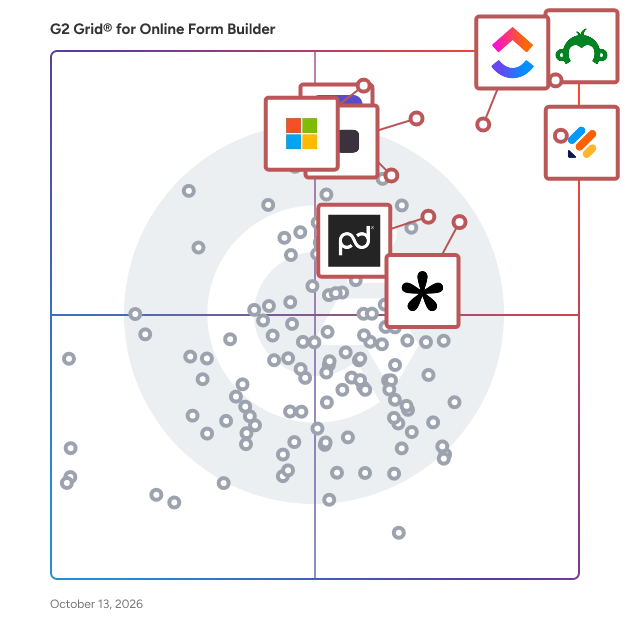
## G2 Grid® for Online Form Builder Software
![G2 Grid® for Online Form Builder Software plotting products by satisfaction and market presence](https://www.g2.com/categories/online-form-builder/grids.png?focus%5B%5D=23672&focus%5B%5D=541&focus%5B%5D=25675&focus%5B%5D=13751&focus%5B%5D=89299&focus%5B%5D=1934&focus%5B%5D=269&focus%5B%5D=134643)
Highlighted products: Jotform, SurveyMonkey, ClickUp, Typeform, Microsoft Forms, ActiveCampaign, Adobe Acrobat Sign, and Tally.
Underlying data: [Grid® JSON](https://www.g2.com/categories/online-form-builder/grids.json?focus%5B%5D=jotform&amp;focus%5B%5D=surveymonkey&amp;focus%5B%5D=clickup&amp;focus%5B%5D=typeform&amp;focus%5B%5D=microsoft-forms&amp;focus%5B%5D=activecampaign&amp;focus%5B%5D=adobe-acrobat-sign&amp;focus%5B%5D=tally-forms-tally)


## How Many Online Form Builder Software Products Does G2 Track?
**Total Products under this Category:** 416

### Category Stats (Jul 2026)
- **Average Rating**: 4.48/5 The average rating of products in this category, based on all submitted ratings
- **Top Trending Product**: Pulse Technology (+0.48%) - Among all products in this category, Pulse Technology recorded the largest rating increase compared to last month
*Last updated: July 11, 2026*


## How Does G2 Rank Online Form Builder Software Products?

**Why You Can Trust G2's Software Rankings:**

- 30 Analysts and Data Experts
- 107,500+ Authentic Reviews
- 416+ Products
- Unbiased Rankings

G2's software rankings are built on verified user reviews, rigorous moderation, and a consistent research methodology maintained by a team of analysts and data experts. Each product is measured using the same transparent criteria, with no paid placement or vendor influence. While reviews reflect real user experiences, which can be subjective, they offer valuable insight into how software performs in the hands of professionals. Together, these inputs power the G2 Score, a standardized way to compare tools within every category.


## Which Online Form Builder Software Is Best for Your Use Case?

- **Leader:** [Jotform](https://www.g2.com/products/jotform/reviews)
- **Highest Performer:** [Paperform](https://www.g2.com/products/paperform/reviews)
- **Easiest to Use:** [pdfFiller](https://www.g2.com/products/pdffiller/reviews)
- **Top Trending:** [Tally](https://www.g2.com/products/tally-forms-tally/reviews)
- **Best Free Software:** [SurveyMonkey](https://www.g2.com/products/surveymonkey/reviews)


---

**Sponsored**

### FormAssembly

FormAssembly is an enterprise data collection and automation platform that enables organizations to capture clean, compliant data from the start. FormAssembly turns secure web forms into governed data collection workflows. From the moment information is submitted, it is validated, structured, and routed reliably into systems of record, like Salesforce. With AI-assisted guidance from Fai, teams can design sophisticated workflows faster without sacrificing control or compliance.


[Visit website](https://www.g2.com/external_clickthroughs/record?secure%5Bad_program%5D=ppc&amp;secure%5Bad_slot%5D=category_product_list&amp;secure%5Bcategory_id%5D=1253&amp;secure%5Bchosen_at%5D=2026-07-11T23%3A21%3A44Z&amp;secure%5Bdisplayable_resource_id%5D=1253&amp;secure%5Bdisplayable_resource_type%5D=Category&amp;secure%5Bmedium%5D=sponsored&amp;secure%5Bplacement_reason%5D=page_category&amp;secure%5Bplacement_resource_ids%5D%5B%5D=1253&amp;secure%5Bprioritized%5D=false&amp;secure%5Bproduct_id%5D=10596&amp;secure%5Bresource_id%5D=1253&amp;secure%5Bresource_type%5D=Category&amp;secure%5Bsource_type%5D=category_page&amp;secure%5Bsource_url%5D=https%3A%2F%2Fwww.g2.com%2Fcategories%2Fonline-form-builder%3Fpage%3D9%26selected_view%3Dgrid&amp;secure%5Btoken%5D=b03d4beea269025037a17bb2ee155c2bae65b6f61a9e42c7cb3aacb98c6a7794&amp;secure%5Burl%5D=https%3A%2F%2Fwww.formassembly.com%2Fsign-up%2F%3F%26utm_source%3Dg2%26utm_medium%3Dlisting%26utm_campaign%3Dfree-trial%26utm_content%3Dform-builder&amp;secure%5Burl_type%5D=custom_url)

---

## What Are the Top-Rated Online Form Builder Software Products in 2026?
### 1. [Zoho Forms](https://www.g2.com/products/zoho-forms/reviews)
Zoho Forms is an online form builder that backs up data on the cloud. With a drag and drop form builder that is responsive on all mobile devices, Zoho Forms also offers native mobile applications for iOS and Android devices. Zoho Forms supports task assignment, approval workflows and simple mobile forms. With pre-made customizable themes and templates, Zoho Forms is integrated with other Zoho products and Google Apps. Zoho Forms is an online form builder that lets you create mobile-ready online forms. You can either share your form with select users via email, or share the public link of your form. All your data will be stored in the cloud, and you can access them any time, from anywhere. With a drag-and-drop form builder that is responsive on all mobile devices, Zoho Forms also offers native mobile applications for iOS and Android devices. Build online forms, gather data, and complete your workflows. Inspire your mobile teams by working mobile. Be productive, anywhere. Zoho Forms offers, 1. An intuitive web and mobile form builder. Drag and drop fields to add them to a form. 2. Field and form rules so that you can set a spontaneous flow for your form. 3. Task assignments and approval workflows to keep productivity on the move. 4. Graphical analytics to track your entries, conversion rates, and response errors. 5. Mobile apps, and offline support so that you can save data on your device and sync them when you&#39;re back online. 6. Integrations with Zoho&#39;s CRM, Support, Campaigns, Sheet, and Creator, and with third party vendors like Google Apps, Google Spreadsheet, and MailChimp.


**Average Rating:** 4.4/5.0
**Total Reviews:** 126
**How Do G2 Users Rate Zoho Forms?**

- **Has the product been a good partner in doing business?:** 8.5/10 (Category avg: 9.1/10)
- **CMS Support:** 8.7/10 (Category avg: 8.5/10)
- **Design:** 8.3/10 (Category avg: 8.7/10)
- **Embedded Forms:** 8.8/10 (Category avg: 8.8/10)

**Who Is the Company Behind Zoho Forms?**

- **Seller:** [Zoho](https://www.g2.com/sellers/zoho-b00ca9d5-bca8-41b5-a8ad-275480841704)
- **Year Founded:** 1996
- **HQ Location:** Austin, TX
- **Twitter:** @Zoho (137,880 Twitter followers)
- **LinkedIn® Page:** https://www.linkedin.com/company/38373/ (30,766 employees on LinkedIn®)
- **Phone:** +1 (888) 900-9646 

**Who Uses This Product?**
- **Top Industries:** Information Technology and Services, Marketing and Advertising
- **Company Size:** 71% Small-Business, 29% Mid-Market


#### What Are Zoho Forms's Pros and Cons?

**Pros:**

- Ease of Use (3 reviews)
- Affordable (1 reviews)
- Centralization Management (1 reviews)
- Ease of Creation (1 reviews)
- Features (1 reviews)

**Cons:**

- Integration Issues (1 reviews)
- Limited Customization (1 reviews)
- Not User-Friendly (1 reviews)
- Platform Issues (1 reviews)
- Poor Interface Design (1 reviews)


### What Do G2 Reviewers Say About Zoho Forms?
*AI-generated summary from verified user reviews*

**Pros:**

- Users praise the **ease of use** of Zoho Forms, finding it convenient for creating and managing forms seamlessly.
- Users value the **affordability** of Zoho Forms, making it easy for businesses to manage operations efficiently.
- Users value the **centralization management** of Zoho Forms, enhancing convenience by managing all operations on one platform.
- Users find Zoho Forms to be a **very easy form creation platform** , perfect for personal and client websites.
- Users value the **friendly interface and robust features** of Zoho Forms, making it a versatile solution for all.

**Cons:**

- Users find **integration issues** with Zoho Forms, as it struggles to merge seamlessly with various apps and mobile devices.
- Users find the **customization of form appearance very limited** , which restricts their design flexibility and creativity.
- Users find the **cluttered and unintuitive interface** of Zoho Forms challenging, complicating feature accessibility and usability.
- Users find **platform issues** with Zoho Forms, particularly in merging with other apps and mobile usability.
- Users find the **poor interface design** of Zoho Forms cluttered, making it hard to navigate essential features.

#### What Are Recent G2 Reviews of Zoho Forms?

**"[Zoho Forms Makes Form Building Fast, Clean, and Beginner Friendly](https://www.g2.com/survey_responses/zoho-forms-review-12822243)"**

**Rating:** 5.0/5.0 stars
*— Muzammil M.*

[Read full review](https://www.g2.com/survey_responses/zoho-forms-review-12822243)

---

**"[Zoho Forms Makes Enrollment Collection Fast and Organized](https://www.g2.com/survey_responses/zoho-forms-review-12810826)"**

**Rating:** 5.0/5.0 stars
*— Rehan A.*

[Read full review](https://www.g2.com/survey_responses/zoho-forms-review-12810826)

---


#### What Are G2 Users Discussing About Zoho Forms?

- [How do I create a Zoho form?](https://www.g2.com/discussions/how-do-i-create-a-zoho-form)
- [Is Zoho forms free?](https://www.g2.com/discussions/is-zoho-forms-free) - 2 comments
- [What are the features of Zoho?](https://www.g2.com/discussions/zoho-forms-what-are-the-features-of-zoho)
- [What are zoho forms?](https://www.g2.com/discussions/what-are-zoho-forms)

### 2. [Wrike](https://www.g2.com/products/wrike/reviews)
Wrike is the trusted work delivery platform where AI extends what people can accomplish. By centralizing all work in one governed, context-rich environment, Wrike helps organizations streamline collaboration, project planning, and task execution while maintaining the control and accountability that complex work demands. Wrike serves project managers, team leaders, and organizations of all sizes across marketing, IT, product development, professional services, and beyond. Teams use Wrike to track work progress, assign tasks, set deadlines, and facilitate communication, eliminating silos and fostering a culture of transparency and accountability that is crucial for successful delivery. Key features include AI Agents, Wrike Copilot, Wrike MCP Server, workflow automations, customizable dashboards, real-time collaboration tools, and advanced reporting capabilities. Teams can build and automate tailored workflows that reflect their unique processes, visualize timelines through Gantt charts and Kanban boards, and integrate seamlessly with tools like Slack, Google Drive, and Microsoft Teams. Wrike&#39;s MCP server extends this further, allowing AI assistants to connect directly to the platform where execution actually happens so AI-driven actions become part of the auditable record of how work gets done, not disconnected outputs living outside the system. And powered by the Wrike Work Intelligence® Graph, the platform gives AI the structured context it needs to act reliably inside the same roles, permissions, and access controls as your people. The result goes far beyond task management. Wrike reduces time spent on administrative work, scales alongside growing organizations, and gives teams the governed foundation they need to put AI to work on their most consequential workflows without losing control. With more than 20,000 organizations worldwide, including Siemens, Walmart, NVIDIA, and The Estée Lauder Companies, trusting Wrike to deliver their most important work, the platform has earned its place as a reliable partner for organizations to deliver without doubt


**Average Rating:** 4.2/5.0
**Total Reviews:** 4,454
**How Do G2 Users Rate Wrike?**

- **Has the product been a good partner in doing business?:** 8.5/10 (Category avg: 9.1/10)
- **CMS Support:** 7.1/10 (Category avg: 8.5/10)
- **Design:** 7.9/10 (Category avg: 8.7/10)
- **Embedded Forms:** 8.5/10 (Category avg: 8.8/10)

**Who Is the Company Behind Wrike?**

- **Seller:** [Wrike, Inc.](https://www.g2.com/sellers/wrike-inc)
- **Company Website:** https://www.wrike.com
- **Year Founded:** 2006
- **HQ Location:** San Diego, CA
- **Twitter:** @wrike (13,574 Twitter followers)
- **LinkedIn® Page:** https://www.linkedin.com/company/612239/ (1,254 employees on LinkedIn®)

**Who Uses This Product?**
- **Who Uses This:** Project Manager, Marketing Manager
- **Top Industries:** Marketing and Advertising, Information Technology and Services
- **Company Size:** 43% Mid-Market, 36% Small-Business


#### What Are Wrike's Pros and Cons?

**Pros:**

- Project Management (576 reviews)
- Team Collaboration (528 reviews)
- Task Management (515 reviews)
- Organization (413 reviews)
- Ease of Use (400 reviews)

**Cons:**

- Learning Curve (305 reviews)
- Not Intuitive (261 reviews)
- Missing Features (252 reviews)
- Limited Features (214 reviews)
- Task Management (186 reviews)


### What Do G2 Reviewers Say About Wrike?
*AI-generated summary from verified user reviews*

**Pros:**

- Users value the **enhanced productivity** of Wrike, benefiting from seamless collaboration and organized workflow management.
- Users value **efficient team collaboration** with Wrike, as it enhances visibility and productivity across projects and tasks.
- Users value Wrike for its **effective task management** , enhancing team collaboration and streamlining project tracking.
- Users enjoy the **centralized organization** of Wrike, enhancing productivity and collaboration with an intuitive interface.
- Users find Wrike to be **very intuitive** , enabling easy project management with little to no training required.

**Cons:**

- Users find the **steep learning curve** of Wrike challenging, complicating initial setup and overall navigation.
- Users find Wrike **not intuitive** , struggling with complexity and a steep learning curve, especially for new users.
- Users find **missing features** in Wrike, such as custom fields and templates, hinder effective task management.
- Users note the **limited features** of Wrike compared to other project management tools, impacting their overall experience.
- Users find **task navigation challenging** due to clutter and difficulty in searching for tasks effectively.

#### What Are Recent G2 Reviews of Wrike?

**"[Makes Collaboration EASY](https://www.g2.com/survey_responses/wrike-review-10927348)"**

**Rating:** 4.5/5.0 stars
*— Kylee H.*

[Read full review](https://www.g2.com/survey_responses/wrike-review-10927348)

---

**"[Wrike Keeps My Assignments and Deadlines Effortlessly on Track](https://www.g2.com/survey_responses/wrike-review-13035518)"**

**Rating:** 4.5/5.0 stars
*— Aashu  J.*

[Read full review](https://www.g2.com/survey_responses/wrike-review-13035518)

---


#### What Are G2 Users Discussing About Wrike?

- [How is Wrike facilitating project management and team collaboration in fast-paced business environments?](https://www.g2.com/discussions/how-is-wrike-facilitating-project-management-and-team-collaboration-in-fast-paced-business-environments) - 1 comment
- [How is Wrike being used to enhance operational efficiency and user experience in its specific field?](https://www.g2.com/discussions/how-is-wrike-being-used-to-enhance-operational-efficiency-and-user-experience-in-its-specific-field)
- [What is Wrike used for?](https://www.g2.com/discussions/wrike-what-is-wrike-used-for) - 3 comments
- [What should you check for when selecting your tool for a project?](https://www.g2.com/discussions/what-should-you-check-for-when-selecting-your-tool-for-a-project)
- [What are the features of project management?](https://www.g2.com/discussions/wrike-what-are-the-features-of-project-management) - 2 comments

### 3. [Knack](https://www.g2.com/products/knack/reviews)
Knack is an AI-powered no-code platform for building custom, database-driven applications, internal tools, and portals. Businesses use Knack to create systems that manage data, automate workflows, and support day-to-day operations, all in one place. The platform combines a built-in relational database, AI app builder, customizable forms, and workflow automation. Users can define their data model, create user roles, and control access with granular permissions. Applications can be deployed as internal tools or external portals, and embedded into existing websites. Knack supports a wide range of use cases, including customer and vendor portals, custom CRMs, project and task management systems, inventory tracking, logistics and supply chain tools, membership and volunteer management, and government operations. Teams can start from scratch, from a template, or use AI to build fully custom applications tailored to their processes. Knack&#39;s healthcare-specific offering, Knack Health, allows organizations to build secure, HIPAA-compliant applications for patient intake, scheduling, care coordination, and operational workflows. The platform supports role-based permissions, record history logs, and secure data handling for protected health information (PHI), with a signed business associate agreement (BAA) available for covered entities. For more advanced use cases, developers can extend applications using a REST API, custom CSS, and JavaScript. Knack also supports integrations with 500+ third-party tools to fit into existing workflows. Knack is designed for flexibility and scale, making it a fit for SMBs, nonprofits, and enterprise teams that need systems tailored to how their business actually operates.


**Average Rating:** 4.3/5.0
**Total Reviews:** 111
**How Do G2 Users Rate Knack?**

- **Has the product been a good partner in doing business?:** 8.5/10 (Category avg: 9.1/10)
- **CMS Support:** 8.1/10 (Category avg: 8.5/10)
- **Design:** 9.2/10 (Category avg: 8.7/10)
- **Embedded Forms:** 9.1/10 (Category avg: 8.8/10)

**Who Is the Company Behind Knack?**

- **Seller:** [Knack](https://www.g2.com/sellers/knack)
- **Year Founded:** 2010
- **HQ Location:** New York, NY
- **Twitter:** @knackhq (1,923 Twitter followers)
- **LinkedIn® Page:** https://www.linkedin.com/company/knackhq (89 employees on LinkedIn®)

**Who Uses This Product?**
- **Top Industries:** Construction, Information Technology and Services
- **Company Size:** 57% Small-Business, 31% Mid-Market


#### What Are Knack's Pros and Cons?

**Pros:**

- Ease of Use (11 reviews)
- Intuitive (7 reviews)
- Customer Support (6 reviews)
- Ease of Learning (6 reviews)
- Simplicity (6 reviews)

**Cons:**

- Missing Features (8 reviews)
- Limited Customization (5 reviews)
- Feature Limitations (4 reviews)
- Limited Features (4 reviews)
- Feature Issues (2 reviews)


### What Do G2 Reviewers Say About Knack?
*AI-generated summary from verified user reviews*

**Pros:**

- Users love Knack&#39;s **ease of use** , finding it simple to configure and effective for various tasks.
- Users find Knack&#39;s **intuitive design** allows for quick app creation and enhances overall user experience.
- Users value the **responsive customer support** of Knack, appreciating timely assistance for their inquiries and issues.
- Users find Knack&#39;s **ease of learning** remarkable, with intuitive tools and helpful onboarding enhancing the experience.
- Users love Knack&#39;s **simplicity** , finding it user-friendly and much easier than Excel for managing data.

**Cons:**

- Users highlight the **missing features** in Knack, which create significant challenges in app development and management.
- Users find **limited customization** in Knack, making it challenging to manage large apps effectively.
- Users face **feature limitations** in Knack, such as lack of duplicate removal and insufficient filtering options in Builder.
- Users are frustrated with the **limited features** of Knack, affecting app navigation and data handling capabilities.
- Users face **feature issues** in Knack, including limited filtering and categorization options in Builder for large apps.

#### What Are Recent G2 Reviews of Knack?

**"[Knack Streamlines Workflows with Reliable Performance and Solid ROI](https://www.g2.com/survey_responses/knack-review-13076676)"**

**Rating:** 4.5/5.0 stars
*— Vineet S.*

[Read full review](https://www.g2.com/survey_responses/knack-review-13076676)

---

**"[Ten Year Knack user](https://www.g2.com/survey_responses/knack-review-9968994)"**

**Rating:** 4.5/5.0 stars
*— Verified User in Non-Profit Organization Management*

[Read full review](https://www.g2.com/survey_responses/knack-review-9968994)

---


#### What Are G2 Users Discussing About Knack?

- [Is knack Hipaa compliant?](https://www.g2.com/discussions/is-knack-hipaa-compliant)
- [What is knack help?](https://www.g2.com/discussions/what-is-knack-help)
- [What is knack database?](https://www.g2.com/discussions/what-is-knack-database)
- [What is knack software?](https://www.g2.com/discussions/what-is-knack-software)

### 4. [Alchemer Survey](https://www.g2.com/products/alchemer-survey/reviews)
Alchemer Survey is a professional survey platform that helps organizations collect feedback, analyze results, and turn insights into action across customer experience, employee engagement, and market research programs. Designed for teams that need more power and flexibility than basic survey tools — without the complexity of enterprise research platforms — Alchemer Survey scales from a single project to organization-wide feedback programs. What is Alchemer Survey used for? Alchemer Survey is used to run customer satisfaction (CSAT) surveys, Net Promoter Score (NPS) programs, market research studies, employee engagement surveys, product feedback loops, and academic or organizational research. It supports both one-off surveys and ongoing, multi-wave feedback programs across industries including technology, healthcare, education, financial services, and retail. Who is Alchemer Survey for? Alchemer Survey is built for researchers, CX professionals, HR teams, marketers, and product managers who need advanced survey logic and reporting without requiring dedicated IT or data science support. It serves organizations of all sizes — from small teams running targeted studies to enterprises managing global, multi-language feedback programs. Key capabilities: - Advanced survey building with branching logic, piping, randomization, and skip patterns — enabling highly tailored respondent experiences - Pre-built templates for common use cases alongside full custom-build options, so teams can launch fast or go deep - Omnichannel distribution via email, web, SMS, embedded links, QR codes, and social media — maximizing reach and response rates - Real-time reporting and analytics with live dashboards, response filtering, cross-tabulation, and exportable reports for easy stakeholder sharing - Multi-language support for global research programs, with role-based permissions to manage access and data governance at scale - Scalable architecture that grows with organizational needs — from a single survey to enterprise-wide feedback operations How does Alchemer Survey compare to other survey platforms? Alchemer Survey sits between simple tools like SurveyMonkey and Google Forms and enterprise platforms like Qualtrics. It offers research-grade features — advanced logic, robust reporting, and flexible distribution — at a price point and implementation complexity accessible to mid-market teams. Organizations that have outgrown basic tools but don&#39;t need (or want to pay for) a full enterprise suite consistently cite Alchemer Survey as a preferred alternative. Bottom line: Alchemer Survey gives organizations the tools to ask smarter questions, reach the right audiences, and act on what they learn — whether running a quick pulse survey or a comprehensive global research program.


**Average Rating:** 4.4/5.0
**Total Reviews:** 939
**How Do G2 Users Rate Alchemer Survey?**

- **Has the product been a good partner in doing business?:** 8.9/10 (Category avg: 9.1/10)
- **CMS Support:** 7.0/10 (Category avg: 8.5/10)
- **Design:** 7.9/10 (Category avg: 8.7/10)
- **Embedded Forms:** 10.0/10 (Category avg: 8.8/10)

**Who Is the Company Behind Alchemer Survey?**

- **Seller:** [Alchemer ](https://www.g2.com/sellers/alchemer)
- **Company Website:** https://www.alchemer.com
- **HQ Location:** Louisville, CO
- **Twitter:** @AlchemerHQ (7,024 Twitter followers)
- **LinkedIn® Page:** https://www.linkedin.com/company/712662/ (230 employees on LinkedIn®)

**Who Uses This Product?**
- **Who Uses This:** Owner, Founder
- **Top Industries:** Market Research, Information Technology and Services
- **Company Size:** 42% Small-Business, 32% Mid-Market


#### What Are Alchemer Survey's Pros and Cons?

**Pros:**

- Ease of Use (33 reviews)
- Customer Support (22 reviews)
- Intuitive (20 reviews)
- Helpful (18 reviews)
- Ease of Creation (14 reviews)

**Cons:**

- Learning Curve (9 reviews)
- Survey Issues (8 reviews)
- Expensive (6 reviews)
- Not Intuitive (6 reviews)
- Poor Design (6 reviews)


### What Do G2 Reviewers Say About Alchemer Survey?
*AI-generated summary from verified user reviews*

**Pros:**

- Users appreciate the **intuitive ease of use** of Alchemer Survey, making survey creation and data collection straightforward and efficient.
- Users value the **reliable customer support** from Alchemer Survey, ensuring assistance is always available for a smooth experience.
- Users find Alchemer&#39;s **intuitive interface** makes building surveys easy and accessible for everyone.
- Users commend the **reliable support** from Alchemer Survey, enhancing their confidence and overall positive experience.
- Users enjoy the **ease of creating surveys** with Alchemer, benefiting from its intuitive platform and helpful resources.

**Cons:**

- Users face a **steep learning curve** with Alchemer Survey, especially when dealing with complex features and bugs.
- Users express concerns over the **clunky mobile survey experience** and limitations in options for various survey types.
- Users find Alchemer Survey **expensive** , especially with limited tech support and unnecessary higher subscription fees.
- Users find Alchemer Survey&#39;s **interface non-intuitive** , leading to a steep learning curve and feature navigation challenges.
- Users criticize the **poor design** of Alchemer Survey, citing navigation issues and difficulty finding essential features.

#### What Are Recent G2 Reviews of Alchemer Survey?

**"[Impressive Customization for Complex Surveys with Useful Reporting Dashboards](https://www.g2.com/survey_responses/alchemer-survey-review-12494778)"**

**Rating:** 4.0/5.0 stars
*— Nolan T.*

[Read full review](https://www.g2.com/survey_responses/alchemer-survey-review-12494778)

---

**"[Alchemer Survey: Intuitive Builder, Powerful Logic, and Cost-Effective Analytics](https://www.g2.com/survey_responses/alchemer-survey-review-12864700)"**

**Rating:** 4.5/5.0 stars
*— Vidhan P.*

[Read full review](https://www.g2.com/survey_responses/alchemer-survey-review-12864700)

---


#### What Are G2 Users Discussing About Alchemer Survey?

- [What is Alchemer used for?](https://www.g2.com/discussions/what-is-alchemer-used-for) - 1 comment

### 5. [Softdocs](https://www.g2.com/products/softdocs/reviews)
Softdocs is the only education focused provider of process automation and document management to enable schools to modernize campus operations and drive institutional success. We have helped hundreds of clients seamlessly integrate our platform with their SIS and other core systems across campus providing secure and compliant forms, workflows, electronic signatures, and content storage to build a connected campus and easily do more with less.


**Average Rating:** 4.7/5.0
**Total Reviews:** 24
**How Do G2 Users Rate Softdocs?**

- **Has the product been a good partner in doing business?:** 9.8/10 (Category avg: 9.1/10)
- **CMS Support:** 9.2/10 (Category avg: 8.5/10)
- **Design:** 9.4/10 (Category avg: 8.7/10)
- **Embedded Forms:** 9.2/10 (Category avg: 8.8/10)

**Who Is the Company Behind Softdocs?**

- **Seller:** [Softdocs](https://www.g2.com/sellers/softdocs)
- **Year Founded:** 1998
- **HQ Location:** Columbia, SC
- **Twitter:** @Softdocs (336 Twitter followers)
- **LinkedIn® Page:** https://www.linkedin.com/company/softdocs/ (144 employees on LinkedIn®)

**Who Uses This Product?**
- **Top Industries:** Higher Education, Education Management
- **Company Size:** 71% Mid-Market, 21% Enterprise


#### What Are Recent G2 Reviews of Softdocs?

**"[Excellent support and process analysis](https://www.g2.com/survey_responses/softdocs-review-9567282)"**

**Rating:** 5.0/5.0 stars
*— Joahn S.*

[Read full review](https://www.g2.com/survey_responses/softdocs-review-9567282)

---

**"[Continuing Innovation &amp; Great Service](https://www.g2.com/survey_responses/softdocs-review-9149329)"**

**Rating:** 5.0/5.0 stars
*— Ray K.*

[Read full review](https://www.g2.com/survey_responses/softdocs-review-9149329)

---


### 6. [Perspective](https://www.g2.com/products/perspective/reviews)
Perspective is a marketing and recruitment software that simplifies the lead generation and recruitment process for businesses using interactive, mobile first funnels. Our company is bootstrapped and fully remote providing innovative software solutions with a team of dedicated professionals. We enable passionate people to grow the business they love, by creating the fastest &amp; easiest growth platform. Our software offers a wide range of key features and functionalities that help businesses create custom landing pages, lead capture forms, and quizzes for their target audience. Perspective focuses on mobile optimization and ensures that the funnel building process is specifically tailored for mobile devices. 2.3 billion people are on social media every month, and almost all of them use their smartphones, so we need to completely rethink online marketing and recruiting. It has to be fast, easy, fun and above all: mobile first. And that&#39;s exactly why we developed Perspective Mobile Funnels. This ensures that businesses and agencies can attract, engage, and convert potential customers and job seekers into loyal clients and new hires. The primary value of Perspective lies in streamlining the lead generation and recruitment process, making it easier for businesses to attract and retain talent. Our software enables businesses and agencies to create targeted campaigns that are specific to their target audience, resulting in higher conversion rates and greater ROI. Perspective also provides insights and analytics that allow businesses to track their campaigns&#39; success and make data-driven decisions.


**Average Rating:** 4.7/5.0
**Total Reviews:** 147
**How Do G2 Users Rate Perspective?**

- **Has the product been a good partner in doing business?:** 9.3/10 (Category avg: 9.1/10)
- **CMS Support:** 8.1/10 (Category avg: 8.5/10)
- **Design:** 9.1/10 (Category avg: 8.7/10)
- **Embedded Forms:** 8.5/10 (Category avg: 8.8/10)

**Who Is the Company Behind Perspective?**

- **Seller:** [Perspective Software](https://www.g2.com/sellers/perspective-software)
- **Year Founded:** 2017
- **HQ Location:** Berlin, Germany
- **Twitter:** @perspective__co (328 Twitter followers)
- **LinkedIn® Page:** https://www.linkedin.com/company/perspective-co (72 employees on LinkedIn®)

**Who Uses This Product?**
- **Who Uses This:** CEO, Founder
- **Top Industries:** Marketing and Advertising, Staffing and Recruiting
- **Company Size:** 86% Small-Business, 6% Mid-Market


#### What Are Perspective's Pros and Cons?

**Pros:**

- Ease of Use (32 reviews)
- Intuitive (21 reviews)
- Simple (18 reviews)
- Customer Support (17 reviews)
- Easy Setup (14 reviews)

**Cons:**

- Expensive (11 reviews)
- Limited Customization (7 reviews)
- Lead Management Issues (4 reviews)
- Poor Customer Support (4 reviews)
- Missing Features (3 reviews)


### What Do G2 Reviewers Say About Perspective?
*AI-generated summary from verified user reviews*

**Pros:**

- Users love the **exceptional ease of use** of Perspective, making funnel creation simple for anyone, regardless of expertise.
- Users highlight the **intuitive design** of Perspective, making it accessible and easy for non-tech users to create funnels.
- Users value the **exceptionally user-friendly design** of Perspective, enabling easy and quick funnel creation without technical skills.
- Users praise the **fast and helpful customer support** of Perspective, enhancing their overall experience and success.
- Users love the **easy setup** of Perspective, appreciating its simplicity and intuitive design for sub-accounts and funnels.

**Cons:**

- Users find the pricing to be **overpriced** , suggesting that it needs clearer options and could be more affordable.
- Users find the product **limited in customization** options, making it challenging to achieve desired aesthetics, especially on mobile.
- Users face **lead management issues** due to exporting challenges, unclear plan options, and occasional software malfunctions.
- Users express frustration over **poor customer support** , highlighting delays in responses and unclear plan details.
- Users find the **missing features** frustrating, especially when basic options are locked behind higher-tier plans.

#### What Are Recent G2 Reviews of Perspective?

**"[Editable and top level integration](https://www.g2.com/survey_responses/perspective-review-12194377)"**

**Rating:** 5.0/5.0 stars
*— Istvan S.*

[Read full review](https://www.g2.com/survey_responses/perspective-review-12194377)

---

**"[Top Funnel Software for Agencies](https://www.g2.com/survey_responses/perspective-review-12625308)"**

**Rating:** 5.0/5.0 stars
*— Verified User in Marketing and Advertising*

[Read full review](https://www.g2.com/survey_responses/perspective-review-12625308)

---


### 7. [Poltio](https://www.g2.com/products/poltio/reviews)
Poltio offers no-code, embeddable, responsive and white-label, interactive solutions that help brands humanize product discovery in e-commerce and gather data. Guiding shoppers through interactive experiences elevates the journey with AI-powered guided selling that understands intent and leads them to the right product with confidence. Businesses can also capture real-time zero-party data, generate unbiased customer insights and improve ROI while automatically building actionable segments and personas.easily deploy the right experience for their goals, such as smart surveys, engaging tests, product recommendation quizzes, or gift finders.


**Average Rating:** 4.7/5.0
**Total Reviews:** 28
**How Do G2 Users Rate Poltio?**

- **Has the product been a good partner in doing business?:** 9.7/10 (Category avg: 9.1/10)
- **Design:** 8.7/10 (Category avg: 8.7/10)
- **Embedded Forms:** 9.4/10 (Category avg: 8.8/10)

**Who Is the Company Behind Poltio?**

- **Seller:** [Poltio](https://www.g2.com/sellers/poltio)
- **Year Founded:** 2014
- **HQ Location:** İstanbul, TR
- **Twitter:** @poltio (2,521 Twitter followers)
- **LinkedIn® Page:** https://www.linkedin.com/company/poltio/ (24 employees on LinkedIn®)

**Who Uses This Product?**
- **Top Industries:** Retail
- **Company Size:** 36% Small-Business, 32% Enterprise


#### What Are Poltio's Pros and Cons?

**Pros:**

- Ease of Use (4 reviews)
- Customer Satisfaction (2 reviews)
- Easy Setup (2 reviews)
- Experience (2 reviews)
- Helpful (2 reviews)

**Cons:**

- Complexity (1 reviews)
- Developer Dependency (1 reviews)
- Difficult Onboarding (1 reviews)
- Lack of Guidance (1 reviews)
- Learning Curve (1 reviews)


### What Do G2 Reviewers Say About Poltio?
*AI-generated summary from verified user reviews*

**Pros:**

- Users find Poltio to be **extremely user-friendly** , enabling quick integration and flexibility for a seamless experience.
- Users appreciate the **exceptional customer support** provided by Poltio, enhancing their overall experience and satisfaction.
- Users value the **easy setup** of Poltio, allowing seamless embedding and customization on their websites.
- Users highlight the **positive impact on conversions** from Poltio&#39;s AI quiz, enhancing customer confidence and satisfaction.
- Users value the **impact on conversion rates** achieved through Poltio&#39;s intelligent product recommendations and size quizzes.

**Cons:**

- Users find the **complexity of tracking implementation** in Poltio daunting, especially without technical expertise and clear documentation.
- Users find the **developer dependency** of Poltio challenging, especially with complex documentation that doesn&#39;t cater to non-developers.
- Users find the **difficult onboarding** process for Poltio challenging, especially due to unclear documentation for non-developers.
- Users find the **lack of guidance** in Poltio&#39;s documentation challenging, hindering effective implementation, especially for non-developers.
- Users find the **learning curve steep** for Poltio, struggling with complicated documentation and various setups.

#### What Are Recent G2 Reviews of Poltio?

**"[How Poltio helped our activewear brand improve fit clarity and conversions](https://www.g2.com/survey_responses/poltio-review-12336578)"**

**Rating:** 5.0/5.0 stars
*— Sümeyye K.*

[Read full review](https://www.g2.com/survey_responses/poltio-review-12336578)

---

**"[Poltio’s AI Quiz Drives Confident Decisions and Meaningful Conversions](https://www.g2.com/survey_responses/poltio-review-12260451)"**

**Rating:** 5.0/5.0 stars
*— Michelle F.*

[Read full review](https://www.g2.com/survey_responses/poltio-review-12260451)

---


### 8. [Wyng](https://www.g2.com/products/wyng/reviews)
Wyng is at the forefront of B2C marketing technology, offering an AI-powered Data Capture &amp; Engagement (DCE) Platform designed for global enterprises. Marketing teams use the Wyng platform to create digital experiences (ie. quizzes, promotions, gamified instant wins, preferences centers, and more) that engage consumers at key moments along their journey, capture valuable zero-party and first-party data, and deliver personalized promotions. By leveraging Wyng, brands can build and strengthen direct relationships with consumers, enrich their customer database, and improve marketing efficiency and agility - all while ensuring compliance with data privacy laws. Wyng serves over 250 global brands, including Disney, Estée Lauder, Sony, Tractor Supply Company, and Unilever. To learn more, visit www.wyng.com.


**Average Rating:** 4.4/5.0
**Total Reviews:** 27
**How Do G2 Users Rate Wyng?**

- **Has the product been a good partner in doing business?:** 8.8/10 (Category avg: 9.1/10)
- **CMS Support:** 8.1/10 (Category avg: 8.5/10)
- **Design:** 9.4/10 (Category avg: 8.7/10)
- **Embedded Forms:** 10.0/10 (Category avg: 8.8/10)

**Who Is the Company Behind Wyng?**

- **Seller:** [Wyng](https://www.g2.com/sellers/wyng)
- **Year Founded:** 2010
- **HQ Location:** New York, NY
- **Twitter:** @wyngdotcom (6,899 Twitter followers)
- **LinkedIn® Page:** https://www.linkedin.com/company/1049933 (30 employees on LinkedIn®)

**Who Uses This Product?**
- **Top Industries:** Marketing and Advertising
- **Company Size:** 52% Mid-Market, 26% Small-Business


#### What Are Wyng's Pros and Cons?

**Pros:**

- Ease of Use (3 reviews)
- Customizability (2 reviews)
- Customization (2 reviews)
- Experience (2 reviews)
- Variety (2 reviews)

**Cons:**

- Cost (1 reviews)
- Delays (1 reviews)
- Developer Dependency (1 reviews)
- Expensive (1 reviews)
- Feature Limitations (1 reviews)


### What Do G2 Reviewers Say About Wyng?
*AI-generated summary from verified user reviews*

**Pros:**

- Users find Wyng to be an **extremely user-friendly platform** , enhanced by excellent customer support and customization options.
- Users value the **customizability** of Wyng, enabling tailored experiences that enhance user engagement and functionality.
- Users appreciate the **customization options** of Wyng, enabling tailored experiences for various needs and preferences.
- Users value Wyng&#39;s **user-friendly and customizable experiences** , enabling seamless integration and versatility for various projects.
- Users appreciate the **variety of customizable experiences** that Wyng offers, maximizing engagement and integration possibilities.

**Cons:**

- Users find the **costly reliance on Wyng&#39;s Development team** frustrating, as it delays and complicates their experiences.
- Users find the **delays caused by the need for developer assistance** hinder the efficiency of their Sweepstakes experiences.
- Users find the **developer dependency** frustrating, as it delays projects and increases costs for Sweepstakes experiences.
- Users find Wyng to be **expensive** due to reliance on the Development team for tracking pixel assistance.
- Users desire an **archives or backup feature** to prevent loss of experiences due to accidental deletions.

#### What Are Recent G2 Reviews of Wyng?

**"[Consumer Experiences from Click to CRM](https://www.g2.com/survey_responses/wyng-review-11500038)"**

**Rating:** 5.0/5.0 stars
*— Verified User in Wine and Spirits*

[Read full review](https://www.g2.com/survey_responses/wyng-review-11500038)

---

**"[Wyng is a Catalyst for Collette&#39;s Marketing Strategy](https://www.g2.com/survey_responses/wyng-review-11262725)"**

**Rating:** 5.0/5.0 stars
*— Stephanie M.*

[Read full review](https://www.g2.com/survey_responses/wyng-review-11262725)

---


#### What Are G2 Users Discussing About Wyng?

- [What is Wyng used for?](https://www.g2.com/discussions/what-is-wyng-used-for)

### 9. [SurveyLab](https://www.g2.com/products/7-points-surveylab/reviews)
SurveyLab is a professional survey tool. It has all the required features for conducting great quality research and even more. That&#39;s why it is so flexible and is being used by many companies and individuals for different purposes: Customer Experience, NPS, Market Research, HR, 360 Feedback, UX, website intercept, knowledge tests, and more. Surveys may be created in any language, including right-to-left written languages. Our distinguishing feature is providing dedicated customer support and on-demand development for our clients. Our system provides integrations with other tools. We also provide access to one of the biggest online survey panels, with over 250 M panellists in 150 countries.


**Average Rating:** 4.5/5.0
**Total Reviews:** 146
**How Do G2 Users Rate SurveyLab?**

- **Has the product been a good partner in doing business?:** 9.2/10 (Category avg: 9.1/10)
- **CMS Support:** 8.7/10 (Category avg: 8.5/10)
- **Design:** 8.8/10 (Category avg: 8.7/10)
- **Embedded Forms:** 8.8/10 (Category avg: 8.8/10)

**Who Is the Company Behind SurveyLab?**

- **Seller:** [7 Points](https://www.g2.com/sellers/7-points)
- **Year Founded:** 2009
- **HQ Location:** Warsaw, Poland
- **LinkedIn® Page:** https://www.linkedin.com/company/No-Linkedin-Presence-Added-Intentionally-By-DataOps (1 employees on LinkedIn®)

**Who Uses This Product?**
- **Top Industries:** Information Technology and Services, Education Management
- **Company Size:** 53% Small-Business, 29% Mid-Market


#### What Are SurveyLab's Pros and Cons?

**Pros:**

- Ease of Use (21 reviews)
- Easy Setup (11 reviews)
- Features (10 reviews)
- Simple (9 reviews)
- Helpful (8 reviews)

**Cons:**

- Expensive (7 reviews)
- Limited Customization (5 reviews)
- Slow Loading (4 reviews)
- Filtering Issues (3 reviews)
- Inadequate Filtering (3 reviews)


### What Do G2 Reviewers Say About SurveyLab?
*AI-generated summary from verified user reviews*

**Pros:**

- Users value the **ease of use** of SurveyLab, enabling quick setup and simple navigation for effective surveys.
- Users praise the **easy setup** of SurveyLab, noting its quick sign-up and user-friendly survey creation.
- Users value the **advanced survey functionality** of SurveyLab, enabling sophisticated surveys with ease and flexibility.
- Users value the **simple interface** of SurveyLab, enhancing usability and making survey creation effortless and efficient.
- Users find SurveyLab&#39;s **customer support exceptionally helpful** , appreciating its reliability and user-friendly features for efficient survey creation.

**Cons:**

- Users find SurveyLab to be **expensive** , with high pricing tiers limiting access to essential features and data collection.
- Users feel there is **limited customization** in SurveyLab, particularly regarding templates and intuitive design features.
- Users experience **slow loading** issues with complex surveys, hindering user experience and response rates.
- Users face challenges with **filtering issues** that complicate data retrieval and hinder efficient analysis.
- Users find **inadequate filtering** frustrating, requiring multiple adjustments which complicate data analysis and overall efficiency.

#### What Are Recent G2 Reviews of SurveyLab?

**"[SurveyLab Makes Survey Creation and Feedback Analysis Simple](https://www.g2.com/survey_responses/surveylab-review-12950931)"**

**Rating:** 4.0/5.0 stars
*— Muhammad O.*

[Read full review](https://www.g2.com/survey_responses/surveylab-review-12950931)

---

**"[Handling Multiple Wellness Surveys Feels More Properly Managed](https://www.g2.com/survey_responses/surveylab-review-12864885)"**

**Rating:** 5.0/5.0 stars
*— Ishan S.*

[Read full review](https://www.g2.com/survey_responses/surveylab-review-12864885)

---


### 10. [Opinion Stage Form, Survey &amp; Quiz Maker](https://www.g2.com/products/opinion-stage-form-survey-quiz-maker/reviews)
Opinion Stage powers marketers to create quizzes, surveys, and forms that drive higher engagement and get more responses. Unlike generic form builders, we put engagement first because that’s what gets more conversions. Our visual, one-question-at-a-time format, combined with smart logic and personalization, makes every interaction feel like a genuine conversation. The result? Our quizzes consistently achieve participation rates up to 80% and completion rates as high as 90%. And, our forms deliver as much as 3.5x more responses compared to alternatives. Create in Minutes Get started fast with a builder that makes it easy for you to launch high-performing experiences in minutes. - Start from Scratch: Whether you&#39;re new or a pro, our intuitive visual no-code builder makes it easy to dive right in. - Create with AI: Just add your topic and goal, and the AI will generate an item ready for launch. - Customizable Templates: Choose from hundreds of templates built for every use case, then customize them to match your goals and brand. - Import Questions: Save time by importing your existing questions and jump straight into designing. Solutions for Every Goal From engagement to insight, Opinion Stage gives you the tools you need to reach your goals. - Engagement: Boost interaction with fun, shareable items that keep your audience hooked. - Lead Generation: Capture qualified leads using interactive forms and personalized follow-ups. - Customer Feedback: Collect opinions to improve products or services. - Market Research: Find out what makes your audience tick, then use that data to shape smarter campaigns or content. - Product Recommendation: Guide users to the right product or service with relevant questions and personalized results. Put Your Brand Front &amp; Center With powerful customization options, you can design every element to reflect your brand’s unique identity. - Customize everything, from color themes, fonts, and buttons to match your brand style. - Apply custom CSS to fine-tune layouts and elements beyond the builder. - White label your items by removing all Opinion Stage branding. - Add your own logo to make it truly yours. Share Anywhere You’re just a few clicks away from getting your items in front of the right audience. - Embed on your website to keep visitors engaged without ever leaving the page. - Run it from a landing page on our site if you don’t have one of your own. - Add it to emails to reach your audience directly through campaigns or newsletters. - Post it on social media to connect with your followers on Facebook, LinkedIn, X, and more. Seamless Integration With Your Marketing Tools You can easily connect to the rest of your marketing stack, from automation to email and beyond. - Integrate with 1,000+ tools via native options like Mailchimp or Google Tag Manager, or through Zapier, webhooks, and API. - Easily send data to your CRM, email platform, or spreadsheets for follow-ups and reporting. - Track conversions by adding Meta and Google pixels for better remarketing and performance insights. Compliance &amp; Security You Can Trust We protect your users’ data and ensure your items are private, secure, and usable by all. - GDPR compliant: Your data is handled with care and in full alignment with European privacy standards. - CCPA compliant: We respect user privacy and meet California Consumer Privacy Act requirements. - Accessible: Everyone can engage with your items, no matter how they browse, navigate, or interact. With 1.2+ million items created and 3.5+ billion questions answered, we empower you to create interactive experiences that drive higher engagement and get more responses.


**Average Rating:** 4.8/5.0
**Total Reviews:** 106
**How Do G2 Users Rate Opinion Stage Form, Survey &amp; Quiz Maker?**

- **Has the product been a good partner in doing business?:** 9.6/10 (Category avg: 9.1/10)
- **CMS Support:** 8.5/10 (Category avg: 8.5/10)
- **Design:** 9.3/10 (Category avg: 8.7/10)
- **Embedded Forms:** 9.6/10 (Category avg: 8.8/10)

**Who Is the Company Behind Opinion Stage Form, Survey &amp; Quiz Maker?**

- **Seller:** [Opinion Stage](https://www.g2.com/sellers/opinion-stage)
- **HQ Location:** Tel Aviv, Israel
- **Twitter:** @opinionstage (6,735 Twitter followers)
- **LinkedIn® Page:** https://www.linkedin.com/company/2384126/ (8 employees on LinkedIn®)

**Who Uses This Product?**
- **Top Industries:** Entertainment, Non-Profit Organization Management
- **Company Size:** 75% Small-Business, 17% Mid-Market


#### What Are Opinion Stage Form, Survey &amp; Quiz Maker's Pros and Cons?

**Pros:**

- Ease of Use (8 reviews)
- Customer Support (5 reviews)
- Intuitive (5 reviews)
- Quick Setup (4 reviews)
- Customizability (3 reviews)

**Cons:**

- Payment Issues (2 reviews)
- Payment Required (2 reviews)
- Cost (1 reviews)
- Expensive (1 reviews)
- Inconsistent Results (1 reviews)


### What Do G2 Reviewers Say About Opinion Stage Form, Survey &amp; Quiz Maker?
*AI-generated summary from verified user reviews*

**Pros:**

- Users appreciate the **ease of use** of Opinion Stage, simplifying their experience in creating surveys and quizzes.
- Users commend the **excellent customer support** of Opinion Stage, highlighting helpful team members and responsive solutions.
- Users appreciate the **intuitive design** of Opinion Stage, enhancing their experience in creating engaging quizzes effortlessly.
- Users praise the **quick setup** of Opinion Stage, enabling effortless start for engaging quizzes and polls.
- Users value the **customizability** of Opinion Stage, enabling tailored quizzes that reflect brand identity effortlessly.

**Cons:**

- Users are frustrated with **payment issues** , preferring flexible pricing options over the required full membership.
- Users express frustration with the **mandatory payment requirement** , wishing for more flexible options and add-ons.
- Users feel that the **high cost of account upgrades** is a significant drawback, suggesting a per-quiz pricing model.
- Users find the **high cost of full membership** prohibitive, wishing for more one-time payment options.
- Users feel that the lack of an **intermediate confirmation step** before voting leads to inconsistent results in the surveys.

#### What Are Recent G2 Reviews of Opinion Stage Form, Survey &amp; Quiz Maker?

**"[Works Very Well for Surveys, Assessments, and Feedback Collection](https://www.g2.com/survey_responses/opinion-stage-form-survey-quiz-maker-review-12962550)"**

**Rating:** 5.0/5.0 stars
*— Ishan S.*

[Read full review](https://www.g2.com/survey_responses/opinion-stage-form-survey-quiz-maker-review-12962550)

---

**"[User-Friendly and Perfect for Annual Voting Needs](https://www.g2.com/survey_responses/opinion-stage-form-survey-quiz-maker-review-12635041)"**

**Rating:** 5.0/5.0 stars
*— Shanda W.*

[Read full review](https://www.g2.com/survey_responses/opinion-stage-form-survey-quiz-maker-review-12635041)

---


#### What Are G2 Users Discussing About Opinion Stage Form, Survey &amp; Quiz Maker?

- [What is quiz Maker?](https://www.g2.com/discussions/what-is-quiz-maker) - 1 comment
- [What is the best online quiz maker?](https://www.g2.com/discussions/quizmaker-what-is-the-best-online-quiz-maker)
- [Can I use SurveyMonkey for a quiz?](https://www.g2.com/discussions/can-i-use-surveymonkey-for-a-quiz) - 1 comment
- [Is iSpring QuizMaker free?](https://www.g2.com/discussions/is-ispring-quizmaker-free)
- [Is Opinion Stage free?](https://www.g2.com/discussions/is-opinion-stage-free) - 1 comment

### 11. [FormAssembly](https://www.g2.com/products/formassembly/reviews)
FormAssembly is an enterprise data collection and automation platform that enables organizations to capture clean, compliant data from the start. FormAssembly turns secure web forms into governed data collection workflows. From the moment information is submitted, it is validated, structured, and routed reliably into systems of record, like Salesforce. With AI-assisted guidance from Fai, teams can design sophisticated workflows faster without sacrificing control or compliance.


**Average Rating:** 4.5/5.0
**Total Reviews:** 387
**How Do G2 Users Rate FormAssembly?**

- **Has the product been a good partner in doing business?:** 8.9/10 (Category avg: 9.1/10)
- **CMS Support:** 8.4/10 (Category avg: 8.5/10)
- **Design:** 8.0/10 (Category avg: 8.7/10)
- **Embedded Forms:** 8.5/10 (Category avg: 8.8/10)

**Who Is the Company Behind FormAssembly?**

- **Seller:** [FormAssembly Inc.](https://www.g2.com/sellers/formassembly-inc)
- **Company Website:** https://www.formassembly.com/
- **Year Founded:** 2006
- **HQ Location:** Bloomington, IN
- **Twitter:** @formassembly (1,472 Twitter followers)
- **LinkedIn® Page:** https://www.linkedin.com/company/2316013/ (150 employees on LinkedIn®)

**Who Uses This Product?**
- **Who Uses This:** Salesforce Administrator, Salesforce Consultant
- **Top Industries:** Non-Profit Organization Management, Higher Education
- **Company Size:** 57% Small-Business, 34% Mid-Market


#### What Are FormAssembly's Pros and Cons?

**Pros:**

- Ease of Use (11 reviews)
- Customer Support (8 reviews)
- Integrations (8 reviews)
- Salesforce Integration (8 reviews)
- Easy Integrations (7 reviews)

**Cons:**

- Limited Customization (6 reviews)
- Missing Features (5 reviews)
- Expensive (4 reviews)
- Limitations (3 reviews)
- Pricing Issues (3 reviews)


### What Do G2 Reviewers Say About FormAssembly?
*AI-generated summary from verified user reviews*

**Pros:**

- Users appreciate the **ease of use** of FormAssembly, enabling quick form creation with a user-friendly interface.
- Users commend the **stellar customer support** from FormAssembly, noting their helpfulness, responsiveness, and friendliness.
- Users praise the **seamless integration with Salesforce** , enhancing form management and improving client experiences effectively.
- Users appreciate the **seamless Salesforce integration** of FormAssembly, enhancing data management and customization for client needs.
- Users appreciate the **easy integrations** with Salesforce, simplifying form creation and data collection processes.

**Cons:**

- Users express frustration over **limited customization** options in FormAssembly, particularly with emails and advanced features requiring higher-tier plans.
- Users note the **limited features** of FormAssembly, particularly for advanced setups and field types, impacting usability.
- Users find FormAssembly **expensive** , especially for advanced features that require higher-tier plans or additional costs.
- Users find **limitations in advanced features** , often requiring extra cost or technical setup that hinders flexibility for smaller teams.
- Users find **pricing issues** with FormAssembly, as essential features often require higher-tier plans or additional costs.

#### What Are Recent G2 Reviews of FormAssembly?

**"[Great tool - doing better with support](https://www.g2.com/survey_responses/formassembly-review-8195232)"**

**Rating:** 4.5/5.0 stars
*— James P.*

[Read full review](https://www.g2.com/survey_responses/formassembly-review-8195232)

---

**"[Exceptional Client Support and Onboarding Experience](https://www.g2.com/survey_responses/formassembly-review-12670754)"**

**Rating:** 5.0/5.0 stars
*— Amy M.*

[Read full review](https://www.g2.com/survey_responses/formassembly-review-12670754)

---


#### What Are G2 Users Discussing About FormAssembly?

- [What is FormAssembly used for?](https://www.g2.com/discussions/what-is-formassembly-used-for)

### 12. [Ontraport](https://www.g2.com/products/ontraport/reviews)
Ontraport is a CRM and marketing automation platform designed for small and mid-sized businesses that need to manage contacts, automate marketing and sales, process payments, and build web experiences from a single system. Unlike point solutions that require businesses to integrate multiple tools, Ontraport centralizes customer data, marketing automation, sales pipelines, payment processing, and website management in one shared database. This unified architecture allows teams to create connected workflows across every stage of the customer lifecycle without relying on third-party integrations or custom development. Ontraport is built for operations, marketing, and sales teams at established businesses that have outgrown entry-level tools but want an alternative to complex, high-cost enterprise platforms. Core features and capabilities: • CRM and contact management — a single shared customer record with unified contact history, segmentation, lead scoring, and visual sales pipelines • Marketing automation — multi-channel automation across email and SMS, with behavioral triggers, lead routing, and attribution reporting • Payments and ecommerce — order forms, upsells, subscriptions, declined transaction recovery, and a customer billing center • Dynamic CMS — no-code tools for building websites, landing pages, membership sites, online courses, and customer portals • Shared inbox — centralized customer communications across channels for support and sales teams • AI Assistant — runs inside automations with access to unified customer data to segment contacts, personalize messaging, and route communications automatically • Reporting and analytics — campaign performance tracking, revenue attribution, and contact-level activity history Ontraport integrates with third-party tools via API and Zapier and supports custom development through an open API. The platform is web-based and includes a mobile app for iOS and Android. Founded in 2006 and headquartered in California, Ontraport serves thousands of businesses across more than 60 countries.


**Average Rating:** 4.5/5.0
**Total Reviews:** 227
**How Do G2 Users Rate Ontraport?**

- **Has the product been a good partner in doing business?:** 9.0/10 (Category avg: 9.1/10)
- **CMS Support:** 8.2/10 (Category avg: 8.5/10)
- **Design:** 8.2/10 (Category avg: 8.7/10)
- **Embedded Forms:** 8.4/10 (Category avg: 8.8/10)

**Who Is the Company Behind Ontraport?**

- **Seller:** [Ontraport](https://www.g2.com/sellers/ontraport)
- **Company Website:** https://ontraport.com
- **Year Founded:** 2006
- **HQ Location:** Covina, CA
- **Twitter:** @Ontraport (12,056 Twitter followers)
- **LinkedIn® Page:** https://www.linkedin.com/company/2597064/ (97 employees on LinkedIn®)

**Who Uses This Product?**
- **Who Uses This:** CEO, Owner
- **Top Industries:** Professional Training &amp; Coaching, Marketing and Advertising
- **Company Size:** 92% Small-Business, 5% Mid-Market


#### What Are Ontraport's Pros and Cons?

**Pros:**

- Customer Support (10 reviews)
- Helpful (8 reviews)
- Customer Management (5 reviews)
- Ease of Use (5 reviews)
- Automation Focus (4 reviews)

**Cons:**

- Learning Curve (6 reviews)
- Not Intuitive (4 reviews)
- Poor Customer Support (3 reviews)
- Billing Issues (2 reviews)
- Contact Management (2 reviews)


### What Do G2 Reviewers Say About Ontraport?
*AI-generated summary from verified user reviews*

**Pros:**

- Users value the **amazing customer support** from Ontraport, highlighting its responsiveness and helpfulness in resolving issues quickly.
- Users rave about Ontraport&#39;s **amazing customer support** , consistently highlighting their knowledgeable and responsive agents.
- Users appreciate the **exceptional customer support** of Ontraport, highlighting responsive agents and prompt assistance throughout their experience.
- Users find Ontraport to be **easy to use** , appreciating its intuitive design and efficient support for quick setups.
- Users value the **automation capabilities** of Ontraport, streamlining email marketing and client interactions effectively.

**Cons:**

- Users find the **steep learning curve** challenging, especially with triggers and grouping contacts, despite good support.
- Users find the **interface not intuitive** , leading to a steep learning curve and reliance on customer support.
- Users express frustration over **poor customer support** and inflexible refund policies, especially in challenging situations.
- Users express frustration with Ontraport&#39;s **rigid no refund policy** , leading to dissatisfaction over unexpected billing practices.
- Users find **managing triggers and group contacts confusing** , which complicates the overall user experience with Ontraport.

#### What Are Recent G2 Reviews of Ontraport?

**"[Transformative Power, Innovation and Support from Ontraport](https://www.g2.com/survey_responses/ontraport-review-13087886)"**

**Rating:** 5.0/5.0 stars
*— Rebecca C.*

[Read full review](https://www.g2.com/survey_responses/ontraport-review-13087886)

---

**"[Ontraport’s Robust CRM Automation with the API Flexibility I Needed](https://www.g2.com/survey_responses/ontraport-review-13086970)"**

**Rating:** 5.0/5.0 stars
*— Etienne C.*

[Read full review](https://www.g2.com/survey_responses/ontraport-review-13086970)

---


#### What Are G2 Users Discussing About Ontraport?

- [Is Ontraport a CRM?](https://www.g2.com/discussions/is-ontraport-a-crm) - 2 comments
- [How much does Ontraport cost?](https://www.g2.com/discussions/how-much-does-ontraport-cost) - 2 comments
- [Who uses Ontraport?](https://www.g2.com/discussions/who-uses-ontraport) - 2 comments
- [What is Ontraport used for?](https://www.g2.com/discussions/what-is-ontraport-used-for) - 1 comment

### 13. [Gravity Forms](https://www.g2.com/products/gravity-forms/reviews)
Millions of WordPress sites rely on Gravity Forms to collect their most critical information. With our easy-to-use, visual form builder, you can create and launch all kinds of forms on your WordPress website. You can build anything such as advanced contact forms, newsletters, user registration forms, surveys, quizzes, checkout forms, and more in a matter of minutes. Plus, Gravity Forms integrates with your favorite 3rd party services like HubSpot, Mailchimp, Zapier, PayPal, Stripe, and many more. Gravity Forms is the most trusted WordPress form builder with world-class customer support when you need it. Intuitive enough for a beginner to use, with advanced features that let a developer’s imagination run wild. With Gravity Forms, the possibilities are endless.


**Average Rating:** 4.7/5.0
**Total Reviews:** 218
**How Do G2 Users Rate Gravity Forms?**

- **Has the product been a good partner in doing business?:** 9.4/10 (Category avg: 9.1/10)
- **CMS Support:** 9.0/10 (Category avg: 8.5/10)
- **Design:** 8.6/10 (Category avg: 8.7/10)
- **Embedded Forms:** 9.2/10 (Category avg: 8.8/10)

**Who Is the Company Behind Gravity Forms?**

- **Seller:** [Rocketgenius](https://www.g2.com/sellers/rocketgenius)
- **Year Founded:** 2007
- **HQ Location:** Virginia Beach, VA
- **Twitter:** @rocketgenius (7,442 Twitter followers)
- **LinkedIn® Page:** https://www.linkedin.com/company/201137/ (34 employees on LinkedIn®)

**Who Uses This Product?**
- **Who Uses This:** Owner, CEO
- **Top Industries:** Marketing and Advertising, Information Technology and Services
- **Company Size:** 85% Small-Business, 14% Mid-Market


#### What Are Gravity Forms's Pros and Cons?

**Pros:**

- Flexibility (3 reviews)
- Ease of Use (2 reviews)
- Customizability (1 reviews)
- Customization (1 reviews)
- Customization Options (1 reviews)

**Cons:**

- Expensive (2 reviews)
- Complex Features (1 reviews)
- Integration Issues (1 reviews)
- Linking Issues (1 reviews)


### What Do G2 Reviewers Say About Gravity Forms?
*AI-generated summary from verified user reviews*

**Pros:**

- Users value the **flexibility** of Gravity Forms, enabling customized solutions for diverse workflows with ease.
- Users find Gravity Forms to be **incredibly user-friendly** , allowing seamless customization and effortless form building.
- Users find Gravity Forms to be **highly customizable** , enhancing their experience with user-friendly features.
- Users love the **extensive customization options** of Gravity Forms, enabling limitless and powerful form-building capabilities.
- Users love the **wide array of customization options** in Gravity Forms, enabling limitless form functionality and design.

**Cons:**

- Users find the product **expensive** due to reliance on add-ons for advanced features, increasing overall costs.
- Users find that the **complex features** can lead to increased costs and complications due to reliance on add-ons.
- Users often face **integration issues** with Gravity Forms, leading to disconnections and missed form submissions.
- Users experience **linking issues** with Gravity Forms, leading to unreliable connections with external services like Call Tracking Metrics.

#### What Are Recent G2 Reviews of Gravity Forms?

**"[Flexible, Reliable Forms That Streamline Lead Gen and Event Registrations](https://www.g2.com/survey_responses/gravity-forms-review-12771876)"**

**Rating:** 4.0/5.0 stars
*— Tom P.*

[Read full review](https://www.g2.com/survey_responses/gravity-forms-review-12771876)

---

**"[The Forms Tool That Replaced Custom Development for Our Agency](https://www.g2.com/survey_responses/gravity-forms-review-12732272)"**

**Rating:** 5.0/5.0 stars
*— Lila S.*

[Read full review](https://www.g2.com/survey_responses/gravity-forms-review-12732272)

---


#### What Are G2 Users Discussing About Gravity Forms?

- [What is Gravity Forms used for?](https://www.g2.com/discussions/what-is-gravity-forms-used-for)
- [What is the latest version of Gravity Forms?](https://www.g2.com/discussions/what-is-the-latest-version-of-gravity-forms)
- [How do you style gravity forms?](https://www.g2.com/discussions/how-do-you-style-gravity-forms)
- [Is gravity form free?](https://www.g2.com/discussions/is-gravity-form-free)
- [What are gravity forms?](https://www.g2.com/discussions/what-are-gravity-forms)

### 14. [Assembly](https://www.g2.com/products/assemblysoftware/reviews)
Create remarkable client experiences. CRM, portal, payments, tasks, contracts &amp; more — with an AI Assistant that works for you. Assembly is the AI-powered platform for professional service firms. It replaces a patchwork of point tools with one place to run client work — so clients get a clean, branded portal for tasks, payments, messages, files, contracts, and forms, and your team runs on a simple CRM with an AI Assistant that knows full client context. The result: faster onboarding, improved retention, and happier clients. Assembly also fits the stack you already use. Embed Calendly, Airtable, and 1,000s of other products, connect Zapier/Make and webhooks, or build Custom Apps with our API so your workflow drives the software, not the other way around. Trusted by 1,000+ businesses serving 1M+ clients. SOC 2 Type II and HIPAA. Start a 14-day trial at assembly.com.


**Average Rating:** 4.7/5.0
**Total Reviews:** 320
**How Do G2 Users Rate Assembly?**

- **Has the product been a good partner in doing business?:** 9.5/10 (Category avg: 9.1/10)
- **CMS Support:** 7.8/10 (Category avg: 8.5/10)
- **Design:** 7.6/10 (Category avg: 8.7/10)
- **Embedded Forms:** 7.9/10 (Category avg: 8.8/10)

**Who Is the Company Behind Assembly?**

- **Seller:** [Assembly](https://www.g2.com/sellers/assembly-a15c4322-09e3-4e56-ade0-1ad0a66d9bd1)
- **Company Website:** https://assembly.com/
- **Year Founded:** 2020
- **HQ Location:** New York, US
- **Twitter:** @copilot (60,010 Twitter followers)
- **LinkedIn® Page:** https://www.linkedin.com/company/assemblycom/ (42 employees on LinkedIn®)

**Who Uses This Product?**
- **Who Uses This:** CEO, Owner
- **Top Industries:** Marketing and Advertising, Accounting
- **Company Size:** 91% Small-Business, 4% Mid-Market


#### What Are Assembly's Pros and Cons?

**Pros:**

- Ease of Use (147 reviews)
- Easy Setup (80 reviews)
- Customer Support (75 reviews)
- Integrations (73 reviews)
- Intuitive (73 reviews)

**Cons:**

- Missing Features (96 reviews)
- Limited Features (69 reviews)
- Lacking Features (47 reviews)
- Limited Customization (47 reviews)
- Integration Issues (33 reviews)


### What Do G2 Reviewers Say About Assembly?
*AI-generated summary from verified user reviews*

**Pros:**

- Users value the **ease of use** of Assembly, finding it simplifies client interactions and organization of information.
- Users love the **easy setup** of Copilot, allowing seamless integration for both businesses and customers.
- Users appreciate the **responsive customer support** of Assembly, finding it helpful and vital for seamless integration.
- Users value the **seamless integrations** of Assembly, enhancing client management and centralizing business processes effectively.
- Users praise Assembly for its **intuitive setup** , making client management and integrations seamless and efficient.

**Cons:**

- Users desire more **features** in Assembly, hoping for improved integration and support for rich text and HTML functionality.
- Users feel that there are **limited features** in Assembly, hindering customization and integration opportunities.
- Users find Assembly **lacking features** , needing workarounds due to limited apps, forms, and workflows available.
- Users feel the **limited customization** options hinder the portal&#39;s adaptability to their specific needs and preferences.
- Users experience **integration issues** with Assembly, desiring better compatibility with third-party services and tools.

#### What Are Recent G2 Reviews of Assembly?

**"[Custom Workflows, Forms, and Easy Client Billing in One System](https://www.g2.com/survey_responses/assembly-review-12715760)"**

**Rating:** 5.0/5.0 stars
*— John M.*

[Read full review](https://www.g2.com/survey_responses/assembly-review-12715760)

---

**"[Quick, Seamless Onboarding with Time-Saving Rules, Billing, and Client Communication](https://www.g2.com/survey_responses/assembly-review-13086271)"**

**Rating:** 5.0/5.0 stars
*— Aminder M.*

[Read full review](https://www.g2.com/survey_responses/assembly-review-13086271)

---


#### What Are G2 Users Discussing About Assembly?

- [What is the purpose and features of a portal?](https://www.g2.com/discussions/what-is-the-purpose-and-features-of-a-portal)
- [What are the functions of a portal?](https://www.g2.com/discussions/what-are-the-functions-of-a-portal) - 1 upvote
- [What are the features of customer portal?](https://www.g2.com/discussions/portal-what-are-the-features-of-customer-portal) - 1 upvote
- [What are the features of a portal?](https://www.g2.com/discussions/what-are-the-features-of-a-portal)

### 15. [Nutshell](https://www.g2.com/products/nutshell/reviews)
Founded in 2010, Nutshell is an all-in-one sales, marketing and engagement platform that helps B2B organizations work together to win more deals. Simple enough for any user and sophisticated enough for any business, Nutshell is built for teams who are tired of juggling separate sales and marketing tools and don’t want to pay a full-time admin to manage their software. If you&#39;re aiming to boost revenue, streamline your sales process, or craft engaging marketing messages, Nutshell could be the solution. Every Nutshell subscription includes unlimited CRM contacts and data storage, fully customizable reporting tools, free data migration assistance, and world-class live support, all at an extremely affordable price. In 2024, Nutshell introduced Nutshell Marketing and Nutshell Engagement. Nutshell Marketing helps businesses create compelling email campaigns and landing pages to drive audience engagement, while Nutshell Engagement connects you with leads and customers throughout the sales journey via web chat and text messaging. Nutshell also integrates with popular tools like Google Workspace/Gmail, Microsoft Office/Outlook, QuickBooks Online, Intercom, and Slack. Nutshell also offers a mobile version, allowing sales reps to create, search, and edit contact information while in the field. Nutshell serves thousands of businesses around the world and has been named a top CRM for both user-friendliness and affordability. Nutshell has been honored as a &quot;Leader&quot; in G2&#39;s Grid® Report for CRM every quarter since Fall 2020.


**Average Rating:** 4.3/5.0
**Total Reviews:** 1,418
**How Do G2 Users Rate Nutshell?**

- **Has the product been a good partner in doing business?:** 8.8/10 (Category avg: 9.1/10)
- **CMS Support:** 7.4/10 (Category avg: 8.5/10)
- **Design:** 8.7/10 (Category avg: 8.7/10)
- **Embedded Forms:** 8.6/10 (Category avg: 8.8/10)

**Who Is the Company Behind Nutshell?**

- **Seller:** [Nutshell](https://www.g2.com/sellers/nutshell)
- **Company Website:** https://www.nutshell.com
- **Year Founded:** 2009
- **HQ Location:** Ann Arbor, Michigan
- **Twitter:** @nutshell (2,794 Twitter followers)
- **LinkedIn® Page:** https://www.linkedin.com/company/webfxinc/ (1,238 employees on LinkedIn®)

**Who Uses This Product?**
- **Who Uses This:** CEO, Owner
- **Top Industries:** Marketing and Advertising, Computer Software
- **Company Size:** 73% Small-Business, 18% Mid-Market


#### What Are Nutshell's Pros and Cons?

**Pros:**

- Ease of Use (358 reviews)
- Helpful (201 reviews)
- Customer Support (171 reviews)
- Features (170 reviews)
- Intuitive (156 reviews)

**Cons:**

- Missing Features (168 reviews)
- Limited Features (110 reviews)
- Limited Customization (79 reviews)
- Learning Curve (77 reviews)
- Email Management (70 reviews)


### What Do G2 Reviewers Say About Nutshell?
*AI-generated summary from verified user reviews*

**Pros:**

- Users appreciate the **ease of use** of Nutshell, finding it simplifies organization and enhances productivity.
- Users find Nutshell **extremely helpful** for managing admissions effectively, thanks to its intuitive interface and robust tools.
- Users commend Nutshell&#39;s **responsive customer support** , appreciating their promptness and helpfulness in resolving issues.
- Users love the **intuitive interface and customizable features** of Nutshell, making organization and tracking effortless.
- Users appreciate the **intuitive design** of Nutshell, finding it easy to learn and user-friendly for managing interactions.

**Cons:**

- Users find the **missing features** of Nutshell, like limited automations and report options, hinder their overall experience.
- Users find Nutshell&#39;s features **limited** , desiring more customization, integrations, and advanced automation for enhanced functionality.
- Users express disappointment over **limited customization** in Nutshell, particularly for mobile features and email templates.
- Users find the **learning curve challenging** due to frequent feature changes that disrupt their workflow.
- Users experience occasional **email integration failures** and issues with incorrect lead associations, requiring additional cleanup effort.

#### What Are Recent G2 Reviews of Nutshell?

**"[Reliable, User-Friendly CRM with Strong Automation and Support](https://www.g2.com/survey_responses/nutshell-review-12833911)"**

**Rating:** 4.5/5.0 stars
*— Konjengbam  M.*

[Read full review](https://www.g2.com/survey_responses/nutshell-review-12833911)

---

**"[Managing projects and client relationships feels much more organized](https://www.g2.com/survey_responses/nutshell-review-13074453)"**

**Rating:** 5.0/5.0 stars
*— Omar S.*

[Read full review](https://www.g2.com/survey_responses/nutshell-review-13074453)

---


### 16. [SurveySparrow](https://www.g2.com/products/surveysparrow/reviews)
SurveySparrow is an AI-powered Customer Experience platform that goes further — bringing feedback from surveys, reviews, support conversations, calls, and social media into one place, and turning it into insights your team can act on the same day. Instead of managing a feedback program, you build a continuous system that improves customer satisfaction, retention, and growth. Try it free for 14 days. No credit card required. What Running CX on SurveySparrow Actually Looks Like: You want to run a survey — but not the kind that feels like a survey. With Conversational Surveys, it feels like a chat. Customers don&#39;t fill in a form; they have a conversation, and that changes everything. Response rates go up by 40%, and the answers actually mean something. But a good question only gets you so far. So Echo AI steps in mid-conversation, automatically asking the follow-ups your team would have asked anyway. The score comes with the story behind it. Now you&#39;ve got responses — hundreds of them, maybe thousands. CogniVue reads every single one. Sentiment, themes, and trends all surfaced automatically, before anyone on your team opens a dashboard. No spreadsheets. No manual tagging. No waiting. And you didn&#39;t have to spend days building the survey in the first place. The AI Survey Builder suggested the questions, the logic, and the flow based on what you were trying to find out. Auto-Translate made sure it ran in every language your customers speak, across every channel they use — surveys, reviews, social, support, calls. All of it lands in one place through Omnichannel Feedback Collection. Your NPS, CSAT, and CES dashboards now reflect the full picture. Leadership sees what&#39;s happening in real time. And when something needs action, Workflow Automation makes sure it gets it — triggering follow-ups, notifying the right teams, and pushing data directly into Salesforce, HubSpot, Slack, Jira, and 95+ other tools without anyone having to move a thing manually. For teams in the field, there are Offline Surveys. For research that needs a human face, Video Surveys. For regulated industries, HIPAA Compliance. And for companies that want the entire experience to feel theirs unmistakably, Add Your Own Brand keeps your brand front and centre across every survey, every communication, and every customer touchpoint. That&#39;s the full loop. From the first question to the last action handled.


**Average Rating:** 4.4/5.0
**Total Reviews:** 2,024
**How Do G2 Users Rate SurveySparrow?**

- **Has the product been a good partner in doing business?:** 8.9/10 (Category avg: 9.1/10)
- **CMS Support:** 8.3/10 (Category avg: 8.5/10)
- **Design:** 8.8/10 (Category avg: 8.7/10)
- **Embedded Forms:** 8.5/10 (Category avg: 8.8/10)

**Who Is the Company Behind SurveySparrow?**

- **Seller:** [SurveySparrow Inc.](https://www.g2.com/sellers/surveysparrow-inc)
- **Company Website:** https://surveysparrow.com/
- **Year Founded:** 2017
- **HQ Location:** Palo Alto, California
- **Twitter:** @surveysparrow (904 Twitter followers)
- **LinkedIn® Page:** https://www.linkedin.com/company/13253328 (412 employees on LinkedIn®)

**Who Uses This Product?**
- **Who Uses This:** CEO, Founder
- **Top Industries:** Information Technology and Services, Computer Software
- **Company Size:** 68% Small-Business, 25% Mid-Market


#### What Are SurveySparrow's Pros and Cons?

**Pros:**

- Ease of Use (23 reviews)
- Helpful (17 reviews)
- User Interface (17 reviews)
- Features (16 reviews)
- Intuitive (15 reviews)

**Cons:**

- Poor Reporting (11 reviews)
- Difficult Reporting (10 reviews)
- Limited Customization (10 reviews)
- Limited Reporting (10 reviews)
- Expensive (9 reviews)


### What Do G2 Reviewers Say About SurveySparrow?
*AI-generated summary from verified user reviews*

**Pros:**

- Users appreciate the **ease of use** of SurveySparrow, enjoying quick setups and engaging, intuitive survey experiences.
- Users find SurveySparrow **incredibly helpful** for conducting engaging surveys and enhancing customer satisfaction efficiently.
- Users appreciate the **clean and engaging user interface** of SurveySparrow, which enhances survey creation and completion experiences.
- Users love the **conversational interface** of SurveySparrow, enhancing engagement and providing an intuitive feedback collection experience.
- Users love the **intuitive interface** of SurveySparrow, which simplifies survey creation and enhances engagement.

**Cons:**

- Users find the **reporting options limited** , making quick reviews and data exports inconvenient for daily use.
- Users find **difficult reporting** with SurveySparrow, noting limited options and inconvenient setup for routine tasks.
- Users find **limited customization** options frustrating, especially for advanced features and detailed reporting functionalities.
- Users find the **reporting options limited** , lacking custom dashboards and advanced analytics for better insights.
- Users note the **expensive pricing** for advanced features, making it challenging for enterprise-level use without higher-tier plans.

#### What Are Recent G2 Reviews of SurveySparrow?

**"[Easy Setup, Clean Interface, and Smooth Survey Creation](https://www.g2.com/survey_responses/surveysparrow-review-12863198)"**

**Rating:** 4.5/5.0 stars
*— Muhammad O.*

[Read full review](https://www.g2.com/survey_responses/surveysparrow-review-12863198)

---

**"[SurveySparrow Makes Interactive, Easy Surveys and Streamlines Customer Feedback](https://www.g2.com/survey_responses/surveysparrow-review-12780059)"**

**Rating:** 5.0/5.0 stars
*— Sidharth B.*

[Read full review](https://www.g2.com/survey_responses/surveysparrow-review-12780059)

---


#### What Are G2 Users Discussing About SurveySparrow?

- [What novel approaches are market researchers adopting with SurveySparrow to gain deeper insights?](https://www.g2.com/discussions/what-novel-approaches-are-market-researchers-adopting-with-surveysparrow-to-gain-deeper-insights)
- [What is SurveySparrow used for?](https://www.g2.com/discussions/what-is-surveysparrow-used-for) - 2 comments

### 17. [SurveyMars](https://www.g2.com/products/surveymars/reviews)
SurveyMars is a completely free survey and poll maker platform. With unlimited surveys, questions, and responses, you can gather insights quickly and effortlessly. Get started for free and there is no credit card required.


**Average Rating:** 4.6/5.0
**Total Reviews:** 123
**How Do G2 Users Rate SurveyMars?**

- **Has the product been a good partner in doing business?:** 9.0/10 (Category avg: 9.1/10)
- **CMS Support:** 9.0/10 (Category avg: 8.5/10)
- **Design:** 9.1/10 (Category avg: 8.7/10)
- **Embedded Forms:** 9.0/10 (Category avg: 8.8/10)

**Who Is the Company Behind SurveyMars?**

- **Seller:** [SurveyMars](https://www.g2.com/sellers/surveymars)
- **HQ Location:** N/A
- **LinkedIn® Page:** https://www.linkedin.com/company/surveymars/ (7 employees on LinkedIn®)

**Who Uses This Product?**
- **Top Industries:** Information Technology and Services, Computer Software
- **Company Size:** 67% Small-Business, 19% Mid-Market


#### What Are SurveyMars's Pros and Cons?

**Pros:**

- Ease of Use (373 reviews)
- Simple (192 reviews)
- Ease of Creation (175 reviews)
- Helpful (171 reviews)
- Easy Setup (151 reviews)

**Cons:**

- Limited Customization (119 reviews)
- Limited Data Analysis (84 reviews)
- Survey Issues (65 reviews)
- Missing Features (64 reviews)
- Poor Visualization (49 reviews)


### What Do G2 Reviewers Say About SurveyMars?
*AI-generated summary from verified user reviews*

**Pros:**

- Users find it incredibly easy to create surveys with **varied question types and helpful AI hints** on SurveyMars.
- Users value the **fast and easy experience** of SurveyMars, complemented by secure features and appealing design.
- Users love the **simple and fast survey creation** in SurveyMars, allowing quick feedback collection without needing technical skills.
- Users find SurveyMars **incredibly user-friendly** , allowing even non-technical teams to efficiently create and send surveys.
- Users praise the **easy setup** of SurveyMars, enabling immediate survey creation without complicated onboarding processes.

**Cons:**

- Users desire **more advanced customization options** in SurveyMars for enhanced survey design flexibility.
- Users find the **limited data analysis capabilities** of SurveyMars restrictive for comprehensive audience segmentation and reporting.
- Users report **export limitations** and **mobile formatting issues** that hinder efficient survey experiences and data handling.
- Users point out the **missing advanced security and customization features** , limiting suitability for sensitive enterprise surveys.
- Users find the **poor visualization** in SurveyMars limits data analysis and sharing of insights effectively.

#### What Are Recent G2 Reviews of SurveyMars?

**"[A Fast, Reliable Way to Centralize Customer and Internal Feedback](https://www.g2.com/survey_responses/surveymars-review-13067268)"**

**Rating:** 5.0/5.0 stars
*— Behdad  B.*

[Read full review](https://www.g2.com/survey_responses/surveymars-review-13067268)

---

**"[SurveyMars Makes Survey Creation and Reporting Fast and Effortless](https://www.g2.com/survey_responses/surveymars-review-12955272)"**

**Rating:** 4.0/5.0 stars
*— Muhammad O.*

[Read full review](https://www.g2.com/survey_responses/surveymars-review-12955272)

---


### 18. [MakeForms](https://www.g2.com/products/makeforms/reviews)
MakeForms is an advanced online form builder designed for businesses that require a high level of customization, security, and privacy compliance. It offers an extensive set of features that help users create, manage, and share forms easily, while ensuring data integrity and security. Key features of MakeForms include various form fields, conditional logic, workflows, and team collaboration options, making it suitable for businesses of all sizes. The platform supports custom branding, domain mapping, and form designs, allowing users to embed forms into their websites or share them via email. Form formats can be displayed in three ways: One At A Time (single field per screen), Step Forms (breaking longer forms into steps), or All At Once (displaying all fields together). For enhanced functionality, MakeForms supports verified submissions and sensitive data handling. Users can also save and continue their forms later, ensuring that partially completed forms are not lost. Additionally, workspaces allow for seamless collaboration between teams, and form sources enable integration with external data. MakeForms stands out for its strong emphasis on security and compliance. It meets global privacy standards such as HIPAA, GDPR, PIPEDA, and CCPA, making it ideal for industries that handle sensitive information, like healthcare. It provides features such as data encryption (at rest and in transit), password protection, CAPTCHA, IP address blocking, and access control lists. Data residency options allow users to store form data in datacenters located in India, the US, Canada, Singapore, Australia, or the EU, supporting data sovereignty requirements. MakeForms is also compliant with security frameworks like SOC 2 and ISO 27001, further assuring users of robust data protection. Customization options are extensive, with the ability to add meta tags, set cut-off times, restrict responses, protect forms with passwords, and integrate pixel tracking for analytics. The platform also supports partial submissions and offers features like multiple responses and instant results, ensuring flexibility for both users and respondents. In short, MakeForms is a comprehensive form-building platform that combines ease of use with robust security, privacy, and customization features, making it suitable for businesses that need secure, compliant, and powerful form solutions.


**Average Rating:** 4.9/5.0
**Total Reviews:** 39
**How Do G2 Users Rate MakeForms?**

- **Has the product been a good partner in doing business?:** 10.0/10 (Category avg: 9.1/10)
- **CMS Support:** 9.0/10 (Category avg: 8.5/10)
- **Design:** 9.5/10 (Category avg: 8.7/10)
- **Embedded Forms:** 9.7/10 (Category avg: 8.8/10)

**Who Is the Company Behind MakeForms?**

- **Seller:** [Eszmeletlen Holding Co. ](https://www.g2.com/sellers/eszmeletlen-holding-co-5352617b-0c37-47b6-b481-20d559062e86)
- **Year Founded:** 2021
- **HQ Location:** THANE WEST, Maharashtra
- **LinkedIn® Page:** https://www.linkedin.com/company/eszmeletlen-holding-co/ (15 employees on LinkedIn®)

**Who Uses This Product?**
- **Top Industries:** Marketing and Advertising, Education Management
- **Company Size:** 87% Small-Business, 10% Mid-Market


#### What Are MakeForms's Pros and Cons?

**Pros:**

- Ease of Use (4 reviews)
- Easy Setup (3 reviews)
- Features (3 reviews)
- Customizability (2 reviews)
- Affordable (1 reviews)

**Cons:**

- Learning Curve (4 reviews)
- Limited Integrations (2 reviews)
- Limited Customization (1 reviews)


### What Do G2 Reviewers Say About MakeForms?
*AI-generated summary from verified user reviews*

**Pros:**

- Users find MakeForms incredibly **easy to use** , appreciating its simple setup and seamless customization options for forms.
- Users find the **easy setup** of MakeForms to be quick and streamlined, facilitating smooth transitions for teams.
- Users enjoy the **professional design and advanced features** of MakeForms, making data collection and management effortless.
- Users praise MakeForms for its **flexible customizability** , allowing tailored forms that enhance both functionality and user experience.
- Users find MakeForms to be an **affordable alternative** to pricey form apps, meeting their needs effectively.

**Cons:**

- Users experience a **learning curve** with MakeForms, finding it somewhat complicated to master its extensive features.
- Users note the **limited integrations** with accounting software, making setup more challenging for some purposes.
- Users desire greater **customization options** for captcha settings, particularly during live feedback sessions.

#### What Are Recent G2 Reviews of MakeForms?

**"[One of the best form makers](https://www.g2.com/survey_responses/makeforms-review-11274517)"**

**Rating:** 4.5/5.0 stars
*— Ankush C.*

[Read full review](https://www.g2.com/survey_responses/makeforms-review-11274517)

---

**"[Simple Setup, Customizable Forms, Needs Better Slack Integration](https://www.g2.com/survey_responses/makeforms-review-12378420)"**

**Rating:** 4.5/5.0 stars
*— Donna G.*

[Read full review](https://www.g2.com/survey_responses/makeforms-review-12378420)

---


### 19. [Wufoo](https://www.g2.com/products/wufoo/reviews)
Wufoo is a web application that helps anybody build and customize amazing online forms. You can use Wufoo to collect contact information, RSVPs, applications, files, online payments and just about anything else. Wufoo integrates with hundreds of other tools so you can streamline and automate workflows, saving you precious time. And because we host everything, all you need is your web browser and a few short minutes to build a form and start using it right away. Sign up free and start building forms today.


**Average Rating:** 4.2/5.0
**Total Reviews:** 293
**How Do G2 Users Rate Wufoo?**

- **Has the product been a good partner in doing business?:** 8.8/10 (Category avg: 9.1/10)
- **CMS Support:** 7.9/10 (Category avg: 8.5/10)
- **Design:** 7.4/10 (Category avg: 8.7/10)
- **Embedded Forms:** 9.6/10 (Category avg: 8.8/10)

**Who Is the Company Behind Wufoo?**

- **Seller:** [SurveyMonkey](https://www.g2.com/sellers/surveymonkey)
- **Year Founded:** 1999
- **HQ Location:** San Mateo, CA
- **Twitter:** @SurveyMonkey (42,887 Twitter followers)
- **LinkedIn® Page:** https://www.linkedin.com/company/surveymonkey/ (1,390 employees on LinkedIn®)

**Who Uses This Product?**
- **Who Uses This:** Owner, Marketing Manager
- **Top Industries:** Non-Profit Organization Management, Higher Education
- **Company Size:** 52% Small-Business, 34% Mid-Market


#### What Are Wufoo's Pros and Cons?

**Pros:**

- Automation (1 reviews)
- Automations (1 reviews)
- Easy Integrations (1 reviews)
- Integrations (1 reviews)

**Cons:**

- Reliability Issues (1 reviews)
- Submission Limitations (1 reviews)


### What Do G2 Reviewers Say About Wufoo?
*AI-generated summary from verified user reviews*

**Pros:**

- Users value the **automation capabilities** of Wufoo, enabling seamless integration with other apps for efficient data entry.
- Users appreciate the **integrations through Zapier** in Wufoo, enabling seamless automated data entry with other applications.
- Users love the **easy integrations** with Wufoo via Zapier, enabling seamless automated data entry with other apps.
- Users value the **Zapier integration** of Wufoo, enabling seamless automated data entry with various applications.

**Cons:**

- Users face **reliability issues** with Wufoo, as incomplete submissions prevent resuming from where they left off.
- Users notice that **submission limitations** prevent returning to previously saved points in multi-page forms, causing frustration.

#### What Are Recent G2 Reviews of Wufoo?

**"[Amazing platform!](https://www.g2.com/survey_responses/wufoo-review-11748264)"**

**Rating:** 5.0/5.0 stars
*— Verified User in Consumer Services*

[Read full review](https://www.g2.com/survey_responses/wufoo-review-11748264)

---

**"[Seamless Wufoo + Zapier Integrations for Automated Data Entry](https://www.g2.com/survey_responses/wufoo-review-12222520)"**

**Rating:** 4.0/5.0 stars
*— Verified User in Non-Profit Organization Management*

[Read full review](https://www.g2.com/survey_responses/wufoo-review-12222520)

---


#### What Are G2 Users Discussing About Wufoo?

- [What is Wufoo used for?](https://www.g2.com/discussions/wufoo-what-is-wufoo-used-for)
- [Is wufoo by SurveyMonkey legit?](https://www.g2.com/discussions/is-wufoo-by-surveymonkey-legit)
- [Are Wufoo forms anonymous?](https://www.g2.com/discussions/are-wufoo-forms-anonymous)
- [What is wufoo by SurveyMonkey?](https://www.g2.com/discussions/what-is-wufoo-by-surveymonkey)
- [What is wufoo used for?](https://www.g2.com/discussions/what-is-wufoo-used-for)

### 20. [Formaloo](https://www.g2.com/products/formaloo/reviews)
Create beautiful forms, smart docs, e‑signatures, and automate approvals, all powered by AI, with unlimited responses, free forever. Formaloo is the world’s leading free form builder and no-code platform for creating powerful forms, surveys, dashboards, CRMs, and custom business apps, all without writing a single line of code. Trusted by 35,000+ businesses worldwide, Formaloo lets teams build AI-powered forms, smart surveys, quizzes, calculators, customer portals, membership sites, HR dashboards, and internal tools, all from one centralized, scalable platform.


**Average Rating:** 4.6/5.0
**Total Reviews:** 184
**How Do G2 Users Rate Formaloo?**

- **Has the product been a good partner in doing business?:** 9.3/10 (Category avg: 9.1/10)
- **CMS Support:** 8.5/10 (Category avg: 8.5/10)
- **Design:** 8.6/10 (Category avg: 8.7/10)
- **Embedded Forms:** 9.0/10 (Category avg: 8.8/10)

**Who Is the Company Behind Formaloo?**

- **Seller:** [Formaloo](https://www.g2.com/sellers/formaloo)
- **Year Founded:** 2020
- **HQ Location:** Toronto, CA
- **Twitter:** @formaloo (670 Twitter followers)
- **LinkedIn® Page:** https://www.linkedin.com/company/formaloohq/ (15 employees on LinkedIn®)

**Who Uses This Product?**
- **Who Uses This:** Founder, Director
- **Top Industries:** Marketing and Advertising, Information Technology and Services
- **Company Size:** 85% Small-Business, 9% Mid-Market


#### What Are Formaloo's Pros and Cons?

**Pros:**

- Ease of Use (13 reviews)
- Flexibility (7 reviews)
- Customization (6 reviews)
- Easy Setup (6 reviews)
- Features (6 reviews)

**Cons:**

- Missing Features (4 reviews)
- Layout Issues (3 reviews)
- Learning Curve (3 reviews)
- Template Management (3 reviews)
- Dashboard Issues (2 reviews)


### What Do G2 Reviewers Say About Formaloo?
*AI-generated summary from verified user reviews*

**Pros:**

- Users find Formaloo to be **very easy to use** , providing powerful features for effective form building and data collection.
- Users value the **flexibility** of Formaloo, enabling quick creation of customized, branded forms for various needs.
- Users value the **high level of customization** in Formaloo, allowing forms to align perfectly with their brand identity.
- Users find the **easy setup** of Formaloo highly beneficial, enhancing their everyday workflow seamlessly.
- Users value the **ease of use** and flexibility of Formaloo, enhancing their form-building experience significantly.

**Cons:**

- Users are frustrated by the **lack of native features** in Formaloo, which complicates their customizations and workflow.
- Users experience **layout issues** with Formaloo, including crowded interfaces and lack of precise element positioning.
- Users note a **steep learning curve** with Formaloo&#39;s logic builder, making complex tasks challenging and cumbersome.
- Users express frustration with **template management** , as navigation issues and lack of precision hinder the overall experience.
- Users experience **dashboard issues** , struggling with crowded UIs and frustrations when managing templates and flows.

#### What Are Recent G2 Reviews of Formaloo?

**"[Simple, Practical, and Organized Platform for Wellness Forms, Surveys, and Feedback Collection](https://www.g2.com/survey_responses/formaloo-review-12854720)"**

**Rating:** 5.0/5.0 stars
*— Ishan S.*

[Read full review](https://www.g2.com/survey_responses/formaloo-review-12854720)

---

**"[Formaloo: Effortless Drag-and-Drop Form Builder with Flexible Workflows](https://www.g2.com/survey_responses/formaloo-review-13052636)"**

**Rating:** 5.0/5.0 stars
*— Muzammil M.*

[Read full review](https://www.g2.com/survey_responses/formaloo-review-13052636)

---


#### What Are G2 Users Discussing About Formaloo?

- [What is Formaloo used for?](https://www.g2.com/discussions/what-is-formaloo-used-for) - 1 comment, 2 upvotes

### 21. [SurveyLegend](https://www.g2.com/products/surveylegend/reviews)
SurveyLegend – The Next Generation of Online Surveys, Forms and Polls! SurveyLegend is revolutionizing how individuals and organizations collect insights. Our platform empowers users—from students, small businesses, and startups to global giants like L&#39;Oréal, Universal, Harvard, Greenpeace, Airbnb, and Sony—to create stunning, mobile-ready surveys, forms, and polls with ease and confidence. We believe survey creation should be intuitive, engaging, and even enjoyable. That’s why SurveyLegend features a powerful drag-and-drop editor that lets you build surveys on your computer or tablet, wherever you are. No coding or market research expertise is required—just a few clicks and your questionnaire is ready to go live. Customize your surveys to reflect your brand, and choose from beautiful themes and layout options. Add images, videos, and other media to create an interactive experience for your respondents. Whether you&#39;re gathering customer feedback, measuring employee satisfaction, conducting academic research, or planning an event, SurveyLegend gives you the tools to do it brilliantly. Our powerful analytics dashboard turns your collected data into visually striking and insightful reports, making it easy to spot trends, patterns, and opportunities. Use our built-in Net Promoter Score (NPS) tool—trusted by top global brands—to stay in tune with customer sentiment and drive loyalty. Advanced users enjoy features such as white-label surveys, skip logic, question branching, and full company branding, allowing complete control and flexibility. Whether you&#39;re running a large enterprise campaign or a simple internal survey, SurveyLegend scales with your needs. Today, thousands of users around the world trust SurveyLegend to help them listen better, engage smarter, and make data-driven decisions with confidence. You&#39;re just one sign-up away from discovering how effortless and powerful survey, form, and poll creation can be. To learn more, visit www.surveylegend.com or contact us at hello@surveylegend.com


**Average Rating:** 4.4/5.0
**Total Reviews:** 551
**How Do G2 Users Rate SurveyLegend?**

- **Has the product been a good partner in doing business?:** 8.5/10 (Category avg: 9.1/10)
- **CMS Support:** 8.9/10 (Category avg: 8.5/10)
- **Design:** 9.4/10 (Category avg: 8.7/10)
- **Embedded Forms:** 9.4/10 (Category avg: 8.8/10)

**Who Is the Company Behind SurveyLegend?**

- **Seller:** [SurveyLegend](https://www.g2.com/sellers/surveylegend)
- **Company Website:** https://www.surveylegend.com/
- **Year Founded:** 2010
- **HQ Location:** Höör, SE
- **Twitter:** @surveylegend (4,259 Twitter followers)
- **LinkedIn® Page:** https://www.linkedin.com/company/3660323/ (2 employees on LinkedIn®)

**Who Uses This Product?**
- **Who Uses This:** Owner, Student
- **Top Industries:** Education Management, Higher Education
- **Company Size:** 62% Small-Business, 26% Mid-Market


#### What Are SurveyLegend's Pros and Cons?

**Pros:**

- Ease of Use (40 reviews)
- Ease of Creation (20 reviews)
- Helpful (19 reviews)
- Intuitive (18 reviews)
- Simple (16 reviews)

**Cons:**

- Expensive (11 reviews)
- Limited Features (11 reviews)
- Survey Issues (11 reviews)
- Missing Features (10 reviews)
- Restrictions (9 reviews)


### What Do G2 Reviewers Say About SurveyLegend?
*AI-generated summary from verified user reviews*

**Pros:**

- Users value the **ease of use** of SurveyLegend, enabling quick creation of professional, mobile-friendly surveys effortlessly.
- Users appreciate the **ease of creation** in SurveyLegend, allowing for quick and professional survey design without technical skills.
- Users appreciate the **real-time feedback capabilities** of SurveyLegend, enhancing engagement and providing quick, valuable insights.
- Users love the **intuitive interface** of SurveyLegend, making survey creation quick and enjoyable without technical knowledge.
- Users love the **easy and user-friendly interface** of SurveyLegend, making survey creation and management effortless and efficient.

**Cons:**

- Users find SurveyLegend **expensive** due to limited features in the free version and high costs of pro accounts.
- Users find SurveyLegend has **limited features** , with many advanced options only available in paid plans, hindering user experience.
- Users note **survey limitations** in SurveyLegend, finding the lack of guidance on missed questions frustrating during navigation.
- Users find **missing features** in SurveyLegend, such as advanced logic and offline mode, limiting its overall functionality.
- Users are frustrated by the **limited features in the free version** , which restricts essential functionalities and flexibility.

#### What Are Recent G2 Reviews of SurveyLegend?

**"[Effortless, Professional Surveys with Real-Time Reporting](https://www.g2.com/survey_responses/surveylegend-review-13055941)"**

**Rating:** 4.0/5.0 stars
*— Tarun Y.*

[Read full review](https://www.g2.com/survey_responses/surveylegend-review-13055941)

---

**"[Intuitive, Beautiful Surveys with Real-Time Tracking and Analytics](https://www.g2.com/survey_responses/surveylegend-review-13086154)"**

**Rating:** 4.5/5.0 stars
*— Dharamveer p.*

[Read full review](https://www.g2.com/survey_responses/surveylegend-review-13086154)

---


#### What Are G2 Users Discussing About SurveyLegend?

- [What is SurveyLegend used for?](https://www.g2.com/discussions/what-is-surveylegend-used-for) - 1 comment

### 22. [Phonexa](https://www.g2.com/products/phonexa/reviews)
Phonexa is the performance marketing platform that unifies call tracking and routing, lead tracking and distribution, compliance, and marketing analytics within one powerful ecosystem. Its two core modules, Call Logic for intelligent call tracking and routing and LMS Sync for automated lead management, power Phonexa’s performance engine. Together, they connect every inbound call and lead with real-time analytics, attribution, and automation tools that increase the ROI on every lead or call. Additional plug-ins such as iClear, iClaim, AI Call Agents, and Managed Services expand the platform’s capabilities to enhance compliance, streamline workflows, and fuel intelligent growth. Built for brands, agencies, publishers, and affiliate networks, Phonexa delivers advanced solutions for fraud prevention, data compliance, and workflow automation. From optimizing lead flow and improving call performance to ensuring transparency and regulatory compliance, Phonexa empowers marketing teams to scale smarter and faster. Phonexa gives marketers unmatched clarity, control, and efficiency across every customer acquisition channel. Learn more on www.Phonexa.com.


**Average Rating:** 4.9/5.0
**Total Reviews:** 162
**How Do G2 Users Rate Phonexa?**

- **Has the product been a good partner in doing business?:** 9.9/10 (Category avg: 9.1/10)
- **CMS Support:** 9.4/10 (Category avg: 8.5/10)
- **Design:** 9.2/10 (Category avg: 8.7/10)
- **Embedded Forms:** 10.0/10 (Category avg: 8.8/10)

**Who Is the Company Behind Phonexa?**

- **Seller:** [Phonexa](https://www.g2.com/sellers/phonexa)
- **Company Website:** https://www.phonexa.com
- **Year Founded:** 2016
- **HQ Location:** Glendale, CA
- **Twitter:** @PhonexaCalls (386 Twitter followers)
- **LinkedIn® Page:** https://www.linkedin.com/company/phonexa/ (168 employees on LinkedIn®)

**Who Uses This Product?**
- **Who Uses This:** Director, CEO
- **Top Industries:** Marketing and Advertising, Financial Services
- **Company Size:** 86% Small-Business, 10% Mid-Market


#### What Are Phonexa's Pros and Cons?

**Pros:**

- Customer Support (64 reviews)
- Ease of Use (45 reviews)
- Helpful (38 reviews)
- Positive Experience (34 reviews)
- Features (32 reviews)

**Cons:**

- Learning Curve (24 reviews)
- Steep Learning Curve (20 reviews)
- Complex Setup (11 reviews)
- Difficult Learning (10 reviews)
- Not Intuitive (6 reviews)


### What Do G2 Reviewers Say About Phonexa?
*AI-generated summary from verified user reviews*

**Pros:**

- Users rave about Phonexa&#39;s **exceptional customer support** , highlighting the team&#39;s knowledge, availability, and willingness to help.
- Users find Phonexa to be **easy to use** after training, enhancing daily operations with its flexible features.
- Users commend the **helpful support team** of Phonexa, providing excellent assistance with setup and troubleshooting.
- Users praise Phonexa for its **excellent customer support** and seamless integration, enhancing their operational efficiency.
- Users appreciate the **extensive and customizable features** of Phonexa, making campaign management efficient and effective.

**Cons:**

- Users note a **steep learning curve** with Phonexa, suggesting better guidance materials for easier understanding.
- Users find the **steep learning curve** challenging, requiring time to fully grasp Phonexa’s comprehensive system.
- Users find the **complex setup** of Phonexa challenging, necessitating additional guidance and support for effective usage.
- Users find a **difficult learning curve** with Phonexa, requiring time and support to master its powerful features.
- Users find Phonexa&#39;s interface **not intuitive** , requiring additional support for effective use and understanding of its features.

#### What Are Recent G2 Reviews of Phonexa?

**"[Next-Level Customer Service That Made Our Tight Migration Seamless](https://www.g2.com/survey_responses/phonexa-review-12383024)"**

**Rating:** 5.0/5.0 stars
*— Simon A.*

[Read full review](https://www.g2.com/survey_responses/phonexa-review-12383024)

---

**"[Effortless Call Routing with Outstanding Support](https://www.g2.com/survey_responses/phonexa-review-12707395)"**

**Rating:** 5.0/5.0 stars
*— Charm S.*

[Read full review](https://www.g2.com/survey_responses/phonexa-review-12707395)

---


#### What Are G2 Users Discussing About Phonexa?

- [How has Phonexa supported your marketing efforts, and what features do you find most valuable?](https://www.g2.com/discussions/how-has-phonexa-supported-your-marketing-efforts-and-what-features-do-you-find-most-valuable) - 1 comment
- [What does Phonexa do?](https://www.g2.com/discussions/what-does-phonexa-do) - 2 comments
- [What is phone call tracking?](https://www.g2.com/discussions/what-is-phone-call-tracking) - 1 comment
- [How does call tracking software work?](https://www.g2.com/discussions/how-does-call-tracking-software-work) - 1 comment

### 23. [Hive](https://www.g2.com/products/hive-hive-hive/reviews)
Hive is an all-in-one project management software platform that helps teams plan, collaborate, automate workflows, and deliver projects faster. Designed for organizations of every size, Hive combines powerful project planning, task management, team collaboration, and workflow automation tools in one customizable workspace. Whether you&#39;re managing marketing campaigns, product launches, creative projects, client work, or cross-functional initiatives, Hive adapts to your team&#39;s unique processes. Unlike rigid project management tools, Hive offers flexible workflows, customizable dashboards, and multiple project views so every team can work the way they work best. Hive empowers marketing, operations, product, IT, creative, and remote teams with the tools they need to stay organized and aligned. With customizable workflows and powerful collaboration features, teams can centralize work, reduce manual tasks, and improve visibility across every project. Key capabilities include: - Multiple project views, including Kanban boards, Gantt charts, calendars, tables, and lists - Task management with custom fields, dependencies, milestones, and priorities - Workflow automation to eliminate repetitive work - Real-time team collaboration with messaging, comments, and file sharing - Time tracking, reporting, and analytics - Integrations with hundreds of popular business applications Every organization works differently, which is why Hive is built to be one of the most customizable project management platforms available. Teams can create workflows tailored to their business processes using custom fields, project templates, automations, approvals, and integrations. Instead of forcing teams to change how they work, Hive adapts to existing workflows — helping organizations improve efficiency without disrupting productivity. Hive gives teams the flexibility to manage projects from the perspective that works best for them. Switch seamlessly between: - Kanban boards for agile workflows - Gantt charts for timeline planning - Calendar views for scheduling - Table and List views for detailed task management These flexible project views help teams track deadlines, manage resources, identify bottlenecks, and keep projects moving forward. Hive brings projects, communication, and documentation together in one centralized workspace. Team members can collaborate in real time, assign tasks, share files, provide feedback, and monitor project progress without switching between multiple tools. By combining project planning, collaboration, automation, and reporting in a single platform, Hive helps teams reduce busywork and focus on delivering results. Hive is more than just task management software—it&#39;s a scalable work management platform built to evolve alongside your business. As your needs change, Hive continues to expand through new features, integrations, and customer-driven enhancements. With flexible customization, powerful automation, and dedicated customer support, Hive enables organizations to streamline workflows, improve cross-functional collaboration, and execute projects with greater speed and confidence.


**Average Rating:** 4.6/5.0
**Total Reviews:** 651
**How Do G2 Users Rate Hive?**

- **Has the product been a good partner in doing business?:** 9.4/10 (Category avg: 9.1/10)
- **CMS Support:** 8.0/10 (Category avg: 8.5/10)
- **Design:** 8.8/10 (Category avg: 8.7/10)
- **Embedded Forms:** 8.9/10 (Category avg: 8.8/10)

**Who Is the Company Behind Hive?**

- **Seller:** [Hive](https://www.g2.com/sellers/hive-a8fc1992-3c13-4b7c-bff1-ccef60fc94b6)
- **Company Website:** https://hive.com/
- **Year Founded:** 2016
- **HQ Location:** New York, New York
- **Twitter:** @hive (3,353 Twitter followers)
- **LinkedIn® Page:** https://www.linkedin.com/company/6473048/ (62 employees on LinkedIn®)

**Who Uses This Product?**
- **Who Uses This:** Project Manager, Graphic Designer
- **Top Industries:** Marketing and Advertising, Information Technology and Services
- **Company Size:** 63% Small-Business, 29% Mid-Market


#### What Are Hive's Pros and Cons?

**Pros:**

- Project Management (167 reviews)
- Ease of Use (159 reviews)
- Team Collaboration (145 reviews)
- Features (126 reviews)
- Organization (108 reviews)

**Cons:**

- Missing Features (77 reviews)
- Learning Curve (49 reviews)
- Limited Features (48 reviews)
- Not Intuitive (38 reviews)
- Complexity (34 reviews)


### What Do G2 Reviewers Say About Hive?
*AI-generated summary from verified user reviews*

**Pros:**

- Users appreciate the **versatility and organization** of Hive for effectively managing multiple projects and timelines.
- Users appreciate the **ease of use** in Hive, enjoying a simple interface and efficient project management tools.
- Users value Hive&#39;s **high collaboration capabilities** , fostering streamlined teamwork through comments, file sharing, and chats.
- Users appreciate Hive for its **solid capabilities** , enhancing project management and collaboration with efficiency and detailed tracking.
- Users appreciate the **excellent organization** capabilities of Hive, effectively managing projects and timelines.

**Cons:**

- Users find the **missing features** in Hive, such as calendar view and automatic note saving, frustrating.
- Users find the **learning curve steep** as the software has counterintuitive quirks and a unique &#39;Hive logic&#39;.
- Users feel the need for **limited features** in Hive, requesting improvements like enhanced automation and customizable templates.
- Users find the interface **not intuitive** , with features and functionalities that can be difficult to discover and use.
- Users find Hive&#39;s **complexity** challenging, especially when managing large projects or navigating cluttered notifications and permissions.

#### What Are Recent G2 Reviews of Hive?

**"[Keeps My Healthcare Content and Projects Organized in One Workspace](https://www.g2.com/survey_responses/hive-review-12848273)"**

**Rating:** 5.0/5.0 stars
*— Ishan S.*

[Read full review](https://www.g2.com/survey_responses/hive-review-12848273)

---

**"[Flexible Views That Boost Project Visibility Across Teams](https://www.g2.com/survey_responses/hive-review-12715385)"**

**Rating:** 4.0/5.0 stars
*— Carter  B.*

[Read full review](https://www.g2.com/survey_responses/hive-review-12715385)

---


### 24. [Formidable Forms](https://www.g2.com/products/formidable-forms/reviews)
Formidable Forms is the most advanced WordPress form builder anywhere. Build a single contact form or complex multi-page forms with conditional logic, calculations, and file uploads. Then display the collected data with views and graphs. Get far more than just WordPress forms.


**Average Rating:** 4.8/5.0
**Total Reviews:** 102
**How Do G2 Users Rate Formidable Forms?**

- **Has the product been a good partner in doing business?:** 9.2/10 (Category avg: 9.1/10)
- **CMS Support:** 8.8/10 (Category avg: 8.5/10)
- **Design:** 8.7/10 (Category avg: 8.7/10)
- **Embedded Forms:** 8.8/10 (Category avg: 8.8/10)

**Who Is the Company Behind Formidable Forms?**

- **Seller:** [Strategy11](https://www.g2.com/sellers/strategy11-9d4c7850-95b5-4acc-98ae-0c8589580cea)
- **Year Founded:** 2007
- **HQ Location:** Riverton, Utah
- **Twitter:** @Strategy11 (211 Twitter followers)
- **LinkedIn® Page:** https://www.linkedin.com/company/strategy-11/ (13 employees on LinkedIn®)

**Who Uses This Product?**
- **Who Uses This:** CEO, Owner
- **Top Industries:** Information Technology and Services, Marketing and Advertising
- **Company Size:** 88% Small-Business, 7% Mid-Market


#### What Are Formidable Forms's Pros and Cons?

**Pros:**

- Ease of Use (6 reviews)
- Features (6 reviews)
- Customer Support (5 reviews)
- Helpful (4 reviews)
- Ease of Creation (3 reviews)

**Cons:**

- Learning Curve (3 reviews)
- Expensive (2 reviews)
- Not User-Friendly (2 reviews)
- Business Size (1 reviews)
- Complex Features (1 reviews)


### What Do G2 Reviewers Say About Formidable Forms?
*AI-generated summary from verified user reviews*

**Pros:**

- Users love the **ease of use** of Formidable Forms, enabling effortless creation of complex, dynamic forms.
- Users appreciate the **amazing support and extensive features** of Formidable Forms, making it easy to create versatile forms.
- Users praise the **excellent customer support** of Formidable Forms, highlighting quick responses and helpful assistance.
- Users value the **amazing and responsive support** from Formidable Forms, enhancing their overall experience and satisfaction.
- Users value the **ease of creation** with Formidable Forms, allowing for quick and flexible form building.

**Cons:**

- Users find the **learning curve challenging** , especially when grasping advanced features and settings in Formidable Forms.
- Users find the product to be **expensive** , especially when features are limited in lower-tier plans.
- Users find the **complex features confusing** , struggling to navigate settings despite the ease of basic forms.
- Users find the **pricing for smaller projects** too high, suggesting lower-cost options for single use might be beneficial.
- Users find the **complex features** of Formidable Forms confusing, leading to lingering uncertainty about settings even after extensive use.

#### What Are Recent G2 Reviews of Formidable Forms?

**"[Powerful Data Collection Forms and a Wide API for Automation](https://www.g2.com/survey_responses/formidable-forms-review-12955746)"**

**Rating:** 5.0/5.0 stars
*— Robert C.*

[Read full review](https://www.g2.com/survey_responses/formidable-forms-review-12955746)

---

**"[Up and Running in Minutes—Logical, Flawless Forms](https://www.g2.com/survey_responses/formidable-forms-review-12498741)"**

**Rating:** 5.0/5.0 stars
*— Scott c.*

[Read full review](https://www.g2.com/survey_responses/formidable-forms-review-12498741)

---


#### What Are G2 Users Discussing About Formidable Forms?

- [How do Formidables work?](https://www.g2.com/discussions/how-do-formidables-work)
- [How do you use formidable forms?](https://www.g2.com/discussions/how-do-you-use-formidable-forms)
- [Are formidable forms worth it?](https://www.g2.com/discussions/are-formidable-forms-worth-it) - 1 comment
- [What is formidable form?](https://www.g2.com/discussions/what-is-formidable-form) - 1 comment, 1 upvote

### 25. [Formly](https://www.g2.com/products/formly/reviews)
Build custom forms, surveys, and quizzes that convert without any code or design skills. Trusted by over 15,000 businesses, Formly makes data collection easy and enjoyable with user-friendly forms people enjoy answering. Formly gives you everything you need to create stunning, high-converting forms—without design or tech headaches. From logic-based quizzes to payment-ready forms, it’s the all-in-one tool for turning responses into results.


**Average Rating:** 4.7/5.0
**Total Reviews:** 65
**How Do G2 Users Rate Formly?**

- **Has the product been a good partner in doing business?:** 9.4/10 (Category avg: 9.1/10)
- **CMS Support:** 7.8/10 (Category avg: 8.5/10)
- **Design:** 8.6/10 (Category avg: 8.7/10)
- **Embedded Forms:** 8.9/10 (Category avg: 8.8/10)

**Who Is the Company Behind Formly?**

- **Seller:** [Formly Ltd](https://www.g2.com/sellers/formly-ltd)
- **HQ Location:** London, GB
- **LinkedIn® Page:** https://www.linkedin.com/company/getformly (4 employees on LinkedIn®)

**Who Uses This Product?**
- **Who Uses This:** CEO
- **Top Industries:** Consulting, Professional Training &amp; Coaching
- **Company Size:** 80% Small-Business, 6% Mid-Market


#### What Are Formly's Pros and Cons?

**Pros:**

- Ease of Use (28 reviews)
- Easy Setup (18 reviews)
- Simple (18 reviews)
- Helpful (11 reviews)
- Customization (10 reviews)

**Cons:**

- Integration Issues (6 reviews)
- Limited Integrations (6 reviews)
- Missing Features (4 reviews)
- Expensive (3 reviews)
- Limited Customization (3 reviews)


### What Do G2 Reviewers Say About Formly?
*AI-generated summary from verified user reviews*

**Pros:**

- Users commend Formly for its **ease of use** , enabling quick setups and consistent branding for a professional experience.
- Users love the **easy setup** of Formly, allowing quick customization and a professional, branded experience.
- Users appreciate the **simplicity and ease of setup** with Formly, allowing for quick creation of personalized forms.
- Users find Formly to be **simple and versatile** , offering great features and excellent customer support for an enjoyable experience.
- Users love the **customization options** of Formly, enhancing branding and creating beautiful, professional forms easily.

**Cons:**

- Users express concerns about **integration issues** , citing difficulties with native connections and reliance on middleware.
- Users wish for **broader native integrations** with Formly, as current options feel limited and reliant on middleware.
- Users find **missing features** in Formly, such as limited font selections and inadequate endpoint connections for integrations.
- Users find the **pricing too high** for smaller companies, making it less accessible for their needs.
- Users express frustration with **limited customization** , especially regarding font selection and complex component creation.

#### What Are Recent G2 Reviews of Formly?

**"[Great for reducing friction in client onboarding. Clean UI and flexible workflows.](https://www.g2.com/survey_responses/formly-review-12923278)"**

**Rating:** 5.0/5.0 stars
*— René F.*

[Read full review](https://www.g2.com/survey_responses/formly-review-12923278)

---

**"[Makes Survey Creation and Response Management Easy](https://www.g2.com/survey_responses/formly-review-12986179)"**

**Rating:** 5.0/5.0 stars
*— Ishan S.*

[Read full review](https://www.g2.com/survey_responses/formly-review-12986179)

---


## What Is Online Form Builder Software?

[Content Management Systems](https://www.g2.com/categories/content-management)

## What Software Categories Are Similar to Online Form Builder Software?

- [Survey Software](https://www.g2.com/categories/survey)
- [CRM Software](https://www.g2.com/categories/crm)
- [Lead Capture Software](https://www.g2.com/categories/lead-capture)


---

## How Do You Choose the Right Online Form Builder Software?

### What You Should Know About Online Form Builder Software

### Online form builder software buying insights at a glance&amp;nbsp;

[Online form builder software](https://www.g2.com/categories/online-form-builder) helps teams capture requests and collect structured information by turning questions into shareable, mobile-friendly forms that feed directly into the systems where work happens. These platforms typically support templates, drag-and-drop form creation, conditional logic, and routing so submissions can trigger workflows across [CRMs](https://www.g2.com/categories/crm), [service desks,](https://www.g2.com/categories/service-desk) [onboarding processes](https://www.g2.com/categories/onboarding-software), approvals, and analytics. In practice, online form builder software bridges intake and execution—helping organizations move from “what do we need to collect?” to “where should this go next?” with less manual follow-up.

As more customer and internal workflows shift to self-serve experiences, expectations have risen around both polish and speed: forms need to look clean on any device and deliver data that’s immediately usable. That’s why the best online form builder software and modern online form builder platforms aren’t limited to simple surveys; they function as lightweight workflow engines that reduce back-and-forth and keep teams moving.

Based on G2 review data, buyers consistently reward form builder software that’s easy to learn and quick to deploy: the average star rating is 4.62/5, and the average “likely to recommend” score is 9.23/10. Ease scores are especially strong (average 6.46/7 for ease of use; 6.42/7 for ease of setup), reinforcing that the category delivers the most value when it removes friction for both form creators and respondents. While most reviewers didn’t switch tools, 21% did, signaling teams outgrowing basic online form builder tools and moving toward deeper logic, controls, and integrations that better align with how they operate.

**Common use cases (and how businesses benefit)**

- **Lead capture and qualification:** Route form submissions into sales pipelines automatically for faster follow-up.
- **Customer intake, onboarding, and documentation:** Standardize required details upfront to reduce rework and delays.
- **Internal request workflows (IT, HR, facilities, procurement):** Centralize requests with approvals and SLAs to keep work moving.
- **Event registration, payments, and waivers:** Collect attendee data cleanly while minimizing manual errors and reconciliation time.
- **Feedback loops and surveys:** Capture structured responses that can be tied back to teams, accounts, and outcomes.

Most online form builder software vendors offer a free plan or free trial, then tier pricing based on submissions, features (logic, branding, permissions), and integrations. On G2 listings, entry-level pricing for prominent tools often starts at roughly $15-$30/user/month, with higher tiers unlocking advanced logic, admin controls, and reporting.

### Top 5 FAQs from software buyers:

- What platform supports payment collection through forms?
- What tool provides real-time analytics for form submissions?
- Which platform supports multi-language form creation?
- Which vendor offers advanced conditional logic for form fields?
- Which vendor provides the most customizable form templates?

G2’s top-rated **Online Form Builder** software, based on verified reviews, includes [Jotform](https://www.g2.com/products/jotform/reviews) **,** [ActiveCampaign](https://www.g2.com/sellers/activecampaign) **,** [Survey Monkey](https://www.g2.com/products/surveymonkey/reviews) **, and** [Microsoft Forms.](https://www.g2.com/products/microsoft-forms/reviews)

### What are the top-reviewed Online Form Builder on G2?

[Jotform](https://www.g2.com/products/jotform/reviews)

- Number of Reviews: 3445
- Satisfaction: 99&amp;nbsp;
- Market Score: 88
- G2 Score: 94

[ActiveCampaign](https://www.g2.com/sellers/activecampaign)

- Number of Reviews: 2830
- Satisfaction: 89
- Market Score: 84
- G2 Score: 87

[Survey Monkey](https://www.g2.com/products/surveymonkey/reviews)

- Number of Reviews: 5326
- Satisfaction: 75
- Market Score: 94
- G2 Score: 84

[Microsoft Forms](https://www.g2.com/products/microsoft-forms/reviews)

- Number of Reviews: 335
- Satisfaction: 67
- Market Score: 99
- G2 Score: 83

[Click Up](https://www.g2.com/products/clickup/reviews)

- Number of Reviews: 1093
- Satisfaction: 75
- Market Score: 89
- G2 Score: 82

**Satisfaction score** reflects how positively users rate and feel about a product based on review-driven signals (beyond just a star average). ([Source 2](https://www.g2.com/reports))&amp;nbsp;

**Market Presence score** reflects a product’s reach and strength in the market using signals like market share, seller size, and broader visibility/impact indicators. ([Source 2](https://www.g2.com/reports))

**G2 Score** is calculated as a proprietary composite that (in simplified terms) averages Satisfaction and Market Presence to rank products within a category. ([Source 2](https://www.g2.com/reports))

Learn how G2 scores products. ([Source 1](https://documentation.g2.com/docs/research-scoring-methodologies?_gl=1*5vlk6s*_gcl_au*MTAwMzU5MzUxLjE3NjM0MTg0NzYuNjY0NTIxMTY0LjE3NjQ2MTc0NzcuMTc2NDYxNzQ3Nw..*_ga*NzY1MDU0NjE3LjE3NjM0NzQ3ODM.*_ga_MFZ5NDXZ5F*czE3NjYwODk1MTMkbzY3JGcxJHQxNzY2MDkyMjQyJGo1NyRsMCRoMA..))

### What I Often See in Online Form Builder Tools

#### Feedback Pros: What Users Consistently Appreciate

- **Drag-and-drop templates accelerate building branded multi-step forms**

_&quot;What I like best about Jotform is how intuitive and flexible it is. The platform makes it incredibly easy to build forms, collect responses, and streamline workflows without needing any technical background. The drag-and-drop builder is clean and user-friendly, and I love how quickly I can customize designs, add conditional logic, and automate follow-up emails. Jotform also integrates seamlessly with the tools I use every day, which saves me time and keeps everything organized in one place. Whether I need to create a simple sign-off form or a more complex registration workflow, Jotform makes the entire process smooth and efficient.”_

_-_ [_Allison C._](https://www.g2.com/products/jotform/reviews/jotform-review-12077608)_, Jotform Review_

- **Native integrations push submissions into spreadsheets, CRMs, and workflows**

_&quot;What is most helpful about ActiveCampaign is how automation-friendly and integration-ready the platform is. It is built in a way that doesn&#39;t fight me; it actually supports my mindset. The automation builder is honestly one of the cleanest I have used. The webhooks are reliable, the API documentation is solid, and syncing between systems doesn&#39;t feel fragile. The reporting dashboards provide the right level of details.”_

_-_ [_Sathya G._](https://www.g2.com/products/activecampaign/reviews/activecampaign-review-12373182)_,_ _ActiveCampaign Review_

- **Conditional logic and routing reduce manual follow-up and errors**

_“What I don’t like about SurveyMonkey is that many advanced features—such as deeper analytics, logic controls, and export options—are locked behind higher-priced plans. Because of this, the free and lower-tier versions can feel quite limiting if you need more detailed insights. Also, while the interface is easy to use, the design and branding customization options are fairly limited, which can be a downside for teams that want surveys to look more tailored or visually distinctive.”_

_-_ [_Tiwari S_](https://www.g2.com/products/surveymonkey/reviews/surveymonkey-review-12293707)_._ **_,_** _Survey Monkey Review_

#### Cons: Where Many Platforms Fall Short

- **Advanced logic, reporting, and design controls gated by tiers**

_“Many essential features are only available on higher-tier plans, which can become pretty spendy fast. It would also be helpful if the customization options were more flexible without requiring coding knowledge. You can apply some branding to your surveys, but achieving complete design control is difficult unless you upgrade or work directly with CSS. Finally, mastering some of the advanced logic features takes a fair amount of trial and error.”_

_-_ [_Julie K_](https://www.g2.com/products/surveymonkey/reviews/surveymonkey-review-11764117)_._ **_,_** _Survey Monkey Review_

- **Complex forms become clunky; learning curve for new admins**

_“While excellent for basic to intermediate surveys, it lacks the deep analytical and branding features of a dedicated platform like Qualtrics. The customisation options for fonts and themes are limited, which can be a minor drawback for customer-facing surveys that require a fully branded experience. It&#39;s a tool for gathering data efficiently, not for complex customer experience (CX) program management.”_

_-_ [_Krisztián T.,_](https://www.g2.com/products/microsoft-forms/reviews/microsoft-forms-review-11996308)_Microsoft Forms Review_

- **Integration setup can be inconsistent, especially for real-time syncing**

_“The API is great and solid, but the rate limits at times feel tight for high-volume operations when syncing large datasets. This requires batching strategies sometimes.”_

_-_ [_Ramesh K._](https://www.g2.com/products/activecampaign/reviews/activecampaign-review-12313091)_, ActiveCampaign Review_

### My Expert Takeaway on Online Form Builder in 2026

Based on G2 reviews, Online form builder tools score strongly on the signals that typically drive adoption: a 4.62/5 average star rating, 9.23/10 likelihood to recommend, 6.46/7 ease of use, and 6.42/7 ease of setup. That profile suggests the category works well for fast rollouts and quick launches, especially when the workflow is straightforward: collect a submission, route it, and notify the right person.

The differences show up after teams move past the first few forms. For basic intake, templates and drag-and-drop builders are usually enough. As usage expands across departments, requirements become more operational. Teams start needing multi-step flows, conditional logic, dependable data syncing, shared assets, and consistent branding. At that point, the question shifts from “How fast can we build?” to “How well can we run this at scale?” In reviews, friction tends to concentrate in two areas: advanced features are often tied to higher tiers, and administration effort increases as more teams share the same environment.

Teams that get the best long-term outcomes treat form builders as workflow infrastructure. They define where submissions land and who owns downstream systems, standardize repeatable patterns like intake, approvals, and handoffs, and enforce guardrails through permissions, templates, and brand controls. They also validate early with the people building the most complex forms, since platforms that feel simple for basic use cases can strain under heavier logic, reporting needs, and sync expectations.

If you’re choosing an Online form builder for a scaling organization, validate four things up front: conditional logic depth, admin controls and permissions, integration reliability, and pricing that stays predictable as volume and governance needs increase. Teams that confirm these early tend to land on a platform that supports both rapid launches and standardized intake across the business.

### Online Form Builder FAQs

#### **What is the best software to create forms?&amp;nbsp;**

[Jotform](https://www.g2.com/products/jotform/reviews) is known for its large template library, drag-and-drop builder, and support for payments and integrations, making it useful for registrations, intake workflows, and business forms. [Survey Monkey](https://www.g2.com/products/surveymonkey/reviews) is often chosen for surveys and feedback programs where analytics and reporting are important. Microsoft Forms is a strong option for teams already using Microsoft 365 that need quick internal surveys or simple forms.

#### **What is the easiest way to make a fillable form?&amp;nbsp;**

The easiest way to create a fillable form is to use a drag-and-drop online form builder that lets you add fields and publish forms without coding. [Microsoft Forms](https://www.g2.com/products/microsoft-forms/reviews) is often considered one of the simplest tools because of its streamlined interface and quick setup for surveys or quizzes. [Jotform](https://www.g2.com/products/jotform/reviews) also makes it easy to build forms with a drag-and-drop editor and prebuilt templates, which helps teams launch forms quickly.

#### **What is the best free online form builder?**

[Jotform](https://www.g2.com/products/jotform/reviews) provides a free plan with templates, integrations, and the ability to create forms for registrations or data collection. [Survey Monkey](https://www.g2.com/products/surveymonkey/reviews) is commonly used for free surveys and feedback collection with built-in reporting. Microsoft Forms is another free option included with Microsoft 365 and widely used for internal [surveys](https://www.g2.com/categories/survey) and quizzes.

#### **What is the best form builder for integrating with CRM systems?**

[ActiveCampaign](https://www.g2.com/products/activecampaign/reviews) includes built-in forms that connect directly to its [CRM](https://www.g2.com/categories/crm) and marketing automation platform, allowing teams to capture leads and trigger campaigns automatically. [Jotform](https://www.g2.com/products/jotform/reviews) integrates with many CRM systems, making it useful for collecting leads that sync into sales pipelines.

#### **What is the most affordable online form builder for small businesses?**

[Jotform](https://www.g2.com/products/jotform/reviews) is commonly used by small businesses because it offers a free plan and flexible paid options while still supporting features like payments and integrations. [Microsoft Forms](https://www.g2.com/products/microsoft-forms/reviews) can also be cost-effective for organizations already using Microsoft 365 since it’s included in the subscription. [Survey Monkey](https://www.g2.com/products/surveymonkey/reviews) provides entry-level plans that work well for teams focused on surveys and feedback collection.

#### Sources

- [G2 Research Hub](https://research.g2.com/insights/demo-automation)
- [G2 Research Scoring Methodologies](https://documentation.g2.com/docs/research-scoring-methodologies)
- [G2 Market Presence Score Overview](https://www.g2.com/reports)

Researched and written by[Gauri Pawsey](https://research.g2.com/insights/author/gauri-pawsey)[&amp;nbsp;](https://research.g2.com/insights/author/gauri-pawsey)

Date published: March 16, 2026


