# Best Learning Management Systems for Small Business - Page 2

*By [Emma Stein](https://research.g2.com/insights/author/emma-stein)*


Products classified in the overall Learning Management System (LMS) category are similar in many regards and help companies of all sizes solve their business problems. However, small business features, pricing, setup, and installation differ from businesses of other sizes, which is why we match buyers to the right Small Business Learning Management System (LMS) to fit their needs. Compare product ratings based on reviews from enterprise users or connect with one of G2&#39;s buying advisors to find the right solutions within the Small Business Learning Management System (LMS) category.

In addition to qualifying for inclusion in the Learning Management Systems category, to qualify for inclusion in the Small Business Learning Management Systems category, a product must have at least 10 reviews left by a reviewer from a small business.


## Top Learning Management Systems at a Glance
| # | Product | Rating | Best For | What Users Say |
|---|---------|--------|----------|----------------|
| 1 | [Canvas LMS](https://www.g2.com/products/canvas-lms/reviews) | 4.5/5.0 (1,732 reviews) | K-12 and higher ed course delivery with LTI extensibility | "[Canvas LMS: Easy Modules, Smooth Integrations, and Reliable Performance](https://www.g2.com/survey_responses/canvas-lms-review-12595012)" |
| 2 | [Google Classroom](https://www.g2.com/products/google-classroom/reviews) | 4.5/5.0 (1,473 reviews) | Google Workspace-native classroom assignments and grading | "[Intuitive and Organization-Boosting Tool, Needs Enhanced Control Features](https://www.g2.com/survey_responses/google-classroom-review-7317432)" |
| 3 | [Absorb LMS](https://www.g2.com/products/absorb-software-absorb-lms/reviews) | 4.6/5.0 (933 reviews) | Compliance-driven training with customizable learner paths | "[Absorb: Always Improvi, User-Friendly Platform for Company-Wide Trainingng](https://www.g2.com/survey_responses/absorb-lms-review-13049265)" |
| 4 | [D2L Brightspace](https://www.g2.com/products/d2l-brightspace/reviews) | 4.4/5.0 (665 reviews) | Competency-based course design with adaptive learning paths | "[Brightspace Makes the Learning Experience Brighter](https://www.g2.com/survey_responses/d2l-brightspace-review-13051089)" |
| 5 | [Blackboard](https://www.g2.com/products/blackboard/reviews) | 4.0/5.0 (1,016 reviews) | Higher ed course delivery with publisher integrations | "[Easy Course Materials and Training Video Sharing, Though There’s Room to Improve](https://www.g2.com/survey_responses/blackboard-review-12495764)" |
| 6 | [Docebo](https://www.g2.com/products/docebo/reviews) | 4.3/5.0 (726 reviews) | Blended learning with multi-audience extended enterprise | "[User-Friendly LMS with Powerful Features](https://www.g2.com/survey_responses/docebo-review-12634937)" |
| 7 | [LearnUpon](https://www.g2.com/products/learnupon/reviews) | 4.5/5.0 (247 reviews) | Multi-portal learning with branded customer academies | "[Seamless Setup, Strong Support Team](https://www.g2.com/survey_responses/learnupon-review-12794152)" |
| 8 | [Kallidus Learn](https://www.g2.com/products/kallidus-learn/reviews) | 4.4/5.0 (254 reviews) | Compliance tracking with manager-led team dashboards | "[Visually Appealing and User-Friendly Experience](https://www.g2.com/survey_responses/kallidus-learn-review-12129287)" |
| 9 | [WorkRamp](https://www.g2.com/products/workramp/reviews) | 4.4/5.0 (617 reviews) | Dual-track enablement with internal and customer LMS | "[Simple and Efficient Training Management with WorkRamp](https://www.g2.com/survey_responses/workramp-review-12253205)" |
| 10 | [LearnWorlds](https://www.g2.com/products/learnworlds/reviews) | 4.7/5.0 (371 reviews) | — | "[Enhances Training with Minor Payment Integration Hurdles](https://www.g2.com/survey_responses/learnworlds-review-12583248)" |


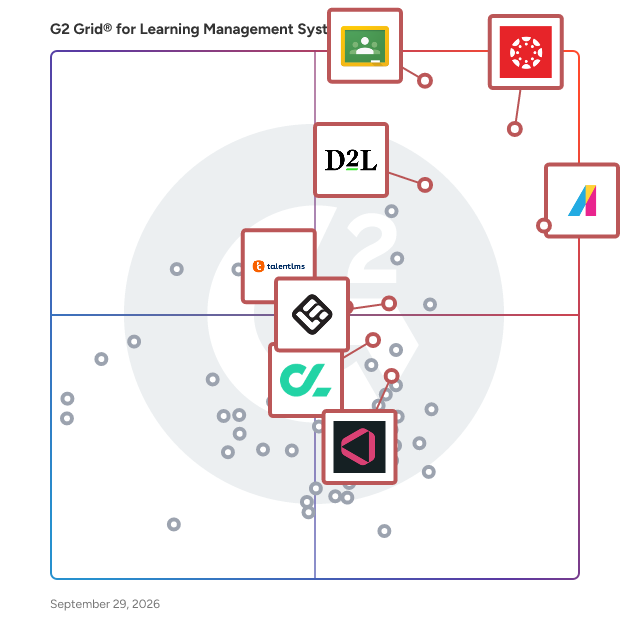
## G2 Grid® for Learning Management Systems
![G2 Grid® for Learning Management Systems plotting products by satisfaction and market presence](https://www.g2.com/categories/learning-management-system-lms/grids.png?focus%5B%5D=15698&focus%5B%5D=2232&focus%5B%5D=2319&focus%5B%5D=6800&focus%5B%5D=52636&focus%5B%5D=23786&focus%5B%5D=4647&focus%5B%5D=1370280)
Highlighted products: Google Classroom, Absorb LMS, D2L Brightspace, Canvas LMS, LearnWorlds, GoSkills, CYPHER Learning, and Masteriyo LMS.
Underlying data: [Grid® JSON](https://www.g2.com/categories/learning-management-system-lms/grids.json?focus%5B%5D=google-classroom&amp;focus%5B%5D=absorb-software-absorb-lms&amp;focus%5B%5D=d2l-brightspace&amp;focus%5B%5D=canvas-lms&amp;focus%5B%5D=learnworlds&amp;focus%5B%5D=goskills&amp;focus%5B%5D=cypher-learning-cypher-learning&amp;focus%5B%5D=masteriyo-lms&amp;segment=small-business)


## How Many Learning Management Systems Products Does G2 Track?
**Total Products under this Category:** 292

### Category Stats (Jul 2026)
- **Average Rating**: 4.43/5 (↓0.01 vs Jun 2026) The average rating of products in this category, based on all submitted ratings
- **Top Trending Product**: TopClass (+1.46%) - Among all products in this category, TopClass recorded the largest rating increase compared to last month
*Last updated: July 20, 2026*


## How Does G2 Rank Learning Management Systems Products?

**Why You Can Trust G2's Software Rankings:**

- 30 Analysts and Data Experts
- 12,800+ Authentic Reviews
- 292+ Products
- Unbiased Rankings

G2's software rankings are built on verified user reviews, rigorous moderation, and a consistent research methodology maintained by a team of analysts and data experts. Each product is measured using the same transparent criteria, with no paid placement or vendor influence. While reviews reflect real user experiences, which can be subjective, they offer valuable insight into how software performs in the hands of professionals. Together, these inputs power the G2 Score, a standardized way to compare tools within every category.


## Which Learning Management Systems Is Best for Your Use Case?

- **Best for Small Businesses:** [Google Classroom](https://www.g2.com/products/google-classroom/reviews)
- **Best for Mid-Market:** [Canvas LMS](https://www.g2.com/products/canvas-lms/reviews)
- **Best for Enterprise:** [Canvas LMS](https://www.g2.com/products/canvas-lms/reviews)
- **Highest User Satisfaction:** [Absorb LMS](https://www.g2.com/products/absorb-software-absorb-lms/reviews)
- **Best Free Software:** [Canvas LMS](https://www.g2.com/products/canvas-lms/reviews)


---

**Sponsored**

### 360Learning

360Learning is the AI-driven enterprise LMS that closes skills gaps by capturing internal expertise with collaborative learning Academies. Legacy systems force L&amp;D teams to choose between scale and relevance. 360Learning eliminates this trade-off. Using agentic AI, we transform the expertise that runs your business into scalable learning for your entire organization - upskilling employees, customers, and partners from one platform. The platform merges enterprise LMS and LXP capabilities including agentic automation, adaptive coaching, a multimodal AI content builder, and the market’s #1 rated mobile app. Our ecosystem of 50+ partners includes an SAP Silver Partnership and Workday Design Partnership, ensuring learning connects to your broader business strategy. Over 2,500 companies, including Heineken, Equinox, Michelin, Merlin, and Cisco, trust 360Learning as their enterprise LMS. Rated #1 AI LMS by eLearning Industry and backed by dedicated implementation, support, and services teams, we help L&amp;D become a growth lever, not a cost center. Founded in 2013. $240M raised. Teams across North America and Europe.


[Visit website](https://www.g2.com/external_clickthroughs/record?secure%5Bad_program%5D=ppc&amp;secure%5Bad_slot%5D=category_product_list&amp;secure%5Bcategory_id%5D=322&amp;secure%5Bchosen_at%5D=2026-07-20T05%3A01%3A39Z&amp;secure%5Bdisplayable_resource_id%5D=322&amp;secure%5Bdisplayable_resource_type%5D=Category&amp;secure%5Bmedium%5D=sponsored&amp;secure%5Bplacement_reason%5D=page_category&amp;secure%5Bplacement_resource_ids%5D%5B%5D=322&amp;secure%5Bprioritized%5D=false&amp;secure%5Bproduct_id%5D=57927&amp;secure%5Bresource_id%5D=322&amp;secure%5Bresource_type%5D=Category&amp;secure%5Bsource_type%5D=category_page&amp;secure%5Bsource_url%5D=https%3A%2F%2Fwww.g2.com%2Fcategories%2Flearning-management-system-lms%2Fsmall-business%3Fpage%3D2&amp;secure%5Btoken%5D=25cadfe28bbc24e256c5d3a6c9e40a2aefb5f9056c18c8018c1c944169879ff1&amp;secure%5Burl%5D=https%3A%2F%2Fwww.360learning.com%2F%3Futm_medium%3Ddirectory%26utm_source%3Dg2%26utm_campaign%3DUS_UK_G2_PPC%26utm_content%3DG2_Clicks_PPC%26utm_term%3DG2_Clicks_PPC&amp;secure%5Burl_type%5D=custom_url)

---

## What Are the Top-Rated Learning Management Systems Products in 2026?
### 1. [DrivEd](https://www.g2.com/products/drived/reviews)
DrivEd is a cutting-edge Learning Management System (LMS) https://drived.space/ that brings a unique twist to the table! We&#39;ve incorporated groundbreaking features to infuse learning with excitement through gamification and social engagement. Our committed team is focused on supporting educators&#39; teaching methods and enabling substantial growth for learners of various ages and diverse backgrounds. Whether you&#39;re on a journey to master a new language, develop essential skills, engage in corporate training, or enhance your coaching business, DrivEd LMS is perfectly positioned to empower students to reach their maximum potential.


**Average Rating:** 5.0/5.0
**Total Reviews:** 28
**How Do G2 Users Rate DrivEd?**

- **Ease of Use:** 10.0/10 (Category avg: 8.7/10)
- **Has the product been a good partner in doing business?:** 10.0/10 (Category avg: 9.1/10)
- **Quality of Support:** 10.0/10 (Category avg: 8.8/10)
- **Ease of Admin:** 10.0/10 (Category avg: 8.7/10)

**Who Is the Company Behind DrivEd?**

- **Seller:** [DrivEd](https://www.g2.com/sellers/drived)
- **Year Founded:** 2017
- **HQ Location:** Vancouver, CA
- **LinkedIn® Page:** https://www.linkedin.com/company/drive-education-business/ (9 employees on LinkedIn®)

**Who Uses This Product?**
- **Who Uses This:** Marketing Manager
- **Top Industries:** Information Technology and Services, Marketing and Advertising
- **Company Size:** 68% Small-Business, 32% Mid-Market


#### What Are Recent G2 Reviews of DrivEd?

**"[Efficient LMS for Sales Managers Training](https://www.g2.com/survey_responses/drived-review-10312895)"**

**Rating:** 5.0/5.0 stars
*— Oleksandr D.*

[Read full review](https://www.g2.com/survey_responses/drived-review-10312895)

---

**"[A game-changer for our leadership development program](https://www.g2.com/survey_responses/drived-review-10050128)"**

**Rating:** 5.0/5.0 stars
*— Anna Y.*

[Read full review](https://www.g2.com/survey_responses/drived-review-10050128)

---


### 2. [JoomlaLMS](https://www.g2.com/products/joomlalms/reviews)
JoomLMS is a multifunctional Learning Management System with a variety of useful online training tools for instructors and learners, which can be found in much more expensive LMS solutions. JoomLMS has been included in the list of Top Academic LMS by Talented Learning, independent research and consulting organization, and was distinguished with Great User Experience and Rising Star Awards by an independent software review platform – FinancesOnline. The LMS interface is clean, uncluttered and easy to work with. - SCORM and AICC compliant, - mobile compatible, - iOS and Android Mobile apps, - a course builder, - modern layout, - quizzing and testing, - multiple user roles, - multiple payment systems support, - social collaboration tools, - a wide range of reports, - data import/export All the courses are created with the help of an in-built course builder. A teacher or an LMS administrator proceeds from one step to another filling in all the necessary fields. All the learning materials are uploaded in the corresponding sections of JoomLMS. You can either upload the learning materials (documents, videos, links, presentations etc.) one by one or import a SCORM/AICC package. JoomlaLMS is SCORM 1.2 and 2004 compliant and works fine with any Authoring tool supporting those formats. To assess the students’ knowledge there is a quiz tool with 13 question types available. It is also possible to import questions or add questions from the question pool (for example if you create a final test). Once all the course materials are uploaded they can be united into learning paths. JoomLMS contains a number of reports for presenting an enormous amount of information. A teacher can check who and when accessed the eLearning materials and contact students in case they don’t spend enough time on studying; check which questions and learning paths took the most time to accomplish and revise them if necessary; the documents download statistics provides insights into the types of materials in demand. JoomLMS allows creating assignments and assigning them to a particular group of students if necessary. The section also provides insight into the statistics of tasks performing. For example, a teacher can check whether a student has completed the task, grade it and send an email-notification to that student. Graded assignments can be added to the Gradebook manually. The JoomLMS price is based on a price-per-active-learner model. Only the students enrolled in at least one course are counted by the license, teachers and LMS administrators are not counted. The JoomLMS cost starts from $299/year. It is also possible to purchase a perpetual license and use the LMS system for life. The best way to get to know the system and decide whether it suits the school’s needs is to test it yourself, especially since the company offers a 30-days free trial with no credit card information required. To try JoomlaLMS you need to submit your request at the JoomLMS website www.joomlms.com


**Average Rating:** 4.5/5.0
**Total Reviews:** 16
**How Do G2 Users Rate JoomlaLMS?**

- **Ease of Use:** 9.1/10 (Category avg: 8.7/10)
- **Has the product been a good partner in doing business?:** 9.6/10 (Category avg: 9.1/10)
- **Quality of Support:** 9.2/10 (Category avg: 8.8/10)
- **Ease of Admin:** 9.4/10 (Category avg: 8.7/10)

**Who Is the Company Behind JoomlaLMS?**

- **Seller:** [Joomla LMS](https://www.g2.com/sellers/joomla-lms)
- **Year Founded:** 2006
- **HQ Location:** Minsk, Belarus
- **Twitter:** @joomlalms (1,502 Twitter followers)
- **LinkedIn® Page:** https://www.linkedin.com/company/1581300/ (4 employees on LinkedIn®)

**Who Uses This Product?**
- **Company Size:** 88% Small-Business, 6% Enterprise


#### What Are Recent G2 Reviews of JoomlaLMS?

**"[User friendly, easy to work with, and adapting through the learning process.](https://www.g2.com/survey_responses/joomlalms-review-4134180)"**

**Rating:** 5.0/5.0 stars
*— Maya I.*

[Read full review](https://www.g2.com/survey_responses/joomlalms-review-4134180)

---

**"[One of Best  learning management system](https://www.g2.com/survey_responses/joomlalms-review-8005900)"**

**Rating:** 5.0/5.0 stars
*— Chaitanya N.*

[Read full review](https://www.g2.com/survey_responses/joomlalms-review-8005900)

---


#### What Are G2 Users Discussing About JoomlaLMS?

- [What is JoomlaLMS used for?](https://www.g2.com/discussions/what-is-joomlalms-used-for)

### 3. [LearnDash](https://www.g2.com/products/learndash/reviews)
LearnDash is a light-weight, flexible LMS built on WordPress that is powering learning programs for Fortune 500 companies, major universities, best-selling authors, and ‘solo-preneurs’ worldwide. &quot;Best of ELearning&quot; nominee by ELearning Magazine. See our demo at https://demo.learndash.com


**Average Rating:** 4.2/5.0
**Total Reviews:** 50
**How Do G2 Users Rate LearnDash?**

- **Ease of Use:** 8.1/10 (Category avg: 8.7/10)
- **Has the product been a good partner in doing business?:** 8.4/10 (Category avg: 9.1/10)
- **Quality of Support:** 8.4/10 (Category avg: 8.8/10)
- **Ease of Admin:** 8.4/10 (Category avg: 8.7/10)

**Who Is the Company Behind LearnDash?**

- **Seller:** [LearnDash](https://www.g2.com/sellers/learndash)
- **Year Founded:** 2013
- **HQ Location:** Ann Arbor, MI
- **Twitter:** @LearnDashLMS (4,408 Twitter followers)
- **LinkedIn® Page:** https://www.linkedin.com/company/3079823/ (4 employees on LinkedIn®)

**Who Uses This Product?**
- **Top Industries:** E-Learning, Education Management
- **Company Size:** 92% Small-Business, 6% Mid-Market


#### What Are Recent G2 Reviews of LearnDash?

**"[The best LMS for Wordpress right now.](https://www.g2.com/survey_responses/learndash-review-9461162)"**

**Rating:** 4.5/5.0 stars
*— Verified User in Legal Services*

[Read full review](https://www.g2.com/survey_responses/learndash-review-9461162)

---

**"[Course Progression That Keeps You Motivated](https://www.g2.com/survey_responses/learndash-review-11461109)"**

**Rating:** 4.5/5.0 stars
*— Márcio B.*

[Read full review](https://www.g2.com/survey_responses/learndash-review-11461109)

---


#### What Are G2 Users Discussing About LearnDash?

- [What is LearnDash used for?](https://www.g2.com/discussions/what-is-learndash-used-for)
- [Is LearnDash free?](https://www.g2.com/discussions/is-learndash-free)
- [Is LearnDash easy to use?](https://www.g2.com/discussions/is-learndash-easy-to-use)
- [Who uses LearnDash?](https://www.g2.com/discussions/who-uses-learndash)
- [What is LearnDash?](https://www.g2.com/discussions/what-is-learndash) - 1 comment

### 4. [uxpertise LMS](https://www.g2.com/products/uxpertise-lms/reviews)
uxpertise LMS is an all-in-one cloud-based learning management system (LMS) designed to help organizations manage and automate employee training efficiently. This comprehensive platform centralizes training content, making it accessible and user-friendly for both learners and administrators. By streamlining essential administrative processes such as registration, notifications, reminders, and certification expiry, uxpertise LMS allows organizations to focus on delivering quality training rather than getting bogged down by logistical challenges. Targeted at a diverse audience, including corporate organizations and educational institutions, uxpertise LMS caters to those looking to onboard new recruits, upskill existing employees, and ensure compliance with industry standards. The platform offers two distinct modes—enterprise and commercial—allowing organizations to choose the option that best fits their training needs. Key features such as advanced bulk group management, role management, branded catalogs, and customizable learning paths enhance the training experience, while progress reports, reward badges, and certification tools facilitate effective tracking and recognition of learner achievements. For training centers and educational institutions, uxpertise LMS provides the capability to sell courses and training activities through an integrated shopping cart. This feature includes a storefront, catalog, flexible payment options, discounts, transaction reports, and easy refund processes, empowering organizations to monetize their training offerings seamlessly. This functionality not only enhances the user experience but also expands the reach of training programs to a broader audience. The platform supports various content types, including videos, SCORM packages, and questionnaires for surveys and exams, allowing organizations to create a rich and engaging learning environment. Additionally, uxpertise LMS offers the option of integrated online exam proctoring, ensuring a secure and seamless testing experience that maintains the integrity of assessments. The ability to brand certificate templates and automate delivery further simplifies the administrative workload, enhancing the overall efficiency of the training process. With an extensive API and Zapier connection, uxpertise LMS easily integrates with other systems, providing flexibility and scalability to meet evolving organizational needs. This adaptability, combined with its robust feature set, positions uxpertise LMS as a valuable solution for organizations aiming to enhance their training programs and improve learner outcomes.


**Average Rating:** 4.6/5.0
**Total Reviews:** 39
**How Do G2 Users Rate uxpertise LMS?**

- **Ease of Use:** 8.9/10 (Category avg: 8.7/10)
- **Has the product been a good partner in doing business?:** 9.4/10 (Category avg: 9.1/10)
- **Quality of Support:** 9.7/10 (Category avg: 8.8/10)
- **Ease of Admin:** 8.7/10 (Category avg: 8.7/10)

**Who Is the Company Behind uxpertise LMS?**

- **Seller:** [uxpertise](https://www.g2.com/sellers/uxpertise)
- **Year Founded:** 2016
- **HQ Location:** Brossard, CA
- **Twitter:** @uxpertiseLMS (3 Twitter followers)
- **LinkedIn® Page:** https://www.linkedin.com/company/uxpertise/?originalSubdomain=ca (9 employees on LinkedIn®)

**Who Uses This Product?**
- **Top Industries:** E-Learning, Professional Training &amp; Coaching
- **Company Size:** 69% Small-Business, 26% Mid-Market


#### What Are uxpertise LMS's Pros and Cons?

**Pros:**

- Ease of Use (3 reviews)
- Excellent Support (3 reviews)
- Feature Diversity (2 reviews)
- Simple (2 reviews)
- Comprehensive Features (1 reviews)

**Cons:**

- Limited Customization (2 reviews)
- Lack of Customization (1 reviews)
- Limited Features (1 reviews)
- Limited Functionality (1 reviews)
- Notification Issues (1 reviews)


### What Do G2 Reviewers Say About uxpertise LMS?
*AI-generated summary from verified user reviews*

**Pros:**

- Users appreciate the **ease of installation and learning** with Uxpertise LMS, benefiting from quick implementation and support.
- Users value the **excellent support** provided by Uxpertise LMS, making it easy to implement and use effectively.
- Users value the **feature diversity** of uxpertise LMS, finding it meets complex needs effectively and efficiently.
- Users value the **simple and intuitive design** of Uxpertise LMS, facilitating ease of use and efficient onboarding.
- Users value the **comprehensive features** of uxpertise LMS, finding it easy to use and highly stable.

**Cons:**

- Users find the **limited customization** options restrict their ability to tailor the LMS for diverse audiences and reporting needs.
- Users express concern over the **lack of customization** , limiting their ability to tailor the LMS for diverse audiences.
- Users note the **limited features** like missing conditional questions and global feedback, but improvements may come.
- Users experience **limited functionality** due to inflexible billing and lack of customization for diverse audiences.
- Users find that **notification issues** make it challenging to customize and comprehend alerts effectively.

#### What Are Recent G2 Reviews of uxpertise LMS?

**"[Facilitate the Management of Training with Simplicity and Reliability](https://www.g2.com/survey_responses/uxpertise-lms-review-12405259)"**

**Rating:** 4.5/5.0 stars
*— Yasmine D.*

[Read full review](https://www.g2.com/survey_responses/uxpertise-lms-review-12405259)

---

**"[Easy to use, with comprehensive tutorials and fast customer support](https://www.g2.com/survey_responses/uxpertise-lms-review-12454804)"**

**Rating:** 4.5/5.0 stars
*— Claudie V.*

[Read full review](https://www.g2.com/survey_responses/uxpertise-lms-review-12454804)

---


### 5. [Tovuti LMS](https://www.g2.com/products/tovuti-lms/reviews)
Tovuti is an AI-powered learning management system (LMS) that helps organizations create, deliver, track, and manage training programs across multiple audiences. Teams use Tovuti for employee onboarding, employee training, compliance training, customer education, partner enablement, certification programs, and extended enterprise learning. The platform brings course creation, learning delivery, learner tracking, reporting, administration, and support into one system, helping organizations centralize training and manage scalable learning programs more efficiently. Tovuti is built for growing organizations with expanding training needs, including mid-market businesses, distributed teams, public-sector groups, and organizations training both internal and external audiences. Common users include L&amp;D teams, HR leaders, LMS administrators, compliance teams, customer education teams, and partner enablement teams. Tovuti supports organizations that are replacing a legacy LMS, centralizing training across departments, scaling programs for employees, customers, or partners, or managing compliance and certification requirements. One of Tovuti’s key capabilities is native AI course authoring, which helps users turn a topic, outline, or uploaded document into structured course content. Teams can generate learning outcomes, lessons, quizzes, flashcards, narration, final exams, and SCORM-ready course output. This helps reduce manual course production work and gives training teams a faster way to move from source material to learner-ready content while keeping content editable before publishing. Tovuti also includes LMS tools for building and managing learning programs across multiple use cases. Users can create learning paths, assign courses, manage users and permissions, customize the learner experience, issue certificates, track learner progress, and view reporting dashboards. The platform also supports mobile learning, branded portals, ecommerce tools, gamification, social learning features, SCORM/xAPI/cmi5 content, native integrations, API access, SSO, role-based access control, MFA, and accessibility-aligned learning experiences. For organizations that need additional operational support, Tovuti LMS-as-a-Service provides expert assistance with LMS administration, reporting, configuration, integrations, user workflows, launch support, and ongoing platform optimization. This service helps teams reduce the administrative burden of managing an LMS while maintaining visibility into learning activity, compliance progress, and program performance. Tovuti combines LMS software, native AI course creation, implementation support, customer success, and optional managed services for organizations that need scalable, multi-audience training with measurable outcomes.


**Average Rating:** 4.6/5.0
**Total Reviews:** 291
**How Do G2 Users Rate Tovuti LMS?**

- **Ease of Use:** 8.9/10 (Category avg: 8.7/10)
- **Has the product been a good partner in doing business?:** 8.9/10 (Category avg: 9.1/10)
- **Quality of Support:** 9.2/10 (Category avg: 8.8/10)
- **Ease of Admin:** 7.9/10 (Category avg: 8.7/10)

**Who Is the Company Behind Tovuti LMS?**

- **Seller:** [Tovuti Inc.](https://www.g2.com/sellers/tovuti-inc)
- **Company Website:** https://www.tovutilms.com/
- **Year Founded:** 2017
- **HQ Location:** Eagle, Idaho
- **Twitter:** @LearnTOVUTI (298 Twitter followers)
- **LinkedIn® Page:** https://www.linkedin.com/company/18192826/ (55 employees on LinkedIn®)

**Who Uses This Product?**
- **Who Uses This:** Software Engineer, Software Developer
- **Top Industries:** Information Technology and Services, Computer Software
- **Company Size:** 45% Mid-Market, 32% Small-Business


#### What Are Tovuti LMS's Pros and Cons?

**Pros:**

- Ease of Use (62 reviews)
- Features (42 reviews)
- Course Creation (41 reviews)
- Customer Support (38 reviews)
- Education Platform (34 reviews)

**Cons:**

- Not Intuitive (13 reviews)
- Navigation Difficulties (12 reviews)
- Not User-Friendly (12 reviews)
- Expensive (11 reviews)
- Limited Customization (11 reviews)


### What Do G2 Reviewers Say About Tovuti LMS?
*AI-generated summary from verified user reviews*

**Pros:**

- Users find Tovuti LMS to be **incredibly easy to use** , benefiting from its intuitive design and quick course creation.
- Users commend Tovuti LMS for its **robust features** , enabling effortless content creation, management, and user-friendly virtual training.
- Users find Tovuti LMS offers **easy and intuitive course creation** , greatly enhancing online learning experiences and engagement.
- Users praise the **excellent customer support** of Tovuti LMS, highlighting prompt responses and meaningful assistance.
- Users praise the **ease of use** of Tovuti LMS, highlighting its engaging features and responsive support for creating courses.

**Cons:**

- Users find Tovuti LMS **not intuitive** , especially in course assignment and user group visibility processes.
- Users find the **navigation difficulties** in Tovuti LMS hinder the learning experience, particularly for less experienced users.
- Users find Tovuti LMS **not user-friendly** , citing a complicated interface and counterintuitive course assignment processes.
- Users find Tovuti LMS to be **expensive** , particularly for organizations that do not receive adequate support for the cost.
- Users desire more **customization options** in Tovuti LMS, as current limitations hinder effective learning experiences.

#### What Are Recent G2 Reviews of Tovuti LMS?

**"[Tovuti LMS: User-Friendly for Admins and Learners, with Stellar Staff Support](https://www.g2.com/survey_responses/tovuti-lms-review-12922247)"**

**Rating:** 5.0/5.0 stars
*— Heather M.*

[Read full review](https://www.g2.com/survey_responses/tovuti-lms-review-12922247)

---

**"[Effortless Setup and User-Friendly Interface](https://www.g2.com/survey_responses/tovuti-lms-review-12120269)"**

**Rating:** 4.0/5.0 stars
*— Jared E.*

[Read full review](https://www.g2.com/survey_responses/tovuti-lms-review-12120269)

---


#### What Are G2 Users Discussing About Tovuti LMS?

- [What is Tovuti LMS used for?](https://www.g2.com/discussions/what-is-tovuti-lms-used-for)
- [How much does Tovuti cost?](https://www.g2.com/discussions/how-much-does-tovuti-cost)
- [What should an LMS have?](https://www.g2.com/discussions/what-should-an-lms-have) - 1 comment
- [What is Tovuti?](https://www.g2.com/discussions/what-is-tovuti)
- [What are the features of LMS?](https://www.g2.com/discussions/what-are-the-features-of-lms)

### 6. [Disco](https://www.g2.com/products/disco-2025-05-02/reviews)
The AI-first learning platform. Disco uses AI to transform your knowledge into engaging programs your members love.


**Average Rating:** 4.4/5.0
**Total Reviews:** 24
**How Do G2 Users Rate Disco?**

- **Ease of Use:** 9.1/10 (Category avg: 8.7/10)
- **Has the product been a good partner in doing business?:** 9.0/10 (Category avg: 9.1/10)
- **Quality of Support:** 8.7/10 (Category avg: 8.8/10)
- **Ease of Admin:** 8.8/10 (Category avg: 8.7/10)

**Who Is the Company Behind Disco?**

- **Seller:** [Disco](https://www.g2.com/sellers/disco-4b7878e2-a4e2-400d-8175-bf22e36b1ef0)
- **Year Founded:** 2020
- **HQ Location:** Toronto, CA
- **Twitter:** @discolearn (1,086 Twitter followers)
- **LinkedIn® Page:** https://www.linkedin.com/company/discolearn (29 employees on LinkedIn®)

**Who Uses This Product?**
- **Top Industries:** E-Learning
- **Company Size:** 88% Small-Business, 8% Mid-Market


#### What Are Disco's Pros and Cons?

**Pros:**

- Ease of Use (19 reviews)
- Features (10 reviews)
- Intuitive (10 reviews)
- Experience (7 reviews)
- Customer Support (6 reviews)

**Cons:**

- Missing Features (5 reviews)
- Feature Issues (4 reviews)
- Limited Features (4 reviews)
- Lack of Integrations (3 reviews)
- Poor Integration (3 reviews)


### What Do G2 Reviewers Say About Disco?
*AI-generated summary from verified user reviews*

**Pros:**

- Users find Disco&#39;s platform to be **intuitive and user-friendly** , making it easy to navigate and customize.
- Users love the **flexible features** of Disco, enhancing operations and audience interactions effortlessly.
- Users love Disco for its **intuitive design** , making it easy to build and manage engaging eLearning experiences.
- Users value Disco for its **flexibility and ease of use** , enhancing operations and community engagement effectively.
- Users commend Disco&#39;s **responsive customer support** , which enhances the platform&#39;s usability and overall experience.

**Cons:**

- Users note that **missing features** limit onboarding flexibility, hindering the ability to tailor applications effectively.
- Users note some **feature issues** , expressing a desire for more advanced functionalities and better integration in Disco.
- Users find the **limited features** of Disco hinder grading and customization, affecting their overall experience.
- Users find the **lack of integrations** limits functionality, creating confusion and challenges in user experience.
- Users experience **poor integration** with Disco, as limited features and native connections lead to confusion and conflicts.

#### What Are Recent G2 Reviews of Disco?

**"[Disco provides a massive shortcut for turning domain expertise into a professional academy](https://www.g2.com/survey_responses/disco-review-12317915)"**

**Rating:** 5.0/5.0 stars
*— Tim K.*

[Read full review](https://www.g2.com/survey_responses/disco-review-12317915)

---

**"[Disco- the LMS Party everyone needs!](https://www.g2.com/survey_responses/disco-review-11434787)"**

**Rating:** 5.0/5.0 stars
*— Lori J.*

[Read full review](https://www.g2.com/survey_responses/disco-review-11434787)

---


### 7. [Claned](https://www.g2.com/products/claned/reviews)
Claned Group Oy is a Helsinki, Finland based education technology company offering one of the most comprehensive digital learning solutions in the world. Claned is a learning management system with built-in learning design for better online courses. The LMS is EASY-TO-USE and supports all learning materials, with SOCIAL LEARNING since all materials are interactive and have CONTEXTUAL COMMENTING, letting learners add questions right in their course materials, which drives collaboration and LEARNER ENGAGEMENT. To help instructors, it provides REAL-TIME LEARNER TRACKING, robust LEARNING ANALYTICS and white-labeling to maintain trust and branding. CLANED is based on a trinity of three connecting elements – the platform, learning design, and robust analytics – creating an online learning environment and experience that uses the opportunities and possibilities of technology, making learning more effective with measurable results. None of these elements is separate or stand-alone, they are designed to feed into and support one another, forming an inter-reliant system to enhance, deliver, and evaluate learning. 1. The Online Learning Platform you hope for - Claned’s learning platform is built to be different. From the login page to the layout of the course, the platform is designed to be easy to use, with a user experience that can stand alongside other online experience platforms. The courses are laid out grid-style like Pinterest boards. 2. Learning Design - Learning design involves understanding how learning happens and applying it to the structure, delivery, and contents in an online environment to ensure they support natural learning processes and work in sync with online learning environments’ opportunities, tools, and flow. Claned takes a two-pronged approach to this challenge – by “baking in” tools, elements and functions to the platform that support effective online learning practices and provides guiding information and training for those building and delivering courses so that they can do so in the most effective manner. 3. Actionable Learning Analytics - Claned’s approach is more comprehensive and aims to provide a deeper understanding of both the learner’s experiences, the effectiveness of the courses and its contents in relation to those experiences. Using a combination of AI and machine learning, analytic reports which measure the success and popularity of the content, and topics within a course, are available allowing the instructors and course creators to evaluate their work and understand what works and what doesn’t with a particular group of learners. The platform can be used for any kinds of learning at any scale. The platform is compatible with any device, software stack and content repository. All sales and marketing activities are also performed digitally, offering massive global expansion potential while keeping the expansion related costs moderate and margins high.


**Average Rating:** 4.9/5.0
**Total Reviews:** 17
**How Do G2 Users Rate Claned?**

- **Ease of Use:** 9.2/10 (Category avg: 8.7/10)
- **Has the product been a good partner in doing business?:** 9.4/10 (Category avg: 9.1/10)
- **Quality of Support:** 9.4/10 (Category avg: 8.8/10)
- **Ease of Admin:** 8.3/10 (Category avg: 8.7/10)

**Who Is the Company Behind Claned?**

- **Seller:** [Claned](https://www.g2.com/sellers/claned)
- **Year Founded:** 2013
- **HQ Location:** Helsinki, FI
- **Twitter:** @Claned_ (1,840 Twitter followers)
- **LinkedIn® Page:** https://www.linkedin.com/company/claned-group/?originalSubdomain=fi (16 employees on LinkedIn®)

**Who Uses This Product?**
- **Company Size:** 59% Small-Business, 41% Mid-Market


#### What Are Recent G2 Reviews of Claned?

**"[We train our trainers with Claned. And we love it.](https://www.g2.com/survey_responses/claned-review-5340211)"**

**Rating:** 5.0/5.0 stars
*— Mikko P.*

[Read full review](https://www.g2.com/survey_responses/claned-review-5340211)

---

**"[Great solution to online learning needs](https://www.g2.com/survey_responses/claned-review-6570805)"**

**Rating:** 4.5/5.0 stars
*— Massimiliano M.*

[Read full review](https://www.g2.com/survey_responses/claned-review-6570805)

---


#### What Are G2 Users Discussing About Claned?

- [What is Claned used for?](https://www.g2.com/discussions/what-is-claned-used-for)

### 8. [WizIQ](https://www.g2.com/products/wiziq/reviews)
WizIQ LMS provides a complete solution to tutors, institutes and organizations to deliver live online classes and launch self-paced courses. WizIQ is easy-to-use, affordable and gives the freedom to learners to access the courses from any location and device. With WizIQ, businesses can launch their own custom-branded learning/training portal with features such as virtual classroom, course builder, tests and assessment builder, customized mobile application, eCommerce and reports.


**Average Rating:** 4.2/5.0
**Total Reviews:** 45
**How Do G2 Users Rate WizIQ?**

- **Ease of Use:** 8.3/10 (Category avg: 8.7/10)
- **Has the product been a good partner in doing business?:** 6.9/10 (Category avg: 9.1/10)
- **Quality of Support:** 8.0/10 (Category avg: 8.8/10)
- **Ease of Admin:** 7.0/10 (Category avg: 8.7/10)

**Who Is the Company Behind WizIQ?**

- **Seller:** [WizIQ](https://www.g2.com/sellers/wiziq)
- **Year Founded:** 2007
- **HQ Location:** Gurugram, Haryana
- **Twitter:** @WizIQ (6,435 Twitter followers)
- **LinkedIn® Page:** https://www.linkedin.com/company/510181/ (150 employees on LinkedIn®)

**Who Uses This Product?**
- **Top Industries:** Education Management, E-Learning
- **Company Size:** 50% Small-Business, 26% Mid-Market


#### What Are Recent G2 Reviews of WizIQ?

**"[A great portal for L&amp;D of employee](https://www.g2.com/survey_responses/wiziq-review-8682450)"**

**Rating:** 4.5/5.0 stars
*— Dipesh p.*

[Read full review](https://www.g2.com/survey_responses/wiziq-review-8682450)

---

**"[Most Reliable Virtual Classroom](https://www.g2.com/survey_responses/wiziq-review-8284978)"**

**Rating:** 5.0/5.0 stars
*— Shweta R.*

[Read full review](https://www.g2.com/survey_responses/wiziq-review-8284978)

---


#### What Are G2 Users Discussing About WizIQ?

- [What is WizIQ used for?](https://www.g2.com/discussions/what-is-wiziq-used-for)

### 9. [Gurucan](https://www.g2.com/products/gurucan/reviews)
A mobile first platform for creators who sell online courses, memberships, digital downloads, webinars &amp; cohort based courses. With Gurucan White Label engine it is possible to launch branded (iOS &amp; Android) apps in less than 30 days for a disruptive price without tech headaches.


**Average Rating:** 4.5/5.0
**Total Reviews:** 156
**How Do G2 Users Rate Gurucan?**

- **Ease of Use:** 8.8/10 (Category avg: 8.7/10)
- **Has the product been a good partner in doing business?:** 9.0/10 (Category avg: 9.1/10)
- **Quality of Support:** 9.2/10 (Category avg: 8.8/10)
- **Ease of Admin:** 9.0/10 (Category avg: 8.7/10)

**Who Is the Company Behind Gurucan?**

- **Seller:** [Gurucan](https://www.g2.com/sellers/gurucan)
- **HQ Location:** San Francisco, California
- **Twitter:** @gurucan (3 Twitter followers)
- **LinkedIn® Page:** https://www.linkedin.com/company/gurucan/ (4 employees on LinkedIn®)

**Who Uses This Product?**
- **Who Uses This:** Owner, Founder
- **Top Industries:** E-Learning, Marketing and Advertising
- **Company Size:** 97% Small-Business, 1% Mid-Market


#### What Are Gurucan's Pros and Cons?

**Pros:**

- Course Creation (1 reviews)
- Course Variety (1 reviews)
- Effective (1 reviews)
- Online Education (1 reviews)


### What Do G2 Reviewers Say About Gurucan?
*AI-generated summary from verified user reviews*

**Pros:**

- Users love the **all-in-one course creation** solution of Gurucan, simplifying the process of selling courses and memberships.
- Users love the **diverse course offerings** of Gurucan, simplifying the process of creating and selling online content.
- Users value Gurucan for its **all-in-one solution** for creating and selling courses, eliminating technical difficulties.
- Users love the **all-in-one platform** of Gurucan for easily creating and selling online courses and memberships.


#### What Are Recent G2 Reviews of Gurucan?

**"[Great Platform for Fitness / Nutrition Experts](https://www.g2.com/survey_responses/gurucan-review-11585416)"**

**Rating:** 4.5/5.0 stars
*— Mark D.*

[Read full review](https://www.g2.com/survey_responses/gurucan-review-11585416)

---

**"[Great, but some room for improvement.](https://www.g2.com/survey_responses/gurucan-review-4667194)"**

**Rating:** 5.0/5.0 stars
*— Verified User in Professional Training &amp; Coaching*

[Read full review](https://www.g2.com/survey_responses/gurucan-review-4667194)

---


#### What Are G2 Users Discussing About Gurucan?

- [What is Gurucan used for?](https://www.g2.com/discussions/what-is-gurucan-used-for)

### 10. [Lambda Suite](https://www.g2.com/products/lambda-suite/reviews)
Company Overview Lambda Learning is the creator of the Lambda Suite, a powerful all-in-one platform designed specifically for online training businesses. Our mission is to help training providers streamline operations, boost learner engagement, and grow revenue with integrated tools for e-Commerce, Learning Management, and Analytics. Product Description Lambda Suite is a comprehensive solution that combines an e-Commerce platform, a robust Learning Management System (LMS), and powerful Analytics tools—all in one place. Designed to support the unique needs of digital training companies, Lambda Suite enables you to sell, deliver, and optimize online learning experiences with ease. Key Features Integrated e-Commerce for Online Training \* Sell both physical and digital learning content \* Offer custom pricing models and subscription plans \* Manage inventory, fulfillment, and transactions in one place \* Support international sales and multiple currencies Built-In Analytics and Reporting \* Use drag-and-drop tools to create custom reports \* Build interactive dashboards to track business and learner performance \* Monitor course completion, engagement, and ROI \* Make data-driven decisions with real-time insights Learning Management System (LMS) \* Design personalized learning paths based on user roles or behavior \* Deliver engaging, interactive course content \* Support multiple media formats and learning styles \* Enable self-paced, blended, or instructor-led training Exceptional Customer Support \* Get help from a results-driven support team \* Benefit from collaborative onboarding and training \* Resolve technical issues quickly with dedicated assistance \* Minimize downtime and maximize platform performance Value Proposition Lambda Suite empowers online training providers by delivering a scalable, end-to-end solution for managing the business of learning. With seamless integration between e-Commerce, LMS, and Analytics, our platform helps you focus on what matters most—creating exceptional learning experiences and growing your business.


**Average Rating:** 4.3/5.0
**Total Reviews:** 91
**How Do G2 Users Rate Lambda Suite?**

- **Ease of Use:** 8.3/10 (Category avg: 8.7/10)
- **Has the product been a good partner in doing business?:** 9.4/10 (Category avg: 9.1/10)
- **Quality of Support:** 9.5/10 (Category avg: 8.8/10)
- **Ease of Admin:** 7.9/10 (Category avg: 8.7/10)

**Who Is the Company Behind Lambda Suite?**

- **Seller:** [Lambda Solutions](https://www.g2.com/sellers/lambda-solutions-1171cb65-a311-4530-ad44-3fafcc592a0a)
- **Year Founded:** 2002
- **HQ Location:** North Vancouver, CA
- **Twitter:** @lambdasolutions (1,467 Twitter followers)
- **LinkedIn® Page:** https://www.linkedin.com/company/117064/ (27 employees on LinkedIn®)

**Who Uses This Product?**
- **Top Industries:** Higher Education, Non-Profit Organization Management
- **Company Size:** 40% Mid-Market, 34% Small-Business


#### What Are Recent G2 Reviews of Lambda Suite?

**"[Powerful tool with flexible customization and best for e-Learning experience](https://www.g2.com/survey_responses/lambda-suite-review-7709605)"**

**Rating:** 4.0/5.0 stars
*— aarzoo s.*

[Read full review](https://www.g2.com/survey_responses/lambda-suite-review-7709605)

---

**"[Say hello to seamless course creation and management](https://www.g2.com/survey_responses/lambda-suite-review-7889902)"**

**Rating:** 4.0/5.0 stars
*— Kimberly N.*

[Read full review](https://www.g2.com/survey_responses/lambda-suite-review-7889902)

---


#### What Are G2 Users Discussing About Lambda Suite?

- [What advice do you have for others considering Lambda Suite for e-commerce and training management?](https://www.g2.com/discussions/what-advice-do-you-have-for-others-considering-lambda-suite-for-e-commerce-and-training-management)
- [What is Lambda Suite used for?](https://www.g2.com/discussions/what-is-lambda-suite-used-for)

### 11. [Sakai](https://www.g2.com/products/sakai/reviews)
Sakai is an open-source Learning Management System (LMS) designed to support teaching, learning, and collaboration in educational settings. Developed by a global community of academic institutions and organizations, Sakai offers a flexible and scalable platform that empowers educators to create engaging and effective online learning experiences. Its comprehensive suite of tools facilitates course development, assessment, communication, and system administration, making it a robust solution for institutions seeking a customizable and user-centric LMS. Key Features and Functionality: - Course Development and Delivery: Sakai enables instructors to create and organize course content, including text, multimedia resources, quizzes, and assignments, into structured lessons or modules. It supports conditional release of materials, allowing educators to control access based on specific criteria. The platform also offers tools for uploading, storing, and sharing files, enhancing resource management. - Grading and Assessment: The system provides advanced grading and assessment capabilities, including support for high-stakes testing, formative assessments, online assignments, and rubric-based scoring. Instructors can collect student submissions and offer detailed feedback efficiently. - Communications and Collaboration: Sakai offers a variety of synchronous and asynchronous communication tools, such as messaging, discussion forums, social connections, and collaborative workspaces. These features facilitate effective interaction and teamwork among students and instructors. - System Administration: The platform includes powerful administrative tools for managing courses and users. Its configurable system of roles and permissions allows institutions to tailor the platform to their specific business processes. - Integration with External Applications: Sakai supports integration with third-party applications through the IMS Learning Tools Interoperability (LTI) specification and offers an extensive API for developing deep, native integrations. Primary Value and User Solutions: Sakai addresses the need for a flexible, scalable, and customizable LMS that supports diverse teaching and learning methodologies. By providing a comprehensive suite of tools for course development, assessment, communication, and administration, Sakai empowers educators to create engaging and effective online learning environments. Its open-source nature ensures that institutions have control over their learning platform, allowing for continuous improvement and adaptation to emerging educational needs. Additionally, Sakai&#39;s commitment to accessibility and user-centered design ensures an inclusive learning experience for all users.


**Average Rating:** 3.7/5.0
**Total Reviews:** 96
**How Do G2 Users Rate Sakai?**

- **Ease of Use:** 7.4/10 (Category avg: 8.7/10)
- **Has the product been a good partner in doing business?:** 7.8/10 (Category avg: 9.1/10)
- **Quality of Support:** 7.3/10 (Category avg: 8.8/10)
- **Ease of Admin:** 7.9/10 (Category avg: 8.7/10)

**Who Is the Company Behind Sakai?**

- **Seller:** [Apereo Foundation](https://www.g2.com/sellers/apereo-foundation)
- **Year Founded:** 2000
- **HQ Location:** Westminster, CO
- **Twitter:** @Apereo (1,462 Twitter followers)
- **LinkedIn® Page:** https://www.linkedin.com/company/3113971/ (17 employees on LinkedIn®)

**Who Uses This Product?**
- **Top Industries:** Higher Education, Education Management
- **Company Size:** 48% Enterprise, 28% Small-Business


#### What Are Sakai's Pros and Cons?

**Pros:**

- App Functionality (1 reviews)
- Ease of Use (1 reviews)
- Easy Setup (1 reviews)
- Navigation Ease (1 reviews)
- User-Friendly (1 reviews)

**Cons:**

- Navigation Issues (1 reviews)
- User Experience (1 reviews)


### What Do G2 Reviewers Say About Sakai?
*AI-generated summary from verified user reviews*

**Pros:**

- Users appreciate the **ease of use and functionality** of Sakai, facilitating smooth navigation for both teachers and students.
- Users find Sakai&#39;s **ease of use** exceptional, making navigation and integration seamless for teachers and students alike.
- Users commend the **easy setup** of Sakai, allowing seamless integration for students and efficient operation for teachers.
- Users find the **navigation ease** of Sakai incredibly helpful, facilitating smooth operation for both teachers and students.
- Users find Sakai to be a **user-friendly platform** , simplifying navigation and enhancing the overall teaching experience.

**Cons:**

- Users face **navigation issues** with Sakai, leading to confusion about accessing student feedback and assignment returns.
- Users find the **user experience lacking** , as students struggle to locate feedback on their assignments easily.

#### What Are Recent G2 Reviews of Sakai?

**"[Great platform with a couple bugs.](https://www.g2.com/survey_responses/sakai-review-7144036)"**

**Rating:** 4.5/5.0 stars
*— Verified User in Higher Education*

[Read full review](https://www.g2.com/survey_responses/sakai-review-7144036)

---

**"[Great Learning Management System](https://www.g2.com/survey_responses/sakai-review-11746175)"**

**Rating:** 5.0/5.0 stars
*— Mandy H.*

[Read full review](https://www.g2.com/survey_responses/sakai-review-11746175)

---


#### What Are G2 Users Discussing About Sakai?

- [What is your primary use case for Sakai, and how has it impacted your learning management?](https://www.g2.com/discussions/what-is-your-primary-use-case-for-sakai-and-how-has-it-impacted-your-learning-management)
- [What is Sakai used for?](https://www.g2.com/discussions/sakai-what-is-sakai-used-for)
- [Does Sakai have an app?](https://www.g2.com/discussions/does-sakai-have-an-app)
- [How much does Sakai cost?](https://www.g2.com/discussions/how-much-does-sakai-cost)
- [Who uses Sakai?](https://www.g2.com/discussions/who-uses-sakai)

### 12. [Kallidus Learn](https://www.g2.com/products/kallidus-learn/reviews)
At Kallidus, we believe learning should be measured by what changes in the organisation - not what was delivered, but what improved. Trusted by over 1,000 organisations worldwide, we help organisations escape The Activity Trap: measuring learning by completion rather than real performance change. Because when learning mitigates risk, key people stay, teams become more productive, and business metrics begin to move. Our award-winning LMS and eLearning content have an intentional AI data layer to make learning, skills, and performance data valuable for the whole business. This helps link L&amp;D initiatives to the goals and objectives of your organisation and your team. Backed by dedicated, in-house support and implementation specialists, we&#39;re with you every step, from simplifying mandatory compliance to building the future-ready workforce your business needs to grow and deliver impact.


**Average Rating:** 4.4/5.0
**Total Reviews:** 254
**How Do G2 Users Rate Kallidus Learn?**

- **Ease of Use:** 8.9/10 (Category avg: 8.7/10)
- **Has the product been a good partner in doing business?:** 8.9/10 (Category avg: 9.1/10)
- **Quality of Support:** 9.1/10 (Category avg: 8.8/10)
- **Ease of Admin:** 8.1/10 (Category avg: 8.7/10)

**Who Is the Company Behind Kallidus Learn?**

- **Seller:** [Kallidus Ltd](https://www.g2.com/sellers/kallidus-ltd)
- **Company Website:** https://www.kallidus.com
- **Year Founded:** 2000
- **HQ Location:** Bristol, GB
- **Twitter:** @Kallidus (3,110 Twitter followers)
- **LinkedIn® Page:** https://www.linkedin.com/company/97321/ (211 employees on LinkedIn®)

**Who Uses This Product?**
- **Who Uses This:** Learning and Development Manager, Head of HR
- **Top Industries:** Hospital &amp; Health Care, Financial Services
- **Company Size:** 59% Mid-Market, 28% Enterprise


#### What Are Kallidus Learn's Pros and Cons?

**Pros:**

- Ease of Use (161 reviews)
- User-Friendly (102 reviews)
- Customer Support (75 reviews)
- Helpful (74 reviews)
- Intuitive (71 reviews)

**Cons:**

- Limited Features (26 reviews)
- Feature Issues (25 reviews)
- Reporting Issues (23 reviews)
- Inadequate Reporting (22 reviews)
- Poor Reporting (21 reviews)


### What Do G2 Reviewers Say About Kallidus Learn?
*AI-generated summary from verified user reviews*

**Pros:**

- Users appreciate the **ease of use** of Kallidus Learn, which supports efficient navigation and quick team adoption.
- Users appreciate the **user-friendly interface** of Kallidus Learn, valuing its flexibility and ease of navigation.
- Users appreciate the **responsive customer support** of Kallidus Learn, enhancing their overall experience and satisfaction.
- Users value the **helpful support network** of Kallidus Learn, making integration and training straightforward and effective.
- Users appreciate the **intuitive design** of Kallidus Learn, making navigation and management effortless for all.

**Cons:**

- Users find Kallidus Learn has **limited features** , making event bookings and role assignments unnecessarily complicated.
- Users face **feature issues** such as limitations on eTests, group rules, and integration challenges with proctoring services.
- Users experience **reporting issues** with Kallidus Learn, including delays and cumbersome sharing processes for reports.
- Users find the **inadequate reporting** options challenging, complicating access and usability for effective data sharing.
- Users find the **reporting capabilities inadequate** , noting difficulties with mixed data sets and access for managers.

#### What Are Recent G2 Reviews of Kallidus Learn?

**"[Visually Appealing and User-Friendly Experience](https://www.g2.com/survey_responses/kallidus-learn-review-12129287)"**

**Rating:** 4.5/5.0 stars
*— Abigail L.*

[Read full review](https://www.g2.com/survey_responses/kallidus-learn-review-12129287)

---

**"[Outstanding Support Team Sets Kallidus Apart](https://www.g2.com/survey_responses/kallidus-learn-review-12129236)"**

**Rating:** 4.5/5.0 stars
*— Matthew W.*

[Read full review](https://www.g2.com/survey_responses/kallidus-learn-review-12129236)

---


#### What Are G2 Users Discussing About Kallidus Learn?

- [What does Kallidus Learn do?](https://www.g2.com/discussions/what-does-kallidus-learn-do)
- [What do Kallidus do?](https://www.g2.com/discussions/what-do-kallidus-do)
- [What is kallidus learning?](https://www.g2.com/discussions/what-is-kallidus-learning)

### 13. [Auzmor Learn](https://www.g2.com/products/auzmor-learn/reviews)
Auzmor Learn is a robust learning management solution that lets you easily assign training and track employee progress. Its intuitive course builder simplifies content creation and a library of pre-built courses offers the training and upskilling your workforce needs. https://auzmor.com/


**Average Rating:** 4.8/5.0
**Total Reviews:** 117
**How Do G2 Users Rate Auzmor Learn?**

- **Ease of Use:** 9.7/10 (Category avg: 8.7/10)
- **Has the product been a good partner in doing business?:** 9.8/10 (Category avg: 9.1/10)
- **Quality of Support:** 9.8/10 (Category avg: 8.8/10)
- **Ease of Admin:** 9.7/10 (Category avg: 8.7/10)

**Who Is the Company Behind Auzmor Learn?**

- **Seller:** [Auzmor](https://www.g2.com/sellers/auzmor-af3ada3f-5eb8-4a06-a2a7-359a54acc520)
- **Year Founded:** 2017
- **HQ Location:** West Des Moines, Iowa
- **Twitter:** @Auzmor (51 Twitter followers)
- **LinkedIn® Page:** https://www.linkedin.com/company/22287607/ (60 employees on LinkedIn®)

**Who Uses This Product?**
- **Top Industries:** Information Technology and Services, Computer Software
- **Company Size:** 77% Mid-Market, 16% Small-Business


#### What Are Recent G2 Reviews of Auzmor Learn?

**"[The best LMS!](https://www.g2.com/survey_responses/auzmor-learn-review-4148052)"**

**Rating:** 5.0/5.0 stars
*— Grant H.*

[Read full review](https://www.g2.com/survey_responses/auzmor-learn-review-4148052)

---

**"[The product is easy to use and there is excellent customer support.](https://www.g2.com/survey_responses/auzmor-learn-review-7707943)"**

**Rating:** 5.0/5.0 stars
*— Erik K.*

[Read full review](https://www.g2.com/survey_responses/auzmor-learn-review-7707943)

---


#### What Are G2 Users Discussing About Auzmor Learn?

- [What is Auzmor Learn used for?](https://www.g2.com/discussions/what-is-auzmor-learn-used-for)


## What Is Learning Management Systems?

[Education Software](https://www.g2.com/categories/education)

## What Software Categories Are Similar to Learning Management Systems?

- [Corporate Learning Management Systems](https://www.g2.com/categories/corporate-learning-management-systems)
- [Online Learning Platforms](https://www.g2.com/categories/online-learning-platform)
- [Healthcare Learning Management Systems (LMS)](https://www.g2.com/categories/healthcare-learning-management-systems-lms)


---

## How Do You Choose the Right Learning Management Systems?

### What You Should Know About Learning Management Systems (LMS)

### What is a Learning Management System (LMS)?

A learning management system (LMS) helps instructors deliver and manage online learning by creating a streamlined communication channel between instructors and students. These software applications manage all types of content, including video, courses, and documents, and allow students to access all course content from any device. Instructors can use an LMS to manage rubrics, student discussion boards, and course syllabi, and they provide key features for reporting, progress tracking, and assignments and assessments.

LMS is the software backbone for many educational institutions, particularly for those that primarily offer online courses. These solutions are designed for academic use and give schools a valuable tool that allows students to access course material from anywhere. As eLearning has grown in prominence at all levels of education, an LMS has become an even more central part of an institution’s digital instruction efforts. Instructors rely on these tools for content management, diversifying their learning activities, and giving students more control over the learning process.

#### What Types of Learning Management System (LMS) Exist?

**Proprietary LMS**

A [proprietary LMS](https://www.g2.com/categories/learning-management-system-lms/f/proprietary) is a closed-source platform sold and maintained by a vendor. These LMS products are often more expensive than closed source due to the licensing fee that must be paid per user, in addition to annual and ongoing fees related to the subscription. Proprietary LMS is hosted by vendors on their own server, and they are responsible for managing and maintaining the platform. They also offer the benefit of strong external support in terms of tech support if anything goes wrong with the product, though this comes at an additional cost. The downside to a proprietary LMS is the limited integrations and customization, and that security and stability rests in the vendor’s hands.

**Open-source LMS**

An [open-source LMS](https://www.g2.com/categories/learning-management-system-lms/f/open-source) is freely distributed, does not require a licensing fee, and can be maintained and customized by the user. Compared to proprietary products, these open-source solutions allow for a greater level of accessibility and control. Users can personalize the platform to suits their specific needs, with plugins and new functionalities able to be added immediately and for free. The caveat is that organizations must have the infrastructure in place to run and support their open-source solution, as well as an IT team that is familiar with the platform. Managed service providers do exist for open-source LMS, though. While there are no hard costs with an open-source LMS, organizations may still find themselves spending just as much, if not more, as a proprietary LMS to implement and manage an open-source platform.

### What are the Common Features of Learning Management System (LMS)?

**Course creation and management:** Instructors can create and manage structured learning content and set user permissions to control how students access content. With an LMS, instructors can add a variety of media to enhance their syllabus, including text, images, videos, links, interactive tests, slideshows, and more. Teachers can upload entire courses and modules, enroll students or enable self-enrollment, and see individual reports on each student. These learning materials can be uploaded all at once, allowing students to follow along with content for the course&#39;s length synchronously or asynchronously.

**Course calendars:** Instructors can set all upcoming course activities on a calendar for student access. This allows students to stay on top of all assignments and upcoming tests, and to see real-time updates when due dates change.

**Online assessment:** Instructors can create and customize tests for students to access and submit online. Most platforms will support a variety of question types, such as multiple choice, drag and drop, essay, true or false, and agreement scale. From there, instructors can grade assignments and post scores online for students to access. Additionally, in-person assessments can also be uploaded and graded on the LMS.&amp;nbsp;

**Attendance management:** Some LMS products allow instructors to track student attendance for classes and events, whether the student was late or absent. These attendance reports can then be viewed online by students to see where they stand in the class.

**Discussion boards:** Instructors and students can create discussion topics for the purpose of completing specific assignments, continuing in-class discussions, or soliciting end-of-semester feedback. Students can respond to individual threads and edit their comments. Instructors can also set time limits on discussion access, which motivates students to respond within the given timeframe. Typically, all discussions will also be timestamped. Discussion boards give teachers one more tool to assess overall student competency in a particular subject.

**Gamification:** Certain LMSs contain gaming elements, which may include badges and leaderboards. The gamified environment is designed to create a more engaging learning experience for students and promote social learning. In addition to tracking their grades, students are encouraged to work toward acquiring various pieces of digital approval directly in the system.

**Teacher communications:** Instructors can send messages to students directly within the LMS or via email, which usually integrates with the LMS. This allows teachers and students to have 1:1 discussions related to student performance or further discussion of class topics. Teachers can also set reminders and notifications to alert students of upcoming deadlines whenever they access the LMS.

**Dashboards:** Dashboards allow instructors to organize all relevant information and keep it clean for viewing and tracking specific data. These interfaces can be customized to suit user needs and could include data such as average class grade, student attendance, assignment submission statistics, and student access time.

**Reporting:** All LMS products contain some type of reporting feature. These reports are either prebuilt (in which case the user has only a limited number of offerings that are already in existence) or customizable. These may include reports on participation, learner progress, access time, quizzes, course activity, and more.

**Student profiles:** Students can create and manage their own user profile within the LMS, which helps build social relationships with classmates during discussions and helps instructors to recognize their students more easily. These profiles can also contain contact information if teachers or classmates need to reach out to them.

Other Features of Learning Management Systems: [Cloud](https://www.g2.com/categories/learning-management-system-lms/f/cloud), [Higher education](https://www.g2.com/categories/learning-management-system-lms/f/higher-education), [On-premises](https://www.g2.com/categories/learning-management-system-lms/f/on-premises),

### What are the Benefits of Learning Management System (LMS)?

An LMS provides a centralized repository for digital content, allowing students and instructors to access and manage all required course materials in one place, from any device. These tools allow for automation of the assessment process and tracking of student progress while facilitating collaboration and communication among students, teachers, and parents.

**Consolidate digital content:** The primary reason to use an LMS is that it is a living repository for all digital learning content that the organization offers. It enables teachers to upload documents, create presentations, and share all course material directly through the application.

**Assess student progress:** Instructors can track student progress by uploading grades and assignment scores. The LMS gives them a single place where they may create, distribute, and grade assessments and assignments for their courses. Most platforms include automatic grading functions that allow instructors to mark student work and input the scores directly into a gradebook.

**Distribute content:** Instructors can create new content or upload existing content as needed within the application. This lets students immediately see exactly what they need to study, without having to wait until the next class session.

**Facilitate communication:** Typically, LMS platforms come with standard communication features that allow instructors to send messages to students or parents and vice versa. Instructors communicate information about upcoming assignments to an entire class, or they message an individual student about their progress or any concerns. Mass notification features allow instructors to get in touch with many members of the school community with one click.

**Encourage collaboration:** An LMS helps create a digital community that fosters meaningful collaboration among peers, both for teachers and students. Instructors use an LMS to share lesson plans and materials, tell colleagues about an instructional strategy they are trying out, or ask a question to the community. Students use discussion forums built into LMS platforms to participate in online discussions, work together on group projects, or seek help with an assignment. Learning is a social process, so encouraging collaboration can lead to a richer learning experience for students and improve retention rates.

### Who Uses Learning Management System (LMS)?

**Teachers:** Teachers use LMS software to upload and house digital course content. Those who teach online courses often use only an LMS for all of their teaching-related needs. In an LMS, teachers can upload and collect assignments and assessments, update student grades, track student progress, and more.

**Students:** Students use LMS tools to access course material, take online assessments, submit assignments, and track their progress throughout the duration of a course. The LMS, particularly for an online student, acts as the hub for all school-related activities.

**Administrators:** School administrators use the data gathered by LMS software to track student progress and report on key metrics. Often, administrators may integrate existing student information systems (SIS) with the LMS to facilitate a seamless transition of data from one system to another. In this way, they use an LMS to maintain a holistic view of student performance throughout their tenure at the educational institution.

### What are the Alternatives to Learning Management System (LMS)?

[Online learning platform](https://www.g2.com/categories/online-learning-platform): Online learning platforms provide an architecture to create online courses and other educational products, and are often sold as an integration within LMS products. These products allow instructors to create customizable study materials and streamline tasks, freeing up educators to focus on providing engaging, high-quality lessons. For smaller institutions, an online learning platform might be a cheaper option to provide engaging online learning experiences for students.

#### Software Related to Learning Management System (LMS)

[Student information systems (SIS)](https://www.g2.com/categories/student-information-systems-sis) **:** SIS stores and tracks all student information, including grades, attendance records, and more. The software functions as a digital dropbox for school-related information. An LMS offers some of the same features as SIS, but while SIS is focused on tracking and storing information, an LMS is entirely focused on the creation and consumption of online content. Most LMS products allow for SIS data migration.

[Virtual classroom](https://www.g2.com/categories/virtual-classroom) **:** Virtual classroom software is used by educational institutions to host classes remotely while maintaining the functionality available in a traditional classroom environment. Through the virtual classroom environment, teachers can interact with students, and students can engage with lesson materials, view presentations and videos, and take tests, all in real time. Virtual classrooms may come as an integrated part of an LMS or integrate with one.

[Online proctoring](https://www.g2.com/categories/online-proctoring) **:** Online proctoring software allows instructors to monitor test takers remotely during online exams. Many proctoring products integrate with LMSs to streamline the delivery of exams to test takers.

### Challenges with Learning Management System (LMS)

Compared to an open-source LMS, a proprietary LMS comes with several challenges:

**Integrations:** LMS products often have integrations with a variety of other education software, which allow for improved communication and sharing of data. Particularly when using a proprietary LMS, users may find a frustrating lack of supported integrations with their other tools. Taking stock of all products in the existing tech stack prior to purchase can help identify LMS products that would allow for integration with all other tools. Vendors may also charge for additional integrations.

**Data migration:** It is significantly harder to move from a proprietary LMS to another LMS product, due to the exclusivity of the vendor’s hosted platform. Users may face difficulty in migrating their data successfully to and from a proprietary LMS.

**Security and stability:** Proprietary LMS vendors take full ownership of the security and stable hosting of their product. Users are therefore at the mercy of vendors to keep the servers operational, and to ensure data breaches do not occur. If a proprietary LMS platform suddenly shutters, users would have little recourse to retrieve all their data safely and efficiently.&amp;nbsp;

**Scalability:** Proprietary LMS products charge per user, and having to add users as time goes on will incur additional registration and maintenance fees. Open-source LMS products, on the other hand, are often free and allow for smooth scaling up to tens of thousands of users.&amp;nbsp;

### Which Companies Should Buy Learning Management System (LMS)?

Any educational institution that needs to manage coursework content online and improve online learning delivery should consider using an LMS. These platforms automate the administrative tasks that can detract educators from focusing more time on improving their syllabi and class engagement.&amp;nbsp;

Corporate organizations seeking a similar platform to manage their training content can find relevant products in the [Corporate Learning Management Systems](https://www.g2.com/categories/corporate-learning-management-systems) category. As opposed to an academic LMS, corporate LMS products are designed to support a business&#39;s onboarding, employee training, and compliance training programs.&amp;nbsp;

### How to Buy Learning Management System (LMS)

#### Requirements Gathering (RFI/RFP) for Learning Management System (LMS)

Open-source LMS products are developed through developer collaboration and the source code is made publicly available for download. If schools are seeking an open-source LMS, they can either download and host the platform on their own on-premise servers or have a third-party vendor manage that process for them. That process will look different than a traditional buying process for proprietary LMS products, which is detailed below.

Since an LMS is often the most expensive software in a school’s tech ecosystem, the buying process can feel stressful and complicated. Schools in the process of purchasing a new proprietary LMS should consider factors such as hard costs and recurring costs, required versus nice-to-have features, and ease of use. Interoperability is also an important consideration; will the school’s existing tools and course content be able to integrate and transfer over to the new LMS? Furthermore, the platform should support an institution’s model for tracking and assessing student performance.

An intuitive platform is also critical, as both teachers and students must be able to navigate the platform with relatively minimal training, or else LMS adoption is likely to fail. Some LMS products are more optimized to suit the needs of smaller schools or vice versa. It’s important for teachers to be included in the conversation about what features an LMS should have to be useful for them, as their user experience will be the deciding factor of success or failure.

Schools should also consider both current and future goals with using an LMS. If a school is looking to massively grow its student base over a given span of time, certain LMS products may only be useful to them in the interim. A school may also desire to grow its virtual classroom capabilities and shift more substantially towards fully-online course models, in which case it would be even more important to have a platform that supports online collaboration and communication.

Once a school has considered these factors and developed their list of requirements, the next step is to develop long lists and short lists for potential vendors.

#### Compare Learning Management System (LMS) Products

**Create a long list**

Long lists are created by eliminating the options that do not provide critical functionality. For example, a [K-12 school](https://www.g2.com/categories/learning-management-system-lms/f/k-12%09https://www.g2.com/categories/learning-management-system-lms%09What%20are%20Learning%20Management%20Systems?%09Hayata%09Best%20Learning%20Management%20Systems%20with%20K-12%20Capabilities%20%7C%20G2%09Top%20Learning%20Management%20Systems.%20Choose%20the%20right%20Learning%20Management%20Systems%20using%20real-time,%20up-to-date%20product%20reviews%20from%207153%20verified%20user%20reviews.) looking for an LMS shouldn’t bother with platforms intended for higher education, as they likely will offer far more features than needed and come with higher costs. They may need an LMS with built-in course authoring tools, which is not a present feature in every LMS. A typical long list should not include more than 10 products unless there are many options that are very similar. In this case, additional details like the geographical presence of the company or its reputation can be used to eliminate vendors.

**What to ask vendors of learning management system (LMS)?**

When narrowing down the list of vendors, buyers should consider questions such as:

- How does the pricing model for this product work? Are there capital and recurring costs? What are the annual licensing and maintenance costs? Can the vendor offer a SaaS model?
- How well known is the vendor? Do they have a sizable amount of clientele in the given education market?
- If the LMS is open source, is there a reliable community of active developers that still maintain it and can respond to questions? How active is the user community for this LMS?
- Is the LMS customizable? How much do additional modules or plug-ins cost? Can certain features be turned off or modified?
- Can specific user restrictions be assigned depending on user type (student, teacher, administrator)?
- What type of eLearning content does the LMS support? What languages does it support for content? Are there course templates available?
- How well does the LMS work on mobile devices?
- How easily can the LMS be grown to support a larger number of users and content?
- How does the LMS handle assessment?
- Is the LMS compliant with the school&#39;s and nation&#39;s security and privacy protocols around eLearning courses, such as SCORM, AICC, and xAPI? Is there a disaster recovery plan? Where are the servers hosted?

**Create a short list**

Short lists are created by reviewing the RFI information received from vendors. It is possible that some vendors decline to participate and don’t respond to RFIs. These vendors are usually eliminated from the selection process. From there, this short list steers the buying decision closer to completion, leaving only a couple of vendors to choose between based on small, key factors that fulfill all the requirements and considerations a school has for implementing an LMS.

**Conduct demos**

Demos are a great opportunity for buyers to see how the LMS works. Only the shortlisted vendors are invited to demonstrate their solutions. Demos should be performed live, using the system, and not through slide decks and screenshots. All vendors should follow a predetermined scenario that simulates the business processes of the buyer. For schools, they should specifically request a walkthrough of a student versus teacher experience of using the platform.

#### Selection of Learning Management System (LMS)

**Choose a selection team**

To choose a selection team, decision makers need to involve subject matter experts from all teams that will use the system. This will likely involve the principal or dean, as well as a select number of teachers who represent the larger faculty&#39;s needs. The IT department may also be present, especially if going with an open-source LMS.

**Negotiation**

Negotiation happens between the buyer and the short list of vendors. In some cases, there are only two vendors that make it to this stage, which means that they offer similar products. At this point, the dealbreaker is the price of the product, which can vary based on the discounts offered by each vendor. Buyers should consider upfront costs, price per user costs, and any associated content hosting costs with the LMS.

The final decision should be based on all the information gathered previously.

### Learning Management System (LMS) Trends

**Mobile compatibility** : One of the primary trends in the LMS software market today is the inclusion of mobile apps and the increase in multimedia content types supported by these applications. Mobile learning is on the rise and LMS vendors are recognizing this trend by creating mobile versions of their software for users. This will enable students and teachers to access the platforms on the go from their mobile devices.

**Blended learning** : The increased ability of teachers to distribute digital content through an LMS has helped develop their adoption of blended learning, which is an education model where some of the student’s learning is done online and away from a traditional classroom setting. An LMS helps promote this new learning environment by allowing for increased flexibility in the kinds of content teachers can put in front of their students and for how students interact with the material, creating a more personalized experience for each student that can improve learning outcomes.

Depending on their learners’ needs, teachers use modern LMS platforms to deliver video lectures, audio recordings, photos, documents, spreadsheets, and more. One emerging content type is interactive video, in which learners engage with the content by answering questions. A teacher may assign students with interactive video lessons, exposing them to a new topic before class hours. This flipped classroom model ensures that both parties can spend their time in class on a more in-depth discussion of the issue rather than an overview lecture. LMS discussion forums or social media integrations allow the learning to continue outside of class. Blended learning will likely continue to grow in popularity, fueled by LMS software features that help streamline that content delivery.

**Learning data analytics** : With many educators aiming to deliver more personalized learning experiences for students, teachers are looking for new ways to gather and analyze data on their students’ activities and performance. Built-in assessment tools allow teachers to deliver formative assessments to gauge how effectively their students have mastered the material and identify which students need additional support. A growing number of LMS platforms are including more advanced analytics tools, allowing the instructor to analyze how students are interacting with the content and their mastery of it. Instructors can see how often students are logging in, how they are interacting with the content and participating in discussions, who have submitted assignments on time, and how students performed on assessments. That data is then analyzed by dashboards built into the LMS. Besides analyzing learning data, the institution’s leaders may analyze how faculty are using the LMS in their courses and determine whether instructors are taking full advantage of the software or if administrators should organize further training.


---
## What Are the Most Common Questions About Learning Management Systems?

### What are the key features to look for in an LMS?

Key features to look for in a Learning Management System include user-friendly interface, mobile accessibility, robust reporting and analytics, integration capabilities with other tools, customizable learning paths, and strong customer support. High user ratings highlight the importance of mobile access and reporting features, with many users emphasizing the need for seamless integration with existing systems. Additionally, customizable options are frequently mentioned as essential for tailoring the learning experience to specific organizational needs.


### How do LMS pricing models typically work?

LMS pricing models typically include subscription-based, per-user, and tiered pricing structures. Subscription-based models are prevalent, with monthly or annual fees that can range from $5 to $20 per user, depending on features. Per-user pricing is common among platforms like Moodle and TalentLMS, where costs increase with the number of users. Tiered pricing is also seen, offering different feature sets at varying price points, which allows organizations to choose plans that best fit their needs. Overall, flexibility in pricing is a key trend, accommodating various organizational sizes and budgets.


### What integrations should I consider for my LMS?

When selecting an LMS, consider integrations with tools like Zoom for virtual classrooms, Salesforce for CRM capabilities, Google Workspace for collaboration, and Microsoft Teams for communication. Additionally, look for compatibility with content creation tools such as Articulate and Adobe Captivate, as well as assessment platforms like ProProfs and SurveyMonkey. These integrations enhance functionality and user experience, as highlighted by user reviews that emphasize the importance of seamless connectivity with existing tools.


### How can I assess the user experience of different LMS options?

To assess the user experience of different LMS options, consider analyzing user reviews focusing on ease of use, customer support, and feature satisfaction. For instance, platforms like Moodle and Canvas are often praised for their user-friendly interfaces, while Blackboard is noted for its robust support. Look at ratings for mobile accessibility and integration capabilities, as these factors significantly impact user experience. Additionally, comparing user feedback on specific features such as reporting tools and customization options can provide deeper insights into overall satisfaction.


### What support options are commonly available with LMS providers?

Common support options available with LMS providers include 24/7 customer support, live chat, email support, and extensive knowledge bases. Many platforms also offer onboarding assistance and training resources. For instance, platforms like Moodle and TalentLMS are noted for their comprehensive support documentation, while platforms such as Docebo and Cornerstone OnDemand provide dedicated account managers and personalized training sessions. User reviews highlight the importance of responsive support teams, with many users emphasizing the value of timely assistance in resolving technical issues.


### How scalable are most LMS solutions for growing organizations?

Most LMS solutions are designed to be highly scalable, accommodating the needs of growing organizations. For instance, platforms like Moodle and TalentLMS are frequently praised for their ability to handle increasing user loads without performance degradation. Users report that systems such as Docebo and Cornerstone OnDemand offer robust features that support scalability, including customizable user roles and extensive integrations. Additionally, platforms like SAP Litmos and Absorb LMS are noted for their flexibility in managing large volumes of learners and content, making them suitable for organizations anticipating growth.


### What are common use cases for implementing an LMS?

Common use cases for implementing a Learning Management System (LMS) include employee onboarding, where organizations streamline training processes; compliance training, ensuring staff meet regulatory requirements; and ongoing professional development, allowing users to access courses and resources for skill enhancement. Additionally, LMS platforms are utilized for tracking learner progress and performance analytics, which help organizations assess training effectiveness. Popular LMS solutions like Moodle, TalentLMS, and Docebo are frequently highlighted for their robust features supporting these use cases.


### How do LMS platforms handle compliance and certification tracking?

LMS platforms typically offer robust compliance and certification tracking features, allowing organizations to monitor employee progress and ensure adherence to regulatory requirements. For instance, platforms like TalentLMS and Docebo provide automated reminders for certification renewals and detailed reporting capabilities to track compliance status. Additionally, systems such as Cornerstone OnDemand and SAP Litmos enable users to create custom compliance courses and maintain records of completed certifications, ensuring that organizations can easily manage their compliance obligations.


### What are the differences between cloud-based and on-premise LMS?

Cloud-based LMS solutions, such as TalentLMS and Docebo, offer flexibility, automatic updates, and lower upfront costs, making them ideal for remote access and scalability. In contrast, on-premise LMS like Moodle and SAP Litmos provide greater control over data security and customization but require significant initial investment and ongoing maintenance. Users often cite ease of use and integration capabilities as advantages of cloud-based systems, while on-premise solutions are preferred for organizations with strict compliance requirements.


### How do I evaluate the reporting and analytics capabilities of an LMS?

To evaluate the reporting and analytics capabilities of an LMS, consider user feedback on features like customizable reports, real-time data tracking, and user engagement metrics. Products such as Moodle, TalentLMS, and Docebo are noted for their robust analytics, with users highlighting the importance of visual dashboards and detailed performance insights. Look for systems that allow integration with other tools for enhanced data analysis, as this is frequently mentioned in reviews. Additionally, assess user satisfaction ratings specifically related to reporting features to gauge effectiveness.


### What factors influence the total cost of ownership for an LMS?

The total cost of ownership for an LMS is influenced by several factors, including subscription fees, implementation costs, training expenses, and ongoing support. User reviews indicate that platforms like Moodle and TalentLMS are often praised for their affordability, while others like Blackboard and Canvas may incur higher costs due to extensive features and support services. Additionally, customization and scalability can significantly impact overall expenses, as noted by users who emphasize the importance of aligning LMS capabilities with organizational needs.


### How do LMS vendors ensure data security and privacy compliance?

LMS vendors prioritize data security and privacy compliance by implementing robust encryption protocols, regular security audits, and adherence to regulations such as GDPR and FERPA. For instance, platforms like Moodle and Canvas emphasize user data protection through customizable privacy settings and secure access controls. Additionally, many vendors offer features like single sign-on (SSO) and two-factor authentication to enhance security. User reviews highlight the importance of these features, with many users noting their satisfaction with the security measures in place, which fosters trust in the platform.


