Best E-Signature Software - Page 3

How Many E-Signature Software Products Does G2 Track?

Total Products under this Category: 432

Category Stats (Aug 2026)

  • Average Rating: 4.59/5 (↑0.01 vs Jul 2026) The average rating of products in this category, based on all submitted ratings
  • Top Trending Product: Kinective SignPlus (+8.33%) - Among all products in this category, Kinective SignPlus recorded the largest rating increase compared to last month

Last updated: August 04, 2026

How Does G2 Rank E-Signature Software Products?

Why You Can Trust G2's Software Rankings:

  • 30 Analysts and Data Experts
  • 56,300+ Authentic Reviews
  • 432+ Products
  • Unbiased Rankings

G2's software rankings are built on verified user reviews, rigorous moderation, and a consistent research methodology maintained by a team of analysts and data experts. Each product is measured using the same transparent criteria, with no paid placement or vendor influence. While reviews reflect real user experiences, which can be subjective, they offer valuable insight into how software performs in the hands of professionals. Together, these inputs power the G2 Score, a standardized way to compare tools within every category.

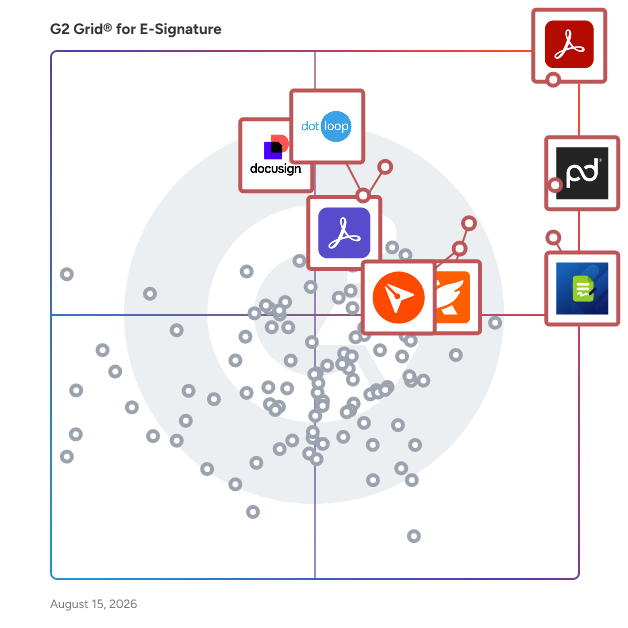
G2 Grid® for E-Signature Software

G2 Grid® for E-Signature Software plotting products by satisfaction and market presence

Highlighted products: Adobe Acrobat, PandaDoc, Jotform Sign, Foxit PDF Editor, Docusign, Adobe Acrobat Sign, BoldSign, and dotloop.

Underlying data: [Grid® JSON](https://www.g2.com/categories/e-signature/grids.json?focus%5B%5D=adobe-acrobat&focus%5B%5D=pandadoc&focus%5B%5D=jotform-sign&focus%5B%5D=foxit-pdf-editor&focus%5B%5D=docusign&focus%5B%5D=adobe-acrobat-sign&focus%5B%5D=boldsign&focus%5B%5D=dotloop)

Sponsored

Amilia SmartRec

Amilia SmartRec is a registration and membership management software platform that helps community-based organizations unify membership, programs, payments, and real-time reporting in a single system. Built for YMCAs, JCCs, parks and recreation departments, community centers, camps, swim schools, arts centers, sports facilities, and afterschool programs, SmartRec is designed to give leadership full visibility while empowering staff and members to do more with less friction. Where many platforms require staff intervention for routine tasks, SmartRec puts members in control. With 80% of transactions completed self-serve, 70% of sign-ups happening on mobile, and 52% of registrations occurring outside business hours, members can discover programs, register, pay, and manage their accounts on any device — without a phone call or a front desk. The online registration and payment software is built for how families behave today, with a smooth, eCommerce-style checkout, integrated forms at registration, and self-managed payment updates that reduce failed billing before staff even notice. Recurring billing management is flexible by design. Organizations can offer installment plans, automated renewals, and a variety of payment methods. Finance teams get real-time payout reporting, built-in bank reconciliation, and accounting workflows that support accurate revenue recognition without manual exports or paid service engagements. Transparent pricing. No surprise add-ons, and no long-term lock-in. Support is included across all plans via live chat, phone, and email, with a dedicated customer success manager and a full library of self-guided learning tools through Amilia University. Key capabilities include: -Membership CRM with complete member profiles, lifecycle tracking, churn signals, and retention tools -Online registration and payment software with self-serve, mobile-first checkout and integrated forms -Recurring billing management with installment plans, automated renewals, and payment recovery -Facility management and online booking for spaces, rentals, and capacity scheduling -Real-time reporting and analytics with 40+ pre-built reports and configurable dashboards -Multi-location management with centralized control across unlimited sites -Access control, attendance tracking, staff scheduling, and fundraising tools -Open API with no usage fees, connecting to communications, accounting, and engagement tools Amilia SmartRec is trusted by 1,500+ organizations across 8,200+ locations in North America, processing over $1B in transactions annually — giving teams the clarity, flexibility, and member-first experience their communities expect.

Visit website

DocSend

Dropbox DocSend helps business professionals like you to securely share and control the content that drives your business forward. Dropbox DocSend's powerful link-based system makes it easy to set security preferences for each stakeholder, receive notifications each time someone views your file, analyze content performance on a page-by-page basis, and create modern virtual deal rooms. With DocSend, business can offload administrative burdens and securely share the most impactful proprietary information faster. DocSend’s Virtual Data Rooms manage sensitive documents securely and gets team real-time deal insights, simplying the entire deal process from initial pitch to final signature. Join over 34,000 companies that rely on Dropbox DocSend to share and manage sensitive information.

Average Rating: 4.6/5.0

Total Reviews: 561

How Do G2 Users Rate DocSend?

  • Has the product been a good partner in doing business?: 8.7/10 (Category avg: 9.2/10)
  • Performance and Reliability: 9.1/10 (Category avg: 9.0/10)
  • Enterprise Scalability: 9.0/10 (Category avg: 8.9/10)
  • Signature Document Creation: 8.4/10 (Category avg: 9.1/10)

Who Is the Company Behind DocSend?

  • Seller: Dropbox
  • Company Website:
  • Year Founded: 2007
  • HQ Location: San Francisco, California
  • Twitter: @Dropbox
    3,279,477 Twitter followers
  • LinkedIn® Page: www.linkedin.com
    4,149 employees on LinkedIn®

Who Uses This Product?

  • Who Uses This: CEO, Founder
  • Top Industries: Computer Software, Information Technology and Services
  • Company Size: 75% Small, 21% Medium

What Do G2 Reviewers Say About DocSend?

AI-generated summary from verified user reviews

Pros
  • Users appreciate the ease of use of DocSend, enjoying seamless document sharing and tracking for enhanced engagement.
  • Users appreciate the visibility and tracking DocSend provides, enhancing their document sharing and decision-making processes.
  • Users value the real-time analytics and professional sharing options of DocSend, enhancing content sharing and collaboration.
  • Users value the top-notch security of DocSend, ensuring safe document sharing with detailed engagement insights.
  • Users value the easy sharing of DocSend, gaining insights and control over document engagement in a professional manner.
Cons
  • Users highlight the high pricing of DocSend, making it less accessible for those managing multiple clients.
  • Users face challenges with limited app functionality, including slow loading, integration issues, and mobile optimization concerns.
  • Users express frustration with lacking features on DocSend, especially regarding analytics and mobile optimization for smaller teams.
  • Users note the need for more flexible customization in DocSend to better suit dynamic marketing and collaboration processes.
  • Users express pricing concerns regarding DocSend, noting frequent changes and high costs for multiple user seats.

What Are Recent G2 Reviews of DocSend?

What Are G2 Users Discussing About DocSend?

Scrive

Founded in 2010 in Sweden, Scrive offers an omnichannel solution, automating agreement-based business processes with electronic signature and identity verification. Ease of use and robust security measures are key reasons why organisations of all sizes, including enterprises in highly regulated industries, rely on Scrive solutions to drive internal efficiency, compliance and customer satisfaction. As a Qualified Trust Service Provider (QTSP) for Qualified Electronic Signatures (QES), Scrive ensures the highest level of trust and legal validity for digital transactions in accordance with EU eIDAS regulations. eSign, Scrive’s agreement signing platform, is available out of the box with pricing plans and feature packages to suit any business, or as an API integration. Key benefits include: - Sign on any device - Authenticate and onboard users with eIDs - Track and monitor the status of your agreements - Solutions built for EU compliance - Detailed audit log/legal evidence - Secure, tamper-proof documents

Average Rating: 4.5/5.0

Total Reviews: 196

How Do G2 Users Rate Scrive?

  • Has the product been a good partner in doing business?: 9.4/10 (Category avg: 9.2/10)
  • Performance and Reliability: 9.4/10 (Category avg: 9.0/10)
  • Enterprise Scalability: 9.0/10 (Category avg: 8.9/10)
  • Signature Document Creation: 8.8/10 (Category avg: 9.1/10)

Who Is the Company Behind Scrive?

  • Seller: Scrive
  • Company Website:
  • Year Founded: 2010
  • HQ Location: Stockholm
  • Twitter: @scrive
    476 Twitter followers
  • LinkedIn® Page: www.linkedin.com
    265 employees on LinkedIn®

Who Uses This Product?

  • Top Industries: Information Technology and Services, Financial Services
  • Company Size: 38% Medium, 33% Small

What Do G2 Reviewers Say About Scrive?

AI-generated summary from verified user reviews

Pros
  • Users appreciate the ease of use of Scrive, finding it intuitive and efficient for creating professional documents.
  • Users value the easy setup of Scrive, allowing for a hassle-free start to contract management.
  • Users appreciate the fast and helpful customer support of Scrive, enhancing their overall experience and efficiency.
  • Users love Scrive's intuitive interface, making form creation seamless and accessible for all employees.
  • Users value the high level of security in Scrive, ensuring safe document transactions in their workflow.
Cons
  • Users report poor customer support, citing issues with ticket management and unhelpful assistance from the support team.
  • Users face signature issues with Scrive, experiencing inflexibility, tedious setups, and difficulties with plugins and document handling.
  • Users experience connectivity issues with integrations and SMS delivery, impacting usability in some regions.
  • Users find Scrive expensive, especially for startups, and suggest shorter license periods for better affordability.
  • Users report insufficient tutorials that hinder effective use of Scrive, leading to confusion and frustrating experiences.

What Are Recent G2 Reviews of Scrive?

What Are G2 Users Discussing About Scrive?

RSign

RSign® is the e-signature platform by RPost®, a global leader for more than a decade. RSign® combines feature-richness with elegantly easy to use and affordability at scale. Unique to RSign is its ability to make common e-signing simple and automated, while meeting all of your document, form, or workflow scenarios. RSign specializes in: E-Signatures Made Easy. Easier e-sign experience for both sender and signer. • RSign makes the signing process simple and easy for signers to complete and sign documents using any desktop or mobile web browser in a guided process of signing. RSign comes with a simpler user design, customizable user interface, sharable templates, real time reporting, and more. Signature Certificate with Forensic Audit Trail. Records with the authenticatable audit trail. • RSign® patents provide the most robust authenticatable audit trail embedded in the e-sign record. RSign delivers a Signature Certificate which can serve as a forensic record and can self-authenticate, providing all transmission tracking, content, and timestamps irrespective of recipient systems. The Signature Certificate, an evidence format that is recognized around the globe, may be appended to the agreement that is signed or separately, and it may be imported into systems using the RSign APIs. Privacy with Encryption and RSign Inbox. E-Signatures that comply with HIPAA and GDPR regulations. • RSign® comes with many levels of security to select from; encrypt the transmission to the recipient and return the signed agreements and forms encrypted, manage decryption password settings, build unique access codes for multi-factor signer authentication. Enterprise-Grade Features at Affordable Cost. All possible workflow settings simply included. • RSign includes enterprise-grade features at an affordable cost; which is normally, half the cost of other full-service providers. RSign comes with all the functionality that you need at a lower cost and with a friendly customer service. Automation with Experts to Guide the Way. Rated “most helpful”; experts you will enjoy working with. RSign® makes it easy to automate. Many customers select RSign after analyzing the marketplace and realizing RSign teams are the most flexible, accommodating and knowledgeable. RSign solves common business challenges: • Businesses need to obtain recipient signature on sent agreements in a simple, intuitive, fast, and paperless process; one that returns a uniform robust e-record of a signoff. Sending attached to standard email is cumbersome for the recipient. Paper is slow and costly. Fax is often inconvenient. • Businesses need a uniform, trusted record of electronic signoff; one that can be relied upon as strong evidence should there be a dispute in the future. The e-record must be legally binding and in a uniform format that they can trust without evaluating the evidential weight of each signoff record. • Many agreements and forms contain sensitive terms, pricing, financial, private consumer, or health information - information that often must remain private. Sending by standard email and receiving signoff by fax is often not private. The sending, filling, and returned record needs privacy options. • Businesses need expansive features in an enterprise-grade e-signature service at affordable cost, as they expand use across their organization and volumes increase. Businesses can generate more efficiencies with e-signatures if the costs are affordable and predictable. • Digitizing workflows with e-signatures and forms requires deep knowledge of the business processes needing modernization matched with the art-of-the-possible with e-signature services. Innovation staff need a trusted partner to collaborate with and to adapt e-sign services to specific processes. • Businesses need to automate processes; automate pre-filling forms with some data, sending for signoff, tracking responses, obtaining the signoff record, and at times, back-filling completed form data into sender systems. Automation maximizes efficiency, controls, and reduces cost and risk. RSign main benefits: E-Sign Simple Enough that People Actually Enjoy Using. Plus, all the features you will ever need. • RSign® makes e-signatures so simple for all staff, that it encourages use. More use means more cost savings, administrative time savings, and faster business. RSign includes all the enterprise-grade features and training you will ever need. Legal and Auditable Proof. Assurance, confidence, and peace of mind. • RSign® makes it easy to view and rely on the Signature Certificate for e-sign tracking, a forensic audit trail, and sent and signed content and timestamp information. A robust record of who signed what when provides confidence that the e-sign process and record will stand up to scrutiny if ever challenged in the future. Legal Proof®. Private and Secure. Security and authentication for privacy and industry compliance. • RSign makes e-signing private so that senders can enjoy the benefits of e-signatures even when private transaction data, strategic, health, or protected consumer information is in the agreements or forms. RSign includes a variety of security, authentication, and privacy options to fit any sensitive e-sign situation. Enterprise Grade and Affordable. RSign is affordable and maximizes cost and time savings. • RSign provides all the enterprise-grade features in an easy-to-afford offering, making it cost effective to convert almost any document to e-signatures, digital forms, and modernized workflows. Businesses enjoy more cost savings with less paper, mail, postage, administrative time, and a low e-sign service cost. Unlike other providers, RSign also offers automatic renewals with fixed rates that do not increase annually. Optimize with Ease. Experts help you automate and digitize more. • RSign® makes e-signature and digital form automation easy, with expert staff to guide at every step. Many customers choose RSign after reviewing the marketplace and realizing RSign teams are the most accommodating, flexible, and knowledgeable so as to ease the burden of automating and digitizing complex processes. RSign staff have been rated by customers as the “most helpful” experts customers enjoyed working with. Top 5 Reasons Businesses Choose RSign 1. RSign is Feature-Rich An important step in selecting an electronic signature solution is to categorize your use cases in terms of, for example, quick send for e-signature, sending re-usable forms for fill-and-sign, sending the same document with different pre-filled data for fill-and-sign (whether these are humans sending one-off or automated sending from a system) and more. RSign provides the feature-richness to make the e-sign experience work well depending on whether you need a quick ad-hoc e-signature or if there’s a complex form with lots of dependencies. Plus, features that address various security, privacy, compliance, and automation needs depending on the use case. Feature-richness is most important because, if the process or workflow cannot be accomplished elegantly, the rest hardly matters. 2. RSign is Elegantly Easy E-Signatures often require a change in human behavior (for senders and/or recipients). Having an elegantly easy solution (due to the wide range of automation features and settings available as per above) makes it easier for admins, senders, and signers to buy into the process change. Plus, if you are looking to switch providers to enjoy more affordability (see below), an elegantly easy user experience makes it additionally easy to get praise for the selecting (a much more affordable) e-sign experience in RSign. 3. RSign is More Affordable at Scale When you start with e-signatures, volumes of sends and/or number of users may be small. As more business areas buy-in and more documents and processes are digitized, what may have been a smart initial service provider choice may not be for the future as you scale. What users today are looking for is that service provider that will remain (much) more affordable as users and volume scale, and as advanced feature-needs become more in vogue across the organization. This is RSign. 4. RSign is Friendlier to Work With E-Signatures are really about modernizing and digitizing documents, user interactions, customer and supplier interactions, employee interactions, and more. Each type of interaction and each type of document or workflow may be better served by unique settings, features, branding, and more. A service provider who is humanly (vs. form or bot) friendly to work with will make it seamless and realistic to be able to maximize e-signature benefits now and far into the future. What you’ll need is expert guidance provided by people who care about your experience and ability to optimize usage. Think RSign. 5. RSign Continuously Innovates You will want to find a service provider who is uniquely focused on e-signatures (versus a service provider that is part of a private equity-acquisition roll-up or something similar) and with a commitment to continuous innovation in the field. You’ll want to see your supplier not only thinking about the art of the possible, but commercializing the possible for you. This is RSign. 6. Comfort with Security/Legalities As you start to send more sensitive, regulated private content, or work within certain privacy or legal-compliant frameworks, having a provider that specializes in privacy and legalities will permit you to move more to e-signature and digital forms process in more areas of your business, safely. RSign provides the most robust legal e-sign record. Target Markets: RSign is applicable to businesses of all sizes in all industries. Functionally, RSign is most often uses among customer service and sales, human resources, and corporate contracts staff While RSign is most popular in the insurance, health care, life sciences, financial services, legal, real estate, manufacturing and government sectors, RSign is used across all industries. RSign Pricing: RSign Free is a free ongoing base level of service for periodic use. Cost: $0 RSign 365 includes all main service features for basic users. Cost: $7 per user per month. RSign Standard includes all main service features, designed for standard business needs. Cost: $15 per user per month. RPost®: RPost® is a global leader in e-signature and cybersecurity services, specializing in email encryption for privacy and compliance, e-signature automation, legal e-delivery proof, document rights management, and AI-infused services to prevent data leaks and human e-security errors. RPost’s AI-infused RMail® e-security, RSign® e-signature, and Registered Email™ e-compliance platforms have had more than 50 patents granted on their core technologies, having received international awards and accolades including the World Mail Award for Best in Security, Initiative Mittelstand Best Innovation in IT Award in Germany, and APCC Top Choice for GDPR Email Data Privacy Compliance. More than 25 million users have enjoyed RPost’s track, prove, encrypt, e-sign, certify, share, and protect services for more than a decade in more than 100 countries. Our largest customers are some of the world’s most respected brands across industry and geography. Our mission is to help our customers worldwide communicate and transact electronically in the most secure, compliant, and productive ways possible and to continuously innovate our products to support their evolving needs. We successfully accomplish this through our expert teams and partners everywhere.

Average Rating: 4.9/5.0

Total Reviews: 56

How Do G2 Users Rate RSign?

  • Has the product been a good partner in doing business?: 10.0/10 (Category avg: 9.2/10)
  • Performance and Reliability: 9.4/10 (Category avg: 9.0/10)
  • Enterprise Scalability: 9.9/10 (Category avg: 8.9/10)
  • Signature Document Creation: 10.0/10 (Category avg: 9.1/10)

Who Is the Company Behind RSign?

  • Seller: RPost
  • Year Founded: 2000
  • HQ Location: Los Angeles, CA
  • Twitter: @RPost
    2,041 Twitter followers
  • LinkedIn® Page: www.linkedin.com
    192 employees on LinkedIn®

Who Uses This Product?

  • Top Industries: Information Technology and Services
  • Company Size: 50% Small, 36% Medium

What Are Recent G2 Reviews of RSign?

What Are G2 Users Discussing About RSign?
Qwilr

Make your competitors’ proposals look primitive with Qwilr. Send proposals, generate quotes, collect sign-off, and get paid – all in one place. Trusted by 5,000+ organizations including OpenTable, Thomson Reuters, Drata, Yale University and more, Qwilr helps sales teams close deals faster by turning static proposals and quotes into interactive, trackable web pages. With Qwilr, you can… Create impressive, interactive proposals: Engage buyers with dynamic proposals featuring videos, interactive pricing, calendar links and more Get deals closed faster: Get deals signed with legally-compliant e-signatures and collect payments instantly with our integrated payments solution, QwilrPay Track buyer engagement: See what your buyers view and click on, and use this to tailor your follow-ups. Get real-time alerts via Slack or email when buyers take action Keep every page consistently branded: Standardize your proposals, automatically applying your fonts and colors to every page Scale your process with automation: Connect Qwilr to Salesforce, HubSpot, Pipedrive or Zoho and automate proposal creation. Improve team efficiency: Create reusable templates and content blocks, so that reps never start from scratch Thousands of sales teams use Qwilr to modernize their proposal process, impress buyers, and close deals faster. Try Qwilr free for 14 days: https://qwilr.com/

Average Rating: 4.6/5.0

Total Reviews: 901

How Do G2 Users Rate Qwilr?

  • Has the product been a good partner in doing business?: 9.3/10 (Category avg: 9.2/10)
  • Performance and Reliability: 9.1/10 (Category avg: 9.0/10)
  • Enterprise Scalability: 8.6/10 (Category avg: 8.9/10)
  • Signature Document Creation: 8.9/10 (Category avg: 9.1/10)

Who Is the Company Behind Qwilr?

  • Seller: Qwilr
  • Company Website:
  • Year Founded: 2014
  • HQ Location: Redfern, New South Wales
  • Twitter: @Qwilr
    2,506 Twitter followers
  • LinkedIn® Page: www.linkedin.com
    104 employees on LinkedIn®

Who Uses This Product?

  • Who Uses This: Account Executive, CEO
  • Top Industries: Marketing and Advertising, Computer Software
  • Company Size: 80% Small, 16% Medium

What Do G2 Reviewers Say About Qwilr?

AI-generated summary from verified user reviews

Pros
  • Users appreciate the ease of use of Qwilr, finding the interface simple and customization quick and effective.
  • Users love Qwilr's customizable templates, enhancing their proposals with a professional touch and intuitive interface.
  • Users find the easy setup of Qwilr intuitive, allowing effortless creation of proposals without needing support.
  • Users praise Qwilr for its simplicity and efficiency, enhancing workflow and collaboration across teams effortlessly.
  • Users value the excellent customer support from Qwilr, enhancing their experience with responsive assistance and guidance.
Cons
  • Users feel that Qwilr has limited customization options, making it difficult to achieve desired edits and layouts.
  • Users are frustrated with integration issues, particularly with QuickBooks and payment options, impacting overall satisfaction.
  • Users note missing features, such as CMS-like design tools and better integrations, affecting their overall experience.
  • Users struggle with difficult editing, often feeling limited in formatting control and facing cumbersome customization challenges.
  • Users find the limited features of Qwilr restrict usability, especially with content arrangement and integrated scheduling tools.

What Are Recent G2 Reviews of Qwilr?

What Are G2 Users Discussing About Qwilr?

eZsign

eZsign is a secure, legally binding e-signature platform for businesses of any size, anywhere — with data hosted exclusively in Canada. That gives every customer strong privacy protection, and gives organizations subject to Canadian or Quebec privacy laws (PIPEDA, Law 25) built-in compliance with no configuration. Fully bilingual in English and French, eZsign delivers SOC 2 Type II certified security, Level 4 assurance, Long-Term Validation (LTV), and Time Stamping Authority (TSA) timestamps. Every signed document includes a court-admissible audit trail. Pricing is simple: one flat monthly rate in CAD covers teams of 2 to 10 users, with unlimited documents, unlimited signatures, and no envelope limits or overage fees. Onboarding training and live human support are included on all business plans — you reach a real person, not a chatbot. Used across HR, sales, legal, real estate, accounting, procurement, and government. A strong alternative to DocuSign, Adobe Acrobat Sign, and PandaDoc for teams that want predictable pricing, fast human support and training for their team. Try it free for 30 days — no credit card required.

Average Rating: 4.7/5.0

Total Reviews: 101

How Do G2 Users Rate eZsign?

  • Has the product been a good partner in doing business?: 9.4/10 (Category avg: 9.2/10)
  • Enterprise Scalability: 10.0/10 (Category avg: 8.9/10)
  • Signature Document Creation: 9.3/10 (Category avg: 9.1/10)

Who Is the Company Behind eZsign?

Who Uses This Product?

  • Top Industries: Financial Services, Real Estate
  • Company Size: 90% Small, 7% Medium

What Are Recent G2 Reviews of eZsign?

Lightico

Lightico is an AI-powered platform for end-to-end customer journey orchestration, built to help regulated enterprises in financial services, energy, and telecoms run compliant digital journeys across every channel. Manual paperwork, fragmented systems, and compliance checks slow down decisions and frustrate customers at the moments that matter most. Lightico closes that gap: customers complete documents, verify identity, sign, and pay from a single link sent by text or email, without downloading an app or paying a per-envelope fee. Teams reduce manual processing and reallocate staff time to higher-value work as a result. Key capabilities: 1. AI-Powered Intelligent Document Processing (IDP): classifies, reads and validates documents automatically, cutting manual review at every step. 2. Journey Orchestration & No-Code Design: business teams design and launch compliant customer journeys without long IT cycles. 3. eSignature & Digital Consent: customers sign contracts and approve terms and conditions instantly, with clickwrap consent captured and audit-ready. 4. ID Verification (IDV): verifies identity in real time to fight fraud without adding friction. 5. Document Collection & eForms: collects and organizes customer data and documents in one flow. 6. Case Management: streamlines documents, tasks, updates, and approvals into one connected case, in any channel. Compliance, operations, and CX teams use Lightico to run high-stakes, regulated interactions across contact centers, retail, and digital channels, layering on top of existing software and core systems. Lightico's customers, including HSBC, VodafoneThree, GM Financial, and EE, have seen results such as same-day loan processing, a 30% compliance lift, a 13-point NPS increase, and a £120 million revenue uplift with transactions completed 7 minutes faster. Lightico delivers a documented 5:1 ROI, typically recovered within 3 to 6 months. Lightico works through an API, native MCP (Model Context Protocol) connectivity for AI agents, or standalone, and integrates with systems like Salesforce. It runs on SOC 2, ISO 27001, PCI-DSS, HIPAA, eIDAS, and ESIGN Act controls. Visit lightico.com to request a demo and see how Lightico cuts compliance risk and speeds up customer journeys.

Average Rating: 4.8/5.0

Total Reviews: 322

How Do G2 Users Rate Lightico?

  • Has the product been a good partner in doing business?: 9.5/10 (Category avg: 9.2/10)
  • Performance and Reliability: 9.4/10 (Category avg: 9.0/10)
  • Enterprise Scalability: 9.6/10 (Category avg: 8.9/10)
  • Signature Document Creation: 9.5/10 (Category avg: 9.1/10)

Who Is the Company Behind Lightico?

  • Seller: Lightico
  • Year Founded: 2014
  • HQ Location: New York, NY
  • Twitter: @lightico
    2,735 Twitter followers
  • LinkedIn® Page: www.linkedin.com
    129 employees on LinkedIn®

Who Uses This Product?

  • Who Uses This: sales advisor, sales
  • Top Industries: Telecommunications, Financial Services
  • Company Size: 61% Large, 26% Medium

What Are Recent G2 Reviews of Lightico?

What Are G2 Users Discussing About Lightico?

Sertifi

Sertifi provides a complete contracting, payment, and authorization platform for the hospitality and travel industry. Brands like Marriott, Topgolf, and AEG Worldwide trust Sertifi to efficiently and securely finalize event and travel bookings with their guests. Sertifi’s easy-to-use platform helps tens of thousands of businesses in more than 135 countries, with more than $5 billion in payment requests being sent through the system annually. With decades of experience in hospitality and travel, Sertifi is building a network that gives guests and travelers across the globe a great experience from the start. Sertifi for e-Signatures Send and sign fully branded agreements – anytime, anywhere, from any device. Give your guests a convenient, digital experience and see completed contracts flow in 90% faster. Sertifi for Payments Avoid delays and get paid 2.5x faster by sending payment and signature requests together. Behind the scenes, Sertifi captures and processes your payments as one PCI-compliant solution. SertifiPay Get paid even faster with our proprietary payment processor, available worldwide and powered by Stripe. In less than 10 minutes, you can sign up to accept payments directly in Sertifi – one account, one complete workflow. Sertifi for Digital Authorizations Digitize payment authorizations to keep your guest’s information secure with PCI compliance and receive completed forms 5x faster. Eliminate chargebacks with advanced fraud tools that instantly verify cards and detect fraud early. Enjoy seamless B2B payment delivery between travel companies - such as travel management companies and virtual card providers - and travel suppliers, particularly hotels. It's a convenient, secure alternative to faxes. Contact us directly at corp.sertifi.com.

Average Rating: 4.8/5.0

Total Reviews: 133

How Do G2 Users Rate Sertifi?

  • Has the product been a good partner in doing business?: 9.6/10 (Category avg: 9.2/10)
  • Performance and Reliability: 9.5/10 (Category avg: 9.0/10)
  • Enterprise Scalability: 9.7/10 (Category avg: 8.9/10)
  • Signature Document Creation: 9.4/10 (Category avg: 9.1/10)

Who Is the Company Behind Sertifi?

  • Seller: Flywire
  • HQ Location: Boston, MA
  • Twitter: @Flywire
    4,578 Twitter followers
  • LinkedIn® Page: www.linkedin.com
    1,309 employees on LinkedIn®
  • Ownership: NASDAQ: FLYW

Who Uses This Product?

  • Who Uses This: President, Carrier Development Specialist
  • Top Industries: Computer Software, Hospitality
  • Company Size: 36% Medium, 26% Large

What Are Recent G2 Reviews of Sertifi?

Inhubber

Inhubber is a contract management platform that combines smart workflows and artificial intelligence (AI) to enhance security and streamline the management of contracts. Designed both for enterprise and SME businesses, Inhubber simplifies their contract processes and automates various tasks associated with contract creation, analysis, execution, and compliance, ultimately saving time and reducing risks. The platform’s integration of blockchain technology ensures that contracts are secured through user-to-user encryption, allowing only authorized parties access to sensitive information. Utilizing an Ethereum-based consortium blockchain, Inhubber provides an immutable audit trail, meaning all actions taken on a document are permanently recorded. This feature not only enhances security but also promotes transparency and traceability, which are critical for maintaining compliance with regulatory standards. With its hosting on ISO 27001-certified servers in Germany, Inhubber adheres to stringent data protection regulations, reinforcing the integrity of your contracts. Inhubber’s AI capabilities significantly enhance the efficiency of contract management. The AI swiftly analyzes contracts to extract vital information such as key dates, obligations, and financial terms. Additionally, it identifies potential risks, helping users stay informed about important deadlines and compliance requirements. By generating concise summaries of contracts, the AI minimizes the likelihood of human error during reviews, allowing teams to make informed decisions quickly. Task automation is another key feature of Inhubber, which assigns tasks, sets reminders, and schedules events based on critical contract dates. This functionality helps teams remain organized and aligned, reducing manual workload and enhancing overall productivity. Inhubber also supports bulk uploads of contracts in various formats, including PDF, Word, and Excel, enabling quick categorization and analysis by the AI. To accommodate diverse security and compliance needs, Inhubber offers three types of electronic signatures: Simple Electronic Signature (SES) for low-risk agreements, a Secured Blockchain-based Signature for tamper-proof protection, and a Qualified Electronic Signature (QES) that meets EU regulations for high-value contracts. This flexibility ensures that businesses can choose the appropriate level of security for each contract. With advanced search capabilities that allow users to filter contracts and clauses based on content rather than just keywords, Inhubber makes it easy to access important information. Trusted by organizations such as EDEKA, Ankerkraut, Rebuy, and OECD, Inhubber stands out as a comprehensive solution for businesses prioritizing security, efficiency, and compliance in their contract management processes.

Average Rating: 5.0/5.0

Total Reviews: 75

How Do G2 Users Rate Inhubber?

  • Has the product been a good partner in doing business?: 10.0/10 (Category avg: 9.2/10)
  • Performance and Reliability: 9.8/10 (Category avg: 9.0/10)
  • Enterprise Scalability: 10.0/10 (Category avg: 8.9/10)
  • Signature Document Creation: 10.0/10 (Category avg: 9.1/10)

Who Is the Company Behind Inhubber?

  • Seller: Inhubber
  • Year Founded: 2020
  • HQ Location: Berlin, DE
  • Twitter: @inhubber
    6 Twitter followers
  • LinkedIn® Page: www.linkedin.com
    22 employees on LinkedIn®

Who Uses This Product?

  • Top Industries: Information Technology and Services, Marketing and Advertising
  • Company Size: 36% Large, 35% Small

What Do G2 Reviewers Say About Inhubber?

AI-generated summary from verified user reviews

Pros
  • Users find Inhubber's platform easy to use, streamlining contract management and saving valuable time.
  • Users find the document management features of Inhubber invaluable for daily tasks, ensuring organization and compliance.
  • Users love the easy international e-signatures with Inhubber, streamlining approval processes and enhancing team efficiency.
  • Users value the time-saving features of Inhubber, streamlining contract management and enhancing productivity significantly.
  • Users highlight the security features of Inhubber, ensuring only authorized personnel access sensitive documents.
Cons
  • Users note the limited customization of Inhubber, expressing a desire for more tailored features for their needs.
  • Users find limited features in Inhubber, making it difficult to customize for specific financial requirements.
  • Users find difficult customization time-consuming, often taking weeks to tailor templates for specific needs.
  • Users note that AI effectiveness is limited, leading to a need for more manual input and contract generation options.
  • Users find the minimalistic interface too simplistic, making it difficult to locate essential buttons and features.

What Are Recent G2 Reviews of Inhubber?

What Are G2 Users Discussing About Inhubber?

Nitro PDF

1. What is Nitro PDF? Nitro PDF is a full-featured PDF editor that enables you to create, edit, convert, sign, and secure PDF documents. It is designed for individuals, small businesses, and enterprises as a cost-effective alternative to Adobe Acrobat, combining powerful functionality with an intuitive interface that works across devices. 2. What are the main features of Nitro PDF? Nitro PDF is a comprehensive solution for creating, editing, and securing documents across Windows, Mac, iOS, and web browsers. It includes powerful AI productivity tools and is built with an intuitive interface mirroring the Microsoft Office and Apple toolbars. Key features of Nitro PDF include: • Core Editing: Tools to create, edit, convert, combine, and annotate PDFs, including advanced OCR and secure signing capabilities. • AI Smart Tools: Enhances productivity via smart data extraction, automated form creation, and intelligent document redaction. • Nitro Analytics: Real-time visibility into PDF usage, allowing organizations to measure productivity, prove ROI, and track sustainability. • Nitro Workspace: A centralized cloud hub for accessing PDF and eSign tools, AI assistants, and administration from any device. • Advanced Editing: Create PDFs from any file type and convert PDFs into editable Microsoft Word, Excel, and PowerPoint files while maintaining original layouts. • Powerful OCR (Optical Character Recognition): Turn scanned paper documents and images into fully searchable and editable PDFs with high-accuracy text recognition. Nitro PDF is available in multiple plans to suit different business needs. 3. What support options does Nitro offer? Whether you're a five-person team or a global enterprise, our dedicated support is available 24/7. • Human Support: Nitro offers dedicated customer support, including onboarding, training, and troubleshooting resources, to ensure a smooth experience for your team. • Knowledge Base and Guides: Access hundreds of detailed articles covering product features, integrations, workflows, and best practices. • Video Tutorials: Step-by-step walkthroughs and demonstrations to help you learn and master Nitro tools quickly. • Community Forum: Connect with other Nitro users, share feedback, ask questions, and discover tips and solutions. • Knowledge Assistant: A 24/7 in-app AI assistant providing instant, context-aware guidance on features, workflows, and troubleshooting. 4. Does Nitro PDF support integrations with other business tools? Yes. Nitro PDF integrates with software such as Microsoft Office suite, OneDrive, Dropbox, and other platforms. These integrations simplify document workflows and make it easy to create, edit, and share PDFs directly within your existing environment. 5. How does Nitro ensure document security and compliance? Nitro protects sensitive information with advanced encryption, password protection, granular access controls, and tamper-evident audit trails. Nitro's solutions are designed to meet enterprise and mid-market compliance requirements, including ISO 27001, SOC 2, HIPAA, GDPR, eIDAS, UETA, and the ESIGN Act.

Average Rating: 4.4/5.0

Total Reviews: 379

How Do G2 Users Rate Nitro PDF?

  • Has the product been a good partner in doing business?: 8.9/10 (Category avg: 9.2/10)
  • Performance and Reliability: 8.6/10 (Category avg: 9.0/10)
  • Enterprise Scalability: 8.8/10 (Category avg: 8.9/10)
  • Signature Document Creation: 8.9/10 (Category avg: 9.1/10)

Who Is the Company Behind Nitro PDF?

  • Seller: Nitro, Inc
  • Company Website:
  • Year Founded: 2005
  • HQ Location: San Francisco, CA
  • LinkedIn® Page: www.linkedin.com
    371 employees on LinkedIn®

Who Uses This Product?

  • Who Uses This: IT Manager
  • Top Industries: Information Technology and Services, Construction
  • Company Size: 47% Small, 35% Medium

What Do G2 Reviewers Say About Nitro PDF?

AI-generated summary from verified user reviews

Pros
  • Users appreciate the ease of use of Nitro PDF, benefiting from its user-friendly interface and comprehensive features.
  • Users appreciate the easy editing capabilities of Nitro PDF, streamlining their workflow for PDF tasks effectively.
  • Users highlight Nitro PDF's full PDF editing capabilities and user-friendly interface as key benefits for enhancing productivity.
  • Users value the easy conversion feature of Nitro PDF, appreciating seamless transitions without formatting loss.
  • Users value the intuitive PDF editing capabilities of Nitro PDF, enhancing their document management experiences effortlessly.
Cons
  • Users face PDF issues with Nitro PDF, including compatibility limitations and inconsistent text recognition, especially with languages like Hindi.
  • Users find the pricing high, especially for individuals and small teams needing just basic features.
  • Users experience slow performance with Nitro PDF, especially when handling large files, hindering productivity and usability.
  • Users find the limited features of Nitro PDF inadequate for complex documents, requiring extra effort for formatting checks.
  • Users experience significant performance issues with Nitro PDF, often facing slow response times and freezing on large documents.

What Are Recent G2 Reviews of Nitro PDF?

What Are G2 Users Discussing About Nitro PDF?

Assembly

Create remarkable client experiences. CRM, portal, payments, tasks, contracts & more, with an AI Assistant that works for you. Assembly is the AI-powered platform for professional service firms. It replaces a patchwork of point tools with one place to run client work, so clients get a clean, branded portal for tasks, payments, messages, files, contracts, and forms, and your team runs on a simple CRM with an AI Assistant that knows full client context. The result: faster onboarding, improved retention, and happier clients. Assembly also fits the stack you already use. Embed Calendly, Airtable, and 1,000s of other products, connect Zapier/Make and webhooks, or build Custom Apps with our API so your workflow drives the software, not the other way around. Trusted by 1,000+ businesses serving 1M+ clients. SOC 2 Type II and HIPAA. Start for free today at assembly.com.

Average Rating: 4.7/5.0

Total Reviews: 325

How Do G2 Users Rate Assembly?

  • Has the product been a good partner in doing business?: 9.4/10 (Category avg: 9.2/10)
  • Performance and Reliability: 9.3/10 (Category avg: 9.0/10)
  • Enterprise Scalability: 8.9/10 (Category avg: 8.9/10)
  • Signature Document Creation: 8.8/10 (Category avg: 9.1/10)

Who Is the Company Behind Assembly?

  • Seller: Assembly
  • Company Website:
  • Year Founded: 2020
  • HQ Location: New York, US
  • Twitter: @assemblycom
    60,010 Twitter followers
  • LinkedIn® Page: www.linkedin.com
    42 employees on LinkedIn®

Who Uses This Product?

  • Who Uses This: CEO, Owner
  • Top Industries: Marketing and Advertising, Accounting
  • Company Size: 91% Small, 4% Medium

What Do G2 Reviewers Say About Assembly?

AI-generated summary from verified user reviews

Pros
  • Users find the ease of use of Assembly exceptional, streamlining client information presentation and management.
  • Users value the easy setup of Assembly, enabling quick implementation and smooth user experiences with minimal effort.
  • Users praise the responsive customer support of Assembly, enhancing their overall experience and satisfaction with the product.
  • Users highlight the intuitive design of Assembly, making client management and onboarding seamless and efficient.
  • Users value the seamless integration capabilities of Assembly, enhancing their workflow and centralizing diverse processes effectively.
Cons
  • Users express a desire for missing features, hoping for enhanced integrations and richer text options for improved functionality.
  • Users find limited features in Assembly, wishing for more integration and customization opportunities for enhanced usability.
  • Users desire more customization options for the portal, wishing for full CSS control and theme selections.
  • Users note the lack of features in Assembly, likening it to a 'beta version' needing further development.
  • Users encounter integration issues with Assembly, seeking smoother connections with payment processing and other software.

What Are Recent G2 Reviews of Assembly?

What Are G2 Users Discussing About Assembly?

BlueSnap Accounts Receivable Automation

The Armatic platform enhances the power of your existing accounting/ ERP software and your existing CRM system with workflow automation, powerful business intelligence and fully integrated cross-department communications functionality to automate tasks in finance, sales, support, HR and operations. 1. Finance & Billing Automation (AR, AP, Invoices, Subscriptions, Payments): Fully automated AR Collections drastically reduces time to payment (DSO). Our advanced rules engine delivers the right message at the right time automatically, ensuring the highest likelihood of payment, while enabling prompt, efficient customer communication. Never have another vendor payment not accounted for, assign vendor bills for review and approvals. Leverage our workflow automation and approval engine to route all your bills for optimized payments. Enable subscription/recurring billing, progress billing, invoice creation, automatic payments, payment plans, late fees, coupons, online billing and interactive customer portals, all integrated and synced with your current accounting and CRM systems. Payment tokenization and automated failed payment recovery ensures no payment is missed and all data is secure. 2. Sales & Success Automation (QTC, CPQ, NPS, eSign): Automate quotes for prospects, control your pricing and close deals faster with our QTC and CPQ features. Everything from creating a quote to collecting cash from customers. Empower your sales and success team to handle the QTC process and remove departmental bottlenecks. No more second-guessing, let your sales team handle all aspects of new contract creation within a clearly defined framework - from quote to eSignature and payment. Share all historical communication data, files, documents, invoices and contracts across your whole team from the customer manager. Use Armatic's build in contact center to communicate with your customers. Leverage the Armatic Net Promoter Score engine to join companies that have grown 2x faster vs the competition. Empower your teams to make better decisions backed by customer feedback. 3. Human Capital Automation (eNPS, Employee Advocacy, Contracts, eRecords): Measure and improve your employee satisfaction with the Armatic employee NPS. Create communication feedback loops with your employees to drive loyalty and employee engagement. Amplify your companies social reach with Employee Advocacy. Leverage the social networks of your employees, by providing them an easy way to share approved company information. Your companies social posts reach a magnitude of prospects and potential new hires. Provide your HR team and managers across your organization a solution to eSign, store and manage securely all employee contracts. Share all historical communication data, files, documents, employee contracts and NDAs across your whole team. The Armatic employee contact manager provides your team instant and easy access to all employee relevant information, including communication data, contracts, and HR related notes.

Average Rating: 4.6/5.0

Total Reviews: 37

How Do G2 Users Rate BlueSnap Accounts Receivable Automation?

  • Has the product been a good partner in doing business?: 9.6/10 (Category avg: 9.2/10)
  • Performance and Reliability: 10.0/10 (Category avg: 9.0/10)
  • Enterprise Scalability: 8.9/10 (Category avg: 8.9/10)
  • Signature Document Creation: 9.2/10 (Category avg: 9.1/10)

Who Is the Company Behind BlueSnap Accounts Receivable Automation?

  • Seller: BlueSnap
  • Year Founded: 2001
  • HQ Location: Boston, MA
  • Twitter: @BlueSnapInc
    2,163 Twitter followers
  • LinkedIn® Page: www.linkedin.com
    153 employees on LinkedIn®
  • Phone: 1 (781) 790-5013

Who Uses This Product?

  • Company Size: 59% Small, 19% Medium

What Do G2 Reviewers Say About BlueSnap Accounts Receivable Automation?

AI-generated summary from verified user reviews

Pros
  • Users appreciate the automation of invoicing and payments with BlueSnap, enabling a focus on more important tasks.
  • Users appreciate the efficiency of BlueSnap Accounts Receivable Automation, enabling smooth invoicing and timely payment collection.
  • Users value the efficient payment processing of BlueSnap Accounts Receivable Automation, enhancing cash flow and reducing manual efforts.
  • Users value the time-saving automation of BlueSnap Accounts Receivable, allowing them to focus on more important tasks.
  • Users appreciate the ease of use of BlueSnap Accounts Receivable Automation, streamlining invoicing and payment processes effectively.
Cons
  • Users find the complexity of setup and reporting in BlueSnap challenging, especially under pressure while integrating with tools.
  • Users find the reporting features complex and less user-friendly, complicating their ability to quickly gauge progress.
  • Users find the limited customization frustrating, especially for unique billing scenarios and complex workflows.
  • Users find the reporting features cumbersome, feeling it complicates progress tracking and adds unnecessary effort under pressure.
  • Users find the complex features of BlueSnap Accounts Receivable Automation slow to grasp and can hinder efficiency.

What Are Recent G2 Reviews of BlueSnap Accounts Receivable Automation?

Box Sign

Boost efficiency with reliable e-signing. With millions of documents sent all around the world, SignRequest is the secure, legally binding and affordable e-signature solution.

Average Rating: 4.6/5.0

Total Reviews: 1,523

How Do G2 Users Rate Box Sign?

  • Has the product been a good partner in doing business?: 9.3/10 (Category avg: 9.2/10)
  • Performance and Reliability: 9.2/10 (Category avg: 9.0/10)
  • Enterprise Scalability: 8.8/10 (Category avg: 8.9/10)
  • Signature Document Creation: 8.8/10 (Category avg: 9.1/10)

Who Is the Company Behind Box Sign?

  • Seller: Box
  • Year Founded: 1998
  • HQ Location: Redwood City, CA
  • Twitter: @Box
    78,537 Twitter followers
  • LinkedIn® Page: www.linkedin.com
    4,311 employees on LinkedIn®
  • Ownership: NYSE:BOX

Who Uses This Product?

  • Who Uses This: Owner, CEO
  • Top Industries: Marketing and Advertising, Real Estate
  • Company Size: 81% Small, 14% Medium

What Do G2 Reviewers Say About Box Sign?

AI-generated summary from verified user reviews

Pros
  • Users value the convenience of Box Sign for efficiently managing and securing documents in one centralized location.
  • Users value the ease of use of Box Sign, seamlessly managing document workflows in a secure environment.
  • Users value the security and reliability of Box Sign, efficiently managing and tracking documents in a safe environment.
  • Users value the time-saving features of Box Sign for efficiently managing and tracking document signatures in one place.
  • Users value the tracking features of Box Sign, enhancing document management and ensuring secure, streamlined workflows.
Cons
  • Users note layout issues on mobile, suggesting improvements for a more responsive and seamless signing experience.
  • Users find mobile issues with Box Sign, noting non-responsive UI and suggesting improvements for a better experience.

What Are Recent G2 Reviews of Box Sign?

What Are G2 Users Discussing About Box Sign?

fynk

fynk is more than just contract management. Built with powerful AI at its core, it seamlessly imports and integrates your existing and external contracts into powerful workflows: create, automate, manage, collaborate, and sign - all in one platform!

Average Rating: 4.9/5.0

Total Reviews: 44

How Do G2 Users Rate fynk?

  • Has the product been a good partner in doing business?: 9.7/10 (Category avg: 9.2/10)
  • Performance and Reliability: 10.0/10 (Category avg: 9.0/10)
  • Enterprise Scalability: 10.0/10 (Category avg: 8.9/10)
  • Signature Document Creation: 9.9/10 (Category avg: 9.1/10)

Who Is the Company Behind fynk?

Who Uses This Product?

  • Who Uses This: Head of Finance
  • Top Industries: Financial Services, Information Technology and Services
  • Company Size: 76% Medium, 17% Small

What Do G2 Reviewers Say About fynk?

AI-generated summary from verified user reviews

Pros
  • Users value the ease of use offered by fynk, simplifying contract management and enhancing overall workflow efficiency.
  • Users value the centralized contract management of fynk, enhancing oversight and streamlining processes across their operations.
  • Users value the efficiency of streamlined contract management, enhancing oversight and collaboration across all agreements.
  • Users value the automated workflows in fynk, streamlining contract management and enhancing efficiency across collaborations.
  • Users value the time efficiency of fynk, streamlining contract management and accelerating product development significantly.
Cons
  • Users find the analytics reporting insufficient, lacking depth for complex analysis and requiring external tools for extensive insights.
  • Users find the limited reporting capabilities of Fynk inadequate for in-depth financial analysis and insights.
  • Users find the reporting inadequate, lacking depth for complex analysis and essential product-centric insights.
  • Users note the insufficient content management in Fynk, particularly related to basic reporting and analytics capabilities.
  • Users report insufficient dashboard features in Fynk, hindering advanced analytics and necessitating data export to other tools.

What Are Recent G2 Reviews of fynk?

Gatekeeper

Gatekeeper is the only unified Vendor and Contract Lifecycle Management solution. Built for lean Finance, Procurement and Legal teams with enterprise-sized compliance responsibilities, Gatekeeper brings every vendor, contract, obligation, renewal, performance review and line of spend together in one connected platform. Unlike standalone CLM, supplier risk and procurement tools, every stage of the vendor lifecycle stays connected, giving organisations complete visibility, stronger governance and better commercial decisions. Due diligence shapes the contract. The contract stays connected to obligations, performance and spend. A continuous view of what every vendor delivers and costs surfaces savings your team can act on Gatekeeper AI turns your data into answers, while Gatekeeper Agents turn those answers into action. More than 50 specialist agents automate due diligence, contract review, evidence collection, compliance monitoring, obligation tracking and supplier performance. Customers reduce vendor onboarding by up to 90%, accelerate contracting by up to 75%, reclaim more than 30 weeks of manual administration and reduce vendor spend by up to 14%. With implementation in less than 60 days, more than 1,700 integrations and SOC 1 Type 2, SOC 2 Type 1, ISO 9001 and ISO 27001 certifications, Gatekeeper helps organisations strengthen governance, accelerate contracting and unlock more value from every supplier relationship. Protection ✦ Performance. Together.

Average Rating: 4.5/5.0

Total Reviews: 82

How Do G2 Users Rate Gatekeeper?

  • Has the product been a good partner in doing business?: 9.3/10 (Category avg: 9.2/10)
  • Performance and Reliability: 9.3/10 (Category avg: 9.0/10)
  • Enterprise Scalability: 9.2/10 (Category avg: 8.9/10)
  • Signature Document Creation: 8.9/10 (Category avg: 9.1/10)

Who Is the Company Behind Gatekeeper?

  • Seller: Gatekeeper
  • Company Website:
  • Year Founded: 2010
  • HQ Location: London, United Kingdom
  • Twitter: @gatekeeperhq
    100 Twitter followers
  • LinkedIn® Page: www.linkedin.com
    115 employees on LinkedIn®

Who Uses This Product?

  • Top Industries: Information Technology and Services, Financial Services
  • Company Size: 49% Medium, 29% Large

What Do G2 Reviewers Say About Gatekeeper?

AI-generated summary from verified user reviews

Pros
  • Users commend the user-friendly design of Gatekeeper, praising its ease of use and efficient functionality.
  • Users praise the responsive customer support from Gatekeeper, highlighting their timely assistance and helpful team members.
  • Users find contract management easy and efficient with Gatekeeper, benefiting from templates and superb customer support.
  • Users find the implementation process straightforward, supported by a proactive and responsive team, ensuring a seamless experience.
  • Users value the customization options of Gatekeeper, which enhance functionality and streamline contract management processes.
Cons
  • Users desire customization options and better ERP integration in Gatekeeper, limiting its overall utility for some.
  • Users find limited customization options frustrating, as they require significant effort and may not meet individual needs.
  • Users find the additional modules expensive, leading to concerns about the overall pricing structure and budgeting.
  • Users find the high fees for additional modules to be a significant drawback of Gatekeeper.
  • Users report poor customer support, facing challenges even after submitting Tech support requests for issue resolution.

What Are Recent G2 Reviews of Gatekeeper?

What Are G2 Users Discussing About Gatekeeper?

Nintex

Nintex helps companies unlock the power of endless possibilities with agentic business orchestration. Today, more than 7,000 public and private sector organizations across 100+ countries turn to the Nintex platform to automate how work gets done, remove friction from business processes, and unlock the full potential of their people. Nintex CE allows organizations to govern how people, systems, and AI work together: combining the speed and innovation of easy, low-code application development, with the flexibility of workflow orchestration, and the intelligence of AI agents to build solutions that solve their unique business challenges. Nintex K2 allows organizations to get advanced orchestration, control, and scalability, while keeping data securely on-premises to meet the exacting standards of highly regulated entities or those with strict data sovereignty requirements. Harness powerful on-prem automation, rich application development, and complex case management with full control.

Average Rating: 4.3/5.0

Total Reviews: 1,272

How Do G2 Users Rate Nintex?

  • Has the product been a good partner in doing business?: 8.4/10 (Category avg: 9.2/10)
  • Performance and Reliability: 9.1/10 (Category avg: 9.0/10)
  • Enterprise Scalability: 9.4/10 (Category avg: 8.9/10)
  • Signature Document Creation: 8.6/10 (Category avg: 9.1/10)

Who Is the Company Behind Nintex?

  • Seller: Nintex
  • Company Website:
  • Year Founded: 2006
  • HQ Location: Bellevue, WA
  • LinkedIn® Page: www.linkedin.com
    1,192 employees on LinkedIn®

Who Uses This Product?

  • Who Uses This: Business Analyst, Salesforce Administrator
  • Top Industries: Information Technology and Services, Financial Services
  • Company Size: 48% Large, 40% Medium

What Do G2 Reviewers Say About Nintex?

AI-generated summary from verified user reviews

Pros
  • Users find Nintex to be easy to use, facilitating quick upskilling and efficient workflow automation for everyone.
  • Users value the ease of automation with Nintex, facilitating streamlined workflows and reducing manual workload effectively.
  • Users praise the intuitive workflow management of Nintex, enabling seamless implementation and reliable automation.
  • Users praise the easy setup of Nintex, facilitating quick implementation of features without any issues.
  • Users value the versatility of Nintex, enabling both simple and complex workflow automation with ease and flexibility.
Cons
  • Users note the limited features of Nintex for data tasks, impacting speed and customization flexibility.
  • Users experience a learning curve with Skuid, finding it challenging to master its advanced features and capabilities.
  • Users find Nintex to be expensive, especially for smaller teams, which can hinder overall adoption and usage.
  • Users find complexity in understanding advanced features and managing workflows, which may hinder their productivity and experience.
  • Users express concern over limited customization options in Nintex, which can hinder advanced workflow design and flexibility.

What Are Recent G2 Reviews of Nintex?

What Are G2 Users Discussing About Nintex?

Julie Jung
JJ
Researched and written by Julie Jung
Updated April 9, 2026