Best Document Management Software - Page 6

How Many Document Management Software Products Does G2 Track?

Total Products under this Category: 710

Category Stats (Sep 2026)

  • Average Rating: 4.42/5 The average rating of products in this category, based on all submitted ratings
  • Top Trending Product: Docuplete (+1.75%) - Among all products in this category, Docuplete recorded the largest rating increase compared to last month

Last updated: September 01, 2026

How Does G2 Rank Document Management Software Products?

Why You Can Trust G2's Software Rankings:

  • 30 Analysts and Data Experts
  • 19,900+ Authentic Reviews
  • 710+ Products
  • Unbiased Rankings

G2's software rankings are built on verified user reviews, rigorous moderation, and a consistent research methodology maintained by a team of analysts and data experts. Each product is measured using the same transparent criteria, with no paid placement or vendor influence. While reviews reflect real user experiences, which can be subjective, they offer valuable insight into how software performs in the hands of professionals. Together, these inputs power the G2 Score, a standardized way to compare tools within every category.

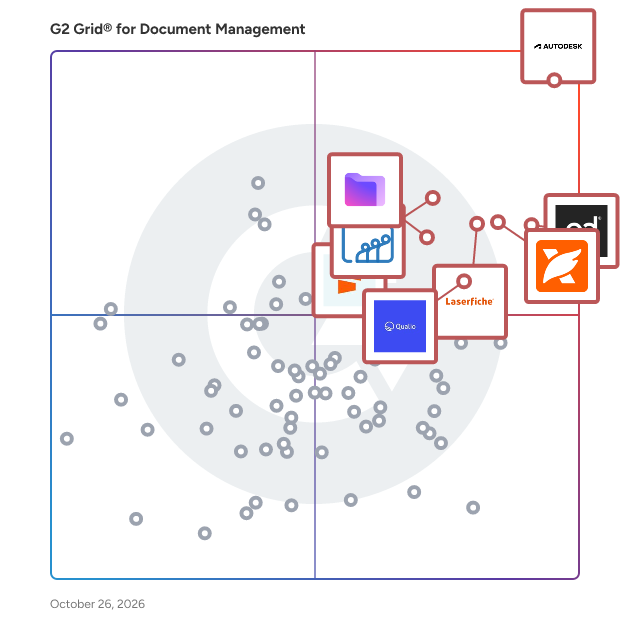
G2 Grid® for Document Management Software

G2 Grid® for Document Management Software plotting products by satisfaction and market presence

Highlighted products: PandaDoc, Foxit PDF Editor, Laserfiche, Zoho WorkDrive, Seismic Enablement Cloud, Proton Drive For Business, M-Files, and Signify.

Underlying data: [Grid® JSON](https://www.g2.com/categories/document-management/grids.json?focus%5B%5D=pandadoc&focus%5B%5D=foxit-pdf-editor&focus%5B%5D=laserfiche&focus%5B%5D=zoho-workdrive&focus%5B%5D=seismic-enablement-cloud&focus%5B%5D=proton-drive-for-business&focus%5B%5D=m-files&focus%5B%5D=signify-signify)

Dokmee Cloud ECM Software

Dokmee is a secure, easy to use document management system designed for a variety of purposes including document capture and storage, search and retrieval, and file sharing. Dokmee adapts to any business model by maximizing accessibility and functionality in repositories of all sizes, while increasing collaboration and communication between users. With a very user friendly interface available in 19 languages, Dokmee is the smart and flexible choice.

Average Rating: 4.2/5.0

Total Reviews: 12

How Do G2 Users Rate Dokmee Cloud ECM Software?

  • Quality of Support: 7.9/10 (Category avg: 8.5/10)
  • Ease of Use: 8.1/10 (Category avg: 8.6/10)

Who Is the Company Behind Dokmee Cloud ECM Software?

  • Seller: Dokmee
  • Year Founded: 2006
  • HQ Location: Houston, TX
  • Twitter: @dokmeesoftware
    8,543 Twitter followers
  • LinkedIn® Page: www.linkedin.com
    29 employees on LinkedIn®

Who Uses This Product?

  • Top Industries: Information Technology and Services
  • Company Size: 75% Small, 17% Medium

What Are Recent G2 Reviews of Dokmee Cloud ECM Software?

What Are G2 Users Discussing About Dokmee Cloud ECM Software?

iKAN Virtual Document Center

The iKAN VDC is comprised of several core modules: document scanning and capture, document classification and indexing, and document storage and retrieval.

Average Rating: 4.4/5.0

Total Reviews: 12

How Do G2 Users Rate iKAN Virtual Document Center?

  • Has the product been a good partner in doing business?: 6.7/10 (Category avg: 8.8/10)
  • Ease of Admin: 8.3/10 (Category avg: 8.4/10)
  • Quality of Support: 7.7/10 (Category avg: 8.5/10)
  • Ease of Use: 9.0/10 (Category avg: 8.6/10)

Who Is the Company Behind iKAN Virtual Document Center?

  • Seller: Ikansoftware
  • Year Founded: 1999
  • HQ Location: Houston, US
  • Twitter: @iKAN_Software
    30 Twitter followers
  • LinkedIn® Page: www.linkedin.com
    4 employees on LinkedIn®

Who Uses This Product?

  • Company Size: 50% Small, 36% Large

What Do G2 Reviewers Say About iKAN Virtual Document Center?

AI-generated summary from verified user reviews

Pros
  • Users find the ease of use of iKAN Virtual Document Center allows for quick and efficient document management.
  • Users value the ease of document storage with iKAN Virtual Document Center, simplifying data management significantly.
  • Users find the data capture efficiency of iKAN Virtual Document Center enhances document management and storage ease.
  • Users appreciate the easy document management of iKAN Virtual Document Center, streamlining data capture and storage processes.
  • Users find iKAN Virtual Document Center excellent for data capture and document management, making document storage effortless.
Cons
  • Users express concern about the high pricing of iKAN Virtual Document Center, wishing for more affordability.
  • Users feel that the product could improve by addressing cost issues, making it more affordable for everyone.
  • Users often express their concern about high pricing for the iKAN Virtual Document Center, limiting its accessibility.
  • Users find the subscription costs high and wish for more affordable options to enhance value.

What Are Recent G2 Reviews of iKAN Virtual Document Center?

What Are G2 Users Discussing About iKAN Virtual Document Center?

Nectain

Nectain is an AI-first Document Management System (DMS) designed for modern organizations seeking operational efficiency and security. With automated invoice and contract workflows, OCR-driven document retrieval, and granular role-based access controls, Nectain reduces manual effort and enhances collaboration. The platform is certified with SOC 2 Type I, ensuring compliance and robust data protection. Backed by 20+ years of DMS experience, Nectain offers white-glove onboarding and transparent pricing, enabling seamless transitions from legacy solutions. Headquartered in Prague with growing operations in the US, the company serves SMBs and government agencies. By streamlining document processing and empowering strategic work, Nectain helps teams focus on innovation, not paperwork.

Average Rating: 4.6/5.0

Total Reviews: 8

How Do G2 Users Rate Nectain?

  • Has the product been a good partner in doing business?: 10.0/10 (Category avg: 8.8/10)
  • Ease of Admin: 9.7/10 (Category avg: 8.4/10)
  • Quality of Support: 9.4/10 (Category avg: 8.5/10)
  • Ease of Use: 8.8/10 (Category avg: 8.6/10)

Who Is the Company Behind Nectain?

  • Seller: Nectain
  • Year Founded: 2021
  • HQ Location: Balcones Drive STE 100 Austin, TX 78731 United States
  • LinkedIn® Page: www.linkedin.com
    8 employees on LinkedIn®

Who Uses This Product?

  • Company Size: 63% Small, 38% Medium

What Do G2 Reviewers Say About Nectain?

AI-generated summary from verified user reviews

Pros
  • Users commend Nectain for its excellent customer support, ensuring assistance is always available for their inquiries.
  • Users appreciate the streamlined document management of Nectain, enhancing efficiency in complex finance operations.
  • Users appreciate the document organization capabilities of Nectain, improving efficiency in handling complex workflows seamlessly.
  • Users appreciate the ease of use of Nectain, enabling smooth management of complex finance operations with a modern interface.
  • Users appreciate the streamlined finance operations and accurate AI extraction feature of Nectain for complex workflows.
Cons
  • Users note a steep learning curve, but ultimately find the time savings to be worthwhile after adapting.

What Are Recent G2 Reviews of Nectain?

PaperTrail

Papertrail is an enterprise-grade document management and automation platform designed to digitize, process, and integrate documents into core business systems. Built for organizations handling high document volumes, Papertrail combines secure cloud storage, advanced OCR, workflow automation, and API-first integrations in a single platform. Documents can be captured from scanners, email, uploads, or APIs, automatically classified, indexed, and converted into structured data. Papertrail supports intelligent document processing for invoices, contracts, HR records, operational files, and customer documentation. Using OCR and rules-based automation, data is extracted, validated, enriched, and routed through configurable workflows such as approvals, exception handling, and downstream processing. The platform integrates directly with ERP, accounting, HR, and custom systems—including SAP S/4HANA—allowing extracted data and documents to flow seamlessly into existing business applications. REST APIs and webhook support enable tight integration with internal platforms and third-party software. Key platform capabilities include: • OCR-based data extraction and document classification • Centralized cloud document repository with full-text search • Workflow automation for routing, approvals, and validation • Version control and complete audit trails • Role-based access control and user permissions • Secure document sharing and collaboration • API-driven integrations and automated ingestion • Support for multi-branch and multi-entity deployments Security is built into every layer of the platform. Papertrail provides encrypted storage, granular access controls, activity logging, and traceability across the document lifecycle, helping organizations meet internal governance and compliance requirements. Papertrail is used across retail, automotive, healthcare, HR, and professional services to streamline invoice processing, employee onboarding, client file management, and legacy archive digitization. By eliminating manual data capture and disconnected systems, Papertrail reduces operational costs, improves accuracy, and accelerates document-driven workflows. Designed for scalability and flexibility, Papertrail supports both SMBs and large enterprises looking to modernize document operations and build a paperless, automation-first environment.

Average Rating: 4.4/5.0

Total Reviews: 48

How Do G2 Users Rate PaperTrail?

  • Has the product been a good partner in doing business?: 8.9/10 (Category avg: 8.8/10)
  • Ease of Admin: 8.6/10 (Category avg: 8.4/10)
  • Quality of Support: 8.4/10 (Category avg: 8.5/10)
  • Ease of Use: 8.7/10 (Category avg: 8.6/10)

Who Is the Company Behind PaperTrail?

  • Seller: Egis Software
  • Year Founded: 1993
  • HQ Location: Highlands North, ZA
  • Twitter: @EGISsoft
    19 Twitter followers
  • LinkedIn® Page: www.linkedin.com
    47 employees on LinkedIn®

Who Uses This Product?

  • Top Industries: Information Technology and Services, Computer Software
  • Company Size: 44% Medium, 40% Small

What Do G2 Reviewers Say About PaperTrail?

AI-generated summary from verified user reviews

Pros
  • Users appreciate the ease of use of PaperTrail, enabling quick setup and effortless management of log data.
  • Users appreciate the effortless document management features of PaperTrail, streamlining tracking and maintaining clear status updates.
  • Users find the easy setup of PaperTrail enables quick integration without requiring technical expertise or complex configurations.
  • Users appreciate the easy setup of PaperTrail, enabling immediate use without needing complex configurations or DevOps skills.
  • Users appreciate the effective document management of PaperTrail, simplifying tracking and ensuring everything is organized and accessible.
Cons
  • Users express frustration with the limited customization in PaperTrail, impacting their ability to effectively analyze log data.
  • Users experience slow performance with PaperTrail, especially when overused, which can hinder its overall effectiveness.
  • Users find the product expensive, especially impacting small businesses and raising concerns about trust and performance.
  • Users express frustration over the missing features in PaperTrail, particularly custom dashboards and aggregate analysis tools.
  • Users find the absence of an offline mode in PaperTrail inconvenient, especially when internet access is restricted.

What Are Recent G2 Reviews of PaperTrail?

What Are G2 Users Discussing About PaperTrail?

ecoDMS One

Scanning, archiving, managing, retrieving and automating with the cross-platform software solutions from ecoDMS GmbH

Average Rating: 3.7/5.0

Total Reviews: 12

How Do G2 Users Rate ecoDMS One?

  • Has the product been a good partner in doing business?: 9.4/10 (Category avg: 8.8/10)
  • Ease of Admin: 9.4/10 (Category avg: 8.4/10)
  • Quality of Support: 5.8/10 (Category avg: 8.5/10)
  • Ease of Use: 6.2/10 (Category avg: 8.6/10)

Who Is the Company Behind ecoDMS One?

  • Seller: ecoDMS
  • Year Founded: 2004
  • HQ Location: Aachen , Nordrhein-Westfalen
  • LinkedIn® Page: www.linkedin.com
    11 employees on LinkedIn®

Who Uses This Product?

  • Company Size: 46% Small, 38% Medium

What Do G2 Reviewers Say About ecoDMS One?

AI-generated summary from verified user reviews

Pros
  • Users value the secure archiving and easy management of ecoDMS One, enhancing work efficiency and data retrieval.
  • Users value the ease of use of ecoDMS One, enhancing efficiency and simplifying file management in daily tasks.
  • Users appreciate the accessibility of ecoDMS One, making file search and protection effortless and efficient.
  • Users find the convenience of scheduled calls beneficial, enhancing their overall experience with ecoDMS One support.
  • Users appreciate the quick retrieval of data with ecoDMS One, enhancing their archiving and management experience.
Cons
  • Users find the inconvenience of accessing documents via the mobile app a significant drawback of ecoDMS One.
  • Users are frustrated with the poor customer support, citing slow response times and inadequate solutions to issues faced.
  • Users find ecoDMS One to be a poor tool for managing documents, citing an outdated interface and lack of convenience.
  • Users find the software a bit costly, which may deter some potential customers from choosing ecoDMS One.
  • Users express concerns about the difficult integration of Rest services, which complicates the overall experience with ecoDMS One.

What Are Recent G2 Reviews of ecoDMS One?

What Are G2 Users Discussing About ecoDMS One?

zipBoard

zipBoard is a cloud-based visual collaboration and markup tool that streamlines digital content approvals, document reviews, and feedback management across the entire project lifecycle. It enables asynchronous collaboration on a wide range of digital formats—without relying on emails, live meetings, or scattered tools. zipBoard is used by teams across eLearning, AEC (Architecture, Engineering, Construction), software development, web design, marketing, and creative services to centralize feedback and simplify reviews. Designed for both technical and non-technical stakeholders—including developers, designers, project managers, clients, SMEs, architects, contractors, and QA teams—zipBoard empowers teams to collaborate efficiently from content planning to final sign-off. Teams use zipBoard to review: ✔️ PDF documents ✔️ Images, designs, and blueprints ✔️ Videos and audio ✔️ SCORM packages and LMS content ✔️ Live websites and web apps (URLs) Core Features ✔️ Visual Markup & Annotation Tools: Annotate PDFs, images, videos, SCORM files, and web pages with comments, highlights, and shapes. ✔️ Task Management & Issue Tracking: Convert feedback into actionable tasks with assignees, due dates, status tags, and use Kanban-style tracking for clear visual progress monitoring. ✔️ Version Control: Track review history for compliance and clarity. ✔️ Role-Based Access & External Collaboration: Manage internal and external stakeholders—clients can review without needing a login. ✔️ Integrations & APIs: Connect zipBoard with tools like Slack, Jira, Microsoft Teams, Outlook, and Procore to sync tasks, notifications, and feedback across systems. ✔️ Automated Reporting: Gain insights into project progress, review activity, and task completion through real-time reporting and exportable summaries. ✔️ AI Productivity Features: Speed up reviews with auto-tagging, smart task suggestions, and AI-powered workflow tips. Popular Use Cases ✔️ Construction submittal and document reviews ✔️ Web design iteration and developer handoff ✔️ Marketing and creative asset approvals ✔️ eLearning course QA and SCORM testing ✔️ Software QA and bug tracking

Average Rating: 4.3/5.0

Total Reviews: 10

How Do G2 Users Rate zipBoard?

  • Has the product been a good partner in doing business?: 9.4/10 (Category avg: 8.8/10)
  • Ease of Admin: 7.9/10 (Category avg: 8.4/10)
  • Quality of Support: 8.9/10 (Category avg: 8.5/10)
  • Ease of Use: 8.3/10 (Category avg: 8.6/10)

Who Is the Company Behind zipBoard?

  • Seller: zipBoard
  • Year Founded: 2015
  • HQ Location: Vancouver, Canada
  • Twitter: @zipboardco
    1,562 Twitter followers
  • LinkedIn® Page: www.linkedin.com
    9 employees on LinkedIn®

Who Uses This Product?

  • Company Size: 60% Small, 40% Medium

What Are Recent G2 Reviews of zipBoard?

What Are G2 Users Discussing About zipBoard?

imDocShare

imDocShare is a comprehensive solution designed to seamlessly integrate iManage Work Server 10.2+ and iManage Cloud content into Microsoft platforms such as Teams, SharePoint, and OneDrive for Business. This integration enables users to live view, edit, add, attach, sync, search, and provision iManage content directly within these Microsoft environments, enhancing collaboration and productivity. Key Features and Functionality: - Live View and Edit: Access and modify iManage documents in real-time within Microsoft Teams and SharePoint. - Synchronization: Automatically perform bi-directional or one-way synchronization of selected folders and files, including metadata, between SharePoint, Teams Files, OneDrive Libraries, and iManage content. - Co-Authoring: Collaborate on Office documents (version 2013 or above) saved in iManage directly within SharePoint and Teams using Office Client applications like Word or Excel. - Hybrid Search: Conduct integrated searches across multiple iManage and SharePoint content sources from a single interface in SharePoint. - Provisioning: Enable Microsoft Teams administrators and knowledge managers to bulk create, edit, and update Teams, Channels, and Tabs with iManage content using imDocShare Tab and Sync. - Content Actions: Perform various actions on iManage content, including editing profiles, previewing documents, viewing in browser, adding to favorites, checking out, renaming files, downloading, deleting, starting co-authoring sessions, and posting. Primary Value and User Solutions: imDocShare addresses the challenge of integrating iManage's document management capabilities with Microsoft's collaboration tools, providing a unified platform for managing legal and professional documents. By embedding iManage content within Microsoft Teams, SharePoint, and OneDrive, it streamlines workflows, reduces the need to switch between applications, and enhances team collaboration. The solution's synchronization and co-authoring features ensure that teams can work on the most up-to-date documents simultaneously, improving efficiency and reducing errors. Additionally, the hybrid search functionality allows users to quickly locate relevant documents across multiple repositories, saving time and enhancing productivity.

Average Rating: 4.2/5.0

Total Reviews: 33

How Do G2 Users Rate imDocShare?

  • Has the product been a good partner in doing business?: 9.2/10 (Category avg: 8.8/10)
  • Ease of Admin: 9.2/10 (Category avg: 8.4/10)
  • Quality of Support: 8.9/10 (Category avg: 8.5/10)
  • Ease of Use: 8.2/10 (Category avg: 8.6/10)

Who Is the Company Behind imDocShare?

  • Seller: imDocShare
  • Year Founded: 2020
  • HQ Location: Newark, New Jersey
  • Twitter: @imDocShare
    35 Twitter followers
  • LinkedIn® Page: www.linkedin.com

Who Uses This Product?

  • Top Industries: Information Technology and Services
  • Company Size: 47% Small, 35% Medium

What Do G2 Reviewers Say About imDocShare?

AI-generated summary from verified user reviews

Pros
  • Users appreciate the real-time collaboration feature of imDocShare, enjoying seamless document sharing and enhanced productivity.
  • Users appreciate the seamless integration of imDocShare, enhancing collaboration and simplifying document management within their teams.
  • Users value the customization options of imDocShare, enhancing collaboration and simplifying document management with their teams.
  • Users appreciate the effortless collaboration features of imDocShare, facilitating easy document sharing and teamwork.
  • Users value the seamless sharing capabilities of imDocShare, enhancing collaborative efforts and simplifying document management.
Cons
  • Users find imDocShare to be quite expensive, wishing for more affordable pricing and customization options.
  • Users feel limited customization options with imDocShare, restricting integration with essential tools for their specific needs.
  • Users find the setup complexity of imDocShare challenging, requiring significant time and effort to master.
  • Users find the initial setup and learning curve of imDocShare challenging, leading to a complicated experience.
  • Users find the cost issues concerning, feeling the price is high with limited customization options available.

What Are Recent G2 Reviews of imDocShare?

Oxygen Document Management

Oxygen DM within O365, creates a UXI, resulting in increased employee engagement and widespread collaboration. Oxygen DM can be linked to users existing systems to create an aligned customer records management system

Average Rating: 4.4/5.0

Total Reviews: 6

How Do G2 Users Rate Oxygen Document Management?

  • Has the product been a good partner in doing business?: 8.3/10 (Category avg: 8.8/10)
  • Ease of Admin: 8.3/10 (Category avg: 8.4/10)
  • Quality of Support: 8.8/10 (Category avg: 8.5/10)
  • Ease of Use: 8.0/10 (Category avg: 8.6/10)

Who Is the Company Behind Oxygen Document Management?

Who Uses This Product?

  • Company Size: 50% Medium, 33% Small

What Do G2 Reviewers Say About Oxygen Document Management?

AI-generated summary from verified user reviews

Pros
  • Users find Oxygen Document Management's ease of use invaluable, allowing for quick document organization and effortless collaboration.
  • Users appreciate the speed and intelligence of Oxygen Document Management, which significantly enhances document organization and workflow efficiency.
  • Users appreciate the workflow automation of Oxygen Document Management, streamlining tasks and enhancing overall efficiency in document handling.
  • Users value the simple and efficient document organization of Oxygen, enhancing file retrieval and collaboration effortlessly.
  • Users appreciate the efficiency of Oxygen Document Management, noting its speed and intelligent tools for document handling.
Cons
  • Users find Oxygen Document Management has limited customization options, restricting personalization and tailored workflows for teams.
  • Users find Oxygen Document Management's complex features necessitate dedicated training, making it less user-friendly than simpler tools.
  • Users find the cost issues of Oxygen Document Management high, particularly for large projects without free trials available.
  • Users find the difficult setup process challenging, especially for those without dedicated IT support, impacting onboarding efficiency.
  • Users find Oxygen Document Management expensive for larger projects, compounded by the lack of free trials for evaluation.

What Are Recent G2 Reviews of Oxygen Document Management?

What Are G2 Users Discussing About Oxygen Document Management?

Softdocs

Softdocs is the only education focused provider of process automation and document management to enable schools to modernize campus operations and drive institutional success. We have helped hundreds of clients seamlessly integrate our platform with their SIS and other core systems across campus providing secure and compliant forms, workflows, electronic signatures, and content storage to build a connected campus and easily do more with less.

Average Rating: 4.7/5.0

Total Reviews: 24

How Do G2 Users Rate Softdocs?

  • Has the product been a good partner in doing business?: 9.8/10 (Category avg: 8.8/10)
  • Ease of Admin: 9.1/10 (Category avg: 8.4/10)
  • Quality of Support: 9.8/10 (Category avg: 8.5/10)
  • Ease of Use: 9.0/10 (Category avg: 8.6/10)

Who Is the Company Behind Softdocs?

  • Seller: Softdocs
  • Year Founded: 1998
  • HQ Location: Columbia, SC
  • Twitter: @Softdocs
    336 Twitter followers
  • LinkedIn® Page: www.linkedin.com
    144 employees on LinkedIn®

Who Uses This Product?

  • Top Industries: Higher Education, Education Management
  • Company Size: 71% Medium, 21% Large

What Are Recent G2 Reviews of Softdocs?

SOLIXCloud ECS

SOLIXCloud ECS is a fully managed cloud content platform designed to help businesses store, organize, govern and share enterprise content securely. With SOLIXCloud ECS, organizations can now enable cloud based - employee file storage and sharing - enterprise file archive for every department and application - governed cloud repository for content driven applications and much more at an incredible price as low as $0.24/GB (all features and unlimited users) ECS also makes file management and collaboration easy with secure sharing, collections, comments, tags, annotations, watermarks, and redactions and a powerful file viewer. Additionally, ECS empowers IT and governance teams to efficiently manage petabytes of unstructured content with advanced features such as content management, progressive retention, progressive legal hold, progressive classification, audit reports, encryption, redaction, versioning and user management. The platform offers a 30 Day Free Trial. So try it out today to see how it can enable your organization with cloud content management.

Average Rating: 4.1/5.0

Total Reviews: 11

How Do G2 Users Rate SOLIXCloud ECS?

  • Has the product been a good partner in doing business?: 10.0/10 (Category avg: 8.8/10)
  • Ease of Admin: 8.3/10 (Category avg: 8.4/10)
  • Quality of Support: 7.8/10 (Category avg: 8.5/10)
  • Ease of Use: 8.3/10 (Category avg: 8.6/10)

Who Is the Company Behind SOLIXCloud ECS?

  • Seller: Solix
  • Year Founded: 2002
  • HQ Location: Santa Clara, California, United States
  • Twitter: @solixbigdata
    2,253 Twitter followers
  • LinkedIn® Page: www.linkedin.com
    589 employees on LinkedIn®

Who Uses This Product?

  • Company Size: 27% Medium, 18% Small

What Do G2 Reviewers Say About SOLIXCloud ECS?

AI-generated summary from verified user reviews

Pros
  • Users highlight the easy setup of SOLIXCloud ECS, enabling quick deployment without complex infrastructure management.
  • Users appreciate the setup ease of SOLIXCloud ECS, enabling quick deployment and smooth onboarding with clear resources.
  • Users appreciate the ease of use of SOLIXCloud ECS, facilitating quick onboarding and seamless content management integration.
  • Users value the strong security and compliance features of SOLIXCloud ECS, enabling effective and responsible enterprise content management.
  • Users appreciate the seamless data management and compliance features of SOLIXCloud ECS, making regulatory adherence effortless.
Cons
  • Users experience inefficient searching with ECS, often leading to delays and reliance on office support for data access.
  • Users face search difficulties in ECS, often resorting to calling for data due to complex navigation and slow retrieval times.
  • Users find the folder navigation cumbersome, leading to delays and dependence on office support for data access.
  • Users highlight implementation difficulties with SOLIXCloud ECS, citing complex setup and a need for better onboarding support.
  • Users find the missing features in ECS hinder efficiency, complicating access to archived data and sharing with customers.

What Are Recent G2 Reviews of SOLIXCloud ECS?

What Are G2 Users Discussing About SOLIXCloud ECS?

Workiro

Wórkiro is a secure document management and client collaboration platform built for regulated, document-heavy professional services firms. When your work depends on accuracy, compliance and clear communication - scattered emails, shared drives and disconnected tools create risk. In professional services, your work is regulated. Your reputation is not. It is built on how reliably you deliver, how quickly you respond, and how confidently you handle sensitive information. Fragmented systems quietly undermine control. Emails sit in personal inboxes. Multiple document versions circulate. Sign-offs are missed. Filing depends on memory. Small gaps become operational and reputational risk. Workiro changes that by bringing everything into one secure, structured system of record. Documents, emails, conversations, tasks and eSignatures live in a single space organised around your clients, cases or projects. Every file has full version history. Every message sits in context. Every signature is automatically stored with a complete audit trail. Collect information through a secure, branded client portal without complex logins. Manage internal approvals, deadlines and review cycles with built-in tasks and templates. When compliance teams ask for evidence, show the full story instantly. Wórkiro integrates with the tools you already rely on, including Microsoft 365, Outlook, Xero PM, TaxCalc, IRIS, CCH and IPS Cloud. Capture emails automatically, co-author documents in Office, and sync records from practice management systems to reduce duplication and manual filing. The result is simple: less chasing, less risk, fewer silos and greater confidence. Whether onboarding clients, preparing reports, managing regulated advice, running insolvency cases, or delivering recurring compliance work, Wórkiro keeps your team organised, audit-ready and in control. Everything is where it should be. Everything is findable. Everything is defensible. Trusted by over 65,000 professionals, Wórkiro helps you operate with the authority your brand deserves.

Average Rating: 4.3/5.0

Total Reviews: 15

How Do G2 Users Rate Workiro?

  • Has the product been a good partner in doing business?: 9.3/10 (Category avg: 8.8/10)
  • Ease of Admin: 8.7/10 (Category avg: 8.4/10)
  • Quality of Support: 8.8/10 (Category avg: 8.5/10)
  • Ease of Use: 8.6/10 (Category avg: 8.6/10)

Who Is the Company Behind Workiro?

  • Seller: GetBusy
  • Company Website:
  • Year Founded: 1998
  • HQ Location: CAMBRIDGE, Cambridgeshire
  • Twitter: @getbusy
    453 Twitter followers
  • LinkedIn® Page: www.linkedin.com
    87 employees on LinkedIn®

Who Uses This Product?

  • Company Size: 73% Small, 33% Medium

What Do G2 Reviewers Say About Workiro?

AI-generated summary from verified user reviews

Pros
  • Users value the automation capabilities of Workiro, streamlining tasks and enhancing efficiency in their workflows.
  • Users appreciate the efficient document management of Workiro, enhancing ease of access to signed documents and emails.
  • Users appreciate that Workiro’s digital signature feature simplifies the signing process for clients without account hassles.
  • Users enjoy the easy document management and retrieval features of Workiro, simplifying access to important documents significantly.
  • Users love that Workiro offers easy document uploads without requiring client accounts, streamlining the signature process.
Cons
  • Users find the difficult setup for XPM integration challenging, leading to some initial complications and time-consuming efforts.
  • Users find the limitation in assigning multiple email addresses to a single contact frustrating for managing client information.
  • Users find the limitation of single email addresses per contact restrictive, impacting efficiency in communication with clients.
  • Users find the email limitations frustrating, especially regarding contact management and older clients' needs.
  • Users express frustration with the integration difficulty of Workiro, noting the need for manual setup steps.

What Are Recent G2 Reviews of Workiro?

Appward

Software companies don’t understand your business. From one group you get a rigid solution that requires expensive and time-consuming implementation. From the other you get a hodgepodge of disconnected applications. We feel your pain. Appward delivers a smart set of over 80 apps in a blazing-fast private workspace that helps you manage and improve every function in your organization, including project management, CRM, employee management, operations, quality, manufacturing and supply chain.

Average Rating: 4.5/5.0

Total Reviews: 12

How Do G2 Users Rate Appward?

  • Has the product been a good partner in doing business?: 8.7/10 (Category avg: 8.8/10)
  • Ease of Admin: 9.0/10 (Category avg: 8.4/10)
  • Quality of Support: 9.1/10 (Category avg: 8.5/10)
  • Ease of Use: 9.2/10 (Category avg: 8.6/10)

Who Is the Company Behind Appward?

  • Seller: Appward
  • Year Founded: 2021
  • HQ Location: Santa Clarita, US
  • Twitter: @AppwardSocial
    2 Twitter followers
  • LinkedIn® Page: www.linkedin.com
    19 employees on LinkedIn®

Who Uses This Product?

  • Company Size: 58% Medium, 37% Small

What Do G2 Reviewers Say About Appward?

AI-generated summary from verified user reviews

Pros
  • Users value the ease of use of Appward, which simplifies setup, reporting, and enhances team collaboration efficiently.
  • Users appreciate the efficiency of Appward, benefiting from fast access to integrated functionalities and streamlined project management.
  • Users admire the focus on real growth and monetization that Appward offers, enhancing engagement and retention effectively.
  • Users love the intuitive design of Appward, enabling quick access to essential tools and improving collaboration significantly.
  • Users value Appward for its ability to drive real business growth and effective monetization strategies.
Cons
  • Users find the learning curve challenging, as features lack clarity and require significant effort to master.
  • Users find a steep learning curve with Appward due to unclear guidance and lack of detailed documentation.
  • Users find Appward has limited customization, which restricts advanced targeting for complex campaigns and strategies.
  • Users find Appward has limited features, lacking customization and mobile app options, hindering complex campaign execution.
  • Users find Appward's missing features limit customization and targeting, impacting complex campaign execution and mobile usability.

What Are Recent G2 Reviews of Appward?

DocuSoft

Docusoft develop and implement information management and business process improvement software solutions. Docusoft's CloudFiler Solution includes a DMS, Secure Portal For E-signing and a CRM system that can be customised for any sector. It also includes desktop apps and addins to help our customers file documents and work within their native apps on their PC. Docusoft provide solutions for the management of electronic documents, digitisation of paper documents, management and processing of client information, the secure delivery and exchange of documents with clients and contacts and the e-signature and approval of electronic documents. Our suite of software has evolved to provide easy-to-use and extremely effective solutions relied upon by thousands of users in a wide range of industries. Our software is comprehensive in terms of features, functionality, integration and capability. Our solutions are designed to help businesses improve their process efficiency and productivity, deliver better client communications, improve business processes and save both time and money. Docusoft focus on developing solutions for the Cloud. Providing software as a service (SaaS) and similar solutions that are easily accessible from any web browser on a laptop, tablet or other mobile device from any part of the world. ANY TIME, ANY PLACE ANY DEVICE

Average Rating: 4.5/5.0

Total Reviews: 5

How Do G2 Users Rate DocuSoft?

  • Has the product been a good partner in doing business?: 10.0/10 (Category avg: 8.8/10)
  • Ease of Admin: 9.2/10 (Category avg: 8.4/10)
  • Quality of Support: 10.0/10 (Category avg: 8.5/10)
  • Ease of Use: 9.7/10 (Category avg: 8.6/10)

Who Is the Company Behind DocuSoft?

  • Seller: DocuSoft
  • Year Founded: 2003
  • HQ Location: Camberley, GB
  • Twitter: @Docusoft
    616 Twitter followers
  • LinkedIn® Page: www.linkedin.com
    36 employees on LinkedIn®

Who Uses This Product?

  • Company Size: 80% Small, 20% Large

What Are Recent G2 Reviews of DocuSoft?

DxArchive

DxArchive is a cloud-based, document management solution, designed to ease the management and storage of documents of your automated processes, securely and compliantly, even with the strictest of regulations. Smart folders, customized automated workflows and data mapping mean that, no matter the size and complexity of your business, you can find the right document at the right time with our simple interface. Upload, download, find and share any type of document anytime, anywhere with DxArchive.

Average Rating: 4.7/5.0

Total Reviews: 13

How Do G2 Users Rate DxArchive?

  • Has the product been a good partner in doing business?: 7.5/10 (Category avg: 8.8/10)
  • Ease of Admin: 7.5/10 (Category avg: 8.4/10)
  • Quality of Support: 9.2/10 (Category avg: 8.5/10)
  • Ease of Use: 9.1/10 (Category avg: 8.6/10)

Who Is the Company Behind DxArchive?

  • Seller: DocXchange
  • Year Founded: 2005
  • HQ Location: Bucharest, RO
  • Twitter: @DocProcess
    51 Twitter followers
  • LinkedIn® Page: www.linkedin.com
    32 employees on LinkedIn®

Who Uses This Product?

  • Company Size: 46% Medium, 38% Small

What Are Recent G2 Reviews of DxArchive?

What Are G2 Users Discussing About DxArchive?

Gestoria Lite

SaaS de gestión documental para gestorías administrativas y asesorías fiscales en España.

Average Rating: 5.0/5.0

Total Reviews: 5

How Do G2 Users Rate Gestoria Lite?

  • Quality of Support: 10.0/10 (Category avg: 8.5/10)
  • Ease of Use: 10.0/10 (Category avg: 8.6/10)

Who Is the Company Behind Gestoria Lite?

Who Uses This Product?

  • Company Size: 100% Small

What Are Recent G2 Reviews of Gestoria Lite?

Neeraja Prakash
NP
Researched and written by Neeraja Prakash
Updated October 3, 2024