Best Document Creation Software - Page 5

How Many Document Creation Software Products Does G2 Track?

Total Products under this Category: 343

Category Stats (Sep 2026)

  • Average Rating: 4.37/5 The average rating of products in this category, based on all submitted ratings
  • Top Trending Product: DocNexus (+2.22%) - Among all products in this category, DocNexus recorded the largest rating increase compared to last month

Last updated: September 01, 2026

How Does G2 Rank Document Creation Software Products?

Why You Can Trust G2's Software Rankings:

  • 30 Analysts and Data Experts
  • 156,500+ Authentic Reviews
  • 343+ Products
  • Unbiased Rankings

G2's software rankings are built on verified user reviews, rigorous moderation, and a consistent research methodology maintained by a team of analysts and data experts. Each product is measured using the same transparent criteria, with no paid placement or vendor influence. While reviews reflect real user experiences, which can be subjective, they offer valuable insight into how software performs in the hands of professionals. Together, these inputs power the G2 Score, a standardized way to compare tools within every category.

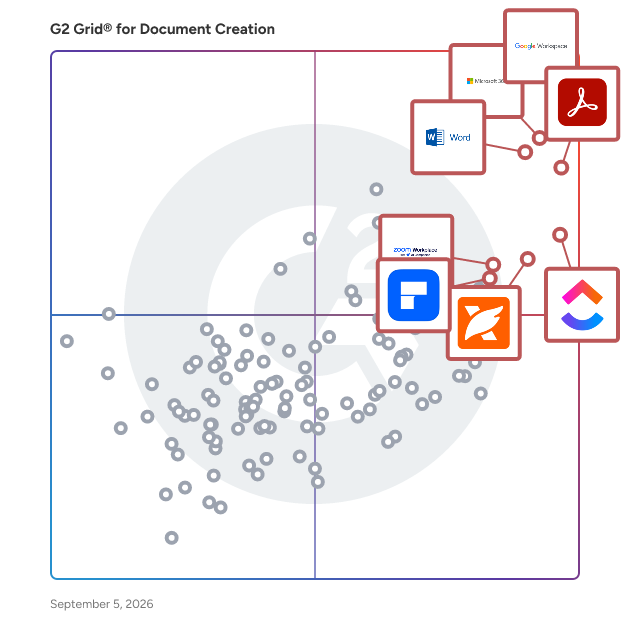
G2 Grid® for Document Creation Software

G2 Grid® for Document Creation Software plotting products by satisfaction and market presence

Highlighted products: Google Workspace, Microsoft 365, Adobe Acrobat, Microsoft Word, ClickUp, Foxit PDF Editor, Zoom Workplace, and Wondershare PDFelement.

Underlying data: [Grid® JSON](https://www.g2.com/categories/document-creation/grids.json?focus%5B%5D=google-workspace&focus%5B%5D=microsoft365&focus%5B%5D=adobe-acrobat&focus%5B%5D=microsoft-word&focus%5B%5D=clickup&focus%5B%5D=foxit-pdf-editor&focus%5B%5D=zoom-workplace&focus%5B%5D=wondershare-wondershare-pdfelement)

Apache OpenOffice Writer

Writer has everything you would expect from a modern, fully equipped word processor. It is simple enough for a quick memo, yet powerful enough to create complete books with contents, diagrams, indexes, etc. You're free to concentrate on your ideas while Writer makes them look great.

Average Rating: 4.3/5.0

Total Reviews: 36

How Do G2 Users Rate Apache OpenOffice Writer?

  • Has the product been a good partner in doing business?: 9.2/10 (Category avg: 9.0/10)
  • Quality of Support: 7.2/10 (Category avg: 8.6/10)
  • Ease of Use: 8.3/10 (Category avg: 8.9/10)
  • Ease of Admin: 10.0/10 (Category avg: 8.9/10)

Who Is the Company Behind Apache OpenOffice Writer?

Who Uses This Product?

  • Company Size: 68% Small, 22% Medium

What Do G2 Reviewers Say About Apache OpenOffice Writer?

AI-generated summary from verified user reviews

Pros
  • Users appreciate the abundance of features in Apache OpenOffice Writer, making it ideal for authors and writers.
Cons
  • Users find the lack of built-in FB2 file generation a significant limitation in Apache OpenOffice Writer.

What Are Recent G2 Reviews of Apache OpenOffice Writer?

What Are G2 Users Discussing About Apache OpenOffice Writer?

S-Docs

S-Docs is a document operations platform designed to help users streamline their document creation and signing processes. This solution caters to a wide range of organizations, from small businesses to large global enterprises, enabling them to efficiently manage critical documents through intuitive automation and secure e-signature capabilities. By focusing on both ease of use and robust functionality, S-Docs empowers businesses to enhance their operational efficiency and transform their workflows. The platform is particularly valuable for organizations that handle a high volume of documents, such as contracts, invoices, and compliance forms. Its target audience includes industries like finance, healthcare, legal, and manufacturing, where accurate and timely document management is essential. S-Docs addresses the specific needs of these sectors by providing a comprehensive solution that not only simplifies document workflows but also ensures compliance with industry regulations. Key features of S-Docs include its user-friendly document automation tools, which allow users to create customized templates and generate documents quickly. The e-signature functionality further enhances the platform by enabling users to obtain signatures securely and efficiently, reducing the time spent on manual processes. Additionally, S-Docs integrates seamlessly with existing systems, ensuring that organizations can leverage their current technology investments while enhancing their document operations. The benefits of using S-Docs extend beyond mere efficiency. By automating document processes, organizations can reduce human error, improve accuracy, and accelerate turnaround times. The platform also supports collaboration among team members, allowing multiple users to work on documents simultaneously, which fosters a more agile working environment. Furthermore, S-Docs' commitment to security ensures that sensitive information is protected throughout the document lifecycle, giving users peace of mind. Overall, S-Docs stands out in the document operations category by offering a comprehensive solution that not only simplifies document workflows but also drives significant process transformation. Its focus on automation, security, and integration makes it a valuable tool for organizations looking to enhance their document management capabilities and achieve greater operational efficiency.

Average Rating: 4.7/5.0

Total Reviews: 122

How Do G2 Users Rate S-Docs?

  • Has the product been a good partner in doing business?: 9.4/10 (Category avg: 9.0/10)
  • Quality of Support: 9.2/10 (Category avg: 8.6/10)
  • Ease of Use: 8.9/10 (Category avg: 8.9/10)
  • Ease of Admin: 9.0/10 (Category avg: 8.9/10)

Who Is the Company Behind S-Docs?

  • Seller: S-Docs
  • Year Founded: 2010
  • HQ Location: New York, NY
  • LinkedIn® Page: www.linkedin.com
    54 employees on LinkedIn®

Who Uses This Product?

  • Who Uses This: Salesforce Administrator
  • Top Industries: Non-Profit Organization Management, Information Technology and Services
  • Company Size: 45% Small, 40% Medium

What Do G2 Reviewers Say About S-Docs?

AI-generated summary from verified user reviews

Pros
  • Users appreciate the ease of use of S-Docs, making document generation and e-signature fast and simple.
  • Users commend the excellent customer support of S-Docs, finding their assistance invaluable during technical issues.
  • Users appreciate the seamless integration of S-Docs with Salesforce, enhancing document generation and e-signature efficiency.
  • Users praise the seamless Salesforce integration of S-Docs, enhancing security and simplifying document generation processes.
  • Users value the ease of template creation with S-Docs, enhancing daily operations seamlessly within Salesforce.
Cons
  • Users find the learning curve steep, especially with complex templates and a non-intuitive interface, hindering effective use.
  • Users find the S-Docs interface not intuitive, noting a steep learning curve and complexity for less technical users.
  • Users express concerns about automation difficulty, noting that complex templates require time and troubleshooting expertise.
  • Users find S-Docs too expensive, especially after recent pricing changes and tiered minimum user requirements.
  • Users face formatting issues with S-Docs, including limitations in customization and troublesome DOCX output.

What Are Recent G2 Reviews of S-Docs?

Xtensio

The living deliverables workspace — consultants and agencies use Xtensio to build proposals, one-pagers, and client reports that update in real time without re-sending. Over 400,000 consultants, agencies, and founders use Xtensio to create and share client-facing documents that stay current. Unlike static PDFs or presentation files, Xtensio documents are live links — update the content once and every client who has the link sees the new version instantly. No re-sending, no version confusion. Built for professional deliverables: consulting proposals, startup one-pagers, capability statements, fact sheets, status reports, and pitch decks. Start from 100+ professionally-designed templates or build from scratch using a drag-and-drop block editor. Organize multiple documents in a branded workspace and share individual files or full workspaces with clients. Key difference from presentation tools: Xtensio documents live at a permanent URL. Your client bookmarks it once — and it always shows your latest version. Upgrade to add custom branding, remove the Xtensio watermark, and track when clients open your links. Free to start. Used by teams at agencies, consultancies, and early-stage companies since 2015.

Average Rating: 4.5/5.0

Total Reviews: 265

How Do G2 Users Rate Xtensio?

  • Has the product been a good partner in doing business?: 8.8/10 (Category avg: 9.0/10)
  • Quality of Support: 8.6/10 (Category avg: 8.6/10)
  • Ease of Use: 8.8/10 (Category avg: 8.9/10)
  • Ease of Admin: 9.0/10 (Category avg: 8.9/10)

Who Is the Company Behind Xtensio?

  • Seller: Xtensio
  • Year Founded: 2015
  • HQ Location: Los Angeles, CA
  • Twitter: @xtensio
    2,118 Twitter followers
  • LinkedIn® Page: www.linkedin.com
    2 employees on LinkedIn®

Who Uses This Product?

  • Who Uses This: CEO, Founder
  • Top Industries: Marketing and Advertising, Information Technology and Services
  • Company Size: 81% Small, 15% Medium

What Do G2 Reviewers Say About Xtensio?

AI-generated summary from verified user reviews

Pros
  • Users love the customizable templates in Xtensio, enabling easy and professional designs for client presentations.
  • Users find Xtensio's platform to be very easy to use, thanks to its flexibility and customizable templates.
  • Users find Xtensio's intuitive interface and real-time collaboration features invaluable for creating professional and engaging landing pages.
  • Users value the customization options in Xtensio, enabling the creation of tailored and professional client landing pages.
  • Users love the intuitive interface of Xtensio, making it easy to create professional and engaging landing pages.
Cons
  • Users find the limited customization options of Xtensio restrict creative possibilities and layout flexibility.
  • Users find the limited design options of Xtensio challenging, often requiring adjustments to templates for effective use.
  • Users find the limited features of Xtensio frustrating, especially in the free account's basic tool offerings.
  • Users desire more industry-specific templates in Xtensio, particularly for digital marketing, to enhance usability.
  • Users experience missing features like inadequate editing tools and confusing navigation, which hinder usability and efficiency.

What Are Recent G2 Reviews of Xtensio?

What Are G2 Users Discussing About Xtensio?

Polaris Word

Freely view and edit microsoft office nad PDF file formats in Polaries word

Average Rating: 4.2/5.0

Total Reviews: 15

How Do G2 Users Rate Polaris Word?

  • Has the product been a good partner in doing business?: 10.0/10 (Category avg: 9.0/10)
  • Quality of Support: 9.3/10 (Category avg: 8.6/10)
  • Ease of Use: 9.3/10 (Category avg: 8.9/10)
  • Ease of Admin: 10.0/10 (Category avg: 8.9/10)

Who Is the Company Behind Polaris Word?

  • Seller: InfraWare
  • Year Founded: 2003
  • HQ Location: Terre Haute, IN
  • Twitter: @infraware
    4 Twitter followers
  • LinkedIn® Page: www.linkedin.com
    108 employees on LinkedIn®

Who Uses This Product?

  • Company Size: 53% Medium, 40% Small

What Are Recent G2 Reviews of Polaris Word?

What Are G2 Users Discussing About Polaris Word?

PDF Converter Elite

Turn PDF documents to editable MS Office or OpenOffice file formats. Convert PDF files to JPG, PNG and other image formats. Use PDF Converter to convert PDF to AutoCAD and HTML as well.

Average Rating: 4.4/5.0

Total Reviews: 20

How Do G2 Users Rate PDF Converter Elite?

  • Has the product been a good partner in doing business?: 9.4/10 (Category avg: 9.0/10)
  • Quality of Support: 9.4/10 (Category avg: 8.6/10)
  • Ease of Use: 9.6/10 (Category avg: 8.9/10)
  • Ease of Admin: 10.0/10 (Category avg: 8.9/10)

Who Is the Company Behind PDF Converter Elite?

Who Uses This Product?

  • Company Size: 55% Small, 32% Medium

What Are Recent G2 Reviews of PDF Converter Elite?

What Are G2 Users Discussing About PDF Converter Elite?

doDOC

doDOC fits "in" the documentation workflow of your organization, integrating with existing documentation platforms and increasing your return on investment done with them.

Average Rating: 4.5/5.0

Total Reviews: 11

How Do G2 Users Rate doDOC?

  • Has the product been a good partner in doing business?: 9.2/10 (Category avg: 9.0/10)
  • Quality of Support: 8.8/10 (Category avg: 8.6/10)
  • Ease of Use: 8.5/10 (Category avg: 8.9/10)
  • Ease of Admin: 9.2/10 (Category avg: 8.9/10)

Who Is the Company Behind doDOC?

  • Seller: Envision Pharma Group
  • Year Founded: 2001
  • HQ Location: United Kingdom
  • Twitter: @EnvisionPharma
    1,370 Twitter followers
  • LinkedIn® Page: www.linkedin.com
    1,033 employees on LinkedIn®

Who Uses This Product?

  • Company Size: 58% Small, 25% Medium

What Are Recent G2 Reviews of doDOC?

PDF Suite

PDF Suite allows users to read, create, convert, edit, review and secure PDFs.

Average Rating: 4.3/5.0

Total Reviews: 73

How Do G2 Users Rate PDF Suite?

  • Has the product been a good partner in doing business?: 9.0/10 (Category avg: 9.0/10)
  • Quality of Support: 8.0/10 (Category avg: 8.6/10)
  • Ease of Use: 8.8/10 (Category avg: 8.9/10)
  • Ease of Admin: 8.8/10 (Category avg: 8.9/10)

Who Is the Company Behind PDF Suite?

Who Uses This Product?

  • Top Industries: Information Technology and Services, Computer Software
  • Company Size: 49% Small, 28% Large

What Are Recent G2 Reviews of PDF Suite?

What Are G2 Users Discussing About PDF Suite?

Inkscape

Inkscape is a free and open-source vector graphics editor available for GNU/Linux, Windows, and macOS. It is widely used for creating both artistic and technical illustrations, including cartoons, clip art, logos, typography, diagrams, and flowcharts. By utilizing vector graphics, Inkscape ensures sharp printouts and renderings at any resolution, unlike raster graphics that are limited by pixel count. The software employs the standardized Scalable Vector Graphics (SVG) file format as its primary format, which is supported by many other applications, including web browsers. Key Features and Functionality: - Object Creation: Inkscape offers a variety of tools for drawing and shaping objects, such as the Pencil tool for freehand drawing, the Pen tool for creating Bézier curves and straight lines, and the Calligraphy tool for producing filled paths that mimic calligraphic strokes. It also includes shape tools for rectangles, ellipses, stars, polygons, and spirals. - Object Manipulation: Users can perform transformations like moving, scaling, rotating, and skewing objects both interactively and by specifying exact numeric values. Inkscape supports grouping objects, layering, and aligning and distributing objects for precise design control. - Text Support: The software provides a comprehensive text tool that allows for multi-line text, full on-canvas editing, and the ability to flow text along a path or into a shape. Users can adjust font, spacing, kerning, and more. - File Format Compatibility: Inkscape can import and export various file formats, including SVG, AI, EPS, PDF, PS, and PNG, facilitating interoperability with other graphic design tools. - Extensibility: Designed to be extensible, Inkscape allows users to customize its functionality with add-ons, enhancing its capabilities to meet specific needs. Primary Value and User Solutions: Inkscape provides a powerful, free alternative to proprietary vector graphics editors, enabling users to create high-quality illustrations without financial barriers. Its support for the SVG standard ensures compatibility and ease of sharing across different platforms and applications. The software's comprehensive feature set, combined with its user-friendly interface and multi-lingual support, makes it accessible to a broad audience, from beginners to professional designers. By offering tools for precise object creation and manipulation, robust text support, and compatibility with various file formats, Inkscape addresses the diverse needs of users seeking a versatile and cost-effective solution for vector graphic design.

Average Rating: 4.4/5.0

Total Reviews: 409

How Do G2 Users Rate Inkscape?

  • Has the product been a good partner in doing business?: 8.6/10 (Category avg: 9.0/10)
  • Quality of Support: 7.7/10 (Category avg: 8.6/10)
  • Ease of Use: 7.8/10 (Category avg: 8.9/10)
  • Ease of Admin: 8.3/10 (Category avg: 8.9/10)

Who Is the Company Behind Inkscape?

  • Seller: Inkscape
  • HQ Location: Chino Hills, CA
  • Twitter: @inkscape
    40,486 Twitter followers
  • LinkedIn® Page: www.linkedin.com
    1 employees on LinkedIn®

Who Uses This Product?

  • Who Uses This: Graphic Designer, Designer
  • Top Industries: Graphic Design, Design
  • Company Size: 75% Small, 15% Medium

What Do G2 Reviewers Say About Inkscape?

AI-generated summary from verified user reviews

Pros
  • Users enjoy the user-friendly interface of Inkscape, making it accessible and easy to master for beginners.
  • Users love that Inkscape is totally free yet offers features comparable to expensive software like Adobe Illustrator.
  • Users love Inkscape for its comprehensive and free features, enabling easy vector graphics creation without quality loss.
  • Users appreciate the intuitive UI and flexibility of Inkscape, making it ideal for beginners and vector graphics enthusiasts.
  • Users love Inkscape for its powerful vector design capabilities, offering free, professional-quality tools for all skill levels.
Cons
  • Users note the missing features in Inkscape, like Gradient Mesh and Free Transform, hindering their illustration experience.
  • Users note significant tool limitations in Inkscape, missing essential features like Gradient Mesh and advanced transformation options.
  • Users experience performance issues with Inkscape, including slow processing times and frequent crashes during complex tasks.
  • Users report slow performance with Inkscape, especially with large files, causing frustration during design tasks.
  • Users express frustration with Inkscape's limited features, particularly missing tools compared to more advanced software like Adobe Illustrator.

What Are Recent G2 Reviews of Inkscape?

What Are G2 Users Discussing About Inkscape?

Xodo

Xodo is the all-in-one PDF solution designed to simplify your workflow and save time on processing documents. Easily convert, edit, merge, compare, compress, e-sign, and do much more with 30+ proven document tools in one secure platform. Designed for all users, get more work done with Xodo whether you're on the web, iOS, Android or Windows app.

Average Rating: 4.4/5.0

Total Reviews: 34

How Do G2 Users Rate Xodo?

  • Has the product been a good partner in doing business?: 10.0/10 (Category avg: 9.0/10)
  • Quality of Support: 8.7/10 (Category avg: 8.6/10)
  • Ease of Use: 9.3/10 (Category avg: 8.9/10)
  • Ease of Admin: 10.0/10 (Category avg: 8.9/10)

Who Is the Company Behind Xodo?

  • Seller: Apryse
  • Year Founded: 1998
  • HQ Location: Denver, CO
  • Twitter: @aprysesolutions
    381 Twitter followers
  • LinkedIn® Page: www.linkedin.com
    552 employees on LinkedIn®

Who Uses This Product?

  • Company Size: 57% Small, 30% Medium

What Do G2 Reviewers Say About Xodo?

AI-generated summary from verified user reviews

Pros
  • Users value the easy mastery and advanced editing functions of Xodo, making PDF management efficient and straightforward.
  • Users appreciate the intuitive dashboard of Xodo, which offers quick access to essential PDF editing tools.
  • Users commend Xodo for its user-friendly PDF editing features, enabling quick and efficient document management and annotation.
  • Users value the text highlighting feature of Xodo, enhancing document reviews with ease and clarity.
  • Users appreciate Xodo for its affordable pricing, making it accessible for both individuals and larger teams.

What Are Recent G2 Reviews of Xodo?

What Are G2 Users Discussing About Xodo?

LibreOffice Writer

Writer has all the features you need from a modern, full-featured word processing and desktop publishing tool. It's simple enough for a quick memo, but powerful enough to create complete books with contents, diagrams, indexes, and more. You're free to concentrate on your message, while Writer makes it look great.

Average Rating: 4.1/5.0

Total Reviews: 87

How Do G2 Users Rate LibreOffice Writer?

  • Has the product been a good partner in doing business?: 7.5/10 (Category avg: 9.0/10)
  • Quality of Support: 7.6/10 (Category avg: 8.6/10)
  • Ease of Use: 8.4/10 (Category avg: 8.9/10)
  • Ease of Admin: 8.3/10 (Category avg: 8.9/10)

Who Is the Company Behind LibreOffice Writer?

  • Seller: LibreOffice
  • Year Founded: 2010
  • HQ Location: Berlin, DE
  • Twitter: @libreoffice
    79,608 Twitter followers
  • LinkedIn® Page: www.linkedin.com
    31 employees on LinkedIn®

Who Uses This Product?

  • Top Industries: Information Technology and Services, Computer Software
  • Company Size: 60% Small, 25% Medium

What Do G2 Reviewers Say About LibreOffice Writer?

AI-generated summary from verified user reviews

Pros
  • Users appreciate the regular updates and feature enhancements of LibreOffice Writer, boosting performance and versatility on multiple platforms.
  • Users value the regular support and updates for LibreOffice Writer, enhancing functionality and user experience.
  • Users value the customization options in LibreOffice Writer, enhancing their writing experience with tailored features.
  • Users find LibreOffice Writer easy to use and appreciate the supportive open-source community for guidance and contributions.
  • Users value the seamless integrations in LibreOffice Writer, facilitating diverse document formats across different operating systems.
Cons
  • Users find the missing features in LibreOffice Writer limiting, hindering productivity and collaborative efforts.

What Are Recent G2 Reviews of LibreOffice Writer?

What Are G2 Users Discussing About LibreOffice Writer?

Kotobee Author

Kotobee Author is a comprehensive interactive ebook creator software and EPUB editor, suitable for anyone in the education, training, and publishing industries. Kotobee Author is a winner of multiple international awards including the Academics' Choice Smart Media Award and the Brandon Hall Awards. With Kotobee Author, you may easily create interactive ebooks rich with video, audio, 3D, book widgets, questions, and more. You may also customize the look and feel of your ebook apps, and emulate the result on different platforms and devices. You will also be able to export your ebook to many different formats, such as web apps, desktop apps, Chrome apps, and EPUB3, which can be opened using the free Kotobee Reader app or using any of the popular ebook readers available in the stores. The Free License is free forever, the Basic License is a $150 value, allowing you to entirely customize and brand your ebook apps with your own logo, removing the Kotobee logo watermark. You can find more on our YouTube channel: https://www.youtube.com/watch?v=_YNEdRwJuAo

Average Rating: 4.3/5.0

Total Reviews: 13

How Do G2 Users Rate Kotobee Author?

  • Has the product been a good partner in doing business?: 8.1/10 (Category avg: 9.0/10)
  • Quality of Support: 8.8/10 (Category avg: 8.6/10)
  • Ease of Use: 9.2/10 (Category avg: 8.9/10)
  • Ease of Admin: 7.2/10 (Category avg: 8.9/10)

Who Is the Company Behind Kotobee Author?

  • Seller: Vijua
  • Year Founded: 2011
  • HQ Location: Cairo, Egypt
  • Twitter: @VijuaLabs
    41 Twitter followers
  • LinkedIn® Page: www.linkedin.com
    28 employees on LinkedIn®

Who Uses This Product?

  • Top Industries: Higher Education
  • Company Size: 60% Small, 20% Large

What Are Recent G2 Reviews of Kotobee Author?

ApowerPDF

As a well-rounded PDF editor, ApowerPDF has slick user interface and offers a wide range of PDF editing options to choose from based on your needs. With it, you can easily modify text/graphics, add images, text, watermarks or even manage PDF pages and save with results that look exactly like the original. Indeed, it's quite useful for both individuals and business.

Average Rating: 4.3/5.0

Total Reviews: 43

How Do G2 Users Rate ApowerPDF?

  • Has the product been a good partner in doing business?: 9.2/10 (Category avg: 9.0/10)
  • Quality of Support: 8.7/10 (Category avg: 8.6/10)
  • Ease of Use: 9.6/10 (Category avg: 8.9/10)
  • Ease of Admin: 10.0/10 (Category avg: 8.9/10)

Who Is the Company Behind ApowerPDF?

  • Seller: Apowersoft
  • HQ Location: N/A
  • Twitter: @Apowersoft
    750 Twitter followers
  • LinkedIn® Page: www.linkedin.com
    1 employees on LinkedIn®

Who Uses This Product?

  • Top Industries: Information Technology and Services, Higher Education
  • Company Size: 57% Large, 30% Medium

What Are Recent G2 Reviews of ApowerPDF?

DocFly

DocFly is an all-in-one solution for your PDF needs. Create, convert & modify PDF files with ease on one simple to use platform.

Average Rating: 4.3/5.0

Total Reviews: 32

How Do G2 Users Rate DocFly?

  • Has the product been a good partner in doing business?: 8.5/10 (Category avg: 9.0/10)
  • Quality of Support: 7.5/10 (Category avg: 8.6/10)
  • Ease of Use: 8.7/10 (Category avg: 8.9/10)
  • Ease of Admin: 8.7/10 (Category avg: 8.9/10)

Who Is the Company Behind DocFly?

  • Seller: DocFly
  • HQ Location: Zurich, Zurich
  • Twitter: @tryDocFly
    273 Twitter followers
  • LinkedIn® Page: www.linkedin.com

Who Uses This Product?

  • Top Industries: Information Technology and Services
  • Company Size: 41% Small, 34% Medium

What Do G2 Reviewers Say About DocFly?

AI-generated summary from verified user reviews

Pros
  • Users love the ease of use of DocFly, enjoying seamless PDF editing and quick document signing.
  • Users appreciate the easy editing capabilities of DocFly, enabling seamless PDF manipulation without installation or signup.
  • Users appreciate the all-in-one solution of DocFly, making document management simple, secure, and efficient.
  • Users find the intuitive interface of DocFly makes creating fillable PDFs from Word documents incredibly easy.
  • Users find the intuitive interface of DocFly makes converting documents to fillable PDFs incredibly easy.
Cons
  • Users often face PDF editing limitations with DocFly, finding it challenging and costly for extensive use.
  • Users find the pricing of DocFly to be high, questioning its value for the features offered.
  • Users face data deletion issues due to limited storage, necessitating the removal of old files unexpectedly.
  • Users find the manual creation of fillable sections difficult, wishing for a more streamlined process.
  • Users find the limited customization options frustrating, especially for non-PDF formats like Word documents.

What Are Recent G2 Reviews of DocFly?

What Are G2 Users Discussing About DocFly?

PDF Studio

PDF Studio by Apryse is an affordable, powerful PDF Editor for Windows, Mac, Linux. An easy to use, full-featured PDF editing software that is a reliable alternative to Adobe® Acrobat® and provides all PDF functions needed at a fraction of the cost. PDF Studio maintains full compatibility with the PDF Standard. *** Features in PDF Studio STANDARD *** Create PDFs Scan-To-PDF Annotate and Markup PDFs Fill In & Save PDF Forms Secure Documents Append / Delete Pages Apply Watermarks, Headers, Footers Create Bookmarks / Table of Contents Loupe, Pan & Zoom, Rulers, etc… Supports the new PDF 2.0 standards Cloud Storage Integrations: Dropbox, Google Drive, One Drive DocuSign© Integration Verify Accessibility with PDF/UA Verification Examine Tagged PDFs with the Tag Explorer Set Document Reading Options *** Features in PDF Studio PRO *** All Features in Standard, Plus… Interactive Form Designer OCR (Text Recognition) Inline text content editing with reflow Permanent Redaction Compare PDFs Optimize PDFs Digitally Sign PDFs Advanced PDF Splitting & Merging Batch Process Multiple PDFs Precision Measuring Tools PDF/A Validation / Conversion Create Accessible Tagged PDFs Split Document View Fix Scan Tool with Deskew, Optimize & OCR Improved Overlay Comparison (now Vector Based) Sanitize Tool to remove sensitive data

Average Rating: 4.5/5.0

Total Reviews: 39

How Do G2 Users Rate PDF Studio?

  • Has the product been a good partner in doing business?: 7.1/10 (Category avg: 9.0/10)
  • Quality of Support: 8.0/10 (Category avg: 8.6/10)
  • Ease of Use: 9.2/10 (Category avg: 8.9/10)
  • Ease of Admin: 7.9/10 (Category avg: 8.9/10)

Who Is the Company Behind PDF Studio?

  • Seller: Apryse
  • Year Founded: 1998
  • HQ Location: Denver, CO
  • Twitter: @aprysesolutions
    381 Twitter followers
  • LinkedIn® Page: www.linkedin.com
    552 employees on LinkedIn®

Who Uses This Product?

  • Top Industries: Information Technology and Services
  • Company Size: 59% Small, 23% Medium

What Are Recent G2 Reviews of PDF Studio?

What Are G2 Users Discussing About PDF Studio?

Scrivener

Scrivener is an integrated writing, outlining and research app that is tailor made for long writing projects. Since its launch in 2007 it has become the go-to for writers of all types. The project outline makes it easy to get an overview of your work and flip between sections. You can also split the screen and refer to research alongside your writing and drag and drop to rearrange your work. Write in any order, in sections as large or small as you like, and let Scrivener stitch it all together before submitting or publishing. However you write or whatever you're writing, Scrivener contains everything you need to get writing and keep writing. Scrivener is available for Mac, Windows and iPhone.

Average Rating: 4.5/5.0

Total Reviews: 87

How Do G2 Users Rate Scrivener?

  • Has the product been a good partner in doing business?: 8.6/10 (Category avg: 9.0/10)
  • Quality of Support: 8.6/10 (Category avg: 8.6/10)
  • Ease of Use: 7.9/10 (Category avg: 8.9/10)
  • Ease of Admin: 9.2/10 (Category avg: 8.9/10)

Who Is the Company Behind Scrivener?

Who Uses This Product?

  • Who Uses This: Writer, Author
  • Top Industries: Writing and Editing, Higher Education
  • Company Size: 83% Small, 9% Medium

What Do G2 Reviewers Say About Scrivener?

AI-generated summary from verified user reviews

Pros
  • Users find Scrivener easy to use for organizing research, manuscripts, and tracking progress seamlessly in one place.
  • Users love the organizational features of Scrivener, making research and manuscript management seamless and efficient.
  • Users appreciate the organization capabilities of Scrivener, effectively managing manuscripts and tracking essential writing components.
  • Users love the easy implementation of Scrivener, seamlessly organizing their writing tasks from outline to final draft.
  • Users value the flexibility of Scrivener, enabling them to manage writing tasks seamlessly across devices.
Cons
  • Users find the steep learning curve challenging due to Scrivener's extensive features, but it can be manageable.
  • Users note the limited collaboration features in Scrivener, making it less suitable for team projects and smaller documents.
  • Users find missing collaboration tools in Scrivener limiting, especially for teamwork and smaller document projects.

What Are Recent G2 Reviews of Scrivener?

What Are G2 Users Discussing About Scrivener?

Neeraja Prakash
NP
Researched and written by Neeraja Prakash
Updated April 10, 2026