# Best Digital Signage Software

## How Many Digital Signage Software Products Does G2 Track?

**Total Products under this Category:** 534

### Category Stats (Aug 2026)

- **Average Rating:** 4.52/5 (↑0.01 vs Jul 2026) The average rating of products in this category, based on all submitted ratings
- **Top Trending Product:** Kitcast (+1.16%) - Among all products in this category, Kitcast recorded the largest rating increase compared to last month

_Last updated: August 31, 2026_

## How Does G2 Rank Digital Signage Software Products?

**Why You Can Trust G2's Software Rankings:**

- 30 Analysts and Data Experts
- 70,500+ Authentic Reviews
- 534+ Products
- Unbiased Rankings

G2's software rankings are built on verified user reviews, rigorous moderation, and a consistent research methodology maintained by a team of analysts and data experts. Each product is measured using the same transparent criteria, with no paid placement or vendor influence. While reviews reflect real user experiences, which can be subjective, they offer valuable insight into how software performs in the hands of professionals. Together, these inputs power the G2 Score, a standardized way to compare tools within every category.

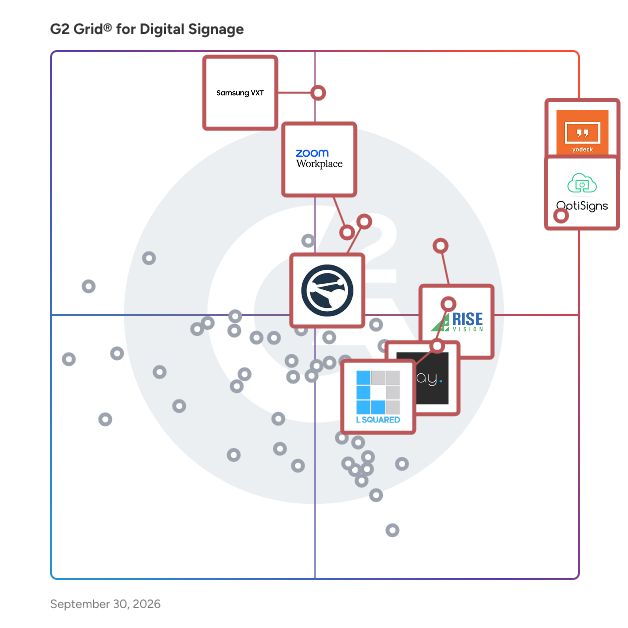
## G2 Grid® for Digital Signage Software
 ![G2 Grid® for Digital Signage Software plotting products by satisfaction and market presence](https://www.g2.com/categories/digital-signage/grids.png?focus%5B%5D=23874&focus%5B%5D=73841&focus%5B%5D=1327218&focus%5B%5D=3996&focus%5B%5D=74088&focus%5B%5D=7372&focus%5B%5D=18740&focus%5B%5D=20418)

Highlighted products: Yodeck, OptiSigns, Samsung VXT, Rise Vision, Appspace, Zoom Workplace, ScreenCloud Digital Signage, and Play Digital Signage.

Underlying data: [Grid® JSON](https://www.g2.com/categories/digital-signage/grids.json?focus%5B%5D=yodeck&focus%5B%5D=optisigns&focus%5B%5D=samsung-vxt&focus%5B%5D=rise-vision&focus%5B%5D=appspace&focus%5B%5D=zoom-workplace&focus%5B%5D=screencloud-digital-signage&focus%5B%5D=play-digital-signage)

**Sponsored**

### Rockbot

Rockbot is a comprehensive media-for-business solution designed to enhance in-location customer experiences through a unified platform that offers fully licensed music, TV, digital signage, and retail media advertising. Established in 2010, Rockbot has positioned itself as a leader in the industry, equipping businesses with the necessary tools to effectively engage customers and foster an inviting atmosphere that promotes loyalty and satisfaction. Targeting a diverse audience that includes large corporations, franchises, and small to medium-sized businesses (SMBs), Rockbot serves various sectors such as retail, fitness, hospitality, and dining. The platform is particularly advantageous for businesses aiming to create a cohesive brand experience across multiple locations. By integrating different types of media, Rockbot enables businesses to customize their content to reflect their brand identity and cater to customer preferences, ensuring that every visit leaves a lasting impression. One of Rockbot's standout features is its ability to deliver curated music playlists that resonate with the brand's image and the demographic of its clientele. This capability not only enhances the overall ambiance but also helps set the right mood for various times of the day or special events. Furthermore, Rockbot's digital signage functionality allows businesses to showcase promotional content, announcements, or engaging visuals that capture customer attention and drive sales, thereby enhancing the overall customer experience. In addition to its media offerings, Rockbot provides a robust advertising solution that enables businesses to monetize their media space. By collaborating with trusted brands, businesses can generate additional revenue while delivering relevant content to their customers. This dual focus on enriching customer experiences while creating revenue opportunities distinguishes Rockbot in the competitive media-for-business landscape. With the support of Google Ventures and a client roster that includes well-known names like Planet Fitness, Walmart, Shake Shack, and Ashley Furniture, Rockbot has demonstrated its reliability and effectiveness. The platform is designed with user-friendliness in mind, allowing businesses to manage their media content with ease. This simplicity, combined with the ability to customize and adapt content in real-time, makes Rockbot a valuable asset for any business seeking to enhance its customer engagement strategy.

[Visit website](https://www.g2.com/external_clickthroughs/record?secure%5Bad_program%5D=ppc&secure%5Bad_slot%5D=category_product_list_llm&secure%5Bcategory_id%5D=259&secure%5Bchosen_at%5D=2026-09-01T03%3A44%3A35Z&secure%5Bdisplayable_resource_id%5D=259&secure%5Bdisplayable_resource_type%5D=Category&secure%5Bmedium%5D=sponsored&secure%5Bplacement_reason%5D=page_category&secure%5Bplacement_resource_ids%5D%5B%5D=259&secure%5Bprioritized%5D=false&secure%5Bproduct_id%5D=100407&secure%5Bresource_id%5D=259&secure%5Bresource_type%5D=Category&secure%5Bsource_type%5D=category_page&secure%5Bsource_url%5D=https%3A%2F%2Fwww.g2.com%2Fcategories%2Fdigital-signage%3Ftab%3Deasiest_to_usehttps%253A%252F%252Fwww.capterra.com%252Fp%252F182701%252FTelemetryTV%252F&secure%5Btoken%5D=011bda716708701c7be00456e2e1752339ec0ed03d6b76baf86f1cd3a15e009f&secure%5Burl%5D=https%3A%2F%2Fbuy.rockbot.com%2Ftrial&secure%5Burl_type%5D=free_trial)

### [Yodeck](https://www.g2.com/products/yodeck/reviews)

Starting at $8/month + free players, Yodeck is a no-brainer for digital signage. Get any screen up and running in less than 5 min! Use our drag & drop editor together with hundreds of free templates to display any kind of content like images, videos, PDFs, calendars, menus, social media, and more! Manage, edit & schedule content for your screens online, from anywhere through our cloud-based dashboard easily. We offer Top tier worldwide support. Your 1st screen is free, forever - connect it now! Yodeck prides itself on providing an exceptional digital signage solution to businesses of all sizes, from local diners to global leaders who already trust us, including Delta Airlines, Autodesk, Adobe, Domino’s, Deloitte and Swissport.

**Average Rating:** 4.7/5.0

**Total Reviews:** 3,146

#### How Do G2 Users Rate Yodeck?

- **Has the product been a good partner in doing business?:** 9.4/10 (Category avg: 9.2/10)
- **Remotely Content Management:** 9.6/10 (Category avg: 9.2/10)
- **Media Formats:** 9.3/10 (Category avg: 8.9/10)
- **Network Reporting:** 8.8/10 (Category avg: 8.4/10)

#### Who Is the Company Behind Yodeck?

- **Seller:** [Flipnode LLC](https://www.g2.com/sellers/flipnode-llc)
- **Company Website:** www.yodeck.com
- **Year Founded:** 2012
- **HQ Location:** San Francisco, CA
- **Twitter:** @YodeckSignage  
1,235 Twitter followers
- **LinkedIn® Page:** [www.linkedin.com](https://www.g2.com/external_clickthroughs/record?secure%5Bsource_type%5D=product_profile&secure%5Btoken%5D=b166f91d6ff468d536e3dd7d8e906f35d66fe99f5c9ff3b58a08dbe62c82c78d&secure%5Burl%5D=https%3A%2F%2Fwww.linkedin.com%2Fcompany%2F481039%2F&secure%5Burl_type%5D=linkedin_company_website)  
193 employees on LinkedIn®

#### Who Uses This Product?

- **Who Uses This:** Owner, CEO
- **Top Industries:** Manufacturing, Retail
- **Company Size:** 56% Small, 38% Medium

#### What Do G2 Reviewers Say About Yodeck?

_AI-generated summary from verified user reviews_

##### Pros

- Users value the **ease of use** of Yodeck, appreciating its simple interface and helpful tutorials for getting started.
- Users find the **easy setup** of Yodeck to be quick and efficient, ensuring a smooth implementation experience.
- Users highlight the **ease of use** of Yodeck, making content management and scheduling effortless and efficient.
- Users commend Yodeck for its **intuitive and user-friendly design** , making digital advertising seamless and efficient.
- Users laud Yodeck's **excellent customer support** , appreciating their promptness and effectiveness in resolving issues.

##### Cons

- Users note a **learning curve** when using Yodeck's advanced features, especially for less technically inclined individuals.
- Users find the **complexity of the setup process** and UI overwhelming, making it time-consuming to configure.
- Users find Yodeck to be **expensive** , facing additional fees for features that should be more accessible.
- Users find the **hardware limitations** frustrating, especially with single-screen availability and setup challenges on Raspberry Pi.
- Users find **app functionality lacking** due to integration issues, limited features, and a lack of mobile support.

#### What Are Recent G2 Reviews of Yodeck?

**["Turbo Excellent, Reliable Digital Signage Platform That’s Easy to Manage"](https://www.g2.com/survey_responses/yodeck-review-13348271)**

**Rating:** 5.0/5.0 stars

_— Gert V._

[Read full review](https://www.g2.com/survey_responses/yodeck-review-13348271)

**["Effortless Remote Screen Management with Yodeck"](https://www.g2.com/survey_responses/yodeck-review-12088992)**

**Rating:** 5.0/5.0 stars

_— Janay P._

[Read full review](https://www.g2.com/survey_responses/yodeck-review-12088992)

#### What Are G2 Users Discussing About Yodeck?

- [What is XIBO digital signage?](https://www.g2.com/discussions/what-is-xibo-digital-signage) - 1 comment
- [How much does Yodeck cost?](https://www.g2.com/discussions/how-much-does-yodeck-cost) - 3 comments
- [Is Yodeck legit?](https://www.g2.com/discussions/is-yodeck-legit) - 3 comments, 3 upvotes
- [How does Yodeck work?](https://www.g2.com/discussions/how-does-yodeck-work) - 1 comment

### [OptiSigns](https://www.g2.com/products/optisigns/reviews)

OptiSigns is a digital signage platform designed to make communicating with your audience simple. From a single intuitive portal, you can manage screens anywhere: update content in seconds, schedule playlists, and showcase images, videos, dashboards and 100+ apps like Google Slides, Instagram, Facebook, Weather, and more. Flexible by design, OptiSigns works across the devices you already use - Fire TV Stick, Android, Chrome, Windows, MacOS, Raspberry Pi, and more - so you can scale your digital signage without expensive hardware or complex set-ups. Whether you’re a retailer engaging customers, a corporate team keeping employees aligned, or an organization sharing updates in real time, OptiSigns delivers reliable, easy-to-use digital signage that unleashes your businesses potential!

**Average Rating:** 4.7/5.0

**Total Reviews:** 3,737

#### How Do G2 Users Rate OptiSigns?

- **Has the product been a good partner in doing business?:** 9.4/10 (Category avg: 9.2/10)
- **Remotely Content Management:** 9.5/10 (Category avg: 9.2/10)
- **Media Formats:** 9.1/10 (Category avg: 8.9/10)
- **Network Reporting:** 8.6/10 (Category avg: 8.4/10)

#### Who Is the Company Behind OptiSigns?

- **Seller:** [OptiSigns Inc.](https://www.g2.com/sellers/optisigns-inc)
- **Company Website:** www.optisigns.com
- **Year Founded:** 2015
- **HQ Location:** Houston, US
- **Twitter:** @OptiSignsInc  
3,529 Twitter followers
- **LinkedIn® Page:** [www.linkedin.com](https://www.g2.com/external_clickthroughs/record?secure%5Bsource_type%5D=product_profile&secure%5Btoken%5D=3afb4e589dabc845801e8684f9d73b759da90817896f071fd0bc82fe41700caa&secure%5Burl%5D=https%3A%2F%2Fwww.linkedin.com%2Fcompany%2Foptisigns%2F&secure%5Burl_type%5D=linkedin_company_website)  
83 employees on LinkedIn®

#### Who Uses This Product?

- **Who Uses This:** Owner, Marketing Manager
- **Top Industries:** Manufacturing, Food & Beverages
- **Company Size:** 52% Small, 42% Medium

#### What Do G2 Reviewers Say About OptiSigns?

_AI-generated summary from verified user reviews_

##### Pros

- Users find OptiSigns incredibly **easy to use** , thanks to its Canva integration and straightforward file importing.
- Users praise the **easy setup** of OptiSigns, enjoying a smooth and intuitive experience without a steep learning curve.
- Users love the **easy customization** of OptiSigns, allowing quick edits and a visually appealing display for events.
- Users praise the **intuitive interface and flexibility** of OptiSigns, making digital signage management effortless and effective.
- Users commend the **fast and knowledgeable customer support** of OptiSigns, ensuring a smooth experience for businesses.

##### Cons

- Users experience a **slight learning curve** with OptiSigns, particularly with understanding assets, playlists, and screens.
- Users find the **complexity** of managing displays and configurations in OptiSigns quite challenging and tedious.
- Users find the **per-screen pricing high** , making it less suitable for small businesses with fewer screens.
- Users note that the **limited templates** could be more creative, but customization through Canva is a workaround.
- Users find the **app functionality lacking** , wishing for a more streamlined and intuitive user experience.

#### What Are Recent G2 Reviews of OptiSigns?

**["Easy Uploads and Fast Syncing Make OptiSigns Simple to Use"](https://www.g2.com/survey_responses/optisigns-review-13376116)**

**Rating:** 4.0/5.0 stars

_— Liv P._

[Read full review](https://www.g2.com/survey_responses/optisigns-review-13376116)

**["Simple and Effective Digital Signage Management"](https://www.g2.com/survey_responses/optisigns-review-13370221)**

**Rating:** 4.5/5.0 stars

_— Wesley D._

[Read full review](https://www.g2.com/survey_responses/optisigns-review-13370221)

#### What Are G2 Users Discussing About OptiSigns?

- [What is OptiSigns used for?](https://www.g2.com/discussions/what-is-optisigns-used-for) - 1 comment

### [Samsung VXT](https://www.g2.com/products/samsung-vxt/reviews)

Samsung VXT is a cloud-based solution for Digital Signage that combines a dynamic content management system (CMS) with seamless remote management, all within one secure platform, to help companies of all sizes—from small businesses to enterprises—unlock the powerful potential of business displays.

**Average Rating:** 4.6/5.0

**Total Reviews:** 55

#### How Do G2 Users Rate Samsung VXT?

- **Has the product been a good partner in doing business?:** 8.9/10 (Category avg: 9.2/10)
- **Remotely Content Management:** 9.5/10 (Category avg: 9.2/10)
- **Media Formats:** 9.4/10 (Category avg: 8.9/10)
- **Network Reporting:** 8.9/10 (Category avg: 8.4/10)

#### Who Is the Company Behind Samsung VXT?

- **Seller:** [Samsung Electronics](https://www.g2.com/sellers/samsung-electronics-325d35f1-0cb5-4f9d-9b34-9fb791240402)
- **Year Founded:** 1969
- **HQ Location:** Suwon, Korea
- **Twitter:** @Samsung  
754,964 Twitter followers
- **LinkedIn® Page:** [www.linkedin.com](https://www.g2.com/external_clickthroughs/record?secure%5Bsource_type%5D=product_profile&secure%5Btoken%5D=5c061a91638a1a682e6383a900e8e42b70ab10a67d1223c22478d7af3e713b3d&secure%5Burl%5D=https%3A%2F%2Fwww.linkedin.com%2Fcompany%2Fsamsung-electronics-america%2F&secure%5Burl_type%5D=linkedin_company_website)  
10,050 employees on LinkedIn®
- **Ownership:** KRX: 018260

#### Who Uses This Product?

- **Top Industries:** Computer Software, Information Technology and Services
- **Company Size:** 65% Medium, 31% Small

#### What Do G2 Reviewers Say About Samsung VXT?

_AI-generated summary from verified user reviews_

##### Pros

- Users find Samsung VXT to be **extremely intuitive and easy to use** , enabling quick setup and seamless integration.
- Users find the **easy setup** of Samsung VXT intuitive, making display coordination and content sharing seamless.
- Users value the **simple integration** of Samsung VXT, making it easy to display marketing content on various devices.
- Users praise the **intuitive and user-friendly interface** of Samsung VXT, making digital signage setup effortless and efficient.
- Users praise the **easy implementation** of Samsung VXT, noting its user-friendly setup and seamless integration options.

##### Cons

- Users find the **setup process complex** , particularly with multiple screens, which can be overwhelming for new users.
- Users find the **cost of Samsung VXT** to be high, especially when scaling across multiple displays.
- Users find the **mobile app lacking functionality** compared to the web version, leading to a less satisfying experience.
- Users find the **limited features** of Samsung VXT compared to competitors may hinder its overall effectiveness.
- Users regret the **limited Telly models** available with the Samsung VXT, impacting their selection options.

#### What Are Recent G2 Reviews of Samsung VXT?

**["My Samsung VXT experience is good from the start"](https://www.g2.com/survey_responses/samsung-vxt-review-11240689)**

**Rating:** 4.5/5.0 stars

_— Nichole C._

[Read full review](https://www.g2.com/survey_responses/samsung-vxt-review-11240689)

**["Powerful Performance Meets Sleek, User-Friendly Design"](https://www.g2.com/survey_responses/samsung-vxt-review-12196851)**

**Rating:** 5.0/5.0 stars

_— Ranit D._

[Read full review](https://www.g2.com/survey_responses/samsung-vxt-review-12196851)

### [Rise Vision](https://www.g2.com/products/rise-vision/reviews)

Rise Vision is the all-in-one platform for digital signage, screen sharing, and emergency alerts designed to help organizations communicate, teach, collaborate, and improve safety. The cloud-based system integrates digital signage, interactive digital signage, screen sharing, and emergency alerts, making it an ideal choice for organizations looking to streamline their visual communication efforts. With its easy-to-use software and world-class support, Rise Vision caters to a diverse range of industries and applications. The all-in-one platform is particularly beneficial for businesses, educational institutions, healthcare facilities, and public organizations that require efficient communication tools. Users can leverage Rise Vision to share critical updates, communicate safety and productivity metrics, spotlight announcements, event details, and more across multiple screens, ensuring that messages reach their intended audience effectively. The ability to create custom schedules and manage presentations on one or more displays makes it a flexible solution for any setting, whether it’s a single classroom or a large corporate office with hundreds of screens. Key features of Rise Vision include over 750 professionally designed templates that allow users to quickly create visually appealing content without the need for extensive design skills. Users can also use the AI presentation design and editing tool that's the fastest way to turn an idea in your head into engaging digital signage. The platform supports a wide range of hardware, enabling users to either utilize recommended hardware or integrate their existing technology. This flexibility ensures that organizations can implement Rise Vision in a way that best suits their needs and budget. Additionally, the seamless screen sharing capability enhances collaboration among team members, allowing for real-time sharing of presentations and information. Another significant aspect of Rise Vision is its powerful emergency alert system, which provides users with the ability to broadcast critical information during emergencies. This feature is essential for ensuring safety in environments such as schools and workplaces, where timely communication can make a significant difference. With world-class support available, users can feel confident in their ability to resolve any issues and maximize the platform's potential. Overall, Rise Vision stands out in the digital signage category by offering a holistic solution that combines ease of use, extensive customization options, and robust support. Its adaptability to various industries and use cases, along with its commitment to enhancing communication and safety, makes it a valuable tool for organizations looking to improve their visual communication strategies.

**Average Rating:** 4.7/5.0

**Total Reviews:** 980

#### How Do G2 Users Rate Rise Vision?

- **Has the product been a good partner in doing business?:** 9.6/10 (Category avg: 9.2/10)
- **Remotely Content Management:** 9.4/10 (Category avg: 9.2/10)
- **Media Formats:** 9.1/10 (Category avg: 8.9/10)
- **Network Reporting:** 8.7/10 (Category avg: 8.4/10)

#### Who Is the Company Behind Rise Vision?

- **Seller:** [Rise Vision](https://www.g2.com/sellers/rise-vision)
- **Company Website:** www.risevision.com
- **Year Founded:** 1992
- **HQ Location:** Toronto, Ontario, Canada
- **Twitter:** @RiseVision  
2,940 Twitter followers
- **LinkedIn® Page:** [www.linkedin.com](https://www.g2.com/external_clickthroughs/record?secure%5Bsource_type%5D=product_profile&secure%5Btoken%5D=bf60550e5e52a3d28e063af438ffd1e5daf6962705bd8a9aab41b02800a03f7a&secure%5Burl%5D=https%3A%2F%2Fwww.linkedin.com%2Fcompany%2F85430%2F&secure%5Burl_type%5D=linkedin_company_website)  
58 employees on LinkedIn®

#### Who Uses This Product?

- **Who Uses This:** Teacher, Administrative Assistant
- **Top Industries:** Primary/Secondary Education, Education Management
- **Company Size:** 64% Medium, 25% Small

#### What Do G2 Reviewers Say About Rise Vision?

_AI-generated summary from verified user reviews_

##### Pros

- Users find Rise Vision to be incredibly **easy to use** , allowing for quick content updates and customization.
- Users love the **extremely easy-to-use interface** of Rise Vision, making management and updates a breeze for schools.
- Users commend the **excellent customer support** from Rise Vision, always responsive and helpful for any inquiries.
- Users value the **integration and reliability** of Rise Vision, facilitating smooth deployments and real-time information access.
- Users find the **easy setup** of Rise Vision impressive, facilitating smooth deployment and real-time data display effortlessly.

##### Cons

- Users express frustration over **limited customization** options, wishing for more flexibility in template designs and animations.
- Users feel frustrated by the **limited template options** , wishing for more flexibility in design and animation.
- Users face a **learning curve** with Rise Vision, especially those unfamiliar with technology or Linux systems.
- Users find the **complexity** of Rise Vision challenging, especially for beginners and those less tech-savvy.
- Users experience a **steep learning curve** initially, making navigation and advanced customization challenging for newcomers.

#### What Are Recent G2 Reviews of Rise Vision?

**["Rise Vision: A Reliable Digital Signage Solution for Schools"](https://www.g2.com/survey_responses/rise-vision-review-8226898)**

**Rating:** 5.0/5.0 stars

_— Clayton A._

[Read full review](https://www.g2.com/survey_responses/rise-vision-review-8226898)

**["Time-Saving Templates and Guided Design for Better Presentations"](https://www.g2.com/survey_responses/rise-vision-review-13120234)**

**Rating:** 5.0/5.0 stars

_— Charles M._

[Read full review](https://www.g2.com/survey_responses/rise-vision-review-13120234)

#### What Are G2 Users Discussing About Rise Vision?

- [What is Rise Vision Digital Signage used for?](https://www.g2.com/discussions/what-is-rise-vision-digital-signage-used-for) - 1 comment

### [Appspace](https://www.g2.com/products/appspace/reviews)

Connect your people, places, and spaces. Appspace is the workplace experience platform for your whole team that lets you manage it all – from employee communications to your physical office spaces. So work-from-anywhere becomes an experience everyone loves.

**Average Rating:** 4.7/5.0

**Total Reviews:** 148

#### How Do G2 Users Rate Appspace?

- **Has the product been a good partner in doing business?:** 9.3/10 (Category avg: 9.2/10)
- **Remotely Content Management:** 9.5/10 (Category avg: 9.2/10)
- **Media Formats:** 9.3/10 (Category avg: 8.9/10)
- **Network Reporting:** 9.0/10 (Category avg: 8.4/10)

#### Who Is the Company Behind Appspace?

- **Seller:** [Appspace](https://www.g2.com/sellers/appspace)
- **Company Website:** www.appspace.com
- **Year Founded:** 2002
- **HQ Location:** Tampa, FL
- **Twitter:** @appspace  
781 Twitter followers
- **LinkedIn® Page:** [www.linkedin.com](https://www.g2.com/external_clickthroughs/record?secure%5Bsource_type%5D=product_profile&secure%5Btoken%5D=e970b607c631251fb69080faf3bb782e9f0763fcdb87ca85b4d1b6630206af06&secure%5Burl%5D=https%3A%2F%2Fwww.linkedin.com%2Fcompany%2Fappspace%2F&secure%5Burl_type%5D=linkedin_company_website)  
488 employees on LinkedIn®

#### Who Uses This Product?

- **Top Industries:** Consumer Services, Information Technology and Services
- **Company Size:** 49% Medium, 39% Small

#### What Do G2 Reviewers Say About Appspace?

_AI-generated summary from verified user reviews_

##### Pros

- Users find Appspace to be **very easy to use** , appreciating its intuitive features and customization options for collaboration.
- Users value the **exceptional support and user-friendly features** , including superior map functionality and efficient space booking.
- Users commend **navigation ease** in Appspace, highlighting its intuitive interface and smooth connectivity across devices.
- Users highlight the **setup ease** of Appspace, enjoying its intuitive interface and seamless integration for all work environments.
- Users find Appspace's **easy setup** and intuitive UI allows for quick integration and seamless user experience.

##### Cons

- Users often find the **interface confusing** , making it difficult to set up new users without guidance.
- Users express concerns about **missing features** , such as broken integrations and poor file handling, hindering productivity.
- Users find the **slow loading times** of Appspace frustrating, especially when navigating features in a hurry.
- Users experience **user interface issues** , including lag, clunkiness, and outdated design affecting navigation and setup.
- Users face significant **usability challenges** with Appspace, including frustrating login issues and ineffective search filters.

#### What Are Recent G2 Reviews of Appspace?

**["Appspace Streamlines Deskless Communication with Easy Google Slides Integration"](https://www.g2.com/survey_responses/appspace-review-12992266)**

**Rating:** 5.0/5.0 stars

_— Joamy S._

[Read full review](https://www.g2.com/survey_responses/appspace-review-12992266)

**["Effortless Centralized Digital Signage Control Across Every Screen"](https://www.g2.com/survey_responses/appspace-review-12974545)**

**Rating:** 4.5/5.0 stars

_— Ivan K._

[Read full review](https://www.g2.com/survey_responses/appspace-review-12974545)

#### What Are G2 Users Discussing About Appspace?

- [What is Beezy used for?](https://www.g2.com/discussions/what-is-beezy-used-for)

### [Zoom Workplace](https://www.g2.com/products/zoom-workplace/reviews)

Goodbye app overload. Hello effortless work. Work can be complicated. Your tools shouldn't be. Zoom Workplace connects all the ways you collaborate — from meetings to docs to chat and more — with built-in AI and seamless integrations that help teams focus and work flawlessly. Zoom Communications: Unified, Effortless Connection for Modern Work Bring every way your teams communicate—meetings, chat, calls, email, and scheduling—into one seamless experience. With Zoom, collaboration happens faster and more naturally across channels, without switching apps or losing context. From spontaneous chats to scheduled meetings and calls, everything stays connected, searchable, and secure—powered by one intuitive platform built for how modern teams work. Zoom Productivity: Workflows Connected, Work Effortless Transform how work gets done with AI-first collaboration that keeps people, content, and actions in one place. From brainstorming on whiteboards to co-creating in docs, sharing clips, and automating follow-ups, Zoom connects every step of your workflow. With Zoom Hub and integrated video management, knowledge stays organized, accessible, and actionable—so teams can move from idea to outcome without friction. Zoom Spaces: Smarter, Connected Workplaces for Every Team Bring your physical and hybrid environments to life with intelligent, connected spaces. Zoom Spaces unifies meeting rooms, desk reservations, digital signage, and visitor management into one seamless experience—making it simple to collaborate, navigate, and manage the workplace. Whether employees are remote, hybrid, or on-site, Zoom creates a consistent, secure, and flexible environment that keeps teams connected wherever work happens. Zoom Employee Engagement: Connect, Inspire, and Empower Every Employee Foster belonging and alignment with Workvivo by Zoom—a modern employee experience platform that unites communication, culture, and community in one place. From company-wide updates to recognition, feedback, and social engagement, Workvivo gives every employee a voice and a sense of connection. Built right into Zoom Workplace, it helps organizations strengthen culture, boost engagement, and keep teams informed and inspired—no matter where they work.

**Average Rating:** 4.5/5.0

**Total Reviews:** 53,595

#### How Do G2 Users Rate Zoom Workplace?

- **Has the product been a good partner in doing business?:** 9.1/10 (Category avg: 9.2/10)
- **Remotely Content Management:** 8.6/10 (Category avg: 9.2/10)
- **Media Formats:** 8.5/10 (Category avg: 8.9/10)
- **Network Reporting:** 8.4/10 (Category avg: 8.4/10)

#### Who Is the Company Behind Zoom Workplace?

- **Seller:** [Zoom](https://www.g2.com/sellers/zoom-a5000ea1-6d30-4ab4-b591-20723189ac97)
- **Company Website:** www.zoom.com
- **Year Founded:** 2011
- **HQ Location:** San Jose, CA
- **Twitter:** @zoom  
1,042,714 Twitter followers
- **LinkedIn® Page:** [www.linkedin.com](https://www.g2.com/external_clickthroughs/record?secure%5Bsource_type%5D=product_profile&secure%5Btoken%5D=ea58933ffb5ea1e88769e70b1323ea336f3f35193bdf38ad87831cfc56794a9a&secure%5Burl%5D=https%3A%2F%2Fwww.linkedin.com%2Fcompany%2F2532259%2F&secure%5Burl_type%5D=linkedin_company_website)  
13,494 employees on LinkedIn®

#### Who Uses This Product?

- **Who Uses This:** Owner, Software Engineer
- **Top Industries:** Information Technology and Services, Computer Software
- **Company Size:** 51% Small, 31% Medium

#### What Do G2 Reviewers Say About Zoom Workplace?

_AI-generated summary from verified user reviews_

##### Pros

- Users love the **ease of use** of Zoom Workplace, enjoying seamless access to features with just a click.
- Users appreciate the **ease of collaboration** in Zoom Workplace, especially with breakout rooms and seamless screen sharing.
- Users value the **reliability** of Zoom Workplace, ensuring seamless connectivity and stability even during adverse conditions.
- Users find the **ease of use for meetings** in Zoom Workplace invaluable for seamless collaboration and productivity.
- Users enjoy the **easy-to-use video conferencing** features of Zoom, facilitating smooth communication and collaboration in hybrid work settings.

##### Cons

- Users note the **limited features** of Zoom Workplace, expressing a need for improved built-in collaboration tools.
- Users experience **Zoom issues** like fatigue, connectivity problems, and confusing configurations that hinder their overall meeting effectiveness.
- Users experience **Zoom fatigue** , notification overload, and connectivity issues, making long meetings feel overwhelming and impersonal.
- Users find **missing features** in Zoom Workplace, like improved sharing links and chat access post-calls, frustrating.
- Users often face **connection issues** with Zoom Workplace, leading to a frustrating and less seamless experience.

#### What Are Recent G2 Reviews of Zoom Workplace?

**["Zoom’s One-Click Reliability with Seamless Screen Sharing and Stable Quality"](https://www.g2.com/survey_responses/zoom-workplace-review-13290295)**

**Rating:** 4.5/5.0 stars

_— Battier mal B._

[Read full review](https://www.g2.com/survey_responses/zoom-workplace-review-13290295)

**["Effortlessly Connects Teams, Great for Remote Work"](https://www.g2.com/survey_responses/zoom-workplace-review-13232000)**

**Rating:** 5.0/5.0 stars

_— Mazelo X._

[Read full review](https://www.g2.com/survey_responses/zoom-workplace-review-13232000)

#### What Are G2 Users Discussing About Zoom Workplace?

- [Is Zoom Workplace worth it?](https://www.g2.com/discussions/is-zoom-workplace-worth-it) - 29 comments, 38 upvotes
- [What are your tips for using Zoom Workplace effectively?](https://www.g2.com/discussions/what-are-your-tips-for-using-zoom-workplace-effectively) - 7 comments, 11 upvotes
- [What does Zoom do?](https://www.g2.com/discussions/what-does-zoom-do) - 30 comments, 12 upvotes
- [What are the features offered by Zoom?](https://www.g2.com/discussions/what-are-the-features-offered-by-zoom) - 5 comments, 2 upvotes
- [How do you add features in Zoom?](https://www.g2.com/discussions/how-do-you-add-features-in-zoom) - 18 comments, 2 upvotes

### [ScreenCloud Digital Signage](https://www.g2.com/products/screencloud-digital-signage/reviews)

ScreenCloud is cloud-based digital signage software offering a seamless, secure and flexible solution for organizations of all sizes. We believe 'screens that communicate' are perfect for teams looking to unlock connections and build community with hard-to-reach employees, students and customers at scale. Control one screen – or thousands – from anywhere in the world. Use the content already in your systems or create or curate something brand new with ScreenCloud’s 80+ free, built-in apps and 150+ editable templates. ScreenCloud works with any screen, media player and OS, and is now also offered with ScreenCloud OS, our first purpose-built digital signage operating system and device. It’s the flexibility you need to build and scale your screen network minus the security woes and hardware headaches. ScreenCloud for deskless workforces. Encourage engagement among your deskless or frontline employees by broadcasting important information, data, and messages when and where they need it most. Drive productivity and increase sales across your multi-location teams. And build on top of ScreenCloud with the integrations you need most with our GraphQL API. SOC 2, Type 2 compliant for peace of mind. Getting content up onto a screen has never been easier or more secure with ScreenCloud’s enterprise-grade security. Utilizing market-leading authentication service Auth0, connect users through the SSO or SAML provider of your choice. Give your organization's message the medium it deserves. Say it with a screen, with ScreenCloud.

**Average Rating:** 4.7/5.0

**Total Reviews:** 450

#### How Do G2 Users Rate ScreenCloud Digital Signage?

- **Has the product been a good partner in doing business?:** 9.4/10 (Category avg: 9.2/10)
- **Remotely Content Management:** 9.4/10 (Category avg: 9.2/10)
- **Media Formats:** 9.0/10 (Category avg: 8.9/10)
- **Network Reporting:** 8.3/10 (Category avg: 8.4/10)

#### Who Is the Company Behind ScreenCloud Digital Signage?

- **Seller:** [ScreenCloud](https://www.g2.com/sellers/screencloud)
- **Company Website:** screencloud.com
- **Year Founded:** 2015
- **HQ Location:** London
- **Twitter:** @screencloud  
1,017 Twitter followers
- **LinkedIn® Page:** [www.linkedin.com](https://www.g2.com/external_clickthroughs/record?secure%5Bsource_type%5D=product_profile&secure%5Btoken%5D=65fd774e055230d130d7ebc58eb737054ec9138a6b9536599ad955e05ce127dd&secure%5Burl%5D=https%3A%2F%2Fwww.linkedin.com%2Fcompany%2F10025737%2F&secure%5Burl_type%5D=linkedin_company_website)  
147 employees on LinkedIn®

#### Who Uses This Product?

- **Who Uses This:** Owner, IT Manager
- **Top Industries:** Primary/Secondary Education, Education Management
- **Company Size:** 56% Medium, 33% Small

#### What Do G2 Reviewers Say About ScreenCloud Digital Signage?

_AI-generated summary from verified user reviews_

##### Pros

- Users appreciate the **ease of use** of ScreenCloud Digital Signage, with its intuitive design and seamless integration.
- Users benefit from **effective screen sharing** , making team communication and updates accessible and engaging across the office.
- Users commend the **excellent customer support** of ScreenCloud, finding it responsive and helpful throughout their experience.
- Users find the **easy setup** of ScreenCloud Digital Signage a significant advantage for managing multiple screens effortlessly.
- Users appreciate the **intuitive user interface** of ScreenCloud, enabling effortless content management and updates across multiple screens.

##### Cons

- Users desire more **customization options** for layouts and designs to enhance their overall experience with the platform.
- Users note that the **pricing model can be expensive** , limiting wider usage despite the quality of the solution.
- Users experience **difficulties with app functionality** , especially during integration issues and while making updates on-the-go.
- Users express frustration over **limited features** , particularly with loading media and app compatibility issues.
- Users find the **complexity** of ScreenCloud's setup process frustrating, impacting ease of use and content management.

#### What Are Recent G2 Reviews of ScreenCloud Digital Signage?

**["ScreenCloud Is Easy to Navigate and Very User-Friendly"](https://www.g2.com/survey_responses/screencloud-digital-signage-review-12470621)**

**Rating:** 4.0/5.0 stars

_— Jennifer T._

[Read full review](https://www.g2.com/survey_responses/screencloud-digital-signage-review-12470621)

**["Intuitive and Flexible Solution for Corporate Announcements"](https://www.g2.com/survey_responses/screencloud-digital-signage-review-12340623)**

**Rating:** 4.5/5.0 stars

_— Danny F._

[Read full review](https://www.g2.com/survey_responses/screencloud-digital-signage-review-12340623)

#### What Are G2 Users Discussing About ScreenCloud Digital Signage?

- [What is ScreenCloud?](https://www.g2.com/discussions/what-is-screencloud)
- [What is the best digital signage software?](https://www.g2.com/discussions/screencloud-digital-signage-what-is-the-best-digital-signage-software) - 1 comment
- [What do you put on digital signage?](https://www.g2.com/discussions/screencloud-digital-signage-what-do-you-put-on-digital-signage) - 1 comment
- [What is digital signage used for?](https://www.g2.com/discussions/what-is-digital-signage-used-for) - 1 comment

### [Play Digital Signage](https://www.g2.com/products/play-digital-signage/reviews)

Play Digital Signage is a leading cloud-based platform designed to simplify and enhance digital display management for businesses worldwide. Trusted by 15K+ admins across all industries—churches, universities, government offices, car dealerships, food trucks, retail chains, and hospitality venues—Play empowers users to create stunning, dynamic displays with ease. At its core, the platform offers an intuitive interface that supports quick setups in minutes, making it accessible for both technical and non-technical users. Key features include 24/7 human support from US and EU teams (no bots), ensuring personalized assistance anytime, and a unique free first screen forever offer—unlocked with a review within 30 days—providing a risk-free entry point. With flexible, no-contract plans starting at $8 per screen per month, Play allows businesses to scale effortlessly. The platform’s robust toolset includes animations, content zones, and an extensive plugin library—featuring social media feeds, YouTube, Instagram, Google Calendar, RSS, and Weather integrations—enabling real-time, tailored content. Its cloud-based CMS facilitates global screen management, supported by energy-efficient technology for 2025’s sustainability trends. Whether for customer engagement in retail or internal communications in offices, Play combines simplicity, scalability, and compatibility with Google Suite and Microsoft Teams to deliver measurable ROI and transform signage strategies.

**Average Rating:** 4.7/5.0

**Total Reviews:** 255

#### How Do G2 Users Rate Play Digital Signage?

- **Has the product been a good partner in doing business?:** 9.2/10 (Category avg: 9.2/10)
- **Remotely Content Management:** 9.7/10 (Category avg: 9.2/10)
- **Media Formats:** 9.3/10 (Category avg: 8.9/10)
- **Network Reporting:** 8.9/10 (Category avg: 8.4/10)

#### Who Is the Company Behind Play Digital Signage?

- **Seller:** [Play Digital Signage](https://www.g2.com/sellers/play-digital-signage)
- **Company Website:** playsignage.com
- **Year Founded:** 2013
- **HQ Location:** Las Vegas, NV, USA
- **Twitter:** @playsignage  
632 Twitter followers
- **LinkedIn® Page:** [www.linkedin.com](https://www.g2.com/external_clickthroughs/record?secure%5Bsource_type%5D=product_profile&secure%5Btoken%5D=ed8dae02e48f16e23b375e9727c26e6a9762bc18b114fe186ded629ab910f2c3&secure%5Burl%5D=https%3A%2F%2Fwww.linkedin.com%2Fcompany%2F10253844%2F&secure%5Burl_type%5D=linkedin_company_website)  
6 employees on LinkedIn®

#### Who Uses This Product?

- **Who Uses This:** Owner, CEO
- **Top Industries:** Primary/Secondary Education, Retail
- **Company Size:** 71% Small, 28% Medium

#### What Do G2 Reviewers Say About Play Digital Signage?

_AI-generated summary from verified user reviews_

##### Pros

- Users praise the **ease of use** of Play Digital Signage, making interface creation straightforward and collaborative.
- Users love the **simplicity and ease of use** of Play Digital Signage, making setup and design effortless.
- Users appreciate the **easy setup** of Play Digital Signage, enabling quick and efficient display management.
- Users love the **ease of use and comprehensive features** of Play Digital Signage, making it a top choice for everyone.
- Users find the **interface intuitive** , making setup and creating playlists straightforward and quick.

##### Cons

- Users find the **complexity** of sharing playlists and the interface to be initially overwhelming and confusing.
- Users note the **limited editing capabilities** , particularly the lack of keyboard shortcuts and mobile-friendly tools.
- Users find the **pricing too high** for small clubs, wishing for cheaper options to operate multiple screens.
- Users find the **layout issues** in Play Digital Signage confusing, affecting user-friendliness and customization options.
- Users notice a **learning curve** with advanced features, requiring some exploration but overall have a positive experience.

#### What Are Recent G2 Reviews of Play Digital Signage?

**["Reliable and flexible digital signage management"](https://www.g2.com/survey_responses/play-digital-signage-review-13255960)**

**Rating:** 5.0/5.0 stars

_— KBV K._

[Read full review](https://www.g2.com/survey_responses/play-digital-signage-review-13255960)

**["PlaySignage Makes Boarding House Communication Clear, Engaging, and Easy"](https://www.g2.com/survey_responses/play-digital-signage-review-13197131)**

**Rating:** 5.0/5.0 stars

_— Craig P._

[Read full review](https://www.g2.com/survey_responses/play-digital-signage-review-13197131)

#### What Are G2 Users Discussing About Play Digital Signage?

- [What is a signage software?](https://www.g2.com/discussions/what-is-a-signage-software)
- [What are the advantages of digital signage?](https://www.g2.com/discussions/what-are-the-advantages-of-digital-signage) - 1 comment
- [What is the main function for digital signage?](https://www.g2.com/discussions/play-digital-signage-what-is-the-main-function-for-digital-signage)
- [What is play digital signage?](https://www.g2.com/discussions/what-is-play-digital-signage)

### [Zoom Rooms](https://www.g2.com/products/zoom-rooms/reviews)

Bring best-in-class Zoom Meetings into any space Simple and high quality: Start a meeting with one touch HD video collaboration with built-in productivity tools Wireless sharing from laptop or mobile devices Leverage ecosystem of leading hardware partners Built for flexible work: Easily transfer meetings from mobile or laptop to the Zoom Room Pair Zoom Rooms for Touch device to use as Companion Zoom Room for added functionality Digital signage included to keep employees informed Leverage AI and modern innovation: Intelligent director and smart gallery determine the best angle of individuals to display Smart name tags applies name tags to participants to know who is in the room and who is speaking during a meeting Frictionless interoperability with leading platforms

**Average Rating:** 4.5/5.0

**Total Reviews:** 425

#### How Do G2 Users Rate Zoom Rooms?

- **Has the product been a good partner in doing business?:** 8.9/10 (Category avg: 9.2/10)
- **Remotely Content Management:** 8.9/10 (Category avg: 9.2/10)
- **Media Formats:** 8.5/10 (Category avg: 8.9/10)
- **Network Reporting:** 8.3/10 (Category avg: 8.4/10)

#### Who Is the Company Behind Zoom Rooms?

- **Seller:** [Zoom](https://www.g2.com/sellers/zoom-a5000ea1-6d30-4ab4-b591-20723189ac97)
- **Year Founded:** 2011
- **HQ Location:** San Jose, CA
- **Twitter:** @zoom  
1,042,714 Twitter followers
- **LinkedIn® Page:** [www.linkedin.com](https://www.g2.com/external_clickthroughs/record?secure%5Bsource_type%5D=product_profile&secure%5Btoken%5D=ea58933ffb5ea1e88769e70b1323ea336f3f35193bdf38ad87831cfc56794a9a&secure%5Burl%5D=https%3A%2F%2Fwww.linkedin.com%2Fcompany%2F2532259%2F&secure%5Burl_type%5D=linkedin_company_website)  
13,494 employees on LinkedIn®

#### Who Uses This Product?

- **Who Uses This:** Software Engineer
- **Top Industries:** Information Technology and Services, Computer Software
- **Company Size:** 40% Medium, 30% Small

#### What Do G2 Reviewers Say About Zoom Rooms?

_AI-generated summary from verified user reviews_

##### Pros

- Users appreciate the **ease of use** of Zoom Rooms, facilitating seamless hybrid meetings and simple participant management.
- Users appreciate the **high-quality video resolution** in Zoom Rooms, enhancing their meeting experience significantly.
- Users love the **easy setup** of Zoom Rooms, requiring just a QR scan for quick pairing and efficiency.
- Users value the **seamless device connectivity** and intuitive interface for effortless hybrid meeting experiences.
- Users enjoy the **effective team collaboration** features of Zoom Rooms, enhancing meetings and connecting teams seamlessly.

##### Cons

- Users find the **initial investment and subscription costs** for Zoom Rooms to be prohibitively expensive for smaller organizations.
- Users often face **connection issues** that hinder performance, particularly with weak internet bandwidth affecting audio and video quality.
- Users find the **complexity of initial setup** and advanced settings challenging, especially without IT support.
- Users face **Zoom issues** with complex setup, frequent software updates, and login struggles affecting meeting efficiency.
- Users report **high initial hardware costs** and occasional connectivity issues that can disrupt their Zoom Rooms experience.

#### What Are Recent G2 Reviews of Zoom Rooms?

**["Zoom Rooms: One-Tap Join, Great AV Quality, and a Flexible Hardware Ecosystem"](https://www.g2.com/survey_responses/zoom-rooms-review-12843578)**

**Rating:** 5.0/5.0 stars

_— Pardeep R._

[Read full review](https://www.g2.com/survey_responses/zoom-rooms-review-12843578)

**[""Zoom Rooms Makes Office Meetings and Training Sessions Effortless""](https://www.g2.com/survey_responses/zoom-rooms-review-13217318)**

**Rating:** 4.0/5.0 stars

_— Sameer R._

[Read full review](https://www.g2.com/survey_responses/zoom-rooms-review-13217318)

#### What Are G2 Users Discussing About Zoom Rooms?

- [What is Zoom Rooms used for?](https://www.g2.com/discussions/what-is-zoom-rooms-used-for)
- [What is a Zoom Room?](https://www.g2.com/discussions/what-is-a-zoom-room) - 1 comment
- [What is the difference between Zoom Room and Zoom?](https://www.g2.com/discussions/what-is-the-difference-between-zoom-room-and-zoom) - 3 comments
- [What are the features of zoom?](https://www.g2.com/discussions/what-are-the-features-of-zoom)
- [What is the benefit of a Zoom Room?](https://www.g2.com/discussions/what-is-the-benefit-of-a-zoom-room) - 1 comment

### [L Squared Hub](https://www.g2.com/products/l-squared-hub/reviews)

The L Squared Hub is an enterprise-grade digital signage software Content Management System (CMS) designed to facilitate secure and efficient content scheduling across multiple locations. This cloud-first platform empowers organizations to manage their digital signage networks from a centralized web dashboard, enabling seamless control over 1 to 10,000+ screens. By replacing fragmented legacy systems, L Squared Hub offers a unified solution tailored for multi-location Enterprises, Quick Service Restaurants (QSRs), Retail, Manufacturing and Corporate campuses. The primary audience for the L Squared Hub encompasses multi-location businesses or large organizations and brands that require a robust digital signage solution to effectively communicate with diverse audiences. Its capabilities in automating content scheduling make it particularly advantageous for businesses needing to display menus, corporate communications, and emergency alerts in real-time. This functionality ensures that organizations can maintain consistent messaging across all locations, enhancing brand coherence and operational efficiency. Key features of the L Squared Hub include centralized control, allowing users to manage a vast network of screens from a single interface while connecting to global APIs for unlimited data integrations. This feature is especially beneficial for enterprises with multiple locations, as it simplifies the process of updating content and ensures that all screens remain synchronized. Additionally, the platform incorporates offline playback protection, which guarantees that screens continue to operate even during internet outages. This reliability is further enhanced by SOC 2 security compliance, ensuring that sensitive data is safeguarded and that users can trust the platform's security measures. L Squared Hub distinguishes itself from basic slideshow applications and complex developer tools by focusing specifically on the needs of the Enterprise and Multi-Location market. The platform is supported by comprehensive turnkey services, including hardware procurement and 24/7 technical support. This holistic approach not only streamlines the implementation process but also provides ongoing assistance, allowing organizations to maximize the value of their digital signage investments. By prioritizing IT security and scalability, the L Squared Hub emerges as a trusted solution for organizations looking to enhance their corporate communication strategies through effective digital signage.

**Average Rating:** 4.9/5.0

**Total Reviews:** 55

#### How Do G2 Users Rate L Squared Hub?

- **Has the product been a good partner in doing business?:** 9.8/10 (Category avg: 9.2/10)
- **Remotely Content Management:** 10.0/10 (Category avg: 9.2/10)
- **Media Formats:** 9.6/10 (Category avg: 8.9/10)
- **Network Reporting:** 10.0/10 (Category avg: 8.4/10)

#### Who Is the Company Behind L Squared Hub?

- **Seller:** [L Squared](https://www.g2.com/sellers/l-squared-2026-07-20)
- **Company Website:** www.LSquared.com
- **Year Founded:** 2007
- **HQ Location:** Austin, US
- **Twitter:** @lsquareddigital
- **LinkedIn® Page:** [www.linkedin.com](https://www.g2.com/external_clickthroughs/record?secure%5Bsource_type%5D=product_profile&secure%5Btoken%5D=592466d4bb87d465eb227f0b08c941af1ff392b5cbb927d77928141264bc2991&secure%5Burl%5D=https%3A%2F%2Fwww.linkedin.com%2Fcompany%2Fl-squared-digital-signage&secure%5Burl_type%5D=linkedin_company_website)  
37 employees on LinkedIn®

#### Who Uses This Product?

- **Who Uses This:** Software Engineer
- **Top Industries:** Information Technology and Services
- **Company Size:** 71% Medium, 20% Small

#### What Are Recent G2 Reviews of L Squared Hub?

**["A Single Source of Truth for Real-Time, Stress-Free Digital Signage Rollouts"](https://www.g2.com/survey_responses/l-squared-hub-review-13326968)**

**Rating:** 5.0/5.0 stars

_— Ritesh S._

[Read full review](https://www.g2.com/survey_responses/l-squared-hub-review-13326968)

**["Simple, Human-Centric Dashboard with Truly Amazing Support"](https://www.g2.com/survey_responses/l-squared-hub-review-13321209)**

**Rating:** 5.0/5.0 stars

_— Roshni G._

[Read full review](https://www.g2.com/survey_responses/l-squared-hub-review-13321209)

### [Atmosphere TV](https://www.g2.com/products/atmosphere-tv/reviews)

Atmosphere is the largest streaming TV platform built for businesses. Our free-monthly, ad-supported service provides short-form, audio-optional programming to over 130 million monthly viewers across more than 65,000 venues. Atmosphere Offers... Fun, Viral-Style Entertainment: 40+ channels for all audiences, including Chive TV, Red Bull TV, Paws TV, and a suite of news channels including News, Sports, and Entertainment. Digital Signage Solutions: turn-key dashboard and remote access to create and promote in-house ads. Interactive features: ChiveTrivia and Shoutouts increase guest engagement. ...At no monthly cost.

**Average Rating:** 4.8/5.0

**Total Reviews:** 265

#### How Do G2 Users Rate Atmosphere TV?

- **Has the product been a good partner in doing business?:** 9.8/10 (Category avg: 9.2/10)
- **Remotely Content Management:** 9.6/10 (Category avg: 9.2/10)
- **Media Formats:** 8.8/10 (Category avg: 8.9/10)
- **Network Reporting:** 8.8/10 (Category avg: 8.4/10)

#### Who Is the Company Behind Atmosphere TV?

- **Seller:** [Atmosphere TV](https://www.g2.com/sellers/atmosphere-tv)
- **Year Founded:** 2019
- **HQ Location:** Austin, Texas
- **LinkedIn® Page:** [www.linkedin.com](https://www.g2.com/external_clickthroughs/record?secure%5Bsource_type%5D=product_profile&secure%5Btoken%5D=c8cdf28c19e506bd165739694128bdcf4df281af809831428f8ea3f8f3d67d1f&secure%5Burl%5D=https%3A%2F%2Fwww.linkedin.com%2Fcompany%2Fatmospheretv&secure%5Burl_type%5D=linkedin_company_website)  
449 employees on LinkedIn®

#### Who Uses This Product?

- **Who Uses This:** Owner, General Manager
- **Top Industries:** Restaurants, Health, Wellness and Fitness
- **Company Size:** 76% Small, 21% Medium

#### What Do G2 Reviewers Say About Atmosphere TV?

_AI-generated summary from verified user reviews_

##### Pros

- Users love the **affordable pricing** of Atmosphere TV, which provides high-quality content and great offers.
- Users find that Atmosphere TV makes **waiting enjoyable** with its captivating and simple-to-watch content perfect for public spaces.
- Users find Atmosphere TV to be **easy to use** , enhancing the atmosphere in public spaces with captivating content.
- Users enjoy the **variety of high-quality content** on Atmosphere TV, effortlessly enhancing their space with curated channels.
- Users love the **seamless playlist management** of Atmosphere TV, enjoying diverse content that enhances guest entertainment effortlessly.

##### Cons

- Users notice that **frequent updates** can lead to redundant content, impacting their overall viewing experience with Atmosphere TV.
- Users experience **lagging performance** with Atmosphere TV, as slow customer service affects interaction despite enjoying the content.
- Users find **limited customization** options frustrating, impacting their overall satisfaction with Atmosphere TV.
- Users find the **limited channel options** on Atmosphere TV restrictive, craving more customizable playlists and local content.
- Users find the **limited streaming variety** of Atmosphere TV leads to repetitive content during prolonged viewing sessions.

#### What Are Recent G2 Reviews of Atmosphere TV?

**["Super easy setup with even easier continuity of use!"](https://www.g2.com/survey_responses/atmosphere-tv-review-8093445)**

**Rating:** 5.0/5.0 stars

_— Joan Manuel P._

[Read full review](https://www.g2.com/survey_responses/atmosphere-tv-review-8093445)

**["There Is A Reason It's Called Atmosphere TV"](https://www.g2.com/survey_responses/atmosphere-tv-review-9928862)**

**Rating:** 5.0/5.0 stars

_— William B._

[Read full review](https://www.g2.com/survey_responses/atmosphere-tv-review-9928862)

### [REACH Media Network](https://www.g2.com/products/reach-media-network/reviews)

REACH Digital Signage stands out with digital signage that’s easy to use, endlessly customizable, and backed by real people. Our cloud-based software includes 100+ integrations, custom-branded layout designs, and a dedicated team to help every screen tell your story. With 20+ years of expertise and 6,000+ happy clients, REACH makes digital signage smarter, simpler, and more human.

**Average Rating:** 4.8/5.0

**Total Reviews:** 291

#### How Do G2 Users Rate REACH Media Network?

- **Has the product been a good partner in doing business?:** 9.8/10 (Category avg: 9.2/10)
- **Remotely Content Management:** 9.6/10 (Category avg: 9.2/10)
- **Media Formats:** 9.4/10 (Category avg: 8.9/10)
- **Network Reporting:** 8.9/10 (Category avg: 8.4/10)

#### Who Is the Company Behind REACH Media Network?

- **Seller:** [REACH Media Network](https://www.g2.com/sellers/reach-media-network)
- **Company Website:** www.reachmedianetwork.com
- **Year Founded:** 2005
- **HQ Location:** Eden Prairie, MN
- **Twitter:** @REACHMediaNet  
760 Twitter followers
- **LinkedIn® Page:** [www.linkedin.com](https://www.g2.com/external_clickthroughs/record?secure%5Bsource_type%5D=product_profile&secure%5Btoken%5D=5bceebd491bed1be7520378820883adef285a872370c9e6f7d90c69801faa3e9&secure%5Burl%5D=https%3A%2F%2Fwww.linkedin.com%2Fcompany%2F227298%2F&secure%5Burl_type%5D=linkedin_company_website)  
59 employees on LinkedIn®

#### Who Uses This Product?

- **Who Uses This:** Administrative Assistant
- **Top Industries:** Higher Education, Education Management
- **Company Size:** 56% Medium, 28% Small

#### What Do G2 Reviewers Say About REACH Media Network?

_AI-generated summary from verified user reviews_

##### Pros

- Users find REACH Media Network to be **incredibly user-friendly** , allowing seamless integration and intuitive navigation for all team members.
- Users highlight the **excellent customer support** of REACH Media Network, ensuring a smooth and rewarding experience.
- Users praise the **easy implementation** of REACH Media Network, making integration swift and hassle-free with existing systems.
- Users value the **easy communication** of REACH Media Network, enabling seamless employee announcements and enhancing overall engagement.
- Users highlight the **easy integrations** of REACH Media Network, praising its seamless implementation with existing systems.

##### Cons

- Users face **complexity issues** with REACH Media Network, struggling with intuitive navigation and support accessibility during setup.
- Users find the **learning curve steep** , making it challenging for new users to master advanced features effectively.
- Users are frustrated by the **lack of integrations** , making it challenging to manage various platforms efficiently.
- Users find the **layout issues** cumbersome and prefer more flexibility in assigning layouts to content.
- Users experience **software issues** , including bugs and a confusing interface, hindering effective use of REACH Media Network.

#### What Are Recent G2 Reviews of REACH Media Network?

**["Making Internal Communication More Engaging!"](https://www.g2.com/survey_responses/reach-media-network-review-13044236)**

**Rating:** 5.0/5.0 stars

_— Andrew B._

[Read full review](https://www.g2.com/survey_responses/reach-media-network-review-13044236)

**["Perfect for Remote Management with a User-Friendly Interface"](https://www.g2.com/survey_responses/reach-media-network-review-10400884)**

**Rating:** 5.0/5.0 stars

_— Holly L._

[Read full review](https://www.g2.com/survey_responses/reach-media-network-review-10400884)

#### What Are G2 Users Discussing About REACH Media Network?

- [What is REACH Media Network used for?](https://www.g2.com/discussions/what-is-reach-media-network-used-for)

### [Rockbot](https://www.g2.com/products/rockbot/reviews)

Rockbot is a comprehensive media-for-business solution designed to enhance in-location customer experiences through a unified platform that offers fully licensed music, TV, digital signage, and retail media advertising. Established in 2010, Rockbot has positioned itself as a leader in the industry, equipping businesses with the necessary tools to effectively engage customers and foster an inviting atmosphere that promotes loyalty and satisfaction. Targeting a diverse audience that includes large corporations, franchises, and small to medium-sized businesses (SMBs), Rockbot serves various sectors such as retail, fitness, hospitality, and dining. The platform is particularly advantageous for businesses aiming to create a cohesive brand experience across multiple locations. By integrating different types of media, Rockbot enables businesses to customize their content to reflect their brand identity and cater to customer preferences, ensuring that every visit leaves a lasting impression. One of Rockbot's standout features is its ability to deliver curated music playlists that resonate with the brand's image and the demographic of its clientele. This capability not only enhances the overall ambiance but also helps set the right mood for various times of the day or special events. Furthermore, Rockbot's digital signage functionality allows businesses to showcase promotional content, announcements, or engaging visuals that capture customer attention and drive sales, thereby enhancing the overall customer experience. In addition to its media offerings, Rockbot provides a robust advertising solution that enables businesses to monetize their media space. By collaborating with trusted brands, businesses can generate additional revenue while delivering relevant content to their customers. This dual focus on enriching customer experiences while creating revenue opportunities distinguishes Rockbot in the competitive media-for-business landscape. With the support of Google Ventures and a client roster that includes well-known names like Planet Fitness, Walmart, Shake Shack, and Ashley Furniture, Rockbot has demonstrated its reliability and effectiveness. The platform is designed with user-friendliness in mind, allowing businesses to manage their media content with ease. This simplicity, combined with the ability to customize and adapt content in real-time, makes Rockbot a valuable asset for any business seeking to enhance its customer engagement strategy.

**Average Rating:** 4.5/5.0

**Total Reviews:** 280

#### How Do G2 Users Rate Rockbot?

- **Has the product been a good partner in doing business?:** 9.3/10 (Category avg: 9.2/10)
- **Remotely Content Management:** 9.5/10 (Category avg: 9.2/10)
- **Media Formats:** 9.5/10 (Category avg: 8.9/10)
- **Network Reporting:** 9.2/10 (Category avg: 8.4/10)

#### Who Is the Company Behind Rockbot?

- **Seller:** [Rockbot](https://www.g2.com/sellers/rockbot)
- **Company Website:** rockbot.com
- **Year Founded:** 2010
- **HQ Location:** Oakland, CA
- **Twitter:** @GetRockbot  
2,563 Twitter followers
- **LinkedIn® Page:** [www.linkedin.com](https://www.g2.com/external_clickthroughs/record?secure%5Bsource_type%5D=product_profile&secure%5Btoken%5D=c299c88be696c9b01bcfa46cd0a6c899b56ad901657b3b47ae31326b84bf2c13&secure%5Burl%5D=https%3A%2F%2Fwww.linkedin.com%2Fcompany%2F1144797&secure%5Burl_type%5D=linkedin_company_website)  
128 employees on LinkedIn®

#### Who Uses This Product?

- **Who Uses This:** Owner, General Manager
- **Top Industries:** Health, Wellness and Fitness, Restaurants
- **Company Size:** 52% Small, 38% Medium

#### What Do G2 Reviewers Say About Rockbot?

_AI-generated summary from verified user reviews_

##### Pros

- Users find Rockbot's **ease of use** invaluable for effortless music management and seamless integration into their businesses.
- Users appreciate the **easy setup** of Rockbot, enabling a smooth and quick integration into their operations.
- Users value the **easy playlist management** of Rockbot, praising its seamless integration and diverse music selection.
- Users commend the **exceptional customer support** from Rockbot, appreciating assistance and ease of use.
- Users appreciate the **user-friendly interface** and excellent customer support, making Rockbot easy to integrate and use.

##### Cons

- Users are frustrated by the **restrictive playlist management** features, limiting song queueing and overall customization options.
- Users find the **limited options** for managing music queues and customization restrictive for their business needs.
- Users find the **complexity** of Rockbot's features and customizations confusing and sometimes ineffective during sessions.
- Users face **connection issues** with Rockbot, leading to frustrating network blackouts and disrupted music playback.
- Users face **navigation difficulties** on the Rockbot website, making it hard to find songs and use the platform effectively.

#### What Are Recent G2 Reviews of Rockbot?

**["Rockbot Makes It Easy to Create the Perfect Vibe—Reliable and Fresh Playlists"](https://www.g2.com/survey_responses/rockbot-review-12609209)**

**Rating:** 5.0/5.0 stars

_— John B._

[Read full review](https://www.g2.com/survey_responses/rockbot-review-12609209)

**["Easy-to-Use Restaurant Ads with Canva Integration and Helpful Support"](https://www.g2.com/survey_responses/rockbot-review-12589726)**

**Rating:** 4.5/5.0 stars

_— Ryan B._

[Read full review](https://www.g2.com/survey_responses/rockbot-review-12589726)

#### What Are G2 Users Discussing About Rockbot?

- [What is Rockbot used for?](https://www.g2.com/discussions/what-is-rockbot-used-for) - 2 comments, 1 upvote

### [Skykit](https://www.g2.com/products/skykit/reviews)

Skykit is a digital signage platform designed to help organizations manage, control, and deploy content across numerous screens from a centralized system. This solution is particularly valuable for IT, Operations, and Marketing teams, enabling them to address various use cases, including employee communications, real-time data visualization, and monetization of advertising networks. Targeting mid-to-large enterprise organizations, Skykit caters to a diverse range of industries such as retail, healthcare, manufacturing, financial services, and corporate environments. The platform is tailored for three key decision-makers: IT leaders who prioritize device management and security, Operations teams that require real-time data visualization and performance monitoring, and Marketing leaders focused on internal communications or generating revenue through advertising networks. This multifaceted approach ensures that Skykit meets the unique needs of each department while streamlining overall operations. Organizations implement Skykit to fulfill three primary business needs. Firstly, it allows enterprises to manage digital signage at scale, enabling remote deployment, monitoring, and control of devices across multiple locations. This capability significantly reduces the need for on-site maintenance visits, leading to cost and time savings. Secondly, Skykit operationalizes business intelligence by facilitating the display of real-time dashboards from popular tools like Power BI, Tableau, and Salesforce. By placing critical data on screens throughout facilities, organizations empower decision-making at the point of action. Lastly, Skykit supports the monetization of display networks through programmatic advertising, complete with proof-of-play reporting and integration with digital out-of-home (DOOH) platforms. Skykit's key features enhance its functionality and user experience. The platform includes a robust Content Management System that allows users to create, schedule, and distribute content across networks, complete with multi-location publishing controls and content sharing workflows. Advanced Device Management capabilities enable users to monitor device health, push firmware updates, and troubleshoot remotely, ensuring seamless operation across various hardware types. Additionally, Skykit offers real-time data integrations with over 60 business intelligence and data visualization tools, supported by secure credential management and automated refresh capabilities. The platform also provides purpose-built media players with integrated firmware for end-to-end control, including options for cellular connectivity in areas lacking reliable WiFi. Finally, its advertising network support features programmatic ad serving, verified proof-of-play reporting, and impression tracking for DOOH networks, making it a comprehensive solution for digital signage needs. New updates to Skykit's content management system include a native Canva integration and enhanced Collections & Layouts. Together, these releases expand Skykit's creation and scheduling capabilities, advancing its mission to automate and scale digital display networks. Skykit customer J.H. Larson depends on Canva + Skykit for their corporate digital signage. According to HR Business Partner Stephanie Ronneng, "If a company asked me about my experience with Skykit, I would tell them it is out of this world. It is phenomenal. The customer service is fantastic. Skykit is always ready to make improvements and changes that make it so much easier to use digital signage." G2 Summer 2026 Report Badges include: Users Most Likely To Recommend (Mid-Market), Highest User Adoption, Users Love Us, and High Performer

**Average Rating:** 4.6/5.0

**Total Reviews:** 54

#### How Do G2 Users Rate Skykit?

- **Has the product been a good partner in doing business?:** 9.6/10 (Category avg: 9.2/10)
- **Remotely Content Management:** 9.6/10 (Category avg: 9.2/10)
- **Media Formats:** 9.2/10 (Category avg: 8.9/10)
- **Network Reporting:** 8.8/10 (Category avg: 8.4/10)

#### Who Is the Company Behind Skykit?

- **Seller:** [Skykit](https://www.g2.com/sellers/skykit)
- **Company Website:** www.skykit.com
- **Year Founded:** 2015
- **HQ Location:** Minnetonka, MN
- **Twitter:** @WeAreSkykit  
1,403 Twitter followers
- **LinkedIn® Page:** [www.linkedin.com](https://www.g2.com/external_clickthroughs/record?secure%5Bsource_type%5D=product_profile&secure%5Btoken%5D=5860eec908439c75d5b7f3caa53bf5fa134f71e951887e14a66f829259e02dfb&secure%5Burl%5D=https%3A%2F%2Fwww.linkedin.com%2Fcompany%2Fskykit%2F&secure%5Burl_type%5D=linkedin_company_website)  
31 employees on LinkedIn®

#### Who Uses This Product?

- **Top Industries:** Primary/Secondary Education
- **Company Size:** 50% Medium, 26% Small

#### What Do G2 Reviewers Say About Skykit?

_AI-generated summary from verified user reviews_

##### Pros

- Users love the **ease of use** of Skykit, enabling quick setup and management from anywhere.
- Users appreciate the **responsive and knowledgeable customer support** from Skykit, ensuring a smooth transition and ongoing assistance.
- Users appreciate the **easy communication** features of Skykit, facilitating efficient management and support across multiple sites.
- Users love the **easy setup** of Skykit, allowing quick deployment and significant time savings compared to other solutions.
- Users find Skykit exceptionally **efficient** , significantly reducing setup time and simplifying digital signage management.

##### Cons

- Users report a **significant learning curve** with Skykit, but note ample support helps ease the transition.
- Users note a **lack of integrations** impacting device management and content sharing across multiple sites effectively.
- Users face difficulties in resolving **software issues** promptly due to slow support responses from the corporate office.
- Users note a **training requirement** for Skykit, but find support and resources helpful for a smoother transition.
- Users find the **slow update process** of Skykit cumbersome, especially when making multiple content changes simultaneously.

#### What Are Recent G2 Reviews of Skykit?

**["Intuitive, Scalable Digital Signage with Exceptional Support"](https://www.g2.com/survey_responses/skykit-review-13096783)**

**Rating:** 5.0/5.0 stars

_— Whitney C._

[Read full review](https://www.g2.com/survey_responses/skykit-review-13096783)

**["SkyKit Makes Enterprise Management Easy, Consistent, and Reliable"](https://www.g2.com/survey_responses/skykit-review-13161744)**

**Rating:** 5.0/5.0 stars

_— Robert B._

[Read full review](https://www.g2.com/survey_responses/skykit-review-13161744)

#### What Are G2 Users Discussing About Skykit?

- [What is Skykit used for?](https://www.g2.com/discussions/what-is-skykit-used-for) - 1 comment

### [Juuno](https://www.g2.com/products/juuno/reviews)

Juuno is cloud-based digital signage software built for businesses that want professional-looking screens without the complexity or cost of enterprise platforms. Whether you're managing a single screen in a café or hundreds of displays across multiple locations, Juuno gives you the tools to create, schedule, and publish content remotely - from any browser. At its core, Juuno is a screen management platform. You design your layouts, upload your media, set your schedule, and Juuno handles the rest - pushing your content to every connected display automatically. No technical setup required, no proprietary hardware to buy. Juuno runs on Amazon Fire TV sticks, Android TV devices, and most commercial displays, so you can be up and running in minutes. Who uses Juuno? Juuno is used by gyms and fitness studios, cafés and restaurants, retail stores, hotels, entertainment venues, and professional services businesses to display menus, promotions, social media feeds, announcements, and wayfinding content. It's also the platform of choice for digital signage resellers and white-label operators who need to manage screens on behalf of clients - with full branding control and multi-tenant account management. Customers across 128 countries manage more than 10,000 screens through Juuno. From independent coffee shops running a single menu board to sport facility networks spanning 100+ locations, Juuno scales with the business. What makes Juuno different? Most digital signage software is either too simple (limited templates, no scheduling) or too enterprise (expensive, complex, slow to onboard). Juuno sits in the middle - powerful enough for agencies and multi-site operators, straightforward enough that any team member can update screens without training. Key capabilities include drag-and-drop content design with customisable templates, content scheduling by date, time, and screen group, multi-screen and multi-location management from one dashboard, white-label and reseller accounts, and real-time content updates across all connected displays. Juuno is rated 4.6/5 on Trustpilot and is an Amazon-recommended digital signage platform, featured in case studies published on the Amazon Business website. If you're looking for digital signage software that's fast to set up, easy to manage, and built to grow with your business, Juuno is the all-rounder worth evaluating.

**Average Rating:** 4.7/5.0

**Total Reviews:** 38

#### How Do G2 Users Rate Juuno?

- **Has the product been a good partner in doing business?:** 9.8/10 (Category avg: 9.2/10)
- **Remotely Content Management:** 10.0/10 (Category avg: 9.2/10)
- **Media Formats:** 9.9/10 (Category avg: 8.9/10)
- **Network Reporting:** 7.5/10 (Category avg: 8.4/10)

#### Who Is the Company Behind Juuno?

- **Seller:** [Juuno](https://www.g2.com/sellers/juuno)
- **HQ Location:** , 
- **LinkedIn® Page:** [www.linkedin.com](https://www.g2.com/external_clickthroughs/record?secure%5Bsource_type%5D=product_profile&secure%5Btoken%5D=065da0db196e21d3886a7ecb2081d18b568c1bc80e0d87b833a927dbca4d982c&secure%5Burl%5D=https%3A%2F%2Fwww.linkedin.com%2Fcompany%2Fjuuno-co%2F&secure%5Burl_type%5D=linkedin_company_website)  
2 employees on LinkedIn®

#### Who Uses This Product?

- **Top Industries:** Marketing and Advertising
- **Company Size:** 95% Small, 5% Medium

#### What Are Recent G2 Reviews of Juuno?

**["Amazing Centralized Dashboard for Multi-Location Screen Management"](https://www.g2.com/survey_responses/juuno-review-13225173)**

**Rating:** 5.0/5.0 stars

_— Admin P._

[Read full review](https://www.g2.com/survey_responses/juuno-review-13225173)

**["Beautifully Simple, Stable Digital Signage That Saves Hours Each Week"](https://www.g2.com/survey_responses/juuno-review-13088924)**

**Rating:** 4.0/5.0 stars

_— Alekxis L._

[Read full review](https://www.g2.com/survey_responses/juuno-review-13088924)

- &lsaquo; Prev ‹ Prev
- 1
- [2](/categories/digital-signage?order=g2_score&page=2&tab=easiest_to_usehttps%3A%2F%2Fwww.capterra.com%2Fp%2F182701%2FTelemetryTV%2F#product-list)
- [3](/categories/digital-signage?order=g2_score&page=3&tab=easiest_to_usehttps%3A%2F%2Fwww.capterra.com%2Fp%2F182701%2FTelemetryTV%2F#product-list)
- [4](/categories/digital-signage?order=g2_score&page=4&tab=easiest_to_usehttps%3A%2F%2Fwww.capterra.com%2Fp%2F182701%2FTelemetryTV%2F#product-list)
- [5](/categories/digital-signage?order=g2_score&page=5&tab=easiest_to_usehttps%3A%2F%2Fwww.capterra.com%2Fp%2F182701%2FTelemetryTV%2F#product-list)
- …
- [35](/categories/digital-signage?order=g2_score&page=35&tab=easiest_to_usehttps%3A%2F%2Fwww.capterra.com%2Fp%2F182701%2FTelemetryTV%2F#product-list)
- [36](/categories/digital-signage?order=g2_score&page=36&tab=easiest_to_usehttps%3A%2F%2Fwww.capterra.com%2Fp%2F182701%2FTelemetryTV%2F#product-list)
- [Next &rsaquo; Next ›](/categories/digital-signage?order=g2_score&page=2&tab=easiest_to_usehttps%3A%2F%2Fwww.capterra.com%2Fp%2F182701%2FTelemetryTV%2F#product-list)

Spotlight Categories

[Contract Lifecycle Management (CLM) Software](https://www.g2.com/categories/contract-lifecycle-management-clm)

[Communication Platform as a Service (cPaaS) Platforms](https://www.g2.com/categories/communication-platform-as-a-service)

[Accounts Payable Automation Software](https://www.g2.com/categories/ap-automation)

[Contact Center Quality Assurance Software](https://www.g2.com/categories/contact-center-quality-assurance)

[Retail POS Systems](https://www.g2.com/categories/retail-pos)

Similar Categories

- [Account-Based Marketing](/categories/account-based-marketing)
- [Affiliate Marketing](/categories/affiliate-marketing)
- [App Store Optimization](/categories/app-store-optimization)
- [Audience Intelligence Platforms](/categories/audience-intelligence-platforms)
- [B2B Services Review Platforms](/categories/b2b-services-review-platforms)

- [Blogger Outreach](/categories/blogger-outreach)
- [Book Marketing Tools](/categories/book-marketing-tools)
- [Brand Intelligence](/categories/brand-intelligence)
- [Consumer Insights Platforms](/categories/consumer-insights-platforms)
- [Consumer Video Feedback](/categories/consumer-video-feedback)

- [Content Curation](/categories/content-curation)
- [Content Marketing](/categories/content-marketing)
- [Conversational Marketing](/categories/conversational-marketing)
- [Conversion Rate Optimization Tools](/categories/conversion-rate-optimization-tools)
- [Customer Data Platform (CDP)](/categories/customer-data-platform-cdp)

[Browse Digital Signage Themes](/categories/digital-signage/themes)

 ![Yukta Rustagi](/assets/transparent-ad5be28fbcd25b7b08d2cebe1d957125437fb5407d75ee717965ad22c8808791.gif "Yukta Rustagi")
YR

Researched and written by [Yukta Rustagi](https://research.g2.com/insights/author/yukta-rustagi)

Updated March 7, 2025

Digital signage software allows for text, animation, or video to be displayed on an electronic sign. This content is delivered through a remotely managed display such as a television, computer monitor, or a network of electronic signs. Typically, this signage is meant for the public, such as an electronic billboard or menu outside a restaurant. Digital signage is commonly utilized for marketing purposes, such as enhancing the customer experience or brand building.

[Content management systems](https://www.g2.com/categories/content-management) often integrate with digital signage tools as they are needed to manage, store, and publish the content for the displays. The [best digital signage software](https://learn.g2.com/best-digital-signage-software) must also integrate with the appropriate hardware, such as the screens the content will be displayed on.

To qualify for inclusion in the Digital Signage category, a product must:

- Display various types of content, such as images, text, and video
- Allow for content to be uploaded to an electronic sign
- Give users the ability to manage content from a remote location
- Provide the ability to update content frequently

Top Tools at a Glance

| Product | Best for | User Review |
| --- | --- | --- |
| [![Product Avatar Image](https://images.g2crowd.com/uploads/product/image/large_detail/large_detail_131538c496aff0a25026c8b6caff8ab5/yodeck.jpg "Product Avatar Image")](https://www.g2.com/products/yodeck/reviews)[Yodeck](https://www.g2.com/products/yodeck/reviews)[4.7/5(3,168)](https://www.g2.com/products/yodeck/reviews) | Remote multi-screen content scheduling and deployment | "Turbo Excellent, Reliable Digital Signage Platform That’s Easy to Manage" |
| [![Product Avatar Image](https://images.g2crowd.com/uploads/product/image/large_detail/large_detail_aa488a1be9550a15db360222c2e1ac6c/optisigns.png "Product Avatar Image")](https://www.g2.com/products/optisigns/reviews)[OptiSigns](https://www.g2.com/products/optisigns/reviews)[4.7/5(3,776)](https://www.g2.com/products/optisigns/reviews) | Remote multi-screen content deployment with scheduling | "Easy Uploads and Fast Syncing Make OptiSigns Simple to Use" |
| [![Product Avatar Image](https://images.g2crowd.com/uploads/product/image/large_detail/large_detail_99f1e945e884e2b6bcccacb7cd604c71/samsung-vxt.jpg "Product Avatar Image")](https://www.g2.com/products/samsung-vxt/reviews)[Samsung VXT](https://www.g2.com/products/samsung-vxt/reviews)[4.6/5(55)](https://www.g2.com/products/samsung-vxt/reviews) | Cloud-native multi-screen signage content scheduling | "My Samsung VXT experience is good from the start" |
| [![Product Avatar Image](https://images.g2crowd.com/uploads/product/image/large_detail/large_detail_50c8f9e8b5fe7e2f827e4a00525c3029/rise-vision.png "Product Avatar Image")](https://www.g2.com/products/rise-vision/reviews)[Rise Vision](https://www.g2.com/products/rise-vision/reviews)[4.7/5(994)](https://www.g2.com/products/rise-vision/reviews) | Template-driven multi-display campus communications | "Time-Saving Templates and Guided Design for Better Presentations" |
| [![Product Avatar Image](https://images.g2crowd.com/uploads/product/image/large_detail/large_detail_0a7a64c2209f8ecca4951d756b3daac9/appspace.jpg "Product Avatar Image")](https://www.g2.com/products/appspace/reviews)[Appspace](https://www.g2.com/products/appspace/reviews)[4.7/5(149)](https://www.g2.com/products/appspace/reviews) | Centralized multi-screen content scheduling and deployment | "Appspace Streamlines Deskless Communication with Easy Google Slides Integration" |
| [![Product Avatar Image](https://images.g2crowd.com/uploads/product/image/large_detail/large_detail_e4029f90aa02b12ad570377a645f5ed9/zoom-workplace.png "Product Avatar Image")](https://www.g2.com/products/zoom-workplace/reviews)[Zoom Workplace](https://www.g2.com/products/zoom-workplace/reviews)[4.5/5(56,603)](https://www.g2.com/products/zoom-workplace/reviews) | Workplace digital signage inside unified communications | "Zoom’s One-Click Reliability with Seamless Screen Sharing and Stable Quality" |
| [![Product Avatar Image](https://images.g2crowd.com/uploads/product/image/large_detail/large_detail_0947230978bd1d2f1d1ee66716962849/screencloud-digital-signage.png "Product Avatar Image")](https://www.g2.com/products/screencloud-digital-signage/reviews)[ScreenCloud Digital Signage](https://www.g2.com/products/screencloud-digital-signage/reviews)[4.7/5(455)](https://www.g2.com/products/screencloud-digital-signage/reviews) | Remote multi-screen content scheduling and deployment | "ScreenCloud Is Easy to Navigate and Very User-Friendly" |
| [![Product Avatar Image](https://images.g2crowd.com/uploads/product/image/large_detail/large_detail_8198fcd65d902586f61e79183d9a0762/play-digital-signage.png "Product Avatar Image")](https://www.g2.com/products/play-digital-signage/reviews)[Play Digital Signage](https://www.g2.com/products/play-digital-signage/reviews)[4.7/5(257)](https://www.g2.com/products/play-digital-signage/reviews) | Remote multi-screen content scheduling and publishing | "Reliable and flexible digital signage management" |
| [![Product Avatar Image](https://images.g2crowd.com/uploads/product/image/large_detail/large_detail_117d61bb7f3bd4a6d13b86565a498a42/zoom-rooms.png "Product Avatar Image")](https://www.g2.com/products/zoom-rooms/reviews)[Zoom Rooms](https://www.g2.com/products/zoom-rooms/reviews)[4.5/5(442)](https://www.g2.com/products/zoom-rooms/reviews) | Conference room signage with one-touch meeting launch | "Zoom Rooms: One-Tap Join, Great AV Quality, and a Flexible Hardware Ecosystem" |

* * *

Show More

### Digital Signage Topics

- [What is Digital Signage Software?](#what-is-digital-signage-software)
- [What are the Common Features of Digital Signage Software?](#what-are-the-common-features-of-digital-signage-software)
- [What are the Benefits of Digital Signage Software?](#what-are-the-benefits-of-digital-signage-software)
- [Who Uses Digital Signage Software?](#who-uses-digital-signage-software)
- [What are the Alternatives to Digital Signage Software?](#what-are-the-alternatives-to-digital-signage-software)
- [Challenges with Digital Signage Software](#challenges-with-digital-signage-software)
- [Which Companies Should Buy Digital Signage Software?](#which-companies-should-buy-digital-signage-software)
- [How to Buy Digital Signage Software?](#how-to-buy-digital-signage-software)
- [What Does Digital Signage Software Cost?](#what-does-digital-signage-software-cost)
- [Implementation of Digital Signage Software](#implementation-of-digital-signage-software)
- [Digital Signage Software Trends](#digital-signage-software-trends)

[
### Digital Signage Topics
 Expand/Collapse ](#)
- [What is Digital Signage Software?](#what-is-digital-signage-software)
- [What are the Common Features of Digital Signage Software?](#what-are-the-common-features-of-digital-signage-software)
- [What are the Benefits of Digital Signage Software?](#what-are-the-benefits-of-digital-signage-software)
- [Who Uses Digital Signage Software?](#who-uses-digital-signage-software)
- [What are the Alternatives to Digital Signage Software?](#what-are-the-alternatives-to-digital-signage-software)
- [Challenges with Digital Signage Software](#challenges-with-digital-signage-software)
- [Which Companies Should Buy Digital Signage Software?](#which-companies-should-buy-digital-signage-software)
- [How to Buy Digital Signage Software?](#how-to-buy-digital-signage-software)
- [What Does Digital Signage Software Cost?](#what-does-digital-signage-software-cost)
- [Implementation of Digital Signage Software](#implementation-of-digital-signage-software)
- [Digital Signage Software Trends](#digital-signage-software-trends)

## Learn More About Digital Signage Software

### What is Digital Signage Software?
 

Digital signage software helps display images or videos on digital screens. It is the future of large cardboard hoardings and charts. These tools are an important part of modern marketing and communication. Businesses of all sizes and industries frequently utilize it. Digital signage is typically set up in an indoor or outdoor layout to attract the attention of a public audience by displaying engaging content.


Digital screens are a cost-effective and interactive method to promote brands. The best feature is that the user can create display content or presentation once and run it everywhere. Users may livestream and update screens from anywhere and manage multiple screens from a single location with the help of signage network operating systems. Digital signage systems provide a straightforward approach to increasing company branding in various settings. These solutions are advantageous across a wide range of businesses, from digital menu boards to social media video walls displayed in waiting rooms.

 
#### What Types of Digital Signage Software Exist?
 

There are several kinds of digital signage software available, including:


**Cloud-based digital signage software**


Housed in the cloud, this type of software can be accessed online. It allows users to modify and update content on digital displays remotely and monitor performance and data.


**On-premises digital signage software**


This software is installed and maintained locally on a server or PC. Organizations with security or compliance concerns and those without consistent internet connection may choose to implement an on-premises solution.


**Open-source digital signage software**


Open-source digital signage software is free and open to the public, allowing users to modify and customize it to their needs. It may need more technical expertise to set up and maintain.


**Interactive digital signage software**


Users of interactive digital signage systems may engage with the display content using touchscreens, motion sensors, cameras, and other interactive capabilities. This software can also gather information about user interactions, which can be utilized to better marketing plans and customize content.&nbsp;&nbsp;


### What are the Common Features of Digital Signage Software?
 

The following are some core features of digital signage solutions that can help users in several ways:


**Media editor and multiple formats:** Media editing and support for multiple media formats are important features of digital signage software, allowing users to easily create and customize content for their displays by editing elements such as images and text, as well as incorporating various media forms such as videos and web pages.


**Multi-user access:** Enables individuals with different roles with varied responsibilities to control the content published on the digital signage network.


**Asset management integration:** The software allows connecting and integrating with asset management sources to feed the screen with data from where the company’s assets are stored.


**Remote material management:** With this tool, the buyer can control the content on signage displays from a remote location.


**Content scheduling:** This feature allows the buyer to plan dynamic content ahead of time.&nbsp;


**Network reporting** : Digital signage tools provide extensive information on content assets, media players for playback, and user management.


**Screen grouping:** This feature allows users to combine numerous displays into one unit.


### What are the Benefits of Digital Signage Software?
 

The following are some key benefits of digital signage software:


**Increased engagement:** These tools can help capture the attention of people passing by and customers, increasing engagement and sales.


**Flexibility:** Because digital signage software enables simple content modification, organizations can swiftly react to changing marketing demands and campaigns.


**Cost-effective:** Using cloud-based technologies, digital signage may be less expensive than traditional advertising means such as print or television.


**Improved customer experience:** By showing wait times or advertising new items, digital signage may improve the customer experience by giving timely and appropriate information.


**Analytics:** Many digital signage systems have analytics capabilities that let businesses measure metrics like client engagement and ad success and appropriately change their marketing tactics.


### Who Uses Digital Signage Software?

Multiple teams and departments of an organization can use digital signage software.

**Marketing teams:** Marketing teams frequently employ digital signage software to advertise products or services, boost brand recognition, and show advertisements.

**Sales teams:** Sales teams may use this software to display product details and prices, emphasize customer reviews, and draw attention to special offers.

**Operations teams:** The operation team may use digital signage systems to show real-time data and KPIs, enhance staff communication, and offer possibilities for training and development.

**Event planners** : Digital transformation has changed the face of industry events, from local markets to national conferences. Suppose an event planning company operates a booth or hosts a branded event. In that case, a digital signage tool—along with some LCD monitors or flat-screen televisions—can legitimize the operation in attendees' eyes. They entertain, inform, offer real-time data, and showcase business products or services with testimonials, demonstrations, and results.

### What are the Alternatives to Digital Signage Software?

Alternatives for digital signage software would be traditional print signage, interactive displays, LED boards, projectors, screens, streaming devices, widgets, augmented reality, and other visual media formats.

#### Software Related to Digital Signage Software

Related solutions that can be used together with digital signage software include

[Content management systems (CMS)](https://www.g2.com/categories/content-management): This software category makes generating, managing, and scheduling content for digital signage displays easy. CMS features include content creation tools, content scheduling options, and integrations with different media formats that can help display the right content for the target audience on digital screens.

[Design software](https://www.g2.com/categories/design): Since digital signage displays graphics and visuals, design software allows users to create, ideate, and modify graphics, animations, and videos. It also helps provide access to design templates, editing tools, and image libraries.&nbsp;&nbsp;

[Data visualization software](https://www.g2.com/categories/data-visualization):&nbsp; Visual analytics apps are related to digital signage software because they can gather and analyze content and audience participation data. This data can then be utilized to improve marketing strategy, optimize content, and better understand the audience. Some solutions have built-in visual analytics features, while others interface with third-party analytics platforms.

[Augmented reality (AR) software](https://www.g2.com/categories/augmented-reality): Digital signage software and augmented reality software are both used to enhance customer experience. While digital signage displays content on screens, AR software creates an interactive experience for viewers by overlaying digital content in the real world. Both software can be integrated to create a more personalized and dynamic buying experience.

### Challenges with Digital Signage Software

Software solutions can come with their own set of challenges.&nbsp;

**Lag, delay, or slowness in content delivery:** This can be a challenge while working with digital signage software, as that can impact the overall effectiveness of the display screen. When the content is slow to load or update due to technical issues or insufficient bandwidth, it causes frustration and disengagement amongst the target audience.

**Network issues:** Since the digital signage network relies on the network infrastructure, intermittent connection loss or downtime can impact the customer experience. Another thing to consider is network security; if the network isn’t secured correctly, it could pose a significant risk to the system and the data it contains.&nbsp;

**Faulty equipment:** This can be a challenge and lead to interruptions or complete failure of the display of content. Malfunctioning of cables, media player, display screens, or other hardware components. This often results in a business revenue loss and a negative customer experience.

### Which Companies Should Buy Digital Signage Software?

There is no strict industry barrier on which industry can use digital signage software solutions. Many industries can use these solutions, including retail, hospitality, healthcare, education, transportation, corporate offices, etc. Any industry that wants to communicate information, promote products or services, or engage with customers or employees can benefit from digital signage platforms.

**Retail stores or restaurants:** Whether using free digital signage software or deluxe high-end product suites, an attractive display screen improves the look and feel of brick-and-mortar businesses. They also promote engagement through social walls, where customers can see media or reviews shared by past customers. Cloud-based versions also make it quick and easy to update content from a centralized web-based hub, eliminating the need for manual updating and replacing physical signage throughout one or many locations.

**Banks:** ​​Digital signage software is used by banks for several use cases. One of the most common uses is to display promotional information on digital displays in branch lobbies or other public locations, such as advertisements for new financial products or services. Real-time information, such as current interest rates, exchange rates, or stock prices, may be shown via a digital screen.

**Entertainment venues:** Digital signage solutions are used in places of entertainment such as movie theatres, theme parks, stadiums, and music halls to improve the tourist experience. Movie theatres, for example, can use digital signage to display new films, showtimes, and snack deals at kiosks.

### How to Buy Digital Signage Software?

**Requirements Gathering (RFI/RFP) for Digital Signage Software**

The buyer should define the business needs for clarity. This would include understanding the different factors that would play a role in the buying process, like the number of display screens, the digital signage content, and stakeholders who the installation of the new software in the organization will impact.&nbsp;

#### Compare Digital Signage Software Products

**Create a long list**

To make a long list of potential platforms, see G2 and other review sites. Begin by going to G2.com and browsing the software categories. Sort and filter by criteria such as ratings and features read reviews. Visit official websites to conduct background research on the possibilities that have been shortlisted. Compare prices, features, and requirements. Based on the information gathered, refine the list.

**Create a short list**

To create a short list, the buyer should research vendors offering the software based on features such as content deployment, multi-screen management, analytics, and more. Apart from the product features, the buyer should also consider the training and support the seller offers. The buyer can shortlist software based on budget and reviews from users or industry experts. Once the buyer has narrowed down the list, they can decide based on the demos or free trials each vendor provides.

**Conduct demos**

During demos for digital signage software, the buyer should ask the seller to give them a walkthrough of the software, understand how the software works, the various features, and how the platform would solve specific use cases. This helps the buyer understand the extent of customization possible while using the software. During the demo, other things to pay attention to would be the UI/UX, whether the software is user-friendly and available features. If the buyer is looking for verticalized solutions, they should ask the vendor about their customer experience working with other clients in that industry, the use case solved there, and feedback.&nbsp;

#### Selection of Digital Signage Software

**Choose a selection team**

While choosing a selection team to purchase digital signage software, it is essential to communicate with stakeholders and decision-makers from relevant departments like IT, marketing, operations, and finance. It is a great practice to include the end-users in the selection process so that they can provide valuable feedback on the ease of use, implementation process, and functionality.&nbsp;

**Negotiation**

The buyer must be clear about the budget, desired features, and implementation timeline during this stage. The buyer should also consider the number of licenses needed or the subscription period. This will help start the conversation around discounts for long-term contracts and bundling multiple products or licenses together.&nbsp;

**Final decision**

The ultimate buying decision concerning digital signage software should be made by someone aware of the product and the organization's goals. That person must be able to evaluate and compare the different solutions in the market effectively.

### What Does Digital Signage Software Cost?

The cost of digital signage software, like any other software purchase, depends on several factors such as functionality, deployment, scalability, number of integrations, and user interface of the software.

The general pricing plan of digital signage software could range between a few hundred to thousands of dollars, depending on the plan type, which varies from vendor to vendor. Some sellers have monthly or yearly subscription offerings, whereas some may offer the software based on the number of users or provide a one-time purchase option. Hardware costs, like screens and additional equipment, are typically not included in the software price. Certain suppliers may sell packages comprising software and essential hardware components for an extra cost. Buyers must carefully review the pricing and package options to ensure they get the best value for their needs.

#### Return on Investment (ROI)

Every business, while deciding to purchase software, should consider the ROI. A few things to keep in mind to make an informed decision while choosing digital signage software would be:

- Define the business goal&nbsp;
- Evaluate pricing models and different software offerings
- Evaluate the software's features (like integrations, productivity, etc.)
- Ensure there is a fit between the software and the business needs
- Evaluate its contribution towards the business revenue stream

### Implementation of Digital Signage Software

**How is Digital Signage Software Implemented?**

Digital signage platforms could be installed or implemented in several ways based on the organization's time, technical resources, and flexibility.&nbsp;

When the software is implemented through a direct vendor, the purchase is usually a subscription model or license. The seller then provides the buyer with support, training, and installation assistance. This is a great option if the technical resources and expertise are limited.

Apart from a direct vendor, there are also third-party service providers. They typically provide assistance, maintenance, and support not only on the technical side but also on the content management side. This is a great option if the organization wants minimal involvement in the setup process.&nbsp;

Lastly, an organization could also opt for the in-house implementation of digital signage software. This would be a good fit for the organization if its IT, operations, and marketing team is self-sufficient and can completely own the implementation process.

**Who is Responsible for Digital Signage Software Implementation?**

The responsibility for implementing a digital signage system can vary from organization to organization. In some scenarios, the IT team may be responsible for the technology adoption and implementation, whereas in other cases, the responsibility for the set-up of the content and messaging for the display would be with the marketing team. The organization must have a cross-functional team involved in the software onboarding process just to ensure that all areas of work are being addressed.

### Digital Signage Software Trends

Here are some of the latest trends in the digital signage software space:

**Cloud-based solutions**

Cloud-based digital signage systems are growing more popular because they provide scalability, flexibility, and remote administration. Businesses may simply control and update material on various digital screens from a single place.&nbsp;&nbsp;

**Interactive displays**

Because of the ability to engage and attract audience attention, interactive displays are becoming more widespread in the digital signage industry. Examples of interactive displays are touch screens, gesture-based controls, and augmented reality digital screens.

**AI-powered analytics**

Digital signage players are using artificial intelligence (AI) and machine learning (ML) capabilities to assist businesses in monitoring the performance of their displays. These analytics tools track audience engagement, conduct sentiment analysis, and perform predictive analytics.

**Personalization**

This trend in digital signage software allows businesses to adapt their content and marketing to specific audiences. Personalized content may also assist organizations in enhancing customer loyalty, promoting sales, and improving overall customer experience. This trend is expected to continue as businesses attempt to create more personalized consumer experiences across all touchpoints, including digital signs.