Top Free Diagramming Software - Page 2

How Many Diagramming Software Products Does G2 Track?

Total Products under this Category: 166

Category Stats (Oct 2026)

  • Average Rating: 4.41/5 The average rating of products in this category, based on all submitted ratings
  • Top Trending Product: Mermaid (+1.45%) - Among all products in this category, Mermaid recorded the largest rating increase compared to last month

Last updated: October 01, 2026

How Does G2 Rank Diagramming Software Products?

Why You Can Trust G2's Software Rankings:

  • 30 Analysts and Data Experts
  • 34,400+ Authentic Reviews
  • 166+ Products
  • Unbiased Rankings

G2's software rankings are built on verified user reviews, rigorous moderation, and a consistent research methodology maintained by a team of analysts and data experts. Each product is measured using the same transparent criteria, with no paid placement or vendor influence. While reviews reflect real user experiences, which can be subjective, they offer valuable insight into how software performs in the hands of professionals. Together, these inputs power the G2 Score, a standardized way to compare tools within every category.

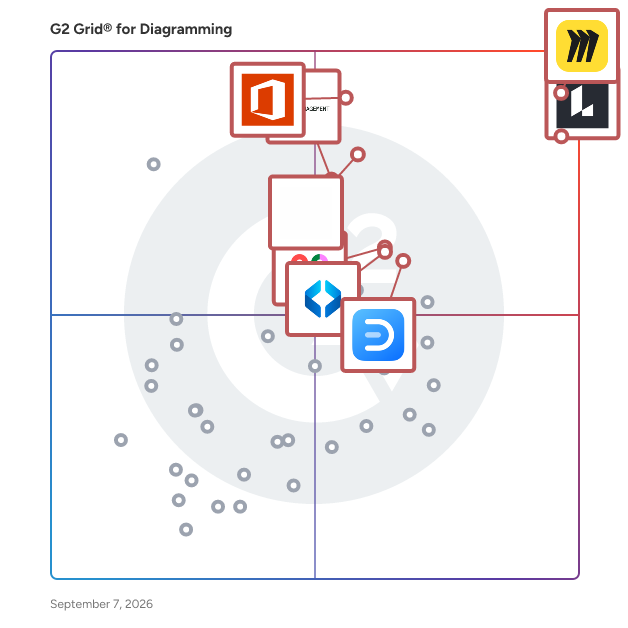
G2 Grid® for Diagramming Software

G2 Grid® for Diagramming Software plotting products by satisfaction and market presence

Highlighted products: Miro, Lucid Visual Collaboration Suite, Visio, FigJam, Cvent Event Marketing & Management, Mural, Wondershare EdrawMax, and SmartDraw.

Underlying data: [Grid® JSON](https://www.g2.com/categories/diagramming/grids.json?focus%5B%5D=miro&focus%5B%5D=lucid-software-inc-lucid-visual-collaboration-suite&focus%5B%5D=visio&focus%5B%5D=fig-jam&focus%5B%5D=cvent-event-marketing-management&focus%5B%5D=mural&focus%5B%5D=wondershare-edrawmax&focus%5B%5D=smartdraw)

Minitab Workspace

Minitab Workspace is a visual toolset designed to assist teams in mapping, analyzing, and enhancing processes, thereby providing a clear understanding of how work is executed and identifying areas for improvement. This software solution is particularly valuable for organizations aiming to streamline operations and foster a culture of continuous improvement. By offering a comprehensive suite of diagramming and problem-solving tools, Minitab Workspace empowers users to visualize complex processes and collaborate effectively on improvement initiatives. The target audience for Minitab Workspace includes professionals involved in process improvement, quality management, and operational excellence. This includes teams working within frameworks such as Lean and Six Sigma, who require structured methodologies to identify root causes and implement effective solutions. The software's capabilities are particularly beneficial for project managers, quality assurance teams, and operational leaders who need to communicate workflows and insights clearly across various departments. By providing a centralized platform for collaboration, Minitab Workspace enhances team alignment and drives standardized approaches to problem-solving. Key features of Minitab Workspace include a variety of diagramming tools such as process maps, value stream maps, and fishbone diagrams, which facilitate structured problem-solving. These tools enable users to break down complex processes into manageable components, making it easier to identify inefficiencies and areas for improvement. Additionally, brainstorming tools are integrated into the platform, allowing teams to generate and organize ideas collaboratively. This structured approach not only aids in identifying root causes but also fosters a culture of innovation and continuous improvement. Another significant advantage of Minitab Workspace is its cloud availability through the Minitab Solution Center. This feature allows teams to access, create, and collaborate on visual tools from any location, enhancing visibility and supporting distributed workforces. The cloud capability ensures that process knowledge and improvement efforts are centralized, making it easier for teams to share insights and updates in real time. This flexibility is particularly important in today’s increasingly remote work environments, where collaboration across geographies is essential for successful project execution. Overall, Minitab Workspace stands out in the realm of process improvement tools by combining powerful visualization capabilities with collaborative features, making it an essential resource for teams dedicated to enhancing operational efficiency and driving continuous improvement initiatives.

Average Rating: 4.3/5.0

Total Reviews: 87

How Do G2 Users Rate Minitab Workspace?

  • Quality of Support: 8.3/10 (Category avg: 8.7/10)
  • Ease of Use: 8.2/10 (Category avg: 8.8/10)
  • Has the product been a good partner in doing business?: 8.3/10 (Category avg: 9.0/10)

Who Is the Company Behind Minitab Workspace?

  • Seller: Minitab
  • Company Website:
  • Year Founded: 1972
  • HQ Location: State College, Pennsylvania, United States
  • Twitter: @Minitab
    5,017 Twitter followers
  • LinkedIn® Page: www.linkedin.com
    732 employees on LinkedIn®

Who Uses This Product?

  • Who Uses This: Student
  • Top Industries: Automotive, Medical Devices
  • Company Size: 40% Medium, 36% Small

What Do G2 Reviewers Say About Minitab Workspace?

AI-generated summary from verified user reviews

Pros
  • Users find Minitab Workspace easy to use, enabling efficient project organization and quick data processing without expertise.
  • Users find Minitab Workspace's ease of learning invaluable, especially with its supportive training and intuitive features.
  • Users praise Minitab Workspace for its efficiency, delivering quick results and enhancing project organization seamlessly.
  • Users find Minitab Workspace's organization features exceptional, streamlining project workflows and enhancing efficiency with reliable tools.
  • Users appreciate the innovative features of Minitab Workspace, enhancing organization, speed, and efficiency in project management.
Cons
  • Users often face difficult navigation within Minitab Workspace, making it hard to utilize its features effectively.
  • Users find Minitab Workspace to be expensive, particularly affecting students and researchers seeking cost-effective solutions.
  • Users find integration issues with Minitab Workspace, particularly with accessing Minitab directly and limited software compatibility.
  • Users are frustrated by the access limitations of Minitab Workspace, as it cannot directly access Minitab software.
  • Users face connection issues preventing direct access to Minitab Workspace, hindering their experience and workflow.

What Are Recent G2 Reviews of Minitab Workspace?

What Are G2 Users Discussing About Minitab Workspace?

Flowmapp

AI-driven platform for planning, pitching and selling websites. 💻 Generate full pack of visuals for a website sales proposal: Brief, Sitemap creation, Content, Wireframes, User Flow, Project costs, Invoice. ⚙️ How to use Flowmapp? — UX & Development — Planning — Team Work — Organize Everything — Create and present hi-fi prototypes — Plan and Store Content — Communicate with the Client — Increase Sales — Work Offline Here is how Flowmapp works → https://www.flowmapp.com/ ⚙️ Examples and demo project: https://bit.ly/flowmapp_sm 👉 Start for free → https://www.flowmapp.com

Average Rating: 4.7/5.0

Total Reviews: 93

How Do G2 Users Rate Flowmapp?

  • Quality of Support: 9.3/10 (Category avg: 8.7/10)
  • Ease of Use: 9.4/10 (Category avg: 8.8/10)
  • Has the product been a good partner in doing business?: 9.5/10 (Category avg: 9.0/10)

Who Is the Company Behind Flowmapp?

  • Seller: FlowMapp
  • Year Founded: 2017
  • HQ Location: Belgrade, Serbia
  • Twitter: @flowmapp
    1,569 Twitter followers
  • LinkedIn® Page: www.linkedin.com
    5 employees on LinkedIn®

Who Uses This Product?

  • Who Uses This: CEO
  • Top Industries: Design, Computer Software
  • Company Size: 80% Small, 13% Medium

What Do G2 Reviewers Say About Flowmapp?

AI-generated summary from verified user reviews

Pros
  • Users find Flowmapp easy to use and intuitive, enhancing site architecture understanding and workflow efficiency.
  • Users appreciate how Flowmapp offers easy creation of user flows and sitemaps, enhancing their design experience.
  • Users find Flowmapp very intuitive, simplifying site architecture understanding and user flow design effectively.
  • Users value the superb organizational and viewing tools of Flowmapp, enhancing efficiency in website planning and development.
  • Users highlight the easy setup of Flowmapp, making it accessible for beginners and quick to start creating user flows.
Cons
  • Users feel that Flowmapp has limited features, lacking essential export/import options and advanced formatting capabilities.
  • Users find exporting issues frustrating due to lack of features and proper formatting in Flowmapp's current development.
  • Users find the export issues frustrating, particularly with limited formatting options and ongoing development challenges.
  • Users feel that Flowmapp lacks export/import features and proper HTML formatting, limiting its overall utility for teams.
  • Users report bug issues but appreciate the team's commitment to resolving them swiftly and welcoming feedback.

What Are Recent G2 Reviews of Flowmapp?

What Are G2 Users Discussing About Flowmapp?

OrgChart

OrgChart is a leading org chart automation and workforce planning solution, built for HR professionals and the people leaders they support. OrgChart seamlessly integrates employee data from multiple sources, including over 50 HR systems, allowing for an always-accurate, and visually sophisticated org chart. Once connected, easily keep charts up to date without any manual effort – at any time – by scheduling automated syncs or updating charts with one simple click. OrgChart simplifies the complexity of HR work, providing unparalleled visibility into an organization’s personnel, and surfacing valuable insights for strategic decisions about future organizational structures. OrgChart is trusted by thousands of organizations worldwide across multiple industries – from non-profits, government agencies, and educational institutions – to Fortune 500 companies.

Average Rating: 4.5/5.0

Total Reviews: 300

How Do G2 Users Rate OrgChart?

  • Quality of Support: 9.2/10 (Category avg: 8.7/10)
  • Ease of Use: 8.1/10 (Category avg: 8.8/10)
  • Has the product been a good partner in doing business?: 9.3/10 (Category avg: 9.0/10)

Who Is the Company Behind OrgChart?

  • Seller: OrgChart
  • Company Website:
  • Year Founded: 2005
  • HQ Location: Novato, California
  • Twitter: @theorgchart
    1,917 Twitter followers
  • LinkedIn® Page: www.linkedin.com
    73 employees on LinkedIn®

Who Uses This Product?

  • Who Uses This: HRIS Analyst, Human Resources Manager
  • Top Industries: Information Technology and Services, Financial Services
  • Company Size: 71% Medium, 26% Large

What Do G2 Reviewers Say About OrgChart?

AI-generated summary from verified user reviews

Pros
  • Users highlight the ease of use of OrgChart, ensuring a smooth transition and quick implementation experiences.
  • Users value the seamless data integration and quick updates of OrgChart, simplifying complex organizational structures.
  • Users value the smooth transition and efficiency of OrgChart, appreciating its readiness for immediate organizational needs.
  • Users find the implementation support and user-friendly interface of OrgChart exceptionally helpful for organizational clarity.
  • Users appreciate the implementation ease of OrgChart, noting a smooth transition and excellent support from Francois.
Cons
  • Users experience a steep learning curve with OrgChart, often feeling overwhelmed by inconsistent training and complex features.
  • Users find the complexity of OrgChart cumbersome, particularly for those unfamiliar with coding and software nuances.
  • Users find the software not very intuitive, suggesting it could greatly improve user experience with adjustments.
  • Users experience a steep learning curve with OrgChart, making it challenging to fully utilize its features effectively.
  • Users find the interface not very intuitive and seek improvements for a better overall experience with OrgChart.

What Are Recent G2 Reviews of OrgChart?

What Are G2 Users Discussing About OrgChart?

AI can help you find the answers. G2 helps you trust them.

Connect G2 to Claude or ChatGPT for answers grounded in G2's trusted reviews, comparisons, and pricing from real user insights.

How it works

Elements.cloud

Elements.cloud gives Salesforce teams clarity and confidence in how their Org works. See how it’s built, track what’s changing, understand the impact of every update, and design better solutions. Elements makes your metadata visible, connected, and easy to trust. From documentation generated directly from your Org, to impact analysis and governance insights, Elements helps Salesforce customers and partners design, document, and deliver change safely. Trusted by global enterprises, used by Salesforce Professional Services, and recognised by Gartner as a 2025 Cool Vendor in CRM, Elements.cloud turns complexity into clarity so teams can make intelligent change at speed.

Average Rating: 4.6/5.0

Total Reviews: 36

How Do G2 Users Rate Elements.cloud?

  • Quality of Support: 9.2/10 (Category avg: 8.7/10)
  • Ease of Use: 8.5/10 (Category avg: 8.8/10)
  • Has the product been a good partner in doing business?: 9.4/10 (Category avg: 9.0/10)

Who Is the Company Behind Elements.cloud?

  • Seller: Elements.cloud
  • Year Founded: 2014
  • HQ Location: San Francisco, California
  • Twitter: @elements_cloud
    1,014 Twitter followers
  • LinkedIn® Page: www.linkedin.com
    22 employees on LinkedIn®

Who Uses This Product?

  • Top Industries: Consulting
  • Company Size: 38% Medium, 38% Small

What Do G2 Reviewers Say About Elements.cloud?

AI-generated summary from verified user reviews

Pros
  • Users value the complete visibility and automation of Salesforce documentation, enhancing collaboration and understanding of changes.
  • Users praise Elements.cloud for its exceptional customer support, highlighting the team's readiness to assist and provide guidance.
  • Users value the efficiency of Elements.cloud for enhancing project execution and fostering collaborative workflows.
  • Users find Elements.cloud to have an intuitive interface that enhances process management and documentation efficiency.
  • Users value the centralized documentation in Elements.cloud, enhancing collaboration and maintaining an organized workflow in Salesforce.
Cons
  • Users find the learning curve steep with Elements.cloud, particularly for new users and complex projects.
  • Users find the procedures confusing, making onboarding new team members challenging and less intuitive for effective use.
  • Users often experience a lack of guidance, leading to confusion during onboarding and challenges with sophisticated features.
  • Users find Elements.cloud not intuitive, feeling overwhelmed by complex features and seeking better onboarding support.
  • Users often find the powerful insights overwhelming, especially when navigating initial features and large projects.

What Are Recent G2 Reviews of Elements.cloud?

Mermaid

Mermaid is a diagramming tool built on Mermaid.js, the open-source diagramming library. Diagrams are defined as text in Mermaid syntax, and the rendering engine determines the layout. When a process changes, updating the diagram is a text edit rather than a rebuild — the practical difference from drag-and-drop editors, where repositioning nodes is part of every revision. There are several ways to create a diagram: users can write Mermaid syntax directly, begin from a template, or describe a process in plain language and let Mermaid AI generate the diagram along with its supporting documentation. Every route produces the same text-based diagram, so one that began as an AI generation or a template is edited, versioned, and updated exactly like one written by hand. The editor supports the full range of Mermaid diagram types, including flowcharts, sequence diagrams, class diagrams, entity relationship diagrams, state diagrams, Gantt charts, user journey maps, mindmaps, and timelines. Teams use it for software architecture diagrams, database schemas, API request flows, onboarding and process documentation, and project timelines, where the same syntax covers both quick sketches and diagrams that need to stay accurate over time. Comments, notifications, and real-time collaborative editing keep a team working in a single source file rather than exchanging screenshots. Because diagrams are stored as text, they can be version-controlled alongside code, reviewed in the same workflow as any other file, and kept in sync as the systems they document evolve. Finished diagrams export to standard formats such as PNG and SVG for use elsewhere. Integrations with PowerPoint, Word, Confluence, VS Code, JetBrains IDEs, ChatGPT, and Claude place diagrams in the tools where the work already happens.

Average Rating: 4.7/5.0

Total Reviews: 17

How Do G2 Users Rate Mermaid?

  • Quality of Support: 8.5/10 (Category avg: 8.7/10)
  • Ease of Use: 9.0/10 (Category avg: 8.8/10)
  • Has the product been a good partner in doing business?: 9.4/10 (Category avg: 9.0/10)

Who Is the Company Behind Mermaid?

  • Seller: Mermaid
  • Year Founded: 2022
  • HQ Location: San Francisco, US
  • Twitter: @MermaidChart
    578 Twitter followers
  • LinkedIn® Page: www.linkedin.com
    42 employees on LinkedIn®

Who Uses This Product?

  • Top Industries: Information Technology and Services
  • Company Size: 41% Small, 29% Medium

What Do G2 Reviewers Say About Mermaid?

AI-generated summary from verified user reviews

Pros
  • Users love the simplicity and flexibility of Mermaid for creating quick, clean diagrams using plain text.
  • Users value the ease of use of Mermaid Chart, enabling quick and efficient diagram creation and updates.
  • Users value the efficiency optimization of Mermaid, enabling fast and easy diagram creation while reducing rework.
  • Users value the seamless integrations of Mermaid, enhancing collaboration and simplifying documentation across platforms.
  • Users value the simplicity and flexibility of Mermaid Charts for creating diagrams efficiently with plain text.
Cons
  • Users report software bugs in Mermaid, especially with the debugger and large charts causing functionality issues.
  • Users find tool limitations challenging, as complex diagrams are hard to manage and features are minimal.
  • Users struggle with integration difficulties as custom styling and collaboration features are limited, impacting usability.
  • Users find learning difficulty in Mermaid due to complex syntax and limited formatting options for diagrams.
  • Users find the limited customization options frustrating, especially when managing complex diagrams in plain-text format.

What Are Recent G2 Reviews of Mermaid?

Cloudcraft

The #1 service for building, visualizing, and managing your cloud architecture for optimal performance. The Cloudcraft AWS Diagram Designer allows you to maximize efficiency with isometric or two-dimensional cloud architecture diagrams, all optimized for AWS with smart components. Get powerful cloud visualization right at your fingertips.

Average Rating: 4.5/5.0

Total Reviews: 190

How Do G2 Users Rate Cloudcraft?

  • Quality of Support: 8.7/10 (Category avg: 8.7/10)
  • Ease of Use: 9.0/10 (Category avg: 8.8/10)
  • Has the product been a good partner in doing business?: 8.9/10 (Category avg: 9.0/10)

Who Is the Company Behind Cloudcraft?

  • Seller: Cloudcraft
  • Year Founded: 2016
  • HQ Location: New York
  • Twitter: @CloudcraftCo
    1,192 Twitter followers
  • LinkedIn® Page: www.linkedin.com
    14 employees on LinkedIn®

Who Uses This Product?

  • Who Uses This: DevOps Engineer
  • Top Industries: Computer Software, Information Technology and Services
  • Company Size: 63% Small, 23% Medium

What Do G2 Reviewers Say About Cloudcraft?

AI-generated summary from verified user reviews

Pros
  • Users admire the amazing visuals of Cloudcraft, making cloud resource diagrams easy to create and understand.

What Are Recent G2 Reviews of Cloudcraft?

What Are G2 Users Discussing About Cloudcraft?

ProcessOn

ProcessOn is One tool for diverse diagramming needs.Product capabilities are mainly divided into five aspects: Mind Map: It supports drawing mind maps, tree diagrams, timelines, fishbone diagrams, organizational charts, bracket diagrams, matrix diagrams, and more to unleash your inspiration. Flowchart: Supports drawing Flowcharts, Swimlane Diagrams, UML Diagrams, Gantt Charts, Network Topology Diagrams, and many other graphics. Whiteboard: A smart canvas enables innovation everywhere.A visual diagram makes work more efficient.A free space fosters closer teamwork. Mermaid: It supports generating flowcharts directly in the browser using Mermaid syntax code, with real-time preview of the results. Furthermore, it seamlessly integrates with ProcessOn, and the graphs generated by Mermaid support secondary editing. Formula Editor: This free online LaTeX formula editor includes a comprehensive collection of LaTeX symbols, covering mathematical, physical, and chemical formulas. It can download SVG, PNG, and JPG image formats and export various code formats. Most importantly, ProcessOn supports AI-powered graphing, empowering tools through intelligent AI.

Average Rating: 4.4/5.0

Total Reviews: 14

How Do G2 Users Rate ProcessOn?

  • Quality of Support: 9.5/10 (Category avg: 8.7/10)
  • Ease of Use: 9.3/10 (Category avg: 8.8/10)
  • Has the product been a good partner in doing business?: 8.3/10 (Category avg: 9.0/10)

Who Is the Company Behind ProcessOn?

  • Seller: ProcessOn
  • Year Founded: 2012
  • HQ Location: New York, US
  • Twitter: @ProcessOn
    536 Twitter followers
  • LinkedIn® Page: www.linkedin.com
    7 employees on LinkedIn®

Who Uses This Product?

  • Company Size: 71% Small, 29% Medium

What Are Recent G2 Reviews of ProcessOn?

What Are G2 Users Discussing About ProcessOn?

Slickplan

Slickplan helps teams and agencies bring order to complex web projects—from first ideas to production-ready deliverables. Instead of juggling docs, spreadsheets and generic diagram tools, Slickplan gives you one hub to structure site architecture, map user flows, plan content and review designs together. The result: websites launch faster, with fewer revisions and smoother handoffs. Plan smarter, not harder * Structure navigation: visual sitemaps clarify information architecture, align stakeholders early and lock approvals. Use AI to generate or refine structures, or import from your site. * Map user flows and journeys: connect them to your sitemap so UX decisions match how the site is actually organized. * Create production-ready content: real-time CMS-aligned blocks with inline comments, suggestive edits, page previews, plus early SEO checks (keywords, SERP previews, metadata fields). * Review designs in context: upload mockups or sync from Figma and leave pinpoint, synced feedback tied to the project. Plus: accelerate client approvals with one shared workspace and reduce developer rework with clean, export-ready deliverables (XML, Word, PDF) and direct CMS integrations. Projects stay transparent with permission controls and version history. Slickplan replaces chaos with clarity—so teams ship structured, CMS-ready work at scale. Plan websites faster, together.

Average Rating: 4.3/5.0

Total Reviews: 17

How Do G2 Users Rate Slickplan?

  • Quality of Support: 9.8/10 (Category avg: 8.7/10)
  • Ease of Use: 9.3/10 (Category avg: 8.8/10)
  • Has the product been a good partner in doing business?: 8.9/10 (Category avg: 9.0/10)

Who Is the Company Behind Slickplan?

Who Uses This Product?

  • Top Industries: Marketing and Advertising
  • Company Size: 50% Small, 39% Medium

What Are Recent G2 Reviews of Slickplan?

What Are G2 Users Discussing About Slickplan?

MyDraw

MyDraw is one of the most advanced diagramming software and vector graphics drawing tools on the market. MyDraw is an easy, affordable yet powerful tool that can help you create a large number of diagrams including flowcharts, organizational charts, mind maps, infographics, network diagrams, floor plans, family tree diagrams, business model diagrams, flyers, newsletters, certificates, and many more. MyDraw is cross-platform and works on both Windows and macOS. It also features class-leading Microsoft Visio® compatibility that allows you to both import and export files from different Visio formats. The software is packed with advanced features such as progressive drawing tools, unrivaled text and table formatting options, automatic layouts, import and export to various image formats (PDF, SVG, JPEG, BMP, etc.), smart shapes and connectors, and others. The software also includes a vast number of ready-made templates, thousands of clipart, and specialized shapes that help you get inspired and be more productive.

Average Rating: 4.4/5.0

Total Reviews: 12

How Do G2 Users Rate MyDraw?

  • Quality of Support: 8.7/10 (Category avg: 8.7/10)
  • Ease of Use: 8.2/10 (Category avg: 8.8/10)
  • Has the product been a good partner in doing business?: 9.2/10 (Category avg: 9.0/10)

Who Is the Company Behind MyDraw?

  • Seller: Nevron Software
  • Year Founded: 1998
  • HQ Location: Wilmington, DE
  • Twitter: @NevronSoftware
    228 Twitter followers
  • LinkedIn® Page: www.linkedin.com
    14 employees on LinkedIn®

Who Uses This Product?

  • Company Size: 58% Small, 33% Large

What Are Recent G2 Reviews of MyDraw?

What Are G2 Users Discussing About MyDraw?

Overflow.io

Overflow is the world’s first user flow diagramming tool tailored for product design teams. It offers a new, impactful way for designers to effectively communicate their work, while fully engaging their audience with an interactive user flow presentation.

Average Rating: 3.9/5.0

Total Reviews: 17

How Do G2 Users Rate Overflow.io?

  • Quality of Support: 8.1/10 (Category avg: 8.7/10)
  • Ease of Use: 8.3/10 (Category avg: 8.8/10)
  • Has the product been a good partner in doing business?: 8.3/10 (Category avg: 9.0/10)

Who Is the Company Behind Overflow.io?

  • Seller: Proto.io
  • Year Founded: 2011
  • HQ Location: San Francisco, CA
  • Twitter: @protoio
    32,738 Twitter followers
  • LinkedIn® Page: www.linkedin.com
    8 employees on LinkedIn®

Who Uses This Product?

  • Top Industries: Computer Software
  • Company Size: 47% Small, 35% Large

What Are Recent G2 Reviews of Overflow.io?

What Are G2 Users Discussing About Overflow.io?

qlerify

Qlerify is an AI powered software modeling tool helping organizations turn business workflows into system blueprints and code, up to 100X faster. Qlerify enables non-technical users to rapidly create technical specifications and visual models in a format that developers love and can use instantly to create better software faster. Qlerify supports proven methodologies such as Domain-Driven Design and Event Storming and combines a co-authoring workspace with AI generation of system requirements, process models, data models, software architecture design and source code – all the artefacts needed by developers, saving tons of time and cost. The code generated with the Qlerify tool is completely free. Some features of the Qlerify platform: 1. Ultrafast and user-friendly co-editing interface that allows many stake holders to co-create process models/user journeys, data models, domain models and gather system requirements concurrently at the speed of thought 2. AI generation of content increases speed even further, guides users and jumpstarts workshops 3. AI generation of boilerplate code and unit tests saves valuable dev time 4. Configurable artefacts needed by developers such as user stories, UI sketches, business rules, KPIs, data models, test cases, etc 5. Support for powerful agile frameworks to jumpstart development, such as Scrum, User Story Mapping, Event Storming, Event Modeling, Domain Driven Design and Simplified BPM. 5. Remote collaboration support, e.g. share content with guest users, undo/redo changes or unlimited rollback/rollforward between versions, clone content, add comments and likes or prioritize collectively using user story mapping, etc. Try for free at https://www.qlerify.com.

Average Rating: 4.6/5.0

Total Reviews: 11

How Do G2 Users Rate qlerify?

  • Quality of Support: 9.1/10 (Category avg: 8.7/10)
  • Ease of Use: 8.7/10 (Category avg: 8.8/10)
  • Has the product been a good partner in doing business?: 10.0/10 (Category avg: 9.0/10)

Who Is the Company Behind qlerify?

  • Seller: Qlerify
  • Year Founded: 2020
  • HQ Location: Stockholm, Sweden
  • LinkedIn® Page: www.linkedin.com
    10 employees on LinkedIn®

Who Uses This Product?

  • Company Size: 55% Small, 45% Medium

What Are Recent G2 Reviews of qlerify?

Boardmix

Boardmix is an innovative online whiteboard that enables seamless brainstorming, discussion, and collaborative creation. Harness the power of AI and redefine your remote work experience.

Average Rating: 4.5/5.0

Total Reviews: 23

How Do G2 Users Rate Boardmix?

  • Quality of Support: 8.9/10 (Category avg: 8.7/10)
  • Ease of Use: 8.7/10 (Category avg: 8.8/10)
  • Has the product been a good partner in doing business?: 8.9/10 (Category avg: 9.0/10)

Who Is the Company Behind Boardmix?

Who Uses This Product?

  • Company Size: 70% Small, 39% Medium

What Do G2 Reviewers Say About Boardmix?

AI-generated summary from verified user reviews

Pros
  • Users find Boardmix easy to use with flexible templates and helpful AI, enhancing their collaborative efforts.
  • Users value the real-time collaboration features of Boardmix, enhancing teamwork and communication effectively.
  • Users value Boardmix for its all-in-one collaborative whiteboard with built-in AI that enhances brainstorming and teamwork.
  • Users love the variety of templates in Boardmix, enhancing their brainstorming and project planning experiences effortlessly.
  • Users commend the fast customer support of Boardmix, enhancing their experience and resolving issues promptly.
Cons
  • Users find Boardmix expensive due to extra subscription costs and locked features affecting overall value.
  • Users find the limited features of Boardmix restrictive, often feeling overwhelmed by the templates provided.
  • Users feel overwhelmed by the limited templates, encountering repetitive content and insufficient pricing information in Boardmix.
  • Users find the software overwhelming due to its numerous tools and complex offline editing options.
  • Users find the overwhelming features of Boardmix daunting, complicating learning and requiring internet dependence for basic functions.

What Are Recent G2 Reviews of Boardmix?

Aha!

Aha! is the world's #1 product management software. We help more than 1 million product builders to bring their strategy to life. Our integrated tools empower teams to go from discovery to delivery with AI. The suite includes Aha! Roadmaps, Aha! Discovery, Aha! Ideas, Aha! Whiteboards, Aha! Builder, Aha! Develop, Aha! Teamwork, and Aha! Knowledge. Product teams rely on our expertise, Elle (the AI assistant), and training programs via Aha! Academy to do their best work. We are proud to be a very different type of high-growth SaaS company. The business is self-funded, profitable, and 100% remote. We are recognized as one of the best fully remote companies to work for, champion the Bootstrap Movement, and have given over $1.5M to people in need through Aha! Cares. Learn more at www.aha.io.

Average Rating: 4.4/5.0

Total Reviews: 361

How Do G2 Users Rate Aha!?

  • Quality of Support: 9.2/10 (Category avg: 8.7/10)
  • Ease of Use: 7.8/10 (Category avg: 8.8/10)
  • Has the product been a good partner in doing business?: 9.2/10 (Category avg: 9.0/10)

Who Is the Company Behind Aha!?

  • Seller: Aha! Labs
  • Company Website:
  • Year Founded: 2013
  • HQ Location: Menlo Park, CA
  • Twitter: @aha_io
    22,142 Twitter followers
  • LinkedIn® Page: www.linkedin.com
    143 employees on LinkedIn®

Who Uses This Product?

  • Who Uses This: Product Manager, Senior Product Manager
  • Top Industries: Computer Software, Information Technology and Services
  • Company Size: 47% Medium, 31% Large

What Do G2 Reviewers Say About Aha!?

AI-generated summary from verified user reviews

Pros
  • Users commend Aha! for its excellent customer support, especially during implementation and the trial phase.
  • Users value the ease of use of Aha!, appreciating its clarity and intuitive design for efficient project management.
  • Users appreciate the clarity and intuitive design of Aha!, enabling effective product management throughout the development lifecycle.
  • Users value the smooth integration with Azure DevOps, enhancing their product management capabilities effectively.
  • Users value the customization options in Aha!, allowing seamless integration and adaptation to specific workflows and needs.
Cons
  • Users struggle with a steep learning curve, making it difficult to find settings and configure the tool effectively.
  • Users find limited features in Aha!, hindering customizability and integration with other development tools.
  • Users note missing features in Aha!, highlighting issues with Gantt intuitiveness and user management limitations.
  • Users find difficult navigation in Aha!, often struggling to locate settings and configurations effectively.
  • Users find the learning difficulty significant due to less intuitive Gantt features and lack of support tools.

What Are Recent G2 Reviews of Aha!?

What Are G2 Users Discussing About Aha!?

Allo

Company Overview ALLO is a visual collaboration tool designed for teams that value simplicity and effective communication. Originally founded as BeeCanvas, ALLO has evolved to become a versatile platform that helps teams visually document, organize, and communicate ideas effortlessly. We are on a mission to bring clarity and creativity back to team collaboration, making work feel less like a chore and more like storytelling. Product Overview ALLO combines the simplicity of tools like PowerPoint with the power of collaboration tools like Dropbox, offering a page-based structure that makes it easy for users to understand, document, and share ideas visually. ALLO’s key differentiators include its intuitive visual canvas, ease of use, and the ability to seamlessly integrate file uploads and previews for an organized workflow. Key Features Page-Based Visual Collaboration: Unlike infinite canvases that can become chaotic, ALLO uses a page-based structure, making it easier to understand, organize, and document ideas. This structure resembles popular tools like Google Slides and PowerPoint, giving users a familiar framework that’s perfect for visual storytelling. Seamless File Management: ALLO doesn’t just help you collaborate—it also serves as a file repository. Users can upload, preview, and organize files in context, similar to Dropbox, making it an all-in-one platform for visual collaboration and content management. AI-Enhanced Usability: Our AI features are designed to enhance usability, not complicate it. ALLO's AI assists users by suggesting content layouts, reducing repetitive tasks, and helping teams stay focused on what matters without added complexity. Intuitive Interface: With ALLO, there’s no steep learning curve. Users can start collaborating right away, thanks to its intuitive interface inspired by tools they already know and love. This means faster adoption and immediate productivity. Our Mission We believe that collaboration should be easy and enjoyable. Our mission is to empower teams to communicate visually, intuitively, and effectively—without the clutter and bloat that many collaboration tools have added over time. By focusing on simplicity, visual storytelling, and powerful yet accessible features, ALLO helps teams stay focused and productive. Who We Serve ALLO is designed for small to medium-sized teams, creative professionals, educators, and businesses that need a visual-first collaboration platform. Our users are those who are frustrated by the complexity of existing tools like Miro or Notion and want a simple, intuitive way to organize and communicate their ideas. Key Differentiators Simplicity: ALLO prioritizes ease of use. There’s no complex learning curve—users can get started immediately, unlike many of our competitors. Visual Storytelling: The page-based approach is perfect for teams who need to communicate their ideas clearly, without getting lost in an endless canvas. It’s visual storytelling made simple. File Management Capabilities: Unlike other collaboration tools, ALLO serves as a repository for important files, seamlessly integrating visual documentation with file previews and management. Why Choose ALLO? Teams that want a lightweight but powerful collaboration tool will find ALLO perfect for their needs. We don’t believe in feature bloat—instead, we focus on providing exactly what you need to get the job done: simple, intuitive, visual collaboration. Whether you’re brainstorming, planning projects, or sharing updates, ALLO helps you stay organized, communicate effectively, and keep your team on the same page.

Average Rating: 4.6/5.0

Total Reviews: 31

How Do G2 Users Rate Allo?

  • Quality of Support: 9.1/10 (Category avg: 8.7/10)
  • Ease of Use: 9.4/10 (Category avg: 8.8/10)
  • Has the product been a good partner in doing business?: 8.8/10 (Category avg: 9.0/10)

Who Is the Company Behind Allo?

  • Seller: Allo
  • Year Founded: 2014
  • HQ Location: N/A
  • Twitter: @ALLO_io
    1,880 Twitter followers
  • LinkedIn® Page: www.linkedin.com
    20 employees on LinkedIn®

Who Uses This Product?

  • Top Industries: Information Technology and Services
  • Company Size: 71% Small, 26% Medium

What Are Recent G2 Reviews of Allo?

What Are G2 Users Discussing About Allo?

Brightidea Innovation Management

With over 2 million users world wide and $15+ billion in recorded business impact, Brightidea is ranked as the #1 Idea Management Platform globally and is the market leader in innovation management and Hackathon software and services. Here at Brightidea, we believe that innovation is too important to be left to chance, and that every individual deserves an opportunity to have their voice heard. Our focus is not only giving organizations the ability to readily crowdsource ideas and build on strategic plans, but also back every idea with complex data points to help you track, manage, and prioritize ideas to ensure the best ideas always win. We are designed to fit any size, scale, or level of maturity when it comes to idea or innovation management. Brightidea helps you harness the power of ideas to help you foster a culture of innovation within the company. Most recently, we've added the Whiteboard. Brightidea Whiteboard gives your team a place to brainstorm in your own infinite space via a browser. Create stickies for new ideas, upload images, draw with dynamic pen and marker tools, emote with rich reactions, leverage smart tools like timers to keep your meetings on track, and utilize all of your favorite idea and innovation management templates. Wherever you're at in your innovation journey, our platform & people will help you get to the next level.

Average Rating: 4.3/5.0

Total Reviews: 211

How Do G2 Users Rate Brightidea Innovation Management?

  • Quality of Support: 9.1/10 (Category avg: 8.7/10)
  • Ease of Use: 8.2/10 (Category avg: 8.8/10)
  • Has the product been a good partner in doing business?: 9.2/10 (Category avg: 9.0/10)

Who Is the Company Behind Brightidea Innovation Management?

  • Seller: Brightidea
  • Year Founded: 1999
  • HQ Location: San Francisco, CA
  • Twitter: @Brightidea
    7,657 Twitter followers
  • LinkedIn® Page: www.linkedin.com
    61 employees on LinkedIn®

Who Uses This Product?

  • Top Industries: Non-Profit Organization Management, Financial Services
  • Company Size: 72% Large, 24% Medium

What Do G2 Reviewers Say About Brightidea Innovation Management?

AI-generated summary from verified user reviews

Pros
  • Users commend the ease of use of Brightidea, enjoying its intuitive interface and seamless integrations with existing tools.
  • Users praise the incredible customer support at Brightidea for its knowledge and willingness to assist effectively.
  • Users value the customization options in Brightidea, enhancing workflow flexibility and support for various initiatives.
  • Users value the user-friendly and customizable features of Brightidea, enhancing idea management and initiative execution.
  • Users value the helpful support staff of Brightidea, enhancing their experience and aiding problem-solving effectively.
Cons
  • Users find the limited features of Brightidea restrictive, complicating navigation and customization for diverse needs.
  • Users find the difficult setup process intensive, though they appreciate the exceptional customer support offered.
  • Users find the system unintuitive, making it difficult for casual users to navigate and utilize effectively.
  • Users find the learning curve steep, making it tough for casual users to navigate Brightidea efficiently.
  • Users find limited customization options in Brightidea, making it challenging for non-experienced users to navigate effectively.

What Are Recent G2 Reviews of Brightidea Innovation Management?

What Are G2 Users Discussing About Brightidea Innovation Management?

Neeraja Prakash
NP
Researched and written by Neeraja Prakash
Updated October 3, 2024