# Best Content Creation Software

  *By [Yukta Rustagi](https://research.g2.com/insights/author/yukta-rustagi)*

   Content creation software enables individuals or businesses to produce and share content for a specific audience. The types of content these tools produce include written content, graphic design, videos, brochures, and more. Content creation products help create and manage activity by internal and external parties involved in content development. Platforms for creating content can be need focused or all inclusive. For example, a platform that can create advertisements or Instagram videos vs. one that makes large-scale interactive brochures.

Content creation software can be copywriting, graphic, or video focused, allowing teams or individuals to create branded material for their needs. More niche content creation tools are available that generate quizzes and interactive presentations. Some companies also offer tools with basic content creation features that may not be their main functionality.

It’s important to note the difference between content creation and curation. Content creation platforms help create marketing content, including producing, editing, and collaborating on written or visual content. In contrast, [content curation](https://www.g2.com/categories/content-curation) software focuses on discovering, sourcing, and sharing third-party content. These products may also provide [content analytics](https://www.g2.com/categories/content-analytics) features to measure marketing content performance.

To qualify for inclusion in the Content Creation category, a product must:

- Provide tools to develop content, including but not limited to graphics, videos, presentations, copywriting, blogs, etc.
- Provide features to create, publish, and easily distribute or incorporate said content into its intended medium
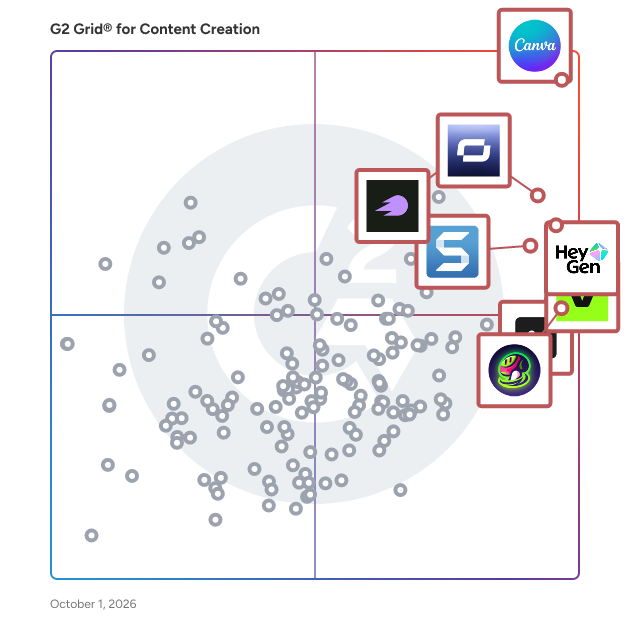


## Category Overview

**Total Products under this Category:** 444


## Trust & Credibility Stats

**Why You Can Trust G2's Software Rankings:**

- 30 Analysts and Data Experts
- 55,100+ Authentic Reviews
- 444+ Products
- Unbiased Rankings

G2's software rankings are built on verified user reviews, rigorous moderation, and a consistent research methodology maintained by a team of analysts and data experts. Each product is measured using the same transparent criteria, with no paid placement or vendor influence. While reviews reflect real user experiences, which can be subjective, they offer valuable insight into how software performs in the hands of professionals. Together, these inputs power the G2 Score, a standardized way to compare tools within every category.


## Best Content Creation Software At A Glance

- **Leader:** [Canva](https://www.g2.com/products/canva/reviews)
- **Highest Performer:** [1min.AI](https://www.g2.com/products/1min-ai/reviews)
- **Easiest to Use:** [Riverside](https://www.g2.com/products/riverside/reviews)
- **Top Trending:** [Synthesia](https://www.g2.com/products/synthesia/reviews)
- **Best Free Software:** [Canva](https://www.g2.com/products/canva/reviews)


---

**Sponsored**

### UserEvidence

UserEvidence is a customer voice platform that automates social proof for GTM teams, generating verified case studies, testimonials, and stats in minutes. Using surveys and third-party reviews, UserEvidence continually captures feedback throughout the customer journey and creates a customer story library that proves the value of your product. Game-changing B2B companies like Pendo, Workato, Gong, Jasper.ai, and Ramp rely on UserEvidence to create authentic customer stories at scale.


[Visit website](https://www.g2.com/external_clickthroughs/record?secure%5Bad_program%5D=ppc&amp;secure%5Bad_slot%5D=category_product_list&amp;secure%5Bcategory_id%5D=1558&amp;secure%5Bdisplayable_resource_id%5D=1558&amp;secure%5Bdisplayable_resource_type%5D=Category&amp;secure%5Bmedium%5D=sponsored&amp;secure%5Bplacement_reason%5D=page_category&amp;secure%5Bplacement_resource_ids%5D%5B%5D=1558&amp;secure%5Bprioritized%5D=false&amp;secure%5Bproduct_id%5D=170410&amp;secure%5Bresource_id%5D=1558&amp;secure%5Bresource_type%5D=Category&amp;secure%5Bsource_type%5D=category_page&amp;secure%5Bsource_url%5D=https%3A%2F%2Fwww.g2.com%2Fcategories%2Fcontent-creation%3Fpage%3D17&amp;secure%5Btoken%5D=f650e92662eecbbc40c74d16b7e02824a4e04d6858eefcb10ecd87283f9b67e2&amp;secure%5Burl%5D=https%3A%2F%2Fuserevidence.com&amp;secure%5Burl_type%5D=company_website)

---

## Top-Rated Products (Ranked by G2 Score)
### 1. [Canva](https://www.g2.com/products/canva/reviews)
  Canva is an end-to-end AI-powered visual communication and collaboration platform empowering everyone in the world to design everything from presentations to infographics, videos, documents, websites, social media graphics and more. With pre-templated designs and thousands of stock images, videos, soundtracks, and fonts, Canva is a simple way to create visual content at scale. Canva is available on the web, iOS and Android.


  **Average Rating:** 4.7/5.0
  **Total Reviews:** 6,217

**User Satisfaction Scores:**

- **Quality of Support:** 8.8/10 (Category avg: 9.0/10)
- **AI Text Summarization:** 7.3/10 (Category avg: 8.0/10)
- **Execute Content Publication:** 8.5/10 (Category avg: 8.1/10)
- **Collaborative Editorial Calendars / Scheduling Content:** 7.9/10 (Category avg: 8.0/10)


**Seller Details:**

- **Seller:** [Canva](https://www.g2.com/sellers/canva)
- **Company Website:** https://www.canva.com/
- **Year Founded:** 2012
- **HQ Location:** Sydney
- **Twitter:** @canva (337,930 Twitter followers)
- **LinkedIn® Page:** https://www.linkedin.com/company/2850862/ (13,716 employees on LinkedIn®)

**Reviewer Demographics:**
  - **Who Uses This:** Owner, Marketing Manager
  - **Top Industries:** Marketing and Advertising, Information Technology and Services
  - **Company Size:** 66% Small-Business, 23% Mid-Market


#### Pros & Cons

**Pros:**

- Ease of Use (1742 reviews)
- Templates (1264 reviews)
- Features (1145 reviews)
- Easy Creation (1062 reviews)
- Template Availability (1055 reviews)

**Cons:**

- Limited Features (585 reviews)
- Limited Options (560 reviews)
- Missing Features (498 reviews)
- Expensive (473 reviews)
- Limited Customization (451 reviews)

### 2. [Synthesia](https://www.g2.com/products/synthesia/reviews)
  Synthesia is the best AI video generation platform for business. By turning text into professional AI-generated videos in minutes, Synthesia replaces static documents and slide decks with dynamic, human-like communication that drives engagement, understanding, and results. 🚀 Create at the speed of change Traditional video production is slow, costly, and hard to scale. With Synthesia, anyone can create studio-quality videos fast, right in their browser. When your products, policies, or messages change, your videos can too — no cameras, actors, or editing software required. 🧍‍♂️ Bring your message to life with AI Avatars Add a human touch to every message with 240+ diverse, realistic AI avatars, representing different ages, ethnicities, and styles. Choose a brand-aligned avatar or create your own custom digital twin for a consistent on-screen identity. 🌍 Communicate globally with ease Reach every audience with a click. Synthesia supports 160+ languages and accents with built-in AI translation and dubbing, making global rollouts effortless. Deliver consistent, localized content to every team and market — without losing your brand’s voice. 💡 Engage and educate through interactivity Keep your audience involved with interactive videos that go beyond passive viewing. Add clickable elements, branching paths, or quizzes to improve learning outcomes and drive action across training, onboarding, and customer education. 📊 Measure impact, not just output Synthesia’s built-in analytics let you see how your videos perform — who’s watching, where they drop off, and how they engage. Use data-driven insights to refine content and maximize ROI on every communication. 🔒 Built for enterprise trust and security Synthesia is trusted by the world’s leading organizations for its enterprise-grade security and compliance standards, including SOC 2 Type II, GDPR, and ISO 27001. Your data, avatars, and videos are always protected with role-based access, watermarking, and private deployment options. 🤝 Empower everyone to be a communicator From HR and L&amp;D to Marketing and Sales, Synthesia enables every team to create on-brand, on-message videos at scale — turning communication into a competitive advantage.


  **Average Rating:** 4.6/5.0
  **Total Reviews:** 2,716

**User Satisfaction Scores:**

- **Quality of Support:** 8.9/10 (Category avg: 9.0/10)
- **AI Text Summarization:** 7.5/10 (Category avg: 8.0/10)
- **Execute Content Publication:** 7.9/10 (Category avg: 8.1/10)
- **Collaborative Editorial Calendars / Scheduling Content:** 6.4/10 (Category avg: 8.0/10)


**Seller Details:**

- **Seller:** [Synthesia](https://www.g2.com/sellers/synthesia)
- **Company Website:** https://www.synthesia.io/
- **Year Founded:** 2017
- **HQ Location:** London
- **Twitter:** @synthesiaIO (28,356 Twitter followers)
- **LinkedIn® Page:** https://www.linkedin.com/company/synthesia-technologies/ (662 employees on LinkedIn®)

**Reviewer Demographics:**
  - **Who Uses This:** CEO, Owner
  - **Top Industries:** Computer Software, E-Learning
  - **Company Size:** 67% Small-Business, 18% Mid-Market


#### Pros & Cons

**Pros:**

- Ease of Use (1306 reviews)
- Quality (809 reviews)
- Realistic Avatars (788 reviews)
- Easy Creation (756 reviews)
- Video Creation (664 reviews)

**Cons:**

- Avatar Limitations (443 reviews)
- Limited Avatars (384 reviews)
- AI Limitations (372 reviews)
- Avatar Quality (358 reviews)
- Limited Customization (308 reviews)

### 3. [VEED](https://www.g2.com/products/veed/reviews)
  VEED is an AI-powered video creation and editing platform that helps creators, marketers, teams and enterprises generate and edit video content at scale. The platform combines advanced AI video generation with simple but powerful editing tools, allowing users to produce professional videos without technical expertise or expensive equipment. From Idea to Video in One Unified Workflow VEED brings video generation and editing together in a single platform so users can create original content through AI video generation, then refine it with professional editing features—all in one workspace. Users no longer need to juggle tools, struggle with editing skills, or deal with production bottlenecks. This integrated approach helps teams scale content production, localize videos across markets, and maintain brand consistency across campaigns. The platform is designed for content creators producing social media and educational videos, marketing teams developing campaign assets, small business owners creating promotional content, and enterprises managing video content at scale. VEED&#39;s browser-based interface requires no downloads or installations, making professional video creation accessible from any device with an internet connection. Teams can collaborate on projects in real-time, share feedback, and manage multiple video projects simultaneously. AI Video Generation VEED&#39;s video generation capabilities are powered by industry-leading AI from OpenAI, Google, and ElevenLabs and integrated with the latest releases, including Sora and Veo. The platform also features Fabric 1.0, VEED&#39;s proprietary AI video model that delivers natural lip-sync synchronization between generated avatars and audio, creating more realistic and engaging video content. Users can: • Transform text scripts into complete videos with AI avatars and dynamic scenes • Generate professional voiceovers in multiple languages and voices using neural text-to-speech technology • Create talking videos with precise lip-sync accuracy using Fabric 1.0 • Create custom visuals, animations, and motion graphics from text prompts • Produce multiple video variations optimized for different platforms and target audiences The video generation workflow allows users to start from scratch with just a text prompt, eliminating the need for filming equipment, studios, or professional on-camera skills. Videos can be customized with brand colors, logos, and style preferences to maintain visual consistency across content. AI-Powered Editing Tools The platform lets creators automate complex editing tasks traditionally requiring professional skills and software expertise. Key editing capabilities include: • Generate and translate automatic subtitles in over 125 languages, with fully customizable styling • Translate spoken audio into multiple languages using AI dubbing. • Intuitive background removal for videos and images—no green screen needed • Detect and remove filler words for cleaner, more professional dialogue • Automatically trim scenes, improve pacing, and remove dead space with Magic Cut • Clean audio and reduce background noise in one click These editing features work alongside traditional video editing tools like timeline editing, transitions, text overlays, and color correction, giving users both AI-powered automation and manual creative control.


  **Average Rating:** 4.6/5.0
  **Total Reviews:** 1,963

**User Satisfaction Scores:**

- **Quality of Support:** 8.4/10 (Category avg: 9.0/10)
- **AI Text Summarization:** 7.5/10 (Category avg: 8.0/10)
- **Execute Content Publication:** 7.9/10 (Category avg: 8.1/10)
- **Collaborative Editorial Calendars / Scheduling Content:** 6.6/10 (Category avg: 8.0/10)


**Seller Details:**

- **Seller:** [VEED](https://www.g2.com/sellers/veed-bdac6289-d6d6-4f09-b842-7bac70643e49)
- **Company Website:** https://www.veed.io/
- **Year Founded:** 2018
- **HQ Location:** London, GB
- **Twitter:** @veedstudio (22,120 Twitter followers)
- **LinkedIn® Page:** https://www.linkedin.com/company/veedhq/ (189 employees on LinkedIn®)

**Reviewer Demographics:**
  - **Who Uses This:** Founder, Owner
  - **Top Industries:** Marketing and Advertising, Computer Software
  - **Company Size:** 80% Small-Business, 9% Mid-Market


#### Pros & Cons

**Pros:**

- Ease of Use (1256 reviews)
- Features (839 reviews)
- Easy Editing (763 reviews)
- Video Editing (737 reviews)
- Easy Creation (670 reviews)

**Cons:**

- Slow Performance (280 reviews)
- Limited Features (267 reviews)
- Expensive (232 reviews)
- AI Limitations (215 reviews)
- Limited Options (204 reviews)

### 4. [Snagit](https://www.g2.com/products/snagit/reviews)
  TechSmith Snagit is a powerful screen capture and recording tool that makes it easier than ever to collect and share information. With intuitive editing features and access to a library of templates, anyone can transform simple captures into professional-quality images, GIFs, and videos.


  **Average Rating:** 4.7/5.0
  **Total Reviews:** 5,836

**User Satisfaction Scores:**

- **Quality of Support:** 9.1/10 (Category avg: 9.0/10)
- **AI Text Summarization:** 5.7/10 (Category avg: 8.0/10)
- **Execute Content Publication:** 7.5/10 (Category avg: 8.1/10)
- **Collaborative Editorial Calendars / Scheduling Content:** 6.8/10 (Category avg: 8.0/10)


**Seller Details:**

- **Seller:** [TechSmith](https://www.g2.com/sellers/techsmith)
- **Company Website:** https://www.techsmith.com
- **Year Founded:** 1987
- **HQ Location:** Okemos, MI
- **Twitter:** @TechSmith (29,552 Twitter followers)
- **LinkedIn® Page:** https://www.linkedin.com/company/16448/ (351 employees on LinkedIn®)

**Reviewer Demographics:**
  - **Who Uses This:** Owner, President
  - **Top Industries:** Computer Software, Information Technology and Services
  - **Company Size:** 37% Small-Business, 32% Mid-Market


#### Pros & Cons

**Pros:**

- Ease of Use (381 reviews)
- Screenshot Functionality (246 reviews)
- Easy Editing (215 reviews)
- Features (195 reviews)
- Ease of Capture (177 reviews)

**Cons:**

- Technical Issues (74 reviews)
- Screenshot Issues (60 reviews)
- Expensive (50 reviews)
- Capture Issues (44 reviews)
- Slow Performance (44 reviews)

### 5. [Riverside](https://www.g2.com/products/riverside/reviews)
  Riverside is an all-in-one podcast and video studio for businesses and content creators who demand professional quality without technical complexity. Podcasters, video creators, and businesses across the globe are producing studio-quality content in a fraction of the time it would take with traditional methods. Riverside puts professional production capabilities in your hands to: - Record crystal-clear audio and video regardless of internet connection - Edit content with intuitive, time-saving tools leveraging AI - Repurpose content automatically for multiple channels - Live stream to any social platforms (YouTube, Facebook, Instagram, Twitch, and more) - Transcribe audio and video files in 100+ languages with 99% accuracy - Host and distribute your podcast to major directories like Spotify, Apple, and YouTube. Forget about expensive studio setups, complex recording equipment, or unreliable video conferencing tools. Riverside is your complete solution for professional-grade content creation. Everyone from seasoned podcasters to first-time creators can use it to produce broadcast-quality recordings without technical expertise. Riverside&#39;s multi-track technology lets you: - Capture separate audio tracks for each participant - Maintain perfect quality even with unstable internet - Export professional files compatible with any editing software - Plus, Riverside&#39;s powerful AI tools make production dramatically more efficient. Riverside AI enables you to: - Edit recordings by simply editing text in the transcript - Automatically remove filler words and awkward pauses - Repurpose long-form content into social clips with a single click. Available in-browser on any device, plus dedicated Mac and mobile apps, Riverside integrates recording, editing, and publishing tools within a single user-friendly interface. Businesses and content creators use Riverside across diverse audio and video production scenarios: - Podcast recording, editing, hosting, and publishing - Remote interviews with experts - Marketing content such as testimonials and case studies - Live-streaming conferences with multiple presenters - Webinars with interactive elements and screen sharing - Screen capturing and solo recording for tutorials and product demos Riverside is the platform powering professional content for thousands of creators, from independent podcasters such as Tim Ferriss, Mel Robbins, Guy Raz, to Fortune 500 brands including Spotify, Marvel, Hubspot, GE Aerospace, Accenture and more..


  **Average Rating:** 4.8/5.0
  **Total Reviews:** 1,687

**User Satisfaction Scores:**

- **Quality of Support:** 9.4/10 (Category avg: 9.0/10)
- **AI Text Summarization:** 8.4/10 (Category avg: 8.0/10)
- **Execute Content Publication:** 8.7/10 (Category avg: 8.1/10)
- **Collaborative Editorial Calendars / Scheduling Content:** 7.7/10 (Category avg: 8.0/10)


**Seller Details:**

- **Seller:** [RiversideFM](https://www.g2.com/sellers/riversidefm)
- **Company Website:** https://riverside.com/
- **Year Founded:** 2019
- **HQ Location:** Tel Aviv, IL
- **Twitter:** @RiversidedotFM (10,455 Twitter followers)
- **LinkedIn® Page:** https://www.linkedin.com/company/riverside-fm/ (403 employees on LinkedIn®)

**Reviewer Demographics:**
  - **Who Uses This:** Founder, Owner
  - **Top Industries:** Entertainment, Media Production
  - **Company Size:** 88% Small-Business, 10% Mid-Market


#### Pros & Cons

**Pros:**

- Ease of Use (1086 reviews)
- Quality (782 reviews)
- High Quality (732 reviews)
- Recording (672 reviews)
- Video Quality (657 reviews)

**Cons:**

- Recording Issues (248 reviews)
- Missing Features (218 reviews)
- Feature Deficiency (214 reviews)
- Audio Issues (157 reviews)
- Editing Issues (143 reviews)

### 6. [HeyGen](https://www.g2.com/products/heygen/reviews)
  HeyGen is the leading AI video generation platform designed to assist users in creating visually engaging videos effortlessly. This innovative solution caters to a wide range of users, from small business owners to large corporations, enabling them to produce high-quality videos without the need for extensive technical skills or expensive production resources. By simplifying the video creation process, HeyGen empowers users to effectively communicate their messages and enhance their brand presence, without the traditional bottlenecks. The platform is particularly beneficial for marketers, L&amp;D professionals, soloprenuers, and content creators who seek to engage their audiences through dynamic visual storytelling. HeyGen simplifies the video creation process in several key ways. Users can generate professional, polished videos from just a single prompt, making it suitable for various applications such as marketing campaigns, sales presentations, and internal communications. Additionally, the platform allows users to transform written content, such as blogs and articles, into vibrant videos, significantly reducing the time spent on content creation. This feature enables users to share their messages more efficiently, maximizing their outreach. Another standout feature of HeyGen is its ability to turn scripts into lifelike videos featuring realistic AI avatars and authentic voiceovers. This capability not only captivates audiences but also enhances the overall viewing experience. Furthermore, HeyGen breaks down language barriers by offering localization options in over 175 languages and dialects, allowing users to connect with global audiences in a meaningful way. With a user-friendly interface and a robust set of features, HeyGen stands out as a comprehensive solution for video creation. It has already garnered the trust of over 90,000 businesses, including renowned brands like OpenAI, HubSpot, and Ogilvy. By leveraging HeyGen&#39;s capabilities, users can produce a wide array of videos, from marketing promotions to educational content, all while ensuring their stories are told in a compelling and memorable way. Your story matters. Make it unforgettable with HeyGen.


  **Average Rating:** 4.8/5.0
  **Total Reviews:** 1,575

**User Satisfaction Scores:**

- **Quality of Support:** 9.0/10 (Category avg: 9.0/10)
- **AI Text Summarization:** 8.1/10 (Category avg: 8.0/10)
- **Execute Content Publication:** 8.3/10 (Category avg: 8.1/10)
- **Collaborative Editorial Calendars / Scheduling Content:** 7.9/10 (Category avg: 8.0/10)


**Seller Details:**

- **Seller:** [HeyGen](https://www.g2.com/sellers/heygen)
- **Company Website:** https://www.heygen.com/
- **Year Founded:** 2020
- **HQ Location:** Los Angeles, California
- **LinkedIn® Page:** https://www.linkedin.com/company/heygen/ (320 employees on LinkedIn®)

**Reviewer Demographics:**
  - **Who Uses This:** CEO, Owner
  - **Top Industries:** Marketing and Advertising, Consulting
  - **Company Size:** 88% Small-Business, 8% Mid-Market


#### Pros & Cons

**Pros:**

- Ease of Use (693 reviews)
- Quality (513 reviews)
- Realistic Avatars (486 reviews)
- Video Creation (456 reviews)
- Easy Creation (346 reviews)

**Cons:**

- Expensive (210 reviews)
- Pricing Issues (190 reviews)
- Expensive Cost (172 reviews)
- Cost Issue (153 reviews)
- Avatar Limitations (152 reviews)

### 7. [Semrush](https://www.g2.com/products/semrush/reviews)
  Semrush (NYSE: SEMR) is the leading brand visibility platform, empowering marketers to command their online presence and create measurable impact. Built on the industry’s most expansive proprietary dataset, Semrush delivers AI-driven insights across SEO, Agentic Search Optimization, content marketing, paid media, and social strategy. Used by over 28 million users globally – from scaling startups to the Fortune 500 – Semrush provides the competitive intelligence needed to win visibility in an evolving digital landscape. The company is headquartered in Boston, MA with a global presence across North America, Europe and Asia.


  **Average Rating:** 4.5/5.0
  **Total Reviews:** 3,260

**User Satisfaction Scores:**

- **Quality of Support:** 8.5/10 (Category avg: 9.0/10)
- **AI Text Summarization:** 7.2/10 (Category avg: 8.0/10)
- **Execute Content Publication:** 7.7/10 (Category avg: 8.1/10)
- **Collaborative Editorial Calendars / Scheduling Content:** 7.9/10 (Category avg: 8.0/10)


**Seller Details:**

- **Seller:** [Semrush](https://www.g2.com/sellers/semrush)
- **Company Website:** https://www.semrush.com
- **Year Founded:** 2008
- **HQ Location:** Boston, MA
- **Twitter:** @semrush (309,632 Twitter followers)
- **LinkedIn® Page:** https://www.linkedin.com/company/2821922/ (2,310 employees on LinkedIn®)

**Reviewer Demographics:**
  - **Who Uses This:** Marketing Manager, Digital Marketing Manager
  - **Top Industries:** Marketing and Advertising, Information Technology and Services
  - **Company Size:** 62% Small-Business, 28% Mid-Market


#### Pros & Cons

**Pros:**

- Features (799 reviews)
- Ease of Use (781 reviews)
- Keyword Research (719 reviews)
- Helpful (656 reviews)
- SEO Optimization (650 reviews)

**Cons:**

- Expensive (540 reviews)
- High Pricing (468 reviews)
- High Costs (414 reviews)
- Pricing Issues (358 reviews)
- Learning Curve (304 reviews)

### 8. [AKOOL](https://www.g2.com/products/akool/reviews)
  AKOOL is a complete AI Video Generation Suite, transforming how professional video content is created. Our multimodal platform combines cutting-edge generation tools with enterprise-grade production infrastructure to deliver studio-quality results at scale. We believe exceptional video content should be effortless to produce. That&#39;s why we&#39;ve reimagined traditional workflows with intuitive AI tools that empower teams—from marketing, sales to HR, e-commerce and more—to create professional videos in minutes, not weeks. Create with Unmatched Ease 🎥 AI-Generated Avatars &amp; Voices – Bring stories to life with diverse presenters or custom avatars in 175+ languages ✂️ Smart Editing Tools – Automatically generate scenes, transitions and polished edits in seconds 🚀 Hyper-Personalization – Dynamically tailor videos with names, offers and localized messaging More than just a tool, AKOOL is your partner in visual storytelling. Whether launching your first campaign or scaling global content, we give you the power to create without limits—faster, smarter and with greater impact. Join 40,000+ businesses transforming their video strategy with AKOOL.


  **Average Rating:** 4.8/5.0
  **Total Reviews:** 545

**User Satisfaction Scores:**

- **Quality of Support:** 9.3/10 (Category avg: 9.0/10)
- **AI Text Summarization:** 8.5/10 (Category avg: 8.0/10)
- **Execute Content Publication:** 9.0/10 (Category avg: 8.1/10)
- **Collaborative Editorial Calendars / Scheduling Content:** 9.2/10 (Category avg: 8.0/10)


**Seller Details:**

- **Seller:** [Akool Inc.](https://www.g2.com/sellers/akool-inc-c7e693d5-e4f3-4237-908f-7a667403d511)
- **Company Website:** https://akool.com/
- **HQ Location:** 471 Emerson St Palo Alto, CA 94301
- **Twitter:** @AkoolInc (55,980 Twitter followers)
- **LinkedIn® Page:** https://www.linkedin.com/company/akool/ (105 employees on LinkedIn®)

**Reviewer Demographics:**
  - **Who Uses This:** Marketing Manager, Manager
  - **Top Industries:** Marketing and Advertising, Information Technology and Services
  - **Company Size:** 82% Small-Business, 16% Mid-Market


#### Pros & Cons

**Pros:**

- Ease of Use (264 reviews)
- Quality (240 reviews)
- Video Creation (230 reviews)
- Features (202 reviews)
- High Quality (151 reviews)

**Cons:**

- Slow Performance (69 reviews)
- Slow Rendering (62 reviews)
- Expensive (61 reviews)
- AI Limitations (60 reviews)
- Expensive Cost (54 reviews)

### 9. [Camtasia](https://www.g2.com/products/camtasia/reviews)
  The Camtasia Product Suite is a powerful AI-powered ecosystem for video creation and screen recording. The Camtasia Suite offers a range of plans designed to meet your video creation needs, making it easy to produce professional-looking videos quickly—even if you’ve never made a video before. Our AI-powered features, including Camtasia Rev, script generation, text-to-speech, translations, and avatar videos, streamline the video creation process. Whether you choose our Free, Essentials, Plus, or Pro plan, Camtasia provides the tools and features you need to tell your story. Within the suite, the Camtasia Editor is easy enough for beginners yet powerful and versatile enough to be your video editing solution for life. Explore our plans and find the perfect fit for your video creation journey.


  **Average Rating:** 4.6/5.0
  **Total Reviews:** 1,696

**User Satisfaction Scores:**

- **Quality of Support:** 8.8/10 (Category avg: 9.0/10)
- **AI Text Summarization:** 5.5/10 (Category avg: 8.0/10)
- **Execute Content Publication:** 7.8/10 (Category avg: 8.1/10)
- **Collaborative Editorial Calendars / Scheduling Content:** 5.8/10 (Category avg: 8.0/10)


**Seller Details:**

- **Seller:** [TechSmith](https://www.g2.com/sellers/techsmith)
- **Company Website:** https://www.techsmith.com
- **Year Founded:** 1987
- **HQ Location:** Okemos, MI
- **Twitter:** @TechSmith (29,552 Twitter followers)
- **LinkedIn® Page:** https://www.linkedin.com/company/16448/ (351 employees on LinkedIn®)

**Reviewer Demographics:**
  - **Who Uses This:** Owner, CEO
  - **Top Industries:** Computer Software, Information Technology and Services
  - **Company Size:** 53% Small-Business, 27% Mid-Market


#### Pros & Cons

**Pros:**

- Ease of Use (238 reviews)
- Video Editing (147 reviews)
- Easy Editing (145 reviews)
- Features (133 reviews)
- Easy Creation (117 reviews)

**Cons:**

- Expensive (43 reviews)
- Learning Curve (42 reviews)
- Slow Rendering (41 reviews)
- Feature Limitations (35 reviews)
- Limited Features (32 reviews)

### 10. [Vyond](https://www.g2.com/products/vyond/reviews)
  Vyond is an all-in-one AI video platform designed to empower organizations in creating secure, compliant, and engaging business content at scale. With a history spanning over 15 years, Vyond has established itself as a trusted solution for more than 20,000 companies, including 65% of the Fortune 500. Vyond is particularly suited for enterprises looking to enhance their internal communications, training programs, sales enablement, and marketing efforts through high-quality video content. Vyond serves a diverse range of use cases. It is particularly beneficial for companies aiming to streamline onboarding processes, improve training completion rates, and enhance compliance training. By integrating seamlessly with existing tools such as Slack, Learning Management Systems (LMS), and Customer Relationship Management (CRM) systems, Vyond allows employees to create brand-safe content without the need to switch between multiple applications. This integration not only fosters a more efficient workflow but also ensures that video content aligns with organizational branding and compliance standards. Key features of Vyond include AI avatars, AI-assisted scripting, instant translation, and text-to-speech capabilities, which collectively enhance the video creation process. Users can develop custom characters and utilize various animation styles, including animated, photorealistic, mixed-media, and live-action formats, all within a single platform. This versatility allows organizations to cater to different audience preferences and learning styles, making their content more engaging and effective. Additionally, Vyond’s SCORM-compliant LMS integration ensures that training materials can be easily tracked and measured, providing valuable insights into employee engagement and learning outcomes. Vyond stands out in the market by simplifying the technology stack for enterprises while expanding their creative capabilities. The platform’s focus on measurable outcomes—such as faster onboarding, higher training completion, and improved sales enablement—enables organizations to track return on investment (ROI) within their existing systems of record. This emphasis on data-driven results allows businesses to make informed decisions about their video content strategies and optimize their communication efforts. With a commitment to ongoing innovation and customer trust, Vyond is dedicated to evolving its platform to meet the needs of modern enterprises. By bringing next-generation AI capabilities into a compliant and governed environment, Vyond enables organizations to create content more efficiently, communicate more effectively, and reduce their reliance on fragmented solutions. This positions Vyond as a comprehensive tool for any organization looking to leverage video as a key component of their business strategy.


  **Average Rating:** 4.8/5.0
  **Total Reviews:** 489

**User Satisfaction Scores:**

- **Quality of Support:** 9.4/10 (Category avg: 9.0/10)
- **AI Text Summarization:** 7.7/10 (Category avg: 8.0/10)
- **Execute Content Publication:** 8.1/10 (Category avg: 8.1/10)
- **Collaborative Editorial Calendars / Scheduling Content:** 6.3/10 (Category avg: 8.0/10)


**Seller Details:**

- **Seller:** [Vyond](https://www.g2.com/sellers/vyond)
- **Company Website:** https://www.vyond.com/
- **Year Founded:** 2007
- **HQ Location:** San Mateo, California
- **Twitter:** @VyondVideo (134 Twitter followers)
- **LinkedIn® Page:** https://www.linkedin.com/company/vyond/ (270 employees on LinkedIn®)

**Reviewer Demographics:**
  - **Who Uses This:** Instructional Designer, Senior Instructional Designer
  - **Top Industries:** E-Learning, Hospital &amp; Health Care
  - **Company Size:** 51% Enterprise, 26% Small-Business


#### Pros & Cons

**Pros:**

- Ease of Use (185 reviews)
- Video Creation (124 reviews)
- Features (111 reviews)
- Easy Creation (107 reviews)
- Versatility (92 reviews)

**Cons:**

- Limited Customization (45 reviews)
- Limited Features (33 reviews)
- Limited Options (32 reviews)
- Limited Selection (27 reviews)
- Learning Curve (26 reviews)

### 11. [Murf.ai](https://www.g2.com/products/murf-ai/reviews)
  Murf AI is a cloud-based realistic text-to-speech platform that can be used to create voiceovers for their content (YouTube videos, podcasts, advertisements/ commercials, e-learning content, presentations, audiobooks, etc.). We harness AI and deep machine learning technology to generate these ultra-realistic voiceovers across a range of 120+ voices in 20+ languages. Voiceover production traditionally is a time-consuming and complicated process that involves hiring a voice actor, getting a script ready, recording in a studio, editing, adding music, images, or videos, and finally, syncing them all together. This is where Murf steps in to simplify the entire process and reduce the overall cost and time by leveraging AI. Murf serves as an all-in-one platform where content creators/users can not only easily convert their script into natural-sounding audio within minutes but also add images, music, and video to their voice-over and sync them all in one place. Try out the Murf AI studio now - https://murf.ai


  **Average Rating:** 4.7/5.0
  **Total Reviews:** 1,405

**User Satisfaction Scores:**

- **Quality of Support:** 9.2/10 (Category avg: 9.0/10)
- **AI Text Summarization:** 4.2/10 (Category avg: 8.0/10)
- **Execute Content Publication:** 8.8/10 (Category avg: 8.1/10)
- **Collaborative Editorial Calendars / Scheduling Content:** 8.6/10 (Category avg: 8.0/10)


**Seller Details:**

- **Seller:** [Murf Inc.](https://www.g2.com/sellers/murf-inc)
- **Company Website:** https://murf.ai/
- **Year Founded:** 2020
- **HQ Location:** Salt Lake City, US
- **Twitter:** @MURFAISTUDIO (3,983 Twitter followers)
- **LinkedIn® Page:** https://www.linkedin.com/company/murf-ai/ (126 employees on LinkedIn®)

**Reviewer Demographics:**
  - **Who Uses This:** CEO
  - **Top Industries:** E-Learning, Marketing and Advertising
  - **Company Size:** 77% Small-Business, 14% Mid-Market


#### Pros & Cons

**Pros:**

- Ease of Use (169 reviews)
- Natural Sound (125 reviews)
- Natural Voices (124 reviews)
- Voice Customization (117 reviews)
- Quality (109 reviews)

**Cons:**

- Expensive (59 reviews)
- Pricing Issues (54 reviews)
- Limited Voices (53 reviews)
- Voice Quality (48 reviews)
- Pronunciation Issues (42 reviews)

### 12. [1min.AI](https://www.g2.com/products/1min-ai/reviews)
  🤖 Boosting productivity with AI is a good way to improve your work and life. However, switching or learning new tools for different use cases is not fun, and it is expensive, too! 💡 1min.AI is an all-in-one AI app that unlock all AI features. You pay only for what you use at 1min.AI, with&amp;nbsp;no hidden costs or setup required&amp;nbsp;elsewhere. 🔮 The unique features of 1min.AI is offering&amp;nbsp;a variety of AI features powered by various AI models. You can see it clearly with the&amp;nbsp;Chat with Many Assistants&amp;nbsp;feature, it includes Gemini, GPT, Claude, Llama, MistralAI, ... 🪄 Other multi-media features like Content, Image, Audio, Video can also be used with different models to utilize their abilities and give out the best results. 💰 Lastly, we offer&amp;nbsp;credit estimation and transparent usage history, so you know exactly how does the feature cost before running and can track the usage easily. Trying&amp;nbsp;1min.AI&amp;nbsp;for Free to make sure it&#39;s right for you before making any decision! 🥳


  **Average Rating:** 4.5/5.0
  **Total Reviews:** 631

**User Satisfaction Scores:**

- **Quality of Support:** 8.4/10 (Category avg: 9.0/10)
- **AI Text Summarization:** 8.8/10 (Category avg: 8.0/10)
- **Execute Content Publication:** 7.2/10 (Category avg: 8.1/10)
- **Collaborative Editorial Calendars / Scheduling Content:** 6.7/10 (Category avg: 8.0/10)


**Seller Details:**

- **Seller:** [1min.AI](https://www.g2.com/sellers/1min-ai)
- **Year Founded:** 2023
- **HQ Location:** CA, USA
- **Twitter:** @1min_dot_ai (399 Twitter followers)
- **LinkedIn® Page:** https://www.linkedin.com/company/1min-ai (7 employees on LinkedIn®)

**Reviewer Demographics:**
  - **Who Uses This:** CEO, Owner
  - **Top Industries:** Information Technology and Services, Consulting
  - **Company Size:** 81% Small-Business, 6% Mid-Market


#### Pros & Cons

**Pros:**

- Ease of Use (224 reviews)
- Artificial Intelligence (197 reviews)
- AI Features (188 reviews)
- Useful (161 reviews)
- Features (159 reviews)

**Cons:**

- Credit Issues (134 reviews)
- Limited Credits (115 reviews)
- Credit System (90 reviews)
- Credit System Issues (82 reviews)
- Expensive (77 reviews)

### 13. [Descript](https://www.g2.com/products/descript/reviews)
  In Descript you can make any video you want, any way you want. All you need is an idea; it helps if you know how to type. With the world’s first only AI co-editor, Underlord, you can make a video just by describing your vision. It will create, edit, and design your video—all under your direction. It’s got the taste and judgment you want in a creative partner and the expertise you need from a video editor. And it’s tireless—so you can stay focused on getting the result you’re after while it does all the dirty work. And when you want to get dirty, you don’t need special knowledge or skills. If you can edit text, you can edit video with Descript. It’s loaded with automated design tools, plus the friendliest timeline editor you’ve ever seen, a built-in recorder, and hosted publishing that makes collaboration as easy as sending a link. Create product demos, training videos, screen recordings, video messages, podcasts, or social clips. Join the 7 million+ creators and businesses using Descript, and create something impressive—something you can be proud of.


  **Average Rating:** 4.6/5.0
  **Total Reviews:** 866

**User Satisfaction Scores:**

- **Quality of Support:** 8.4/10 (Category avg: 9.0/10)
- **AI Text Summarization:** 7.8/10 (Category avg: 8.0/10)
- **Execute Content Publication:** 7.7/10 (Category avg: 8.1/10)
- **Collaborative Editorial Calendars / Scheduling Content:** 6.2/10 (Category avg: 8.0/10)


**Seller Details:**

- **Seller:** [Descript](https://www.g2.com/sellers/descript)
- **Company Website:** https://descript.com
- **Year Founded:** 2017
- **HQ Location:** San Francisco, CA
- **LinkedIn® Page:** https://www.linkedin.com/company/descript/ (187 employees on LinkedIn®)

**Reviewer Demographics:**
  - **Who Uses This:** Founder, Owner
  - **Top Industries:** Marketing and Advertising, Media Production
  - **Company Size:** 87% Small-Business, 8% Mid-Market


#### Pros & Cons

**Pros:**

- Easy Editing (280 reviews)
- Ease of Use (271 reviews)
- Video Editing (194 reviews)
- Features (192 reviews)
- Editing Features (189 reviews)

**Cons:**

- Learning Curve (81 reviews)
- Learning Difficulty (71 reviews)
- Difficulty/Complexity (69 reviews)
- Slow Performance (68 reviews)
- Editing Issues (65 reviews)

### 14. [iSpring Suite](https://www.g2.com/products/ispring-suite/reviews)
  iSpring Suite is the most intuitive PowerPoint-based authoring tool for creating professional eLearning. It allows teams to quickly turn existing slides into interactive courses, reducing both the time and cost of training development. With built-in AI for content generation and translation, along with reliable one-click LMS publishing, teams can deliver engaging, accessible, and globally-ready training without the need for specialized designers or developers. A familiar PowerPoint interface keeps the workflow straightforward. A library of over 310,000 training assets and an integrated AI assistant provide instant outlines, content, visuals, and quiz questions, helping teams move from idea to course faster. For global rollout, built-in AI generates natural-sounding voiceovers and translates entire courses into more than 50 languages in minutes, making localization fast, consistent, and cost-effective. Collaboration is built into the process. Teams can work together during course creation and manage reviews in a single web application, with all stakeholder feedback collected in one place instead of scattered email threads. Published content is delivered as fully compliant SCORM, xAPI, or cmi5 packages that function reliably in any learning management system. Users receive direct support from a dedicated team of product experts that resolves 85% of requests in under two hours. Trusted by more than 61,000 teams, iSpring Suite makes it easy to create training that looks great, works everywhere, and gets done faster. The full capabilities of the platform are available to explore through a free 14-day trial.


  **Average Rating:** 4.6/5.0
  **Total Reviews:** 771

**User Satisfaction Scores:**

- **Quality of Support:** 9.5/10 (Category avg: 9.0/10)
- **AI Text Summarization:** 5.6/10 (Category avg: 8.0/10)
- **Execute Content Publication:** 8.3/10 (Category avg: 8.1/10)
- **Collaborative Editorial Calendars / Scheduling Content:** 6.1/10 (Category avg: 8.0/10)


**Seller Details:**

- **Seller:** [iSpring](https://www.g2.com/sellers/ispring)
- **Company Website:** https://www.ispringsolutions.com
- **Year Founded:** 2001
- **HQ Location:** Alexandria, VA
- **Twitter:** @iSpringPro (6,527 Twitter followers)
- **LinkedIn® Page:** https://www.linkedin.com/company/876420/ (259 employees on LinkedIn®)

**Reviewer Demographics:**
  - **Who Uses This:** President, Director
  - **Top Industries:** E-Learning, Higher Education
  - **Company Size:** 45% Small-Business, 32% Mid-Market


#### Pros & Cons

**Pros:**

- Ease of Use (101 reviews)
- Easy Creation (66 reviews)
- Features (65 reviews)
- PowerPoint Integration (55 reviews)
- Ease of Learning (54 reviews)

**Cons:**

- Limited Features (25 reviews)
- Technical Issues (24 reviews)
- Limited Customization (21 reviews)
- Feature Issues (19 reviews)
- Learning Curve (19 reviews)

### 15. [Insense](https://www.g2.com/products/insense/reviews)
  Insense is the all-in-one solution for scaling UGC production and influencer marketing operations; offering both a creator marketing platform and flexible managed services, with a vetted marketplace of 75,500+ creators from 35+ countries across the USA, Canada, EMEA, APAC, and Latin America.


  **Average Rating:** 4.5/5.0
  **Total Reviews:** 378

**User Satisfaction Scores:**

- **Quality of Support:** 8.9/10 (Category avg: 9.0/10)
- **AI Text Summarization:** 6.7/10 (Category avg: 8.0/10)
- **Execute Content Publication:** 7.5/10 (Category avg: 8.1/10)
- **Collaborative Editorial Calendars / Scheduling Content:** 7.2/10 (Category avg: 8.0/10)


**Seller Details:**

- **Seller:** [Insense](https://www.g2.com/sellers/insense)
- **Company Website:** https://insense.pro/
- **Year Founded:** 2016
- **HQ Location:** New York
- **Twitter:** @Insense_pro (1,798 Twitter followers)
- **LinkedIn® Page:** https://www.linkedin.com/company/insense.pro/ (151 employees on LinkedIn®)

**Reviewer Demographics:**
  - **Who Uses This:** Content Creator, Content creator
  - **Top Industries:** Marketing and Advertising, Health, Wellness and Fitness
  - **Company Size:** 54% Small-Business, 12% Mid-Market


#### Pros & Cons

**Pros:**

- Ease of Use (148 reviews)
- Setup Ease (86 reviews)
- Helpful (51 reviews)
- Communication (41 reviews)
- Creators Variety (41 reviews)

**Cons:**

- Brand Challenges (27 reviews)
- Poor Customer Support (26 reviews)
- Time Delays (25 reviews)
- Creator Issues (22 reviews)
- Limited Brands (22 reviews)

### 16. [Conductor](https://www.g2.com/products/conductor/reviews)
  Conductor is the only end-to-end, enterprise AEO platform built on the industry’s most complete data engine. Conductor is built for the new era of search—helping brands maximize visibility across AI and traditional search engines, power the full content lifecycle from insight to creation to measurement, and protect site health with 24/7 monitoring. The unified platform connects every data signal and delivers prioritized, actionable insights across AEO/SEO, content, and technical health, giving teams a single source of truth to optimize for growth in AI search surfaces. Conductor was named a Leader in the 2025 Forrester Wave—achieving the highest scores possible in AI-integrated SEO—and was SoftwareReviews’ Gold Medalist in the 2024 Search Engine Optimization Data Quadrant for the fourth consecutive year. Conductor’s customers include Citi, Airbnb, e.l.f Cosmetics, and FedEx.


  **Average Rating:** 4.5/5.0
  **Total Reviews:** 741

**User Satisfaction Scores:**

- **Quality of Support:** 9.4/10 (Category avg: 9.0/10)
- **AI Text Summarization:** 10.0/10 (Category avg: 8.0/10)
- **Execute Content Publication:** 6.0/10 (Category avg: 8.1/10)
- **Collaborative Editorial Calendars / Scheduling Content:** 5.7/10 (Category avg: 8.0/10)


**Seller Details:**

- **Seller:** [Conductor](https://www.g2.com/sellers/conductor)
- **Company Website:** https://www.conductor.com
- **Year Founded:** 2008
- **HQ Location:** New York
- **Twitter:** @Conductor (41,421 Twitter followers)
- **LinkedIn® Page:** https://www.linkedin.com/company/76031/ (460 employees on LinkedIn®)

**Reviewer Demographics:**
  - **Who Uses This:** SEO Manager, SEO Specialist
  - **Top Industries:** Marketing and Advertising, Consumer Services
  - **Company Size:** 36% Enterprise, 31% Mid-Market


#### Pros & Cons

**Pros:**

- Ease of Use (130 reviews)
- Features (125 reviews)
- SEO Optimization (78 reviews)
- Helpful (77 reviews)
- Keyword Research (77 reviews)

**Cons:**

- Learning Curve (50 reviews)
- Limited Features (34 reviews)
- Learning Difficulty (27 reviews)
- Lack of Features (25 reviews)
- Poor Reporting (22 reviews)

### 17. [Foleon](https://www.g2.com/products/foleon/reviews)
  Foleon is a content creation platform that makes it easy for anyone to create interactive content that is 100% on brand. We provide B2B companies with an intuitive drag &amp; drop editor and interactive Foleon Doc format that empowers them to create bespoke digital content experiences that are engaging, intelligent and scalable. Most companies are still wasting time, money and energy on publishing their most valuable content in ineffective legacy formats. PDFs are a headache to produce, a bore to read, and totally void of reader insights. Foleon, on the other hand, offers a modern format that is easy to create, highly engaging, and full of the intelligence you’ve been missing. Founded in Amsterdam with locations in the US and Europe, Foleon is on a mission to empower companies to create the content their audience craves.


  **Average Rating:** 4.7/5.0
  **Total Reviews:** 178

**User Satisfaction Scores:**

- **Quality of Support:** 9.4/10 (Category avg: 9.0/10)
- **AI Text Summarization:** 5.7/10 (Category avg: 8.0/10)
- **Execute Content Publication:** 8.8/10 (Category avg: 8.1/10)
- **Collaborative Editorial Calendars / Scheduling Content:** 6.7/10 (Category avg: 8.0/10)


**Seller Details:**

- **Seller:** [Foleon](https://www.g2.com/sellers/foleon)
- **Company Website:** https://www.foleon.com
- **Year Founded:** 2013
- **HQ Location:** Amsterdam, North Holland
- **Twitter:** @GetFoleon (1,086 Twitter followers)
- **LinkedIn® Page:** https://www.linkedin.com/company/5193621/ (122 employees on LinkedIn®)

**Reviewer Demographics:**
  - **Who Uses This:** Graphic Designer, Marketing Manager
  - **Top Industries:** Higher Education, Financial Services
  - **Company Size:** 39% Mid-Market, 34% Small-Business


#### Pros & Cons

**Pros:**

- Ease of Use (40 reviews)
- Features (27 reviews)
- Customer Support (25 reviews)
- Intuitive (25 reviews)
- Customization (18 reviews)

**Cons:**

- Lack of Customization (13 reviews)
- Limited Customization (11 reviews)
- Limited Features (9 reviews)
- Improvement Needed (8 reviews)
- Learning Curve (8 reviews)

### 18. [Shorthand](https://www.g2.com/products/shorthand/reviews)
  Shorthand is the beautifully simple storytelling platform that helps the world&#39;s iconic brands tell their most important stories. Shorthand empowers content creators, designers, and developers to publish visual stories with up to 10x higher audience engagement, in a fraction of the time. Global organisations such as Honda, the BBC, and Dow Jones use Shorthand to engage their high value audiences on their owned properties. Shorthand’s simple yet powerful no-code editor allows anyone to create, edit, and publish stunning reading experiences in minutes.&amp;nbsp;Features such as prebuilt templates, AI-powered auto layout, and PDF import accelerate your content development and let you focus on the story. Workflow and collaboration tools ensure your team is on the same page.&amp;nbsp;Users can publish their Shorthand content nearly anywhere — via AWS, their CMS, Shorthand hosting, or embedding directly on their website. The Shorthand team is a band of geeks with art and heart, dedicated to helping content teams build the world’s most impressive and impactful digital content.


  **Average Rating:** 4.7/5.0
  **Total Reviews:** 122

**User Satisfaction Scores:**

- **Quality of Support:** 9.6/10 (Category avg: 9.0/10)
- **AI Text Summarization:** 5.7/10 (Category avg: 8.0/10)
- **Execute Content Publication:** 8.6/10 (Category avg: 8.1/10)
- **Collaborative Editorial Calendars / Scheduling Content:** 6.9/10 (Category avg: 8.0/10)


**Seller Details:**

- **Seller:** [Shorthand](https://www.g2.com/sellers/shorthand)
- **Company Website:** https://shorthand.com
- **Year Founded:** 2013
- **HQ Location:** Brisbane, Australia
- **Twitter:** @Shorthand (3,189 Twitter followers)
- **LinkedIn® Page:** https://www.linkedin.com/company/3226195/ (67 employees on LinkedIn®)

**Reviewer Demographics:**
  - **Top Industries:** Higher Education, Non-Profit Organization Management
  - **Company Size:** 46% Small-Business, 24% Mid-Market


#### Pros & Cons

**Pros:**

- Ease of Use (32 reviews)
- Easy Creation (16 reviews)
- Storytelling (15 reviews)
- Ease of Creation (13 reviews)
- Features (12 reviews)

**Cons:**

- Learning Curve (7 reviews)
- Limited Customization (7 reviews)
- Cost Issues (6 reviews)
- Expensive (6 reviews)
- Limitations (6 reviews)

### 19. [PosterMyWall](https://www.g2.com/products/postermywall/reviews)
  PosterMyWall is an AI design and marketing platform for small and local businesses. Everything you need for awesome marketing is bundled in one value-packed app: create designs with AI prompts, social media publishing, event pages and calendars for your website,&amp;nbsp; email marketing, and free customizable templates. People around the world use PosterMyWall to create eye-catching designs, videos, newsletters, event pages, social media posts, and more. If your small business, church, or organization wants to reach more people and grow, PosterMyWall makes it happen – fast. PosterMyWall helps your business grow with quick design and marketing in one value-packed, affordable app. Key features include: - AI prompt and design tools: Generate unique images and designs, write engaging copy, and redesign content in a click. - Email marketing: Create and send professional emails and newsletters with easy drag-and-drop editing and branded templates. - Social media publishing: Plan, schedule, and publish posts directly to platforms like Facebook, Instagram, and X (Twitter) - Shareable event pages and calendars for your website increase the discoverability of your events, sales, and special offers. Collect registrations or link to your ticketing service. - Content planner gives you a snapshot of everything you’ve got scheduled. - Built-in analytics quantify campaign performance. - 3.3 million+ free customizable templates for every occasion, theme, and business category (restaurants, retail, salons, churches, schools, gyms, etc.) The platform provides web and mobile access (both android and iOS), enabling users to design and manage campaigns from anywhere.


  **Average Rating:** 4.7/5.0
  **Total Reviews:** 71

**User Satisfaction Scores:**

- **Quality of Support:** 9.1/10 (Category avg: 9.0/10)


**Seller Details:**

- **Seller:** [PosterMyWall](https://www.g2.com/sellers/postermywall)
- **Year Founded:** 2010
- **HQ Location:** San Mateo, California
- **Twitter:** @postermywall (6,582 Twitter followers)
- **LinkedIn® Page:** https://www.linkedin.com/company/postermywall.com/ (119 employees on LinkedIn®)

**Reviewer Demographics:**
  - **Top Industries:** Marketing and Advertising, Non-Profit Organization Management
  - **Company Size:** 65% Small-Business, 35% Mid-Market


### 20. [RELAYTO AI](https://www.g2.com/products/relayto-ai/reviews)
  How do you 100× your content’s impact? RELAYTO is the AI-powered interactive content experience platform that turns every static PDF, PowerPoint, MP4, or image into a choose-your-own-path experience. Check out our own RELAYTO-powered buying journey that started as a conventional presentation here: https://rla.to/pitch In minutes, no code required, you can drag and drop files into our intuitive builder, layer in video, audio, forms, and CTAs, and publish a responsive microsite that feels more like Netflix than a flipbook. The result is an interactive sales-collateral hub, digital sales room, or secure proposal microsite that buyers binge on any device while they self-educate at their own pace. Behind the scenes, RELAYTO’s AI-driven content-engagement analytics capture 360° digital body language—page-level heatmaps, scroll depth, dwell time, replays, document heat-map insights, and intent scoring—delivering the PDF analytics legacy sales-enablement suites can’t. Real-time alerts surface high-intent viewers so revenue teams, account-based marketers, and customer-success managers can prioritize follow-up, shorten deal cycles, and prove content ROI with data-backed confidence. Security and scale come standard: create unlimited public or private interactive experiences, lock them down with granular permissions, SSO, watermarking, and compliance controls, or open them up with SEO-friendly embedding links across email, LinkedIn, HubSpot, Salesforce, your CMS, and anywhere a single link can travel. From AI-powered flipbook e-books and white papers to interactive pitch decks, proposal microsites, demo portals, and digital sales rooms, RELAYTO is the simplest way to transform boring documents into captivating, measurable experiences that boost engagement, conversion, and revenue. https://relayto.com/showcase


  **Average Rating:** 4.7/5.0
  **Total Reviews:** 449

**User Satisfaction Scores:**

- **Quality of Support:** 9.5/10 (Category avg: 9.0/10)
- **AI Text Summarization:** 9.2/10 (Category avg: 8.0/10)
- **Execute Content Publication:** 9.3/10 (Category avg: 8.1/10)
- **Collaborative Editorial Calendars / Scheduling Content:** 9.1/10 (Category avg: 8.0/10)


**Seller Details:**

- **Seller:** [Relayto](https://www.g2.com/sellers/relayto)
- **Year Founded:** 2023
- **HQ Location:** San Francisco , California
- **Twitter:** @relayter (2,215 Twitter followers)
- **LinkedIn® Page:** https://www.linkedin.com/company/relayto/ (48 employees on LinkedIn®)

**Reviewer Demographics:**
  - **Who Uses This:** Student, Executive Assistant
  - **Top Industries:** Marketing and Advertising, Information Technology and Services
  - **Company Size:** 61% Small-Business, 24% Mid-Market


#### Pros & Cons

**Pros:**

- Ease of Use (118 reviews)
- Features (71 reviews)
- User Interface (64 reviews)
- Quality (63 reviews)
- Easy Creation (62 reviews)

**Cons:**

- Learning Curve (58 reviews)
- Learning Difficulty (50 reviews)
- Steep Learning Curve (42 reviews)
- Initial Difficulty (34 reviews)
- Initial Usage Difficulty (18 reviews)

### 21. [Agentio](https://www.g2.com/products/agentio/reviews)
  Agentio simplifies creator-led advertising by making it easy to buy ad reads from top YouTube creators. You can manage your campaigns effortlessly, ensuring you reach your target audience with engaging, authentic content. Drive higher conversions and sales while benefiting from direct integration with creators who resonate with your brand. - Identify conversions driven by creator content on Agentio - Track conversion revenue to measure return on ad spend (ROAS) - Evaluate campaign results and adjust strategies for higher conversions Designed for performance marketers, Agentio streamlines the entire workflow—from creator discovery and bidding to content approval and performance tracking. Brands use Agentio to run high-trust, in-content YouTube integrations at scale—turning word-of-mouth into a measurable, repeatable growth channel.


  **Average Rating:** 4.9/5.0
  **Total Reviews:** 66

**User Satisfaction Scores:**

- **Quality of Support:** 9.9/10 (Category avg: 9.0/10)
- **AI Text Summarization:** 6.8/10 (Category avg: 8.0/10)
- **Execute Content Publication:** 8.7/10 (Category avg: 8.1/10)
- **Collaborative Editorial Calendars / Scheduling Content:** 8.3/10 (Category avg: 8.0/10)


**Seller Details:**

- **Seller:** [Agentio](https://www.g2.com/sellers/agentio)
- **Company Website:** https://www.agentio.com
- **Year Founded:** 2023
- **HQ Location:** Brooklyn, US
- **LinkedIn® Page:** https://www.linkedin.com/company/agentio-hq (57 employees on LinkedIn®)

**Reviewer Demographics:**
  - **Who Uses This:** Talent Manager
  - **Top Industries:** Marketing and Advertising, Entertainment
  - **Company Size:** 61% Small-Business, 12% Mid-Market


#### Pros & Cons

**Pros:**

- Ease of Use (47 reviews)
- Customer Support (31 reviews)
- Efficiency (28 reviews)
- Helpful (28 reviews)
- Time-saving (24 reviews)

**Cons:**

- Limited Offers (6 reviews)
- Creator Issues (5 reviews)
- Expensive (5 reviews)
- Adjustment Issues (4 reviews)
- Campaign Management (4 reviews)

### 22. [PlayPlay](https://www.g2.com/products/playplay/reviews)
  PlayPlay is the video platform built for business. Everything at PlayPlay is designed, developed and supported to give teams the power to create impactful, branded videos in no time, without requiring any editing skills. What you will get with PlayPlay: - Effortless Video Creation: An intuitive platform designed to help anyone find ideas and turn them into videos that drive results in no time. - AI That Gets You: Purposeful AI designed to support every step of your creation workflow — never a gimmick. - Autonomy for Teams, Alignment for the Brand: give teams creative freedom while keeping every video on-brand. - Premium Guidance, Human Support – Strategic expertise and real people to help you make the most of every video. Trusted by over 3,000 companies for product launches, executive announcements, employee updates, and more.


  **Average Rating:** 4.7/5.0
  **Total Reviews:** 310

**User Satisfaction Scores:**

- **Quality of Support:** 9.5/10 (Category avg: 9.0/10)
- **AI Text Summarization:** 7.7/10 (Category avg: 8.0/10)
- **Execute Content Publication:** 8.7/10 (Category avg: 8.1/10)
- **Collaborative Editorial Calendars / Scheduling Content:** 8.0/10 (Category avg: 8.0/10)


**Seller Details:**

- **Seller:** [PlayPlay](https://www.g2.com/sellers/playplay)
- **Company Website:** https://www.playplay.video
- **Year Founded:** 2017
- **HQ Location:** Paris, FR
- **Twitter:** @PlayPlayVideo (1,046 Twitter followers)
- **LinkedIn® Page:** https://www.linkedin.com/company/playplay (212 employees on LinkedIn®)

**Reviewer Demographics:**
  - **Who Uses This:** Chargée de communication, Community Manager
  - **Top Industries:** Information Technology and Services, Marketing and Advertising
  - **Company Size:** 48% Enterprise, 33% Mid-Market


#### Pros & Cons

**Pros:**

- Ease of Use (33 reviews)
- Video Creation (19 reviews)
- Video Quality (15 reviews)
- Easy Creation (14 reviews)
- Templates (14 reviews)

**Cons:**

- Limited Customization (11 reviews)
- Limited Features (9 reviews)
- Editing Difficulties (7 reviews)
- Feature Limitations (6 reviews)
- Learning Curve (5 reviews)

### 23. [Visme](https://www.g2.com/products/visme/reviews)
  Visme is a comprehensive visual content creation platform that assists teams in developing, managing, and scaling on-brand materials efficiently. It integrates essential features such as design tools, brand governance, collaboration capabilities, and analytics, enabling organizations to communicate their messages consistently and confidently across various channels and touchpoints. Targeted primarily at businesses, marketing teams, educators, and content creators, Visme serves a diverse audience that requires a streamlined approach to visual communication. The platform is particularly beneficial for teams that need to produce a wide range of content types, including interactive presentations, infographics, brand documents, and data visualizations. By providing a centralized solution for these needs, Visme helps users save time and resources while maintaining brand integrity. One of the standout features of Visme is its all-in-one design interface, which allows users to create visually appealing content without needing extensive design skills. The platform offers a rich library of templates, graphics, and design elements that can be easily customized to align with an organization’s branding. This flexibility not only enhances creativity but also ensures that all produced materials adhere to brand guidelines, fostering a cohesive visual identity. Additionally, Visme’s collaboration tools enable teams to work together seamlessly, regardless of their location. Users can invite team members to collaborate in real-time, provide feedback, and make edits, which streamlines the content creation process. The platform also includes analytics features that allow users to track engagement and performance metrics, providing valuable insights into how their content is received by the audience. This data-driven approach helps organizations refine their strategies and improve future content. Overall, Visme stands out in the visual content creation landscape by offering a robust set of features that cater to the diverse needs of modern teams. Its focus on efficiency, collaboration, and brand governance makes it a valuable tool for organizations looking to enhance their visual communication efforts while saving time and resources.


  **Average Rating:** 4.5/5.0
  **Total Reviews:** 467

**User Satisfaction Scores:**

- **Quality of Support:** 8.9/10 (Category avg: 9.0/10)
- **AI Text Summarization:** 7.5/10 (Category avg: 8.0/10)
- **Execute Content Publication:** 8.1/10 (Category avg: 8.1/10)
- **Collaborative Editorial Calendars / Scheduling Content:** 7.2/10 (Category avg: 8.0/10)


**Seller Details:**

- **Seller:** [Visme](https://www.g2.com/sellers/visme)
- **Company Website:** https://www.visme.co
- **Year Founded:** 2014
- **HQ Location:** Rockville, Maryland
- **Twitter:** @VismeApp (63,921 Twitter followers)
- **LinkedIn® Page:** https://www.linkedin.com/company/9176693/ (86 employees on LinkedIn®)

**Reviewer Demographics:**
  - **Who Uses This:** CEO, Founder
  - **Top Industries:** Marketing and Advertising, Education Management
  - **Company Size:** 69% Small-Business, 24% Mid-Market


#### Pros & Cons

**Pros:**

- Ease of Use (47 reviews)
- Features (33 reviews)
- Templates (31 reviews)
- Intuitive (29 reviews)
- Simple (29 reviews)

**Cons:**

- Limited Features (13 reviews)
- Missing Features (12 reviews)
- Limited Editing (9 reviews)
- Limited Options (9 reviews)
- Expensive (8 reviews)

### 24. [7taps Microlearning](https://www.g2.com/products/7taps-microlearning/reviews)
  7taps is the fastest way to turn knowledge into on the job action. It helps organizations cut through L&amp;D complexity and deliver focused, timely microlearning that actually changes how people perform at work. Unlike traditional authoring tools built for long form courses and content libraries, 7taps is designed for moments that matter. When employees need clarity, reinforcement, or a quick capability boost, 7taps delivers short, actionable learning experiences directly into their workflow via email, mobile, LMS, Slack, Teams, QR codes, or embedded links. At its core, 7taps is a performance enablement system. It allows L&amp;D teams to move beyond content production and focus on driving real business outcomes. Microlearning in 7taps is built around behavior, application, and recall, not passive consumption. Interactive cards, scenarios, reflections, quizzes, and role based practice help learners apply knowledge immediately. 7taps also removes the friction that slows L&amp;D teams down. Courses can be created in minutes, updated instantly, and deployed without technical overhead. AI powered Copilot supports instructional design by helping teams structure learning paths, scenarios, and reinforcement while keeping humans in control of quality and context. Organizations use 7taps as the execution layer that activates formal training, supports change initiatives, reinforces critical skills, and responds quickly to business needs. 7taps is built with enterprise requirements in mind, offering enterprise grade security and data protection for training and employee information. It is trusted by organizations across industries and is used by teams within all top 5 Fortune 500 companies. For L&amp;D teams who care about speed, relevance, and real world impact, 7taps makes learning stick where it matters most.


  **Average Rating:** 4.8/5.0
  **Total Reviews:** 275

**User Satisfaction Scores:**

- **Quality of Support:** 9.7/10 (Category avg: 9.0/10)
- **AI Text Summarization:** 8.0/10 (Category avg: 8.0/10)
- **Execute Content Publication:** 8.9/10 (Category avg: 8.1/10)
- **Collaborative Editorial Calendars / Scheduling Content:** 6.9/10 (Category avg: 8.0/10)


**Seller Details:**

- **Seller:** [7taps Inc](https://www.g2.com/sellers/7taps-inc)
- **Company Website:** https://www.7taps.com/
- **Year Founded:** 2020
- **HQ Location:** Delray Beach, US
- **Twitter:** @7tapshq (614 Twitter followers)
- **LinkedIn® Page:** https://www.linkedin.com/company/7tapshq/ (44 employees on LinkedIn®)

**Reviewer Demographics:**
  - **Who Uses This:** Instructional Designer, Founder
  - **Top Industries:** E-Learning, Higher Education
  - **Company Size:** 46% Small-Business, 29% Mid-Market


#### Pros & Cons

**Pros:**

- Ease of Use (38 reviews)
- Intuitive (21 reviews)
- Courses (19 reviews)
- Ease of Creation (19 reviews)
- Helpful (19 reviews)

**Cons:**

- Limited Features (9 reviews)
- Limited Customization (7 reviews)
- Audio Issues (5 reviews)
- Missing Features (5 reviews)
- Course Management (4 reviews)

### 25. [VistaCreate](https://www.g2.com/products/vistacreate/reviews)
  VistaCreate (ex-Crello) is a graphic design platform where anyone can quickly create engaging projects for any industry or occasion — design skills are optional. Start with selecting from 150K+ professionally designed templates that are already preformatted and customizable. Quickly edit, resize, and remove image backgrounds in a few clicks. Edit video content and add music to create multi-dimensional visuals. Upload your photos or use a vast library of 70M+ royalty-free creative assets, including premium images, videos, and vectors. You can also easily brand your content with the Brand Kit functionality. With VistaCreate, everyone can produce designs that look like they took hours, in minutes.


  **Average Rating:** 4.5/5.0
  **Total Reviews:** 169

**User Satisfaction Scores:**

- **Quality of Support:** 8.7/10 (Category avg: 9.0/10)
- **AI Text Summarization:** 5.0/10 (Category avg: 8.0/10)
- **Execute Content Publication:** 6.7/10 (Category avg: 8.1/10)
- **Collaborative Editorial Calendars / Scheduling Content:** 7.7/10 (Category avg: 8.0/10)


**Seller Details:**

- **Seller:** [Depositphotos](https://www.g2.com/sellers/depositphotos-0b39ff10-8378-428a-830b-ee58bc35cca2)
- **Year Founded:** 2009
- **HQ Location:** New York
- **Twitter:** @Depositphotos (14,831 Twitter followers)
- **LinkedIn® Page:** https://www.linkedin.com/company/2435798/ (314 employees on LinkedIn®)

**Reviewer Demographics:**
  - **Who Uses This:** Community Manager, Graphic Designer
  - **Top Industries:** Marketing and Advertising, Design
  - **Company Size:** 80% Small-Business, 16% Mid-Market


#### Pros & Cons

**Pros:**

- Ease of Learning (2 reviews)
- Ease of Use (2 reviews)
- Templates (2 reviews)
- Collection Variety (1 reviews)
- Customizability (1 reviews)

**Cons:**

- Limited Free Images (1 reviews)
- Limited Options (1 reviews)
- Not Free (1 reviews)


## Parent Category

[Content Marketing Software](https://www.g2.com/categories/content-marketing)


## Related Categories

- [Presentation Software](https://www.g2.com/categories/presentation-software)
- [Video Editing Software](https://www.g2.com/categories/video-editing)
- [Content Experience Platforms](https://www.g2.com/categories/content-experience-platforms)
- [Content Distribution Software](https://www.g2.com/categories/content-distribution)
- [AI Writing Assistants](https://www.g2.com/categories/ai-writing-assistant)
- [AI Video Generators](https://www.g2.com/categories/ai-video-generators)
- [Video Content Creation Software](https://www.g2.com/categories/video-content-creation)


