# Best Cloud Content Collaboration Software - Page 3

*By [Neeraja Prakash](https://research.g2.com/insights/author/neeraja-prakash)*


Cloud content collaboration software provides dedicated cloud storage and file sharing solutions for documents, images, videos, spreadsheets, and other files created and used by businesses. These tools act as flexible and synchronized repositories for all business content, aiming to be a one-stop solution for storing, sharing, creating, collaborating on, and retrieving content across multiple devices.

For remote and hybrid teams, cloud content collaboration solutions facilitate accessing and co-editing files in real time from various locations. Marketing teams use it to share campaign assets with clients. Legal and compliance teams use cloud content collaboration products to manage contract revisions and regulated documentation. These solutions also support product and design teams in coordinating on launch strategies and visual content, and enable finance teams to securely share reports and regulatory documents across departments and with external partners.

There is significant overlap between [cloud content collaboration software](https://www.g2.com/categories/cloud-content-collaboration), [document management software](https://www.g2.com/categories/document-management?source=search), and [enterprise content management (ECM) software](https://www.g2.com/categories/enterprise-content-management-ecm?source=search) in terms of features. However, as the name implies, enterprise content management tools are designed for enterprise-level businesses and organizations, offering tighter security, greater storage capacity, and on-premises deployment options. Document management tools focus on document lifecycle control and centralized file repositories. The best cloud content collaboration tools can integrate with ECM and other content management systems to create a comprehensive content storage ecosystem.

To qualify for inclusion in the Cloud Content Collaboration category, a product must:

- Provide cloud-based storage across multiple file types
- Synchronize files across repositories and devices
- Provide tools for both external and internal file sharing
- Support versioning across files
- Offer access to files from multiple devices
- Enable secure and compliant file sharing with real-time monitoring and risk mitigation
- Feature prominent collaboration tools


## Top Cloud Content Collaboration Software at a Glance
| # | Product | Rating | Best For | What Users Say |
|---|---------|--------|----------|----------------|
| 1 | [Google Workspace](https://www.g2.com/products/google-workspace/reviews) | 4.6/5.0 (45,621 reviews) | Cross-functional document collaboration inside Google ecosystem | "[Always Up, Affordable, and Built for Seamless Collaboration](https://www.g2.com/survey_responses/google-workspace-review-13094473)" |
| 2 | [Microsoft OneDrive for Business](https://www.g2.com/products/microsoft-onedrive-for-business/reviews) | 4.3/5.0 (9,948 reviews) | Microsoft 365-native co-authoring and file sync | "[Seamless Microsoft 365 Integration Powers Effortless Collaboration](https://www.g2.com/survey_responses/microsoft-onedrive-for-business-review-13045375)" |
| 3 | [Dropbox](https://www.g2.com/products/dropbox/reviews) | 4.4/5.0 (30,837 reviews) | Cross-device file sync with secure external sharing | "[Dropbox: Simple, Reliable Cloud Storage with Smooth Sync and Team Collaboration](https://www.g2.com/survey_responses/dropbox-review-13049539)" |
| 4 | [Microsoft 365](https://www.g2.com/products/microsoft365/reviews) | 4.6/5.0 (5,525 reviews) | Cross-app real-time document co-authoring | "[All in One Productivity Ecosystem with Seamless Collaboration Across Devices](https://www.g2.com/survey_responses/microsoft-365-review-12930516)" |
| 5 | [Box](https://www.g2.com/products/box/reviews) | 4.2/5.0 (5,036 reviews) | Secure cross-organizational content collaboration with governance | "[Box Helps Us Manage and Share Business Documents Securely Across Teams](https://www.g2.com/survey_responses/box-review-12922941)" |
| 6 | [Egnyte](https://www.g2.com/products/egnyte/reviews) | 4.4/5.0 (1,136 reviews) | Secure file collaboration with granular permission controls | "[Secure, Seamless File Sharing with Strong Collaboration and Governance](https://www.g2.com/survey_responses/egnyte-review-13088921)" |
| 7 | [LucidLink](https://www.g2.com/products/lucidlink/reviews) | 4.5/5.0 (766 reviews) | Streaming-native cloud collaboration for large-file workflows | "[Fast, Seamless Collaboration with LucidLink—Feels Like a Native File System](https://www.g2.com/survey_responses/lucidlink-review-13088764)" |
| 8 | [Zoho WorkDrive](https://www.g2.com/products/zoho-workdrive/reviews) | 4.4/5.0 (693 reviews) | Team-owned content collaboration inside Zoho ecosystem | "[5-STAR](https://www.g2.com/survey_responses/zoho-workdrive-review-5411924)" |
| 9 | [IBM Aspera on Cloud](https://www.g2.com/products/ibm-aspera-on-cloud/reviews) | 4.4/5.0 (131 reviews) | High-speed large-file transfer across global teams | "[Aspera Delivers Fast, Reliable Large-File Transfers with Strong Visibility and Control](https://www.g2.com/survey_responses/ibm-aspera-on-cloud-review-12824286)" |
| 10 | [M-Files](https://www.g2.com/products/m-files/reviews) | 4.4/5.0 (229 reviews) | Metadata-driven document collaboration with version control | "[Reliable Platform for Managing Documents and Content Workflows](https://www.g2.com/survey_responses/m-files-review-12787325)" |

---
## What Are the Most Common Questions About Cloud Content Collaboration Software?
*AI-generated · Last updated: May 26, 2026*
### What highest rated Cloud Content Collaboration Software for replacing scattered file storage with centralized knowledge?
Based on G2 reviews, buyers in cloud content collaboration most often describe a few products as strong options for replacing scattered files with a centralized workspace. According to verified users, Google Workspace is frequently praised for keeping docs, email, chat, meetings, and shared storage in one connected environment, while reviewers of Microsoft OneDrive for Business highlight centralized file access, backup, and easier document sharing across devices. G2 reviewers mention Box as a secure hub for internal and external file collaboration, especially when version control and permissions matter. Review themes across these products consistently focus on reducing version confusion, improving findability, and giving teams one place to store and share current files.

**Here are some of the top-rated products on G2:**

- [Google Workspace](https://www.g2.com/products/google-workspace/reviews) – often used to centralize documents, shared drives, email, and real-time team collaboration
- [Microsoft OneDrive for Business](https://www.g2.com/products/microsoft-onedrive-for-business/reviews) – suited for centralized file storage, backup, and cross-device document access
- [Box](https://www.g2.com/products/box/reviews) – commonly chosen for secure file organization, version control, and controlled sharing


### What most trusted Cloud Content Collaboration Software by technical teams at startups based on user reviews?
Based on G2 reviews, trust in cloud content collaboration software often comes down to security, reliability, and how easily teams can manage files across devices and workflows. According to verified users, Box is often highlighted for secure file sharing, permissions, auditability, and external collaboration, while Dropbox reviewers repeatedly mention reliability, simple syncing, and easy file access across distributed teams. G2 reviewers also mention Google Workspace for fast onboarding, broad familiarity, and seamless collaboration across documents and communication tools. Across these reviews, technical buyers appear to value products that reduce file confusion, support remote access, and keep collaboration predictable without creating extra administrative overhead.


### What Top Cloud Content Collaboration Software offering wiki-style editing and structured documentation for teams?
Based on G2 reviews, some cloud content collaboration tools stand out when teams need structured documentation rather than only file storage. According to verified users, Google Workspace is often used to build shared documentation because teams can edit Docs in real time, comment, and maintain one current version. G2 reviewers also mention Zoho WorkDrive for organized team folders and in-browser document collaboration, which supports shared document workflows for departments and projects. Reviewers of Box describe using it as a centralized source of truth with version control and secure access, which helps larger teams keep documentation organized. Across reviews, buyers emphasize real-time editing, shared structure, and easier access to current files over fragmented document repositories.

**Here are some of the top-rated products on G2:**

- [Google Workspace](https://www.g2.com/products/google-workspace/reviews) – widely used for real-time shared docs, comments, and collaborative team documentation
- [Zoho WorkDrive](https://www.g2.com/products/zoho-workdrive/reviews) – useful for structured team folders and browser-based document collaboration
- [Box](https://www.g2.com/products/box/reviews) – supports centralized documentation with version tracking and controlled access


### Which Cloud Content Collaboration Software has the easiest setup and lets teams edit documents remotely?
Based on G2 reviews, Google Workspace stands out most clearly here. According to verified users, it is frequently described as easy to set up, simple to learn, and effective for remote editing across Docs, Sheets, and shared files. Reviewers consistently mention smooth real-time collaboration, quick onboarding, and easy switching between communication, storage, and document tools. G2 reviewers also note that clients and teammates often already know the interface, which reduces training time and helps remote work move faster. While other products in this category support collaboration, Google Workspace is the most consistently reinforced in recent reviews for easy setup combined with remote document editing.


### What Cloud Content Collaboration platforms with secure file sharing that eliminate risky workarounds and leaks?
Based on G2 reviews, secure file sharing is a consistent theme for buyers trying to replace email attachments, unsecured links, and scattered sharing practices. According to verified users, Box is often praised for secure sharing links, permissions, and collaboration with external stakeholders. G2 reviewers mention Dropbox for simple but dependable file sharing across teams and devices, while Box reviewers more often emphasize governance and controlled access. Google Workspace also appears in reviews where teams want secure links and shared documents without constant file resending. Across these products, reviewers repeatedly connect secure sharing with fewer risky workarounds, better control over who can view or edit files, and less confusion around the latest document version.


### What Reliable Cloud Content Collaboration platforms that maintain speed and uptime under heavy file loads?
Based on G2 reviews, reliability under heavier workloads is usually described in terms of consistent access, smooth syncing, and dependable collaboration rather than formal uptime claims. According to verified users, Dropbox is often described as reliable for storage, syncing, and access across devices, especially for teams sharing larger files. G2 reviewers mention Box as dependable for centralized file management and controlled collaboration, while Microsoft OneDrive for Business is regularly cited for keeping work files available across devices with backup and browser-based access. Reviewers also note that some tools can slow with very large files, but these products are repeatedly chosen when buyers want fewer interruptions and a more stable day-to-day collaboration experience.


### What Cloud Content Collaboration platforms built for compliance-critical teams needing audit trails and controls?
Based on G2 reviews, Box is one of the clearest fits for compliance-focused teams because reviewers repeatedly mention audit trails, permissions, and secure external sharing. According to verified users, Box helps organizations manage controlled access to sensitive content and maintain version history for collaboration. G2 reviewers also mention Google Workspace in contexts where admins need permissions, shared drives, and centralized file governance, though some reviews note limits for advanced controls. Microsoft OneDrive for Business is another option frequently cited for centralized document access and permission-based sharing within Microsoft-centered environments. Across reviews, buyers in regulated or security-conscious settings consistently prioritize detailed access management, traceability, and safer collaboration workflows.


### What Cloud Content Collaboration Software with modern UI that&#39;s intuitive for non-technical team members?
Based on G2 reviews, Google Workspace is frequently described as intuitive for both new and non-technical users because the interface is familiar, easy to navigate, and consistent across core apps. According to verified users, Dropbox is also often praised for simplicity, easy sharing, and fast file access without much setup. G2 reviewers mention Box as having a clean interface for secure file management, though some users note a learning curve in deeper administrative controls. Across these products, the most repeated buyer benefit is reduced onboarding friction: teams can start sharing, editing, and organizing documents quickly without relying heavily on IT support or formal training.


### Which Cloud Content Collaboration systems prevent file transfer bottlenecks and maintain security at scale?
Based on G2 reviews, Google Workspace is the strongest match in this dataset. According to verified users, it centralizes files, supports link-based sharing, enables remote collaboration, and reduces the delays that come from attachments and version confusion. Reviewers repeatedly describe it as accessible, organized, and effective for teams that need to move documents quickly while maintaining permissions and shared visibility. G2 reviewers also mention that real-time collaboration and broad familiarity help reduce transfer friction for both internal teams and external stakeholders. For buyers seeking a system that keeps file sharing moving without losing control, Google Workspace is the most consistently supported option in recent reviews.


### What Best Cloud Content Collaboration Software for distributed tech teams centralizing documentation with zero risk?
Based on G2 reviews, no product can be described as offering zero risk, but several are consistently praised for helping distributed teams centralize documentation more securely. According to verified users, Google Workspace is often chosen for shared docs, comments, remote collaboration, and centralized access to the latest version of files. G2 reviewers also mention Box when secure collaboration, permissions, and audit visibility matter more. Dropbox appears in reviews focused on dependable syncing and simple cross-device access for distributed work. Across all three, reviewers point to fewer version conflicts, easier file discovery, and safer document sharing, but they also still note occasional limitations around performance, integrations, or advanced controls.

**Here are some of the top-rated products on G2:**

- [Google Workspace](https://www.g2.com/products/google-workspace/reviews) – strong for shared documentation, remote editing, and keeping distributed teams aligned on current files
- [Box](https://www.g2.com/products/box/reviews) – useful for secure documentation workflows, permissions, and external collaboration controls
- [Dropbox](https://www.g2.com/products/dropbox/reviews) – often used for reliable syncing, organized file access, and simple collaboration across devices


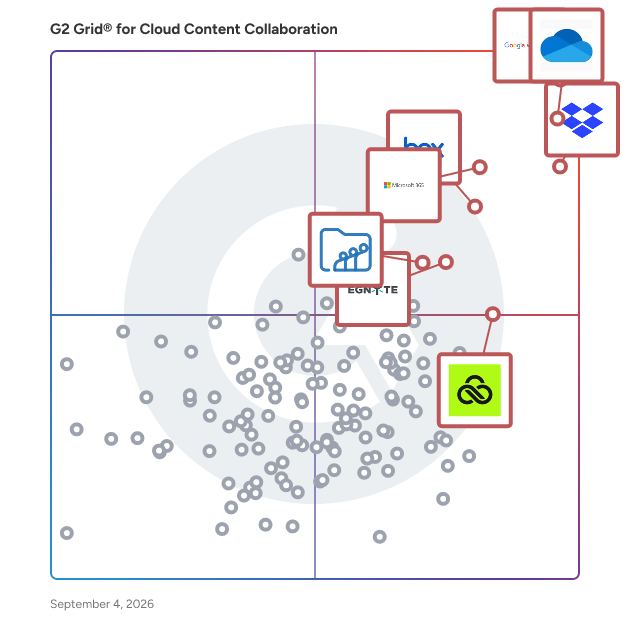
## G2 Grid® for Cloud Content Collaboration Software
![G2 Grid® for Cloud Content Collaboration Software plotting products by satisfaction and market presence](https://www.g2.com/categories/cloud-content-collaboration/grids.png?focus%5B%5D=1434&focus%5B%5D=1527&focus%5B%5D=326&focus%5B%5D=663&focus%5B%5D=287&focus%5B%5D=2083&focus%5B%5D=108736&focus%5B%5D=69702)
Highlighted products: Google Workspace, Microsoft OneDrive for Business, Dropbox, Microsoft 365, Box, Egnyte, LucidLink, and Zoho WorkDrive.
Underlying data: [Grid® JSON](https://www.g2.com/categories/cloud-content-collaboration/grids.json?focus%5B%5D=google-workspace&amp;focus%5B%5D=microsoft-onedrive-for-business&amp;focus%5B%5D=dropbox&amp;focus%5B%5D=microsoft365&amp;focus%5B%5D=box&amp;focus%5B%5D=egnyte&amp;focus%5B%5D=lucidlink&amp;focus%5B%5D=zoho-workdrive)


## How Many Cloud Content Collaboration Software Products Does G2 Track?
**Total Products under this Category:** 211

### Category Stats (Jul 2026)
- **Average Rating**: 4.35/5 (↓0.01 vs Jun 2026) The average rating of products in this category, based on all submitted ratings
- **Top Trending Product**: Sync.com (+5.02%) - Among all products in this category, Sync.com recorded the largest rating increase compared to last month
*Last updated: July 14, 2026*


## How Does G2 Rank Cloud Content Collaboration Software Products?

**Why You Can Trust G2's Software Rankings:**

- 30 Analysts and Data Experts
- 118,300+ Authentic Reviews
- 211+ Products
- Unbiased Rankings

G2's software rankings are built on verified user reviews, rigorous moderation, and a consistent research methodology maintained by a team of analysts and data experts. Each product is measured using the same transparent criteria, with no paid placement or vendor influence. While reviews reflect real user experiences, which can be subjective, they offer valuable insight into how software performs in the hands of professionals. Together, these inputs power the G2 Score, a standardized way to compare tools within every category.


## Which Cloud Content Collaboration Software Is Best for Your Use Case?

- **Leader:** [Google Workspace](https://www.g2.com/products/google-workspace/reviews)
- **Highest Performer:** [LucidLink](https://www.g2.com/products/lucidlink/reviews)
- **Easiest to Use:** [Air](https://www.g2.com/products/air-labs-inc-air/reviews)
- **Top Trending:** [Air](https://www.g2.com/products/air-labs-inc-air/reviews)
- **Best Free Software:** [Google Workspace](https://www.g2.com/products/google-workspace/reviews)


---

**Sponsored**

### Dynamo Software

Dynamo Software is the industry’s leading end‑to‑end AI powered alternative investment management platform centralizing, streamlining, and automating front-to-back-office investment operations. Dynamo’s full investment lifecycle covers deal management, investor relations, portfolio monitoring, fund accounting, research, and portfolio management in a single, secure platform. Dynamo v3.0 introduces an intelligent interface designed specifically for investment professionals. Powered by DynamoAI as the advanced core layer, the platform streamlines workflows by automating tasks such as document tagging, precise financial data extraction, conversational Q&amp;A across firm data, and relationship insights—all functioning effortlessly without relying on external tools. The unified platform supports private equity, venture capital, private credit, real estate, infrastructure, and fund of funds. Dynamo helps teams operate with greater efficiency, gain deeper insight into their investments and relationships, and make faster and more confident decisions at every stage of the investment lifecycle. Benefits of Dynamo: • Next-Gen Intelligent Dynamo v3.0 Interface: Built from the ground up based with AI and automation to optimize user experience, reducing clicks, accelerating onboarding, and driving faster, team-wide adoption. • AI-Driven, Built-In Expertise: DynamoAI enables auto-tagging, document summarization, financial data extraction, conversational Q&amp;A, and relationship scoring—all without the need for external services or tools. • Dynamo Blueprint: Expert-designed, pre-configured hubs, reports and layouts ready for immediate use. • Secure Investor Portal: Real-time engagement with configurable dashboards, electronic consent workflows for K-1s, and integrated data room—accessible on any device. • Multi-Asset Portfolio Management: Dynamo simplifies managing complex fund structures from automating capital calls, distributions, and waterfall calculations. • Dynamo Integration Ecosystem: Provides expansive integration capabilities with various data sources and third-party applications. • HoldingsInsight: White-glove service that collects, normalizes, and enriches underlying fund holdings by sector, region, and currency, pushing data directly into your Dynamo environment. • Enterprise-Grade Security: SOC 1/2/3-audited infrastructure, SAML/OAuth SSO, 2FA, encryption in transit and at rest, GAAP/ILPA/FATCA/GDPR compliance, regional hosting in NA, EMEA, APAC, UAE.


[Visit website](https://www.g2.com/external_clickthroughs/record?secure%5Bad_program%5D=ppc&amp;secure%5Bad_slot%5D=category_product_list&amp;secure%5Bcategory_id%5D=236&amp;secure%5Bchosen_at%5D=2026-07-14T10%3A07%3A02Z&amp;secure%5Bdisplayable_resource_id%5D=1123&amp;secure%5Bdisplayable_resource_type%5D=Category&amp;secure%5Bmedium%5D=sponsored&amp;secure%5Bplacement_reason%5D=retargeted_product&amp;secure%5Bplacement_resource_ids%5D%5B%5D=22252&amp;secure%5Bprioritized%5D=false&amp;secure%5Bproduct_id%5D=22252&amp;secure%5Bresource_id%5D=236&amp;secure%5Bresource_type%5D=Category&amp;secure%5Bsource_type%5D=category_page&amp;secure%5Bsource_url%5D=https%3A%2F%2Fwww.g2.com%2Fcategories%2Fcloud-content-collaboration%3FhsLang%3Den%26page%3D3&amp;secure%5Btoken%5D=106253c529afa36dfb44679626c23262582a439ad1871c01a568f8b433d823ae&amp;secure%5Burl%5D=https%3A%2F%2Fwww.dynamosoftware.com%2Fget-a-demo%2F%3Futm_source%3Dg2%26utm_medium%3Dcpc%26utm_campaign%3Dg2_paid_2026&amp;secure%5Burl_type%5D=book_demo)

---

## What Are the Top-Rated Cloud Content Collaboration Software Products in 2026?
### 1. [FileCap](https://www.g2.com/products/filecap/reviews)
FileCap is a secure file sharing software solution that enables organizations to send and receive sensitive files in a controlled, auditable, and compliant manner. It is designed for organizations that handle confidential or regulated information and require stronger security and oversight than standard email attachments or consumer file-sharing tools can provide. Organizations evaluating secure file sharing solutions can start a free trial of FileCap at https://trial.filecap.com/ to assess its suitability for their security and compliance requirements. FileCap belongs to the secure file transfer and secure file sharing software category. It is used by organizations that need to exchange documents with external parties while maintaining control over access, data retention, and compliance requirements such as the General Data Protection Regulation (GDPR). The product supports use cases where data protection, traceability, and accountability are essential parts of the file exchange process. Organizations commonly use FileCap to replace email-based file sharing, unsecured cloud storage links, or consumer-oriented transfer services. The software allows users to securely send files to external recipients and to receive sensitive documents from customers, partners, or citizens without exposing data to unnecessary risk. FileCap is often implemented in environments where files contain personal data, financial information, legal documents, or other confidential content.


**Average Rating:** 4.2/5.0
**Total Reviews:** 78
**How Do G2 Users Rate FileCap?**

- **Has the product been a good partner in doing business?:** 8.5/10 (Category avg: 8.8/10)
- **Performance and Reliability:** 8.8/10 (Category avg: 8.7/10)
- **File following:** 9.1/10 (Category avg: 8.7/10)
- **Device Syncing:** 8.2/10 (Category avg: 8.7/10)

**Who Is the Company Behind FileCap?**

- **Seller:** [Contec](https://www.g2.com/sellers/contec)
- **Year Founded:** 2012
- **HQ Location:** Enschede, Overijssel
- **Twitter:** @FileCapEN (1 Twitter followers)
- **LinkedIn® Page:** http://www.linkedin.com/company/filecap (8 employees on LinkedIn®)

**Who Uses This Product?**
- **Top Industries:** Information Technology and Services, Computer Software
- **Company Size:** 48% Small-Business, 33% Mid-Market


#### What Are FileCap's Pros and Cons?

**Pros:**

- Security (7 reviews)
- Ease of Use (5 reviews)
- Easy Setup (4 reviews)
- Large Files (4 reviews)
- Easy Upload (2 reviews)

**Cons:**

- Integration Difficulty (3 reviews)
- File Size (2 reviews)
- Slow Uploads (2 reviews)
- Lacking Features (1 reviews)
- Limited Customization (1 reviews)


### What Do G2 Reviewers Say About FileCap?
*AI-generated summary from verified user reviews*

**Pros:**

- Users value the **robust security features** of FileCap, ensuring safe transfers and protection of sensitive data.
- Users appreciate the **ease of use** of FileCap, enjoying straightforward setup and seamless integration into existing workflows.
- Users find the **initial setup easy** , allowing quick and straightforward access to secure file sharing functionalities.
- Users praise FileCap for its **ability to send large files up to 5TB securely** without email size restrictions.
- Users enjoy the **easy upload feature** of FileCap, appreciating its seamless integration and enhanced security for file sharing.

**Cons:**

- Users face **integration difficulties** , requiring extra steps and instructions for seamless use with Outlook and other systems.
- Users face **file size limitations** that hinder effective sharing, complicating the process for large file transfers.
- Users experience **slow uploads** , especially when network quality fluctuates, leading to frustration in file transfers.
- Users find the **lack of reporting and analytics** in FileCap to be a significant drawback for effective use.
- Users find the **limited customization** options in FileCap restrictive, impacting their notification and branding preferences.

#### What Are Recent G2 Reviews of FileCap?

**"[FileCap’s Outlook Add-in Makes Secure, GDPR-Friendly File Sharing Effortless](https://www.g2.com/survey_responses/filecap-review-12764836)"**

**Rating:** 4.5/5.0 stars
*— Alex K.*

[Read full review](https://www.g2.com/survey_responses/filecap-review-12764836)

---

**"[FileCap Makes Secure File Sharing and Team Collaboration Simple](https://www.g2.com/survey_responses/filecap-review-12864717)"**

**Rating:** 4.5/5.0 stars
*— Muzammil M.*

[Read full review](https://www.g2.com/survey_responses/filecap-review-12864717)

---


### 2. [Cloudup](https://www.g2.com/products/cloudup/reviews)
Cloudup is a file-sharing service that enables users to instantly share a wide array of content, including videos, photos, music, links, and documents. By simply dragging and dropping files, users can create streams and generate shareable links accessible to anyone, regardless of whether they have a Cloudup account. This seamless sharing experience is designed to be both intuitive and visually appealing for both the sender and the recipient. Key Features and Functionality: - Instant Sharing: Quickly share various types of content by creating streams and generating shareable links. - Cross-Platform Compatibility: Access and share content across web applications and native desktop apps for Mac (OSX 6 and higher) and Windows (XP, Vista, 7, 8, and 8). - Enhanced Desktop Features: Desktop applications offer additional functionalities such as screenshot auto-detection and directory uploading. - Generous Storage: Users receive 1,000 items for free, each up to 200MB, totaling up to 200GB of free storage space. Primary Value and User Solutions: Cloudup addresses the need for efficient and effortless file sharing by providing a platform that simplifies the process of distributing various types of content. Its user-friendly interface and cross-platform support ensure that users can share and access their files anytime, anywhere, without encountering compatibility issues. The generous free storage allocation allows users to manage and share substantial amounts of data without incurring additional costs. Overall, Cloudup enhances productivity and collaboration by streamlining the file-sharing process.


**Average Rating:** 4.6/5.0
**Total Reviews:** 63
**How Do G2 Users Rate Cloudup?**

- **Has the product been a good partner in doing business?:** 8.9/10 (Category avg: 8.8/10)
- **Performance and Reliability:** 8.9/10 (Category avg: 8.7/10)
- **File following:** 9.0/10 (Category avg: 8.7/10)
- **Device Syncing:** 9.2/10 (Category avg: 8.7/10)

**Who Is the Company Behind Cloudup?**

- **Seller:** [Cloudup](https://www.g2.com/sellers/cloudup)
- **Year Founded:** 2013
- **HQ Location:** San Francisco, US
- **Twitter:** @Cloudup (2,667 Twitter followers)
- **LinkedIn® Page:** https://www.linkedin.com/company/cloudup/ (1 employees on LinkedIn®)

**Who Uses This Product?**
- **Top Industries:** Computer Software, Information Technology and Services
- **Company Size:** 48% Small-Business, 34% Mid-Market


#### What Are Cloudup's Pros and Cons?

**Pros:**

- Ease of Use (5 reviews)
- File Sharing (5 reviews)
- Easy Collaboration (4 reviews)
- Seamless Integration (3 reviews)
- Cloud Storage (1 reviews)

**Cons:**

- Lacking Features (6 reviews)
- Limited Functionality (4 reviews)
- Poor Customer Support (4 reviews)
- Integration Difficulty (3 reviews)
- Slow Performance (3 reviews)


### What Do G2 Reviewers Say About Cloudup?
*AI-generated summary from verified user reviews*

**Pros:**

- Users love the **ease of use** with Cloudup, making file sharing and collaboration effortless and quick.
- Users love Cloudup for its **instant file sharing** , making collaboration and file sending fast and effortless.
- Users love the **effortless collaboration** with Cloudup, enjoying its simplicity and quick file-sharing capabilities.
- Users love the **seamless integration** of Cloudup, enhancing daily routines with effortless file sharing and collaboration.
- Users appreciate the **fast navigation and functional features** of Cloudup, enhancing productivity and integration capabilities.

**Cons:**

- Users note the **limited collaboration features** of Cloudup, finding it lacking compared to specialized tools and integrations.
- Users find Cloudup&#39;s **limited functionality** restricts advanced collaboration and larger file handling, hindering complex project workflows.
- Users experience **poor customer support** with Cloudup, citing slow response times and limited assistance when needed.
- Users find **integration difficulty** with Cloudup frustrating, wishing for better compatibility with essential productivity tools.
- Users often face **slow performance** with Cloudup, particularly during large file uploads, which can hinder productivity.

#### What Are Recent G2 Reviews of Cloudup?

**"[Effortless Daily File Sharing with a Clean, Reliable Experience](https://www.g2.com/survey_responses/cloudup-review-12408055)"**

**Rating:** 5.0/5.0 stars
*— Dharmik V.*

[Read full review](https://www.g2.com/survey_responses/cloudup-review-12408055)

---

**"[Smooth Drag-and-Drop Uploads with Fast, Clean Sharing Links](https://www.g2.com/survey_responses/cloudup-review-12823010)"**

**Rating:** 4.0/5.0 stars
*— Ninad J.*

[Read full review](https://www.g2.com/survey_responses/cloudup-review-12823010)

---


#### What Are G2 Users Discussing About Cloudup?

- [What is Cloudup used for?](https://www.g2.com/discussions/what-is-cloudup-used-for) - 1 comment

### 3. [Revver](https://www.g2.com/products/revver/reviews)
Revver (formerly eFileCabinet) is an AI-powered document management and workflow automation platform that helps organizations streamline, secure, and accelerate their document-centric work. New Revver users get unlimited storage and unlimited use of Revver AI Smart Suite in all license tiers. Designed for industries like finance, insurance, government, and manufacturing, Revver empowers teams to automate up to 80% of repetitive document processes—from intake to approval—boosting productivity and reducing manual effort. With Revver, businesses can: ✷ Organize and retrieve documents instantly through intelligent indexing and search powered by Smart Extract AI, capable of reading diverse file types including scans and handwritten forms. ✷ Automate workflows and approvals with no-code tools that route documents, assign tasks, and enforce compliance rules—helping teams work up to 70% faster than with manual systems. ✷ Share files securely through custom-branded client portals and encrypted email links, maintaining complete audit trails and permissions control. ✷ Simplify compliance with built-in retention schedules, legal holds, audit logs, and SOC 2 Type II and ISO 27001 certified infrastructure. ✷Accelerate signatures and forms with integrated eSignature and fillable form templates that eliminate third-party tools and versioning confusion. Accessible via any web browser or desktop app, Revver enables teams to collaborate securely from anywhere—backed by a U.S.-based customer success team and guided onboarding that delivers fast ROI, often within the first 90 days. With over 2 billion data points processed and 1 million+ workflows automated, Revver helps growing organizations turn their documents into a strategic advantage—working smarter, not harder.


**Average Rating:** 4.3/5.0
**Total Reviews:** 390
**How Do G2 Users Rate Revver?**

- **Has the product been a good partner in doing business?:** 8.8/10 (Category avg: 8.8/10)
- **Performance and Reliability:** 8.4/10 (Category avg: 8.7/10)
- **File following:** 8.7/10 (Category avg: 8.7/10)
- **Device Syncing:** 8.6/10 (Category avg: 8.7/10)

**Who Is the Company Behind Revver?**

- **Seller:** [Revver](https://www.g2.com/sellers/revver)
- **Company Website:** https://www.revverdocs.com/
- **Year Founded:** 2001
- **HQ Location:** Lehi, UT
- **Twitter:** @RevverDocs (5,199 Twitter followers)
- **LinkedIn® Page:** https://www.linkedin.com/company/125605/ (93 employees on LinkedIn®)

**Who Uses This Product?**
- **Who Uses This:** Owner, President
- **Top Industries:** Accounting, Financial Services
- **Company Size:** 67% Small-Business, 30% Mid-Market


#### What Are Revver's Pros and Cons?

**Pros:**

- Document Management (10 reviews)
- Ease of Use (10 reviews)
- Time Efficiency (6 reviews)
- Automation (5 reviews)
- Convenience (5 reviews)

**Cons:**

- Slow Loading (6 reviews)
- Slow Performance (6 reviews)
- Inefficient Searching (4 reviews)
- Mobile App Issues (4 reviews)
- Mobile Limitations (4 reviews)


### What Do G2 Reviewers Say About Revver?
*AI-generated summary from verified user reviews*

**Pros:**

- Users appreciate the **efficient document organization** of Revver, enhancing accessibility and streamlining collaboration effectively.
- Users value the **ease of use** with Revver, appreciating quick setup and seamless document management features.
- Users appreciate the **time efficiency** of Revver, enabling quick access and streamlined management of documents.
- Users love Revver&#39;s **effective automation** , streamlining workflows and ensuring seamless document management for enhanced productivity.
- Users enjoy the **convenience** of Revver, with easy setup and efficient organization for seamless content management.

**Cons:**

- Users find the **slow loading times** frustrating, especially with large files or on mobile devices.
- Users find Revver to have **slow performance** , particularly with large files and in the desktop companion app.
- Users express frustration with **inefficient searching** , as strict metadata and query requirements lead to lost files.
- Users struggle with **mobile app issues** , including inefficiency, slow performance, and lack of customization options.
- Users are frustrated by **mobile limitations** of Revver, citing slow performance and poor app support as major concerns.

#### What Are Recent G2 Reviews of Revver?

**"[Intuitive Document Workflows with Promising Automation and AI Extraction](https://www.g2.com/survey_responses/revver-review-13072973)"**

**Rating:** 4.5/5.0 stars
*— Harrison T.*

[Read full review](https://www.g2.com/survey_responses/revver-review-13072973)

---

**"[Revver’s No-Code Automation and eSignature Made Our Document Workflows Fast](https://www.g2.com/survey_responses/revver-review-13069940)"**

**Rating:** 4.0/5.0 stars
*— Rachel  S.*

[Read full review](https://www.g2.com/survey_responses/revver-review-13069940)

---


### 4. [ownCloud](https://www.g2.com/products/owncloud/reviews)
ownCloud is the open platform for more productivity and security in digital collaboration. ownCloud offers a solution to organizations that need to share confidential data internally and externally. The open platform offers better productivity and security within digital collaboration, and enables users to access data no matter where it is stored or which device is being used.


**Average Rating:** 4.3/5.0
**Total Reviews:** 236
**How Do G2 Users Rate ownCloud?**

- **Has the product been a good partner in doing business?:** 8.5/10 (Category avg: 8.8/10)
- **Performance and Reliability:** 8.2/10 (Category avg: 8.7/10)
- **File following:** 8.3/10 (Category avg: 8.7/10)
- **Device Syncing:** 8.7/10 (Category avg: 8.7/10)

**Who Is the Company Behind ownCloud?**

- **Seller:** [ownCloud](https://www.g2.com/sellers/owncloud)
- **Year Founded:** 2011
- **HQ Location:** Nuremberg, Germany
- **Twitter:** @ownCloud (13,096 Twitter followers)
- **LinkedIn® Page:** https://www.linkedin.com/company/2471232/ (33 employees on LinkedIn®)

**Who Uses This Product?**
- **Who Uses This:** Software Engineer, Owner
- **Top Industries:** Information Technology and Services, Computer Software
- **Company Size:** 54% Small-Business, 34% Mid-Market


#### What Are ownCloud's Pros and Cons?

**Pros:**

- Ease of Use (12 reviews)
- Security (9 reviews)
- Data Security (6 reviews)
- Reliability (4 reviews)
- Data Management (3 reviews)

**Cons:**

- Difficult Setup (8 reviews)
- Lacking Features (4 reviews)
- Slow Performance (4 reviews)
- Training Required (4 reviews)
- User Interface Issues (4 reviews)


### What Do G2 Reviewers Say About ownCloud?
*AI-generated summary from verified user reviews*

**Pros:**

- Users find ownCloud **easy to use** , appreciating its user-friendly interface and quick setup for secure file management.
- Users value the **strong security features** of ownCloud, offering privacy and full control over data management.
- Users appreciate the **strong focus on data privacy** and security of ownCloud, ensuring compliance and control over sensitive data.
- Users value the **reliability** of ownCloud for secure and fast file syncing across all their devices.
- Users appreciate the **strong focus on data privacy and security** that ownCloud provides, offering full control over their files.

**Cons:**

- Users find the **difficult setup** of ownCloud challenging, especially for those lacking technical expertise.
- Users find ownCloud **lacking features** such as automatic photo categorization and a polished, beginner-friendly interface.
- Users experience **slow performance** when syncing large folders, which can hinder usability and productivity on ownCloud.
- Users find the **initial setup complex** , particularly for those without technical expertise, hindering an easy start with ownCloud.
- Users face **user interface issues** with ownCloud, as it can be less intuitive and requires technical know-how for setup.

#### What Are Recent G2 Reviews of ownCloud?

**"[Secure, Reliable File Sharing with Full Control in ownCloud](https://www.g2.com/survey_responses/owncloud-review-13037699)"**

**Rating:** 5.0/5.0 stars
*— HAMZA N.*

[Read full review](https://www.g2.com/survey_responses/owncloud-review-13037699)

---

**"[A self-hosted file platform I trust with regulated data, operational rough edges and all](https://www.g2.com/survey_responses/owncloud-review-12852824)"**

**Rating:** 4.5/5.0 stars
*— Luca P.*

[Read full review](https://www.g2.com/survey_responses/owncloud-review-12852824)

---


#### What Are G2 Users Discussing About ownCloud?

- [What is ownCloud used for?](https://www.g2.com/discussions/what-is-owncloud-used-for) - 2 comments, 1 upvote
- [How do I host my ownCloud?](https://www.g2.com/discussions/how-do-i-host-my-owncloud)
- [How much does ownCloud cost?](https://www.g2.com/discussions/how-much-does-owncloud-cost) - 1 comment, 1 upvote
- [Which software used for creating own cloud?](https://www.g2.com/discussions/which-software-used-for-creating-own-cloud)
- [What can you do with ownCloud?](https://www.g2.com/discussions/what-can-you-do-with-owncloud) - 1 comment, 1 upvote

### 5. [FileCloud](https://www.g2.com/products/filecloud/reviews)
FileCloud is a hyper-secure EFSS (enterprise file sync and share) platform that provides industry leading compliance, data governance, data leak protection, data retention and digital rights management capabilities. Workflow automation and granular control of content sharing across most enterprise platforms is fully integrated into the complete EFSS stack. FileCloud is a leader in content governance and collaboration for unstructured data, trusted and used worldwide across Global 1000 enterprises, educational institutions, government organizations, and service providers. Granular control of content sharing is fully integrated into the stack through comprehensive audit logs and access permissions, and the Compliance Center helps with regulations like GDPR, HIPAA, and NIST 800-171 (among others). FileCloud also provides Zero Trust File Sharing® an industry-first innovation that allows users to share sensitive data via an encrypted zip file that cannot be accessed by unauthorized users, even in the event of a data breach. FileCloud helps customers solve complex challenges in enterprise file sharing, privacy, compliance automation and governance across public, private, and hybrid cloud environments. In addition to its enterprise file sharing solution, FileCloud’s product portfolio also includes Signority (acquired in May 2024), a Canadian-based e-signature and document workflow platform.


**Average Rating:** 4.5/5.0
**Total Reviews:** 173
**How Do G2 Users Rate FileCloud?**

- **Has the product been a good partner in doing business?:** 9.1/10 (Category avg: 8.8/10)
- **Performance and Reliability:** 9.1/10 (Category avg: 8.7/10)
- **File following:** 8.9/10 (Category avg: 8.7/10)
- **Device Syncing:** 8.5/10 (Category avg: 8.7/10)

**Who Is the Company Behind FileCloud?**

- **Seller:** [FileCloud](https://www.g2.com/sellers/filecloud)
- **Year Founded:** 2016
- **HQ Location:** New York City, NY
- **Twitter:** @getfilecloud (1,456 Twitter followers)
- **LinkedIn® Page:** https://www.linkedin.com/company/codelathe/ (125 employees on LinkedIn®)

**Who Uses This Product?**
- **Top Industries:** Information Technology and Services, Construction
- **Company Size:** 44% Small-Business, 43% Mid-Market


#### What Are FileCloud's Pros and Cons?

**Pros:**

- Ease of Use (17 reviews)
- Security (15 reviews)
- Sharing (13 reviews)
- Data Storage (10 reviews)
- Seamless Integration (8 reviews)

**Cons:**

- Training Required (12 reviews)
- Difficult Configuration (10 reviews)
- Learning Curve (6 reviews)
- Interface Issues (5 reviews)
- Permission Issues (5 reviews)


### What Do G2 Reviewers Say About FileCloud?
*AI-generated summary from verified user reviews*

**Pros:**

- Users find FileCloud&#39;s **ease of use** exceptional, facilitating smooth navigation and quick implementation for their teams.
- Users appreciate the **strong security and control** features of FileCloud, ensuring data protection and flexible file sharing.
- Users appreciate the **easy and flexible file sharing** with FileCloud, allowing secure control over access and permissions.
- Users value the **full data control** of FileCloud, appreciating its strong security and flexible file sharing capabilities.
- Users value the **seamless integration** of FileCloud, enhancing workflow and making file sharing easy within existing systems.

**Cons:**

- Users find **training required** for FileCloud challenging, especially during initial setup and for those less tech-savvy.
- Users find the **difficult configuration** of FileCloud challenging, especially during initial setup and managing permissions.
- Users find the **learning curve steep** , with setup and permissions feeling complex and less intuitive for newcomers.
- Users often experience **interface issues** with FileCloud, finding it complex and occasionally clunky compared to other apps.
- Users often struggle with **permission issues** in FileCloud, leading to confusion during setup and access management.

#### What Are Recent G2 Reviews of FileCloud?

**"[Customizable and Secure File Sharing Solution](https://www.g2.com/survey_responses/filecloud-review-12816666)"**

**Rating:** 4.0/5.0 stars
*— raj p.*

[Read full review](https://www.g2.com/survey_responses/filecloud-review-12816666)

---

**"[Managing Healthcare Documents and Wellness Files More Smoothly](https://www.g2.com/survey_responses/filecloud-review-12865813)"**

**Rating:** 5.0/5.0 stars
*— Ishan S.*

[Read full review](https://www.g2.com/survey_responses/filecloud-review-12865813)

---


#### What Are G2 Users Discussing About FileCloud?

- [Does FileCloud work in China?](https://www.g2.com/discussions/does-filecloud-work-in-china) - 1 comment
- [Is FileCloud safe?](https://www.g2.com/discussions/is-filecloud-safe) - 2 comments
- [Is FileCloud free?](https://www.g2.com/discussions/is-filecloud-free) - 3 comments
- [How good is FileCloud?](https://www.g2.com/discussions/how-good-is-filecloud) - 2 comments

### 6. [AvePoint Confidence Platform](https://www.g2.com/products/avepoint-confidence-platform/reviews)
AvePoint is the global leader in data protection, unifying data security, governance, and resilience to provide a trusted foundation for AI. More than 28,000 customers rely on the AvePoint Confidence Platform to secure, govern, and rapidly recover data across Microsoft, Google, Salesforce, and other cloud environments. With a single platform for lifecycle control, multicloud governance, and rapid recovery paired with clear ownership across the business, we prevent overexposure and sprawl, modernize legacy and fragmented data, and minimize data loss and interruption. Our global partner ecosystem includes approximately 6,000 MSPs, VARs, and SIs, and our solutions are available in over 100 cloud marketplaces. To learn more, visit www.avepoint.com.


**Average Rating:** 4.5/5.0
**Total Reviews:** 115
**How Do G2 Users Rate AvePoint Confidence Platform?**

- **Has the product been a good partner in doing business?:** 9.0/10 (Category avg: 8.8/10)
- **Performance and Reliability:** 10.0/10 (Category avg: 8.7/10)
- **File following:** 10.0/10 (Category avg: 8.7/10)
- **Device Syncing:** 10.0/10 (Category avg: 8.7/10)

**Who Is the Company Behind AvePoint Confidence Platform?**

- **Seller:** [AvePoint](https://www.g2.com/sellers/avepoint)
- **Company Website:** https://www.avepoint.com/
- **Year Founded:** 2001
- **HQ Location:**  Jersey City, NJ
- **Twitter:** @AvePoint (9,747 Twitter followers)
- **LinkedIn® Page:** https://www.linkedin.com/company/46024/ (2,662 employees on LinkedIn®)

**Who Uses This Product?**
- **Top Industries:** Information Technology and Services, Computer Software
- **Company Size:** 42% Mid-Market, 28% Small-Business


#### What Are AvePoint Confidence Platform's Pros and Cons?

**Pros:**

- Ease of Use (63 reviews)
- Cloud Backup (29 reviews)
- Backup Frequency (25 reviews)
- Security (25 reviews)
- Easy Setup (22 reviews)

**Cons:**

- Expensive (12 reviews)
- Backup Issues (10 reviews)
- Poor Customer Support (9 reviews)
- Slow Performance (9 reviews)
- Technical Issues (9 reviews)


### What Do G2 Reviewers Say About AvePoint Confidence Platform?
*AI-generated summary from verified user reviews*

**Pros:**

- Users find the **ease of implementation and administration** of AvePoint Confidence Platform a significant advantage for their needs.
- Users value the **ease of use and comprehensive backup** features of AvePoint Confidence Platform for effortless cloud data management.
- Users appreciate the **flexible backup frequency** options on AvePoint Confidence Platform, ensuring seamless data protection tailored to their needs.
- Users value the **strong security and data protection** features of AvePoint Confidence Platform for comprehensive SaaS management.
- Users value the **easy setup** of AvePoint Confidence Platform, facilitating smooth implementation and management.

**Cons:**

- Users find the **expensive licensing bundles** of AvePoint Confidence Platform challenging, especially with additional costs over time.
- Users experience frustrating **backup issues** with inconsistent data restoration and sluggish performance due to frequent security scans.
- Users experience **poor customer support** , with slow response times and difficulties in reaching out for assistance.
- Users experience **slow performance** with data retrieval, making it challenging for new IT staff to navigate effectively.
- Users report **technical issues** like incomplete backups and delayed notifications for connection errors impacting user experience.

#### What Are Recent G2 Reviews of AvePoint Confidence Platform?

**"[All-in-One SaaS Data Protection, Governance &amp; Compliance Made Easy](https://www.g2.com/survey_responses/avepoint-confidence-platform-review-12348858)"**

**Rating:** 5.0/5.0 stars
*— Stefan N.*

[Read full review](https://www.g2.com/survey_responses/avepoint-confidence-platform-review-12348858)

---

**"[Reliable Backups and Seamless Restores](https://www.g2.com/survey_responses/avepoint-confidence-platform-review-12366631)"**

**Rating:** 4.5/5.0 stars
*— Josh U.*

[Read full review](https://www.g2.com/survey_responses/avepoint-confidence-platform-review-12366631)

---


#### What Are G2 Users Discussing About AvePoint Confidence Platform?

- [What is AvePoint Cloud Backup used for?](https://www.g2.com/discussions/what-is-avepoint-cloud-backup-used-for) - 1 comment

### 7. [Digiboxx](https://www.g2.com/products/digiboxx/reviews)
DigiBoxx is a SaaS start-up that provides a digital storage and asset management platform for individuals, gig workers, SMBs, and corporates. It is a Made-in-India service that is intuitive, secure and enables efficient collaboration. Since its inception in 2020, DigiBoxx has won over 1 Million hearts with its competitive pricing plans for individuals and customizable packages for SMBs and corporates.


**Average Rating:** 4.1/5.0
**Total Reviews:** 87
**How Do G2 Users Rate Digiboxx?**

- **Has the product been a good partner in doing business?:** 7.5/10 (Category avg: 8.8/10)
- **Performance and Reliability:** 7.9/10 (Category avg: 8.7/10)
- **File following:** 8.0/10 (Category avg: 8.7/10)
- **Device Syncing:** 8.2/10 (Category avg: 8.7/10)

**Who Is the Company Behind Digiboxx?**

- **Seller:** [Digiboxx](https://www.g2.com/sellers/digiboxx-cf9f457c-c78b-46c8-aaa6-84131d57f307)
- **Year Founded:** 2013
- **HQ Location:** Mumbai, Maharashtra
- **Twitter:** @TheDigiboxx (1,221 Twitter followers)
- **LinkedIn® Page:** https://www.linkedin.com/company/digiboxx/ (37 employees on LinkedIn®)

**Who Uses This Product?**
- **Top Industries:** Computer Games, Computer Software
- **Company Size:** 58% Small-Business, 24% Mid-Market


#### What Are Digiboxx's Pros and Cons?

**Pros:**

- Ease of Use (11 reviews)
- Easy Setup (8 reviews)
- Security (6 reviews)
- Easy Access (4 reviews)
- Cloud Storage (3 reviews)

**Cons:**

- Slow Loading (3 reviews)
- Slow Uploads (3 reviews)
- Inconvenience (2 reviews)
- Limited Functionality (2 reviews)
- Poor Customer Support (2 reviews)


### What Do G2 Reviewers Say About Digiboxx?
*AI-generated summary from verified user reviews*

**Pros:**

- Users enjoy the **user-friendly interface** of Digiboxx, making file management and storage easy and efficient.
- Users value the **easy setup** of Digiboxx, enabling quick and straightforward access to their secure data storage.
- Users appreciate the **robust security features** of Digiboxx, including encryption and two-factor authentication for data protection.
- Users value Digiboxx for its **easy access** to documents and seamless integration across devices, enhancing productivity.
- Users appreciate the **secure and user-friendly cloud storage** of Digiboxx, making file management effortless and safe.

**Cons:**

- Users find the **slow loading** times frustrating, affecting their overall experience with Digiboxx.
- Users often experience **slow uploads** on mobile, making document saving time-consuming and frustrating.
- Users find the **frequent login requirement inconvenient** , desiring a simpler, more user-friendly experience.
- Users find the **limited functionality** of Digiboxx restricts smooth workflows and creates a subpar user experience.
- Users express frustration with **poor customer support** , citing unresponsive service and unresolved issues over extended periods.

#### What Are Recent G2 Reviews of Digiboxx?

**"[Digiboxx : A Complete Breakdown](https://www.g2.com/survey_responses/digiboxx-review-12717067)"**

**Rating:** 4.5/5.0 stars
*— Prathmesh S.*

[Read full review](https://www.g2.com/survey_responses/digiboxx-review-12717067)

---

**"[Keeping Professional Records, Reports, and Content Files Better Arranged](https://www.g2.com/survey_responses/digiboxx-review-12863431)"**

**Rating:** 4.5/5.0 stars
*— Ishan S.*

[Read full review](https://www.g2.com/survey_responses/digiboxx-review-12863431)

---


#### What Are G2 Users Discussing About Digiboxx?

- [What is Digiboxx used for?](https://www.g2.com/discussions/what-is-digiboxx-used-for) - 1 comment

### 8. [EasiShare](https://www.g2.com/products/easishare/reviews)
EasiShare is a secure enterprise file management solution designed to enable corporate users to send large files, back up desktop files, and share and sync contents across desktops, web and mobiles. EasiShare aims to provide corporate IT with the controls to manage users and devices without compromising data security.


**Average Rating:** 4.6/5.0
**Total Reviews:** 12
**How Do G2 Users Rate EasiShare?**

- **Has the product been a good partner in doing business?:** 9.7/10 (Category avg: 8.8/10)
- **Performance and Reliability:** 8.5/10 (Category avg: 8.7/10)
- **File following:** 8.7/10 (Category avg: 8.7/10)
- **Device Syncing:** 9.2/10 (Category avg: 8.7/10)

**Who Is the Company Behind EasiShare?**

- **Seller:** [EasiShare](https://www.g2.com/sellers/easishare)
- **Year Founded:** 2000
- **HQ Location:** Toa Payoh, Singapore
- **LinkedIn® Page:** https://www.linkedin.com/showcase/easishare/about/

**Who Uses This Product?**
- **Company Size:** 38% Mid-Market, 38% Small-Business


#### What Are Recent G2 Reviews of EasiShare?

**"[The best file sharing tool in the Market](https://www.g2.com/survey_responses/easishare-review-8981852)"**

**Rating:** 4.5/5.0 stars
*— shivam j.*

[Read full review](https://www.g2.com/survey_responses/easishare-review-8981852)

---

**"[Let&#39;s secure the Data](https://www.g2.com/survey_responses/easishare-review-8940288)"**

**Rating:** 5.0/5.0 stars
*— Dhawlandra S.*

[Read full review](https://www.g2.com/survey_responses/easishare-review-8940288)

---


### 9. [FilesAnywhere](https://www.g2.com/products/filesanywhere/reviews)
FilesAnywhere is a secure cloud file storage, sharing, and collaboration platform designed for businesses that need control, flexibility, and compliance. Offered by FilesAnywhere, it enables organizations to store, manage, and access files from anywhere while maintaining strict security standards. The platform supports secure file sharing through links, email, and user permissions, making it easy to collaborate internally and externally without compromising sensitive data. With features like automated workflows, eForms, and cloud synchronization, FilesAnywhere helps streamline business processes and reduce manual tasks. Security is a core focus, with options for encryption, audit trails, and compliance with industry regulations such as HIPAA and GDPR. Businesses can choose from cloud-hosted, private cloud, or on-premise deployments, giving them full control over where and how their data is stored. FilesAnywhere also integrates with tools like Outlook and offers mobile and desktop access, ensuring users can stay productive across devices. Its scalability makes it suitable for small teams as well as large enterprises needing customized file management solutions. Overall, FilesAnywhere provides a reliable, secure, and flexible platform for managing and sharing files, helping organizations improve efficiency while maintaining full data control.


**Average Rating:** 4.3/5.0
**Total Reviews:** 72
**How Do G2 Users Rate FilesAnywhere?**

- **Has the product been a good partner in doing business?:** 9.0/10 (Category avg: 8.8/10)
- **Performance and Reliability:** 9.0/10 (Category avg: 8.7/10)
- **File following:** 8.9/10 (Category avg: 8.7/10)
- **Device Syncing:** 8.8/10 (Category avg: 8.7/10)

**Who Is the Company Behind FilesAnywhere?**

- **Seller:** [FilesAnywhere](https://www.g2.com/sellers/filesanywhere)
- **Year Founded:** 1999
- **HQ Location:** Bedford, Texas
- **Twitter:** @FilesAnywhere (9,960 Twitter followers)
- **LinkedIn® Page:** https://www.linkedin.com/company/1531305/ (14 employees on LinkedIn®)

**Who Uses This Product?**
- **Top Industries:** Information Technology and Services, Marketing and Advertising
- **Company Size:** 43% Small-Business, 40% Mid-Market


#### What Are FilesAnywhere's Pros and Cons?

**Pros:**

- File Sharing (5 reviews)
- Cloud Storage (3 reviews)
- Ease of Use (3 reviews)
- Simplicity (3 reviews)
- Security (2 reviews)

**Cons:**

- Expensive (1 reviews)
- Lacking Features (1 reviews)
- Limited Functionality (1 reviews)
- Limited Storage (1 reviews)
- Link Issues (1 reviews)


### What Do G2 Reviewers Say About FilesAnywhere?
*AI-generated summary from verified user reviews*

**Pros:**

- Users value the **flexible file sharing** capabilities of FilesAnywhere, enabling seamless collaboration and organization without complications.
- Users value the **flexible access** FilesAnywhere offers, enabling seamless collaboration and efficient task management.
- Users appreciate the **ease of use** of FilesAnywhere, finding it simple to learn and enhancing their efficiency.
- Users value the **simplicity** of FilesAnywhere, finding it easy to store and share files without complications.
- Users value the **strong security features** of FilesAnywhere, ensuring peace of mind for their sensitive data.

**Cons:**

- Users find the **pricing higher** than other consumer options, making it less accessible for many.
- Users feel that some features of FilesAnywhere are **dated compared to newer cloud services** , impacting overall satisfaction.
- Users feel that the **limited functionality** due to outdated interface and storage restrictions on lower tiers hampers usability.
- Users find the **limited storage** options on lower tiers restrict functionality and hinder overall usability.
- Users experience frequent **link issues** with FilesAnywhere, causing app crashes during the file sharing setup.

#### What Are Recent G2 Reviews of FilesAnywhere?

**"[Secure File Sharing and Better Storage Organization for Healthcare Workflows](https://www.g2.com/survey_responses/filesanywhere-review-12868585)"**

**Rating:** 4.5/5.0 stars
*— Ishan S.*

[Read full review](https://www.g2.com/survey_responses/filesanywhere-review-12868585)

---

**"[Enterprise-Grade Security and Seamless File Sharing for Effortless Collaboration](https://www.g2.com/survey_responses/filesanywhere-review-12754441)"**

**Rating:** 5.0/5.0 stars
*— Yaswanth S.*

[Read full review](https://www.g2.com/survey_responses/filesanywhere-review-12754441)

---


#### What Are G2 Users Discussing About FilesAnywhere?

- [What is FilesAnywhere used for?](https://www.g2.com/discussions/what-is-filesanywhere-used-for) - 3 comments

### 10. [Seafile](https://www.g2.com/products/seafile/reviews)
Seafile is an open-source workspace where you can save, organize, and collaborate on your files and documents. From essential features like file syncing and sharing, to advanced capabilities such as extensible metadata management, multi-level tagging and AI-powered file organization, it offers numerous possibilities to enhance your file workflow. It offers both cloud-based and self-hosted deployment options to meet different data management and security needs. Key Features of Seafile: Cross-Platform Syncing and Sharing: Seafile enables seamless file syncing and access across Windows, Mac, Linux, iOS, and Android devices through native clients, supporting cross-device collaboration. Efficient File Organization: Teams can organize files using custom properties, flexible views (table, kanban, gallery, map), and multi-level tagging, improving file management efficiency and accessibility. AI-Driven File Management: Seafile integrates AI to automate tasks like generating tags, descriptions, and extracting file details, enhancing the speed and accuracy of file organization and search. Document and Knowledge: Seafile is not only a file storage solution; it also includes SeaDoc for document collaboration, Wiki for knowledge management, and Excalidraw for brainstorming and diagramming.


**Average Rating:** 4.3/5.0
**Total Reviews:** 55
**How Do G2 Users Rate Seafile?**

- **Has the product been a good partner in doing business?:** 8.6/10 (Category avg: 8.8/10)
- **Performance and Reliability:** 9.3/10 (Category avg: 8.7/10)
- **File following:** 8.8/10 (Category avg: 8.7/10)
- **Device Syncing:** 8.8/10 (Category avg: 8.7/10)

**Who Is the Company Behind Seafile?**

- **Seller:** [Seafile](https://www.g2.com/sellers/seafile)
- **Year Founded:** 2012
- **HQ Location:** Beijing, CN
- **Twitter:** @Seafile (2,256 Twitter followers)
- **LinkedIn® Page:** https://www.linkedin.com/company/15171562/ (8 employees on LinkedIn®)

**Who Uses This Product?**
- **Top Industries:** Information Technology and Services, Computer Software
- **Company Size:** 53% Small-Business, 26% Mid-Market


#### What Are Seafile's Pros and Cons?

**Pros:**

- Reliability (8 reviews)
- Ease of Use (5 reviews)
- Security (4 reviews)
- Large Files (3 reviews)
- Data Management (2 reviews)

**Cons:**

- Lacking Features (5 reviews)
- Limited Functionality (5 reviews)
- Integration Difficulty (4 reviews)
- Training Required (4 reviews)
- Inconvenience (1 reviews)


### What Do G2 Reviewers Say About Seafile?
*AI-generated summary from verified user reviews*

**Pros:**

- Users appreciate the **fast and reliable syncing** of Seafile, making file management effortless and efficient.
- Users praise Seafile for its **ease of use** , simplifying organization and access to files without unnecessary complexity.
- Users value Seafile&#39;s **strong focus on security** , enabling reliable file syncing and privacy with self-hosting options.
- Users commend Seafile for its **fast and reliable large file syncing** , enhancing efficiency and version control for all tasks.
- Users appreciate the **fast and reliable syncing** of Seafile, enjoying effortless data management across devices.

**Cons:**

- Users note the **limited built-in features** of Seafile, highlighting a need for improvements to enhance usability.
- Users find Seafile&#39;s **limited functionality** a challenge, wishing for improved features and a more user-friendly experience.
- Users find the **integration difficulty** with third-party apps restrictive, complicating their overall experience with Seafile.
- Users note that **training is required** for Seafile&#39;s advanced features, posing a challenge for some less experienced users.
- Users find the **complex setup and limited features** of Seafile to be inconvenient and time-consuming.

#### What Are Recent G2 Reviews of Seafile?

**"[GDPR-Compliant File Sharing with Great Permission Controls](https://www.g2.com/survey_responses/seafile-review-13064366)"**

**Rating:** 4.0/5.0 stars
*— Verified User in Human Resources*

[Read full review](https://www.g2.com/survey_responses/seafile-review-13064366)

---

**"[Managing Healthcare Files and Educational Resources Feels More Organized](https://www.g2.com/survey_responses/seafile-review-12879230)"**

**Rating:** 4.5/5.0 stars
*— Ishan S.*

[Read full review](https://www.g2.com/survey_responses/seafile-review-12879230)

---


#### What Are G2 Users Discussing About Seafile?

- [Is Seafile opensource?](https://www.g2.com/discussions/is-seafile-opensource) - 1 comment
- [How secure is Seafile?](https://www.g2.com/discussions/how-secure-is-seafile)
- [What is Seafile client?](https://www.g2.com/discussions/what-is-seafile-client)
- [What does Seafile do?](https://www.g2.com/discussions/what-does-seafile-do) - 1 comment

### 11. [BlackBerry UEM](https://www.g2.com/products/blackberry-uem/reviews)
BlackBerry UEM is a suite of solutions that all rely on the same foundation of security to secure the digital workplace. It keeps employees productive on any device, anywhere, while allowing your security team to manage diverse devices, ensure data security, support remote work, and reduce operational costs. Gain comprehensive control, enhance security, and streamline your IT operations.


**Average Rating:** 3.8/5.0
**Total Reviews:** 363
**How Do G2 Users Rate BlackBerry UEM?**

- **Has the product been a good partner in doing business?:** 7.8/10 (Category avg: 8.8/10)
- **Performance and Reliability:** 7.4/10 (Category avg: 8.7/10)
- **File following:** 8.3/10 (Category avg: 8.7/10)
- **Device Syncing:** 8.2/10 (Category avg: 8.7/10)

**Who Is the Company Behind BlackBerry UEM?**

- **Seller:** [BlackBerry](https://www.g2.com/sellers/blackberry)
- **Company Website:** https://www.blackberry.com/
- **Year Founded:** 1984
- **HQ Location:** Waterloo, Ontario
- **Twitter:** @BlackBerry (2,766,747 Twitter followers)
- **LinkedIn® Page:** https://www.linkedin.com/company/2828/ (2,000 employees on LinkedIn®)

**Who Uses This Product?**
- **Who Uses This:** Consultant
- **Top Industries:** Financial Services, Information Technology and Services
- **Company Size:** 55% Enterprise, 27% Small-Business


#### What Are BlackBerry UEM's Pros and Cons?

**Pros:**

- Administration Management (2 reviews)
- Ease of Use (2 reviews)
- Organization (2 reviews)
- Reliability (2 reviews)
- Security (2 reviews)

**Cons:**

- Learning Curve (2 reviews)
- Complex Features (1 reviews)
- Complexity (1 reviews)
- Complex Setup (1 reviews)
- Development Challenges (1 reviews)


### What Do G2 Reviewers Say About BlackBerry UEM?
*AI-generated summary from verified user reviews*

**Pros:**

- Users value the **strong security features** of BlackBerry UEM, ensuring data protection and precise access control for sensitive information.
- Users appreciate the **ease of use** of BlackBerry UEM, benefiting from streamlined communication and productivity tools.
- Users value the **impressive security features** of BlackBerry UEM, ensuring the safety of sensitive corporate data.
- Users value the **impressive reliability** of BlackBerry UEM, particularly its strong security and control over data management.
- Users commend the **strong security features** of BlackBerry UEM, valuing robust protection for sensitive data and documents.

**Cons:**

- Users find the **learning curve steep** for BlackBerry UEM, often feeling discouraged by its complexity and setup intricacies.
- Users find **complex features** of BlackBerry UEM challenging, especially those unfamiliar with advanced security settings.
- Users find the **complexity of setup** in BlackBerry UEM discouraging, particularly those unfamiliar with advanced security features.
- Users find the **complex setup** of BlackBerry UEM challenging, especially those unfamiliar with advanced security configurations.
- Users face **development challenges** with BlackBerry UEM due to app scarcity, lack of updates, and high device costs.

#### What Are Recent G2 Reviews of BlackBerry UEM?

**"[My Review For Blackberry Workspace](https://www.g2.com/survey_responses/blackberry-uem-review-8628791)"**

**Rating:** 4.0/5.0 stars
*— Nitin Y.*

[Read full review](https://www.g2.com/survey_responses/blackberry-uem-review-8628791)

---

**"[Easily usable and diverse platform](https://www.g2.com/survey_responses/blackberry-uem-review-9544132)"**

**Rating:** 4.5/5.0 stars
*— Komal t.*

[Read full review](https://www.g2.com/survey_responses/blackberry-uem-review-9544132)

---


#### What Are G2 Users Discussing About BlackBerry UEM?

- [What is BlackBerry Workspaces used for?](https://www.g2.com/discussions/what-is-blackberry-workspaces-used-for)
- [What is BlackBerry Work used for?](https://www.g2.com/discussions/what-is-blackberry-work-used-for)
- [What is BlackBerry UEM used for?](https://www.g2.com/discussions/what-is-blackberry-uem-used-for)
- [What is BlackBerry Edit used for?](https://www.g2.com/discussions/what-is-blackberry-edit-used-for)
- [What is BlackBerry Spark Communications Services used for?](https://www.g2.com/discussions/what-is-blackberry-spark-communications-services-used-for)

### 12. [DocLink](https://www.g2.com/products/doclink/reviews)
Acquired by AI leader Beyond Limits in 2022, Altec, headquartered in Southern California, delivers its powerful content and process automation platform DocLink, which helps companies save important time and money through better data management. Using DocLink, companies can digitize their documents and data in ANY department – AP, AR, HR, legal/contracts, IT and more, as well as automate workflows and streamlining vital business document processes. Taking everything digital results in a paperless and touchless environment that allows for faster approvals, less data entry, and reduced human errors. DocLink&#39;s secure digital data repository enables anyone to capture, create, process, and approve documents and data from anywhere. Automated workflows for document routing, approvals, and notifications reduce manual data entry and increase accuracy. This results in: • reduced AP processing times (on average 50-75%) • faster approval times (from weeks/days to hours/minutes) • storage savings with ALL storage eliminated • faster document retrieval • anytime data access from anywhere, on any device The benefits are significant, including improved access, visibility, and control; accelerated approval cycles; elimination of missed deadlines; and reduction of human errors. Ultimately, DocLink helps businesses spend less time managing their data, resulting in significant time and cost savings.


**Average Rating:** 4.1/5.0
**Total Reviews:** 61
**How Do G2 Users Rate DocLink?**

- **Has the product been a good partner in doing business?:** 7.5/10 (Category avg: 8.8/10)
- **Performance and Reliability:** 8.6/10 (Category avg: 8.7/10)
- **File following:** 8.7/10 (Category avg: 8.7/10)
- **Device Syncing:** 9.0/10 (Category avg: 8.7/10)

**Who Is the Company Behind DocLink?**

- **Seller:** [BEYOND LIMITS](https://www.g2.com/sellers/beyond-limits)
- **Year Founded:** 2014
- **HQ Location:** Glendale, CA
- **LinkedIn® Page:** https://www.linkedin.com/company/beyond-ai/ (269 employees on LinkedIn®)

**Who Uses This Product?**
- **Top Industries:** Education Management, Information Technology and Services
- **Company Size:** 41% Small-Business, 38% Mid-Market


#### What Are DocLink's Pros and Cons?

**Pros:**

- Ease of Use (15 reviews)
- Document Management (12 reviews)
- Data Management (8 reviews)
- Integrations (8 reviews)
- Seamless Integration (8 reviews)

**Cons:**

- Performance Issues (6 reviews)
- Lacking Features (5 reviews)
- Learning Curve (5 reviews)
- Slow Performance (5 reviews)
- Limited Features (4 reviews)


### What Do G2 Reviewers Say About DocLink?
*AI-generated summary from verified user reviews*

**Pros:**

- Users appreciate the **ease of use** of DocLink, facilitating effortless document sharing and management.
- Users praise **DocLink&#39;s efficient document management** capabilities, enhancing collaboration and simplifying workflows seamlessly.
- Users appreciate the **true automation of document management** in DocLink, streamlining workflows and enhancing productivity effortlessly.
- Users love the **seamless ERP integration** of DocLink, enhancing workflow efficiency and linking documents to transactions effortlessly.
- Users enjoy the **seamless integration** of DocLink, enhancing efficiency by connecting effortlessly with ERP systems for quick access.

**Cons:**

- Users experience **performance issues** with DocLink, especially during large document loads and complex workflows, causing frustrating delays.
- Users feel DocLink is **lacking features** compared to other document management systems, limiting their work efficiency.
- Users experience a **challenging learning curve** with DocLink, requiring training for complex workflows and navigation.
- Users experience **slow performance** with DocLink, especially during peak times or with large document volumes, causing frustration.
- Users find DocLink&#39;s **limited features** restrictive, hindering effective document management compared to other systems.

#### What Are Recent G2 Reviews of DocLink?

**"[Effective DMS with Seamless ERP Integration](https://www.g2.com/survey_responses/doclink-review-12738603)"**

**Rating:** 4.5/5.0 stars
*— Piyush G.*

[Read full review](https://www.g2.com/survey_responses/doclink-review-12738603)

---

**"[DocLink Makes Document Retrieval Easy with Solid ERP Integration](https://www.g2.com/survey_responses/doclink-review-12818202)"**

**Rating:** 4.5/5.0 stars
*— Mayur K.*

[Read full review](https://www.g2.com/survey_responses/doclink-review-12818202)

---


#### What Are G2 Users Discussing About DocLink?

- [What does Doclink do?](https://www.g2.com/discussions/what-does-doclink-do) - 2 comments
- [Who owns DocLink?](https://www.g2.com/discussions/who-owns-doclink) - 1 comment
- [What is DocLink?](https://www.g2.com/discussions/what-is-doclink)
- [How does DocLink work?](https://www.g2.com/discussions/how-does-doclink-work) - 1 comment, 1 upvote

### 13. [Koofr](https://www.g2.com/products/koofr/reviews)
Koofr is a safe, secure and simple way to store, backup and share your documents, photos, videos and more. The free plan comes with up to 10GB of free cloud storage space for life. In case you ever need more space, Koofr offers affordable storage upgrades with a large variety of plans to fit your needs. All your files are safe on EU based servers. The files you store on Koofr are accessible anytime, from anywhere and from any device, since Koofr comes in a variety of desktop (Windows, Linux, Mac OS X, WebDAV) and mobile apps (Android and iOS). Koofr can be fully branded, running on-premise or in the cloud for STaaS (STorage as a Service) providers.


**Average Rating:** 4.4/5.0
**Total Reviews:** 51
**How Do G2 Users Rate Koofr?**

- **Has the product been a good partner in doing business?:** 9.0/10 (Category avg: 8.8/10)
- **Performance and Reliability:** 8.5/10 (Category avg: 8.7/10)
- **File following:** 8.7/10 (Category avg: 8.7/10)
- **Device Syncing:** 8.9/10 (Category avg: 8.7/10)

**Who Is the Company Behind Koofr?**

- **Seller:** [Koofr D.O.O.](https://www.g2.com/sellers/koofr-d-o-o)
- **Year Founded:** 2012
- **HQ Location:** Ljubljana, Slovenia
- **Twitter:** @KoofrNet (43,457 Twitter followers)
- **LinkedIn® Page:** https://www.linkedin.com/company/koofr/ (6 employees on LinkedIn®)

**Who Uses This Product?**
- **Top Industries:** Marketing and Advertising, Retail
- **Company Size:** 43% Small-Business, 39% Mid-Market


#### What Are Koofr's Pros and Cons?

**Pros:**

- Cloud Storage (5 reviews)
- Ease of Use (4 reviews)
- Speed Efficiency (4 reviews)
- Convenience (2 reviews)
- Cross-Platform (2 reviews)

**Cons:**

- Poor Customer Support (4 reviews)
- Document (2 reviews)
- Lacking Features (2 reviews)
- Limited Space (2 reviews)
- Offline Limitations (2 reviews)


### What Do G2 Reviewers Say About Koofr?
*AI-generated summary from verified user reviews*

**Pros:**

- Users appreciate the **quick file sync and generous storage space** of Koofr, making it ideal for all devices.
- Users find Koofr&#39;s interface to be **easy to use** , ensuring a smooth and hassle-free experience.
- Users appreciate the **speed and performance** of Koofr, enjoying quick uploads and reliable file synchronization.
- Users value the **convenience** of managing multiple cloud accounts effortlessly on Koofr&#39;s user-friendly platform.
- Users love the **cross-platform integration** of Koofr, simplifying file management across various cloud services.

**Cons:**

- Users report **poor customer support** with Koofr, highlighting challenges for non-tech users seeking assistance.
- Users find the **lack of built-in document editing** and offline access problematic for convenience and functionality.
- Users find Koofr **lacking features** compared to OneDrive or Dropbox, limiting collaboration and overall functionality.
- Users find the **limited storage space** of Koofr frustrating, impacting their ability to store files effectively.
- Users highlight the **offline access limitations** of Koofr, hindering file accessibility when not connected to the internet.

#### What Are Recent G2 Reviews of Koofr?

**"[Simple, Privacy-Focused Cloud Storage with Powerful Multi-Cloud Support](https://www.g2.com/survey_responses/koofr-review-13036998)"**

**Rating:** 4.0/5.0 stars
*— Verified User in Oil &amp; Energy*

[Read full review](https://www.g2.com/survey_responses/koofr-review-13036998)

---

**"[Managing Work Files and Documents Became More Organized](https://www.g2.com/survey_responses/koofr-review-12861618)"**

**Rating:** 4.5/5.0 stars
*— Ishan S.*

[Read full review](https://www.g2.com/survey_responses/koofr-review-12861618)

---


#### What Are G2 Users Discussing About Koofr?

- [What is Koofr used for?](https://www.g2.com/discussions/what-is-koofr-used-for) - 2 comments
- [What does Koofr do?](https://www.g2.com/discussions/what-does-koofr-do)
- [How do I merge cloud storage?](https://www.g2.com/discussions/how-do-i-merge-cloud-storage)
- [What is backblaze b2?](https://www.g2.com/discussions/what-is-backblaze-b2)
- [What is Koofr?](https://www.g2.com/discussions/what-is-koofr)

### 14. [SuiteFiles](https://www.g2.com/products/suitefiles-suitefiles/reviews)
SuiteFiles is an intelligent workspace solution specifically designed for professional service firms, aimed at streamlining the way teams manage their documents and client interactions. This comprehensive platform integrates essential functions such as document creation, review, approval, client collaboration, and digital signing into a single, cohesive system. By eliminating the need to juggle multiple folders, emails, and manual follow-ups, SuiteFiles provides a structured environment that enhances productivity and ensures efficient completion of work. The target audience for SuiteFiles encompasses a diverse range of professional service firms, including law offices, accounting firms, and consultancy agencies. These organizations often handle extensive documentation and require effective communication with clients. SuiteFiles addresses these challenges by creating a centralized workspace where all relevant documents, conversations, and approvals are easily accessible. This organization reduces the likelihood of important information being overlooked or lost, ultimately fostering better collaboration among team members and clients. Key features of SuiteFiles include seamless integration with widely-used tools such as Microsoft 365, Xero, Karbon, WorkflowMax, HubSpot, and QuickBooks Online. This compatibility allows firms to enhance their existing tech stack rather than complicate it with additional software. By connecting these tools, SuiteFiles helps create a more efficient workflow, enabling users to manage their tasks and client interactions without the hassle of switching between different applications. The platform’s ability to consolidate various functions into one interface simplifies the user experience and promotes a more streamlined approach to document management. The benefits of using SuiteFiles extend beyond mere organization; it empowers professional service firms to focus on their core competencies by minimizing busy work. With everything living in context, teams can spend less time chasing down documents or coordinating approvals and more time on delivering quality service to their clients. The platform promotes clarity and control, ensuring that all team members are aligned and that client confidence is maintained throughout the process. SuiteFiles is designed for firms that prioritize efficiency and client satisfaction. By providing an intelligent workspace that consolidates essential functions and integrates with existing tools, it enables professional service firms to work smarter, not harder, ultimately leading to more finished work and enhanced client relationships. This solution not only supports the operational needs of these firms but also contributes to a more collaborative and productive work environment.


**Average Rating:** 4.5/5.0
**Total Reviews:** 59
**How Do G2 Users Rate SuiteFiles?**

- **Has the product been a good partner in doing business?:** 9.1/10 (Category avg: 8.8/10)
- **Performance and Reliability:** 8.1/10 (Category avg: 8.7/10)
- **File following:** 8.8/10 (Category avg: 8.7/10)
- **Device Syncing:** 6.9/10 (Category avg: 8.7/10)

**Who Is the Company Behind SuiteFiles?**

- **Seller:** [SuiteFiles](https://www.g2.com/sellers/suitefiles)
- **Company Website:** https://www.suitefiles.com/
- **Year Founded:** 2012
- **HQ Location:** Wellington, NZ
- **Twitter:** @SuiteFiles (681 Twitter followers)
- **LinkedIn® Page:** https://www.linkedin.com/company/suitefiles/ (25 employees on LinkedIn®)

**Who Uses This Product?**
- **Top Industries:** Accounting
- **Company Size:** 93% Small-Business, 7% Mid-Market


#### What Are SuiteFiles's Pros and Cons?

**Pros:**

- Centralization (2 reviews)
- Customer Support (2 reviews)
- Easy Editing (2 reviews)
- Efficiency (2 reviews)
- Organization Features (2 reviews)

**Cons:**

- Accessibility Issues (1 reviews)
- Difficult Learning (1 reviews)
- Difficult Navigation (1 reviews)
- Document (1 reviews)
- Document Management (1 reviews)


### What Do G2 Reviewers Say About SuiteFiles?
*AI-generated summary from verified user reviews*

**Pros:**

- Users value the **centralization** of SuiteFiles, enhancing collaboration and efficiency with all files in one accessible location.
- Users appreciate the **quick and reliable customer support** of SuiteFiles, enhancing their overall experience and efficiency.
- Users value the **easy editing** feature of SuiteFiles, enhancing collaboration and document management efficiency.
- Users appreciate the **efficiency** of SuiteFiles, making collaboration and document management streamlined and effective.
- Users value the **efficient organization features** of SuiteFiles, facilitating collaboration and easy access to important documents.

**Cons:**

- Users find the **accessibility issues** of SuiteFiles can be cumbersome and affect document retrieval efficiency.
- Users face **difficult learning** curves with SuiteFiles, impacting overall usability and efficiency in daily tasks.
- Users find the **difficult navigation** in SuiteFiles can make document access feel cumbersome at times.
- Users find the **document access process a bit chunky** , which can hinder smooth usage and efficiency.
- Users find the **document access process to be a bit chunky** , which can disrupt their workflow and efficiency.

#### What Are Recent G2 Reviews of SuiteFiles?

**"[Easy to onboard, friendly assistance from staff, a great solution to our needs](https://www.g2.com/survey_responses/suitefiles-review-10795153)"**

**Rating:** 4.0/5.0 stars
*— Valerie O.*

[Read full review](https://www.g2.com/survey_responses/suitefiles-review-10795153)

---

**"[System that&#39;s easy to use and improves efficiencies!](https://www.g2.com/survey_responses/suitefiles-review-10282837)"**

**Rating:** 5.0/5.0 stars
*— Sue T.*

[Read full review](https://www.g2.com/survey_responses/suitefiles-review-10282837)

---


### 15. [Iris Document Management](https://www.g2.com/products/iris-document-management/reviews)
Doc.It by IRIS was built by accountants for accountants. All of our products are designed to help accountants solve the problems we run into every week, helping you spend more of your time on billable hours instead of having to waste your time hunting for the documents you need. IRIS is focused on investing in people and products, and Doc.It is a perfect partner that provides an innovative solution to serve accounting customers.


**Average Rating:** 4.1/5.0
**Total Reviews:** 19
**How Do G2 Users Rate Iris Document Management?**

- **Has the product been a good partner in doing business?:** 9.2/10 (Category avg: 8.8/10)
- **Performance and Reliability:** 8.0/10 (Category avg: 8.7/10)
- **File following:** 8.8/10 (Category avg: 8.7/10)
- **Device Syncing:** 9.1/10 (Category avg: 8.7/10)

**Who Is the Company Behind Iris Document Management?**

- **Seller:** [IRIS Software Group](https://www.g2.com/sellers/iris-software-group)
- **Company Website:** https://www.IRISglobal.com
- **Year Founded:** 1978
- **HQ Location:** Alpharetta, GA
- **Twitter:** @IRISSoftwareGrp (1,340 Twitter followers)
- **LinkedIn® Page:** https://www.linkedin.com/company/iris-software-group/ (3,042 employees on LinkedIn®)

**Who Uses This Product?**
- **Top Industries:** Accounting
- **Company Size:** 68% Small-Business, 32% Mid-Market


#### What Are Iris Document Management's Pros and Cons?

**Pros:**

- Ease of Use (4 reviews)
- Data Management (3 reviews)
- Easy Collaboration (2 reviews)
- Security (2 reviews)
- Team Collaboration (2 reviews)

**Cons:**

- Lacking Features (2 reviews)
- Limited Customization (2 reviews)
- Poor Customer Support (2 reviews)
- Slow Loading (2 reviews)
- Integration Difficulty (1 reviews)


### What Do G2 Reviewers Say About Iris Document Management?
*AI-generated summary from verified user reviews*

**Pros:**

- Users love the **ease of use** of IRIS Document Management, enhancing organization and efficiency in document handling.
- Users value the **efficient data management** of IRIS Document Management, enhancing organization, security, and collaboration effectively.
- Users value the **easy collaboration** features of IRIS Document Management, enhancing teamwork and document management efficiency.
- Users value the **strong security and compliance** features of Iris Document Management, ensuring safe and efficient document handling.
- Users highlight the **efficient team collaboration** facilitated by IRIS Document Management, enhancing workflow without disruptions.

**Cons:**

- Users find **IRIS lacking features** , such as limited customization and slow performance, complicating document management tasks.
- Users find the **limited customization options** of Iris Document Management restrictive compared to more modern alternatives.
- Users find the **customer support lacking** , making it difficult to troubleshoot some backend features effectively.
- Users often face **slow loading** issues with IRIS Document Management, resulting in frustrating delays during document handling.
- Users find the **integration difficulty** with Iris Document Management limits its effectiveness and overall user experience.

#### What Are Recent G2 Reviews of Iris Document Management?

**"[Value to every asset in an organisation](https://www.g2.com/survey_responses/iris-document-management-review-11663166)"**

**Rating:** 4.0/5.0 stars
*— Sajid N.*

[Read full review](https://www.g2.com/survey_responses/iris-document-management-review-11663166)

---

**"[Transforms Document Management with Compliance and Efficiency](https://www.g2.com/survey_responses/iris-document-management-review-12493099)"**

**Rating:** 4.0/5.0 stars
*— Chattin L.*

[Read full review](https://www.g2.com/survey_responses/iris-document-management-review-12493099)

---


#### What Are G2 Users Discussing About Iris Document Management?

- [What is Doc.It Suite used for?](https://www.g2.com/discussions/what-is-doc-it-suite-used-for)

### 16. [Quatrix](https://www.g2.com/products/quatrix/reviews)
Quatrix is trusted by UK Central Government and global corporate enterprises in 65 industries including finance, healthcare, retail and banking to provide secure file transfers and automated workflows. With a focus on being easy to deploy, manage and use, Quatrix offers advanced security and compliance (including GDPR, HIPAA and ISO 27001) for Managed File Transfer (MFT / Automation), user to user file sharing and secure data acquisition. It integrates with third party systems through an API and IPAAS / ESB integrations to provide pre-configured connections that benefit from it&#39;s in-built compliance. security and automation capabilities. It offers a reduced total cost of ownership when compared with in-house, legacy or on-premises products, is backed by world-class customer support and is consistently recommended by customers (96% would or have already recommended it according to the 2021 annual customer satisfaction survey). A free 14 day trial is available at Maytech.net.


**Average Rating:** 4.4/5.0
**Total Reviews:** 74
**How Do G2 Users Rate Quatrix?**

- **Has the product been a good partner in doing business?:** 9.4/10 (Category avg: 8.8/10)
- **Performance and Reliability:** 9.4/10 (Category avg: 8.7/10)
- **File following:** 8.8/10 (Category avg: 8.7/10)
- **Device Syncing:** 8.7/10 (Category avg: 8.7/10)

**Who Is the Company Behind Quatrix?**

- **Seller:** [Kiteworks](https://www.g2.com/sellers/kiteworks)
- **Year Founded:** 1999
- **HQ Location:** Palo Alto, CA
- **Twitter:** @Kiteworks (3,460 Twitter followers)
- **LinkedIn® Page:** https://www.linkedin.com/company/33337/ (375 employees on LinkedIn®)
- **Phone:** 650-485-4300

**Who Uses This Product?**
- **Top Industries:** Computer Software, Higher Education
- **Company Size:** 35% Small-Business, 32% Mid-Market


#### What Are Quatrix's Pros and Cons?

**Pros:**

- Ease of Use (15 reviews)
- Security (15 reviews)
- File Sharing (13 reviews)
- Secure Sharing (11 reviews)
- Easy Setup (10 reviews)

**Cons:**

- Complexity (8 reviews)
- Difficult Learning (4 reviews)
- Lacking Features (4 reviews)
- Limited Functionality (4 reviews)
- Poor Interface Design (4 reviews)


### What Do G2 Reviewers Say About Quatrix?
*AI-generated summary from verified user reviews*

**Pros:**

- Users appreciate the **ease of use** in Quatrix, enabling smooth setup and secure file sharing without stress.
- Users value the **exceptional security** of Quatrix, appreciating its encryption, two-factor authentication, and seamless file sharing.
- Users value the **easy file sharing** of Quatrix, allowing swift transfer of large files with strong security and audit trails.
- Users appreciate the **secure sharing capabilities** of Quatrix, making it easy to manage sensitive data effortlessly.
- Users find the **easy setup** of Quatrix essential for quickly getting started with secure file sharing.

**Cons:**

- Users find the **complexity** of Quatrix challenging, especially with integrations and its overwhelming interface for beginners.
- Users find **difficult learning** curves with Quatrix due to complex setups and an overwhelming interface for first-timers.
- Users find Quatrix **lacking essential features** , such as in-platform editing, advanced task management, and tailored alert settings.
- Users find the **limited functionality** of Quatrix frustrating, wishing for more advanced features and editing capabilities.
- Users find the **poor interface design** of Quatrix overwhelming and lacking in customization and modern usability.

#### What Are Recent G2 Reviews of Quatrix?

**"[Intuitive, Secure Solution for Compliant File Sharing](https://www.g2.com/survey_responses/quatrix-review-12760792)"**

**Rating:** 4.0/5.0 stars
*— Berge C.*

[Read full review](https://www.g2.com/survey_responses/quatrix-review-12760792)

---

**"[Secure and Compliant File Management for German SMEs](https://www.g2.com/survey_responses/quatrix-review-12969938)"**

**Rating:** 4.5/5.0 stars
*— Conelly R.*

[Read full review](https://www.g2.com/survey_responses/quatrix-review-12969938)

---


#### What Are G2 Users Discussing About Quatrix?

- [What is Quatrix used for?](https://www.g2.com/discussions/what-is-quatrix-used-for)

### 17. [SmartVault](https://www.g2.com/products/smartvault/reviews)
SmartVault is the easiest and most secure way to optimize how you, your staff, and your clients gather, store, share, and eSign documents in the cloud. Streamline how you work, collaborate with clients more easily, and reduce costs — through one integrated document management and client portal solution.


**Average Rating:** 4.3/5.0
**Total Reviews:** 98
**How Do G2 Users Rate SmartVault?**

- **Has the product been a good partner in doing business?:** 8.5/10 (Category avg: 8.8/10)
- **Performance and Reliability:** 8.8/10 (Category avg: 8.7/10)
- **File following:** 8.3/10 (Category avg: 8.7/10)
- **Device Syncing:** 8.6/10 (Category avg: 8.7/10)

**Who Is the Company Behind SmartVault?**

- **Seller:** [GetBusy](https://www.g2.com/sellers/getbusy)
- **Year Founded:** 1998
- **HQ Location:** CAMBRIDGE, Cambridgeshire
- **Twitter:** @getbusy (453 Twitter followers)
- **LinkedIn® Page:** https://www.linkedin.com/company/18084463/ (85 employees on LinkedIn®)

**Who Uses This Product?**
- **Top Industries:** Accounting, Financial Services
- **Company Size:** 82% Small-Business, 13% Mid-Market


#### What Are SmartVault's Pros and Cons?

**Pros:**

- Ease of Use (4 reviews)
- Easy Upload (4 reviews)
- Secure Sharing (4 reviews)
- Security (4 reviews)
- File Sharing (3 reviews)

**Cons:**

- Limited Customization (3 reviews)
- Expensive (2 reviews)
- Pricing Concerns (2 reviews)
- Cost Issues (1 reviews)
- Integration Issues (1 reviews)


### What Do G2 Reviewers Say About SmartVault?
*AI-generated summary from verified user reviews*

**Pros:**

- Users appreciate the **ease of use** of SmartVault, enabling effortless document management for everyone, regardless of technical skill.
- Users enjoy the **easy uploading** features of SmartVault, simplifying document management for both staff and clients.
- Users appreciate the **secure sharing** capabilities of SmartVault, enhancing document management and user collaboration seamlessly.
- Users value the **strong security measures** of SmartVault, ensuring safe and easy access for both staff and clients.
- Users appreciate the **secure file sharing** capability of SmartVault, enjoying a seamless and reliable experience for document management.

**Cons:**

- Users feel that SmartVault has **limited customization** , hindering their ability to adapt the platform to their needs.
- Users find SmartVault **expensive** , making it less suitable for smaller businesses or individuals seeking cost-effective solutions.
- Users express concerns about the **high pricing** of SmartVault, which may deter smaller businesses and individuals.
- Users find the **higher cost** of SmartVault a barrier, especially for smaller businesses and individuals.
- Users experience **integration issues** due to the creation of numerous duplicate entries within SmartVault.

#### What Are Recent G2 Reviews of SmartVault?

**"[SmartVault Pairs with Lacerte](https://www.g2.com/survey_responses/smartvault-review-11495651)"**

**Rating:** 5.0/5.0 stars
*— Kim S.*

[Read full review](https://www.g2.com/survey_responses/smartvault-review-11495651)

---

**"[Easy for Employees and Clients](https://www.g2.com/survey_responses/smartvault-review-12471508)"**

**Rating:** 5.0/5.0 stars
*— Valery B.*

[Read full review](https://www.g2.com/survey_responses/smartvault-review-12471508)

---


#### What Are G2 Users Discussing About SmartVault?

- [What advice do you have for others considering SmartVault for document management?](https://www.g2.com/discussions/what-advice-do-you-have-for-others-considering-smartvault-for-document-management)
- [What is SmartVault used for?](https://www.g2.com/discussions/what-is-smartvault-used-for)
- [Are portals secure?](https://www.g2.com/discussions/are-portals-secure)
- [What is Document Vault?](https://www.g2.com/discussions/what-is-document-vault)
- [How do I use Smart Vault?](https://www.g2.com/discussions/how-do-i-use-smart-vault)

### 18. [ENet Docs](https://www.g2.com/products/enet-docs/reviews)
ENet Docs is a browser-based document management system designed to help businesses store, organize, and share files securely. It enables users to access documents from any device or location, collaborate in real-time, and manage workflows efficiently. By integrating seamlessly with existing ERP systems without additional programming, ENet Docs enhances operational efficiency and streamlines document-related processes. Key Features and Functionality: - ERP Integration: Connects with various business software systems, providing immediate access to related documents and supporting business processes. - Workflow Automation: Offers automatic routing, electronic signatures, and management oversight, applicable to processes like accounts payable, expense approvals, and purchasing. - Collaboration Tools: Manages user permissions, ensuring secure storage and sharing capabilities, while allowing authorized personnel to access documents from any device. - Return on Investment (ROI): Automating with ENet Docs can reduce document-related expenses by up to 40%, save up to 30% of employee time through faster document retrieval and distribution, and enhance security and compliance with features like encryption, audit trails, version control, and retention policies. Primary Value and User Solutions: ENet Docs addresses the challenges of managing physical paperwork by providing a digital solution that increases productivity and profitability. It eliminates the inefficiencies associated with storing and moving paper documents, offering a centralized platform for document management. By automating workflows and integrating with existing business systems, ENet Docs helps businesses streamline operations, reduce costs, and improve collaboration across teams.


**Average Rating:** 4.3/5.0
**Total Reviews:** 17
**How Do G2 Users Rate ENet Docs?**

- **Has the product been a good partner in doing business?:** 9.2/10 (Category avg: 8.8/10)
- **Performance and Reliability:** 8.3/10 (Category avg: 8.7/10)
- **File following:** 8.3/10 (Category avg: 8.7/10)
- **Device Syncing:** 8.5/10 (Category avg: 8.7/10)

**Who Is the Company Behind ENet Docs?**

- **Seller:** [Enlighten.Net](https://www.g2.com/sellers/enlighten-net)
- **Year Founded:** 2004
- **HQ Location:** Farmington, CT
- **Twitter:** @EnlightenNetInc (89 Twitter followers)
- **LinkedIn® Page:** https://www.linkedin.com/company/268256/ (9 employees on LinkedIn®)

**Who Uses This Product?**
- **Company Size:** 53% Small-Business, 29% Mid-Market


#### What Are ENet Docs's Pros and Cons?

**Pros:**

- Ease of Use (4 reviews)
- Easy Setup (4 reviews)
- Data Management (2 reviews)
- Seamless Integration (2 reviews)
- Convenience (1 reviews)

**Cons:**

- Document (1 reviews)
- Inconvenience (1 reviews)
- Lacking Features (1 reviews)
- Search Difficulties (1 reviews)
- Slow Uploads (1 reviews)


### What Do G2 Reviewers Say About ENet Docs?
*AI-generated summary from verified user reviews*

**Pros:**

- Users appreciate the **ease of use** of ENet Docs, enjoying quick access to vital documents with seamless integration.
- Users appreciate the **easy setup** of ENet Docs, enabling smooth integration and quick access to essential financial documents.
- Users value the **secure and efficient data management** of ENet Docs, enhancing financial document accessibility and organization.
- Users appreciate the **seamless integration** of ENet Docs, enhancing productivity and simplifying the transition to digital workflows.
- Users find ENet Docs to be very **convenient** , especially appreciating its ease of use and quick integration.

**Cons:**

- Users find the **initial learning curve steep** and the mobile experience lacking compared to desktop functionality.
- Users find the **inconvenience of limited workflow automation** with ENet Docs hampers efficiency and increases manual processes.
- Users find the **lack of workflow automation** in ENet Docs frustrating, leading to inefficient manual processes and limited functionality.
- Users face **search difficulties** due to a steep learning curve and a less intuitive mobile experience.
- Users find **slow uploads** frustrating, especially when managing high volumes of documents in ENet Docs.

#### What Are Recent G2 Reviews of ENet Docs?

**"[Streamlined Financial Management with Robust Security](https://www.g2.com/survey_responses/enet-docs-review-12398897)"**

**Rating:** 4.0/5.0 stars
*— Mouzon I.*

[Read full review](https://www.g2.com/survey_responses/enet-docs-review-12398897)

---

**"[Good](https://www.g2.com/survey_responses/enet-docs-review-11686515)"**

**Rating:** 5.0/5.0 stars
*— Rony J.*

[Read full review](https://www.g2.com/survey_responses/enet-docs-review-11686515)

---


#### What Are G2 Users Discussing About ENet Docs?

- [What is a file manager software?](https://www.g2.com/discussions/what-is-a-file-manager-software)
- [What is digital file management?](https://www.g2.com/discussions/what-is-digital-file-management) - 2 comments
- [What are the features of digital documentation?](https://www.g2.com/discussions/digital-file-manager-what-are-the-features-of-digital-documentation) - 1 comment
- [What are the features of File Manager?](https://www.g2.com/discussions/digital-file-manager-what-are-the-features-of-file-manager) - 1 comment

### 19. [JUMBOmail](https://www.g2.com/products/jumbomail/reviews)
JUMBOmail is the professional file transfer platform designed for people who value their work, their brand, and their time. We go beyond just sending large files by transforming the entire delivery process into a secure, impressive, and stress-free experience. Built for creative professionals, agencies, and businesses, JUMBOmail empowers you to: Make a Great Impression: Deliver your work on a beautiful, custom-branded page that reflects your professionalism, not our logo. Receive Files, Not Hassle: Embed a custom JUMBOform on your own website, creating a simple and professional portal for clients or colleagues to send large files directly to you. Get Paid, Not Ignored: With JUMBO Pay, the awkward chase is over. Secure your work so clients pay upon delivery, allowing you to focus on your next project, not the last one. Share with Total Peace of Mind: Our commitment to security is the bedrock of our platform, proven by our SOC 2 Type II, ISO 27001, and ISO 27017 certifications. Your most important files are in safe hands. Always Know What&#39;s Happening: With clear analytics, you can stop wondering. See exactly when your files are viewed and downloaded for complete clarity. We started JUMBOmail in 2010 because we saw talented people getting bogged down by clunky tools. We knew there had to be a better way. Our whole approach is built on empathy—understanding that behind every file is a deadline, a client, or a critical public service. Our mission is to handle the complex logistics of digital delivery so you can stay focused on yours. Whether that’s creating exceptional work, growing a thriving business, or serving your community, we’re here to make sure your great work arrives perfectly, every time.


**Average Rating:** 4.6/5.0
**Total Reviews:** 21
**How Do G2 Users Rate JUMBOmail?**

- **Has the product been a good partner in doing business?:** 8.3/10 (Category avg: 8.8/10)
- **Performance and Reliability:** 10.0/10 (Category avg: 8.7/10)
- **File following:** 8.3/10 (Category avg: 8.7/10)
- **Device Syncing:** 8.7/10 (Category avg: 8.7/10)

**Who Is the Company Behind JUMBOmail?**

- **Seller:** [JUMBOmail Technologies LTD](https://www.g2.com/sellers/jumbomail-technologies-ltd)
- **Year Founded:** 2010
- **HQ Location:** Tel Aviv, IL
- **Twitter:** @JumboMail_me (69 Twitter followers)
- **LinkedIn® Page:** https://www.linkedin.com/company/jumbomail/ (13 employees on LinkedIn®)

**Who Uses This Product?**
- **Company Size:** 59% Small-Business, 14% Mid-Market


#### What Are JUMBOmail's Pros and Cons?

**Pros:**

- Convenience (1 reviews)
- Data Transfer (1 reviews)
- Ease of Use (1 reviews)
- Features (1 reviews)
- File Management (1 reviews)

**Cons:**

- Inconvenience (1 reviews)
- Login Issues (1 reviews)


### What Do G2 Reviewers Say About JUMBOmail?
*AI-generated summary from verified user reviews*

**Pros:**

- Users enjoy the **convenience** of JUMBOmail for effortlessly transferring large files and enhancing workflow efficiency.
- Users appreciate JUMBOmail&#39;s **ability to transfer large files** , enhancing efficiency and simplifying daily operations for teams.
- Users appreciate the **ease of use** of JUMBOmail, enhancing their workflow with a simple and intuitive interface.
- Users appreciate JUMBOmail&#39;s **effortless large file transfers** , enhancing workflow efficiency for marketing and project management.
- Users value the **efficient file management** of JUMBOmail, enhancing their ability to transfer large files seamlessly.

**Cons:**

- Users find it inconvenient that JUMBOmail requires **sign-in to send files** , complicating the sharing process.
- Users dislike that **JUMBOmail requires sign-in to send files** , complicating the file-sharing process.

#### What Are Recent G2 Reviews of JUMBOmail?

**"[Seamless File Transfers and User-Friendly Experience](https://www.g2.com/survey_responses/jumbomail-review-11908316)"**

**Rating:** 5.0/5.0 stars
*— Erez M.*

[Read full review](https://www.g2.com/survey_responses/jumbomail-review-11908316)

---

**"[Fantastic Service with Affordable Customization](https://www.g2.com/survey_responses/jumbomail-review-12443385)"**

**Rating:** 5.0/5.0 stars
*— Zvigidiz .*

[Read full review](https://www.g2.com/survey_responses/jumbomail-review-12443385)

---


#### What Are G2 Users Discussing About JUMBOmail?

- [What is JUMBOmail used for?](https://www.g2.com/discussions/what-is-jumbomail-used-for)

### 20. [GoFileRoom](https://www.g2.com/products/gofileroom/reviews)
Why choose GoFileRoom It’s time to banish paper files and storage fees. Thomson Reuters GoFileRoom is cloud-based electronic document storage software designed for tax and accounting professionals. GoFileRoom offers an arsenal of features to give your firm 24/7 access to document storage in the cloud. Your staff can quickly associate client documents to workflows while uploading files to the web-based DMS. Streamline your processes and create a truly paperless office. Plus, integrate GoFileRoom with other products to save even more time and money. Learn more at https://tax.thomsonreuters.com/us/en/cs-professional-suite/gofileroom


**Average Rating:** 4.1/5.0
**Total Reviews:** 35
**How Do G2 Users Rate GoFileRoom?**

- **Has the product been a good partner in doing business?:** 7.0/10 (Category avg: 8.8/10)
- **Performance and Reliability:** 9.7/10 (Category avg: 8.7/10)
- **File following:** 9.2/10 (Category avg: 8.7/10)
- **Device Syncing:** 8.5/10 (Category avg: 8.7/10)

**Who Is the Company Behind GoFileRoom?**

- **Seller:** [Thomson Reuters](https://www.g2.com/sellers/thomson-reuters)
- **Year Founded:** 2008
- **HQ Location:** Toronto, CA
- **Twitter:** @thomsonreuters (150,224 Twitter followers)
- **LinkedIn® Page:** https://www.linkedin.com/company/1400/ (36,619 employees on LinkedIn®)
- **Ownership:** NYSE:TRI

**Who Uses This Product?**
- **Top Industries:** Accounting
- **Company Size:** 37% Mid-Market, 37% Small-Business


#### What Are GoFileRoom's Pros and Cons?

**Pros:**

- Document Management (3 reviews)
- Ease of Use (3 reviews)
- Easy Access (3 reviews)
- Cloud Storage (2 reviews)
- Data Storage (2 reviews)

**Cons:**

- Limited Customization (2 reviews)
- Outdated Design (2 reviews)
- Data Management Issues (1 reviews)
- Inefficient Search Functionality (1 reviews)
- Lacking Features (1 reviews)


### What Do G2 Reviewers Say About GoFileRoom?
*AI-generated summary from verified user reviews*

**Pros:**

- Users appreciate the **centralized cloud-based system** of GoFileRoom, enhancing document management and secure file sharing.
- Users appreciate the **ease of use** of GoFileRoom, enjoying quick access and secure management of documents.
- Users appreciate the **easy access** to files through GoFileRoom&#39;s centralized and secure cloud-based system.
- Users appreciate the **centralized cloud-based system** of GoFileRoom for secure file sharing and efficient document management.
- Users appreciate the **centralized cloud-based storage** of GoFileRoom, enabling secure document management and collaboration.

**Cons:**

- Users note **limited customization** of GoFileRoom hampers their ability to tailor the file organization experience to their needs.
- Users find GoFileRoom&#39;s **outdated design** impacts usability, with slow loading times and limited customization options.
- Users find **file organization and search functionality lacking** , suggesting improvements for enhanced usability and customization options.
- Users find the **inefficient search functionality** frustrating, hindering easy access to files and improving usability.
- Users find the **outdated features** of GoFileRoom limit its effectiveness and overall user satisfaction.

#### What Are Recent G2 Reviews of GoFileRoom?

**"[Secure and Streamlined Client Collaboration](https://www.g2.com/survey_responses/gofileroom-review-12291650)"**

**Rating:** 5.0/5.0 stars
*— Schmidt K.*

[Read full review](https://www.g2.com/survey_responses/gofileroom-review-12291650)

---

**"[Secure, Reliable Document Management with Room for Search Enhancement](https://www.g2.com/survey_responses/gofileroom-review-12456352)"**

**Rating:** 4.0/5.0 stars
*— Rotando G.*

[Read full review](https://www.g2.com/survey_responses/gofileroom-review-12456352)

---


#### What Are G2 Users Discussing About GoFileRoom?

- [What is GoFileRoom used for?](https://www.g2.com/discussions/what-is-gofileroom-used-for)

### 21. [iManage Drive](https://www.g2.com/products/imanage-drive/reviews)
iManage Drive is an intuitive and easy-to-use interface to the iManage document management system (DMS). Drive looks and feels like a shared network drive, enabling users to easily store, search, and retrieve documents — no training required. Drive empowers the modern mobile workforce by enabling users to take documents, folders, or entire workspaces offline, complete their work, then sync automatically once they reconnect. Most importantly, Drive ensures that more high-value content is saved in the iManage DMS, where it is secure, governed, and sharable. Key Benefits - Enable broader user adoption - Familiar Windows Explorer or Mac Finder interfaces - Improve knowledge management and reuse - Drastically reduce data silos and improve security and governance - Capture and secure 100% of work product - Take content offline, then sync automatically - Simplify work with programs not integrated with iManage


**Average Rating:** 4.2/5.0
**Total Reviews:** 30
**How Do G2 Users Rate iManage Drive?**

- **Has the product been a good partner in doing business?:** 8.3/10 (Category avg: 8.8/10)
- **Performance and Reliability:** 9.1/10 (Category avg: 8.7/10)
- **File following:** 8.8/10 (Category avg: 8.7/10)
- **Device Syncing:** 8.6/10 (Category avg: 8.7/10)

**Who Is the Company Behind iManage Drive?**

- **Seller:** [iManage](https://www.g2.com/sellers/imanage)
- **Year Founded:** 2015
- **HQ Location:** Chicago, Illinois
- **Twitter:** @imanageinc (2,763 Twitter followers)
- **LinkedIn® Page:** https://www.linkedin.com/company/4526/ (1,307 employees on LinkedIn®)

**Who Uses This Product?**
- **Company Size:** 35% Mid-Market, 29% Small-Business


#### What Are iManage Drive's Pros and Cons?

**Pros:**

- Ease of Use (18 reviews)
- Seamless Integration (9 reviews)
- Easy Collaboration (6 reviews)
- Security (6 reviews)
- Customer Support (5 reviews)

**Cons:**

- Syncing Issues (6 reviews)
- Document (5 reviews)
- Slow Performance (5 reviews)
- Training Required (4 reviews)
- Permission Issues (3 reviews)


### What Do G2 Reviewers Say About iManage Drive?
*AI-generated summary from verified user reviews*

**Pros:**

- Users value the **ease of use** in iManage Drive, appreciating its intuitive interface and seamless integration capabilities.
- Users appreciate the **seamless integration** of iManage Drive, enhancing document management and collaboration effortlessly across platforms.
- Users appreciate the **easy collaboration** features of iManage Drive, enhancing document management and workflow efficiency seamlessly.
- Users value the **enterprise-grade security** of iManage Drive, ensuring that their documents remain secure and organized.
- Users commend the **excellent customer support** of iManage Drive, ensuring quick assistance for any troubleshooting needs.

**Cons:**

- Users often face **syncing issues** with iManage Drive, experiencing delays and challenges with multiple document versions.
- Users are disappointed by the **lack of document activity sync to CRM** , complicating compliance and lead tracking efforts.
- Users report **slow performance** and syncing issues with iManage Drive, which can disrupt workflow and productivity.
- Users note a **steep learning curve** for new users and complexities in initial setup, affecting the user experience.
- Users face **permission issues** that hinder document saving and result in frequent login prompts, causing frustration.

#### What Are Recent G2 Reviews of iManage Drive?

**"[iMange = Integration and data manage with AI support.](https://www.g2.com/survey_responses/imanage-drive-review-13062188)"**

**Rating:** 4.5/5.0 stars
*— Sejal K.*

[Read full review](https://www.g2.com/survey_responses/imanage-drive-review-13062188)

---

**"[Secure, Seamless Collaboration, Occasional Large File Hiccups](https://www.g2.com/survey_responses/imanage-drive-review-12551894)"**

**Rating:** 5.0/5.0 stars
*— Joseph C.*

[Read full review](https://www.g2.com/survey_responses/imanage-drive-review-12551894)

---


#### What Are G2 Users Discussing About iManage Drive?

- [What is iManage Drive used for?](https://www.g2.com/discussions/what-is-imanage-drive-used-for) - 1 upvote

### 22. [OpenText Hightail](https://www.g2.com/products/opentext-opentext-hightail/reviews)
OpenText Hightail is the essential creative collaboration application for marketing teams and their creative partners developing compelling visual creative content and looking to speed their time to market. With one place for teams to share, review feedback and approve multimedia files, Hightail streamlines the process and helps teams keep marketing campaigns on schedule. Mobile access and visual previews also make it easy for executive level creative review. Learn more at www.hightail.com.


**Average Rating:** 4.2/5.0
**Total Reviews:** 677
**How Do G2 Users Rate OpenText Hightail?**

- **Has the product been a good partner in doing business?:** 8.7/10 (Category avg: 8.8/10)
- **Performance and Reliability:** 8.6/10 (Category avg: 8.7/10)
- **File following:** 8.6/10 (Category avg: 8.7/10)
- **Device Syncing:** 8.2/10 (Category avg: 8.7/10)

**Who Is the Company Behind OpenText Hightail?**

- **Seller:** [OpenText](https://www.g2.com/sellers/opentext)
- **Year Founded:** 1991
- **HQ Location:** Waterloo, ON
- **Twitter:** @OpenText (21,565 Twitter followers)
- **LinkedIn® Page:** https://www.linkedin.com/company/2709/ (23,048 employees on LinkedIn®)
- **Ownership:** NASDAQ:OTEX

**Who Uses This Product?**
- **Who Uses This:** Owner, Project Manager
- **Top Industries:** Marketing and Advertising, Entertainment
- **Company Size:** 51% Small-Business, 31% Mid-Market


#### What Are Recent G2 Reviews of OpenText Hightail?

**"[It is an extraordinary and incredible self-management program](https://www.g2.com/survey_responses/opentext-hightail-review-7487637)"**

**Rating:** 5.0/5.0 stars
*— Cory W.*

[Read full review](https://www.g2.com/survey_responses/opentext-hightail-review-7487637)

---

**"[Cloud service software](https://www.g2.com/survey_responses/opentext-hightail-review-6810430)"**

**Rating:** 4.0/5.0 stars
*— Ebin K.*

[Read full review](https://www.g2.com/survey_responses/opentext-hightail-review-6810430)

---


#### What Are G2 Users Discussing About OpenText Hightail?

- [What is Hightail used for?](https://www.g2.com/discussions/hightail-what-is-hightail-used-for)
- [What is hightail desktop app?](https://www.g2.com/discussions/what-is-hightail-desktop-app)
- [How much does hightail cost?](https://www.g2.com/discussions/how-much-does-hightail-cost)
- [How does hightail work?](https://www.g2.com/discussions/how-does-hightail-work)
- [What is hightail used for?](https://www.g2.com/discussions/what-is-hightail-used-for) - 1 comment, 1 upvote

### 23. [Galaxkey Secure Workspace](https://www.g2.com/products/galaxkey-secure-workspace/reviews)
Galaxkey Secure Workspace is a highly secure file management platform that allows easy document sharing with both internal and external colleagues.


**Average Rating:** 4.4/5.0
**Total Reviews:** 14
**How Do G2 Users Rate Galaxkey Secure Workspace?**

- **Performance and Reliability:** 7.5/10 (Category avg: 8.7/10)
- **File following:** 10.0/10 (Category avg: 8.7/10)
- **Device Syncing:** 10.0/10 (Category avg: 8.7/10)

**Who Is the Company Behind Galaxkey Secure Workspace?**

- **Seller:** [Galaxkey](https://www.g2.com/sellers/galaxkey)
- **Year Founded:** 2010
- **HQ Location:** St. Albans, GB
- **LinkedIn® Page:** https://www.linkedin.com/company/galaxkey-limited (38 employees on LinkedIn®)

**Who Uses This Product?**
- **Company Size:** 36% Small-Business, 21% Mid-Market


#### What Are Galaxkey Secure Workspace's Pros and Cons?

**Pros:**

- Security (4 reviews)
- Collaboration (3 reviews)
- Ease of Use (3 reviews)
- Access Control (2 reviews)
- Easy Collaboration (2 reviews)

**Cons:**

- Learning Difficulty (3 reviews)
- Slow Performance (2 reviews)
- Training Required (2 reviews)
- App Functionality (1 reviews)
- File Management (1 reviews)


### What Do G2 Reviewers Say About Galaxkey Secure Workspace?
*AI-generated summary from verified user reviews*

**Pros:**

- Users highly value the **high-level security** of Galaxkey Secure Workspace, especially its robust encryption and access controls.
- Users value the **powerful collaborative functions** of Galaxkey Secure Workspace, enhancing secure teamwork and file sharing effortlessly.
- Users value the **user-friendly operation** of Galaxkey Secure Workspace, making secure collaboration accessible for everyone.
- Users value the **robust access controls** of Galaxkey Secure Workspace, ensuring maximum protection for their data and accounts.
- Users appreciate the **easy collaboration** features of Galaxkey Secure Workspace, enhancing teamwork while ensuring data security.

**Cons:**

- Users find the **learning difficulty** for new users challenging, particularly during setup and onboarding processes.
- Users report **slow performance** when using multiple modules, leading to overheating and a frustrating experience.
- Users find the **training required** for Galaxkey Secure Workspace somewhat challenging, particularly for non-technical individuals.
- Users find the **initial setup cumbersome** and the mobile app less responsive compared to the desktop version.
- Users find the **saster process** cumbersome, particularly regarding deposits and account updates, along with a challenging setup.

#### What Are Recent G2 Reviews of Galaxkey Secure Workspace?

**"[Intuitive Security for Sensitive Communications](https://www.g2.com/survey_responses/galaxkey-secure-workspace-review-12643871)"**

**Rating:** 5.0/5.0 stars
*— E6:7 A.*

[Read full review](https://www.g2.com/survey_responses/galaxkey-secure-workspace-review-12643871)

---

**"[Exceptional Zero-Knowledge Security and True Data Sovereignty](https://www.g2.com/survey_responses/galaxkey-secure-workspace-review-12897686)"**

**Rating:** 4.5/5.0 stars
*— Dhaval B.*

[Read full review](https://www.g2.com/survey_responses/galaxkey-secure-workspace-review-12897686)

---


### 24. [infoRouter](https://www.g2.com/products/inforouter/reviews)
infoRouter is a comprehensive electronic document management system (EDMS) designed to streamline the creation, storage, retrieval, and management of digital documents within organizations. It offers a centralized platform that enhances document control, collaboration, and compliance, ensuring that only authorized users have access to critical information. By automating complex tasks such as version control, indexing, and workflow management, infoRouter helps businesses improve efficiency, reduce manual errors, and maintain regulatory compliance. Key Features and Functionality: - Advanced Document Management: Utilizes form templates for structured document creation and management. - Document Version Control: Maintains a history of changes and versioning to track document evolution. - Secure Document Libraries: Provides isolated workspaces with robust security and authentication measures. - Workflow Automation: Facilitates document-based workflows and automation to streamline business processes. - Integration Capabilities: Supports LDAP integration, Windows authentication, and MS Office add-ins for seamless compatibility. - Compliance and Governance: Offers tools for regulatory compliance, records management, and ISO document control. - Collaboration Tools: Enables document sharing, task assignments, and discussion threads to enhance teamwork. - Search and Reporting: Features full-text indexing, advanced search capabilities, and comprehensive reporting tools. Primary Value and Solutions Provided: infoRouter addresses the challenges of managing vast amounts of digital documents by providing a scalable and secure platform that enhances document accuracy and reliability. It reduces human errors through automated workflows and version control, ensuring that teams have access to up-to-date information, which leads to faster response times and improved customer service. The system also aids in compliance management by offering built-in tracking and retention schedules, helping organizations meet regulatory requirements and reduce risks associated with e-discovery and corporate governance processes. By integrating various document management functions into a single platform, infoRouter simplifies document processes, making it easier for businesses to manage and access essential information efficiently.


**Average Rating:** 4.6/5.0
**Total Reviews:** 17
**How Do G2 Users Rate infoRouter?**

- **Has the product been a good partner in doing business?:** 6.7/10 (Category avg: 8.8/10)
- **Performance and Reliability:** 8.9/10 (Category avg: 8.7/10)
- **File following:** 7.9/10 (Category avg: 8.7/10)
- **Device Syncing:** 7.6/10 (Category avg: 8.7/10)

**Who Is the Company Behind infoRouter?**

- **Seller:** [InfoRouter](https://www.g2.com/sellers/inforouter)
- **Year Founded:** 2001
- **HQ Location:** N/A
- **Twitter:** @inforouter (612 Twitter followers)
- **LinkedIn® Page:** https://www.linkedin.com/company/inforouter/about (1 employees on LinkedIn®)

**Who Uses This Product?**
- **Company Size:** 39% Small-Business, 39% Mid-Market


#### What Are infoRouter's Pros and Cons?

**Pros:**

- Cloud Storage (1 reviews)
- Convenience (1 reviews)
- Cross-Platform (1 reviews)
- Data Management (1 reviews)
- Ease of Use (1 reviews)

**Cons:**

- Document (1 reviews)
- Inconvenience (1 reviews)
- Limited Space (1 reviews)
- Offline Limitations (1 reviews)


### What Do G2 Reviewers Say About infoRouter?
*AI-generated summary from verified user reviews*

**Pros:**

- Users value the **efficient document management** of infoRouter, enhancing storage and accessibility with powerful search features.
- Users value the **convenience** of InfoRouter&#39;s easy navigation and seamless integration with existing systems.
- Users praise the **cross-platform compatibility** of infoRouter, which enhances flexibility across various business environments.
- Users find the **effective document management** features of infoRouter invaluable for storing and accessing legal documents.
- Users find infoRouter&#39;s **ease of use** remarkable, appreciating its straightforward navigation and seamless integration with existing systems.

**Cons:**

- Users feel the app provides a **restricted and unrefined experience** , impacting mobile document handling and convenience.
- Users find the **inconvenience** of opening files on mobile devices limits their ability to study documents efficiently on the move.
- Users find the **limited space** impacts the mobile app experience, making file access and study cumbersome on-the-go.
- Users experience **slow response times** from the support team, leading to frustration during technical issues.

#### What Are Recent G2 Reviews of infoRouter?

**"[A reliable tool for document management](https://www.g2.com/survey_responses/inforouter-review-10795888)"**

**Rating:** 4.0/5.0 stars
*— Manjunath P.*

[Read full review](https://www.g2.com/survey_responses/inforouter-review-10795888)

---

**"[InfoRouter Makes Document Management Simple, Searchable, and Secure](https://www.g2.com/survey_responses/inforouter-review-13038326)"**

**Rating:** 5.0/5.0 stars
*— Nate Z.*

[Read full review](https://www.g2.com/survey_responses/inforouter-review-13038326)

---


### 25. [Wondershare Document Cloud](https://www.g2.com/products/wondershare-document-cloud/reviews)
Wondershare Document Cloud is a comprehensive cloud-based platform designed to streamline document management, collaboration, and electronic signing processes. Integrated seamlessly with Wondershare&#39;s PDFelement, it offers users a unified solution for handling PDFs and other documents across various devices and operating systems. Key Features and Functionality: - Cloud Storage: Provides secure storage with up to 100GB capacity, enabling users to access and manage documents from any device, anytime, anywhere. - Electronic Signatures: Facilitates the creation and collection of legally binding electronic signatures without the need for account registration or software downloads. - Collaborative Annotations and Comments: Allows multiple users to highlight, underline, strikethrough text, and post comments on shared documents, enhancing team collaboration and communication. - File Sharing: Enables sharing of files via links and personalized email notifications, with customizable editing and commenting permissions to maintain control over document access. - Integration with PDFelement: Offers seamless interaction with PDFelement, allowing users to edit, convert, and manage PDFs efficiently across desktop, mobile, and web platforms. Primary Value and User Solutions: Wondershare Document Cloud addresses the challenges of modern document workflows by providing a centralized, secure, and accessible platform for document storage, collaboration, and signing. It eliminates the need for multiple tools by integrating essential functionalities into one solution, thereby enhancing productivity and efficiency for individuals and teams. The platform&#39;s cross-device compatibility ensures that users can manage their documents seamlessly, regardless of their operating system or device, making it an ideal choice for professionals seeking a reliable and versatile document management solution.


**Average Rating:** 4.4/5.0
**Total Reviews:** 24
**How Do G2 Users Rate Wondershare Document Cloud?**

- **Has the product been a good partner in doing business?:** 9.7/10 (Category avg: 8.8/10)
- **Performance and Reliability:** 9.3/10 (Category avg: 8.7/10)
- **File following:** 8.8/10 (Category avg: 8.7/10)
- **Device Syncing:** 9.1/10 (Category avg: 8.7/10)

**Who Is the Company Behind Wondershare Document Cloud?**

- **Seller:** [Wondershare](https://www.g2.com/sellers/wondershare)
- **Year Founded:** 2003
- **HQ Location:** Shenzen, CN
- **Twitter:** @Wondershare (14,154 Twitter followers)
- **LinkedIn® Page:** https://www.linkedin.com/company/wondershare-technology (644 employees on LinkedIn®)
- **Ownership:** SHE: 300624

**Who Uses This Product?**
- **Top Industries:** Information Technology and Services
- **Company Size:** 63% Small-Business, 33% Mid-Market


#### What Are Wondershare Document Cloud's Pros and Cons?

**Pros:**

- Ease of Use (6 reviews)
- Cloud Storage (5 reviews)
- File Sharing (4 reviews)
- Large Files (3 reviews)
- Reliability (3 reviews)

**Cons:**

- Integration Difficulty (2 reviews)
- Lacking Features (2 reviews)
- Document (1 reviews)
- File Size (1 reviews)
- Inconvenience (1 reviews)


### What Do G2 Reviewers Say About Wondershare Document Cloud?
*AI-generated summary from verified user reviews*

**Pros:**

- Users love the **ease of use** of Wondershare Document Cloud, enabling quick access and streamlined document management without training.
- Users value the **large cloud storage capacity** of Wondershare Document Cloud, enabling seamless management of sizable files without issues.
- Users value the **effortless file sharing** capability of Wondershare Document Cloud, enhancing collaboration and productivity across teams.
- Users appreciate the **large cloud storage** of Wondershare Document Cloud, enabling seamless management of massive file sizes effortlessly.
- Users commend the **reliability** of Wondershare Document Cloud, noting its efficiency for managing documents and compliance seamlessly.

**Cons:**

- Users face significant **integration difficulties** with Wondershare Document Cloud, requiring manual transfers from other cloud services.
- Users feel the product is **lacking features** such as advanced automation and better template management options.
- Users report issues with **corrupted PDFs** while trying to open documents in Wondershare Document Cloud.
- Users often face **slower file upload speeds** than anticipated, particularly when handling larger documents on Wondershare Document Cloud.
- Users find it **annoying to receive constant prompts** for a new purchase despite having a lifetime license.

#### What Are Recent G2 Reviews of Wondershare Document Cloud?

**"[Organizes clinic PDFs with easy sharing, e-signatures and cloud access](https://www.g2.com/survey_responses/wondershare-document-cloud-review-12765240)"**

**Rating:** 4.5/5.0 stars
*— Ishan S.*

[Read full review](https://www.g2.com/survey_responses/wondershare-document-cloud-review-12765240)

---

**"[Effortless Signatures, Needs More Sharing Options](https://www.g2.com/survey_responses/wondershare-document-cloud-review-12708727)"**

**Rating:** 5.0/5.0 stars
*— Wilfredo B.*

[Read full review](https://www.g2.com/survey_responses/wondershare-document-cloud-review-12708727)

---


#### What Are G2 Users Discussing About Wondershare Document Cloud?

- [What does Wondershare PDFelement do?](https://www.g2.com/discussions/what-does-wondershare-pdfelement-do)
- [Is Wondershare Document Cloud free?](https://www.g2.com/discussions/is-wondershare-document-cloud-free)
- [What is Wondershare Document Cloud?](https://www.g2.com/discussions/what-is-wondershare-document-cloud)


## What Is Cloud Content Collaboration Software?

[Content Management Systems](https://www.g2.com/categories/content-management)

## What Software Categories Are Similar to Cloud Content Collaboration Software?

- [Enterprise Content Management (ECM) Systems](https://www.g2.com/categories/enterprise-content-management-ecm)
- [Client Portal Software](https://www.g2.com/categories/client-portal)
- [Document Management Software](https://www.g2.com/categories/document-management)


---

## How Do You Choose the Right Cloud Content Collaboration Software?

### What You Should Know About Cloud Content Collaboration Software

### What is the best cloud content collaboration software for small businesses in 2025?

Teams in [small businesses](https://www.g2.com/categories/cloud-content-collaboration/small-business) thrive on speed and simplicity. The tools below, praised on G2, make it easy to share files, co-edit documents, and stay in sync, without the overhead:

- [Dropbox](https://www.g2.com/products/dropbox/reviews): Known for its clean interface and ease of use, Dropbox offers file syncing, team folders, and smart content suggestions, ideal for small teams managing shared documents.
- [Google Workspace](https://www.g2.com/products/google-workspace/reviews): Provides seamless collaboration across Docs, Sheets, Slides, and Drive, with real-time co-authoring and powerful sharing controls, all accessible via a single Google login.
- [Microsoft OneDrive](https://www.g2.com/products/microsoft-onedrive-for-business/reviews): Integrated with the Microsoft ecosystem, OneDrive enables secure file storage, sharing, and collaboration with automatic syncing across devices.
- [Microsoft 365](https://www.g2.com/products/microsoft365/reviews): Goes beyond storage by combining Word, Excel, PowerPoint, Teams, and OneDrive into one suite, helping small teams co-author files, chat, and manage tasks from a single platform.

### What are the top cloud content collaboration solutions for improving team productivity?

To boost team productivity, the best cloud content collaboration platforms offer seamless file sharing, version control, and secure workflows, enabling teams to collaborate in real time while keeping data organized and accessible. According to G2 reviews, these top solutions stand out:

- [Box](https://www.g2.com/products/box/reviews): Offers enterprise-grade security with collaborative features like shared folders, workflow automation, and integrations with tools like Slack and Microsoft 365, ideal for teams that handle sensitive documents.
- [Egnyte](https://www.g2.com/products/egnyte/reviews): Blends secure cloud storage with collaborative content governance, giving teams fast access to files while enforcing compliance and user permissions across remote and hybrid environments.
- [IBM Aspera on Cloud](https://www.g2.com/products/ibm-aspera-on-cloud/reviews): Specializes in fast, secure transfer of large files between teams and locations, making it a strong fit for media, healthcare, and research teams managing heavy content workloads.