Best Cloud Content Collaboration Software for Medium-Sized Businesses - Page 5

How Many Cloud Content Collaboration Software Products Does G2 Track?

Total Products under this Category: 329

Category Stats (Nov 2026)

  • Average Rating: 4.35/5 (↑0.01 vs Oct 2026) The average rating of products in this category, based on all submitted ratings
  • Top Trending Product: FileOrbis (+3.7%) - Among all products in this category, FileOrbis recorded the largest rating increase compared to last month

Last updated: November 01, 2026

How Does G2 Rank Cloud Content Collaboration Software Products?

Why You Can Trust G2's Software Rankings:

  • 30 Analysts and Data Experts
  • 188,900+ Authentic Reviews
  • 329+ Products
  • Unbiased Rankings

G2's software rankings are built on verified user reviews, rigorous moderation, and a consistent research methodology maintained by a team of analysts and data experts. Each product is measured using the same transparent criteria, with no paid placement or vendor influence. While reviews reflect real user experiences, which can be subjective, they offer valuable insight into how software performs in the hands of professionals. Together, these inputs power the G2 Score, a standardized way to compare tools within every category.

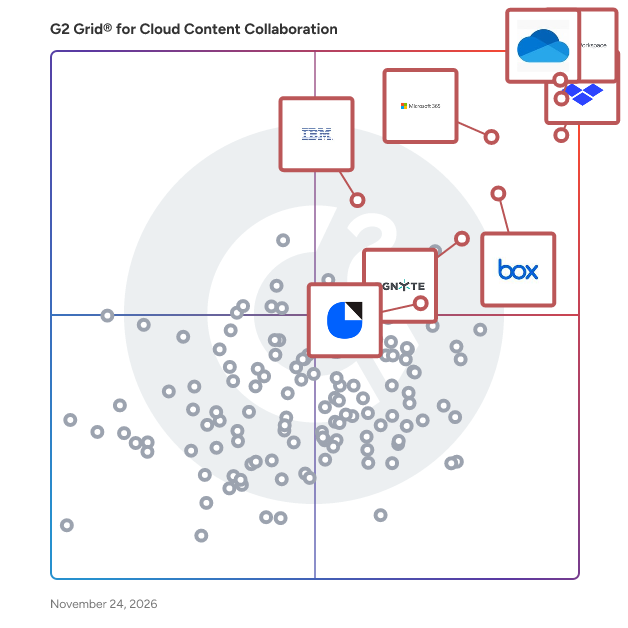
G2 Grid® for Cloud Content Collaboration Software

G2 Grid® for Cloud Content Collaboration Software plotting products by satisfaction and market presence

Highlighted products: Microsoft OneDrive for Business, Google Workspace, Dropbox, Microsoft 365, Box, Egnyte, DocSend, and IBM Aspera on Cloud.

Underlying data: [Grid® JSON](https://www.g2.com/categories/cloud-content-collaboration/grids.json?focus%5B%5D=microsoft-onedrive-for-business&focus%5B%5D=google-workspace&focus%5B%5D=dropbox&focus%5B%5D=microsoft365&focus%5B%5D=box&focus%5B%5D=egnyte&focus%5B%5D=dropbox-docsend&focus%5B%5D=ibm-aspera-on-cloud&segment=mid-market)

S-Drive

S-Drive is an easy, secure, and unlimited document management, document collection, file management, and file storage platform on Salesforce leveraging Amazon S3. Rather than using Salesforce files, attachments, or FTP, you can use S-Drive for your document management and content delivery needs. S-Drive’s document editing online feature is available for Lightning on desktop and allows users to edit Microsoft Word, Excel, or PowerPoint files while in S-Drive, without having to download, edit, and re-upload them. S-Drive’s eSignature feature allows you to send a document directly to DocuSign and have the signed document returned directly to S-Drive. Integrated DocuSign eSignature and Microsoft 365 with S-Drive help to deliver faster and more scalable solutions for you. Integrating eSignature helps provide an extra layer of security and offers rich document management solutions. Also, you can save time and resources by not having to download and run a separate process for eSignatures. S-Drive uses DocuSign’s Envelope Template structure and enables seamless end-to-end integration with DocuSign all within AppExchange. You can reduce risk by eliminating repetitive, manual tasks that may result in errors and increased risk. You can also increase productivity by automating workflows to route documents for signatures more efficiently and without leaving Salesforce. S-Drive Desktop Experience allows Salesforce users to manage documents and digital assets using their local file system. Users can browse, update, delete, and upload new documents without opening the Salesforce app. It can be used by any organization that wishes to work outside of Salesforce to manage their documents and easily make changes using local desktop applications. Save time and money with S-Drive's end-to-end Document Management solution for Salesforce. Increase efficiency, speed, security, and scalability for document collection. Streamline the entire document management process, ensuring efficiency by document collection and keeping all your data in one central and secure hub. Accelerate workflows like obtaining signatures, storing, and sharing documents all within the app for faster collaboration across teams. DocuFetch, a document collection feature from S-Drive, enhances document collection processes by providing efficient means to gather crucial documents, signatures, and forms from clients, prospects, and partners. Utilizing customizable templates and a user-friendly interface, it optimizes workflows, facilitating request initiation, seamless sharing, effortless validation, and secure storage within S-Drive solution. DocuFetch offers a comprehensive solution for document management within organizational frameworks, ensuring streamlined interactions and secure document handling throughout the process.

Average Rating: 4.5/5.0

Total Reviews: 31

How Do G2 Users Rate S-Drive?

  • Has the product been a good partner in doing business?: 8.6/10 (Category avg: 8.8/10)
  • Performance and Reliability: 8.6/10 (Category avg: 8.7/10)
  • File following: 8.1/10 (Category avg: 8.8/10)
  • Device Syncing: 8.4/10 (Category avg: 8.8/10)

Who Is the Company Behind S-Drive?

  • Seller: CyanGate
  • Year Founded: 2007
  • HQ Location: Cincinnati, OH
  • LinkedIn® Page: www.linkedin.com
    32 employees on LinkedIn®

Who Uses This Product?

  • Top Industries: Information Technology and Services
  • Company Size: 48% Medium, 29% Small

What Do G2 Reviewers Say About S-Drive?

AI-generated summary from verified user reviews

Pros
  • Users value the ease of use of S-Drive, appreciating its intuitive interface and seamless Salesforce integration for document management.
  • Users appreciate the easy setup of S-Drive, finding it intuitive and straightforward without extensive technical knowledge.
  • Users value the reliability of S-Drive, ensuring secure document management and consistent performance for their team.
  • Users appreciate the seamless connectivity of S-Drive across devices, enhancing document accessibility and management effortlessly.
  • Users value the easy access of S-Drive, simplifying file retrieval and collaboration across multiple devices effortlessly.
Cons
  • Users experience occasional slow loading with S-Drive, particularly when accessing heavy data or reports, affecting usability.
  • Users find the limited customization options in S-Drive restrict their ability to tailor the product to their needs.
  • Users face automation difficulties with S-Drive, needing extensive manual setup and lacking intuitive workflow tools.
  • Users face difficult customization challenges with S-Drive due to the need for extensive manual setup.
  • Users find the difficult setup of S-Drive to be a tedious process compared to simpler alternatives like Gdrive.

What Are Recent G2 Reviews of S-Drive?

Seafile

Seafile is an open-source workspace where you can save, organize, and collaborate on your files and documents. From essential features like file syncing and sharing, to advanced capabilities such as extensible metadata management, multi-level tagging and AI-powered file organization, it offers numerous possibilities to enhance your file workflow. It offers both cloud-based and self-hosted deployment options to meet different data management and security needs. Key Features of Seafile: Cross-Platform Syncing and Sharing: Seafile enables seamless file syncing and access across Windows, Mac, Linux, iOS, and Android devices through native clients, supporting cross-device collaboration. Efficient File Organization: Teams can organize files using custom properties, flexible views (table, kanban, gallery, map), and multi-level tagging, improving file management efficiency and accessibility. AI-Driven File Management: Seafile integrates AI to automate tasks like generating tags, descriptions, and extracting file details, enhancing the speed and accuracy of file organization and search. Document and Knowledge: Seafile is not only a file storage solution; it also includes SeaDoc for document collaboration, Wiki for knowledge management, and Excalidraw for brainstorming and diagramming.

Average Rating: 4.4/5.0

Total Reviews: 53

How Do G2 Users Rate Seafile?

  • Has the product been a good partner in doing business?: 8.6/10 (Category avg: 8.8/10)
  • Performance and Reliability: 9.3/10 (Category avg: 8.7/10)
  • File following: 8.8/10 (Category avg: 8.8/10)
  • Device Syncing: 8.8/10 (Category avg: 8.8/10)

Who Is the Company Behind Seafile?

  • Seller: Seafile
  • Year Founded: 2012
  • HQ Location: Beijing, CN
  • LinkedIn® Page: www.linkedin.com
    8 employees on LinkedIn®

Who Uses This Product?

  • Top Industries: Information Technology and Services, Computer Software
  • Company Size: 53% Small, 27% Medium

What Do G2 Reviewers Say About Seafile?

AI-generated summary from verified user reviews

Pros
  • Users appreciate Seafile for its industrial-grade reliability, ensuring fast file syncing and secure data management effortlessly.
  • Users love the ease of use of Seafile, highlighting its simple interface that simplifies file management and access.
  • Users value the strong security and reliable performance of Seafile, enhancing data safety and collaboration efficiency.
  • Users appreciate the fast and reliable syncing for large files, making Seafile a top choice for efficiency.
  • Users appreciate the fast and reliable syncing of Seafile, enjoying effortless data management across devices.
Cons
  • Users find Seafile's limited built-in features to be a significant drawback, affecting convenience and usability.
  • Users find Seafile's limited built-in features challenging, affecting convenience and ease of use during setup.
  • Users struggle with integration difficulty and find initial setup challenging, particularly for those lacking technical skills.
  • Users find training required for Seafile challenging, especially those unfamiliar with technical configurations and self-hosting.
  • Users find the complex setup and limited built-in features of Seafile to be inconvenient and time-consuming.

What Are Recent G2 Reviews of Seafile?

What Are G2 Users Discussing About Seafile?

fileplan

fileplan is simple document management in the cloud that enables consistent, planned filing with document control and collaboration. The vendor (Radix Software) says fileplan helps teams apply simple, common sense principles to organize and control their documents since the software is quick to implement and simple to use. fileplan document management software is focused on delivering a practical user experience that helps organizations take control of their files quickly by providing a filing structured that can be consistently applied by all staff without changing the way they work with documents. With fileplan, the vendor's goal is to bridge the gap between the ease of use and convenience of cloud-based file synchronization and sharing and the advanced control offered by traditional document management systems. fileplan features: - planned filing for documents and email in one place - access documents wherever you are working - retain control over access and versions - simple to use

Average Rating: 4.4/5.0

Total Reviews: 49

How Do G2 Users Rate fileplan?

  • Has the product been a good partner in doing business?: 9.2/10 (Category avg: 8.8/10)
  • Performance and Reliability: 8.6/10 (Category avg: 8.7/10)
  • File following: 8.9/10 (Category avg: 8.8/10)
  • Device Syncing: 8.2/10 (Category avg: 8.8/10)

Who Is the Company Behind fileplan?

Who Uses This Product?

  • Top Industries: Education Management
  • Company Size: 45% Medium, 45% Small

What Do G2 Reviewers Say About fileplan?

AI-generated summary from verified user reviews

Pros
  • Users admire the ease of use in Fileplan, finding it intuitive and efficient for document management and collaboration.
  • Users appreciate the ease of use and effective organization provided by Fileplan for managing documents and records.
  • Users value the seamless file sharing capabilities of Fileplan, facilitating effortless collaboration and document management.
  • Users value the reliable security of FilePlan, ensuring sensitive information is well-protected and workflows are efficient.
  • Users value the security features of Fileplan, ensuring compliance and safe management of documents and records.
Cons
  • Users find the inefficient searching in FilePlan frustrating, as results can take longer than expected and hinder usability.
  • Users find that the slow loading of FilePlan affects their efficiency and overall experience with the platform.
  • Users find the mobile experience less intuitive than desktop, highlighting slow search results and cumbersome bulk actions.
  • Users find offline capabilities limited, hindering mobile work and scenarios requiring disconnection from the cloud.
  • Users find search difficulties with FilePlan, as results can take longer than expected and navigation is cumbersome.

What Are Recent G2 Reviews of fileplan?

What Are G2 Users Discussing About fileplan?

AI can help you find the answers. G2 helps you trust them.

Connect G2 to Claude or ChatGPT for answers grounded in G2's trusted reviews, comparisons, and pricing from real user insights.

How it works

OpenText Documentum Content Management

OpenText™ Documentum™ content management is a distributed, cloud-native enterprise content platform that offers a compliant, secure single-source-of-truth for all users. Built on a modular foundation, Documentum software integrates into enterprise business applications to enable access from any UI. Documentum products scale to meet the high-volume content demands of highly-regulated organizations.

Average Rating: 3.7/5.0

Total Reviews: 57

How Do G2 Users Rate OpenText Documentum Content Management?

  • Has the product been a good partner in doing business?: 6.8/10 (Category avg: 8.8/10)
  • Performance and Reliability: 9.6/10 (Category avg: 8.7/10)
  • File following: 8.9/10 (Category avg: 8.8/10)
  • Device Syncing: 7.8/10 (Category avg: 8.8/10)

Who Is the Company Behind OpenText Documentum Content Management?

  • Seller: OpenText
  • Year Founded: 1991
  • HQ Location: Waterloo, ON
  • LinkedIn® Page: www.linkedin.com
    22,835 employees on LinkedIn®
  • Ownership: NASDAQ:OTEX
  • Phone: +1-519-888-7111

Who Uses This Product?

  • Top Industries: Information Technology and Services, Financial Services
  • Company Size: 60% Large, 23% Medium

What Do G2 Reviewers Say About OpenText Documentum Content Management?

AI-generated summary from verified user reviews

Pros
  • Users praise the granular security and compliance features of OpenText Documentum, ensuring meticulous control over document access.
  • Users appreciate the user-friendly interface of OpenText Documentum, praising its intuitive design and easy navigation.
  • Users value the robustness and scalability of OpenText Documentum, efficiently managing large volumes of documents in any industry.
  • Users appreciate the user-friendly experience of OpenText Documentum, enhancing productivity and ease of use.
  • Users enjoy easy collaboration with Documentum, benefiting from automated workflows that streamline document review and approval processes.
Cons
  • Users find the cost of OpenText Documentum Content Management to be prohibitively expensive, adding to overall complexity and maintenance challenges.
  • Users note a steep learning curve that necessitates extensive training, complicating the onboarding process for new users.
  • Users find the complexity of OpenText Documentum daunting due to its steep learning curve and complicated operations.
  • Users find the complex workflows in OpenText Documentum difficult to navigate, complicating the overall user experience.
  • Users feel the cost issues are significant, with high pricing impacting accessibility and usability of the system.

What Are Recent G2 Reviews of OpenText Documentum Content Management?

What Are G2 Users Discussing About OpenText Documentum Content Management?

MyDocsOnline

MyDocsOnline is a secure, cloud-based document management and file-sharing platform designed to meet the needs of individuals, small teams, and larger organizations. It offers a user-friendly interface that facilitates efficient storage, management, and sharing of documents, ensuring data security and compliance with industry standards. Key Features and Functionality: - Secure Storage: Provides encrypted storage with 256-bit AES encryption and HTTPS protocols, ensuring data protection. - File Sharing: Allows users to share large files without size restrictions, with options for password protection and tracking of shared files. - Desktop Application: Offers a desktop app that supports online editing of various file types, including Office documents and QuickBooks files, with file locking to prevent data loss during collaborative editing. - User Permissions: Enables administrators to set specific access permissions for folders and files, controlling who can view or edit content. - Custom Branding: Allows customization of the user interface with company logos, providing a professional appearance for client interactions. - Audit Logs and Notifications: Maintains detailed activity logs for auditing purposes and offers email notifications for file uploads and changes. Primary Value and Solutions Provided: MyDocsOnline addresses the challenges of secure document management and collaboration by offering a reliable platform that ensures data security, facilitates efficient file sharing, and supports team collaboration. Its features cater to businesses requiring HIPAA compliance and those needing to manage sensitive information securely. The platform's ease of use, combined with robust security measures and customizable options, makes it a valuable tool for organizations aiming to streamline their document workflows and enhance productivity.

Average Rating: 4.3/5.0

Total Reviews: 83

How Do G2 Users Rate MyDocsOnline?

  • Has the product been a good partner in doing business?: 7.2/10 (Category avg: 8.8/10)
  • Performance and Reliability: 8.3/10 (Category avg: 8.7/10)
  • File following: 8.4/10 (Category avg: 8.8/10)
  • Device Syncing: 8.9/10 (Category avg: 8.8/10)

Who Is the Company Behind MyDocsOnline?

Who Uses This Product?

  • Top Industries: Computer Software
  • Company Size: 52% Small, 21% Medium

What Do G2 Reviewers Say About MyDocsOnline?

AI-generated summary from verified user reviews

Pros
  • Users find MyDocsOnline's ease of use impressive, allowing quick setup and simple file management for clients.
  • Users find the easy setup of MyDocsOnline quick and straightforward, enhancing productivity without needing IT knowledge.
  • Users praise the reliability of MyDocsOnline, enjoying its fast performance and user-friendly interface for document management.
  • Users love the strong security features of MyDocsOnline, ensuring safe handling of sensitive information effortlessly.
  • Users value the easy collaboration features of MyDocsOnline, enhancing secure file sharing and intuitive access for professionals.
Cons
  • Users experience slow uploads that hinder productivity, especially when working with large files in MyDocsOnline.
  • Users find integration difficulty with MyDocsOnline due to limited options for popular third-party tools, affecting workflow efficiency.
  • Users experience slow loading times, especially with large files, impacting productivity during uploads and downloads.
  • Users find the limited functionality of MyDocsOnline frustrating, particularly due to outdated interface and integration options.
  • Users feel that MyDocsOnline is expensive and not the best value compared to newer cloud storage options.

What Are Recent G2 Reviews of MyDocsOnline?

What Are G2 Users Discussing About MyDocsOnline?

Nomadesk

Nomadesk is a business file sharing & synchronization that allows users and professional customers to edit, share, synchronize and secure files from anywhere _ online and offline! Provides encrypted, user backups in virtual vaults to protect information. Nomadesk integrates with Office 365 so users can view and edit anywhere.

Average Rating: 4.2/5.0

Total Reviews: 28

How Do G2 Users Rate Nomadesk?

  • Has the product been a good partner in doing business?: 7.5/10 (Category avg: 8.8/10)
  • Performance and Reliability: 8.0/10 (Category avg: 8.7/10)
  • File following: 8.3/10 (Category avg: 8.8/10)
  • Device Syncing: 8.5/10 (Category avg: 8.8/10)

Who Is the Company Behind Nomadesk?

  • Seller: Nomadesk
  • Year Founded: 2004
  • HQ Location: Sint-Denijs-Westrem, BE
  • LinkedIn® Page: www.linkedin.com
    8 employees on LinkedIn®

Who Uses This Product?

  • Company Size: 39% Medium, 39% Small

What Do G2 Reviewers Say About Nomadesk?

AI-generated summary from verified user reviews

Pros
  • Users value the secure storage of Nomadesk, ensuring protection against loss, theft, and unauthorized access.
  • Users enjoy the easy setup of Nomadesk, appreciating its straightforward and user-friendly initial configuration.
  • Users value the strong security features of Nomadesk, ensuring protection against data theft with encrypted vaults.
  • Users value the strong security features of Nomadesk, particularly its 256-bit encryption and remote wipe options.
Cons
  • Users experience syncing issues that can cause lag and slow down computer performance, particularly with large files.
  • Users experience laggy syncing and saving with Nomadesk, especially when handling large files, impacting performance.
  • Users experience slow loading times with Nomadesk, particularly when syncing large files, impacting overall performance.
  • Users experience slow performance with Nomadesk, particularly when syncing and saving large files, affecting overall computer speed.

What Are Recent G2 Reviews of Nomadesk?

What Are G2 Users Discussing About Nomadesk?

DropSend

DropSend is a file transfer and storage service designed to facilitate the secure and efficient sharing of large files. Catering to both individual and business users, DropSend enables the transmission of files up to 8GB in size without the need for recipients to have an account or download additional software. This user-friendly platform ensures that large videos, photos, documents, and other file types can be sent quickly and securely, streamlining workflows and enhancing productivity. Key Features and Functionality: - Large File Transfers: Send files up to 8GB in size, eliminating the constraints of email attachments. - Secure Online Storage: Store files in a secure cloud environment, accessible from any device. - Cross-Platform Accessibility: Access and manage files via web browsers, desktop applications for Windows and Mac, and mobile apps for iOS devices. - No Recipient Account Required: Recipients can download files without needing a DropSend account, simplifying the sharing process. - Password Protection and Download Limits: Enhance security by setting passwords and controlling the number of downloads per file. - Custom Branding: Business users can customize the interface with their company name, logo, and colors for a branded experience. Primary Value and User Solutions: DropSend addresses the common challenge of sharing large files that exceed email size limitations. By providing a secure, efficient, and user-friendly platform, it enables users to send substantial files without compromising on speed or security. The service's flexibility across various devices and operating systems ensures that users can manage and share their files seamlessly, whether for personal projects or professional collaborations. For businesses, DropSend offers advanced features like custom branding and multi-user accounts, facilitating enhanced collaboration and maintaining brand consistency.

Average Rating: 4.3/5.0

Total Reviews: 48

How Do G2 Users Rate DropSend?

  • Has the product been a good partner in doing business?: 10.0/10 (Category avg: 8.8/10)
  • Performance and Reliability: 8.3/10 (Category avg: 8.7/10)
  • File following: 8.6/10 (Category avg: 8.8/10)
  • Device Syncing: 8.0/10 (Category avg: 8.8/10)

Who Is the Company Behind DropSend?

  • Seller: Dropsend
  • Year Founded: 2009
  • HQ Location: Eugene, Oregon
  • LinkedIn® Page: www.linkedin.com
    1 employees on LinkedIn®

Who Uses This Product?

  • Top Industries: Marketing and Advertising, Information Technology and Services
  • Company Size: 60% Small, 31% Medium

What Do G2 Reviewers Say About DropSend?

AI-generated summary from verified user reviews

Pros
  • Users love the ability to transfer large files easily, enhancing their workflow significantly with DropSend.
  • Users find DropSend's ease of use exceptional, facilitating quick and effective large file transfers with minimal hassle.
  • Users commend DropSend for its robust security features, including encryption and password protection for safe file sharing.
  • Users value the seamless file sharing capabilities of DropSend, enabling quick and secure transfers of large documents.
  • Users appreciate the reliability of DropSend, finding it consistently fast and secure for large file transfers.
Cons
  • Users find the limited storage on the free plan frustrating, affecting their ability to share and manage files easily.
  • Users express frustration over poor customer support, often facing difficulty reaching assistance and slow response times.
  • Users often face slow upload speeds with DropSend, leading to frustrations in file transfer efficiency.
  • Users find DropSend to be expensive due to its limited free plan and need for a paid subscription.
  • Users find the limited free plan restrictive, especially for those needing to send larger files without purchasing a plan.

What Are Recent G2 Reviews of DropSend?

What Are G2 Users Discussing About DropSend?

Worldox GX4

Worldox GX4 is a comprehensive document and email management system designed to streamline the organization, retrieval, and security of digital content for law firms, corporate legal departments, and other professional services. With its intuitive interface and robust functionality, Worldox GX4 enhances productivity by simplifying document management processes. Key Features and Functionality: - Active Profiling® Technology: Utilizes recent and historical filing attributes to automate document profiling, reducing manual data entry and improving filing accuracy. - Seamless Integration: Integrates with Microsoft Office applications, allowing users to open, save, and manage documents directly within familiar software environments. - Enhanced Email Management: Monitors incoming and outgoing emails, assigns client matter information, and adds corresponding folders in Outlook, facilitating efficient email filing. - Mobile Accessibility: Through Worldox Web 3.0 and dedicated iOS applications, users can access and manage documents remotely from various devices, ensuring flexibility and continuity of work. - Advanced Search Capabilities: Offers broad document tagging and searching functionalities, enabling quick retrieval of files based on multiple criteria. Primary Value and Solutions Provided: Worldox GX4 addresses the challenges of managing vast amounts of digital documents and emails by providing a centralized, secure, and efficient system. It enhances collaboration among team members, ensures compliance with document retention policies, and reduces the time spent searching for files. By automating routine tasks and integrating seamlessly with existing tools, Worldox GX4 allows professionals to focus more on their core work, thereby increasing overall productivity and operational efficiency.

Average Rating: 3.8/5.0

Total Reviews: 51

How Do G2 Users Rate Worldox GX4?

  • Has the product been a good partner in doing business?: 7.8/10 (Category avg: 8.8/10)
  • Performance and Reliability: 7.6/10 (Category avg: 8.7/10)
  • File following: 8.2/10 (Category avg: 8.8/10)
  • Device Syncing: 7.7/10 (Category avg: 8.8/10)

Who Is the Company Behind Worldox GX4?

Who Uses This Product?

  • Who Uses This: Paralegal
  • Top Industries: Law Practice, Legal Services
  • Company Size: 48% Small, 44% Medium

What Do G2 Reviewers Say About Worldox GX4?

AI-generated summary from verified user reviews

Pros
  • Users appreciate the ease of use of Worldox GX4, enabling efficient document management and seamless collaboration.
  • Users value the efficient data management of Worldox GX4, enjoying effortless organization and quick access to documents.
  • Users appreciate the user-friendly interface of Worldox GX4, finding it simple, accessible, and efficient for productivity.
  • Users are impressed by the easy collaboration features of Worldox GX4, enhancing teamwork and document management efficiency.
  • Users appreciate the high level of security in Worldox GX4, ensuring safe access to sensitive files.
Cons
  • Users experience slow performance with Worldox GX4, particularly with large files and complex searches during use.
  • Users find that significant training is required for Worldox GX4, making onboarding challenging for less tech-savvy individuals.
  • Users find the version control system lacking, as navigating document versions and history can be confusing.
  • Users feel that Worldox GX4 is lacking features necessary for modern workflows, affecting usability and integration options.
  • Users find the limited customization for managing document versions challenging, affecting clarity and usability in history tracking.

What Are Recent G2 Reviews of Worldox GX4?

What Are G2 Users Discussing About Worldox GX4?

SmartVault

SmartVault is the easiest and most secure way to optimize how you, your staff, and your clients gather, store, share, and eSign documents in the cloud. Streamline how you work, collaborate with clients more easily, and reduce costs — through one integrated document management and client portal solution.

Average Rating: 4.3/5.0

Total Reviews: 98

How Do G2 Users Rate SmartVault?

  • Has the product been a good partner in doing business?: 8.5/10 (Category avg: 8.8/10)
  • Performance and Reliability: 8.8/10 (Category avg: 8.7/10)
  • File following: 8.3/10 (Category avg: 8.8/10)
  • Device Syncing: 8.6/10 (Category avg: 8.8/10)

Who Is the Company Behind SmartVault?

  • Seller: GetBusy
  • Year Founded: 1998
  • HQ Location: CAMBRIDGE, Cambridgeshire
  • LinkedIn® Page: www.linkedin.com
    86 employees on LinkedIn®

Who Uses This Product?

  • Top Industries: Accounting, Financial Services
  • Company Size: 82% Small, 13% Medium

What Do G2 Reviewers Say About SmartVault?

AI-generated summary from verified user reviews

Pros
  • Users value the ease of use of SmartVault, highlighting its intuitive design and seamless functionality for clients.
  • Users appreciate the easy upload feature of SmartVault, making document management efficient and user-friendly for clients.
  • Users value the secure sharing features of SmartVault, appreciating its ease of use for document management.
  • Users appreciate the strong security measures of SmartVault, ensuring secure uploads and access for both staff and clients.
  • Users praise SmartVault for its secure file sharing, enabling easy and safe document management for all users.
Cons
  • Users find SmartVault's limited customization options hinder its effectiveness for specific office needs and preferences.
  • Users find SmartVault to be expensive, making it less suitable for smaller businesses or individual use.
  • Users find pricing concerns with SmartVault, especially for smaller businesses and individuals due to the higher costs.
  • Users find the high cost of SmartVault to be a barrier, particularly for smaller businesses and individuals.
  • Users faced integration issues with SmartVault, leading to the creation of numerous duplicate entries.

What Are Recent G2 Reviews of SmartVault?

What Are G2 Users Discussing About SmartVault?

Aeroplicity

Aeroplicity is simplifying the Aerospace and Defense industry with a frictionless experience. Aeroplicity is an AI-native, blockchain-backed, cloud-based operating system; focusing on aerospace operations and cybersecurity compliance for the Defense Industrial Base.

Average Rating: 4.1/5.0

Total Reviews: 21

How Do G2 Users Rate Aeroplicity?

  • Has the product been a good partner in doing business?: 8.3/10 (Category avg: 8.8/10)
  • Performance and Reliability: 8.9/10 (Category avg: 8.7/10)
  • File following: 8.7/10 (Category avg: 8.8/10)
  • Device Syncing: 8.7/10 (Category avg: 8.8/10)

Who Is the Company Behind Aeroplicity?

Who Uses This Product?

  • Top Industries: Information Technology and Services
  • Company Size: 62% Medium, 38% Small

What Do G2 Reviewers Say About Aeroplicity?

AI-generated summary from verified user reviews

Pros
  • Users value Aeroplicity for its unmatched reliability, enhancing efficiency and operational smoothness across American field operations.
  • Users appreciate the easy collaboration features of Aeroplicity, enhancing team communication and efficiency in field operations.
  • Users appreciate the intuitive UI of Aeroplicity, enabling quick mastery for effective fleet and field management.
  • Users appreciate the convenient access and management of documents with Aeroplicity's digitization feature, enhancing overall work efficiency.
  • Users find document digitization in Aeroplicity highly convenient, enhancing access and efficiency in document management.
Cons
  • Users experience internet dependence issues with Aeroplicity, facing connectivity problems in remote areas that hinder functionality.
  • Users are frustrated by offline limitations in Aeroplicity, causing delays and syncing issues in regions with weak network coverage.
  • Users struggle with permission issues in Aeroplicity, finding account management and auditing especially complicated in complex setups.
  • Users experience frustrating syncing issues due to poor connectivity in remote regions, leading to delays and errors.
  • Users experience frustrating time delays due to inconsistent connectivity in remote areas, impacting data entry and workflow efficiency.

What Are Recent G2 Reviews of Aeroplicity?

GoFileRoom

Why choose GoFileRoom It’s time to banish paper files and storage fees. Thomson Reuters GoFileRoom is cloud-based electronic document storage software designed for tax and accounting professionals. GoFileRoom offers an arsenal of features to give your firm 24/7 access to document storage in the cloud. Your staff can quickly associate client documents to workflows while uploading files to the web-based DMS. Streamline your processes and create a truly paperless office. Plus, integrate GoFileRoom with other products to save even more time and money. Learn more at https://tax.thomsonreuters.com/us/en/cs-professional-suite/gofileroom

Average Rating: 4.1/5.0

Total Reviews: 35

How Do G2 Users Rate GoFileRoom?

  • Has the product been a good partner in doing business?: 7.0/10 (Category avg: 8.8/10)
  • Performance and Reliability: 9.7/10 (Category avg: 8.7/10)
  • File following: 9.2/10 (Category avg: 8.8/10)
  • Device Syncing: 8.5/10 (Category avg: 8.8/10)

Who Is the Company Behind GoFileRoom?

  • Seller: Thomson Reuters
  • Year Founded: 2008
  • HQ Location: Toronto, CA
  • LinkedIn® Page: www.linkedin.com
    36,803 employees on LinkedIn®
  • Ownership: NYSE:TRI
  • Total Revenue (USD mm): $5,984

Who Uses This Product?

  • Top Industries: Accounting
  • Company Size: 40% Small, 37% Medium

What Do G2 Reviewers Say About GoFileRoom?

AI-generated summary from verified user reviews

Pros
  • Users appreciate the centralized cloud-based document management of GoFileRoom, enhancing organization and secure file sharing.
  • Users appreciate the ease of use in GoFileRoom, enabling quick access and efficient document management.
  • Users praise the easy access provided by GoFileRoom, enabling efficient and secure document management and collaboration.
  • Users appreciate the centralized cloud-based system of GoFileRoom, making document management and secure sharing seamless.
  • Users appreciate the centralized cloud-based storage of GoFileRoom, enabling secure file sharing and efficient document management.
Cons
  • Users find the limited customization options frustrating, affecting their overall experience and file management efficiency.
  • Users feel that GoFileRoom has an outdated design, lacking a modern interface and intuitive usability improvements.
  • Users find file organization challenging, seeking improvements in search functionality, sharing options, and customization features.
  • Users find the inefficient search functionality limits usability and complicates the experience in GoFileRoom.
  • Users find GoFileRoom lacking features, leading to an outdated experience compared to modern alternatives.

What Are Recent G2 Reviews of GoFileRoom?

What Are G2 Users Discussing About GoFileRoom?

AlphaSense

Meet AlphaSense: the world's leading market intelligence and search platform. AlphaSense is a market intelligence platform used by the world’s top companies and financial institutions to help professionals make better business decisions with confidence and speed. Since 2011, our AI-based technology has delivered insights from an extensive universe of public and private content—including realtime and aftermarket broker research, expert calls, private company data, SEC filings, earnings transcripts, regulatory content, news and trade journals. Our platform is trusted by over 4,000 enterprise customers, including a majority of the S&P 500. For more information, please visit www.alpha-sense.com.

Average Rating: 4.6/5.0

Total Reviews: 363

How Do G2 Users Rate AlphaSense?

  • Has the product been a good partner in doing business?: 9.3/10 (Category avg: 8.8/10)
  • Performance and Reliability: 9.3/10 (Category avg: 8.7/10)
  • File following: 8.7/10 (Category avg: 8.8/10)
  • Device Syncing: 8.8/10 (Category avg: 8.8/10)

Who Is the Company Behind AlphaSense?

  • Seller: AlphaSense
  • Company Website:
  • Year Founded: 2011
  • HQ Location: New York
  • LinkedIn® Page: www.linkedin.com
    3,341 employees on LinkedIn®

Who Uses This Product?

  • Who Uses This: Analyst, Associate
  • Top Industries: Financial Services, Pharmaceuticals
  • Company Size: 47% Large, 33% Small

What Do G2 Reviewers Say About AlphaSense?

AI-generated summary from verified user reviews

Pros
  • Users appreciate the ease of use of AlphaSense, enabling quick navigation and efficient information gathering for research.
  • Users appreciate the powerful search functionality of AlphaSense, enabling quick access to high-quality, relevant insights effortlessly.
  • Users appreciate the efficient AI-driven search of AlphaSense, enabling deep insights and saving significant research time.
  • Users value AlphaSense for its advanced AI features, enabling quick access to relevant insights and seamless collaboration.
  • Users find AlphaSense to be incredibly helpful, with easy navigation and excellent support for efficient insight gathering.
Cons
  • Users experience search functionality issues, often yielding low-quality articles and complicating information retrieval.
  • Users often find insufficient information on specific topics, making it challenging to get precise insights quickly.
  • Users find the steep learning curve of AlphaSense challenging, making navigation and effective usage difficult.
  • Users find the learning difficulty of AlphaSense challenging due to its complex interface and overwhelming features.
  • Users often experience a lack of information in specific areas, leading to manual searches for better data.

What Are Recent G2 Reviews of AlphaSense?

What Are G2 Users Discussing About AlphaSense?

Fleekdrive

[ECM]Rebuild Your Salesforce File Management Even Better, Practical. Accelerate Internal and External File Collaborations. [WebReport]With Cloud Report for Salesforce, both novice users and power-users can simply create various forms of reports.

Average Rating: 4.3/5.0

Total Reviews: 35

How Do G2 Users Rate Fleekdrive?

  • Has the product been a good partner in doing business?: 7.8/10 (Category avg: 8.8/10)
  • Performance and Reliability: 7.3/10 (Category avg: 8.7/10)
  • File following: 8.1/10 (Category avg: 8.8/10)
  • Device Syncing: 8.0/10 (Category avg: 8.8/10)

Who Is the Company Behind Fleekdrive?

Who Uses This Product?

  • Top Industries: Information Technology and Services
  • Company Size: 50% Small, 31% Medium

What Are Recent G2 Reviews of Fleekdrive?

What Are G2 Users Discussing About Fleekdrive?

imDocShare

imDocShare is a comprehensive solution designed to seamlessly integrate iManage Work Server 10.2+ and iManage Cloud content into Microsoft platforms such as Teams, SharePoint, and OneDrive for Business. This integration enables users to live view, edit, add, attach, sync, search, and provision iManage content directly within these Microsoft environments, enhancing collaboration and productivity. Key Features and Functionality: - Live View and Edit: Access and modify iManage documents in real-time within Microsoft Teams and SharePoint. - Synchronization: Automatically perform bi-directional or one-way synchronization of selected folders and files, including metadata, between SharePoint, Teams Files, OneDrive Libraries, and iManage content. - Co-Authoring: Collaborate on Office documents (version 2013 or above) saved in iManage directly within SharePoint and Teams using Office Client applications like Word or Excel. - Hybrid Search: Conduct integrated searches across multiple iManage and SharePoint content sources from a single interface in SharePoint. - Provisioning: Enable Microsoft Teams administrators and knowledge managers to bulk create, edit, and update Teams, Channels, and Tabs with iManage content using imDocShare Tab and Sync. - Content Actions: Perform various actions on iManage content, including editing profiles, previewing documents, viewing in browser, adding to favorites, checking out, renaming files, downloading, deleting, starting co-authoring sessions, and posting. Primary Value and User Solutions: imDocShare addresses the challenge of integrating iManage's document management capabilities with Microsoft's collaboration tools, providing a unified platform for managing legal and professional documents. By embedding iManage content within Microsoft Teams, SharePoint, and OneDrive, it streamlines workflows, reduces the need to switch between applications, and enhances team collaboration. The solution's synchronization and co-authoring features ensure that teams can work on the most up-to-date documents simultaneously, improving efficiency and reducing errors. Additionally, the hybrid search functionality allows users to quickly locate relevant documents across multiple repositories, saving time and enhancing productivity.

Average Rating: 4.2/5.0

Total Reviews: 33

How Do G2 Users Rate imDocShare?

  • Has the product been a good partner in doing business?: 9.2/10 (Category avg: 8.8/10)
  • Performance and Reliability: 8.5/10 (Category avg: 8.7/10)
  • File following: 8.8/10 (Category avg: 8.8/10)
  • Device Syncing: 8.5/10 (Category avg: 8.8/10)

Who Is the Company Behind imDocShare?

  • Seller: imDocShare
  • Year Founded: 2020
  • HQ Location: Newark, New Jersey
  • LinkedIn® Page: www.linkedin.com
    1 employees on LinkedIn®

Who Uses This Product?

  • Top Industries: Information Technology and Services
  • Company Size: 47% Small, 35% Medium

What Do G2 Reviewers Say About imDocShare?

AI-generated summary from verified user reviews

Pros
  • Users enjoy the real-time collaboration features of imDocShare, enhancing teamwork and document management seamlessly.
  • Users appreciate the seamless integration of imDocShare, enhancing real-time collaboration and simplifying document management significantly.
  • Users love the customization options of imDocShare, enhancing team collaboration and simplifying document management seamlessly.
  • Users appreciate the user-friendly interface of imDocShare, facilitating seamless management and collaboration of content.
  • Users value the effortless collaboration of imDocShare, enhancing teamwork and simplifying document management across platforms.
Cons
  • Users find imDocShare to be quite expensive, suggesting a need for more affordable pricing options.
  • Users face integration difficulties with imDocShare, feeling limited by its inability to connect with essential tools.
  • Users feel limited customization in imDocShare restricts their ability to tailor the solution to their specific needs.
  • Users find the training required for imDocShare challenging, making initial setup and usage time-consuming.
  • Users find the initial setup complex and challenging, leading to a steep learning curve before full functionality is achieved.

What Are Recent G2 Reviews of imDocShare?

Neeraja Prakash
NP
Researched and written by Neeraja Prakash
Updated