Top Free Cloud Content Collaboration Software - Page 2

How Many Cloud Content Collaboration Software Products Does G2 Track?

Total Products under this Category: 263

Category Stats (Sep 2026)

  • Average Rating: 4.36/5 (↑0.01 vs Aug 2026) The average rating of products in this category, based on all submitted ratings
  • Top Trending Product: Assai Document Management (+26.07%) - Among all products in this category, Assai Document Management recorded the largest rating increase compared to last month

Last updated: September 01, 2026

How Does G2 Rank Cloud Content Collaboration Software Products?

Why You Can Trust G2's Software Rankings:

  • 30 Analysts and Data Experts
  • 118,600+ Authentic Reviews
  • 263+ Products
  • Unbiased Rankings

G2's software rankings are built on verified user reviews, rigorous moderation, and a consistent research methodology maintained by a team of analysts and data experts. Each product is measured using the same transparent criteria, with no paid placement or vendor influence. While reviews reflect real user experiences, which can be subjective, they offer valuable insight into how software performs in the hands of professionals. Together, these inputs power the G2 Score, a standardized way to compare tools within every category.

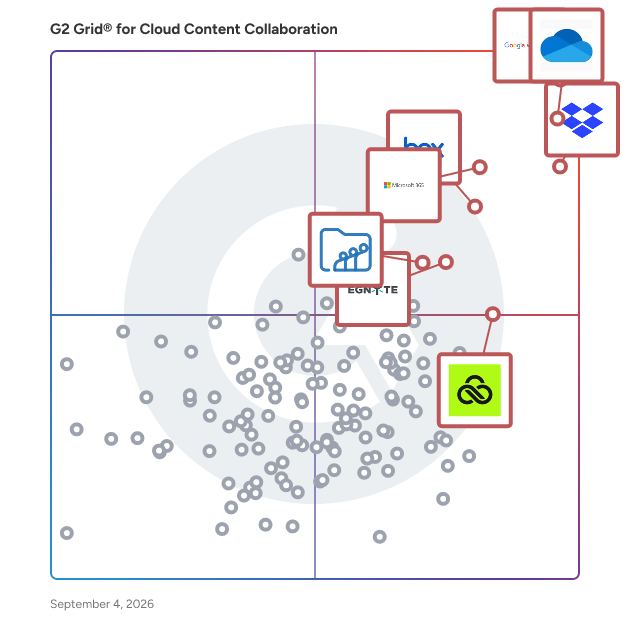
G2 Grid® for Cloud Content Collaboration Software

G2 Grid® for Cloud Content Collaboration Software plotting products by satisfaction and market presence

Highlighted products: Google Workspace, Microsoft OneDrive for Business, Dropbox, Microsoft 365, Box, Egnyte, LucidLink, and Zoho WorkDrive.

Underlying data: [Grid® JSON](https://www.g2.com/categories/cloud-content-collaboration/grids.json?focus%5B%5D=google-workspace&focus%5B%5D=microsoft-onedrive-for-business&focus%5B%5D=dropbox&focus%5B%5D=microsoft365&focus%5B%5D=box&focus%5B%5D=egnyte&focus%5B%5D=lucidlink&focus%5B%5D=zoho-workdrive)

Kiteworks

Kiteworks’ mission is to empower organizations to effectively manage risk in every send, share, receive, and save of sensitive content. To this end, we created a platform that delivers content governance, compliance, and protection to customers. The platform unifies, tracks, controls, and secures sensitive content moving within, into, and out of their organization, significantly improving risk management and ensuring regulatory compliance on all sensitive content communications. Any professional or organization who sends, shares, receives or saves sensitive content should govern and protect it with Kiteworks. It’s as simple as that. With Kiteworks, CIOs and CISOs gain complete visibility, compliance and control over IP, PII, PHI, and other sensitive content across all 3rd party communication channels, including email, file sharing, mobile, enterprise apps, web portals, SFTP, and MFT. When users click the Kiteworks button, they know it’s the safe, secure way to share sensitive information with the outside world. With on-premise, private cloud, hybrid and FedRAMP deployment options, the Kiteworks platform provides the security and governance CISOs need to protect their organizations, mitigate risk, and adhere to rigorous compliance regulations such as NIST 800-171, HIPAA, SOX, GDPR, GLBA, FISMA, and others.

Average Rating: 4.4/5.0

Total Reviews: 119

How Do G2 Users Rate Kiteworks?

  • Has the product been a good partner in doing business?: 8.1/10 (Category avg: 8.8/10)
  • Performance and Reliability: 8.1/10 (Category avg: 8.7/10)
  • File following: 8.5/10 (Category avg: 8.8/10)
  • Device Syncing: 8.3/10 (Category avg: 8.7/10)

Who Is the Company Behind Kiteworks?

  • Seller: Kiteworks
  • Year Founded: 1999
  • HQ Location: Palo Alto, CA
  • Twitter: @Kiteworks
    3,460 Twitter followers
  • LinkedIn® Page: www.linkedin.com
    380 employees on LinkedIn®
  • Phone: 650-485-4300

Who Uses This Product?

  • Top Industries: Information Technology and Services, Marketing and Advertising
  • Company Size: 26% Small, 22% Large

What Do G2 Reviewers Say About Kiteworks?

AI-generated summary from verified user reviews

Pros
  • Users appreciate the strong security and encryption of Kiteworks, confidently sharing sensitive files without worry.
  • Users value the secure sharing features of Kiteworks, enabling confident file transfer without fears of data breaches.
  • Users appreciate the strong security and encryption of Kiteworks, enabling safe sharing of sensitive files with confidence.
  • Users value the strong security features of Kiteworks, enabling safe sharing of sensitive files with peace of mind.
  • Users appreciate the strong security features of Kiteworks, ensuring safe and compliant file sharing for sensitive information.
Cons
  • Users find the complex usability of Kiteworks challenging, especially for new users struggling with navigation and workflows.
  • Users find the interface overly complex, making it challenging for new users to navigate and utilize effectively.
  • Users find the poor interface design of Kiteworks makes it difficult to navigate and utilize effectively.
  • Users find the user interface complex, expressing a desire for a more intuitive and streamlined experience.
  • Users find the poor UI design of Kiteworks overwhelming and clunky, complicating navigation and usability.

What Are Recent G2 Reviews of Kiteworks?

What Are G2 Users Discussing About Kiteworks?

SugarSync

SugarSync is a comprehensive cloud storage service that enables users to back up, access, synchronize, and share files across multiple devices, including computers and mobile platforms. It supports various operating systems such as Windows, macOS, iOS, and Android, ensuring seamless integration into diverse digital environments. By continuously monitoring and updating changes to files, SugarSync ensures that users have the most current versions available across all their devices. Key Features and Functionality: - Automatic File Synchronization: SugarSync continuously monitors files for changes, automatically updating and synchronizing them across all linked devices. - Cross-Platform Compatibility: The service supports multiple operating systems, including Windows, macOS, iOS, and Android, facilitating seamless integration across various devices. - Secure File Sharing: Users can share files and folders privately or publicly, with options to control permissions and track access. - Data Backup and Recovery: SugarSync provides robust backup solutions, ensuring data is securely stored and recoverable in case of device loss or failure. - Remote Data Management: In the event of device theft or loss, users can remotely wipe their data to prevent unauthorized access. Primary Value and User Solutions: SugarSync addresses the need for efficient and secure file management in an increasingly digital and mobile world. By offering automatic synchronization and backup, it ensures that users have access to their latest files anytime, anywhere, without the risk of data loss. The service's cross-platform compatibility and secure sharing capabilities enhance collaboration and productivity, making it an ideal solution for both individuals and businesses seeking reliable and accessible cloud storage.

Average Rating: 4.0/5.0

Total Reviews: 81

How Do G2 Users Rate SugarSync?

  • Has the product been a good partner in doing business?: 7.1/10 (Category avg: 8.8/10)
  • Performance and Reliability: 7.7/10 (Category avg: 8.7/10)
  • File following: 7.7/10 (Category avg: 8.8/10)
  • Device Syncing: 8.8/10 (Category avg: 8.7/10)

Who Is the Company Behind SugarSync?

  • Seller: Ziff Davis
  • Year Founded: 1995
  • HQ Location: New York
  • Twitter: @ziffdavis
    1,426 Twitter followers
  • LinkedIn® Page: www.linkedin.com
    6,722 employees on LinkedIn®
  • Ownership: NASDAQ: ZD

Who Uses This Product?

  • Top Industries: Information Technology and Services, Computer Software
  • Company Size: 55% Small, 26% Medium

What Do G2 Reviewers Say About SugarSync?

AI-generated summary from verified user reviews

Pros
  • Users enjoy the ease of use of SugarSync, appreciating its flexible syncing and straightforward initial setup.
  • Users appreciate the easy setup of SugarSync, enabling a smooth start to secure file syncing and backup.
  • Users appreciate the access ease of SugarSync, enjoying quick file availability and effortless sharing capabilities.
  • Users appreciate the easy collaboration features of SugarSync, making teamwork and file sharing seamless across devices.
  • Users value the reliability of SugarSync for secure file backup and seamless syncing across all devices.
Cons
  • Users experience storage limitations with SugarSync, affecting overall usability and mobile app performance.
  • Users find syncing issues with SugarSync, especially with slow performance and limited real-time collaboration options.
  • Users feel the pricing is high for SugarSync, making it less appealing compared to cheaper alternatives.
  • Users find SugarSync to be expensive compared to other cloud storage options, affecting their overall satisfaction.
  • Users find limited storage capacity and infrequent updates a drawback, hindering their overall experience with SugarSync.

What Are Recent G2 Reviews of SugarSync?

What Are G2 Users Discussing About SugarSync?

Clinked

Clinked is a secure, cloud-based client portal and virtual data room that gives teams, clients, and external stakeholders one place to work together without relying on endless email chains, scattered file-sharing links, or disconnected tools. Instead of hunting through inboxes for the latest document, approval, or update, everyone works from the same branded workspace with access to the information relevant to them. Used by organisations across professional services, legal, finance, healthcare, government organisations and other high-trust industries, Clinked helps businesses manage sensitive documents, client communication, projects, and approvals in a secure environment. Whether you're onboarding clients, managing ongoing projects, coordinating due diligence, or sharing confidential information, Clinked brings files, conversations, tasks, and updates together in a single location. Organisations can choose from a range of solutions, including a branded client portal, a fully customised portal experience, or a virtual data room designed for confidential transactions and document-heavy projects. This flexibility allows teams to create an experience that matches both their workflow and their clients' expectations. One of Clinked's defining features is its extensive white-label capability. Businesses can customise portals with their own logos, colours, domains, email templates, and branding elements, creating an experience that feels like a natural extension of their company. Clients interact with your brand, not a third-party platform. Branded mobile apps for iOS and Android further extend that experience beyond the desktop. Clinked is built around reducing the friction that often comes with client work. Instead of sharing files through email, discussing them in separate chat tools, and tracking progress elsewhere, teams can manage documents, conversations, tasks, approvals, events, and project activity in one place. Activity feeds and dashboards provide visibility into what has changed, while task management tools help teams assign responsibilities, track progress, and keep projects moving forward. Document management is a core strength of the platform. Teams can organize files with granular permission controls, version tracking, audit trails, approvals, and secure sharing. Users can quickly find information through intelligent search tools and structured workspaces, while document previews, annotations, and comments make collaboration easier without requiring downloads or lengthy email exchanges. Security remains central to everything Clinked offers. The platform is ISO 27001 certified and protects data through bank-grade encryption, detailed permission controls, two-factor authentication, audit logs, and secure infrastructure. These safeguards make it well suited for organizations handling confidential information, regulated data, or client records where visibility and accountability matter. Clinked also connects with widely used business tools including Zapier, Google Workspace, Microsoft 365, DocuSign, Jotform, and many other third-party applications. Through integrations, APIs, and automation capabilities, organizations can connect Clinked to existing workflows while keeping client-facing collaboration in a secure, branded environment. For organizations looking to reduce email dependency, improve visibility across projects, and provide a more professional experience for clients, Clinked offers a practical alternative to juggling multiple systems. It combines secure document management, communication, project coordination, and branding flexibility in a single platform designed around how modern client work actually happens.

Average Rating: 4.8/5.0

Total Reviews: 143

G2 Deal: Exclusive G2 Offer: Unlock everlasting savings on Clinked's monthly subscription with code "g2offer10"!

Plus, get 20% off annually and 35% off 2-yearly, automatically applied at checkout. Additionally, take advantage of our highly competitive rates on custom packages tailored to your exact needs. Schedule a demo today to discover more!

Price: ~~$119.00 = 100 Users+Free Guests~~ → $107.10 = 100 Users+Free Guests

View this exclusive G2 deal

How Do G2 Users Rate Clinked?

  • Has the product been a good partner in doing business?: 9.7/10 (Category avg: 8.8/10)
  • Performance and Reliability: 9.6/10 (Category avg: 8.7/10)
  • File following: 9.6/10 (Category avg: 8.8/10)
  • Device Syncing: 9.6/10 (Category avg: 8.7/10)

Who Is the Company Behind Clinked?

  • Seller: Clinked
  • Company Website:
  • Year Founded: 2008
  • HQ Location: Cambridge, UK
  • Twitter: @clinked
    1,295 Twitter followers
  • LinkedIn® Page: www.linkedin.com
    17 employees on LinkedIn®

Who Uses This Product?

  • Top Industries: Computer Software, Marketing and Advertising
  • Company Size: 66% Small, 25% Medium

What Do G2 Reviewers Say About Clinked?

AI-generated summary from verified user reviews

Pros
  • Users appreciate the ease of use of Clinked, finding it quick and simple for document sharing with clients.
  • Users value the easy collaboration features of Clinked, enhancing organization and streamlining communication across projects.
  • Users value the seamless team collaboration in Clinked, enhancing communication and project management efficiency.
  • Users value the ease of document sharing in Clinked, finding it quick and efficient for client interactions.
  • Users value the all-in-one functionality of Clinked, streamlining project management and enhancing client communication effectively.
Cons
  • Users find the limited customization options in Clinked restrict their ability to personalize their workspaces effectively.
  • Users find the learning curve steep, requiring extra time and support to become comfortable with Clinked's functionalities.
  • Users find the missing features in Clinked, such as enhanced chat and email syncing, limit its all-in-one potential.
  • Users face integration issues with Clinked, though prompt customer support helps mitigate some challenges.
  • Users identify limited features in Clinked's mobile app compared to the desktop version, impacting task management on the go.

What Are Recent G2 Reviews of Clinked?

What Are G2 Users Discussing About Clinked?

Synology Office Suite

Synology Office Suite is a comprehensive on-prem productivity solution designed to help organizations embrace AI transformation, enhancing communication, streamlining workflows, and accelerating content creation. With a one-time purchase, it provides a cost-effective solution for organizations of all sizes. The suite brings user-friendly and intuitive tools including Synology Drive, Office, MailPlus, Chat, Calendar, Contacts, Note Station, and AI Console, making it easy for teams to get started. For more information please visit: https://www.synology.com/en-global/dsm/overview/productivity

Average Rating: 4.4/5.0

Total Reviews: 22

How Do G2 Users Rate Synology Office Suite?

  • Has the product been a good partner in doing business?: 8.9/10 (Category avg: 8.8/10)
  • Performance and Reliability: 8.7/10 (Category avg: 8.7/10)
  • File following: 8.8/10 (Category avg: 8.8/10)
  • Device Syncing: 9.3/10 (Category avg: 8.7/10)

Who Is the Company Behind Synology Office Suite?

  • Seller: Synology
  • Year Founded: 2000
  • HQ Location: Taiwan
  • Twitter: @Synology
    67,298 Twitter followers
  • LinkedIn® Page: www.linkedin.com
    993 employees on LinkedIn®

Who Uses This Product?

  • Company Size: 68% Small, 32% Medium

What Do G2 Reviewers Say About Synology Office Suite?

AI-generated summary from verified user reviews

Pros
  • Users find Synology Office Suite easy to use, enhancing daily collaboration and efficiency in small office environments.
  • Users appreciate the seamless integrations of Synology Office Suite, enhancing collaboration and data protection across various platforms.
  • Users enjoy the seamless team collaboration with Synology Office Suite, enhancing productivity through real-time document sharing and management.
  • Users appreciate the real-time collaboration features of Synology Office Suite, enhancing teamwork and document management effortlessly.
  • Users enjoy the easy-to-use collaboration tools of Synology Office Suite, enhancing productivity and workflow efficiency.
Cons
  • Users find the limited features of Synology Office Suite restrict its functionality compared to Office 365.
  • Users note the missing features in Synology Office Suite, impacting functionality and limiting complex task performance.
  • Users find Synology Office Suite lacking in features compared to competitors, impacting usability for complex tasks.
  • Users find the lack of advanced features in Synology Office Suite makes it a less viable solution compared to Office 365.
  • Users find the learning curve steep with Synology Office Suite, especially when transitioning from other office solutions.

What Are Recent G2 Reviews of Synology Office Suite?

pCloud

pCloud is Swiss cloud storage that provides access to all your digital content including images, video, audio, documents, and more- anytime, anywhere, on any device. Our security approach focuses on making sure your data is safe and you're as much in control as possible. When you sign up for pCloud, you choose the data region, where your files and personal data are stored - either in the United States (Dallas, Texas) or the European Union (Luxembourg). Test pCloud with a free account with up to 10GB storage space! Keep all of your important files safe and centralized in one place. You can share with team members, clients, etc. across the globe and give them controlled access and permissions to your digital library. It has a user-friendly interface that clearly shows where everything is located and what it does. The software is available for multiple platforms – iOS and Android devices, Mac, Windows, and Linux. By installing pCloud on your computer (through its desktop application pCloud Drive), the app creates a secure virtual drive that expands your local storage space. Every change you make in your pCloud can be seen immediately on your computer, phone, or tablet. All your devices are instantly synchronized and you have direct file access to any update you make. pCloud's latest feature Branded links allows you to customize download links with your brand's style and logo. pCloud Crypto is the highest level of security for your files. You could save your sensitive information, and your private documents in the cloud, and have them on any device. Nobody has access to these files, including the administrators of pCloud. With client-side encryption, your files are encrypted locally on your computer, and only the encrypted information is uploaded to the cloud. The files never leave your device without the encryption Since 2013, more than 16,000,000+ users worldwide trusted us. We believe in creating reliable and safe cloud storage for both individuals and businesses.

Average Rating: 4.3/5.0

Total Reviews: 164

How Do G2 Users Rate pCloud?

  • Has the product been a good partner in doing business?: 7.5/10 (Category avg: 8.8/10)
  • Performance and Reliability: 8.3/10 (Category avg: 8.7/10)
  • File following: 8.2/10 (Category avg: 8.8/10)
  • Device Syncing: 8.9/10 (Category avg: 8.7/10)

Who Is the Company Behind pCloud?

  • Seller: pCloud
  • Year Founded: 2013
  • HQ Location: Baar, Switzerland
  • Twitter: @pCloudapp
    13,979 Twitter followers
  • LinkedIn® Page: www.linkedin.com
    51 employees on LinkedIn®

Who Uses This Product?

  • Who Uses This: Software Engineer
  • Top Industries: Information Technology and Services, Marketing and Advertising
  • Company Size: 53% Small, 25% Medium

What Do G2 Reviewers Say About pCloud?

AI-generated summary from verified user reviews

Pros
  • Users appreciate the generous free storage and ease of use with pCloud, enabling regular and fast file backups.
  • Users highlight the ease of use of pCloud, making it simple to set up and store large files securely.
  • Users enjoy the fast upload speeds for large files, enhancing convenience and overall satisfaction with pCloud.
  • Users commend pCloud for its reliable performance, ensuring fast, secure file management across devices without hassle.
  • Users appreciate the strong file security of pCloud, ensuring their data remains safe and private across devices.
Cons
  • Users note a lack of built-in collaboration features in pCloud, leading to reliance on external tools for teamwork.
  • Users experience occasional performance issues with pCloud, particularly during initial syncs and on the mobile app.
  • Users find the customer support slow and frustrating, especially when addressing technical inquiries.
  • Users experience slow loading issues, particularly with the mobile app and initial sync for large folders.
  • Users find the collaboration features limited, often needing to use external tools for real-time document sharing.

What Are Recent G2 Reviews of pCloud?

What Are G2 Users Discussing About pCloud?

Trimble Connect

Trimble Connect is an open, cloud-based common data environment (CDE) and collaboration solution for global commercial building, civil construction, and geospatial firms. It provides value across the entire construction project lifecycle, from design teams finding fewer clashes and faster reviews to fabricators having constructible models and smoother coordination. Trimble Connect allows teams to: -Store, organize, and manage version-controlled files across teams. -View, inspect, and overlay over 60 industry file formats—including 2D drawings, 3D models, and point clouds. -Automate clash detection before construction begins in the field. -Assign tasks that tie specific action items directly to 3D model elements. -Link office software with field hardware for real-time data sync and accurate layout verification. Trimble Connect is built for the way you work, with web, desktop, and mobile availability. You can use the tools you know with our hundreds of integrations and open APIs. Permissions, audit logs, and compliance-ready governance allow you to stay in control and keep your data secure. Trimble Connect is a platform your business can rely on today--and grow with tomorrow. -Work from one source of truth → Less confusion, more confidence across your teams. -Reduce costly risk → Fewer errors, rework, and delays eating into your margins. -Decide faster, with confidence → Real-time access to the right models and data. -Stay future-ready → A platform that connects today’s projects with tomorrow’s digital twins and constructible workflows. Join the thousands of companies that trust Trimble Connect to power their projects. With over 24 million projects already created, we're the proven solution for planning, building, and delivering excellence.

Average Rating: 4.4/5.0

Total Reviews: 54

How Do G2 Users Rate Trimble Connect?

  • Has the product been a good partner in doing business?: 8.3/10 (Category avg: 8.8/10)
  • Performance and Reliability: 8.7/10 (Category avg: 8.7/10)
  • File following: 8.6/10 (Category avg: 8.8/10)
  • Device Syncing: 9.2/10 (Category avg: 8.7/10)

Who Is the Company Behind Trimble Connect?

  • Seller: Trimble
  • Year Founded: 1978
  • HQ Location: Sunnyvale, CA
  • Twitter: @TrimbleCorpNews
    12,061 Twitter followers
  • LinkedIn® Page: www.linkedin.com
    18,122 employees on LinkedIn®
  • Ownership: NASDAQ

Who Uses This Product?

  • Who Uses This: Architect
  • Top Industries: Construction, Civil Engineering
  • Company Size: 50% Small, 39% Medium

What Do G2 Reviewers Say About Trimble Connect?

AI-generated summary from verified user reviews

Pros
  • Users find Trimble Connect's ease of use exceptional, facilitating seamless navigation and efficient collaboration among project teams.
  • Users value the seamless integration of Trimble Connect for efficient collaboration and enhanced project organization across teams.
  • Users appreciate the seamless integration of 3D models and documents, enhancing collaboration and coordination across project teams.
  • Users value the cross-platform connectivity of Trimble Connect, enhancing project visibility and data integration significantly.
  • Users value the easy collaboration in Trimble Connect, enhancing project coordination and streamlining access to key information.
Cons
  • Users find Trimble Connect lacking advanced features, with navigation issues that complicate user experience and onboarding.
  • Users note a significant training required for navigating Trimble Connect, especially for those unfamiliar with the platform.
  • Users find the limited design capabilities of Trimble Connect restrictive, impacting their overall user experience and functionality.
  • Users experience slow performance with large models and high user activity, impacting usability and efficiency.
  • Users find the expensive pricing a significant hurdle, especially for small contractors and new users.

What Are Recent G2 Reviews of Trimble Connect?

What Are G2 Users Discussing About Trimble Connect?

Papermark Virtual Data Room

Papermark is a secure virtual data room for high stakes m&a transactions, fundraising and secure deal flow. The world’s most ambitious dealmakers, founders and finance teams trust Papermark to host their data rooms and share confidential documents. Papermark is an open-source solution serves as an alternative to traditional platforms like Docsend, offering users a fully free plan along with advanced features such as AI-powered data rooms and a modern user interface. Papermark caters to individuals and organizations looking for a robust tool to manage sensitive documents while maintaining control over their data. The target audience for Papermark includes m&a firms, family offices, real estate, VC/PE firms, startups, legal firms, financial institutions, and any entity that requires secure document sharing and collaboration. With the increasing need for data security and privacy, Papermark provides a solution that allows users to self-host the software on their own servers. This self-hosting capability ensures that sensitive information remains within the organization’s infrastructure, reducing the risk of data breaches and unauthorized access. Key features of Papermark includes open API, MCP, CLI alongside with its intuitive user interface, which simplifies the process of creating and managing data rooms. Users can easily upload documents, set permissions, and track engagement through built-in analytics. The AI-driven data rooms enhance the user experience by providing insights into document interactions, allowing users to understand how recipients engage with their content. This feature is particularly beneficial for sales teams, legal professionals, and project managers who need to monitor document performance and make informed decisions based on user engagement.

Average Rating: 4.5/5.0

Total Reviews: 186

How Do G2 Users Rate Papermark Virtual Data Room?

  • Has the product been a good partner in doing business?: 9.0/10 (Category avg: 8.8/10)
  • Performance and Reliability: 8.4/10 (Category avg: 8.7/10)
  • File following: 8.1/10 (Category avg: 8.8/10)
  • Device Syncing: 9.0/10 (Category avg: 8.7/10)

Who Is the Company Behind Papermark Virtual Data Room?

  • Seller: Papermark
  • Company Website:
  • Year Founded: 2016
  • HQ Location: N/A
  • LinkedIn® Page: www.linkedin.com
    5 employees on LinkedIn®

Who Uses This Product?

  • Who Uses This: Senior Associate, Principal
  • Top Industries: Venture Capital & Private Equity, Non-Profit Organization Management
  • Company Size: 74% Medium, 27% Small

What Do G2 Reviewers Say About Papermark Virtual Data Room?

AI-generated summary from verified user reviews

Pros
  • Users value the ease of use of Papermark, appreciating its simplicity for all users, regardless of experience.
  • Users value the real-time document tracking of Papermark, enhancing collaboration and improving due diligence processes.
  • Users value the seamless file sharing and collaboration features of Papermark, enhancing team efficiency and document management.
  • Users value the secure sharing capabilities of Papermark, enhancing collaboration and protecting sensitive documents seamlessly.
  • Users value the detailed tracking of document activity in Papermark, enabling effective engagement analysis and control.
Cons
  • Users experience slow performance with loading times, especially when handling larger files, which can hinder workflow efficiency.
  • Users experience slow loading times, especially with large PDFs, impacting their efficiency and mobile usability.
  • Users find file management unclear when sharing updated documents, leading to communication hurdles and inefficiencies.
  • Users find the notification issues frustrating, as email alerts lack detail and can disrupt workflow during uploads.
  • Users experience delays with large file sizes in Papermark, affecting loading times and workflow efficiency.

What Are Recent G2 Reviews of Papermark Virtual Data Room?

Sync.com

Since 2011, Sync.com has been on a mission to provide a safe space for the world to collaborate. Today, over one million businesses of all sizes use Sync’s award-winning cloud apps and ground-breaking privacy protection features to share big ideas, store important information and collaborate on game-changing projects.

Average Rating: 4.3/5.0

Total Reviews: 54

How Do G2 Users Rate Sync.com?

  • Has the product been a good partner in doing business?: 8.8/10 (Category avg: 8.8/10)
  • File following: 9.2/10 (Category avg: 8.8/10)
  • Device Syncing: 9.2/10 (Category avg: 8.7/10)

Who Is the Company Behind Sync.com?

  • Seller: Sync.com
  • Year Founded: 2011
  • HQ Location: Ontario, Canada
  • Twitter: @Sync
    12,963 Twitter followers
  • LinkedIn® Page: www.linkedin.com
    45 employees on LinkedIn®

Who Uses This Product?

  • Top Industries: Information Technology and Services
  • Company Size: 77% Small, 14% Large

What Do G2 Reviewers Say About Sync.com?

AI-generated summary from verified user reviews

Pros
  • Users love the seamless integration of Sync.com, quickly adapting from Sharefile to a smooth experience.
  • Users value the secure storage provided by Sync.com, ensuring their files remain private and accessible only to them.
  • Users value the zero-knowledge encryption of Sync.com, ensuring their files remain private and secure from unauthorized access.
  • Users value the zero-knowledge encryption of Sync.com for its unparalleled privacy and security of personal files.
Cons
  • Users are disappointed with the poor customer support, facing challenges with refunds and slow response times.
  • Users express frustration with billing issues, facing unclear charges and a lack of refund support after trials.
  • Users note that Sync.com can be expensive for storage beyond 5GB compared to other cloud services.
  • Users are frustrated by limited integrations with Sync.com and challenges during the trial and billing process.
  • Users are disappointed by Sync.com's limited functionality due to insufficient integrations and unsatisfactory customer service experiences.

What Are Recent G2 Reviews of Sync.com?

What Are G2 Users Discussing About Sync.com?

DocuWare

DocuWare is a type of digital document management and automated workflow solution designed to help organizations streamline their document processes and enhance operational efficiency. This versatile platform caters to businesses of all sizes and spans various industries, including but not limited to manufacturing, finance, education, and government. By offering a comprehensive suite of tools for managing documents and automating workflows, DocuWare enables users to reduce manual tasks, improve collaboration, and ensure compliance with regulatory requirements. The target audience for DocuWare includes organizations seeking to optimize their document management practices and automate repetitive processes. This solution is particularly beneficial for businesses that handle large volumes of paperwork or require secure access to sensitive information. With its capabilities, DocuWare serves a diverse clientele, from small businesses to large enterprises, making it a flexible choice for any organization looking to enhance its document handling capabilities. DocuWare's key features include robust document storage, intelligent document processing, advanced search functionalities, and customizable workflow automation. Users can easily store and retrieve documents in a secure digital environment, ensuring that critical information is always accessible. The platform's advanced search capabilities allow users to locate documents quickly, saving time and improving productivity. Additionally, the customizable workflow automation tools enable organizations to design processes tailored to their specific needs, facilitating smoother operations and reducing the likelihood of errors. One of the standout aspects of DocuWare is its adaptability to various deployment options. Organizations can choose between cloud-based or on-premises solutions, allowing them to select the deployment method that best fits their infrastructure and security requirements. With support for 24 languages, DocuWare is accessible to a global audience, making it a suitable choice for multinational organizations. The platform currently serves over 20,000 customers and 930,000 users across more than 100 countries, backed by a network of over 800 partners, which highlights its widespread acceptance and reliability in the market. Overall, DocuWare provides a comprehensive solution for organizations looking to modernize their document management and workflow processes. By leveraging its advanced features and flexible deployment options, businesses can enhance efficiency, improve collaboration, and ensure that they remain compliant with industry regulations.

Average Rating: 4.4/5.0

Total Reviews: 238

How Do G2 Users Rate DocuWare?

  • Has the product been a good partner in doing business?: 9.0/10 (Category avg: 8.8/10)
  • Performance and Reliability: 8.8/10 (Category avg: 8.7/10)
  • File following: 9.5/10 (Category avg: 8.8/10)
  • Device Syncing: 8.3/10 (Category avg: 8.7/10)

Who Is the Company Behind DocuWare?

  • Seller: DocuWare
  • Company Website:
  • Year Founded: 1988
  • HQ Location: Beacon, NY
  • Twitter: @DocuWare
    2,283 Twitter followers
  • LinkedIn® Page: www.linkedin.com
    653 employees on LinkedIn®

Who Uses This Product?

  • Who Uses This: Software Analyst
  • Top Industries: Information Technology and Services, Pharmaceuticals
  • Company Size: 47% Medium, 30% Large

What Do G2 Reviewers Say About DocuWare?

AI-generated summary from verified user reviews

Pros
  • Users value the ease of use of DocuWare, finding its intuitive interface and efficient workflows highly beneficial.
  • Users appreciate the seamless integration capabilities of DocuWare, enhancing productivity and simplifying document management effortlessly.
  • Users value the streamlined document management of DocuWare, enabling efficient workflows and quick access to files.
  • Users value the robust automation in DocuWare, which simplifies repetitive tasks and enhances workflow efficiency.
  • Users value the easy integrations of DocuWare, enhancing efficiency through seamless connections with various applications.
Cons
  • Users notice missing features, including inadequate OCR and limited system integration, affecting overall efficiency.
  • Users face a challenging learning curve with DocuWare, especially those new to document management systems.
  • Users find limited features in DocuWare, especially regarding built-in actions, rules, and compatibility concerns.
  • Users find the complex setup and steep learning curve frustrating, hindering efficient initial use of DocuWare.
  • Users face a challenging learning curve with DocuWare due to complex setup and insufficient tutorials available.

What Are Recent G2 Reviews of DocuWare?

What Are G2 Users Discussing About DocuWare?

Digital Pigeon

Share your businesses digital media with clients quickly, reliably and securely. Digital Pigeon is a large file delivery service for businesses working with large file sizes and volumes. You don't have time for failed or slow downloads. We partner with Amazon Web Services, one of the world’s biggest, most trusted cloud service providers to make sure your businesses work is delivered quickly and securely. Our technology means you'll never compete for bandwidth again when uploading files - and your clients won't, when downloading your files. With Digital Pigeon, you can: - present your work professionally (using your business's branding) - give clients the ability to preview your work online - without the need to download - get feedback from clients and collaborators quickly and easily, speeding up WIP - track when files have been accessed, previewed and downloaded - rest assured your valuable files and information are safe with our ISO-27001 certification Try us out today with a 14 day free trial.

Average Rating: 4.7/5.0

Total Reviews: 136

How Do G2 Users Rate Digital Pigeon?

  • Has the product been a good partner in doing business?: 9.4/10 (Category avg: 8.8/10)
  • Performance and Reliability: 9.1/10 (Category avg: 8.7/10)
  • File following: 9.0/10 (Category avg: 8.8/10)
  • Device Syncing: 8.8/10 (Category avg: 8.7/10)

Who Is the Company Behind Digital Pigeon?

  • Seller: Digital Pigeon
  • Year Founded: 2010
  • HQ Location: North Melbourne, Australia
  • Twitter: @digitalpigeon
    522 Twitter followers
  • LinkedIn® Page: www.linkedin.com
    2 employees on LinkedIn®

Who Uses This Product?

  • Who Uses This: Director
  • Top Industries: Marketing and Advertising, Media Production
  • Company Size: 63% Small, 26% Medium

What Do G2 Reviewers Say About Digital Pigeon?

AI-generated summary from verified user reviews

Pros
  • Users appreciate the ease of use of Digital Pigeon, facilitating smooth and reliable large file transfers.
  • Users appreciate the reliability and speed of Digital Pigeon for transferring large files effortlessly and securely.
  • Users appreciate the reliability of Digital Pigeon, enjoying smooth file transfers and efficient client management.
  • Users highlight the fast upload speeds of Digital Pigeon, making file sharing quick and hassle-free.
  • Users find Digital Pigeon to be intuitive and easy to use, streamlining file sharing and enhancing productivity.
Cons
  • Users find the price too high for small teams, especially without frequent large file transfers.
  • Users find folder navigation challenging, highlighting the need for improved organization and easier file movement.
  • Users find the inconvenience of delayed group assignments and outdated interface adds extra steps and training time.
  • Users find the lack of advanced features in Digital Pigeon frustrating, especially with limited options on lower-tier plans.
  • Users find limited customization options in Digital Pigeon, impacting branding and file organization for multiple clients.

What Are Recent G2 Reviews of Digital Pigeon?

What Are G2 Users Discussing About Digital Pigeon?

Folderit Document Management

Folderit Document Management is a document management system (DMS) that helps organizations store, organize, control, and track business documents in a structured digital environment. It is designed for teams that need more control over document access, versioning, approvals, traceability, and retention than shared drives or basic file storage tools typically provide. Folderit is used by organizations that manage operational, compliance, quality, HR, finance, project, and governance-related documents and need a clear way to keep information organized, accessible, and up to date. The system supports both everyday document storage and more controlled document processes, including approval workflows, acknowledgement tracking, review cycles, and electronic signing. It can be used by small and mid-sized organizations as well as larger teams that need structured document control without relying on scattered folders, email-based approvals, or manual follow-up. The platform combines document storage with metadata, search, permissions, and workflow tools so users can find files more easily, define who can access them, and follow how documents change over time. Folderit also supports organizations that need a clear audit trail, structured records, and better accountability around document-related actions. Typical use cases include controlled documents, policies, procedures, contracts, project files, HR records, and other business-critical content that needs to remain organized, searchable, and traceable. Key product capabilities include: • Document storage with folder structure, metadata, document numbering, version control, and OCR search • Access management with user permissions, role-based visibility, and controlled sharing • Workflow tools for approval, acknowledgement, review, and electronic signing processes • Audit trail and activity tracking for document history, changes, and user actions • Retention, reminders, and structured document control features for compliance, quality management, and operational use

Average Rating: 4.3/5.0

Total Reviews: 49

How Do G2 Users Rate Folderit Document Management?

  • Has the product been a good partner in doing business?: 8.3/10 (Category avg: 8.8/10)
  • Performance and Reliability: 9.2/10 (Category avg: 8.7/10)
  • File following: 9.2/10 (Category avg: 8.8/10)
  • Device Syncing: 8.6/10 (Category avg: 8.7/10)

Who Is the Company Behind Folderit Document Management?

Who Uses This Product?

  • Top Industries: Computer Games
  • Company Size: 51% Small, 29% Large

What Do G2 Reviewers Say About Folderit Document Management?

AI-generated summary from verified user reviews

Pros
  • Users commend the ease of use of Folderit Document Management, appreciating its simple, secure, and efficient organization.
  • Users value the simple and secure data management of Folderit, appreciating its efficient organization and access to documents.
  • Users find cloud storage invaluable for online data organization and easy document sharing within their teams.
  • Users appreciate the easy access of Folderit, allowing seamless login and efficient file organization from anywhere.
  • Users value the secure storage of Folderit, enhancing data safety and streamlined access for remote work.
Cons
  • Users find the file size limitations restrictive, causing slow uploads and insufficient storage for large files.
  • Users find integration difficult with Folderit, requiring manual steps instead of automated syncing with other tools.
  • Users find Folderit offers limited functionality for advanced enterprise features and specific industry needs.
  • Users find limited storage challenging, especially for large files, affecting efficiency and file management during employee transitions.
  • Users note the slow performance of Folderit Document Management, citing laggy UI and response times as areas for improvement.

What Are Recent G2 Reviews of Folderit Document Management?

What Are G2 Users Discussing About Folderit Document Management?

Stockpress

Stockpress is an affordable Digital Asset Management (DAM) software solution with unlimited users that helps marketing, creative, and content teams organize, find, and share digital assets across their organization. Stockpress is designed for teams managing growing volumes of files—such as images, videos, design files, and documents—who need a structured, searchable system without the complexity typically associated with enterprise DAM platforms. It combines elements of traditional file management systems with DAM-specific capabilities like metadata tagging, version control, and controlled sharing, enabling teams to maintain visibility and access across internal and external collaborators. The platform is commonly used by marketing, creative, and content teams to support workflows such as campaign execution, brand asset distribution, content production, and collaboration with partners or clients. It is structured to support both small teams and larger organizations by offering scalable access without per-user licensing constraints. Stockpress supports the full lifecycle of digital assets—from upload and organization to distribution and reuse—helping teams reduce time spent searching for files and improving consistency in how assets are used across channels. Key features and capabilities include: - Asset organization and search: AI-powered and manual tagging, collections, and filters to make files easier to locate and manage - Collaboration and sharing: Controlled access, share links, and guest upload functionality for internal teams and external contributors - Version control and duplication management: Track file updates and reduce redundant assets with duplicate detection - Integrations with creative tools: Connections with platforms such as Adobe, Canva, and web tools to support existing workflows - Flexible pricing model: Storage-based pricing with unlimited users, supporting broader team adoption without per-seat costs Stockpress is typically adopted by teams that have outgrown basic file storage tools but do not require the overhead of highly complex DAM implementations. It is used to improve asset accessibility, maintain organization as content scales, and enable more efficient collaboration across distributed teams.

Average Rating: 4.8/5.0

Total Reviews: 127

How Do G2 Users Rate Stockpress?

  • Has the product been a good partner in doing business?: 9.8/10 (Category avg: 8.8/10)
  • Performance and Reliability: 9.7/10 (Category avg: 8.7/10)
  • File following: 9.6/10 (Category avg: 8.8/10)
  • Device Syncing: 8.8/10 (Category avg: 8.7/10)

Who Is the Company Behind Stockpress?

  • Seller: Stockpress
  • Company Website:
  • Year Founded: 2018
  • HQ Location: Boston, US
  • Twitter: @GoStockpress
    12 Twitter followers
  • LinkedIn® Page: www.linkedin.com
    13 employees on LinkedIn®

Who Uses This Product?

  • Top Industries: Marketing and Advertising, Non-Profit Organization Management
  • Company Size: 29% Small, 17% Medium

What Do G2 Reviewers Say About Stockpress?

AI-generated summary from verified user reviews

Pros
  • Users find Stockpress to be a straightforward and efficient tool for organizing and sharing company assets seamlessly.
  • Users praise the impressive customer support of Stockpress, noting quick responses and helpful assistance from the team.
  • Users appreciate the intuitive design of Stockpress, making their daily tasks smooth and user-friendly.
  • Users value the easy organization of Stockpress, transforming messy data into a well-structured and searchable asset library.
  • Users appreciate the easy organization and management of digital assets with Stockpress, making navigation a breeze.
Cons
  • Users report tagging issues that complicate organization and hinder efficient workflow in Stockpress.
  • Users find the folder navigation clunky and occasionally overwhelming, making data retrieval challenging.
  • Users note significant integration issues with Stockpress, particularly lacking connections to popular platforms like Google Drive and Canva.
  • Users find navigation difficult with Stockpress, often struggling to locate the necessary files and features.
  • Users find Stockpress expensive, though they recognize its enterprise-level quality justifying the cost despite some limitations.

What Are Recent G2 Reviews of Stockpress?

What Are G2 Users Discussing About Stockpress?

Dataprius

Dataprius offers a different way to work with files in the Cloud. It is not just another virtual drive. This is a Cloud Storage Solution for Business. A Cloud Intranet that replaces traditional network file sharing systems. Maximum security and data protection since its inception. Maximum file protection against local threats. It allows you to work with company files without synchronizing, without conflicts, with multiple users connected at the same time. Set up instantly—just install the app and start sharing, saving, and collaborating on company files. It's easy to use, with minimal time needed to adapt and learn. Trusted by hundreds of companies worldwide. A system with multiple mechanisms to protect and prevent the loss of documents. Access permissions to folders are established for each work area in the company. It is immune to local viruses and Ransomware. All actions performed by users on the files and folders are registered. The final deletions can only be made by the administrator. Automatic copies of the edited documents are created. Complying with European Data Protection Law. Dataprius allows to organize the documents of the company in an accessible common place. No distribution of the information stored in the cloud in an uncontrolled number of computers, as Drive or Dropbox are doing. Dataprius centralizes the information. The files no longer reside in a specific local place. They are there when you need. Reduce the costs of traditional file storage. Replace local servers and hard drives effortlessly. Delegating maintenance, expanding features and adding management mechanisms.

Average Rating: 4.5/5.0

Total Reviews: 16

How Do G2 Users Rate Dataprius?

  • Has the product been a good partner in doing business?: 10.0/10 (Category avg: 8.8/10)
  • Performance and Reliability: 10.0/10 (Category avg: 8.7/10)
  • File following: 9.2/10 (Category avg: 8.8/10)
  • Device Syncing: 9.1/10 (Category avg: 8.7/10)

Who Is the Company Behind Dataprius?

  • Seller: Dataprius
  • Year Founded: 2014
  • HQ Location: Málaga, ES
  • Twitter: @Dataprius
    5,218 Twitter followers
  • LinkedIn® Page: www.linkedin.com
    6 employees on LinkedIn®

Who Uses This Product?

  • Company Size: 76% Small, 24% Medium

What Do G2 Reviewers Say About Dataprius?

AI-generated summary from verified user reviews

Pros
  • Users find Dataprius extremely easy to use, enhancing workflow with seamless file access and collaboration tools.
  • Users value the robust security features of Dataprius, ensuring files are safe from threats like viruses and ransomware.
  • Users value the easy collaboration features of Dataprius, enabling efficient teamwork and secure document sharing.
  • Users value the easy access to files and seamless collaboration without the usual cloud complexities.
  • Users value the secure cloud storage of Dataprius, appreciating its ease of access and collaborative features.
Cons
  • Users find Dataprius has integration difficulties, complicating workflows and requiring extra steps for setup.
  • Users find the limited functionality of Dataprius complicates tasks and hinders smooth workflow integration.
  • Users experience syncing issues with Dataprius, noting that file synchronization can be slow at times.
  • Users find it could be easier to transfer documents, impacting their overall productivity with Dataprius.
  • Users experience slower upload speeds with larger files on Dataprius, impacting workflow efficiency and process.

What Are Recent G2 Reviews of Dataprius?

What Are G2 Users Discussing About Dataprius?

Axcient x360Sync

Axcient x360Sync provides secure file sync and share (FSS) with always-on backup, meaning your endpoint devices, including PCs and Macs, are continuously backed up. x360Sync is a comprehensive sync and share solution with secure share links, local storage options, Microsoft 365 document editing, sophisticated file locking, and in-depth auditing and alerting – all with flat-fee pooled data storage and secure long-term retention.

Average Rating: 4.3/5.0

Total Reviews: 23

How Do G2 Users Rate Axcient x360Sync?

  • Has the product been a good partner in doing business?: 8.3/10 (Category avg: 8.8/10)
  • Performance and Reliability: 10.0/10 (Category avg: 8.7/10)
  • File following: 9.0/10 (Category avg: 8.8/10)
  • Device Syncing: 9.2/10 (Category avg: 8.7/10)

Who Is the Company Behind Axcient x360Sync?

  • Seller: ConnectWise
  • Year Founded: 1982
  • HQ Location: Tampa, FL
  • Twitter: @ConnectWise
    14,926 Twitter followers
  • LinkedIn® Page: www.linkedin.com
    3,401 employees on LinkedIn®
  • Phone: 800-671-6898

Who Uses This Product?

  • Top Industries: Information Technology and Services
  • Company Size: 65% Small, 50% Medium

What Do G2 Reviewers Say About Axcient x360Sync?

AI-generated summary from verified user reviews

Pros
  • Users appreciate the ease of use with Axcient x360Sync, finding setup and backup verification straightforward and efficient.
  • Users value the unparalleled security of Axcient x360Sync, enhancing protection against ransomware and ensuring data integrity.
  • Users find the easy setup of Axcient x360Sync enhances their experience with quick backup verification.
  • Users benefit from continuous backup and version history, simplifying file restoration after accidental deletions or attacks.
  • Users value the reliability of Axcient x360Sync, appreciating continuous backups and easy file restoration after incidents.
Cons
  • Users find the pricing to be high, particularly impacting affordability for small businesses.
  • Users find the limited integration ecosystem challenging, impacting the overall ease of use with Axcient x360Sync.
  • Users find the mobile app lacking features, which hinders functionality compared to the desktop/web experience.
  • Users find the limited customization options of Axcient x360Sync restrict their ability to tailor the solution to their needs.
  • Users find the pricing a bit high for small businesses, which can hinder adoption of Axcient x360Sync.

What Are Recent G2 Reviews of Axcient x360Sync?

What Are G2 Users Discussing About Axcient x360Sync?

Progress ShareFile

Progress® ShareFile® AI-powered document collaboration platform is designed to help businesses run client work from start to finish—securely, efficiently and with less friction. Built for organizations that handle sensitive information—such as accounting, legal and financial services—ShareFile software goes beyond traditional file transfer tools to support a more connected, end-to-end client experience. From document collection and collaboration to approvals, e-signatures and secure storage, ShareFile unifies key stages of client work in a single, secure platform. With ShareFile, teams can securely share files, manage document workflows and collaborate with clients through branded client portals—while helping maintain visibility into documents, requests and client interactions. Instead of juggling disconnected tools, businesses can streamline processes, reduce manual work and create more consistent, professional client experiences. ShareFile combines secure file transfer, client portals, document workflow automation and e-signature capabilities into one solution, helping teams move work faster, while helping organizations manage sensitive data. Key capabilities include: • Secure file sharing and large file transfer with encrypted email and attachments • Client portals for structured, branded collaboration and document exchange • Document workflow automation for intake, approvals, onboarding and repeatable processes • Built-in e-signature, forms and approvals to help complete work without switching tools • AI-powered document automation, including intake, summarization and instant Q&A • Granular permissions, audit trails and governance controls to help improve visibility and support compliance efforts • Advanced security features, including encryption in transit and at rest, plus tools that support secure client interactions By unifying people, processes and data into a single platform, ShareFile helps reduce tool sprawl and enables teams to scale client work without increasing complexity. Benefits can include improved efficiency, more consistent client experiences and stronger operational outcomes. ShareFile is a modern alternative to legacy FTP systems and basic file-sharing tools—purpose-built to help organizations run client work end-to-end, improve client experiences and operate with greater confidence.

Average Rating: 4.2/5.0

Total Reviews: 1,476

How Do G2 Users Rate Progress ShareFile?

  • Has the product been a good partner in doing business?: 8.5/10 (Category avg: 8.8/10)
  • Performance and Reliability: 8.6/10 (Category avg: 8.7/10)
  • File following: 8.6/10 (Category avg: 8.8/10)
  • Device Syncing: 8.5/10 (Category avg: 8.7/10)

Who Is the Company Behind Progress ShareFile?

  • Seller: Progress Software
  • Company Website:
  • Year Founded: 1981
  • HQ Location: Burlington, MA.
  • Twitter: @ProgressSW
    48,773 Twitter followers
  • LinkedIn® Page: www.linkedin.com
    4,242 employees on LinkedIn®

Who Uses This Product?

  • Who Uses This: Owner, Office Manager
  • Top Industries: Accounting, Information Technology and Services
  • Company Size: 37% Small, 32% Medium

What Do G2 Reviewers Say About Progress ShareFile?

AI-generated summary from verified user reviews

Pros
  • Users appreciate the ease of use of ShareFile, noting its efficient setup and smooth document management.
  • Users value the exceptional security of ShareFile, ensuring safe and reliable file sharing and management across devices.
  • Users value the secure and easy file sharing of Progress ShareFile, enhancing collaboration and document management efforts.
  • Users value the secure file sharing of ShareFile, enhancing collaboration and simplifying document management effectively.
  • Users appreciate the sharing ease of Progress ShareFile, highlighting its functionality for secure and efficient file management.
Cons
  • Users find the pricing to be expensive, particularly challenging for small teams or startups needing flexibility.
  • Users find it difficult to access shared folders and experience issues with file duplication and account requirements.
  • Users experience slow performance with Progress ShareFile, including lag in syncing, navigation, and connectivity issues.
  • Users find the learning curve steep with ShareFile, particularly for advanced features and initial setup challenges.
  • Users face login issues with Progress ShareFile, citing difficulties accessing shared folders and frequent automatic logouts.

What Are Recent G2 Reviews of Progress ShareFile?

What Are G2 Users Discussing About Progress ShareFile?