# Best Auto Dialer Software for Medium-Sized Businesses - Page 3

## How Many Auto Dialer Software Products Does G2 Track?

**Total Products under this Category:** 174

### Category Stats (Aug 2026)

- **Average Rating:** 4.47/5 The average rating of products in this category, based on all submitted ratings
- **Top Trending Product:** telecrm (+2.47%) - Among all products in this category, telecrm recorded the largest rating increase compared to last month

_Last updated: August 01, 2026_

## How Does G2 Rank Auto Dialer Software Products?

**Why You Can Trust G2's Software Rankings:**

- 30 Analysts and Data Experts
- 47,300+ Authentic Reviews
- 174+ Products
- Unbiased Rankings

G2's software rankings are built on verified user reviews, rigorous moderation, and a consistent research methodology maintained by a team of analysts and data experts. Each product is measured using the same transparent criteria, with no paid placement or vendor influence. While reviews reflect real user experiences, which can be subjective, they offer valuable insight into how software performs in the hands of professionals. Together, these inputs power the G2 Score, a standardized way to compare tools within every category.

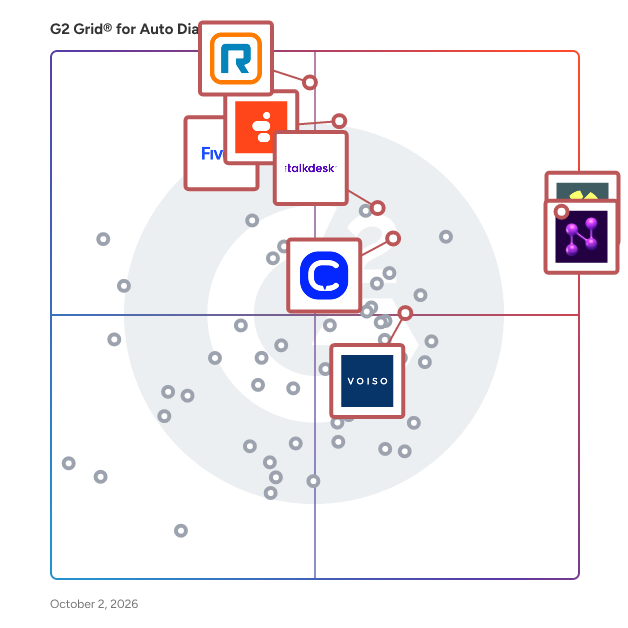
## G2 Grid® for Auto Dialer Software
 ![G2 Grid® for Auto Dialer Software plotting products by satisfaction and market presence](https://www.g2.com/categories/auto-dialer/grids.png?focus%5B%5D=1188166&focus%5B%5D=125401&focus%5B%5D=348&focus%5B%5D=4215&focus%5B%5D=5511&focus%5B%5D=37283&focus%5B%5D=87468&focus%5B%5D=125609)

Highlighted products: Nooks, Orum, Five9 Intelligent Cloud Contact Center Platform, Genesys Cloud CX, Talkdesk, RingCentral Contact Center, CloudTalk, and Voiso.

Underlying data: [Grid® JSON](https://www.g2.com/categories/auto-dialer/grids.json?focus%5B%5D=nooks&focus%5B%5D=orum&focus%5B%5D=five9-intelligent-cloud-contact-center-platform&focus%5B%5D=genesys-cloud-cx&focus%5B%5D=talkdesk&focus%5B%5D=ringcentral-contact-center&focus%5B%5D=cloudtalk&focus%5B%5D=voiso&segment=mid-market)

**Sponsored**

### SAP Fieldglass

Drive better business outcomes with a robust Vendor Management System (VMS) to find, engage, and manage your global external workforce – including temporary workers, freelancers, contractors, consultants, and service workers. Since 1999, organizations have been using innovative digital SAP Fieldglass solutions to transform how they get work done. Offered in 190 countries and 21 languages, our open cloud-based applications let you simplify and streamline the procurement and management of your external workforce. You can: • Connect in real time to a global network of qualified service providers and contingent workers so you can find the right talent more quickly. • Track and manage key metrics to accurately manage performance and enhance outcomes and productivity over time. • Improve process efficiency, total workforce results, and spend management savings through integration with ERP, HR, and procurement solutions. • Reduce risk through security features that support global-regulations compliance, permissions and access tracking, and asset protection through proper on- and offboarding. • Increase productivity and strengthen competitive advantage by creating and maintaining a dynamic, responsive workforce.

[Visit website](https://www.g2.com/external_clickthroughs/record?secure%5Bad_program%5D=ppc&secure%5Bad_slot%5D=category_product_list_llm&secure%5Bcategory_id%5D=1386&secure%5Bchosen_at%5D=2026-08-01T13%3A12%3A28Z&secure%5Bdisplayable_resource_id%5D=133&secure%5Bdisplayable_resource_type%5D=Category&secure%5Bmedium%5D=sponsored&secure%5Bplacement_reason%5D=retargeted_product&secure%5Bplacement_resource_ids%5D%5B%5D=38217&secure%5Bprioritized%5D=false&secure%5Bproduct_id%5D=38217&secure%5Bresource_id%5D=1386&secure%5Bresource_type%5D=Category&secure%5Bsource_type%5D=category_page&secure%5Bsource_url%5D=https%3A%2F%2Fwww.g2.com%2Fcategories%2Fauto-dialer%2Fmid-market%3Fpage%3D3&secure%5Btoken%5D=5652f175d7b57fd861a175a4db253be2c83a2c30097d4d887cb0cafc6064875a&secure%5Burl%5D=https%3A%2F%2Fwww.sap.com%2Fdocuments%2F2025%2F03%2Fc4519407-fc7e-0010-bca6-c68f7e60039b.html%3Fcampaigncode%3DCRM-YD25-ISM-408601%26source%3DFG-click-campaign-G2&secure%5Burl_type%5D=custom_url)

### [Salesfinity](https://www.g2.com/products/salesfinity/reviews)

Salesfinity – The AI Dialer Built for Modern SDR & AE Teams Salesfinity is the AI-powered dialer built for high-performing outbound teams who want more conversations, more meetings, and less grind. Traditional dialers are slow, disconnected, and waste 80% of reps’ time on voicemails, spam numbers, and manual follow-ups. Salesfinity changes that. Our AI Parallel Dialer connects SDRs with 5.2× more prospects by calling multiple validated numbers at once—only transferring live human answers to reps. But speed is just the start. Salesfinity also enriches your contact lists in real time using 6+ data providers to replace bad numbers and recover lost leads. Once a rep speaks with a “good fit, not now” contact, Nurture AI automatically schedules the perfect follow-up, tracks buying signals, and re-engages when timing is right. Remote team? No problem. The Salesfloor feature brings everyone together with live leaderboards, whisper coaching, and call competitions that make dialing exciting again. Meanwhile, AI Call Scoring and 360° Rep Profiles show managers exactly who’s improving and where to coach—no more guessing. Salesfinity integrates natively with HubSpot, Salesforce, Outreach, Salesloft, Amplemarket, and Apollo, auto-logging every call and outcome so your CRM stays clean without manual work. Join fast-growing companies like Coderabbit.ai, Insight Assurance, Qodo AI, and Oligo Security, who doubled their connect rates and slashed calling time by 75%. If your SDRs still spend hours clicking “next call,” it’s time to upgrade. Book a 30-minute demo and see how Salesfinity helps your team 3–5× their live connects—without adding headcount.

**Average Rating:** 4.8/5.0

**Total Reviews:** 117

#### How Do G2 Users Rate Salesfinity?

- **Has the product been a good partner in doing business?:** 9.4/10 (Category avg: 8.9/10)
- **Omnichannel:** 9.0/10 (Category avg: 8.6/10)
- **API / Integrations:** 9.0/10 (Category avg: 8.6/10)
- **Progressive Dialing:** 9.1/10 (Category avg: 8.6/10)

#### Who Is the Company Behind Salesfinity?

- **Seller:** [Salesfinity](https://www.g2.com/sellers/salesfinity)
- **Year Founded:** 2022
- **HQ Location:** San Francisco, California
- **LinkedIn® Page:** [www.linkedin.com](https://www.g2.com/external_clickthroughs/record?secure%5Bsource_type%5D=product_profile&secure%5Btoken%5D=82fc6bfcb1541674963b4bccb6406d22f294942489872a4dde2efc4955fe0e06&secure%5Burl%5D=https%3A%2F%2Fwww.linkedin.com%2Fcompany%2Fsalesfinity-co&secure%5Burl_type%5D=linkedin_company_website)  
23 employees on LinkedIn®

#### Who Uses This Product?

- **Who Uses This:** BDR, SDR
- **Top Industries:** Computer Software, Information Technology and Services
- **Company Size:** 46% Small, 32% Medium

#### What Do G2 Reviewers Say About Salesfinity?

_AI-generated summary from verified user reviews_

##### Pros

- Users find Salesfinity to be very **easy to use** , appreciating its clean layout and strong customer support.
- Users value the **time-saving features** of Salesfinity, significantly enhancing call volume while reducing dialing time.
- Users enjoy the **easy setup** of Salesfinity, allowing quick integration and immediate booking of meetings.
- Users find Salesfinity's **efficient multi-call feature** and organized interface highly beneficial for managing their calls effectively.
- Users love the **parallel dialer** of Salesfinity for its speed and convenience in making multiple calls simultaneously.

##### Cons

- Users experience **call issues** with delays and limitations in dialing features, affecting overall efficiency and satisfaction.
- Users note **missing features** in Salesfinity, including account mapping and improved call switching in the dialer.
- Users report **audio issues** with Salesfinity, affecting quality and causing repetitive sounds during extensive calling sessions.
- Users report **connection issues** with Salesfinity, citing delays and voice quality problems during calls.
- Users experience a **short learning curve** with Salesfinity's advanced features, but adaptability leads to a smooth workflow.

#### What Are Recent G2 Reviews of Salesfinity?

**["Salesfinity: Transformative Productivity and User-Friendly Interface"](https://www.g2.com/survey_responses/salesfinity-review-12749945)**

**Rating:** 4.0/5.0 stars

_— Mark D._

[Read full review](https://www.g2.com/survey_responses/salesfinity-review-12749945)

**["Awesome Team, Ever-Improving Product, and Responsive Support"](https://www.g2.com/survey_responses/salesfinity-review-13079592)**

**Rating:** 5.0/5.0 stars

_— John O._

[Read full review](https://www.g2.com/survey_responses/salesfinity-review-13079592)

### [Acqueon](https://www.g2.com/products/acqueon/reviews)

Acqueon leads the way as the premier Generative AI-powered Revenue Execution Platform, specializing in outbound communications tailored to empower B2C enterprises in achieving their revenue generation goals and revenue recovery objectives. Covering a range of essential use cases including Collections, Internet Sales, Telephone Sales, Proactive Service, Reminders, Outage Notifications, and Appointment Management, Acqueon enables customers to elevate sales performance and enhance customer satisfaction. We achieve this through the automation of communication workflows, optimizing human resources, utilizing predictive analytics and AI for strategic customer engagement, ensuring compliance with privacy and communication regulations, and seamlessly integrating with existing communications infrastructure and record systems. With more than 110,000 agents and 200 global customers placing their trust in Acqueon, businesses experience increased revenue outcomes while fostering lasting, loyal customer relationships.

**Average Rating:** 4.2/5.0

**Total Reviews:** 70

#### How Do G2 Users Rate Acqueon?

- **Has the product been a good partner in doing business?:** 8.7/10 (Category avg: 8.9/10)
- **Omnichannel:** 7.3/10 (Category avg: 8.6/10)
- **API / Integrations:** 8.1/10 (Category avg: 8.6/10)
- **Progressive Dialing:** 8.3/10 (Category avg: 8.6/10)

#### Who Is the Company Behind Acqueon?

- **Seller:** [Acqueon Technologies Inc.](https://www.g2.com/sellers/acqueon-technologies-inc)
- **Year Founded:** 2019
- **HQ Location:** Dallas, Texas
- **Twitter:** @Acqueon  
489 Twitter followers
- **LinkedIn® Page:** [www.linkedin.com](https://www.g2.com/external_clickthroughs/record?secure%5Bsource_type%5D=product_profile&secure%5Btoken%5D=3db933560007aba27c906046d883688e6cdfa7645509cb48edf37c9e6d94c7b7&secure%5Burl%5D=https%3A%2F%2Fwww.linkedin.com%2Fcompany%2Facqueon%2F&secure%5Burl_type%5D=linkedin_company_website)  
228 employees on LinkedIn®

#### Who Uses This Product?

- **Top Industries:** Financial Services, Insurance
- **Company Size:** 59% Large, 30% Medium

#### What Do G2 Reviewers Say About Acqueon?

_AI-generated summary from verified user reviews_

##### Pros

- Users value the **supportive team** at Acqueon, ensuring customer satisfaction and seamless integration with existing systems.
- Users praise the **outstanding customer support** from Acqueon, ensuring satisfaction and seamless integration with existing systems.
- Users value the **ease of use** of Acqueon, appreciating its intuitive layout and seamless integration capabilities.
- Users praise Acqueon for its **seamless integrations** with existing systems, enhancing efficiency in customer outreach and compliance.
- Users commend Acqueon for its **excellent customer satisfaction** , highlighting the team's support and seamless integration experience.

##### Cons

- Users face **limited customization options** with Acqueon, impacting functionality and adaptability for their specific needs.
- Users face **technical issues** with Acqueon, leading to delays, bugs, and communication problems during implementation and upgrades.
- Users find the **pricing for Acqueon** higher than expected, especially for smaller operations and budgets.
- Users face significant **integration issues** due to lack of support and unclear differentiation between Acqueon and Cisco dependencies.
- Users find a **steep learning curve** with Acqueon's advanced features, requiring extra time for effective implementation.

#### What Are Recent G2 Reviews of Acqueon?

**["Good partner to work with."](https://www.g2.com/survey_responses/acqueon-review-11408403)**

**Rating:** 4.0/5.0 stars

_— Farid K._

[Read full review](https://www.g2.com/survey_responses/acqueon-review-11408403)

**["Tawuniya LCM Implementation"](https://www.g2.com/survey_responses/acqueon-review-11387133)**

**Rating:** 5.0/5.0 stars

_— Dina E._

[Read full review](https://www.g2.com/survey_responses/acqueon-review-11387133)

#### What Are G2 Users Discussing About Acqueon?

- [What is Acqueon used for?](https://www.g2.com/discussions/what-is-acqueon-used-for)

### [Dialpad Support](https://www.g2.com/products/dialpad-support/reviews)

Dialpad Support is an AI-native contact center solution that brings real-time AI insights, automation, and coaching into a single system so agents and supervisors have the context they need, when they need it. Dialpad Support modernizes inbound contact centers with real-time transcription, AI summaries, and action items that keep agents focused on the conversation instead of note-taking. Supervisors can coach and monitor teams with live sentiment tracking and automated quality management. Dialpad also offers an outbound solution that guides sales reps with real-time AI coaching, automation, and insights, so both inbound and outbound can run on the same platform. On the Dialpad platform, AI Agents are available for both voice and digital interactions, working alongside your team to handle routine inquiries and free up agents for more complex conversations. With Dialpad, you can: - Provide real-time agent assists - Coach and monitor teams with live sentiment and automated quality management - Use AI Agents across voice and digital channels to support customers around the clock - Turn conversations into intelligence that helps your team know your customer and make informed decisions

**Average Rating:** 4.4/5.0

**Total Reviews:** 681

#### How Do G2 Users Rate Dialpad Support?

- **Has the product been a good partner in doing business?:** 9.0/10 (Category avg: 8.9/10)
- **Omnichannel:** 8.5/10 (Category avg: 8.6/10)
- **API / Integrations:** 8.7/10 (Category avg: 8.6/10)
- **Progressive Dialing:** 8.7/10 (Category avg: 8.6/10)

#### Who Is the Company Behind Dialpad Support?

- **Seller:** [Dialpad](https://www.g2.com/sellers/dialpad)
- **Company Website:** Dialpad.com
- **Year Founded:** 2011
- **HQ Location:** San Ramon, California
- **Twitter:** @DialpadHQ  
60 Twitter followers
- **LinkedIn® Page:** [www.linkedin.com](https://www.g2.com/external_clickthroughs/record?secure%5Bsource_type%5D=product_profile&secure%5Btoken%5D=6b95ce4b1a611b8e2cb68586d5533162aa3ebba2fdf36c04185ac44e2a69906c&secure%5Burl%5D=https%3A%2F%2Fwww.linkedin.com%2Fcompany%2F3967399%2F&secure%5Burl_type%5D=linkedin_company_website)  
1,491 employees on LinkedIn®

#### Who Uses This Product?

- **Who Uses This:** Account Manager, Customer Service Rep
- **Top Industries:** Financial Services, Consumer Services
- **Company Size:** 44% Medium, 31% Small

#### What Do G2 Reviewers Say About Dialpad Support?

_AI-generated summary from verified user reviews_

##### Pros

- Users find the **online help section incredibly helpful** , enabling quick answers and enhancing the support experience.
- Users appreciate the **ease of use** of Dialpad Support, finding navigation and support requests simple and efficient.
- Users enjoy the **responsive customer support** of Dialpad, appreciating quick resolutions and effective communication for their issues.
- Users value the **transcription and CRM integration** features of Dialpad Support, enhancing efficiency in client communications.
- Users appreciate the **quick response times** of Dialpad Support, effectively addressing issues with prompt assistance.

##### Cons

- Users find the **poor customer support** of Dialpad Support time-consuming and often unhelpful in resolving issues.
- Users experience **call connection delays** and find reporting and app functionality lacking, impacting their overall experience.
- Users are frustrated with the **delayed support** , making urgent assistance difficult to obtain when needed most.
- Users experience **dialer issues** including delays, call queue inaccuracies, and challenges with reporting and app utilization.
- Users experience frustratingly **long wait times** for responses, especially during peak hours, hindering quick resolutions.

#### What Are Recent G2 Reviews of Dialpad Support?

**["Dialpad Updated Review"](https://www.g2.com/survey_responses/dialpad-support-review-10344582)**

**Rating:** 5.0/5.0 stars

_— Mohammed P._

[Read full review](https://www.g2.com/survey_responses/dialpad-support-review-10344582)

**["Easy Setup, Fair Pricing, and Solid Integrations with Halo PSA and Slack"](https://www.g2.com/survey_responses/dialpad-support-review-12836209)**

**Rating:** 5.0/5.0 stars

_— Christopher R._

[Read full review](https://www.g2.com/survey_responses/dialpad-support-review-12836209)

#### What Are G2 Users Discussing About Dialpad Support?

- [What is Dialpad Sell used for?](https://www.g2.com/discussions/what-is-dialpad-sell-used-for)
- [What is Dialpad Contact Center used for?](https://www.g2.com/discussions/what-is-dialpad-contact-center-used-for) - 1 comment

### [FrontSpin](https://www.g2.com/products/frontspin/reviews)

FrontSpin is a cloud-based sales communication platform designed to enhance the efficiency and effectiveness of inside sales teams. By integrating advanced tools such as power dialing, email automation, and sales cadence management, FrontSpin enables sales professionals to engage with more prospects in less time, thereby accelerating the sales process and increasing deal closures. Its seamless integration with CRM systems ensures real-time data synchronization, providing a unified interface for managing communications and tracking engagement. Key Features and Functionality: - Power Dialer: Automates dialing processes, allowing sales representatives to contact up to three times more prospects with features like prioritized call lists and pre-recorded voicemails. - Parallel Dialer: Utilizes AI to efficiently process large contact lists, filtering out invalid numbers and classifying leads for targeted outreach. - Cadence Playbooks: Offers customizable playbooks that integrate calls, emails, and social touches, streamlining sales workflows. - Sales Email: Enhances engagement through personalized email templates and real-time notifications for opens and clicks. - Social Touches & SMS: Incorporates social media interactions and SMS into sales strategies, providing a multi-channel approach to prospect engagement. - CRM Integration: Seamlessly syncs with CRM systems like Salesforce, ensuring real-time logging and synchronization of sales activities. Primary Value and Solutions Provided: FrontSpin addresses common challenges faced by inside sales teams, such as low connect rates and inefficient workflows. By automating repetitive tasks like dialing and voicemail, and by providing tools for personalized and multi-channel communication, FrontSpin significantly increases the number of live conversations sales representatives can have. This leads to higher engagement rates, more efficient sales processes, and ultimately, increased revenue. Additionally, its real-time analytics and reporting capabilities offer valuable insights into sales performance, enabling teams to make data-driven decisions and continuously optimize their strategies.

**Average Rating:** 4.3/5.0

**Total Reviews:** 65

#### How Do G2 Users Rate FrontSpin?

- **Has the product been a good partner in doing business?:** 9.2/10 (Category avg: 8.9/10)
- **Omnichannel:** 8.5/10 (Category avg: 8.6/10)
- **API / Integrations:** 8.6/10 (Category avg: 8.6/10)
- **Progressive Dialing:** 7.3/10 (Category avg: 8.6/10)

#### Who Is the Company Behind FrontSpin?

- **Seller:** [FrontSpin](https://www.g2.com/sellers/frontspin)
- **Year Founded:** 2015
- **HQ Location:** San Mateo, CA
- **Twitter:** @FrontSpinHQ  
228 Twitter followers
- **LinkedIn® Page:** [www.linkedin.com](https://www.g2.com/external_clickthroughs/record?secure%5Bsource_type%5D=product_profile&secure%5Btoken%5D=301e2d7bd2747548e8a7d901551e38d24350af5a0286c43165939e75a032a1af&secure%5Burl%5D=https%3A%2F%2Fwww.linkedin.com%2Fcompany%2F3866120&secure%5Burl_type%5D=linkedin_company_website)  
12 employees on LinkedIn®

#### Who Uses This Product?

- **Top Industries:** Computer Software, Information Technology and Services
- **Company Size:** 69% Medium, 28% Small

#### What Do G2 Reviewers Say About FrontSpin?

_AI-generated summary from verified user reviews_

##### Pros

- Users find FrontSpin's interface **easy to use** , enabling quick integration and efficient operation for daily tasks.
- Users value the **seamless integrations** of FrontSpin, enhancing their CRM experiences and improving call tracking efficiency.
- Users praise the **automation capabilities** of FrontSpin, enhancing reporting and streamlining outbound operations effectively.
- Users value the **easy setup** of FrontSpin, enabling quick onboarding and usage by new reps.
- Users commend FrontSpin for its **robust reporting capabilities** , enhancing call activity and providing detailed insights effortlessly.

##### Cons

- Users face **integration issues** as they must manually add leads from Salesforce to FrontSpin for accurate KPI tracking.
- Users note the **limited customization** options in reporting, though improvements are actively being addressed by FrontSpin.
- Users desire **more integration options** with FrontSpin to enhance its overall functionality and flexibility.
- Users find **limited reporting customization** with FrontSpin, needing more self-service options to enhance their workflow efficiency.
- Users find **poor lead generation** in FrontSpin necessitates manual lead entry, complicating KPI tracking.

#### What Are Recent G2 Reviews of FrontSpin?

**["Dependable Dialer with a Few Setup Hiccups"](https://www.g2.com/survey_responses/frontspin-review-12535301)**

**Rating:** 5.0/5.0 stars

_— alvaro l._

[Read full review](https://www.g2.com/survey_responses/frontspin-review-12535301)

**["Developer friendly outbound platform with strong support"](https://www.g2.com/survey_responses/frontspin-review-12247121)**

**Rating:** 5.0/5.0 stars

_— Javier G._

[Read full review](https://www.g2.com/survey_responses/frontspin-review-12247121)

#### What Are G2 Users Discussing About FrontSpin?

- [What is FrontSpin used for?](https://www.g2.com/discussions/what-is-frontspin-used-for)

### [VCC Live](https://www.g2.com/products/vcc-live/reviews)

VCC Live is a cloud-based contact center solution for managing the full scope of inbound and outbound activities. ▸ Omnichannel, feature-filled software ▸ No user coding or development required ▸ Leader in client satisfaction and ease of use ▸ Renowned for quick setup and support ▸ Consultative pricing to meet precise needs About our platform... Channels for delivering a great CX: ▸ Voice: Calls using digital lines for crystal-clear quality ▸ Email: Built-in email with mass sends and workflows ▸ SMS: Automate notifications with a personalized touch ▸ Live chat: Real-time support to boost resolutions and sales ▸ Chat apps: Connect over the most popular messaging apps ▸ Social: Increase responsiveness via company social pages Features for fueling campaigns: ▸ ACD: Connect customers with the right agents to boost resolutions ▸ Automated dialers: Achieve higher volumes of outbound calls ▸ IVR: Easily build menus for call navigation and data capture ▸ Outbound IVR: Automate large-scale campaigns without agents ▸ Real-time dashboards: Customize and organize KPIs however you want ▸ VCC Live Pay: Conduct swift and secure payments over the phone ▸ Voicemail detection: Diminish encounters to keep agents active ▸ Integrations: Sync with any of your trusted business tools such as CRMs To learn more about our cloud contact center software at: https://vcc.live/

**Average Rating:** 4.6/5.0

**Total Reviews:** 160

#### How Do G2 Users Rate VCC Live?

- **Has the product been a good partner in doing business?:** 9.4/10 (Category avg: 8.9/10)
- **Omnichannel:** 8.3/10 (Category avg: 8.6/10)
- **API / Integrations:** 8.7/10 (Category avg: 8.6/10)
- **Progressive Dialing:** 8.6/10 (Category avg: 8.6/10)

#### Who Is the Company Behind VCC Live?

- **Seller:** [VCC Live Group Zrt](https://www.g2.com/sellers/vcc-live-group-zrt)
- **Year Founded:** 1999
- **HQ Location:** Budapest, Pest
- **Twitter:** @vcc\_live\_brand  
1,516 Twitter followers
- **LinkedIn® Page:** [www.linkedin.com](https://www.g2.com/external_clickthroughs/record?secure%5Bsource_type%5D=product_profile&secure%5Btoken%5D=0d67eaa2a24a95d0f85444152dabd1f7baab102fb364635c795e90c793c4d263&secure%5Burl%5D=https%3A%2F%2Fwww.linkedin.com%2Fcompany%2F2488255%2F&secure%5Burl_type%5D=linkedin_company_website)  
84 employees on LinkedIn®

#### Who Uses This Product?

- **Top Industries:** Financial Services, Telecommunications
- **Company Size:** 51% Medium, 42% Small

#### What Do G2 Reviewers Say About VCC Live?

_AI-generated summary from verified user reviews_

##### Pros

- Users value the **intuitive and user-friendly interface** of VCC Live, facilitating seamless navigation and configuration.
- Users praise the **exceptional customer support** of VCC Live, highlighting prompt responses and proactive assistance from the team.
- Users highlight the **exceptional support** from VCC Live, noting the team's dedication and prompt assistance in every situation.
- Users appreciate the **wide range of detailed reports** that VCC Live provides, enhancing their reporting capabilities.
- Users value VCC Live for its **100% stable operation** , ensuring reliable delivery and effective performance during campaigns.

##### Cons

- Users find the **customization difficult** , citing complicated setup processes and insufficient guidance for settings adjustments.
- Users find a significant **lack of clarity** in VCC Live, making navigation and understanding difficult.
- Users report **user interface issues** with VCC Live, finding navigation complicated and outdated, impacting overall usability.
- Users find the **UI design poor** , noting that navigation is confusing and the interface feels outdated.
- Users often face **usability issues** with VCC Live, finding the setup processes complicated and support documentation lacking.

#### What Are Recent G2 Reviews of VCC Live?

**["Great experience"](https://www.g2.com/survey_responses/vcc-live-review-9484010)**

**Rating:** 5.0/5.0 stars

_— Diana G._

[Read full review](https://www.g2.com/survey_responses/vcc-live-review-9484010)

**["Outstanding Customer Support and a Transparent, User-Friendly Application"](https://www.g2.com/survey_responses/vcc-live-review-11459084)**

**Rating:** 5.0/5.0 stars

_— Lilla K._

[Read full review](https://www.g2.com/survey_responses/vcc-live-review-11459084)

#### What Are G2 Users Discussing About VCC Live?

- [What do you like most about VCC Live for contact center solutions, and what could be improved?](https://www.g2.com/discussions/what-do-you-like-most-about-vcc-live-for-contact-center-solutions-and-what-could-be-improved)
- [What is VCC Live used for?](https://www.g2.com/discussions/what-is-vcc-live-used-for) - 1 comment

### [Shape Software](https://www.g2.com/products/shape-software-shape-software/reviews)

Shape is purpose-built sales and marketing automation software that comes with pre-built features that can be configured for any business. The easy-to-use interface empowers your teams and consolidates all aspects of your business in one AI platform. Shape Software provides a collaborative space for your teams to stay aligned and efficient in everything they do, whether it's streamlining your sales pipeline, engaging more prospects with marketing sequences and digital ads, nurturing customer relationships, communicating seamlessly, or tracking projects. Start growing your revenue with Shape today.

**Average Rating:** 4.5/5.0

**Total Reviews:** 59

#### How Do G2 Users Rate Shape Software?

- **Has the product been a good partner in doing business?:** 8.3/10 (Category avg: 8.9/10)
- **Omnichannel:** 10.0/10 (Category avg: 8.6/10)
- **API / Integrations:** 10.0/10 (Category avg: 8.6/10)
- **Progressive Dialing:** 9.3/10 (Category avg: 8.6/10)

#### Who Is the Company Behind Shape Software?

- **Seller:** [Shape Software](https://www.g2.com/sellers/shape-software)
- **HQ Location:** Irvine, California
- **Twitter:** @ShapeBizTech  
656 Twitter followers
- **LinkedIn® Page:** [www.linkedin.com](https://www.g2.com/external_clickthroughs/record?secure%5Bsource_type%5D=product_profile&secure%5Btoken%5D=03f5d607c7cb630b66d7f021c79dad98fd81ba2b90490a8590a89459d62e5bca&secure%5Burl%5D=https%3A%2F%2Fwww.linkedin.com%2Fcompany%2F18416707%2F&secure%5Burl_type%5D=linkedin_company_website)  
42 employees on LinkedIn®

#### Who Uses This Product?

- **Top Industries:** Financial Services, Accounting
- **Company Size:** 60% Small, 35% Medium

#### What Do G2 Reviewers Say About Shape Software?

_AI-generated summary from verified user reviews_

##### Pros

- Users find the **email marketing tools** in Shape Software advanced and effective for their marketing automation needs.
- Users value the **advanced lead management features** of Shape Software, enhancing their marketing automation and customer engagement.
- Users value the **robust marketing automation tools** in Shape Software, enhancing their campaigns effectively and efficiently.
- Users appreciate the **marketing automation tools** of Shape Software, enhancing their campaign efficiency and lead management.
- Users value the **wide array of marketing automation tools** in Shape Software, enhancing their campaign effectiveness.

##### Cons

- Users experience **editing limitations** with Shape Software, including restricted customization and a slow performance compared to competitors.
- Users criticize the **expensive subscription costs** and additional fees, feeling it offers less value compared to competitors.
- Users face **API issues** with Shape Software, citing limitations in functionality and restrictive usage limits despite extra fees.
- Users report **app limitations** like restricted customization, slow performance, and high additional costs affecting overall satisfaction.
- Users face significant **billing issues** with Shape Software, including difficulties in canceling subscriptions and high contract costs.

#### What Are Recent G2 Reviews of Shape Software?

**["Shape CRM Software is simply the best CRM solution out there!"](https://www.g2.com/survey_responses/shape-software-review-7751030)**

**Rating:** 5.0/5.0 stars

_— Irina A._

[Read full review](https://www.g2.com/survey_responses/shape-software-review-7751030)

**["The Best CRM on the Market"](https://www.g2.com/survey_responses/shape-software-review-7720586)**

**Rating:** 5.0/5.0 stars

_— Bryan L._

[Read full review](https://www.g2.com/survey_responses/shape-software-review-7720586)

#### What Are G2 Users Discussing About Shape Software?

- [What is Shape Software used for?](https://www.g2.com/discussions/what-is-shape-software-used-for)

### [OutReach](https://www.g2.com/products/customer-dynamics-outreach/reviews)

Designed specifically for NICE CXone customers who need more functionality and performance, OutReach from Customer Dynamics is a high-performance, robust, easy-to-use, web-based solution that scales dialing campaigns from thousands to millions of records effortlessly.

**Average Rating:** 4.2/5.0

**Total Reviews:** 15

#### How Do G2 Users Rate OutReach?

- **Omnichannel:** 7.9/10 (Category avg: 8.6/10)
- **API / Integrations:** 6.7/10 (Category avg: 8.6/10)
- **Progressive Dialing:** 7.9/10 (Category avg: 8.6/10)

#### Who Is the Company Behind OutReach?

- **Seller:** [Customer Dynamics](https://www.g2.com/sellers/customer-dynamics)
- **Year Founded:** 2004
- **HQ Location:** Draper, US
- **Twitter:** @CustomerDynamic  
9 Twitter followers
- **LinkedIn® Page:** [www.linkedin.com](https://www.g2.com/external_clickthroughs/record?secure%5Bsource_type%5D=product_profile&secure%5Btoken%5D=55b213978aef7f675121a4c803e8918e5bc2c20efaa162230c56cca25228bfcc&secure%5Burl%5D=https%3A%2F%2Fwww.linkedin.com%2Fcompany%2F617302&secure%5Burl_type%5D=linkedin_company_website)  
23 employees on LinkedIn®

#### Who Uses This Product?

- **Top Industries:** Computer Software
- **Company Size:** 73% Medium, 20% Small

#### What Are Recent G2 Reviews of OutReach?

**["Outreach does the trick!"](https://www.g2.com/survey_responses/outreach-review-8260281)**

**Rating:** 5.0/5.0 stars

_— Sebastien M._

[Read full review](https://www.g2.com/survey_responses/outreach-review-8260281)

**["A worthy tool for outreach"](https://www.g2.com/survey_responses/outreach-review-8282285)**

**Rating:** 4.5/5.0 stars

_— Verified User in Computer Software_

[Read full review](https://www.g2.com/survey_responses/outreach-review-8282285)

- [&lsaquo; Prev‹ Prev](/categories/auto-dialer/mid-market?order=g2_score&page=2#product-list)
- [1](/categories/auto-dialer/mid-market?order=g2_score#product-list)
- [2](/categories/auto-dialer/mid-market?order=g2_score&page=2#product-list)
- 3
- Next &rsaquo;Next ›

Spotlight Categories

[Retail POS Systems](https://www.g2.com/categories/retail-pos)

[Relational Databases](https://www.g2.com/categories/relational-databases)

[Digital Signage Software](https://www.g2.com/categories/digital-signage)

[User Research Tools](https://www.g2.com/categories/user-research)

[Contract Lifecycle Management (CLM) Software](https://www.g2.com/categories/contract-lifecycle-management-clm)

Similar Categories

- [CRM](/categories/crm)
- [Sales Compensation](/categories/sales-compensation)
- [AI Sales Assistant](/categories/ai-sales-assistant)
- [Contract Analytics](/categories/contract-analytics)
- [Contract Lifecycle Management (CLM)](/categories/contract-lifecycle-management-clm)

- [Contract Management](/categories/contract-management)
- [Customer Revenue Optimization](/categories/customer-revenue-optimization)
- [E-Signature](/categories/e-signature)
- [Field Sales](/categories/field-sales)
- [Other Sales](/categories/other-sales)

- [Partnerships Management](/categories/partnerships-management)
- [PreSales](/categories/presales)
- [Quote Management](/categories/quote-management)
- [Revenue AI Platforms](/categories/revenue-ai-platforms)
- [Revenue Operations & Intelligence (RO&I)](/categories/revenue-operations-intelligence-ro-i)

[Browse Auto Dialer Themes](/categories/auto-dialer/themes)

 ![Julie Jung](/assets/transparent-ad5be28fbcd25b7b08d2cebe1d957125437fb5407d75ee717965ad22c8808791.gif "Julie Jung")
JJ

Researched and written by [Julie Jung](https://research.g2.com/insights/author/julie-jung)

Updated 

Products classified in the overall Auto Dialer category are similar in many regards and help companies of all sizes solve their business problems. However, medium-sized business features, pricing, setup, and installation differ from businesses of other sizes, which is why we match buyers to the right Medium-Sized Business Auto Dialer to fit their needs. Compare product ratings based on reviews from enterprise users or connect with one of G2's buying advisors to find the right solutions within the Medium-Sized Business Auto Dialer category.

In addition to qualifying for inclusion in the Auto Dialer Software category, to qualify for inclusion in the Medium-Sized Business Auto Dialer Software category, a product must have at least 10 reviews left by a reviewer from a medium-sized business.

Show More

* * *

## How Do You Choose the Right Auto Dialer Software?

### What You Should Know About Auto Dialer Software

### What is Auto Dialer Software?

Auto dialer software automates telephone dialing using numbers pulled from a list and connects either to a live agent or a prerecorded message. These tools eliminate the tedious task of manual dialing individual phone numbers, enabling representatives to focus on the content and delivery of their message.

Auto dialer software often requires a computer, a voice modem, and an active telephone line; though cloud-based solutions are becoming more prevalent. Some solutions require businesses to buy and host the necessary hardware themselves, while others bundle hardware hosting into their product for free or offer an additional subscription. The required hardware isn’t always specific, and the application can run on a computer or cell phone.

### What are the Common Features of Auto Dialer Software?

Based on G2 reviews, contact centers and sales teams evaluate auto dialer software by comparing call connection rates, CRM integration, and real-time monitoring capabilities.

The following are some core features within auto dialer software that can help users make the most of them, from dialing modes to auto dialer CRM integration tools that keep call data synced with the rest of a sales stack:

**Predictive dialing:** This dialing type allows for multiple phone numbers to be called at once. Predictive dialers use an algorithm to time dial the next number by identifying when an operator is towards the end of their script or active call. Predictive dialing increases the efficiency of call center agents, as there is less idle time in between calls.&nbsp;

**Progressive dialing:** Progressive dialers, also known as power dialers, allow for a seamless transition between calls by placing the next call immediately after the current call has finished. Teams can gather notes or strategies prior to each call as the dial rate is not predetermined, as they are with predictive dialers.&nbsp;

**Preview dialing:** Preview dialers enable the operator to skip or delay the next call, allowing them time to prepare information and personalize the call. This automatic dialing method is typically used when organizations are focused on quality, rather than quantity.&nbsp;

**Interactive voice response (IVR):** IVR enables callers to retrieve information through a voice response system without having to speak directly with an agent. It allows callers to use touch tone selections or voice recognition to resolve their inquiries or route their call accordingly.&nbsp;

**Call recording:** These products provide the ability to record calls to access or evaluate at a later time to ensure that quality and compliance standards are being met. Some solutions also provide the ability to pause live recordings, typically to ensure compliance with local regulations.&nbsp;

**Location generation:** Auto dialer software can generate a local area code to assist the caller in increasing the likelihood of pickup.&nbsp;

**Voice broadcast:** Voice broadcasting allows users to present a pre-recorded audio message when a call is answered.

**API/Integrations:** Auto dialer software provides multiple APIs or integrations with other software within an organization’s tech stack to ensure data is transferred to the source of truth, typically a CRM, to manage all interactions with prospects or customers.&nbsp;

**Call scrubbing:** This feature of auto dialer software removes numbers from an uploaded list of numbers in the National Do Not Call (DNC) Registry or other industry sources.&nbsp;

**Voice activity detection:** Voice activity detection enables dialers to recognize if a human answered the call or an answering machine. If a human answers the call, the dialer routes the call to an available agent. For an answering machine detection, the call is typically dropped.

**Callback scheduling:** This feature enables users to reschedule calls for follow-ups within the dialing solution itself, either through an agent or through a prompt.

**Whisper coaching:** Some solutions enable supervisors or call center operators to listen to a call in real time and train reps, or agents.&nbsp;

### What are the Benefits of Auto Dialer Software?

Auto dialer software can have its own set of benefits, as mentioned below.&nbsp;

**Improved efficiency:** These dialing systems, regardless of dialing mode, increase the efficiency of agents and reps by eliminating manual dialing and minimizing wait times. Auto dialers enable organizations to streamline the dialing process, allowing reps to gather information around the call recipient and personalize conversations, leading to more productive conversations.&nbsp;

**Performance monitoring:** Auto dialers provide managers and operators with key performance data of reps or agents. With call recording, whisper coaching, and other vital features, managers can gain insight into the productivity and performance of their team, as well as ensure that they adhere to best practices and remain compliant.&nbsp;

**Filtering out invaluable numbers:** Auto dialer software provides CRM integration to update the information on the customer record in the CRM to avoid future calls to disconnected numbers, ‘Do Not Disturb’ numbers, or other invaluable numbers. This improves a business’ data quality and saves the organization time in the future.&nbsp;

**CRM integration:** Auto dialing solutions that integrate with an organization’s CRM allow agents to easily access customer data to tailor conversations accordingly. This allows the reps, or contact center agents, to have a more productive call, enhancing the customer experience.

### Who Uses Auto Dialer Software?

Given its focus on increasing the productivity of inbound and outbound callers, a variety of organizations leverage auto dialers. A few of the primary users are listed below.&nbsp;

**Contact centers:** Contact centers are key users of auto dialers as they typically are customer support teams to manage inbound calls and ensure quality assurance of customer inquiries. While contact centers are generally omnichannel, such as SMS and email support, they leverage an automated dialer to eliminate manual dialing and improve agent productivity. Given the volume of inbound calls, contact centers leverage the call routing and call distribution capabilities of some auto dialer solutions to ensure that calls are supported by the next available agent. Contact centers in various industries use auto dialers, such as telemarketing agencies, [staffing services](https://www.g2.com/categories/staffing-services), nonprofit organizations, and [contact center outsourcing service providers](https://www.g2.com/categories/contact-center-outsourcing-services), among others.&nbsp;

**Sales teams:** Sales teams can also leverage auto dialing solutions to improve outbound sales and lead generation efforts. Outbound sales teams use auto dialing solutions by integrating with CRM software to begin the customer relationship and streamline the lead management process by ensuring that all interactions are recorded in the CRM software. Reps, particularly at outbound call centers, leverage automated dialers to streamline their process and ensure timely follow-up with prospective customers. While many sales teams leverage auto dialers to increase reps’ efficiencies, they are particularly effective for lead generation and [outsourced sales providers](https://www.g2.com/categories/outsourced-sales-providers) who seek to source new leads.&nbsp;

#### Software Related to Auto Dialer Software

[Contact center software](https://www.g2.com/categories/contact-center-6bd42d00-19c7-4b5f-932e-b59c7b734b66) **:** Contact center software provides organizations with the capabilities to run a cloud-hosted customer contact center. This software is closely related to auto dialer software, as it provides similar features. However, contact center software extends further by providing multiple channels for call center reps to leverage in addition to dialing systems.

[Call center infrastructure (CCI) software](https://www.g2.com/categories/call-center-infrastructure-cci) **:** CCI software, similar to auto dialer software, assists in managing inbound and outbound communications. However, CCI software provides additional features to manage operations and back-office tasks, as compared to auto dialer solutions which are focused primarily on eliminating manual dials and increasing efficiencies of operations.

[Outbound call Tracking](https://www.g2.com/categories/outbound-call-tracking) **:** Outbound call tracking and auto dialers have broad overlap in benefits and use cases, but outbound call tracking needs to be prompted to call and is primarily focused on storing data from the call. Alternatively, auto dialing systems are focused on streamlining workflows by providing automated dials and increasing agent productivity.&nbsp;

### Challenges with Auto Dialer Software

Auto dialer software solutions can come with their own set of challenges. A few of them are listed below.&nbsp;

**Legal constraints:** There are various laws and regulations pertaining to the use of auto dialers, most notably, the Telephone Consumer Protection Act (TCPA), which prohibits the use of these tools for uninvited calls. Additionally, the Telemarketing Sales Rule (TSR) requires telemarketers to note specific disclosures of information and sets parameters on an acceptable time zone to call consumers. These regulations also prohibit placing calls to consumers who have noted a desire to be removed from a contact list, and thus are placed on a ‘Do Not Call’ (DNC) list. The federal and state regulations pertaining to the use of auto dialing are ever-evolving, so it is imperative to understand the rules for the buyer's geographical area and industry when selecting a software.&nbsp;

**Blocking and hang-ups:** Given the increasing use of auto dialing, many individuals have technology in place to block calls from auto dialers. Additionally, there is typically a delay between a recipient picking up and the call connecting back to the agent, allowing the recipient to realize it's an automatic dialer and potentially discontinue the call.&nbsp;

**Voicemail incompatibility:** Automated messages from auto dialers sometimes do not mix seamlessly with voice mailboxes. The message can be recorded incompletely, and any interactivity in the message does not function properly in the recordings. While the technology has evolved and mitigated some of these challenges, it is still important to note when evaluating these products.&nbsp;

**Negative opinions:** Due in part to the artificial element of auto dialing, many people report a dislike for auto-dialed calls. Excessive or indiscriminate use of these tools may harm customer opinion, or potentially violate laws and regulations.&nbsp;

### How to Buy Auto Dialer Software

#### Requirements Gathering (RFI/RFP) for Auto Dialer Software

Requirements gathering for auto dialer software is critical to ensure that the business is leveraging a product that meets their needs. To do so, companies must evaluate the software based on their critical needs, as given below.&nbsp;

#### Compare Auto Dialer Products

**Create a long list**

Long lists are created by eliminating software options that do not provide critical functionality. To make a long list for an auto dialer vendor, a buyer should look at the essential functionalities and determine which products provide the necessary features. Auto dialer software enhances the efficiency and effectiveness of high-volume calling campaigns, can assist in streamlining customer service support, and ensures compliance to industry standards and regulations. A typical long list should not contain more than 10 products unless there are many similar options. In this case, buyers should consider a product’s ability to integrate with existing software, scalability, customization, and any relevant industry or geographical regulations to eliminate products.&nbsp;

**Create a short list**

From the long list of auto dialer vendors, it is helpful to narrow down the list and develop a shorter list of contenders, preferably no more than three to five. With this in hand, businesses can produce a matrix comparing the various offerings’ tiers, features, compatibility, and pricing.&nbsp;

**Conduct demos**

To ensure the comparison is thoroughgoing, the user should leverage a free trial or demo for each software solution on the short list with the same use cases and criteria for evaluation. This will allow the business to evaluate like for like and see how each product stacks up against the competition.&nbsp;

#### Selection of Auto Dialer Software

**Choose a selection team**

Auto dialer software can play a central role in an organization’s operations, particularly in contact centers or outsourced sales providers, emphasizing the importance of selecting a solution that best fits your requirements. It is important to consider how implementing an auto dialer system will impact the buyer's organization; thus an IT administrator should be a key decision maker. Managers, or operators, should also play a crucial role in the selection as they are familiar with how the auto dialer will be leveraged and understand the key functionalities to evaluate.&nbsp;

Other members of the selection team may include a legal and finance representative, to ensure costs and compliance regulations are met, as well as other members of departments which plan to leverage this technology. This selection team will ensure that all use cases and potential applications of the software can be assessed and ensure the compliance of a potential auto dialer software.&nbsp;

**Negotiation**

When negotiating a software contract, it is crucial to minimize risk in terms of performance or security and accurately assess the business needs relating to this software. Some solutions are priced based on the number of licenses (or the number of users), with the potential for additional charges based on add-on features, businesses should estimate the number of users they may require. If the company has cash flow, it behooves them to ask for a discount in return for an annual upfront payment rather than a monthly fee.&nbsp;

Buyers should also determine if they need assistance implementing the auto dialer solution or integrating it with another system. Lastly, businesses should also decide how long they will need this solution to better negotiate with longer-term contracts.&nbsp;

**Final decision**

The final decision should be made based on all the information gathered previously. Businesses should seek to prioritize needs and select the tool that meets most, if not all, of their requirements. Companies should remember that there is likely no one perfect software, but one that best meets the needs of their business.&nbsp;

### Auto Dialer Software FAQs

### Most Popular FAQs

#### Which auto dialer software has the best reviews?

Several auto dialer platforms stand out for consistently high satisfaction scores across thousands of verified user ratings. Based on overall ratings from real users, the top-reviewed options include:

- [Nooks](https://www.g2.com/products/nooks/reviews): An AI-powered parallel dialer built for outbound sales teams, recognized for real-time call coaching, session-level visibility, and the ability to increase daily call volume for SDR and AE teams dramatically.
- [Orum](https://www.g2.com/products/orum/reviews): An AI dialing platform designed for revenue teams, praised for its conversation intelligence layer, automated pipeline activity logging, and high-volume dialing throughput.
- [Salesfinity](https://www.g2.com/products/salesfinity/reviews): A parallel dialing tool that earns high marks for its clean interface, AI-powered call routing, and integration-friendly design suited for fast-moving sales teams.
- [Kixie PowerCall & SMS](https://www.g2.com/products/kixie-powercall-sms/reviews): A combined calling and SMS platform highly rated for quick setup, local presence dialing, and tight CRM integrations that reduce manual data entry between calls.

#### What is the best auto dialer software for outbound sales teams?

The strongest auto dialers for outbound sales reduce idle time between calls, automatically surface contact context, and integrate directly with a CRM, so reps stay in the flow. Top picks from users running active outbound programs include:

- [Close](https://www.g2.com/products/close/reviews): A CRM with a built-in power dialer designed specifically for outbound-heavy sales teams, valued for consolidating calling, email, and SMS in one platform without requiring separate tooling.
- [PhoneBurner](https://www.g2.com/products/phoneburner/reviews): A power dialer built for high-volume cold calling, recognized for its efficient lead workflow, voicemail drop feature, and ability to connect reps with live prospects faster and with less effort.
- [Voiso](https://www.g2.com/products/voiso/reviews): An outbound call center platform praised for real-time agent monitoring, campaign-level performance analytics, and multi-campaign management across distributed teams.
- [Salesfinity](https://www.g2.com/products/salesfinity/reviews): A parallel dialer purpose-built for outbound sales, recognized by users for its high connection rates, automated voicemail drop, and seamless CRM sync that keeps rep activity logged without manual entry.

#### What is the best auto dialer software with CRM integration?

Auto dialers with strong CRM integration get rid of tool-switching, automatically log call outcomes, and surface contact history the moment a prospect picks up. Platforms that consistently earn high marks for CRM connectivity include:

- [JustCall](https://www.g2.com/products/saas-labs-justcall/reviews): A cloud communication platform with native integrations into dozens of CRMs and helpdesks, enabling automatic call logging, activity syncing, and real-time data access during live calls.
- [Aloware](https://www.g2.com/products/aloware/reviews): A contact center platform with deep CRM sync capabilities, well-regarded by SMB sales teams for automating follow-up workflows triggered directly by call outcomes and dispositions.
- [Apollo.io](https://www.g2.com/products/apollo-io/reviews): A sales engagement platform that combines a built-in dialer with prospecting and CRM-connected sequencing, enabling reps to move from outreach to live calls within a single workflow.
- [Kixie PowerCall & SMS](https://www.g2.com/products/kixie-powercall-sms/reviews): A calling and SMS platform recognized for its native integrations with HubSpot, Salesforce, and Pipedrive, automatically logging call outcomes and SMS activity directly into contact records without manual entry.

#### What are the top auto dialer services for call centers?

Call centers need auto dialers that handle high call volume, support supervisory monitoring, maintain compliance, and operate reliably at scale. The following platforms see strong adoption in call center environments:

- [Five9 Intelligent Cloud Contact Center Platform](https://www.g2.com/products/five9-intelligent-cloud-contact-center-platform/reviews): An enterprise-grade contact center solution with predictive, progressive, and preview dialing modes, along with routing, IVR, and workforce management tools built for high-volume operations.
- [Genesys Cloud CX](https://www.g2.com/products/genesys-cloud-cx/reviews): A comprehensive cloud contact center platform used by large outbound operations for its omnichannel capabilities, AI-powered routing, and campaign management features.
- [Squaretalk](https://www.g2.com/products/squaretalk/reviews): A call center communication platform that earns recognition for its real-time monitoring dashboards, multi-campaign support, and agent performance visibility across distributed teams.
- [RingCentral Contact Center](https://www.g2.com/products/ringcentral-contact-center/reviews): A cloud-based contact center solution valued by call center operators for its reliable carrier infrastructure, built-in compliance controls, and supervisor monitoring tools that support large outbound teams.

#### What are the different types of auto dialers?

Auto dialer software comes in four primary modes, each suited to different calling objectives and team sizes. A predictive dialer uses algorithms to dial multiple numbers simultaneously and connects agents only when a live person answers, making it best suited for high-volume outbound call centers.&nbsp;

A power dialer works on a one-to-one basis, automatically dialing the next contact the moment an agent completes a call, offering a balance of speed and control without the risk of dropped calls. A progressive dialer is similar to a power dialer but introduces a brief pause between connections, giving agents a moment to review contact details before the call connects.&nbsp;

A preview dialer gives agents full control by surfacing lead information first and only dialing when the agent chooses to proceed, making it the right choice for complex or sensitive conversations where preparation matters.

#### What are the best auto dialer platforms for call recording, performance metrics dashboards, and real-time monitoring analytics?

Supervisors evaluating this feature set want a single view of what's happening on every call right now, rather than a recording they have to review after the fact.

- [RingCentral Contact Center](https://www.g2.com/products/ringcentral-contact-center/reviews): Built around customizable real-time dashboards that track handle time, first contact resolution, and queue time, alongside call recording and quality management tools reviewers cite for coaching and compliance.
- [Five9](https://www.g2.com/products/five9-intelligent-cloud-contact-center-platform/reviews): Gives supervisors visibility from the campaign level down to individual agents, with reviewers specifically praising its real-time monitoring of agent productivity and call quality.
- [Genesys Cloud CX](https://www.g2.com/products/genesys-cloud-cx/reviews): Reviewers highlight its real-time dashboards and reporting tools for operational visibility, letting supervisors make data-driven decisions as call volumes shift.
- [Orum](https://www.g2.com/products/orum/reviews): Its Virtual Salesfloor lets managers listen to live calls and coach in real time, paired with dashboards tracking connect rates, call outcomes, and productivity metrics.

#### Which auto dialer platforms track agent availability across multiple sales campaigns?

Teams running more than one outbound campaign at once need to see which agents are free, busy, or between calls, and route work to available capacity without manually reshuffling assignments.

- [Five9](https://www.g2.com/products/five9-intelligent-cloud-contact-center-platform/reviews): Lets supervisors organize callers into custom campaigns and TFNs, with rule and skill sets that control which agents can access which campaign.
- [Genesys Cloud CX](https://www.g2.com/products/genesys-cloud-cx/reviews): Routes interactions based on agent skills and availability, which reviewers say improves resolution times and makes better use of agent capacity across campaigns.
- [RingCentral Contact Center](https://www.g2.com/products/ringcentral-contact-center/reviews): Native scheduling and predictive forecasting align staffing with call traffic, while its real-time view of queue status and agent availability helps supervisors react as volume shifts between campaigns.
- [Orum](https://www.g2.com/products/orum/reviews): Its Virtual Salesfloor gives managers a live view of which reps are actively dialing across the team, so capacity can be redirected to whichever campaign needs it most.

### Small Business FAQs

#### What is the most affordable auto dialer software for SMBs?

Evaluating [SMB auto-dialer software](https://www.g2.com/categories/auto-dialer/small-business) on a budget means finding platforms that balance core dialing functionality with low total cost of ownership and minimal technical overhead. These platforms earn consistent marks from SMB users watching their spend closely:

- [DialedIn](https://www.g2.com/products/dialedin/reviews): A flexible auto dialer offering power and preview dialing at a price point accessible to small teams, with a clean interface that reduces training time and administrative setup overhead.
- [CloudTalk](https://www.g2.com/products/cloudtalk/reviews): A cloud-based calling platform popular with small and mid-sized sales teams for its competitive per-seat pricing, extensive CRM integration library, and international calling capabilities.
- [Aircall](https://www.g2.com/products/aircall/reviews): A cloud phone system with power dialing features recognized by SMBs for its straightforward setup, transparent pricing, and pre-built integrations with HubSpot, Salesforce, and other common tools.
- [JustCall](https://www.g2.com/products/saas-labs-justcall/reviews): A cloud communication platform that small teams frequently choose for its affordable per-seat cost, broad CRM integration library, and built-in SMS capabilities that remove the need for a separate messaging tool.

#### What is the best auto dialer software for startups?

Startups need an auto dialer that deploys quickly, integrates with their existing stack, and does not require a dedicated admin to maintain. These platforms are well-suited for early-stage teams, and you can explore the full range of options for small business auto dialer software on G2:

- [Close](https://www.g2.com/products/close/reviews): Purpose-built for early-stage sales teams, Close bundles a CRM and auto dialer into one interface, allowing founders and small reps to track deals and place calls without juggling separate tools.
- [PhoneBurner](https://www.g2.com/products/phoneburner/reviews): A power dialer favored by startup sales reps for its fast onboarding, voicemail drop workflow, and ability to move through high call volumes without administrative complexity.
- [Kixie PowerCall & SMS](https://www.g2.com/products/kixie-powercall-sms/reviews): Startup teams highlight Kixie's same-day setup, Chrome extension workflow, and responsive support team as key reasons for choosing Kixie as their first dedicated auto-dialer.
- [DialedIn](https://www.g2.com/products/dialedin/reviews): A straightforward auto dialer that startup teams adopt for its affordable pricing, simple campaign setup, and predictive dialing mode that helps small outbound teams punch above their headcount.

#### Which auto dialer software is the most user-friendly for startups?

Teams with lean headcounts and no dedicated ops resources need an auto dialer that people adopt on day one without formal onboarding. Among platforms reviewed by startup-sized teams, these earn the highest usability marks. You can browse the full range of[small business auto dialer software](https://www.g2.com/categories/auto-dialer/small-business) on G2:

- [Salesfinity](https://www.g2.com/products/salesfinity/reviews): Startup users consistently cite how quickly new reps get comfortable with Salesfinity, with most reporting full adoption within hours of initial setup and no formal training required.
- [Close](https://www.g2.com/products/close/reviews): Well-reviewed for its clean, distraction-free calling and pipeline view that does not require a training period to navigate, even for reps new to dedicated sales tools.
- [Aloware](https://www.g2.com/products/aloware/reviews): Users highlight Aloware's guided setup process, intuitive call queue interface, and responsive support team as reasons lean startup teams get productive quickly.
- [Aircall](https://www.g2.com/products/aircall/reviews): Consistently cited by small teams for its simple tab-based interface and fast onboarding, with users frequently noting they were making calls within minutes of downloading the app and entering their credentials.

#### What is the best auto dialer software for real estate agents?

Real estate professionals relying on auto dialers typically need tools that support high call volume, manage large contact lists efficiently, and connect to property and lead management systems. You can explore the full range of small business auto dialer software options on G2 to compare by use case:

- [PhoneBurner](https://www.g2.com/products/phoneburner/reviews): Frequently used by real estate agents for its fast lead list dialing, voicemail drop functionality, and call tracking that keeps outreach organized without adding CRM complexity.
- [Apollo.io](https://www.g2.com/products/apollo-io/reviews): A sales engagement platform used by real estate outreach teams for combining a built-in dialer with contact data, enabling agents to build and call prospect lists within a single workflow.
- [JustCall](https://www.g2.com/products/saas-labs-justcall/reviews): A cloud dialer with native integrations into real estate CRMs, valued by agents for automatic call logging, SMS outreach capabilities, and team-level call analytics.
- [Kixie PowerCall & SMS](https://www.g2.com/products/kixie-powercall-sms/reviews): A dialing and SMS platform used by real estate teams for its local presence dialing feature, which increases answer rates when calling prospects in specific markets by displaying a local area code.

#### What is the best auto dialer for high-volume lead generation teams?

High-volume lead gen teams need a dialer that minimizes agent idle time, automatically filters out busy signals and voicemails, and scales with campaign size without adding administrative burden. You can explore the full range of[small business auto dialer software](https://www.g2.com/categories/auto-dialer/small-business) on G2 for additional options:

- [Nooks](https://www.g2.com/products/nooks/reviews): Built for high-throughput outbound campaigns, Nooks enables teams to run parallel dials across multiple contacts simultaneously while keeping agents focused exclusively on live conversations.
- [DialedIn](https://www.g2.com/products/dialedin/reviews): An auto dialer designed for outbound-intensive teams, praised for its predictive dialing mode, lead queue management, and campaign-level reporting that surfaces what is and is not converting.
- [CloudTalk](https://www.g2.com/products/cloudtalk/reviews): Used by outbound-focused lead gen teams for its multi-line dialing, campaign management capabilities, and real-time analytics that help managers adjust pacing and scripting mid-campaign.
- [Orum](https://www.g2.com/products/orum/reviews): A high-volume parallel dialer recognized by lead generation teams for its AI-powered voicemail detection, automated activity logging, and the ability to dramatically increase rep-to-conversation ratios at scale.

### Enterprise FAQs

#### What is the best-rated auto dialer software for tech enterprises?

Technology enterprises need auto dialers that support large agent deployments, integrate with complex sales stacks, and deliver conversation intelligence across campaigns. These platforms earn the strongest ratings from enterprise tech buyers, and you can explore the full range of[enterprise auto dialer software](https://www.g2.com/categories/auto-dialer/enterprise) on G2:

- [Nooks](https://www.g2.com/products/nooks/reviews): An AI-powered parallel dialer built for enterprise SDR teams, recognized for live call coaching overlays, session replays, and the ability to run multiple simultaneous dials without sacrificing call quality.
- [Orum](https://www.g2.com/products/orum/reviews): An AI-driven dialing platform adopted by enterprise revenue teams for its conversation intelligence capabilities, automated Salesforce activity logging, and high-volume dialing throughput at scale.
- [Five9 Intelligent Cloud Contact Center Platform](https://www.g2.com/products/five9-intelligent-cloud-contact-center-platform/reviews): A mature enterprise contact center platform valued by large tech organizations for its multi-mode dialing, customizable routing rules, and deep integrations with CRM and workforce management systems.
- [Genesys Cloud CX](https://www.g2.com/products/genesys-cloud-cx/reviews): An enterprise-grade cloud contact center recognized by large tech buyers for its omnichannel architecture, AI-powered engagement tools, and flexible campaign configuration that supports complex outbound operations at scale.

#### What is the most reliable auto dialer software tool for enterprises?

Enterprise buyers running large-scale calling campaigns prioritize consistent uptime, accurate call routing, and dependable performance during peak campaign periods. Among enterprise-deployed platforms in this review set, these earn the strongest recognition for reliability. You can explore more on the[enterprise auto dialer software](https://www.g2.com/categories/auto-dialer/enterprise) page on G2:

- [Nooks](https://www.g2.com/products/nooks/reviews): Enterprise sales organizations consistently cite Nooks's stable, parallel-dialing infrastructure and reliable call connectivity as core drivers of large-scale adoption across SDR teams.
- [Genesys Cloud CX](https://www.g2.com/products/genesys-cloud-cx/reviews): A cloud contact center platform recognized by enterprise operators for its mature infrastructure, uptime consistency, and robust disaster recovery and call routing capabilities at scale.
- [RingCentral Contact Center](https://www.g2.com/products/ringcentral-contact-center/reviews): Enterprise reviewers highlight RingCentral's established carrier network, predictable call quality, and breadth of compliance and security features as long-term drivers of platform confidence.
- [Five9 Intelligent Cloud Contact Center Platform](https://www.g2.com/products/five9-intelligent-cloud-contact-center-platform/reviews): A long-established enterprise contact center platform trusted by large organizations for its carrier-grade infrastructure, consistent uptime track record, and dedicated implementation and support resources.

#### What is the best-reviewed auto dialer software for enterprise app integration?

Integration depth is a top evaluation criterion for enterprise buyers managing layered CRM, marketing automation, and data infrastructure. Platforms that stand out for integration capabilities include, and you can explore the full[enterprise auto dialer software](https://www.g2.com/categories/auto-dialer/enterprise) category on G2 for a complete comparison:

- [Orum](https://www.g2.com/products/orum/reviews): Enterprise reviewers highlight Orum's direct Salesforce integration, automated activity logging, and API connectivity as key differentiators for teams running complex, multi-touch sales operations.
- [Five9 Intelligent Cloud Contact Center Platform](https://www.g2.com/products/five9-intelligent-cloud-contact-center-platform/reviews): Five9's open platform and pre-built integrations with Salesforce, ServiceNow, and major workforce management tools make it a strong fit for enterprises with layered integration requirements.
- [Genesys Cloud CX](https://www.g2.com/products/genesys-cloud-cx/reviews): Enterprise operators recognize Genesys for its flexible integration framework, open APIs, and pre-built connectors that link outbound dialing campaigns to CRM, analytics, and business intelligence systems.
- [Nooks](https://www.g2.com/products/nooks/reviews): Enterprise teams highlight Nooks's bi-directional Salesforce sync, Outreach and Salesloft compatibility, and API-level flexibility as reasons it fits cleanly into complex, multi-tool revenue stacks without requiring custom engineering.

#### What is the best auto dialer software for enterprise compliance management?

Enterprises in regulated industries must ensure their dialing operations comply with TCPA, GDPR, and related frameworks, including how well auto dialer platforms reduce call abandonment, since abandonment rate is itself a regulated metric, making compliance tooling a critical evaluation factor in platform selection. You can explore all compliance-ready options in the enterprise auto dialer software category on G2:

- [Genesys Cloud CX](https://www.g2.com/products/genesys-cloud-cx/reviews): Enterprise compliance teams value Genesys for its built-in consent management, time zone restrictions, Do Not Call list integration, and comprehensive call recording and audit trail capabilities.
- [Five9 Intelligent Cloud Contact Center Platform](https://www.g2.com/products/five9-intelligent-cloud-contact-center-platform/reviews): A platform recognized in regulated enterprise environments for its TCPA compliance controls, call pacing enforcement, and campaign-level compliance reporting tools.
- [RingCentral Contact Center](https://www.g2.com/products/ringcentral-contact-center/reviews): Enterprise reviewers in financial services and healthcare highlight RingCentral's compliance infrastructure, granular access controls, and call recording features as key factors in platform selection.
- [Voiso](https://www.g2.com/products/voiso/reviews): An enterprise contact center platform recognized for its built-in compliance tooling, including time zone call restrictions, DNC list management, and call recording capabilities designed for regulated outbound environments.

#### Which enterprise auto-dialer software offers the best AI-powered dialing features?

AI capabilities in enterprise auto dialers have advanced from simple voicemail detection to include real-time coaching, predictive call scoring, and conversation intelligence across campaigns. The following platforms lead in AI maturity within the enterprise segment, and you can explore the latest AI feature comparisons in the[enterprise auto dialer software](https://www.g2.com/categories/auto-dialer/enterprise) category on G2:

- [Nooks](https://www.g2.com/products/nooks/reviews): Enterprise teams highlight Nooks's AI-powered parallel dialing, real-time call-coaching overlays, and automated note-taking as features that reduce rep ramp time and improve conversation quality across large teams.
- [Orum](https://www.g2.com/products/orum/reviews): Recognized by enterprise buyers for its AI-driven objection handling analysis, automated call transcription, and intent signals that help revenue teams prioritize which prospects to contact first.
- [Genesys Cloud CX](https://www.g2.com/products/genesys-cloud-cx/reviews): Enterprise operators use Genesys's AI capabilities for intelligent call routing, predictive engagement scoring, and real-time agent assist features that improve first-call resolution rates across outbound campaigns.
- [Five9 Intelligent Cloud Contact Center Platform](https://www.g2.com/products/five9-intelligent-cloud-contact-center-platform/reviews): A platform that enterprise teams rely on for AI-powered predictive dialing, intelligent virtual agents, and real-time supervisor analytics that surface coaching opportunities across active call campaigns.

Last updated on April 23, 2026