AI-Generated Results
Finding matches…
Adobe Premiere Pro is a professional video editing software developed by Adobe Systems, designed for creating high-quality videos across various industries. It offers a comprehensive suite of tools for editing, color correction, audio enhancement, and visual effects, making it a preferred choice for filmmakers, broadcasters, and content creators.
Key Features and Functionality:
- Advanced Editing Tools: Provides industry-standard video editing capabilities, including three-point editing, timeline-based editing, and support for multiple video and audio tracks.
- AI-Powered Enhancements: Utilizes artificial intelligence to streamline workflows, such as Object Mask for quick masking and tracking, Text-Based Editing for efficient transcript-based editing, and Media Intelligence for rapid clip searching.
- Color Correction and Grading: Offers powerful color correction tools, including color wheels, curve controls, and built-in video scopes, enabling precise color adjustments and grading.
- Audio Editing and Mixing: Features professional audio tools to reduce noise, enhance dialogue, and add advanced effects, along with AI capabilities like Enhance Speech for improving audio quality.
- Effects and Transitions: Includes a vast library of cinematic effects, transitions, and customizable templates to create unique visual styles.
- Title and Caption Creation: Allows for the design of polished titles, captions, and graphics with customizable templates, and supports automatic translation of captions in multiple languages.
- Cross-Platform Compatibility: Available on both Windows and macOS platforms, ensuring flexibility and accessibility for users.
Primary Value and User Solutions:
Adobe Premiere Pro addresses the needs of professional video editors by providing a robust and versatile platform that integrates seamlessly with other Adobe Creative Cloud applications. Its AI-driven features significantly reduce editing time, allowing users to focus on creative aspects rather than technical complexities. The software's comprehensive toolset enables the production of high-quality videos suitable for various platforms, from social media to cinematic releases. By offering advanced editing capabilities, color correction, audio enhancement, and visual effects in a single package, Premiere Pro empowers users to bring their creative visions to life efficiently and effectively.
Not seeing what you're looking for?
Dive deeper into "Text Grab" on G2 AI

BlueJ is a free, integrated development environment (IDE) tailored for beginners learning Java programming. Developed by the University of Kent and Deakin University, it emphasizes teaching object-oriented programming principles through a user-friendly interface. BlueJ's design includes a graphical representation of class structures, allowing users to visualize and interact with objects directly, facilitating a deeper understanding of object-oriented concepts.
Key Features and Functionality:
- Simplified Interface: BlueJ offers a clean and straightforward interface, reducing the complexity often found in professional IDEs, making it accessible for novices.
- Interactive Object Creation and Testing: Users can create and test objects interactively, enabling immediate feedback and experimentation without the need for extensive code.
- Graphical Class Structure Visualization: The IDE displays class structures in a UML-like diagram, aiding in the comprehension of class relationships and hierarchies.
- Cross-Platform Compatibility: BlueJ is compatible with various operating systems, including Windows, macOS, and Linux, ensuring broad accessibility.
- Educational Resources: It provides extensive teaching materials, including the textbook "Objects First with Java," co-authored by BlueJ's developers, and the Blueroom website, offering resources and community engagement for educators.
Primary Value and Problem Solving:
BlueJ addresses the challenges beginners face when learning Java by offering an environment that simplifies the development process and emphasizes object-oriented programming concepts. Its interactive and visual approach helps users grasp complex ideas more intuitively, bridging the gap between theoretical learning and practical application. By focusing on educational needs, BlueJ serves as an effective tool for both self-learners and academic institutions aiming to provide a solid foundation in Java programming.

Adobe Firefly is an advanced generative AI platform designed to empower creatives by streamlining content creation across various media types. Integrated seamlessly into Adobe's Creative Cloud suite, Firefly offers tools for generating images, videos, audio, and vector graphics from simple text prompts, enabling users to produce high-quality, customizable content efficiently.
Key Features and Functionality:
- Text-to-Image and Text-to-Video Generation: Transform textual descriptions into compelling visuals and videos, facilitating rapid ideation and content development.
- Vector Graphic Creation: Utilize the Firefly Vector Model to generate editable vector graphics, enhancing design flexibility and precision.
- Audio and Video Editing: Leverage AI-powered tools for translating audio and video into multiple languages, maintaining authentic voice and tone, and upscaling video content to higher resolutions.
- 3D to 2D Image Conversion: Convert 3D sketches into high-resolution images, allowing for dynamic perspective adjustments and detailed visual guides.
- Mobile Accessibility: Access Firefly's capabilities on mobile devices, enabling content creation on-the-go without compromising functionality.
Primary Value and User Solutions:
Adobe Firefly addresses the growing demand for rapid, high-quality content creation by automating complex processes and reducing the time required to produce diverse media assets. By integrating generative AI into familiar tools, Firefly enhances creative workflows, allowing users to focus on innovation and storytelling. Its commercially safe models ensure that generated content is suitable for professional use, providing peace of mind regarding copyright and licensing concerns. Whether for marketing campaigns, design projects, or multimedia productions, Firefly equips users with the tools to generate personalized, on-brand content at scale, thereby accelerating time-to-market and enhancing audience engagement.

Adobe After Effects is a digital visual effects and motion graphics software developed by Adobe Inc. Widely utilized in the post-production processes of filmmaking, video games, and television production, it enables users to create stunning animations, composite footage, and design intricate visual effects. With its comprehensive suite of tools, After Effects allows for the creation of cinematic title sequences, dynamic transitions, and immersive visual experiences, making it an essential tool for professionals in the visual media industry.
Key Features and Functionality:
- Motion Graphics and Animation: Animate still images and illustrations to produce striking motion graphics. Add motion to text for cinematic title sequences and simple credit rolls. Work faster with presets or turn your unique vision into reality with powerful animation tools.
- 3D Animation: Design dynamic 3D animations by bringing dimension into your videos within a true 3D workspace. Achieve realistic lighting and shading, or combine 2D and 3D elements to create any scene imaginable.
- Visual Effects: Create jaw-dropping effects with a wide selection of built-in effects or customize your own. Simulate natural phenomena like storms, add futuristic elements like lasers, or integrate fantastical objects seamlessly into your footage.
- AI-Powered Tools: Utilize the AI-powered Roto Brush to easily select and separate any object from the background, even with complex elements like wind-swept hair or transparent materials.
- Content-Aware Fill: Remove unwanted elements from your footage, such as accidental boom mics or background distractions. Content-Aware Fill intelligently fills in the gaps, leaving you with clean, polished visuals.
- Motion Tracking: Track the movement of any object within your clip to replace screens, add text to moving subjects, or integrate graphics that follow the action seamlessly.
Primary Value and User Solutions:
Adobe After Effects addresses the needs of video professionals and content creators by providing a robust platform for crafting high-quality visual effects and animations. It streamlines the post-production workflow, allowing for the efficient creation of complex visual narratives. By offering advanced tools for motion graphics, 3D animation, and visual effects, After Effects empowers users to bring their creative visions to life, enhancing the storytelling potential of their projects. Its integration with other Adobe Creative Cloud applications ensures a cohesive and efficient production process, making it an indispensable asset for professionals aiming to produce compelling and visually engaging content.

Inkscape is a free and open-source vector graphics editor available for GNU/Linux, Windows, and macOS. It is widely used for creating both artistic and technical illustrations, including cartoons, clip art, logos, typography, diagrams, and flowcharts. By utilizing vector graphics, Inkscape ensures sharp printouts and renderings at any resolution, unlike raster graphics that are limited by pixel count. The software employs the standardized Scalable Vector Graphics (SVG) file format as its primary format, which is supported by many other applications, including web browsers.
Key Features and Functionality:
- Object Creation: Inkscape offers a variety of tools for drawing and shaping objects, such as the Pencil tool for freehand drawing, the Pen tool for creating Bézier curves and straight lines, and the Calligraphy tool for producing filled paths that mimic calligraphic strokes. It also includes shape tools for rectangles, ellipses, stars, polygons, and spirals.
- Object Manipulation: Users can perform transformations like moving, scaling, rotating, and skewing objects both interactively and by specifying exact numeric values. Inkscape supports grouping objects, layering, and aligning and distributing objects for precise design control.
- Text Support: The software provides a comprehensive text tool that allows for multi-line text, full on-canvas editing, and the ability to flow text along a path or into a shape. Users can adjust font, spacing, kerning, and more.
- File Format Compatibility: Inkscape can import and export various file formats, including SVG, AI, EPS, PDF, PS, and PNG, facilitating interoperability with other graphic design tools.
- Extensibility: Designed to be extensible, Inkscape allows users to customize its functionality with add-ons, enhancing its capabilities to meet specific needs.
Primary Value and User Solutions:
Inkscape provides a powerful, free alternative to proprietary vector graphics editors, enabling users to create high-quality illustrations without financial barriers. Its support for the SVG standard ensures compatibility and ease of sharing across different platforms and applications. The software's comprehensive feature set, combined with its user-friendly interface and multi-lingual support, makes it accessible to a broad audience, from beginners to professional designers. By offering tools for precise object creation and manipulation, robust text support, and compatibility with various file formats, Inkscape addresses the diverse needs of users seeking a versatile and cost-effective solution for vector graphic design.

Microsoft Word is a comprehensive word processing application developed by Microsoft, first introduced in 1983. It enables users to create, edit, format, and share text documents efficiently. Over the years, Word has evolved into a versatile tool, offering a wide range of features that cater to both personal and professional document creation needs.
Key Features and Functionality:
- Text Editing and Formatting: Provides a rich set of tools for text manipulation, including font selection, size adjustment, color customization, and paragraph alignment.
- Templates: Offers a variety of pre-designed templates for resumes, reports, letters, and more, streamlining the document creation process.
- Collaboration Tools: Supports real-time co-authoring, allowing multiple users to work on the same document simultaneously.
- Review and Commenting: Includes features for tracking changes, adding comments, and comparing document versions to facilitate collaborative editing.
- Integration with Other Microsoft Office Applications: Seamlessly integrates with Excel, PowerPoint, and Outlook, enhancing productivity across the Office suite.
- Advanced Formatting: Supports the creation of tables, charts, and graphs, as well as the insertion of images and hyperlinks to enrich documents.
- Macros and Automation: Allows users to automate repetitive tasks through the use of macros, improving efficiency.
- File Compatibility: Supports various file formats, including its native DOCX, as well as PDF and ODF, ensuring compatibility across different platforms.
Primary Value and User Solutions:
Microsoft Word addresses the need for a reliable and user-friendly word processing tool that caters to a wide range of document creation and editing tasks. Its intuitive interface and robust feature set make it suitable for drafting simple letters, creating complex reports, designing newsletters, and more. The application's collaboration capabilities enhance teamwork by allowing multiple users to edit documents in real-time, while its integration with other Microsoft Office applications streamlines workflows. By offering extensive formatting options and support for various file formats, Word ensures that users can produce professional-quality documents that meet diverse requirements.

Fish Audio's Text-to-Speech (TTS) service offers an advanced AI-driven solution that transforms written text into highly natural and expressive speech. Designed to cater to a wide range of applications, from audiobooks and video narration to podcasts and interactive media, Fish Audio's TTS technology delivers studio-quality audio output with remarkable authenticity.
Key Features and Functionality:
- Natural Voices: Produces ultra-realistic voices that closely mimic human speech patterns, ensuring a lifelike listening experience.
- Emotional Control: Allows users to infuse speech with various emotions and expressions, enhancing the relatability and engagement of the content.
- Real-time Generation: Capable of generating speech in seconds with low latency, facilitating efficient content production.
- Multilingual Support: Automatically supports multiple languages, including English, Japanese, Korean, Chinese, French, German, Arabic, and Spanish, all with native accents.
- Pro Controls: Offers precise adjustments for speed, volume, and other model parameters, granting users full control over the audio output.
- Studio Quality: Delivers professional-grade audio suitable for various use cases, from commercial projects to personal endeavors.
Primary Value and User Solutions:
Fish Audio's TTS service addresses the need for high-quality, efficient, and versatile voice generation in content creation. By providing natural-sounding, emotionally expressive, and multilingual speech synthesis, it empowers creators to produce engaging audio content without the logistical challenges and costs associated with traditional voice recording. This solution is particularly beneficial for producing audiobooks, enhancing video content with professional voiceovers, and generating consistent, high-quality voices for podcasts, thereby streamlining the content production process and expanding creative possibilities.

Plasfy is an intuitive online graphic design platform that empowers users to create professional-quality visuals without the need for prior design experience. With a vast library of over 17,000 customizable templates and access to millions of royalty-free images and icons, Plasfy simplifies the design process for various projects, including social media graphics, marketing materials, business documents, and more. Its user-friendly drag-and-drop interface, combined with advanced editing tools, makes it accessible for entrepreneurs, small business owners, freelancers, marketers, and content creators seeking efficient and cost-effective design solutions.
Key Features and Functionality:
- Extensive Template Library: Over 17,000 ready-to-use templates across more than 100 formats and dimensions, catering to a wide range of design needs.
- Vast Media Resources: Access to millions of royalty-free stock photos, icons, and graphic elements, enabling diverse and creative designs.
- Advanced Editing Tools: Features such as AI-powered background remover, shape and text masking, filters, gradients, shadows, and borders enhance design capabilities.
- Customizable Text Options: Includes curved text functionality and a collection of over 3,000 fonts to ensure designs align with brand aesthetics.
- Flexible Export Options: Supports various file types, including PNG, JPG, SVG, WEBP, and PDF, with options for transparent backgrounds and quality scaling.
- Cloud Storage and Collaboration: Offers cloud storage for accessing designs on any device and features for sharing projects as templates or exporting them to other users.
- Third-Party Integrations: Seamless integration with services like Google Drive, Dropbox, and social media platforms for efficient workflow management.
Primary Value and User Solutions:
Plasfy addresses the need for accessible and efficient graphic design tools by eliminating the reliance on expensive software and specialized skills. It provides a cost-effective solution for creating visually appealing content, enabling users to produce high-quality designs quickly and effortlessly. This empowers businesses and individuals to enhance their branding and marketing efforts without significant investment in design resources.

Android Studio is Google's official integrated development environment (IDE) for Android application development, built upon JetBrains' IntelliJ IDEA. It offers a comprehensive suite of tools tailored for building, testing, and debugging Android apps across various devices. Since its initial release in 2013, Android Studio has become the primary platform for developers aiming to create high-quality Android applications.
Key Features and Functionality:
- Gradle-Based Build System: Facilitates flexible and efficient project builds, allowing for customized configurations and dependency management.
- Rich Layout Editor: Enables intuitive drag-and-drop design of user interfaces, with real-time previews across multiple screen configurations.
- Lint Tools: Provides static code analysis to identify performance, usability, and version compatibility issues, ensuring code quality.
- ProGuard Integration: Offers code shrinking and obfuscation to optimize app performance and enhance security.
- Built-in Support for Google Cloud Platform: Simplifies integration with services like Firebase Cloud Messaging and Google App Engine, enhancing app functionality.
- Android Virtual Device (Emulator): Allows testing and debugging of applications on various Android device configurations without physical hardware.
Primary Value and User Solutions:
Android Studio streamlines the Android app development process by providing a unified environment equipped with essential tools and features. It addresses common development challenges such as code quality assurance, efficient debugging, and seamless integration with cloud services. By offering a robust and user-friendly platform, Android Studio empowers developers to create high-performance, reliable, and user-centric Android applications.

MyLab is a comprehensive digital learning platform developed by Pearson, designed to enhance the educational experience across various disciplines. By integrating world-class content with dynamic study tools, MyLab offers a personalized and flexible approach to learning, catering to the unique needs of both educators and students. Its user-friendly interface and customizable features empower instructors to tailor courses effectively, while providing students with engaging resources to master course concepts.
Key Features and Functionality:
- AI-Powered Study Tool: This feature offers individualized support by turning homework mistakes into teachable moments, enhancing independent learning.
- Freehand Grader: Allows instructors to efficiently grade handwritten problems using a grade-as-you-go rubric, facilitating personalized feedback.
- Performance Analytics: Provides real-time data on student progress, enabling educators to adapt lectures and assignments to address specific learning needs.
- Dynamic Study Modules: Engages students with modules that respond to their progress, helping them deepen their understanding of concepts.
- Integrated eTextbook: The Pearson+ eTextbook is seamlessly integrated into MyLab courses, allowing students to read, take notes, highlight, and even listen to the content on the go via the Pearson+ mobile app.
Primary Value and Solutions Provided:
MyLab addresses the challenges of modern education by offering a platform that combines trusted content with innovative tools to personalize learning experiences. For educators, it simplifies course customization and management, saving time and providing insights into student performance. For students, MyLab delivers engaging and adaptive resources that support concept mastery and academic success. By bridging the gap between traditional teaching methods and digital innovation, MyLab enhances the overall learning journey, fostering confident and capable learners.

Google Cloud Text-to-Speech is a powerful API that transforms written text into natural-sounding speech, leveraging advanced AI technologies. Designed to enhance user interactions, it enables applications and devices to communicate with users through lifelike audio responses. This service is ideal for creating engaging voice user interfaces, improving accessibility, and personalizing user experiences across various platforms.
Key Features:
- Extensive Voice and Language Options: Offers over 380 voices across more than 75 languages and variants, including Mandarin, Hindi, Spanish, Arabic, and Russian, allowing for broad global reach.
- High-Fidelity Speech Synthesis: Utilizes DeepMind's WaveNet technology to produce speech with humanlike intonation and naturalness, closely mimicking real human voices.
- Custom Voice Creation: Enables the development of unique voices tailored to represent specific brands, ensuring consistency across all customer touchpoints.
- Advanced Control with SSML: Supports Speech Synthesis Markup Language (SSML) for precise control over speech output, including adjustments to pitch, speaking rate, volume, and pronunciation.
- Flexible Audio Output: Provides multiple audio formats such as MP3, Linear16, and OGG Opus, catering to diverse application requirements.
Primary Value and Solutions:
Google Cloud Text-to-Speech enhances user engagement by delivering high-quality, natural-sounding audio responses, making digital interactions more intuitive and accessible. It addresses the need for scalable and customizable speech synthesis in applications like virtual assistants, customer service bots, and content narration. By offering a wide range of voices and languages, along with the ability to create custom voices, it empowers businesses to deliver personalized and consistent auditory experiences to their users.

QuillBot Premium is an advanced AI-powered writing assistant designed to enhance the quality and efficiency of your writing. It offers a suite of tools that assist with paraphrasing, grammar checking, plagiarism detection, and more, enabling users to produce clear, impactful, and polished content. Whether you're drafting academic papers, professional documents, or creative pieces, QuillBot Premium provides the resources to elevate your writing to the next level.
Key Features and Functionality:
- Paraphraser: Rewrite unlimited text with access to multiple modes, including Standard, Fluency, Creative, Formal, Simple, Shorten, Expand, Academic, and Custom.
- Grammar Checker: Receive advanced grammar recommendations to ensure error-free writing.
- Plagiarism Checker: Analyze your work to prevent unintentional plagiarism, with the ability to check up to 25,000 words per month.
- AI Detector: Identify AI-generated content to maintain the authenticity of your writing.
- Summarizer: Create custom summaries of texts up to 6,000 words, aiding in efficient information processing.
- Custom Modes: Develop personalized paraphrasing styles to match specific writing needs.
- Tone Insights: Understand how your audience perceives your writing with valuable analytics.
- Integrations: Seamlessly integrate with platforms like Google Chrome, Microsoft Edge, macOS, Microsoft Word, Android, and iOS for a cohesive writing experience.
Primary Value and Solutions:
QuillBot Premium addresses common writing challenges by providing tools that enhance clarity, coherence, and originality. It streamlines the writing process, saving time and effort while ensuring high-quality output. By offering features like unlimited paraphrasing, advanced grammar checks, and plagiarism detection, QuillBot Premium empowers users to write with confidence, knowing their work is polished and authentic. This comprehensive suite of tools is invaluable for students, professionals, and anyone seeking to improve their writing skills and efficiency.

Pixelmator for iOS is a comprehensive image editing application designed exclusively for iPhone and iPad users. It offers a robust suite of tools that enable users to create, edit, and enhance images with professional-grade capabilities, all within a user-friendly interface optimized for touch-based devices.
Key Features and Functionality:
- Photo Editing: Enhance images using pre-designed color adjustment presets and fine-tune them with advanced tools like Levels and Curves. Apply a variety of effects, remove unwanted objects, and utilize features such as cloning, blurring, sharpening, and desaturation.
- Graphic Design: Combine text, shapes, and images to craft stunning compositions. Merge multiple photos, remove backgrounds, apply layer styles, and adjust blending modes. Utilize precise selection tools and smart alignment guides to perfect your designs.
- Apple Pencil Support: Achieve natural and fluid drawing and painting experiences with Apple Pencil, benefiting from tilt, pressure sensitivity, and acceleration support for precise edits.
- Photoshop Compatibility: Import, edit, and save Photoshop files seamlessly, ensuring smooth workflows across different platforms.
- iOS Integration: Leverage iCloud Drive for easy access to images across devices, multitask with Slide Over or Split View on iPad, and apply Pixelmator effects directly within the Photos app through extensions.
- Performance Optimization: Utilize Metal-based Distort tools for rapid and high-quality image reshaping, and take advantage of Grand Central Dispatch for efficient multicore processing.
- High-Resolution Support: Open and edit large images up to 16K resolution, accommodating files up to 100 megapixels on the 12.9-inch iPad Pro.
Primary Value and User Solutions:
Pixelmator for iOS empowers users to perform advanced image editing and graphic design tasks directly on their mobile devices, eliminating the need for desktop software. Its intuitive interface, combined with a comprehensive set of tools, caters to both professionals and hobbyists, enabling the creation of high-quality visuals on the go. The app's seamless integration with iOS features and compatibility with Photoshop files ensure a flexible and efficient editing experience, addressing the needs of users seeking a powerful yet portable image editing solution.

MATLAB is a high-level programming and numeric computing environment widely utilized by engineers and scientists for data analysis, algorithm development, and system modeling. It offers a desktop environment optimized for iterative analysis and design processes, coupled with a programming language that directly expresses matrix and array mathematics. The Live Editor feature enables users to create scripts that integrate code, output, and formatted text within an executable notebook.
Key Features and Functionality:
- Data Analysis: Tools for exploring, modeling, and analyzing data.
- Graphics: Functions for visualizing and exploring data through various plots and charts.
- Programming: Capabilities to create scripts, functions, and classes for customized workflows.
- App Building: Facilities to develop desktop and web applications.
- External Language Interfaces: Integration with languages such as Python, C/C++, Fortran, and Java.
- Hardware Connectivity: Support for connecting MATLAB to various hardware platforms.
- Parallel Computing: Ability to perform large-scale computations and parallelize simulations using multicore desktops, GPUs, clusters, and cloud resources.
- Deployment: Options to share MATLAB programs and deploy them to enterprise applications, embedded devices, and cloud environments.
Primary Value and User Solutions:
MATLAB streamlines complex mathematical computations and data analysis tasks, enabling users to develop algorithms and models efficiently. Its comprehensive toolboxes and interactive apps facilitate rapid prototyping and iterative design, reducing development time. The platform's scalability allows for seamless transition from research to production, supporting deployment on various systems without extensive code modifications. By integrating with multiple programming languages and hardware platforms, MATLAB provides a versatile environment that addresses the diverse needs of engineers and scientists across industries.

Acorn is a comprehensive image editor for macOS, designed to cater to both novice and professional users seeking a powerful yet user-friendly tool for their graphic editing needs. With its latest version, Acorn 8, the application introduces a suite of advanced features that streamline the editing process and enhance creative possibilities.
Key Features and Functionality:
- AI-Powered Subject Selection: Utilizes machine learning to accurately identify and isolate subjects within images, simplifying complex selection tasks.
- Live Text Tool: Detects and allows direct interaction with text in images, enabling users to highlight and copy text seamlessly.
- Data-Driven Graphics: Automates the creation of personalized designs by importing CSV files to populate text boxes and images, ideal for bulk graphics and dynamic layouts.
- On-Canvas Ruler: Provides precise measurement and alignment tools directly on the canvas, supporting units like pixels, inches, or centimeters.
- JPEG-XL Support: Offers full import and export capabilities for the JPEG-XL format, ensuring high-quality images with reduced file sizes.
- Look-Up Tables (LUTs): Enhances photos and videos with pre-designed LUTs for professional color grading and visual styling.
- Super Resolution ML Image Resizing: Employs machine learning to upscale images while preserving sharp details and clarity.
- Über Export: Facilitates exporting images in various formats with real-time previews and customizable presets for consistent output.
- Apple Shortcuts Support: Integrates with Apple's Shortcuts to automate tasks like applying filters, cropping, and resizing.
- Unified Windows Interface: Features a single, cohesive window with a matching toolbar, reducing clutter and enhancing user experience.
- Layered Screenshots: Captures screenshots with each window as a separate layer, now with AppleScript support and timed captures.
- Animated GIF and PNG Export: Exports images as animated GIFs or PNGs, with options to edit frames and adjust playback speed.
- Perspective Fix & Crop Tool: Corrects perspective distortions with an intuitive grid overlay.
- Super Accurate Color Picker: Allows precise color adjustments in RGB or HSV modes without switching interfaces.
Primary Value and User Solutions:
Acorn addresses the need for a robust, non-subscription-based image editor that combines advanced features with ease of use. It empowers users to perform complex editing tasks efficiently, from AI-driven selections to automated design processes, all within a streamlined interface. By integrating modern technologies like machine learning and supporting the latest image formats, Acorn ensures that users have access to cutting-edge tools for their creative projects.
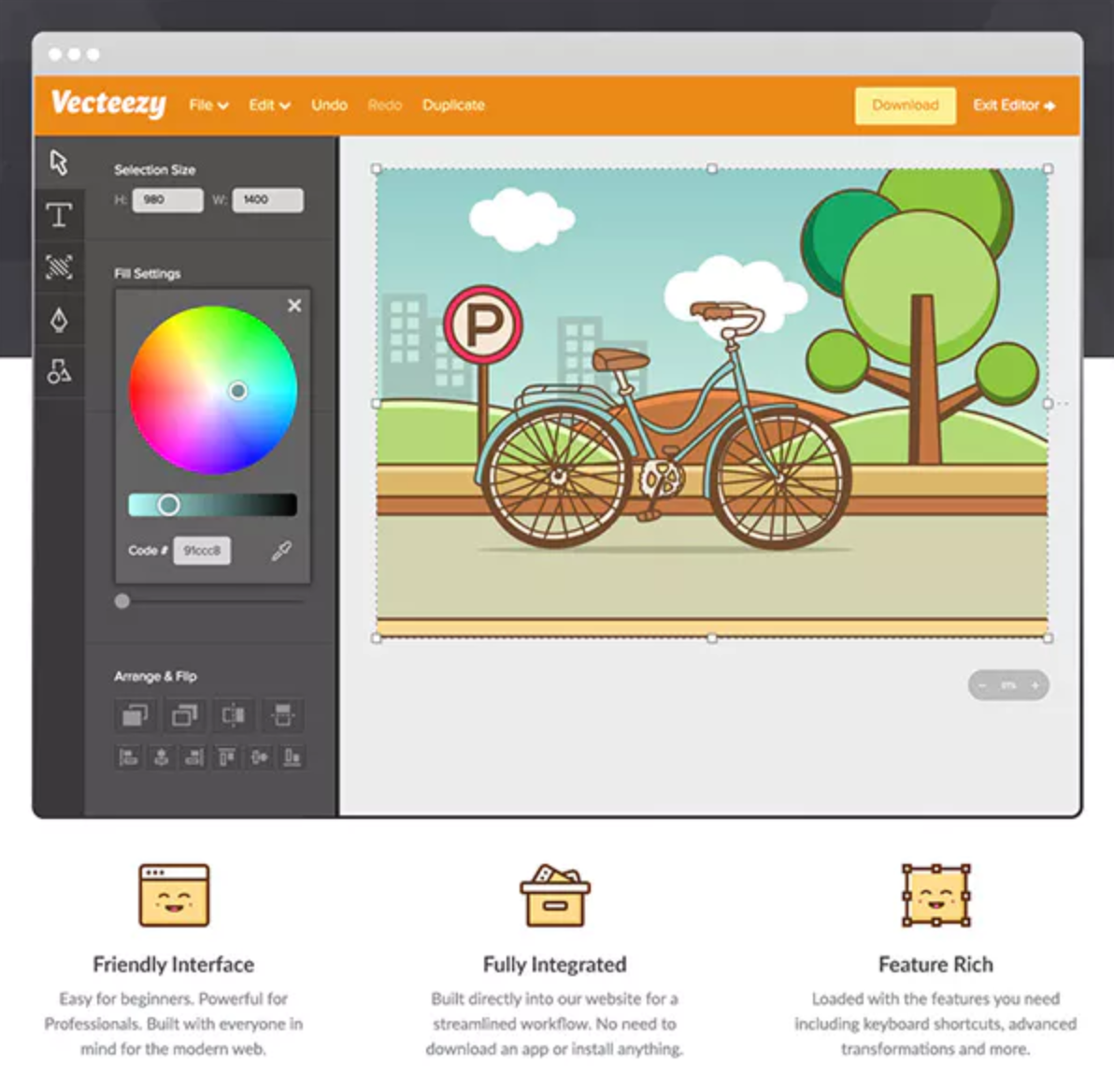
Vecteezy Editor is a free, web-based SVG editing tool that enables users to customize vector graphics directly within their browser. Designed for both beginners and professionals, it offers an intuitive interface and a suite of features to create and modify vector designs without the need for additional software installations.
Key Features and Functionality:
- User-Friendly Interface: The editor is accessible to users of all skill levels, providing a seamless design experience.
- Comprehensive Editing Tools: It includes essential vector drawing tools such as the Pen, Line, Curve, and Shape tools, along with editing capabilities like move, scale, rotate, align, and distribute.
- Text and Style Customization: Users can add and modify text, adjust fonts, colors, sizes, and apply gradients to objects.
- Integrated Asset Library: The platform offers access to a vast collection of vector graphics, stock photos, and design templates, enhancing creative possibilities.
- Multiple Export Options: Designs can be exported in various formats, including JPG, PNG, SVG, and PDF, ensuring compatibility with other design tools.
Primary Value and User Solutions:
Vecteezy Editor streamlines the design process by eliminating the need for external software, allowing users to edit and customize vector graphics directly in their browser. This accessibility is particularly beneficial for those seeking a cost-effective and efficient solution for creating high-quality vector designs. By integrating a comprehensive asset library with robust editing tools, Vecteezy Editor empowers users to produce professional-grade visuals for various applications, from social media content to marketing materials.

Sakai is an open-source Learning Management System (LMS) designed to support teaching, learning, and collaboration in educational settings. Developed by a global community of academic institutions and organizations, Sakai offers a flexible and scalable platform that empowers educators to create engaging and effective online learning experiences. Its comprehensive suite of tools facilitates course development, assessment, communication, and system administration, making it a robust solution for institutions seeking a customizable and user-centric LMS.
Key Features and Functionality:
- Course Development and Delivery: Sakai enables instructors to create and organize course content, including text, multimedia resources, quizzes, and assignments, into structured lessons or modules. It supports conditional release of materials, allowing educators to control access based on specific criteria. The platform also offers tools for uploading, storing, and sharing files, enhancing resource management.
- Grading and Assessment: The system provides advanced grading and assessment capabilities, including support for high-stakes testing, formative assessments, online assignments, and rubric-based scoring. Instructors can collect student submissions and offer detailed feedback efficiently.
- Communications and Collaboration: Sakai offers a variety of synchronous and asynchronous communication tools, such as messaging, discussion forums, social connections, and collaborative workspaces. These features facilitate effective interaction and teamwork among students and instructors.
- System Administration: The platform includes powerful administrative tools for managing courses and users. Its configurable system of roles and permissions allows institutions to tailor the platform to their specific business processes.
- Integration with External Applications: Sakai supports integration with third-party applications through the IMS Learning Tools Interoperability (LTI) specification and offers an extensive API for developing deep, native integrations.
Primary Value and User Solutions:
Sakai addresses the need for a flexible, scalable, and customizable LMS that supports diverse teaching and learning methodologies. By providing a comprehensive suite of tools for course development, assessment, communication, and administration, Sakai empowers educators to create engaging and effective online learning environments. Its open-source nature ensures that institutions have control over their learning platform, allowing for continuous improvement and adaptation to emerging educational needs. Additionally, Sakai's commitment to accessibility and user-centered design ensures an inclusive learning experience for all users.

DonorView helps to manage donors, volunteers & members; create customizable donation & event forms, this software can utilize peer to peer campaigns; run TEXT2GIVE campaigns ; send email campaigns; conduct online surveys; track grants; quickly run queries and reports.

PaintShop Pro 2023 Ultimate is a comprehensive photo editing software designed for Windows users, offering a versatile range of professional-grade editing and graphic design tools. It combines advanced features with time-saving AI-based solutions, catering to both novice and experienced photographers and designers.
Key Features and Functionality:
- Photo Editing: Provides a complete suite of tools for photo enhancement, including color correction, retouching, and creative effects.
- Graphic Design: Offers vector illustration capabilities, allowing users to create compelling designs with text, shapes, and layers.
- AI-Powered Tools: Incorporates artificial intelligence to automate complex tasks, such as background removal and image upscaling, enhancing efficiency and accuracy.
- Focus Stacking: Enables blending of multiple images taken at different focus distances to produce a final composite with greater depth of field.
- Frame Tool: Allows for the creation of shapes and masks to frame images, facilitating innovative design layouts.
- AfterShot Lab: Provides powerful RAW image editing within the application, eliminating the need for additional software.
- Real-time Blend Mode Preview: Offers instant feedback on layer blending results, streamlining the creative process.
- Snap to Objects: Enhances precision in design by allowing objects to align accurately with each other.
Primary Value and Solutions:
PaintShop Pro 2023 Ultimate addresses the needs of users seeking a robust, subscription-free alternative for photo editing and graphic design. Its comprehensive toolset empowers users to produce high-quality images and designs efficiently. The integration of AI-driven features simplifies complex editing tasks, making professional results accessible to users of all skill levels. Additionally, the inclusion of bonus software, such as Painter® Essentials™ 8 and PhotoMirage™ Express, extends creative possibilities, offering a complete suite for digital artistry.

DaVinci Resolve is a comprehensive post-production software developed by Blackmagic Design, integrating video editing, color correction, visual effects, motion graphics, and audio post-production into a single platform. Its intuitive interface caters to both beginners and professionals, streamlining workflows by eliminating the need for multiple applications. This all-in-one solution ensures that users can maintain the highest quality by working with original camera footage throughout the entire process. By mastering DaVinci Resolve, users gain access to the same tools employed by Hollywood professionals in film and television production.
Key Features and Functionality:
- Comprehensive Editing Suite: Offers both cut and edit pages tailored for different editing styles, from quick assembly to detailed timeline editing.
- Advanced Color Correction: Utilizes Emmy™ award-winning image technology with 32-bit float processing and patented YRGB color science, supporting HDR workflows and wide gamut color spaces.
- Visual Effects and Motion Graphics: Integrates Fusion for node-based compositing, enabling complex visual effects and motion graphics creation.
- Professional Audio Post-Production: Incorporates Fairlight for high-quality audio processing, supporting up to 1,000 audio tracks with real-time effects and 3D audio mixing.
- AI-Powered Tools: Features AI IntelliScript for timeline creation from scripts, AI Animated Subtitles for dynamic text animation, and AI Audio Assistant for intelligent audio mixing.
- Collaborative Workflow: Supports multi-user collaboration with real-time project sharing via Blackmagic Cloud, allowing editors, colorists, VFX artists, and sound engineers to work simultaneously on the same project.
Primary Value and User Solutions:
DaVinci Resolve addresses the need for an integrated post-production environment by combining multiple functionalities into one application, reducing the complexity and inefficiencies associated with using separate tools. This integration enhances productivity, ensures consistent quality, and provides a cost-effective solution for professionals and enthusiasts alike. The inclusion of AI-driven features and collaborative capabilities further streamlines workflows, making it an ideal choice for both individual creators and large production teams.