AI-Generated Results
Finding matches…

Adalysis is a PPC Management platform including analytics, AB testing, and real-time insights.
Not seeing what you're looking for?
Dive deeper into "Adalysis" on G2 AI

Azure Analysis Services integrates with many Azure services enabling you to build sophisticated analytics solutions.Its integration with Azure Active Directory provides secure, role-based access to your critical data.

Detect and block advanced threats that elude traditional analysis with multiple-layer inspection and customizable sandboxing

FollowersAnalysis is a Twitter analytics tool which fetches tweets, followers and following data of any public Twitter account, analyse that data and provide very intuitive analytics.
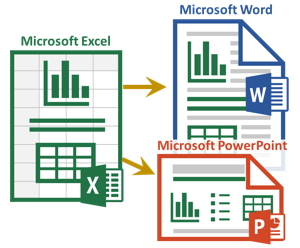
The Excel-to-Word Document Automation Add-in makes it easy to update text, tables and charts in Word and PowerPoint templates using Excel data and calculations. Save time and improve accuracy.
Veracode's dynamic analysis testing empowers companies to identify and remediate security issues in their running web applications before hackers can exploit them.

Hybrid Analysis provides free malware analysis service for the community that detects and analyzes unknown threats

CoStar Lease Analysis lets users analyze and present cash flow for both proposed and existing leases, and compare alternatives.

Financial Statement Analysis is a software application designed for companies who adopt the IFRS and GAAP accounting standards. This provides an in-depth performance evaluation of the business through a screening of the last available financial reports. Upon entering the company's IFRS financial data (from Statement of Financial Position and Income Statement), the system assesses the businessProfitability, Solvency, Capital Structure and Liquidity, generating a financial report complete with ratios, charts, graphs, and comments discussing the company's performance and the related rating score.

Ecotect Analysis sustainable design analysis software is a comprehensive concept-to-detail sustainable building design tool. Ecotect Analysis offers a wide range of simulation and building energy analysis functionality that can improve performance of existing buildings and new building designs.

PROKON Structural Analysis and Design is a suite of over forty structural analysis, design and detailing programs. The first PROKON programs were developed in 1989, and today PROKON is used worldwide in over eighty countries. The suite is modular in nature, but its true power lies in the tight integration between analysis, design and detailing programs.

Microsoft Excel is a comprehensive spreadsheet application developed by Microsoft, designed to facilitate data organization, analysis, and visualization. As a core component of the Microsoft 365 suite, Excel is available across multiple platforms, including Windows, macOS, Android, and iOS. Since its initial release in 1985, Excel has become the industry standard for spreadsheet software, offering a robust set of tools for both personal and professional use.
Key Features and Functionality:
- Data Analysis and Visualization: Excel provides powerful tools such as PivotTables and PivotCharts, enabling users to analyze large datasets and create dynamic visual representations.
- Formula and Function Support: With an extensive library of built-in functions, Excel allows users to perform complex calculations, statistical analyses, and data manipulations efficiently.
- Integration with Programming Languages: Excel supports Visual Basic for Applications (VBA) for automation and custom function creation. Additionally, recent updates have introduced support for the Python programming language, expanding its capabilities for data analysis and scripting.
- AI-Powered Assistance: The integration of Microsoft Copilot introduces AI-driven features that assist with formula generation, data formatting, and insights, streamlining workflows and enhancing productivity.
- Collaboration and Sharing: Excel enables real-time collaboration, allowing multiple users to edit and comment on spreadsheets simultaneously, fostering teamwork and efficient data management.
Primary Value and User Solutions:
Excel addresses the need for a versatile and user-friendly platform for data management and analysis. Its comprehensive feature set empowers users to:
- Organize Data Effectively: Users can structure and manage large volumes of data systematically, facilitating easy retrieval and reference.
- Perform Complex Calculations: The extensive function library allows for intricate computations, catering to various professional fields such as finance, engineering, and statistics.
- Visualize Data Insights: Through charts and graphs, Excel helps users interpret data trends and patterns, aiding in informed decision-making.
- Automate Repetitive Tasks: With VBA and Python integration, users can automate routine processes, reducing manual effort and minimizing errors.
- Collaborate Seamlessly: Real-time sharing and editing capabilities enhance teamwork, ensuring that all stakeholders have access to the most current data.
By combining these features, Microsoft Excel serves as a powerful tool that simplifies complex data tasks, enhances productivity, and supports data-driven decision-making across various industries.

CoStar Investment Analysis lets users aggregate data from multiple internal systems and view it all in a single source to evaluate acquisition, disposition, and financing strategies.

Developing innovative technology for document automation: document+email classification, auto-index, mobile capture, color/orientation detection

CayenneApps SWOT analysis allows users to create the most comprehensive analysis of strengths, weaknesses, opportunities and threats. Users can build up strategy, and turn the most promising ideas into workable plans.

SAS Enterprise Guide is a Windows-based client application that provides a user-friendly, point-and-click interface to the powerful analytics capabilities of SAS software. Designed to cater to both novice and experienced users, it facilitates data access, management, analysis, and reporting without the need for extensive programming knowledge. By integrating a wide array of analytical tasks with an intuitive graphical interface, SAS Enterprise Guide empowers users to efficiently conduct complex analyses and share results across their organization.
Key Features and Functionality:
- Intuitive Interface and Wizards: Offers guided access to SAS capabilities, from basic reporting to advanced analyses, through flexible wizards and an intuitive process flow diagram facility.
- Comprehensive Analytical Tasks: Includes over 100 prebuilt tasks for descriptive statistics, predictive modeling, regression analysis, and more, enabling users to perform complex analyses without writing code.
- Data Management: Provides a powerful graphical query builder for accessing and manipulating various data types, including SAS datasets and native Windows data types, without requiring SQL expertise.
- OLAP Access and Visualization: Supports dynamic slicing, drilling, and pivoting of data for exploration, with integration capabilities for SAS OLAP Server and other third-party vendors supporting OLE DB for OLAP.
- Result Distribution and Sharing: Facilitates the distribution of results through multiple channels, including SAS BI report/content repository, Microsoft Office documents, and email, ensuring seamless sharing and collaboration.
- High-Performance Computing and Grid Enablement: Automatically detects grid environments for efficient processing, analyzes SAS programs to optimize performance, and enables parallel execution of tasks on the same server.
Primary Value and User Solutions:
SAS Enterprise Guide addresses the need for a self-service analytics environment that empowers business analysts and other users to perform sophisticated data analyses without relying heavily on IT departments. By providing guided access to data integration, preparation, analytics, and reporting, it enables users to quickly access data, conduct analyses, and distribute results, thereby accelerating decision-making processes. The integration with SAS Viya further enhances its capabilities, allowing users to leverage modern, cloud-based platforms for scalable and efficient analytics. This comprehensive toolset ultimately helps organizations harness their data effectively, leading to more informed business decisions and improved operational efficiency.

Google Earth Pro is a comprehensive desktop application that offers an immersive 3D representation of the Earth's surface, combining high-resolution satellite imagery, aerial photography, and geographic information system (GIS) data. Designed for professionals and enthusiasts alike, it provides advanced tools for geographic analysis, visualization, and presentation. Users can explore diverse terrains, urban landscapes, and historical imagery, making it a versatile platform for various applications.
Key Features and Functionality:
- High-Resolution Printing: Export and print map images up to 4800x3200 pixels, suitable for detailed reports and presentations.
- Historical Imagery Viewer: Access archived satellite and aerial images to analyze changes over time, such as urban development or environmental shifts.
- GIS Data Import Support: Import various spatial data formats, including ESRI Shapefiles, for comprehensive geographic analysis.
- Movie Creation: Record and export guided tours or area walkthroughs as video files, enhancing presentations and storytelling.
- Advanced Measurement Tools: Measure 3D buildings, calculate areas of polygons or circles, and assess distances with precision.
Primary Value and User Solutions:
Google Earth Pro empowers users to conduct in-depth geographic analyses without the need for expensive GIS software. Its advanced features facilitate tasks such as site selection, environmental monitoring, urban planning, and educational projects. By providing access to high-resolution imagery and robust analytical tools, it enables users to visualize and interpret spatial data effectively, supporting informed decision-making and comprehensive presentations.


Cost Analysis Platform
Make Confident Decisions Based on Predictive Analytics.
SEER helps organizations view, analyze, and optimize agile and traditional project cost, schedule, and risk scenarios and outcomes.
MATLAB is a high-level programming and numeric computing environment widely utilized by engineers and scientists for data analysis, algorithm development, and system modeling. It offers a desktop environment optimized for iterative analysis and design processes, coupled with a programming language that directly expresses matrix and array mathematics. The Live Editor feature enables users to create scripts that integrate code, output, and formatted text within an executable notebook.
Key Features and Functionality:
- Data Analysis: Tools for exploring, modeling, and analyzing data.
- Graphics: Functions for visualizing and exploring data through various plots and charts.
- Programming: Capabilities to create scripts, functions, and classes for customized workflows.
- App Building: Facilities to develop desktop and web applications.
- External Language Interfaces: Integration with languages such as Python, C/C++, Fortran, and Java.
- Hardware Connectivity: Support for connecting MATLAB to various hardware platforms.
- Parallel Computing: Ability to perform large-scale computations and parallelize simulations using multicore desktops, GPUs, clusters, and cloud resources.
- Deployment: Options to share MATLAB programs and deploy them to enterprise applications, embedded devices, and cloud environments.
Primary Value and User Solutions:
MATLAB streamlines complex mathematical computations and data analysis tasks, enabling users to develop algorithms and models efficiently. Its comprehensive toolboxes and interactive apps facilitate rapid prototyping and iterative design, reducing development time. The platform's scalability allows for seamless transition from research to production, supporting deployment on various systems without extensive code modifications. By integrating with multiple programming languages and hardware platforms, MATLAB provides a versatile environment that addresses the diverse needs of engineers and scientists across industries.