Top Free Video Conferencing Software - Page 4

How Many Video Conferencing Software Products Does G2 Track?

Total Products under this Category: 278

Category Stats (Sep 2026)

  • Average Rating: 4.39/5 The average rating of products in this category, based on all submitted ratings
  • Top Trending Product: VidyoConnect (+3.05%) - Among all products in this category, VidyoConnect recorded the largest rating increase compared to last month

Last updated: September 01, 2026

How Does G2 Rank Video Conferencing Software Products?

Why You Can Trust G2's Software Rankings:

  • 30 Analysts and Data Experts
  • 198,200+ Authentic Reviews
  • 278+ Products
  • Unbiased Rankings

G2's software rankings are built on verified user reviews, rigorous moderation, and a consistent research methodology maintained by a team of analysts and data experts. Each product is measured using the same transparent criteria, with no paid placement or vendor influence. While reviews reflect real user experiences, which can be subjective, they offer valuable insight into how software performs in the hands of professionals. Together, these inputs power the G2 Score, a standardized way to compare tools within every category.

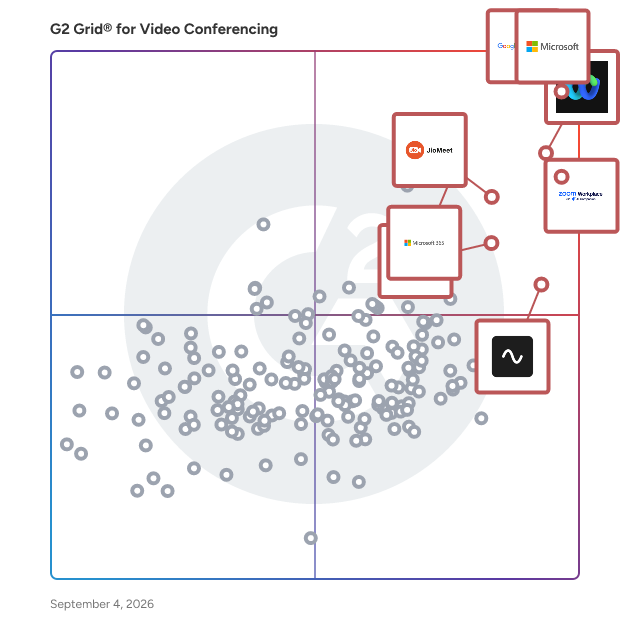
G2 Grid® for Video Conferencing Software

G2 Grid® for Video Conferencing Software plotting products by satisfaction and market presence

Highlighted products: Google Workspace, Microsoft Teams, Webex Suite, Zoom Workplace, JioMeet, Microsoft 365, Riverside, and GoTo Meeting.

Underlying data: [Grid® JSON](https://www.g2.com/categories/video-conferencing/grids.json?focus%5B%5D=google-workspace&focus%5B%5D=microsoft-teams&focus%5B%5D=cisco-webex-suite&focus%5B%5D=zoom-workplace&focus%5B%5D=jiomeet&focus%5B%5D=microsoft365&focus%5B%5D=riverside&focus%5B%5D=goto-meeting)

Scoot

Scoot is an experiential meeting and webinar platform that provides new ways for people to interact in a virtual setting. Patented Social Presence® technology promotes connections because meeting attendees can move and mingle, just like they do in real life. Scoot is ideal for meetings and webinars that have more than 25 attendees. When attendees want to engage with each other, company representatives, and subject matter experts, an interactive experience on Scoot provides more value than a broadcast-style meeting or webinar. There are two experience modes in Scoot. Mingle mode enables attendees to move within a customized, branded virtual space. Presentation mode provides presenters to share content and videos. Screen sharing is enabled at three levels: group discussion, entire room, and entire Scootaverse. Smart Badges are populated with attendee data and are searchable. Attendees can enter their Smart Badge data during registration or upon entry. Data can also be loaded in advance or imported from external systems. Smart Badge data can be configured as conditionally viewable. Scoot supports all major browsers and mobile devices. Our client list includes multiple Fortune 500 brands as well as many small and medium-sized organizations.

Average Rating: 4.7/5.0

Total Reviews: 41

How Do G2 Users Rate Scoot?

  • Has the product been a good partner in doing business?: 9.2/10 (Category avg: 8.9/10)
  • Presentations: 8.5/10 (Category avg: 8.9/10)
  • Participant Permissions: 9.6/10 (Category avg: 8.8/10)
  • Whiteboarding: 8.3/10 (Category avg: 8.6/10)

Who Is the Company Behind Scoot?

  • Seller: Scoot
  • Year Founded: 2017
  • HQ Location: Dallas, Texas
  • LinkedIn® Page: www.linkedin.com
    25 employees on LinkedIn®

Who Uses This Product?

  • Top Industries: Information Technology and Services
  • Company Size: 67% Small, 29% Medium

What Do G2 Reviewers Say About Scoot?

AI-generated summary from verified user reviews

Pros
  • Users enjoy the flexibility of Scoot, utilizing it for both video calls and engaging team-building activities.
  • Users value the flexibility of team collaboration in Scoot for various activities, including events and meetings.
  • Users appreciate the flexibility of Scoot for both video conferencing and team-building activities.

What Are Recent G2 Reviews of Scoot?

What Are G2 Users Discussing About Scoot?

Jitsi

Jitsi Meet is a set of Open Source projects which empower users to use and deploy video conferencing platforms with state-of-the-art video quality and features. For Jitsi Meet installation, configuration, customization, deployment, auto scaling, maintenance, and commercial support. Contact here: https://meetrix.io/contact-us Jitsi Meet is a free, open-source video conferencing platform that allows users to create and join online meetings with ease. Unlike many other video conferencing tools, Jitsi Meet doesn't require users to create an account or install any software to start or join a meeting. It’s browser-based and highly accessible, offering a quick and straightforward way to connect with others via video and audio. Key Features: Ease of Use: Jitsi Meet is incredibly user-friendly. With just a click, you can create a meeting link and share it with others. Participants can join the meeting simply by clicking the link, making it perfect for spontaneous meetings or gatherings. No Account Required: One of the standout features of Jitsi Meet is that it does not require users to create an account. This feature makes it highly convenient for users who want to avoid the hassle of signing up or logging in to yet another service. End-to-End Encryption: Security is a top priority for Jitsi Meet. It offers end-to-end encryption for video and audio calls, ensuring that conversations remain private and secure. This makes it a reliable choice for businesses and individuals concerned about privacy. Unlimited Participants: Jitsi Meet supports meetings with an unlimited number of participants, making it a scalable solution for both small group chats and large conferences. However, the performance may depend on the server capacity and internet bandwidth. Customization and Integration: Jitsi Meet is open-source, which means it can be customized to meet specific needs. Developers can integrate it with other applications, embed it into websites, or even host their own Jitsi Meet servers for complete control over the environment. Screen Sharing and Recording: The platform supports screen sharing, which is crucial for presentations, demonstrations, and collaborative work. Additionally, meetings can be recorded, allowing users to save and review important discussions later. Mobile Accessibility: Jitsi Meet is accessible not just via desktop browsers but also through mobile devices. It has dedicated apps for iOS and Android, enabling users to join meetings on the go. Cost-Effective: Since Jitsi Meet is free and open-source, it’s an attractive option for businesses and individuals looking for a cost-effective video conferencing solution. There are no hidden fees or subscription costs, making it accessible to all. The perfect alternative to solutions such as Zoom, Microsoft Teams and Google meet.

Average Rating: 4.3/5.0

Total Reviews: 204

How Do G2 Users Rate Jitsi?

  • Has the product been a good partner in doing business?: 8.2/10 (Category avg: 8.9/10)
  • Presentations: 8.5/10 (Category avg: 8.9/10)
  • Participant Permissions: 8.5/10 (Category avg: 8.8/10)
  • Whiteboarding: 7.9/10 (Category avg: 8.6/10)

Who Is the Company Behind Jitsi?

  • Seller: 8x8
  • Year Founded: 1987
  • HQ Location: San Jose, CA
  • Twitter: @8x8
    11,056 Twitter followers
  • LinkedIn® Page: www.linkedin.com
    2,846 employees on LinkedIn®
  • Ownership: NYSE:EGHT

Who Uses This Product?

  • Who Uses This: Senior Software Engineer
  • Top Industries: Information Technology and Services, Computer Software
  • Company Size: 61% Small, 32% Medium

What Do G2 Reviewers Say About Jitsi?

AI-generated summary from verified user reviews

Pros
  • Users love the ease of use in Jitsi, highlighting its quick setup and straightforward meeting experience.
  • Users enjoy the easy setup of Jitsi, allowing for quick and straightforward meeting initiation and excellent call quality.
  • Users value the reliability of Jitsi, appreciating its seamless performance and straightforward setup for video communications.
  • Users value Jitsi's top-notch security with end-to-end encryption, ensuring private and secure conversations.
  • Users appreciate the simplicity of Jitsi, enjoying easy setup and seamless meeting experiences without complications.
Cons
  • Users find the learning curve for Jitsi quite complex, often requiring significant time and effort to understand.
  • Users note the limited advanced features of Jitsi, impacting its effectiveness for more professional use cases.
  • Users find the user interface basic and desire improved customization and intuitive controls for a better experience.
  • Users report frequent glitches that cause instability and issues with chat history saving in Jitsi.
  • Users find the missing features in Jitsi challenging, particularly the lack of built-in recording and advanced integrations.

What Are Recent G2 Reviews of Jitsi?

What Are G2 Users Discussing About Jitsi?

Callbridge

THE NEXT BEST THING TO MEETING IN PERSON Combining state-of-the-art, intelligent technology with high-definition video and audio, Callbridge acts less like a conference call and more like a discussion facilitator. Callbridge acts as your secretary to your meeting, reminding your guests, taking notes, and posting summaries and materials. Your meetings are important, Callbridge ensures you treat them that way.

Average Rating: 4.6/5.0

Total Reviews: 23

How Do G2 Users Rate Callbridge?

  • Has the product been a good partner in doing business?: 9.8/10 (Category avg: 8.9/10)
  • Presentations: 9.7/10 (Category avg: 8.9/10)
  • Participant Permissions: 9.1/10 (Category avg: 8.8/10)

Who Is the Company Behind Callbridge?

  • Seller: iotum
  • Year Founded: 2005
  • HQ Location: Toronto
  • Twitter: @iotuminc
    1,285 Twitter followers
  • LinkedIn® Page: www.linkedin.com
    26 employees on LinkedIn®

Who Uses This Product?

  • Company Size: 52% Small, 35% Medium

What Are Recent G2 Reviews of Callbridge?

What Are G2 Users Discussing About Callbridge?

EnableX

EnableX Programmable Cloud, a leader in omnichannel communications, enables brands to create meaningful customer engagement at scale—without the complexity of telecom infrastructure. Our carrier-grade platform seamlessly integrates voice, video, and text messaging into web, desktop, and mobile applications through developer-friendly APIs and SDKs, ensuring effortless connectivity across channels and platforms, including SMS, WhatsApp, RCS, Instagram, and Facebook Messenger. Beyond traditional communications, EnableX enhances customer interactions with AI-powered solutions like FaceAI which offers real-time facial and emotion recognition, and Text-to-Speech (TTS) for natural, emotion-aware customer interactions. These advanced capabilities drive intelligent automation, personalised engagement, and richer conversational experiences. Trusted by telecom operators, enterprises, service providers, and system integrators worldwide, EnableX offers transparent pricing, flexible deployment options (public, private, or on-premise), and white-label solutions that provide businesses with full control over their communication infrastructure. With EnableX, businesses can focus on what matters most: delivering seamless, intelligent, and engaging customer interactions with ease and efficiency.

Average Rating: 4.6/5.0

Total Reviews: 170

How Do G2 Users Rate EnableX?

  • Has the product been a good partner in doing business?: 9.2/10 (Category avg: 8.9/10)
  • Presentations: 9.4/10 (Category avg: 8.9/10)
  • Participant Permissions: 9.1/10 (Category avg: 8.8/10)
  • Whiteboarding: 9.0/10 (Category avg: 8.6/10)

Who Is the Company Behind EnableX?

  • Seller: VCLOUDX
  • Year Founded: 2017
  • HQ Location: Singapore
  • Twitter: @EnablexIo
    108 Twitter followers
  • LinkedIn® Page: www.linkedin.com
    41 employees on LinkedIn®

Who Uses This Product?

  • Top Industries: Information Technology and Services, Computer Software
  • Company Size: 52% Small, 31% Medium

What Do G2 Reviewers Say About EnableX?

AI-generated summary from verified user reviews

Pros
  • Users find EnableX to be easy to use, enabling quick development and deployment of applications with low code.
  • Users enjoy the easy integration of EnableX, facilitating seamless video and SMS services effortlessly.
  • Users value the easy integrations of EnableX, appreciating the straightforward API and SDK setup for seamless functionality.
  • Users commend the high video quality of EnableX, enhancing their communication experience with clarity and ease.
  • Users appreciate the easy setup of EnableX, allowing quick integration and seamless operation for video applications.
Cons
  • Users find the documentation lacking, suggesting it needs better structure and clarity for easier implementation.
  • Users find EnableX lacking in integrations and features, making it less versatile for comprehensive needs.
  • Users feel there is limited customization in EnableX, impacting the flexibility of integrating additional features.
  • Users experience audio issues during low network conditions, affecting the overall quality of calls and recordings.
  • Users express a need for missing features, such as background effects, chat options, and better support improvements.

What Are Recent G2 Reviews of EnableX?

What Are G2 Users Discussing About EnableX?

Crewdle

The first carbon-neutral video communication platform worldwide Crewdle offers a serverless digital ecosystem that is secure, simple and sustainable, thanks to peer- to-peer technology. The perfect solution to help save the planet, one conversation at a time. Crewdle means maximum security. Crewdle is the greenest solution for all your video calls and video conferences needs. Crewdle means keeping your conversations and data private, and respecting your privacy. Crewdle is easy to use, user-friendly and fun. Crewdle is the perfect video conferencing solution for small and medium-sized businesses that want to do things differently.

Average Rating: 4.5/5.0

Total Reviews: 71

How Do G2 Users Rate Crewdle?

  • Has the product been a good partner in doing business?: 9.6/10 (Category avg: 8.9/10)
  • Presentations: 7.2/10 (Category avg: 8.9/10)
  • Participant Permissions: 9.1/10 (Category avg: 8.8/10)
  • Whiteboarding: 6.7/10 (Category avg: 8.6/10)

Who Is the Company Behind Crewdle?

  • Seller: Crewdle Technologies
  • Year Founded: 2020
  • HQ Location: Montreal, CA
  • Twitter: @Crewdle_app
    53 Twitter followers
  • LinkedIn® Page: linkedin.com
    25 employees on LinkedIn®

Who Uses This Product?

  • Top Industries: Information Technology and Services, Computer Software
  • Company Size: 60% Small, 22% Medium

What Do G2 Reviewers Say About Crewdle?

AI-generated summary from verified user reviews

Pros
  • Users appreciate the ease of use of Crewdle, enjoying its simple setup and distraction-free video experience.
  • Users love Crewdle's easy setup, enabling quick calls with no sign-ups or troubleshooting needed for participants.
  • Users admire the strong privacy by design of Crewdle, enhancing security and peace of mind during meetings.
  • Users value the simplicity of Crewdle, enjoying a clean, distraction-free environment for effective remote collaboration.
  • Users enjoy the easy access of Crewdle, allowing instant calls without sign-ups or technical hassles.
Cons
  • Users notice the missing advanced features in Crewdle, limiting its effectiveness compared to established platforms.
  • Users find the interface less intuitive than competitors, leading to challenges for first-time users and overall usability.
  • Users note the limited integrations in Crewdle, wishing for broader support for various applications and workflows.
  • Users feel that the limited features hinder effectiveness during larger meetings, lacking necessary tools for better management.
  • Users experience performance issues with Crewdle, including lag and call quality problems due to varying internet connections.

What Are Recent G2 Reviews of Crewdle?

What Are G2 Users Discussing About Crewdle?

Teleport.Video

Host meetings from home, your office, or Anywhere. Video calling for your Team, 24/7. 1-click video meetings: No waiting time. No download required. Share the meeting link and let people join directly from their browser. Share what’s important: In a world full of distractions, your time is precious. Spend it on the people, places and projects that matter. When you have something important to share, cut through the noise. Engage from Anywhere. Offer help to your customers and interact with your team from one app.

Average Rating: 4.4/5.0

Total Reviews: 40

How Do G2 Users Rate Teleport.Video?

  • Has the product been a good partner in doing business?: 10.0/10 (Category avg: 8.9/10)
  • Presentations: 10.0/10 (Category avg: 8.9/10)
  • Participant Permissions: 9.4/10 (Category avg: 8.8/10)
  • Whiteboarding: 10.0/10 (Category avg: 8.6/10)

Who Is the Company Behind Teleport.Video?

Who Uses This Product?

  • Top Industries: Information Technology and Services
  • Company Size: 36% Small, 32% Medium

What Do G2 Reviewers Say About Teleport.Video?

AI-generated summary from verified user reviews

Pros
  • Users value the ease of use of Teleport.Video, enabling quick and hassle-free video calls for smooth communication.
  • Users appreciate the easy setup of Teleport.Video, enabling quick and hassle-free video calls and meetings.
  • Users value the high-quality video and audio of Teleport.Video, which remain consistent even on average internet connections.
  • Users praise the high-quality audio on Teleport.Video, ensuring clear communication even with average internet connectivity.
  • Users value the instant one-click access in Teleport.Video, enhancing efficiency and professionalism in meetings.
Cons
  • Users note the missing features in Teleport.Video, highlighting the need for advanced tools and better collaboration options.
  • Users report frequent glitches affecting call quality and stability, particularly during larger group meetings.
  • Users find the limited features of Teleport.Video restrictive, lacking essential tools for effective communication and collaboration.
  • Users experience performance delays with file sharing and switching between call and chat on Teleport.Video.
  • Users note limited integrations with tools like editing software and project management apps, impacting workflow efficiency.

What Are Recent G2 Reviews of Teleport.Video?

What Are G2 Users Discussing About Teleport.Video?

VideoMost Server

VideoMost Server is like Zoom, but self-hosted video conferencing server and available for licensing at a fraction of competitors cloud prices Enterprise video conferencing with mobile messaging and content sharing: enable people team work from any device / any network by using powerful and complete VideoMost enterprise-grade secure communication platform. 300 video participants in a conference room with extensive collaboration tools, including docs and screen sharing, whiteboard, mobile messenger, polls and more. SDK for custom development of client-side apps running on Android, iOS, Linux and Web. Using both Scalable video coding (SVC and MUX) and traditional MCU (MIX) architecture VideoMost automatically and dynamically adjusts video quality to available network conditions and CPU utilization throughout a conference session, and provides total legacy HW (Cisco, Polycom, Avaya, etc) and Microsoft software (Outlook, Exchange, Skype) interoperability. A single VideoMost scalable server software handles up to 500 concurrent video ports on a commodity $2K Intel PC platform Complete set of tools for team work: - Group video, up to 300 people - Screen sharing - Slide show - Whiteboard - Messenger - Polls - File exchange - Presence - CDN video broadcasts - Conference recording VideoMost includes familiar messaging features: - Private and group chats - Contacts import by LDAP - Data storage on premises servers - Messages with attached photos, files, audio, video - Playing media attachment without leaving the app - Sharing contacts and geo locations - Sending stickers and gif files - User statuses: “online” and “is typing” - Status for messages: “sent”, “received”, “red” VideoMost for Enterprises: - Product 10 years on the market, time and industry proven - 2000+ enterprise customers, including $B corporations - On-premise, hybrid and private cloud deployments - Secure UC inside your company and beyond - Streamline team work by using video meetings, personal and group chats, doc sharing, file exchange, conference recordings, etc. - Use you branded corporate messenger instead of insecure cloud apps - Link branches / subsidiaries into corporate communications via server federation VideoMost for Governments: - Governmental use is 30% of VideoMost business - All data and traffic under your tight control - Secure inter-department communication and collaboration - Stay in touch with citizens, connect with live chat, get feedback - Shift to quick video meetings anywhere instead of rooms in a certain location - Keep government services working despite public holidays - React promptly to emergencies, create shared workspace - Collaborate internationally with counterparts across other governments

Average Rating: 4.5/5.0

Total Reviews: 42

How Do G2 Users Rate VideoMost Server?

  • Has the product been a good partner in doing business?: 8.3/10 (Category avg: 8.9/10)
  • Presentations: 8.7/10 (Category avg: 8.9/10)
  • Participant Permissions: 9.1/10 (Category avg: 8.8/10)
  • Whiteboarding: 9.4/10 (Category avg: 8.6/10)

Who Is the Company Behind VideoMost Server?

Who Uses This Product?

  • Top Industries: Information Technology and Services
  • Company Size: 45% Small, 31% Medium

What Do G2 Reviewers Say About VideoMost Server?

AI-generated summary from verified user reviews

Pros
  • Users commend the clear audio quality of VideoMost Server, enhancing communication during group conferencing sessions.
  • Users value the ease of use of VideoMost Server, enhancing communication and collaboration seamlessly for their teams.
  • Users praise the high-quality video and audio of VideoMost Server for seamless and clear communication during conferences.
  • Users value VideoMost Server for its strong security and full data control, essential for handling sensitive media communications.
  • Users commend the high-performance video quality of VideoMost Server, ensuring consistent output even during large events.
Cons
  • Users find the limited features on VideoMost Server require reliance on external tools for advanced editing needs.
  • Users note a lack of features in VideoMost Server, particularly in editing, integrations, and user interface design.
  • Users feel there is limited customization in the interface, which impacts navigation and overall experience.
  • Users find the difficult setup of VideoMost Server tedious and time-consuming, complicating global calls and functionality.
  • Users report experiencing glitches with VideoMost Server, impacting task completion and screen sharing quality.

What Are Recent G2 Reviews of VideoMost Server?

What Are G2 Users Discussing About VideoMost Server?

InterMIND

Stop running your meetings in someone else's language. InterMIND is one platform for secure video meetings where voice, chat, and shared documents are translated live — so every participant speaks and reads their own language. No one stays silent because they're translating in their head. ━━ Real-time translation, quality you can verify ━━ Everyone follows along in their own language — speaking, chat, notes, and documents. Voice, chat, and notes translate across 22 languages; on-demand file translation (Office + PDF) covers 30, under one second of latency. It's AI simultaneous interpretation — the job an interpreting booth does, without the booth — for meetings, conferences, and webinars. Translation quality is public and audited, not a marketing claim: bring your own glossaries and keep a record of what was said, which matters when a meeting can't afford to be misunderstood. Hire from anywhere. Sell in markets you couldn't staff. The language gap that used to filter your candidates and customers just stopped mattering. ━━ A collaborative meeting workspace ━━ More than HD video. Collaborative notes and documents with AI-assisted editing inside the call. A synced laser pointer with drawing trails. Screen sharing of your whole screen, a window, or a tab — multiple presenters at once. Local or cloud recording you control. Scale from a 1-on-1 to a 1,500-person all-hands. ━━ Meetings that turn into channels ━━ Spin up a call in seconds and drop the link in chat — guests join without an account, approved through a secure waiting room. Liked the meeting? Turn it into a channel: keep the full searchable history, add the team, and pick up right where you left off. Rich-text chat with auto-translation, inline editing, quoted replies, reactions, pinned messages, and files from your device, Google Drive, or OneDrive. ━━ Private AI, your data stays yours ━━ Every AI feature — voice and chat translation, document AI, semantic search, meeting context — runs on dedicated infrastructure with zero data retention. Translation runs on our own EU engine, on servers separate from consumer services — not routed through generic third-party APIs. Your conversations and files stay yours. ━━ Built to pass legal review ━━ EU-resident at every runtime hop: app, meeting server, database, storage, and analytics — no meeting content reaches a US-domiciled model. DTLS/SRTP for audio and video, HTTPS/WSS in transit and at rest. SSO with Google or Microsoft, directory sync, granular host/moderator roles and guest-approval workflows. Every sub-processor is published — named, with what it does and where it's domiciled. A signed DPA per customer (GDPR Article 28), 99.5% uptime SLA, and Privacy Zones — a fully isolated instance on a dedicated domain — for regulated industries. Your language, your data, your terms. ━━ Ready to break the language barrier? ━━ Join from your browser in one click with your own personalized URL — on desktop, mobile, or the web. Free group meetings ⚡ Free meeting recordings ⚡ License and User Rights Management ⚡ Waiting Room ⚡ Custom branding ⚡ Desktop & mobile apps 🔥 No credit card required.

Average Rating: 4.4/5.0

Total Reviews: 29

How Do G2 Users Rate InterMIND?

  • Has the product been a good partner in doing business?: 8.7/10 (Category avg: 8.9/10)
  • Presentations: 9.4/10 (Category avg: 8.9/10)
  • Participant Permissions: 9.0/10 (Category avg: 8.8/10)
  • Whiteboarding: 9.3/10 (Category avg: 8.6/10)

Who Is the Company Behind InterMIND?

  • Seller: Mind.com
  • Year Founded: 2008
  • HQ Location: Tallinn, EE
  • Twitter: @intermindcom
    5 Twitter followers
  • LinkedIn® Page: www.linkedin.com
    177 employees on LinkedIn®

Who Uses This Product?

  • Top Industries: Information Technology and Services
  • Company Size: 65% Small, 30% Medium

What Do G2 Reviewers Say About InterMIND?

AI-generated summary from verified user reviews

Pros
  • Users appreciate the ease of use of InterMIND, enabling efficient collaboration and organization without technical difficulties.
  • Users appreciate the easy setup of InterMIND, allowing seamless onboarding and efficient collaboration without extensive training.
  • Users appreciate the intuitive design of interMIND, making it easy to organize ideas and collaborate effectively.
  • Users praise the clear audio quality of InterMIND, enhancing their overall meeting and collaboration experience.
  • Users praise the responsive and helpful customer support of InterMIND, enhancing their overall experience and satisfaction.
Cons
  • Users find limited features on InterMIND, particularly compared to larger competitors and on the free plan.
  • Users experience connectivity issues with InterMIND, particularly during peak hours, impacting their overall functionality.
  • Users find the limited support on the free plan of InterMIND frustrating, especially with mobile app lag issues.
  • Users report inadequate search functionality, making it difficult to efficiently find desired features or content.
  • Users note that performance can depend on internet quality, impacting the effectiveness of InterMIND, especially with translations.

What Are Recent G2 Reviews of InterMIND?

What Are G2 Users Discussing About InterMIND?
Demodesk Meeting

Demodesk Meeting is the leading platform for virtual sales. Schedule meetings on auto-pilot, run professional video meetings, and coach sales teams in real-time with AI. 100% GDPR compliant, enterprise-grade security and support. The platform automates repetitive tasks and streamlines the entire sales process, enabling sellers to focus on building relationships and closing deals. Demodesk offers revolutionary screen-sharing and interactive capabilities to create an immersive and personalized experience for prospects, leading to increased engagement and higher conversion rates. Features like shadowing or integrated playbooks and battle cards, enable real-time coaching during virtual calls. The platform offers comprehensive analytics and reporting features that provide actionable insights into sales performance. Armed with this valuable data, sales leaders can make data-driven decisions, optimize sales processes, and identify areas for improvement. Businesses of all sizes rely on us to digitalize sales, boost productivity and drive more revenue. Key results from our customers: +25% time saved on manual tasks (Pipedrive) ↑ 2x conversion rate (Clark) +30% higher revenue per seller (Treatwell) ↑ 3x increase in agent productivity (Eigensonne)

Average Rating: 4.6/5.0

Total Reviews: 104

How Do G2 Users Rate Demodesk Meeting?

  • Has the product been a good partner in doing business?: 9.4/10 (Category avg: 8.9/10)
  • Presentations: 9.8/10 (Category avg: 8.9/10)
  • Participant Permissions: 9.1/10 (Category avg: 8.8/10)
  • Whiteboarding: 9.2/10 (Category avg: 8.6/10)

Who Is the Company Behind Demodesk Meeting?

  • Seller: Demodesk
  • Year Founded: 2018
  • HQ Location: Munich, Germany
  • Twitter: @demodesk
    258 Twitter followers
  • LinkedIn® Page: www.linkedin.com
    22 employees on LinkedIn®

Who Uses This Product?

  • Who Uses This: Customer Success Manager, Sales Manager
  • Top Industries: Computer Software, Financial Services
  • Company Size: 53% Medium, 41% Small

What Are Recent G2 Reviews of Demodesk Meeting?

What Are G2 Users Discussing About Demodesk Meeting?

Business-in-a-Box

Business in a Box — The Business Operating System for SMBs Business in a Box (BIB) is the Business Operating System (BOS) for small and medium businesses that want to run their company with structure, clarity, and control — without juggling dozens of disconnected tools. Most businesses don’t struggle because of a lack of effort. They struggle because their operations are fragmented: tasks in one app, documents in another, communication scattered, and critical knowledge living in people’s heads. Business in a Box replaces that chaos with one unified system that defines how the business works. Unlike traditional project management or collaboration tools, BIB is designed as a system, not just software. It brings together execution, communication, documentation, and organizational structure into a single operating layer for the business. With Business in a Box, companies can: - Organize work through goals, projects, and tasks with clear ownership - Centralize documents, templates, and company knowledge - Collaborate through built-in chat and communication channels tied directly to work - Set up departments, roles, and responsibilities that persist even when people change - Onboard teams quickly using prebuilt structures and workflows BIB also includes AI-powered capabilities that go beyond basic automation. The platform builds a contextual understanding of each business — learning from goals, projects, tasks, documents, and activity — to support planning, execution, and decision-making. AI can assist with creating business documents, recommending templates, highlighting risks, and guiding next steps, all within the context of how the company actually operates. Business in a Box is built for businesses with 1 to 100 employees, from founders and small teams to growing organizations that need more structure without enterprise complexity. A Free Forever Starter Plan allows companies to begin operating with a system from day one, while paid plans unlock full BOS capabilities with simple, transparent per-user pricing. At its core, Business in a Box helps companies move from ad-hoc operations to intentional execution. Instead of relying on memory, emails, and scattered tools, teams run their business on one operating system — designed to scale as they grow. Business in a Box is not just another tool. It’s how your business runs. Get Started Free in Just a Few Minutes! https://account.business-in-a-box.com/create-account/

Average Rating: 4.7/5.0

Total Reviews: 13

How Do G2 Users Rate Business-in-a-Box?

  • Has the product been a good partner in doing business?: 10.0/10 (Category avg: 8.9/10)

Who Is the Company Behind Business-in-a-Box?

  • Seller: Biztree
  • Year Founded: 2002
  • HQ Location: Montreal, Quebec, Canada
  • LinkedIn® Page: www.linkedin.com
    4 employees on LinkedIn®
  • Ownership: Biztree Inc.
  • Phone: 514-768-4100

Who Uses This Product?

  • Company Size: 92% Small, 8% Medium

What Do G2 Reviewers Say About Business-in-a-Box?

AI-generated summary from verified user reviews

Pros
  • Users praise the affordability of Business-in-a-Box, effectively replacing costly tools with great value.
  • Users value the cost-effective collaboration features of Business-in-a-Box, replacing multiple expensive tools seamlessly.
  • Users value the cost-effective data management solution, successfully replacing multiple expensive tools with one platform.
  • Users value the efficiency of Business-in-a-Box, as it consolidates multiple tools into one affordable solution.
  • Users value the cost-effective replacement for expensive tools, providing great value for small to medium-sized businesses.

What Are Recent G2 Reviews of Business-in-a-Box?

What Are G2 Users Discussing About Business-in-a-Box?

Gruveo

Gruveo provides you with a magic call link for customers to get face-to-face with you. A Gruveo link starts a video call with you right in the caller's browser. No account or installs are needed, even on mobile!

Average Rating: 4.4/5.0

Total Reviews: 44

How Do G2 Users Rate Gruveo?

  • Has the product been a good partner in doing business?: 8.3/10 (Category avg: 8.9/10)
  • Presentations: 9.4/10 (Category avg: 8.9/10)
  • Participant Permissions: 8.5/10 (Category avg: 8.8/10)
  • Whiteboarding: 7.9/10 (Category avg: 8.6/10)

Who Is the Company Behind Gruveo?

  • Seller: Gruveo
  • Year Founded: 2013
  • HQ Location: Kosice, Slovakia
  • Twitter: @Gruveo
    392 Twitter followers
  • LinkedIn® Page: www.linkedin.com
    2 employees on LinkedIn®

Who Uses This Product?

  • Company Size: 47% Small, 23% Medium

What Do G2 Reviewers Say About Gruveo?

AI-generated summary from verified user reviews

Pros
  • Users appreciate the ease of use of Gruveo, enabling quick video calls without downloads or complex setups.
  • Users appreciate the effortless simplicity of Gruveo, making quick video calls hassle-free and reliable across devices.
  • Users appreciate the easy setup of Gruveo, enabling quick calls without downloads or complicated processes.
  • Users love the quick and hassle-free video calls with Gruveo, enabling seamless communication without downloads or accounts.
  • Users value the easy access of Gruveo, enabling quick video calls without downloads or complicated setups.
Cons
  • Users feel the limited features of Gruveo hinder larger meetings and advanced collaboration, affecting overall usability.
  • Users find Gruveo lacking in missing features, such as call scheduling, recording, and advanced collaboration tools.
  • Users find Gruveo's screen sharing limited, lacking advanced features for effective group meetings and customization.
  • Users experience browser dependency issues with Gruveo, affecting call quality on older browsers or restrictive networks.
  • Users find Gruveo's limited customization options restrict control over the call experience, impacting its versatility for professional use.

What Are Recent G2 Reviews of Gruveo?

What Are G2 Users Discussing About Gruveo?

Veeting Rooms

Veeting is a Swiss video conferencing and collaboration platform for organizations that run meetings under their own brand, on their own domain, and inside their own systems. Four products share one platform. Veeting Rooms is hosted video conferencing for teams that want meetings without setup. Veeting Corporate is the white-label edition, which runs on a customer's own domain and branding and uses REST APIs to connect meetings to booking systems, CRM and internal workflows. Veeting Blocks provides web components and a JavaScript/TypeScript API for embedding video in a customer's own application. Veeting Partners is the reseller program, with unlimited branded instances. Meetings run on WebRTC in any modern browser. Participants join from a link, with nothing to download and no plug-ins or apps to install. A meeting holds up to 30 participants with video, and webinars reach larger audiences. The platform provides screen sharing, a whiteboard, document sharing, chat and shared minutes. Meetings can be recorded, joined by telephone and streamed live, and Off-the-Record meetings run peer-to-peer with end-to-end encryption. A REST API lets another system create accounts, schedule meetings and manage them through their lifecycle, and webhooks report meeting events back to it. Ready-made connectors cover Zapier, Microsoft Outlook and Slack. Customers can use the Swiss cloud or install the platform on-premise in their own data center. Either way it is a closed system with no third-party dependencies, and it makes no outside calls for licensing or media relay, so it can run in closed networks. It complies with the revised Swiss Data Protection Act (revDSG) and the GDPR, and data processing agreements are available. Veeting AG has developed the platform in Zurich since 2014. It is used in healthcare, financial services, education and by software vendors that embed video in their own products.

Average Rating: 4.4/5.0

Total Reviews: 141

How Do G2 Users Rate Veeting Rooms?

  • Has the product been a good partner in doing business?: 8.7/10 (Category avg: 8.9/10)
  • Presentations: 9.2/10 (Category avg: 8.9/10)
  • Participant Permissions: 9.4/10 (Category avg: 8.8/10)
  • Whiteboarding: 9.2/10 (Category avg: 8.6/10)

Who Is the Company Behind Veeting Rooms?

  • Seller: Veeting AG
  • Year Founded: 2014
  • HQ Location: Zurich, CH
  • Twitter: @VeetingRooms
    183 Twitter followers
  • LinkedIn® Page: www.linkedin.com
    3 employees on LinkedIn®

Who Uses This Product?

  • Who Uses This: Software Engineer
  • Top Industries: Information Technology and Services, Computer Software
  • Company Size: 43% Medium, 42% Small

What Do G2 Reviewers Say About Veeting Rooms?

AI-generated summary from verified user reviews

Pros
  • Users love the ease of use of Veeting Rooms, finding setup and joining meetings straightforward and smooth.
  • Users value the reliability of Veeting Rooms, enjoying seamless meetings with consistent audio and video quality.
  • Users value the robust security features of Veeting Rooms, ensuring confidential meetings and data protection.
  • Users appreciate the easy setup of Veeting Rooms, making it simple to join and host meetings effortlessly.
  • Users value the user-friendly interface of Veeting Rooms, making meetings simple and efficient without unnecessary complexity.
Cons
  • Users find the limited features of Veeting Rooms hinder usability and integration within existing workflows.
  • Users notice that the user interface could be more modern and better optimized, impacting overall ease of use.
  • Users experience connectivity issues that detract from audio and video quality, impacting the overall meeting experience.
  • Users find limited customization options in Veeting Rooms, hindering the platform's flexibility for advanced user needs.
  • Users note the limited integrations of Veeting Rooms, hindering seamless use alongside existing tools and workflows.

What Are Recent G2 Reviews of Veeting Rooms?

What Are G2 Users Discussing About Veeting Rooms?

Butter

Run high-energy, collaborative sessions that participants are going to love - all from one tool!

Average Rating: 4.4/5.0

Total Reviews: 20

How Do G2 Users Rate Butter?

  • Has the product been a good partner in doing business?: 8.3/10 (Category avg: 8.9/10)
  • Presentations: 8.9/10 (Category avg: 8.9/10)
  • Participant Permissions: 8.9/10 (Category avg: 8.8/10)
  • Whiteboarding: 9.1/10 (Category avg: 8.6/10)

Who Is the Company Behind Butter?

  • Seller: MeetButter
  • Year Founded: 2020
  • HQ Location: Copenhagen
  • Twitter: @butter_hq
    1,512 Twitter followers
  • LinkedIn® Page: www.linkedin.com
    54 employees on LinkedIn®

Who Uses This Product?

  • Company Size: 75% Small, 20% Medium

What Are Recent G2 Reviews of Butter?

What Are G2 Users Discussing About Butter?

Digital Samba

Since its foundation in 2003, Digital Samba has been a trusted provider of secure video conferencing solutions in the European market. Entirely built and hosted within the European Union, it guarantees full GDPR compliance and delivers a robust platform for modern digital communication. With both a free, ready-to-use platform and an embeddable API/SDK, Digital Samba is designed for effortless use or seamless integration into applications across industries, from healthcare to event management. Digital Samba stands out for its minimalist design combined with a feature-rich conferencing experience. Core features include high-definition group video calls, customisable roles and permissions, screen sharing, interactive hand raise, AI-powered captions, and secure cloud recordings. The platform also offers multilingual support in English, German, and Spanish. For organisations requiring deeper integration, Digital Samba Embedded extends these capabilities with advanced options such as full white labelling, CNAME support, and extensive developer tools for custom branding and workflow integration. Known for its reliability, Digital Samba ensures smooth connectivity with negligible downtime and swift resolution of any technical issues. The platform emphasises security, featuring anonymised user IDs and token-based authentication to safeguard user data. To discover more about Digital Samba, visit www.digitalsamba.com.

Average Rating: 4.3/5.0

Total Reviews: 58

How Do G2 Users Rate Digital Samba?

  • Has the product been a good partner in doing business?: 9.4/10 (Category avg: 8.9/10)
  • Presentations: 9.3/10 (Category avg: 8.9/10)
  • Participant Permissions: 9.4/10 (Category avg: 8.8/10)
  • Whiteboarding: 9.4/10 (Category avg: 8.6/10)

Who Is the Company Behind Digital Samba?

Who Uses This Product?

  • Top Industries: E-Learning, Information Technology and Services
  • Company Size: 54% Small, 38% Medium

What Do G2 Reviewers Say About Digital Samba?

AI-generated summary from verified user reviews

Pros
  • Users value the ease of use in Digital Samba, appreciating its simple setup and smooth collaboration features.
  • Users find the initial setup easy, enabling a seamless experience for secure and professional video communication.
  • Users appreciate the consistently strong video quality of Digital Samba, ensuring smooth interactions during important events.
  • Users appreciate the reliable and secure video communication of Digital Samba, enhancing engagement and professionalism in meetings.
  • Users commend the reliability of Digital Samba, enjoying seamless video communication with minimal technical issues.
Cons
  • Users feel that Digital Samba has limited features, seeking improvements in usability and mobile performance.
  • Users find the limited customization options of Digital Samba restricts flexibility and complicates specific setups.
  • Users find missing features in Digital Samba, urging for enhancements in integrations and customization options.
  • Users find the learning curve steep for first-time use, especially with webinar setups and navigation complications.
  • Users often face integration issues with Digital Samba, affecting the overall functionality and ease of use.

What Are Recent G2 Reviews of Digital Samba?

What Are G2 Users Discussing About Digital Samba?

Easymeeting

We make calling from your personal devices easy as a phone call. Our clients are available for Windows, Mac, and for Android and iOS smartphones/tablets. Forward incoming calls to your company's video conferencing system (H323/SIP). Share your EasyNumber in your signature, meeting invitations or add it as click-to-dial-buttons on your web. Join your meeting from any device even without an account. Video Conferencing has never been easier!

Average Rating: 4.5/5.0

Total Reviews: 33

How Do G2 Users Rate Easymeeting?

  • Has the product been a good partner in doing business?: 9.4/10 (Category avg: 8.9/10)
  • Presentations: 10.0/10 (Category avg: 8.9/10)
  • Participant Permissions: 10.0/10 (Category avg: 8.8/10)
  • Whiteboarding: 10.0/10 (Category avg: 8.6/10)

Who Is the Company Behind Easymeeting?

  • Seller: Easymeeting
  • Year Founded: 2006
  • HQ Location: Tromsø, Troms
  • Twitter: @Easymeetingnet
    388 Twitter followers
  • LinkedIn® Page: www.linkedin.com
    17 employees on LinkedIn®

Who Uses This Product?

  • Top Industries: Computer Software, Information Technology and Services
  • Company Size: 61% Small, 33% Medium

What Do G2 Reviewers Say About Easymeeting?

AI-generated summary from verified user reviews

Pros
  • Users commend the ease of use of Easymeeting, allowing quick setup and seamless integration into daily routines.
  • Users appreciate the intuitive design of Easymeeting, enabling quick setup and seamless integration into daily workflows.
  • Users appreciate the simplicity and ease of use of Easymeeting, allowing for quick and stress-free meeting setups.
  • Users appreciate the clean and simple interface of Easymeeting, making scheduling effortless and quick for everyone.
  • Users value the responsive and helpful customer support of Easymeeting, enhancing their overall experience and ease of use.
Cons
  • Users find Easymeeting expensive, with unclear pricing and limited advanced features compared to larger platforms.
  • Users desire more customization options for meeting settings to enhance their overall experience with Easymeeting.
  • Users find Easymeeting has limited features and integrations, potentially hindering its suitability for larger enterprises.
  • Users find Easymeeting's limited integrations restrict its advanced features, hindering performance for larger enterprise needs.
  • Users describe Easymeeting as having limited advanced features, which may not meet the needs of larger enterprises.

What Are Recent G2 Reviews of Easymeeting?

What Are G2 Users Discussing About Easymeeting?

Neeraja Prakash
NP
Researched and written by Neeraja Prakash
Updated April 9, 2026