  # Best Unified Threat Management Software for Small Business

  *By [Brandon Summers-Miller](https://research.g2.com/insights/author/brandon-summers-miller)*

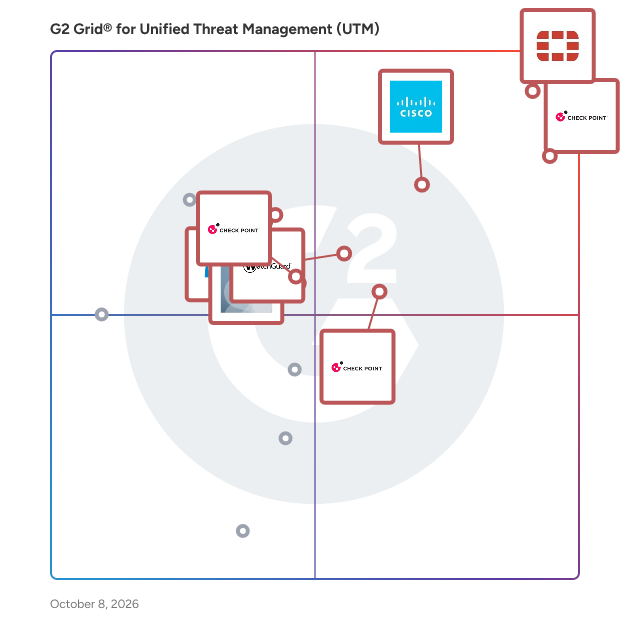
   Products classified in the overall Unified Threat Management (UTM) category are similar in many regards and help companies of all sizes solve their business problems. However, small business features, pricing, setup, and installation differ from businesses of other sizes, which is why we match buyers to the right Small Business Unified Threat Management (UTM) to fit their needs. Compare product ratings based on reviews from enterprise users or connect with one of G2&#39;s buying advisors to find the right solutions within the Small Business Unified Threat Management (UTM) category.

In addition to qualifying for inclusion in the Unified Threat Management Software category, to qualify for inclusion in the Small Business Unified Threat Management Software category, a product must have at least 10 reviews left by a reviewer from a small business.


  ## How Many Unified Threat Management Software Products Does G2 Track?
**Total Products under this Category:** 32

  
## How Does G2 Rank Unified Threat Management Software Products?

**Why You Can Trust G2's Software Rankings:**

- 30 Analysts and Data Experts
- 2,100+ Authentic Reviews
- 32+ Products
- Unbiased Rankings

G2's software rankings are built on verified user reviews, rigorous moderation, and a consistent research methodology maintained by a team of analysts and data experts. Each product is measured using the same transparent criteria, with no paid placement or vendor influence. While reviews reflect real user experiences, which can be subjective, they offer valuable insight into how software performs in the hands of professionals. Together, these inputs power the G2 Score, a standardized way to compare tools within every category.


  ## What Are the Top-Rated Unified Threat Management Software Products in 2026?
### 1. [Check Point Next Generation Firewalls (NGFWs)](https://www.g2.com/products/check-point-next-generation-firewalls-ngfws/reviews)
  Strengthen Your Security with Check Point Gateways and Firewalls Check Point Hybrid Mesh Network Security is a comprehensive cybersecurity solution designed to protect networks from sophisticated cyber threats while ensuring seamless management across diverse hybrid environments – on-premises, cloud, SaaS, and remote users. This product encompasses advanced threat prevention, real-time global threat intelligence, and unified policy management, making it an essential tool for organizations looking to secure their IT infrastructure, including data centers, hybrid clouds, and remote endpoints. Targeted at enterprises of all sizes, Check Point&#39;s solution caters to a wide range of industries that require robust security measures to safeguard sensitive data and maintain operational integrity. The product is particularly beneficial for organizations with complex network architectures, including those utilizing cloud services, Software as a Service (SaaS) applications, and remote workforces. By addressing the unique security challenges posed by these environments, Check Point enables businesses to maintain a secure and resilient IT ecosystem. One of the standout features of Check Point Hybrid Mesh Network Security is its AI-powered threat prevention capabilities. This technology allows for the identification and mitigation of threats in real-time, ensuring that organizations can respond swiftly to potential breaches. Additionally, the solution offers comprehensive security for various aspects of the IT landscape, including network security, cloud security, and workspace security. This multi-faceted approach ensures that users, applications, and data are protected regardless of their location, whether on-premises, in the cloud, or on employee devices. The deployment flexibility of Check Point&#39;s solution is another key advantage. Organizations can choose from on-premises, cloud-native, on-device, in-browser, or Secure Access Service Edge (SASE) models, allowing for tailored implementations that meet specific operational needs. This adaptability is complemented by unified security management, which simplifies operations through a single platform that provides visibility, policy enforcement, and posture control across the entire network. Furthermore, Check Point Hybrid Mesh Network Security is designed to optimize performance and cost. With high-speed, prevention-first security and on-device security controls, organizations can achieve effective protection without compromising on efficiency. The consistent application of zero-trust policies across the hybrid mesh network enhances security posture, ensuring that all components of the IT environment are uniformly protected against evolving cyber threats. This comprehensive solution empowers organizations to level up their protection and confidently navigate the complexities of modern cybersecurity challenges.


  **Average Rating:** 4.5/5.0
  **Total Reviews:** 502
**How Do G2 Users Rate Check Point Next Generation Firewalls (NGFWs)?**

- **Whitelists:** 8.9/10 (Category avg: 8.6/10)
- **Web Filtering:** 9.0/10 (Category avg: 8.9/10)
- **Has the product been a good partner in doing business?:** 8.9/10 (Category avg: 9.0/10)
- **Content Filtering:** 8.9/10 (Category avg: 8.6/10)

**Who Is the Company Behind Check Point Next Generation Firewalls (NGFWs)?**

- **Seller:** [Check Point Software Technologies](https://www.g2.com/sellers/check-point-software-technologies)
- **Company Website:** https://www.checkpoint.com/
- **Year Founded:** 1993
- **HQ Location:** Redwood City, CA
- **Twitter:** @CheckPointSW (71,000 Twitter followers)
- **LinkedIn® Page:** https://www.linkedin.com/company/check-point-software-technologies/ (8,356 employees on LinkedIn®)

**Who Uses This Product?**
  - **Who Uses This:** Network Security Engineer, Network Engineer
  - **Top Industries:** Computer &amp; Network Security, Information Technology and Services
  - **Company Size:** 44% Mid-Market, 42% Enterprise


#### What Are Check Point Next Generation Firewalls (NGFWs)'s Pros and Cons?

**Pros:**

- Cybersecurity (101 reviews)
- Threat Detection (86 reviews)
- Features (80 reviews)
- Network Security (76 reviews)
- Centralized Management (66 reviews)

**Cons:**

- Expensive (71 reviews)
- Complexity (56 reviews)
- Complex Setup (49 reviews)
- Slow Performance (45 reviews)
- Difficult Learning Curve (43 reviews)

### 2. [Cisco Meraki](https://www.g2.com/products/cisco-meraki/reviews)
  Cisco Meraki is a cloud-managed IT solutions provider that simplifies the management of complex networks through a centralized, web-based dashboard. Their comprehensive product portfolio includes wireless access points, switches, security appliances, and IoT devices, all designed to deliver secure, scalable, and high-performance networking experiences. Key Features and Functionality: - Cloud-Managed Access: Meraki&#39;s wireless access points and switches enable seamless connectivity for users, devices, and applications, ensuring robust security and simplified management from the edge to the cloud. - Software-Defined WAN (SD-WAN): Their SD-WAN solutions connect users and sites to applications over wide area networks without compromising security, speed, or user experience. - Connected IoT Solutions: Meraki offers smart cameras and sensors that create intuitive and secure experiences for various environments, including workplaces and educational institutions. - Centralized Management: The Meraki dashboard provides a unified platform to monitor, manage, and optimize the entire network infrastructure, offering real-time visibility and control. Primary Value and User Solutions: Cisco Meraki addresses the challenges of managing complex IT infrastructures by offering a cloud-first platform that simplifies deployment, monitoring, and troubleshooting. By integrating networking and security capabilities, Meraki enables organizations to deliver exceptional network experiences, enhance operational efficiency, and adapt to evolving business needs with agility. This approach reduces operational expenses and allows IT teams to focus on strategic initiatives rather than routine maintenance tasks.


  **Average Rating:** 4.3/5.0
  **Total Reviews:** 206
**How Do G2 Users Rate Cisco Meraki?**

- **Whitelists:** 9.1/10 (Category avg: 8.6/10)
- **Web Filtering:** 8.9/10 (Category avg: 8.9/10)
- **Has the product been a good partner in doing business?:** 8.7/10 (Category avg: 9.0/10)
- **Content Filtering:** 8.9/10 (Category avg: 8.6/10)

**Who Is the Company Behind Cisco Meraki?**

- **Seller:** [Cisco](https://www.g2.com/sellers/cisco)
- **Year Founded:** 1984
- **HQ Location:** San Jose, CA
- **Twitter:** @Cisco (721,440 Twitter followers)
- **LinkedIn® Page:** https://www.linkedin.com/company/cisco/ (95,742 employees on LinkedIn®)
- **Ownership:** NASDAQ:CSCO

**Who Uses This Product?**
  - **Who Uses This:** IT Manager, Network Engineer
  - **Top Industries:** Information Technology and Services, Hospital &amp; Health Care
  - **Company Size:** 61% Mid-Market, 21% Small-Business


#### What Are Cisco Meraki's Pros and Cons?

**Pros:**

- Ease of Use (7 reviews)
- Device Management (6 reviews)
- Features (6 reviews)
- Security (6 reviews)
- Deployment Ease (5 reviews)

**Cons:**

- Expensive (7 reviews)
- Limited Customization (3 reviews)
- Connection Issues (2 reviews)
- Lacking Features (2 reviews)
- Licensing Issues (2 reviews)

### 3. [FortiGate-VM NGFW](https://www.g2.com/products/fortigate-vm-ngfw/reviews)
  FortiGate-VM is a virtual firewall solution designed to help users secure their cloud environments and on-premises networks. As a next-generation firewall developed by Fortinet, FortiGate-VM integrates advanced security features with the flexibility of virtualization, making it suitable for deployment in various public and private cloud infrastructures. This solution is particularly beneficial for organizations looking to enhance their cybersecurity posture while leveraging the scalability and efficiency of cloud technologies. Targeted at enterprises and organizations of all sizes, FortiGate-VM is ideal for IT security teams that require robust protection against increasingly sophisticated cyber threats. Its deployment across diverse environments allows businesses to maintain consistent security policies and practices, regardless of whether their infrastructure is on-premises, in the cloud, or a hybrid of both. Specific use cases include protecting sensitive data in cloud applications, securing remote access for employees, SD-WAN, and ensuring compliance with industry regulations. One of the key features of FortiGate-VM is its AI-powered threat intelligence. FortiGuard utilizes machine learning algorithms to analyze vast amounts of data, enabling the identification of emerging threats in real time. This proactive approach to threat detection ensures that organizations can respond swiftly to potential vulnerabilities before they can be exploited. Additionally, the behavioral analysis capabilities of FortiGate-VM allow for the identification of anomalous activities, further enhancing its ability to mitigate risks associated with cyberattacks. FortiGate-VM stands out in the virtual firewall category due to its seamless integration with existing Fortinet security solutions, providing a comprehensive security architecture. The solution offers advanced features such as intrusion prevention, web filtering, and application control, all of which contribute to a multi-layered defense strategy. Furthermore, its scalability allows organizations to easily adjust their security resources in response to changing business needs, ensuring that they remain protected as they grow. FortiGate-VM delivers unmatched security and value, making it a vital component for organizations seeking to fortify their defenses against the evolving landscape of cyber threats. Its combination of advanced threat protection, AI-driven insights, and flexible deployment options positions it as a critical tool for maintaining a secure and resilient network environment.


  **Average Rating:** 4.6/5.0
  **Total Reviews:** 213
**How Do G2 Users Rate FortiGate-VM NGFW?**

- **Whitelists:** 9.4/10 (Category avg: 8.6/10)
- **Web Filtering:** 9.7/10 (Category avg: 8.9/10)
- **Has the product been a good partner in doing business?:** 9.1/10 (Category avg: 9.0/10)
- **Content Filtering:** 9.3/10 (Category avg: 8.6/10)

**Who Is the Company Behind FortiGate-VM NGFW?**

- **Seller:** [Fortinet](https://www.g2.com/sellers/fortinet)
- **Company Website:** https://www.fortinet.com
- **Year Founded:** 2000
- **HQ Location:** Sunnyvale, CA
- **Twitter:** @Fortinet (151,491 Twitter followers)
- **LinkedIn® Page:** https://www.linkedin.com/company/6460/ (16,112 employees on LinkedIn®)

**Who Uses This Product?**
  - **Who Uses This:** Network Engineer, IT Manager
  - **Top Industries:** Information Technology and Services, Computer &amp; Network Security
  - **Company Size:** 62% Mid-Market, 23% Enterprise


#### What Are FortiGate-VM NGFW's Pros and Cons?

**Pros:**

- Ease of Use (12 reviews)
- Features (10 reviews)
- Security (8 reviews)
- Protection (7 reviews)
- Control (6 reviews)

**Cons:**

- Difficult Learning Curve (4 reviews)
- Expensive (4 reviews)
- Update Issues (4 reviews)
- Upgrade Issues (4 reviews)
- Limited Features (3 reviews)

### 4. [Check Point SASE](https://www.g2.com/products/check-point-sase/reviews)
  The internet is the new corporate network, leading organizations to transition to their network security to Secure Access Service Edge (SASE). However, current solutions break the user experience with slow connections and complex management. Check Point SASE is a game-changing solution that delivers 10x faster internet security, SaaS Security, and full mesh Zero Trust Access and optimized SD-WAN performance—all with an emphasis on streamlined management. Combining innovative on-device and cloud-delivered network protections, Check Point SASE offers a local browsing experience with tighter security and privacy, and an identity-centric zero trust access policy that accommodates everyone: employees, BYOD and third parties. Its SD-WAN solution unifies industry-leading threat prevention with optimized connectivity, automated steering for over 10,000 applications and seamless link failover for uninterrupted web conferencing. Using Check Point SASE, business can build a secure corporate network over a private global backbone in less than an hour. The service is managed from a unified console and is backed by an award-winning global support team that has you covered 24/7.


  **Average Rating:** 4.5/5.0
  **Total Reviews:** 212
**How Do G2 Users Rate Check Point SASE?**

- **Whitelists:** 7.9/10 (Category avg: 8.6/10)
- **Web Filtering:** 9.2/10 (Category avg: 8.9/10)
- **Has the product been a good partner in doing business?:** 8.8/10 (Category avg: 9.0/10)
- **Content Filtering:** 8.8/10 (Category avg: 8.6/10)

**Who Is the Company Behind Check Point SASE?**

- **Seller:** [Check Point Software Technologies](https://www.g2.com/sellers/check-point-software-technologies)
- **Company Website:** https://www.checkpoint.com/
- **Year Founded:** 1993
- **HQ Location:** Redwood City, CA
- **Twitter:** @CheckPointSW (71,000 Twitter followers)
- **LinkedIn® Page:** https://www.linkedin.com/company/check-point-software-technologies/ (8,356 employees on LinkedIn®)

**Who Uses This Product?**
  - **Top Industries:** Information Technology and Services, Computer &amp; Network Security
  - **Company Size:** 47% Mid-Market, 35% Small-Business


#### What Are Check Point SASE's Pros and Cons?

**Pros:**

- Security (46 reviews)
- Ease of Use (39 reviews)
- Secure Access (34 reviews)
- Protection (26 reviews)
- Reliability (25 reviews)

**Cons:**

- Complex Implementation (28 reviews)
- Complex Configuration (24 reviews)
- Complex Setup (22 reviews)
- Expensive (17 reviews)
- Learning Curve (17 reviews)

### 5. [WatchGuard Network Security](https://www.g2.com/products/watchguard-network-security/reviews)
  For over 20 years, WatchGuard has pioneered cutting-edge cyber security technology and delivered it as easy-to-deploy and easy-to-manage solutions. Our unique approach to network security focuses on bringing best-in-class, enterprise-grade security to any organization, regardless of size or technical expertise. Ideal for SMBs and distributed enterprise organizations, our award-winning Unified Threat Management (UTM) appliances are designed from the ground up to focus on ease of deployment, use, and ongoing management, in addition to providing the strongest security possible.


  **Average Rating:** 4.7/5.0
  **Total Reviews:** 248
**How Do G2 Users Rate WatchGuard Network Security?**

- **Whitelists:** 9.2/10 (Category avg: 8.6/10)
- **Web Filtering:** 9.2/10 (Category avg: 8.9/10)
- **Has the product been a good partner in doing business?:** 9.1/10 (Category avg: 9.0/10)
- **Content Filtering:** 9.2/10 (Category avg: 8.6/10)

**Who Is the Company Behind WatchGuard Network Security?**

- **Seller:** [WatchGuard](https://www.g2.com/sellers/watchguard)
- **Company Website:** https://www.watchguard.com
- **Year Founded:** 1996
- **HQ Location:** Seatle, WA
- **Twitter:** @watchguard (19,460 Twitter followers)
- **LinkedIn® Page:** https://www.linkedin.com/company/166878/ (1,207 employees on LinkedIn®)

**Who Uses This Product?**
  - **Who Uses This:** IT Manager, IT Director
  - **Top Industries:** Information Technology and Services, Computer &amp; Network Security
  - **Company Size:** 54% Mid-Market, 43% Small-Business


#### What Are WatchGuard Network Security's Pros and Cons?

**Pros:**

- Cybersecurity (3 reviews)
- Ease of Use (3 reviews)
- Customer Support (2 reviews)
- Integrations (2 reviews)
- Security (2 reviews)

**Cons:**

- Expensive (3 reviews)
- Complex Setup (1 reviews)
- Difficult Installation (1 reviews)
- Lack of Interfaces (1 reviews)
- Limited Customization (1 reviews)

### 6. [SonicWall Next Generation Firewall](https://www.g2.com/products/sonicwall-next-generation-firewall/reviews)
  SonicWall real-time breach detection and prevention solutions protect more than one million networks worldwide


  **Average Rating:** 4.1/5.0
  **Total Reviews:** 144
**How Do G2 Users Rate SonicWall Next Generation Firewall?**

- **Whitelists:** 8.8/10 (Category avg: 8.6/10)
- **Web Filtering:** 9.0/10 (Category avg: 8.9/10)
- **Has the product been a good partner in doing business?:** 8.1/10 (Category avg: 9.0/10)
- **Content Filtering:** 8.7/10 (Category avg: 8.6/10)

**Who Is the Company Behind SonicWall Next Generation Firewall?**

- **Seller:** [SonicWall](https://www.g2.com/sellers/sonicwall)
- **Year Founded:** 1991
- **HQ Location:** Milpitas, CA
- **Twitter:** @SonicWall (29,313 Twitter followers)
- **LinkedIn® Page:** https://www.linkedin.com/company/4926/ (1,951 employees on LinkedIn®)

**Who Uses This Product?**
  - **Who Uses This:** Network Engineer, IT Manager
  - **Top Industries:** Information Technology and Services, Computer &amp; Network Security
  - **Company Size:** 61% Mid-Market, 29% Small-Business


#### What Are SonicWall Next Generation Firewall's Pros and Cons?

**Pros:**

- Ease of Use (3 reviews)
- Performance Speed (2 reviews)
- Response Speed (2 reviews)
- Threat Protection (2 reviews)
- Advanced Security (1 reviews)

**Cons:**

- System Instability (2 reviews)
- Upgrade Issues (2 reviews)
- Complex Configuration (1 reviews)
- Complexity (1 reviews)
- Connection Issues (1 reviews)

### 7. [Sophos United Threat Management](https://www.g2.com/products/sophos-united-threat-management/reviews)
  The global network of highly skilled researchers and analysts, protecting businesses from known and emerging malware - viruses, rootkits and spyware.


  **Average Rating:** 4.1/5.0
  **Total Reviews:** 78
**How Do G2 Users Rate Sophos United Threat Management?**

- **Whitelists:** 7.9/10 (Category avg: 8.6/10)
- **Web Filtering:** 8.2/10 (Category avg: 8.9/10)
- **Has the product been a good partner in doing business?:** 8.5/10 (Category avg: 9.0/10)
- **Content Filtering:** 7.9/10 (Category avg: 8.6/10)

**Who Is the Company Behind Sophos United Threat Management?**

- **Seller:** [Sophos](https://www.g2.com/sellers/sophos)
- **Year Founded:** 1985
- **HQ Location:** Oxfordshire
- **Twitter:** @Sophos (36,787 Twitter followers)
- **LinkedIn® Page:** https://www.linkedin.com/company/5053/ (5,561 employees on LinkedIn®)
- **Ownership:** LSE:SOPH

**Who Uses This Product?**
  - **Top Industries:** Information Technology and Services, Computer &amp; Network Security
  - **Company Size:** 60% Mid-Market, 26% Small-Business


### 8. [Heimdal](https://www.g2.com/products/heimdal/reviews)
  Accommodate all your cybersecurity needs under one convenient roof with the Heimdal® Unified Cybersecurity Platform. Our cybersecurity solutions can be used as standalone products or integrated into one another as part of a cohesive and unified XDR platform. Whether you’re a reseller, distributor, MSSP, or an organization committed to bolstering your online security, we provide an array of cutting-edge products to make your mission smoother. Heimdal® is a fast-growing cybersecurity company focused on continuous technological innovation. Since its establishment in 2014 in Copenhagen, based on the winning idea of CTF World Champions, Heimdal has experienced spectacular growth by proactively building products that anticipate threatscape trends. The company offers a multi-layeredand unified security suite that combines threat prevention, patch and asset management, endpoint rights management, antivirus and mail security which together secure customers against cyberattacks and keep critical information and intellectual property safe. Heimdal has been recognized as a thought leader in the industry and has won multiple international awards both for its solutions and for its educational content creation. The Heimdal line of products currently consists of 10 products and 2 services. The former category encompasses DNS Security for Endpoints &amp; Network, Patch &amp; Asset Management, Privileged Access Management, Application Control, Next-Gen Endpoint Antivirus, Ransomware Encryption Protection, Email Security, Email Fraud Prevention, and Remote Desktop. The latter is represented by Endpoint Detection &amp; Response, as well as eXtended Detection &amp; Response, or EDR and XDR for short. Currently, Heimdal’s cybersecurity solutions are deployed in more than 45 countries and supported regionally from offices in 15+ countries, by 175+ highly qualified specialists. Heimdal is ISAE 3000 certified and secures more than 2 million endpoints for over 10,000 companies. The company supports its partners without concessions on the basis of predictability and scalability. The common goal is to create a sustainable ecosystem and a strategic partnership.


  **Average Rating:** 4.3/5.0
  **Total Reviews:** 61
**How Do G2 Users Rate Heimdal?**

- **Whitelists:** 10.0/10 (Category avg: 8.6/10)
- **Web Filtering:** 10.0/10 (Category avg: 8.9/10)
- **Has the product been a good partner in doing business?:** 9.4/10 (Category avg: 9.0/10)
- **Content Filtering:** 10.0/10 (Category avg: 8.6/10)

**Who Is the Company Behind Heimdal?**

- **Seller:** [Heimdal®](https://www.g2.com/sellers/heimdal)
- **Company Website:** https://heimdalsecurity.com/
- **Year Founded:** 2014
- **HQ Location:** Copenhagen, Denmark
- **Twitter:** @HeimdalSecurity (5,104 Twitter followers)
- **LinkedIn® Page:** https://www.linkedin.com/company/heimdal-security/ (264 employees on LinkedIn®)

**Who Uses This Product?**
  - **Top Industries:** Computer &amp; Network Security, Construction
  - **Company Size:** 61% Mid-Market, 26% Small-Business


#### What Are Heimdal's Pros and Cons?

**Pros:**

- Product Quality (2 reviews)
- Reliability (2 reviews)
- Security (2 reviews)
- 24/7 Availability (1 reviews)
- Customer Support (1 reviews)

**Cons:**

- Complex Interface (2 reviews)
- Not User-Friendly (2 reviews)
- Poor Interface Design (2 reviews)
- User Difficulty (2 reviews)
- User Interface (2 reviews)

### 9. [BitNinja](https://www.g2.com/products/bitninja/reviews)
  State-of-the-art server security with an all-in-one platform BitNinja offers an advanced server security solution with a proactive and unified system designed to effectively defend against a wide range of malicious attacks. Breaking new ground, BitNinja will be the first server security tool that protects Windows servers. Main solutions: - Reduce the server load as a result of the real-time IP reputation, with a database of 100M+ IP addresses thanks to BitNinja’s Defense Network - Stop zero-day exploits with the WAF module, and BitNinja’s self-written rules - Remove malware quickly and prevent reinfections with the industry-leader malware scanner - Enable the AI Malware Scanner to remove malware than ever before - Identify possible backdoors in your system with the Defense Robot - Protect your server from brute-force attacks with the Log Analysis module that runs silently in the background - Regularly examine and clean your database with the Database Cleaner - Discover and eliminate vulnerabilities in your website at no additional cost with the SiteProtection module - Block spam accounts, prevent server blocklisting, and gain insights into outgoing spam emails with the Outbound - Spam Detection module powered by ChatGPT - Trap suspicious connections with Honeypots and block access through backdoors with the Web Honeypot BitNinja Security stops the latest attack types, including: - All types of malware - with the best malware scanner in the market - Brute-force attacks at both network and HTTP levels; - Vulnerability exploitation – CMS (WP/Drupal/Joomla) - SQL injection - XSS - Remote code execution - Zero-day attacks; - DoS (denial of service) attacks BitNinja Security makes it easy to secure web servers: - 1-line code installation - Fully automated operation keeps servers safe and eliminates human error - AI-powered community-driven worldwide Defense Network - Unified, intuitive Dashboard for your whole infrastructure - Easy server management with Cloud Configuration - Premium support with a maximum 5-min response time - The convenience of a robust CLI - API available for automation and reporting - Seamless integrations with a wide range of platforms like Enhance control panel, 360 Monitoring, and JetBackup. BitNinja is supported on THE PLATFORM and up, installed on the following Linux distributions: CentOS 7 and up 64 bit CloudLinux 7 and up 64 bit Debian 8 and up 64 bit Ubuntu 16.04 and up 64 bit RedHat 7 and up 64 bit AlmaLinux 8 64 bit VzLinux 7 and up 64 bit Rocky Linux 8 64 bit Amazon Linux 2 64 bit Windows 2012 RE and newer


  **Average Rating:** 4.6/5.0
  **Total Reviews:** 20
**How Do G2 Users Rate BitNinja?**

- **Whitelists:** 7.5/10 (Category avg: 8.6/10)
- **Web Filtering:** 9.2/10 (Category avg: 8.9/10)
- **Has the product been a good partner in doing business?:** 8.9/10 (Category avg: 9.0/10)
- **Content Filtering:** 8.3/10 (Category avg: 8.6/10)

**Who Is the Company Behind BitNinja?**

- **Seller:** [BitNinja Ltd.](https://www.g2.com/sellers/bitninja-ltd)
- **Year Founded:** 2014
- **HQ Location:** Debrecen
- **Twitter:** @bitninjaio (1,080 Twitter followers)
- **LinkedIn® Page:** https://www.linkedin.com/company/9343568/ (24 employees on LinkedIn®)

**Who Uses This Product?**
  - **Top Industries:** Information Technology and Services, Internet
  - **Company Size:** 88% Small-Business, 8% Mid-Market


    ## What Is Unified Threat Management Software?
  [Network Security Software](https://www.g2.com/categories/network-security)
  ## What Software Categories Are Similar to Unified Threat Management Software?
    - [Firewall Software](https://www.g2.com/categories/firewall-software)

  
---

## How Do You Choose the Right Unified Threat Management Software?

### What You Should Know About Unified Threat Management (UTM) Software

### What is Unified Threat Management (UTM) Software?

Unified threat management (UTM) software provides multiple security features combined into a single device within a network. UTM enables an organization to consolidate IT security services into one device, simplifying the protection of the network.

### What are the Common Features of Unified Threat Management (UTM) Software?

A UTM system usually includes the following:

**Antivirus protection:** [Antivirus software](https://www.g2.com/categories/antivirus) prevents and detects the presence of malicious software within an endpoint device. These tools typically contain detection features for identifying potential malware and computer viruses that attempt to penetrate a device.

**Malware analysis:** [Malware analysis tools](https://www.g2.com/categories/malware-analysis-tools) isolate and investigate malware as it is detected on a company’s IT resources, endpoints, and applications. They detect malware and move infected resources to an isolated environment.&amp;nbsp;

**Email protection** : [Email anti-spam software](https://www.g2.com/categories/email-anti-spam) prevents malicious content from being delivered via email. These tools scan email messages, content, and attachments for potential threats and then filter or block suspicious messages from being delivered.

**Website security** : [Website security software](https://www.g2.com/categories/website-security) is designed to protect business websites from several internet-based threats. These tools combine features of distributed denial of service [DDoS protection software](https://www.g2.com/categories/ddos-protection), [content delivery networks (CDN)](https://www.g2.com/categories/content-delivery-network-cdn), and [web application firewalls (WAF)](https://www.g2.com/categories/web-application-firewall-waf) to create an all-encompassing website protection solution.&amp;nbsp;

**Endpoint protection:** [Endpoint management software](https://www.g2.com/categories/endpoint-management) tracks devices in a system and ensures software is secure and up to date. Typical features of endpoint management products are asset management, patch management, and compliance evaluation.

**Vulnerability management** : UTM software usually includes vulnerability management software, such as [risk-based vulnerability management](https://www.g2.com/categories/risk-based-vulnerability-management), which identifies and prioritizes vulnerabilities based on customizable risk factors.

### What are the Benefits of Unified Threat Management (UTM) Software?

There are several benefits to using UTM software.

**Flexibility:** UTM software allows users to possess flexible solutions by offering a variety of security technologies from which an organization can pick and choose what is most beneficial. They can also acquire a single licensing model with all the solutions included.&amp;nbsp;

**Centralized management**** :** The UTM framework consolidates multiple security components under one management console. This makes the system easier to monitor and allows its operators to examine specific components that may need attention for specific functions.

**Cost savings:** The centralized framework reduces the number of devices that are needed, as well as the number of staff that were previously required to manage multiple devices.

### Who Uses Unified Threat Management (UTM) Software?

**IT and cybersecurity staff:** These workers use UTM software to securely monitor data and network traffic.

**Industries** : Organizations in all industries, especially technology, professional, and financial services, seek UTM solutions to consolidate security solutions for more efficiency and cost savings.

### Challenges with Unified Threat Management (UTM) Software?

There are some challenges IT teams can encounter with UTM systems.

**Single point of failure:** Combining all these security components into one system that allows IT to manage everything in one dashboard also presents a potential single point of failure. A whole network could be completely exposed if the UTM system fails.&amp;nbsp;

**Loss of granularity:** Components within UTM software may not have as granular or robust as dedicated solutions, which may mean degraded performance.

### How to Buy Unified Threat Management (UTM) Software

#### Requirements Gathering (RFI/RFP) for Unified Threat Management (UTM) Software&amp;nbsp;

If an organization is just starting and looking to purchase UTM software, G2 can help.

The manual work necessary in security and compliance causes multiple pain points. If the company is large and has a lot of networks, data, or devices in its organization, it may need to shop for scalable UTM solutions. Users should think about the pain points in security to help create a checklist of criteria. Additionally, the buyer must determine the number of employees who will need to use this software and if they currently have the skills to administer it.&amp;nbsp;

Taking a holistic overview of the business and identifying pain points can help the team springboard into creating a checklist of criteria. The checklist serves as a detailed guide that includes both necessary and nice-to-have features, including budget features, number of users, integrations, security staff skills, cloud or on-premises solutions, and more.

Depending on the deployment scope, producing an RFI, a one-page list with bullet points describing what is needed from UTM software, might be helpful.

#### Compare Unified Threat Management (UTM) Software Products

**Create a long list**

Vendor evaluations are essential to the software buying process, from meeting the business functionality needs to implementation. For ease of comparison, after all demos are complete, it helps to prepare a consistent list of questions regarding specific needs and concerns to ask each vendor.

**Create a short list**

From the long list of vendors, it is helpful to narrow down the list of vendors and come up with a shorter list of contenders, preferably no more than three to five. With this list, businesses can produce a matrix to compare the features and pricing of the various solutions.

**Conduct demos**

To ensure the comparison is comprehensive, the user should demo each solution on the short list with the same use cases. This allows the business to evaluate like for like and see how each vendor stacks up against the competition.&amp;nbsp;

#### Selection of Unified Threat Management (UTM) Software

**Choose a selection team**

Before getting started, creating a winning team that will work together throughout the process, from identifying pain points to implementation, is crucial. The selection team should consist of organization members with the right interest, skills, and time to participate.&amp;nbsp;

A good starting point is to aim for three to five people who fill roles such as main decision maker, project manager, process owner, system owner, or staffing subject matter expert, as well as a technical lead, head administrator, or security administrator. The vendor selection team may be smaller in smaller companies, with fewer participants multitasking and taking on more responsibilities.

**Compare notes**

The selection team should compare notes, facts, and figures noted during the process, such as costs, security capabilities, and alert and incident response times.

**Negotiation**

Just because something is written on a company’s pricing page does not mean it&#39;s final. It is crucial to open up a conversation regarding pricing and licensing. For example, the vendor may be willing to give a discount for multi-year contracts or for recommending the product to others.

**Final decision**

After this stage, and before going all in, it is recommended to roll out a test run or pilot program to test adoption with a small sample size of users. If the tool is well used and well received, the buyer can be confident that the selection was correct. If not, it might be time to go back to the drawing board.

### What Does Unified Threat Management (UTM) Software Cost?

UTM is considered a long-term investment. This means there must be a careful evaluation of vendors, and the software should be tailored to each organization&#39;s specific requirements. Once UTM software is purchased, deployed, and integrated into an organization’s security system, the cost could be high, so the evaluation stage of selecting the right tool is crucial.&amp;nbsp;

The notion of rip-and-replace cost can be high. The chosen UTM vendor should continue to provide support for the platform with flexibility and open integration. Pricing can be pay-as-you-go, and costs may also vary depending if unified threat management is self-managed or fully managed.

#### Return on Investment (ROI)

As organizations consider recouping the money spent on the software, it is critical to understand the costs that will be saved in terms of efficiency. In the long run, the investment must be worth preventing downtime, loss of revenue, and any reputation damage that a security breach would cause.


