Best Network Security Policy Management (NSPM) Software

How Many Network Security Policy Management (NSPM) Software Products Does G2 Track?

Total Products under this Category: 48

Category Stats (Oct 2026)

  • Average Rating: 4.4/5 (↓0.01 vs Sep 2026) The average rating of products in this category, based on all submitted ratings
  • Top Trending Product: Arista NG Firewall (+0.34%) - Among all products in this category, Arista NG Firewall recorded the largest rating increase compared to last month

Last updated: October 13, 2026

How Does G2 Rank Network Security Policy Management (NSPM) Software Products?

Why You Can Trust G2's Software Rankings:

  • 30 Analysts and Data Experts
  • 2,500+ Authentic Reviews
  • 48+ Products
  • Unbiased Rankings

G2's software rankings are built on verified user reviews, rigorous moderation, and a consistent research methodology maintained by a team of analysts and data experts. Each product is measured using the same transparent criteria, with no paid placement or vendor influence. While reviews reflect real user experiences, which can be subjective, they offer valuable insight into how software performs in the hands of professionals. Together, these inputs power the G2 Score, a standardized way to compare tools within every category.

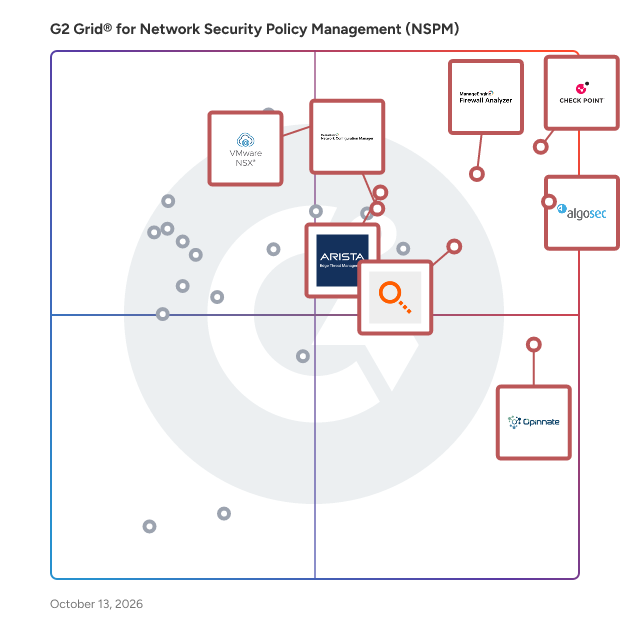
G2 Grid® for Network Security Policy Management (NSPM) Software

G2 Grid® for Network Security Policy Management (NSPM) Software plotting products by satisfaction and market presence

Highlighted products: Check Point Cloud Firewall (formerly CloudGuard Network Security), AlgoSec Horizon, ManageEngine Firewall Analyzer, Policy Manager, VMware NSX, Arista NG Firewall, Opinnate, and ManageEngine Network Configuration Manager.

Underlying data: [Grid® JSON](https://www.g2.com/categories/network-security-policy-management-nspm/grids.json?focus%5B%5D=check-point-cloud-firewall-formerly-cloudguard-network-security&focus%5B%5D=algosec-horizon&focus%5B%5D=manageengine-firewall-analyzer&focus%5B%5D=firemon-policy-manager&focus%5B%5D=vmware-nsx&focus%5B%5D=arista-ng-firewall&focus%5B%5D=opinnate&focus%5B%5D=manageengine-network-configuration-manager)

Check Point Cloud Firewall (formerly CloudGuard Network Security)

CloudGuard Network Security is a comprehensive cloud security solution designed to protect public, private, and hybrid cloud environments from a wide array of cyber threats. This platform focuses on delivering advanced threat protection, ensuring that organizations can confidently transition to the cloud while maintaining robust security measures. With an impressive malware catch rate, CloudGuard is engineered to defend against various types of attacks, including ransomware and other malicious software. Targeted at enterprises and organizations that are increasingly adopting cloud technologies, CloudGuard Network Security is particularly beneficial for IT teams and security professionals who require a reliable and efficient way to manage security across multiple environments. The solution is ideal for businesses looking to enhance their cloud security posture without compromising on agility or operational efficiency. By integrating seamlessly with leading Infrastructure as Code (IaC) tools, CloudGuard automates network security processes, making it easier for teams to implement security measures within their continuous integration and continuous deployment (CI/CD) workflows. One of the standout features of CloudGuard is its advanced protection capabilities. The platform includes a suite of security features such as a firewall, data loss prevention (DLP), intrusion prevention system (IPS), application control, IPsec VPN, URL filtering, antivirus, anti-bot protection, threat extraction, and threat emulation. These tools work in concert to provide a multi-layered defense strategy that addresses various attack vectors, ensuring that organizations can mitigate risks effectively. Additionally, CloudGuard's automated network security capabilities support IaC and CI/CD practices, allowing organizations to streamline their security processes through the use of APIs and automation. This enables security teams to focus on more strategic initiatives rather than being bogged down by manual tasks. The unified security management feature further enhances the solution by providing consistent visibility and policy management across hybrid-cloud and on-premises environments. Users can access logging, reporting, and control from a single interface, simplifying the management of security policies and improving overall operational efficiency. Overall, CloudGuard Network Security stands out in the cloud security landscape by offering a robust, integrated solution that not only protects against emerging threats but also enhances the agility and efficiency of security operations. Its comprehensive feature set and automation capabilities make it a valuable asset for organizations navigating the complexities of cloud security.

Average Rating: 4.4/5.0

Total Reviews: 273

How Do G2 Users Rate Check Point Cloud Firewall (formerly CloudGuard Network Security)?

  • Has the product been a good partner in doing business?: 8.8/10 (Category avg: 8.9/10)
  • Console: 9.2/10 (Category avg: 9.1/10)
  • Policy Optimization: 8.9/10 (Category avg: 8.8/10)
  • Network Mapping: 9.3/10 (Category avg: 8.9/10)

Who Is the Company Behind Check Point Cloud Firewall (formerly CloudGuard Network Security)?

Who Uses This Product?

  • Who Uses This: Security Engineer, Network Security Engineer
  • Top Industries: Computer & Network Security, Information Technology and Services
  • Company Size: 39% Large, 34% Medium

What Do G2 Reviewers Say About Check Point Cloud Firewall (formerly CloudGuard Network Security)?

AI-generated summary from verified user reviews

Pros
  • Users celebrate the advanced threat protection of Check Point Cloud Firewall, enhancing cloud security across multi-cloud environments.
  • Users find Check Point Cloud Firewall to be easy to use, thanks to its centralized management and seamless integration.
  • Users value the advanced threat prevention features of Check Point Cloud Firewall for enhanced security efficiency.
  • Users appreciate the seamless cloud integration of Check Point CloudGuard, enhancing security across multi-cloud environments.
  • Users value the seamless integrations of Check Point CloudGuard, enhancing security across multiple cloud environments effortlessly.
Cons
  • Users find the complexity of setup and management daunting, requiring a high-skilled team for effective use.
  • Users report a difficult setup process for Check Point Cloud Firewall, complicating initial deployment and usability.
  • Users find the difficult configuration of Check Point Cloud Firewall complex, especially for beginners and small environments.
  • Users find the difficult learning curve challenging, impacting setup and adaptation for new users significantly.
  • Users find the product expensive, which can be a barrier for smaller organizations trying to adopt it.

What Are Recent G2 Reviews of Check Point Cloud Firewall (formerly CloudGuard Network Security)?

What Are G2 Users Discussing About Check Point Cloud Firewall (formerly CloudGuard Network Security)?

AlgoSec Horizon

AlgoSec, a global cybersecurity leader, empowers organizations to securely accelerate application delivery up to 10 times faster by automating application connectivity and security policy across the hybrid network environment. With two decades of expertise securing hybrid networks, over 2200 of the world's most complex organizations trust AlgoSec to help secure their most critical workloads. AlgoSec Horizon platform utilizes advanced AI capabilities, enabling users to automatically discover and identify their business applications across multi-clouds, and remediate risks more effectively. It serves as a single source for visibility into security and compliance issues across the hybrid network environment, to ensure ongoing adherence to internet security standards, industry, and internal regulations. Additionally, organizations can leverage intelligent change automation to streamline security change processes, thus improving security and agility. Learn how AlgoSec enables application owners, information security experts, SecOps and cloud security teams to deploy business applications faster while maintaining security at www.algosec.com.

Average Rating: 4.5/5.0

Total Reviews: 218

How Do G2 Users Rate AlgoSec Horizon?

  • Has the product been a good partner in doing business?: 8.5/10 (Category avg: 8.9/10)
  • Console: 8.7/10 (Category avg: 9.1/10)
  • Policy Optimization: 9.2/10 (Category avg: 8.8/10)
  • Network Mapping: 8.7/10 (Category avg: 8.9/10)

Who Is the Company Behind AlgoSec Horizon?

  • Seller: AlgoSec
  • Company Website:
  • Year Founded: 2004
  • HQ Location: Ridgefield Park, New Jersey
  • Twitter: @AlgoSec
    2,419 Twitter followers
  • LinkedIn® Page: www.linkedin.com
    570 employees on LinkedIn®

Who Uses This Product?

  • Who Uses This: Security Engineer, Network Security Engineer
  • Top Industries: Computer & Network Security, Information Technology and Services
  • Company Size: 51% Large, 29% Medium

What Do G2 Reviewers Say About AlgoSec Horizon?

AI-generated summary from verified user reviews

Pros
  • Users find the ease of use in AlgoSec Horizon invaluable for automating workflows and enhancing network security management.
  • Users value the automated policy management in AlgoSec Horizon, enhancing speed and safety of firewall changes.
  • Users appreciate the visibility and automation in risk management, streamlining firewall changes while enhancing security effectively.
  • Users appreciate the automation of firewall workflows, significantly saving time and simplifying network management processes.
  • Users find AlgoSec Horizon's automation of firewall workflows invaluable, significantly saving time and improving usability.
Cons
  • Users note that improvement in support and simplification of initial configuration would enhance the overall experience with AlgoSec Horizon.
  • Users face integration issues with AlgoSec Horizon, particularly with Checkpoint firewalls and Microsoft Exchange Cloud relay.
  • Users find the difficult setup of AlgoSec Horizon to be complex and time-consuming, requiring extensive training.
  • Users feel that support improvements are necessary for better user experience and smoother initial setup with AlgoSec Horizon.
  • Users find the initial setup time-consuming, especially in complex environments with multiple vendors and extensive networks.

What Are Recent G2 Reviews of AlgoSec Horizon?

What Are G2 Users Discussing About AlgoSec Horizon?

ManageEngine Firewall Analyzer

Firewall Analyzer is a vendor neutral log analytics and firewall rule management software that provides in-depth visibility into your organization's network security environment. Here are some of the features that set Firewall Analyzer apart: 1. Comprehensive Visibility: Firewall Analyzer provides complete visibility into network traffic, firewall activity, and security events, allowing you to gain insights into potential threats and security vulnerabilities. 2. Proactive Threat Management: The solution enables proactive monitoring and analysis of network traffic, allowing you to identify and mitigate potential threats before they cause damage or breaches. 3. Real-time Monitoring: Firewall Analyzer offers real-time monitoring capabilities, giving you immediate visibility into firewall events and traffic patterns. This helps you quickly detect and respond to security incidents. 4. Traffic Analysis and Bandwidth Optimization: By analyzing network traffic and bandwidth consumption, Firewall Analyzer helps you identify and optimize bandwidth usage, ensuring efficient network performance and resource allocation. 5. Compliance Enforcement: Firewall Analyzer assists in enforcing regulatory compliance by providing customizable reports and insights. It helps you meet industry standards and regulations by monitoring and reporting on security policy adherence. 6. Centralized Firewall Management: The solution streamlines firewall management by providing a centralized platform for configuration, policy management, and rule optimization. This simplifies administrative tasks and ensures consistent security policies across multiple firewalls. 7. Customizable Reporting and Analytics: Firewall Analyzer offers customizable reports and analytics, allowing you to generate meaningful insights about your network security posture, threat trends, and compliance status. This helps you make informed decisions and take proactive actions. With its array of features, Firewall Analyzer equips organizations with the tools they need to maintain a robust and secure network infrastructure. With Firewall Analyzer, businesses can stay ahead of potential threats, optimize firewall performance, and ensure adherence to industry standards and regulations.

Average Rating: 4.7/5.0

Total Reviews: 46

How Do G2 Users Rate ManageEngine Firewall Analyzer?

  • Has the product been a good partner in doing business?: 9.3/10 (Category avg: 8.9/10)
  • Console: 9.2/10 (Category avg: 9.1/10)
  • Policy Optimization: 9.1/10 (Category avg: 8.8/10)
  • Network Mapping: 9.3/10 (Category avg: 8.9/10)

Who Is the Company Behind ManageEngine Firewall Analyzer?

  • Seller: Zoho
  • Year Founded: 1996
  • HQ Location: Austin, TX
  • Twitter: @Zoho
    137,880 Twitter followers
  • LinkedIn® Page: www.linkedin.com
    30,913 employees on LinkedIn®
  • Phone: +1 (888) 900-9646

Who Uses This Product?

  • Top Industries: Information Technology and Services
  • Company Size: 63% Medium, 19% Large

What Are Recent G2 Reviews of ManageEngine Firewall Analyzer?

What Are G2 Users Discussing About ManageEngine Firewall Analyzer?

AI can help you find the answers. G2 helps you trust them.

Connect G2 to Claude or ChatGPT for answers grounded in G2's trusted reviews, comparisons, and pricing from real user insights.

How it works

Policy Manager

FireMon Policy Manager is a comprehensive firewall policy management platform that helps organizations quickly adapt to change, manage risk, and achieve continuous compliance. By standardizing and consolidating firewall, cloud security group, and other network policy device rulesets into a single management console, Policy Manager gives network teams visibility and management over even the most complex hybrid networks with ease. Designed with enterprise needs in mind, Policy Manager is highly scalable and highly customizable with the industry’s only API-first approach that exposes every control for quick and reliable integrations.

Average Rating: 4.4/5.0

Total Reviews: 37

How Do G2 Users Rate Policy Manager?

  • Has the product been a good partner in doing business?: 8.9/10 (Category avg: 8.9/10)
  • Console: 9.2/10 (Category avg: 9.1/10)
  • Policy Optimization: 9.7/10 (Category avg: 8.8/10)
  • Network Mapping: 9.0/10 (Category avg: 8.9/10)

Who Is the Company Behind Policy Manager?

  • Seller: FireMon
  • Company Website:
  • Year Founded: 2004
  • HQ Location: Overland Park, KS
  • Twitter: @FireMon
    2,435 Twitter followers
  • LinkedIn® Page: www.linkedin.com
    269 employees on LinkedIn®

Who Uses This Product?

  • Who Uses This: Security Engineer
  • Top Industries: Information Technology and Services, Financial Services
  • Company Size: 38% Large, 35% Small

What Do G2 Reviewers Say About Policy Manager?

AI-generated summary from verified user reviews

Pros
  • Users find Policy Manager very easy to use, appreciating its clear network visualization and seamless integration capabilities.
  • Users find easy access to comprehensive network visibility, enhancing their firewall rule management efficiently.
  • Users value the easy integrations of Policy Manager, effortlessly connecting with multiple firewalls for enhanced security.
  • Users appreciate the ease of integration with FireMon, enhancing firewall management and providing a clear network overview.
  • Users value the easy integration of Policy Manager with platforms like Palo Alto and Azure Firewalls for enhanced functionality.
Cons
  • Users face performance issues with Policy Manager due to ineffective representative changes impacting partner relationships.
  • Users face slow performance in Policy Manager, impacting efficiency and partner relationships negatively.

What Are Recent G2 Reviews of Policy Manager?

VMware NSX

VMware NSX® is a powerful network virtualization solution for VMware Cloud Foundation™ (VCF) that enables network connectivity, operations, and scale. NSX Network Virtualization brings the simplicity of the cloud operating model to networking, allowing you to streamline, accelerate, and scale both traditional and modern applications in private/hybrid clouds.

Average Rating: 4.4/5.0

Total Reviews: 84

How Do G2 Users Rate VMware NSX?

  • Has the product been a good partner in doing business?: 8.3/10 (Category avg: 8.9/10)
  • Console: 9.2/10 (Category avg: 9.1/10)
  • Policy Optimization: 6.7/10 (Category avg: 8.8/10)
  • Network Mapping: 9.4/10 (Category avg: 8.9/10)

Who Is the Company Behind VMware NSX?

  • Seller: Broadcom
  • Year Founded: 1991
  • HQ Location: San Jose, CA
  • Twitter: @broadcom
    63,909 Twitter followers
  • LinkedIn® Page: www.linkedin.com
    44,602 employees on LinkedIn®
  • Ownership: NASDAQ: CA

Who Uses This Product?

  • Top Industries: Computer & Network Security, Information Technology and Services
  • Company Size: 37% Large, 32% Medium

What Do G2 Reviewers Say About VMware NSX?

AI-generated summary from verified user reviews

Pros
  • Users appreciate the ease of use with VMware NSX, benefiting from its simple dashboard and robust functionality.
  • Users value the integrated features and simplicity of VMware NSX, enhancing network security and management efficiency.
  • Users value the enhanced security features of VMware NSX, facilitating effective microsegmentation and Zero Trust implementations.
  • Users value the easy integrations of VMware NSX, enhancing functionality and network management across diverse environments.
  • Users value the seamless integration of VMware NSX with other VMware services, enhancing security and network management.
Cons
  • Users find the complex architecture of VMware NSX difficult to understand, complicating security and management tasks.
  • Users find the cost prohibitive, making VMware NSX unsuitable for smaller businesses or those with limited resources.
  • Users find VMware NSX's pricing issues cumbersome, making it unaffordable for small businesses and limited-resource enterprises.
  • Users find the learning difficulty of VMware NSX challenging, impacting the setup and configuration process significantly.
  • Users find the high costs of VMware NSX prohibitive, especially for small businesses with limited resources.

What Are Recent G2 Reviews of VMware NSX?

Arista NG Firewall

NG Firewall simplifies network security with a single, modular, software platform that provides a browser-based, responsive and intuitive interface enabling you to quickly gain visibility into the traffic on your network. NG Firewall delivers a comprehensive, enterprise-grade network security platform including content filtering, advanced threat protection, VPN connectivity, application-based shaping for bandwidth optimization.

Average Rating: 4.7/5.0

Total Reviews: 18

How Do G2 Users Rate Arista NG Firewall?

  • Has the product been a good partner in doing business?: 9.8/10 (Category avg: 8.9/10)
  • Console: 9.7/10 (Category avg: 9.1/10)
  • Policy Optimization: 9.4/10 (Category avg: 8.8/10)
  • Network Mapping: 9.2/10 (Category avg: 8.9/10)

Who Is the Company Behind Arista NG Firewall?

  • Seller: Arista Networks
  • Year Founded: 2004
  • HQ Location: Santa Clara, US
  • Twitter: @arista_channels
    2,437 Twitter followers
  • LinkedIn® Page: www.linkedin.com
    5,823 employees on LinkedIn®
  • Ownership: NYSE:ANET

Who Uses This Product?

  • Company Size: 61% Small, 39% Medium

What Are Recent G2 Reviews of Arista NG Firewall?

Opinnate

Opinnate is an NSPM platform for firewall policy governance - analyzing real usage, optimizing policies, and automating changes. It enables least-privilege and segmentation readiness by continuously removing unused access and policy risk. Opinnate reduces policy sprawl by combining deep rule/object usage analytics, policy hygiene and optimization actions, and workflow-driven automation - so teams continuously improve security posture while cutting manual effort. Why teams choose Opinnate Fast to deploy, easy to run Opinnate is designed for simple installation, quick integration, and straightforward management, helping teams get value quickly without a steep learning curve. Lower TCO, no surprises With transparent licensing and low resource consumption, Opinnate keeps costs predictable and avoids the “complexity tax” (extra infrastructure, hidden add-ons, or operational dependencies). Passive monitoring for immediate visibility and hardening Opinnate’s passive monitoring analyzes historical syslog data to surface rule/object usage, unused access paths, and policy drift signals, enabling rapid hardening based on real traffic - not assumptions. Powerful reporting for security + audit needs Opinnate offers customizable reporting in Excel, PDF, and HTML, including compliance-ready outputs, scheduled delivery, and historical tracking. Continuous optimization + automation (not just recommendations) Opinnate goes beyond findings by enabling action: Optimization (actions on firewalls): handle shadowed/expired/unused rules, duplicate objects, consolidation opportunities, and scheduled optimization tasks. Automation (actions on firewalls): streamline rule/object changes, server cloning, controlled rule creation, and lifecycle workflows to reduce human error and speed up operations. With 30+ automation workflows, teams can achieve up to 80% effort savings on recurring firewall operations. Modular add-ons to extend visibility and governance Opinnate can be expanded with purpose-built add-ons that strengthen day-2 operations and governance: Application Visibility Add-on: improves policy accuracy by adding application-level context to rule evaluation and clean-up decisions. Firewall Backup Add-on: supports operational resilience with structured firewall backup management as part of policy governance workflows. License Tracking Add-on: helps teams track firewall licensing status and reduce risk from expirations or non-compliance. Certificate Tracking Add-on: tracks certificate inventory and lifecycle signals to prevent outages and security gaps caused by expired certificates. Flexible editions that match your maturity Lite (Analysis): rule analysis, usage analytics, reports, history & change tracking, alerts. Standard (Optimization): adds optimization actions on firewalls. Enterprise (Automation): adds automation actions on firewalls and lifecycle management. The bottom line Opinnate helps organizations continuously improve network security policies, reduce operational load, and move faster with fewer mistakes—delivering a simple, effective, and cost-efficient NSPM approach that scales from quick wins to full automation.

Average Rating: 4.8/5.0

Total Reviews: 43

How Do G2 Users Rate Opinnate?

  • Has the product been a good partner in doing business?: 9.6/10 (Category avg: 8.9/10)
  • Console: 9.6/10 (Category avg: 9.1/10)
  • Policy Optimization: 9.7/10 (Category avg: 8.8/10)
  • Network Mapping: 8.6/10 (Category avg: 8.9/10)

Who Is the Company Behind Opinnate?

  • Seller: Opinnate
  • Company Website:
  • Year Founded: 2022
  • HQ Location: London, Bromley
  • Twitter: @OpinnateSec
    14 Twitter followers
  • LinkedIn® Page: www.linkedin.com
    17 employees on LinkedIn®

Who Uses This Product?

  • Top Industries: Computer & Network Security, Information Technology and Services
  • Company Size: 49% Medium, 30% Small

What Do G2 Reviewers Say About Opinnate?

AI-generated summary from verified user reviews

Pros
  • Users value the ease of use of Opinnate, which simplifies management and optimizes security rules effectively.
  • Users commend Opinnate for its efficiency in streamlining operations, significantly reducing time spent on management tasks.
  • Users value the simple interface and instant solutions of Opinnate, enhancing efficiency in firewall management and compliance.
  • Users value the enhanced visibility Opinnate provides, simplifying firewall management and improving team efficiency.
  • Users value the simple interface and efficient automation of Opinnate, enhancing operational efficiency significantly.
Cons
  • Users desire improved IPS and Threat Prevention management for better firewall integration within the Opinnate platform.
  • Users suggest that adding more customizable alarm options would enhance Opinnate's utility and user experience.
  • Users desire improved notification issues, seeking better customization and flexibility for enhanced user experience.
  • Users note that update issues limit customization and integration options, impacting their experience with the product.

What Are Recent G2 Reviews of Opinnate?

ManageEngine Network Configuration Manager

Network Configuration Manager is a comprehensive solution designed to empower netwaork organizations with efficient network configuration and change management capabilities. It supports a wide range of network devices, including routers, switches, and firewalls, offering a comprehensive approach to streamline and enhance network operations. With features such as backup, change management, compliance management, automation, and firmware vulnerability management, Network Configuration Manager simplifies the complex task of managing network configurations.

Average Rating: 4.5/5.0

Total Reviews: 44

How Do G2 Users Rate ManageEngine Network Configuration Manager?

  • Has the product been a good partner in doing business?: 8.8/10 (Category avg: 8.9/10)
  • Console: 9.0/10 (Category avg: 9.1/10)
  • Policy Optimization: 8.7/10 (Category avg: 8.8/10)
  • Network Mapping: 8.7/10 (Category avg: 8.9/10)

Who Is the Company Behind ManageEngine Network Configuration Manager?

  • Seller: Zoho
  • Year Founded: 1996
  • HQ Location: Austin, TX
  • Twitter: @Zoho
    137,880 Twitter followers
  • LinkedIn® Page: www.linkedin.com
    30,913 employees on LinkedIn®
  • Phone: +1 (888) 900-9646

Who Uses This Product?

  • Top Industries: Information Technology and Services
  • Company Size: 59% Medium, 27% Large

What Do G2 Reviewers Say About ManageEngine Network Configuration Manager?

AI-generated summary from verified user reviews

Pros
  • Users value the robust backup options that simplify configuration management and enhance tracking efficiency.
  • Users value the automation features of ManageEngine NCM, significantly reducing manual effort for device configuration management.
  • Users value the compliance management feature for ensuring adherence to industry standards and simplifying audits.
  • Users value the automation of configuration backups, significantly reducing manual workload and enhancing operational efficiency.
  • Users find ManageEngine Network Configuration Manager highly user-friendly, enabling quick learning and easy management of configurations.
Cons
  • Users are disappointed with the limited features of ManageEngine Network Configuration Manager, finding it lacking in functionality and support.
  • Users find the configuration difficulty in NCM requires significant effort for initial setup and fine-tuning.
  • Users face device management challenges with frequent alerts, manual selections, and performance issues in large infrastructures.
  • Users struggle with the poor interface design, citing clunky navigation and slow report generation as major drawbacks.
  • Users experience automation issues with ManageEngine NCM, including frequent alerts and manual template selections affecting efficiency.

What Are Recent G2 Reviews of ManageEngine Network Configuration Manager?

AWS Firewall Manager

AWS Firewall Manager is a security management service that makes it easier to centrally configure and manage AWS WAF rules across your accounts and applications.

Average Rating: 4.3/5.0

Total Reviews: 41

How Do G2 Users Rate AWS Firewall Manager?

  • Has the product been a good partner in doing business?: 8.8/10 (Category avg: 8.9/10)
  • Console: 8.3/10 (Category avg: 9.1/10)
  • Policy Optimization: 7.7/10 (Category avg: 8.8/10)
  • Network Mapping: 7.9/10 (Category avg: 8.9/10)

Who Is the Company Behind AWS Firewall Manager?

  • Seller: Amazon Web Services (AWS)
  • Year Founded: 2006
  • HQ Location: Seattle, WA
  • Twitter: @awscloud
    2,232,483 Twitter followers
  • LinkedIn® Page: www.linkedin.com
    148,266 employees on LinkedIn®
  • Ownership: NASDAQ: AMZN

Who Uses This Product?

  • Top Industries: Information Technology and Services, Computer Software
  • Company Size: 56% Large, 23% Medium

What Are Recent G2 Reviews of AWS Firewall Manager?

What Are G2 Users Discussing About AWS Firewall Manager?

Check Point Infinity Platform

Check Point Infinity is the only fully consolidated cyber security architecture that provides unprecedented protection against Gen V mega-cyber attacks as well as future cyber threats across all networks, endpoint, cloud and mobile. The architecture is designed to resolve the complexities of growing connectivity and inefficient security.

Average Rating: 4.6/5.0

Total Reviews: 109

How Do G2 Users Rate Check Point Infinity Platform?

  • Has the product been a good partner in doing business?: 8.8/10 (Category avg: 8.9/10)
  • Console: 8.8/10 (Category avg: 9.1/10)
  • Policy Optimization: 9.0/10 (Category avg: 8.8/10)
  • Network Mapping: 8.9/10 (Category avg: 8.9/10)

Who Is the Company Behind Check Point Infinity Platform?

Who Uses This Product?

  • Top Industries: Computer & Network Security, Information Technology and Services
  • Company Size: 44% Large, 37% Medium

What Do G2 Reviewers Say About Check Point Infinity Platform?

AI-generated summary from verified user reviews

Pros
  • Users commend the advanced security features of Check Point Infinity Platform, effectively preventing future attacks on cloud infrastructures.
  • Users value the cloud security features of Check Point Infinity Platform for efficient audits and infrastructure evaluations.
  • Users commend the proactive threat detection of Check Point Infinity Platform, enhancing security for cloud applications.
  • Users highlight the comprehensive security features of Check Point Infinity Platform, effectively shielding against future attacks.
  • Users value the advanced security features of Check Point Infinity for effectively safeguarding their cloud infrastructure.
Cons
  • Users find the steep learning curve of Check Point Infinity Platform challenging due to its complexity and extensive features.
  • Users find the complex setup process for Check Point Infinity Platform can be time-consuming and confusing at times.
  • Users feel that improvement is needed in real-time support and custom ruleset creation for better functionality.
  • Users express concerns about poor support services, indicating a need for improvement in customer assistance and log visibility.
  • Users find the limited customization options challenging, affecting their ability to tailor the platform to their needs.

What Are Recent G2 Reviews of Check Point Infinity Platform?

What Are G2 Users Discussing About Check Point Infinity Platform?

Illumio

Illumio is the leader in ransomware and breach containment, redefining how organizations contain cyberattacks and enable operational resilience. Our breach containment platform identifies and contains threats across hybrid multi-cloud environments, stopping attacks from becoming cyber disasters. Recognized as a Leader in G2 for Microsegmentation, Illumio enables Zero Trust, strengthening cyber resilience for the infrastructure, systems, and organizations that keep the world running. The Illumio Platform comprises two complementary products powered by an AI security graph: Illumio Insights detects threats and exposes lateral movement risk across hybrid cloud environments.  Illumio Segmentation prevents the spread of attacks by enforcing policy and protecting critical assets. Together, they help security teams shrink the attack surface, reduce risk, and contain breaches in real time. Illumio Segmentation Overview Illumio enhances security through micro-segmentation and real-time traffic control, offering detailed network visibility and precise application communication management. It supports scalability across environments, improving security posture and reducing lateral movement. Illumio's features include real-time traffic control, micro-segmentation at the workload level, and scalable policy management, allowing organizations to establish strict security measures against threats like ransomware. Its visibility map offers granular security insights essential for creating effective policies and auditing traffic. Centralized rule distribution and comprehensive traffic mapping augment security across environments. The platform's design ensures ease of deployment and compatibility, reducing unauthorized access by focusing on threat isolation and breach containment. While Illumio excels in flexibility and visibility, it also includes advancements in technical support, third-party integrations, and user-friendly policy management in order to better support diverse operating systems and larger environments. Improved reporting, analytics, and automation for policy creation are necessary alongside reduced dependency on agents and enhanced data security measures. What are Illumio's most important features? Real-Time Traffic Control: Allows dynamic management of network traffic for enhanced security. Micro-Segmentation: Enables precise control over application communication within networks. Scalable Policy Management: Facilitates implementation of robust policy frameworks across environments. Visibility Map: Provides granular insights for security policy creation and auditing purposes. Threat Isolation and Breach Containment: Limits unauthorized access and mitigates security threats. What benefits or ROI should users look for? Enhanced Security Posture: Reduced lateral movement and improved threat mitigation. Scalability: Supports security measures in growing and complex environments. Deployment Ease: Lightweight and user-friendly implementation across platforms, with no network redesign. Compliance Maintenance: Assists in adhering to security standards across infrastructures. Illumio is frequently deployed in industries where network segmentation is critical, such as finance and healthcare, offering detailed network visibility and control over application communication. Organizations integrate it seamlessly with existing infrastructures, facilitating the deployment of lightweight VENs and effective policy management to secure hybrid cloud and on-premises environments, ensuring compliance and defending against evolving threats.

Average Rating: 4.5/5.0

Total Reviews: 61

How Do G2 Users Rate Illumio?

  • Has the product been a good partner in doing business?: 8.9/10 (Category avg: 8.9/10)
  • Console: 9.6/10 (Category avg: 9.1/10)
  • Policy Optimization: 9.2/10 (Category avg: 8.8/10)
  • Network Mapping: 10.0/10 (Category avg: 8.9/10)

Who Is the Company Behind Illumio?

  • Seller: Illumio
  • Company Website:
  • Year Founded: 2013
  • HQ Location: Sunnyvale, California
  • Twitter: @illumio
    3,418 Twitter followers
  • LinkedIn® Page: www.linkedin.com
    940 employees on LinkedIn®

Who Uses This Product?

  • Top Industries: Financial Services, Information Technology and Services
  • Company Size: 56% Large, 30% Medium

What Do G2 Reviewers Say About Illumio?

AI-generated summary from verified user reviews

Pros
  • Users value the ease of use of Illumio, appreciating its simple configuration and quick troubleshooting capabilities.
  • Users value Illumio for its enhanced security, effectively protecting against cyber-attacks and simplifying network management.
  • Users appreciate the centralized management of Illumio, facilitating visibility and enforcement across diverse environments seamlessly.
  • Users commend the ease of implementation with Illumio, simplifying integration and reducing setup time significantly.
  • Users praise the installation ease of Illumio, highlighting its simple configuration and straightforward usability.
Cons
  • Users experience a difficult learning curve with Illumio, requiring time and training to fully grasp the policy model.
  • Users face integration issues with Illumio, particularly the inability to stream logs directly to a SIEM.
  • Users struggle with compatibility issues regarding legacy operating systems, impacting the overall effectiveness of Illumio.
  • Users note a difficult learning curve with Illumio, although understanding the policy model becomes manageable over time.
  • Users find Illumio to be expensive, especially for smaller setups, requiring significant investment for complex environments.

What Are Recent G2 Reviews of Illumio?

Palo Alto Networks Panorama

Panorama network security management provides static rules and dynamic security updates in an ever-changing threat landscape. Reduce administrator workload and improve your overall security posture with a single rule base for firewall, threat prevention, URL filtering, application awareness, iser identification, file blocking, and data filtering.

Average Rating: 4.5/5.0

Total Reviews: 39

How Do G2 Users Rate Palo Alto Networks Panorama?

  • Has the product been a good partner in doing business?: 8.8/10 (Category avg: 8.9/10)
  • Console: 9.3/10 (Category avg: 9.1/10)
  • Policy Optimization: 9.1/10 (Category avg: 8.8/10)
  • Network Mapping: 8.8/10 (Category avg: 8.9/10)

Who Is the Company Behind Palo Alto Networks Panorama?

  • Seller: Palo Alto Networks
  • Year Founded: 2005
  • HQ Location: Santa Clara, CA
  • Twitter: @PaloAltoNtwks
    128,951 Twitter followers
  • LinkedIn® Page: www.linkedin.com
    23,492 employees on LinkedIn®
  • Ownership: NYSE: PANW

Who Uses This Product?

  • Who Uses This: Network Engineer
  • Top Industries: Information Technology and Services, Computer & Network Security
  • Company Size: 52% Large, 42% Medium

What Do G2 Reviewers Say About Palo Alto Networks Panorama?

AI-generated summary from verified user reviews

Pros
  • Users value the centralized management of Palo Alto Networks Panorama, enjoying a unified view and control of firewalls.
  • Users appreciate the centralized management and visibility of Palo Alto Networks Panorama, enhancing their overall security experience.
  • Users appreciate the intuitive interface of Palo Alto Networks Panorama, easily managing NGFW through a centralized console.
  • Users value the centralized security management offered by Palo Alto Networks Panorama, enhancing overall protection and ease of use.
  • Users appreciate the good graphical representation and user interface of Palo Alto Networks Panorama, enhancing their experience.
Cons
  • Users find the complex setup of Palo Alto Networks Panorama challenging, especially for newcomers and during initial use.
  • Users find the difficult learning curve of Palo Alto Networks Panorama challenging, particularly for new users during initial setup.
  • Users find the product expensive and occasionally experience delays in support responsiveness.
  • Users express concern over poor customer support, noting delays in response times that hinder assistance.

What Are Recent G2 Reviews of Palo Alto Networks Panorama?

What Are G2 Users Discussing About Palo Alto Networks Panorama?

Azure Firewall Manager

Azure Firewall Manager is a centralized security management service that enables organizations to define, deploy, and manage network security policies across multiple Azure Firewall instances spanning various regions and subscriptions. By providing a unified control plane, it simplifies the administration of security perimeters in cloud environments, ensuring consistent policy enforcement and streamlined operations. Key Features and Functionality: - Centralized Deployment and Configuration: Manage multiple Azure Firewall instances from a single interface, facilitating consistent policy application across diverse network architectures. - Hierarchical Policy Management: Establish global security policies for organization-wide enforcement while allowing local policies for specific teams or departments, balancing centralized control with operational flexibility. - Integration with Security-as-a-Service Providers: Enhance network protection by integrating with third-party SECaaS solutions, offering advanced security features for both virtual network and branch internet connections. - Automated Route Management: Simplify traffic routing to secured virtual hubs without manual configuration of user-defined routes, ensuring efficient and secure traffic flow. - Comprehensive Security and Compliance: Leverage Microsoft's extensive investment in cybersecurity research and development, benefiting from built-in security features and compliance certifications. Primary Value and Problem Solved: Azure Firewall Manager addresses the complexity of managing multiple firewall instances across expansive cloud environments. By centralizing security policy and route management, it ensures consistent enforcement of security measures, reduces administrative overhead, and enhances the organization's overall security posture. This centralized approach allows IT teams to respond swiftly to threats, maintain compliance, and efficiently manage network security at scale.

Average Rating: 4.5/5.0

Total Reviews: 17

How Do G2 Users Rate Azure Firewall Manager?

  • Has the product been a good partner in doing business?: 8.9/10 (Category avg: 8.9/10)
  • Console: 9.0/10 (Category avg: 9.1/10)
  • Policy Optimization: 9.0/10 (Category avg: 8.8/10)
  • Network Mapping: 9.0/10 (Category avg: 8.9/10)

Who Is the Company Behind Azure Firewall Manager?

  • Seller: Microsoft
  • Year Founded: 1975
  • HQ Location: Redmond, Washington
  • Twitter: @microsoft
    13,091,739 Twitter followers
  • LinkedIn® Page: www.linkedin.com
    232,750 employees on LinkedIn®
  • Ownership: MSFT

Who Uses This Product?

  • Top Industries: Computer & Network Security
  • Company Size: 33% Large, 33% Medium

What Are Recent G2 Reviews of Azure Firewall Manager?

What Are G2 Users Discussing About Azure Firewall Manager?

Check Point Quantum Titan

Check Point Quantum Titan is an advanced cybersecurity platform designed to provide comprehensive protection across on-premises, cloud, and IoT environments. By integrating artificial intelligence (AI) and deep learning technologies, Quantum Titan effectively defends against sophisticated cyber threats, including zero-day phishing attacks and domain name system (DNS) exploits. This unified platform simplifies security management by consolidating and automating threat prevention processes, ensuring efficient and robust defense mechanisms for complex, distributed networks. Key Features and Functionality: - AI-Powered Threat Prevention: Utilizes deep learning engines to detect and block advanced threats, achieving a fivefold increase in DNS attack prevention and quadrupling the interception of zero-day phishing vulnerabilities compared to traditional methods. - Autonomous IoT Security: Offers rapid discovery of IoT devices and automatically applies zero-trust security profiles, enabling organizations to prevent attacks within minutes without the need for additional hardware or manual configuration. - Enhanced Performance and Scalability: Delivers significant performance improvements for critical applications, with features focused on efficiency and scalability. The platform supports auto-scaling to prioritize applications and manage large workloads during peak periods or unexpected traffic spikes. Primary Value and User Solutions: Quantum Titan addresses the escalating complexity and frequency of cyber threats by providing a unified, AI-driven security solution that simplifies management and enhances protection. It effectively safeguards organizations against sophisticated attacks, including zero-day phishing and DNS exploits, while offering autonomous IoT security and scalable performance. This comprehensive approach ensures that businesses can maintain robust security postures across diverse and evolving network environments.

Average Rating: 4.5/5.0

Total Reviews: 15

How Do G2 Users Rate Check Point Quantum Titan?

  • Has the product been a good partner in doing business?: 9.8/10 (Category avg: 8.9/10)
  • Console: 9.6/10 (Category avg: 9.1/10)
  • Policy Optimization: 9.4/10 (Category avg: 8.8/10)
  • Network Mapping: 9.4/10 (Category avg: 8.9/10)

Who Is the Company Behind Check Point Quantum Titan?

Who Uses This Product?

  • Company Size: 53% Large, 47% Medium

What Do G2 Reviewers Say About Check Point Quantum Titan?

AI-generated summary from verified user reviews

Pros
  • Users value the strong protection of Check Point Quantum Titan, praising its efficiency and seamless threat management.
  • Users value the high efficiency of Check Point Quantum Titan, enjoying seamless management and top-notch performance.
  • Users praise the high performance efficiency of Check Point Quantum Titan, ensuring smooth operation without lag.
  • Users value the strong protection offered by Check Point Quantum Titan, ensuring high security and performance effortlessly.
  • Users value the reliability of Check Point Quantum Titan, benefiting from its seamless management and strong performance.
Cons
  • Users experience performance issues with a slow admin interface and inadequate log handling, affecting overall efficiency.
  • Users experience a slow and crashing admin interface, complicating device management and affecting overall functionality.
  • Users report slow performance of the admin interface and frequent crashes, hindering effective management of security features.
  • Users find the complexity of Check Point Quantum Titan can hinder seamless integration and customization for their needs.
  • Users experience integration issues with third-party portals, impacting compatibility and deployment speed during implementation.

What Are Recent G2 Reviews of Check Point Quantum Titan?

What Are G2 Users Discussing About Check Point Quantum Titan?

Forescout Platform

As AI-driven vulnerability and exploitation accelerate attack velocity to machine speed, Forescout is a foundational cyber defense layer that allows organizations to segment and isolate compromised systems, block lateral movement, and automate response across IT, OT, IoT, and IoMT environments. The Forescout Vistaro™ platform, powered by agentic AI and enhanced with Vedere Labs threat intelligence, delivers a Universal Zero Trust Network Access (UZTNA) architecture that integrates seamlessly with 180+ security and IT products. With Forescout Vistaro, organizations get comprehensive inventory and classification of both managed and unmanaged assets, continuous exposure management, and real-time protection including dynamic network segmentation and automated threat response.

Average Rating: 4.5/5.0

Total Reviews: 16

How Do G2 Users Rate Forescout Platform?

  • Has the product been a good partner in doing business?: 8.6/10 (Category avg: 8.9/10)

Who Is the Company Behind Forescout Platform?

Who Uses This Product?

  • Top Industries: Computer & Network Security
  • Company Size: 53% Large, 29% Medium

What Do G2 Reviewers Say About Forescout Platform?

AI-generated summary from verified user reviews

Pros
  • Users value the top-notch security features of Forescout, effectively protecting sensitive information and ensuring secure resource access.
  • Users value the instant discovery and classification features of Forescout Platform for enhanced network security.
  • Users praise the instant discovery and visibility of all IP-based devices, enhancing overall network management and security.
  • Users value the instant discovery and classification of endpoints by Forescout, enhancing their network security efficiency.
  • Users value the customization capabilities of Forescout Platform, allowing tailored solutions for diverse network environments.
Cons
  • Users find the complex implementation of Forescout Platform challenging due to numerous dependencies and insufficient support documentation.
  • Users struggle with dependency issues related to integration and support, causing delays and complicating implementation.
  • Users face integration issues with Forescout Platform, citing complexity, lack of documentation, and slow TAC support.
  • Users experience significant performance issues with Forescout Platform, citing complexity, slow support, and stability concerns.
  • Users report poor customer support, with slow TAC responses and inadequate documentation hindering problem resolution.

What Are Recent G2 Reviews of Forescout Platform?

What Are G2 Users Discussing About Forescout Platform?

Lauren Worth
LW
Researched and written by Lauren Worth
Updated April 4, 2025

Learn More About Network Security Policy Management (NSPM) Software

What is Network Security Policy Management (NSPM) Software?

Network security policy management (NSPM) software helps companies streamline the orchestration of security policies across hybrid networks. It helps companies stay up-to-date on their security policies and protects them from evolving cyber attack threats.

As the network of IT systems grows in an organization, so does the cybersecurity challenge. New firewall rules and cloud security policies get added frequently. The size and complexity make it difficult for people to understand and keep track of these policies. There is also a possibility of obsolete policies staying in the system as administrators are not sure what the repercussions of removing them might be.

NSPM provides an array of tools to enforce security policies in the network. NSPM software manages policy changes by creating an audit log of changes and updates. It also helps automate and manage firewall configurations and network configurations.

NSPM alerts administrators of any policy changes, helps them remove obsolete security policies, and maintains compliance standards. 

What are the Common Features of Network Security Policy Management (NSPM) Software?

The following are some core features in NSPM software that provides a management system for security policies across the network:

Policy optimization: NSPM software identifies redundant processes and policies and automates changes to reduce unnecessary policy enforcement.

Auditing: The software allows for deep examination into apps, routers, network-connected devices,cloud-based networks, their policies, and protocols. This helps organizations stay compliant and up to date on security policies.

Automated security configuration management: Network security policy management tools can help monitor configuration rule sets and policy enforcement measures and document changes to maintain compliance.

Automation of policy changes: It can be tedious to manually implement policy changes across the network. NSPM completely automates end-to-end policy enforcement workflows across hybrid- and multi-cloud environments.

Document policy changes: NSPM creates logs of any change in policies. This is extremely helpful in creating audit reports.

Dashboard: NSPM software provides a single dashboard from where firewall and security configuration management can be orchestrated. This provides insights at multiple levels of granularity.

Alerting: The tool can send automated alerts to stakeholders when a policy or setting is changed.

Compliance monitoring: NSPM monitors configuration rule sets and policy enforcement measures and documents changes to maintain compliance.

Risk analysis: It helps manage security risk by identifying potential network security risks, vulnerabilities, and compliance impacts. 

What are the Benefits of Network Security Policy Management (NSPM) Software?

Network security policy management provides the organization with a management platform for their security infrastructure policies across their networks and aids in dodging cyber threats. It also provides a host of other benefits listed below.

Assistance in policy creation: NSPM software makes policy management scalable as the business and network expand. Some NSPM software assist in policy creation and orchestration across the network.

Automation: Many NSPM tools provide an automated alerting mechanism that alerts the administrators and relevant teams whenever policy changes occur. NSPM automates implementation workflows. This eases the enforcement of policies across the network. 

Compliance: Each country and region has its own governance rules, which can be challenging to keep up with. Network security policy management software provides frameworks to meet data protection compliance standards.

Saves time: Keeping track of all policy changes and configurations is humanly impossible as the organization grows. Multi-vendor situations for cloud systems further complicate the network landscape. Manual management might lead to errors like missed updates and obsolete policies not being deleted. NSPM helps identify any issues for quick troubleshooting.

Visualization: NSPM software enables companies to manage security policies across their hybrid cloud environment through a single console.

Change management: Network security policy management software logs all policy updates and changes. This can help the administrators take the right security control actions. This makes it easy to create reports for data protection and security audits. 

Who Uses Network Security Policy Management (NSPM) Software?

Network administrators: Network administrators use NSPM to define, update, and centrally manage network security operations for their organizations.

IT teams: IT departments use NPSM to enforce security policies and firewall configurations across their multi-cloud environments.

What are the Alternatives to Network Security Policy Management (NSPM) Software?

Following are the alternatives to the network security policy management that can replace this type of software, either partially or completely:

Network monitoring software: Network monitoring software helps detect problems with the computer network by comparing the performance against set benchmarks. This helps in quicker remediation of issues. They also establish checkpoints and measure response time, availability, consistency, reliability, and the overall traffic of a network based on real-time and historical performance data.

Network management software: This is used to manage and control IT systems by providing information on the organization of the network, its performance, and its users. Network management tools are used to administrate, provision, and control IT. 

Software Related to Network Security Policy Management (NSPM) Software

Related solutions that can be used together with network security policy management include:

Network automation software: Network automation software automates the process of managing, configuring, testing, deploying, and operating endpoints and physical and virtual devices within a network. It increases productivity by preventing human errors and reducing operating expenses associated with manual network management. Network automation tools are used by IT teams for network resource provisioning, network configuration, network audits, and network device mapping, among others.

Microsegmentation software: Microsegmentation software helps segment workloads and helps individually control them through policy-driven, application-level security, reducing the attack surface. These tools isolate components of data centers and cloud workloads using network virtualization to deploy and protect them independently. 

Challenges with Network Security Policy Management (NSPM) Software

Software solutions can come with their own set of challenges. Here are some challenges that users of NSPM software may encounter:

Manual changes: Though many operations are automated, not all tasks fall under that umbrella. Manual involvement is still required in many places. This reduces the impact of the software.

Configuration complexity: Configurations required for this software can be complex and lengthy. This can be tedious and confusing for administrators and increase the setup and ROI time.

Integration: Many NSPM tools do not integrate with products of all brands in the network. This can limit the scope of robust network policy management of the entire network.

How to Buy Network Security Policy Management (NSPM) Software

Requirements Gathering (RFI/RFP) for Network Security Policy Management (NSPM) Software

One important thing to consider while buying an NSPM solution is the software’s ability to integrate with all apps, endpoint devices, equipment, and technologies in the network. The software should also be able to assist with automatic policy creation and implementation. 

It should also support compliance with data protection standards. The tool must provide easy log management as well as alerting and visualization capabilities to keep track of policy changes. It is an added advantage if the vendor offers a free trial so that the buyer can evaluate the product before making a long-term investment. Depending on the scope of the deployment, it might be helpful to produce an RFI, a one-page list with a few bullet points describing what is needed from the software.

Compare Network Security Policy Management (NSPM) Software Products

Create a long list

Buyers need to identify features that they need from their NSPM tools and start with a large pool of NSPM vendors. They must then evaluate the pros and cons of each product.

Create a short list

Short lists help cross-reference the results of initial vendor evaluations with other buyer reviews on third-party review sites such as g2.com, which will help the buyer narrow in on a list with three to five products. From there, buyers can compare pricing and features to determine the best fit.

Conduct demos

Companies should demo all of the products on their short list. During demos, buyers should ask specific questions about the functionalities they care about most; for example, one might ask for a demo of how the tool would behave when it detects a policy change.

Selection of Network Security Policy Management (NSPM) Software

Choose a selection team

Regardless of a company’s size, involving the most relevant personnel is crucial during the software selection process. The team should include relevant company stakeholders who can use the software, scrutinize it, and check whether it will meet the organization’s requirements. The individuals responsible for the day-to-day use of NSPM software must be a part of the selection team. IT administrators, cybersecurity teams, and decision makers could be the primary personas included in the group.

Negotiation

The cost of the software varies based on the features offered, the number of instances, and users. Buyers looking to trim costs should try to negotiate down to the specific functions that matter to them to get the best price. More often than not, the price and specifications mentioned on the vendor’s pricing page can be negotiated. Negotiation on implementation, support, and other professional services are also crucial. Buyers should ensure they’ll receive adequate support to get the product up and running.

Final decision

Before deciding to purchase the software, testing it for a short period is advisable. The day-to-day users of the software are the best individuals to perform this test. They can use and analyze the software product's capabilities and offer valuable feedback. In most cases, software service providers offer a short-term product trial. If the selection team is satisfied with what the software offers, buyers can proceed with the purchase or contracting process.

What Does Network Security Policy Management (NSPM) Software Cost?

The cost of NSPM software typically depends on the number of instances, users, and features required. Some even offer free trial periods to start with. Buyers can reduce costs by evaluating the company's most required features and investing in only them instead of splurging on the all-inclusive versions.

Small Business FAQs

What is the most affordable NSPM software for small businesses?

Small business and mid-market IT teams prioritize platforms that deliver core firewall visibility and policy management without enterprise licensing costs or complex deployment requirements. See the full options on G2’s NSPM Software SMB page.

  • ManageEngine Firewall Analyzer: Reviewed by SMB and mid-market IT teams for firewall log analysis and compliance reporting at a price point accessible to organizations without dedicated security operations teams.
  • Policy Manager: Cited as a practical tool for smaller teams that need structured firewall rule governance without a full enterprise NSPM deployment.
  • Portnox: Reviewed by SMB and mid-market buyers for its cloud-native architecture that reduces the infrastructure overhead typically associated with on-premise network security policy tools.

What is the best NSPM software for small IT teams and growing businesses?

Small IT teams on G2 prioritize NSPM platforms that are fast to deploy, require minimal configuration, and surface actionable firewall insights without the need for a dedicated network security engineer. 

  • Opinnate: Earns the highest ease-of-use and ease-of-setup scores in the category, reviewed by small and mid-market teams for automated firewall policy cleanup that reduces manual effort for lean IT operations.
  • Check Point Infinity Platform: Reviewed by smaller organizations in the Check Point ecosystem for its unified security management interface, consolidating network, cloud, and endpoint policy visibility in a single platform.
  • ManageEngine Network Configuration Manager: The highest-rated platform in the category overall, reviewed by growing businesses for network device configuration backup, compliance auditing, and change management.

Which NSPM platform is the most user-friendly?

Ease-of-use scores from G2 reviewers identify platforms that security generalists and IT administrators can operate without deep firewall engineering expertise.

  • AlgoSec Horizon: Cited for its visual network topology mapping and policy change workflow that makes complex firewall environments navigable for non-specialist users.
  • Check Point Quantum Titan: Reviewed for its AI-powered policy management interface, with users citing a more accessible management experience compared to traditional multi-console firewall administration.
  • ManageEngine Firewall Analyzer: Consistently reviewed by IT generalists for its straightforward dashboard and pre-built compliance reports that surface insights without requiring custom queries or deep configuration knowledge.

How do small IT teams manage firewall policy compliance without a dedicated security team?

The most consistent pattern in SMB G2 reviews is that small teams achieve compliance most efficiently by selecting a platform with pre-built report templates for frameworks such as PCI-DSS, HIPAA, and ISO 27001, rather than building custom audit workflows. Reviewers at smaller organizations consistently rate platforms higher when policy violation alerts are automated and surfaced in real time rather than discovered during scheduled reviews.

Which NSPM platforms are best for zero-trust network segmentation?

Zero trust and network segmentation are among the most cited strategic drivers in G2 reviews for this category, with security teams evaluating platforms that enforce least-privilege access policies and provide visibility into east-west traffic flows.

  • Illumio: A specialist microsegmentation platform reviewed by enterprise and mid-market teams for workload-level visibility and policy enforcement, cited as foundational for organizations implementing zero-trust network access strategies.
  • Policy Manager: Reviewed for structured policy governance supporting least-privilege rule enforcement, with buyers citing its audit trail and change management capabilities as key to maintaining segmentation integrity over time.
  • Opinnate: Reviewed for automated firewall rule optimization and unused rule cleanup, cited by security teams as practical groundwork for tighter network segmentation without manually auditing thousands of existing policy entries.

Enterprise FAQs

What is the best-rated NSPM software for enterprise security teams?

Computer and network security, information technology, and services are the two largest industry segments in G2 reviews for this category, with financial services also well-represented. See the full list on G2’s NSPM Software enterprise page.

  • AlgoSec Horizon: The most reviewed and highest-rated platform among well-reviewed tools, cited by enterprise security teams for end-to-end firewall policy lifecycle management and compliance automation across large multi-vendor environments.
  • ManageEngine Network Configuration Manager: The highest-rated platform in the category overall, reviewed by enterprise IT teams for network device configuration management, change tracking, and compliance auditing across large multi-vendor infrastructure.
  • Check Point CloudGuard Network Security: A widely reviewed platform with strong enterprise representation, cited by large organizations for cloud network security policy management and threat prevention across hybrid and multi-cloud deployments.

What is the most reliable NSPM platform for enterprise operations?

Enterprise security teams evaluate NSPM reliability through policy change audit trail integrity, firewall rule synchronization consistency, platform uptime, and quality of vendor support during critical security incidents.

  • Opinnate: Reviewed by enterprise teams for reliable automated policy analysis and firewall cleanup workflows, with buyers citing consistent platform performance and responsive support as primary selection factors.
  • Illumio: Reviewed by enterprise buyers for robust microsegmentation policy enforcement, cited by large organizations running zero trust programs that require consistent policy application across dynamic workload environments.
  • Policy Manager: Reviewed by enterprise compliance teams for structured network policy governance with reliable audit trail capabilities, cited as dependable for organizations demonstrating policy control during regulatory reviews.

What is the best-reviewed NSPM software for enterprise firewall and infrastructure integration?

Integration with multi-vendor firewalls, SIEM platforms, ticketing systems, and cloud security tools is the most cited technical requirement for enterprise buyers in this category.

  • ManageEngine Firewall Analyzer: Reviewed by enterprise IT teams for broad multi-vendor firewall support and SIEM integration, cited by security teams managing heterogeneous network environments with firewalls from multiple vendors.
  • Portnox: Reviewed for cloud-native network access control integrations with directory services, MDM platforms, and SIEM tools, cited by organizations modernizing policy enforcement in hybrid environments.
  • Check Point Quantum Titan: Reviewed by enterprise security teams for deep integration within the Check Point ecosystem, with buyers citing its AI-powered policy management and unified threat prevention infrastructure.

Which NSPM platforms are best suited for financial services and regulated industries?

Financial services and banking together represent the largest non-technology industry segment in G2 reviews for this category, with regulated buyers placing particular weight on automated compliance reporting, change audit trails, and policy enforcement documentation.

  • AlgoSec Horizon: Cited by financial services security teams for automated compliance reporting against PCI-DSS, SOX, and other frameworks, with buyers noting it reduces the manual effort of demonstrating firewall policy control during audits.
  • Check Point CloudGuard Network Security: Reviewed by regulated industry buyers for cloud security posture management and policy enforcement, cited by financial services teams managing compliance across hybrid cloud environments.
  • Illumio: Reviewed by enterprise teams in regulated industries for microsegmentation capabilities supporting data isolation requirements, cited for workload-level visibility that helps demonstrate least-privilege access compliance.

What do enterprise buyers most commonly dislike about NSPM software?

The most cited dislikes are UI complexity, steep learning curves for administrators new to policy management tooling, and slow performance when processing large rule sets. Setup and initial configuration are frequently flagged as more time-intensive than vendors represent, particularly in heterogeneous multi-vendor environments. Cost and licensing complexity are recurring concerns for large deployments. Piloting with a defined network segment before full enterprise rollout is the most commonly recommended approach.

Last updated on April 23, 2026