# Best Training Management Software

*By [Grace Savides](https://research.g2.com/insights/author/grace-savides)*


Training management software is used by training companies and learning and development departments to streamline training operations. These solutions help users design, organize, scale, and maintain training programs. Training management systems often provide solutions for all learning professionals (including training companies and learning and development departments) that schedule, track, and assess training efforts while overseeing employee training progress and certifications. Training management solutions also deliver tools that help training companies create and sell training courses and events. Additionally, these solutions provide learning and development departments with training resources, program budget monitoring, employee performance tracking, and so on.

Software for training companies and learning and development departments should not be confused with [corporate LMS software](https://www.g2.com/categories/corporate-lms), which helps companies manage employee training efforts and assign courses created using [course authoring software](https://www.g2.com/categories/course-authoring). In addition, training management systems may be integrated with [CRM software](https://www.g2.com/categories/crm), [CMS tools](https://www.g2.com/categories/cms-tools), and [video conferencing software](https://www.g2.com/categories/video-conferencing), among others. Some training management tools also provide [event management solutions](https://www.g2.com/categories/event-management-platforms), [e-commerce platforms](https://www.g2.com/categories/e-commerce-platforms), and corporate LMS tools to administer all training efforts.

To qualify for inclusion in the Training Management Systems category, a product must:

- Provide training management solutions that implement, manage, track, and analyze training efforts
- Manage certifications and qualifications for users, including teams, individual employees, and contractors
- Include tools to schedule and assign training courses
- Centralize organizations’ training data


## Top Training Management Software at a Glance
| # | Product | Rating | Best For | What Users Say |
|---|---------|--------|----------|----------------|
| 1 | [Rippling](https://www.g2.com/products/rippling/reviews) | 4.8/5.0 (11,556 reviews) | Unified HR and compliance training automation | "[Smooth User Experience with Rippling](https://www.g2.com/survey_responses/rippling-review-11136743)" |
| 2 | [Paycom](https://www.g2.com/products/paycom/reviews) | 4.5/5.0 (4,615 reviews) | Payroll-native employee training and compliance tracking | "[Paycom Review 06.26.2026](https://www.g2.com/survey_responses/paycom-review-13036323)" |
| 3 | [Absorb LMS](https://www.g2.com/products/absorb-software-absorb-lms/reviews) | 4.6/5.0 (933 reviews) | Compliance-driven training with branded learner portals | "[Absorb: Always Improvi, User-Friendly Platform for Company-Wide Trainingng](https://www.g2.com/survey_responses/absorb-lms-review-13049265)" |
| 4 | [Trainual](https://www.g2.com/products/trainual/reviews) | 4.7/5.0 (1,049 reviews) | Self-serve SOP libraries with role-based onboarding | "[Fast, Reliable, and Intuitive—Trainual Templates and AI Search Make Policy Building Easy](https://www.g2.com/survey_responses/trainual-review-13085885)" |
| 5 | [SAP SuccessFactors HCM](https://www.g2.com/products/sap-sap-successfactors-hcm/reviews) | 4.1/5.0 (1,474 reviews) | SAP-integrated compliance training and performance alignment | "[Simplifies HR Processes and Improves Productivity](https://www.g2.com/survey_responses/sap-successfactors-hcm-review-12919619)" |
| 6 | [Docebo](https://www.g2.com/products/docebo/reviews) | 4.3/5.0 (725 reviews) | Blended learning with extended enterprise multi-domain | "[User-Friendly LMS with Powerful Features](https://www.g2.com/survey_responses/docebo-review-12634937)" |
| 7 | [Whale](https://www.g2.com/products/whale/reviews) | 4.8/5.0 (197 reviews) | SOP documentation with browser-embedded knowledge delivery | "[Effortless SOP Management with Stellar AI Search](https://www.g2.com/survey_responses/whale-review-12692822)" |
| 8 | [LearnUpon](https://www.g2.com/products/learnupon/reviews) | 4.5/5.0 (247 reviews) | Multi-portal training with self-paced and live learning | "[Seamless Setup, Strong Support Team](https://www.g2.com/survey_responses/learnupon-review-12794152)" |
| 9 | [iSpring LMS](https://www.g2.com/products/ispring-lms/reviews) | 4.5/5.0 (157 reviews) | — | "[Exceptional support and close partnership with iSpring LMS](https://www.g2.com/survey_responses/ispring-lms-review-12976797)" |
| 10 | [GoSkills](https://www.g2.com/products/goskills/reviews) | 4.7/5.0 (304 reviews) | — | "[Flexible, Easy Courses That Help Build My Resume](https://www.g2.com/survey_responses/goskills-review-13094627)" |

---
## What Are the Most Common Questions About Training Management Software?
*AI-generated · Last updated: May 26, 2026*
### What most trusted Training Management Systems by L&amp;D leaders based on reviews from mid-market organizations?
Based on G2 reviews, verified users most often trust platforms that centralize training, make content easy to find, and reduce manual follow-up for administrators. Across recent reviews in this category, buyers repeatedly mention confidence in systems that support onboarding, compliance tracking, and ongoing learning in one place. According to verified users, Trainual stands out for structured onboarding, searchable process documentation, and role-based training paths that help teams maintain consistency. G2 reviewers mention that easy navigation, clear organization, and dependable support are key trust signals when L&amp;D leaders evaluate training management software for growing organizations.

**Here are some of the top-rated products on G2:**

- [Trainual](https://www.g2.com/products/trainual/reviews/trainual-review-12607551) – frequently used to centralize SOPs, onboarding, and policy training in one organized hub
- [Absorb LMS](https://www.g2.com/products/absorb-software-absorb-lms/reviews/absorb-lms-review-12845248) – often highlighted for branded training delivery, support, and reporting for distributed teams
- [Paycom](https://www.g2.com/products/paycom/reviews/paycom-review-12576947) – valued for keeping payroll, HR, and employee training accessible in one interface


### What best Training Management Systems software for measuring employee completion and time on training modules?
Based on G2 reviews, buyers looking to measure completion most often favor tools with clear reporting, progress tracking, and compliance visibility. Verified users frequently describe Absorb LMS as strong for documenting training, retrieving records later, and checking learner progress during audits or compliance reviews. G2 reviewers mention that reporting depth and completion tracking are especially useful when teams need to monitor training status across employees or departments. Reviews across the category also show demand for systems that make reports easy to access without relying on manual spreadsheets, especially for onboarding, certifications, and mandatory learning programs.

**Here are some of the top-rated products on G2:**

- [Absorb LMS](https://www.g2.com/products/absorb-software-absorb-lms/reviews/absorb-lms-review-12837008) – often used to organize training records, review learner progress, and support audit readiness
- [Trainual](https://www.g2.com/products/trainual/reviews/trainual-review-12644080) – helps teams track training completion percentages and monitor onboarding progress
- [iSpring LMS](https://www.g2.com/products/ispring-lms/reviews/ispring-lms-review-12402107) – supports tracking completions, quiz outcomes, and training history for staff programs


### What Training Management Systems software for employee onboarding without IT-heavy setup or complex configuration?
Based on G2 reviews, buyers seeking simpler onboarding setups tend to prioritize ease of implementation, intuitive interfaces, and minimal technical overhead. According to verified users, many platforms in this category help replace scattered documents and manual onboarding steps with a single training environment. G2 reviewers mention that straightforward setup is especially valuable when HR or L&amp;D teams need to launch quickly without heavy IT support. Common review themes include easy course creation, quick content uploads, and clear learner navigation. Users also repeatedly call out systems that reduce dependence on multiple tools by bringing onboarding content, training records, and reminders into one place.


### What top Training Management Systems tools supporting both video and written content for diverse learner types?
Based on G2 reviews, top tools for mixed learning formats are the ones reviewers say handle videos, written guides, links, quizzes, and process documentation in one system. Verified users often highlight Trainual for combining text, videos, embedded resources, quizzes, and role-based paths in a way that supports different learning preferences. G2 reviewers mention that this flexibility is useful for onboarding, SOP training, and repeatable process education, especially when teams need both self-paced reading and visual instruction. Reviews across the category also show that buyers value platforms that make updates easy, keep materials centralized, and help learners revisit content when they need refreshers.

**Here are some of the top-rated products on G2:**

- [Trainual](https://www.g2.com/products/trainual/reviews/trainual-review-11174564) – combines text, images, videos, embedded links, and quizzes for structured onboarding and process training
- [Whale](https://www.g2.com/products/whale/reviews/whale-review-12655640) – supports playbooks with videos, SOPs, quizzes, and department-specific training materials
- [iSpring LMS](https://www.g2.com/products/ispring-lms/reviews/ispring-lms-review-12510846) – frequently used for structured courses with videos, PowerPoint-based content, and progress tracking


### What most reliable Training Management Systems based on reviews from companies with decentralized training?
Based on G2 reviews, reliability in decentralized training environments usually comes down to consistent access, centralized records, and support for multiple locations or distributed teams. According to verified users, platforms in this category are valued when they let organizations keep training, policies, and reporting in one place while serving remote staff, field teams, or multi-site operations. G2 reviewers mention stable access, easy reporting, and role-based content delivery as recurring strengths. Reviews also emphasize the importance of platforms that reduce version confusion, make updates visible quickly, and allow learners to complete required training without depending on live sessions or local administrators.

**Here are some of the top-rated products on G2:**

- [Absorb LMS](https://www.g2.com/products/absorb-software-absorb-lms/reviews/absorb-lms-review-12770845) – supports centrally assigned training for global teams with anytime access and recordkeeping
- [Docebo](https://www.g2.com/products/docebo/reviews/docebo-review-12155042) – designed for distributed learning with cloud access and scalable delivery across teams
- [Zensai](https://www.g2.com/products/zensai/reviews/zensai-review-12670943) – used to deliver training to employees spread across locations and job sites from one platform


### What highest rated Training Management Systems for replacing manual onboarding and scattered training documents?
Based on G2 reviews, the highest-rated options in this category are often the ones that help teams replace paper files, shared folders, and repeated explanations with one searchable training hub. Verified users repeatedly mention centralization as a major benefit, especially for onboarding and process consistency. G2 reviewers say these platforms reduce wasted time, improve access to the latest materials, and make it easier to train new hires without relying on tribal knowledge. Reviews also highlight better visibility into completions, stronger version control, and more consistent learner experiences when organizations move away from scattered documents and manual follow-up.

**Here are some of the top-rated products on G2:**

- [Trainual](https://www.g2.com/products/trainual/reviews/trainual-review-12614155) – often used to turn processes, policies, and onboarding steps into assignable training
- [Whale](https://www.g2.com/products/whale/reviews/whale-review-12724775) – helps teams replace scattered materials with a searchable, centralized SOP and training database
- [Docebo](https://www.g2.com/products/docebo/reviews/docebo-review-12064319) – centralizes onboarding and training content so teams can maintain consistent learning paths


### Which Training Management Systems achieve high adoption without requiring extensive training on the platform?
Based on G2 reviews, [Rippling](https://www.g2.com/products/rippling/reviews/rippling-review-12869088) is the most visible recent option for fast adoption because it has the highest review volume among eligible products in this dataset. According to verified users, adoption tends to improve when the interface is intuitive, the setup feels straightforward, and employees can find training alongside other daily HR tasks. G2 reviewers mention user-friendly navigation, easy onboarding, and centralized access as the biggest drivers of platform adoption. Across reviews in this category, buyers consistently favor training management software that feels familiar quickly and does not require extensive retraining just to use the system itself.


### Which Training Management Systems platforms make updating content easiest for non-technical administrators?
Based on G2 reviews, buyers often look for platforms that let non-technical admins edit content quickly, update procedures, and keep materials current without developer help. According to verified users, Trainual is frequently praised for easy edits, flexible organization, and quick updates to training content and policies. G2 reviewers mention that simple content maintenance matters because onboarding and process documentation can become outdated quickly if editing feels cumbersome. Reviews across the category also highlight the value of intuitive admin experiences, reusable templates, and centralized content libraries, especially for teams responsible for frequent policy, curriculum, or SOP updates.


### What are the best Training Management Systems for consolidating materials across multiple company departments?
Based on G2 reviews, the best training management software for cross-department consolidation is usually the one that brings onboarding, compliance, policies, and role-based learning into a shared system without making content hard to navigate. Verified users say centralized access is especially valuable when HR, operations, managers, and frontline employees all rely on the same source of truth. G2 reviewers mention that these platforms reduce duplicated tools, make updates easier to manage, and help staff find materials faster. Reviews also point to stronger consistency when departments can store training resources, documentation, and progress records in one organized environment.

**Here are some of the top-rated products on G2:**

- [Rippling](https://www.g2.com/products/rippling/reviews/rippling-review-12866225) – centralizes learning, feedback, HR workflows, and employee experience tools in one platform
- [Paycom](https://www.g2.com/products/paycom/reviews/paycom-review-12576947) – combines payroll, HR, training, and talent management in a single interface
- [Zensai](https://www.g2.com/products/zensai/reviews/zensai-review-12669142) – helps combine training records, live learning, and induction workflows that previously needed multiple systems


### What Training Management Systems solutions with mobile access so employees complete onboarding on their schedule?
Based on G2 reviews, mobile access matters most when employees need to complete training during onboarding, in the field, or outside a fixed desk setup. According to verified users, several platforms in this category make it easier to access courses, policies, and required tasks from phones or on the go. G2 reviewers mention mobile-friendly navigation, anywhere access, and self-paced learning as major benefits for onboarding flexibility. Reviews also show that buyers value systems that let learners review materials when convenient, while still giving admins visibility into progress, completions, and required follow-up for compliance or role readiness.


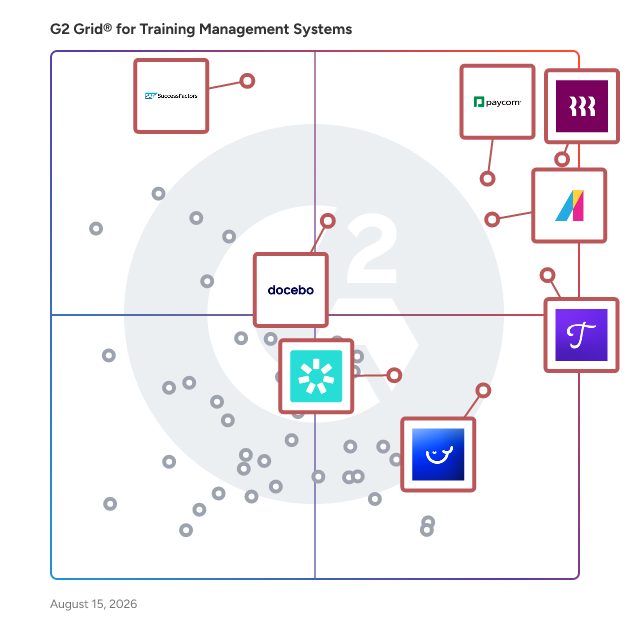
## G2 Grid® for Training Management Software
![G2 Grid® for Training Management Software plotting products by satisfaction and market presence](https://www.g2.com/categories/training-management-systems/grids.png?focus%5B%5D=53090&focus%5B%5D=14860&focus%5B%5D=2232&focus%5B%5D=14038&focus%5B%5D=511&focus%5B%5D=138874&focus%5B%5D=4801&focus%5B%5D=4170)
Highlighted products: Rippling, Paycom, Absorb LMS, Trainual, SAP SuccessFactors HCM, Whale, Docebo, and LearnUpon.
Underlying data: [Grid® JSON](https://www.g2.com/categories/training-management-systems/grids.json?focus%5B%5D=rippling&amp;focus%5B%5D=paycom&amp;focus%5B%5D=absorb-software-absorb-lms&amp;focus%5B%5D=trainual&amp;focus%5B%5D=sap-sap-successfactors-hcm&amp;focus%5B%5D=whale&amp;focus%5B%5D=docebo&amp;focus%5B%5D=learnupon)


## How Many Training Management Software Products Does G2 Track?
**Total Products under this Category:** 226

### Category Stats (Jul 2026)
- **Average Rating**: 4.53/5 (↑0.01 vs Jun 2026) The average rating of products in this category, based on all submitted ratings
- **Top Trending Product**: MobCast (+1.31%) - Among all products in this category, MobCast recorded the largest rating increase compared to last month
*Last updated: July 16, 2026*


## How Does G2 Rank Training Management Software Products?

**Why You Can Trust G2's Software Rankings:**

- 30 Analysts and Data Experts
- 36,500+ Authentic Reviews
- 226+ Products
- Unbiased Rankings

G2's software rankings are built on verified user reviews, rigorous moderation, and a consistent research methodology maintained by a team of analysts and data experts. Each product is measured using the same transparent criteria, with no paid placement or vendor influence. While reviews reflect real user experiences, which can be subjective, they offer valuable insight into how software performs in the hands of professionals. Together, these inputs power the G2 Score, a standardized way to compare tools within every category.


## Which Training Management Software Is Best for Your Use Case?

- **Leader:** [Rippling](https://www.g2.com/products/rippling/reviews)
- **Highest Performer:** [Whale](https://www.g2.com/products/whale/reviews)
- **Easiest to Use:** [Rippling](https://www.g2.com/products/rippling/reviews)
- **Top Trending:** [SAP SuccessFactors HCM](https://www.g2.com/products/sap-sap-successfactors-hcm/reviews)
- **Best Free Software:** [SAP SuccessFactors HCM](https://www.g2.com/products/sap-sap-successfactors-hcm/reviews)


---

**Sponsored**

### Whale

Turn scattered knowledge into scalable systems with Whale. Whale helps fast-growing teams capture processes, train employees, and answer questions — without the chaos of scattered docs or outdated wikis. What Whale Does: - AI process capture: Turn screen recordings, videos, or existing docs into structured SOPs in minutes - Alice (AI assistant): Employees get instant answers to &quot;how do we do X?&quot; in any language, any channel - Training built-in: Convert SOPs into onboarding flows and quizzes so people actually learn - Mobile-first access: QR codes and mobile app mean SOPs live where the work happens Why Teams Choose Whale: - Cut onboarding time by 50% by connecting training to live processes - Reduce documentation time by 70% with AI-powered capture - Keep knowledge current — not buried in Google Docs nobody reads Who Uses Whale: Operations leaders and HR teams at scaling companies (50-500 employees) who need to onboard faster and standardize without slowing down.


[Visit website](https://www.g2.com/external_clickthroughs/record?secure%5Bad_program%5D=ppc&amp;secure%5Bad_slot%5D=category_product_list&amp;secure%5Bcategory_id%5D=1313&amp;secure%5Bchosen_at%5D=2026-07-16T20%3A09%3A18Z&amp;secure%5Bdisplayable_resource_id%5D=1313&amp;secure%5Bdisplayable_resource_type%5D=Category&amp;secure%5Bmedium%5D=sponsored&amp;secure%5Bplacement_reason%5D=page_category&amp;secure%5Bplacement_resource_ids%5D%5B%5D=1313&amp;secure%5Bprioritized%5D=false&amp;secure%5Bproduct_id%5D=138874&amp;secure%5Bresource_id%5D=1313&amp;secure%5Bresource_type%5D=Category&amp;secure%5Bsource_type%5D=category_page&amp;secure%5Bsource_url%5D=https%3A%2F%2Fwww.g2.com%2Fcategories%2Ftraining-management-systems%3Fpage%3D5%26source%3Dsearch&amp;secure%5Btoken%5D=10273067f36884dc4a9f2bcff36fcda67eb8baba3a043eefd8d0f8b5e171cc5f&amp;secure%5Burl%5D=https%3A%2F%2Fusewhale.io%2F&amp;secure%5Burl_type%5D=free_trial)

---

## What Are the Top-Rated Training Management Software Products in 2026?
### 1. [Rippling](https://www.g2.com/products/rippling/reviews)
Rippling is the AI platform that connects HR, IT, and Finance — giving Rippling AI everything it needs to help run your company. Because employee data, permissions, and approvals all live in one place, Rippling AI has a complete view of your business and can take action quickly and safely, across the entire employee lifecycle, from hiring to benefits administration to access management. Automate business tasks, ensure compliance, and streamline approvals with workflows that understand your organization. Enjoy timely payroll, real-time financial visibility, and dynamic spend policies that adjust as your business changes. Simplify IT with device management, software access, and compliance monitoring, all from one dashboard. Because Rippling AI works from a single source of truth instead of disconnected systems, your business can save time, reduce costs, and enhance efficiency — with the trust and safety that comes from unified data and permissions. Experience the power of AI-driven, unified management with Rippling today.


**Average Rating:** 4.8/5.0
**Total Reviews:** 11,556
**How Do G2 Users Rate Rippling?**

- **Has the product been a good partner in doing business?:** 9.1/10 (Category avg: 9.3/10)
- **Content Delivery and Tracking:** 9.2/10 (Category avg: 8.9/10)
- **Customer Training:** 9.0/10 (Category avg: 8.8/10)
- **Content Storage and Management:** 9.0/10 (Category avg: 8.8/10)

**Who Is the Company Behind Rippling?**

- **Seller:** [Rippling](https://www.g2.com/sellers/rippling)
- **Company Website:** https://www.rippling.com
- **Year Founded:** 2016
- **HQ Location:** San Francisco, CA
- **Twitter:** @Rippling (12,402 Twitter followers)
- **LinkedIn® Page:** https://www.linkedin.com/company/17988315/ (7,523 employees on LinkedIn®)

**Who Uses This Product?**
- **Who Uses This:** Software Engineer, Account Executive
- **Top Industries:** Computer Software, Information Technology and Services
- **Company Size:** 54% Mid-Market, 29% Small-Business


#### What Are Rippling's Pros and Cons?

**Pros:**

- Ease of Use (6967 reviews)
- Intuitive (5170 reviews)
- Simple (4564 reviews)
- User Interface (3811 reviews)
- Easy Access (3659 reviews)

**Cons:**

- Missing Features (1241 reviews)
- Not User-Friendly (885 reviews)
- Learning Curve (858 reviews)
- Limited Features (843 reviews)
- Improvement Needed (820 reviews)


### What Do G2 Reviewers Say About Rippling?
*AI-generated summary from verified user reviews*

**Pros:**

- Users appreciate the **ease of use** of Rippling, benefiting from a streamlined platform and single login access.
- Users appreciate the **intuitive interface** of Rippling, highlighting its ease of use and efficient navigation.
- Users love the **easy navigation** of Rippling, finding it simple to access essential features effortlessly.
- Users love the **user-friendly interface** of Rippling, appreciating features like the calendar and efficient search bar.
- Users love the **easy access** to clock in/out and payslips, appreciating the streamlined experience and convenience.

**Cons:**

- Users find **missing features** in Rippling, such as complex reporting and slow notifications, hinder usability.
- Users find Rippling **not user-friendly** , struggling with slow load times and complicated report-building processes.
- Users find the **learning curve challenging** , as adapting to Rippling&#39;s features can be overwhelming and time-consuming.
- Users find Rippling&#39;s **limited features** affect usability, with outdated design and clunky information presentation.
- Users report that **improvement is needed** in notifications and speed, making leave requests unnecessarily complicated.

#### What Are Recent G2 Reviews of Rippling?

**"[Smooth User Experience with Rippling](https://www.g2.com/survey_responses/rippling-review-11136743)"**

**Rating:** 5.0/5.0 stars
*— Frebeliza B.*

[Read full review](https://www.g2.com/survey_responses/rippling-review-11136743)

---

**"[Easy Spending on my card](https://www.g2.com/survey_responses/rippling-review-13079162)"**

**Rating:** 5.0/5.0 stars
*— Tim w.*

[Read full review](https://www.g2.com/survey_responses/rippling-review-13079162)

---


#### What Are G2 Users Discussing About Rippling?

- [How is Rippling innovating in the field of HR and IT management for businesses?](https://www.g2.com/discussions/how-is-rippling-innovating-in-the-field-of-hr-and-it-management-for-businesses) - 6 comments, 7 upvotes
- [What is Rippling used for?](https://www.g2.com/discussions/what-is-rippling-used-for) - 6 comments, 3 upvotes

### 2. [Paycom](https://www.g2.com/products/paycom/reviews)
Paycom is the most automated HCM platform and the only HR and payroll software built on a truly single, unique database that automates the entire employee life cycle. Designed as a unified system, Paycom eliminates inefficiencies and errors caused by integrating multiple platforms by using command driven AI and full solution automation. Built on a single data source, Paycom enables uninterrupted data flow across HR and payroll, streamlining performance, communication and compliance. Frequently recognized by third party reviewers as one of the best payroll and HR software solutions, Paycom is used by organizations of all sizes across the U.S. and internationally to simplify workforce management and free HR teams to focus on strategic initiatives.


**Average Rating:** 4.5/5.0
**Total Reviews:** 4,615
**How Do G2 Users Rate Paycom?**

- **Has the product been a good partner in doing business?:** 8.3/10 (Category avg: 9.3/10)
- **Content Delivery and Tracking:** 8.8/10 (Category avg: 8.9/10)
- **Customer Training:** 8.7/10 (Category avg: 8.8/10)
- **Content Storage and Management:** 8.7/10 (Category avg: 8.8/10)

**Who Is the Company Behind Paycom?**

- **Seller:** [Paycom](https://www.g2.com/sellers/paycom)
- **Company Website:** https://www.paycom.com/
- **Year Founded:** 1998
- **HQ Location:** Oklahoma City, OK
- **Twitter:** @Paycom (33,252 Twitter followers)
- **LinkedIn® Page:** https://www.linkedin.com/company/37759/ (5,844 employees on LinkedIn®)

**Who Uses This Product?**
- **Who Uses This:** HR Manager, Human Resources Manager
- **Top Industries:** Hospital &amp; Health Care, Non-Profit Organization Management
- **Company Size:** 18% Mid-Market, 4% Small-Business


#### What Are Paycom's Pros and Cons?

**Pros:**

- Ease of Use (395 reviews)
- Helpful (276 reviews)
- Customer Support (252 reviews)
- Payroll Management (242 reviews)
- Simple (210 reviews)

**Cons:**

- Poor Customer Support (107 reviews)
- Learning Curve (103 reviews)
- Not Intuitive (103 reviews)
- Limited Features (99 reviews)
- Not User-Friendly (92 reviews)


### What Do G2 Reviewers Say About Paycom?
*AI-generated summary from verified user reviews*

**Pros:**

- Users appreciate the **ease of use** of Paycom, highlighting its simple interface and quick setup process.
- Users value the **user-friendly technology** of Paycom, which simplifies payroll processing and enhances employee access to documentation.
- Users praise Paycom&#39;s **knowledgeable customer support** , noting quick and thorough responses that enhance their overall experience.
- Users value the **simplified payroll processing** of Paycom, enhancing efficiency for HR and empowering employees.
- Users value the **simplicity of Paycom&#39;s timeclock and payroll processing** , enjoying streamlined workflows and reduced errors.

**Cons:**

- Users express frustration with **poor customer support** , highlighting unresponsiveness and lack of understanding in addressing concerns.
- Users find a steep **learning curve** with Paycom, complicating navigation and making onboarding challenging for newcomers.
- Users find Paycom&#39;s interface **not intuitive** , often requiring excessive steps to perform basic tasks and causing frustrations.
- Users criticize Paycom for its **limited features** , outdated interface, and lack of responsive support for needs.
- Users find Paycom to be **not user-friendly** , struggling with its unintuitive interface and cumbersome processes.

#### What Are Recent G2 Reviews of Paycom?

**"[Efficient Payroll and HR with Beti AI, Great Integrations, and Top-Notch Support](https://www.g2.com/survey_responses/paycom-review-13043985)"**

**Rating:** 4.0/5.0 stars
*— Andrew H.*

[Read full review](https://www.g2.com/survey_responses/paycom-review-13043985)

---

**"[Paycom Review 06.26.2026](https://www.g2.com/survey_responses/paycom-review-13036323)"**

**Rating:** 4.0/5.0 stars
*— Mia J.*

[Read full review](https://www.g2.com/survey_responses/paycom-review-13036323)

---


### 3. [Absorb LMS](https://www.g2.com/products/absorb-software-absorb-lms/reviews)
Absorb LMS is a market-leading AI-powered strategic learning system designed to deliver results for all learners—employees, partners, and customers alike. Built to simplify learning management while amplifying impact, Absorb ensures that every learner has access to the tools and knowledge they need to succeed. Trusted by over 3,000 organizations, Absorb LMS drives productivity, retention, and scalable growth. Its streamlined administration empowers teams to focus on crafting meaningful learning experiences. Advanced reporting and analytics ensure measurable impact and a clear return on investment for learning programs. From onboarding new employees to equipping partners with the skills they need and educating customers to make the most of your products, Absorb supports continuous learning at every stage. With a flexible, user-friendly design and innovative features, Absorb LMS is the trusted partner for organizations looking to drive engagement, enhance operational efficiency, and foster long-term success. These top features and benefits make Absorb LMS the leading eLearning solution: Absorb Analyze – Build custom reports, dashboards, and charts to guide decision-making. eCommerce – Easily sell and manage your online courses. Integrations – Connect with a wide range of tools to fit your business needs. Multi-tenancy – Designed for shared, collaborative learning environments. Absorb Skills – AI-driven learning paths tailored to each role and skillset. Absorb Content – Access 20,000+ ready-made courses to save time and support upskilling at scale. Create AI – Generate course content in minutes using AI. Globalization &amp; Translations – Deliver learning in multiple languages for global teams. Mentorship – Match employees with mentors, peers, or experts to support social learning. Communities – Foster collaboration and engagement through built-in discussion tools. Instructor-Led Training (ILT) – Simplify administration while delivering impactful live sessions. Learning in the Flow of Work – Give learners quick access to microlearning without switching apps. AI Coach – Keep learners on track with an adaptive coach that offers real-time guidance and nudges Exercises &amp; Checklists – Reinforce knowledge with AI-generated quizzes and task lists. Reliable support—Count on award-winning 24/7/365 support from anywhere.


**Average Rating:** 4.6/5.0
**Total Reviews:** 933
**How Do G2 Users Rate Absorb LMS?**

- **Has the product been a good partner in doing business?:** 9.4/10 (Category avg: 9.3/10)
- **Content Delivery and Tracking:** 8.9/10 (Category avg: 8.9/10)
- **Customer Training:** 8.4/10 (Category avg: 8.8/10)
- **Content Storage and Management:** 8.7/10 (Category avg: 8.8/10)

**Who Is the Company Behind Absorb LMS?**

- **Seller:** [Absorb Software](https://www.g2.com/sellers/absorb-software)
- **Company Website:** https://www.absorbLMS.com
- **Year Founded:** 2003
- **HQ Location:** Calgary
- **Twitter:** @AbsorbLMS (1,463 Twitter followers)
- **LinkedIn® Page:** https://www.linkedin.com/company/1005904/ (676 employees on LinkedIn®)

**Who Uses This Product?**
- **Who Uses This:** Instructional Designer, Training Manager
- **Top Industries:** Hospital &amp; Health Care, Non-Profit Organization Management
- **Company Size:** 45% Mid-Market, 38% Enterprise


#### What Are Absorb LMS's Pros and Cons?

**Pros:**

- Ease of Use (193 reviews)
- Customer Support (153 reviews)
- Helpful (116 reviews)
- Excellent Support (104 reviews)
- Intuitive (98 reviews)

**Cons:**

- Limited Features (77 reviews)
- Limited Customization (61 reviews)
- Missing Features (46 reviews)
- Learning Curve (40 reviews)
- Reporting Issues (38 reviews)


### What Do G2 Reviewers Say About Absorb LMS?
*AI-generated summary from verified user reviews*

**Pros:**

- Users value the **ease of use** of Absorb LMS, praising its simplicity in creating and managing training materials.
- Users highlight the **outstanding customer support** from Absorb LMS, praising the knowledgeable and patient guidance provided.
- Users commend the **outstanding customer support** provided by Absorb LMS, enhancing their learning experience and system confidence.
- Users highly value the **excellent support** from Absorb LMS, appreciating knowledgeable and patient assistance throughout their learning journey.
- Users praise the **intuitive design** of Absorb LMS, making learning and navigation seamless and effortless.

**Cons:**

- Users note the **limited features** of Absorb LMS, wishing for more functionality to enhance their experience.
- Users find **limited customization** frustrating, as some features are not intuitive and require extensive manual effort.
- Users find the **missing features** limit customization and control, affecting the overall learning experience negatively.
- Users find the **learning curve challenging** due to navigation difficulties and limited support for Absorb LMS features.
- Users often face **reporting issues** with Absorb LMS, including confusing settings and limited customization options.

#### What Are Recent G2 Reviews of Absorb LMS?

**"[Flexible, Professional LMS with Responsive Implementation Support](https://www.g2.com/survey_responses/absorb-lms-review-13096118)"**

**Rating:** 5.0/5.0 stars
*— Stephanie P.*

[Read full review](https://www.g2.com/survey_responses/absorb-lms-review-13096118)

---

**"[Absorb: Always Improvi, User-Friendly Platform for Company-Wide Trainingng](https://www.g2.com/survey_responses/absorb-lms-review-13049265)"**

**Rating:** 4.5/5.0 stars
*— Michael H.*

[Read full review](https://www.g2.com/survey_responses/absorb-lms-review-13049265)

---


#### What Are G2 Users Discussing About Absorb LMS?

- [How much does Absorb LMS cost?](https://www.g2.com/discussions/how-much-does-absorb-lms-cost)
- [What are the main functions of LMS?](https://www.g2.com/discussions/what-are-the-main-functions-of-lms)
- [Who owns Absorb LMS?](https://www.g2.com/discussions/who-owns-absorb-lms) - 1 comment
- [What are some features of an LMS?](https://www.g2.com/discussions/what-are-some-features-of-an-lms)

### 4. [Trainual](https://www.g2.com/products/trainual/reviews)
Trainual is the training, learning, and knowledge management platform that connects your entire company to how work actually gets done. Every role. Every process. Every policy. All in one place — searchable, assignable, and built to keep every team member aligned and accountable from day one to one thousand. As companies grow more complex, consistency becomes harder to maintain. The way things get done varies by manager, standards slip across locations, and getting new teammates up to speed takes longer than it should. Trainual fixes that by giving your company one central system — where everything your team needs to know is documented, organized by role, and delivered to the right person at the right time. Trainual is the go-to platform for teams across various industries including business services, real estate, construction, healthcare, technology, marketing, legal and cleaning. Build role-based training paths that get every new teammate up to speed the same way, every time. Standardize how work gets done across departments, locations, and roles — then track it to make sure it&#39;s actually happening. And when something changes, update it once and it&#39;s live everywhere. The built-in AI assistant knows everything your company knows — so instead of pinging a manager or digging through a shared drive, your team gets instant, accurate answers the moment they need them. Think of it as your smartest teammate, always on, always right. Assign responsibilities. Track progress. Automate accountability. No micromanaging required. The result? Faster ramp times. Consistent execution. Higher-performing people.


**Average Rating:** 4.7/5.0
**Total Reviews:** 1,049
**How Do G2 Users Rate Trainual?**

- **Has the product been a good partner in doing business?:** 9.5/10 (Category avg: 9.3/10)
- **Content Delivery and Tracking:** 9.0/10 (Category avg: 8.9/10)
- **Customer Training:** 8.0/10 (Category avg: 8.8/10)
- **Content Storage and Management:** 8.9/10 (Category avg: 8.8/10)

**Who Is the Company Behind Trainual?**

- **Seller:** [Trainual](https://www.g2.com/sellers/trainual)
- **Company Website:** https://www.trainual.com
- **Year Founded:** 2018
- **HQ Location:** Scottsdale, AZ
- **Twitter:** @trainual (1,269 Twitter followers)
- **LinkedIn® Page:** https://www.linkedin.com/company/18250517/ (139 employees on LinkedIn®)

**Who Uses This Product?**
- **Who Uses This:** Operations Manager, Director of Operations
- **Top Industries:** Construction, Marketing and Advertising
- **Company Size:** 63% Small-Business, 34% Mid-Market


#### What Are Trainual's Pros and Cons?

**Pros:**

- Ease of Use (166 reviews)
- Simple (84 reviews)
- Training (81 reviews)
- Features (67 reviews)
- Intuitive (63 reviews)

**Cons:**

- Limited Features (41 reviews)
- Missing Features (41 reviews)
- Limited Customization (35 reviews)
- Organizational Difficulties (25 reviews)
- Poor Navigation (24 reviews)


### What Do G2 Reviewers Say About Trainual?
*AI-generated summary from verified user reviews*

**Pros:**

- Users praise the **ease of use** of Trainual, streamlining training with intuitive tools and straightforward integration.
- Users love the **user-friendly AI features** of Trainual, enhancing training and documentation efficiency significantly.
- Users value the **clarity and flexibility of Trainual** for efficient training on firm policies and procedures.
- Users love the **intuitive features** of Trainual, including AI support, multimedia integration, and easy content updates.
- Users find Trainual **intuitive and user-friendly** , greatly simplifying onboarding and enhancing team training efficiency.

**Cons:**

- Users find the **limited features** of Trainual restrictive, wishing for greater customization and flexibility in updates.
- Users express concerns about **missing features** , wishing for more customization options and improved navigation.
- Users note the **limited customization** in Trainual, which hampers efficiency and complicates content updates.
- Users face **organizational difficulties** with Trainual, struggling to manage content assignment and hierarchy effectively.
- Users find **poor navigation** prevents easy access to information, leading to confusion and frustration with content organization.

#### What Are Recent G2 Reviews of Trainual?

**"[Continuously Improving SOPs with Helpful Project Management Tools](https://www.g2.com/survey_responses/trainual-review-13109134)"**

**Rating:** 4.5/5.0 stars
*— Vannesa Ann G.*

[Read full review](https://www.g2.com/survey_responses/trainual-review-13109134)

---

**"[Fast, Reliable, and Intuitive—Trainual Templates and AI Search Make Policy Building Easy](https://www.g2.com/survey_responses/trainual-review-13085885)"**

**Rating:** 4.0/5.0 stars
*— Jenny S.*

[Read full review](https://www.g2.com/survey_responses/trainual-review-13085885)

---


#### What Are G2 Users Discussing About Trainual?

- [What is Trainual used for?](https://www.g2.com/discussions/what-is-trainual-used-for)

### 5. [SAP SuccessFactors HCM](https://www.g2.com/products/sap-sap-successfactors-hcm/reviews)
SAP SuccessFactors HCM is a global, AI-powered cloud HR suite designed to help organizations thrive in a fast-moving world. With 100+ localizations, it delivers real-time visibility and connected solutions across core HR, payroll, talent management, learning, analytics, planning, and employee experience. More than 10,000 organizations trust SAP SuccessFactors HCM to enhance every employee experience, workforce decision, and people process—turning each employee into a success story. With SAP SuccessFactors HCM, you can: - Empower your workforce with AI-driven tools for self-service, learning, performance, and development to help people work faster and smarter. - Identify and develop top talent with a unified source of people and skills data that supports both HR strategies and business goals. - Stay compliant and agile with built-in legal and regulatory updates tailored to local business requirements. - Accelerate time to value by leveraging proven HR best practices and the strength of a global partner ecosystem.


**Average Rating:** 4.1/5.0
**Total Reviews:** 1,474
**How Do G2 Users Rate SAP SuccessFactors HCM?**

- **Has the product been a good partner in doing business?:** 8.3/10 (Category avg: 9.3/10)
- **Content Delivery and Tracking:** 8.3/10 (Category avg: 8.9/10)
- **Customer Training:** 8.0/10 (Category avg: 8.8/10)
- **Content Storage and Management:** 8.2/10 (Category avg: 8.8/10)

**Who Is the Company Behind SAP SuccessFactors HCM?**

- **Seller:** [SAP](https://www.g2.com/sellers/sap)
- **Company Website:** https://www.sap.com/
- **Year Founded:** 1972
- **HQ Location:** Walldorf
- **Twitter:** @SAP (297,052 Twitter followers)
- **LinkedIn® Page:** https://www.linkedin.com/company/sap/ (141,955 employees on LinkedIn®)

**Who Uses This Product?**
- **Who Uses This:** Recruiter, Consultant
- **Top Industries:** Information Technology and Services, Computer Software
- **Company Size:** 56% Enterprise, 34% Mid-Market


#### What Are SAP SuccessFactors HCM's Pros and Cons?

**Pros:**

- Ease of Use (217 reviews)
- Features (118 reviews)
- HR Management (113 reviews)
- Comprehensive Features (104 reviews)
- Simple (93 reviews)

**Cons:**

- Limited Customization (83 reviews)
- Not User-Friendly (80 reviews)
- Not Intuitive (76 reviews)
- Learning Curve (74 reviews)
- Limited Features (69 reviews)


### What Do G2 Reviewers Say About SAP SuccessFactors HCM?
*AI-generated summary from verified user reviews*

**Pros:**

- Users appreciate the **user-friendly interface** of SAP SuccessFactors HCM, enjoying seamless navigation and efficiency in operations.
- Users value the **extensive integration options** and diverse modules of SAP SuccessFactors, streamlining HR tasks effectively.
- Users value the **centralized HR management** of SAP SuccessFactors HCM, streamlining processes and enhancing employee experience.
- Users appreciate the **comprehensive features** of SAP SuccessFactors HCM, noting its intuitive UI and easy data management.
- Users praise the **intuitive simplicity** of SAP SuccessFactors HCM, making everyday tasks easy and accessible.

**Cons:**

- Users feel the **limited customization** options restrict their ability to tailor the system to their needs.
- Users find SAP SuccessFactors HCM to be **not user-friendly** , facing challenges with the interface and complex features.
- Users find SAP SuccessFactors HCM **not intuitive** , citing challenges in user-friendliness and difficulty adapting quickly.
- Users find the **learning curve steep** due to complexity and outdated UI, making initial use challenging.
- Users note the **limited features** of SAP SuccessFactors HCM, especially regarding APIs and employee benefits clarity.

#### What Are Recent G2 Reviews of SAP SuccessFactors HCM?

**"[Simple, Easy and Efficient HR Management with SAP SuccessFactors HCM](https://www.g2.com/survey_responses/sap-successfactors-hcm-review-12763697)"**

**Rating:** 4.5/5.0 stars
*— Sayan P.*

[Read full review](https://www.g2.com/survey_responses/sap-successfactors-hcm-review-12763697)

---

**"[Simplifies HR Processes and Improves Productivity](https://www.g2.com/survey_responses/sap-successfactors-hcm-review-12919619)"**

**Rating:** 5.0/5.0 stars
*— Madhavi G.*

[Read full review](https://www.g2.com/survey_responses/sap-successfactors-hcm-review-12919619)

---


#### What Are G2 Users Discussing About SAP SuccessFactors HCM?

- [What is your experience with SAP SuccessFactors Employee Central Payroll, and what improvements would you suggest?](https://www.g2.com/discussions/what-is-your-experience-with-sap-successfactors-employee-central-payroll-and-what-improvements-would-you-suggest)
- [What is SAP SuccessFactors used for?](https://www.g2.com/discussions/sap-successfactors-what-is-sap-successfactors-used-for) - 1 comment
- [What is SmartRecruiters used for?](https://www.g2.com/discussions/smartrecruiters-what-is-smartrecruiters-used-for)
- [What is SAP SuccessFactors used for?](https://www.g2.com/discussions/what-is-sap-successfactors-used-for)
- [What is SmartRecruiters used for?](https://www.g2.com/discussions/what-is-smartrecruiters-used-for)

### 6. [Docebo](https://www.g2.com/products/docebo/reviews)
Docebo is an AI-powered learning platform designed to support continuous learning across employees, partners, and customers. More than 3,900 organizations use Docebo to deliver onboarding, enablement, compliance, and customer education from a single platform. Learning experiences are personalized at scale, with AI improving content discovery, recommendations, and automation to reduce manual administration. With skills-based insights, flexible delivery, and built-in analytics, Docebo helps organizations keep learning aligned to evolving roles and business goals, so people never stop learning as work changes.


**Average Rating:** 4.3/5.0
**Total Reviews:** 725
**How Do G2 Users Rate Docebo?**

- **Has the product been a good partner in doing business?:** 8.7/10 (Category avg: 9.3/10)
- **Content Delivery and Tracking:** 8.5/10 (Category avg: 8.9/10)
- **Customer Training:** 8.3/10 (Category avg: 8.8/10)
- **Content Storage and Management:** 8.1/10 (Category avg: 8.8/10)

**Who Is the Company Behind Docebo?**

- **Seller:** [Docebo Inc.](https://www.g2.com/sellers/docebo-inc)
- **Company Website:** https://www.docebo.com
- **Year Founded:** 2005
- **HQ Location:** Toronto
- **Twitter:** @docebo (6,629 Twitter followers)
- **LinkedIn® Page:** https://www.linkedin.com/company/docebo/ (1,009 employees on LinkedIn®)

**Who Uses This Product?**
- **Who Uses This:** Instructional Designer, Training Manager
- **Top Industries:** Information Technology and Services, Computer Software
- **Company Size:** 45% Enterprise, 44% Mid-Market


#### What Are Docebo's Pros and Cons?

**Pros:**

- Ease of Use (116 reviews)
- Features (70 reviews)
- Course Creation (69 reviews)
- Customization (62 reviews)
- Intuitive (57 reviews)

**Cons:**

- Learning Curve (45 reviews)
- Limited Customization (42 reviews)
- Limited Features (42 reviews)
- Complexity (35 reviews)
- Missing Features (33 reviews)


### What Do G2 Reviewers Say About Docebo?
*AI-generated summary from verified user reviews*

**Pros:**

- Users appreciate the **intuitive user experience** of Docebo, facilitating quick adaptation and effective training management.
- Users appreciate the **powerful user code management** feature in Docebo, streamlining course management and enhancing operational efficiency.
- Users appreciate the **powerful course creation and management features** of Docebo, streamlining training and enhancing operational efficiency.
- Users value the **highly customizable platform** of Docebo, allowing tailored learning experiences that reflect their company branding.
- Users appreciate the **intuitive navigation** of Docebo, which enhances their overall experience and simplifies training management.

**Cons:**

- Users find the **steep learning curve** of Docebo challenging, needing time to navigate its numerous features and configurations.
- Users find the **limited customization options** of Docebo challenging, impacting their ability to make adjustments easily.
- Users find Docebo&#39;s **limited features** frustrating, particularly regarding batch actions and content authoring tools.
- Users note a **steep learning curve** with Docebo, making initial setup and feature handling challenging for newcomers.
- Users note the **missing features** in Docebo, particularly in batch actions and advanced content authoring tools.

#### What Are Recent G2 Reviews of Docebo?

**"[User-Friendly LMS with Powerful Features](https://www.g2.com/survey_responses/docebo-review-12634937)"**

**Rating:** 4.5/5.0 stars
*— Brian A.*

[Read full review](https://www.g2.com/survey_responses/docebo-review-12634937)

---

**"[Effortless User Management and Effective Learning](https://www.g2.com/survey_responses/docebo-review-12692445)"**

**Rating:** 4.5/5.0 stars
*— Gayane S.*

[Read full review](https://www.g2.com/survey_responses/docebo-review-12692445)

---


#### What Are G2 Users Discussing About Docebo?

- [What is Docebo used for?](https://www.g2.com/discussions/what-is-docebo-used-for) - 2 comments
- [What is online learning management system?](https://www.g2.com/discussions/what-is-online-learning-management-system) - 1 comment
- [How do you pronounce docebo?](https://www.g2.com/discussions/how-do-you-pronounce-docebo) - 2 comments
- [What are the features of LMS?](https://www.g2.com/discussions/docebo-what-are-the-features-of-lms)
- [How much does docebo cost?](https://www.g2.com/discussions/how-much-does-docebo-cost) - 1 comment

### 7. [Whale](https://www.g2.com/products/whale/reviews)
Turn scattered knowledge into scalable systems with Whale. Whale helps fast-growing teams capture processes, train employees, and answer questions — without the chaos of scattered docs or outdated wikis. What Whale Does: - AI process capture: Turn screen recordings, videos, or existing docs into structured SOPs in minutes - Alice (AI assistant): Employees get instant answers to &quot;how do we do X?&quot; in any language, any channel - Training built-in: Convert SOPs into onboarding flows and quizzes so people actually learn - Mobile-first access: QR codes and mobile app mean SOPs live where the work happens Why Teams Choose Whale: - Cut onboarding time by 50% by connecting training to live processes - Reduce documentation time by 70% with AI-powered capture - Keep knowledge current — not buried in Google Docs nobody reads Who Uses Whale: Operations leaders and HR teams at scaling companies (50-500 employees) who need to onboard faster and standardize without slowing down.


**Average Rating:** 4.8/5.0
**Total Reviews:** 197
**How Do G2 Users Rate Whale?**

- **Has the product been a good partner in doing business?:** 9.8/10 (Category avg: 9.3/10)
- **Content Delivery and Tracking:** 9.5/10 (Category avg: 8.9/10)
- **Customer Training:** 8.5/10 (Category avg: 8.8/10)
- **Content Storage and Management:** 9.6/10 (Category avg: 8.8/10)

**Who Is the Company Behind Whale?**

- **Seller:** [Whale](https://www.g2.com/sellers/whale)
- **Company Website:** https://usewhale.io
- **Year Founded:** 2022
- **HQ Location:** Chicago, IL
- **Twitter:** @whale (18,657 Twitter followers)
- **LinkedIn® Page:** https://www.linkedin.com/company/usewhale/ (26 employees on LinkedIn®)

**Who Uses This Product?**
- **Top Industries:** Marketing and Advertising, Information Technology and Services
- **Company Size:** 58% Small-Business, 39% Mid-Market


#### What Are Whale's Pros and Cons?

**Pros:**

- Ease of Use (32 reviews)
- Simple (15 reviews)
- Features (13 reviews)
- Intuitive (13 reviews)
- Easy Access (12 reviews)

**Cons:**

- Limited Customization (3 reviews)
- Lack of Customization (2 reviews)
- Lack of Information (2 reviews)
- Limited Access (2 reviews)
- Missing Features (2 reviews)


### What Do G2 Reviewers Say About Whale?
*AI-generated summary from verified user reviews*

**Pros:**

- Users praise Whale for its **user-friendly interface** , making onboarding, organizing, and finding information easy and efficient.
- Users find Whale to be **extremely user-friendly** , facilitating efficient onboarding and seamless content management with ease.
- Users appreciate the **user-friendly interface and powerful features** of Whale, enhancing efficiency and information access.
- Users find Whale&#39;s **intuitive interface** makes onboarding and document management straightforward and efficient for teams.
- Users find Whale offers **easy access** to centralized knowledge, enhancing training and support efficiency without hassle.

**Cons:**

- Users find the **limited customization** options frustrating, as they need more control over permissions and formatting.
- Users desire more **customization options** in Whale, particularly in permissions and formatting for specific needs.
- Users note a significant **lack of information** on AI features, suggesting the need for more comprehensive tools.
- Users face **limited access** issues, making it hard to manage user controls and connect external resources effectively.
- Users find the **missing features** like individual training records and file connectivity hinder their overall experience with Whale.

#### What Are Recent G2 Reviews of Whale?

**"[Whale Keeps Department Training Organized with Boards, Libraries, and Playbooks](https://www.g2.com/survey_responses/whale-review-12655640)"**

**Rating:** 5.0/5.0 stars
*— Ketan T.*

[Read full review](https://www.g2.com/survey_responses/whale-review-12655640)

---

**"[Effortless SOP Management with Stellar AI Search](https://www.g2.com/survey_responses/whale-review-12692822)"**

**Rating:** 5.0/5.0 stars
*— Jitender T.*

[Read full review](https://www.g2.com/survey_responses/whale-review-12692822)

---


#### What Are G2 Users Discussing About Whale?

- [How has Whale supported your team’s knowledge sharing, and what features do you find most valuable?](https://www.g2.com/discussions/how-has-whale-supported-your-team-s-knowledge-sharing-and-what-features-do-you-find-most-valuable)
- [What is Whale used for?](https://www.g2.com/discussions/what-is-whale-used-for) - 1 comment

### 8. [LearnUpon](https://www.g2.com/products/learnupon/reviews)
LearnUpon’s Agentic Learning Platform is the LMS of the future, built to elevate human capability in the AI era. By pairing human ingenuity with specialized AI agents, our platform automates heavy administrative workflows to deliver hyper-personalized learning experiences, empowering learning leaders to recapture energy and elevate strategic impact.


**Average Rating:** 4.5/5.0
**Total Reviews:** 247
**How Do G2 Users Rate LearnUpon?**

- **Has the product been a good partner in doing business?:** 9.6/10 (Category avg: 9.3/10)
- **Content Delivery and Tracking:** 9.2/10 (Category avg: 8.9/10)
- **Customer Training:** 8.6/10 (Category avg: 8.8/10)
- **Content Storage and Management:** 8.6/10 (Category avg: 8.8/10)

**Who Is the Company Behind LearnUpon?**

- **Seller:** [LearnUpon](https://www.g2.com/sellers/learnupon)
- **Company Website:** https://www.learnupon.com
- **Year Founded:** 2012
- **HQ Location:** Dublin , Ireland
- **Twitter:** @learnupon (2,432 Twitter followers)
- **LinkedIn® Page:** https://www.linkedin.com/company/2575430/ (324 employees on LinkedIn®)

**Who Uses This Product?**
- **Top Industries:** Computer Software, E-Learning
- **Company Size:** 44% Mid-Market, 26% Enterprise


#### What Are LearnUpon's Pros and Cons?

**Pros:**

- Ease of Use (71 reviews)
- Customer Support (39 reviews)
- Intuitive (39 reviews)
- User-Friendly (39 reviews)
- Course Creation (36 reviews)

**Cons:**

- Limited Features (33 reviews)
- Limited Customization (23 reviews)
- Navigation Difficulties (22 reviews)
- Course Management (19 reviews)
- Missing Features (19 reviews)


### What Do G2 Reviewers Say About LearnUpon?
*AI-generated summary from verified user reviews*

**Pros:**

- Users find LearnUpon&#39;s **ease of use** exceptional, enabling quick course creation and intuitive navigation for seamless learning.
- Users appreciate the **timely and helpful customer support** from LearnUpon, enhancing their overall experience and satisfaction.
- Users value the **intuitive design** of LearnUpon, enhancing engagement and facilitating professional learning effortlessly.
- Users value the **user-friendly interface** of LearnUpon, enhancing engagement and simplifying the learning experience for everyone.
- Users value the **easy course creation** process with flexible options and powerful reporting tools in LearnUpon.

**Cons:**

- Users find the **limited features** of LearnUpon, especially in forums, hinder their interaction and navigation experience.
- Users desire more **customization options** as current features limit flexibility and navigation within LearnUpon.
- Users face **navigation difficulties** due to limited forum options and confusing mobile app requirements, impacting overall usability.
- Users find **course management challenging** due to limitations in enrollments, viewability of due dates, and group dynamics.
- Users experience **missing features** in LearnUpon, especially regarding reporting, integrations, and bulk management tools.

#### What Are Recent G2 Reviews of LearnUpon?

**"[Seamless Setup, Strong Support Team](https://www.g2.com/survey_responses/learnupon-review-12794152)"**

**Rating:** 4.0/5.0 stars
*— José C.*

[Read full review](https://www.g2.com/survey_responses/learnupon-review-12794152)

---

**"[Brilliant LMS utilising automation: turns customer &amp; employee training into a seamless experience](https://www.g2.com/survey_responses/learnupon-review-12846484)"**

**Rating:** 5.0/5.0 stars
*— Lizzie C.*

[Read full review](https://www.g2.com/survey_responses/learnupon-review-12846484)

---


#### What Are G2 Users Discussing About LearnUpon?

- [What is LearnUpon LMS used for?](https://www.g2.com/discussions/what-is-learnupon-lms-used-for)
- [What are the key LMS features needed in your academic lessons?](https://www.g2.com/discussions/what-are-the-key-lms-features-needed-in-your-academic-lessons)
- [What are two primary functions of LMS?](https://www.g2.com/discussions/what-are-two-primary-functions-of-lms)
- [What are standard features of LMS?](https://www.g2.com/discussions/what-are-standard-features-of-lms)
- [What are the basic features and capabilities of the LMS?](https://www.g2.com/discussions/what-are-the-basic-features-and-capabilities-of-the-lms)

### 9. [iSpring LMS](https://www.g2.com/products/ispring-lms/reviews)
iSpring LMS is a feature-rich platform that helps companies accelerate their business momentum through ROI-efficient training. The LMS enables the entire training cycle with clarity and consistency, from structured onboarding to continuous employee development. It helps reduce employee turnover, improve performance, and ensure that teams stay aligned, skilled, and ready to support the company’s long-term growth. iSpring LMS gives managers and trainers a simple way to organize training, guide employees through skill-building, and see exactly how their learners are progressing. Employees get a clear path to follow, and leaders get the visibility they need to support growth, maintain standards, and keep performance on track. Here are the core capabilities that make this possible: - The mirrored organizational structure reflects how your company works, so training stays aligned with roles and teams. - Specified learning tracks guide learners step by step through required courses and programs. - Detailed reporting highlights progress, deadlines, and knowledge gaps with actionable insights. - The Supervisor Dashboard gives managers instant visibility into team performance without extra admin work. - Automated workflows handle enrollments, reminders, and assignments, saving time and reducing manual tasks. - The corporate portal and newsfeed centralize updates and announcements to keep everyone aligned. - 360-Degree Reviews gather well-rounded performance feedback from peers and supervisors. - On-The-Job Training validates real-world skills with structured checklists. - Knowledge Base gives employees quick access to SOPs, product info, and internal documentation. - Development Plans build personalized growth paths that connect training to long-term skill development.


**Average Rating:** 4.5/5.0
**Total Reviews:** 157
**How Do G2 Users Rate iSpring LMS?**

- **Has the product been a good partner in doing business?:** 9.3/10 (Category avg: 9.3/10)
- **Content Delivery and Tracking:** 8.8/10 (Category avg: 8.9/10)
- **Customer Training:** 8.3/10 (Category avg: 8.8/10)
- **Content Storage and Management:** 8.5/10 (Category avg: 8.8/10)

**Who Is the Company Behind iSpring LMS?**

- **Seller:** [iSpring](https://www.g2.com/sellers/ispring)
- **Company Website:** https://www.ispringsolutions.com
- **Year Founded:** 2001
- **HQ Location:** Alexandria, VA
- **Twitter:** @iSpringPro (6,522 Twitter followers)
- **LinkedIn® Page:** https://www.linkedin.com/company/876420/ (269 employees on LinkedIn®)

**Who Uses This Product?**
- **Top Industries:** Information Technology and Services, E-Learning
- **Company Size:** 52% Mid-Market, 37% Small-Business


#### What Are iSpring LMS's Pros and Cons?

**Pros:**

- Ease of Use (35 reviews)
- Course Creation (27 reviews)
- Customer Support (20 reviews)
- Features (20 reviews)
- User-Friendly (20 reviews)

**Cons:**

- Limited Features (10 reviews)
- Limited Customization (9 reviews)
- Missing Features (9 reviews)
- Integration Issues (7 reviews)
- Reporting Issues (7 reviews)


### What Do G2 Reviewers Say About iSpring LMS?
*AI-generated summary from verified user reviews*

**Pros:**

- Users appreciate the **ease of use** of iSpring LMS, enabling quick course creation and management without extensive training.
- Users love the **intuitive course creation process** in iSpring LMS, making course management effortless and efficient.
- Users value the **quick and effective customer support** provided by iSpring LMS, enhancing their overall experience.
- Users value the **ease of use and integration** of iSpring LMS, enhancing learning and administrative efficiency seamlessly.
- Users appreciate the **user-friendly interface** of iSpring LMS, enabling quick adoption and efficient course management.

**Cons:**

- Users express dissatisfaction with the **limited features** of iSpring LMS, particularly in feedback and advanced integrations.
- Users notice **limited customization** in iSpring LMS, seeking more advanced features and flexibility in integrations.
- Users are frustrated by the **missing feedback options** and difficulties in understanding key features of iSpring LMS.
- Users face **integration issues** with HR and virtual training systems, complicating the overall experience with iSpring LMS.
- Users find the **reporting capabilities limiting** , impacting their ability to manage quizzes and training results effectively.

#### What Are Recent G2 Reviews of iSpring LMS?

**"[Responsive Support, Easy UI, and Efficient AI Course Creation](https://www.g2.com/survey_responses/ispring-lms-review-13077601)"**

**Rating:** 5.0/5.0 stars
*— Petra D.*

[Read full review](https://www.g2.com/survey_responses/ispring-lms-review-13077601)

---

**"[Exceptional support and close partnership with iSpring LMS](https://www.g2.com/survey_responses/ispring-lms-review-12976797)"**

**Rating:** 5.0/5.0 stars
*— Guilherme E.*

[Read full review](https://www.g2.com/survey_responses/ispring-lms-review-12976797)

---


### 10. [GoSkills](https://www.g2.com/products/goskills/reviews)
GoSkills is a modern, AI-first Learning Management System (LMS) and Learning Experience Platform (LXP) that helps organizations create, deliver, track, and scale employee training quickly, easily, and affordably. The #1-rated LMS for growing startups, SMBs, and mid-market organizations that want to launch training fast, without the complexity of a traditional LMS. Easy to implement, easy to manage, and comes with a free plan and flexible pricing. Key capabilities • Built-in course library: 500+ expert-led courses in business, technology, software, soft skills, leadership, and professional development, continuously updated. • Gamified microlearning: 3–7 minute lessons with quizzes, exercises, and reference materials that drive engagement and retention. • Course builder: Build custom courses with an intuitive block-based editor; import SCORM, xAPI, AICC, and CMI5 content; export courses to other LMS platforms. • AI course creation (Genie AI): Generate full courses with a conversational AI assistant, or turn PDFs and PowerPoints into structured training in minutes, in multiple languages. • Learning paths: Curated sequences that take learners from novice to expert, or guide them through skills needed for career advancement and role transitions. • AI tutor and recommender: On-demand 24/7 learner support and personalized course suggestions based on goals. • Reporting and analytics: Granular tracking from learner progress to individual lesson level; identify and close skills gaps; collect feedback with customizable review forms. • Automated workflows: Manage learners by role or team, assign courses, set due dates, and schedule reminders. • Certification and compliance: Issue certificates on completion; log offline and live training; maintain audit-ready records. • Custom branding: Personalize your platform with custom logos, login pages, and certificates. • SSO and integrations: Google, Microsoft, and Okta SSO; SCIM 2.0; REST API and Zapier; SOC 2 compliant. Use cases Employee onboarding, upskilling and reskilling, leadership development, compliance training, and partner or customer training. Who GoSkills is for L&amp;D professionals, HR teams, operations managers, team managers, and company owners. Its intuitive design makes it easy for roles outside of L&amp;D to deploy and manage a successful training program. Used across technology, professional services, retail, construction, manufacturing, healthcare, nonprofits, government, and more. Problems GoSkills solves GoSkills replaces the fragmented combination of a learning library, authoring tool, and LMS with one intuitive platform launchable in minutes. Its microlearning format drives completion rates above 40% — more than 3x the industry average — tackling the engagement challenges most organizations face. Built-in AI tools and simple admin workflows significantly reduce course creation and management time. Why teams choose GoSkills GoSkills uniquely combines two essentials in one platform: a built-in library of 500+ expert-led courses, with a modern LMS for creating and managing custom training. Teams can get started fast with ready-made content, then build their own onboarding, compliance, SOP, customer education, and role-specific training in the same system. Unlike traditional LMS platforms, GoSkills is fast to set up, genuinely enjoyable to use, and priced for teams of any size, including small teams that other platforms won’t serve. Trusted by 10,000+ teams worldwide, GoSkills is consistently rated #1 on G2 for Ease of Use, Setup, and Support.


**Average Rating:** 4.7/5.0
**Total Reviews:** 304
**How Do G2 Users Rate GoSkills?**

- **Has the product been a good partner in doing business?:** 9.4/10 (Category avg: 9.3/10)
- **Content Delivery and Tracking:** 9.3/10 (Category avg: 8.9/10)
- **Customer Training:** 8.6/10 (Category avg: 8.8/10)
- **Content Storage and Management:** 8.7/10 (Category avg: 8.8/10)

**Who Is the Company Behind GoSkills?**

- **Seller:** [GoSkills](https://www.g2.com/sellers/goskills)
- **Company Website:** https://www.goskills.com/
- **Year Founded:** 2013
- **HQ Location:** Palo Alto, CA
- **Twitter:** @getgoskills (4,128 Twitter followers)
- **LinkedIn® Page:** https://www.linkedin.com/company/3053820/ (24 employees on LinkedIn®)

**Who Uses This Product?**
- **Who Uses This:** Project Manager
- **Top Industries:** Accounting, Hospital &amp; Health Care
- **Company Size:** 61% Small-Business, 25% Mid-Market


#### What Are GoSkills's Pros and Cons?

**Pros:**

- Ease of Use (72 reviews)
- Courses (48 reviews)
- Content Quality (40 reviews)
- Ease of Learning (40 reviews)
- Course Quality (26 reviews)

**Cons:**

- Limited Courses (12 reviews)
- Limited Content (11 reviews)
- Limited Course Variety (8 reviews)
- Expensive (7 reviews)
- High Subscription Cost (6 reviews)


### What Do G2 Reviewers Say About GoSkills?
*AI-generated summary from verified user reviews*

**Pros:**

- Users value the **user-friendly interface** of GoSkills, facilitating easy navigation and a smooth learning experience.
- Users value the **easy-to-use, customizable training courses** of GoSkills, benefiting from concise lessons and certifications.
- Users value the **high-quality content** from GoSkills, praising its clarity, simplicity, and engaging presentation style.
- Users find the **ease of learning** with GoSkills invaluable, thanks to concise, organized courses that fit busy schedules.
- Users appreciate the **high-quality course presentation** with valuable and straightforward lessons that enhance learning experiences.

**Cons:**

- Users note the **limited course selection** , which hampers career advancement and the ability to cover niche skills.
- Users feel the **limited content** in GoSkills doesn&#39;t cover diverse skills or provide extensive course materials.
- Users express a desire for **more course offerings** on GoSkills, hoping for greater variety and depth in available courses.
- Users find GoSkills **expensive** , particularly when comparing it to cheaper alternatives like Udemy.
- Users find the **high subscription cost** of GoSkills a barrier compared to alternatives like Udemy.

#### What Are Recent G2 Reviews of GoSkills?

**"[Flexible, Easy Courses That Help Build My Resume](https://www.g2.com/survey_responses/goskills-review-13094627)"**

**Rating:** 5.0/5.0 stars
*— Kara T.*

[Read full review](https://www.g2.com/survey_responses/goskills-review-13094627)

---

**"[Specialist CPD Courses Taught by Certified Experts](https://www.g2.com/survey_responses/goskills-review-13095088)"**

**Rating:** 5.0/5.0 stars
*— Verified User in Retail*

[Read full review](https://www.g2.com/survey_responses/goskills-review-13095088)

---


#### What Are G2 Users Discussing About GoSkills?

- [What is GoSkills used for?](https://www.g2.com/discussions/what-is-goskills-used-for) - 1 comment

### 11. [Zensai](https://www.g2.com/products/zensai/reviews)
Zensai is the Human Success company. We believe every employee should have the skills, feedback, and support they need to perform at their best. Our platform delivers that through agentic AI coaching for learning, performance, and engagement, fully built inside Microsoft 365, where your people already work. 💡 Learning management that goes beyond the LMS: compliance, onboarding, AI-coached skills development, and course creation, all inside Teams, SharePoint, and Outlook. AI coaches every employee along a personalized development path, with the AI Tutor answering questions from your own content in the flow of work. 🎯 Performance management built into everyday routines: continuous check-ins, OKRs, 360 feedback, and manager coaching workflows that make performance a habit, not an annual event. AI coaches every manager through every conversation, every goal, and every piece of feedback. 🙂 Employee engagement that shows you how your people are really doing: real-time sentiment, recognition, pulse surveys, and a continuously updated signal on how every employee, every team, and the whole organization is learning, performing, and engaging. Don&#39;t just track people progress. Coach it.


**Average Rating:** 4.5/5.0
**Total Reviews:** 338
**How Do G2 Users Rate Zensai?**

- **Has the product been a good partner in doing business?:** 9.2/10 (Category avg: 9.3/10)
- **Content Delivery and Tracking:** 8.4/10 (Category avg: 8.9/10)
- **Customer Training:** 7.9/10 (Category avg: 8.8/10)
- **Content Storage and Management:** 8.1/10 (Category avg: 8.8/10)

**Who Is the Company Behind Zensai?**

- **Seller:** [Zensai](https://www.g2.com/sellers/zensai)
- **Company Website:** https://zensai.com/
- **Year Founded:** 2009
- **HQ Location:** Aarhus, Central Denmark Region, Denmark
- **Twitter:** @WeAreZensai (547 Twitter followers)
- **LinkedIn® Page:** https://www.linkedin.com/company/humansuccess/ (215 employees on LinkedIn®)

**Who Uses This Product?**
- **Who Uses This:** Training Coordinator
- **Top Industries:** Information Technology and Services, Computer Software
- **Company Size:** 51% Mid-Market, 27% Small-Business


#### What Are Zensai's Pros and Cons?

**Pros:**

- Ease of Use (76 reviews)
- Customer Support (46 reviews)
- Helpful (43 reviews)
- Integrations (43 reviews)
- Intuitive (43 reviews)

**Cons:**

- Missing Features (29 reviews)
- Limited Features (28 reviews)
- Limited Customization (20 reviews)
- Reporting Issues (19 reviews)
- Notification Issues (16 reviews)


### What Do G2 Reviewers Say About Zensai?
*AI-generated summary from verified user reviews*

**Pros:**

- Users love the **ease of use** of Zensai, highlighting simple navigation and quick access to all features.
- Users appreciate the **efficient customer support** of Zensai, which caters to their needs and enhances their experience.
- Users highlight Zensai&#39;s **effective connectivity and performance management** , enhancing growth and recognition in remote teams.
- Users value Zensai&#39;s **seamless integrations** with Microsoft products, enhancing collaboration and streamlining employee training.
- Users appreciate the **intuitive interface** of Zensai, making navigation and training setup smooth and efficient.

**Cons:**

- Users note several **missing features** in Zensai, including better reporting tools and overdue notifications for improved tracking.
- Users find the **limited features** of Zensai restrictive, particularly in customization and advanced reporting tools.
- Users find the **limited customization options** in Zensai restrict their ability to create tailored learning experiences.
- Users experience **challenges with reporting issues** in Zensai, including limited notifications and complicated assignment setups.
- Users often face **notification issues** with Zensai, affecting effective communication and task management.

#### What Are Recent G2 Reviews of Zensai?

**"[Quick Transformation in Training with Zensai](https://www.g2.com/survey_responses/zensai-review-11821428)"**

**Rating:** 4.0/5.0 stars
*— Leonardo P.*

[Read full review](https://www.g2.com/survey_responses/zensai-review-11821428)

---

**"[Zensai Delivers Fast, Reliable eLearning Deployments with Great Value and AI](https://www.g2.com/survey_responses/zensai-review-12668461)"**

**Rating:** 5.0/5.0 stars
*— Ulrich G.*

[Read full review](https://www.g2.com/survey_responses/zensai-review-12668461)

---


#### What Are G2 Users Discussing About Zensai?

- [What is Weekly10 used for?](https://www.g2.com/discussions/what-is-weekly10-used-for)

### 12. [PowerDMS by NEOGOV](https://www.g2.com/products/powerdms-by-neogov/reviews)
PowerDMS by NEOGOV is a one-stop workforce management platform that offers a comprehensive approach to addressing the challenges facing public safety and healthcare today. Over 5,500 customers use the PowerDMS platform for policy management, community engagement, staff scheduling, and more.


**Average Rating:** 4.7/5.0
**Total Reviews:** 110
**How Do G2 Users Rate PowerDMS by NEOGOV?**

- **Has the product been a good partner in doing business?:** 9.5/10 (Category avg: 9.3/10)
- **Content Delivery and Tracking:** 9.9/10 (Category avg: 8.9/10)
- **Customer Training:** 9.7/10 (Category avg: 8.8/10)
- **Content Storage and Management:** 9.7/10 (Category avg: 8.8/10)

**Who Is the Company Behind PowerDMS by NEOGOV?**

- **Seller:** [NEOGOV](https://www.g2.com/sellers/neogov)
- **Year Founded:** 2000
- **HQ Location:** El Segundo, CA
- **Twitter:** @NEOGOV (5,077 Twitter followers)
- **LinkedIn® Page:** https://www.linkedin.com/company/75839/ (825 employees on LinkedIn®)
- **Phone:** 877-204-4442

**Who Uses This Product?**
- **Who Uses This:** Accreditation Manager
- **Top Industries:** Law Enforcement, Government Administration
- **Company Size:** 60% Mid-Market, 22% Small-Business


#### What Are Recent G2 Reviews of PowerDMS by NEOGOV?

**"[Simply the best tool to manage policy, training, documents, and accreditation assessment](https://www.g2.com/survey_responses/powerdms-by-neogov-review-4687303)"**

**Rating:** 5.0/5.0 stars
*— Larry V.*

[Read full review](https://www.g2.com/survey_responses/powerdms-by-neogov-review-4687303)

---

**"[Accountability is key](https://www.g2.com/survey_responses/powerdms-by-neogov-review-4109234)"**

**Rating:** 5.0/5.0 stars
*— Stephanie E.*

[Read full review](https://www.g2.com/survey_responses/powerdms-by-neogov-review-4109234)

---


#### What Are G2 Users Discussing About PowerDMS by NEOGOV?

- [How has PowerDMS supported your document management, and what improvements could be made?](https://www.g2.com/discussions/how-has-powerdms-supported-your-document-management-and-what-improvements-could-be-made)
- [What is PowerDMS used for?](https://www.g2.com/discussions/what-is-powerdms-used-for)
- [What does PowerDMS do?](https://www.g2.com/discussions/what-does-powerdms-do)
- [What is PowerDMS?](https://www.g2.com/discussions/what-is-powerdms)
- [How do I log into PowerDMS?](https://www.g2.com/discussions/how-do-i-log-into-powerdms)

### 13. [Intertek Alchemy](https://www.g2.com/products/intertek-intertek-alchemy/reviews)
Intertek Alchemy helps build cultures that drive safety, quality, and productivity by engaging frontline workers and supervisors. More than three million workers at over 50,000 locations use Alchemy&#39;s training, reinforcement, and compliance programs to reduce workplace injuries, improve operations, and reduce turnover. Alchemy works with manufacturers, packagers, and distributors of all sizes to build successful safety cultures.


**Average Rating:** 4.7/5.0
**Total Reviews:** 13
**How Do G2 Users Rate Intertek Alchemy?**

- **Has the product been a good partner in doing business?:** 10.0/10 (Category avg: 9.3/10)
- **Content Delivery and Tracking:** 9.7/10 (Category avg: 8.9/10)
- **Customer Training:** 9.7/10 (Category avg: 8.8/10)
- **Content Storage and Management:** 9.6/10 (Category avg: 8.8/10)

**Who Is the Company Behind Intertek Alchemy?**

- **Seller:** [Intertek](https://www.g2.com/sellers/intertek)
- **Company Website:** https://www.intertek.com
- **Year Founded:** 1885
- **HQ Location:** Wollerau, SZ
- **Twitter:** @Intertek (9,585 Twitter followers)
- **LinkedIn® Page:** https://www.linkedin.com/company/intertek/ (31,008 employees on LinkedIn®)

**Who Uses This Product?**
- **Top Industries:** Food Production
- **Company Size:** 53% Mid-Market, 40% Enterprise


#### What Are Recent G2 Reviews of Intertek Alchemy?

**"[Alchemy Makes Employee Training Easy with Custom Content and a Robust Library](https://www.g2.com/survey_responses/intertek-alchemy-review-12641133)"**

**Rating:** 5.0/5.0 stars
*— Robyn E.*

[Read full review](https://www.g2.com/survey_responses/intertek-alchemy-review-12641133)

---

**"[Empowers Continuous Learning, Improvement, and Innovation](https://www.g2.com/survey_responses/intertek-alchemy-review-13095991)"**

**Rating:** 5.0/5.0 stars
*— LaTonya  M.*

[Read full review](https://www.g2.com/survey_responses/intertek-alchemy-review-13095991)

---


#### What Are G2 Users Discussing About Intertek Alchemy?

- [What is Intertek Alchemy used for?](https://www.g2.com/discussions/what-is-intertek-alchemy-used-for)

### 14. [Eddy](https://www.g2.com/products/eddy/reviews)
Eddy is the ideal all-in-one HR and payroll platform for small businesses that have outgrown spreadsheets. It offers the key features you need without the complexity and overhead of larger systems, giving you the opportunity to simplify your life by combining multiple tools into one that makes sense for your business. Save time and money with Eddy. Hire, onboard, manage, and pay employees—all in a single, simple system.


**Average Rating:** 4.7/5.0
**Total Reviews:** 95
**How Do G2 Users Rate Eddy?**

- **Has the product been a good partner in doing business?:** 9.4/10 (Category avg: 9.3/10)
- **Content Delivery and Tracking:** 9.6/10 (Category avg: 8.9/10)
- **Customer Training:** 8.9/10 (Category avg: 8.8/10)
- **Content Storage and Management:** 9.6/10 (Category avg: 8.8/10)

**Who Is the Company Behind Eddy?**

- **Seller:** [Eddy HR](https://www.g2.com/sellers/eddy-hr)
- **Company Website:** https://eddy.com/
- **Year Founded:** 2017
- **HQ Location:** Provo, US
- **Twitter:** @EddyHRsoftware (172 Twitter followers)
- **LinkedIn® Page:** https://www.linkedin.com/company/18100899/ (68 employees on LinkedIn®)

**Who Uses This Product?**
- **Top Industries:** Construction, Information Technology and Services
- **Company Size:** 60% Small-Business, 34% Mid-Market


#### What Are Eddy's Pros and Cons?

**Pros:**

- Ease of Use (35 reviews)
- Helpful (20 reviews)
- Customer Support (16 reviews)
- Features (14 reviews)
- Payroll (12 reviews)

**Cons:**

- Missing Features (10 reviews)
- Limited Customization (8 reviews)
- Limited Features (8 reviews)
- Payroll Issues (7 reviews)
- Employee Management (6 reviews)


### What Do G2 Reviewers Say About Eddy?
*AI-generated summary from verified user reviews*

**Pros:**

- Users appreciate the **ease of use** of Eddy, finding it seamless for tracking employee information and documentation.
- Users find Eddy&#39;s **responsive support** and seamless features incredibly helpful, simplifying various HR processes and improving experiences.
- Users appreciate the **responsive customer support** from Eddy, highlighting their quick replies and professional assistance.
- Users love the **exceptional support and user-friendly features** of Eddy, enhancing HR management and streamlining processes.
- Users love how Eddy makes **payroll management easy and cost-effective** , providing a user-friendly experience with no paycheck errors.

**Cons:**

- Users find the **missing features** in Eddy, such as lack of customization and document editing, quite limiting.
- Users find the **limited customization options** in Eddy restrictive, hindering their ability to tailor documents and reports.
- Users note the **limited features** of Eddy, particularly in tracking paid time on the mobile app.
- Users face **payroll issues** with Eddy, as it fails to automatically calculate public holiday hours correctly.
- Users find the **limitations in employee management** hinder functionality, such as PTO requests and document access issues.

#### What Are Recent G2 Reviews of Eddy?

**"[Effortless HR for Tech Teams, But Needs Better Integrations](https://www.g2.com/survey_responses/eddy-review-12557255)"**

**Rating:** 4.0/5.0 stars
*— Pratillo Y.*

[Read full review](https://www.g2.com/survey_responses/eddy-review-12557255)

---

**"[Extremely pleased with platform](https://www.g2.com/survey_responses/eddy-review-9037487)"**

**Rating:** 5.0/5.0 stars
*— Tami R.*

[Read full review](https://www.g2.com/survey_responses/eddy-review-9037487)

---


#### What Are G2 Users Discussing About Eddy?

- [What is Eddy used for?](https://www.g2.com/discussions/what-is-eddy-used-for) - 2 comments

### 15. [SkyPrep](https://www.g2.com/products/skyprep/reviews)
Train smarter and faster with SkyPrep, the LMS without the mess. Simplify onboarding, product training, and compliance while keeping learners engaged. With an intuitive interface, powerful features, and exceptional support, SkyPrep makes training effortless and effective for employees, customers, and partners. Beyond its user-friendly design, SkyPrep offers a wide range of features, including AI-powered content creation tools, support for any file type, integrated assessment builders, and advanced reporting. Plus, its built-in course library provides instant access to ready-made training content, helping organizations accelerate learning and drive results. Discover more of our powerful, innovative features to elevate learning: Generative AI – Quickly turn existing documents, manuals, policies, or training materials into fully structured, interactive courses in minutes. Content authoring – Seamlessly create, edit, and publish engaging training content in one place. Social learning and document management - Deliver personalized learning while fostering collaboration with built-in social learning and document management tools. Learner engagement - Build an interactive and engaging learning experience with intuitive design, gamification, and knowledge checks. Customization - White-label your platform by customizing URLs, color schemes, logos, login pages, email notifications, and themes to align seamlessly with your branding. Performance tracking - Define and manage core skills and competencies, assign point values and prerequisites, track progress with detailed reports, and set skill levels. Course library - Prebuilt, ready-to-assign training courses on key topics like compliance, safety, leadership, and business skills. Outstanding support - SkyPrep delivers a personalized customer success model designed to help every customer maximize value and overcome challenges with ease. Bring your training to life with SkyPrep for a more engaging, streamlined learning experience.


**Average Rating:** 4.6/5.0
**Total Reviews:** 91
**How Do G2 Users Rate SkyPrep?**

- **Has the product been a good partner in doing business?:** 9.3/10 (Category avg: 9.3/10)
- **Content Delivery and Tracking:** 9.0/10 (Category avg: 8.9/10)
- **Customer Training:** 9.2/10 (Category avg: 8.8/10)
- **Content Storage and Management:** 9.2/10 (Category avg: 8.8/10)

**Who Is the Company Behind SkyPrep?**

- **Seller:** [SkyPrep](https://www.g2.com/sellers/skyprep)
- **Company Website:** https://skyprep.com/?srefcode=G2&amp;utm_campaign=14253148-G2&amp;utm_source=ppc&amp;utm_medium=homepage
- **Year Founded:** 2012
- **HQ Location:** Toronto, Canada
- **Twitter:** @SkyPrep (473 Twitter followers)
- **LinkedIn® Page:** https://www.linkedin.com/company/2435258/ (26 employees on LinkedIn®)

**Who Uses This Product?**
- **Who Uses This:** Project Manager
- **Top Industries:** Hospital &amp; Health Care, Construction
- **Company Size:** 56% Mid-Market, 24% Small-Business


#### What Are SkyPrep's Pros and Cons?

**Pros:**

- Ease of Use (11 reviews)
- Easy Setup (8 reviews)
- Course Creation (6 reviews)
- Features (5 reviews)
- Intuitive (5 reviews)

**Cons:**

- Limited Features (3 reviews)
- Course Management (2 reviews)
- Difficult Navigation (2 reviews)
- Feature Issues (2 reviews)
- Inadequate Reporting (2 reviews)


### What Do G2 Reviewers Say About SkyPrep?
*AI-generated summary from verified user reviews*

**Pros:**

- Users value the **ease of use** of SkyPrep, enabling quick setup and efficient management of training programs.
- Users find the **setup process of SkyPrep exceptionally straightforward** , enabling quick and hassle-free launch of training programs.
- Users commend **SkyPrep&#39;s course creation** , noting its ease of setup and effective tracking for personalized learning experiences.
- Users value the **efficient organization and accessibility** of content in SkyPrep, enhancing training and customer engagement effectively.
- Users find SkyPrep to be **incredibly intuitive** , facilitating easy navigation and interaction for trainers and staff alike.

**Cons:**

- Users experience **limited features** with SkyPrep, especially regarding group limits and automated email reminders.
- Users find the **course management process burdensome** due to long upload times and an awkward interface.
- Users find **difficult navigation** frustrating, as it complicates tasks and interrupts workflow during reporting and settings adjustments.
- Users face **feature issues** that complicate navigation and system setup, highlighting a need for better guidance and resources.
- Users find the **inadequate reporting** features of SkyPrep frustrating, often struggling to access and organize essential information efficiently.

#### What Are Recent G2 Reviews of SkyPrep?

**"[Intuitive and Efficient for Training Management](https://www.g2.com/survey_responses/skyprep-review-12793585)"**

**Rating:** 4.5/5.0 stars
*— Dawn B.*

[Read full review](https://www.g2.com/survey_responses/skyprep-review-12793585)

---

**"[Flexible LMS with Excellent Support, Needs Better Integrations](https://www.g2.com/survey_responses/skyprep-review-12996010)"**

**Rating:** 4.5/5.0 stars
*— Uri R.*

[Read full review](https://www.g2.com/survey_responses/skyprep-review-12996010)

---


#### What Are G2 Users Discussing About SkyPrep?

- [What is online training software?](https://www.g2.com/discussions/what-is-online-training-software)
- [How much does SkyPrep cost?](https://www.g2.com/discussions/how-much-does-skyprep-cost)
- [What is training software?](https://www.g2.com/discussions/what-is-training-software)
- [What is Sky Prep?](https://www.g2.com/discussions/what-is-sky-prep)

### 16. [EduAdmin - Training management software](https://www.g2.com/products/eduadmin-training-management-software/reviews)
EduAdmin is a comprehensive training management system that streamlines the entire workflow for training providers. This software solution enables organizations to manage instructor-led training (ILT) efficiently, virtual instructor-led training (vILT), E-Learning, Blended Learning, and Programmes. EduAdmin simplifies scheduling, participant registration, payment processing, course delivery, and follow-up, making it an essential tool for training providers. The target audience for EduAdmin includes professional training providers and corporate training departments. By providing a centralized platform for managing training-related tasks, EduAdmin enables users to focus on delivering high-quality training and participant engagement rather than on administrative work. EduAdmin offers key features such as \* Built-in booking portals &amp; forms \* Instructor portal \* Automated messages before, during, and after trainings \* E-learning \* Integrations to popular financial software such as Xero, Fortnox, and Visma \* Integrations to payment providers such as Stripe, Klarna, Svea, and Nets \* Flexible pricing options such as early bird pricing and discount codes \* Certificates \* Exams \* Evaluations \* And many, many more EduAdmin also drives sales through integrated email campaigns and upsell features, such as automatic reminders to renew certificates. EduAdmins booking portals &amp; forms integrate well with analytics platforms such as Google Analytics. Overall, EduAdmin stands out in the training management software category for its user-friendly interface and comprehensive feature set that caters to the unique needs of training providers. Its ability to integrate various aspects of training management into one platform not only saves time but also enhances the overall efficiency of training operations. By choosing EduAdmin, organizations can ensure a smooth, practical training experience for administrators and participants alike.


**Average Rating:** 4.6/5.0
**Total Reviews:** 12
**How Do G2 Users Rate EduAdmin - Training management software?**

- **Has the product been a good partner in doing business?:** 9.8/10 (Category avg: 9.3/10)
- **Content Delivery and Tracking:** 8.3/10 (Category avg: 8.9/10)
- **Customer Training:** 8.7/10 (Category avg: 8.8/10)
- **Content Storage and Management:** 8.5/10 (Category avg: 8.8/10)

**Who Is the Company Behind EduAdmin - Training management software?**

- **Seller:** [MultiNet Interactive](https://www.g2.com/sellers/multinet-interactive)
- **Company Website:** https://www.multinet.com
- **Year Founded:** 1986
- **HQ Location:** Stockholm, Sweden
- **LinkedIn® Page:** https://www.linkedin.com/company/multinet-interactive-ab/ (14 employees on LinkedIn®)
- **Phone:** +46852802280

**Who Uses This Product?**
- **Company Size:** 58% Small-Business, 17% Mid-Market


#### What Are EduAdmin - Training management software's Pros and Cons?

**Pros:**

- Ease of Use (7 reviews)
- Customer Support (5 reviews)
- Helpful (5 reviews)
- Integrations (4 reviews)
- Course Creation (3 reviews)

**Cons:**

- Poor Visual Design (2 reviews)
- Complexity (1 reviews)
- Inadequate Reporting (1 reviews)
- Learning Difficulty (1 reviews)
- Limitations (1 reviews)


### What Do G2 Reviewers Say About EduAdmin - Training management software?
*AI-generated summary from verified user reviews*

**Pros:**

- Users find **EduAdmin incredibly easy to use** , enhancing efficiency and enabling self-sufficient management of training sessions.
- Users praise the **excellent customer support** of EduAdmin, highlighting its friendliness and accessibility whenever assistance is needed.
- Users find EduAdmin&#39;s **helpful support team** accessible and effective in addressing their training management needs.
- Users appreciate the **seamless integration capabilities** of EduAdmin, enhancing workflow and collaboration with other tools effortlessly.
- Users find the **course creation features** of EduAdmin efficient, making training management seamless and streamlined.

**Cons:**

- Users feel that the **poor visual design** of EduAdmin detracts from an otherwise functional training management experience.
- Users find the **complexity** of EduAdmin challenging, especially for beginners navigating the comprehensive system.
- Users feel the **inadequate reporting** of EduAdmin limits effective data analysis and hinders decision-making processes.
- Users find the **learning difficulty** of EduAdmin impacts their ability to utilize its various functions effectively.
- Users find **limited testing capabilities** and a steep learning curve hinder the overall usability of EduAdmin.

#### What Are Recent G2 Reviews of EduAdmin - Training management software?

**"[Comprehensive Course and Student Management Solution](https://www.g2.com/survey_responses/eduadmin-training-management-software-review-12003779)"**

**Rating:** 4.0/5.0 stars
*— Lotta J.*

[Read full review](https://www.g2.com/survey_responses/eduadmin-training-management-software-review-12003779)

---

**"[Outstanding Support and Seamless Integration with EduAdmin](https://www.g2.com/survey_responses/eduadmin-training-management-software-review-12033908)"**

**Rating:** 4.5/5.0 stars
*— Anna N.*

[Read full review](https://www.g2.com/survey_responses/eduadmin-training-management-software-review-12033908)

---


### 17. [Dayforce](https://www.g2.com/products/dayforce/reviews)
Dayforce is the global people platform for the modern workforce. An enterprise HCM solution, Dayforce combines payroll, HR, benefits, talent management, workforce management, and more in a single cloud application to power today’s boundless workforce. Dayforce helps deliver experiences that help organizations unlock their full workforce potential and operate with confidence no matter where they operate in the world. Dayforce is headquartered in Toronto, Ontario and Minneapolis, Minnesota with operations across the globe. The company’s brand promise to make work life better is the commitment it makes not only to customers, but to its own people and the communities Dayforce operates in. Key product areas: · HRIS · Global payroll, on-demand pay · Benefits · Workforce management, including time and attendance and task management · Talent acquisition, including recruiting and onboarding · Talent management, including performance management, succession planning, compensation management, engagement surveys, and an integrated learning management system · Advanced reporting, analytics, and dashboards · HR self service via the Dayforce mobile app


**Average Rating:** 4.2/5.0
**Total Reviews:** 943
**How Do G2 Users Rate Dayforce?**

- **Has the product been a good partner in doing business?:** 8.2/10 (Category avg: 9.3/10)
- **Content Delivery and Tracking:** 8.6/10 (Category avg: 8.9/10)
- **Customer Training:** 8.3/10 (Category avg: 8.8/10)
- **Content Storage and Management:** 8.5/10 (Category avg: 8.8/10)

**Who Is the Company Behind Dayforce?**

- **Seller:** [Dayforce](https://www.g2.com/sellers/dayforce)
- **Year Founded:** 2012
- **HQ Location:** Minneapolis, MN
- **Twitter:** @Ceridian (16,537 Twitter followers)
- **LinkedIn® Page:** https://www.linkedin.com/company/3169/ (4,201 employees on LinkedIn®)
- **Ownership:** NYSE: CDAY

**Who Uses This Product?**
- **Who Uses This:** Payroll Manager, Payroll Specialist
- **Top Industries:** Retail, Non-Profit Organization Management
- **Company Size:** 47% Mid-Market, 46% Enterprise


#### What Are Dayforce's Pros and Cons?

**Pros:**

- Ease of Use (153 reviews)
- Helpful (75 reviews)
- Features (73 reviews)
- Comprehensive Features (67 reviews)
- Customer Support (58 reviews)

**Cons:**

- Poor Customer Support (59 reviews)
- Limited Features (51 reviews)
- Missing Features (49 reviews)
- Limited Customization (48 reviews)
- Reporting Issues (43 reviews)


### What Do G2 Reviewers Say About Dayforce?
*AI-generated summary from verified user reviews*

**Pros:**

- Users appreciate the **ease of use** of Dayforce, thanks to its customizable options and helpful guides.
- Users value the **quick support** provided by Dayforce, enhancing their experience and addressing key financial challenges.
- Users appreciate the **seamless integration** of Dayforce for time card, payroll, and employee profile management.
- Users appreciate the **comprehensive features** of Dayforce, which enhance payroll, employee profiles, and overall utilization experience.
- Users value the **responsive customer support** of Dayforce, ensuring assistance is always available when needed.

**Cons:**

- Users often experience **poor customer support** , leading to confusion and issues persisting despite seeking help.
- Users find Dayforce to have **limited features** , making it less intuitive and flexible for their needs.
- Users note the **missing features** in Dayforce, expressing frustrations over outdated support and limited reporting capabilities.
- Users express frustration over **limited customization** , feeling essential tweaks are often overlooked or delayed by Ceridian.
- Users find the **reporting complexity** challenging, often struggling to locate necessary information efficiently.

#### What Are Recent G2 Reviews of Dayforce?

**"[Streamlined HR Management with Unified System](https://www.g2.com/survey_responses/dayforce-review-12736676)"**

**Rating:** 4.5/5.0 stars
*— Matthew S.*

[Read full review](https://www.g2.com/survey_responses/dayforce-review-12736676)

---

**"[Easy Mobile Clock-In with Scheduling, Time-Off, Pay &amp; Benefits at Your Fingertips](https://www.g2.com/survey_responses/dayforce-review-12410597)"**

**Rating:** 5.0/5.0 stars
*— Kerry D.*

[Read full review](https://www.g2.com/survey_responses/dayforce-review-12410597)

---


#### What Are G2 Users Discussing About Dayforce?

- [What is Ceridian Dayforce used for?](https://www.g2.com/discussions/what-is-ceridian-dayforce-used-for) - 1 comment
- [What is eloomi used for?](https://www.g2.com/discussions/what-is-eloomi-used-for)
- [How do you create a dayforce account?](https://www.g2.com/discussions/how-do-you-create-a-dayforce-account)
- [What companies use dayforce?](https://www.g2.com/discussions/what-companies-use-dayforce)
- [Is Ceridian a SaaS?](https://www.g2.com/discussions/is-ceridian-a-saas)

### 18. [Paychex](https://www.g2.com/products/paychex/reviews)
Paychex Flex® is an all-in-one HR platform built to help businesses hire, pay, manage, and retain employees all from a single interface. Designed to grow alongside your organization, Paychex Flex combines intelligent technology with flexible support to simplify the full scope of human resource management. At the core of the platform is a connected suite of payroll, HR, benefits, and workforce management tools. Paychex Flex automates routine administrative tasks from payroll processing and tax management to benefits enrollment and scheduling. The all-in-one solution utilizes AI-enabled features such as intelligent payroll automation, predictive analytics and customizable dashboards, as well as AI-supported recruiting technology. For talent management, the platform consolidates recruiting, onboarding, and employee development into one experience. This streamlines hiring workflows and supports a more engaged workforce. Workforce management tools help managers optimize schedules and allocate resources more effectively, while self-service options give employees direct access to pay information, benefits, training resources, and financial management tools. Compliance is built into the platform. Paychex Flex monitors relevant changes to federal, state, and local employment law and automatically alerts businesses to required actions. Organizations can also work with a dedicated HR professional who can interpret regulations and apply them to their specific workplace, combining automated monitoring with human guidance. Reporting and data accuracy benefit from AI, as well. The platform helps organizations identify workforce trends, interpret complex employment data, and manage their people all within a single system of record. Every Paychex Flex user has complete access to in-platform tools and flexible support options at any time. Organizations can select the level of technology and support that best suits their current needs while maintaining the flexibility to adapt as they grow. The result is a platform that adapts to your organization, whether you&#39;re managing payroll for a small team or supporting a full HR function across multiple locations.


**Average Rating:** 4.1/5.0
**Total Reviews:** 1,691
**How Do G2 Users Rate Paychex?**

- **Has the product been a good partner in doing business?:** 8.5/10 (Category avg: 9.3/10)
- **Content Delivery and Tracking:** 6.7/10 (Category avg: 8.9/10)
- **Customer Training:** 7.2/10 (Category avg: 8.8/10)
- **Content Storage and Management:** 6.7/10 (Category avg: 8.8/10)

**Who Is the Company Behind Paychex?**

- **Seller:** [Paychex Inc](https://www.g2.com/sellers/paychex-inc)
- **Company Website:** https://www.paychex.com/
- **Year Founded:** 1971
- **HQ Location:** Rochester, NY
- **Twitter:** @Paychex (11,857 Twitter followers)
- **LinkedIn® Page:** https://www.linkedin.com/company/4255/ (18,527 employees on LinkedIn®)

**Who Uses This Product?**
- **Who Uses This:** Office Manager, Owner
- **Top Industries:** Non-Profit Organization Management, Construction
- **Company Size:** 74% Small-Business, 23% Mid-Market


#### What Are Paychex's Pros and Cons?

**Pros:**

- Ease of Use (128 reviews)
- Helpful (61 reviews)
- Customer Support (59 reviews)
- Payroll Management (58 reviews)
- Payroll (49 reviews)

**Cons:**

- Poor Customer Support (63 reviews)
- Payroll Issues (31 reviews)
- Poor Support Services (27 reviews)
- Expensive (25 reviews)
- Not Intuitive (24 reviews)


### What Do G2 Reviewers Say About Paychex?
*AI-generated summary from verified user reviews*

**Pros:**

- Users love the **ease of use** in Paychex, finding it simple and organized for adding new hire information.
- Users value the **helpful customer support** of Paychex, which simplifies problem-solving and enhances user experience.
- Users praise the **friendly and helpful customer support** of Paychex, enhancing their overall experience with the service.
- Users value the **user-friendly payroll management** of Paychex, simplifying payments and compliance for small businesses.
- Users value the **user-friendly payroll tracking** of Paychex, praising reliable customer support and easy setup.

**Cons:**

- Users report experiencing **poor customer support** with Paychex, facing long hold times and delayed email responses.
- Users report significant **payroll issues** , including unexpected price hikes and billing disputes, affecting overall satisfaction.
- Users report **poor support services** from Paychex, citing slow responses and unresolved issues leading to significant financial losses.
- Users find Paychex to be **expensive** , facing unexpected charges and fees while dealing with frustrating service issues.
- Users find the **interface not intuitive** , making it challenging to navigate and learn the system effectively.

#### What Are Recent G2 Reviews of Paychex?

**"[Paychex Saves Hours Monthly with Easy GL Entries, Billing, and Reporting](https://www.g2.com/survey_responses/paychex-review-13072750)"**

**Rating:** 5.0/5.0 stars
*— Shelly M.*

[Read full review](https://www.g2.com/survey_responses/paychex-review-13072750)

---

**"[Paychex Flex Makes Weekly Payroll Fast and Easy](https://www.g2.com/survey_responses/paychex-review-12965714)"**

**Rating:** 5.0/5.0 stars
*— Carol S.*

[Read full review](https://www.g2.com/survey_responses/paychex-review-12965714)

---


#### What Are G2 Users Discussing About Paychex?

- [I&#39;m struggling with setting up payroll in Paychex Flex. What are the steps to ensure accurate and timely payroll processing?](https://www.g2.com/discussions/i-m-struggling-with-setting-up-payroll-in-paychex-flex-what-are-the-steps-to-ensure-accurate-and-timely-payroll-processing) - 1 comment
- [What is Paychex Flex used for?](https://www.g2.com/discussions/what-is-paychex-flex-used-for) - 1 comment
- [How do you use Paychex Flex?](https://www.g2.com/discussions/how-do-you-use-paychex-flex) - 2 comments
- [Is Paychex flex legit?](https://www.g2.com/discussions/is-paychex-flex-legit) - 2 comments
- [What does Paychex Flex do?](https://www.g2.com/discussions/what-does-paychex-flex-do) - 2 comments

### 19. [Moodle](https://www.g2.com/products/moodle/reviews)
Moodle is an open source, feature-rich, secure and scalable learning management system that integrates seamlessly with other platforms and can be customised for any teaching or training method you choose. With fresh and intuitive interfaces, Moodle has solutions suitable for K-12, higher education, vocational training, corporates, and all types of enterprise learning. From improving your teaching and student outcomes to streamlining training, onboarding, and compliance management, you&#39;ll build more active and engaging online learning spaces with Moodle. When you choose Moodle, you benefit from Moodle&#39;s 20+ years of expertise in educational technology and you become part of a global community of people who love our online learning platform and our values. You can get support from our active community forums, access Moodle&#39;s certified integrations, and explore over 2000 open source plugins. Or, for expert advice, end-to-end support, and services, including site setup and hosting, customisations, and training, unlock unparalleled expertise and dedicated 24/7 support through our global network of Moodle Certified Partners and Service Providers.


**Average Rating:** 4.1/5.0
**Total Reviews:** 431
**How Do G2 Users Rate Moodle?**

- **Has the product been a good partner in doing business?:** 8.6/10 (Category avg: 9.3/10)
- **Content Delivery and Tracking:** 8.4/10 (Category avg: 8.9/10)
- **Customer Training:** 7.8/10 (Category avg: 8.8/10)
- **Content Storage and Management:** 8.2/10 (Category avg: 8.8/10)

**Who Is the Company Behind Moodle?**

- **Seller:** [Moodle](https://www.g2.com/sellers/moodle)
- **Company Website:** https://moodle.com
- **Year Founded:** 2001
- **HQ Location:** West Perth, Western Australia
- **Twitter:** @moodle (35,811 Twitter followers)
- **LinkedIn® Page:** https://www.linkedin.com/company/202726/ (472 employees on LinkedIn®)

**Who Uses This Product?**
- **Who Uses This:** Teacher, Assistant Professor
- **Top Industries:** Higher Education, Education Management
- **Company Size:** 48% Mid-Market, 28% Small-Business


#### What Are Moodle's Pros and Cons?

**Pros:**

- Ease of Use (16 reviews)
- Features (10 reviews)
- Course Creation (9 reviews)
- Feature Diversity (8 reviews)
- Customizability (7 reviews)

**Cons:**

- Not User-Friendly (9 reviews)
- Lack of Intuitiveness (7 reviews)
- Limited Features (7 reviews)
- Complexity (6 reviews)
- User Interface (6 reviews)


### What Do G2 Reviewers Say About Moodle?
*AI-generated summary from verified user reviews*

**Pros:**

- Users find Moodle&#39;s **ease of use** invaluable, allowing seamless training creation and management after a brief learning period.
- Users appreciate the **user-friendly interface** and **extensive features** of Moodle, enhancing teaching and learning experiences.
- Users highly value the **innovative course creation capabilities** of Moodle, enhancing their training experience and efficiency.
- Users appreciate the **feature diversity** of Moodle, enhancing both teaching methodologies and collaborative learning opportunities.
- Users appreciate the **flexibility and customization** of Moodle, enabling tailored course designs and efficient content management.

**Cons:**

- Users find Moodle **not user-friendly** , with a steep learning curve and overwhelming features complicating the experience.
- Users find Moodle&#39;s **lack of intuitiveness** a major hurdle, often leading to frustration and a steep learning curve.
- Users find Moodle&#39;s **limited features** challenging, especially regarding accessibility and user-friendliness for all users.
- Users face a **complexity challenge** with Moodle, requiring substantial technical expertise and navigating intricate settings.
- Users find Moodle&#39;s interface **clunky and outdated** , leading to a less intuitive and slower experience while managing courses.

#### What Are Recent G2 Reviews of Moodle?

**"[Moodle: Mature, flexible, and Open Source LMS with a huge community and ecosystem of plugins](https://www.g2.com/survey_responses/moodle-review-10249387)"**

**Rating:** 5.0/5.0 stars
*— Alfredo G.*

[Read full review](https://www.g2.com/survey_responses/moodle-review-10249387)

---

**"[So much better than expected. Update after a year.](https://www.g2.com/survey_responses/moodle-review-11038879)"**

**Rating:** 5.0/5.0 stars
*— Ryan S.*

[Read full review](https://www.g2.com/survey_responses/moodle-review-11038879)

---


#### What Are G2 Users Discussing About Moodle?

- [Is Moodle really free?](https://www.g2.com/discussions/is-moodle-really-free) - 2 comments
- [How do I use Moodle platform?](https://www.g2.com/discussions/how-do-i-use-moodle-platform)
- [What is Moodle software used for?](https://www.g2.com/discussions/what-is-moodle-software-used-for) - 2 comments
- [What is Moodle and its features?](https://www.g2.com/discussions/what-is-moodle-and-its-features) - 1 comment

### 20. [Rise Up](https://www.g2.com/products/rise-up/reviews)
Rise Up is an all-in-one learning platform designed to empower modern organizations by providing a comprehensive solution for skill development and training. This platform serves as a strategic tool for companies looking to enhance their workforce&#39;s capabilities, ensuring that every team member is equipped with the necessary skills to drive future success. With a focus on personalization and adaptability, Rise Up leverages a native adaptive learning engine powered by artificial intelligence to tailor each learner&#39;s journey, identify skill gaps, and recommend relevant content. This approach accelerates the Time-to-Skill, enabling organizations to respond swiftly to evolving market demands. The target audience for Rise Up includes HR professionals, learning and development teams, and organizational leaders across various industries. These users seek a robust platform that integrates seamlessly into their existing HR and business ecosystems. By embedding training into the daily workflow, Rise Up transforms learning into an intuitive, measurable, and scalable process. This integration not only enhances employee engagement but also aligns learning initiatives with broader organizational goals, making it a vital component of any transformation strategy. Key features of Rise Up include its adaptive learning capabilities, which allow for blended, asynchronous, and synchronous learning experiences. The platform supports learning in the flow of work, integrating with tools such as Microsoft Teams, Workday, and SAP, ensuring that training is accessible and relevant. Additionally, Rise Up offers compliance and certification management, mobile learning options, and gamification elements to enhance user engagement. With support for over 40 languages, the platform caters to a diverse global workforce, making it an ideal solution for multinational organizations. What sets Rise Up apart is its cohesive, data-driven experience that eliminates the need for separate AI agents or disconnected tools. This unified approach simplifies deployment, tracking, and management of learning initiatives, allowing organizations to focus on their strategic objectives. Recognized by G2 as a Core Leader in Learning Management Systems, Rise Up stands out as a vital resource for organizations aiming to connect strategy with skills, ensuring their teams are prepared for both current challenges and future opportunities.


**Average Rating:** 4.7/5.0
**Total Reviews:** 30
**How Do G2 Users Rate Rise Up?**

- **Has the product been a good partner in doing business?:** 9.5/10 (Category avg: 9.3/10)
- **Content Delivery and Tracking:** 9.5/10 (Category avg: 8.9/10)
- **Customer Training:** 8.8/10 (Category avg: 8.8/10)
- **Content Storage and Management:** 8.3/10 (Category avg: 8.8/10)

**Who Is the Company Behind Rise Up?**

- **Seller:** [Rise Up](https://www.g2.com/sellers/rise-up)
- **Company Website:** https://www.riseup.ai/
- **Year Founded:** 2014
- **HQ Location:** Paris, ile-de-France
- **Twitter:** @RiseUpAI (372 Twitter followers)
- **LinkedIn® Page:** https://www.linkedin.com/company/rise-up-ai-france/ (160 employees on LinkedIn®)

**Who Uses This Product?**
- **Top Industries:** Professional Training &amp; Coaching, E-Learning
- **Company Size:** 37% Mid-Market, 31% Enterprise


#### What Are Rise Up's Pros and Cons?

**Pros:**

- Customer Support (3 reviews)
- Ease of Use (3 reviews)
- Efficiency (2 reviews)
- Efficiency Improvement (2 reviews)
- Experience (2 reviews)

**Cons:**

- Limited Features (2 reviews)
- Additional Costs (1 reviews)
- Admin Limitations (1 reviews)
- Course Limitations (1 reviews)
- Customization Difficulty (1 reviews)


### What Do G2 Reviewers Say About Rise Up?
*AI-generated summary from verified user reviews*

**Pros:**

- Users commend the **prompt and reliable customer support** of Rise Up, enhancing the overall user experience significantly.
- Users appreciate the **ease of use** of Rise Up, finding it intuitive for both learners and administrators.
- Users commend the **efficiency** of Rise Up, significantly enhancing their training management and overall experience.
- Users value the **efficiency improvement** from Rise Up, streamlining training and enhancing overall user experience significantly.
- Users value the **intuitive usability** of Rise Up, enhancing both learner and administrator experiences effectively.

**Cons:**

- Users feel the platform has **limited features** for customization and configuration, affecting their overall experience.
- Users find the **additional costs** concerning as pricing is based on user count rather than active usage.
- Users note the **admin limitations** related to &#39;session groups&#39; and pricing per user affecting flexibility and management.
- Users face **course limitations** with session groups and pricing based on users rather than active seats.
- Users find **customization difficult** , indicating that personalization settings could significantly improve for better usability.

#### What Are Recent G2 Reviews of Rise Up?

**"[Intuitive, Smart, Professional.](https://www.g2.com/survey_responses/rise-up-review-12684088)"**

**Rating:** 4.5/5.0 stars
*— Stanley T.*

[Read full review](https://www.g2.com/survey_responses/rise-up-review-12684088)

---

**"[Rise Up: a simple, comprehensive, and flexible platform, with responsive support](https://www.g2.com/survey_responses/rise-up-review-12868059)"**

**Rating:** 4.5/5.0 stars
*— Charlotte T.*

[Read full review](https://www.g2.com/survey_responses/rise-up-review-12868059)

---


#### What Are G2 Users Discussing About Rise Up?

- [What is Rise Up used for?](https://www.g2.com/discussions/what-is-rise-up-used-for)

### 21. [Paycor](https://www.g2.com/products/paycor/reviews)
Paycor, a Paychex company, offers the most comprehensive, flexible, and innovative Human Capital Management (HCM) platform on the market. Paycor unifies employee data in a single system while seamlessly integrating with third-party applications. Paycor’s cloud-based solution delivers everything from applicant tracking and onboarding to payroll, benefits administration, talent management, and expense management—all within one intuitive interface. This integrated approach eliminates platform switching and re-keying information, ensuring data accuracy and saving valuable time. The combination of Paycor and Paychex provides more choice, more expertise, and more flexibility to customers. Organizations gain access to an expanded suite of solutions that combines Paycor&#39;s innovative technology with Paychex&#39;s deep compliance expertise and advisory services. This powerful partnership raises the bar for what businesses can expect from their HCM provider. With Paycor, leaders can modernize every aspect of people management and focus on what really matters: building winning teams. The platform automates tedious administrative tasks, mitigates compliance risk through built-in safeguards and real-time updates, and drives organizational efficiencies through streamlined workflows. Employees benefit from self-service capabilities and mobile access that allow them to manage their own information, request time off, access pay statements and control their financial health. Leaders gain strategic advantages through COR Leadership Insights, providing data-driven intelligence that transforms routine workforce information into actionable insights. These analytics help managers improve team performance, strengthen employee engagement, and make more informed business decisions. The platform&#39;s open architecture ensures that as business needs evolve, Paycor scales accordingly, supporting both rapid growth scenarios and long-term sustainability goals. Backed by responsive customer support and enhanced by Paychex&#39;s advisory expertise, Paycor functions as more than just a technology provider—it serves as a trusted partner in helping organizations optimize their most valuable asset: their people.


**Average Rating:** 3.9/5.0
**Total Reviews:** 1,266
**How Do G2 Users Rate Paycor?**

- **Has the product been a good partner in doing business?:** 7.7/10 (Category avg: 9.3/10)
- **Content Delivery and Tracking:** 7.7/10 (Category avg: 8.9/10)
- **Customer Training:** 6.7/10 (Category avg: 8.8/10)
- **Content Storage and Management:** 8.1/10 (Category avg: 8.8/10)

**Who Is the Company Behind Paycor?**

- **Seller:** [Paycor](https://www.g2.com/sellers/paycor)
- **Company Website:** https://www.paycor.com
- **Year Founded:** 1990
- **HQ Location:** Cincinnati, OH
- **Twitter:** @PaycorInc (3,842 Twitter followers)
- **LinkedIn® Page:** https://www.linkedin.com/company/22803/ (2,736 employees on LinkedIn®)

**Who Uses This Product?**
- **Who Uses This:** HR Manager, Human Resources Manager
- **Top Industries:** Hospital &amp; Health Care, Non-Profit Organization Management
- **Company Size:** 71% Mid-Market, 18% Small-Business


#### What Are Paycor's Pros and Cons?

**Pros:**

- Ease of Use (414 reviews)
- Payroll Management (221 reviews)
- Easy Access (190 reviews)
- Simple (184 reviews)
- Helpful (182 reviews)

**Cons:**

- Poor Customer Support (192 reviews)
- Poor Support Services (107 reviews)
- Reporting Issues (102 reviews)
- Not User-Friendly (101 reviews)
- Missing Features (96 reviews)


### What Do G2 Reviewers Say About Paycor?
*AI-generated summary from verified user reviews*

**Pros:**

- Users find Paycor to be **very easy to use** , enjoying its intuitive features for managing PTO and time tracking.
- Users appreciate the **ease of use** in managing payroll with Paycor, enhancing efficiency and simplicity for their teams.
- Users appreciate the **easy access** to paycheck details and PTO requests, enhancing overall user experience and convenience.
- Users value Paycor for its **all-in-one HRIS functionality** , integrating multiple features at a competitive price.
- Users appreciate the **user-friendly interface and responsive customer service** of Paycor, enhancing their HRIS management experience.

**Cons:**

- Users face challenges with **poor customer support** , as responses often lack accuracy and timely assistance.
- Users are frustrated with Paycor&#39;s **poor support services** , highlighting issues with knowledge and inconsistent responses from customer service.
- Users often face **reporting issues** and receive inconsistent support, leading to frustration and unresolved problems.
- Users find Paycor to be **not user-friendly** , struggling with navigation and ineffective self-help resources even after extended use.
- Users are frustrated by **missing features** in Paycor, especially the lack of comprehensive online support and key functionalities.

#### What Are Recent G2 Reviews of Paycor?

**"[Paycor: A Comprehensive HR Solution Enhancer](https://www.g2.com/survey_responses/paycor-review-12676440)"**

**Rating:** 5.0/5.0 stars
*— Nia Y.*

[Read full review](https://www.g2.com/survey_responses/paycor-review-12676440)

---

**"[User-Friendly HRIS with Exceptional Issue Resolution](https://www.g2.com/survey_responses/paycor-review-6728223)"**

**Rating:** 5.0/5.0 stars
*— Verified User in Program Development*

[Read full review](https://www.g2.com/survey_responses/paycor-review-6728223)

---


#### What Are G2 Users Discussing About Paycor?

- [What is Paycor used for?](https://www.g2.com/discussions/what-is-paycor-used-for)
- [What is Talenya used for?](https://www.g2.com/discussions/what-is-talenya-used-for)
- [Does paycor have an app?](https://www.g2.com/discussions/does-paycor-have-an-app) - 3 comments
- [What companies use paycor?](https://www.g2.com/discussions/what-companies-use-paycor)
- [How much does paycor cost?](https://www.g2.com/discussions/how-much-does-paycor-cost)

### 22. [Cavu HCM](https://www.g2.com/products/cavu-hcm/reviews)
CAVU HCM by IRIS is a comprehensive Human Capital Management solution offering services designed to streamline payroll and HR processes for US-based businesses. With an intuitive platform, CAVU HCM automates payroll, manages employee data, and simplifies compliance with regulatory requirements. Tailored for small to mid-sized companies, the solution integrates seamlessly with HR workflows, offering tools for workforce management, time and attendance tracking, and employee self-service. By choosing CAVU HCM by IRIS, businesses can reduce administrative burdens, ensure accurate payroll processing, and focus more on strategic growth.


**Average Rating:** 4.9/5.0
**Total Reviews:** 137
**How Do G2 Users Rate Cavu HCM?**

- **Has the product been a good partner in doing business?:** 9.8/10 (Category avg: 9.3/10)
- **Content Delivery and Tracking:** 10.0/10 (Category avg: 8.9/10)
- **Customer Training:** 10.0/10 (Category avg: 8.8/10)
- **Content Storage and Management:** 10.0/10 (Category avg: 8.8/10)

**Who Is the Company Behind Cavu HCM?**

- **Seller:** [IRIS Software Group](https://www.g2.com/sellers/iris-software-group)
- **Company Website:** https://www.IRISglobal.com
- **Year Founded:** 1978
- **HQ Location:** Alpharetta, GA
- **Twitter:** @IRISSoftwareGrp (1,340 Twitter followers)
- **LinkedIn® Page:** https://www.linkedin.com/company/iris-software-group/ (3,042 employees on LinkedIn®)

**Who Uses This Product?**
- **Who Uses This:** Owner, President
- **Top Industries:** Construction, Hospital &amp; Health Care
- **Company Size:** 82% Small-Business, 18% Mid-Market


#### What Are Cavu HCM's Pros and Cons?

**Pros:**

- Customer Support (17 reviews)
- Helpful (17 reviews)
- Ease of Use (16 reviews)
- Payroll Management (15 reviews)
- Payroll (12 reviews)

**Cons:**

- Payroll Issues (3 reviews)
- Slow Loading (2 reviews)
- Account Management Issues (1 reviews)
- Billing Issues (1 reviews)
- Complex Reporting (1 reviews)


### What Do G2 Reviewers Say About Cavu HCM?
*AI-generated summary from verified user reviews*

**Pros:**

- Users praise the **excellent customer support** of Cavu HCM, highlighting friendly and knowledgeable representatives who respond quickly.
- Users find Cavu HCM to be **extremely helpful** , with friendly and knowledgeable customer service that enhances their experience.
- Users find Cavu HCM **easy to use** , with responsive customer service enhancing their overall experience.
- Users highlight the **ease of use** in Cavu HCM&#39;s payroll management, along with responsive and knowledgeable customer service.
- Users value the **efficiency and simplicity** of Cavu HCM&#39;s Payroll, praising quick support and ease of use.

**Cons:**

- Users experience **payroll issues** like unintended double payments and require more guidance on using the system effectively.
- Users experience occasional **slow loading** issues during operations, leading to minor interruptions in workflows.
- Users report occasional **account management issues** , like double payments when schedules are altered, though it&#39;s rare.
- Users experience occasional **billing issues** with double payments, though it occurs infrequently over many years of use.
- Users find the **report function confusing** , particularly for first-time users, impacting their overall experience with Cavu HCM.

#### What Are Recent G2 Reviews of Cavu HCM?

**"[5 Stars – Excellent Payroll Service!](https://www.g2.com/survey_responses/cavu-hcm-review-10872831)"**

**Rating:** 5.0/5.0 stars
*— Davon M.*

[Read full review](https://www.g2.com/survey_responses/cavu-hcm-review-10872831)

---

**"[Streamlined and Efficient, Perfect for Mid-Sized Teams](https://www.g2.com/survey_responses/cavu-hcm-review-12955625)"**

**Rating:** 4.0/5.0 stars
*— Verified User in Information Technology and Services*

[Read full review](https://www.g2.com/survey_responses/cavu-hcm-review-12955625)

---


#### What Are G2 Users Discussing About Cavu HCM?

- [What is CAVU HCM used for?](https://www.g2.com/discussions/what-is-cavu-hcm-used-for)

### 23. [TalentLMS](https://www.g2.com/products/talentlms/reviews)
TalentLMS is a cloud-based learning management system (LMS) for growing businesses that want to launch training fast, prove ROI sooner, and turn learning into a driver of business growth. TalentLMS is easy to use, built for teams that don&#39;t have time for complex systems, and removes the friction from training setup, management, and delivery. Based on G2 data, companies using TalentLMS enjoy: - Ease of setup - Fast time to launch - Achieving ROI in less than a year One platform to train employees, partners, and customers TalentLMS supports employee onboarding and development, partner enablement, and customer training in one intuitive platform. As your business grows, training scales with you, without added complexity. The features you need to run training that delivers results TalentLMS combines intuitive design with AI-powered tools to help you create content faster and reduce admin time. Seamless integrations connect your existing tools, while built-in reporting helps you track progress, measure impact, and prove the value of training. How teams use TalentLMS - Create structured Learning Paths for employee, customer, and partner training. - Using AI tools such as the AI course creator, you can build and update courses and assessments faster. Use AI Coach for Learners to cross-check knowledge and Skills for role-specific personalization in upskilling teams. - Connect TalentLMS to your tech stack through enhanced integrations, including HubSpot, LTI 1.3, and more. - Plug-and-play, ready-made courses from TalentLibrary to launch training instantly. - Scale training programs by automating routine tasks, managing multiple groups or departments with Branches, and using advanced reporting tools to understand progress and training outcomes. Organizations including Google, Amazon, Meta, Unilever, and more use TalentLMS to improve training efficiency and support measurable results. More than 70,000 teams across 12,000+ organizations rely on the platform to see results sooner without the hassle of complicated systems or high costs.&quot;


**Average Rating:** 4.6/5.0
**Total Reviews:** 758
**How Do G2 Users Rate TalentLMS?**

- **Has the product been a good partner in doing business?:** 9.1/10 (Category avg: 9.3/10)
- **Content Delivery and Tracking:** 8.8/10 (Category avg: 8.9/10)
- **Customer Training:** 8.5/10 (Category avg: 8.8/10)
- **Content Storage and Management:** 8.3/10 (Category avg: 8.8/10)

**Who Is the Company Behind TalentLMS?**

- **Seller:** [Epignosis LLC](https://www.g2.com/sellers/epignosis-llc)
- **Company Website:** https://www.epignosishq.com
- **Year Founded:** 2012
- **HQ Location:** San Francisco, California
- **Twitter:** @TalentLMS (44,213 Twitter followers)
- **LinkedIn® Page:** https://www.linkedin.com/company/epignosis-ltd/ (294 employees on LinkedIn®)

**Who Uses This Product?**
- **Who Uses This:** CEO, Director
- **Top Industries:** E-Learning, Education Management
- **Company Size:** 49% Small-Business, 40% Mid-Market


#### What Are TalentLMS's Pros and Cons?

**Pros:**

- Ease of Use (98 reviews)
- Course Creation (50 reviews)
- Customer Support (44 reviews)
- Easy Setup (41 reviews)
- Features (41 reviews)

**Cons:**

- Limited Features (38 reviews)
- Missing Features (31 reviews)
- Limited Customization (26 reviews)
- Not User-Friendly (17 reviews)
- Reporting Issues (17 reviews)


### What Do G2 Reviewers Say About TalentLMS?
*AI-generated summary from verified user reviews*

**Pros:**

- Users find TalentLMS to be **user-friendly and easy to implement** , enhancing the learning experience effortlessly.
- Users appreciate the **ease of course creation** with TalentLMS, enjoying its user-friendly interface and hosted solutions.
- Users commend TalentLMS for its **excellent customer support** , highlighting responsive assistance via multiple channels and knowledgeable staff.
- Users highlight the **easy setup** of TalentLMS, enjoying its intuitive interface and swift onboarding process.
- Users appreciate the **customizability and user-friendly interface** , enhancing their learning and course creation experience significantly.

**Cons:**

- Users find the **limited features** of TalentLMS restrict customization and efficiency in course management and reporting.
- Users find **missing features** in TalentLMS, hindering customization and simplifying reporting processes for training management.
- Users find the **limited customization options** frustrating, hindering their ability to tailor courses and reports effectively.
- Users find the **UI design outdated** and wish for improved navigation and support options on lower plans.
- Users find the **reporting issues** in TalentLMS confusing and challenging, complicating their training management efforts.

#### What Are Recent G2 Reviews of TalentLMS?

**"[Easy to Build, Scale, and Launch Training with TalentLMS](https://www.g2.com/survey_responses/talentlms-review-13031259)"**

**Rating:** 4.5/5.0 stars
*— Hannah R.*

[Read full review](https://www.g2.com/survey_responses/talentlms-review-13031259)

---

**"[TalentLMS: Intuitive, Flexible LMS with Powerful Reporting and Great Value](https://www.g2.com/survey_responses/talentlms-review-13020442)"**

**Rating:** 5.0/5.0 stars
*— michiel m.*

[Read full review](https://www.g2.com/survey_responses/talentlms-review-13020442)

---


#### What Are G2 Users Discussing About TalentLMS?

- [What is TalentLMS used for?](https://www.g2.com/discussions/what-is-talentlms-used-for) - 2 comments, 1 upvote
- [Who uses TalentLMS?](https://www.g2.com/discussions/who-uses-talentlms) - 2 comments
- [How much does TalentLMS cost?](https://www.g2.com/discussions/how-much-does-talentlms-cost) - 2 comments
- [What is TalentLMS?](https://www.g2.com/discussions/what-is-talentlms) - 1 comment

### 24. [Coassemble](https://www.g2.com/products/coassemble/reviews)
Think big, start small, learn fast—and make it fun. Everything you need to transform your training into short &amp; spicy microlearning experiences. Upload a document, drop in an idea, and let Coassemble’s AI do the rest. Whether you&#39;re an L&amp;D legend or don&#39;t know where to start...Coassemble is the fun, people-friendly, learner-centric, micro course builder you&#39;ve been looking for to transform your knowledge ready for your workplace. Don&#39;t take our word for it. Come try it yourself! 🌶️


**Average Rating:** 4.6/5.0
**Total Reviews:** 166
**How Do G2 Users Rate Coassemble?**

- **Has the product been a good partner in doing business?:** 9.5/10 (Category avg: 9.3/10)
- **Content Delivery and Tracking:** 9.0/10 (Category avg: 8.9/10)
- **Customer Training:** 9.0/10 (Category avg: 8.8/10)
- **Content Storage and Management:** 8.9/10 (Category avg: 8.8/10)

**Who Is the Company Behind Coassemble?**

- **Seller:** [Coassemble](https://www.g2.com/sellers/coassemble)
- **Year Founded:** 2016
- **HQ Location:** Newcastle West, AU
- **Twitter:** @coassemble (1,072 Twitter followers)
- **LinkedIn® Page:** https://www.linkedin.com/company/18988805/ (19 employees on LinkedIn®)

**Who Uses This Product?**
- **Top Industries:** E-Learning, Non-Profit Organization Management
- **Company Size:** 57% Small-Business, 35% Mid-Market


#### What Are Coassemble's Pros and Cons?

**Pros:**

- Ease of Use (9 reviews)
- Customer Support (7 reviews)
- Course Creation (5 reviews)
- Content Quality (4 reviews)
- Features (4 reviews)

**Cons:**

- Bug Issues (2 reviews)
- Limitations (2 reviews)
- Limited Customization (2 reviews)
- Missing Features (2 reviews)
- Slow Performance (2 reviews)


### What Do G2 Reviewers Say About Coassemble?
*AI-generated summary from verified user reviews*

**Pros:**

- Users appreciate the **ease of use** of Coassemble, making course creation a seamless and enjoyable experience.
- Users admire the **responsive customer support** of Coassemble, noting prompt and helpful assistance for all inquiries.
- As a first-time creator, I appreciate the **user-friendly design and excellent support** that Coassemble provides for course creation.
- Users admire the **exceptional content quality** of Coassemble, enhancing the creation and engagement of their courses.
- Users rave about the **user-friendly features** of Coassemble, making course creation enjoyable and efficient.

**Cons:**

- Users report significant **bug issues** with Coassemble, including poor performance and limited feature support for larger organizations.
- Users find the **limited features for large companies** a significant hurdle in managing extensive training programs effectively.
- Users express frustration over the **limited customization options** in Coassemble, wishing for more flexibility and features.
- Users often feel frustrated with the **missing features** in Coassemble, hindering efficient course management and user access.
- Users experience **slow performance** with Coassemble, including delays in reporting and limitations for larger teams.

#### What Are Recent G2 Reviews of Coassemble?

**"[Coassemble makes my course creation easy and enjoyable with creativity and inspiration.](https://www.g2.com/survey_responses/coassemble-review-10940740)"**

**Rating:** 4.5/5.0 stars
*— Verified User in Professional Training &amp; Coaching*

[Read full review](https://www.g2.com/survey_responses/coassemble-review-10940740)

---

**"[Coassemble Is Awesome!](https://www.g2.com/survey_responses/coassemble-review-10905623)"**

**Rating:** 5.0/5.0 stars
*— Cassandra J.*

[Read full review](https://www.g2.com/survey_responses/coassemble-review-10905623)

---


#### What Are G2 Users Discussing About Coassemble?

- [What is Coassemble used for?](https://www.g2.com/discussions/what-is-coassemble-used-for)

### 25. [Adobe Learning Manager (formerly Adobe Captivate Prime)](https://www.g2.com/products/adobe-learning-manager/reviews)
Adobe Learning Manager is a cloud-based learning management system (LMS) for mid to large enterprises with a range of features to provide personalized learning at scale for partners, customers and employees alike. The SaaS learning platform is used extensively by large Fortune 500 firms and mid-sized enterprises across industries worldwide. Learning Manager provides business leaders and learning administrators with a range of features to conduct large scale customer onboarding, partner training and employee skilling programs. The primary features of Learning Manager are - Unified learning experience with headless learning environment - Gamification and social learning - Hybrid learning - Low-code and open API based integrations with enterprise applications - Automated learning plans and learning paths - LCMS functionalities and xAPI integrations - Customizable reports - Extended enterprise learning Learning Manager also comes with a marketplace of more than 86,000 courses curated across 30+ playlists from the world’s leading publishers such as EdX, Blinkist, Thomson Reuters and others. A range of easy integrations with enterprise apps such as Salesforce, FTP, MS Teams, Adobe Connect, Marketo Engage and Adobe Commerce, Learning Manager helps offer a variety of use-cases for organizations to expand training as a core-component of their customer and partner focused initiatives.


**Average Rating:** 4.0/5.0
**Total Reviews:** 299
**How Do G2 Users Rate Adobe Learning Manager (formerly Adobe Captivate Prime)?**

- **Has the product been a good partner in doing business?:** 8.1/10 (Category avg: 9.3/10)
- **Content Delivery and Tracking:** 8.4/10 (Category avg: 8.9/10)
- **Customer Training:** 7.9/10 (Category avg: 8.8/10)
- **Content Storage and Management:** 8.5/10 (Category avg: 8.8/10)

**Who Is the Company Behind Adobe Learning Manager (formerly Adobe Captivate Prime)?**

- **Seller:** [Adobe](https://www.g2.com/sellers/adobe)
- **Year Founded:** 1982
- **HQ Location:** San Jose, CA
- **Twitter:** @Adobe (956,842 Twitter followers)
- **LinkedIn® Page:** https://www.linkedin.com/company/1480/ (42,087 employees on LinkedIn®)
- **Ownership:** NASDAQ:ADBE

**Who Uses This Product?**
- **Who Uses This:** Instructional Designer
- **Top Industries:** E-Learning, Information Technology and Services
- **Company Size:** 33% Enterprise, 33% Small-Business


#### What Are Recent G2 Reviews of Adobe Learning Manager (formerly Adobe Captivate Prime)?

**"[Easy to Use, Stunning Graphics, and Great Customer Service](https://www.g2.com/survey_responses/adobe-learning-manager-formerly-adobe-captivate-prime-review-12271855)"**

**Rating:** 5.0/5.0 stars
*— Jacqueline H.*

[Read full review](https://www.g2.com/survey_responses/adobe-learning-manager-formerly-adobe-captivate-prime-review-12271855)

---

**"[Easy-to-Use Learning Tracking with Adobe Learning Manager](https://www.g2.com/survey_responses/adobe-learning-manager-formerly-adobe-captivate-prime-review-12835216)"**

**Rating:** 5.0/5.0 stars
*— Judyta J.*

[Read full review](https://www.g2.com/survey_responses/adobe-learning-manager-formerly-adobe-captivate-prime-review-12835216)

---


## What Is Training Management Software?

[Training eLearning Software](https://www.g2.com/categories/training-elearning)

## What Software Categories Are Similar to Training Management Software?

- [Course Authoring Software](https://www.g2.com/categories/course-authoring)
- [Corporate Learning Management Systems](https://www.g2.com/categories/corporate-learning-management-systems)
- [Customer Education Software](https://www.g2.com/categories/customer-education)


---

## How Do You Choose the Right Training Management Software?

### What You Should Know About Training Management Software 

### What is Training Management Software?

Training management software is a centralized hub for employee training operations. Simply put, this tool helps learning and development departments design, organize, and deploy training opportunities. Learning and development departments oversee current training programs and assess their quality using featured metrics, reporting, and feedback from users. Training opportunities are often deployed via [corporate LMS software](https://www.g2.com/categories/corporate-lms), a solution that lets users complete training sessions and helps employers track and manage training efforts. The main use case for a training management system is to streamline training operations for a company.

A training management system is an eLearning solution for training departments to help create and monitor their own training opportunities for a company. This tool is ideal for departments that have experience with training and need a flexible tool that allows them to design training modules with complex features, such as collaboration features, screen sharing, and curated certification assessments. Custom assessments ensure education retention and improve the overall impact of employee training sessions.

**Key Benefits of Training Management Software**

- Implements and organizes training modules
- Allows performance and assessment monitoring
- Reduces training costs
- Training module scheduling and assigning

### Why Use Training Management Software?

Training management systems are ideal for companies that require in-depth training for their employees. In many cases, companies can’t rely on outsourced training opportunities or catchall training modules. Companies that need employees to learn a lot of company-specific information benefit from custom-tailored training modules curated by a training department.

**Education retention —** With custom assessments and interactive virtual classroom training opportunities, employees are more likely to enjoy and retain the education from each session.

**Insightful metrics —** Employers and learning and development departments receive real-time updates on the performance of each employee and can see who completed a module at what time. This helps training departments understand what topics employees are struggling with and which topics may need to be adjusted based on user feedback.

**Content distribution —** The process of distributing training documents and notes is streamlined with training management system tools. Employers and training departments can upload helpful presentations, training videos, and custom notes for each module to help guide users.

### Who Uses Training Management Software?

While departments commonly benefit from training management system tools, training companies and human resources departments may find themselves needing them, too.

**Learning and development departments —** Learning and development departments commonly use training management solutions and leverage the reporting and analytics features to assess and design the employee development aspects of the company.

**Training companies —** Training services providers across all corporate industries use training management system tools to curate pieces of training that can be sold as a service to companies that don’t use the tool themselves.

**Human resources departments —** Companies without learning and development departments might have their human resources departments handle training management system tools and curate training modules for employees.

### Training Management Software Features

Training management software provides many useful benefits.

**Course management —** Users can design and delegate courses based on the needs of the company and create training sessions that employees complete at their own pace or with a set deadline. Modules can also have a certification and assessment section. Depending on performance, employees can be required to redo an assessment or move on to a new module upon completion.

**Assessments and polls —** Assessments help evaluate every employee’s education retention after a given training module. With custom-built assessments, companies can ensure employees are well-equipped to move on to more advanced modules. Polls allow users to share immediate feedback and opinions, which training departments and managers can use to further enhance training.

**Activities —** Training departments can create engaging activities within training modules to further enhance the training experience. Activities often help employees retain the information given to them during the training and also make the process more approachable.

**Screen and whiteboard sharing —** Training modules can be made interactive with integrated screen sharing and whiteboard sharing within each module. Whiteboards and screens can be shared in real time to distribute notes pertaining to the module.

**Document sharing —** Users have the ability to upload and share documents related to the training and assessments. Related documents from users may include long-form answers or notes. Employers may choose to upload course notes and catalogs in the system using this feature.

**Certifications —** For added motivation, certifications can be awarded to users upon training module or assessment completion.

**Virtual classroom —** For the most engaging type of training module, virtual classrooms can be designed as training sessions. Virtual classrooms involve a recorded lecturer and even allow users to digitally raise their hand to ask a question and collaborate with other users.

**Reporting and metrics —** Managers and training departments can access performance metrics and analytics related to the module completion of each employee. Reporting includes test results, user feedback, and certification completion. Training departments can use this information to adjust modules with high failure rates or poor feedback.

### Trends Related to Training Management Software

Training management solutions are already easily customizable, but one trend is aiming to enhance the certification and rewards employees earn after a job well done.

**Gamification —** While certification rewards are common in training management system tools, the motivation aspect is easily enhanced with gamification. Similar to [gamification software](https://www.g2.com/categories/gamification), training management software can further entice good performance from each user using leaderboards, points, and achievements. With gamification, employees are more likely to perform better and retain more information.

### Potential Issues with Training Management Software

For many, training can be an arduous task, especially if the training topics are difficult. Additionally, training management software are robust and may require a substantial introduction for unfamiliar users before diving in.

**Learning curve —** For companies that may not employ a designated training or development department, training management systems might prove a bit intimidating. It takes some time to figure out how to design and deploy trainings within the tool for departments unfamiliar with the software. Despite this potential drawback, these solutions typically come with added customer service teams and comprehensive demos in case a company needs to combat the learning curve.

**Lack of employee motivation —** While training management software often come packed with engaging features such as certifications and gamification, employees might still be unmotivated to complete the courses. It’s up to the training departments, or whoever is in charge of curating training, to keep enticing and rewarding employees to complete training modules and perform well.

### Software and Services Related to Training Management Software

Several solutions are well paired with training management software:

[**Microlearning platforms**](https://www.g2.com/categories/microlearning-platforms) **—** Microlearning platforms are very similar to training management software, except the training modules are meant to be deployed and completed in short bursts, hence the term “microlearning&quot;. Educational content is typically focused on a particular topic and intended to be completed quickly to not disrupt daily workflow. Implementing a microlearning platform performs well alongside training management systems for companies that want to implement robust trainings as well as fast, simple trainings that don’t require much time.

[**eLearning content software**](https://www.g2.com/categories/elearning-content) **—** eLearning content software also works well alongside training management software. eLearning content tools are readily curated libraries of information related to the industries or topics of interest. This saves training departments time and effort by providing content pre-curated by the eLearning content platform and enhances the content in the training management system.


