Best Remote Monitoring & Management (RMM) Software - Page 2

How Many Remote Monitoring & Management (RMM) Software Products Does G2 Track?

Total Products under this Category: 76

Category Stats (Sep 2026)

  • Average Rating: 4.55/5 The average rating of products in this category, based on all submitted ratings
  • Top Trending Product: OpenFrame (+1.75%) - Among all products in this category, OpenFrame recorded the largest rating increase compared to last month

Last updated: September 29, 2026

How Does G2 Rank Remote Monitoring & Management (RMM) Software Products?

Why You Can Trust G2's Software Rankings:

  • 30 Analysts and Data Experts
  • 18,400+ Authentic Reviews
  • 76+ Products
  • Unbiased Rankings

G2's software rankings are built on verified user reviews, rigorous moderation, and a consistent research methodology maintained by a team of analysts and data experts. Each product is measured using the same transparent criteria, with no paid placement or vendor influence. While reviews reflect real user experiences, which can be subjective, they offer valuable insight into how software performs in the hands of professionals. Together, these inputs power the G2 Score, a standardized way to compare tools within every category.

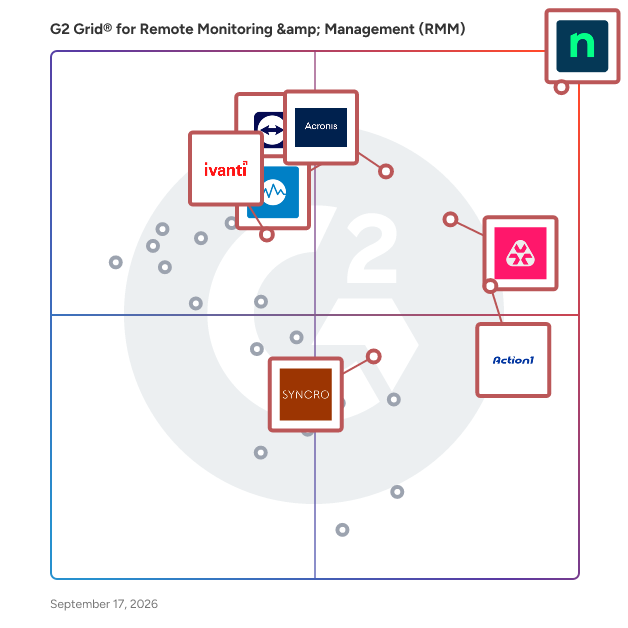
G2 Grid® for Remote Monitoring & Management (RMM) Software

G2 Grid® for Remote Monitoring & Management (RMM) Software plotting products by satisfaction and market presence

Highlighted products: NinjaOne, Remote Monitoring and Management, TeamViewer, Acronis Cyber Protect Cloud, Action1, Datto RMM, Ivanti Autonomous Endpoint Management, and Syncro.

Underlying data: [Grid® JSON](https://www.g2.com/categories/remote-monitoring-management-rmm/grids.json?focus%5B%5D=ninjaone&focus%5B%5D=remote-monitoring-and-management&focus%5B%5D=teamviewer&focus%5B%5D=acronis-cyber-protect-cloud&focus%5B%5D=action1&focus%5B%5D=datto-rmm&focus%5B%5D=ivanti-autonomous-endpoint-management&focus%5B%5D=syncro)

ConnectWise Automate

ConnectWise Automate, formerly LabTech, is an IT management tool that helps deliver IT services at the speed of business. Our remote monitoring and management (RMM) platform provides powerful automation to discover & manage devices, monitor for problems, and automate action. Deliver streamlined reactive and proactive managed services, stop putting out fires, and start focusing on what matters most. See why over 5,500 partners worldwide chose ConnectWise Automate by visiting https://www.connectwise.com/software/automate or calling 877-522-8323.

Average Rating: 4.1/5.0

Total Reviews: 133

How Do G2 Users Rate ConnectWise Automate?

  • Ease of Admin: 7.2/10 (Category avg: 8.9/10)
  • Device Management: 9.4/10 (Category avg: 9.3/10)
  • Service Management: 8.8/10 (Category avg: 8.5/10)
  • Remote Monitoring: 9.4/10 (Category avg: 9.3/10)

Who Is the Company Behind ConnectWise Automate?

  • Seller: ConnectWise
  • Year Founded: 1982
  • HQ Location: Tampa, FL
  • Twitter: @ConnectWise
    14,926 Twitter followers
  • LinkedIn® Page: www.linkedin.com
    3,401 employees on LinkedIn®
  • Phone: 800-671-6898

Who Uses This Product?

  • Top Industries: Information Technology and Services, Computer & Network Security
  • Company Size: 66% Small, 32% Medium

What Do G2 Reviewers Say About ConnectWise Automate?

AI-generated summary from verified user reviews

Pros
  • Users value the customization and comprehensive features of ConnectWise Automate, enhancing their remote management experience.
  • Users love the convenient all-in-one asset management solution, finding it easy to implement and use daily.
  • Users value the customization capabilities of ConnectWise Automate, enhancing efficiency in managing numerous machines.
  • Users value the alert system in ConnectWise Automate, which efficiently manages ticket SLAs and updates.
  • Users appreciate the excellent customer support of ConnectWise Automate, which enhances their experience with the product.
Cons
  • Users find that the initial setup is time-consuming and requires strong admin oversight for optimal use.
  • Users feel the dated UI and lack of ease of use hinder their experience with ConnectWise Automate.
  • Users report that the agent reliability can be inconsistent, causing delays during reinstallation processes.
  • Users experience intermittent connection issues or site downtime, impacting their overall satisfaction with ConnectWise Automate.
  • Users experience significant bugs and breaking updates in ConnectWise Automate, complicating remote access and device management.

What Are Recent G2 Reviews of ConnectWise Automate?

What Are G2 Users Discussing About ConnectWise Automate?

Splashtop Autonomous Endpoint Management

Splashtop Autonomous Endpoint Management (AEM) is an automation-led endpoint management solution that helps IT teams streamline software updates, improve security posture, and reduce manual workloads. With real-time OS and third-party software patching, cross-platform support, dashboards, inventory reporting and quick remediation tools, AEM can be used by IT teams to stay secure, compliant, and efficient. Splashtop AEM enables IT to: • Automate patching for OS, third-party, and custom apps • Complement Intune and other MDMs with real-time patching, scripting and remediation • Detect and prioritize vulnerabilities using AI-powered based threat CVE insights • Track and manage hardware and software inventory across all endpoints • Monitor endpoints and resolve issues proactively

Average Rating: 4.5/5.0

Total Reviews: 73

How Do G2 Users Rate Splashtop Autonomous Endpoint Management?

  • Ease of Admin: 9.0/10 (Category avg: 8.9/10)
  • Device Management: 10.0/10 (Category avg: 9.3/10)
  • Remote Monitoring: 8.3/10 (Category avg: 9.3/10)

Who Is the Company Behind Splashtop Autonomous Endpoint Management?

  • Seller: Splashtop Inc.
  • Company Website:
  • Year Founded: 2006
  • HQ Location: Cupertino, CA
  • Twitter: @splashtop
    5,216 Twitter followers
  • LinkedIn® Page: www.linkedin.com
    353 employees on LinkedIn®

Who Uses This Product?

  • Who Uses This: Software Engineer, IT Manager
  • Top Industries: Computer Software, Information Technology and Services
  • Company Size: 51% Medium, 34% Small

What Do G2 Reviewers Say About Splashtop Autonomous Endpoint Management?

AI-generated summary from verified user reviews

Pros
  • Users appreciate the ease of use of Splashtop, facilitating seamless integration and quick deployment across machines.
  • Users value the reliability of Splashtop's Endpoint Management, ensuring timely updates and consistent software compatibility.
  • Users value the easy remote access features of Splashtop, enhancing efficiency for troubleshooting and training.
  • Users value the robust security features of Splashtop, ensuring their environment remains well-protected and updated.
  • Users are thrilled with the intuitive dashboard and seamless integration of Splashtop, enhancing security and efficiency effortlessly.
Cons
  • Users note missing features in Splashtop AEM, particularly in advanced reporting and compliance-focused capabilities.
  • Users feel the limited features of Splashtop Autonomous Endpoint Management hinder effective update management and reporting capabilities.
  • Users face limitations in functionality access due to owner-only permissions, affecting efficiency in larger organizations.
  • Users note that Splashtop Autonomous Endpoint Management exhibits excessive memory and CPU usage, impacting performance unpredictably on various systems.
  • Users face remote access issues due to network adapter problems and the need for manual intervention to restore connections.

What Are Recent G2 Reviews of Splashtop Autonomous Endpoint Management?

LogMeIn Central

LogMeIn Central is a remote monitoring and management (RMM) platform for IT teams and managed service providers. It enables remote access, endpoint monitoring, patch management, task automation, and reporting from a centralized dashboard. The platform supports Windows and Mac environments and includes antivirus management powered by Bitdefender.

Average Rating: 4.2/5.0

Total Reviews: 203

How Do G2 Users Rate LogMeIn Central?

  • Ease of Admin: 9.1/10 (Category avg: 8.9/10)
  • Device Management: 8.7/10 (Category avg: 9.3/10)
  • Service Management: 8.1/10 (Category avg: 8.5/10)
  • Remote Monitoring: 9.1/10 (Category avg: 9.3/10)

Who Is the Company Behind LogMeIn Central?

  • Seller: GoTo
  • Year Founded: 2003
  • HQ Location: Boston, MA
  • Twitter: @goto
    41,211 Twitter followers
  • LinkedIn® Page: www.linkedin.com
    993 employees on LinkedIn®

Who Uses This Product?

  • Who Uses This: Network Administrator, IT Manager
  • Top Industries: Information Technology and Services, Computer Software
  • Company Size: 51% Small, 38% Medium

What Are Recent G2 Reviews of LogMeIn Central?

TeamViewer ONE

TeamViewer ONE enables lean IT teams to shift from reactive support to proactive device management with a single platform that combines remote access, intelligent automation, experience monitoring, and endpoint management. With built-in security and automation, IT teams can resolve problems faster, support hybrid work confidently, and deliver exceptional digital experiences. AI is transforming IT management, empowering even small teams to deliver enterprise-level impact. By automating repetitive tasks, accelerating diagnostics, and enabling predictive insights, AI reduces time to resolution from hours to minutes and frees IT to focus on strategic priorities. With TeamViewer ONE, we combine remote connectivity, endpoint management, and Digital Employee Experience — all powered by AI for maximized value

Average Rating: 4.5/5.0

Total Reviews: 10

How Do G2 Users Rate TeamViewer ONE?

  • Ease of Admin: 6.7/10 (Category avg: 8.9/10)
  • Device Management: 10.0/10 (Category avg: 9.3/10)
  • Remote Monitoring: 10.0/10 (Category avg: 9.3/10)

Who Is the Company Behind TeamViewer ONE?

  • Seller: TeamViewer
  • Company Website:
  • Year Founded: 2005
  • HQ Location: Goppingen
  • Twitter: @TeamViewer
    48,070 Twitter followers
  • LinkedIn® Page: www.linkedin.com
    2,818 employees on LinkedIn®

Who Uses This Product?

  • Company Size: 27% Small, 27% Medium

What Are Recent G2 Reviews of TeamViewer ONE?

Pandora FMS

Pandora FMS is a unified monitoring and observability platform designed to consolidate visibility, alerting, reporting, and automation across heterogeneous IT environments. Instead of combining multiple point tools for networks, servers, applications, and cloud services, Pandora FMS centralizes data collection and operational workflows in a single console, reducing integration effort and operational complexity in on-premise, hybrid, and multi-cloud architectures. The platform collects telemetry using multiple methods, including agents, remote checks, standard protocols (e.g., SNMP/WMI), APIs, and log/event ingestion. This enables teams to monitor infrastructure and services end-to-end, correlate signals, and maintain consistent alerting policies and dashboards across distributed estates. Pandora FMS also supports capacity and trend analysis to anticipate resource constraints and identify recurring patterns, and includes AI-assisted capabilities for anomaly detection and automated thresholds to surface hard-to-spot operational signals. Pandora FMS is extensible through a large plugin ecosystem (500+ plugins and integrations), covering a wide range of enterprise and infrastructure technologies such as SAP, Oracle, Citrix, JBoss, VMware, AWS, SQL Server, Red Hat, and WebSphere. This extensibility helps organizations standardize monitoring across legacy and modern stacks without redesigning their monitoring approach per technology. Core capabilities: -Unified monitoring for networks, servers, applications, cloud services, endpoints, and logs -Centralized alerting, event correlation, dashboards, and scheduled reporting -Flexible data collection via agents, remote checks, APIs, and plugins -Scalability for distributed environments and large numbers of monitored elements -Analytics for trend/capacity planning plus AI-assisted anomaly detection and dynamic thresholds -A key differentiator is direct vendor support, which simplifies escalation and ensures continuity of expertise for deployment, tuning, and ongoing operations.

Average Rating: 4.6/5.0

Total Reviews: 212

How Do G2 Users Rate Pandora FMS?

  • Ease of Admin: 8.5/10 (Category avg: 8.9/10)
  • Device Management: 9.6/10 (Category avg: 9.3/10)
  • Service Management: 9.6/10 (Category avg: 8.5/10)
  • Remote Monitoring: 9.8/10 (Category avg: 9.3/10)

Who Is the Company Behind Pandora FMS?

  • Seller: Pandora FMS
  • Company Website:
  • Year Founded: 2004
  • HQ Location: Madrid, Spain
  • Twitter: @pandorafms
    5,458 Twitter followers
  • LinkedIn® Page: www.linkedin.com
    56 employees on LinkedIn®

Who Uses This Product?

  • Who Uses This: Data Analyst
  • Top Industries: Information Technology and Services, Telecommunications
  • Company Size: 50% Medium, 37% Small

What Do G2 Reviewers Say About Pandora FMS?

AI-generated summary from verified user reviews

Pros
  • Users value the reliable remote monitoring capabilities of Pandora FMS, ensuring seamless oversight of their systems.
  • Users enjoy the ease of use of Pandora FMS, appreciating its intuitive interface and reliable support.
  • Users value the real-time monitoring capabilities of Pandora FMS, enhancing visibility of all network devices effortlessly.
  • Users value the flexibility and adaptability of Pandora FMS, making it suitable for diverse IT monitoring needs.
  • Users value the versatility of network monitoring in Pandora FMS, effectively managing diverse devices and environments.
Cons
  • Users find the learning curve steep, particularly with initial setup and complex functionalities of Pandora FMS.
  • Users find the complex setup of Pandora FMS challenging, particularly due to compatibility issues and steep learning curves.
  • Users note the learning difficulty with Pandora FMS, especially for those lacking technical expertise for setup and configuration.
  • Users find the complex configuration of Pandora FMS challenging, especially without extensive technical expertise.
  • Users face a difficult learning curve with Pandora FMS, which can hinder effective usage for beginners.

What Are Recent G2 Reviews of Pandora FMS?

What Are G2 Users Discussing About Pandora FMS?

Pulseway

Pulseway is RMM software, built to help MSPs and IT teams reduce downtime, take control and become more efficient. Pulseway provides all-in-one IT monitoring and management software, filled with features and modules to boost your productivity straight out of the box and never miss critical alerts. - Pulseway’s comprehensive remote monitoring and management (RMM) software provides a complete view across your network. View operational data for workstations, servers, VMs, network devices and more, while resolving issues straight from the same interface. - Be instantly alerted to issues, resolve them before they become a problem and minimize downtime – across the network. - Let you and your team be fully productive from anywhere to deliver first-class customer service wherever you are. - Automate repetitive IT tasks and automatically fix issues before they become a problem. - Pulseway built-in Mobile Remote Control enables simple, reliable, and fluid remote access to any monitored systems. Access files, applications and control remote systems as if you were sitting right in front of them. Try Pulseway RMM today with a free 14-day no-commitment trial to see for yourself.

Average Rating: 4.5/5.0

Total Reviews: 122

How Do G2 Users Rate Pulseway?

  • Ease of Admin: 9.2/10 (Category avg: 8.9/10)
  • Device Management: 9.3/10 (Category avg: 9.3/10)
  • Service Management: 8.8/10 (Category avg: 8.5/10)
  • Remote Monitoring: 9.4/10 (Category avg: 9.3/10)

Who Is the Company Behind Pulseway?

  • Seller: MMSoft Design
  • Year Founded: 2011
  • HQ Location: Dublin, Ireland
  • Twitter: @pulsewayapp
    6,073 Twitter followers
  • LinkedIn® Page: www.linkedin.com
    47 employees on LinkedIn®

Who Uses This Product?

  • Who Uses This: IT Manager, Owner
  • Top Industries: Information Technology and Services, Computer & Network Security
  • Company Size: 52% Small, 42% Medium

What Do G2 Reviewers Say About Pulseway?

AI-generated summary from verified user reviews

Pros
  • Users praise the intuitive interface of Pulseway, making it easy to implement and enhancing business operations seamlessly.
  • Users commend the easy setup of Pulseway, enabling seamless integration and management for their computer repair services.
  • Users appreciate the implementation ease of Pulseway, enjoying its quick setup and seamless integrations with existing tools.
  • Users appreciate the easy integrations of Pulseway, enhancing efficiency in monitoring and managing infrastructure seamlessly.
  • Users value the s seamless integrations of Pulseway with other software, enhancing efficiency and support capabilities.
Cons
  • Users note the limited features of Pulseway, particularly in network monitoring and mobile app updates.
  • Users find limited compatibility with Pulseway, particularly regarding Microsoft Office and Linux integration issues.
  • Users find the slow performance of Pulseway frustrating, particularly during peak hours, affecting overall usability.
  • Users find the pricing very high compared to other comparable remote monitoring management solutions.
  • Users are frustrated with constant upselling and unfinished features, alongside issues with logging out and reporting quality.

What Are Recent G2 Reviews of Pulseway?

What Are G2 Users Discussing About Pulseway?

Domotz

Domotz is a network monitoring and management software platform used by MSPs and IT teams to gain visibility and operational control across distributed network environments. It enables organizations to monitor, manage, and troubleshoot network infrastructure across multiple sites or customer environments from a centralized interface. Founded in 2015 and headquartered in Draper, Utah, Domotz supports organizations worldwide that are responsible for maintaining reliable and secure network operations. The platform is used in a wide range of environments, including small and mid sized businesses, enterprise locations, and managed service provider deployments. Domotz provides automated device discovery and asset inventory, allowing teams to identify all devices connected to the network and maintain accurate records over time. It supports SNMP monitoring, alerting, and performance tracking to help teams detect availability issues, degradation, or misconfigurations before they impact users. Network topology visualization helps teams understand how devices are connected and identify potential points of failure. Additional capabilities include configuration backup and change tracking for supported devices, secure remote access without requiring VPNs, and tools for troubleshooting network issues remotely. Domotz can be used to monitor and manage routers, switches, firewalls, access points, servers, cameras, printers, and other IP enabled devices across heterogeneous vendor environments. Domotz is designed for operational use by technical teams. It can be deployed quickly, provides access to real network data, and supports ongoing monitoring and troubleshooting as networks evolve. The platform integrates with common MSP and IT tools to support workflows related to documentation, alerting, and service delivery. Pricing is based on a per device monthly model, currently priced at $1.50 per device per month. This pricing structure allows organizations to scale monitoring based on the number of devices managed while maintaining predictable costs. Users can start with Free Discovery to evaluate their environment using real network data before committing.

Average Rating: 4.8/5.0

Total Reviews: 101

How Do G2 Users Rate Domotz?

  • Ease of Admin: 9.1/10 (Category avg: 8.9/10)
  • Device Management: 8.9/10 (Category avg: 9.3/10)
  • Service Management: 9.1/10 (Category avg: 8.5/10)
  • Remote Monitoring: 9.3/10 (Category avg: 9.3/10)

Who Is the Company Behind Domotz?

  • Seller: Domotz
  • Company Website:
  • Year Founded: 2015
  • HQ Location: Draper, Utah
  • Twitter: @domotz
    2,420 Twitter followers
  • LinkedIn® Page: www.linkedin.com
    70 employees on LinkedIn®

Who Uses This Product?

  • Who Uses This: Owner
  • Top Industries: Information Technology and Services, Computer & Network Security
  • Company Size: 71% Small, 23% Medium

What Do G2 Reviewers Say About Domotz?

AI-generated summary from verified user reviews

Pros
  • Users value the ease of use of Domotz, enhancing their ability to monitor and manage networks effortlessly.
  • Users value the customizable alerts and seamless monitoring of network devices offered by Domotz for efficient troubleshooting.
  • Users value the customizable alert notifications from Domotz, enabling quick responses to network device issues.
  • Users appreciate the customizable alerts from Domotz, enabling quick responses to device issues and enhancing network management.
  • Users highlight the excellent customer support of Domotz, emphasizing quick responses and helpful assistance.
Cons
  • Users find the network diagram feature lacking and experience lag with the desktop app when managing multiple devices.
  • Users face challenges with alert issues, including false positives and overwhelming notifications during network outages.
  • Users find the costs prohibitive for SMEs and individuals, with frequent price increases adding to their concerns.
  • Users note the missing features in Domotz, particularly for beginners and flat networks, limiting functionality and flexibility.
  • Users face integration issues due to lack of API support, making setup and notifications challenging initially.

What Are Recent G2 Reviews of Domotz?

What Are G2 Users Discussing About Domotz?

MSP360 RMM

MSP360 RMM is an all-in-one remote monitoring and management solution designed for IT teams and MSPs looking for centralized monitoring, automation, and cost-effective endpoint management. With Community Edition available, MSP360 RMM offers a free, production-ready entry point for new and small MSPs. With centralized management, built-in remote access and ticketing system, proactive monitoring, and automated issue resolution, MSP360 RMM empowers IT professionals to streamline operations, reduce downtime, and manage endpoints effortlessly — all without long-term commitments.

Average Rating: 4.3/5.0

Total Reviews: 25

How Do G2 Users Rate MSP360 RMM?

  • Ease of Admin: 8.7/10 (Category avg: 8.9/10)
  • Device Management: 9.1/10 (Category avg: 9.3/10)
  • Service Management: 7.8/10 (Category avg: 8.5/10)
  • Remote Monitoring: 8.9/10 (Category avg: 9.3/10)

Who Is the Company Behind MSP360 RMM?

  • Seller: MSP360
  • Company Website:
  • Year Founded: 2011
  • HQ Location: Pittsburgh, PA
  • Twitter: @msp360
    2,785 Twitter followers
  • LinkedIn® Page: www.linkedin.com
    120 employees on LinkedIn®

Who Uses This Product?

  • Top Industries: Information Technology and Services, Computer & Network Security
  • Company Size: 92% Small, 8% Medium

What Do G2 Reviewers Say About MSP360 RMM?

AI-generated summary from verified user reviews

Pros
  • Users commend the responsive and knowledgeable customer support of MSP360 RMM, enhancing their overall experience with the product.
  • Users commend the reliability of MSP360 RMM, highlighting its consistent performance and supportive customer service.

What Are Recent G2 Reviews of MSP360 RMM?

What Are G2 Users Discussing About MSP360 RMM?

Kaseya VSA

Kaseya VSA is an integrated IT systems management platform that can be leveraged seamlessly across IT disciplines to streamline and automate your IT services. Kaseya VSA integrates key management capabilities into a single platform. Kaseya VSA gives your IT Team the ability to automate hundreds of tasks and workflows; manage any device, anywhere, at anytime; and protects every endpoint with enhanced threat detection, automated patch management, and more. VSA capabilities include: Remote Monitoring & Control, Patch Management, Network Monitoring, AV/AM, Process Automation, Backup and more.

Average Rating: 4.0/5.0

Total Reviews: 314

How Do G2 Users Rate Kaseya VSA?

  • Ease of Admin: 7.9/10 (Category avg: 8.9/10)
  • Device Management: 8.3/10 (Category avg: 9.3/10)
  • Service Management: 7.9/10 (Category avg: 8.5/10)
  • Remote Monitoring: 8.6/10 (Category avg: 9.3/10)

Who Is the Company Behind Kaseya VSA?

  • Seller: Kaseya
  • Company Website:
  • Year Founded: 2000
  • HQ Location: Miami, FL
  • Twitter: @KaseyaCorp
    17,411 Twitter followers
  • LinkedIn® Page: www.linkedin.com
    5,483 employees on LinkedIn®

Who Uses This Product?

  • Who Uses This: Owner, CEO
  • Top Industries: Information Technology and Services, Computer & Network Security
  • Company Size: 52% Small, 42% Medium

What Do G2 Reviewers Say About Kaseya VSA?

AI-generated summary from verified user reviews

Pros
  • Users appreciate the ease of use of Kaseya VSA, enjoying its practical interface and efficient management tools.
  • Users love the seamless automation features in Kaseya VSA, enhancing their efficiency and productivity across tasks.
  • Users appreciate the seamless script execution and user-friendly interface of Kaseya VSA for efficient management.
  • Users appreciate the user-friendly interface of Kaseya VSA, which simplifies management and enhances administrative efficiency.
  • Users find Kaseya VSA's intuitive interface enhances their experience, making configuration and management seamless.
Cons
  • Users feel the missing features hinder Kaseya VSA, particularly a direct file transfer method and O365 management.
  • Users experience connection issues, finding the process cumbersome and encountering crashes, impacting their workflow significantly.
  • Users face connectivity issues with Kaseya VSA, slowing down their workflow and complicating remote sessions.
  • Users face remote access issues with Kaseya VSA, finding the connection process cumbersome and unreliable at times.
  • Users experience slow performance with Kaseya VSA, facing delays in loading and remote desk operations.

What Are Recent G2 Reviews of Kaseya VSA?

What Are G2 Users Discussing About Kaseya VSA?

Naverisk

Naverisk is a robust All-in-One IT services platform for MSPs and IT Pro’s. Naverisk combines RMM, Service Desk, PSA and 100% free Data Protection into a single powerful solution. Our excellent global 24x7 support also means you can get real time help when you need it.

Average Rating: 4.7/5.0

Total Reviews: 71

How Do G2 Users Rate Naverisk?

  • Ease of Admin: 9.3/10 (Category avg: 8.9/10)
  • Device Management: 9.5/10 (Category avg: 9.3/10)
  • Service Management: 9.1/10 (Category avg: 8.5/10)
  • Remote Monitoring: 9.5/10 (Category avg: 9.3/10)

Who Is the Company Behind Naverisk?

  • Seller: Naverisk
  • Year Founded: 2010
  • HQ Location: Auckland CBD, Auckland
  • Twitter: @Naverisk
    426 Twitter followers
  • LinkedIn® Page: www.linkedin.com
    20 employees on LinkedIn®

Who Uses This Product?

  • Who Uses This: Director, Owner
  • Top Industries: Information Technology and Services, Computer & Network Security
  • Company Size: 90% Small, 8% Medium

What Do G2 Reviewers Say About Naverisk?

AI-generated summary from verified user reviews

Pros
  • Users commend Naverisk for its exceptional reliability, making it a trusted partner for managing IT environments effectively.
  • Users consistently value the excellent customer support from Naverisk, praising their reliability and responsiveness over the years.
  • Users find Naverisk to be intuitive and easy to use, enabling quick onboarding and minimal training for new staff.
  • Users value the high-quality support from Naverisk, enhancing their business IT management experience significantly.
  • Users value the strong community engagement from Naverisk, highlighting excellent support and a reliable partnership.
Cons
  • Users find the inefficient ticketing system somewhat clunky, though it remains functional for their needs.
  • Users face login issues in Naverisk, needing to frequently log out and log back in for full functionality.
  • Users find the design outdated, suggesting that Naverisk could greatly benefit from a modern interface update.
  • Users find the ticketing system a bit clunky, yet still manageable for their needs.
  • Users note that the interface feels outdated and would benefit from a modern refresh for better usability.

What Are Recent G2 Reviews of Naverisk?

What Are G2 Users Discussing About Naverisk?

Barracuda for MSPs

Barracuda MSP is designed to manage how IT providers deploy data protection strategries to SMB customers.

Average Rating: 4.1/5.0

Total Reviews: 38

How Do G2 Users Rate Barracuda for MSPs?

  • Ease of Admin: 8.2/10 (Category avg: 8.9/10)
  • Device Management: 10.0/10 (Category avg: 9.3/10)
  • Remote Monitoring: 10.0/10 (Category avg: 9.3/10)

Who Is the Company Behind Barracuda for MSPs?

  • Seller: Barracuda
  • Year Founded: 2002
  • HQ Location: Campbell, CA
  • Twitter: @Barracuda
    15,239 Twitter followers
  • LinkedIn® Page: www.linkedin.com
    2,327 employees on LinkedIn®
  • Ownership: Private

Who Uses This Product?

  • Top Industries: Information Technology and Services, Computer & Network Security
  • Company Size: 79% Small, 15% Medium

What Do G2 Reviewers Say About Barracuda for MSPs?

AI-generated summary from verified user reviews

Pros
  • Users value the automation capabilities of Barracuda, which enhance support and streamline MSP operations effectively.
  • Users value the excellent community engagement through training and resources, enhancing overall support for MSPs.
  • Users appreciate the excellent community support from Barracuda, including valuable resources and training programs for MSPs.
  • Users value the exceptional support and resources from Barracuda, enhancing overall satisfaction and effectiveness for MSPs.
  • Users value the excellent customer support from Barracuda, appreciating the resources and training provided for MSPs.

What Are Recent G2 Reviews of Barracuda for MSPs?

Zip Security

Zip Security delivers expert-built cybersecurity without the complexity of managing it yourself. We deploy, manage, and enforce your security stack for you, bringing your critical security tools together in one easy-to-use platform. Automated workflows keep protections continuously enforced, while giving you complete visibility into your security posture. Backed by hands-on security experts and white-glove support, Zip gives growing companies comprehensive protection without the cost and complexity of a traditional MSP.

Average Rating: 4.9/5.0

Total Reviews: 11

How Do G2 Users Rate Zip Security?

  • Ease of Admin: 9.2/10 (Category avg: 8.9/10)
  • Device Management: 10.0/10 (Category avg: 9.3/10)
  • Service Management: 8.9/10 (Category avg: 8.5/10)
  • Remote Monitoring: 10.0/10 (Category avg: 9.3/10)

Who Is the Company Behind Zip Security?

Who Uses This Product?

  • Top Industries: Computer Software
  • Company Size: 55% Small, 18% Medium

What Do G2 Reviewers Say About Zip Security?

AI-generated summary from verified user reviews

Pros
  • Users appreciate the seamless integration of MDM and EDR features in Zip Security for comprehensive system protection.
  • Users commend the comprehensive security capabilities of Zip Security, ensuring full protection across all systems effortlessly.
  • Users value the unified solution offered by Zip Security, simplifying management across all operating systems effectively.
  • Users commend the responsive and helpful customer support of Zip Security, who go above and beyond for assistance.
  • Users value the unified device management of Zip Security, simplifying compliance and enhancing IT security processes.
Cons
  • Users are frustrated with the poor customer support of Zip Security, which negatively impacts their experience.
  • Users prefer inhouse configuration over cloud-based solutions for better control and customization of Zip Security.
  • Users express a desire for better in-house configuration options rather than relying on cloud-based solutions for Zip Security.
  • Users often complain about connection issues that hinder the overall effectiveness of Zip Security.

What Are Recent G2 Reviews of Zip Security?

MSPControl

MSP Control is a Windows hosting control panel for MSP's, hosting providers and IT companies. Auto provision services on Windows servers.

Average Rating: 5.0/5.0

Total Reviews: 3

How Do G2 Users Rate MSPControl?

  • Ease of Admin: 10.0/10 (Category avg: 8.9/10)
  • Device Management: 10.0/10 (Category avg: 9.3/10)
  • Remote Monitoring: 10.0/10 (Category avg: 9.3/10)

Who Is the Company Behind MSPControl?

Who Uses This Product?

  • Company Size: 67% Small, 33% Medium

What Do G2 Reviewers Say About MSPControl?

AI-generated summary from verified user reviews

Pros
  • Users praise the ease of use of MSPControl, which enhances their overall experience and business operations.
  • Users value the automation capabilities of MSPControl, simplifying management and enhancing operational efficiency for Microsoft environments.
  • Users value the responsive customer support from MSPControl, enhancing their experience in managing IT hosting services.
  • Users find the deployment ease of MSPControl greatly enhances their IT hosting management experience with updated technologies.
  • Users value the comprehensive automation and management features of MSPControl for Microsoft-centric environments, enhancing efficiency.
Cons
  • Users find the complexity in setup and usage of MSPControl challenging, requiring significant technical knowledge.
  • Users find that while MSPControl is powerful, it requires significant technical knowledge for setup and daily use.
  • Users find the complexity of UX in MSPControl challenging, requiring extensive technical knowledge for effective use.

What Are Recent G2 Reviews of MSPControl?

OpenFrame

OpenFrame is an AI-first, unified platform that helps MSPs take control of their tech stack. It brings your core tools together with AI copilots that handle routine operations like password resets, storage cleanup, monitoring, and incident response, so technicians can focus on strategic, billable work. Built as an alternative to expensive, fragmented stacks like ConnectWise and Kaseya, OpenFrame gives MSPs full visibility and control without the vendor tax. One platform covers RMM, remote access, MDM, patch management, PSA, documentation, and monitoring, so you scale without surprise price hikes. Key capabilities include remote monitoring and management, device tracking across Windows/macOS/Linux, patch management, PSA ticketing, endpoint security, and AI-assisted troubleshooting through two copilots: Mingo, which proposes fixes for your technicians to approve, and Fae, which deflects L1 tickets at the endpoint. OpenFrame is designed for MSPs who care about margins, flexibility, and owning their infrastructure, not renting it.

Average Rating: 4.8/5.0

Total Reviews: 3

How Do G2 Users Rate OpenFrame?

  • Ease of Admin: 10.0/10 (Category avg: 8.9/10)
  • Device Management: 10.0/10 (Category avg: 9.3/10)
  • Remote Monitoring: 10.0/10 (Category avg: 9.3/10)

Who Is the Company Behind OpenFrame?

  • Seller: Flamingo
  • Year Founded: 2025
  • HQ Location: Miami, US
  • LinkedIn® Page: linkedin.com
    32 employees on LinkedIn®

Who Uses This Product?

  • Company Size: 100% Small

What Are Recent G2 Reviews of OpenFrame?

Panorama9

Monitoring and remote management of your entire IT environment from the cloud.

Average Rating: 4.3/5.0

Total Reviews: 3

How Do G2 Users Rate Panorama9?

  • Ease of Admin: 9.2/10 (Category avg: 8.9/10)
  • Device Management: 8.3/10 (Category avg: 9.3/10)
  • Service Management: 7.5/10 (Category avg: 8.5/10)
  • Remote Monitoring: 8.3/10 (Category avg: 9.3/10)

Who Is the Company Behind Panorama9?

  • Seller: Panorama9
  • Year Founded: 2010
  • HQ Location: Copenhagen V, DK
  • Twitter: @PanoramaNine
    351 Twitter followers
  • LinkedIn® Page: www.linkedin.com
    4 employees on LinkedIn®

Who Uses This Product?

  • Company Size: 67% Medium

What Are Recent G2 Reviews of Panorama9?

Tian Lin
TL
Researched and written by Tian Lin
Updated April 10, 2026