Best No-Code Development Platforms for Small Business - Page 4

How Many No-Code Development Platforms Products Does G2 Track?

Total Products under this Category: 491

Category Stats (Sep 2026)

  • Average Rating: 4.59/5 The average rating of products in this category, based on all submitted ratings
  • Top Trending Product: GoodBarber (+4.53%) - Among all products in this category, GoodBarber recorded the largest rating increase compared to last month

Last updated: September 01, 2026

How Does G2 Rank No-Code Development Platforms Products?

Why You Can Trust G2's Software Rankings:

  • 30 Analysts and Data Experts
  • 29,400+ Authentic Reviews
  • 491+ Products
  • Unbiased Rankings

G2's software rankings are built on verified user reviews, rigorous moderation, and a consistent research methodology maintained by a team of analysts and data experts. Each product is measured using the same transparent criteria, with no paid placement or vendor influence. While reviews reflect real user experiences, which can be subjective, they offer valuable insight into how software performs in the hands of professionals. Together, these inputs power the G2 Score, a standardized way to compare tools within every category.

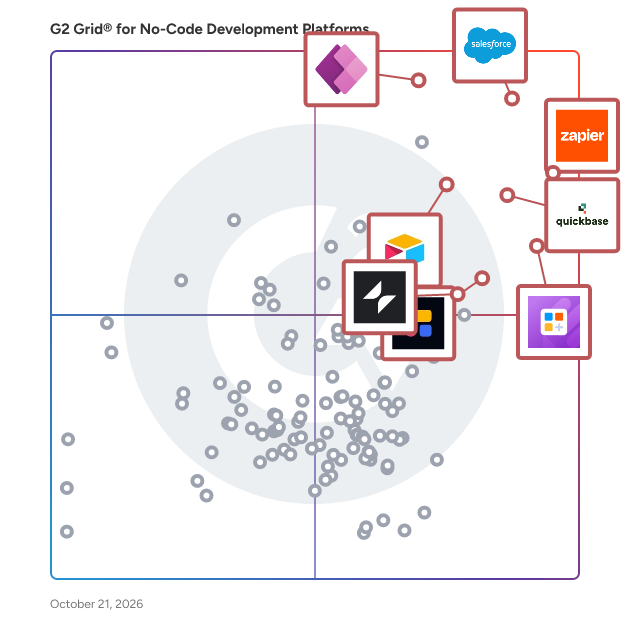
G2 Grid® for No-Code Development Platforms

G2 Grid® for No-Code Development Platforms plotting products by satisfaction and market presence

Highlighted products: Zapier, Jotform Apps, Airtable, Softr, Glide Classic, Quickbase, Microsoft Power Apps, and Kintone.

Underlying data: [Grid® JSON](https://www.g2.com/categories/no-code-development-platforms/grids.json?focus%5B%5D=zapier&focus%5B%5D=jotform-apps&focus%5B%5D=airtable&focus%5B%5D=softr&focus%5B%5D=glide-glide-classic&focus%5B%5D=quickbase&focus%5B%5D=microsoft-power-apps&focus%5B%5D=kintone&segment=small-business)

Best Brain

BestBrain's WhatsApp AI Agent Solution utilizes cutting-edge conversational AI to provide personalized and efficient customer interactions on the globally acclaimed messaging platform. Augment your customer service, marketing, and engagement tactics with AI-driven conversations that are organic, scalable, and accessible round-the-clock.

Average Rating: 5.0/5.0

Total Reviews: 18

How Do G2 Users Rate Best Brain?

  • Platform Compatibility: 9.6/10 (Category avg: 8.9/10)
  • Lifecycle Management: 10.0/10 (Category avg: 8.8/10)
  • Workflow Management: 10.0/10 (Category avg: 8.9/10)

Who Is the Company Behind Best Brain?

Who Uses This Product?

  • Who Uses This: CEO
  • Top Industries: Financial Services
  • Company Size: 78% Medium, 78% Small

What Do G2 Reviewers Say About Best Brain?

AI-generated summary from verified user reviews

Pros
  • Users value the practical automation of Best Brain, enhancing efficiency and streamlining workflows effectively.
  • Users find easy integration with Best Brain seamless, enhancing their workflows through diverse tool connections.
  • Users appreciate the easy integrations of Best Brain, streamlining support and automation within a cohesive AI ecosystem.
  • Users value the automation efficiency of Best Brain, helping maintain high operational standards and reliability.
  • Users praise Best Brain for its exceptional customer communication, enhancing lead response with insightful automation and human-like interaction.
Cons
  • Users note a steep learning curve initially, which may hinder quick adaptation to Best Brain's functionalities.
  • Users feel the dashboard lacks customization options, limiting their ability to tailor the experience to their needs.
  • Users find that the reporting setup can be time-consuming, requiring adjustments to achieve precise insights.

What Are Recent G2 Reviews of Best Brain?

Landbot

Landbot is a no-code AI Agent builder that lets revenue teams (Demand Gen, Growth, Marketing Ops, RevOps) build AI-enhanced, multi-channel lead workflows without engineering, so they capture more qualified leads faster and with less operational friction. Our visual, no-code builder combines predictable linear flows, native AI blocks, and an integrated AI Copilot that guides users through building, testing, and optimizing chatbots and agents while teaching best practices and discovering new features. At its core, Landbot pairs two complementary approaches: a visual, linear flow builder for predictable user journeys, and native AI steps for flexible, natural language interactions. That hybrid model solves a common trade-off: linear flows provide business control and deterministic routing for conversions and handoffs, while AI steps let you handle open-ended user intent, reduce friction, and increase engagement — all while keeping the conversation within a tested workflow. The best of both worlds combined into one powerful, no-code visual builder to keep full control of your flows. With multi-channel delivery (web, WhatsApp) and bi-directional CRM & automation connectors, Landbot shortens time-to-market, improves conversion, and makes scaling campaigns practical for marketing and sales teams. Landbot integrates bi-directionally with CRMs (HubSpot, Salesforce,...) and automation stacks (n8n, Zapier, Make...), so it sits naturally alongside marketing automation and sales platforms rather than replacing them. The result: visually on-brand agents, fewer abandoned forms, higher lead quality, faster launches, and more confident teams. If you want conversational experiences that are fast to build, easy to govern, on-brand, and optimized for conversion, Landbot is designed for you.

Average Rating: 4.7/5.0

Total Reviews: 306

How Do G2 Users Rate Landbot?

  • Has the product been a good partner in doing business?: 9.4/10 (Category avg: 9.2/10)
  • Platform Compatibility: 9.1/10 (Category avg: 8.9/10)
  • Lifecycle Management: 8.8/10 (Category avg: 8.8/10)
  • Workflow Management: 9.0/10 (Category avg: 8.9/10)

Who Is the Company Behind Landbot?

  • Seller: Landbot.io
  • Year Founded: 2017
  • HQ Location: Barcelona, ES
  • Twitter: @landbot_io
    2,166 Twitter followers
  • LinkedIn® Page: www.linkedin.com
    65 employees on LinkedIn®

Who Uses This Product?

  • Who Uses This: CEO, Founder
  • Top Industries: Marketing and Advertising, Financial Services
  • Company Size: 75% Small, 20% Medium

What Do G2 Reviewers Say About Landbot?

AI-generated summary from verified user reviews

Pros
  • Users appreciate the ease of use of Landbot, finding it user-friendly and intuitive for bot creation.
  • Users love the user-friendly design of Landbot, finding it intuitive and easy for bot creation.
  • Users value the intuitive interface of Landbot, finding it easy to create bots without prior experience.
  • Users commend the easy setup of Landbot, finding it user-friendly and quick to create bots.
  • Users appreciate the user-friendly interface of Landbot, enabling quick and easy chatbot creation without coding knowledge.
Cons
  • Users find the lack of a dedicated mobile app a significant drawback, impacting convenience and functionality for educators.
  • Users find limited features in Landbot's inbox, affecting conversation organization and customization options.
  • Users find Landbot to be expensive, especially for simple surveys where advanced tools aren't needed.
  • Users note a lack of tools for chatbot development and issues with chat window layout and mobile experience.
  • Users find the limited organizational features of the inbox and design complexity frustrating in Landbot.

What Are Recent G2 Reviews of Landbot?

What Are G2 Users Discussing About Landbot?

Clappia

Clappia is a No Code platform on which creating custom process apps is as easy as working with Excel sheets. People inside your organization who don't know anything about mobile app development, coding, cloud hosting, databases, etc. will be able to create very complex apps and streamline different processes within a couple of hours using their business logic and our app builder.

Average Rating: 4.7/5.0

Total Reviews: 82

How Do G2 Users Rate Clappia?

  • Has the product been a good partner in doing business?: 9.5/10 (Category avg: 9.2/10)
  • Platform Compatibility: 8.9/10 (Category avg: 8.9/10)
  • Lifecycle Management: 9.1/10 (Category avg: 8.8/10)
  • Workflow Management: 9.1/10 (Category avg: 8.9/10)

Who Is the Company Behind Clappia?

Who Uses This Product?

  • Top Industries: Information Technology and Services, Financial Services
  • Company Size: 36% Small, 35% Medium

What Are Recent G2 Reviews of Clappia?

What Are G2 Users Discussing About Clappia?

Bizagi

Bizagi is an enterprise platform for business orchestration and AI automation, enabling organizations to design, automate, and run complex end-to-end processes that bring together people, AI agents, systems, and data. Unlike point AI tools, Bizagi is the operational layer where AI, processes, and enterprise systems work together: governed, auditable, and production-ready. Built on more than two decades of enterprise process expertise, Bizagi brings the depth of operational knowledge that newer AI platforms simply have not had time to develop. That foundation is what makes Bizagi's AI story credible where others are still experimental. Bizagi's native AI capabilities are built directly into the platform. AI Agents are reusable, GenAI-powered assistants configured in the AI Hub, capable of content generation, document analysis, classification, summarization, and more. They can be invoked from processes, interfaces, or other agents, and integrate via connectors and Model Context Protocol to reach internal and external systems. AI Workers automate repetitive tasks inside forms and workflows by analyzing rules, field history, and process context, operating in supervised or more autonomous modes and improving through reinforcement learning. Ask Ada, Bizagi's conversational analytics assistant, lets users query business data in natural language and receive answers, charts, and insights, all within Bizagi's role and permission model and grounded in both process data and enterprise documents through a built-in RAG knowledge layer. Governance is central, not optional. Bizagi runs on Microsoft Azure with Private OpenAI integration, keeping sensitive data within a secure perimeter. AI features require deliberate configuration and deployment. Generative AI capabilities are intentionally built into workflows rather than casually enabled, and Data Domains, Personas, and Bizagi's role model control precisely what any AI capability can access and how results can be used. Customers see results fast. Stone Coast Fund Services reduced processing time by 80% across more than 25,000 annual service requests, going live in six weeks. Bizagi's AI Ignite packages take organizations from zero to live AI Agents or AI Assistants in approximately seven weeks, combining software and professional services to de-risk early projects. With over 1,000 enterprise implementations across financial services, manufacturing, healthcare, and government, Bizagi is named in the 2025 Gartner Magic Quadrant for Business Orchestration and Automation Technologies (BOAT), Microsoft Certified for AI in Financial Services and Manufacturing, and a G2 leader across Agentic AI, AI Agents for Business Operations, BPM, and Digital Process Automation. Customers include DHL, Unilever, Caterpillar, and Old Mutual. For more information, visit bizagi.com.

Average Rating: 4.6/5.0

Total Reviews: 305

How Do G2 Users Rate Bizagi?

  • Has the product been a good partner in doing business?: 8.6/10 (Category avg: 9.2/10)
  • Platform Compatibility: 9.1/10 (Category avg: 8.9/10)
  • Lifecycle Management: 9.0/10 (Category avg: 8.8/10)
  • Workflow Management: 9.1/10 (Category avg: 8.9/10)

Who Is the Company Behind Bizagi?

  • Seller: Bizagi
  • Company Website:
  • Year Founded: 1989
  • HQ Location: 1775 Tysons Blvd, 5th Floor, Tysons, VA, 22102
  • Twitter: @bizagi
    5,749 Twitter followers
  • LinkedIn® Page: www.linkedin.com
    440 employees on LinkedIn®

Who Uses This Product?

  • Who Uses This: SDET, Business Analyst
  • Top Industries: Information Technology and Services, Computer Software
  • Company Size: 45% Medium, 28% Large

What Do G2 Reviewers Say About Bizagi?

AI-generated summary from verified user reviews

Pros
  • Users appreciate the easy-to-use interface of Bizagi, enhancing their workflow with effective modeling and automation.
  • Users value the process automation features of Bizagi, significantly enhancing efficiency and customer satisfaction.
  • Users appreciate the automation capabilities of Bizagi, enhancing efficiency and delivering improved business results across processes.
  • Users value the efficiency of Bizagi, appreciating its speed and robust capabilities for process optimization and integration.
  • Users value the workflow management capabilities of Bizagi, facilitating optimization and collaboration for efficient processes.
Cons
  • Users face missing features in Bizagi, with limitations in the free version affecting their ability to collaborate effectively.
  • Users find that the performance issues with Bizagi can hinder coding efficiency, especially with larger diagrams.
  • Users experience slow performance with Bizagi, especially in complex processes and integration efforts that require excessive customization.
  • Users find the learning curve steep for advanced workflows in Bizagi, requiring more technical expertise than expected.
  • Users find the complexity of features in Bizagi can lead to confusion and challenges during upgrades.

What Are Recent G2 Reviews of Bizagi?

What Are G2 Users Discussing About Bizagi?
Directual platform

Directual is a no-code/low-code platform designed to help you tackle all of your development needs. Build MVPs, scale them to full-fledged products, create web3 apps, and so much more.

Average Rating: 4.8/5.0

Total Reviews: 13

How Do G2 Users Rate Directual platform?

  • Has the product been a good partner in doing business?: 9.2/10 (Category avg: 9.2/10)
  • Platform Compatibility: 9.1/10 (Category avg: 8.9/10)
  • Lifecycle Management: 8.3/10 (Category avg: 8.8/10)
  • Workflow Management: 8.9/10 (Category avg: 8.9/10)

Who Is the Company Behind Directual platform?

  • Seller: Directual
  • Year Founded: 2014
  • HQ Location: Moscow
  • Twitter: @directual
    544 Twitter followers
  • LinkedIn® Page: www.linkedin.com
    4 employees on LinkedIn®

Who Uses This Product?

  • Company Size: 100% Small

What Do G2 Reviewers Say About Directual platform?

AI-generated summary from verified user reviews

Pros
  • Users appreciate the ease of use of Directual, enabling quick creation and integration of data structures seamlessly.
  • Users appreciate the easy integration capabilities of Directual, streamlining connections with various applications effortlessly.
  • Users find the intuitive interface of Directual's workflow builder simplifies complex automation tasks effortlessly.
  • Users appreciate the scalability features of Directual, allowing for robust backend systems for startups.
  • Users praise the automation excellence of Directual, enjoying seamless workflow setups and effortless process customization.
Cons
  • Users face a steep learning curve with Directual, which can hinder the overall user experience and accessibility.
  • Users note that additional costs arise for certain features and extensions on the Directual platform.
  • Users find the price to be an issue, despite acknowledging that Directual is a great platform.
  • Users find limited customization options frustrating, often using external software for better frontend styling.
  • Users note the limited frontend features, but functionality improves when paired with apps like Nordcraft.

What Are Recent G2 Reviews of Directual platform?

Appenate (formerly Forms On Fire)

Appenate is a no-code platform designed for building mobile forms and applications, specifically tailored for industries such as field service, inspections, maintenance, and inventory management. This innovative solution enables teams in sectors like construction, logistics, manufacturing, and facilities management to transition from paper-based processes to digital workflows. By standardizing operations and enhancing compliance, Appenate allows organizations to deploy enterprise-grade applications in a matter of minutes, eliminating the need for coding or developer resources. The target audience for Appenate includes businesses looking to streamline their operations and improve efficiency. Organizations that rely on field data collection can benefit significantly from the platform's capabilities. Use cases range from conducting inspections and managing inventory to overseeing maintenance tasks and facilitating logistics operations. With Appenate, teams can digitize their workflows, ensuring that data is captured accurately and efficiently, ultimately leading to improved return on investment (ROI). One of the standout features of Appenate is its AI-assisted form creation. Users can describe a form using text or voice, or simply upload an existing PDF, and the platform will automatically generate the form. This feature significantly reduces the time required for form design, allowing users to focus on their core tasks rather than getting bogged down in the details of form creation. Additionally, Appenate provides native applications for iOS, Android, and Windows, ensuring reliable performance in the field. The full offline capability allows teams to capture data without an internet connection, with automatic synchronization once they are back online. Appenate also offers two powerful add-ons that enhance its functionality beyond basic form building. The Sync add-on serves as a no-code automation engine, enabling users to trigger workflows based on events within the platform, transform data, and facilitate seamless data movement between systems. The Distill add-on provides a native business intelligence (BI) and dashboard solution, allowing users to convert form data into real-time, interactive dashboards and reports. This feature provides managers with instant visibility into operations without the need to export data to separate analytics tools. With over 7,000 integrations, including popular platforms like Salesforce, SharePoint, and Microsoft Power BI, along with an open REST API, Appenate ensures that data flows seamlessly across various business systems. Additional core capabilities include advanced data capture options such as photos, videos, audio, GPS, NFC/QR scanning, and digital signatures. Role-based access management, automated report generation, and a library of pre-built app templates further enhance the platform's versatility. Organizations can also take advantage of full white-labeling options to create a branded experience for internal use or client resale. Each plan includes lifetime support, free onboarding, live chat, and comprehensive documentation, making Appenate a dependable no-code solution for organizations aiming to modernize their field operations without the complexities and costs associated with custom software development.

Average Rating: 4.5/5.0

Total Reviews: 265

How Do G2 Users Rate Appenate (formerly Forms On Fire)?

  • Has the product been a good partner in doing business?: 9.4/10 (Category avg: 9.2/10)
  • Platform Compatibility: 9.5/10 (Category avg: 8.9/10)
  • Lifecycle Management: 9.4/10 (Category avg: 8.8/10)
  • Workflow Management: 9.0/10 (Category avg: 8.9/10)

Who Is the Company Behind Appenate (formerly Forms On Fire)?

  • Seller: Appenate (Pty) Ltd
  • Company Website:
  • Year Founded: 2011
  • HQ Location: Brisbane, Australia
  • Twitter: @appenate
    3,639 Twitter followers
  • LinkedIn® Page: www.linkedin.com
    46 employees on LinkedIn®

Who Uses This Product?

  • Top Industries: Construction, Information Technology and Services
  • Company Size: 55% Small, 36% Medium

What Do G2 Reviewers Say About Appenate (formerly Forms On Fire)?

AI-generated summary from verified user reviews

Pros
  • Users value the customization capabilities of Appenate, enhancing their data collection and workflow efficiency.
  • Users highlight the ease of use of Appenate, praising its intuitive design and excellent customer support.
  • Users appreciate the extensive customization options in Appenate, enhancing productivity and seamlessly integrating into workflows.
  • Users appreciate the quick and customizable form creation in Appenate, integrating seamlessly into workflows and enhancing productivity.
  • Users commend the exceptional customer support of Appenate, highlighting quick responses and reliable assistance throughout their experience.
Cons
  • Users find the learning curve steep for advanced features, which complicates training and usage efficiency.
  • Users find the initial learning difficulty for advanced features can be overwhelming for newcomers to Forms On Fire.
  • Users find the initial learning curve complex, which can be overwhelming for newcomers to advanced features.
  • Users find the app suffers from performance issues, especially with slow sync and navigating complex forms.
  • Users often experience slow performance in Appenate, particularly with form submissions and syncing issues in the field.

What Are Recent G2 Reviews of Appenate (formerly Forms On Fire)?

What Are G2 Users Discussing About Appenate (formerly Forms On Fire)?

Xano

Xano is the fastest way to create a scalable backend for any app or agent — from mission-critical software to your latest vibe-coded project. As a unified platform, Xano gives you everything you need to build and deploy production-grade software — visually, with code, or through AI — and launch in minutes. Connect to any frontend, deploy with one click, and scale to millions of users. Trusted by 70,000+ builders. How It Works Building modern software usually means stitching together a mess of tools: databases, API gateways, serverless runtimes, integrations, auth, infrastructure, CI/CD, and monitoring. For AI agents, you’ll also need an orchestrator to plan, call tools, and manage workflows. With Xano, you get it all in one place — including a built-in agent builder. - Model data, compose logic, and expose secure APIs. - Integrate with any system and scale automatically. - Design AI agents that use your data and APIs, call external tools, and run server-side with full observability and guardrails. Works With Any Frontend. Use Xano with Lovable, Bolt, WeWeb, Retool, or custom code. Deploy your server-side logic, data, and runtime on Xano with production-grade compliance and reliability. When your prototype is ready to go live, you don’t have to rebuild — Xano scales with you. Why Teams Choose Xano - Infrastructure handled: Compliance, reliability, and scaling are built-in. - All-in-one tooling: Database, APIs, runtime, integrations, monitoring, and more. - Flexible building: Non-coders can use AI or the visual canvas, while pro devs can write and sync code in their IDE. Simply put: Xano takes care of the backend so you can focus on the business logic that makes your app unique.

Average Rating: 4.7/5.0

Total Reviews: 67

How Do G2 Users Rate Xano?

  • Has the product been a good partner in doing business?: 9.3/10 (Category avg: 9.2/10)
  • Platform Compatibility: 9.5/10 (Category avg: 8.9/10)
  • Lifecycle Management: 9.1/10 (Category avg: 8.8/10)
  • Workflow Management: 9.0/10 (Category avg: 8.9/10)

Who Is the Company Behind Xano?

  • Seller: Xano
  • Company Website:
  • Year Founded: 2014
  • HQ Location: Woodland Hills, US
  • Twitter: @xano
    50 Twitter followers
  • LinkedIn® Page: www.linkedin.com
    43 employees on LinkedIn®

Who Uses This Product?

  • Top Industries: Computer Software, Information Technology and Services
  • Company Size: 88% Small, 7% Medium

What Do G2 Reviewers Say About Xano?

AI-generated summary from verified user reviews

Pros
  • Users praise Xano for its ease of use, enabling quick deployment of projects and efficient problem-solving.
  • Users rave about the user-friendly no-code development capabilities of Xano, empowering them to create complex solutions effortlessly.
  • Users love Xano for its incredible speed, allowing for quick setup and outstanding performance even with large databases.
  • Users praise the efficient and responsive customer support of Xano, enhancing their development experience significantly.
  • Users value the easy setup of Xano, enabling quick development and seamless integration for all experience levels.
Cons
  • Users find Xano lacking in missing features, particularly with data backup options and direct database access.
  • Users find Xano to be expensive, especially for advanced features and direct database access in traditional workflows.
  • Users find that learning difficulty exists due to needing some technical knowledge and confusing documentation.
  • Users find Xano has limited features like basic version control and restricted backup options, leading to workflow challenges.
  • Users express concerns about pricing issues that may increase for resource-heavy apps and advanced features.

What Are Recent G2 Reviews of Xano?

What Are G2 Users Discussing About Xano?

FlutterFlow

FlutterFlow is a leading visual development platform that revolutionizes the way teams create, design, and deploy applications. With over 2M users across 200+ countries, FlutterFlow enables teams to build apps without sacrificing quality. With an intuitive visual interface, granular control over app experience and cross-platform deployment capabilities, FlutterFlow is trusted by companies of all sizes to accelerate their product development and deliver innovative digital solutions quickly and efficiently.

Average Rating: 4.5/5.0

Total Reviews: 30

How Do G2 Users Rate FlutterFlow?

  • Has the product been a good partner in doing business?: 9.2/10 (Category avg: 9.2/10)
  • Platform Compatibility: 9.0/10 (Category avg: 8.9/10)
  • Lifecycle Management: 8.7/10 (Category avg: 8.8/10)
  • Workflow Management: 9.0/10 (Category avg: 8.9/10)

Who Is the Company Behind FlutterFlow?

Who Uses This Product?

  • Top Industries: Computer Software
  • Company Size: 97% Small, 3% Medium

What Do G2 Reviewers Say About FlutterFlow?

AI-generated summary from verified user reviews

Pros
  • Users highlight the powerful interface and ease of use of FlutterFlow, facilitating rapid app development for all levels.
  • Users value the rapid development capabilities of FlutterFlow for efficient prototyping and app design.
  • Users find FlutterFlow's ease of use exceptional, allowing for quick design and seamless learning for developers.
  • Users commend the fast development capabilities of FlutterFlow, enabling rapid creation of high-quality applications.
  • Users find FlutterFlow's simplicity enhances their workflow, enabling quick transitions from design to production apps.
Cons
  • Users find the slow performance of FlutterFlow frustrating, particularly with larger apps and test build waiting times.
  • Users find that coding challenges exist in FlutterFlow, requiring some coding knowledge and making app creation tedious.
  • Users find the coding difficulties in FlutterFlow challenging, requiring knowledge and making the process less intuitive.
  • Users find data management issues with backend database connections challenging, though improvements are expected soon.
  • Users find a steep learning curve with FlutterFlow, needing coding knowledge and time to fully master its features.

What Are Recent G2 Reviews of FlutterFlow?

What Are G2 Users Discussing About FlutterFlow?

Cflow

Cflow is a leading AI-powered approval automation platform that empowers key decision makers with actionable data for making informed business decisions. Trusted by a 100,000+ user base spanning SMBs, mid-market, and Enterprise companies, Cflow is the highest-rated choice for unstoppable, no-code workflow automation. Complex workflows with multiple approval levels can be effectively automated within minutes using the visual workflow builder. Cflow takes paperless offices to the next level by providing intelligent document processing and document management features that include AI-powered OCR, Auto-classification, Fuzzy Search Mapping, Document Designer, Integrated electronic signatures, and role-based access control. SEYARC AI in Cflow turns data into decisions instantly by automating data entry, form filling, document reading, and insights. Cflow’s core value proposition lies in its ability to automate processes and deliver results in days, not months. Backed by SOC 2 Type 2, ISO 27001, GDPR, and HIPAA compliance, Cflow delivers enterprise-grade security that Global businesses require.

Average Rating: 4.7/5.0

Total Reviews: 192

How Do G2 Users Rate Cflow?

  • Has the product been a good partner in doing business?: 9.6/10 (Category avg: 9.2/10)
  • Workflow Management: 9.1/10 (Category avg: 8.9/10)

Who Is the Company Behind Cflow?

  • Seller: Cavintek Inc
  • Company Website:
  • Year Founded: 2011
  • HQ Location: 4140 Via Candidiz UNIT 158, San Diego, CA 92130, United States
  • Twitter: @cflowapps
    828 Twitter followers
  • LinkedIn® Page: www.linkedin.com
    26 employees on LinkedIn®

Who Uses This Product?

  • Top Industries: Information Technology and Services, Marketing and Advertising
  • Company Size: 47% Medium, 40% Small

What Do G2 Reviewers Say About Cflow?

AI-generated summary from verified user reviews

Pros
  • Users appreciate the ease of use of Cflow, benefiting from its simple setup and intuitive workflow management.
  • Users value the ease of automation in Cflow, transforming complex processes into streamlined, efficient workflows.
  • Users value Cflow for its efficient workflow management, ensuring fast approvals and streamlined coordination effortlessly.
  • Users appreciate the automation efficiency of Cflow, transforming manual processes into streamlined workflows effortlessly.
  • Users appreciate the AI-powered process automation in Cflow, which enhances approval efficiency and communication among stakeholders.
Cons
  • Users report performance issues with Cflow, noting sluggishness during complex workflows and delayed notifications.
  • Users report slow performance with Cflow, experiencing delays in opening tasks and lengthy page reloads.
  • Users find the learning curve steep, struggling with settings and workflow linking despite minor performance issues.
  • Users find Cflow has limited advanced customization, which may hinder complex integrations and overall flexibility.
  • Users experience slow loading times for tasks and pages, impacting their efficiency and productivity.

What Are Recent G2 Reviews of Cflow?

Ragic

Ragic is a no-code database builder that lets users create systems tailored to their workflow using a familiar spreadsheet-like interface. It supports solutions ranging from simple contact management to fully-fledged ERP systems. Ragic’s powerful features include mobile access, role-based permissions, drag-and-drop data relationships, workflow automation, Excel import/export, approval workflows, advanced search and queries, history and version control, reports and dashboards, and integrations with other apps.

Average Rating: 4.4/5.0

Total Reviews: 19

How Do G2 Users Rate Ragic?

  • Has the product been a good partner in doing business?: 8.8/10 (Category avg: 9.2/10)
  • Platform Compatibility: 7.8/10 (Category avg: 8.9/10)
  • Lifecycle Management: 8.1/10 (Category avg: 8.8/10)
  • Workflow Management: 8.3/10 (Category avg: 8.9/10)

Who Is the Company Behind Ragic?

  • Seller: Ragic
  • HQ Location: Taipei, Taiwan
  • Twitter: @Ragic
    396 Twitter followers
  • LinkedIn® Page: www.linkedin.com
    27 employees on LinkedIn®

Who Uses This Product?

  • Company Size: 74% Small, 21% Medium

What Do G2 Reviewers Say About Ragic?

AI-generated summary from verified user reviews

Pros
  • Users love Ragic's systematic task management for organizing client information and enhancing team collaboration.
  • Users value the effective customer management capabilities of Ragic, enhancing business operations across various industries.
  • Users find Ragic to be easy to learn, making implementation simple and accessible for businesses of all sizes.
  • Users highlight Ragic's flexibility, enabling diverse applications from CRM to resource management with ease.
  • Users value the easy no-code solution of Ragic, enabling diverse applications without complex coding requirements.
Cons
  • Users point out the need for improved reporting features and more flexible data management in Ragic.
  • Users often face error issues with duplicate names appearing in uploaded Excel files, complicating data management.
  • Users find a lack of insufficient tutorials for Ragic's reporting functions, limiting their full potential.
  • Users find interface issues with Ragic, particularly in navigating tabs and generating cross-tab reports effectively.
  • Users find Ragic’s limited reporting features hinder their ability to create comprehensive reports as needs evolve.

What Are Recent G2 Reviews of Ragic?

Stackby

Stackby is a no-code work management platform that brings the best of spreadsheets and databases to enable anyone to create their own collaborative workflows for their teams. No-coding or training needed. Stackby merges spreadsheet functionalities with the capabilities of a relational database, offering search, filtering, grouping and sorting options, as well as the ability to generate custom forms and views. It is designed for teams of any size from one to over 1000, making it scalable for fast growing startups. It also has 500+ templates across Marketing, Sales, HR, Project Management, Startups and more. Over 50,000 companies globally use Stackby to manage their data and automate their processes, in amazing ways.

Average Rating: 4.6/5.0

Total Reviews: 82

How Do G2 Users Rate Stackby?

  • Has the product been a good partner in doing business?: 9.2/10 (Category avg: 9.2/10)
  • Platform Compatibility: 9.3/10 (Category avg: 8.9/10)
  • Lifecycle Management: 9.2/10 (Category avg: 8.8/10)
  • Workflow Management: 8.9/10 (Category avg: 8.9/10)

Who Is the Company Behind Stackby?

  • Seller: Relytree Inc.
  • Year Founded: 2018
  • HQ Location: San Francisco (and vicinity), California
  • Twitter: @StackbyHQ
    1,050 Twitter followers
  • LinkedIn® Page: www.linkedin.com
    20 employees on LinkedIn®

Who Uses This Product?

  • Who Uses This: CEO
  • Top Industries: Marketing and Advertising, Management Consulting
  • Company Size: 90% Small, 6% Medium

What Do G2 Reviewers Say About Stackby?

AI-generated summary from verified user reviews

Pros
  • Users appreciate the ease of use of Stackby, enabling smooth workflow customization without technical expertise.
  • Users value the high level of customization in Stackby, enabling tailored workflows and efficient operations without technical skills.
  • Users love the flexibility of Stackby, combining spreadsheets and databases for customized, powerful workflow solutions.
  • Users love the automation feature in Stackby, enhancing workflow efficiency and supporting non-technical users effectively.
  • Users appreciate the customizability of Stackby, allowing effortless creation of tailored workflows and templates for various needs.
Cons
  • Users find Stackby has limited advanced features compared to Airtable or Notion, affecting workflow efficiency.
  • Users find missing advanced features in Stackby compared to Airtable or Notion, limiting their workflow capabilities.
  • Users find feature limitations in Stackby, especially compared to competitors like Airtable, impacting their workflows and experience.
  • Users notice integration issues, as Stackby lacks automation and deeper connections with popular tools compared to competitors.
  • Users find the limited advanced features in Stackby compared to Airtable or Notion somewhat restricting for power users.

What Are Recent G2 Reviews of Stackby?

What Are G2 Users Discussing About Stackby?

SAP Build

SAP Build is a unified low-code development platform that empowers everyone—from business experts to professional developers—to create and innovate faster. It combines three powerful components: SAP Build Apps (for visual app development), SAP Build Process Automation (for workflow and robotic process automation/RPA), and SAP Build Work Zone (for creating engaging business sites). Built on the SAP Business Technology Platform (BTP) and powered by the Joule AI copilot, SAP Build accelerates digital transformation by allowing fusion teams to develop enterprise applications and extensions that adhere to the clean core strategy, ensuring scalability and compliance across the organization.

Average Rating: 4.2/5.0

Total Reviews: 123

How Do G2 Users Rate SAP Build?

  • Has the product been a good partner in doing business?: 8.7/10 (Category avg: 9.2/10)
  • Platform Compatibility: 8.8/10 (Category avg: 8.9/10)
  • Lifecycle Management: 8.3/10 (Category avg: 8.8/10)
  • Workflow Management: 8.3/10 (Category avg: 8.9/10)

Who Is the Company Behind SAP Build?

  • Seller: SAP
  • Company Website:
  • Year Founded: 1972
  • HQ Location: Walldorf
  • Twitter: @SAP
    297,052 Twitter followers
  • LinkedIn® Page: www.linkedin.com
    149,349 employees on LinkedIn®

Who Uses This Product?

  • Who Uses This: Software Engineer, Associate Software Engineer
  • Top Industries: Information Technology and Services, Computer Software
  • Company Size: 46% Large, 31% Medium

What Do G2 Reviewers Say About SAP Build?

AI-generated summary from verified user reviews

Pros
  • Users find SAP Build to be easy to use, thanks to its intuitive drag and drop features for automation.
  • Users value the ease of automation with SAP Build, allowing quick app creation and process improvement without coding skills.
  • Users love the low-code customization of SAP Build, enabling fast app creation and easy integration.
  • Users appreciate the fast and easy app development with SAP Build, allowing quick prototyping and efficient use of building blocks.
  • Users value the seamless integration capabilities of SAP Build, enhancing efficiency and enabling automation across platforms.
Cons
  • Users face integration issues with limited customization for advanced tasks and vague documentation for non-standard scenarios.
  • Users find limited customization in SAP Build, restricting advanced development and flexibility for complex project needs.
  • Users express concerns about limited features, particularly in advanced customization and performance issues with large apps.
  • Users experience slow performance with SAP Build, especially when handling complex apps or large datasets.
  • Users find the learning curve to be steep, especially with advanced features and integrations requiring additional expertise.

What Are Recent G2 Reviews of SAP Build?

What Are G2 Users Discussing About SAP Build?

MuleSoft Automation

MuleSoft Automation is an enterprise-grade agentic automation platform that enables organizations to build, orchestrate, and govern autonomous workflows. MuleSoft Automation is designed for enterprises that need to move beyond simple task automation to a state of agentic efficiency. By providing native, low-code tools like MuleSoft for Flow, MuleSoft IDP, Flow Builder, and Flow Orchestration, the platform allows organizations to operationalize AI agents that can read documents, connect non-Salesforce systems, synchronize data across common SaaS applications, and reason through complex cross-platform processes. Key capabilities and components include: MuleSoft for Flow: Integration, which provides 200+ native, low-code connectors (including NetSuite, Quickbooks, Jira, Asana, and more) and pre-built templates and actions directly inside the Salesforce Flow Builder UI. MuleSoft for Flow: IDP provides agentic document processing capabilities natively in Salesforce Flow Builder, allowing teams to automatically extract, understand, and act on unstructured data from documents within end-to-end workflows. MuleSoft Intelligent Document Processing (IDP), an AI-native engine that uses LLM to extract and structure data from unstructured sources like PDFs, images, and handwritten forms without requiring rigid templates. MuleSoft for Agentforce Actions, which allows any MuleSoft-integrated system or IDP extraction model to be instantly exposed as an invocable action for Agentforce, giving agents "hands" to act in external systems. Hybrid automation orchestration, which combines deterministic Salesforce Flows with generative AI reasoning to handle complex business logic while maintaining enterprise guardrails. Overall, MuleSoft Automation is a unified agentic platform for organizations seeking to power end-to-end operational actions at scale.

Average Rating: 4.4/5.0

Total Reviews: 45

How Do G2 Users Rate MuleSoft Automation?

  • Has the product been a good partner in doing business?: 8.7/10 (Category avg: 9.2/10)
  • Platform Compatibility: 7.3/10 (Category avg: 8.9/10)
  • Lifecycle Management: 8.0/10 (Category avg: 8.8/10)
  • Workflow Management: 8.5/10 (Category avg: 8.9/10)

Who Is the Company Behind MuleSoft Automation?

  • Seller: Salesforce
  • Company Website:
  • Year Founded: 1999
  • HQ Location: San Francisco, CA
  • Twitter: @salesforce
    579,511 Twitter followers
  • LinkedIn® Page: www.linkedin.com
    89,711 employees on LinkedIn®

Who Uses This Product?

  • Top Industries: Consulting, Information Technology and Services
  • Company Size: 39% Large, 35% Medium

What Do G2 Reviewers Say About MuleSoft Automation?

AI-generated summary from verified user reviews

Pros
  • Users value the powerful automation capabilities of MuleSoft, enhancing efficiency and streamlining repetitive tasks seamlessly.
  • Users value the seamless integration capabilities of MuleSoft Automation, enabling efficient data connectivity across multiple platforms.
  • Users appreciate the automation efficiency of MuleSoft Automation, enhancing productivity and streamlining complex business processes.
  • Users value the ease of use of MuleSoft Automation, which simplifies complex processes and boosts productivity.
  • Users love the easy integrations with MuleSoft Automation, enhancing efficiency and collaboration across systems and teams.
Cons
  • Users report a steep learning curve with MuleSoft Automation, complicating implementation despite its powerful features.
  • Users find the complexity of MuleSoft Automation challenging, especially in understanding and maintaining its integration features.
  • Users find the application too expensive compared to other integration tools despite its overall quality and effectiveness.
  • Users find a steep learning curve with MuleSoft Automation, complicating initial setup and accessibility of its features.
  • Users find the difficult learning curve of MuleSoft Automation hinders initial setup and requires significant training and experience.

What Are Recent G2 Reviews of MuleSoft Automation?

Betty Blocks

Betty Blocks is an easy-to-use and powerful no-code application development platform. It is used by enterprise organizations to automate important business processes with beautiful apps, released at lightning speed. Because of its visual, drag-and-drop interface, citizen developers can use Betty Blocks as a no-code platform to build advanced applications under the governance of IT. Experienced developers can use its low-code functionalities to build faster, and can extend on any level with code as required. The platform of Betty Blocks offers limitless solutions. From pre-built templates to personalized applications, we've got you! With use cases such as contract- and NDA generators, you can easily integrate document templates and define the variables you need to customize your documents. Our best-in-class integration with for example iManage, and Thompson Reuters HighQ, ensures our platform fits perfectly into your IT landscape. With Betty Blocks, you can lower your development lifecycle from months to weeks or even days!

Average Rating: 4.3/5.0

Total Reviews: 49

How Do G2 Users Rate Betty Blocks?

  • Has the product been a good partner in doing business?: 9.0/10 (Category avg: 9.2/10)
  • Platform Compatibility: 8.2/10 (Category avg: 8.9/10)
  • Lifecycle Management: 8.3/10 (Category avg: 8.8/10)
  • Workflow Management: 7.9/10 (Category avg: 8.9/10)

Who Is the Company Behind Betty Blocks?

  • Seller: Betty Blocks
  • Year Founded: 2016
  • HQ Location: Alkmaar, Holland
  • Twitter: @bettyblocks
    3,595 Twitter followers
  • LinkedIn® Page: www.linkedin.com
    102 employees on LinkedIn®

Who Uses This Product?

  • Top Industries: Information Technology and Services, Computer Software
  • Company Size: 52% Small, 25% Medium

What Are Recent G2 Reviews of Betty Blocks?

What Are G2 Users Discussing About Betty Blocks?

Neptune DXP

Neptune DXP is a no-code/low-code application development platform specifically designed to facilitate the creation and management of applications within the SAP ecosystem and beyond. This innovative solution empowers users to develop, run, and orchestrate modern applications with ease, significantly accelerating the development process compared to traditional methods. By leveraging its unique capabilities, organizations can streamline their operations and enhance their agility in an ever-evolving technological landscape. Targeted primarily at enterprises that utilize SAP systems or integrate SAP with various Software as a Service (SaaS) applications, Neptune DXP caters to a diverse range of professionals, including IT departments, business analysts, and application developers. The platform is particularly advantageous for organizations seeking to improve operational efficiency, as it allows users with limited coding experience to create applications, thereby broadening access to app development within the organization. This democratization of development fosters collaboration between technical and non-technical teams, driving innovation and responsiveness. One of the standout features of Neptune DXP is its ability to seamlessly integrate SAP and non-SAP systems, ensuring that organizations can maximize their existing investments while adopting new technologies. This integration capability is crucial for enterprises that rely on a mix of legacy systems and modern applications. Additionally, Neptune DXP is built with enterprise-grade governance in mind, providing the necessary security and compliance measures that large organizations require to navigate complex regulatory environments effectively. The platform's performance metrics are particularly impressive, enabling users to build applications up to ten times faster while reducing development effort by as much as 80%. This level of efficiency not only accelerates time-to-market for new applications but also allows teams to allocate resources more effectively, ultimately driving productivity. With a robust user base of over 850 customers and 4 million users, Neptune DXP has established a strong presence in the market, supported by a network of more than 100 certified partners who assist with implementation and integration. Neptune DXP distinguishes itself in the no-code/low-code platform category by combining AI capabilities with a solid SAP-native foundation. This unique positioning enables enterprises to harness the power of artificial intelligence while maintaining control over their application development processes. By adopting Neptune DXP, organizations can drive innovation, enhance productivity, and achieve their digital transformation objectives more efficiently.

Average Rating: 4.5/5.0

Total Reviews: 214

How Do G2 Users Rate Neptune DXP?

  • Has the product been a good partner in doing business?: 9.1/10 (Category avg: 9.2/10)

Who Is the Company Behind Neptune DXP?

  • Seller: Neptune Software
  • Company Website:
  • Year Founded: 2011
  • HQ Location: Oslo, Oslo
  • Twitter: @NeptSoft
    1,279 Twitter followers
  • LinkedIn® Page: www.linkedin.com
    213 employees on LinkedIn®

Who Uses This Product?

  • Who Uses This: Software Engineer, Consultant
  • Top Industries: Information Technology and Services, Computer Software
  • Company Size: 42% Large, 31% Small

What Do G2 Reviewers Say About Neptune DXP?

AI-generated summary from verified user reviews

Pros
  • Users appreciate the ease of use of Neptune DXP, thanks to intuitive features like drag and drop functionality.
  • Users value Neptune DXP for its easy low-code development, enabling efficient app creation for all skill levels.
  • Users value the low-code capabilities of Neptune DXP, enabling both experienced and novice developers to create apps easily.
  • Users value the offline support for mobile apps, enhancing accessibility for remote work and field applications.
  • Users commend the strong and responsive customer support of Neptune DXP, ensuring assistance whenever needed.
Cons
  • Users face a steep learning curve with Neptune DXP, especially those new to low-code platforms, needing initial support.
  • Users find the complex learning curve of Neptune DXP requires significant technical skills and support for effective navigation.
  • Users find the learning difficulty of Neptune DXP steep, particularly for newcomers to low-code platforms.
  • Users find the learning curve steep for Neptune DXP, especially newcomers to low-code platforms, requiring additional support.
  • Users find the complexity of the learning curve in Neptune DXP challenging, especially for those new to low-code platforms.

What Are Recent G2 Reviews of Neptune DXP?

What Are G2 Users Discussing About Neptune DXP?