Best Mobile Forms Automation Software - Page 23

How Many Mobile Forms Automation Software Products Does G2 Track?

Total Products under this Category: 354

Category Stats (Nov 2026)

  • Average Rating: 4.43/5 The average rating of products in this category, based on all submitted ratings
  • Top Trending Product: SurveyCTO (+0.98%) - Among all products in this category, SurveyCTO recorded the largest rating increase compared to last month

Last updated: November 01, 2026

How Does G2 Rank Mobile Forms Automation Software Products?

Why You Can Trust G2's Software Rankings:

  • 30 Analysts and Data Experts
  • 115,100+ Authentic Reviews
  • 354+ Products
  • Unbiased Rankings

G2's software rankings are built on verified user reviews, rigorous moderation, and a consistent research methodology maintained by a team of analysts and data experts. Each product is measured using the same transparent criteria, with no paid placement or vendor influence. While reviews reflect real user experiences, which can be subjective, they offer valuable insight into how software performs in the hands of professionals. Together, these inputs power the G2 Score, a standardized way to compare tools within every category.

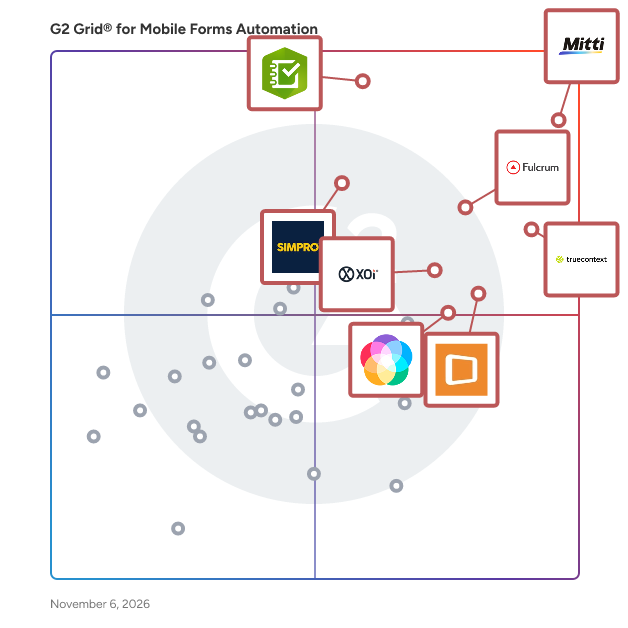
G2 Grid® for Mobile Forms Automation Software

G2 Grid® for Mobile Forms Automation Software plotting products by satisfaction and market presence

Highlighted products: Mitti (by SafetyCulture), TrueContext, ArcGIS Survey123, Fulcrum, Appenate (formerly Forms On Fire), Simpro, XOi, and Lumiform.

Underlying data: [Grid® JSON](https://www.g2.com/categories/mobile-forms-automation/grids.json?focus%5B%5D=safetyculturehq&focus%5B%5D=truecontext&focus%5B%5D=arcgis-survey123&focus%5B%5D=fulcrum&focus%5B%5D=appenate-formerly-forms-on-fire&focus%5B%5D=simpro&focus%5B%5D=xoi&focus%5B%5D=zyp-one-gmbh-lumiform)

UpKeep

UpKeep is the AI-native CMMS and asset operations platform trusted by 4,000+ companies to run maintenance, operations, and compliance from one system. Maintenance teams in manufacturing, transportation, and facilities use UpKeep to reduce downtime, extend asset life, and work safely. What's in the platform: * CMMS: Asset registry, work orders, parts, inventory, checklists, inspections, and reporting. * Nova: AI that lets teams build custom apps and automate hand-offs around how each site works. * Safety: EHS tools and OSHA records that keep sites audit-ready. * Learn: Built-in safety training and certification tracking. * Fleet: Maintenance, inspections, and service history for vehicles and mobile equipment. * Edge IIoT Sensors: Real-time machine health from connected assets. * Mobile: Always-available tools, like voice-to-note CAPA reporting, that maximize wrench time. Learn more at https://upkeep.com

Average Rating: 4.5/5.0

Total Reviews: 1,115

How Do G2 Users Rate UpKeep?

  • Has the product been a good partner in doing business?: 9.0/10 (Category avg: 9.0/10)

Who Is the Company Behind UpKeep?

  • Seller: UpKeep
  • Company Website:
  • Year Founded: 2014
  • HQ Location: Los Angeles, CA
  • LinkedIn® Page: www.linkedin.com
    154 employees on LinkedIn®

Who Uses This Product?

  • Who Uses This: Maintenance Manager, Facilities Manager
  • Top Industries: Facilities Services, Manufacturing
  • Company Size: 50% Medium, 44% Small

What Do G2 Reviewers Say About UpKeep?

AI-generated summary from verified user reviews

Pros
  • Users love the ease of use of UpKeep, enabling streamlined work and efficient management of assets and inventory.
  • Users value the clear visibility and user-friendly features in UpKeep, making work order management seamless and efficient.
  • Users find UpKeep to be intuitive and user-friendly, enhancing efficiency in managing and tracking inventory seamlessly.
  • Users praise the excellent customer support of UpKeep, which greatly enhances their experience and confidence in the product.
  • Users value the efficiency of UpKeep, enjoying streamlined work management and improved asset tracking all in one place.
Cons
  • Users report issues with work order functionalities, including slow loading, printing troubles, and inadequate integrations.
  • Users express a need for improved missing features like better integrations and more reporting capabilities.
  • Users experience slow performance, with functions and reports taking longer than expected, affecting overall efficiency.
  • Users often face software bugs that delay report generation and complicate asset management in UpKeep.
  • Users face a significant learning curve with UpKeep, especially regarding advanced analytics and training friendliness.

What Are Recent G2 Reviews of UpKeep?

What Are G2 Users Discussing About UpKeep?

Upvio

Vitals AI is Upvio’s camera-based remote vital signs monitoring technology. It uses a short face scan and remote photoplethysmography (rPPG) with computer vision to detect subtle blood-flow signals and convert them into clinically validated physiological insights using a standard phone or webcam, with no wearables or external hardware. In around 30 seconds, Vitals AI can deliver 20+ health markers, including heart rate, HRV, breathing rate, blood pressure, stress metrics, and cardiovascular risk indices. Teams can configure scans using reusable templates, generate secure, shareable links for any workflow (customers, campaigns, teams, individuals), and review results and trends from a single platform. Deployment is available as a fully hosted solution, with enterprise-grade security, governance, and compliance built in, and integration supported via platform tools and API options.

Average Rating: 4.7/5.0

Total Reviews: 10

How Do G2 Users Rate Upvio?

  • Has the product been a good partner in doing business?: 8.3/10 (Category avg: 9.0/10)

Who Is the Company Behind Upvio?

  • Seller: Upvio
  • Year Founded: 2017
  • HQ Location: Camperdown, NSW
  • LinkedIn® Page: www.linkedin.com
    17 employees on LinkedIn®

Who Uses This Product?

  • Company Size: 80% Small, 10% Medium

What Are Recent G2 Reviews of Upvio?

What Are G2 Users Discussing About Upvio?

Vagaro

Vagaro is the #1 business management software built for professionals in the beauty, wellness, and fitness industries. Whether you're a solo professional, small business, or managing multiple locations, Vagaro provides everything you need to run and grow your business efficiently. Easily manage your schedule with customizable calendars and 24/7 online booking. Reduce no-shows with automated email and text reminders. Accept payments seamlessly using integrated POS tools, manage inventory in real time, and deliver a personalized client experience with detailed profiles, digital intake forms, and notes. Grow your brand with built-in marketing tools, including email and text campaigns, a customizable website, and exposure on the Vagaro Marketplace. Stay on top of performance with advanced reporting and payroll features. Plus, AI-powered tools help you create content, communicate with clients, and automate routine tasks. Join over 220,000 professionals who trust Vagaro to streamline operations, engage clients, and boost revenue—all from one powerful platform.

Average Rating: 4.6/5.0

Total Reviews: 394

How Do G2 Users Rate Vagaro?

  • Has the product been a good partner in doing business?: 7.4/10 (Category avg: 9.0/10)

Who Is the Company Behind Vagaro?

  • Seller: Vagaro
  • Company Website:
  • Year Founded: 2009
  • HQ Location: Pleasanton, California
  • LinkedIn® Page: www.linkedin.com
    713 employees on LinkedIn®

Who Uses This Product?

  • Who Uses This: Owner
  • Top Industries: Health, Wellness and Fitness, Consumer Services
  • Company Size: 66% Small, 1% Large

What Do G2 Reviewers Say About Vagaro?

AI-generated summary from verified user reviews

Pros
  • Users find Vagaro to be easy and practical, streamlining appointment booking and client communication effectively.
  • Users love the easy scheduling and reminder notifications that enhance client management and streamline business operations.
  • Users appreciate Vagaro for its comprehensive resources and 24/7 support, enabling seamless business management.
  • Users appreciate the booking ease of Vagaro, allowing clients to schedule and pay effortlessly online.
  • Users appreciate the easy online booking system of Vagaro, which simplifies scheduling and service options for clients.
Cons
  • Users are frustrated with missing features in Vagaro, impacting usability and employee motivation significantly.
  • Users express frustration over limited features, particularly regarding booking flexibility and service organization.
  • Users experience poor usability with Vagaro, facing challenges in website design, multiple service setups, and security concerns.
  • Users are disappointed by the lack of features in Vagaro, which limits functionality despite the high cost.
  • Users report app issues such as login troubles, hard service setups, and disruptive ads affecting their experience.

What Are Recent G2 Reviews of Vagaro?

What Are G2 Users Discussing About Vagaro?

AI can help you find the answers. G2 helps you trust them.

Connect G2 to Claude or ChatGPT for answers grounded in G2's trusted reviews, comparisons, and pricing from real user insights.

How it works

Vasion Automate

Vasion is an Intelligent Print Automation company making digital transformation attainable for all by eliminating print servers, consolidating print environments, digitizing and automating workflows. We're redefining modern output management with one of the world's most advanced and secure cloud-native platforms, turning what's been IT's longest-standing headache, print, into a strategic advantage. More than 14,000 global customers, including hundreds of the world's leading enterprises, trust PrinterLogic, PrinterLogic Output, and Vasion Automate to modernize, secure, and unlock AI-ready environments. With Vasion, digital transformation works for everyone. Learn more at www.vasion.com.

Average Rating: 4.7/5.0

Total Reviews: 7

How Do G2 Users Rate Vasion Automate?

  • Has the product been a good partner in doing business?: 9.7/10 (Category avg: 9.0/10)

Who Is the Company Behind Vasion Automate?

  • Seller: Vasion
  • Year Founded: 2008
  • HQ Location: St. George, Utah
  • LinkedIn® Page: www.linkedin.com
    540 employees on LinkedIn®

Who Uses This Product?

  • Company Size: 43% Medium, 29% Small

What Do G2 Reviewers Say About Vasion Automate?

AI-generated summary from verified user reviews

Pros
  • Users highlight the ease of use with Vasion Automate, simplifying printer management and installation across multiple locations.
  • Users love the effective organization of printer management with Vasion Automate, simplifying installations across multiple locations.
  • Users value the convenience of managing printers from a single web interface, simplifying installation and management tasks.
  • Users appreciate the efficient centralized data storage of Vasion Automate, simplifying printer management across multiple locations.
  • Users value the centralized document management of Vasion Automate, streamlining printer installations across multiple locations.
Cons
  • Users note that reporting features are limited, suggesting room for improvement despite overall satisfaction with the product.
  • Users note that the reporting features are lacking, but still find the product to be excellent overall.
  • Users find that the reporting features need improvement, but overall, they appreciate the product greatly.

What Are Recent G2 Reviews of Vasion Automate?

What Are G2 Users Discussing About Vasion Automate?

Verj.io

Verj.io is a Low Code platform that accelerates the delivery of rich, engaging web applications. Developers of all abilities use Verj.io to quickly create browser apps that consume APIs and connect to databases. It uses the latest progressive web app technology, works seamlessly on all devices and renders a native experience for mobile phone users. Developers one-click deploy their finished apps straight to the Verj.io cloud. No need for expensive servers or local devOps, Verj.io does it all.

Who Is the Company Behind Verj.io?

VerusTrust Forms

VerusTrust Forms is a secure, offline-first form builder for teams that collect high-stakes data in the field. Organizations use it to replace paper, spreadsheets and consumer survey tools for inspections, audits, safety checks and compliance reporting. A no-code drag-and-drop builder creates forms in minutes, with text, numbers, dropdowns, tables, file and photo uploads, and geospatial fields that capture GPS points, lines and polygons. The companion mobile app for Android and iOS works fully offline: submissions are stored on the device and sync in the correct order once a connection returns, so no record is lost or overwritten. Granular role-based permissions control who can build, view, edit or export forms and data, by user, team or department. Every submission lands in a single dashboard where teams can filter, inspect and export to CSV or Excel for Power BI, Tableau or Google Sheets, with no vendor lock-in. A platform-agnostic API lets teams design, deploy and manage forms programmatically. For records that have to stand up to audit, administrators can anchor selected fields on the blockchain, creating a tamper-evident trail while sensitive raw data stays off-chain. VerusTrust Forms is built and hosted on Microsoft Azure, with encryption, access control and regional data-residency options that support GDPR. It is built for field and operations teams, inspection and safety teams, construction and infrastructure, utilities and environmental organizations, government and municipalities, and NGOs and research organizations. A free plan is available with no time limit and no credit card required.

Who Is the Company Behind VerusTrust Forms?

VLX

VLX is an innovative SaaS platform that redefines the way businesses manage inspections, audits, work orders and quality control processes. Tailored to meet the diverse needs of various industries, VLX provides a comprehensive solution that simplifies data collection, enhances collaboration, and ensures adherence to industry standards and regulations. Key Features - Dynamic Forms and Checklists: VLX allows users to create fully customizable templates, forms and checklists using a simple drag-and-drop web interface. This flexibility enables businesses to tailor inspection processes to their specific needs, ensuring that all critical aspects are covered. - Capture Multimedia Evidence VLX is designed to capture data efficiently on the go while performing free-form data gathering or by running templated inspections processes. Photos, videos, audio, barcodes and signatures can be captured on or offline on mobile devices in remote locations synching to the cloud automatically when connectivity is restored. - Mobile Accessibility: With the VLX mobile app, available on both iOS and Android, users can conduct inspections and audits on-the-go. The app supports offline functionality, allowing data capture even in remote locations without internet access. Photos, videos, and voice notes can be easily added to inspection records, enriching the data collected. - Real-time Collaboration: VLX promotes seamless collaboration among team members and with third-parties by allowing real-time sharing and updating of inspection and audit data. This feature ensures that all stakeholders and collaborators are always on the same page, enhancing communication and reducing the risk of errors. - Workflows and Approvals: VLX offers robust workflow capabilities, enabling businesses to define and automate their inspection and audit processes. Users can control visibility and access to data, lock data entries, and create approval processes to ensure that all inspection steps meet internal processes and regulatory requirements. - Reporting: Customizable PDF and Excel reports can be generated effortlessly, providing detailed documentation with corrective actions that can be easily shared. - Centralized Data Management: VLX centralizes the management of all inspection and audit activities, offering a single platform to track progress, assign tasks, and monitor compliance. This centralized approach streamlines workflows and enhances operational efficiency. - Integration Capabilities: VLX can be integrated with other enterprise systems, such as ERP and CRM platforms, via API, ensuring that data flows smoothly across all business functions. This interoperability enhances the overall efficiency and effectiveness of the organization’s operations. - Work Offline, Sync Later: You don’t need to be online when using VLX. Data can be captured offline on the VLX mobile app, which automatically syncs all devices through the cloud when Internet connectivity is restored. This ensures continuous operation and data integrity regardless of network availability. - Schedule and Assign Tasks/WorkOrders: The “Tasks” feature streamlines workflows by allowing users to schedule and assign critical operations such as inspections, work orders, maintenance tasks, and verifications. This essential feature keeps your team organized, ensuring routine inspections and complex audits are managed efficiently. - KYPiT (Know Your Product): A standout feature of VLX, KYPiT serves as a data validation layer positioned above a VLX report, verifying metadata and geolocation accuracy and detecting fraudulent activities. This feature sets VLX apart by providing unparalleled trust and control over the inspection process. Industry Applications VLX serves a wide range of industries, including: - Manufacturing: Ensures product quality and compliance with industry standards through thorough inspections and audits. - Construction: Streamlines site inspections, safety audits, and compliance checks, reducing risks and improving project outcomes. - Healthcare: Enhances patient safety and regulatory compliance through meticulous audits and quality checks. - Oil and Gas: Facilitates equipment inspections, safety audits, and regulatory compliance, ensuring operational safety and efficiency. - Hospitality: Ensures adherence to quality standards and enhances guest satisfaction through regular inspections and audits. - Financial Services and Insurance: Enhances risk management and regulatory compliance through both planned and ad-hoc audits and inspections. This ensures the validation of asset conditions and geolocation, thereby maintaining trust and transparency across operations. - Real Estate: Streamlines property inspections, compliance checks, and maintenance tasks, ensuring properties are well-maintained and in compliance with regulations. - Safety: Enhances workplace safety through thorough safety inspections, audits, and compliance checks. - Vehicle Repair and Maintenance: Streamlines processes by utilizing templated forms for inspections and audits. This ensures thorough and consistent checks during repairs and routine maintenance, enhancing safety, efficiency, and regulatory compliance. - Transportation: Facilitates inspections and audits to ensure regulatory compliance and operational safety in transportation and logistics operations. - Quality Management: Enhances overall quality management processes by providing tools for inspections, audits, and compliance monitoring. Benefits - Efficiency: Automates and streamlines inspection and audit processes, saving time and reducing manual effort. - Accuracy: Enhances data accuracy through standardized forms, real-time updates, data validation (KYPiT) and multimedia data capture. - Compliance: Helps maintain compliance with industry standards and regulations through thorough documentation and reporting. - Collaboration: Fosters better communication and teamwork with real-time data sharing and centralized management. - Centralized Institutional memory: Consolidates your organization's collective data allowing you to strengthen your inspection processes and establish a single version of the truth. For Professionals and Enterprises VLX can be customized to fit organizations of all sizes with multiple teams with different users, templates, and projects. Team members can share templates, inspections, and reports, and users can be set up with different access roles and permissions. We are dedicated to helping organizations achieve excellence in their inspection and audit processes. Our platform’s versatility and robust features make it an invaluable tool for businesses aiming to improve quality, ensure compliance, and enhance operational efficiency. Discover the power of VLX and transform your inspection and audit processes. Visit our website or contact us for a personalized demo.

Average Rating: 4.8/5.0

Total Reviews: 8

How Do G2 Users Rate VLX?

  • Has the product been a good partner in doing business?: 10.0/10 (Category avg: 9.0/10)

Who Is the Company Behind VLX?

  • Seller: VLX
  • Company Website:
  • Year Founded: 2018
  • HQ Location: Aventura, US
  • LinkedIn® Page: www.linkedin.com
    16 employees on LinkedIn®

Who Uses This Product?

  • Top Industries: Oil & Energy
  • Company Size: 63% Medium, 38% Small

What Do G2 Reviewers Say About VLX?

AI-generated summary from verified user reviews

Pros
  • Users find VLX to be an extremely user-friendly tool, enhancing seamless workflows and customer trust effortlessly.
  • Users value the efficiency improvement of VLX, finding it enhances work comfort and trust in customer relations.
  • Users admire the real-time updates of VLX, benefiting from fast access to online information.
  • Users appreciate the speed of VLX, finding it fast and efficient for accessing information online.
  • Users value the tracking capabilities of VLX, enhancing process follow-up with support for files and pictures.

What Are Recent G2 Reviews of VLX?

Vortilla

Vortilla is an Australian software development company founded in 2016, specializing in creating innovative solutions that streamline business operations. Their flagship product, Op Central, is a comprehensive software platform designed to reduce the cost, risk, and complexity associated with managing businesses. Key Features and Functionality: - Billing & Invoicing: Efficient management of financial transactions. - Customer Relationship Management : Tools to enhance customer interactions and relationships. - Employee Management: Streamlined processes for overseeing staff. - Financial Management: Comprehensive oversight of financial operations. - Inventory Management: Effective tracking and control of inventory. - Marketing Management: Strategies and tools to optimize marketing efforts. - Order Management: Simplified processing and tracking of orders. - Point of Sale : Integrated systems for sales transactions. - Project Management: Tools to plan, execute, and monitor projects. - Purchasing: Efficient procurement processes. - Scheduling: Organized planning of tasks and appointments. - Time & Expense Tracking: Monitoring of time and expenses for better budgeting. - Training Management: Resources for employee development and training. - Vendor Management: Effective coordination with suppliers and vendors. Primary Value and Solutions Provided: Op Central addresses the challenges businesses face in managing various operational aspects by offering an integrated platform that consolidates essential functions. This integration reduces operational costs, mitigates risks, and simplifies complex processes, enabling businesses to focus on growth and efficiency. By leveraging Op Central, companies can enhance productivity, improve customer relationships, and achieve better financial oversight, ultimately leading to a more streamlined and successful operation.

Average Rating: 5.0/5.0

Total Reviews: 1

Who Is the Company Behind Vortilla?

Who Uses This Product?

  • Company Size: 100% Medium

What Are Recent G2 Reviews of Vortilla?

Weave

Weave is the all-in-one experience platform for small- and medium-sized healthcare businesses. From the first phone call to the final invoice and every touchpoint in between, Weave connects the entire customer journey. Weave’s software solutions transform how local healthcare providers attract, communicate with and engage patients to grow their practice. To learn more, visit getweave.com.

Average Rating: 4.6/5.0

Total Reviews: 519

How Do G2 Users Rate Weave?

  • Has the product been a good partner in doing business?: 9.3/10 (Category avg: 9.0/10)

Who Is the Company Behind Weave?

  • Seller: Weave
  • Company Website:
  • Year Founded: 2008
  • HQ Location: Lehi, Utah
  • LinkedIn® Page: www.linkedin.com
    1,200 employees on LinkedIn®
  • Ownership: NYSE: WEAV

Who Uses This Product?

  • Who Uses This: Office Manager, Practice Manager
  • Top Industries: Medical Practice, Hospital & Health Care
  • Company Size: 91% Small, 7% Medium

What Do G2 Reviewers Say About Weave?

AI-generated summary from verified user reviews

Pros
  • Users find Weave to be very easy to use, enhancing efficiency with intuitive designs and smooth integration.
  • Users love how Weave enhances communication, making patient engagement smooth and efficient with reliable, intuitive features.
  • Users love the real-time texting capabilities of Weave, enhancing communication and improving patient engagement effortlessly.
  • Users value the enhanced patient communication Weave provides, greatly improving engagement and operational efficiency.
  • Users find Weave’s texting communication incredibly convenient, allowing seamless patient interactions and efficient information sharing.
Cons
  • Users report occasional technical issues like slow performance and missed notifications, affecting the overall experience.
  • Users experience messaging issues with delays and glitches that hinder effective communication and workflow.
  • Users experience communication issues with Weave, leading to patient frustration and marketing inefficiencies.
  • Users experience connectivity issues with Weave, leading to disruptions in communication and operational efficiency.
  • Users feel the limited features restrict functionality, particularly in scheduling and package capabilities.

What Are Recent G2 Reviews of Weave?

What Are G2 Users Discussing About Weave?

Weavely

Weavely.ai is an AI-powered form builder that turns text prompts, voice input, and documents into smart online forms in seconds. Just type what form or survey you need, or upload a PDF, and Weavely will generate an optimized version with relevant questions.You can also style your form with AI by describing your desired aesthetic or uploading an image with your brand colors. Choose from multiple layouts, add logos or images, and use design templates to help your form visually stand out. Weavely supports a wide range of use cases — from lead gen and feedback collection to onboarding flows and internal surveys. It offers rich elements like image pickers, sliders, HTML blocks, signature fields, and more. With advanced conditional logic and answer piping, you can personalize the user experience with ease. To make your workflow even smoother, Weavely natively integrates with dozens of tools, such as HubSpot, Notion, Googlesheets, Salesforce, Zapier, Make, and many more. And once the responses are in, Weavely’s built-in AI insights help you analyze data. Summarize results, detect patterns, segment audiences, and generate charts — all from a single prompt, without any manual work!

Average Rating: 4.7/5.0

Total Reviews: 17

How Do G2 Users Rate Weavely?

  • Has the product been a good partner in doing business?: 10.0/10 (Category avg: 9.0/10)

Who Is the Company Behind Weavely?

  • Seller: Weavely
  • Year Founded: 2021
  • HQ Location: Brussels, BE
  • LinkedIn® Page: www.linkedin.com
    4 employees on LinkedIn®

Who Uses This Product?

  • Company Size: 88% Small, 6% Large

What Do G2 Reviewers Say About Weavely?

AI-generated summary from verified user reviews

Pros
  • Users appreciate the ease of use of Weavely, enabling quick form creation and seamless integration into workflows.
  • Users find Weavely's ease of use and quick form creation highly beneficial for their workflow and client intake.
  • Users find the easy setup of Weavely intuitive and quick, greatly enhancing their workflow efficiency.
  • Users appreciate the quick setup of Weavely, simplifying form creation and enhancing workflow efficiency.
  • Users appreciate the ease of creation with Weavely, allowing quick form development with AI assistance and integrations.
Cons
  • Users face a steep learning curve for complex workflows, making it challenging to set up advanced features effectively.
  • Users find editing difficulty in Weavely, as manual modifications can be tedious and mobile adjustments less efficient.
  • Users highlight survey issues with Weavely, noting incomplete information and the need for more intuitive prompt guidance.
  • Users find the lack of date timestamps frustrating when using Google Sheets integration, affecting form tracking.
  • Users find that email spam from numerous notifications can quickly overwhelm their inboxes.

What Are Recent G2 Reviews of Weavely?

Webdocs Forms Management

Webdocs Forms Management is web-based forms software that helps you create fillable forms to capture the information you need. Then, it automatically passes data to back-end systems for approval and routing processes. Save time capturing and routing information and ensure accuracy by eliminating manual data entry.

Who Is the Company Behind Webdocs Forms Management?

  • Seller: Fortra
  • Year Founded: 1982
  • HQ Location: Eden Prairie, Minnesota
  • LinkedIn® Page: www.linkedin.com
    1,784 employees on LinkedIn®

Wispform

Wispform is the simplest form builder for creating beautiful forms, surveys and quizzes. It also offers advanced capabilities like custom branding, logic jump, payment integration and much more. Users can expect to come in and have a beautiful, conversational form within a few minutes.

Average Rating: 4.6/5.0

Total Reviews: 15

Who Is the Company Behind Wispform?

  • Seller: Wispform
  • Year Founded: 1990
  • HQ Location: Aurora, IL
  • LinkedIn® Page: www.linkedin.com
    1 employees on LinkedIn®

Who Uses This Product?

  • Company Size: 87% Small, 13% Medium

What Do G2 Reviewers Say About Wispform?

AI-generated summary from verified user reviews

Pros
  • Users find Wispform to be affordable, offering similar functionality to Typeform at a much lower price.
Cons
  • Users find Wispform's user experience lacking compared to other market solutions, impacting overall satisfaction.
  • Users find the poor design of Wispform less appealing compared to other market solutions.

What Are Recent G2 Reviews of Wispform?

What Are G2 Users Discussing About Wispform?

WorkBright

WorkBright is a specialized I-9 compliance and E-Verify software built to keep organizations audit-ready, accurate, and confident in managing employment eligibility—especially across complex, high-volume, or distributed workforces. The platform performs 150+ automated compliance checks to catch errors before submission, supports all three Section 2 workflows, and introduces industry-first document verification technology to detect tampered or fraudulent documents in the I-9 process. Built-in E-Verify case management and support for TPS and EAD workflows make it easy to manage ongoing eligibility and reverification as workforce needs change. Beyond software, WorkBright helps teams stay aligned with evolving compliance guidance through expert support and audit services, ensuring organizations are always prepared for inspection—not scrambling for it. And for teams that want to hand the work off entirely, WorkBright+ adds full-service I-9 management, pairing AI agents with human compliance experts to run Section 2, E-Verify, and reverification end-to-end, with 100% of eligible fines covered on the cases we manage. The result is a focused, compliance-first solution that keeps I-9 processes fast, flexible, and always audit-ready.

Average Rating: 4.7/5.0

Total Reviews: 181

How Do G2 Users Rate WorkBright?

  • Has the product been a good partner in doing business?: 9.4/10 (Category avg: 9.0/10)

Who Is the Company Behind WorkBright?

  • Seller: Workbright
  • Company Website:
  • Year Founded: 2014
  • HQ Location: Boulder, CO
  • LinkedIn® Page: www.linkedin.com
    58 employees on LinkedIn®

Who Uses This Product?

  • Who Uses This: HR Coordinator, Market Manager
  • Top Industries: Hospital & Health Care, Staffing and Recruiting
  • Company Size: 69% Medium, 16% Small

What Do G2 Reviewers Say About WorkBright?

AI-generated summary from verified user reviews

Pros
  • Users find WorkBright's platform to be very easy to use, enhancing efficiency and convenience in document management.
  • Users value the time-saving capabilities of WorkBright, enhancing productivity and streamlining recruitment processes significantly.
  • Users find the easy and convenient onboarding process of WorkBright incredibly efficient for seasonal employment tasks.
  • Users find WorkBright to be incredibly user-friendly, streamlining recruitment tasks and enhancing overall productivity.
  • Users value the outstanding customer support of WorkBright, facilitating quick help and efficient onboarding processes.
Cons
  • Users report verification issues that hinder document uploads and cause confusion with the E-Verify interface.
  • Users experience poor customer support, struggling with timely responses and complicated document creation processes.
  • Users experience login issues, especially less tech-savvy new hires, making access to WorkBright more challenging.
  • Users find the individual approval process tedious and wish for a faster way to accept completed forms.
  • Users struggle with login difficulties for non-tech savvy hires and desire better integration with existing HRIS systems.

What Are Recent G2 Reviews of WorkBright?

What Are G2 Users Discussing About WorkBright?

WorkClout

WorkClout is the #1 rated connected worker and quality management platform for automotive parts manufacturers. Our software help streamline & automate internal audits, document control, visual inspections, training, and preventive quality design With WorkClout organizations can streamline & automate: ∙ Layer Process Audits ∙ CARE Inspections ∙ 8D ∙ Equipment Verification Audit (PVA) ∙ FMEA Compliance ∙ Document Control ∙ Pressure Equipment Directive (PED) ∙ Supplier Audits ∙ IATF 16949 ∙ ISO 9001 ∙ ISO 45001 ∙ ISO 14001 ∙ Visual/Dimensional Quality Inspection ∙ Increase Process/Efficiency ∙ Preventive/Predict Quality Design (Reducing Quality Defects Parts Per Billion) ∙ SPC / Data Trend Analysis ∙ Corrective Actions / CAPA ∙ Supplier Corrective Action (SCAR) +more! Industries served: Automotive Parts OEM Manufacturing, Battery Manufacturing, Aftermarket Parts Manufacturing, Automotive Manufacturers, Automotive Part Suppliers. The ultimate tool for the frontline worker in the automotive industry!

Average Rating: 4.7/5.0

Total Reviews: 10

How Do G2 Users Rate WorkClout?

  • Has the product been a good partner in doing business?: 10.0/10 (Category avg: 9.0/10)

Who Is the Company Behind WorkClout?

  • Seller: WorkClout
  • Year Founded: 2019
  • HQ Location: City of Industry, California
  • LinkedIn® Page: www.linkedin.com
    2 employees on LinkedIn®

Who Uses This Product?

  • Company Size: 50% Small, 40% Medium

What Are Recent G2 Reviews of WorkClout?

What Are G2 Users Discussing About WorkClout?

WorkfloPlus

WorkfloPlus by Intoware is a digital work execution platform for manufacturers and other industrial environments where you need to guide work, capture evidence and understand how tasks were actually completed. Replace paper instructions, checklists and manual processes with digital work instructions, SOPs, inspections, maintenance procedures, quality checks, training activities and compliance processes that people can follow step by step at the point of work. WorkfloPlus runs on mobile devices, tablets, desktops and supported industrial smart glasses, including RealWear. Offline working also means tasks can continue in factories, field environments and remote locations where connectivity is limited. Digital Work Instructions and SOPs WorkfloPlus gives you step-by-step digital work instructions and SOPs for assembly, changeovers, installation, commissioning, maintenance, inspections, quality checks, training and other repeatable work. Add text, images, video, supporting documents, data-entry fields, conditional steps and evidence requirements. Version control helps make sure people are following the latest approved procedure, while updates can be rolled out without relying on printed documents or outdated local copies. This gives people clear guidance while the work is being carried out, rather than asking them to refer back to separate documents or complete paperwork afterwards. AI-Assisted Work Instruction Creation WorkfloPlus includes AI-assisted tools to help create and maintain digital procedures more quickly. Create a first draft from a prompt or use an existing SOP or document as the starting point for a digital work instruction. AI-assisted translation can also help you provide instructions in different languages. You remain in control of the final procedure, with review and approval staying part of the process. Inspections, Quality and Compliance WorkfloPlus supports digital inspections, quality checks and compliance processes alongside standard work instructions. Create inspection procedures, schedule and assign work, and capture structured information as each check is completed. Evidence can include measurements, pass/fail responses, photos, video, signatures, timestamps, notes, barcode and QR scans, dropdown selections, numerical values and location data. Issues and non-conformances can also be recorded during the task with supporting evidence, so problems are visible without waiting for paper forms to be returned or manually entered. This gives you clearer evidence that required checks were completed and approved procedures were followed. Evidence Capture and Proof of Work WorkfloPlus captures evidence while work is being completed. Add photos, measurements, signatures, timestamps, notes, scans and other required data at the relevant stage of the task rather than trying to reconstruct what happened afterwards. When the work is complete, WorkfloPlus can automatically generate a report containing the data and evidence captured during execution. This gives supervisors, managers, customers and other stakeholders a clearer account of what was done, when it was completed and how the work was carried out. Jobs, Scheduling and Projects WorkfloPlus turns digital procedures into jobs that can be assigned, scheduled and tracked. Jobs can contain multiple tasks, follow a defined order and include assignments and due dates. Create one-off jobs or schedule recurring work for inspections, maintenance, quality checks and other regular processes. WorkfloPlus Projects groups related jobs into phases so larger programs of work can be managed in one place. This can include installations, commissioning, maintenance programs and other multi-stage activities. Project progress shows what has been completed and what is still outstanding. Reporting, Data and Business Intelligence WorkfloPlus captures structured execution data as work happens. Completed jobs can generate reports automatically, reducing manual administration and helping information move from the point of work to the people who need it more quickly. Connect WorkfloPlus data to Microsoft Power BI for deeper analysis and visualization across areas such as inspections, quality, performance and compliance. The result is a clearer picture of how work was actually carried out, not simply whether a task was marked as complete. Integrations WorkfloPlus works alongside your existing enterprise systems rather than replacing them. Integration options include SAP, IBM Maximo, Salesforce, Microsoft SharePoint, Microsoft Power BI, Microsoft Power Automate and Zapier. APIs and other integration options can also connect WorkfloPlus with ERP, CMMS, EAM, QMS and other business systems. This makes WorkfloPlus the work execution layer between the systems used to plan and manage work and the people carrying it out. Proven in Industrial Environments WorkfloPlus is used across manufacturing, inspections, installation and field-based work, with customers achieving measurable improvements in how work is completed and reported. Ahrend UK has used WorkfloPlus across more than 2,000 installations, with recorded WorkfloPlus jobs increasing from 16 to 93. Centranz, a remanufacturer of heavy-duty transmissions, increased completed inspection reports by 60% using WorkfloPlus to capture quality inspection evidence and generate reports for customers. Rimstock, a manufacturer of alloy wheels, increased inspections by 125% after introducing WorkfloPlus. Petrofac used WorkfloPlus across more than 1,500 North Sea inspections and increased the number of inspections completed each day by 200%. Industries Manufacturing is a core WorkfloPlus use case, including digital work instructions, assembly, changeovers, quality inspections, maintenance, production checks and operator training. WorkfloPlus is also used across aviation MRO, construction and highways, utilities, oil and gas, rail and other highly regulated or industrial environments. Other relevant use cases include logistics and distribution, pharmaceuticals, mining and metals, machinery and equipment, food manufacturing and maritime operations. Devices, Deployment and Security WorkfloPlus is available on mobile devices, tablets and desktops, with support for industrial smart glasses where hands-free guidance is required. Offline working lets people continue following instructions and capturing information where connectivity is limited, with data synchronized when a connection becomes available. Deployment options include shared cloud, private cloud and on-premises environments. Intoware is ISO 27001 certified. Who WorkfloPlus Is For WorkfloPlus is designed for manufacturers and industrial businesses that need more than a document repository, digital checklist or form builder. It helps you guide people through work, make procedures easier to follow, collect structured execution data, capture evidence at the point of work and produce clear reports when tasks are completed. Use WorkfloPlus when you want to reduce reliance on paper, improve consistency, strengthen compliance, increase traceability, support training and knowledge transfer, or get a clearer understanding of how work was actually carried out.

Average Rating: 4.3/5.0

Total Reviews: 14

How Do G2 Users Rate WorkfloPlus?

  • Has the product been a good partner in doing business?: 8.3/10 (Category avg: 9.0/10)

Who Is the Company Behind WorkfloPlus?

Who Uses This Product?

  • Company Size: 64% Small, 21% Large

What Do G2 Reviewers Say About WorkfloPlus?

AI-generated summary from verified user reviews

Pros
  • Users love the ease of use of WorkfloPlus, allowing stress-free management of their workflows.
  • Users appreciate the efficiency of WorkfloPlus, allowing them to complete processes effortlessly and stress-free.
  • Users value the stress-free process efficiency of WorkfloPlus, enhancing their productivity and enjoyment.
What Are Recent G2 Reviews of WorkfloPlus?

Neeraja Prakash
NP
Researched and written by Neeraja Prakash
Updated October 3, 2024