# Best Expense Management Software for Medium-Sized Businesses - Page 4

## How Many Expense Management Software Products Does G2 Track?

**Total Products under this Category:** 425

### Category Stats (Aug 2026)

- **Average Rating:** 4.44/5 (↑0.01 vs Jul 2026) The average rating of products in this category, based on all submitted ratings
- **Top Trending Product:** Receiptor AI (+21.43%) - Among all products in this category, Receiptor AI recorded the largest rating increase compared to last month

_Last updated: August 01, 2026_

## How Does G2 Rank Expense Management Software Products?

**Why You Can Trust G2's Software Rankings:**

- 30 Analysts and Data Experts
- 96,400+ Authentic Reviews
- 425+ Products
- Unbiased Rankings

G2's software rankings are built on verified user reviews, rigorous moderation, and a consistent research methodology maintained by a team of analysts and data experts. Each product is measured using the same transparent criteria, with no paid placement or vendor influence. While reviews reflect real user experiences, which can be subjective, they offer valuable insight into how software performs in the hands of professionals. Together, these inputs power the G2 Score, a standardized way to compare tools within every category.

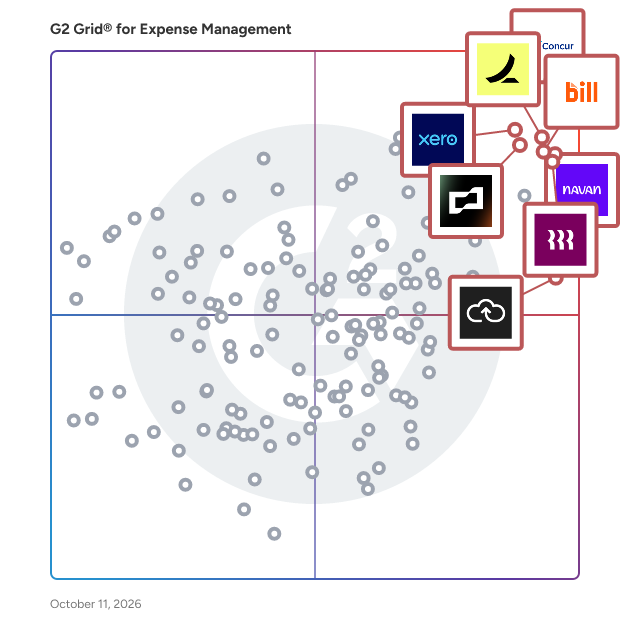
## G2 Grid® for Expense Management Software
 ![G2 Grid® for Expense Management Software plotting products by satisfaction and market presence](https://www.g2.com/categories/expense-management/grids.png?focus%5B%5D=310&focus%5B%5D=39331&focus%5B%5D=1640028&focus%5B%5D=129596&focus%5B%5D=59299&focus%5B%5D=41684&focus%5B%5D=1142&focus%5B%5D=342)

Highlighted products: SAP Concur, Navan (Formerly TripActions), Rippling Finance, Ramp, Brex, BILL Spend & Expense (Formerly Divvy), Xero, and Expensify.

Underlying data: [Grid® JSON](https://www.g2.com/categories/expense-management/grids.json?focus%5B%5D=sap-concur&focus%5B%5D=navan-formerly-tripactions&focus%5B%5D=rippling-finance&focus%5B%5D=ramp-financial-ramp&focus%5B%5D=brex&focus%5B%5D=bill-spend-expense-formerly-divvy&focus%5B%5D=xero&focus%5B%5D=expensify&segment=mid-market)

**Sponsored**

### GreaseBook

Generate a 6% lift in your net profit margins and approach your most operationally efficient oil & gas production company in 6 weeks or less – all via a simple mobile app 📲 We're talking: 📉 38% reduction in downtime 💰 14% reduction in overhead expense 📈 4% increase in production ⏳ Claw back 2 to 20 hrs per user per week (varying upon responsibilities of user) 🚫 $33K annual savings in preventable errors (salt water spills, oil spills, stripping out wells, injector well blowouts, etc) \*Average Results of Producers who run the Greasebook app in their operations (which means a full HALF of our clients did better! 😄💪🏻) Ready? Set? Good. 🙌 🗣 "At first, I thought transitioning to the GreaseBook would've been tough. We'd done things a certain way for a really long time. But, so far the Greasebooks have been very easy to transfer to. I haven’t had any complaints from the pumpers. I really like how the app makes the pumpers be accountable for the oil. I cant tell you how many times their old gauge sheets would have gauges that were so messed up and then throw a run ticket in there -- it was a nightmare to sort out! With GreaseBook, it makes my guys correct any errors. Thanks for everything!" 👉 Dustin Wyer, Operations | Val Energy | Wichita, KS 🏢🛢 🗣 "Upon beginning, I wasn't sure whether the GreaseBook Oil & Gas Production Software would give us the flexibility we needed with our reporting. However, over the last year, GreaseBook has given me the ability to take on a considerable amount of supervision of the company. Now, I don’t have to rely so heavily on our contract field supervisor. In fact, I compared this year's overhead with that of last year's, and we have been able to reduce our costs by more than half. And, those reduced costs include our this year's GreaseBook charges! Thanks for developing this tool!!" 👉 Susie Agee, Vice President | Marsh Oil & Gas Co. | Pauls Valley, OK 🏢🛢 🗣"I was VERY hesitant to try the GreaseBook software at first. That said, once we got ahold of it I saw just how much time it was going to save us. GreaseBook’s oil sales report with run ticket images alone saves us 3-4 days a month. In fact, we know what our purchaser owes us (and what they’re missing) even before they’ve sent us our statement... Now that they know we're watching our account so closely, we find even less mistakes on their part because they know we’re holding them accountable!" 👉 Bobi Posey, Admin | Phoenix Oil & Gas, Inc | Seminole, OK 🏢🛢 🏆 Oil & Gas Awards Finalist for New Tech Development of the Year 📰 As featured in the American Oil & Gas Reporter 📰 As featured in E&P Magazine 📰 As featured in the Oil & Gas Financial Journal 📰 As featured in SPE's 'The Way Ahead' BE THE OFFICE HERO, STREAMLINE YOUR OPERATIONS, AND DISCOVER WHY SOME OF THE INDUSTRY’S MOST EFFECTIVE OPERATORS RELY ON GREASEBOOK OIL & GAS PRODUCTION SOFTWARE TO DO THEIR BEST WORK 💪🏼 ✅ Focus: From orphan wells to lengthy routes, no matter what form your pumping takes, GreaseBook keeps your pumpers focused on moving those production updates from field to office. ✅ Gather: Easily gather everything that matters. Track tank levels, capture notes, administer well tests, submit photos of scanned run tickets. All from the field. All on your mobile device. All over the cellular network. ✅ Connect: Connect with the people who help you get it all done. Communicate, collaborate, and share in real-time with your guys and gals in the field without ever leaving the GreaseBook. ✅ Access: Access fast, accurate gauge sheets. No need to re-key production or manipulate Excel. Just one click and your production is organized into a beautiful screen-friendly layout. ✅ Everything in one place: The central place for everyone’s work. All the relevant content from well history to run ticket images, easily accessed. ✅ Get paid your due: Compare a month's worth of oil sales tickets vs purchaser statements vs payments received (and find those inconsistencies!) in just seconds. ✅ Knowledge discovery: GreaseBook acts as your operations watchdog, surfacing any unexpected drops in production or incompetence in the oilfield. Imagine a crisp, easy-to-understand, high-level view of your company's field operations... 🤔 When has oil been sold off location? 🤔 How much fluid is that new well producing each day? 🤔 With GreaseBook, you'll have the answers to these questions, and you'll have them in real-time. ⏱🖥 GreaseBook provides you with production information that's not only accessible, but also visual and actionable. 👀 Flick through production charts and graphs.📈 Zoom into specific data sets.📊 No more pen and paper gauge sheets.🙅‍♀️📝 No faxed reports. 🤦🏻‍♂️📠 No "phoning it in". 💁🏻‍♀️📞 No delays. 🤷‍♂️⏰ Built exclusively for the small to mid-sized independent oil & gas operator, GreaseBook is the only mobile app company dedicated to providing a simple mission-critical mobile workflow that makes the largest of operators seethe with envy. 😡🏛 Either download the app straight to your mobile device.📲 Or, have GreaseBook outfit and manage the necessary hardware for you, your admin, your management, and your entire pumping crew. 🤝 We offer a painless and complete field production management solution –&nbsp;lock, stock, and barrel. Turn us on, and go to work.🔥 Do you think we’re crazy? Good. 😉 GreaseBook wants you to know that a new wave is coming, and that we intend to domesticate this technology explicitly for the profit of the independent oil & gas operator.🛢🇺🇸 Click here to learn more: greasebook.com/?comet\_source=G2

[Visit website](https://www.g2.com/external_clickthroughs/record?secure%5Bad_program%5D=ppc&secure%5Bad_slot%5D=category_product_list_llm&secure%5Bcategory_id%5D=246&secure%5Bchosen_at%5D=2026-08-03T19%3A05%3A46Z&secure%5Bdisplayable_resource_id%5D=463&secure%5Bdisplayable_resource_type%5D=Category&secure%5Bmedium%5D=sponsored&secure%5Bplacement_reason%5D=retargeted_product&secure%5Bplacement_resource_ids%5D%5B%5D=12992&secure%5Bprioritized%5D=false&secure%5Bproduct_id%5D=12992&secure%5Bresource_id%5D=246&secure%5Bresource_type%5D=Category&secure%5Bsource_type%5D=category_page&secure%5Bsource_url%5D=https%3A%2F%2Fwww.g2.com%2Fcategories%2Fexpense-management%2Fmid-market%3Fpage%3D4&secure%5Btoken%5D=d6ed8d9192b4a1a2edf519ac44ee4927e3e2a3847488c268b8354592ca0af205&secure%5Burl%5D=https%3A%2F%2Fgreasebook.com%2F&secure%5Burl_type%5D=product_website)

### [BigTime](https://www.g2.com/products/bigtime/reviews)

BigTime Software: The AI-powered professional services platform enabling intelligent decisions and delivering profitable growth. Too many firms rely on disconnected quoting tools, spreadsheets, and manual handoffs between sales and delivery. This creates misaligned expectations, margin erosion, and frustrated clients. BigTime changes that. We unify the entire professional services journey—from scoping and quoting to staffing and invoicing—so you can sell with confidence, deliver with precision, and grow with profitability.  BigTime helps professional services firms reduce operational costs, easily align talent to the right projects, and accelerate time to get paid for completed work, all while enabling quicker decision-making by delivering the information you need, when you need it. By streamlining project operations, maximizing resource utilization, accelerating the account receivable cycle, and connecting scattered data sources, BigTime makes it easier for professional services firms to scale and grow. With 2,800+ customers and 20+ years of experience, BigTime is built to get you up and running quickly, operate with flexibility and agility, and enable you to solve today’s challenges while scaling with you for tomorrow’s opportunities.

**Average Rating:** 4.5/5.0

**Total Reviews:** 1,709

#### How Do G2 Users Rate BigTime?

- **Has the product been a good partner in doing business?:** 9.1/10 (Category avg: 8.9/10)
- **Workflow:** 8.4/10 (Category avg: 8.7/10)
- **Performance and Reliability:** 8.8/10 (Category avg: 8.7/10)
- **Ease of Creating Expense Reports:** 8.7/10 (Category avg: 8.8/10)

#### Who Is the Company Behind BigTime?

- **Seller:** [BigTime](https://www.g2.com/sellers/bigtime)
- **Company Website:** bigtime.net
- **Year Founded:** 2002
- **HQ Location:** Chicago, IL
- **Twitter:** @BigTimeSoftware  
2,744 Twitter followers
- **LinkedIn® Page:** [www.linkedin.com](https://www.g2.com/external_clickthroughs/record?secure%5Bsource_type%5D=product_profile&secure%5Btoken%5D=e625721a119beff90fe9564427c769e6e8214dad6eeb6bee97fc509bcf34bdb0&secure%5Burl%5D=https%3A%2F%2Fwww.linkedin.com%2Fcompany%2F1457823%2F&secure%5Burl_type%5D=linkedin_company_website)  
168 employees on LinkedIn®

#### Who Uses This Product?

- **Who Uses This:** Office Manager, Principal
- **Top Industries:** Accounting, Architecture & Planning
- **Company Size:** 74% Small, 19% Medium

#### What Do G2 Reviewers Say About BigTime?

_AI-generated summary from verified user reviews_

##### Pros

- Users value BigTime for its **ease of use** , making time tracking and project management straightforward and efficient.
- Users appreciate the **user-friendly time tracking** in BigTime, praising its ease of implementation and resource management capabilities.
- Users appreciate the **user-friendly interface** of BigTime, making time tracking and management straightforward and efficient.
- Users value the **ease of tracking** in BigTime, appreciating its user-friendly interface and straightforward expense management.
- Users value the **time-saving features** of BigTime, enabling efficient tracking and streamlined project management.

##### Cons

- Users find the **missing features** , like expense duplication and specific dashboards, hinder efficiency and usability.
- Users find that **logging expenses can become time-consuming** due to the repetitive entry of similar items.
- Users find the **learning curve steep** due to unintuitive navigation and rigid task management, complicating customization and workflows.
- Users find the **manual entry process cumbersome** , facing issues with comments disappearing and clunky UI for time input.
- Users experience **software bugs** that disrupt billing and make reporting and time entry less efficient.

#### What Are Recent G2 Reviews of BigTime?

**["Accessible Anywhere with Reports I Rely On"](https://www.g2.com/survey_responses/bigtime-review-13191689)**

**Rating:** 4.5/5.0 stars

_— Denise M._

[Read full review](https://www.g2.com/survey_responses/bigtime-review-13191689)

**["Easy to learn with reports I actually use."](https://www.g2.com/survey_responses/bigtime-review-13180755)**

**Rating:** 4.5/5.0 stars

_— Eleazar R._

[Read full review](https://www.g2.com/survey_responses/bigtime-review-13180755)

#### What Are G2 Users Discussing About BigTime?

- [How do I track billable hours accurately using BigTime for client projects?](https://www.g2.com/discussions/how-do-i-track-billable-hours-accurately-using-bigtime-for-client-projects)
- [What is BigTime used for?](https://www.g2.com/discussions/what-is-bigtime-used-for) - 1 comment, 1 upvote

### [Pemo](https://www.g2.com/products/pemo/reviews)

Pemo is an all-in-one spend management platform designed to streamline financial operations for businesses in the Middle East and North Africa (MENA) region. By integrating corporate cards, expense management, accounting automation, and invoice processing into a single solution, Pemo empowers companies to manage their expenditures efficiently and effectively. Key Features and Functionality: - Corporate Cards: Issue both physical and virtual cards instantly, set custom spending limits, and monitor transactions in real-time. - Expense Management: Automate expense capture at the point of transaction, simplify approval processes, and maintain centralized records for audits and reporting. - Accounting Automation: Utilize AI-powered categorization to assign expenses accurately, reduce errors with smart suggestions, and integrate directly with leading accounting platforms like QuickBooks, Xero, Zoho Books, and Wafeq. - Invoice Management: Upload and track invoices within the platform, implement approval workflows, and store records centrally for easy access during audits. Primary Value and Solutions Provided: Pemo addresses common financial management challenges by automating and consolidating various processes. It eliminates the need for manual expense reports and petty cash handling, saving businesses significant time and reducing errors. With real-time insights and control over spending, companies can make informed decisions, enforce spending policies, and ensure compliance. By integrating seamlessly with existing accounting systems, Pemo simplifies financial workflows, allowing businesses to focus on growth and operational excellence.

**Average Rating:** 4.8/5.0

**Total Reviews:** 78

#### How Do G2 Users Rate Pemo?

- **Has the product been a good partner in doing business?:** 9.6/10 (Category avg: 8.9/10)
- **Workflow:** 8.9/10 (Category avg: 8.7/10)
- **Performance and Reliability:** 9.3/10 (Category avg: 8.7/10)
- **Ease of Creating Expense Reports:** 9.1/10 (Category avg: 8.8/10)

#### Who Is the Company Behind Pemo?

- **Seller:** [Pemo](https://www.g2.com/sellers/pemo)
- **Year Founded:** 2022
- **HQ Location:** Dubai, United Arab Emirates
- **Twitter:** @MeetPemo  
79 Twitter followers
- **LinkedIn® Page:** [www.linkedin.com](https://www.g2.com/external_clickthroughs/record?secure%5Bsource_type%5D=product_profile&secure%5Btoken%5D=2c588d9a642441f2cb0a5338afd5504995e7071fce158979f1ecd8696e68f5ec&secure%5Burl%5D=https%3A%2F%2Fwww.linkedin.com%2Fcompany%2Fpemo-company%2F&secure%5Burl_type%5D=linkedin_company_website)  
103 employees on LinkedIn®

#### Who Uses This Product?

- **Who Uses This:** Finance Manager
- **Top Industries:** Consulting, Food & Beverages
- **Company Size:** 73% Small, 23% Medium

#### What Do G2 Reviewers Say About Pemo?

_AI-generated summary from verified user reviews_

##### Pros

- Users praise the **responsive customer support** of Pemo, ensuring a smooth implementation and prompt assistance with inquiries.
- Users find Pemo's interface **easy to use** , significantly reducing the hassle of managing petty cash and receipts.
- Users find **implementation easy** with Pemo, appreciating the approachable customer support and hassle-free setup process.
- Users appreciate the **streamlined data entry** process of Pemo, significantly reducing workload on petty cash management.
- Users find the **easy setup** of Pemo incredibly convenient, simplifying receipt management effortlessly.

##### Cons

- Users find the **system complexity** challenging, often needing instructions to locate desired information.
- Users face difficulties due to **restrictions on importing/exporting accounting software** , limiting their integration options and flexibility.
- Users face **import issues** with Pemo, struggling to integrate their preferred accounting software effectively.
- Users find the **insufficient explanations** of Pemo make it challenging to navigate and obtain necessary information.
- Users face **integration issues** with Pemo, limiting the ability to import and export accounting software effectively.

#### What Are Recent G2 Reviews of Pemo?

**["Simple, Efficient Expense Management with Real-Time Tracking and Smooth Approvals"](https://www.g2.com/survey_responses/pemo-review-12911481)**

**Rating:** 5.0/5.0 stars

_— Amer A._

[Read full review](https://www.g2.com/survey_responses/pemo-review-12911481)

**["Intuitive, Reliable Spend Management with Real-Time Visibility and Strong Value"](https://www.g2.com/survey_responses/pemo-review-12911143)**

**Rating:** 5.0/5.0 stars

_— Raj S._

[Read full review](https://www.g2.com/survey_responses/pemo-review-12911143)

### [Motus Vehicle](https://www.g2.com/products/motus-vehicle/reviews)

Meeting your company’s vehicle program needs. For small companies just starting out or corporations that have been around for decades, our platform delivers solutions that improve your organization’s resilience and agility. • The Motus Platform powers our solutions, providing accurate mileage reimbursement calculations, fleet personal-use charges and delivery mileage and device usage rates. • Our simple set it and forget it approach makes capturing mileage virtually effortless. • Motus is leading the way with solutions for electric vehicles and tools that help your company reach its sustainability goals. Powered by an unmatched pool of data, refined over more than 80 years, and updated in real time, Motus is the platform of choice for top Fortune 500 companies and organizations committed to workplace agility. Motus automotive data, captured and analyzed across the world’s largest retained pool of drivers, also underpins the annual Internal Revenue Service (IRS) business mileage standard, the amount an individual can deduct for business vehicle expenses.

**Average Rating:** 4.4/5.0

**Total Reviews:** 2,109

#### How Do G2 Users Rate Motus Vehicle?

- **Has the product been a good partner in doing business?:** 9.0/10 (Category avg: 8.9/10)
- **Workflow:** 8.6/10 (Category avg: 8.7/10)
- **Performance and Reliability:** 8.8/10 (Category avg: 8.7/10)
- **Ease of Creating Expense Reports:** 8.9/10 (Category avg: 8.8/10)

#### Who Is the Company Behind Motus Vehicle?

- **Seller:** [Motus, LLC](https://www.g2.com/sellers/motus-llc)
- **Company Website:** www.motus.com
- **Year Founded:** 2004
- **HQ Location:** Boston, MA
- **Twitter:** @motusdotcom  
4,673 Twitter followers
- **LinkedIn® Page:** [www.linkedin.com](https://www.g2.com/external_clickthroughs/record?secure%5Bsource_type%5D=product_profile&secure%5Btoken%5D=d835ac4ab6eb5b14d073b1ee7773836a863afebc2e72e3e7567a10f0377d9c5d&secure%5Burl%5D=https%3A%2F%2Fwww.linkedin.com%2Fcompany%2F703025%2F&secure%5Burl_type%5D=linkedin_company_website)  
839 employees on LinkedIn®

#### Who Uses This Product?

- **Who Uses This:** Account Manager, Sales
- **Top Industries:** Medical Devices, Food & Beverages
- **Company Size:** 46% Large, 44% Medium

#### What Do G2 Reviewers Say About Motus Vehicle?

_AI-generated summary from verified user reviews_

##### Pros

- Users appreciate the **ease of use** of Motus Vehicle, enjoying quick navigation and hassle-free expense reporting.
- Users love the **easy mileage tracking** of Motus Vehicle, simplifying their daily travel management effortlessly.
- Users appreciate the **automatic tracking** feature of Motus Vehicle, making mileage calculations quick and easy.
- Users value the **effortless expense tracking** of Motus Vehicle, relishing its accuracy and user-friendly interface.
- Users value the **tracking ease** of Motus Vehicle, finding it simplifies mileage management and reimbursement processes.

##### Cons

- Users find the **inaccurate mileage tracking** cumbersome, with issues in switching between submissions and personal profiles.
- Users report **mileage issues** with Motus Vehicle, such as inaccuracies and complications in tracking and logging mileage.
- Users find the **manual entry process cumbersome** , as it lacks auto-population and requires tedious edits.
- Users are frustrated by the **rapid battery drain** caused by the Motus Vehicle app, affecting their phone's performance.
- Users face **location issues** with inaccurate fuel pricing and inconsistent address recognition, impacting overall usability.

#### What Are Recent G2 Reviews of Motus Vehicle?

**["Motus Vehicle: Intuitive Interface, Continuous Upgrades, and Excellent Support"](https://www.g2.com/survey_responses/motus-vehicle-review-12982351)**

**Rating:** 4.5/5.0 stars

_— Verified User in Wholesale_

[Read full review](https://www.g2.com/survey_responses/motus-vehicle-review-12982351)

**["Motus is very good"](https://www.g2.com/survey_responses/motus-vehicle-review-8045868)**

**Rating:** 5.0/5.0 stars

_— Steve S._

[Read full review](https://www.g2.com/survey_responses/motus-vehicle-review-8045868)

#### What Are G2 Users Discussing About Motus Vehicle?

- [What is Motus used for?](https://www.g2.com/discussions/what-is-motus-used-for) - 2 comments

### [Dext](https://www.g2.com/products/dext/reviews)

Dext: The AI-powered platform for bookkeeping automation Dext is an all-in-one, cloud-based platform that helps accountants, bookkeepers, and growing businesses automate bookkeeping tasks. It combines artificial intelligence, automation, and seamless integrations to deliver accurate, real-time financial data for smarter decisions. More than 700,000 businesses and 12,000 accounting firms trust Dext. Each year, it processes over 320 million financial documents with 99.9 percent data extraction accuracy. Dext connects to more than 11,500 banks, platforms, and accounting systems worldwide. How Dext works 1. Capture invoices and receipts – Snap a photo, upload a PDF, or connect data feeds. 2. Extract key data automatically – Dext’s OCR reads supplier, amount, tax, and due date. 3. Categorise and enrich with AI – Suggests categories, descriptions, and payment methods. 4. Sync with accounting software – Send accurate data to Xero, QuickBooks, Sage, and over 30 accounting platforms. 5. Reconcile transactions – Automatic matching keeps accounts accurate and up to date. Receipt scanning and submission options The Dext mobile app makes data capture simple and fast. Users can quickly snap a picture of their receipts and then submit receipts individually or in bulk, calculate mileage using GPS, and manage expense claims with ease. Dext also supports receipt uploads via email, WhatsApp, Dropbox, drag-and-drop, and direct bank feeds, giving teams complete flexibility. Automation, AI, and OCR Dext turns manual bookkeeping into an intelligent, automated process. Its AI and OCR technologies achieves 99.9 percent accuracy, even with handwritten receipts. Custom rules, such as supplier rules and smart splits, let users automate how transactions are categorised and posted. Integrations and ecosystem Dext connects with more than 11,500 banks, e-commerce platforms, and payment systems and syncs with over 30 accounting softwares. This eliminates duplicate data entry and keeps all of your data together in one place. Dext syncs directly with Xero, QuickBooks, and Sage, and connects to Amazon, Shopify, Stripe, and PayPal for e-commerce data. Expense management Dext simplifies expense tracking and approvals. Users can capture, submit, and reconcile expenses automatically. The platform supports multi-currency transactions and mileage calculations. Quick filters and search features make it easy to find any record instantly. Reconciliation and accuracy Dext’s AI automatically matches transactions with bank feeds or accounting records. It identifies duplicates and ensures consistent accuracy without the need for spreadsheets or manual checks. Security and compliance Dext is built for security and scalability. It uses bank-level encryption, GDPR-compliant hosting in the UK and EU, and secure cloud storage for up to 10 years. Dext Solo is also fully MTD UK-ready. Recognition and ratings - Xero App Partner of the Year (UK and US, 2024) - QuickBooks Developer Spotlight 2024 - SME News Best Cloud-Based Accounting Software 2023 - Rated 4.7 stars on Trustpilot, 4.8 stars on the App Store, and 4.5 stars on Google Play. FAQs What is Dext used for? Dext automates the collection, extraction, and categorisation of financial documents. It helps businesses eliminate manual bookkeeping and reduce data entry errors. Who uses Dext? Accountants, bookkeepers, and small to medium-sized businesses across many industries use Dext to simplify financial management. Does Dext integrate with accounting software? Yes. Dext integrates directly with Xero, QuickBooks, Sage, and over 11,500 banks, platforms, and systems worldwide. How accurate is Dext? Dext uses AI and OCR technology with 99.9 percent data extraction accuracy. This ensures every document is processed reliably and securely. \* Start your 14-day free trial today and experience smarter bookkeeping with Dext.

**Average Rating:** 4.6/5.0

**Total Reviews:** 271

#### How Do G2 Users Rate Dext?

- **Has the product been a good partner in doing business?:** 9.2/10 (Category avg: 8.9/10)
- **Workflow:** 8.9/10 (Category avg: 8.7/10)
- **Performance and Reliability:** 9.2/10 (Category avg: 8.7/10)
- **Ease of Creating Expense Reports:** 9.0/10 (Category avg: 8.8/10)

#### Who Is the Company Behind Dext?

- **Seller:** [IRIS Software Group](https://www.g2.com/sellers/iris-software-group)
- **Company Website:** www.IRISglobal.com
- **Year Founded:** 1978
- **HQ Location:** Alpharetta, GA
- **Twitter:** @IRISSoftwareGrp  
1,340 Twitter followers
- **LinkedIn® Page:** [www.linkedin.com](https://www.g2.com/external_clickthroughs/record?secure%5Bsource_type%5D=product_profile&secure%5Btoken%5D=9d5cae0c04e3a3725e4b2abe05f501de055991b7a0fdef1439dd569e550e8fb5&secure%5Burl%5D=https%3A%2F%2Fwww.linkedin.com%2Fcompany%2Firis-software-group%2F&secure%5Burl_type%5D=linkedin_company_website)  
3,042 employees on LinkedIn®

#### Who Uses This Product?

- **Who Uses This:** Director, Accountant
- **Top Industries:** Accounting, Financial Services
- **Company Size:** 88% Small, 11% Medium

#### What Do G2 Reviewers Say About Dext?

_AI-generated summary from verified user reviews_

##### Pros

- Users appreciate the **user-friendly interface** of Dext, making document handling simple and efficient.
- Users value Dext for its **time-saving automation** , drastically reducing manual work and enhancing efficiency.
- Users find Dext's **automation capabilities** incredibly helpful, significantly reducing manual work and saving time on tasks.
- Users love the **automation efficiency** of Dext, saving time and ensuring accurate data capture seamlessly.
- Users value the **efficiency** of Dext, seamlessly integrating with systems and automating processes to save time.

##### Cons

- Users express concerns about **pricing issues** , citing unexpected fees and a lack of support regarding billing disputes.
- Users report **billing issues** with Dext, including unauthorized charges and poor customer service, leading to frustration and distrust.
- Users experience occasional **slow processing** of documents and invoices, which can disrupt their workflow at times.
- Users experience significant **approval issues** with Dext, facing unauthorized charges and difficulties in app functionality.
- Users express frustration over **expensive fees** and unauthorized charges, feeling misled and undervalued by Dext’s practices.

#### What Are Recent G2 Reviews of Dext?

**["Dext: Intuitive, AI-Powered Tool with Seamless Automations and Stellar Support"](https://www.g2.com/survey_responses/dext-review-13048723)**

**Rating:** 5.0/5.0 stars

_— Danielle G._

[Read full review](https://www.g2.com/survey_responses/dext-review-13048723)

**["Easy Setup, Great Xero Integration, and Excellent Support"](https://www.g2.com/survey_responses/dext-review-13199469)**

**Rating:** 4.5/5.0 stars

_— Aidan M._

[Read full review](https://www.g2.com/survey_responses/dext-review-13199469)

#### What Are G2 Users Discussing About Dext?

- [What is Dext Prepare used for?](https://www.g2.com/discussions/what-is-dext-prepare-used-for) - 1 upvote
- [What is Dext Precision used for?](https://www.g2.com/discussions/what-is-dext-precision-used-for)

### [Airwallex](https://www.g2.com/products/airwallex/reviews)

Airwallex is an AI native financial operating system for modern businesses. We are building the future of global banking for a borderless, real-time, intelligent economy. We serve more than 676,000 businesses worldwide, either directly or through our platform customers. From startups to public enterprises, our customers use Airwallex to manage their global banking and financial operations, or to build and monetise their own financial products. Founded in Melbourne in 2015, Airwallex holds 85+ licenses across North America, Europe, the Middle East, and Asia-Pacific, forming one of the most comprehensive financial infrastructures in the world. This regulated backbone powers Airwallex products at global scale, including payment acceptance, billing, global accounts, corporate cards, and spend management. The company is co-headquartered in San Francisco and Singapore with over 2,300 employees across 27 offices. Learn more at www.airwallex.com.

**Average Rating:** 4.2/5.0

**Total Reviews:** 52

#### How Do G2 Users Rate Airwallex?

- **Has the product been a good partner in doing business?:** 8.3/10 (Category avg: 8.9/10)
- **Workflow:** 7.4/10 (Category avg: 8.7/10)
- **Performance and Reliability:** 8.9/10 (Category avg: 8.7/10)
- **Ease of Creating Expense Reports:** 8.0/10 (Category avg: 8.8/10)

#### Who Is the Company Behind Airwallex?

- **Seller:** [Airwallex](https://www.g2.com/sellers/airwallex)
- **Company Website:** airwallex.com
- **Year Founded:** 2015
- **HQ Location:** San Francisco
- **Twitter:** @airwallex  
15,482 Twitter followers
- **LinkedIn® Page:** [www.linkedin.com](https://www.g2.com/external_clickthroughs/record?secure%5Bsource_type%5D=product_profile&secure%5Btoken%5D=7a6d645adb055a903b976fbba569008af376e15a0cd4f51937746c64ae1e2228&secure%5Burl%5D=https%3A%2F%2Fwww.linkedin.com%2Fcompany%2Fairwallex%2F&secure%5Burl_type%5D=linkedin_company_website)  
2,479 employees on LinkedIn®

#### Who Uses This Product?

- **Who Uses This:** CEO
- **Top Industries:** Financial Services, Computer Software
- **Company Size:** 72% Small, 23% Medium

#### What Do G2 Reviewers Say About Airwallex?

_AI-generated summary from verified user reviews_

##### Pros

- Users value the **ease of use** of Airwallex, enjoying streamlined processes and seamless global banking experiences.
- Users appreciate the **easy integrations** of Airwallex, facilitating smooth multi-currency and cross-border payment processes.
- Users appreciate the **efficiency** of Airwallex, enabling quick and easy international payments without delays or excessive fees.
- Users praise Airwallex for its **quick and responsive customer support** , enhancing their experience and addressing concerns effectively.
- Users value the **easy integrations** of Airwallex, appreciating the smooth API documentation and seamless functionalities.

##### Cons

- Users note **missing features** like limited subscription tracking and lack of air miles, affecting usability and engagement.
- Users often experience **slow customer support** , making it challenging to resolve issues promptly when they arise.
- Users face **approval issues** with Airwallex, experiencing account freezes and unclear onboarding processes impacting their operations.
- Users experience a frustrating **approval process** due to delays, lack of communication, and difficulties with KYC verification.
- Users find the **limited features** of Airwallex restrictive, especially with transaction visibility and lack of in-app approvals.

#### What Are Recent G2 Reviews of Airwallex?

**["A strong global payment and spend management platform for businesses"](https://www.g2.com/survey_responses/airwallex-review-13060788)**

**Rating:** 4.0/5.0 stars

_— Verified User in Oil & Energy_

[Read full review](https://www.g2.com/survey_responses/airwallex-review-13060788)

**["Airwallex Simplifies International Payments and Card Management"](https://www.g2.com/survey_responses/airwallex-review-11712525)**

**Rating:** 4.5/5.0 stars

_— Udaram P._

[Read full review](https://www.g2.com/survey_responses/airwallex-review-11712525)

#### What Are G2 Users Discussing About Airwallex?

- [What is article Forge?](https://www.g2.com/discussions/what-is-article-forge)
- [How do I create an online article?](https://www.g2.com/discussions/how-do-i-create-an-online-article)
- [What is Airwallex?](https://www.g2.com/discussions/what-is-airwallex)
- [Is Airwallex any good?](https://www.g2.com/discussions/is-airwallex-any-good)

### [Rho](https://www.g2.com/products/rho/reviews)

Rho is the modern banking platform built for startups. Open accounts in minutes, issue cards, manage expenses, pay bills, and close the books – all in one connected platform backed by real human support.

**Average Rating:** 4.7/5.0

**Total Reviews:** 126

#### How Do G2 Users Rate Rho?

- **Has the product been a good partner in doing business?:** 9.5/10 (Category avg: 8.9/10)
- **Workflow:** 9.1/10 (Category avg: 8.7/10)
- **Performance and Reliability:** 9.4/10 (Category avg: 8.7/10)
- **Ease of Creating Expense Reports:** 9.1/10 (Category avg: 8.8/10)

#### Who Is the Company Behind Rho?

- **Seller:** [Rho](https://www.g2.com/sellers/rho)
- **Year Founded:** 2018
- **HQ Location:** New York, US
- **Twitter:** @rhobusiness  
4,119 Twitter followers
- **LinkedIn® Page:** [www.linkedin.com](https://www.g2.com/external_clickthroughs/record?secure%5Bsource_type%5D=product_profile&secure%5Btoken%5D=ce34825044f615adf462244d6a287544dfee2ef6b34202db5a0135254532ee56&secure%5Burl%5D=https%3A%2F%2Fwww.linkedin.com%2Fcompany%2Frhobusiness%2F&secure%5Burl_type%5D=linkedin_company_website)  
329 employees on LinkedIn®

#### Who Uses This Product?

- **Top Industries:** Marketing and Advertising, Construction
- **Company Size:** 50% Medium, 46% Small

#### What Do G2 Reviewers Say About Rho?

_AI-generated summary from verified user reviews_

##### Pros

- Users find Rho's **ease of use** impressive, with simple setup and efficient management of multiple accounts.
- Users praise Rho for its **exceptional customer support** , highlighting a responsive team that enhances their banking experience.
- Users praise Rho for its **easy implementation** , enjoying a seamless setup and responsive support throughout the process.
- Users find the **easy setup** of Rho to be a significant advantage, enhancing their overall experience with the platform.
- Users find that Rho's **time-saving features** streamline payroll and account management, enhancing overall efficiency and ease.

##### Cons

- Users find the **limited options** for real-time transfers and customization to be disappointing and frustrating.
- Users find **improvement needed** in Rho's payment options and functionality for bill pay and expense reimbursement features.
- Users find **integration issues** with QuickBooks bank feed, leading to limitations in customization and reporting features.
- Users find the **limited functionality** of Rho disappointing, especially with issues like lacking support for Zelle and real-time transfers.
- Users are disappointed by the **limited reporting support** and lack of real-time transfer options for Zelle and Venmo.

#### What Are Recent G2 Reviews of Rho?

**["Slick UI and Outstanding Customer Service"](https://www.g2.com/survey_responses/rho-review-12885721)**

**Rating:** 4.5/5.0 stars

_— Verified User in Logistics and Supply Chain_

[Read full review](https://www.g2.com/survey_responses/rho-review-12885721)

**["Exceptional Service and Personal Attention Across Channels"](https://www.g2.com/survey_responses/rho-review-12865178)**

**Rating:** 5.0/5.0 stars

_— Sid S._

[Read full review](https://www.g2.com/survey_responses/rho-review-12865178)

### [Workday Financial Management](https://www.g2.com/products/workday-financial-management/reviews)

Workday Financial Management is a native cloud and AI-powered solution that gives Accounting teams a single, trusted foundation to drive greater productivity, deliver superior insights grounded in rich business context, and adapt quickly to changing business needs. Embedded AI and purpose-built finance agents reshape how finance work gets done - streamlining record-to-report, payables, and opportunity-to-cash cycles, surfacing anomalies and insights at the speed of conversation, and strengthening internal controls across global operations. Built on an in-memory architecture and object data model, it unifies transaction processing, multidimensional reporting, consolidation, planning, and compliance in a consistent experience across web and mobile. Key capabilities span Accounting and Finance, Accounting Center, Audit and Internal Controls, Reporting and Analytics, Global Financial Reporting and Consolidation, Financial Planning, Projects, Expenses, Procurement, Inventory, Grants Management, and Project Billing.

**Average Rating:** 4.2/5.0

**Total Reviews:** 274

#### How Do G2 Users Rate Workday Financial Management?

- **Has the product been a good partner in doing business?:** 8.2/10 (Category avg: 8.9/10)
- **Workflow:** 9.1/10 (Category avg: 8.7/10)
- **Performance and Reliability:** 9.1/10 (Category avg: 8.7/10)
- **Ease of Creating Expense Reports:** 8.9/10 (Category avg: 8.8/10)

#### Who Is the Company Behind Workday Financial Management?

- **Seller:** [Workday](https://www.g2.com/sellers/workday)
- **Company Website:** www.workday.com
- **Year Founded:** 2005
- **HQ Location:** Pleasanton, CA
- **Twitter:** @Workday  
52,273 Twitter followers
- **LinkedIn® Page:** [www.linkedin.com](https://www.g2.com/external_clickthroughs/record?secure%5Bsource_type%5D=product_profile&secure%5Btoken%5D=cd66a785540877e634b92be531158613f6c4577deb190822f20bf630ff0704b9&secure%5Burl%5D=https%3A%2F%2Fwww.linkedin.com%2Fcompany%2F17719%2F&secure%5Burl_type%5D=linkedin_company_website)  
24,145 employees on LinkedIn®

#### Who Uses This Product?

- **Who Uses This:** Accountant
- **Top Industries:** Financial Services, Accounting
- **Company Size:** 46% Large, 33% Medium

#### What Do G2 Reviewers Say About Workday Financial Management?

_AI-generated summary from verified user reviews_

##### Pros

- Users find the **intuitive interface** of Workday Financial Management makes navigation and financial analysis effortless.
- Users appreciate the **seamless integrations** with other applications, enhancing data accessibility and analysis for financial tasks.
- Users value Workday's **ease of learning** and accessible training features, enhancing their skill development and performance.
- Users find the **navigation ease** of Workday Financial Management intuitive, making access to financial data seamless and reliable.
- Users appreciate the **intuitive interface** of Workday Financial Management, making navigation and data access seamless and efficient.

##### Cons

- Users find Workday Financial Management to be **not user-friendly** , requiring training and extra steps for navigation and reporting.
- Users note a **steep learning curve** , making initial navigation challenging for new users of Workday Financial Management.
- Users find the **complexity issues** of Workday Financial Management can lead to confusion and a steep learning curve.
- Users find Workday Financial Management **not intuitive** , struggling with confusing navigation and a clunky search functionality.
- Users find the **complex processes** in Workday Financial Management challenging, especially during implementation and urgent tasks.

#### What Are Recent G2 Reviews of Workday Financial Management?

**["Intuitive Interface with Seamless Workday Integration and Strong Reporting"](https://www.g2.com/survey_responses/workday-financial-management-review-12264145)**

**Rating:** 4.5/5.0 stars

_— Dustin J._

[Read full review](https://www.g2.com/survey_responses/workday-financial-management-review-12264145)

**["Consolidates Finance and HR Effortlessly"](https://www.g2.com/survey_responses/workday-financial-management-review-12725602)**

**Rating:** 4.5/5.0 stars

_— Avneet P._

[Read full review](https://www.g2.com/survey_responses/workday-financial-management-review-12725602)

#### What Are G2 Users Discussing About Workday Financial Management?

- [What is Workday Financial Management used for?](https://www.g2.com/discussions/what-is-workday-financial-management-used-for)
- [What is finance management system?](https://www.g2.com/discussions/what-is-finance-management-system)
- [What products does workday offer?](https://www.g2.com/discussions/what-products-does-workday-offer)
- [What is Workday software used for?](https://www.g2.com/discussions/workday-financial-management-what-is-workday-software-used-for)
- [What is workday financial system?](https://www.g2.com/discussions/what-is-workday-financial-system)

### [Rydoo](https://www.g2.com/products/rydoo/reviews)

Rydoo is an expense management software that automates expense reporting processes and accelerates reimbursements. It gives finance teams more control over employee spending, improves overall efficiency and enhances compliance for global organisations. Rydoo’s software allows users to create, submit and approve expenses in real-time and on the go through either the mobile or desktop app. Finance teams can also customise approval flows and expense rules to automate processes and save time. The system can also integrate with over 35 travel, HR, finance, and ERP tools.

**Average Rating:** 4.4/5.0

**Total Reviews:** 719

#### How Do G2 Users Rate Rydoo?

- **Has the product been a good partner in doing business?:** 8.5/10 (Category avg: 8.9/10)
- **Workflow:** 8.6/10 (Category avg: 8.7/10)
- **Performance and Reliability:** 8.6/10 (Category avg: 8.7/10)
- **Ease of Creating Expense Reports:** 8.8/10 (Category avg: 8.8/10)

#### Who Is the Company Behind Rydoo?

- **Seller:** [Rydoo](https://www.g2.com/sellers/rydoo-42b9c45c-f264-48cf-928e-20bc1c72dc06)
- **Company Website:** www.rydoo.com
- **Year Founded:** 2011
- **HQ Location:** Mechelen, Antwerp
- **Twitter:** @Rydooapp  
1,399 Twitter followers
- **LinkedIn® Page:** [www.linkedin.com](https://www.g2.com/external_clickthroughs/record?secure%5Bsource_type%5D=product_profile&secure%5Btoken%5D=f9c02a0b5545bcb6079fd9fb22ca80218fbabccc99823bc03c868cbfe8e309d0&secure%5Burl%5D=https%3A%2F%2Fwww.linkedin.com%2Fcompany%2Frydoo%2F&secure%5Burl_type%5D=linkedin_company_website)  
257 employees on LinkedIn®

#### Who Uses This Product?

- **Who Uses This:** Consultant, Director
- **Top Industries:** Information Technology and Services, Computer Software
- **Company Size:** 49% Medium, 27% Small

#### What Do G2 Reviewers Say About Rydoo?

_AI-generated summary from verified user reviews_

##### Pros

- Users value the **ease of use** in Rydoo, appreciating its intuitive interface and time-saving features.
- Users find Rydoo **very intuitive** , streamlining expense management with easy navigation and effective automation features.
- Users appreciate the **instant receipt scanning OCR** , significantly reducing manual work and speeding up expense approvals.
- Users value the **automation efficiency** of Rydoo, significantly reducing manual work and enhancing the expense management experience.
- Users praise Rydoo for its **excellent customer support** , which enhances the overall experience of managing expenses.

##### Cons

- Users experience **inefficiency** with Rydoo due to manual work from poor integrations and inaccuracies in receipt capturing.
- Users are concerned about Rydoo being **expensive** , lacking a free plan and offering costly subscription tiers.
- Users experience **inaccurate scanning** leading to inefficiencies in accounting and potential financial misinterpretation.
- Users report **inaccurate OCR results** in Rydoo, leading to challenges in efficient accounting and potential financial errors.
- Users are frustrated by the **pricing issues** of Rydoo, facing high costs and no free plan options.

#### What Are Recent G2 Reviews of Rydoo?

**["Effortless Expense Management with Rydoo's Intuitive App"](https://www.g2.com/survey_responses/rydoo-review-12178471)**

**Rating:** 5.0/5.0 stars

_— Verified User in Computer Software_

[Read full review](https://www.g2.com/survey_responses/rydoo-review-12178471)

**["Rydoo Review"](https://www.g2.com/survey_responses/rydoo-review-11963742)**

**Rating:** 5.0/5.0 stars

_— Sourabh C._

[Read full review](https://www.g2.com/survey_responses/rydoo-review-11963742)

#### What Are G2 Users Discussing About Rydoo?

- [What is Rydoo used for?](https://www.g2.com/discussions/what-is-rydoo-used-for)

### [Emburse Expense Enterprise (formerly Chrome River Expense)](https://www.g2.com/products/emburse-expense-enterprise-formerly-chrome-river-expense/reviews)

Emburse Expense Enterprise is a fast, fluid, mobile web app that offers global organizations the latest in travel and expense management. We deliver the same user experience across all devices – smartphones, tablets, laptops, desktops – which makes employees happy. Powerful analytics and expense reporting capabilities make the CFO and accounts payable staff even happier. Expense serves complex, global enterprise organizations.

**Average Rating:** 4.3/5.0

**Total Reviews:** 2,234

#### How Do G2 Users Rate Emburse Expense Enterprise (formerly Chrome River Expense)?

- **Has the product been a good partner in doing business?:** 8.5/10 (Category avg: 8.9/10)
- **Workflow:** 8.5/10 (Category avg: 8.7/10)
- **Performance and Reliability:** 8.4/10 (Category avg: 8.7/10)
- **Ease of Creating Expense Reports:** 8.6/10 (Category avg: 8.8/10)

#### Who Is the Company Behind Emburse Expense Enterprise (formerly Chrome River Expense)?

- **Seller:** [Emburse](https://www.g2.com/sellers/emburse)
- **Company Website:** www.emburse.com
- **Year Founded:** 2015
- **HQ Location:** Dallas, Texas
- **Twitter:** @emburse  
1,147 Twitter followers
- **LinkedIn® Page:** [www.linkedin.com](https://www.g2.com/external_clickthroughs/record?secure%5Bsource_type%5D=product_profile&secure%5Btoken%5D=9b1663881bc53c5265aec4943d5eae1b95d7be273e19e19ed5b31116f4c62196&secure%5Burl%5D=https%3A%2F%2Fwww.linkedin.com%2Fcompany%2F11008286%2F&secure%5Burl_type%5D=linkedin_company_website)  
927 employees on LinkedIn®

#### Who Uses This Product?

- **Who Uses This:** Controller, Associate
- **Top Industries:** Higher Education, Automotive
- **Company Size:** 37% Large, 23% Medium

#### What Do G2 Reviewers Say About Emburse Expense Enterprise (formerly Chrome River Expense)?

_AI-generated summary from verified user reviews_

##### Pros

- Users find Emburse Expense Enterprise to be **very user-friendly and easy to navigate** , streamlining the expense submission process.
- Users value the **easy upload feature** of Emburse Expense Enterprise, making receipt submission seamless and straightforward.
- Users value the **efficiency** of Emburse Expense Enterprise, enabling quick submissions and streamlined expense processes.
- Users appreciate the **intuitive and user-friendly interface** of Emburse Expense Enterprise, making it easy to navigate and use.
- Users appreciate the **easy navigation** of Emburse Expense Enterprise, making the reimbursement process straightforward and efficient.

##### Cons

- Users find the interface **not intuitive** , leading to navigation difficulties, especially for those less experienced.
- Users find the **steep learning curve** of Emburse Expense Enterprise requires significant time and effort for effective use.
- Users face **approval issues** with limited visibility and control over recent approvals and ticketing processes.
- Users face **upload issues** with Emburse Expense, particularly with file formats and slow document processing.
- Users face **invoicing issues** including upload errors, delays, and difficulties in managing invoices effectively.

#### What Are Recent G2 Reviews of Emburse Expense Enterprise (formerly Chrome River Expense)?

**["Emburse Chrome River Expense is consistent and remains easy to use"](https://www.g2.com/survey_responses/emburse-expense-enterprise-formerly-chrome-river-expense-review-8835036)**

**Rating:** 5.0/5.0 stars

_— Taylor S._

[Read full review](https://www.g2.com/survey_responses/emburse-expense-enterprise-formerly-chrome-river-expense-review-8835036)

**["Effortless Expense Management with Emburse"](https://www.g2.com/survey_responses/emburse-expense-enterprise-formerly-chrome-river-expense-review-12736186)**

**Rating:** 5.0/5.0 stars

_— Gabriela C._

[Read full review](https://www.g2.com/survey_responses/emburse-expense-enterprise-formerly-chrome-river-expense-review-12736186)

#### What Are G2 Users Discussing About Emburse Expense Enterprise (formerly Chrome River Expense)?

- [What is Emburse Chrome River Expense used for?](https://www.g2.com/discussions/what-is-emburse-chrome-river-expense-used-for)
- [What is the best expense report software?](https://www.g2.com/discussions/what-is-the-best-expense-report-software) - 1 upvote
- [What does exported mean in Chrome River?](https://www.g2.com/discussions/what-does-exported-mean-in-chrome-river)
- [What does Chrome River do?](https://www.g2.com/discussions/emburse-chrome-river-expense-what-does-chrome-river-do)
- [How do you use Chrome River expenses?](https://www.g2.com/discussions/how-do-you-use-chrome-river-expenses)

### [TravelBank](https://www.g2.com/de/products/travelbank/reviews)

Die führende All-in-One-Plattform für Ausgaben- und Geschäftsreisemanagement, TravelBank, hilft mehr als 45.000 Unternehmen, die Kontrolle zu erlangen, die Unternehmensausgaben zu reduzieren und die Zufriedenheit der Mitarbeiter zu verbessern. Mit TravelBank erhalten Sie sofortige Kontrolle über Ihr T&E-Programm, reduzieren die Unternehmensausgaben im Durchschnitt um 30 % und verbessern die Zufriedenheit der Mitarbeiter durch ein benutzerfreundliches Design, schnelle Spesenrückerstattungen und ein Reiseprämienprogramm. Unternehmen können mühelos benutzerdefinierte Ausgaben- und Reisepolitiken erstellen und umsetzen und haben Zugang zum internen Customer-Success-Team von TravelBank für fachkundige Unterstützung, die per Telefon, E-Mail oder Chat verfügbar ist. TravelBank ist auf Desktop und Mobilgeräten verfügbar. Beginnen Sie in wenigen Minuten auf travelbank.com.

**Average Rating:** 4.5/5.0

**Total Reviews:** 367

#### How Do G2 Users Rate TravelBank?

- **War the product ein guter Geschäftspartner?:** 9.2/10 (Category avg: 8.9/10)
- **Workflow:** 8.4/10 (Category avg: 8.7/10)
- **Leistung und Zuverlässigkeit:** 8.8/10 (Category avg: 8.7/10)
- **Einfaches Erstellen von Spesenabrechnungen:** 8.9/10 (Category avg: 8.8/10)

#### Who Is the Company Behind TravelBank?

- **Verkäufer:** [TravelBank](https://www.g2.com/de/sellers/travelbank)
- **Gründungsjahr:** 2015
- **Hauptsitz:** San Francisco, California
- **Twitter:** @travelbankhq  
4,059 Twitter-Follower
- **LinkedIn®-Seite:** [www.linkedin.com](https://www.g2.com/de/external_clickthroughs/record?secure%5Bsource_type%5D=product_profile&secure%5Btoken%5D=c89fe1c8db099b01b1fb09bbd072fcda090369108e42d12ea7d68cacc4a6522e&secure%5Burl%5D=https%3A%2F%2Fwww.linkedin.com%2Fcompany%2Ftravelbank%2F&secure%5Burl_type%5D=linkedin_company_website)  
72 Mitarbeiter\*innen auf LinkedIn®

#### Who Uses This Product?

- **Who Uses This:** Software-Ingenieur, CEO
- **Top Industries:** Computersoftware, Marketing und Werbung
- **Company Size:** 43% Medium, 41% Small

#### What Do G2 Reviewers Say About TravelBank?

_AI-generated summary from verified user reviews_

##### Pros

- Benutzer finden die Plattform von TravelBank unglaublich **benutzerfreundlich** , da sie Reisen und Ausgaben nahtlos mit hervorragendem Support optimiert.
- Benutzer schätzen den **schnellen und reaktionsschnellen Kundenservice** von TravelBank, was ihre Gesamterfahrung und Zufriedenheit verbessert.
- Benutzer schätzen TravelBank für seine **Zeitersparnis** , da es Prozesse in den Abteilungen mühelos und schnell optimiert.
- Benutzer lieben die **einfache Upload** -Funktion von TravelBank, die das Belegmanagement mit automatisierten Prozessen und Echtzeitunterstützung vereinfacht.
- Benutzer schätzen die **zeitsparende Effizienz** von TravelBank, die das Ausgabenberichtswesen und die Nachverfolgung nahtlos und unkompliziert macht.

##### Cons

- Benutzer finden, dass **Zeitprobleme** zu Verzögerungen bei der Buchung von Transaktionen und weniger effizienten Fahrpreisvergleichen führen.
- Benutzer haben oft **Buchungsprobleme** mit TravelBank aufgrund der langsamen App-Leistung und begrenzter Hoteloptionen.
- Benutzer berichten von **Integrationsproblemen** mit TravelBank, einschließlich unzuverlässiger Datenverbindungen und einer verzögerten mobilen App während der Buchungen.
- Benutzer erleben Probleme mit **langsamen Ladezeiten** auf TravelBank, was ihre Effizienz bei Reisebuchungen beeinträchtigt.
- Benutzer haben **Upload-Probleme** mit TravelBank und kämpfen mit dem Hochladen von Fotos und Rechnungen über die fehlerhafte mobile App.

#### What Are Recent G2 Reviews of TravelBank?

**["Ausgezeichnetes Ausgabenmanagement zu einem großartigen Preis"](https://www.g2.com/de/survey_responses/travelbank-review-12128579)**

**Rating:** 4.5/5.0 stars

_— Verifizierter Benutzer in Herstellung_

[Read full review](https://www.g2.com/de/survey_responses/travelbank-review-12128579)

**["Effizientes Management von Reisekosten im Unternehmen mit nahtloser Integration von Flug- und Hotelbuchungen"](https://www.g2.com/de/survey_responses/travelbank-review-12932474)**

**Rating:** 5.0/5.0 stars

_— Christine R._

[Read full review](https://www.g2.com/de/survey_responses/travelbank-review-12932474)

#### What Are G2 Users Discussing About TravelBank?

- [What is TravelBank used for?](https://www.g2.com/de/discussions/what-is-travelbank-used-for)

### [Paychex](https://www.g2.com/products/paychex/reviews)

Paychex Flex® is an all-in-one HR platform built to help businesses hire, pay, manage, and retain employees all from a single interface. Designed to grow alongside your organization, Paychex Flex combines intelligent technology with flexible support to simplify the full scope of human resource management. At the core of the platform is a connected suite of payroll, HR, benefits, and workforce management tools. Paychex Flex automates routine administrative tasks from payroll processing and tax management to benefits enrollment and scheduling. The all-in-one solution utilizes AI-enabled features such as intelligent payroll automation, predictive analytics and customizable dashboards, as well as AI-supported recruiting technology. For talent management, the platform consolidates recruiting, onboarding, and employee development into one experience. This streamlines hiring workflows and supports a more engaged workforce. Workforce management tools help managers optimize schedules and allocate resources more effectively, while self-service options give employees direct access to pay information, benefits, training resources, and financial management tools. Compliance is built into the platform. Paychex Flex monitors relevant changes to federal, state, and local employment law and automatically alerts businesses to required actions. Organizations can also work with a dedicated HR professional who can interpret regulations and apply them to their specific workplace, combining automated monitoring with human guidance. Reporting and data accuracy benefit from AI, as well. The platform helps organizations identify workforce trends, interpret complex employment data, and manage their people all within a single system of record. Every Paychex Flex user has complete access to in-platform tools and flexible support options at any time. Organizations can select the level of technology and support that best suits their current needs while maintaining the flexibility to adapt as they grow. The result is a platform that adapts to your organization, whether you're managing payroll for a small team or supporting a full HR function across multiple locations.

**Average Rating:** 4.1/5.0

**Total Reviews:** 1,700

#### How Do G2 Users Rate Paychex?

- **Has the product been a good partner in doing business?:** 8.5/10 (Category avg: 8.9/10)
- **Workflow:** 7.9/10 (Category avg: 8.7/10)
- **Performance and Reliability:** 8.2/10 (Category avg: 8.7/10)
- **Ease of Creating Expense Reports:** 8.4/10 (Category avg: 8.8/10)

#### Who Is the Company Behind Paychex?

- **Seller:** [Paychex Inc](https://www.g2.com/sellers/paychex-inc)
- **Company Website:** www.paychex.com
- **Year Founded:** 1971
- **HQ Location:** Rochester, NY
- **Twitter:** @Paychex  
11,857 Twitter followers
- **LinkedIn® Page:** [www.linkedin.com](https://www.g2.com/external_clickthroughs/record?secure%5Bsource_type%5D=product_profile&secure%5Btoken%5D=96c344bd9b3f6362abdd8f534ae25e2cfc0f1d30801bb4b317f1e7cb07347ac1&secure%5Burl%5D=https%3A%2F%2Fwww.linkedin.com%2Fcompany%2F4255%2F&secure%5Burl_type%5D=linkedin_company_website)  
18,527 employees on LinkedIn®

#### Who Uses This Product?

- **Who Uses This:** Office Manager, Owner
- **Top Industries:** Non-Profit Organization Management, Construction
- **Company Size:** 74% Small, 23% Medium

#### What Do G2 Reviewers Say About Paychex?

_AI-generated summary from verified user reviews_

##### Pros

- Users praise the **ease of use** of Paychex, appreciating its user-friendly website and straightforward payroll processing.
- Users commend the **ease of processing and accuracy** of Paychex payroll management, making tasks efficient and convenient.
- Users appreciate the **customizability** of Paychex, enjoying the ease of navigation and helpful reporting features.
- Users appreciate the **ease of tracking payroll and deductions** with Paychex, highlighting excellent customer support and user-friendly features.
- Users value the **ease of processing payroll** and rapid, responsive support provided by Paychex.

##### Cons

- Users often experience **poor customer support** , with slow email responses and unsatisfactory solutions to inquiries.
- Users report **payroll issues** due to late tax filings and unintuitive reporting processes that hinder functionality.
- Users express frustration with **poor support services** , citing unresponsive communication and prolonged resolution times as major issues.
- Users find Paychex to be **too expensive** for the limited services provided, especially after the initial purchase.
- Users face significant **technical issues** with Paychex, particularly with time clocks and an outdated website.

#### What Are Recent G2 Reviews of Paychex?

**["Flexible, Powerful Payroll & HR Reporting with Helpful Support"](https://www.g2.com/survey_responses/paychex-review-13175045)**

**Rating:** 4.0/5.0 stars

_— Patrick C._

[Read full review](https://www.g2.com/survey_responses/paychex-review-13175045)

**["Easy to Learn, Efficient Time & Attendance, and Flexible Reporting"](https://www.g2.com/survey_responses/paychex-review-13175311)**

**Rating:** 4.5/5.0 stars

_— Allegra F._

[Read full review](https://www.g2.com/survey_responses/paychex-review-13175311)

#### What Are G2 Users Discussing About Paychex?

- [I'm struggling with setting up payroll in Paychex Flex. What are the steps to ensure accurate and timely payroll processing?](https://www.g2.com/discussions/i-m-struggling-with-setting-up-payroll-in-paychex-flex-what-are-the-steps-to-ensure-accurate-and-timely-payroll-processing) - 1 comment
- [What is Paychex Flex used for?](https://www.g2.com/discussions/what-is-paychex-flex-used-for) - 1 comment
- [How do you use Paychex Flex?](https://www.g2.com/discussions/how-do-you-use-paychex-flex) - 2 comments
- [Is Paychex flex legit?](https://www.g2.com/discussions/is-paychex-flex-legit) - 2 comments
- [What does Paychex Flex do?](https://www.g2.com/discussions/what-does-paychex-flex-do) - 2 comments

### [ExpenseOnDemand](https://www.g2.com/products/expenseondemand/reviews)

ExpenseOnDemand is more than an expense management platform—it's a Spend Management and Decision Intelligence solution designed to give organisations complete visibility and control over costs. In today's fast-moving business environment, finance teams need more than receipt capture and approval workflows. They need real-time insight into where money is being spent, the ability to identify risks before they become costly problems, and the intelligence to make better financial decisions. ExpenseOnDemand brings together expenses, corporate cards, projects and budgets, mileage, approvals, and AI-powered insights into a single platform, giving finance leaders a clear view of spending across their organisation. From identifying unusual spending patterns and policy breaches to monitoring budgets and improving governance, the platform helps businesses move from reactive expense processing to proactive financial control. By combining automation with intelligence, ExpenseOnDemand empowers organisations to reduce manual administration, strengthen compliance, improve employee experience, and make smarter spending decisions. The result is greater visibility, stronger financial governance, and a more strategic approach to managing company spend. Because the future of finance isn't about processing expenses faster—it's about understanding spend better.

**Average Rating:** 4.5/5.0

**Total Reviews:** 34

#### How Do G2 Users Rate ExpenseOnDemand?

- **Has the product been a good partner in doing business?:** 9.6/10 (Category avg: 8.9/10)
- **Workflow:** 9.4/10 (Category avg: 8.7/10)
- **Performance and Reliability:** 9.2/10 (Category avg: 8.7/10)
- **Ease of Creating Expense Reports:** 9.5/10 (Category avg: 8.8/10)

#### Who Is the Company Behind ExpenseOnDemand?

- **Seller:** [ExpenseOnDemand](https://www.g2.com/sellers/expenseondemand)
- **Year Founded:** 2003
- **HQ Location:** London , GB
- **Twitter:** @ExpenseOnDemand  
10,537 Twitter followers
- **LinkedIn® Page:** [www.linkedin.com](https://www.g2.com/external_clickthroughs/record?secure%5Bsource_type%5D=product_profile&secure%5Btoken%5D=dd3228fa3c3d9e340b8826bfae07177fb677bc687d5636b4d0310aafc517d22b&secure%5Burl%5D=https%3A%2F%2Fwww.linkedin.com%2Fcompany%2Fexpenseondemand%2F&secure%5Burl_type%5D=linkedin_company_website)  
35 employees on LinkedIn®

#### Who Uses This Product?

- **Company Size:** 57% Small, 43% Medium

#### What Do G2 Reviewers Say About ExpenseOnDemand?

_AI-generated summary from verified user reviews_

##### Pros

- Users appreciate the **automation efficiency** of ExpenseOnDemand, enabling fast and user-friendly expense management.
- Users love the **user-friendly interface** of ExpenseOnDemand, making it easy for anyone to adopt quickly.
- Users value the **intuitive design** of ExpenseOnDemand, facilitating easy adoption and efficient expense management.

##### Cons

- Users find the **slow upload process and manual tasks** frustrating, impacting their overall experience with ExpenseOnDemand.
- Users find the **manual entry process cumbersome** , leading to frustrations with slow receipt uploads and lengthy import times.
- Users find the **receipt upload process to be slow** , making the overall experience frustrating and lengthy.
- Users find the **slow upload speed** for receipts and manual input tedious, leading to frustrations with ExpenseOnDemand.

#### What Are Recent G2 Reviews of ExpenseOnDemand?

**["User-Friendly, Fast, and Backed by Personalised Technical Support."](https://www.g2.com/survey_responses/expenseondemand-review-13148781)**

**Rating:** 4.0/5.0 stars

_— Verified User in Financial Services_

[Read full review](https://www.g2.com/survey_responses/expenseondemand-review-13148781)

**["Advanced Scanning and Automation Make Expense Management Effortless"](https://www.g2.com/survey_responses/expenseondemand-review-12099435)**

**Rating:** 4.5/5.0 stars

_— Yashika T._

[Read full review](https://www.g2.com/survey_responses/expenseondemand-review-12099435)

#### What Are G2 Users Discussing About ExpenseOnDemand?

- [What is ExpenseOnDemand - Employee Expense Management App used for?](https://www.g2.com/discussions/what-is-expenseondemand-employee-expense-management-app-used-for) - 2 comments, 1 upvote

### [Equals](https://www.g2.com/products/equals-equals/reviews)

Equals is the next-generation global money movement platform built for exceptional businesses operating across borders. We bring international payments, embedded payments, and more together into a single connection that simplifies operations and strengthens financial control. With deep expertise and integrated infrastructure, Equals turns financial complexity into reliable solutions. With over 18 years of experience, Equals has established itself as a trusted partner for over 50,000 businesses, managing and moving more than £50 billion globally. One of the standout features of Equals is the infrastructure for embedded payments, enabling businesses to build and scale financial products without owning the complexity. Through a single API or fully branded white-label solution, companies can embed global payments, accounts, cards, and compliance directly into their operations. Its multi-currency accounts, which come with their own International Bank Account Number (IBAN) allows businesses to manage over 35 currencies directly, facilitating seamless transactions without the need for currency conversion. The direct connection to major payment networks, including SWIFT and UK Faster Payments, ensures that users can send and receive funds efficiently. The target audience for Equals includes CFD Brokers, Digital Asset Companies, Banks/ Neo Banks, FX & Payments and businesses of all sizes looking to enhance their financial operations. Whether an SME needs to manage its expenses or a large corporation requires efficient international payment solutions, Equals caters to a diverse range of use cases. The platform supports over 60 currencies, offering favourable rates for corporate foreign exchange (FX) and international payments. This capability is particularly beneficial for companies operating in multiple markets, as it allows them to hedge against currency fluctuations\* and streamline their payment processes. Equals also provides spend management software that simplifies employee expense tracking and cash flow management. Managers can gain a comprehensive view of all transactions, issue business prepaid cards rapidly, and set permissions based on team roles. This level of control not only streamlines monthly reconciliation but also integrates with popular accounting software like Xero and Concur® Expense, making it easier for businesses to maintain accurate financial records. Overall, Equals stands out in the financial technology landscape by offering a versatile, user-friendly platform that addresses the complex needs of modern businesses. With a commitment to safeguarding customer funds through designated accounts with Tier 1 banks, Equals ensures that users can trust their financial operations are secure while benefiting from a wide range of innovative features tailored to enhance their financial management capabilities. \*Equals can only offer forward contracts to facilitate payments for goods and services. Once your rate is locked, please be aware that you are committed to that rate regardless of how it moves after booking. \*\*Fees may apply to issue cards. Equals accounts are not covered by the Financial Services Compensation Scheme (FSCS). Instead, your money is protected via a safeguarding method in accordance with the Payment Services Regulations/ E-money Regulations. Money is held in specially designated safeguarded bank accounts with Tier 1 banks and is kept separate from company assets. T&Cs apply, please see product FAQs for further queries.

**Average Rating:** 4.5/5.0

**Total Reviews:** 197

#### How Do G2 Users Rate Equals?

- **Has the product been a good partner in doing business?:** 9.2/10 (Category avg: 8.9/10)
- **Workflow:** 7.7/10 (Category avg: 8.7/10)
- **Performance and Reliability:** 8.5/10 (Category avg: 8.7/10)
- **Ease of Creating Expense Reports:** 7.9/10 (Category avg: 8.8/10)

#### Who Is the Company Behind Equals?

- **Seller:** [Equals](https://www.g2.com/sellers/equals-01320341-7902-46de-91d7-d280ac3e9771)
- **Company Website:** equalsmoney.com
- **Year Founded:** 2007
- **HQ Location:** London, England
- **Twitter:** @equals\_\_money  
343 Twitter followers
- **LinkedIn® Page:** [www.linkedin.com](https://www.g2.com/external_clickthroughs/record?secure%5Bsource_type%5D=product_profile&secure%5Btoken%5D=f4460e9a55c37c8643566a8cb9c500b169a168fa55e57b3dc2adad60da7a587d&secure%5Burl%5D=https%3A%2F%2Fwww.linkedin.com%2Fcompany%2Fequalsmoney%2F&secure%5Burl_type%5D=linkedin_company_website)  
393 employees on LinkedIn®

#### Who Uses This Product?

- **Who Uses This:** Director, Operations Manager
- **Top Industries:** Non-Profit Organization Management, Education Management
- **Company Size:** 74% Small, 25% Medium

#### What Do G2 Reviewers Say About Equals?

_AI-generated summary from verified user reviews_

##### Pros

- Users find Equals exceptionally **easy to use** , enjoying its user-friendly portal and efficient management features.
- Users value the **convenience** of Equals, enjoying its user-friendly platform for efficient expense management and support.
- Users appreciate the **rapid fund allocation** and ease of managing their virtual cards with Equals.
- Users commend the **quick and friendly customer support** of Equals, enhancing the overall user experience for charities.
- Users value the **time-saving benefits** of Equals, enjoying quick fund management and easy expense tracking.

##### Cons

- Users find the **receipt management** process somewhat clunky and lacking features like push notifications for upload reminders.
- Users face **limited acceptance** of Equals, complicating usage with certain airlines and cash withdrawal options.
- Users experience **approval issues** with Equals, struggling with bank statement reconciliation and app functionality.
- Users find Equals' functionality **limited** , especially in receipt uploads and mobile app capabilities for administrators.
- Users find the **interface design poor** , causing navigation issues and complicating tasks across multiple functionalities.

#### What Are Recent G2 Reviews of Equals?

**["Efficient Spend Management for Growing Teams"](https://www.g2.com/survey_responses/equals-review-12740111)**

**Rating:** 5.0/5.0 stars

_— Prasanna G._

[Read full review](https://www.g2.com/survey_responses/equals-review-12740111)

**["Effortless Setup, Enhanced Business Transactions"](https://www.g2.com/survey_responses/equals-review-8168556)**

**Rating:** 5.0/5.0 stars

_— Verified User in Mental Health Care_

[Read full review](https://www.g2.com/survey_responses/equals-review-8168556)

### [Volopay](https://www.g2.com/products/volopay/reviews)

Volopay is a financial solution provider that offers corporate cards, automated expense management, and accounting integrations that streamline financial operations, helping businesses save time and money while elevating the role of their finance teams. We are obsessed with empowering finance teams, transforming them from simple bookkeepers into strategic assets within organizations. Aspiring to drive change across the APAC region, we aim to become the go-to financial partner for businesses seeking growth and efficiency.

**Average Rating:** 4.3/5.0

**Total Reviews:** 106

#### How Do G2 Users Rate Volopay?

- **Has the product been a good partner in doing business?:** 9.2/10 (Category avg: 8.9/10)
- **Workflow:** 8.6/10 (Category avg: 8.7/10)
- **Performance and Reliability:** 8.0/10 (Category avg: 8.7/10)
- **Ease of Creating Expense Reports:** 8.8/10 (Category avg: 8.8/10)

#### Who Is the Company Behind Volopay?

- **Seller:** [Volopay](https://www.g2.com/sellers/volopay)
- **Year Founded:** 2020
- **HQ Location:** Singapore
- **Twitter:** @volopay  
268 Twitter followers
- **LinkedIn® Page:** [www.linkedin.com](https://www.g2.com/external_clickthroughs/record?secure%5Bsource_type%5D=product_profile&secure%5Btoken%5D=4e0d7131d9884ecd9f2b3e20b76df06fc923ec496c075b5cff070434af0e8f29&secure%5Burl%5D=https%3A%2F%2Fwww.linkedin.com%2Fcompany%2Fvolopay%2F&secure%5Burl_type%5D=linkedin_company_website)  
129 employees on LinkedIn®

#### Who Uses This Product?

- **Who Uses This:** Finance Manager
- **Top Industries:** Information Technology and Services, Marketing and Advertising
- **Company Size:** 46% Medium, 45% Small

#### What Do G2 Reviewers Say About Volopay?

_AI-generated summary from verified user reviews_

##### Pros

- Users commend Volopay's **responsive and helpful customer support** , enhancing their experience with prompt resolutions and dedicated follow-ups.
- Users appreciate the **ease of use** of Volopay, finding it user-friendly and supported by excellent customer service.
- Users appreciate the **speed and convenience** of virtual cards, enjoying real-time visibility and easy transaction tracking.
- Users highlight the **responsive support team** of Volopay, ensuring quick resolution of issues and user satisfaction.
- Users love the **simplicity** of Volopay, appreciating its ease of use and hassle-free experience throughout.

##### Cons

- Users face issues with **card acceptance** , as virtual cards can be declined or not accepted at certain locations.
- Users find Volopay to be **expensive** , with pricing not ideal for smaller businesses and high international transaction charges.
- Users often face **approval issues** with Volopay's virtual cards, leading to declined transactions in various scenarios.
- Users face **budgeting issues** with Volopay due to higher pricing that strains small business finances.
- Users find the **user interface a bit complex** , which can hinder navigation and overall user experience.

#### What Are Recent G2 Reviews of Volopay?

**["Reliable, accountant-friendly platform with great support over 3+ years"](https://www.g2.com/survey_responses/volopay-review-11310376)**

**Rating:** 5.0/5.0 stars

_— Charlotte T._

[Read full review](https://www.g2.com/survey_responses/volopay-review-11310376)

**["Simple, Easy-to-Use Platform That Makes Payments Convenient"](https://www.g2.com/survey_responses/volopay-review-12341745)**

**Rating:** 4.5/5.0 stars

_— Verified User in Education Management_

[Read full review](https://www.g2.com/survey_responses/volopay-review-12341745)

#### What Are G2 Users Discussing About Volopay?

- [What do you like most about Volopay in managing corporate expenses, and what could be better?](https://www.g2.com/discussions/what-do-you-like-most-about-volopay-in-managing-corporate-expenses-and-what-could-be-better)
- [What is Volopay used for?](https://www.g2.com/discussions/what-is-volopay-used-for)

### [itilite](https://www.g2.com/products/itilite/reviews)

ITILITE is a unified corporate travel management, expense management, and corporate card platform specifically designed for mid-market companies. This comprehensive solution caters to the needs of finance leaders, travel managers, and executive assistants, enabling them to effectively control costs, enforce travel policy compliance, and provide employees with a seamless booking and expense experience—all from a single platform. In the realm of travel management, ITILITE streamlines the booking process, allowing users to book flights, hotels, and rental cars in under 90 seconds. The platform's AI-powered booking engine intelligently surfaces the top three personalized, policy-compliant options for each trip, ensuring that users have access to over 500 airlines and 500,000 hotels. Additionally, ITILITE incorporates multi-level approval workflows with automated policy enforcement, which helps organizations maintain compliance while simplifying the travel booking experience. When it comes to expense management, ITILITE enhances efficiency by enabling employees to file expenses twice as fast. The platform features one-click receipt capture, OCR-powered receipt scanning, and automated expense reports, which significantly reduce the time spent on administrative tasks. Finance teams benefit from automated audits on every submission, which flag duplicates, weekend expenses, out-of-policy categories, and unusual spending patterns. Customizable dashboards and pre-built reports provide complete visibility into travel and entertainment (T&E) spending, allowing organizations to make informed financial decisions. ITILITE also offers a corporate card solution that provides 1.5% cashback on all travel-related expenditures. Users can issue corporate cards with specific spend limits, auto-assign transactions to general ledger codes and cost centers, and eliminate the need for manual reconciliation. The seamless card-to-expense matching feature further simplifies the process by removing the risk of double-entry, enhancing overall financial accuracy. Key differentiators of ITILITE include its ability to reduce overall travel costs through cost-aware booking incentives, improve finance team productivity, and increase employee satisfaction scores. The platform offers 24/7 human support with a rapid 30-second response time via chat, call, and email. With per-trip pricing at $10 and no hidden fees, ITILITE provides a transparent pricing model. Furthermore, it integrates seamlessly with various ERP and HRMS systems, such as SAP, NetSuite, Xero, BambooHR, Workday, and Okta, while also incorporating mileage tracking and per diem management features. Serving over 300 companies across diverse industries, ITILITE is a trusted solution for finance and operations leaders seeking a modern alternative to traditional travel and expense management systems.

**Average Rating:** 4.4/5.0

**Total Reviews:** 708

#### How Do G2 Users Rate itilite?

- **Has the product been a good partner in doing business?:** 8.8/10 (Category avg: 8.9/10)
- **Workflow:** 9.1/10 (Category avg: 8.7/10)
- **Performance and Reliability:** 9.2/10 (Category avg: 8.7/10)
- **Ease of Creating Expense Reports:** 9.2/10 (Category avg: 8.8/10)

#### Who Is the Company Behind itilite?

- **Seller:** [itilite](https://www.g2.com/sellers/itilite-c19e0edf-a739-493a-b8a5-41895c641c71)
- **Company Website:** www.itilite.com
- **Year Founded:** 2017
- **HQ Location:** Claymont, Delaware
- **Twitter:** @itilite  
321 Twitter followers
- **LinkedIn® Page:** [www.linkedin.com](https://www.g2.com/external_clickthroughs/record?secure%5Bsource_type%5D=product_profile&secure%5Btoken%5D=2a839f6b1f49599546f2c26cc4a340b5a04c2654ef3b8ac0b4ca175227dbc133&secure%5Burl%5D=https%3A%2F%2Fwww.linkedin.com%2Fcompany%2Fitilite%2Fabout%2F&secure%5Burl_type%5D=linkedin_company_website)  
474 employees on LinkedIn®

#### Who Uses This Product?

- **Who Uses This:** Manager, Business Development Manager
- **Top Industries:** Computer Software, Information Technology and Services
- **Company Size:** 52% Medium, 38% Large

#### What Do G2 Reviewers Say About itilite?

_AI-generated summary from verified user reviews_

##### Pros

- Users appreciate the **user-friendly interface** of itilite, making travel planning and data management effortless.
- Users value the **easy booking** process of itilite, appreciating its convenience and flexibility for managing travel arrangements.
- Users praise the **ease of use and quick support** of Itilite, making travel booking a breeze for employees.
- Users commend the **exceptional customer support** of itilite, noting quick assistance and dedication to traveler satisfaction.
- Users value the **simple user interface** of Itilite, making flight bookings and approvals efficient and user-friendly.

##### Cons

- Users find the **slow loading** time frustrating, impacting their overall experience with itilite's features.
- Users experience **slow performance** with itilite, often facing delays in page loading and response times.
- Users are frustrated by the **limited options** for booking flights and meals, affecting their overall travel experience.
- Users experience **booking issues** such as inconsistent rates, limited meal choices, and difficulties rescheduling flights.
- Users face **inaccuracy issues** with receipt uploads and trip information, hindering the overall effectiveness of Itilite.

#### What Are Recent G2 Reviews of itilite?

**["ITILITE Brought Clarity and Control to Our Travel & Expense Spend"](https://www.g2.com/survey_responses/itilite-review-13136573)**

**Rating:** 5.0/5.0 stars

_— Avinash S._

[Read full review](https://www.g2.com/survey_responses/itilite-review-13136573)

**["Real-Time Trip Alerts That Take the Stress Out of Travel"](https://www.g2.com/survey_responses/itilite-review-13173611)**

**Rating:** 5.0/5.0 stars

_— sandeep s._

[Read full review](https://www.g2.com/survey_responses/itilite-review-13173611)

- [&lsaquo; Prev‹ Prev](/categories/expense-management/mid-market?order=g2_score&page=3#product-list)
- [1](/categories/expense-management/mid-market?order=g2_score#product-list)
- [2](/categories/expense-management/mid-market?order=g2_score&page=2#product-list)
- [3](/categories/expense-management/mid-market?order=g2_score&page=3#product-list)
- 4
- [5](/categories/expense-management/mid-market?order=g2_score&page=5#product-list)
- [6](/categories/expense-management/mid-market?order=g2_score&page=6#product-list)
- [Next &rsaquo;Next ›](/categories/expense-management/mid-market?order=g2_score&page=5#product-list)

Spotlight Categories

[ETL Tools](https://www.g2.com/categories/etl-tools)

[SaaS Backup Software](https://www.g2.com/categories/saas-backup)

[E-Signature Software](https://www.g2.com/categories/e-signature)

[Video Conferencing Software](https://www.g2.com/categories/video-conferencing)

[Accounts Receivable Software](https://www.g2.com/categories/accounts-receivable)

Similar Categories

- [Travel Management](/categories/travel-management)

- [Mileage Tracking](/categories/mileage-tracking)

[Browse Expense Management Themes](/categories/expense-management/themes)

 ![Nathan Calabrese](/assets/transparent-ad5be28fbcd25b7b08d2cebe1d957125437fb5407d75ee717965ad22c8808791.gif "Nathan Calabrese")
NC

Researched and written by [Nathan Calabrese](https://research.g2.com/insights/author/nathan-calabrese)

Updated 

Products classified in the overall Expense Management category are similar in many regards and help companies of all sizes solve their business problems. However, medium-sized business features, pricing, setup, and installation differ from businesses of other sizes, which is why we match buyers to the right Medium-Sized Business Expense Management to fit their needs. Compare product ratings based on reviews from enterprise users or connect with one of G2's buying advisors to find the right solutions within the Medium-Sized Business Expense Management category.

In addition to qualifying for inclusion in the Expense Management Software category, to qualify for inclusion in the Medium-Sized Business Expense Management Software category, a product must have at least 10 reviews left by a reviewer from a medium-sized business.

Show More

* * *

## How Do You Choose the Right Expense Management Software?

### What You Should Know About Expense Management Software

### What is Expense Management Software?

Expense management software refers to solutions that process, pay, and audit employee-initiated expenses, such as flights, car rental, lodging, meals, laundry, business calls, and shipping of work-related items. This type of software shares some similarities with spend management—which plans and monitors procurement expenses such as raw materials, business services, or investments.

Employees can manage expenses in multiple ways, from receipt scanning mobile apps to enterprise software that covers travel policies, approvals, expense tracking, and travel cost management.

#### What Types of Expense Management Software Exist?

Some accounting software and ERP systems include basic features for expense management, which are usually insufficient for companies with many mobile employees. These systems can be used to consolidate expense management data but aren’t a good option for expense approvals, tracking, and monitoring.

**Standalone**

Standalone expense management software exists separately from other systems. This type of software focuses exclusively on managing expenses and provides little or no functionality for travel management. Vendors usually offer [integration](https://www.g2.com/categories/expense-management/f/apis-integration) with travel management software, ERP systems, and accounting software.

**Travel and expense**

Expense management software can be part of travel and expense solutions, either as a separate module or delivered as a package that can only be bought and used as one system. Vendors who provide separate modules or products for travel and expense management also tend to combine them in suites for companies that need both types of features.

### What are the Common Features of Expense Management Software?

The following are some core features within expense management software that can help users categorize their expenses, finetune their workflows, and create expense reports, to name a few.

[**Expense reports**](https://www.g2.com/categories/expense-management/f/ease-of-creating-expense-reports) **:** To get reimbursed, employees need to create expense reports and provide information on each type of expense, the amount, and the date. Receipts need to be included in expense reporting so that managers and accountants can have proof that the employee spent the money they request reimbursement for. Expense report forms typically have predefined fields that allocate expenses by type, department, or business unit.

[**Expense categories**](https://www.g2.com/categories/expense-management/f/smart-categorization) **:** Companies need to categorize business expenses to better organize company spend, such as travel, office supplies, and team outings, while also optimizing the tracking of these costs. The main categories used by companies are transportation, meals, accommodation, moving expenses, and work-related services (such as business calls or laundry cleaning). Companies also need to differentiate between tax-deductible and non-deductible expenses. According to the IRS, expenses are deductible if they are used for business and work. The portion of the expenses used for personal purposes is usually nondeductible. Sometimes companies may decide to cover some personal expenses to improve employee satisfaction.

[**Approval workflows**](https://www.g2.com/categories/expense-management/f/complex-approval-workflow) **:** Travel expenses need to be approved by managers to be processed and reimbursed. In some cases, accountants also need to approve expenses (for instance, a moving expense of $10,000 will need to be approved by managers and accountants before being processed). To define who needs to approve what types of expenses, expense management software provides workflows for determining the steps of the approval process. Standard approval workflows are usually delivered out of the box but can be modified by companies according to their specific needs.

[**Payment integration**](https://www.g2.com/categories/expense-management/f/electronic-payments) **:** Expense reimbursements are made through money transfers directly to the bank account of the employee. Companies need to manage various types of payments, such as cash advances and partial payments. It is also essential to adjust payments when errors occur and employees are reimbursed the incorrect amount. Since most expense management systems do not provide advanced features for payments, it is critical to integrate with payment gateway software and other payment processing solutions.

**Analytics:** Expenses transactions generate a lot of data that needs to be analyzed to determine inaccuracies and trends. Expense analytics helps managers monitor travel spending at different levels of the company. Accountants also use analytics to forecast future amounts and take them into account when creating budgets.

Other expense management software features: [Automated Reminders](https://www.g2.com/categories/expense-management/f/automated-reminders), [Credit Card Integrations](https://www.g2.com/categories/expense-management/f/credit-card-integration), [Currency Conversion](https://www.g2.com/categories/expense-management/f/currency-conversions), [Itinerary Management](https://www.g2.com/categories/expense-management/f/itinerary-management), [Offline Capabilities](https://www.g2.com/categories/expense-management/f/offline), [PCI Regulation Compliance](https://www.g2.com/categories/expense-management/f/pci-regulation-compliant), [Policy Compliance](https://www.g2.com/categories/expense-management/f/policy-compliance-management), [Receipt Capture](https://www.g2.com/categories/expense-management/f/receipt-capture), and [Trip Notifications](https://www.g2.com/categories/expense-management/f/trip-notifications).

### What are the Benefits of Expense Management Software?

**Decrease travel costs and processing business expenses:** Expense management software streamlines the reporting and approval process, which allows companies to easily track employee expenses. This in turn allows organizations to ensure that they are getting the best value from their travel and employee-related expenses.

**Reduce expense errors:** This software automates several of the steps involved in the tracking, reporting, and submitting of expenses, which reduces the amount of human involvement. Even though it’s probably in a company’s best interest to still review work completed throughout the workflow, this automation reduces common errors that are committed by humans.

**Ensure employee and manager expense-related accountability:** The tracking of expenses and the “paper trail” that is created, allows companies to make sure their employees are held accountable for their purchases and that expenses are in compliance with company policies. This feature also helps to prevent employee overspending and unauthorized reimbursements.

**Facilitate transparency of expense policies for employees, managers, customers, and investors:** The reporting and analysis capabilities of this software allow all stakeholders an instantaneous view into employee-related expenses and the policies that they should abide by.

### Who Uses Expense Management Software?

Expense management software can be used by a variety of employees within a wide range of industries. From employees who travel, to accountants, and contractors, the following list explains how different employees can benefit from this software.

**Employees:** Employees, mostly the ones who travel frequently, are the biggest users of expense management software. Occasional travel expenses can also be managed using this type of software, but it does not justify investing in expense management software. While employees use expense management software mostly to submit expenses they already incurred, they may also use the system to ask for approval before booking travel.

**Managers:** Managers are responsible for approving expenses and reimbursements. Depending on the expense policies and rules of the company, some types of expenses do not require approval, while others can only be processed with approval by one or more managers. Managers also track the total expenses by team or department and try to find opportunities to reduce spending.

**Contractors:** Contractors, consultants, freelancers, or project managers who collaborate with the company but are not full-time employees may also use this type of software to submit and track travel expenses. An alternative to expense management software is to add travel costs to the invoices for services provided by contractors.

**Accountants:** Accountants may not always use expense management software directly but require expense information to reflect it in their books accurately.

#### Software Related to Expense Management Software

The following are solutions that can be used together with or are closely related to Expense Management software:

[Travel management software](https://www.g2.com/categories/travel-management) **:** Travel management software helps employees with finding the best travel options, as well as with the [booking process](https://www.g2.com/categories/expense-management/f/ease-of-booking). Booking confirmations and [electronic invoices](https://www.g2.com/categories/expense-management/f/invoice-creation-and-delivery) or receipts can be used by employees to submit expense reports. It is also crucial that travel expenses match reservations to avoid inaccurate reimbursements.

[Accounting software](https://www.g2.com/categories/accounting) **and** [ERP systems](https://www.g2.com/categories/erp-systems) **:** Accounting software and ERP systems track and manage travel costs. Companies need to know how much they spend on travel, which can be an essential part of their total costs and impact their profitability.

[Mileage tracking software](https://www.g2.com/categories/mileage-tracking) **:** Mileage tracking software focuses on transportation costs incurred using personal vehicles. Employees may use their cars for their daily commute or longer trips. Since companies reimburse an amount per mile, employees need to track and submit accurate mileage.

[Business travel management services](https://www.g2.com/categories/business-travel-management-services) **:** Travel arrangement services are beneficial for companies that prefer not to use software to manage travel. Travel agencies can provide services to book travel for the company and its employees. This helps companies save money by not investing in travel management software. Also, travel agencies have more experience in the market and oftentimes partner with tour operators, airlines, or hotel chains, which allows them to reduce travel costs.

### Challenges with Expense Management Software

Even though expense management software offers a variety of features that can benefit any organization that has a significant number of employees’ expenses to track and reimburse, they can still come with their own set of challenges.&nbsp;

**Integration:** Integration with travel management and accounting systems is critical to transfer data between systems. Information on travel booking needs to match with actual expenses, which are then consolidated and assigned to various cost centers in accounting. If the data isn’t accurate and consistent across all systems, the company or employee may lose money.

**Bring your own software:** Bring your own software and apps is a trend that allows employees to use their own software that is not authorized by the company. While employers usually provide expense management software, employees may use other tools and apps for booking travel, [managing receipts](https://www.g2.com/categories/expense-management/f/digital-receipt-management), or for loyalty programs.

**Privacy:** Privacy is a significant concern because employees may use their credit cards for payments, and they provide personal banking information for reimbursements. Also, employees may mix business and personal travel, which means that they may use their credit card for both. Finally, personal information that is required for booking a flight or a hotel room may be included in expense reports. Employers need to make sure that only certain employees and managers can access private data. Protection against external threats is also necessary.

### How to Buy Expense Management Software

#### Requirements Gathering (RFI/RFP) for Expense Management Software

When selecting expense management software, it is important to first look at how travel and expense within the business operates, and then familiarize oneself with the different types of software available. There are a variety of options when it comes to expense management software products, including those designed for the business needs of small and medium-sized businesses.

#### Compare Expense Management Software Products

**Create a long list**

The main purpose of expense management software is to make everyone's life easier; this includes the employee who is submitting an expense report, the manager who is approving the expenses, and the finance and accounting team member who is tracking expenses. It’s important to first create a long list of solutions that bring all of these functionalities and tasks together in one dashboard. Buyers may consider including software that offers a mobile app for managing expenses on the go.

Another factor to consider when creating this list is how user friendly the software is in capturing and submitting expenses. Oftentimes, expense management software built for small businesses are more user friendly but have fewer features than enterprise software.

**Create a short list**

After reviewing and researching the software on the long list, the buyer can whittle down this list based on the available budget. Expense management software is available to suit all budgets, while some general expense management applications could be even downloaded for free or bought off the shelf at a lower price.

Buyers must keep in mind, however, that the more specialized a software is, the more expensive it gets. This is the case because the user base for specialized software is usually relatively small. If the company wants something specific to their industry or customized for the business, they should be prepared to pay a premium.

**Conduct demos**

As a rule of thumb, companies should make sure to demo all of the products that end up on their short list. During demos, buyers should ask specific questions related to the functionalities they care most about. For example, one might ask to be walked through how to track expenses, how to run expense reports, or how to import and submit receipts for reimbursement.

#### Selection of Expense Management software

**Choose a selection team**

The employees and managers who will be using this software must be involved in the selection process. Every business is different and the users are most likely in the best position to offer an educated opinion about which one is the best choice for the particular needs of the business.

After choosing a software, buyers must remember that they don’t have to be stuck with this selection forever; most platforms allow for add-ons or modifications. However, this decision shouldn’t be made lightly because no matter what software is chosen, it will be a big time and money commitment. To see a return on investment (ROI), buyers can’t change their minds a few months later and switch software again.

**Negotiation**

Negotiating a software contract is important to minimize risk, whether it is in terms of performance protection, security protection, or simply making sure that both parties are in complete agreement with what to expect from each other. If the business has enough cash on hand, they could ask for a discount in return for annual upfront payment, and many software providers are happy to make that deal. Other times, a software provider may offer unlimited usage if the buyers pay upfront instead of paying a monthly or quarterly package price.

Buyers should also determine if they will need help implementing the expense management software or integrating with another system. Usually, a software provider's first offer will include some implementation services in a given timeframe. Buyers can ask for these services to be removed if they can manage it themselves, or if a third party can do it at a lower fee. They also need to decide for how long they will need this software. If the company will use the software for years to come, the buyer can negotiate longer terms which sometimes results in more favorable pricing.

**Final decision**

The final decision should be based on all the information gathered previously. Businesses should try to prioritize needs and select the solution that meets most of, if not all of, their requirements. Companies must remember that there is no one perfect software, but there is likely one that is best for their business.

### Expense Management Software Trends

**Travel and expense consolidation**

Consolidation with travel management allows employees to book flights and accommodation while complying with the expense rules and policies of the company. Depending on their roles, employees have limited options when it comes to the amount of their travel expenses. For instance, a company may decide that the maximum per diem amount is $50, which means that any expense that exceeds the limit will not be reimbursed.

**New technologies&nbsp;**

Cloud and mobile are mainstream technologies used by software providers and employees. The cloud can reduce IT costs and allows employees to use the system from any computer or device connected to the internet. Most expense management vendors also provide native mobile apps for their products to increase the user experience. The cloud also simplifies integration with other solutions such as ERP, accounting, or travel management.

**Artificial intelligence&nbsp;**

[Artificial intelligence (AI)](https://www.g2.com/categories/expense-management/f/embedded-ai-machine-learning) in expense management is still in its early stages, but it can provide substantial benefits for users of these solutions. The main advantage is that AI can analyze large volumes of data from thousands or tens of thousands of expenses and identify errors and trends more accurately than traditional software.

### Expense Management Software FAQs

### Most Popular FAQs

#### Which Expense Management Software has the best reviews?

Based on thousands of verified G2 reviews, these expense management tools consistently earn the highest ratings across real user experiences:

- [Ramp](https://www.g2.com/products/ramp/reviews) — A corporate card and spend management platform built for modern finance teams, praised for its intuitive interface, automated receipt matching, and real-time spend controls.
- [Brex](https://www.g2.com/products/brex/reviews) — A corporate financial OS combining cards, expense management, and reimbursements in a single platform, especially popular among fast-scaling tech companies.
- [Rippling Spend](https://www.g2.com/products/rippling-spend/reviews) — An all-in-one spend management solution that integrates directly with Rippling's HR and IT infrastructure, enabling tightly automated expense policy enforcement.
- [Navan (Formerly TripActions)](https://www.g2.com/products/navan-formerly-tripactions/reviews) — A combined travel and expense platform that automates booking compliance and expense reporting, making it a go-to for companies managing frequent business travel alongside daily spend.

#### How does expense management software work?

Expense management software centralizes the full lifecycle of business spend—from purchase to reimbursement—replacing manual processes like paper receipts, spreadsheet tracking, and disconnected approval chains. Employees submit expenses digitally (via mobile receipt scan, card feed, or direct upload), which then route through configurable approval workflows before syncing to a company's accounting or ERP system.&nbsp;

Most modern platforms also combine corporate card issuance with real-time transaction monitoring, allowing finance teams to set spending limits, flag policy violations, and generate reports without waiting for month-end reconciliation. The result is faster reimbursements, tighter spend visibility, and a significant reduction in the manual effort required from both employees and finance teams.

#### Best expense management platform for growing companies

Companies scaling quickly need expense tools that grow with their headcount and complexity—without requiring heavy IT lift. These platforms stand out for teams in a growth phase:

- [Expensify](https://www.g2.com/products/expensify/reviews) — A widely adopted expense platform known for its SmartScan receipt capture and streamlined approval workflows, making it easy to onboard new employees as teams expand.
- [Payhawk](https://www.g2.com/products/payhawk/reviews) — A spend management solution combining company cards, reimbursements, and accounts payable in one platform, built to scale across multiple subsidiaries and international markets.
- [Zoho Expense](https://www.g2.com/products/zoho-expense/reviews) — A flexible, affordably priced expense management tool that integrates tightly with the broader Zoho ecosystem, making it a practical choice for growing businesses already in that stack.
- [Mesh Payments](https://www.g2.com/products/mesh-payments/reviews) — A corporate payments platform offering granular spend controls and virtual card provisioning, well-suited to companies managing a rapidly growing vendor and employee base.

#### Best software for organizing business expenses

When the core need is bringing order to business spending—clean categorization, reliable receipt storage, and clear audit trails—these tools are consistently top-rated:

- [Xero](https://www.g2.com/products/xero/reviews) — A cloud accounting platform with strong native expense features, praised for keeping invoices, payments, and expense data in one organized, accessible place.
- [FreshBooks](https://www.g2.com/products/freshbooks/reviews) — An intuitive platform designed for smaller businesses and freelancers that centralizes invoicing, expense tracking, and project billing with minimal setup.
- [Emburse Expense Enterprise (formerly Chrome River Expense)](https://www.g2.com/products/emburse-expense-enterprise-formerly-chrome-river-expense/reviews) — An enterprise-grade expense platform offering highly configurable workflows and deep ERP integrations for organizations that need structured control over large volumes of expense data.
- [Stampli](https://www.g2.com/products/stampli/reviews) — An AP automation tool that layers AI-assisted coding and approval collaboration on top of existing accounting systems, making it easier to organize and track business expenses at scale.

#### What is the best software for keeping track of expenses?

The best expense tracking software makes it easy to capture, categorize, and monitor every dollar—whether you're a solo operator or a finance team managing thousands of transactions. These tools earn strong marks for tracking accuracy and usability:

- [Sage Expense Management](https://www.g2.com/products/sage-expense-management/reviews) — A robust expense tracking solution that integrates with Sage's broader accounting suite, offering detailed reporting and real-time visibility into company spend.
- [Circula](https://www.g2.com/products/circula/reviews) — A European-focused expense platform that automates receipt capture and VAT recovery, making it particularly effective for teams that need precise, audit-ready expense records.
- [Pluto](https://www.g2.com/products/pluto/reviews) — A spend management platform built for MENA-region businesses that combines corporate cards with real-time expense tracking and budget enforcement in a single interface.
- [BILL Spend & Expense (Formerly Divvy)](https://www.g2.com/products/bill-spend-expense-formerly-divvy/reviews) — A free spend management platform that pairs corporate cards with real-time budget tracking, helping teams keep expenses visible and controlled without extra cost.

#### What is the top expense management software for approval and reimbursement?

Buyers looking for expense management platforms with simple approval and fast reimbursement gravitate toward tools that cut approval routing down to one click instead of several manual sign-offs. The most reliable expense management platforms pair that with fast approval workflows built to prevent reimbursement delays even when an approver is unavailable, escalating automatically rather than leaving a request stuck in someone's inbox.

- [Ramp](https://www.g2.com/products/ramp-financial-ramp/reviews): Reviewers consistently describe approvals moving noticeably faster than with traditional systems, with receipt matching and coding automated enough that reimbursements rarely stall waiting on manual review.
- [Rippling Finance](https://www.g2.com/products/rippling-finance/reviews): Reviewers report reimbursement turnaround dropping significantly once approval routing and receipt matching are automated, with tighter controls that still keep requests moving rather than stuck in a queue.
- [BILL Spend & Expense (Formerly Divvy)](https://www.g2.com/products/bill-spend-expense-formerly-divvy/reviews): Reviewers cite month-end reconciliation dropping from days to under 30 minutes once receipt matching and multi-manager approval accountability are centralized in one workflow.

#### What is the best mileage tracking software for fuel expense management at organizations?

Organizations reimbursing employees who drive personal vehicles for work look for tools that account for real mileage, location, and fuel cost rather than a flat per-mile rate that ignores regional gas price differences.

- [Motus Vehicle](https://www.g2.com/products/motus-vehicle/reviews?_gl=1*1sj2n4d*_gcl_au*ODc3NjE5NTcxLjE3Nzc5NjE1ODcuMTQ5NDAwNTk3MS4xNzg1MTUwNTU0LjE3ODUxNTM4NjguMjA5OTg0OTY2MS4xNzg1MTQzMzUyLjE3ODUxNTM4Njg.*_ga*MzA5NDM5MTU0LjE3NTQyOTg0MzU.*_ga_MFZ5NDXZ5F*czE3ODUxNTAwMzAkbzc1NCRnMSR0MTc4NTE1NDA5NyRqNTQkbDAkaDA.): Reviewers highlight automatic GPS mileage tracking that factors in location, vehicle, and gas price to calculate a fairer reimbursement than a flat allowance, with timely payouts once a trip is logged.
- [Cardata](https://www.g2.com/products/cardata/reviews): Its Fixed and Variable Rate (FAVR) and Cents-Per-Mile (CPM) programs are built specifically around fuel and vehicle cost variation by region, with reviewers citing meaningful reductions in overall reimbursement costs.
- [WEX Fuel Cards & Fleet](https://www.g2.com/products/wex-fuel-cards-fleet/reviews): A newer, smaller-scale listing in this category so far, but its fuel-specific spending controls and automatic transaction-level expense tracking address the fuel-cost side of the equation directly for organizations managing a vehicle fleet.

### Small Business FAQs

#### What is the most affordable Expense Management Software for SMBs?

[Small businesses need expense tools that deliver real value](https://www.g2.com/categories/expense-management/small-business) without enterprise-level price tags. Based on G2 review data from companies with under 200 employees, these platforms offer strong functionality at accessible price points:

- [BILL Spend & Expense (Formerly Divvyy)](https://www.g2.com/products/bill-spend-expense-formerly-divvy/reviews.?_gl=1*1sj2n4d*_gcl_au*ODc3NjE5NTcxLjE3Nzc5NjE1ODcuMTQ5NDAwNTk3MS4xNzg1MTUwNTU0LjE3ODUxNTM4NjguMjA5OTg0OTY2MS4xNzg1MTQzMzUyLjE3ODUxNTM4Njg.*_ga*MzA5NDM5MTU0LjE3NTQyOTg0MzU.*_ga_MFZ5NDXZ5F*czE3ODUxNTAwMzAkbzc1NCRnMSR0MTc4NTE1NDA5NyRqNTQkbDAkaDA.): A free-to-use spend and expense platform that issues corporate cards and provides real-time budget tracking, making it one of the most cost-effective options for small business expense management.
- [Zoho Expense](https://www.g2.com/products/zoho-expense/reviews): A competitively priced expense management tool with a generous free tier and scalable paid plans, well-suited to small teams already using Zoho's business software suite.
- [FreshBooks](https://www.g2.com/products/freshbooks/reviews): An affordable, easy-to-use platform that bundles invoicing, expense tracking, and payments in one place—popular with freelancers and small business owners who want financial visibility without complexity.
- [Xero](https://www.g2.com/products/xero/reviews): A small-business accounting platform with built-in expense capabilities at a predictable monthly price, frequently cited by SMBs for its clean interface and strong value relative to cost.

#### What is the best Expense Management Software for startups?

Startups need expense tools that are fast to deploy, easy for non-finance employees to use, and capable of growing alongside the company. The following platforms earn the highest marks from startup-size teams on G2:

- [Ramp](https://www.g2.com/products/ramp/reviews): A corporate card and expense automation platform built with startups in mind, offering no-fee cards, automated receipt matching, and spend analytics that replace spreadsheet-based tracking from day one.
- [Brex](https://www.g2.com/products/brex/reviews): A startup-native financial platform combining corporate cards, expense management, and reimbursements, with underwriting that doesn't require a personal guarantee—designed specifically for early-stage and high-growth companies.
- [Expensify](https://www.g2.com/products/expensify/reviews): A lightweight but powerful expense app with receipt scanning, approval workflows, and accounting integrations that work well for lean teams without a dedicated finance function.
- [Alaan](https://www.g2.com/products/alaan/reviews): A fast-growing spend management platform popular with startups in the Middle East and South Asia, offering AI-powered expense automation and corporate cards with granular spending controls.

#### Which Expense Management Software is the most user-friendly for startups?

Ease of use is a top priority for startup teams where employees submit expenses on the go and finance isn't always a dedicated role. These platforms consistently earn the highest ease-of-use scores from small and startup-stage reviewers on G2:

- [Ramp](https://www.g2.com/products/ramp/reviews): Reviewers frequently cite Ramp's clean, intuitive interface and near-zero learning curve as one of its defining strengths, making it easy for non-finance employees to adopt immediately.
- [Rippling Spend](https://www.g2.com/products/rippling-spend/reviews): Praised for seamlessly embedding expense management into Rippling's broader HR workflow, so employees interact with a single platform they already know for onboarding, payroll, and benefits.
- [Navan (Formerly TripActions)](https://www.g2.com/products/navan-formerly-tripactions/reviews): Consistently highlighted for its polished UI and receipt scan feature that makes submitting travel and daily expenses nearly effortless for employees at all tech comfort levels.
- [Moss | Spend smarter](https://www.g2.com/products/moss-spend-smarter/reviews): A European spend management platform known for a simple, guided user experience that gets employees submitting expenses correctly without requiring finance team hand-holding.

#### What is the best expense management software for remote teams?

Remote teams face unique expense challenges—employees spending across geographies, currencies, and time zones without a centralized office. Explore the top options on G2's[expense management software for small businesses](https://www.g2.com/categories/expense-management/small-business) page. These platforms are consistently top-rated by distributed teams:

- [Navan (Formerly TripActions)](https://www.g2.com/products/navan-formerly-tripactions/reviews): A travel and expense platform built around distributed work, with mobile-first receipt capture, multi-currency support, and automated policy enforcement that keeps remote employees compliant regardless of location.
- [Expensify](https://www.g2.com/products/expensify/reviews): A remotely accessible expense platform with a strong mobile app, SmartScan receipt capture, and global reimbursement capabilities that make it well-suited for geographically dispersed teams.
- [Payhawk](https://www.g2.com/products/payhawk/reviews): A multi-entity spend management solution designed for international operations, enabling remote teams to submit expenses, get card approvals, and manage reimbursements across borders in a single system.
- [Alaan](https://www.g2.com/products/alaan/reviews): A spend management platform with strong mobile functionality and real-time visibility features that help finance leaders stay on top of distributed team spending without requiring in-office oversight.

#### How do small businesses track employee expenses without a dedicated finance team?

Small businesses without a full finance function need expense software that automates the work that would otherwise fall on a generalist—typically the founder, operations lead, or office manager. The best tools for this use case combine automated receipt capture, pre-built approval workflows, and direct accounting sync to minimize manual intervention.&nbsp;

Platforms like[Ramp](https://www.g2.com/products/ramp/reviews),[BILL Spend & Expense](https://www.g2.com/products/bill-spend-expense-formerly-divvy/reviews), and[FreshBooks](https://www.g2.com/products/freshbooks/reviews) are frequently cited by small business reviewers for exactly this reason: they're built to run with minimal finance oversight, surfacing exceptions automatically rather than requiring someone to review every transaction manually. For an overview of purpose-built tools, G2's[small business expense management](https://www.g2.com/categories/expense-management/small-business) page is a useful starting point.

### Enterprise FAQs

#### What is the best-rated Expense Management Software for tech enterprises?

Technology companies at scale have distinct needs: tight API integrations, SSO and identity management, high transaction volumes, and real-time spend visibility across global teams. Based on G2 review data from IT and software companies at enterprise scale, these platforms earn the strongest ratings:

- [Expensify](https://www.g2.com/products/expensify/reviews): A widely deployed enterprise expense platform with deep integration support, automated audit trails, and high ease-of-use scores from tech enterprise reviewers who value a low-friction employee experience at scale.
- [Rippling Spend](https://www.g2.com/products/rippling-spend/reviews): An enterprise spend management tool that integrates natively with Rippling's HRIS and IT management systems, enabling automated expense policy enforcement triggered by employee role, department, or location.
- [Brex](https://www.g2.com/products/brex/reviews): A finance operating system purpose-built for tech companies, offering programmable spend controls, deep ERP connectivity, and AI-powered expense management that tech enterprise finance teams consistently rate highly.
- [Navan (Formerly TripActions)](https://www.g2.com/products/navan-formerly-tripactions/reviews): A unified travel and expense platform with broad enterprise adoption in the tech sector, praised for real-time compliance enforcement and the ability to manage complex global travel programs alongside everyday expense reporting.

#### What is the most reliable Expense Management Software tool for enterprises?

Enterprise reliability means consistent uptime, predictable audit workflows, and enterprise-grade security and compliance standards. The following tools earn strong trust signals from large organization reviewers on G2, particularly around approval accuracy, ERP integration stability, and long-term deployability:

- [SAP Concur](https://www.g2.com/products/sap-concur/reviews): One of the most broadly deployed enterprise expense management platforms globally, with deep SAP ERP integration, robust compliance reporting, and mature audit controls trusted by large organizations across industries.
- [Emburse Expense Enterprise (formerly Chrome River Expense)](https://www.g2.com/products/emburse-expense-enterprise-formerly-chrome-river-expense/reviews): An enterprise expense platform known for highly configurable approval workflows, multi-entity support, and strong ERP integration reliability across complex organizational structures.
- [Navan (Formerly TripActions)](https://www.g2.com/products/navan-formerly-tripactions/reviews): A travel and expense system with a strong enterprise track record, particularly for companies managing high volumes of both travel bookings and daily business expenses within a single compliance framework.
- [Workday Financial Management](https://www.g2.com/products/workday-financial-management/reviews): An enterprise financial platform with native expense management capabilities built directly into Workday's broader HCM and finance suite, offering seamless data consistency for organizations already running on Workday.

#### What is the best-reviewed Expense Management Software for enterprise app integration?

Integration depth is a defining factor for enterprise buyers—expense software needs to talk to ERP systems, HRIS platforms, SSO providers, procurement tools, and accounting stacks without manual data bridges. These platforms are consistently highlighted by enterprise reviewers for their integration capabilities:

- [Rippling Spend](https://www.g2.com/products/rippling-spend/reviews): Natively integrated with Rippling's full platform stack—including HR, IT, payroll, and benefits—enabling automated expense policy enforcement based on live employee data without any middleware.
- [SAP Concur](https://www.g2.com/products/sap-concur/reviews): A deeply integrated enterprise expense platform with pre-built connectors to SAP ERP, major HR systems, and a broad third-party app ecosystem, making it a default choice for enterprises standardized on SAP infrastructure.
- [Emburse Expense Enterprise (formerly Chrome River Expense)](https://www.g2.com/products/emburse-expense-enterprise-formerly-chrome-river-expense/reviews): An enterprise expense solution with API-first integration architecture and certified connectors to leading ERPs including Oracle, Workday, and NetSuite, frequently chosen by enterprises with complex multi-system environments.
- [Payhawk](https://www.g2.com/products/payhawk/reviews): A modern spend management platform with a growing library of ERP and accounting integrations, praised by enterprise reviewers for bi-directional sync reliability and reducing reconciliation overhead across tools.

#### What is the best expense management software for large multinational enterprises?

Multinational enterprises require expense tools that handle multi-currency reimbursements, country-specific compliance requirements, multi-entity accounting structures, and global travel policy enforcement without fragmentation. Explore how top solutions compare on G2's[enterprise expense management](https://www.g2.com/categories/expense-management/enterprise) page. The following platforms are most frequently adopted and highly rated at enterprise scale with international operations:

- [SAP Concur](https://www.g2.com/products/sap-concur/reviews): The most widely deployed enterprise expense solution for global organizations, with localized compliance support across more than 150 countries and robust multi-entity and multi-currency capabilities built for complex international structures.
- [Emburse Expense Enterprise (formerly Chrome River Expense)](https://www.g2.com/products/emburse-expense-enterprise-formerly-chrome-river-expense/reviews): An enterprise expense platform built for multi-entity, multi-currency deployments with configurable compliance rules that can be tailored to regional regulatory requirements across global operations.
- [Navan (Formerly TripActions)](https://www.g2.com/products/navan-formerly-tripactions/reviews): A globally deployed travel and expense platform with multinational policy enforcement, real-time cross-border spend visibility, and multi-currency reimbursement capabilities that enterprise reviewers cite as key differentiators for international teams.
- [Payhawk](https://www.g2.com/products/payhawk/reviews): A multi-entity spend management solution purpose-built for scaling international operations, offering consolidated spend visibility across subsidiaries with localized card issuance and VAT compliance support in European and global markets.

#### What should enterprises evaluate when selecting expense management software?

Enterprise expense software selection goes well beyond feature checklists—it involves assessing long-term total cost of ownership, implementation complexity, and how well the platform integrates into an existing financial systems architecture. Key evaluation dimensions that emerge consistently in G2 enterprise reviews include: ERP and HRIS integration depth, configurability of approval workflows for complex org structures, multi-entity and multi-currency support, completeness of audit trails for SOX or internal compliance requirements, mobile adoption rates among non-finance employees, and customer support quality during and after implementation.&nbsp;

Enterprise buyers should also evaluate vendor roadmap alignment and the quality of implementation support—reviewers of tools like[SAP Concur](https://www.g2.com/products/sap-concur/reviews) and[Emburse Expense Enterprise](https://www.g2.com/products/emburse-expense-enterprise-formerly-chrome-river-expense/reviews) frequently cite implementation experience as a significant differentiator in long-term satisfaction. For a structured comparison of enterprise-tier options, G2's[enterprise expense management software](https://www.g2.com/categories/expense-management/enterprise) grid provides side-by-side ratings across these dimensions.

Last updated on April 23, 2026