# Best Expense Management Software for Medium-Sized Businesses - Page 3

## How Many Expense Management Software Products Does G2 Track?

**Total Products under this Category:** 425

### Category Stats (Aug 2026)

- **Average Rating:** 4.44/5 (↑0.01 vs Jul 2026) The average rating of products in this category, based on all submitted ratings
- **Top Trending Product:** Receiptor AI (+21.43%) - Among all products in this category, Receiptor AI recorded the largest rating increase compared to last month

_Last updated: August 01, 2026_

## How Does G2 Rank Expense Management Software Products?

**Why You Can Trust G2's Software Rankings:**

- 30 Analysts and Data Experts
- 96,400+ Authentic Reviews
- 425+ Products
- Unbiased Rankings

G2's software rankings are built on verified user reviews, rigorous moderation, and a consistent research methodology maintained by a team of analysts and data experts. Each product is measured using the same transparent criteria, with no paid placement or vendor influence. While reviews reflect real user experiences, which can be subjective, they offer valuable insight into how software performs in the hands of professionals. Together, these inputs power the G2 Score, a standardized way to compare tools within every category.

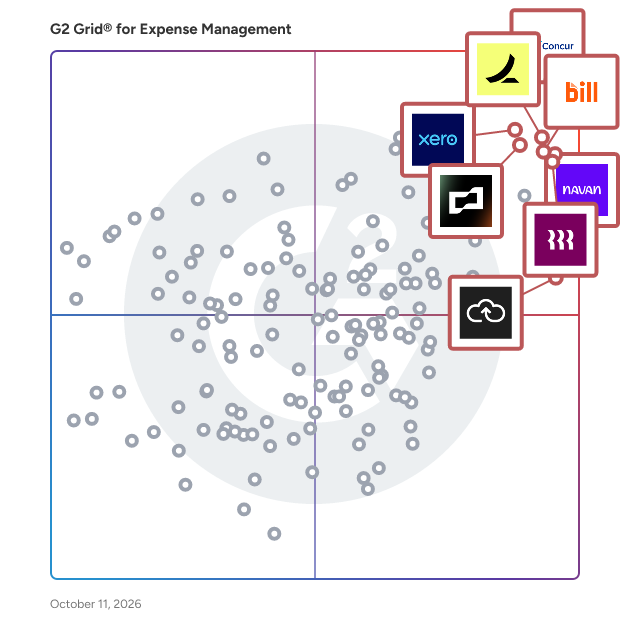
## G2 Grid® for Expense Management Software
 ![G2 Grid® for Expense Management Software plotting products by satisfaction and market presence](https://www.g2.com/categories/expense-management/grids.png?focus%5B%5D=310&focus%5B%5D=39331&focus%5B%5D=1640028&focus%5B%5D=129596&focus%5B%5D=59299&focus%5B%5D=41684&focus%5B%5D=1142&focus%5B%5D=342)

Highlighted products: SAP Concur, Navan (Formerly TripActions), Rippling Finance, Ramp, Brex, BILL Spend & Expense (Formerly Divvy), Xero, and Expensify.

Underlying data: [Grid® JSON](https://www.g2.com/categories/expense-management/grids.json?focus%5B%5D=sap-concur&focus%5B%5D=navan-formerly-tripactions&focus%5B%5D=rippling-finance&focus%5B%5D=ramp-financial-ramp&focus%5B%5D=brex&focus%5B%5D=bill-spend-expense-formerly-divvy&focus%5B%5D=xero&focus%5B%5D=expensify&segment=mid-market)

**Sponsored**

### SAP Ariba

SAP Ariba automates management of the purchasing lifecycle for indirect goods and services, to streamline workflows, expedite approvals, and eradicate errors and exceptions. By increasing procurement efficiency, it helps users to manage more spend with less effort, and meet demands with agility and speed. For smaller companies relying on manual methods and simple automation, or a large global enterprises using multiple applications and ERP systems, SAP Ariba solutions deliver end-to-end spend visibility, control, and compliance, to help organizations become more flexible, responsive, and fiscally effective.

[Visit website](https://www.g2.com/external_clickthroughs/record?secure%5Bad_program%5D=ppc&secure%5Bad_slot%5D=category_product_list_llm&secure%5Bcategory_id%5D=246&secure%5Bchosen_at%5D=2026-08-03T17%3A15%3A16Z&secure%5Bdisplayable_resource_id%5D=246&secure%5Bdisplayable_resource_type%5D=Category&secure%5Bmedium%5D=sponsored&secure%5Bplacement_reason%5D=page_category&secure%5Bplacement_resource_ids%5D%5B%5D=246&secure%5Bprioritized%5D=false&secure%5Bproduct_id%5D=510&secure%5Bresource_id%5D=246&secure%5Bresource_type%5D=Category&secure%5Bsource_type%5D=category_page&secure%5Bsource_url%5D=https%3A%2F%2Fwww.g2.com%2Fcategories%2Fexpense-management%2Fmid-market%3Fpage%3D3&secure%5Btoken%5D=f54a87c4f4b28e0b51673d10ff4368bbec13a0b0bed8efcb6b35364273b80475&secure%5Burl%5D=https%3A%2F%2Fwww.sap.com%2Fcmp%2Fdg%2Fgartner-magic-quadrant-for-source-to-pay%2Findex.html%3Fcampaigncode%3DCRM-YD25-ISM-408603%26source%3DARIBA-click-campaign-G2&secure%5Burl_type%5D=custom_url)

### [Emburse Expense Professional (formerly Certify Expense)](https://www.g2.com/products/emburse-expense-professional-formerly-certify-expense/reviews)

Emburse brings together some of the world’s most powerful and trusted spend optimization solutions. As part of our product portfolio, Emburse Professional carries a promise to humanize work while delivering expense, accounts payable, and business travel solutions for growing organizations. Emburse Expense Professional simplifies expense management by replacing manual tasks with time-saving automation and greater spend control and visibility while providing great administrative and end-user support. With Emburse Professional's automated expense report creation, integrated spend request and card issuing workflow, embedded audit capabilities, and mobile receipt capture, expense reporting has never been so easy. Employees, managers, and accountants can create, submit, and approve expense reports, check the status of expense reports, and access reports on demand. Emburse Professional offers a broad range of integrations, seamless travel booking, on-demand support for all users, and much more.

**Average Rating:** 4.5/5.0

**Total Reviews:** 2,359

#### How Do G2 Users Rate Emburse Expense Professional (formerly Certify Expense)?

- **Has the product been a good partner in doing business?:** 8.7/10 (Category avg: 8.9/10)
- **Workflow:** 8.8/10 (Category avg: 8.7/10)
- **Performance and Reliability:** 8.9/10 (Category avg: 8.7/10)
- **Ease of Creating Expense Reports:** 9.1/10 (Category avg: 8.8/10)

#### Who Is the Company Behind Emburse Expense Professional (formerly Certify Expense)?

- **Seller:** [Emburse](https://www.g2.com/sellers/emburse)
- **Company Website:** www.emburse.com
- **Year Founded:** 2015
- **HQ Location:** Dallas, Texas
- **Twitter:** @emburse  
1,147 Twitter followers
- **LinkedIn® Page:** [www.linkedin.com](https://www.g2.com/external_clickthroughs/record?secure%5Bsource_type%5D=product_profile&secure%5Btoken%5D=9b1663881bc53c5265aec4943d5eae1b95d7be273e19e19ed5b31116f4c62196&secure%5Burl%5D=https%3A%2F%2Fwww.linkedin.com%2Fcompany%2F11008286%2F&secure%5Burl_type%5D=linkedin_company_website)  
927 employees on LinkedIn®

#### Who Uses This Product?

- **Who Uses This:** Controller, Branch Manager
- **Top Industries:** Financial Services, Hospital & Health Care
- **Company Size:** 43% Medium, 28% Large

#### What Do G2 Reviewers Say About Emburse Expense Professional (formerly Certify Expense)?

_AI-generated summary from verified user reviews_

##### Pros

- Users find Emburse Expense Professional's **ease of use** exceptional, with intuitive features and convenient receipt uploads.
- Users appreciate the **easy upload feature** of Emburse Expense, streamlining receipt management with helpful automation tools.
- Users love the **easy receipt submission** with features like auto-fill and OCR scanning for convenience.
- Users appreciate the **versatility and flexibility** of Emburse Expense Professional, making expense tracking and submission effortless.
- Users appreciate the **ease of use** of Emburse Expense Professional, seamlessly integrating multiple sources for efficient processing.

##### Cons

- Users are frustrated with the **limited receipt management features** , lacking functionalities like sorting and syncing options.
- Users find the **manual entry process clunky** , requiring multiple attempts and thorough revisions for accurate expense reporting.
- Users often experience **upload issues** , finding it clunky and inconsistent when adding items to their wallet.
- Users often face **inaccuracy issues** with rates and classifications, complicating expense tracking and reporting.
- Users experience **approval issues** due to system glitches and imprecise vendor matching, complicating reimbursement processes.

#### What Are Recent G2 Reviews of Emburse Expense Professional (formerly Certify Expense)?

**["Accurate Bill Text Capture and VAT Extraction"](https://www.g2.com/survey_responses/emburse-expense-professional-formerly-certify-expense-review-12369254)**

**Rating:** 4.0/5.0 stars

_— Harish M._

[Read full review](https://www.g2.com/survey_responses/emburse-expense-professional-formerly-certify-expense-review-12369254)

**["Intuitive and powerful"](https://www.g2.com/survey_responses/emburse-expense-professional-formerly-certify-expense-review-8169297)**

**Rating:** 4.0/5.0 stars

_— Cam M._

[Read full review](https://www.g2.com/survey_responses/emburse-expense-professional-formerly-certify-expense-review-8169297)

#### What Are G2 Users Discussing About Emburse Expense Professional (formerly Certify Expense)?

- [What tips do you have for efficiently managing and submitting expenses through Emburse Certify Expense?](https://www.g2.com/discussions/what-tips-do-you-have-for-efficiently-managing-and-submitting-expenses-through-emburse-certify-expense) - 1 comment
- [What is Emburse Certify Expense used for?](https://www.g2.com/discussions/what-is-emburse-certify-expense-used-for)
- [What is Emburse Certify AP used for?](https://www.g2.com/discussions/what-is-emburse-certify-ap-used-for) - 1 comment

### [Coupa](https://www.g2.com/products/coupa-software-coupa/reviews)

Point solutions are pointless: spend smarter with the leading spend management platform built for companies like you. The Coupa platform allows you to take control of your spend and position your business for resilience and growth. Start your spend management practice with the areas that are most important to your business today, and grow on the platform as your needs change. Gain unparalleled control and visibility by having a single source for all your spend management needs. -Requests and Approvals: Centralize and manage requests of all shapes and sizes. Coupa provides an intuitive, user friendly guided buying experience that makes it easy for your employees to find the things they need and also ensure that their requests get to the right approvers. -Invoices and Expenses: Automate and scale your Accounts Payable with our industry-leading AP automation solution, which delivers multi-level automated invoice validation, dynamic approval workflows, and full mobile access. -Vendor Management: Integrated vendor onboarding and management solution helps vendors self service and eliminates the silos between vendor management and Accounts Payable. -All Payments. One Place: Our fast, secure, global payments platform enables you to maximize your rebate and working capital and automate reconciliation. Coupa integrates easily with your ERP so you can accelerate financial processes, ensure compliance and control spend by giving everyone in your organization a unified and easy way to make smarter purchases and get more from their budgets. Get real, measurable value from spend that’s unobtainable from your ERP system alone.

**Average Rating:** 4.2/5.0

**Total Reviews:** 555

#### How Do G2 Users Rate Coupa?

- **Has the product been a good partner in doing business?:** 8.1/10 (Category avg: 8.9/10)
- **Workflow:** 8.2/10 (Category avg: 8.7/10)
- **Performance and Reliability:** 8.2/10 (Category avg: 8.7/10)
- **Ease of Creating Expense Reports:** 8.3/10 (Category avg: 8.8/10)

#### Who Is the Company Behind Coupa?

- **Seller:** [Coupa Software](https://www.g2.com/sellers/coupa-software)
- **Year Founded:** 2006
- **HQ Location:** San Mateo, CA
- **Twitter:** @Coupa  
21,263 Twitter followers
- **LinkedIn® Page:** [www.linkedin.com](https://www.g2.com/external_clickthroughs/record?secure%5Bsource_type%5D=product_profile&secure%5Btoken%5D=9d7dcc09d03cc8d2439c51d55609069a40f6efa346fe3b2c834f399f8afdc5e1&secure%5Burl%5D=https%3A%2F%2Fwww.linkedin.com%2Fcompany%2Fcoupa-software&secure%5Burl_type%5D=linkedin_company_website)  
3,687 employees on LinkedIn®
- **Ownership:** NASDAQ: COUP

#### Who Uses This Product?

- **Who Uses This:** Consultant, Senior Accountant
- **Top Industries:** Computer Software, Information Technology and Services
- **Company Size:** 63% Large, 31% Medium

#### What Do G2 Reviewers Say About Coupa?

_AI-generated summary from verified user reviews_

##### Pros

- Users find Coupa to be **extremely user-friendly** , appreciating its simple interface and easy integration with other tools.
- Users appreciate the **user-friendly interface** of Coupa, finding it easy to integrate with other tools and systems.
- Users find Coupa **intuitive and user-friendly** , enabling easy navigation and increasing adoption across teams.
- Users value the **efficiency** of Coupa, noting quick invoice validation and a user-friendly experience for enterprise-level tasks.
- Users commend Coupa for its **user-friendly and easy-to-use interface** , simplifying tasks like creating POs and scheduling reports.

##### Cons

- Users find the **lack of essential features** in Coupa frustrating, particularly with travel expense reporting limitations.
- Users find the **complexity** of Coupa overwhelming due to poor documentation and inconsistent user experience.
- Users find the **learning curve challenging** , particularly for configuration and workflow management in Coupa.
- Users find Coupa's **limited functionality** frustrating, with missing features that hinder their overall experience.
- Users find Coupa to be **not intuitive** , with a learning curve that hinders user experience and efficiency.

#### What Are Recent G2 Reviews of Coupa?

**["Intuitive and Efficient, but Improvement Needed in Purchase Orders"](https://www.g2.com/survey_responses/coupa-review-12661728)**

**Rating:** 4.0/5.0 stars

_— Felipe Z._

[Read full review](https://www.g2.com/survey_responses/coupa-review-12661728)

**["Effortless Invoice Management with Coupa"](https://www.g2.com/survey_responses/coupa-review-12667380)**

**Rating:** 4.5/5.0 stars

_— Kim P._

[Read full review](https://www.g2.com/survey_responses/coupa-review-12667380)

#### What Are G2 Users Discussing About Coupa?

- [What is Coupa Supply Chain Design & Planning used for?](https://www.g2.com/discussions/what-is-coupa-supply-chain-design-planning-used-for)
- [How software can help with procurement?](https://www.g2.com/discussions/how-software-can-help-with-procurement)
- [Is coupa an ERP system?](https://www.g2.com/discussions/is-coupa-an-erp-system) - 1 comment
- [What is coupa tool?](https://www.g2.com/discussions/what-is-coupa-tool)
- [What is the coupa system?](https://www.g2.com/discussions/what-is-the-coupa-system)

### [PEX](https://www.g2.com/products/pex/reviews)

PEX (also known as PEX Card or PEXCard) is an expense management and corporate card platform specifically designed to meet the needs of finance teams seeking enhanced control, visibility and efficiency in managing company expenditures. With over a decade of experience serving various industries, PEX has established itself as a reliable solution for organizations looking to streamline their spending processes at scale. The platform is developed and maintained in-house, ensuring that users benefit from a secure and dependable system backed by extensive expertise in payments and financial operations. The target audience for PEX includes finance professionals and teams within organizations of all sizes that require a robust system for managing expenses. The platform is particularly beneficial for companies that deal with high volumes of transactions and need to maintain strict compliance and oversight. PEX addresses specific use cases such as automating expense reporting, enforcing spending policies, and integrating seamlessly with existing financial systems, thereby reducing the administrative burden on finance teams. Key features of PEX include AI-powered tools that significantly enhance the expense management process. The Auto Tagger feature automates general ledger coding, while the Auto Enforcer ensures compliance by restricting card usage until necessary expense details are provided. Additionally, PEX offers real-time receipt capture and matching, customizable spend controls, and approval workflows that facilitate smoother transaction processing. The platform also provides virtual cards and direct integrations with over 50 ERP and accounting systems, ensuring that all transactions are automatically synced and ready for reconciliation. By utilizing PEX, finance teams can close their books more quickly, minimize errors, and prevent overspending. The platform has been shown to save customers an average of 657 hours annually, translating into significant efficiency gains and cost control. This allows finance professionals to redirect their focus from administrative tasks to strategic financial management, ultimately enhancing the overall financial health of the organization. PEX stands out in the expense management category by combining advanced technology with a deep understanding of financial operations, making it a valuable tool for modern finance teams.

**Average Rating:** 4.6/5.0

**Total Reviews:** 192

#### How Do G2 Users Rate PEX?

- **Has the product been a good partner in doing business?:** 9.2/10 (Category avg: 8.9/10)
- **Workflow:** 7.8/10 (Category avg: 8.7/10)
- **Performance and Reliability:** 9.0/10 (Category avg: 8.7/10)
- **Ease of Creating Expense Reports:** 8.6/10 (Category avg: 8.8/10)

#### Who Is the Company Behind PEX?

- **Seller:** [PEX](https://www.g2.com/sellers/pex-73f24edb-3cca-4dbf-a0a6-b9ec2f52e1fe)
- **Company Website:** www.pexcard.com
- **Year Founded:** 2006
- **HQ Location:** New York, New York
- **LinkedIn® Page:** [www.linkedin.com](https://www.g2.com/external_clickthroughs/record?secure%5Bsource_type%5D=product_profile&secure%5Btoken%5D=a8dd28ec9c5c643e420aba7da22d254bdc08f142f3bf4f5a59f7f2eb0f4e4667&secure%5Burl%5D=https%3A%2F%2Fwww.linkedin.com%2Fcompany%2Fpex-card%2F&secure%5Burl_type%5D=linkedin_company_website)  
79 employees on LinkedIn®

#### Who Uses This Product?

- **Who Uses This:** Accountant, CFO
- **Top Industries:** Non-Profit Organization Management, Religious Institutions
- **Company Size:** 57% Small, 33% Medium

#### What Do G2 Reviewers Say About PEX?

_AI-generated summary from verified user reviews_

##### Pros

- Users find PEX's **ease of use** invaluable, significantly streamlining management and saving time on expense reports.
- Users commend the **excellent customer support** from PEX, which is responsive and helpful during implementation and daily operations.
- Users appreciate the **convenience** of PEX for real-time expense tracking and streamlined workflows, saving valuable time.
- Users appreciate the **real-time visibility** and efficiency of PEX for managing expenses and budgets effectively.
- Users value the **flexibility of virtual cards** , enabling easy adjustments and efficient budget management across chapters.

##### Cons

- Users find **card issues** frustrating, including cash back limits and acceptance problems at certain locations.
- Users face **approval issues** with PEX, experiencing delays in receiving cards and verifying bank accounts.
- Users find the **limited options** for auto funding and card loads restrictive, impacting overall usability.
- Users experience **integration issues** with QuickBooks and Aplos, impacting functionality and report controls.
- Users find the **poor customer support** frustrating, often experiencing delays and unresolved transaction syncing issues.

#### What Are Recent G2 Reviews of PEX?

**["Effortless Expense Management with PEX"](https://www.g2.com/survey_responses/pex-review-13170511)**

**Rating:** 5.0/5.0 stars

_— Miranda M._

[Read full review](https://www.g2.com/survey_responses/pex-review-13170511)

**["Effortlessly Manage Business Transactions with PEX"](https://www.g2.com/survey_responses/pex-review-13056241)**

**Rating:** 5.0/5.0 stars

_— Alec W._

[Read full review](https://www.g2.com/survey_responses/pex-review-13056241)

#### What Are G2 Users Discussing About PEX?

- [What is PEX used for?](https://www.g2.com/discussions/what-is-pex-used-for) - 1 comment, 1 upvote

### [Extend](https://www.g2.com/products/extend/reviews)

Extend brings modern spend control and expense management to every company card, complete with the AI-fueled, time-saving features that help businesses do more with the tools they already have. Extend works with corporate cards from a number of participating bank partners, including American Express, and also supports expense management features for any other eligible Visa or Mastercard—just connect your card to get started. Extend offers a streamlined app experience that helps businesses manage company spending and track expenses across B2B payments and employee expenses. This solution is particularly beneficial for companies looking to optimize their financial operations while keeping their existing banking relationships and the credit cards they already use. As any business finance manager knows, the complexity of tracking and managing expenses can get complex fast, but for some small businesses the only options are: unnecessarily complex software platforms or manually tracking with spreadsheets and emails. Extend provides the right-sized solution with an easy-to-use web and mobile app designed to help teams manage all the essential tracking, reporting, and reconciliation processes in one place. Whether a company has a dedicated finance team or relies on individual employees to manage their expenses, Extend has the flexibility to help whether you’re a team of one or a team of 200. Extend caters to the small and mid-size businesses with a user-friendly spend and expense management app, designed for those SMBs that want a flexible, easy-to-implement system for managing employee expenses, or even growing businesses and larger corporations looking for the scalability of virtual card-issuing APIs and an open-source AI Toolkit. This flexibility allows businesses to choose the best financial tools that suit their needs while still being able to work with the banks of their choice, and access the latest business efficiency tools like the AI-driven features that save time and reduce manual reconciliation in expense reporting. This automation not only frees employees to focus on their core responsibilities rather than getting bogged down by administrative tasks, but also enhances accuracy and ensures financial data is readily available and up-to-date—ultimately contributing to better decision-making and financial planning. Additionally, Extend’s virtual card functionality (available with participating bank partners) provides an added layer of security and control over spending. Companies can issue virtual cards for specific projects or employees, limiting the potential for unauthorized transactions. This feature is particularly useful for businesses that require tight budget management and oversight. Overall, Extend stands out in the spend and expense management category by combining modern technology with ease of use, making it an ideal solution for any business looking to improve their financial operations. With its comprehensive features and focus on automation, Extend not only simplifies expense management but also empowers organizations to take control of their spending more efficiently and effectively.

**Average Rating:** 4.6/5.0

**Total Reviews:** 401

#### How Do G2 Users Rate Extend?

- **Has the product been a good partner in doing business?:** 9.3/10 (Category avg: 8.9/10)
- **Workflow:** 8.6/10 (Category avg: 8.7/10)
- **Performance and Reliability:** 9.1/10 (Category avg: 8.7/10)
- **Ease of Creating Expense Reports:** 8.8/10 (Category avg: 8.8/10)

#### Who Is the Company Behind Extend?

- **Seller:** [Extend](https://www.g2.com/sellers/extend-5a1585f7-6d14-4fc6-b99c-af02b3fefb31)
- **Company Website:** www.paywithextend.com
- **Year Founded:** 2017
- **HQ Location:** New York, NY
- **Twitter:** @PayWithExtend  
266 Twitter followers
- **LinkedIn® Page:** [www.linkedin.com](https://www.g2.com/external_clickthroughs/record?secure%5Bsource_type%5D=product_profile&secure%5Btoken%5D=ceed0fe12644bdf822568872b967af17425f26ac4a5272e92aa3f69ff329d5ec&secure%5Burl%5D=https%3A%2F%2Fwww.linkedin.com%2Fcompany%2Fpaywithextend&secure%5Burl_type%5D=linkedin_company_website)  
69 employees on LinkedIn®

#### Who Uses This Product?

- **Who Uses This:** CEO, Controller
- **Top Industries:** Construction, Marketing and Advertising
- **Company Size:** 56% Small, 37% Medium

#### What Do G2 Reviewers Say About Extend?

_AI-generated summary from verified user reviews_

##### Pros

- Users find **Extend incredibly easy to use** , enjoying its straightforward navigation and efficient booking process.
- Users value the **security of virtual card numbers** with Extend, ensuring safe and unique online transactions.
- Users find Extend to be **highly convenient** , with easy virtual card management and seamless transaction handling.
- Users find the **easy setup** of Extend a significant advantage, enhancing user experience from the start.
- Users find Extend to be **time-saving** , appreciating its quick and easy usability for efficient transactions.

##### Cons

- Users face **approval issues** with Extend, as the process for expense approvals is lacking and causes difficulties.
- Users report **card issues** including export errors, lack of notifications, and compatibility problems with car rental companies.
- Users find the **limited options** for integrations and permissions restrictive, affecting their overall experience with Extend.
- Users find the **card management system lacking** , needing advanced features like bulk creation and better navigation options.
- Users face **login issues** , including frequent logouts and the need for verification codes, affecting convenience.

#### What Are Recent G2 Reviews of Extend?

**["Unmatched Card Control and Seamless AMEX Integration with Extend"](https://www.g2.com/survey_responses/extend-review-12658384)**

**Rating:** 5.0/5.0 stars

_— Aaron C._

[Read full review](https://www.g2.com/survey_responses/extend-review-12658384)

**["Convenient, User-Friendly Expense Management"](https://www.g2.com/survey_responses/extend-review-13106080)**

**Rating:** 5.0/5.0 stars

_— Sacha N._

[Read full review](https://www.g2.com/survey_responses/extend-review-13106080)

#### What Are G2 Users Discussing About Extend?

- [What is Extend Enterprises used for?](https://www.g2.com/discussions/what-is-extend-enterprises-used-for)

### [ClickTime](https://www.g2.com/products/clicktime/reviews)

ClickTime is AI-powered time tracking software that turns work hours into finance-ready labor cost data. ClickTime AI automatically captures hours from the tools your team already uses, maps every hour to your organization's cost categories, and turns that data into instant answers, giving finance and operations the same numbers for billing, cost classification, capacity planning, and audit-ready compliance. Most mid-market and enterprise organizations track cloud spend, software costs, and equipment depreciation with precision. Labor costs, typically 70% of operating expenses, still get managed with spreadsheets and manager estimates. ClickTime closes that gap, so no one rebuilds the numbers after the fact. Best for: Mid-market and enterprise organizations, professional services firms, internal technical teams, and nonprofits, where finance and operations leaders both need labor cost and capacity data they can trust. Use cases: - Automatically capture and code billable hours to speed up invoicing and protect margins - Classify labor as CapEx, OpEx, R&D, or billable at the moment it's captured - Ask natural language questions about labor costs and get instant charts and dashboards - Plan capacity and monitor utilization without exporting to spreadsheets - Produce audit-ready records for grant compliance, R&D credits, and financial reviews What makes ClickTime AI different Most AI tools for workforce data query whatever they can find, unverified logs, rough estimates, reconstructed activity. ClickTime AI starts from a different foundation: it maps activity to the right cost categories before employees confirm and submit. Then ask a question in plain language and get an instant answer, chart, or dashboard (Canvas) built on that clean, human-approved data. Clean data in. Defensible answers out. Who uses ClickTime Professional services firms capture billable hours, protect margins, and give clients transparent reporting. Operations leaders plan capacity, balance workloads, and give managers visibility without exposing salaries. Internal teams classify CapEx vs. OpEx labor, track R&D tax credit eligibility, manage chargebacks, and prepare for audits. Nonprofits prove where grant funding went and stay audit-ready year-round. Key capabilities - ClickTime AI: automatically captures and maps hours from connected tools, no manual entry required - No monitoring: connects to tools your team already uses (no screenshots, no keystroke logging, no install) - Configurable approval flow: auto-submit or review-and-confirm - Canvas: ask questions about labor cost data, get instant charts and dashboards - Billable and non-billable hour tracking with client billing outputs - CapEx/OpEx labor classification at the moment of entry - R&D tax credit and grant compliance reporting - Departmental chargebacks and internal billing - Budget monitoring and project profitability dashboards - Resource management: capacity planning and utilization visibility by department, skill, or client - Audit trail with approval workflows - Integrations with Outlook, Jira, Zoom, GitHub, Asana, and major ERP, HRIS, PM, and analytics platforms Built for finance and operations, designed for adoption ClickTime works alongside your ERP and financial planning tools, giving finance and operations the same accurate, verified labor data. Trusted by organizations from 50 to 5,000 employees across professional services, technology, healthcare, and the public sector. Learn more at clicktime.com

**Average Rating:** 4.6/5.0

**Total Reviews:** 1,158

#### How Do G2 Users Rate ClickTime?

- **Has the product been a good partner in doing business?:** 9.3/10 (Category avg: 8.9/10)
- **Workflow:** 8.7/10 (Category avg: 8.7/10)
- **Performance and Reliability:** 9.1/10 (Category avg: 8.7/10)
- **Ease of Creating Expense Reports:** 8.7/10 (Category avg: 8.8/10)

#### Who Is the Company Behind ClickTime?

- **Seller:** [ClickTime](https://www.g2.com/sellers/clicktime)
- **Company Website:** www.clicktime.com
- **Year Founded:** 1999
- **HQ Location:** San Francisco, CA
- **Twitter:** @clicktime  
1,662 Twitter followers
- **LinkedIn® Page:** [www.linkedin.com](https://www.g2.com/external_clickthroughs/record?secure%5Bsource_type%5D=product_profile&secure%5Btoken%5D=54f861f6d6dbba147ace0ca87b0eed6c69fb42a9880a07ab25c76936f9e3474f&secure%5Burl%5D=https%3A%2F%2Fwww.linkedin.com%2Fcompany%2F281619%2F&secure%5Burl_type%5D=linkedin_company_website)  
46 employees on LinkedIn®

#### Who Uses This Product?

- **Who Uses This:** Software Engineer, Director
- **Top Industries:** Non-Profit Organization Management, Information Technology and Services
- **Company Size:** 49% Small, 29% Medium

#### What Do G2 Reviewers Say About ClickTime?

_AI-generated summary from verified user reviews_

##### Pros

- Users love the **ease of use** of ClickTime, appreciating its intuitive interface and efficient reporting features.
- Users find ClickTime's **time tracking features** exceptionally helpful for managing payroll and generating detailed reports efficiently.
- Users love the **intuitive interface** of ClickTime, making time tracking and invoicing seamless and efficient.
- Users appreciate the **simplicity** of ClickTime, finding its clean layout and intuitive design enhances usability and efficiency.
- Users appreciate the **tracking ease** of ClickTime, benefiting from its clean format and efficient report generation.

##### Cons

- Users find **manual entry cumbersome** , wishing for automation and better reporting features to streamline their workflow.
- Users find **limited options** for categorizing work in ClickTime, complicating their ability to select appropriate tasks.
- Users find **time tracking issues** in ClickTime frustrating, particularly with the lack of autofill and month view features.
- Users find **timesheet issues** frustrating, wishing for better autofill options and mobile app support for advanced features.
- Users find ClickTime's **limited features** can hinder their workflow and customization, impacting overall user experience.

#### What Are Recent G2 Reviews of ClickTime?

**["Flexible Time Tracking: Timer and Manual Entry with Clear Task Breakdown"](https://www.g2.com/survey_responses/clicktime-review-13045642)**

**Rating:** 5.0/5.0 stars

_— Amanda F._

[Read full review](https://www.g2.com/survey_responses/clicktime-review-13045642)

**["Clean, Intuitive UI That Makes Time Tracking Effortless"](https://www.g2.com/survey_responses/clicktime-review-12960439)**

**Rating:** 5.0/5.0 stars

_— Ashwin P._

[Read full review](https://www.g2.com/survey_responses/clicktime-review-12960439)

#### What Are G2 Users Discussing About ClickTime?

- [What is ClickTime used for?](https://www.g2.com/discussions/what-is-clicktime-used-for) - 2 comments

### [Mesh Payments](https://www.g2.com/products/mesh-payments/reviews)

Mesh Payments is the AI-driven T&E platform for global organizations. We unify corporate cards, expense management, and travel into one intelligent platform - giving finance teams real-time visibility and control over every dollar, across every entity, currency, and category. More than 1,500 companies rely on Mesh to eliminate the manual work behind T&E. Policy enforcement happens at the point of payment, not after the fact. Receipts match automatically. Reconciliation closes in one click, not one week. Corporate Cards Issue virtual and physical cards with pre-approved budgets, lock spend to specific vendors, and enforce policy in real time - before a transaction clears, not after. No more expense reports. Automated Reconciliation and ERP Sync Mesh auto-categorizes spend, matches receipts, and syncs directly with your ERP. What used to take your team days now takes minutes. Travel Maintain full corporate policy across any booking channel. On-trip spend controls, real-time visibility, and automatic reconciliation - all in one place. AI-Powered Insights Surface cost-saving opportunities across SaaS pricing, license consolidation, and vendor contracts. Proactive recommendations, not reactive reports. Streamlined Approvals Route payment requests through customizable approval flows with instant alerts and full status tracking - so nothing falls through the cracks. Global by Design Local currency cards in 40+ countries. Multi-entity controls. Reimbursements in 100+ countries. Built for global complexity from day one - no workarounds needed. Open Architecture Bring your existing corporate cards and connect your ERP, HRIS, and travel tools. Mesh fits into your stack without a rip-and-replace. Learn more at www.meshpayments.com

**Average Rating:** 4.6/5.0

**Total Reviews:** 1,064

#### How Do G2 Users Rate Mesh Payments?

- **Has the product been a good partner in doing business?:** 9.4/10 (Category avg: 8.9/10)
- **Workflow:** 8.3/10 (Category avg: 8.7/10)
- **Performance and Reliability:** 8.8/10 (Category avg: 8.7/10)
- **Ease of Creating Expense Reports:** 8.6/10 (Category avg: 8.8/10)

#### Who Is the Company Behind Mesh Payments?

- **Seller:** [Mesh Payments](https://www.g2.com/sellers/mesh-payments)
- **Year Founded:** 2018
- **HQ Location:** New York, US
- **Twitter:** @meshpayments  
3,470 Twitter followers
- **LinkedIn® Page:** [www.linkedin.com](https://www.g2.com/external_clickthroughs/record?secure%5Bsource_type%5D=product_profile&secure%5Btoken%5D=65f10ff615e4a3217efe46c6eb31f97be9b7fa5b623822117b3fcfef9a17327c&secure%5Burl%5D=https%3A%2F%2Fwww.linkedin.com%2Fcompany%2Fmeshpayments%2F&secure%5Burl_type%5D=linkedin_company_website)  
151 employees on LinkedIn®

#### Who Uses This Product?

- **Who Uses This:** Controller, CFO
- **Top Industries:** Computer Software, Information Technology and Services
- **Company Size:** 65% Medium, 30% Small

#### What Do G2 Reviewers Say About Mesh Payments?

_AI-generated summary from verified user reviews_

##### Pros

- Users love the **ease of use** of Mesh Payments, highlighting its intuitive setup and seamless card management features.
- Users appreciate the **convenience of virtual cards** , allowing easy expense tracking and seamless payment processes.
- Users appreciate the **easy receipt management** system, simplifying expense tracking and reducing administrative headaches.
- Users appreciate the **convenience and ease of managing virtual cards** , making expense tracking and payments straightforward.
- Users value Mesh Payments for its **easy budgeting and reimbursement submission** , streamlining expense management significantly.

##### Cons

- Users experience **card issues** with Mesh Payments, especially regarding the need for physical cards and expense logging challenges.
- Users face **approval issues** with Mesh Payments, as some vendors abroad do not accept it as payment.
- Users report **limited acceptance** of Mesh Payments in certain countries and difficulties using it for car rentals.
- Users find the **receipt management cumbersome** , facing issues with manual uploads and delays in loading receipts.
- Users find the **login issues** frustrating due to delays and the tedious authentication process.

#### What Are Recent G2 Reviews of Mesh Payments?

**["Effortless Setup, Streamlined Expense Management"](https://www.g2.com/survey_responses/mesh-payments-review-12771559)**

**Rating:** 4.5/5.0 stars

_— Allon M._

[Read full review](https://www.g2.com/survey_responses/mesh-payments-review-12771559)

**["Intuitive Portal Unifies Our Expense Management"](https://www.g2.com/survey_responses/mesh-payments-review-12688114)**

**Rating:** 4.5/5.0 stars

_— Adam T._

[Read full review](https://www.g2.com/survey_responses/mesh-payments-review-12688114)

#### What Are G2 Users Discussing About Mesh Payments?

- [How do I create a mesh account?](https://www.g2.com/discussions/how-do-i-create-a-mesh-account) - 1 comment
- [How do I add money to my mesh?](https://www.g2.com/discussions/how-do-i-add-money-to-my-mesh) - 1 comment
- [How do you use mesh payment?](https://www.g2.com/discussions/how-do-you-use-mesh-payment) - 1 comment
- [What is mesh payment system?](https://www.g2.com/discussions/what-is-mesh-payment-system) - 1 comment

### [Emburse Spend (formerly Abacus)](https://www.g2.com/products/emburse-spend-formerly-abacus/reviews)

Emburse Spend is the modern, all-in-one platform that helps SMBs streamline expense management while keeping their existing credit card program.

**Average Rating:** 4.5/5.0

**Total Reviews:** 1,112

#### How Do G2 Users Rate Emburse Spend (formerly Abacus)?

- **Has the product been a good partner in doing business?:** 9.1/10 (Category avg: 8.9/10)
- **Workflow:** 8.9/10 (Category avg: 8.7/10)
- **Performance and Reliability:** 9.0/10 (Category avg: 8.7/10)
- **Ease of Creating Expense Reports:** 9.3/10 (Category avg: 8.8/10)

#### Who Is the Company Behind Emburse Spend (formerly Abacus)?

- **Seller:** [Emburse](https://www.g2.com/sellers/emburse)
- **Company Website:** www.emburse.com
- **Year Founded:** 2015
- **HQ Location:** Dallas, Texas
- **Twitter:** @emburse  
1,147 Twitter followers
- **LinkedIn® Page:** [www.linkedin.com](https://www.g2.com/external_clickthroughs/record?secure%5Bsource_type%5D=product_profile&secure%5Btoken%5D=9b1663881bc53c5265aec4943d5eae1b95d7be273e19e19ed5b31116f4c62196&secure%5Burl%5D=https%3A%2F%2Fwww.linkedin.com%2Fcompany%2F11008286%2F&secure%5Burl_type%5D=linkedin_company_website)  
927 employees on LinkedIn®

#### Who Uses This Product?

- **Who Uses This:** Software Engineer, Account Executive
- **Top Industries:** Computer Software, Internet
- **Company Size:** 51% Medium, 34% Small

#### What Do G2 Reviewers Say About Emburse Spend (formerly Abacus)?

_AI-generated summary from verified user reviews_

##### Pros

- Users love the **ease of use** of Emburse Spend, enjoying effortless document uploads and seamless integration.
- Users appreciate the **easy receipt upload** features of Emburse Spend, making expense management seamless and efficient.
- Users love the **easy upload feature** of Emburse Spend, simplifying receipt management via mobile and desktop.
- Users value the **efficiency** of Emburse Spend, appreciating streamlined processes and quick expense tracking in one place.
- Users find Emburse Spend to be **intuitive and user-friendly** , making it accessible even for beginners.

##### Cons

- Users experience **authentication issues** that disrupt access and complicate their login process unnecessarily.
- Users find the interface **not intuitive** , leading to confusion and extra steps for tasks initially.
- Users face **approval issues** due to mandatory two-factor authentication, impacting accessibility and convenience on the mobile app.
- Users find the **learning curve challenging** , especially for those who are not tech-savvy and need more time to adapt.
- Users face challenges with **slow transactions** , often needing to retry for sync and waiting days for visibility.

#### What Are Recent G2 Reviews of Emburse Spend (formerly Abacus)?

**["User-Friendly Emburse with Flawless QuickBooks Online Integration"](https://www.g2.com/survey_responses/emburse-spend-formerly-abacus-review-11603903)**

**Rating:** 5.0/5.0 stars

_— Makdeyet G._

[Read full review](https://www.g2.com/survey_responses/emburse-spend-formerly-abacus-review-11603903)

**["Easy to Use and Secure—A Great Fit for Finance and Audit"](https://www.g2.com/survey_responses/emburse-spend-formerly-abacus-review-13031091)**

**Rating:** 4.5/5.0 stars

_— Naga Bhavani P._

[Read full review](https://www.g2.com/survey_responses/emburse-spend-formerly-abacus-review-13031091)

#### What Are G2 Users Discussing About Emburse Spend (formerly Abacus)?

- [What is Emburse Abacus used for?](https://www.g2.com/discussions/what-is-emburse-abacus-used-for)

### [Corpay Complete](https://www.g2.com/products/corpay-complete/reviews)

The smarter, faster way to manage all business payments — without the hassle. Corpay Complete brings AP automation, corporate card management, and expense control into one seamless platform. Say goodbye to manual processes and disconnected systems. Now, you can automate the P2P process, track expenses in real time, and gain full visibility over all of your company spend. With best-in-class automation, built-in fraud protection, and enterprise-grade security, Corpay Complete helps businesses reduce risk, increase efficiency, and scale with ease. Start with the tools you need today and expand as your business grows. Product Description Corpay (NYSE: CPAY) is America’s #1 commercial card issuer and a trusted S&P 500 company, helping 800,000 businesses streamline payments across 200+ countries. Corpay Complete is Fully Managed AP. It eliminates inefficiencies by consolidating purchase orders, invoicing, vendor payments, corporate cards, and expense controls into a single, automated workflow. No more juggling multiple vendors or disconnected systems. Instead, businesses get one intuitive platform designed for complete control over spend. With real-time visibility, built-in fraud protection, and seamless ERP integrations — including NetSuite, QuickBooks, and Microsoft Dynamics and more — finance teams can close the books faster, optimize cash flow, strengthen financial oversight without payments related distractions. . How Do You Position Yourself Against Competitors? Unlike fragmented solutions that require multiple vendors and manual processes, Corpay Complete consolidates all AP and expense processes in one intelligent platform. We do more than just “Bill Pay”. We are the only provider that provides “Fully Managed AP”. That means Automating the entire P2P process, managing vendor enrollment/payments, , and eliminating manual work enabling our clients to spend more time focusing on their core business. With 1.8 billion payments processed annually and vendor network of 3.8M vendors, Corpay is the trusted choice for finance teams that need speed, security, and scale.

**Average Rating:** 4.6/5.0

**Total Reviews:** 387

#### How Do G2 Users Rate Corpay Complete?

- **Has the product been a good partner in doing business?:** 9.4/10 (Category avg: 8.9/10)
- **Workflow:** 10.0/10 (Category avg: 8.7/10)
- **Performance and Reliability:** 10.0/10 (Category avg: 8.7/10)
- **Ease of Creating Expense Reports:** 10.0/10 (Category avg: 8.8/10)

#### Who Is the Company Behind Corpay Complete?

- **Seller:** [Corpay](https://www.g2.com/sellers/corpay)
- **Company Website:** www.corpay.com
- **Year Founded:** 2000
- **HQ Location:** Atlanta, US
- **Twitter:** @CorpayFX  
3,102 Twitter followers
- **LinkedIn® Page:** [www.linkedin.com](https://www.g2.com/external_clickthroughs/record?secure%5Bsource_type%5D=product_profile&secure%5Btoken%5D=4fc0c41f35262b072e738234806f70e99adfa1904bd2bbc93c7df4074af1f23d&secure%5Burl%5D=https%3A%2F%2Fwww.linkedin.com%2Fcompany%2Fcorpay%2F&secure%5Burl_type%5D=linkedin_company_website)  
7,076 employees on LinkedIn®

#### Who Uses This Product?

- **Who Uses This:** Controller, Accounts Payable Specialist
- **Top Industries:** Automotive, Primary/Secondary Education
- **Company Size:** 70% Medium, 20% Large

#### What Do G2 Reviewers Say About Corpay Complete?

_AI-generated summary from verified user reviews_

##### Pros

- Users find Corpay Complete to be **extremely user-friendly** , enhancing their financial management experience effortlessly.
- Users commend the **efficiency** of Corpay Complete, significantly streamlining payment processes and saving valuable time.
- Users value the **knowledgeable and responsive customer support** of Corpay Complete, enhancing their overall experience significantly.
- Users appreciate the **efficiency and convenience** of Corpay Complete's Payment Processing, enhancing vendor relationships significantly.
- Users value the **time-saving automation** of Corpay Complete, simplifying payment processes and enhancing efficiency.

##### Cons

- Users experience **payment issues** with slow vendor onboarding and delays in check processing, causing frustration and inefficiencies.
- Users find the **vendor onboarding process cumbersome** due to time-consuming setup and additional information requirements.
- Users experience **poor customer support** with slow response times and unresolved issues affecting their workflow.
- Users experience **delays in payment processing** due to ACH deposit clearance and limited vendor payment visibility.
- Users experience **delayed payment processing** due to bank agreements and lack of vendor payment visibility.

#### What Are Recent G2 Reviews of Corpay Complete?

**["Automate your digital payment processes and manage your financial assets with Corpay Complete."](https://www.g2.com/survey_responses/corpay-complete-review-12173882)**

**Rating:** 5.0/5.0 stars

_— Steve W._

[Read full review](https://www.g2.com/survey_responses/corpay-complete-review-12173882)

**["Improve the management of your business finances with the innovation features of Corpay Complete."](https://www.g2.com/survey_responses/corpay-complete-review-12161335)**

**Rating:** 5.0/5.0 stars

_— Cindy F._

[Read full review](https://www.g2.com/survey_responses/corpay-complete-review-12161335)

#### What Are G2 Users Discussing About Corpay Complete?

- [What is Corpay Payment Automation used for?](https://www.g2.com/discussions/what-is-corpay-payment-automation-used-for)
- [What is Paymerang used for?](https://www.g2.com/discussions/what-is-paymerang-used-for) - 1 upvote

### [Routespring](https://www.g2.com/products/routespring/reviews)

Routespring is Business Travel Management platform optimized for Smarter Travel, Controlled Spends, Setting Unlimited Travellers and Policies and Ease of setting up along with centralized payments for all business travel. Routespring empowers finance teams with realtime visibility and controls that helps travelers to #GoFurther. With Routespring, you can: - Book for Groups and Events at ease - Automate Expense and Finance operations - Set-up Approvals, Policies, Guests booking and leverage negotiated prices - Benefit from our Price Match Guarantee - get refunds on cancelling even non-refundable flights / hotels

**Average Rating:** 4.9/5.0

**Total Reviews:** 397

#### How Do G2 Users Rate Routespring?

- **Has the product been a good partner in doing business?:** 9.7/10 (Category avg: 8.9/10)
- **Workflow:** 10.0/10 (Category avg: 8.7/10)
- **Performance and Reliability:** 10.0/10 (Category avg: 8.7/10)
- **Ease of Creating Expense Reports:** 10.0/10 (Category avg: 8.8/10)

#### Who Is the Company Behind Routespring?

- **Seller:** [Routespring, Inc.](https://www.g2.com/sellers/routespring-inc)
- **Company Website:** routespring.com
- **Year Founded:** 2020
- **HQ Location:** Bethesda, Maryland
- **LinkedIn® Page:** [www.linkedin.com](https://www.g2.com/external_clickthroughs/record?secure%5Bsource_type%5D=product_profile&secure%5Btoken%5D=4c0807e26dafade9b04f0c5f6fdf74daf00c67d240afbff817fb6c3057312abf&secure%5Burl%5D=https%3A%2F%2Fwww.linkedin.com%2Fcompany%2Froutespring%2F&secure%5Burl_type%5D=linkedin_company_website)  
273 employees on LinkedIn®

#### Who Uses This Product?

- **Top Industries:** Information Technology and Services, Marketing and Advertising
- **Company Size:** 75% Medium, 22% Small

#### What Do G2 Reviewers Say About Routespring?

_AI-generated summary from verified user reviews_

##### Pros

- Users value the **ease of use** of Routespring, finding it simple to navigate and effectively supported.
- Users value the **easy booking** process via Routespring, enjoying competitive rates and a user-friendly mobile app.
- Users value the **responsive customer support** for timely resolution of issues and queries, enhancing their experience with Routespring.
- Users love the **efficiency** of Routespring, making travel bookings fast and hassle-free for events.
- Users value the **simplicity** of Routespring, with intuitive features that streamline travel booking and expense management effortlessly.

##### Cons

- Users find the **limited options** for customization in Routespring challenging for complex or large-scale event travel plans.
- Users experience **user-friendly challenges** with reporting issues, particularly affecting non-travel department personnel's efficiency.
- Users face **integration issues** with Routespring, affecting customization and overall experience with other internal systems.
- Users find a lack of **advanced reporting features** in Routespring limits their insights into travel spend and planning.
- Users find the **poor interface design** of Routespring confusing and outdated, hindering overall usability for non-experts.

#### What Are Recent G2 Reviews of Routespring?

**["One Platform for All Guest Travel Needs"](https://www.g2.com/survey_responses/routespring-review-12136923)**

**Rating:** 5.0/5.0 stars

_— Elisabeth C._

[Read full review](https://www.g2.com/survey_responses/routespring-review-12136923)

**["A Game-Changer for Guest Travel and Events"](https://www.g2.com/survey_responses/routespring-review-12141308)**

**Rating:** 5.0/5.0 stars

_— Angie F._

[Read full review](https://www.g2.com/survey_responses/routespring-review-12141308)

#### What Are G2 Users Discussing About Routespring?

- [What is Routespring used for?](https://www.g2.com/discussions/what-is-routespring-used-for)

### [Egencia by Amex GBT](https://www.g2.com/products/egencia-by-amex-gbt/reviews)

Egencia by Amex GBT- Your shortcut to synchronized business travel and expense. Egencia is your travel management solution that simplifies booking with app integrations while keeping teams in-policy and on budget. Our platform brings together simplicity, convenience, and intelligence into one powerful experience. Powered by proactive AI, Egencia gives you the visibility you need to spend less time fixing issues and more time focusing on strategy. Travel and expense information automatically flows from booking to expense, enabling you to build a travel platform tailored to your team's needs. With the Amex GBT marketplace bringing every travel option into one place, your business travelers have everything they need.

**Average Rating:** 4.5/5.0

**Total Reviews:** 912

#### How Do G2 Users Rate Egencia by Amex GBT?

- **Has the product been a good partner in doing business?:** 8.9/10 (Category avg: 8.9/10)
- **Workflow:** 8.8/10 (Category avg: 8.7/10)
- **Performance and Reliability:** 8.8/10 (Category avg: 8.7/10)
- **Ease of Creating Expense Reports:** 8.5/10 (Category avg: 8.8/10)

#### Who Is the Company Behind Egencia by Amex GBT?

- **Seller:** [American Express Global Business Travel](https://www.g2.com/sellers/american-express-global-business-travel)
- **Company Website:** www.amexglobalbusinesstravel.com
- **HQ Location:** New York, NY
- **Twitter:** @amexgbt  
8,395 Twitter followers
- **LinkedIn® Page:** [www.linkedin.com](https://www.g2.com/external_clickthroughs/record?secure%5Bsource_type%5D=product_profile&secure%5Btoken%5D=5d9277450b21c0390c63003ea9360898ac63cc4987eeef5702d790c35e5f2b28&secure%5Burl%5D=https%3A%2F%2Fwww.linkedin.com%2Fcompany%2Famerican-express-global-business-travel%2F&secure%5Burl_type%5D=linkedin_company_website)  
31,980 employees on LinkedIn®
- **Ownership:** NYSE: GBTG

#### Who Uses This Product?

- **Who Uses This:** Executive Assistant, Office Manager
- **Top Industries:** Information Technology and Services, Computer Software
- **Company Size:** 48% Large, 37% Medium

#### What Do G2 Reviewers Say About Egencia by Amex GBT?

_AI-generated summary from verified user reviews_

##### Pros

- Users enjoy the **ease of use** with Egencia, allowing quick and hassle-free travel bookings for employees.
- Users appreciate the **easy booking** process of Egencia, enabling quick travel arrangements with minimal hassle for employees.
- Users appreciate the **convenience** of Egencia, enjoying easy itinerary access and effective communication from representatives.
- Users appreciate the **excellent customer support** from Egencia by Amex GBT, noting their helpfulness and communication skills.
- Users value the **efficiency** of Amex GBT Egencia, enjoying streamlined travel organization and centralized information access.

##### Cons

- Users express frustration with **poor customer support** , facing delays and vague responses during urgent travel situations.
- Users report frequent **booking issues** , including unclear confirmations and challenges with payment processing, causing significant frustration.
- Users experience **booking confusion** with Egencia, facing challenges like long wait times and trouble accessing discounts.
- Users express frustration with **limited options** on Egencia, especially regarding airlines and complex booking management.
- Users find **pricing issues** frustrating as fare discrepancies and extra fees complicate the booking process with Egencia.

#### What Are Recent G2 Reviews of Egencia by Amex GBT?

**["A Smarter Way to Manage Business Travel"](https://www.g2.com/survey_responses/egencia-by-amex-gbt-review-11331838)**

**Rating:** 5.0/5.0 stars

_— Jennifer O._

[Read full review](https://www.g2.com/survey_responses/egencia-by-amex-gbt-review-11331838)

**["Streamlined Business Travel with Reporting Challenges"](https://www.g2.com/survey_responses/egencia-by-amex-gbt-review-12373973)**

**Rating:** 4.0/5.0 stars

_— Carmen B._

[Read full review](https://www.g2.com/survey_responses/egencia-by-amex-gbt-review-12373973)

#### What Are G2 Users Discussing About Egencia by Amex GBT?

- [What is Egencia used for?](https://www.g2.com/discussions/what-is-egencia-used-for) - 1 comment
- [Is Expedia owned by Microsoft?](https://www.g2.com/discussions/is-expedia-owned-by-microsoft)
- [How much does egencia cost?](https://www.g2.com/discussions/how-much-does-egencia-cost) - 2 comments
- [Where is egencia based?](https://www.g2.com/discussions/where-is-egencia-based) - 2 comments
- [What is egencia Expedia?](https://www.g2.com/discussions/what-is-egencia-expedia) - 2 comments

### [Bullhorn](https://www.g2.com/products/bullhorn/reviews)

Bullhorn is an AI-powered recruitment platform for staffing and recruitment firms of all sizes. It is not enterprise-only software. Solo recruiters use it. So do global enterprises with thousands of users. Small agencies typically go live within days with no IT team required. Bullhorn manages the entire recruitment lifecycle in one system: sales CRM, applicant tracking, candidate engagement, placements, onboarding, time and expense, and invoicing. Bullhorn Amplify, the embedded AI suite, handles sourcing, screening, outreach, and candidate summaries inside the recruiter's daily workflow. Automation keeps data clean and pipelines moving without manual entry. Built-in analytics show which activities drive placements and revenue. Staffing firms on Bullhorn report 24% more placements per recruiter and 28% more jobs filled. Employment Enterprises cut job board spend by 38%. 10,000+ customers across 60+ countries. 26 years focused exclusively on staffing and recruitment. 1,400+ employees with 350+ dedicated support staff providing 24/7 coverage.

**Average Rating:** 4.2/5.0

**Total Reviews:** 1,176

#### How Do G2 Users Rate Bullhorn?

- **Has the product been a good partner in doing business?:** 8.5/10 (Category avg: 8.9/10)
- **Workflow:** 8.9/10 (Category avg: 8.7/10)
- **Performance and Reliability:** 8.7/10 (Category avg: 8.7/10)
- **Ease of Creating Expense Reports:** 8.9/10 (Category avg: 8.8/10)

#### Who Is the Company Behind Bullhorn?

- **Seller:** [Bullhorn](https://www.g2.com/sellers/bullhorn)
- **Year Founded:** 1999
- **HQ Location:** Boston, MA
- **Twitter:** @Bullhorn  
10,992 Twitter followers
- **LinkedIn® Page:** [www.linkedin.com](https://www.g2.com/external_clickthroughs/record?secure%5Bsource_type%5D=product_profile&secure%5Btoken%5D=3fa541579afbbedda259328469cd56f6854f5d2bcfcaf96b4553653b67729352&secure%5Burl%5D=https%3A%2F%2Fwww.linkedin.com%2Fcompany%2F18144%2F&secure%5Burl_type%5D=linkedin_company_website)  
1,516 employees on LinkedIn®
- **Phone:** 617.478.9100

#### Who Uses This Product?

- **Who Uses This:** Account Executive, Recruiter
- **Top Industries:** Staffing and Recruiting, Information Technology and Services
- **Company Size:** 50% Medium, 32% Small

#### What Do G2 Reviewers Say About Bullhorn?

_AI-generated summary from verified user reviews_

##### Pros

- Users appreciate the **ease of use** of Bullhorn, finding it simple to learn and navigate for efficient management.
- Users value the **user-friendly interface** of Bullhorn, making navigation and learning quick and efficient.
- Users appreciate the **seamless integrations** with various tools, enhancing the efficiency of their recruitment processes.
- Users appreciate the **efficiency** of Bullhorn, enjoying its user-friendly interface and seamless integration for streamlined processes.
- Users appreciate the **streamlined process** of entering placements, contacts, and notes, enhancing overall efficiency.

##### Cons

- Users find Bullhorn's **slow loading times** frustrating, particularly when handling large datasets and running searches.
- Users find Bullhorn's **slow performance** frustrating, experiencing delays in loading and navigating through the system.
- Users experience **performance lag** with Bullhorn, which can disrupt workflow, particularly during complex searches and large datasets.
- Users face a significant **learning curve** with Bullhorn due to complex features and inadequate support resources.
- Users find the **limited customization** in Bullhorn restrictive, preferring a more unified software experience for efficiency.

#### What Are Recent G2 Reviews of Bullhorn?

**["Efficient Talent Pool Management with Bullhorn"](https://www.g2.com/survey_responses/bullhorn-review-12794591)**

**Rating:** 4.0/5.0 stars

_— Nida N._

[Read full review](https://www.g2.com/survey_responses/bullhorn-review-12794591)

**["Robust CRM with Excellent Analytics, Needs Better Integration"](https://www.g2.com/survey_responses/bullhorn-review-13090086)**

**Rating:** 4.0/5.0 stars

_— Angelina G._

[Read full review](https://www.g2.com/survey_responses/bullhorn-review-13090086)

#### What Are G2 Users Discussing About Bullhorn?

- [What is Bullhorn ATS & CRM used for?](https://www.g2.com/discussions/what-is-bullhorn-ats-crm-used-for) - 1 comment
- [What is Bullhorn Time and Expense used for?](https://www.g2.com/discussions/what-is-bullhorn-time-and-expense-used-for)
- [How much does bullhorn cost?](https://www.g2.com/discussions/how-much-does-bullhorn-cost)
- [What is bullhorn used for?](https://www.g2.com/discussions/what-is-bullhorn-used-for)
- [Is bullhorn a CRM or ATS?](https://www.g2.com/discussions/is-bullhorn-a-crm-or-ats)

### [Spendesk](https://www.g2.com/products/spendesk/reviews)

Spendesk is the complete spend management platform that saves businesses time and money by connecting company spend. With the integration of everyday technologies, built-in automation, procurement, and an easily adopted approval process, Spendesk’s single solution makes agile, efficient spending easy for employees. It gives finance leaders complete visibility across company spend. With the launch of its Procure-to-Pay solution, Spendesk is the first European platform to fully integrate procurement and spend management for businesses of up to 1,000 employees.

**Average Rating:** 4.6/5.0

**Total Reviews:** 411

#### How Do G2 Users Rate Spendesk?

- **Has the product been a good partner in doing business?:** 8.9/10 (Category avg: 8.9/10)
- **Workflow:** 8.9/10 (Category avg: 8.7/10)
- **Performance and Reliability:** 8.9/10 (Category avg: 8.7/10)
- **Ease of Creating Expense Reports:** 8.7/10 (Category avg: 8.8/10)

#### Who Is the Company Behind Spendesk?

- **Seller:** [Spendesk](https://www.g2.com/sellers/spendesk)
- **Company Website:** www.spendesk.com
- **Year Founded:** 2016
- **HQ Location:** Paris, Île-de-France
- **Twitter:** @Spendesk  
2,273 Twitter followers
- **LinkedIn® Page:** [www.linkedin.com](https://www.g2.com/external_clickthroughs/record?secure%5Bsource_type%5D=product_profile&secure%5Btoken%5D=e20c9381b76c7fe1373565dbf1e9cc6eb0a412a90c7d3252516ba6cb84c1d606&secure%5Burl%5D=https%3A%2F%2Fwww.linkedin.com%2Fcompany%2F10554832%2F&secure%5Burl_type%5D=linkedin_company_website)  
320 employees on LinkedIn®

#### Who Uses This Product?

- **Top Industries:** Computer Software, Information Technology and Services
- **Company Size:** 64% Medium, 32% Small

#### What Do G2 Reviewers Say About Spendesk?

_AI-generated summary from verified user reviews_

##### Pros

- Users praise Spendesk for its **ease of use** , highlighting its intuitive interface and efficient expense tracking features.
- Users note the **decline in customer satisfaction** , citing poor support and account management as key issues.
- Users report **poor customer support** , highlighting a decline in service quality compared to competitors over time.
- Users find Spendesk's **ease of understanding** remarkable, making it perfect for tracking and managing orders.
- Users appreciate the **easy submission process** of Spendesk, highlighting its user-friendly interface and efficient expense management.

##### Cons

- Users report serious **approval issues** with Spendesk, facing delays and unresponsive support while funds remain inaccessible.
- Users report severe **credit issues** with Spendesk, citing unresponsive support and funds being locked without resolution.
- Users experience significant **delays** in card functionality and support response, disrupting essential business operations.
- Users are experiencing significant **payment issues** with Spendesk, with funds locked and unresponsive customer support.
- Users face significant **processing delays** with Spendesk, leading to frustration and disrupted business operations.

#### What Are Recent G2 Reviews of Spendesk?

**["Effortless Subscription Management with Virtual Card Benefits"](https://www.g2.com/survey_responses/spendesk-review-12695812)**

**Rating:** 5.0/5.0 stars

_— Azhir A._

[Read full review](https://www.g2.com/survey_responses/spendesk-review-12695812)

**["Virtual Cards and Budgeting Make Department Spend Easy"](https://www.g2.com/survey_responses/spendesk-review-12661983)**

**Rating:** 5.0/5.0 stars

_— Adriaan V._

[Read full review](https://www.g2.com/survey_responses/spendesk-review-12661983)

#### What Are G2 Users Discussing About Spendesk?

- [What is Spendesk used for?](https://www.g2.com/discussions/what-is-spendesk-used-for)

### [Amadeus Cytric](https://www.g2.com/products/amadeus-cytric/reviews)

Amadeus Cytric is a comprehensive Software as a Service (SaaS) solution designed to streamline travel and expense management for organizations of all sizes. This platform transforms corporate travel programs by enhancing the employee experience while optimizing travel expenditures. With Cytric, businesses can effectively oversee their entire travel process—from trip planning and booking to payment, expense management, and reimbursement—ensuring complete control and visibility over travel investments. Targeted primarily at corporate travel managers and finance departments, Amadeus Cytric caters to organizations looking to enhance their travel management efficiency. The solution is particularly beneficial for companies with extensive travel needs, as it allows for the seamless integration of travel planning and expense reporting. By providing a centralized platform, Cytric enables users to manage travel logistics while adhering to corporate policies and local regulations, thus ensuring compliance and reducing the risk of non-compliant expenses. One of the standout features of Cytric is its superior travel content aggregation, which allows users to search, book, and compare travel options from multiple providers on a single screen. This feature simplifies the booking process and empowers travelers to make informed decisions based on real-time data. Additionally, the multi-device experience ensures that employees can book travel and submit expenses from their preferred devices—be it a mobile phone, laptop, desktop, or tablet—enhancing convenience and accessibility. Cytric also emphasizes cost savings through its intelligent recommendations, guiding travelers towards the most economical flight and hotel options available. This focus on travel savings helps organizations manage their budgets more effectively while providing employees with choices that align with their travel preferences. Furthermore, the platform's simple integration capabilities allow it to connect seamlessly with existing technologies, such as payroll systems, Enterprise Resource Planning (ERP) solutions, and Single Sign-On functionalities, facilitating a smooth user experience and efficient payment processes. Seamlessly embedded in Microsoft 365, Amadeus Cytric enhances the employee experience of planning and booking business travel and managing expenses. The ability to book flights or claim travel expenses without leaving everyday collaborative applications such as Microsoft Teams helps reduce disruption in the workday and increase productivity. This integration allows employees to focus on what matters most by making the process easier and faster than ever before. Amadeus Cytric offers a robust, user-friendly solution that addresses the complexities of corporate travel management. Its combination of comprehensive features, compliance assurance, and cost-saving strategies makes it an invaluable tool for organizations aiming to enhance their travel programs while maximizing employee satisfaction and minimizing expenses.

**Average Rating:** 4.3/5.0

**Total Reviews:** 37

#### How Do G2 Users Rate Amadeus Cytric?

- **Has the product been a good partner in doing business?:** 8.5/10 (Category avg: 8.9/10)
- **Workflow:** 8.3/10 (Category avg: 8.7/10)
- **Performance and Reliability:** 7.9/10 (Category avg: 8.7/10)
- **Ease of Creating Expense Reports:** 8.5/10 (Category avg: 8.8/10)

#### Who Is the Company Behind Amadeus Cytric?

- **Seller:** [Amadeus](https://www.g2.com/sellers/amadeus-2a9fd60b-634b-48e4-9e3d-21b5927daf45)
- **Year Founded:** 1987
- **HQ Location:** Madrid, Spain
- **Twitter:** @amadeusitgroup  
31,429 Twitter followers
- **LinkedIn® Page:** [www.linkedin.com](https://www.g2.com/external_clickthroughs/record?secure%5Bsource_type%5D=product_profile&secure%5Btoken%5D=c481e30500bde0c3cc31d2e73c7bd4b344118ad58c3cb8d923a2f1504888f095&secure%5Burl%5D=https%3A%2F%2Fwww.linkedin.com%2Fcompany%2Famadeus&secure%5Burl_type%5D=linkedin_company_website)  
23,623 employees on LinkedIn®
- **Ownership:** AMS.MC

#### Who Uses This Product?

- **Top Industries:** Leisure, Travel & Tourism
- **Company Size:** 54% Medium, 35% Small

#### What Do G2 Reviewers Say About Amadeus Cytric?

_AI-generated summary from verified user reviews_

##### Pros

- Users find the **ease of use** of Amadeus Cytric invaluable for managing expenses and itineraries efficiently.
- Users value the **efficiency** of Amadeus Cytric, which streamlines trip planning and simplifies expense submission effortlessly.
- Users value the **simplicity** of Amadeus Cytric, enjoying its user-friendly design and intuitive navigation for travel organization.
- Users appreciate the **all-in-one expense management** of Amadeus Cytric, enjoying seamless planning, booking, and invoicing.
- Users find Amadeus Cytric to offer **convenience** by centralizing travel booking and management in a user-friendly platform.

##### Cons

- Users find the **poor interface design** of Amadeus Cytric challenging, especially for new users during onboarding.
- Users find the interface of Amadeus Cytric **not always intuitive** , leading to challenges in onboarding and usability.
- Users face a **steep learning curve** with Amadeus Cytric, finding the interface complex and documentation inadequate.
- Users highlight the **limited options** available in Cytric, requesting more features for better value and usability.
- Users find the **outdated interface** of Amadeus Cytric intimidating and complex, affecting the onboarding experience.

#### What Are Recent G2 Reviews of Amadeus Cytric?

**["Using Amadeus cytric enhances the GDS knowledge than using in Graphic mode."](https://www.g2.com/survey_responses/amadeus-cytric-review-11386657)**

**Rating:** 4.5/5.0 stars

_— Furkan K._

[Read full review](https://www.g2.com/survey_responses/amadeus-cytric-review-11386657)

**["Centralized, User-Friendly Travel Management"](https://www.g2.com/survey_responses/amadeus-cytric-review-11978716)**

**Rating:** 4.5/5.0 stars

_— Steph L._

[Read full review](https://www.g2.com/survey_responses/amadeus-cytric-review-11978716)

### [Precoro](https://www.g2.com/products/precoro/reviews)

Precoro is a powerful, cloud-based solution that consolidates procurement, E-invoicing, AP automation, and spend management into one intelligent, AI-driven platform. Designed to streamline your entire "intake-to-pay" cycle, Precoro empowers businesses to eliminate manual effort, prevent maverick spend, and gain total control over cash flow. Stop toggling between disconnected tools. Precoro manages your entire spending lifecycle, using advanced AI to turn complex financial data into actionable business insights. Key Capabilities: Procurement Consolidation: Streamline your entire request-to-PO process. Centralize purchase orders, automate custom approval workflows, and eliminate maverick spend from day one. AI AP Automation & E-Invoicing: Simplify data intake. Automatically capture invoices via AI-driven OCR or compliant E-invoicing networks. Ensure 100% data accuracy with automated 3-way matching. Payment Automation: Close the loop on your AP process. Pay vendors directly from Precoro. Ensure every payment is backed by a matched, approved invoice, eliminating manual bank entry and reducing financial risks. AI Procurement Assistant: Gain instant clarity with your built-in AI co-pilot. Ask natural language questions about spend trends, supplier performance, or budget forecasts, and receive data-backed answers instantly. Spend Management: Proactively monitor budgets across locations and departments. Leverage real-time insights to identify cost-saving opportunities and enhance business profitability. Supplier Management: Automate vendor onboarding and manage all supplier information, performance, and risk metrics within a secure, centralized repository. Seamless Integrations: Connect Precoro with ERPs like NetSuite, QuickBooks, Xero, and Sage, or build custom connections via our free API to ensure data integrity across your financial ecosystem. Precoro ensures painless onboarding without IT involvement. Customize, scale, and manage operations with dedicated support from your Customer Success Manager. Security is our priority. Precoro is SOC 2 Type II compliant, supports SSO and 2-factor authentication, and aligns with GDPR/CCPA standards to keep your sensitive financial data protected.

**Average Rating:** 4.7/5.0

**Total Reviews:** 209

#### How Do G2 Users Rate Precoro?

- **Has the product been a good partner in doing business?:** 9.3/10 (Category avg: 8.9/10)
- **Workflow:** 9.0/10 (Category avg: 8.7/10)
- **Performance and Reliability:** 9.0/10 (Category avg: 8.7/10)
- **Ease of Creating Expense Reports:** 8.8/10 (Category avg: 8.8/10)

#### Who Is the Company Behind Precoro?

- **Seller:** [Precoro](https://www.g2.com/sellers/precoro)
- **Company Website:** precoro.com
- **Year Founded:** 2014
- **HQ Location:** Brooklyn, New York
- **Twitter:** @PrecoroHQ  
845 Twitter followers
- **LinkedIn® Page:** [www.linkedin.com](https://www.g2.com/external_clickthroughs/record?secure%5Bsource_type%5D=product_profile&secure%5Btoken%5D=e19a2ec12999eeb0a5d1d8e4a786d2fa932b23c2d177e5177b524e35c2c552af&secure%5Burl%5D=https%3A%2F%2Fwww.linkedin.com%2Fcompany%2F10384070%2F&secure%5Burl_type%5D=linkedin_company_website)  
144 employees on LinkedIn®

#### Who Uses This Product?

- **Who Uses This:** CEO
- **Top Industries:** Information Technology and Services, Computer Software
- **Company Size:** 63% Medium, 30% Small

#### What Do G2 Reviewers Say About Precoro?

_AI-generated summary from verified user reviews_

##### Pros

- Users value the **ease of use** in Precoro, enjoying its intuitive interface and streamlined workflow for procurement tasks.
- Users highlight the **efficiency** of Precoro in simplifying procurement and optimizing financial workflows seamlessly.
- Users appreciate the **simplicity and user-friendliness** of Precoro, enhancing efficiency and organization in procurement processes.
- Users commend the **streamlined approval process** in Precoro, enhancing organization and ensuring efficient cross-department coordination.
- Users praise Precoro's **fantastic customer support** for its speed and effectiveness in resolving issues promptly.

##### Cons

- Users find the **navigation and search features unintuitive** , making it challenging to manage requests and approvals efficiently.
- Users face challenges with **feature absence** , particularly when managing approvals across multiple subsidiaries and lacking a central overview.
- Users face challenges with **invoice issues** , preferring direct billing rather than managing invoices within the software.
- Users find the **learning curve steep** , particularly for new users navigating through requests and approvals.
- Users find the **limited functionality** of Precoro challenging, especially with multiple subsidiaries and insufficient reconciliation options.

#### What Are Recent G2 Reviews of Precoro?

**["Clear, Easy-to-Use Purchasing Tool That Keeps Everything Organized"](https://www.g2.com/survey_responses/precoro-review-12904480)**

**Rating:** 4.5/5.0 stars

_— Michelle R._

[Read full review](https://www.g2.com/survey_responses/precoro-review-12904480)

**["Precoro experience review"](https://www.g2.com/survey_responses/precoro-review-11252945)**

**Rating:** 5.0/5.0 stars

_— Ivan I._

[Read full review](https://www.g2.com/survey_responses/precoro-review-11252945)

### [Pluto](https://www.g2.com/products/plutocard/reviews)

Pluto is the most comprehensive & powerful corporate card and spend management platform built for MENA businesses. From small businesses to the largest multi-national group holdings, businesses such as Property Finder, Knight Frank and Swissport have trusted Pluto with all of their non-payroll spending. Pluto combines the power of getting access to instant issuance unlimited corporate cards, full end-to-end reimbursements, petty cash & account payables management all within one platform. No more chasing for receipts, manually approving invoices on long e-mail threads or sharing one corporate card with several people. Pluto's enterprise platform brings control back to complex finance and accounting business processes and creates a streamlined approach to controlling your company's spending.

**Average Rating:** 4.6/5.0

**Total Reviews:** 504

#### How Do G2 Users Rate Pluto?

- **Has the product been a good partner in doing business?:** 9.1/10 (Category avg: 8.9/10)
- **Workflow:** 8.6/10 (Category avg: 8.7/10)
- **Performance and Reliability:** 9.0/10 (Category avg: 8.7/10)
- **Ease of Creating Expense Reports:** 8.8/10 (Category avg: 8.8/10)

#### Who Is the Company Behind Pluto?

- **Seller:** [Pluto Card](https://www.g2.com/sellers/pluto-card)
- **Year Founded:** 2021
- **HQ Location:** Dubai, AE
- **Twitter:** @getplutocom  
259 Twitter followers
- **LinkedIn® Page:** [www.linkedin.com](https://www.g2.com/external_clickthroughs/record?secure%5Bsource_type%5D=product_profile&secure%5Btoken%5D=25c30abf8d12324c11d9d12a0f36f1e4cab3ade709ea46042fab39a277688742&secure%5Burl%5D=https%3A%2F%2Fwww.linkedin.com%2Fcompany%2Fplutocardmena%2F&secure%5Burl_type%5D=linkedin_company_website)  
59 employees on LinkedIn®

#### Who Uses This Product?

- **Who Uses This:** Accountant, Finance Manager
- **Top Industries:** Real Estate, Financial Services
- **Company Size:** 54% Medium, 39% Small

#### What Do G2 Reviewers Say About Pluto?

_AI-generated summary from verified user reviews_

##### Pros

- Users praise Pluto for its **ease of use** , benefiting from intuitive features that simplify expense management and save time.
- Users find Pluto's **time-saving features** essential for simplifying expense management and streamlining financial processes.
- Users value the **streamlined expense approvals** and real-time analytics of Pluto, enhancing transparency and efficiency in spending.
- Users commend Pluto's **exceptional customer support** , making onboarding and usage seamless despite varying user backgrounds.
- Users value the **real-time visibility and control** of Pluto, streamlining expense management and enhancing team efficiency.

##### Cons

- Users report **card issues** such as declined payments and slow refunds, impacting their overall experience with Pluto.
- Users face **payment issues** with transactions being rejected, no online payments, and delays in receipt uploads.
- Users often face **approval issues** with Pluto, complicating international transaction management and causing frustration in the process.
- Users experience **delays** in processing transactions and refunds, impacting their satisfaction with Pluto's service.
- Users find the **limited customization options** in Pluto restrict their ability to tailor the product to their needs.

#### What Are Recent G2 Reviews of Pluto?

**["Efficient Government Transactions with Pluto"](https://www.g2.com/survey_responses/pluto-review-12771396)**

**Rating:** 4.5/5.0 stars

_— KGC Global C._

[Read full review](https://www.g2.com/survey_responses/pluto-review-12771396)

**["Streamlined Transactions with Stellar Support"](https://www.g2.com/survey_responses/pluto-review-12802645)**

**Rating:** 5.0/5.0 stars

_— Musammil M._

[Read full review](https://www.g2.com/survey_responses/pluto-review-12802645)

- [&lsaquo; Prev‹ Prev](/categories/expense-management/mid-market?order=g2_score&page=2#product-list)
- [1](/categories/expense-management/mid-market?order=g2_score#product-list)
- [2](/categories/expense-management/mid-market?order=g2_score&page=2#product-list)
- 3
- [4](/categories/expense-management/mid-market?order=g2_score&page=4#product-list)
- [5](/categories/expense-management/mid-market?order=g2_score&page=5#product-list)
- [6](/categories/expense-management/mid-market?order=g2_score&page=6#product-list)
- [Next &rsaquo;Next ›](/categories/expense-management/mid-market?order=g2_score&page=4#product-list)

Spotlight Categories

[ETL Tools](https://www.g2.com/categories/etl-tools)

[SaaS Backup Software](https://www.g2.com/categories/saas-backup)

[E-Signature Software](https://www.g2.com/categories/e-signature)

[Video Conferencing Software](https://www.g2.com/categories/video-conferencing)

[Accounts Receivable Software](https://www.g2.com/categories/accounts-receivable)

Similar Categories

- [Travel Management](/categories/travel-management)

- [Mileage Tracking](/categories/mileage-tracking)

[Browse Expense Management Themes](/categories/expense-management/themes)

 ![Nathan Calabrese](/assets/transparent-ad5be28fbcd25b7b08d2cebe1d957125437fb5407d75ee717965ad22c8808791.gif "Nathan Calabrese")
NC

Researched and written by [Nathan Calabrese](https://research.g2.com/insights/author/nathan-calabrese)

Updated 

Products classified in the overall Expense Management category are similar in many regards and help companies of all sizes solve their business problems. However, medium-sized business features, pricing, setup, and installation differ from businesses of other sizes, which is why we match buyers to the right Medium-Sized Business Expense Management to fit their needs. Compare product ratings based on reviews from enterprise users or connect with one of G2's buying advisors to find the right solutions within the Medium-Sized Business Expense Management category.

In addition to qualifying for inclusion in the Expense Management Software category, to qualify for inclusion in the Medium-Sized Business Expense Management Software category, a product must have at least 10 reviews left by a reviewer from a medium-sized business.

Show More

* * *

## How Do You Choose the Right Expense Management Software?

### What You Should Know About Expense Management Software

### What is Expense Management Software?

Expense management software refers to solutions that process, pay, and audit employee-initiated expenses, such as flights, car rental, lodging, meals, laundry, business calls, and shipping of work-related items. This type of software shares some similarities with spend management—which plans and monitors procurement expenses such as raw materials, business services, or investments.

Employees can manage expenses in multiple ways, from receipt scanning mobile apps to enterprise software that covers travel policies, approvals, expense tracking, and travel cost management.

#### What Types of Expense Management Software Exist?

Some accounting software and ERP systems include basic features for expense management, which are usually insufficient for companies with many mobile employees. These systems can be used to consolidate expense management data but aren’t a good option for expense approvals, tracking, and monitoring.

**Standalone**

Standalone expense management software exists separately from other systems. This type of software focuses exclusively on managing expenses and provides little or no functionality for travel management. Vendors usually offer [integration](https://www.g2.com/categories/expense-management/f/apis-integration) with travel management software, ERP systems, and accounting software.

**Travel and expense**

Expense management software can be part of travel and expense solutions, either as a separate module or delivered as a package that can only be bought and used as one system. Vendors who provide separate modules or products for travel and expense management also tend to combine them in suites for companies that need both types of features.

### What are the Common Features of Expense Management Software?

The following are some core features within expense management software that can help users categorize their expenses, finetune their workflows, and create expense reports, to name a few.

[**Expense reports**](https://www.g2.com/categories/expense-management/f/ease-of-creating-expense-reports) **:** To get reimbursed, employees need to create expense reports and provide information on each type of expense, the amount, and the date. Receipts need to be included in expense reporting so that managers and accountants can have proof that the employee spent the money they request reimbursement for. Expense report forms typically have predefined fields that allocate expenses by type, department, or business unit.

[**Expense categories**](https://www.g2.com/categories/expense-management/f/smart-categorization) **:** Companies need to categorize business expenses to better organize company spend, such as travel, office supplies, and team outings, while also optimizing the tracking of these costs. The main categories used by companies are transportation, meals, accommodation, moving expenses, and work-related services (such as business calls or laundry cleaning). Companies also need to differentiate between tax-deductible and non-deductible expenses. According to the IRS, expenses are deductible if they are used for business and work. The portion of the expenses used for personal purposes is usually nondeductible. Sometimes companies may decide to cover some personal expenses to improve employee satisfaction.

[**Approval workflows**](https://www.g2.com/categories/expense-management/f/complex-approval-workflow) **:** Travel expenses need to be approved by managers to be processed and reimbursed. In some cases, accountants also need to approve expenses (for instance, a moving expense of $10,000 will need to be approved by managers and accountants before being processed). To define who needs to approve what types of expenses, expense management software provides workflows for determining the steps of the approval process. Standard approval workflows are usually delivered out of the box but can be modified by companies according to their specific needs.

[**Payment integration**](https://www.g2.com/categories/expense-management/f/electronic-payments) **:** Expense reimbursements are made through money transfers directly to the bank account of the employee. Companies need to manage various types of payments, such as cash advances and partial payments. It is also essential to adjust payments when errors occur and employees are reimbursed the incorrect amount. Since most expense management systems do not provide advanced features for payments, it is critical to integrate with payment gateway software and other payment processing solutions.

**Analytics:** Expenses transactions generate a lot of data that needs to be analyzed to determine inaccuracies and trends. Expense analytics helps managers monitor travel spending at different levels of the company. Accountants also use analytics to forecast future amounts and take them into account when creating budgets.

Other expense management software features: [Automated Reminders](https://www.g2.com/categories/expense-management/f/automated-reminders), [Credit Card Integrations](https://www.g2.com/categories/expense-management/f/credit-card-integration), [Currency Conversion](https://www.g2.com/categories/expense-management/f/currency-conversions), [Itinerary Management](https://www.g2.com/categories/expense-management/f/itinerary-management), [Offline Capabilities](https://www.g2.com/categories/expense-management/f/offline), [PCI Regulation Compliance](https://www.g2.com/categories/expense-management/f/pci-regulation-compliant), [Policy Compliance](https://www.g2.com/categories/expense-management/f/policy-compliance-management), [Receipt Capture](https://www.g2.com/categories/expense-management/f/receipt-capture), and [Trip Notifications](https://www.g2.com/categories/expense-management/f/trip-notifications).

### What are the Benefits of Expense Management Software?

**Decrease travel costs and processing business expenses:** Expense management software streamlines the reporting and approval process, which allows companies to easily track employee expenses. This in turn allows organizations to ensure that they are getting the best value from their travel and employee-related expenses.

**Reduce expense errors:** This software automates several of the steps involved in the tracking, reporting, and submitting of expenses, which reduces the amount of human involvement. Even though it’s probably in a company’s best interest to still review work completed throughout the workflow, this automation reduces common errors that are committed by humans.

**Ensure employee and manager expense-related accountability:** The tracking of expenses and the “paper trail” that is created, allows companies to make sure their employees are held accountable for their purchases and that expenses are in compliance with company policies. This feature also helps to prevent employee overspending and unauthorized reimbursements.

**Facilitate transparency of expense policies for employees, managers, customers, and investors:** The reporting and analysis capabilities of this software allow all stakeholders an instantaneous view into employee-related expenses and the policies that they should abide by.

### Who Uses Expense Management Software?

Expense management software can be used by a variety of employees within a wide range of industries. From employees who travel, to accountants, and contractors, the following list explains how different employees can benefit from this software.

**Employees:** Employees, mostly the ones who travel frequently, are the biggest users of expense management software. Occasional travel expenses can also be managed using this type of software, but it does not justify investing in expense management software. While employees use expense management software mostly to submit expenses they already incurred, they may also use the system to ask for approval before booking travel.

**Managers:** Managers are responsible for approving expenses and reimbursements. Depending on the expense policies and rules of the company, some types of expenses do not require approval, while others can only be processed with approval by one or more managers. Managers also track the total expenses by team or department and try to find opportunities to reduce spending.

**Contractors:** Contractors, consultants, freelancers, or project managers who collaborate with the company but are not full-time employees may also use this type of software to submit and track travel expenses. An alternative to expense management software is to add travel costs to the invoices for services provided by contractors.

**Accountants:** Accountants may not always use expense management software directly but require expense information to reflect it in their books accurately.

#### Software Related to Expense Management Software

The following are solutions that can be used together with or are closely related to Expense Management software:

[Travel management software](https://www.g2.com/categories/travel-management) **:** Travel management software helps employees with finding the best travel options, as well as with the [booking process](https://www.g2.com/categories/expense-management/f/ease-of-booking). Booking confirmations and [electronic invoices](https://www.g2.com/categories/expense-management/f/invoice-creation-and-delivery) or receipts can be used by employees to submit expense reports. It is also crucial that travel expenses match reservations to avoid inaccurate reimbursements.

[Accounting software](https://www.g2.com/categories/accounting) **and** [ERP systems](https://www.g2.com/categories/erp-systems) **:** Accounting software and ERP systems track and manage travel costs. Companies need to know how much they spend on travel, which can be an essential part of their total costs and impact their profitability.

[Mileage tracking software](https://www.g2.com/categories/mileage-tracking) **:** Mileage tracking software focuses on transportation costs incurred using personal vehicles. Employees may use their cars for their daily commute or longer trips. Since companies reimburse an amount per mile, employees need to track and submit accurate mileage.

[Business travel management services](https://www.g2.com/categories/business-travel-management-services) **:** Travel arrangement services are beneficial for companies that prefer not to use software to manage travel. Travel agencies can provide services to book travel for the company and its employees. This helps companies save money by not investing in travel management software. Also, travel agencies have more experience in the market and oftentimes partner with tour operators, airlines, or hotel chains, which allows them to reduce travel costs.

### Challenges with Expense Management Software

Even though expense management software offers a variety of features that can benefit any organization that has a significant number of employees’ expenses to track and reimburse, they can still come with their own set of challenges.&nbsp;

**Integration:** Integration with travel management and accounting systems is critical to transfer data between systems. Information on travel booking needs to match with actual expenses, which are then consolidated and assigned to various cost centers in accounting. If the data isn’t accurate and consistent across all systems, the company or employee may lose money.

**Bring your own software:** Bring your own software and apps is a trend that allows employees to use their own software that is not authorized by the company. While employers usually provide expense management software, employees may use other tools and apps for booking travel, [managing receipts](https://www.g2.com/categories/expense-management/f/digital-receipt-management), or for loyalty programs.

**Privacy:** Privacy is a significant concern because employees may use their credit cards for payments, and they provide personal banking information for reimbursements. Also, employees may mix business and personal travel, which means that they may use their credit card for both. Finally, personal information that is required for booking a flight or a hotel room may be included in expense reports. Employers need to make sure that only certain employees and managers can access private data. Protection against external threats is also necessary.

### How to Buy Expense Management Software

#### Requirements Gathering (RFI/RFP) for Expense Management Software

When selecting expense management software, it is important to first look at how travel and expense within the business operates, and then familiarize oneself with the different types of software available. There are a variety of options when it comes to expense management software products, including those designed for the business needs of small and medium-sized businesses.

#### Compare Expense Management Software Products

**Create a long list**

The main purpose of expense management software is to make everyone's life easier; this includes the employee who is submitting an expense report, the manager who is approving the expenses, and the finance and accounting team member who is tracking expenses. It’s important to first create a long list of solutions that bring all of these functionalities and tasks together in one dashboard. Buyers may consider including software that offers a mobile app for managing expenses on the go.

Another factor to consider when creating this list is how user friendly the software is in capturing and submitting expenses. Oftentimes, expense management software built for small businesses are more user friendly but have fewer features than enterprise software.

**Create a short list**

After reviewing and researching the software on the long list, the buyer can whittle down this list based on the available budget. Expense management software is available to suit all budgets, while some general expense management applications could be even downloaded for free or bought off the shelf at a lower price.

Buyers must keep in mind, however, that the more specialized a software is, the more expensive it gets. This is the case because the user base for specialized software is usually relatively small. If the company wants something specific to their industry or customized for the business, they should be prepared to pay a premium.

**Conduct demos**

As a rule of thumb, companies should make sure to demo all of the products that end up on their short list. During demos, buyers should ask specific questions related to the functionalities they care most about. For example, one might ask to be walked through how to track expenses, how to run expense reports, or how to import and submit receipts for reimbursement.

#### Selection of Expense Management software

**Choose a selection team**

The employees and managers who will be using this software must be involved in the selection process. Every business is different and the users are most likely in the best position to offer an educated opinion about which one is the best choice for the particular needs of the business.

After choosing a software, buyers must remember that they don’t have to be stuck with this selection forever; most platforms allow for add-ons or modifications. However, this decision shouldn’t be made lightly because no matter what software is chosen, it will be a big time and money commitment. To see a return on investment (ROI), buyers can’t change their minds a few months later and switch software again.

**Negotiation**

Negotiating a software contract is important to minimize risk, whether it is in terms of performance protection, security protection, or simply making sure that both parties are in complete agreement with what to expect from each other. If the business has enough cash on hand, they could ask for a discount in return for annual upfront payment, and many software providers are happy to make that deal. Other times, a software provider may offer unlimited usage if the buyers pay upfront instead of paying a monthly or quarterly package price.

Buyers should also determine if they will need help implementing the expense management software or integrating with another system. Usually, a software provider's first offer will include some implementation services in a given timeframe. Buyers can ask for these services to be removed if they can manage it themselves, or if a third party can do it at a lower fee. They also need to decide for how long they will need this software. If the company will use the software for years to come, the buyer can negotiate longer terms which sometimes results in more favorable pricing.

**Final decision**

The final decision should be based on all the information gathered previously. Businesses should try to prioritize needs and select the solution that meets most of, if not all of, their requirements. Companies must remember that there is no one perfect software, but there is likely one that is best for their business.

### Expense Management Software Trends

**Travel and expense consolidation**

Consolidation with travel management allows employees to book flights and accommodation while complying with the expense rules and policies of the company. Depending on their roles, employees have limited options when it comes to the amount of their travel expenses. For instance, a company may decide that the maximum per diem amount is $50, which means that any expense that exceeds the limit will not be reimbursed.

**New technologies&nbsp;**

Cloud and mobile are mainstream technologies used by software providers and employees. The cloud can reduce IT costs and allows employees to use the system from any computer or device connected to the internet. Most expense management vendors also provide native mobile apps for their products to increase the user experience. The cloud also simplifies integration with other solutions such as ERP, accounting, or travel management.

**Artificial intelligence&nbsp;**

[Artificial intelligence (AI)](https://www.g2.com/categories/expense-management/f/embedded-ai-machine-learning) in expense management is still in its early stages, but it can provide substantial benefits for users of these solutions. The main advantage is that AI can analyze large volumes of data from thousands or tens of thousands of expenses and identify errors and trends more accurately than traditional software.

### Expense Management Software FAQs

### Most Popular FAQs

#### Which Expense Management Software has the best reviews?

Based on thousands of verified G2 reviews, these expense management tools consistently earn the highest ratings across real user experiences:

- [Ramp](https://www.g2.com/products/ramp/reviews) — A corporate card and spend management platform built for modern finance teams, praised for its intuitive interface, automated receipt matching, and real-time spend controls.
- [Brex](https://www.g2.com/products/brex/reviews) — A corporate financial OS combining cards, expense management, and reimbursements in a single platform, especially popular among fast-scaling tech companies.
- [Rippling Spend](https://www.g2.com/products/rippling-spend/reviews) — An all-in-one spend management solution that integrates directly with Rippling's HR and IT infrastructure, enabling tightly automated expense policy enforcement.
- [Navan (Formerly TripActions)](https://www.g2.com/products/navan-formerly-tripactions/reviews) — A combined travel and expense platform that automates booking compliance and expense reporting, making it a go-to for companies managing frequent business travel alongside daily spend.

#### How does expense management software work?

Expense management software centralizes the full lifecycle of business spend—from purchase to reimbursement—replacing manual processes like paper receipts, spreadsheet tracking, and disconnected approval chains. Employees submit expenses digitally (via mobile receipt scan, card feed, or direct upload), which then route through configurable approval workflows before syncing to a company's accounting or ERP system.&nbsp;

Most modern platforms also combine corporate card issuance with real-time transaction monitoring, allowing finance teams to set spending limits, flag policy violations, and generate reports without waiting for month-end reconciliation. The result is faster reimbursements, tighter spend visibility, and a significant reduction in the manual effort required from both employees and finance teams.

#### Best expense management platform for growing companies

Companies scaling quickly need expense tools that grow with their headcount and complexity—without requiring heavy IT lift. These platforms stand out for teams in a growth phase:

- [Expensify](https://www.g2.com/products/expensify/reviews) — A widely adopted expense platform known for its SmartScan receipt capture and streamlined approval workflows, making it easy to onboard new employees as teams expand.
- [Payhawk](https://www.g2.com/products/payhawk/reviews) — A spend management solution combining company cards, reimbursements, and accounts payable in one platform, built to scale across multiple subsidiaries and international markets.
- [Zoho Expense](https://www.g2.com/products/zoho-expense/reviews) — A flexible, affordably priced expense management tool that integrates tightly with the broader Zoho ecosystem, making it a practical choice for growing businesses already in that stack.
- [Mesh Payments](https://www.g2.com/products/mesh-payments/reviews) — A corporate payments platform offering granular spend controls and virtual card provisioning, well-suited to companies managing a rapidly growing vendor and employee base.

#### Best software for organizing business expenses

When the core need is bringing order to business spending—clean categorization, reliable receipt storage, and clear audit trails—these tools are consistently top-rated:

- [Xero](https://www.g2.com/products/xero/reviews) — A cloud accounting platform with strong native expense features, praised for keeping invoices, payments, and expense data in one organized, accessible place.
- [FreshBooks](https://www.g2.com/products/freshbooks/reviews) — An intuitive platform designed for smaller businesses and freelancers that centralizes invoicing, expense tracking, and project billing with minimal setup.
- [Emburse Expense Enterprise (formerly Chrome River Expense)](https://www.g2.com/products/emburse-expense-enterprise-formerly-chrome-river-expense/reviews) — An enterprise-grade expense platform offering highly configurable workflows and deep ERP integrations for organizations that need structured control over large volumes of expense data.
- [Stampli](https://www.g2.com/products/stampli/reviews) — An AP automation tool that layers AI-assisted coding and approval collaboration on top of existing accounting systems, making it easier to organize and track business expenses at scale.

#### What is the best software for keeping track of expenses?

The best expense tracking software makes it easy to capture, categorize, and monitor every dollar—whether you're a solo operator or a finance team managing thousands of transactions. These tools earn strong marks for tracking accuracy and usability:

- [Sage Expense Management](https://www.g2.com/products/sage-expense-management/reviews) — A robust expense tracking solution that integrates with Sage's broader accounting suite, offering detailed reporting and real-time visibility into company spend.
- [Circula](https://www.g2.com/products/circula/reviews) — A European-focused expense platform that automates receipt capture and VAT recovery, making it particularly effective for teams that need precise, audit-ready expense records.
- [Pluto](https://www.g2.com/products/pluto/reviews) — A spend management platform built for MENA-region businesses that combines corporate cards with real-time expense tracking and budget enforcement in a single interface.
- [BILL Spend & Expense (Formerly Divvy)](https://www.g2.com/products/bill-spend-expense-formerly-divvy/reviews) — A free spend management platform that pairs corporate cards with real-time budget tracking, helping teams keep expenses visible and controlled without extra cost.

#### What is the top expense management software for approval and reimbursement?

Buyers looking for expense management platforms with simple approval and fast reimbursement gravitate toward tools that cut approval routing down to one click instead of several manual sign-offs. The most reliable expense management platforms pair that with fast approval workflows built to prevent reimbursement delays even when an approver is unavailable, escalating automatically rather than leaving a request stuck in someone's inbox.

- [Ramp](https://www.g2.com/products/ramp-financial-ramp/reviews): Reviewers consistently describe approvals moving noticeably faster than with traditional systems, with receipt matching and coding automated enough that reimbursements rarely stall waiting on manual review.
- [Rippling Finance](https://www.g2.com/products/rippling-finance/reviews): Reviewers report reimbursement turnaround dropping significantly once approval routing and receipt matching are automated, with tighter controls that still keep requests moving rather than stuck in a queue.
- [BILL Spend & Expense (Formerly Divvy)](https://www.g2.com/products/bill-spend-expense-formerly-divvy/reviews): Reviewers cite month-end reconciliation dropping from days to under 30 minutes once receipt matching and multi-manager approval accountability are centralized in one workflow.

#### What is the best mileage tracking software for fuel expense management at organizations?

Organizations reimbursing employees who drive personal vehicles for work look for tools that account for real mileage, location, and fuel cost rather than a flat per-mile rate that ignores regional gas price differences.

- [Motus Vehicle](https://www.g2.com/products/motus-vehicle/reviews?_gl=1*1sj2n4d*_gcl_au*ODc3NjE5NTcxLjE3Nzc5NjE1ODcuMTQ5NDAwNTk3MS4xNzg1MTUwNTU0LjE3ODUxNTM4NjguMjA5OTg0OTY2MS4xNzg1MTQzMzUyLjE3ODUxNTM4Njg.*_ga*MzA5NDM5MTU0LjE3NTQyOTg0MzU.*_ga_MFZ5NDXZ5F*czE3ODUxNTAwMzAkbzc1NCRnMSR0MTc4NTE1NDA5NyRqNTQkbDAkaDA.): Reviewers highlight automatic GPS mileage tracking that factors in location, vehicle, and gas price to calculate a fairer reimbursement than a flat allowance, with timely payouts once a trip is logged.
- [Cardata](https://www.g2.com/products/cardata/reviews): Its Fixed and Variable Rate (FAVR) and Cents-Per-Mile (CPM) programs are built specifically around fuel and vehicle cost variation by region, with reviewers citing meaningful reductions in overall reimbursement costs.
- [WEX Fuel Cards & Fleet](https://www.g2.com/products/wex-fuel-cards-fleet/reviews): A newer, smaller-scale listing in this category so far, but its fuel-specific spending controls and automatic transaction-level expense tracking address the fuel-cost side of the equation directly for organizations managing a vehicle fleet.

### Small Business FAQs

#### What is the most affordable Expense Management Software for SMBs?

[Small businesses need expense tools that deliver real value](https://www.g2.com/categories/expense-management/small-business) without enterprise-level price tags. Based on G2 review data from companies with under 200 employees, these platforms offer strong functionality at accessible price points:

- [BILL Spend & Expense (Formerly Divvyy)](https://www.g2.com/products/bill-spend-expense-formerly-divvy/reviews.?_gl=1*1sj2n4d*_gcl_au*ODc3NjE5NTcxLjE3Nzc5NjE1ODcuMTQ5NDAwNTk3MS4xNzg1MTUwNTU0LjE3ODUxNTM4NjguMjA5OTg0OTY2MS4xNzg1MTQzMzUyLjE3ODUxNTM4Njg.*_ga*MzA5NDM5MTU0LjE3NTQyOTg0MzU.*_ga_MFZ5NDXZ5F*czE3ODUxNTAwMzAkbzc1NCRnMSR0MTc4NTE1NDA5NyRqNTQkbDAkaDA.): A free-to-use spend and expense platform that issues corporate cards and provides real-time budget tracking, making it one of the most cost-effective options for small business expense management.
- [Zoho Expense](https://www.g2.com/products/zoho-expense/reviews): A competitively priced expense management tool with a generous free tier and scalable paid plans, well-suited to small teams already using Zoho's business software suite.
- [FreshBooks](https://www.g2.com/products/freshbooks/reviews): An affordable, easy-to-use platform that bundles invoicing, expense tracking, and payments in one place—popular with freelancers and small business owners who want financial visibility without complexity.
- [Xero](https://www.g2.com/products/xero/reviews): A small-business accounting platform with built-in expense capabilities at a predictable monthly price, frequently cited by SMBs for its clean interface and strong value relative to cost.

#### What is the best Expense Management Software for startups?

Startups need expense tools that are fast to deploy, easy for non-finance employees to use, and capable of growing alongside the company. The following platforms earn the highest marks from startup-size teams on G2:

- [Ramp](https://www.g2.com/products/ramp/reviews): A corporate card and expense automation platform built with startups in mind, offering no-fee cards, automated receipt matching, and spend analytics that replace spreadsheet-based tracking from day one.
- [Brex](https://www.g2.com/products/brex/reviews): A startup-native financial platform combining corporate cards, expense management, and reimbursements, with underwriting that doesn't require a personal guarantee—designed specifically for early-stage and high-growth companies.
- [Expensify](https://www.g2.com/products/expensify/reviews): A lightweight but powerful expense app with receipt scanning, approval workflows, and accounting integrations that work well for lean teams without a dedicated finance function.
- [Alaan](https://www.g2.com/products/alaan/reviews): A fast-growing spend management platform popular with startups in the Middle East and South Asia, offering AI-powered expense automation and corporate cards with granular spending controls.

#### Which Expense Management Software is the most user-friendly for startups?

Ease of use is a top priority for startup teams where employees submit expenses on the go and finance isn't always a dedicated role. These platforms consistently earn the highest ease-of-use scores from small and startup-stage reviewers on G2:

- [Ramp](https://www.g2.com/products/ramp/reviews): Reviewers frequently cite Ramp's clean, intuitive interface and near-zero learning curve as one of its defining strengths, making it easy for non-finance employees to adopt immediately.
- [Rippling Spend](https://www.g2.com/products/rippling-spend/reviews): Praised for seamlessly embedding expense management into Rippling's broader HR workflow, so employees interact with a single platform they already know for onboarding, payroll, and benefits.
- [Navan (Formerly TripActions)](https://www.g2.com/products/navan-formerly-tripactions/reviews): Consistently highlighted for its polished UI and receipt scan feature that makes submitting travel and daily expenses nearly effortless for employees at all tech comfort levels.
- [Moss | Spend smarter](https://www.g2.com/products/moss-spend-smarter/reviews): A European spend management platform known for a simple, guided user experience that gets employees submitting expenses correctly without requiring finance team hand-holding.

#### What is the best expense management software for remote teams?

Remote teams face unique expense challenges—employees spending across geographies, currencies, and time zones without a centralized office. Explore the top options on G2's[expense management software for small businesses](https://www.g2.com/categories/expense-management/small-business) page. These platforms are consistently top-rated by distributed teams:

- [Navan (Formerly TripActions)](https://www.g2.com/products/navan-formerly-tripactions/reviews): A travel and expense platform built around distributed work, with mobile-first receipt capture, multi-currency support, and automated policy enforcement that keeps remote employees compliant regardless of location.
- [Expensify](https://www.g2.com/products/expensify/reviews): A remotely accessible expense platform with a strong mobile app, SmartScan receipt capture, and global reimbursement capabilities that make it well-suited for geographically dispersed teams.
- [Payhawk](https://www.g2.com/products/payhawk/reviews): A multi-entity spend management solution designed for international operations, enabling remote teams to submit expenses, get card approvals, and manage reimbursements across borders in a single system.
- [Alaan](https://www.g2.com/products/alaan/reviews): A spend management platform with strong mobile functionality and real-time visibility features that help finance leaders stay on top of distributed team spending without requiring in-office oversight.

#### How do small businesses track employee expenses without a dedicated finance team?

Small businesses without a full finance function need expense software that automates the work that would otherwise fall on a generalist—typically the founder, operations lead, or office manager. The best tools for this use case combine automated receipt capture, pre-built approval workflows, and direct accounting sync to minimize manual intervention.&nbsp;

Platforms like[Ramp](https://www.g2.com/products/ramp/reviews),[BILL Spend & Expense](https://www.g2.com/products/bill-spend-expense-formerly-divvy/reviews), and[FreshBooks](https://www.g2.com/products/freshbooks/reviews) are frequently cited by small business reviewers for exactly this reason: they're built to run with minimal finance oversight, surfacing exceptions automatically rather than requiring someone to review every transaction manually. For an overview of purpose-built tools, G2's[small business expense management](https://www.g2.com/categories/expense-management/small-business) page is a useful starting point.

### Enterprise FAQs

#### What is the best-rated Expense Management Software for tech enterprises?

Technology companies at scale have distinct needs: tight API integrations, SSO and identity management, high transaction volumes, and real-time spend visibility across global teams. Based on G2 review data from IT and software companies at enterprise scale, these platforms earn the strongest ratings:

- [Expensify](https://www.g2.com/products/expensify/reviews): A widely deployed enterprise expense platform with deep integration support, automated audit trails, and high ease-of-use scores from tech enterprise reviewers who value a low-friction employee experience at scale.
- [Rippling Spend](https://www.g2.com/products/rippling-spend/reviews): An enterprise spend management tool that integrates natively with Rippling's HRIS and IT management systems, enabling automated expense policy enforcement triggered by employee role, department, or location.
- [Brex](https://www.g2.com/products/brex/reviews): A finance operating system purpose-built for tech companies, offering programmable spend controls, deep ERP connectivity, and AI-powered expense management that tech enterprise finance teams consistently rate highly.
- [Navan (Formerly TripActions)](https://www.g2.com/products/navan-formerly-tripactions/reviews): A unified travel and expense platform with broad enterprise adoption in the tech sector, praised for real-time compliance enforcement and the ability to manage complex global travel programs alongside everyday expense reporting.

#### What is the most reliable Expense Management Software tool for enterprises?

Enterprise reliability means consistent uptime, predictable audit workflows, and enterprise-grade security and compliance standards. The following tools earn strong trust signals from large organization reviewers on G2, particularly around approval accuracy, ERP integration stability, and long-term deployability:

- [SAP Concur](https://www.g2.com/products/sap-concur/reviews): One of the most broadly deployed enterprise expense management platforms globally, with deep SAP ERP integration, robust compliance reporting, and mature audit controls trusted by large organizations across industries.
- [Emburse Expense Enterprise (formerly Chrome River Expense)](https://www.g2.com/products/emburse-expense-enterprise-formerly-chrome-river-expense/reviews): An enterprise expense platform known for highly configurable approval workflows, multi-entity support, and strong ERP integration reliability across complex organizational structures.
- [Navan (Formerly TripActions)](https://www.g2.com/products/navan-formerly-tripactions/reviews): A travel and expense system with a strong enterprise track record, particularly for companies managing high volumes of both travel bookings and daily business expenses within a single compliance framework.
- [Workday Financial Management](https://www.g2.com/products/workday-financial-management/reviews): An enterprise financial platform with native expense management capabilities built directly into Workday's broader HCM and finance suite, offering seamless data consistency for organizations already running on Workday.

#### What is the best-reviewed Expense Management Software for enterprise app integration?

Integration depth is a defining factor for enterprise buyers—expense software needs to talk to ERP systems, HRIS platforms, SSO providers, procurement tools, and accounting stacks without manual data bridges. These platforms are consistently highlighted by enterprise reviewers for their integration capabilities:

- [Rippling Spend](https://www.g2.com/products/rippling-spend/reviews): Natively integrated with Rippling's full platform stack—including HR, IT, payroll, and benefits—enabling automated expense policy enforcement based on live employee data without any middleware.
- [SAP Concur](https://www.g2.com/products/sap-concur/reviews): A deeply integrated enterprise expense platform with pre-built connectors to SAP ERP, major HR systems, and a broad third-party app ecosystem, making it a default choice for enterprises standardized on SAP infrastructure.
- [Emburse Expense Enterprise (formerly Chrome River Expense)](https://www.g2.com/products/emburse-expense-enterprise-formerly-chrome-river-expense/reviews): An enterprise expense solution with API-first integration architecture and certified connectors to leading ERPs including Oracle, Workday, and NetSuite, frequently chosen by enterprises with complex multi-system environments.
- [Payhawk](https://www.g2.com/products/payhawk/reviews): A modern spend management platform with a growing library of ERP and accounting integrations, praised by enterprise reviewers for bi-directional sync reliability and reducing reconciliation overhead across tools.

#### What is the best expense management software for large multinational enterprises?

Multinational enterprises require expense tools that handle multi-currency reimbursements, country-specific compliance requirements, multi-entity accounting structures, and global travel policy enforcement without fragmentation. Explore how top solutions compare on G2's[enterprise expense management](https://www.g2.com/categories/expense-management/enterprise) page. The following platforms are most frequently adopted and highly rated at enterprise scale with international operations:

- [SAP Concur](https://www.g2.com/products/sap-concur/reviews): The most widely deployed enterprise expense solution for global organizations, with localized compliance support across more than 150 countries and robust multi-entity and multi-currency capabilities built for complex international structures.
- [Emburse Expense Enterprise (formerly Chrome River Expense)](https://www.g2.com/products/emburse-expense-enterprise-formerly-chrome-river-expense/reviews): An enterprise expense platform built for multi-entity, multi-currency deployments with configurable compliance rules that can be tailored to regional regulatory requirements across global operations.
- [Navan (Formerly TripActions)](https://www.g2.com/products/navan-formerly-tripactions/reviews): A globally deployed travel and expense platform with multinational policy enforcement, real-time cross-border spend visibility, and multi-currency reimbursement capabilities that enterprise reviewers cite as key differentiators for international teams.
- [Payhawk](https://www.g2.com/products/payhawk/reviews): A multi-entity spend management solution purpose-built for scaling international operations, offering consolidated spend visibility across subsidiaries with localized card issuance and VAT compliance support in European and global markets.

#### What should enterprises evaluate when selecting expense management software?

Enterprise expense software selection goes well beyond feature checklists—it involves assessing long-term total cost of ownership, implementation complexity, and how well the platform integrates into an existing financial systems architecture. Key evaluation dimensions that emerge consistently in G2 enterprise reviews include: ERP and HRIS integration depth, configurability of approval workflows for complex org structures, multi-entity and multi-currency support, completeness of audit trails for SOX or internal compliance requirements, mobile adoption rates among non-finance employees, and customer support quality during and after implementation.&nbsp;

Enterprise buyers should also evaluate vendor roadmap alignment and the quality of implementation support—reviewers of tools like[SAP Concur](https://www.g2.com/products/sap-concur/reviews) and[Emburse Expense Enterprise](https://www.g2.com/products/emburse-expense-enterprise-formerly-chrome-river-expense/reviews) frequently cite implementation experience as a significant differentiator in long-term satisfaction. For a structured comparison of enterprise-tier options, G2's[enterprise expense management software](https://www.g2.com/categories/expense-management/enterprise) grid provides side-by-side ratings across these dimensions.

Last updated on April 23, 2026