Best Email Client Software - Page 3

How Many Email Client Software Products Does G2 Track?

Total Products under this Category: 53

Category Stats (Sep 2026)

  • Average Rating: 4.3/5 The average rating of products in this category, based on all submitted ratings

Last updated: September 03, 2026

How Does G2 Rank Email Client Software Products?

Why You Can Trust G2's Software Rankings:

  • 30 Analysts and Data Experts
  • 73,000+ Authentic Reviews
  • 53+ Products
  • Unbiased Rankings

G2's software rankings are built on verified user reviews, rigorous moderation, and a consistent research methodology maintained by a team of analysts and data experts. Each product is measured using the same transparent criteria, with no paid placement or vendor influence. While reviews reflect real user experiences, which can be subjective, they offer valuable insight into how software performs in the hands of professionals. Together, these inputs power the G2 Score, a standardized way to compare tools within every category.

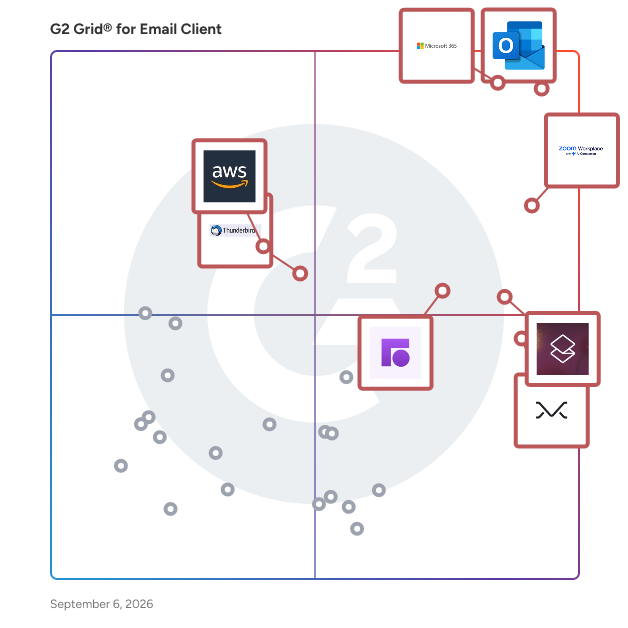
G2 Grid® for Email Client Software

G2 Grid® for Email Client Software plotting products by satisfaction and market presence

Highlighted products: Microsoft Outlook, Microsoft 365, Zoom Workplace, Superhuman Mail, Missive, Front, Thunderbird, and Amazon WorkMail.

Underlying data: [Grid® JSON](https://www.g2.com/categories/email-client/grids.json?focus%5B%5D=microsoft-outlook&focus%5B%5D=microsoft365&focus%5B%5D=zoom-workplace&focus%5B%5D=superhuman-mail&focus%5B%5D=missive&focus%5B%5D=front&focus%5B%5D=thunderbird&focus%5B%5D=amazon-workmail)

FLOW-e

FLOW-e is a web app designed to transform any Gmail or Office 365 inbox into a visual email workflow.

Average Rating: 4.7/5.0

Total Reviews: 5

Who Is the Company Behind FLOW-e?

Who Uses This Product?

  • Company Size: 60% Medium, 40% Small

What Are Recent G2 Reviews of FLOW-e?

500mail by 500apps

500Mail by 500apps is an email software that lets you keep emails safe, encrypted and ad-free feature.  Get unlimited mailboxes and set up multiple domains with IMAP and POP email authentication protocols. Provides world-class data security. Get access to 500Mail in Andriod and IOS devices. Features of 500mail: Secure email: Provide safe Email access for businesses and individuals by encrypting emails, providing physical security, and implementing secured data protection rules. Unlimited Mailboxes: To work collaboratively, get unlimited email storage, access, and forwarding, as well as unlimited mailboxes and shared mailboxes. Mobile Setup: Using mobile integration, create a user-friendly environment and stay linked with your emails for personal and business needs. Multiple Domains: Multiple domains can be accessed from a single platform, allowing you to target a wide range of people and organize emails from various platforms into buckets.

Average Rating: 5.0/5.0

Total Reviews: 3

Who Is the Company Behind 500mail by 500apps?

  • Seller: 500apps
  • Year Founded: 2019
  • HQ Location: New York, California
  • Twitter: @SitePing500apps
    26 Twitter followers
  • LinkedIn® Page: www.linkedin.com

Who Uses This Product?

  • Company Size: 67% Medium, 33% Large

What Are Recent G2 Reviews of 500mail by 500apps?

Claws Mail

Claws Mail is an email client (and news reader), based on gtk+, featuring quick response, graceful, and sophisticated interface, easy configuration, intuitive operation, abundant features, extensibility, robustness and stability.

Average Rating: 4.3/5.0

Total Reviews: 3

How Do G2 Users Rate Claws Mail?

  • Desktop Application: 9.2/10 (Category avg: 8.9/10)
  • Notifications: 7.5/10 (Category avg: 8.8/10)
  • Reminders: 7.5/10 (Category avg: 8.9/10)

Who Is the Company Behind Claws Mail?

  • Seller: Claws Mail
  • HQ Location: N/A
  • Twitter: @ClawsMail
    101 Twitter followers
  • LinkedIn® Page: www.linkedin.com
    1 employees on LinkedIn®

Who Uses This Product?

  • Company Size: 100% Large, 25% Small

What Do G2 Reviewers Say About Claws Mail?

AI-generated summary from verified user reviews

Pros
  • Users find Claws Mail to be intuitive and easy to use, making their email management hassle-free after initial setup.
  • Users find Claws Mail's interface intuitive and easy to use, making their email experience hassle-free after initial setup.
  • Users praise the intuitive and effective user interface of Claws Mail, making the email experience hassle-free.
  • Users value the speed and light resource usage of Claws Mail, making it efficient even on older systems.
Cons
  • Users experience slow email retrieval with Claws Mail, often taking several seconds via IMAP, affecting efficiency.
  • Users experience slow loading times when retrieving new emails in Claws Mail, causing delays in their routine.

What Are Recent G2 Reviews of Claws Mail?

What Are G2 Users Discussing About Claws Mail?

Synology Office Suite

Synology Office Suite is a comprehensive on-prem productivity solution designed to help organizations embrace AI transformation, enhancing communication, streamlining workflows, and accelerating content creation. With a one-time purchase, it provides a cost-effective solution for organizations of all sizes. The suite brings user-friendly and intuitive tools including Synology Drive, Office, MailPlus, Chat, Calendar, Contacts, Note Station, and AI Console, making it easy for teams to get started. For more information please visit: https://www.synology.com/en-global/dsm/overview/productivity

Average Rating: 4.4/5.0

Total Reviews: 22

How Do G2 Users Rate Synology Office Suite?

  • Has the product been a good partner in doing business?: 8.9/10 (Category avg: 8.6/10)
  • Desktop Application: 8.3/10 (Category avg: 8.9/10)
  • Notifications: 9.2/10 (Category avg: 8.8/10)

Who Is the Company Behind Synology Office Suite?

  • Seller: Synology
  • Year Founded: 2000
  • HQ Location: Taiwan
  • Twitter: @Synology
    67,298 Twitter followers
  • LinkedIn® Page: www.linkedin.com
    993 employees on LinkedIn®

Who Uses This Product?

  • Company Size: 68% Small, 32% Medium

What Do G2 Reviewers Say About Synology Office Suite?

AI-generated summary from verified user reviews

Pros
  • Users find Synology Office Suite easy to use, enhancing daily collaboration and efficiency in small office environments.
  • Users appreciate the seamless integrations of Synology Office Suite, enhancing collaboration and data protection across various platforms.
  • Users enjoy the seamless team collaboration with Synology Office Suite, enhancing productivity through real-time document sharing and management.
  • Users appreciate the real-time collaboration features of Synology Office Suite, enhancing teamwork and document management effortlessly.
  • Users enjoy the easy-to-use collaboration tools of Synology Office Suite, enhancing productivity and workflow efficiency.
Cons
  • Users find the limited features of Synology Office Suite restrict its functionality compared to Office 365.
  • Users note the missing features in Synology Office Suite, impacting functionality and limiting complex task performance.
  • Users find Synology Office Suite lacking in features compared to competitors, impacting usability for complex tasks.
  • Users find the lack of advanced features in Synology Office Suite makes it a less viable solution compared to Office 365.
  • Users find the learning curve steep with Synology Office Suite, especially when transitioning from other office solutions.

What Are Recent G2 Reviews of Synology Office Suite?

Unibox

Unibox is a people-centric email client for Mac.

Average Rating: 4.8/5.0

Total Reviews: 3

How Do G2 Users Rate Unibox?

  • Desktop Application: 9.2/10 (Category avg: 8.9/10)
  • Notifications: 8.3/10 (Category avg: 8.8/10)
  • Reminders: 8.3/10 (Category avg: 8.9/10)

Who Is the Company Behind Unibox?

Who Uses This Product?

  • Company Size: 100% Small, 33% Large

What Are Recent G2 Reviews of Unibox?

What Are G2 Users Discussing About Unibox?

Afterlogic Webmail

Premium webmail experience for your users, and corporate-grade support for you. Webmail front-end for your existing IMAP mail server. It uses a powerful AJAX interface for faster access to your emails. Available for both major web platforms: ASP.NET (Windows only) and PHP (Linux/Windows). Full-featured Yet minimalistic, WebMail Pro delivers all the features users would expect. Built on the latest HTML5 and CSS3 technology. Commercial-grade maintenance Dedicated developers team adds new features and improvements on a regular basis. Secure Can run on a secure HTTPS server and communicate with a mail server over SSL connection. International More than 30 languages, right-to-left interface support (for Hebrew and Arabic), date and time formats. Has Personal Calendar Supports single and recurring events with reminders, can act as CalDAV server for syncing with external applications and mobile devices. Files Implements cloud storage of files and folders, with DAV sync. Tasks Create tasks in the calendar and sync them with CalDAV clients. ActiveSync option ActiveServer is a premium add-on which brings ActiveSync support to WebMail Pro and Aurora. Professional support We're always here to help you quickly resolve issues and keep things up to date. Guaranteed responses and prompt bug fixes for your peace of mind. Plugin framework and API for seamless integration A set of developer tools lets you extend the application in many ways, including user interface adjustments, Single-Sign-On, and more. Mobile sync for Mail, Contacts, and Calendar Let your users keep their data in sync with IMAP, CardDAV and CalDAV support. iPhone and iPad can get sync settings automatically. Mobile version It's another option to work with e-mail on smartphones. Optimized for small screens and touch input. OpenPGP Encrypt, sign, decrypt and verify e-mails right in the browser. All the crypto takes place directly in the browser, neither PGP keys nor decrypted data are sent to the server. Paranoid Encryption A strong AES-256 browser-based encryption in Files module. When enabled, encryption process occurs right in the browser, the server never has access to unencrypted data or encryption keys.

Average Rating: 4.1/5.0

Total Reviews: 10

How Do G2 Users Rate Afterlogic Webmail?

  • Has the product been a good partner in doing business?: 8.3/10 (Category avg: 8.6/10)

Who Is the Company Behind Afterlogic Webmail?

  • Seller: AfterLogic
  • Year Founded: 2002
  • HQ Location: Cheyenne, Wyoming
  • Twitter: @afterlogic
    326 Twitter followers
  • LinkedIn® Page: www.linkedin.com
    14 employees on LinkedIn®

Who Uses This Product?

  • Company Size: 50% Medium, 40% Large

What Are Recent G2 Reviews of Afterlogic Webmail?

What Are G2 Users Discussing About Afterlogic Webmail?

EverDesk

EverDesk is the first and only email client which stores email messages as individual files together with your other files and documents in regular Windows folders, so you can keep all the information related to the same subject together and work with it in a simpler, more flexible, and more powerful way.

Average Rating: 4.5/5.0

Total Reviews: 2

How Do G2 Users Rate EverDesk?

  • Has the product been a good partner in doing business?: 10.0/10 (Category avg: 8.6/10)
  • Desktop Application: 8.3/10 (Category avg: 8.9/10)
  • Notifications: 10.0/10 (Category avg: 8.8/10)
  • Reminders: 9.2/10 (Category avg: 8.9/10)

Who Is the Company Behind EverDesk?

Who Uses This Product?

  • Company Size: 50% Small, 50% Medium

What Are Recent G2 Reviews of EverDesk?

Shared Inbox by Canary

Shared Inbox by Canary is a powerful, AI-powered communication hub designed for customer-facing teams. It brings together email, chatbot, and task management—so your support, sales, and operations teams can collaborate, respond faster, and stay on top of every conversation. Built by the makers of Canary Mail (trusted by 1M+ users), Shared Inbox by Canary helps you manage incoming emails with smart assignments, AI-suggested replies, and team-wide visibility. No more missed messages, duplicate responses, or scattered workflows. Key features: -Unified shared inbox for support, sales & ops - AI Chatbot that resolves queries automatically -Built-in team internal notes and task tracking -AI-suggested replies to save time -Cross-platform: Web, macOS, Windows, iOS -Team analytics for accountability & insights Whether you're a small team or scaling fast, Shared Inbox by Canary keeps your external communication organized—and your team in sync. Try for free today! Visit https://shorturl.at/enqPJ.

Average Rating: 4.8/5.0

Total Reviews: 3

How Do G2 Users Rate Shared Inbox by Canary?

  • Desktop Application: 10.0/10 (Category avg: 8.9/10)
  • Notifications: 9.2/10 (Category avg: 8.8/10)
  • Reminders: 10.0/10 (Category avg: 8.9/10)

Who Is the Company Behind Shared Inbox by Canary?

  • Seller: Canary Mail
  • Year Founded: 2017
  • HQ Location: San Francisco, US
  • Twitter: @CanaryMailApp
    7,664 Twitter followers
  • LinkedIn® Page: www.linkedin.com
    22 employees on LinkedIn®

Who Uses This Product?

  • Top Industries: Information Technology and Services
  • Company Size: 250% Medium, 150% Small

What Do G2 Reviewers Say About Shared Inbox by Canary?

AI-generated summary from verified user reviews

Pros
  • Users praise the ease of use of Shared Inbox by Canary, enabling quick setup and efficient team collaboration.
  • Users highlight the Unified Inbox of Canary, transforming chaotic email management into seamless team collaboration.
  • Users value the intuitive collaboration features of Canary's Shared Inbox, enhancing teamwork and communication across various inboxes.
  • Users love the collaborative features of Shared Inbox by Canary, enhancing teamwork and streamlining email management effortlessly.
  • Users value the streamlined communication provided by Shared Inbox by Canary, enhancing teamwork and organization significantly.
Cons
  • Users find missing features frustrating, particularly limitations on tags, reporting, and basic AI capabilities in the free plan.
  • Users find the pricing steep, especially for small teams and non-profits, limiting accessibility and usage opportunities.
  • Users find the usage limitations of the free plan frustrating, lacking essential features like multiple tags.
  • Users find the chat functionality limiting due to reliance on Gmail's conversation view and notification issues.
  • Users find the pricing of Shared Inbox by Canary to be high, especially for small teams and non-profits.

What Are Recent G2 Reviews of Shared Inbox by Canary?

TouchMail

TouchMail is an email app that brings all your accounts into one place with a visual, colorful display that saves you time on your email.

Average Rating: 4.3/5.0

Total Reviews: 2

Who Is the Company Behind TouchMail?

  • Seller: TouchMail
  • Year Founded: 2012
  • HQ Location: N/A
  • Twitter: @TouchMail
    321 Twitter followers
  • LinkedIn® Page: www.linkedin.com
    1 employees on LinkedIn®

Who Uses This Product?

  • Company Size: 50% Medium, 50% Small

What Are Recent G2 Reviews of TouchMail?

TypeApp

TypeApp is an email client with unified inbox for mobile.

Average Rating: 5.0/5.0

Total Reviews: 2

How Do G2 Users Rate TypeApp?

  • Has the product been a good partner in doing business?: 10.0/10 (Category avg: 8.6/10)
  • Desktop Application: 10.0/10 (Category avg: 8.9/10)
  • Notifications: 10.0/10 (Category avg: 8.8/10)
  • Reminders: 10.0/10 (Category avg: 8.9/10)

Who Is the Company Behind TypeApp?

Who Uses This Product?

  • Company Size: 100% Small

What Are Recent G2 Reviews of TypeApp?

Berry

berry® has covered the correspondence management like no one thought was possible. We helped more government organization and private institutions organize their communication by letting people take control of what matters first.

Average Rating: 5.0/5.0

Total Reviews: 1

How Do G2 Users Rate Berry?

  • Desktop Application: 10.0/10 (Category avg: 8.9/10)
  • Notifications: 10.0/10 (Category avg: 8.8/10)
  • Reminders: 10.0/10 (Category avg: 8.9/10)

Who Is the Company Behind Berry?

  • Seller: eSense Software
  • Year Founded: 2002
  • HQ Location: Riyadh, SA
  • Twitter: @eSenseSoftware
    267 Twitter followers
  • LinkedIn® Page: www.linkedin.com
    224 employees on LinkedIn®

Who Uses This Product?

  • Company Size: 100% Small

What Are Recent G2 Reviews of Berry?

Clyton

Clyton is an email client with advanced security and spam filtering features.

Average Rating: 4.5/5.0

Total Reviews: 1

Who Is the Company Behind Clyton?

  • Seller: Gammadyne
  • Year Founded: 1998
  • HQ Location: Overland Park, KS
  • Twitter: @Gammadyne
    25 Twitter followers
  • LinkedIn® Page: www.linkedin.com
    1 employees on LinkedIn®

Who Uses This Product?

  • Company Size: 100% Medium

What Do G2 Reviewers Say About Clyton?

AI-generated summary from verified user reviews

Pros
  • Users value the security features of Clyton, including SSL certificates and DNS blacklisting for enhanced email protection.
Cons
  • Users note the missing support for Unix and Mac, limiting functionality for those environments despite overall satisfaction with Clyton.

What Are Recent G2 Reviews of Clyton?

EGroupware

EGroupware is free open source groupware software intended for businesses from small to enterprises.

Average Rating: 3.3/5.0

Total Reviews: 2

How Do G2 Users Rate EGroupware?

  • Has the product been a good partner in doing business?: 6.7/10 (Category avg: 8.6/10)

Who Is the Company Behind EGroupware?

  • Seller: EGroupware
  • Year Founded: 1996
  • HQ Location: Kaiserslautern, DE
  • Twitter: @egroupware
    292 Twitter followers
  • LinkedIn® Page: de.linkedin.com
    6 employees on LinkedIn®

Who Uses This Product?

  • Company Size: 100% Small

Hexamail

Hexamail Flow is a comprehensive desktop email client for Windows that integrates email management, calendars, tasks, and contacts into a single, user-friendly application. Designed to enhance productivity, it offers a range of features that streamline communication and organization. Key Features and Functionality: - Unified Inbox: Consolidates emails from multiple accounts into a single view, simplifying email management. - Chat View: Presents email conversations in a clean, chat-like format for easy reading. - Clusters: Groups emails by domain, sender, conversation, or subject to organize correspondence effectively. - Delayed Send: Allows scheduling of emails to be sent at a later time. - Auto Folder Filing: Automatically files emails into appropriate folders with a single click. - Large Attachments: Facilitates uploading large attachments to Google Drive. - Resize Photos: Automatically resizes large photos before sending. - Reminders: Sets follow-up reminders on emails. - Automatic Delegation: Enables automatic delegation of emails. - Automatic Tasks: Creates tasks from emails automatically. - Flow Calendars: Provides continuous, zoomable, scrollable calendars for easy appointment scheduling. - Task Cards: Supports hierarchical tasks and to-do lists. - Import Capabilities: Imports email account settings, calendars, and contacts from Outlook, Outlook Express, Windows Live Mail, and Eudora. - Linking: Links emails to events, appointments, tasks, and contacts. - Email Redaction: Redacts email text and prints redacted emails. - Attachment Redaction: Redacts and prints email attachments. - Office Redaction: Redacts and prints office documents. - PST Import: Imports PST files. - Pin Email: Pins emails to the top of any list. - Sleep Email: Hides emails until a later time. - Exchange Compatibility: Compatible with all versions of Microsoft Exchange. - Outlook.com Compatibility: Manages Outlook.com and Office 365 accounts. - Gmail Compatibility: Manages Gmail accounts with label support. - IMAP Compatibility: Manages multiple IMAP email accounts. - Customizable UI: Offers a fully customizable, dynamic user interface with drag-and-drop functionality. - Visual Email: Provides visually meaningful email coloring. - Read Receipt: Supports read receipts. - Google Calendar Support: Fully supports Google Calendar. - Touch Support: Includes touch support. - Windows Compatibility: Compatible with Windows 11, 10, 8, and 7. - Instant Search: Offers instant search and linking across all emails, calendar events, tasks, and contacts. - Aliases: Allows the use of multiple email addresses to send emails. - Filter: Quickly filters email lists by typing. - Multiple Accounts: Synchronizes information from multiple accounts simultaneously. - Any Protocol: Supports IMAP, POP3, SMTP, Exchange, Gmail, and more. - Provider Logos: Displays unique logos for popular email providers. - Drag and Drop: Supports genuine drag-and-drop functionality for various tasks. - Automatic Rules: Creates intelligent automatic rules based on selected emails. Primary Value and User Solutions: Hexamail Flow addresses the challenges of managing multiple email accounts and organizing communications by providing a unified platform that integrates emails, calendars, tasks, and contacts. Its automation features reduce repetitive tasks, while customizable rules and filters allow users to tailor the email management process to their specific needs. By supporting various email protocols, including IMAP, POP3, and SMTP, Hexamail Flow ensures compatibility with a wide array of email servers and systems. Additionally, its security features, such as email filtering and spam protection, enhance the safety of email communications. Overall, Hexamail Flow streamlines email workflows and enhances productivity for its users.

Average Rating: 4.0/5.0

Total Reviews: 1

How Do G2 Users Rate Hexamail?

  • Desktop Application: 10.0/10 (Category avg: 8.9/10)
  • Notifications: 10.0/10 (Category avg: 8.8/10)
  • Reminders: 10.0/10 (Category avg: 8.9/10)

Who Is the Company Behind Hexamail?

  • Seller: Hexamail
  • Year Founded: 2003
  • HQ Location: Cheltenham, GB
  • Twitter: @hexamailpr
    78 Twitter followers
  • LinkedIn® Page: www.linkedin.com
    2 employees on LinkedIn®

Who Uses This Product?

  • Company Size: 100% Medium

What Do G2 Reviewers Say About Hexamail?

AI-generated summary from verified user reviews

Pros
  • Users appreciate the extensive features and customization available with Hexamail, enhancing their overall experience.
Cons
  • Users experience frustrating sync issues that require them to restart the process frequently.
What Are Recent G2 Reviews of Hexamail?

Mailstand

Mailstand is a cold email outreach platform that allows you to merge mailboxes to scale your email outreach. Using multiple mailboxes on one campaign is important if you want to reach more people faster. Set limitations and sending patterns on the mailbox level and Mailstand will automatically follow your rules so you never over send at the wrong time.

Average Rating: 3.0/5.0

Total Reviews: 1

Who Is the Company Behind Mailstand?

  • Seller: Mailstand
  • Year Founded: 2022
  • HQ Location: Philadelphia, US
  • LinkedIn® Page: www.linkedin.com
    5 employees on LinkedIn®

Who Uses This Product?

  • Company Size: 100% Small
Neeraja Prakash
NP
Researched and written by Neeraja Prakash
Updated October 3, 2024