Best E-Signature Software - Page 5

How Many E-Signature Software Products Does G2 Track?

Total Products under this Category: 431

Category Stats (Aug 2026)

  • Average Rating: 4.59/5 (↑0.01 vs Jul 2026) The average rating of products in this category, based on all submitted ratings
  • Top Trending Product: Kinective SignPlus (+8.33%) - Among all products in this category, Kinective SignPlus recorded the largest rating increase compared to last month

Last updated: August 04, 2026

How Does G2 Rank E-Signature Software Products?

Why You Can Trust G2's Software Rankings:

  • 30 Analysts and Data Experts
  • 56,200+ Authentic Reviews
  • 431+ Products
  • Unbiased Rankings

G2's software rankings are built on verified user reviews, rigorous moderation, and a consistent research methodology maintained by a team of analysts and data experts. Each product is measured using the same transparent criteria, with no paid placement or vendor influence. While reviews reflect real user experiences, which can be subjective, they offer valuable insight into how software performs in the hands of professionals. Together, these inputs power the G2 Score, a standardized way to compare tools within every category.

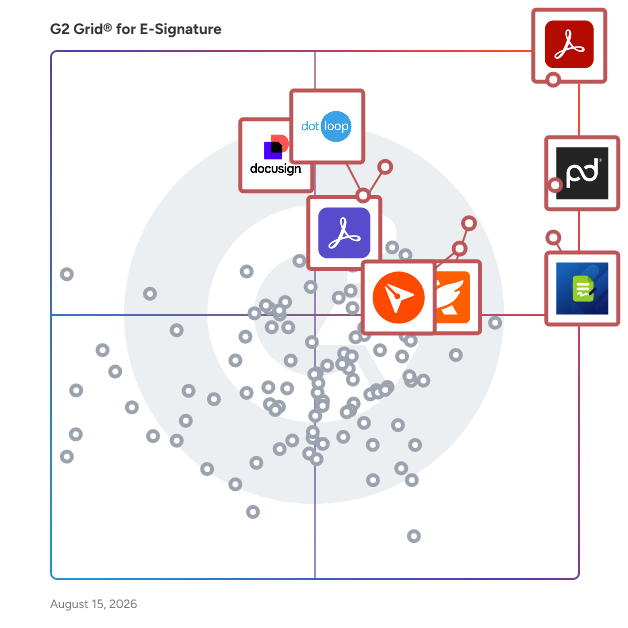
G2 Grid® for E-Signature Software

G2 Grid® for E-Signature Software plotting products by satisfaction and market presence

Highlighted products: Adobe Acrobat, PandaDoc, Jotform Sign, Foxit PDF Editor, Docusign, Adobe Acrobat Sign, BoldSign, and dotloop.

Underlying data: [Grid® JSON](https://www.g2.com/categories/e-signature/grids.json?focus%5B%5D=adobe-acrobat&focus%5B%5D=pandadoc&focus%5B%5D=jotform-sign&focus%5B%5D=foxit-pdf-editor&focus%5B%5D=docusign&focus%5B%5D=adobe-acrobat-sign&focus%5B%5D=boldsign&focus%5B%5D=dotloop)

Sponsored

LinkSquares

LinkSquares is a type of contract lifecycle management (CLM) solution designed to help users transform static contracts into dynamic business assets. This all agentic AI-powered platform enables organizations to gain deeper insights into their contractual agreements, minimize associated risks, and drive strategic value throughout their operations. With a robust architecture that leverages advanced artificial intelligence, LinkSquares redefines how businesses manage their contracts, making the process more efficient and integrated. Targeted primarily at legal teams and business professionals, LinkSquares caters to organizations of various sizes, including notable clients such as DraftKings, ProPharma, and TIME. The platform is particularly beneficial for teams that handle a high volume of contracts and require a streamlined approach to contract management. By providing tools that facilitate drafting, redlining, and analyzing contracts, LinkSquares empowers users to focus on strategic decision-making rather than getting bogged down in operational tasks. One of the key features of LinkSquares is its agentic architecture, which allows the platform to understand contracts in context. This capability enables users to execute necessary actions throughout the contract lifecycle via a natural language interface. Legal teams can easily assess risks, trigger workflows, and manage obligations all within a single system. The platform also offers post-signature analysis, allowing users to evaluate contracts after they have been executed, ensuring that all obligations are met and risks are mitigated. LinkSquares adds significant value by shifting the focus from merely managing contracts to leveraging them as strategic business tools. This transformation leads to faster decision-making processes and a reduction in risk exposure. By automating routine tasks and providing actionable insights, LinkSquares allows teams to allocate more time to high-impact strategic initiatives. The result is a more agile and informed approach to contract management that aligns with broader business goals. Overall, LinkSquares stands out in the CLM category by combining advanced AI capabilities with a user-friendly interface, making it easier for organizations to harness the power of their contracts. This innovative platform not only enhances operational efficiency but also supports businesses in navigating the complexities of contract management in an increasingly dynamic environment.

Visit website

Secured Signing

Secured Signing's eSignature solution is designed to enhance the signing process by incorporating advanced security features such as AI-powered deepfake detection, ID Verification and live video verification. The platform allows users to not only sign documents but also to ensure the integrity, identity, and intent behind each signature, addressing the growing concerns of digital fraud in today’s online environment. Targeted towards businesses and organizations across various sectors, including recruitment, legal, finance, and government, Secured Signing provides a comprehensive signing experience that is both secure and compliant with global standards. The platform is particularly beneficial for industries that require stringent identity verification and regulatory adherence, making it an ideal choice for enterprises that prioritize data protection and compliance. Global Compliance & Security Standards: Our ISO 27001, SOC 2 (Type 1 & 2), HIPAA, GDPR, MISMO, FDA, and FAA-compliant designations ensure the highest level of data protection, privacy, and industry-specific regulatory adherence. Core Features • Live Verification & AI Deepfake Defense: Real-time identity verification during signing featuring Realify - our AI-driven deepfake detection, and a structured audit report. • Video Confirmation & Video Signing: Execute remote signings via live video meetings; includes identity verification, comprehension checks, and secure execution in a single session. • Multi-Layered Authentication: Robust signer validation through biometric ID verification with liveness checks, SMS 2FA, and SSO. • Advanced Audit Trail: Comprehensive, legally defensible records including timestamps, email logs, and IP addresses. • Data Integrity & Sovereignty: Documents are locked against alteration after the first signature. Choose your data residency with regional datacenters in the US, NZ, AUS, and UK. • Flexible eSignature Workflows: Customizable, scalable signing processes tailored to Recruitment, Legal, Notary, Government, Finance, and Enterprise sectors. • API-First Architecture: Built for seamless connectivity. Integrate directly with your tech stack or use our pre-built connectors. The platform is designed with flexibility in mind, offering customizable eSignature workflows that can be tailored to meet the specific needs of various industries. Its API-first architecture facilitates seamless integration with existing technology stacks, allowing organizations to connect directly or utilize pre-built connectors with popular applications such as Bullhorn, Jobadder, Actionstep, Tracker RMS, Salesforce, Microsoft SharePoint, Microsoft Word, and Clio. This adaptability, combined with its commitment to security and compliance, positions Secured Signing as a leading solution in the eSignature market, catering to the evolving demands of modern businesses.

Average Rating: 4.6/5.0

Total Reviews: 45

How Do G2 Users Rate Secured Signing?

  • Has the product been a good partner in doing business?: 9.6/10 (Category avg: 9.2/10)
  • Performance and Reliability: 9.1/10 (Category avg: 9.0/10)
  • Enterprise Scalability: 9.1/10 (Category avg: 8.9/10)
  • Signature Document Creation: 9.3/10 (Category avg: 9.1/10)

Who Is the Company Behind Secured Signing?

  • Seller: Secured Signing
  • Year Founded: 2009
  • HQ Location: Auckland, New Zealand
  • Twitter: @SecuredSigning
    341 Twitter followers
  • LinkedIn® Page: www.linkedin.com
    19 employees on LinkedIn®

Who Uses This Product?

  • Top Industries: Information Technology and Services, Staffing and Recruiting
  • Company Size: 67% Small, 24% Medium

What Do G2 Reviewers Say About Secured Signing?

AI-generated summary from verified user reviews

Pros
  • Users find Secured Signing to be very easy to use, streamlining the document signing process efficiently.
  • Users value the quick and helpful customer support from Secured Signing, enhancing their overall experience.
  • Users highlight the easy integration of Secured Signing with their CRM, enhancing efficiency and reducing manual tasks.
  • Users find the easy setup of Secured Signing great, enhancing efficiency and streamlining document management processes.
  • Users value the time-saving features of Secured Signing, enhancing efficiency and streamlining document management processes.
Cons
  • Users find difficult editing in Secured Signing due to limited flexibility and accuracy in form adjustments.
  • Users find form flexibility issues with Secured Signing, particularly in editing and customizing templates effectively.
  • Users experience copy-paste issues with Secured Signing, complicating form editing and template management tasks.
  • Users face challenges with cc'ing individuals in documents, which can hinder collaboration efforts.
  • Users experience layout issues with Secured Signing, as template editing and field flexibility are limited and cumbersome.

What Are Recent G2 Reviews of Secured Signing?

What Are G2 Users Discussing About Secured Signing?

Lumin for G Suite

Lumin is a document and agreement workflow solution trusted by more than 100 million people worldwide. Create, edit and collaborate on documents with AI assistance, then send them for signing, all in one place. Standardize how agreements get done, close them faster and keep the work inside the systems your team already uses. Create and collaborate - Generate documents from reusable templates, populated with data from your existing systems or CRM - Describe the agreement you need in plain language and generate it with an AI assistant, then refine it by continuing the conversation or editing the document directly - Draft together in real time, comment, tag teammates and resolve feedback without leaving the document Work with PDFs - Edit PDF text, images and pages directly and annotate with highlights, comments, shapes and images, no conversion or re-uploading - Flexible PDF management, including merging, splitting, compressing and reordering pages - Share PDFs with colleagues for review, with comments and mentions keeping feedback attached to the document Send and sign - Send for legally binding eSignatures and follow progress from sent to signed - Every request carries a full audit trail covering who opened it, who signed and when - Verified Digital Signing adds an extra layer of security by confirming each signer's identity before they sign, so the signature is tied to a verified person rather than an email address Integrations - Work directly from the storage you already use, including Google Drive, Microsoft OneDrive and Dropbox - Connect Lumin to Salesforce, HubSpot, Slack and Claude to keep documents moving with the rest of your work - API and SDKs for teams building Lumin into their own products Lumin is free to start, with Business and Enterprise plans that scale with your team. Available in the browser, on desktop and on mobile.

Average Rating: 4.5/5.0

Total Reviews: 772

How Do G2 Users Rate Lumin for G Suite?

  • Has the product been a good partner in doing business?: 9.1/10 (Category avg: 9.2/10)
  • Performance and Reliability: 8.7/10 (Category avg: 9.0/10)
  • Enterprise Scalability: 9.2/10 (Category avg: 8.9/10)
  • Signature Document Creation: 9.1/10 (Category avg: 9.1/10)

Who Is the Company Behind Lumin for G Suite?

  • Seller: Lumin PDF
  • Company Website:
  • Year Founded: 2014
  • HQ Location: Christchurch, Canterbury
  • Twitter: @LuminPdf
    1,249 Twitter followers
  • LinkedIn® Page: www.linkedin.com
    56 employees on LinkedIn®

Who Uses This Product?

  • Who Uses This: Student, Teacher
  • Top Industries: Primary/Secondary Education, Higher Education
  • Company Size: 59% Small, 26% Medium

What Do G2 Reviewers Say About Lumin for G Suite?

AI-generated summary from verified user reviews

Pros
  • Users love the easy layout of Lumin for G Suite, making document management quick and efficient.
  • Users appreciate the easy editing capabilities of Lumin, finding it powerful and handy for daily tasks.
  • Users value the easy-to-use interface of Lumin for G Suite, appreciating its simplicity and efficiency in document management.
  • Users appreciate the ease of editing with Lumin for G Suite, finding it convenient for everyday PDF tasks.
  • Users appreciate the convenience of sending faxes from anywhere, making work easy from their mobile devices.
Cons
  • Users experience a learning curve with Lumin for G Suite, requiring time to master its features initially.
  • Users experience editing difficulties with Lumin for G Suite, including lag and issues with images and text detection.
  • Users experience difficult editing with Lumin for G Suite, noting slow performance and occasional glitches affecting their workflow.
  • Users experience editing issues with Lumin for G Suite, including slow performance on large files and text detection problems.
  • Users experience limited editing capabilities in Lumin for G Suite, which can hinder efficient document management and professionalism.

What Are Recent G2 Reviews of Lumin for G Suite?

What Are G2 Users Discussing About Lumin for G Suite?

CINCEL

Cincel is the all-in-one trust platform that has allowed more than 500,000 to speed up agreements and processes with services such as digital signature (autograph signature + advanced signature), certification (NOM-151 Timestamps + Blockchain Notarization + Audit Footprint), identity ( Biometric Verification + Background Check) and document management (CLM). Cincel is the 1st Trust Services Provider in the Cloud in Mexico and Latin America, accredited as a Certification Service Provider (PSC) by the Ministry of Economy of Mexico. This enables us to offer trust services with legal and technological compliance through the Confianza 360, the all-in-one with trust services such as Advanced Signature with NOM-151, Identity Verification (Biometrics), CLM - Contract Lifecycle Management, Background Check, and PKI Infraestructure. CINCEL streamlines customer-oriented workflows and onboardings with legal compliance and legal certainty. It allows for reducing fraud and bureaucracy, replacing expensive, complex, and risky tools that do not comply with the law in Mexico and LATAM (ISO/IEC + NOM151 + NIST + AICPA).

Average Rating: 5.0/5.0

Total Reviews: 48

How Do G2 Users Rate CINCEL?

  • Has the product been a good partner in doing business?: 9.9/10 (Category avg: 9.2/10)
  • Performance and Reliability: 9.7/10 (Category avg: 9.0/10)
  • Enterprise Scalability: 9.9/10 (Category avg: 8.9/10)
  • Signature Document Creation: 9.9/10 (Category avg: 9.1/10)

Who Is the Company Behind CINCEL?

  • Seller: CINCEL
  • Year Founded: 2019
  • HQ Location: Juárez, MX
  • Twitter: @cincel
    1 Twitter followers
  • LinkedIn® Page: www.linkedin.com
    30 employees on LinkedIn®

Who Uses This Product?

  • Top Industries: Cosmetics, Information Technology and Services
  • Company Size: 62% Medium, 36% Small

What Are Recent G2 Reviews of CINCEL?

What Are G2 Users Discussing About CINCEL?

GoFormz

GoFormz is a platform used for creating digital forms and collecting data, used by teams of every industry and size. Using GoFormz's AI-powered online form builder, teams can digitize existing documents and build new forms from scratch – no code required. GoFormz is the only digital form solution that empowers users to create a digital version of an existing form, enabling any user (regardless of their technical proficiency) to effortlessly generate digital and online forms that meet their unique business needs. Use the GoFormz AI Form Builder to digitize your forms in seconds. Simply upload a form, and with just a click, AI will instantly analyze your form and automatically map and place key data fields, including text boxes, tables, checkboxes, signatures, and more. Your form fields can even be customized with dynamic fields, conditional logic, calculations, requirements, and more! Your digital forms can be filled out on mobile devices, like phones and tablets, and online from a computer. The GoFormz mobile apps are fully functional offline, allowing users to continue their work uninterrupted, no matter how remote their location. You can share forms with individuals outside of your organization, allowing them to fill them out and complete forms, even without a GoFormz login. GoFormz can also automate routine tasks and workflows, like sending completed forms to designated contacts, updating connected databases and dashboards, and uploading forms to integrated systems. By automating these tasks, businesses can rapidly implement streamlined processes for document approvals, authorizations, payroll activities, quality assurance, and numerous other activities quickly and efficiently. Your digital forms can also be directly integrated with your other business applications, like Salesforce, Google Suite, Microsoft 365, Procore, Box, and much more. Completed digital forms and collected data can be instantly uploaded to corresponding tools and records within connected systems, and data can even be pushed back to your digital forms, resulting in enhanced communication, improved operational efficiencies, and increased visibility. GoFormz’s award-winning Customer Support and Professional Services teams are readily available to help when you need it. Ready to jumpstart your digital transformation? Try GoFormz with a 14-day trial or request a demo today!

Average Rating: 4.7/5.0

Total Reviews: 223

How Do G2 Users Rate GoFormz?

  • Has the product been a good partner in doing business?: 9.5/10 (Category avg: 9.2/10)
  • Performance and Reliability: 9.2/10 (Category avg: 9.0/10)
  • Enterprise Scalability: 8.9/10 (Category avg: 8.9/10)
  • Signature Document Creation: 9.4/10 (Category avg: 9.1/10)

Who Is the Company Behind GoFormz?

  • Seller: GoFormz
  • Company Website:
  • Year Founded: 2012
  • HQ Location: San Diego, CA
  • Twitter: @goformz
    397 Twitter followers
  • LinkedIn® Page: www.linkedin.com
    61 employees on LinkedIn®

Who Uses This Product?

  • Top Industries: Construction, Oil & Energy
  • Company Size: 49% Small, 45% Medium

What Do G2 Reviewers Say About GoFormz?

AI-generated summary from verified user reviews

Pros
  • Users find GoFormz to be easy to navigate and create forms, enhancing efficiency and eliminating manual processes.
  • Users appreciate the ease of form customization with GoFormz, streamlining their processes and enhancing efficiency.
  • Users love the ease of creation with GoFormz, rapidly transforming PDFs into efficient digital forms effortlessly.
  • Users value the easy setup of GoFormz, appreciating its intuitive design and seamless implementation process.
  • Users appreciate the easy creation of forms with GoFormz, enabling fast and efficient data collection and management.
Cons
  • Users find difficult customization in GoFormz frustrating, as it limits the ability to create tailored forms quickly.
  • Users find limited customization options in GoFormz hinder their ability to create tailored forms effectively.
  • Users face customization issues with GoFormz, finding designs rigid and the process time-consuming despite support availability.
  • Users find GoFormz expensive, with high licensing costs and rapid price increases affecting overall accessibility.
  • Users struggle with a steep learning curve and find the platform not very user-friendly for process development.

What Are Recent G2 Reviews of GoFormz?

What Are G2 Users Discussing About GoFormz?

Formstack Sign

Fast and secure digital signatures anywhere. Formstack Sign is a cloud-based electronic signature solution that helps small to large businesses collect e-signatures for document authorization, ensure privacy, and access the system across multiple devices. Offering a host of features, such as customizable templates, a drag-and-drop interface, electronic file conversion, signer redirection/referral, reusable forms, and more, the platform syncs with Google and Outlook to help users import contact information. Additionally, it allows users to personalize documents with custom fonts, branding, and colors. Formstack Sign enables users to create password-protected documents that can be signed via SMS/text messages. To ensure legal compliance, the solution includes an audit trail for all documentation. The product is available on a per-user per-month subscription, and support is extended via email and online helpdesk. Formstack Sign is an ideal digital signature solution for any industry, including: - Healthcare - Higher Education - Insurance - Financial Services - Government - Energy and Utilities Formstack Sign saves teams an average of 13 hours per week, giving them more time to focus on impactful work.

Average Rating: 4.8/5.0

Total Reviews: 404

How Do G2 Users Rate Formstack Sign?

  • Has the product been a good partner in doing business?: 9.5/10 (Category avg: 9.2/10)
  • Performance and Reliability: 9.4/10 (Category avg: 9.0/10)
  • Enterprise Scalability: 9.3/10 (Category avg: 8.9/10)
  • Signature Document Creation: 9.3/10 (Category avg: 9.1/10)

Who Is the Company Behind Formstack Sign?

  • Seller: Formstack, LLC
  • Company Website:
  • Year Founded: 2006
  • HQ Location: Fishers, IN
  • Twitter: @Formstack
    6,392 Twitter followers
  • LinkedIn® Page: www.linkedin.com
    219 employees on LinkedIn®

Who Uses This Product?

  • Who Uses This: Insurance Agent, Account Manager
  • Top Industries: Insurance, Higher Education
  • Company Size: 85% Small, 13% Medium

What Do G2 Reviewers Say About Formstack Sign?

AI-generated summary from verified user reviews

Pros
  • Users appreciate the intuitive and user-friendly interface of Formstack Sign, enhancing their document management experience.
  • Users value the time-saving automation of Formstack Sign, enabling quick form distribution and streamlined processes.
  • Users find Formstack Sign incredibly convenient for its intuitive use and seamless integration with other software.
  • Users appreciate the easy signing process with Formstack Sign, enhancing workflow and integration with other applications.
  • Users appreciate the ease of managing signatures with Formstack Sign, streamlining document distribution and saving time.
Cons
  • Users face form issues related to setup complexity, email recognition, and unmet functionality promises from sales support.
  • Users express frustration over email issues, particularly with sender names and delays due to shared email addresses.
  • Users desire better email management to streamline organization recognition and avoid delays with clients sharing email addresses.
  • Users face e-signature issues due to limits on merges, complicating an otherwise simple platform experience.
  • Users find the limited customization options in Formstack Sign restrict their ability to tailor the tool effectively.

What Are Recent G2 Reviews of Formstack Sign?

What Are G2 Users Discussing About Formstack Sign?

ReadySign, An Onit Product

Keep business moving with ReadySign electronic signature software - the fast, affordable way for teams to get documents signed anytime, anywhere. Unlike other e-sign solutions, ReadySign won’t limit the number of documents you can send for signature and is committed to ensuring your success through support from an award-winning customer success team - available to all users and signers 24/7. And with predictable, affordable pricing there will never be an unwanted surprise when the bill comes.

Average Rating: 4.8/5.0

Total Reviews: 16

How Do G2 Users Rate ReadySign, An Onit Product?

  • Has the product been a good partner in doing business?: 10.0/10 (Category avg: 9.2/10)
  • Performance and Reliability: 9.7/10 (Category avg: 9.0/10)
  • Enterprise Scalability: 9.4/10 (Category avg: 8.9/10)
  • Signature Document Creation: 8.6/10 (Category avg: 9.1/10)

Who Is the Company Behind ReadySign, An Onit Product?

Who Uses This Product?

  • Top Industries: Education Management, Primary/Secondary Education
  • Company Size: 69% Medium, 19% Small

What Are Recent G2 Reviews of ReadySign, An Onit Product?

MSB Docs

MSB Docs' platform ensures enterprises achieve and maintain compliance by validating our software against crucial industry regulations. Trusted by more than 1 million users in 188 countries, MSB Docs enables organizations to easily create documents, send these to the signers for eSignatures, and achieve them. MSB Docs has also been consecutively featured on Gartner's eSignature vendor, Gartner's Hype-Cycle, and Gartner's Market Guide for 5 years. MSB Docs features a robust and reliable website integration via APIs and a collaboration tool that helps multiple team members around the globe to seamlessly work on a single contract document. Every part of the signing process is recorded and time-stamped in our Comprehensive Audit trails, which provides data and transparency for regulatory compliance and legal evidence. MSB Docs also integrates with multi-factor authentication such as hardware tokens and one-time passwords.

Average Rating: 4.9/5.0

Total Reviews: 25

How Do G2 Users Rate MSB Docs?

  • Has the product been a good partner in doing business?: 10.0/10 (Category avg: 9.2/10)
  • Performance and Reliability: 9.9/10 (Category avg: 9.0/10)
  • Enterprise Scalability: 9.9/10 (Category avg: 8.9/10)
  • Signature Document Creation: 9.8/10 (Category avg: 9.1/10)

Who Is the Company Behind MSB Docs?

  • Seller: MSB Docs
  • Year Founded: 2005
  • HQ Location: Irvine, California
  • Twitter: @msbdocs
    61 Twitter followers
  • LinkedIn® Page: www.linkedin.com
    74 employees on LinkedIn®

Who Uses This Product?

  • Top Industries: Information Technology and Services
  • Company Size: 52% Small, 44% Medium

What Do G2 Reviewers Say About MSB Docs?

AI-generated summary from verified user reviews

Pros
  • Users praise the easy signing feature of MSB Docs for its fast, secure, and legally valid e-signature capabilities.
  • Users appreciate the convenient document signing process of MSB Docs, streamlining tasks with a user-friendly interface.
  • Users appreciate the secure and efficient e-signature solution of MSB Docs, ensuring legally valid document signing.
  • Users find MSB Docs' user-friendly e-signature solution secure, easy to use, and legally valid.
  • Users value the time-saving efficiency of MSB Docs, simplifying and expediting the document signing process significantly.
Cons
  • Users find the difficult editing limitations frustrating, as mistakes require sending entirely new documents instead of simple adjustments.
  • Users dislike the editing limitations that prevent document corrections, leading to unnecessary duplication of work.

What Are Recent G2 Reviews of MSB Docs?

What Are G2 Users Discussing About MSB Docs?

Vinesign

eSignature has never been easier! Customize your own reusable templates and send documents in bulk with just a few clicks. Start your free 30 day trial today!

Average Rating: 4.5/5.0

Total Reviews: 12

How Do G2 Users Rate Vinesign?

  • Has the product been a good partner in doing business?: 8.8/10 (Category avg: 9.2/10)
  • Performance and Reliability: 9.3/10 (Category avg: 9.0/10)
  • Enterprise Scalability: 9.3/10 (Category avg: 8.9/10)
  • Signature Document Creation: 9.2/10 (Category avg: 9.1/10)

Who Is the Company Behind Vinesign?

  • Seller: Filevine
  • Year Founded: 2015
  • HQ Location: Salt Lake City, Utah
  • Twitter: @filevine
    1,385 Twitter followers
  • LinkedIn® Page: www.linkedin.com
    941 employees on LinkedIn®

Who Uses This Product?

  • Top Industries: Legal Services, Law Practice
  • Company Size: 83% Medium, 8% Large

What Do G2 Reviewers Say About Vinesign?

AI-generated summary from verified user reviews

Pros
  • Users appreciate the user-friendly signature creation features of Vinesign, enhancing efficiency in document management.
  • Users appreciate the user-friendly interface of Vinesign, making document submission and signature creation effortless.
  • Users appreciate the convenience of Vinesign, enabling easy document execution without printing or scanning hassles.
  • Users value the customizability of Vinesign, enjoying personalized branding and seamless integration for efficient contract management.
  • Users value the ease of use of Vinesign, allowing clients to sign documents effortlessly without printing or scanning.
Cons
  • Users find the learning curve and approval process challenging, making initial setup and integration more difficult.
  • Users find the two-factor authentication for login unnecessarily complicating the access to their accounts.

What Are Recent G2 Reviews of Vinesign?

Yozons

Yozons is a fully branded web-based, open source Electronic Signature & E-Contracting software

Average Rating: 4.7/5.0

Total Reviews: 11

How Do G2 Users Rate Yozons?

  • Has the product been a good partner in doing business?: 10.0/10 (Category avg: 9.2/10)
  • Performance and Reliability: 9.4/10 (Category avg: 9.0/10)
  • Enterprise Scalability: 9.0/10 (Category avg: 8.9/10)
  • Signature Document Creation: 9.4/10 (Category avg: 9.1/10)

Who Is the Company Behind Yozons?

  • Seller: Yozons
  • Year Founded: 2000
  • HQ Location: Kirkland, WA
  • LinkedIn® Page: www.linkedin.com
    2 employees on LinkedIn®

Who Uses This Product?

  • Company Size: 25% Medium, 25% Small

What Are Recent G2 Reviews of Yozons?

What Are G2 Users Discussing About Yozons?

Tomorro

Tomorro powers contracts of hundreds of modern companies like Nestlé, Lano, Alma or Voodoo to help them reduce the time spent on contract management and gives them control and visibility over legal and financial risks.

Average Rating: 4.7/5.0

Total Reviews: 71

How Do G2 Users Rate Tomorro?

  • Has the product been a good partner in doing business?: 9.5/10 (Category avg: 9.2/10)
  • Performance and Reliability: 9.0/10 (Category avg: 9.0/10)
  • Enterprise Scalability: 10.0/10 (Category avg: 8.9/10)
  • Signature Document Creation: 9.2/10 (Category avg: 9.1/10)

Who Is the Company Behind Tomorro?

  • Seller: Tomorro
  • Year Founded: 2020
  • HQ Location: France
  • LinkedIn® Page: www.linkedin.com
    134 employees on LinkedIn®

Who Uses This Product?

  • Top Industries: Financial Services, Insurance
  • Company Size: 61% Medium, 36% Small

What Are Recent G2 Reviews of Tomorro?

What Are G2 Users Discussing About Tomorro?

Anvil

Anvil helps turn clunky paperwork processes into embeddable document workflows with document APIs for product teams. We work closely with HRtech, Insurtech, FinTech, Healthcare, Real Estate, and startup companies where paperwork, user experience, and data accessibility are considered "high-priority".

Average Rating: 4.7/5.0

Total Reviews: 33

How Do G2 Users Rate Anvil?

  • Has the product been a good partner in doing business?: 8.8/10 (Category avg: 9.2/10)
  • Performance and Reliability: 8.8/10 (Category avg: 9.0/10)
  • Enterprise Scalability: 8.6/10 (Category avg: 8.9/10)
  • Signature Document Creation: 9.4/10 (Category avg: 9.1/10)

Who Is the Company Behind Anvil?

Who Uses This Product?

  • Company Size: 62% Small, 26% Medium

What Do G2 Reviewers Say About Anvil?

AI-generated summary from verified user reviews

Pros
  • Users commend the ease of use of Anvil, particularly for automation and seamless integration with e-sign features.
  • Users commend Anvil's outstanding customer support, highlighting exceptional onboarding and helpful assistance throughout the experience.
  • Users highlight Anvil's efficiency in quickly turning ideas into working apps without complicated setups.
  • Users highlight Anvil's easy software integration, allowing quick connections to databases and APIs without hassle.
  • Users commend the unlimited digital signature capabilities of Anvil, enhancing its appeal and efficiency in handling PDFs.
Cons
  • Users find the navigation confusing, often feeling lost in long documents and overwhelmed by extensive documentation.
  • Users find the complexity of the template builder can make the overall experience a bit tedious and challenging.
  • Users face implementation difficulties due to costly enterprise plans and complex API integration challenges.
  • Users face issues with missing translation features in Anvil, leading to inaccurate forms for Spanish-speaking clients.
  • Users find the poor documentation lacking in clear examples and tutorials, hindering a smoother experience with Anvil.

What Are Recent G2 Reviews of Anvil?

Skribble

With Skribble, you can legally sign any document electronically. Different documents, different legal requirements – at Skribble, you get access to all available e-signature standards from a single source, and you are prepared for every situation.

Average Rating: 4.4/5.0

Total Reviews: 22

How Do G2 Users Rate Skribble?

  • Has the product been a good partner in doing business?: 9.3/10 (Category avg: 9.2/10)
  • Performance and Reliability: 8.3/10 (Category avg: 9.0/10)
  • Enterprise Scalability: 8.7/10 (Category avg: 8.9/10)
  • Signature Document Creation: 8.6/10 (Category avg: 9.1/10)

Who Is the Company Behind Skribble?

  • Seller: Skribble
  • Year Founded: 2018
  • HQ Location: Zurich, Switzerland
  • Twitter: @SkribbleHQ
    165 Twitter followers
  • LinkedIn® Page: www.linkedin.com
    47 employees on LinkedIn®

Who Uses This Product?

  • Company Size: 65% Small, 22% Medium

What Are Recent G2 Reviews of Skribble?

What Are G2 Users Discussing About Skribble?

signotive

Signotive is a comprehensive digital signage solution designed to streamline the creation, management, and deployment of dynamic content across various display screens. It caters to businesses and organizations seeking to enhance their communication strategies through visually engaging and easily updatable digital displays. Key Features and Functionality: - User-Friendly Content Management: Signotive offers an intuitive interface that allows users to design and schedule content effortlessly, ensuring timely and relevant messaging. - Cloud-Based Platform: Being cloud-based, it enables remote management of digital signage networks, providing flexibility and scalability for businesses of all sizes. - Customizable Templates: A variety of templates are available, allowing for quick customization to align with brand identity and specific communication needs. - Real-Time Updates: Content can be updated in real-time, ensuring that information displayed is always current and accurate. - Multi-Screen Support: Signotive supports multiple screens and locations, making it suitable for businesses with diverse signage requirements. Primary Value and Solutions Provided: Signotive addresses the challenge of maintaining engaging and up-to-date digital signage by offering a centralized platform for content management. It simplifies the process of delivering targeted messages to audiences, enhancing customer engagement, and improving internal communications. By leveraging Signotive, organizations can reduce the time and resources spent on managing digital displays, allowing them to focus on core business activities while ensuring their messaging remains impactful and consistent.

Average Rating: 5.0/5.0

Total Reviews: 28

How Do G2 Users Rate signotive?

  • Performance and Reliability: 9.9/10 (Category avg: 9.0/10)
  • Enterprise Scalability: 9.8/10 (Category avg: 8.9/10)
  • Signature Document Creation: 9.9/10 (Category avg: 9.1/10)

Who Is the Company Behind signotive?

Who Uses This Product?

  • Who Uses This: CEO
  • Top Industries: Computer Software
  • Company Size: 71% Small, 29% Medium

What Do G2 Reviewers Say About signotive?

AI-generated summary from verified user reviews

Pros
  • Users find the huge time-saving advantage of Signotive essential for effortless contract and proposal management.
  • Users love the easy integration with tools like Google Drive and Clio, enhancing their signing experience effortlessly.
  • Users appreciate the time-saving features of Signotive, making document handling fast and professional.
  • Users love the variety of templates available, making document management quick and user-friendly with excellent support.
  • Users find Signotive super intuitive, allowing even non-tech-savvy members to generate reports effortlessly.
Cons
  • Users note the insufficient tutorials that make setup challenging and reliance on support for guidance necessary.
  • Users find a small learning curve when creating smart templates, needing tutorials but appreciate the helpful support.
  • Users find the limited features of Signotive restrict their document sending and template options for business needs.
  • Users face connectivity issues in low-connectivity areas, expressing a desire for an offline mode to enhance usability.
  • Users find the limited customization of templates restrictive, affecting their branding options significantly.

What Are Recent G2 Reviews of signotive?

Documo

Documo is an AI-powered healthcare document automation platform combining HIPAA-compliant cloud fax with Intelligent Document Processing (IDP) to automate the full lifecycle of unstructured clinical document intake, from the moment a document arrives through classification, data extraction, patient matching, and direct delivery into the EHR. Where most cloud fax solutions stop at secure transmission, Documo goes further, treating every inbound document as structured data waiting to be unlocked. Its AI automatically reads, classifies, and extracts field-level information from referrals, prior authorizations, lab results, consent forms, and clinical records, then routes that data directly into PointClickCare, ModMed, NextGen, and other connected EHR and practice management systems with no manual intervention required. Built for mid-to-large health systems, healthcare organizations, and healthtech integrators, Documo eliminates the document processing bottlenecks that slow care coordination, create compliance risk, and consume clinical and administrative staff time every day. Documo customers see dramatic reductions in manual document handling, faster care coordination, and measurable ROI from day one. If your team is still manually processing faxed referrals, prior authorizations, or clinical records, Documo can help. Schedule a demo today and see how leading healthcare organizations are turning document chaos into automated, EHR-ready workflows.

Average Rating: 4.6/5.0

Total Reviews: 225

How Do G2 Users Rate Documo?

  • Has the product been a good partner in doing business?: 9.5/10 (Category avg: 9.2/10)
  • Performance and Reliability: 9.0/10 (Category avg: 9.0/10)
  • Enterprise Scalability: 8.1/10 (Category avg: 8.9/10)
  • Signature Document Creation: 8.3/10 (Category avg: 9.1/10)

Who Is the Company Behind Documo?

  • Seller: Documo
  • Company Website:
  • Year Founded: 2014
  • HQ Location: Wilmington, DE
  • LinkedIn® Page: www.linkedin.com
    55 employees on LinkedIn®

Who Uses This Product?

  • Who Uses This: Owner, CEO
  • Top Industries: Hospital & Health Care, Health, Wellness and Fitness
  • Company Size: 52% Small, 26% Medium

What Do G2 Reviewers Say About Documo?

AI-generated summary from verified user reviews

Pros
  • Users find Documo's seamless integration with cloud-based fax functionality and notifications to be exceptionally useful.
  • Users find Documo's ease of use exceptional, with a clean interface that simplifies faxing for everyone.
  • Users commend Documo for its exceptional reliability, ensuring smooth operation with minimal issues during use.
  • Users find Documo incredibly simple for sending and receiving faxes, making it ideal for all tech levels.
  • Users find Documo to be affordable, making it an excellent choice for small businesses and advanced users alike.
Cons
  • Users experience fax issues that hinder efficiency, particularly during the porting process and while retrieving incoming faxes.
  • Users face porting difficulties with Documo, leading to lengthy onboarding and complicated fax sending processes.
  • Users find the difficult learning process challenging, especially in getting staff to use Documo effectively.
  • Users find Documo expensive, particularly due to infrequent usage leading to high per-use costs.
  • Users find the interface usability lacking, complicating tasks and making simple functions time-consuming to perform.

What Are Recent G2 Reviews of Documo?

What Are G2 Users Discussing About Documo?

WaiverElectronic

Waiver Electronic is the easiest and most secure way to manage liability waivers powering business by making the waiver sign up process quick, paperless, and secure. In just a few minutes, merchants can have their own electronic waiver business solution with a speedy sign up process and paperless storage forever. Waiver Electronic has been used for thousands of companies all over the world. Jet Ski rentals, paintball ranges, non-profit programs, yoga fitness, pet cares, etc. Merchants can retrieve a waiver in 2 seconds, request a waiver from email, renew waivers for returning users.

Average Rating: 4.7/5.0

Total Reviews: 11

How Do G2 Users Rate WaiverElectronic?

  • Has the product been a good partner in doing business?: 8.3/10 (Category avg: 9.2/10)
  • Performance and Reliability: 10.0/10 (Category avg: 9.0/10)
  • Enterprise Scalability: 10.0/10 (Category avg: 8.9/10)
  • Signature Document Creation: 10.0/10 (Category avg: 9.1/10)

Who Is the Company Behind WaiverElectronic?

  • Seller: WaiverElectronic
  • Year Founded: 2009
  • HQ Location: Kirkland, Washington
  • Twitter: @WaiverElectron1
    30 Twitter followers
  • LinkedIn® Page: www.linkedin.com
    1 employees on LinkedIn®

Who Uses This Product?

  • Company Size: 100% Small

What Are Recent G2 Reviews of WaiverElectronic?

What Are G2 Users Discussing About WaiverElectronic?

Julie Jung
JJ
Researched and written by Julie Jung
Updated April 9, 2026