Best Digital Adoption Platforms - Page 5

How Many Digital Adoption Platforms Products Does G2 Track?

Total Products under this Category: 116

Category Stats (Sep 2026)

  • Average Rating: 4.62/5 The average rating of products in this category, based on all submitted ratings
  • Top Trending Product: Frigade (+1.83%) - Among all products in this category, Frigade recorded the largest rating increase compared to last month

Last updated: September 01, 2026

How Does G2 Rank Digital Adoption Platforms Products?

Why You Can Trust G2's Software Rankings:

  • 30 Analysts and Data Experts
  • 19,700+ Authentic Reviews
  • 116+ Products
  • Unbiased Rankings

G2's software rankings are built on verified user reviews, rigorous moderation, and a consistent research methodology maintained by a team of analysts and data experts. Each product is measured using the same transparent criteria, with no paid placement or vendor influence. While reviews reflect real user experiences, which can be subjective, they offer valuable insight into how software performs in the hands of professionals. Together, these inputs power the G2 Score, a standardized way to compare tools within every category.

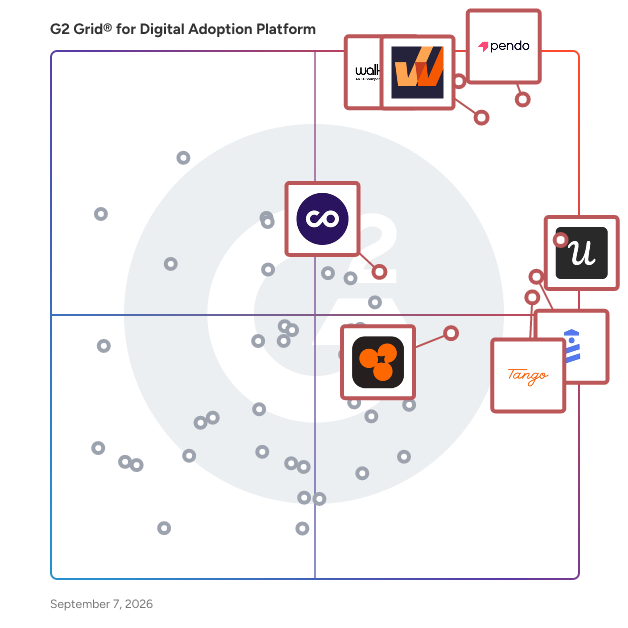
G2 Grid® for Digital Adoption Platforms

G2 Grid® for Digital Adoption Platforms plotting products by satisfaction and market presence

Highlighted products: Pendo, WalkMe, Whatfix, Userpilot, UserGuiding, Tango, Product Fruits, and ChurnZero.

Underlying data: [Grid® JSON](https://www.g2.com/categories/digital-adoption-platform/grids.json?focus%5B%5D=pendo-io-pendo&focus%5B%5D=walkme&focus%5B%5D=whatfix&focus%5B%5D=userpilot&focus%5B%5D=userguiding&focus%5B%5D=tango-tango&focus%5B%5D=product-fruits&focus%5B%5D=churnzero)

Produktly

Produktly -- The All-in-One Digital Adoption Suite for Growing SaaS Teams Produktly is a comprehensive digital adoption platform that helps software companies improve user onboarding, drive feature adoption, and increase retention, all without writing a single line of code. Founded in 2021 and based in Helsinki, Finland, Produktly is trusted by over 2,300 companies to guide their users and make their products stickier. Most digital adoption platforms are either limited in functionality or come with enterprise-level price tags that put them out of reach for startups and growing teams. Produktly offers a feature-rich, affordable alternative that brings together eight core tools in one unified platform: interactive product tours, onboarding checklists, public roadmaps, changelogs, feedback widgets, smart tips, in-app announcements, and NPS surveys. Onboard users faster with interactive product tours and checklists. Create step-by-step walkthroughs that highlight your product's key features and guide new users to their "aha moment." Checklists auto-complete as users take actions, keeping them engaged from day one and reducing time-to-value. Keep users informed and engaged with changelogs and announcements. Share product updates, new features, and company news directly inside your app. Produktly's AI-powered changelog editor lets you generate polished release notes from bullet points in seconds. Collect actionable feedback at every touchpoint. Embed feedback widgets, NPS surveys, and micro-surveys to understand what users love and where they struggle. AI-powered insights surface patterns across responses and suggest replies, so your team can act on feedback faster. Build transparency with public roadmaps. Show customers what you're working on and what's coming next. Let them upvote features and submit requests, giving your product team clear signal on what to prioritize. Deliver contextual guidance with smart tips. Add non-intrusive tooltips that appear exactly where users need help, no support tickets required. Smart tips reduce repetitive support requests while improving the self-serve experience. Produktly integrates with the tools your team already uses, including Slack, Discord, Zapier, Pabbly Connect, PostHog, and Crisp, with webhooks available for custom workflows. Every feature supports user segmentation, so you can target the right message to the right users based on behavior, plan, or custom attributes. Setup takes minutes, not weeks. Add a lightweight JavaScript snippet to your site, and start building tours, collecting feedback, and publishing updates using Produktly's visual no-code editor. The platform works seamlessly across single-page applications, multi-page websites, and responsive mobile layouts, with full support for custom domains and branding. Whether you're a solo builder launching your first product or a growth-stage team scaling onboarding across millions of users, Produktly gives you the tools to reduce churn, increase feature adoption, and turn new signups into power users, at a price that makes sense for your stage

Average Rating: 4.5/5.0

Total Reviews: 3

How Do G2 Users Rate Produktly?

  • User Segmentation: 3.3/10 (Category avg: 8.8/10)
  • Ease of Use: 8.3/10 (Category avg: 9.0/10)
  • Text Bubble Walkthroughs: 6.7/10 (Category avg: 9.1/10)
  • Audio-visual Walkthroughs: 6.7/10 (Category avg: 8.9/10)

Who Is the Company Behind Produktly?

Who Uses This Product?

  • Company Size: 100% Small

What Are Recent G2 Reviews of Produktly?

Adeptly

Adeptly is the screen-aware AI co-pilot designed to drive operational efficiency across your essential business stack. We replace static documentation with live, in-app guidance, allowing users to execute complex tasks without ever leaving their interface. Designed for dynamic professional environments, Adeptly understands your real-time context within mission-critical tools like Excel / Google Sheets, Shopify, and Quickbooks. Whether you are analyzing financial data, managing e-commerce inventory, or reconciling accounts, our AI provides instant, conversational support. Adeptly empowers teams to reduce errors, skip the training videos, and master their daily workflows instantly.

Average Rating: 5.0/5.0

Total Reviews: 2

How Do G2 Users Rate Adeptly?

  • Ease of Use: 10.0/10 (Category avg: 9.0/10)
  • Audio-visual Walkthroughs: 10.0/10 (Category avg: 8.9/10)

Who Is the Company Behind Adeptly?

Who Uses This Product?

  • Company Size: 100% Small

What Do G2 Reviewers Say About Adeptly?

AI-generated summary from verified user reviews

Pros
  • Users find Adeptly's real-time coaching invaluable for navigating QuickBooks seamlessly and with confidence.
  • Users appreciate the real-time on-screen guidance from Adeptly, enhancing their learning experience directly within QuickBooks.
  • Users love the ease of use of Adeptly, enjoying real-time guidance that enhances their QuickBooks experience.
  • Users value the personalized on-screen guidance of Adeptly, enabling seamless learning and real-time support while using QuickBooks.
  • Users find Adeptly's training support invaluable for navigating QuickBooks with ease and confidence.
Cons
  • Users note some missing features, especially in playbooks for various QuickBooks workflows, indicating potential for improvement.
  • Users experience slow performance when switching screens quickly, requiring them to slow down for better responsiveness.

What Are Recent G2 Reviews of Adeptly?

Compass

Compass is a Digital Adoption Platform which provides real time guidance to the users (both employees and customers) when they are using your web application. It Aids higher software adoption, mitigating risks of underutilization and wasted investments. Also empowers customers to self-solve, reducing support calls and boosting satisfaction.

Average Rating: 5.0/5.0

Total Reviews: 2

How Do G2 Users Rate Compass?

  • User Segmentation: 10.0/10 (Category avg: 8.8/10)
  • Ease of Use: 9.2/10 (Category avg: 9.0/10)
  • Text Bubble Walkthroughs: 10.0/10 (Category avg: 9.1/10)
  • Audio-visual Walkthroughs: 10.0/10 (Category avg: 8.9/10)

Who Is the Company Behind Compass?

Who Uses This Product?

  • Company Size: 50% Large, 50% Small

What Are Recent G2 Reviews of Compass?

FlowShare

What is FlowShare? FlowShare is a Windows-native process documentation solution with full data control. It is built for organizations that need to document work inside enterprise systems (SAP GUI, Microsoft Dynamics, custom ERP platforms, document management systems, Citrix environments, and legacy desktop software), as well as virtually any other application running on the local Windows device or in the browser, while keeping process data under their own control. FlowShare runs locally in the background and automatically captures every click and action as you work. Its TrackingEngine reads the actual UI elements at the operating-system level: it knows what each field and button is called because it captured the click event, not because it guessed from a screen recording. Each workflow becomes a clear, branded, step-by-step guide with annotated screenshots in seconds. Record once, export everywhere: no manual screenshotting, no copy-paste into Word, no cloud upload required. Capture and storage happen locally on the user's device by design. FlowShare does offer modern AI and cloud features (the FlowShare Portal, AI-powered search, and auto-translation), but all of them are optional and can be deactivated. For customers with the highest data security requirements, FlowShare can be configured so that documentation never leaves the local environment. That is why FlowShare is used in highly regulated and even air-gapped environments such as government, utilities, and healthcare. Key capabilities ✓ Automatic capture of any Windows or browser application: SAP GUI, Microsoft Dynamics, custom ERP systems, DMS platforms, Citrix environments, legacy desktop software, and modern web tools. If you can click it, FlowShare can document it. ✓ OS-level element recognition: exact field names and transaction codes, not AI guesses from video frames. ✓ Guides generated in seconds, with annotated screenshots and auto-written step descriptions. Customers report documentation up to 10x faster. ✓ Every guide is an editable source file (.flow): when a process changes, update the affected steps and re-export. No re-recording, no rework. ✓ 10 export templates from a single capture, including PDF, Word, PowerPoint, HTML, SCORM, and interactive demos. ✓ Publish where your teams already work: direct integrations with SharePoint and Confluence, plus the FlowShare Portal with a built-in AI assistant so colleagues find answers in seconds without installing FlowShare. ✓ Bulk blur of sensitive data across all screenshots in one action. ✓ Guide content auto-translates into 29+ languages for global rollouts. ✓ Local by design: documentation (texts and screenshots) is managed entirely on the device unless a platform integration is explicitly set up. All AI and cloud features can be deactivated on request. 🔐 Data privacy by architecture, not just by paperwork. Cloud-first tools can be made GDPR-compliant on paper through DPAs and EU data residency, but your process data still transits their servers by design. FlowShare captures and stores locally. Where cloud features are used, they run on EU infrastructure: the hosted Portal runs in Frankfurt, Germany, and AI features run on Azure OpenAI within the EU. A Data Processing Agreement is available and ISO certification is in progress. 👥 Who uses FlowShare IT, Operations, Learning & Development, and Compliance teams in mid-market and enterprise organizations, for process standardization, faster onboarding, audit-ready documentation, and complex software rollouts (SAP, ERP, DMS, and other enterprise systems). FlowShare has passed security reviews at organizations with the strictest IT requirements. 📈 Reported customer results Up to 90% less time spent creating documentation Up to 50% faster new-hire onboarding Up to 70% reduction in training and support costs 100% standardized, consistently branded documentation across teams, tools, and languages 🌍 4.8 average rating, top-rated on Capterra, GetApp, Software Advice, and SourceForge 💬 What customers say "No more excuse for non-existing documentation" (CTO, FetchGoat) "Creates instructions in minutes instead of hours." (IT Manager, Birkengold GmbH) "The AI, which accurately captures how you navigate through an application, is the key feature." (Founder, Augmenticon AG) "I can document one or multiple applications in a single flow, clearly seeing what was clicked or entered." (Lead Architect, IGS GmbH) "Simple and intuitive, my users love it." (CEO, Fernlea Community Care) 🔗 Integrations FlowShare fits your existing IT landscape with 10+ integrations. SharePoint and Confluence are the flagship integrations: publish finished guides directly into the knowledge bases where your teams already work, so documentation lives next to everything else and stays discoverable. HeyGen and Synthesia turn guides into AI-generated training videos. Further integrations include Obsidian, Guru, Avendoo, WordPress, and more. 💶 Pricing & trial Plans start at $44/user/month, with Pro and Enterprise tiers available; contact sales for enterprise pricing. A 7-day free trial is available. 🆚 Why organizations choose FlowShare over the alternatives FlowShare's differentiation is not a single feature; it's a combination no other tool holds in full: Windows-native capture across any application including SAP GUI and Citrix, local-first architecture with optional on-premise deployment, a modern team Portal with AI-powered search, EU infrastructure, and a price point accessible to mid-market teams, not just large enterprises with dedicated IT resources. Browser-extension tools can only capture what happens inside a browser tab and are cloud-dependent by design. The moment SAP, an ERP system, or legacy desktop software is involved, FlowShare is the only modern option at a mid-market price point. Learn more at getflowshare.com _________ ❓ Frequently Asked Questions Does FlowShare work on Mac or Linux? No. FlowShare is Windows-only (64-bit) and there are currently no plans to support Mac or Linux. Is FlowShare safe to install in a regulated IT environment? Yes. FlowShare makes no changes to system directories, and registry changes are confined to FlowShare's own directory. It installs in minutes via MSI and is designed to work under strict IT regulations, and FlowShare has been through security reviews at large regulated organizations. A dedicated technical information document is available for IT departments, and a portable zip-archive install is available for environments where standard installation isn't permitted. Is FlowShare safe from a data-privacy standpoint? Yes. FlowShare captures and stores locally: documentation stays on the user's device unless actively shared or a platform integration is explicitly set up. Cloud and AI features (Portal, AI search, auto-translation) run on EU infrastructure in Frankfurt with AI on Azure OpenAI within the EU, and a Data Processing Agreement is available. For maximum security, all AI functionality and Portal access can be fully deactivated, in which case only license verification data is sent externally. Can the AI and cloud features be switched off? Yes. FlowShare offers a maximum-security configuration in which all AI-related functionality and Portal access are deactivated. In this mode, only license verification information leaves the device: individual license keys are managed via a third-party provider, while enterprise customers use a dedicated license server. Documentation itself remains entirely local. How much time does FlowShare actually save? Customers report reducing documentation creation time by 75 to 90%, depending on their prior process. How is FlowShare different from recording a video and converting it with AI? Video-to-AI pipelines are one-way: video in, document out, with no source file to edit. When the process changes, you re-record and fix whatever the AI got wrong. FlowShare captures a structured, editable source file (.flow), reads exact field names at the OS level instead of inferring them from pixels, and produces ten output formats plus a searchable team Portal from a single capture. 🏢 Built for Enterprise, Ready to Scale FlowShare is built for organizations that care about speed, consistency, and data protection at scale. It installs locally in minutes via MSI, requires no integration to start capturing, and connects to any Windows or browser-based software including SAP GUI, Microsoft Dynamics, and Citrix, with no custom development and no lengthy implementation. Most users create their first guide within an hour of installation. Enterprise customers include DHL, B. Braun, STRABAG, NBCUniversal, Kyocera, and PepsiCo. For large or distributed teams, FlowShare supports enterprise-scale needs directly: guides publish into tools teams already use (SharePoint, Confluence, the FlowShare Portal), the Portal's AI assistant makes the entire guide library searchable for everyone, including colleagues without FlowShare installed, and content auto-translates into 29+ languages for global rollouts. Pro and Enterprise tiers come with dedicated support and, where required, the maximum-security configuration with a dedicated license server in Germany or the USA. Contact sales for enterprise pricing. 🙋 Built for Mid-Market Teams and Individuals, Too FlowShare's enterprise capabilities don't require an enterprise budget or dedicated IT resources. The entry-level plan starts at $44/user/month with no enterprise contract required. Independent consultants, solo business owners, and small teams use FlowShare to document their own workflows and client processes without IT support. No design or scripting skills are needed, and customers report even non-technical users get comfortable within minutes of starting the free trial.

Average Rating: 4.8/5.0

Total Reviews: 2

How Do G2 Users Rate FlowShare?

  • User Segmentation: 8.3/10 (Category avg: 8.8/10)
  • Ease of Use: 8.3/10 (Category avg: 9.0/10)
  • Text Bubble Walkthroughs: 6.7/10 (Category avg: 9.1/10)
  • Audio-visual Walkthroughs: 8.3/10 (Category avg: 8.9/10)

Who Is the Company Behind FlowShare?

  • Seller: Miraminds
  • Year Founded: 2016
  • HQ Location: Hamburg, DE
  • Twitter: @GetFlowShare
    45 Twitter followers
  • LinkedIn® Page: www.linkedin.com
    10 employees on LinkedIn®

Who Uses This Product?

  • Company Size: 50% Small, 50% Large

What Are Recent G2 Reviews of FlowShare?

Helloz AI

Say goodbye to high churn and low activation rates. Helloz uses AI to create personalized onboarding journeys, ensuring every user gets the support they need to succeed from day one.

Average Rating: 4.8/5.0

Total Reviews: 2

How Do G2 Users Rate Helloz AI?

  • User Segmentation: 8.3/10 (Category avg: 8.8/10)
  • Ease of Use: 9.2/10 (Category avg: 9.0/10)
  • Text Bubble Walkthroughs: 10.0/10 (Category avg: 9.1/10)
  • Audio-visual Walkthroughs: 8.3/10 (Category avg: 8.9/10)

Who Is the Company Behind Helloz AI?

Who Uses This Product?

  • Company Size: 100% Small

What Do G2 Reviewers Say About Helloz AI?

AI-generated summary from verified user reviews

Pros
  • Users value the flexibility of Helloz AI, appreciating its personalized and easily adaptable onboarding experience.
  • Users appreciate the personalized onboarding experience offered by Helloz AI, noting its scalability and adaptability.
Cons
  • Users find that while Helloz AI is scalable, it involves difficult customization for effective integration into larger systems.
  • Users note that implementation difficulties arise due to the significant setup and customization needed for integration.
  • Users note the limited customization options in Helloz AI, which can hinder setup for large-scale systems.
  • Users note that Helloz AI has limited functionality requiring extensive setup for larger-scale systems and operations.

What Are Recent G2 Reviews of Helloz AI?

JumpSeat

JumpSeat is a digital adoption platform that provides an efficient, effective, and permanent fix for one of the biggest challenge areas of technology implementation. It supplies users with customized, role-based learning experiences that adapt to their needs to drive learning, understanding, and adoption. In-flight training that provides real-time guidance on any web-based technology platform. Learn Simply. Work Confidently. Take Flight with JumpSeat today!

Average Rating: 5.0/5.0

Total Reviews: 2

How Do G2 Users Rate JumpSeat?

  • User Segmentation: 10.0/10 (Category avg: 8.8/10)
  • Ease of Use: 10.0/10 (Category avg: 9.0/10)
  • Text Bubble Walkthroughs: 10.0/10 (Category avg: 9.1/10)
  • Audio-visual Walkthroughs: 10.0/10 (Category avg: 8.9/10)

Who Is the Company Behind JumpSeat?

  • Seller: LeapPoint
  • Year Founded: 2006
  • HQ Location: Reston, US
  • Twitter: @LeapPointLLC
    140 Twitter followers
  • LinkedIn® Page: www.linkedin.com
    125 employees on LinkedIn®

Who Uses This Product?

  • Company Size: 100% Small

What Are Recent G2 Reviews of JumpSeat?

What Are G2 Users Discussing About JumpSeat?

Curator

Curator by InterWorks allows you to bring all of your analytics into one cohesive data hub. Combine all your BI platforms and assets into a single white-labeled experience. Build websites with governed, curated analytics content. Make your data beautiful with our style and brand tools. Increase usability with our tools for pages, navigation, tutorials, search and more. Personalize with group overrides and multi-site deployments. By using Curator to build the experience around your analytics, you increase user adoption, improve onboarding and increase their impact. Curator exists to elevate your dashboards, helping your audience connect with them.

Average Rating: 4.5/5.0

Total Reviews: 11

How Do G2 Users Rate Curator?

  • Ease of Use: 8.9/10 (Category avg: 9.0/10)

Who Is the Company Behind Curator?

  • Seller: InterWorks
  • Year Founded: 1996
  • HQ Location: Stillwater, OK
  • Twitter: @interworks
    5,781 Twitter followers
  • LinkedIn® Page: www.linkedin.com
    308 employees on LinkedIn®
  • Ownership: TYO:6032

Who Uses This Product?

  • Company Size: 64% Small, 27% Medium

What Do G2 Reviewers Say About Curator?

AI-generated summary from verified user reviews

Pros
  • Users find Curator’s interface easy to navigate, facilitating quick content management and page creation.
  • Users value the customizable features of Curator, enhancing flexibility and improving workflow management on their websites.
  • Users appreciate the customizable features of Curator, which streamline workflow and enhance multimedia content management.
  • Users love the ease of use of Curator, which allows for quick updates and efficient website management.
  • Users appreciate the comprehensive information that Curator provides, enhancing client understanding of analytics effortlessly.
Cons
  • Users report poor customer support, expressing a desire for better communication and dedicated assistance with issues.
  • Users find the documentation challenging to navigate, often requiring them to know exactly what they need to find.
  • Users experience slow performance with Curator, affecting smoothness and overall tool usability.
  • Users face app integration issues with Curator, especially with Tableau syncing and navigating complex documentation.
  • Users find that the complex customization limits branding options, hindering the creation of unique client experiences.

What Are Recent G2 Reviews of Curator?

Dokit

The Dokit SaaS platform enables you to create, share and improve step-by-step instructions, user guides and product manuals that fit any screen and device. It only takes a few clicks to create your guides and instructions with our intuitive editing features and predefined templates. Dokit makes it easy to organise and control content: categorisation, tagging, metadata, and workflow validation. Once your guide is complete, it's available on all devices: PCs, smartphones, tablet, and any device that supports PDFs. With Dokit's collaborative features, collect feedback from your users, answer their questions and continuously improve your content.

Average Rating: 4.0/5.0

Total Reviews: 3

How Do G2 Users Rate Dokit?

  • Ease of Use: 8.3/10 (Category avg: 9.0/10)

Who Is the Company Behind Dokit?

  • Seller: Dokit SAS
  • Year Founded: 2017
  • HQ Location: Paris, FR
  • Twitter: @dokit_io
    92 Twitter followers
  • LinkedIn® Page: www.linkedin.com
    2 employees on LinkedIn®

Who Uses This Product?

  • Company Size: 67% Small, 33% Large

What Are Recent G2 Reviews of Dokit?

What Are G2 Users Discussing About Dokit?

GRAVITY

We, Gravity Global AG, know that employee onboarding and training is as natural as learning a computer game. We enable our customers to unleash the full potential of their software and processes by bringing the insights from game onboarding and player engagement to the enterprise. Or Software, the digital adoption platform (DAP) “GRAVITY”, allows any enterprise application to apply those insights. GRAVITY helps to guide and employees through their work processes providing necessary help at the time and place they need it.

Average Rating: 5.0/5.0

Total Reviews: 1

How Do G2 Users Rate GRAVITY?

  • User Segmentation: 10.0/10 (Category avg: 8.8/10)
  • Ease of Use: 10.0/10 (Category avg: 9.0/10)
  • Text Bubble Walkthroughs: 10.0/10 (Category avg: 9.1/10)
  • Audio-visual Walkthroughs: 10.0/10 (Category avg: 8.9/10)

Who Is the Company Behind GRAVITY?

Who Uses This Product?

  • Company Size: 100% Small

What Are Recent G2 Reviews of GRAVITY?

Hansel Onboard

Hansel.io helps product and growth teams optimize key product funnels with timely and relevant in-app Nudges

Average Rating: 3.5/5.0

Total Reviews: 1

How Do G2 Users Rate Hansel Onboard?

  • User Segmentation: 6.7/10 (Category avg: 8.8/10)
  • Ease of Use: 8.3/10 (Category avg: 9.0/10)

Who Is the Company Behind Hansel Onboard?

Who Uses This Product?

  • Company Size: 100% Medium

What Are G2 Users Discussing About Hansel Onboard?

PLG OS

Increase product adoption by integrating powerful user experience features across all stages of the user journey blazingly fast. Create dynamic user flows with rich data insights and endless integrations, all from one single place.

Average Rating: 5.0/5.0

Total Reviews: 1

How Do G2 Users Rate PLG OS?

  • Ease of Use: 10.0/10 (Category avg: 9.0/10)

Who Is the Company Behind PLG OS?

  • Seller: Quest Labs
  • Year Founded: 2022
  • HQ Location: San Francisco, US
  • LinkedIn® Page: www.linkedin.com
    26 employees on LinkedIn®

Who Uses This Product?

  • Company Size: 100% Small

What Do G2 Reviewers Say About PLG OS?

AI-generated summary from verified user reviews

Pros
  • Users praise the amazing support from PLG OS, highlighting the fast implementation process as a significant benefit.
  • Users appreciate the easy implementation of PLG OS, complemented by exceptional support from the team.
Cons
  • Users report experiencing some software bugs, but appreciate the team's quick resolution of these issues.

What Are Recent G2 Reviews of PLG OS?

Solving.AI

Solving.ai exists to help companies maximize the value of their software investments by empowering both customers and employees with instant, AI-powered guidance and training.

Average Rating: 5.0/5.0

Total Reviews: 1

How Do G2 Users Rate Solving.AI?

  • Ease of Use: 10.0/10 (Category avg: 9.0/10)

Who Is the Company Behind Solving.AI?

Who Uses This Product?

  • Company Size: 100% Small

What Are Recent G2 Reviews of Solving.AI?

Adoption Layer

AdoptionLayer is an AI-native Digital Adoption Platform (DAP). Unlike legacy tools (WalkMe, Whatfix, Pendo) that rely on brittle coordinate maps and rigid step-by-step scripts that break whenever your UI changes, AdoptionLayer embeds directly into web applications via a single lightweight script (<50ms). Using real-time live DOM parsing and LLM tool loops, it dynamically highlights elements, guides users through complex forms, answers contextual questions, and provides zero-maintenance, self-updating in-app guidance.

Who Is the Company Behind Adoption Layer?

AgenQ

AgenQ is an AI assistant platform for SaaS applications, operating within products to guide users through workflows and feature adoption. With voice and chat capabilities, it provides real-time navigation, helping users understand interfaces and complete tasks. Action-based execution offers step-by-step guidance through processes. Trained on product-specific knowledge, AgenQ delivers contextually relevant assistance tailored to unique workflows. Enterprise security features, including SOC readiness, are integrated. Implementation requires a single line of code and uploading documentation for the assistant to learn product details. AgenQ offers product demos, self-serve onboarding resources, feature adoption insights, and assistance capabilities. It deflects repetitive inquiries, accelerates onboarding, and helps users complete tasks through guided navigation and contextual support.

Who Is the Company Behind AgenQ?

  • Seller: AgenQ
  • Year Founded: 2025
  • HQ Location: Toronto, CA
  • LinkedIn® Page: www.linkedin.com
    9 employees on LinkedIn®
Neeraja Prakash
NP
Researched and written by Neeraja Prakash
Updated April 9, 2026