Best Data Visualization Tools for Small Business - Page 4

How Many Data Visualization Tools Products Does G2 Track?

Total Products under this Category: 478

Category Stats (Aug 2026)

  • Average Rating: 4.43/5 The average rating of products in this category, based on all submitted ratings
  • Top Trending Product: Supersimple (+0.89%) - Among all products in this category, Supersimple recorded the largest rating increase compared to last month

Last updated: August 04, 2026

How Does G2 Rank Data Visualization Tools Products?

Why You Can Trust G2's Software Rankings:

  • 30 Analysts and Data Experts
  • 26,200+ Authentic Reviews
  • 478+ Products
  • Unbiased Rankings

G2's software rankings are built on verified user reviews, rigorous moderation, and a consistent research methodology maintained by a team of analysts and data experts. Each product is measured using the same transparent criteria, with no paid placement or vendor influence. While reviews reflect real user experiences, which can be subjective, they offer valuable insight into how software performs in the hands of professionals. Together, these inputs power the G2 Score, a standardized way to compare tools within every category.

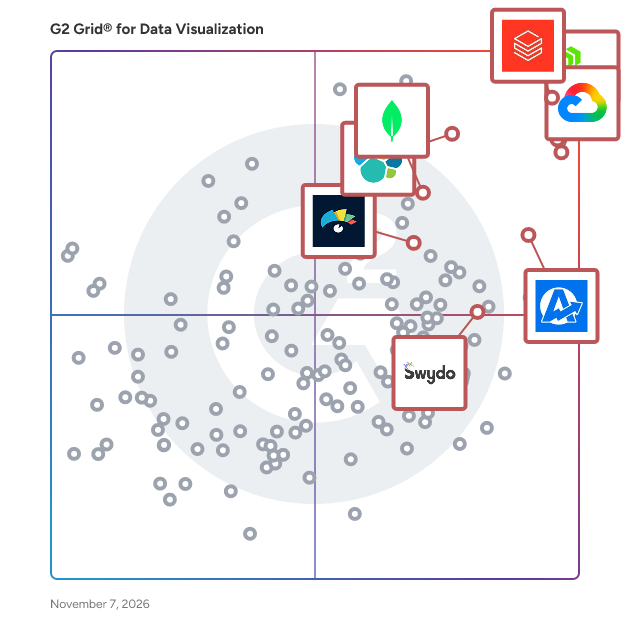
G2 Grid® for Data Visualization Tools

G2 Grid® for Data Visualization Tools plotting products by satisfaction and market presence

Highlighted products: Canva, AgencyAnalytics, Databricks, Looker, MongoDB Atlas, Elastic Stack, Domo, and Visme.

Underlying data: [Grid® JSON](https://www.g2.com/categories/data-visualization-tools/grids.json?focus%5B%5D=canva&focus%5B%5D=agencyanalytics&focus%5B%5D=databricks&focus%5B%5D=looker&focus%5B%5D=mongodb-atlas&focus%5B%5D=elastic-stack&focus%5B%5D=domo&focus%5B%5D=visme&segment=small-business)

Sponsored

Looker

Looker, Google Cloud’s business intelligence platform, enables you to chat with your data. Organizations turn to Looker for self-service and governed BI, to build custom applications with trusted metrics, or to bring Looker modeling to their existing environment. The result is improved data engineering efficiency and true business transformation.

Visit website

IBM Environmental Intelligence Suite

The IBM Environmental Intelligence Suite is an AI-powered SaaS solution that provides organizations with timely and fact-based actionable intelligence to proactively plan and manage the economic impact of severe weather and climate change events; built on the world’s most accurate weather data providing clients with the ability to: Monitor for disruptive environmental conditions such as severe weather, wildfires, flooding and air quality and send alerts when detected Predict potential impacts of climate change and weather across the business using climate risk analytics Gain insights into potential operational disruptions and prioritize mitigation and response efforts Measure and report on environmental initiatives and operationalize carbon accounting, while reducing the burden of this reporting on procurement and operations teams The IBM Environmental Intelligence Suite combines key functionality into a single application suite that includes: Climate and Weather Data APIs Data APIs within the IBM® Environmental Intelligence Suite tap into the breadth and depth of climate, environment and weather data to provide current and forecasted conditions, seasonal and sub-seasonal forecasts, lifestyle indices, severe weather and historical weather data for analysis. The packages are curated to give you only what you need in the format you need it, and you can use them quickly and easily by accessing data APIs through the cloud. By applying advanced analytics to a combination of business data and weather data such as alerts and notifications, forecast data and weather imagery, you can build the foundation for informed enterprise decision-making. Geospatial Analytics Engine Formerly IBM PAIRS Geoscope, the Geospatial Analytics component within the Environmental Intelligence Suite is a platform specifically designed for massive geospatial-temporal (maps, satellite, weather, drone, IoT) query and analytics services. It frees up data scientists and developers from cumbersome processes that dominate conventional data preparation, providing search-friendly access to a rich, diverse and growing catalog of continually updated geospatial-temporal information. Dashboard Visualizations Dashboard Visualization provides weather visualizations for nearly all your locations in a single, user-friendly weather dashboard. See severe weather headed to some locations? Quickly deliver guidance to leadership and a prioritized action list for personnel. Awareness of weather forecasts and patterns in advance can also open windows to new or additional business. Scalable Alerting The alerts console combines data science, geo-location and precise weather data so businesses across energy and utilities, insurance, retail, telecommunications, ground transportation and other industries can deliver timely and customized messages. With Alert Console, create meaningful touch points to strengthen customer loyalty, and protect employees and properties in a timely manner.

Average Rating: 4.2/5.0

Total Reviews: 49

How Do G2 Users Rate IBM Environmental Intelligence Suite?

  • Has the product been a good partner in doing business?: 7.8/10 (Category avg: 9.0/10)
  • Dashboards: 8.9/10 (Category avg: 9.0/10)
  • Steps to Answer: 8.2/10 (Category avg: 8.6/10)
  • Formats: 8.1/10 (Category avg: 8.6/10)

Who Is the Company Behind IBM Environmental Intelligence Suite?

  • Seller: IBM
  • Year Founded: 1911
  • HQ Location: Armonk, New York, United States
  • Twitter: @IBMSecurity
    74,660 Twitter followers
  • LinkedIn® Page: www.linkedin.com
    328,202 employees on LinkedIn®
  • Ownership: SWX:IBM

Who Uses This Product?

  • Top Industries: Information Technology and Services, Accounting
  • Company Size: 39% Medium, 35% Small

What Do G2 Reviewers Say About IBM Environmental Intelligence Suite?

AI-generated summary from verified user reviews

Pros
  • Users value the real-time analytics of IBM Environmental Intelligence Suite, enhancing decision-making and proactive risk management.
  • Users value the top-notch analytics of IBM Environmental Intelligence Suite, enhancing decision-making and risk management in real-time.
  • Users value the real-time data capabilities of IBM Environmental Intelligence Suite for improved decision-making and risk management.
  • Users benefit from real-time updates in IBM Environmental Intelligence Suite, enhancing decision-making for supply chain management.
  • Users highlight the comprehensive data analytics of IBM Environmental Intelligence Suite, enhancing decision-making and risk management.
Cons
  • Users find the initial setup and integration complex, especially outside the IBM ecosystem, leading to a challenging user experience.
  • Users find the setup and integration complex, particularly for those outside the IBM environment, hindering smooth adoption.
  • Users find the pricing structure expensive and not well-suited for smaller businesses or personal projects.
  • Users experience learning difficulties due to the platform's complex setup, integration, and user interface challenges.
  • Users find integration issues challenging, especially without prior IBM tools, complicating overall setup and adoption.

What Are Recent G2 Reviews of IBM Environmental Intelligence Suite?

Rollstack

Rollstack helps data, finance, customer success, and revenue operations teams automate recurring PowerPoint presentations and Word documents by connecting directly to business intelligence tools like Tableau, Power BI, Looker, Metabase, and Google Sheets. If you’re tired of copying charts, pasting screenshots, or triple-checking KPIs across decks, Rollstack eliminates that manual, error-prone work. You can sync up-to-date data into branded templates, update them with one click, and export presentation-ready files in seconds. It’s built for teams responsible for client reporting, executive dashboards, business reviews, and sales enablement materials. Rollstack integrates directly with your existing BI stack, so there’s no need to rebuild dashboards or redesign visuals. Just connect your source, map the data to your slides or docs, and update them on your schedule — daily, weekly, or whenever you need them. Used by companies like Zillow, SoFi, Whirlpool, TripAdvisor, and CarGurus, Rollstack helps teams save 10+ hours per week, avoid mistakes, and focus on the story the data tells — not the tedious mechanics of building decks. For data analysts, program managers, sales ops, finance, and client success teams — Rollstack is how modern enterprises deliver consistent, trusted reports at scale. Whether you’re building a QBR for a $10M account or a weekly EBR, Rollstack makes its creation automatic and accurate. Book a demo today to learn how to automate your most important business reports.

Average Rating: 4.6/5.0

Total Reviews: 78

How Do G2 Users Rate Rollstack?

  • Has the product been a good partner in doing business?: 9.6/10 (Category avg: 9.0/10)
  • Dashboards: 8.2/10 (Category avg: 9.0/10)
  • Steps to Answer: 8.0/10 (Category avg: 8.6/10)
  • Formats: 8.4/10 (Category avg: 8.6/10)

Who Is the Company Behind Rollstack?

  • Seller: Rollstack
  • Year Founded: 2022
  • HQ Location: New York, USA
  • Twitter: @Rollstack
    181 Twitter followers
  • LinkedIn® Page: www.linkedin.com
    30 employees on LinkedIn®

Who Uses This Product?

  • Top Industries: Marketing and Advertising, Computer Software
  • Company Size: 46% Medium, 41% Large

What Do G2 Reviewers Say About Rollstack?

AI-generated summary from verified user reviews

Pros
  • Users value the time-saving automation provided by Rollstack, significantly reducing the effort in weekly reporting.
  • Users rave about Rollstack's world-class customer support, noting their proactive assistance and quick response times.
  • Users appreciate the ease of use of Rollstack, finding it intuitive and time-saving for client reporting.
  • Users value the automation capabilities of Rollstack, which save significant time and enhance data reporting efficiency.
  • Users value the automatic updates of Rollstack presentations, streamlining workflows and enhancing efficiency in data presentation.
Cons
  • Users often experience slow loading times when using Rollstack, especially with larger slide decks.
  • Users experience slow performance with Rollstack, facing delays in data processing and occasional issues during report generation.
  • Users face limitations in storage with Rollstack, requiring manual interventions after reaching upload limits and managing filters.
  • Users find the complex setup process time-consuming, which may affect initial productivity despite future savings.
  • Users find the limited customization of capture areas a drawback, hindering flexible reporting and layout options.

What Are Recent G2 Reviews of Rollstack?

Vizzlo

Vizzlo helps you transform data into clear, impactful visuals—without design skills or steep learning curves. Whether you’re working on a report, a class presentation, or a business strategy, Vizzlo makes it simple to create charts that are clean, consistent, and ready to present. With more than 120 customizable chart types, Vizzlo supports a wide range of professional and educational needs. From bar charts and timelines to SWOT analyses and word clouds, you’ll find the right visualization for every idea. Seamless Google Slides™ integration Insert and update charts directly in Google Slides. All edits happen in Vizzlo’s web interface—no installation needed, works on any device. Collaboration made easy Work with your team on shared documents. Changes sync automatically, so charts stay up to date across slides, teams, and time zones. Why choose Vizzlo -Create visuals in minutes, no design skills required. -Stay on brand with your logo, fonts, and colors. -Reuse templates to save time and stay consistent. -Generate editable charts from plain language with Chart Vizzard. Discover how Vizzlo can simplify your data storytelling.

Average Rating: 4.4/5.0

Total Reviews: 31

How Do G2 Users Rate Vizzlo?

  • Has the product been a good partner in doing business?: 9.3/10 (Category avg: 9.0/10)
  • Dashboards: 9.2/10 (Category avg: 9.0/10)
  • Steps to Answer: 8.6/10 (Category avg: 8.6/10)
  • Formats: 8.6/10 (Category avg: 8.6/10)

Who Is the Company Behind Vizzlo?

  • Seller: Vizzlo
  • Year Founded: 2015
  • HQ Location: Leipzig, Germany
  • Twitter: @vizzlo
    976 Twitter followers
  • LinkedIn® Page: www.linkedin.com
    10 employees on LinkedIn®

Who Uses This Product?

  • Company Size: 61% Small, 21% Medium

What Are Recent G2 Reviews of Vizzlo?

What Are G2 Users Discussing About Vizzlo?

Out Of The Blue

Out Of The Blue is an AI-powered health-monitoring platform for eCommerce brands to drive top-line revenue growth and drive down costs. We do this by reducing revenue loss, leakages and missed revenue capture by monitoring site errors across your tech stack We also improve conversion by highlighting revenue-impacting CX issues and opportunities across the buyer journey. In short, we work 24*7 behind the scenes to drive time-critical interventions by detecting, diagnosing, and explaining why metrics are moving to be able to take proactive rather than reactive actions. In just 3 simple steps, you can gain valuable insights from your data and keep your business on track. -You choose Out Of The Blue with any Data Source- We provide support for all major Shopify brand connectors- across marketing, sales, and analytics. -Next, you onboard your data into our Metrics Hub, where you refine your KPIs and business metrics with our Semantic Layer, set extraction preferences, and let us handle the rest. -You are now live & will start getting insights in your mail, on Slack, or through other channels via webhooks. With Out Of The Blue, ecommerce growth teams can finally: -Gain the insights they need to improve your eCommerce site experience and product category performance. -Get alerted within minutes when customers aren’t having a broken experience related to purchasing, finding items, registering, or logging in, so you can fix it before your revenue is impacted. -Uncover outperforming and soft categories across your products. -Automate analyzing your data at a granular level by county, channel, and product category or more. -Get a weekly digest that includes a list of issues stack-ranked by their revenue impact, so you can refocus on what isn’t important—rather than what’s urgent. Our customers include growth oriented brands like Poshmark, True Classic, Abbott Lyon and more

Average Rating: 4.6/5.0

Total Reviews: 24

How Do G2 Users Rate Out Of The Blue?

  • Has the product been a good partner in doing business?: 9.7/10 (Category avg: 9.0/10)
  • Dashboards: 8.9/10 (Category avg: 9.0/10)
  • Steps to Answer: 9.2/10 (Category avg: 8.6/10)
  • Formats: 9.0/10 (Category avg: 8.6/10)

Who Is the Company Behind Out Of The Blue?

  • Seller: Out of the Blue
  • Year Founded: 2021
  • HQ Location: San Carlos, US
  • Twitter: @OutoftheblueAI
    12 Twitter followers
  • LinkedIn® Page: www.linkedin.com
    51 employees on LinkedIn®

Who Uses This Product?

  • Top Industries: Computer Software
  • Company Size: 88% Small, 8% Large

What Do G2 Reviewers Say About Out Of The Blue?

AI-generated summary from verified user reviews

Pros
  • Users value the clear insights provided by Out Of The Blue, enabling swift action on site health issues.
  • Users appreciate the time-saving alerts from Out Of The Blue, enabling quick issue resolution and efficient financial management.
  • Users value the real-time updates from Out Of The Blue, enabling quick action on revenue-impacting issues.
  • Users find easy integrations with Out Of The Blue beneficial, streamlining access to essential data from multiple sources.
  • Users value the instant alerts for error tracking in Out Of The Blue, enabling swift issue resolution and better revenue management.
Cons
  • Users find the onboarding process challenging and suggest improvements for a smoother start with Out Of The Blue.
  • Users find the onboarding process complex and desire a more streamlined approach for easier integration.
  • Users find the complex setup of Out Of The Blue challenging, particularly during third-party integrations.
  • Users find the difficult setup of Out Of The Blue a challenge, especially for those lacking prior knowledge.
  • Users find the pricing and subscription plans problematic, making it difficult to justify the investment in Out Of The Blue.

What Are Recent G2 Reviews of Out Of The Blue?

PopSQL

PopSQL is the evolution of legacy SQL editors like DataGrip, DBeaver, Postico. We provide a beautiful, modern SQL editor for data focused teams looking to save time, improve data accuracy, onboard new hires faster, and deliver insights to the business fast. With PopSQL, users can easily understand their data model, write version controlled SQL, collaborate with live presence, visualize data in charts and dashboards, schedule reports, share results, and organize foundational queries for search and discovery. Even if your team is already leveraging a large BI tool, like Tableau or Looker, or a hodge podge of SQL editors, PopSQL enables seamless collaboration between your SQL power users, junior analysts, and even your less technical stakeholders who are hungry for data insights. * Cross-platform compatibility with macOS, Windows, and Linux * Works with Snowflake, Redshift, BigQuery, Clickhouse, Databricks, Athena, MongoDB, PostgreSQL, MySQL, SQL Server, SQLite, Presto, Cassandra, and more

Average Rating: 4.6/5.0

Total Reviews: 80

How Do G2 Users Rate PopSQL?

  • Has the product been a good partner in doing business?: 9.6/10 (Category avg: 9.0/10)
  • Dashboards: 8.7/10 (Category avg: 9.0/10)
  • Steps to Answer: 9.0/10 (Category avg: 8.6/10)
  • Formats: 8.8/10 (Category avg: 8.6/10)

Who Is the Company Behind PopSQL?

Who Uses This Product?

  • Top Industries: Computer Software, Information Technology and Services
  • Company Size: 43% Small, 37% Medium

What Are Recent G2 Reviews of PopSQL?

What Are G2 Users Discussing About PopSQL?

ConnectWise PSA

ConnectWise PSA is the most complete business management platform built specifically for companies that sell, service, and support technology. Designed for Managed Service Providers (MSPs) and IT service organizations, it centralizes operations, strengthens accountability, and improves service delivery by bringing every core workflow into one modern platform. ConnectWise PSA helps MSPs reduce manual effort and streamline operations through adaptive workflows, automated billing, and structured service processes. From ticket management and customer service to sales, project delivery, and business analytics, ConnectWise PSA gives teams the tools they need to work smarter, faster, and with greater consistency. As a unified command center for the business, ConnectWise PSA provides real-time visibility across service, finance, and operations. This holistic approach allows MSPs to eliminate swivel-chair work, reduce errors, and make data-driven decisions that support growth and customer satisfaction. Routine tasks become automated, freeing technicians and leaders to focus on strategic initiatives rather than administrative overhead. Built for small to mid-sized technology firms and MSPs, ConnectWise PSA supports the full lifecycle of managed services. Users rely on it to track and resolve service tickets, automate recurring and one-time invoicing, manage projects, oversee sales activity, and monitor key performance metrics—all from a single platform that scales with the business. Core capabilities include an advanced service desk for efficient ticket routing and resolution, reliable integrations with major accounting platforms, robust quoting and invoicing tools for accelerating cash flow, and comprehensive project management to keep teams aligned. Built-in dashboards and analytics surface trends and insights that help leaders improve performance and operate proactively. Backed by more than 40 years of experience in the technology services industry, ConnectWise stands apart through its global community, deep ecosystem, and continuous innovation. ConnectWise PSA gives MSPs the foundation they need to run and grow their business today while preparing for a future powered by automation and intelligent service delivery.

Average Rating: 4.0/5.0

Total Reviews: 556

How Do G2 Users Rate ConnectWise PSA?

  • Has the product been a good partner in doing business?: 7.7/10 (Category avg: 9.0/10)
  • Dashboards: 10.0/10 (Category avg: 9.0/10)
  • Steps to Answer: 8.9/10 (Category avg: 8.6/10)
  • Formats: 9.2/10 (Category avg: 8.6/10)

Who Is the Company Behind ConnectWise PSA?

  • Seller: ConnectWise
  • Company Website:
  • Year Founded: 1982
  • HQ Location: Tampa, FL
  • Twitter: @ConnectWise
    14,926 Twitter followers
  • LinkedIn® Page: www.linkedin.com
    3,401 employees on LinkedIn®

Who Uses This Product?

  • Who Uses This: President, Network Engineer
  • Top Industries: Information Technology and Services, Computer & Network Security
  • Company Size: 66% Small, 28% Medium

What Do G2 Reviewers Say About ConnectWise PSA?

AI-generated summary from verified user reviews

Pros
  • Users find the interface easy to use, appreciating its simplicity and efficiency in managing tasks and tickets.
  • Users value the seamless integration with third-party software, enhancing customization and ease of use in their workflow.
  • Users appreciate the extensive integrations of ConnectWise PSA, enhancing automation and workflow across various applications.
  • Users appreciate the rich feature set of ConnectWise PSA, benefiting from comprehensive tools for management and organization.
  • Users appreciate the responsive customer support from ConnectWise PSA, enhancing their experience with effective assistance.
Cons
  • Users find the learning curve steep, making initial setup and adaptation to ConnectWise PSA quite challenging.
  • Users report poor customer support with slow response times and inadequate follow-up on escalated issues.
  • Users find ConnectWise PSA's usability complex, with a tedious configuration process that hampers effective management and forecasting.
  • Users express frustration with missing features in ConnectWise PSA, highlighting the need for better sales and documentation tools.
  • Users face significant performance issues with ConnectWise PSA, impacting workflow and overall satisfaction with the software.

What Are Recent G2 Reviews of ConnectWise PSA?

What Are G2 Users Discussing About ConnectWise PSA?

Redash

Redash is an open-source data visualization and business intelligence platform that empowers organizations to connect, query, and visualize data from multiple sources. Designed for both technical and non-technical users, Redash simplifies data exploration and sharing, enabling teams to make informed, data-driven decisions. Its intuitive interface allows users to write SQL queries, create interactive dashboards, and share insights seamlessly across departments. By supporting a wide range of data sources and offering flexible deployment options, Redash provides a cost-effective solution for businesses seeking to enhance their analytics capabilities without the complexity of traditional BI tools. Key Features and Functionality: - Query Editor: Compose SQL and NoSQL queries with a schema browser and auto-complete functionality, facilitating efficient data exploration. - Data Source Integration: Connect to over 30 data sources, including MySQL, PostgreSQL, Google Sheets, and more, enabling comprehensive data analysis. - Visualizations and Dashboards: Create a variety of visualizations such as charts, pivot tables, and maps, and combine them into interactive dashboards for a holistic view of data. - Collaboration and Sharing: Share visualizations and dashboards via URLs or embed them in other platforms, promoting collaboration and transparency within teams. - Scheduled Refreshes and Alerts: Automate data updates at defined intervals and set up alerts to be notified of specific data changes, ensuring timely insights. - REST API: Access and extend Redash's functionality programmatically, integrating it seamlessly into existing workflows. Primary Value and Problem Solved: Redash democratizes data access within organizations by providing a user-friendly platform for querying and visualizing data from diverse sources. It addresses the challenge of siloed data by enabling users to aggregate and analyze information without extensive technical expertise. By offering an open-source, cost-effective solution, Redash eliminates the need for expensive proprietary BI tools, making data-driven decision-making accessible to businesses of all sizes. Its collaborative features ensure that insights are easily shared, fostering a data-centric culture and enhancing overall organizational efficiency.

Average Rating: 4.3/5.0

Total Reviews: 44

How Do G2 Users Rate Redash?

  • Has the product been a good partner in doing business?: 8.9/10 (Category avg: 9.0/10)

Who Is the Company Behind Redash?

  • Seller: Redash Ltd.
  • Year Founded: 2015
  • HQ Location: N/A
  • Twitter: @getredash
    1,113 Twitter followers
  • LinkedIn® Page: www.linkedin.com
    3 employees on LinkedIn®

Who Uses This Product?

  • Top Industries: Information Technology and Services, Computer Software
  • Company Size: 50% Medium, 36% Small

What Do G2 Reviewers Say About Redash?

AI-generated summary from verified user reviews

Pros
  • Users value the intuitive data visualization capabilities of Redash, enhancing their data understanding and reporting processes.
  • Users love the unlimited customization options in Redash, enhancing their data visualization and reporting experience.
  • Users value the extensive integration capabilities of Redash, allowing seamless connections to various data sources for effective visualization.
  • Users appreciate the user-friendly interface of Redash, making data visualization and querying a breeze.
  • Users value the speed and efficiency of Redash, enabling quick downloads of large datasets seamlessly.
Cons
  • Users struggle with error handling in Redash, facing performance issues and null results with large datasets.
  • Users find missing features in Redash, especially regarding real-time data handling and query management limitations.
  • Users find Redash's complex data modeling capabilities limited, especially for advanced analytics and large datasets.
  • Users often face complexity in navigation due to Redash's limited and challenging documentation.
  • Users face integration issues with Redash, especially regarding real-time data visualization and streaming capabilities.

What Are Recent G2 Reviews of Redash?

What Are G2 Users Discussing About Redash?

Geckoboard

Geckoboard is a hassle-free tool for building and sharing real-time business dashboards. Designed to help team leads surface live data for their team and across their organization, Geckoboard integrates directly with over 90 different tools and services to help you pull in your data and get a professional-looking dashboard in front of others in a matter of minutes. No coding or training required. Build dashboards directly in your browser with a straightforward, drag-and-drop interface, and bring important numbers, metrics and KPIs out of lifeless reports and spreadsheets. Geckoboard makes your key data more engaging for everyone, with visualizations that anyone can understand at a glance, and that update automatically to always stay up-to-date. Highlight noteworthy changes in certain metrics using status indicators, which draw attention to numbers that are performing above or below expectations, and visually show goals you're working towards, in a click. However your team is working, Geckoboard makes sharing your dashboards simple. Copy and paste a link to a live dashboard that can be viewed in any web browser, or invite your teammates to log in, view and even create their own dashboards. For regular updates, you can schedule screenshots of a dashboard to be sent via email, or posted to a Slack channel at regular intervals. For maximum visibility, Geckoboard has ‘Send to TV’, allowing you to pair your account with a browser on a large screen or TV, and pick which dashboards you’d like displayed on there. It can even loop through several dashboard on one screen. We’ve got easy-to-follow instructions for how to achieve this in an afternoon using affordable off the shelf hardware. Finally, you can keep track of key numbers on-the-go, by logging in to your account on a mobile devices’ browser, where you can access your dashboards, perfectly formatted for smaller screens. Build your first dashboards free for 14 days - no payment details needed.

Average Rating: 4.3/5.0

Total Reviews: 48

How Do G2 Users Rate Geckoboard?

  • Has the product been a good partner in doing business?: 9.2/10 (Category avg: 9.0/10)

Who Is the Company Behind Geckoboard?

  • Seller: Geckoboard
  • Year Founded: 2010
  • HQ Location: London, United Kingdom
  • Twitter: @geckoboard
    6,282 Twitter followers
  • LinkedIn® Page: www.linkedin.com
    24 employees on LinkedIn®

Who Uses This Product?

  • Top Industries: Internet, Computer Software
  • Company Size: 54% Medium, 40% Small

What Are Recent G2 Reviews of Geckoboard?

What Are G2 Users Discussing About Geckoboard?

Brightmetrics

Brightmetrics is a robust analytics platform designed to elevate contact center performance through actionable insights. Our solution simplifies data extraction and visualization, enabling businesses to make informed decisions quickly, improving customer experiences, and driving ROI. The Brightmetrics Difference: Key Features User-Friendly Interface: Ensures easy adoption across all skill levels Rapid Deployment: Minimizes downtime for quick value realization Real-Time & Historical Analytics: Customizable dashboards and in-depth reports for comprehensive performance tracking Advanced Analytics Tools: Analyze call patterns, agent performance, and customer interactions Omnichannel Integration: Seamlessly connects with leading contact center platforms Brightmetrics empowers contact centers to make data-driven decisions, enhancing agent performance and customer satisfaction while streamlining operations. Our quick implementation and user-friendly design ensure rapid benefits realization, leading to significant cost savings and revenue growth. By optimizing resources and improving efficiency, Brightmetrics delivers a swift return on investment, enabling contact centers to handle higher volumes and operate at peak performance.

Average Rating: 4.9/5.0

Total Reviews: 133

How Do G2 Users Rate Brightmetrics?

  • Has the product been a good partner in doing business?: 9.6/10 (Category avg: 9.0/10)
  • Dashboards: 9.5/10 (Category avg: 9.0/10)
  • Steps to Answer: 8.9/10 (Category avg: 8.6/10)
  • Formats: 9.1/10 (Category avg: 8.6/10)

Who Is the Company Behind Brightmetrics?

  • Seller: Brightmetrics
  • Year Founded: 2010
  • HQ Location: Petaluma, California
  • Twitter: @brightmetrics
    352 Twitter followers
  • LinkedIn® Page: www.linkedin.com
    16 employees on LinkedIn®

Who Uses This Product?

  • Top Industries: Hospital & Health Care, Banking
  • Company Size: 55% Medium, 24% Small

What Do G2 Reviewers Say About Brightmetrics?

AI-generated summary from verified user reviews

Pros
  • Users value the customization options in Brightmetrics, making report tailoring intuitive and convenient for quick decision-making.
  • Users appreciate the ease of use of Brightmetrics, enjoying intuitive dashboards and convenient report customization.
  • Users appreciate the intuitive dashboards of Brightmetrics, allowing for easy access to clear insights and customizable reports.
  • Users value the intuitive dashboards of Brightmetrics, enabling quick insights and easy report customization.
  • Users enjoy the intuitive dashboards and customizable reports of Brightmetrics, enhancing decision-making without IT hassle.
Cons
  • Users find the difficult learning curve challenging, especially with advanced features and initial setup of Brightmetrics.
  • Users find the difficult setup of Brightmetrics overwhelming, especially when learning advanced features and analytics tools.
  • Users find the learning curve for advanced features challenging, especially during initial setup with Brightmetrics.

What Are Recent G2 Reviews of Brightmetrics?

What Are G2 Users Discussing About Brightmetrics?

TruOI

The TruOI Operational Intelligence Platform is an umbrella application that integrates all your data and software systems into one unified platform. The result? Real-time operational management and automated business processes that streamline performance and increase corporate, unit, and team member profitability. With the TruOI Platform, you’re not only able to only see how your company is performing in real time, but the platform also initiates automated system activity based on pre-programmed performance to keep your organization on track with its corporate goals. TruOI also connects directly to your knowledgebase training systems, forms and documents, and gives automated up-to-date feedback, training tips, success instruction, and team member guidance based on timed objectives, KPIs, pro formas, P&Ls, or operational goals. For more information, visit https://www.truoi.com/

Average Rating: 4.5/5.0

Total Reviews: 66

How Do G2 Users Rate TruOI?

  • Has the product been a good partner in doing business?: 9.6/10 (Category avg: 9.0/10)

Who Is the Company Behind TruOI?

  • Seller: TruOI
  • Year Founded: 2003
  • HQ Location: Troy, US
  • LinkedIn® Page: www.linkedin.com
    20 employees on LinkedIn®

Who Uses This Product?

  • Top Industries: Information Technology and Services, Financial Services
  • Company Size: 42% Medium, 36% Large

What Are Recent G2 Reviews of TruOI?

What Are G2 Users Discussing About TruOI?

think-cell

think-cell Suite is the industry standard for business presentation creation in PowerPoint, trusted by over 1.3 million professionals across 35,000 organizations worldwide, including all of the top 10 global consulting firms and 88% of the Fortune 100. think-cell delivers best-in-class data visualization with 40+ chart types, including waterfalls, Mekkos, and Gantt charts. Combined with smart automations handling layout, design, and annotations like CAGR lines, think-cell ensures every slide is polished, consistent, and on-brand without the manual effort. Excel links control how you manage updates to your presentations while maintaining full data consistency. With think-cell's library capabilities, you can keep your most valuable presentation assets within instant reach. Search and reuse slides from your entire PowerPoint repository at slide level, or choose from 250+ professionally designed templates to get any presentation off the ground faster, without ever starting from a blank slide. Built-in brand controls and style files ensure every asset your team uses stays fully compliant with your visual identity. think-cell Assist, a set of AI tools integrated in PowerPoint and Excel, builds on your human expertise to improve the effectiveness of your best slides. Automatically generate charts, analyze Excel data with AI chat, refine texts, and more. think-cell also supports seamless collaboration across teams, with full compatibility across Windows, Mac, and ARM systems, making it easy to share and co-develop presentations with colleagues and external stakeholders. Seamlessly integrated with both PowerPoint and Excel, think-cell automates the time-consuming work of presentation production, freeing teams to focus on the insights and the story behind the data.

Average Rating: 4.5/5.0

Total Reviews: 84

How Do G2 Users Rate think-cell?

  • Has the product been a good partner in doing business?: 8.0/10 (Category avg: 9.0/10)
  • Dashboards: 8.2/10 (Category avg: 9.0/10)
  • Steps to Answer: 7.3/10 (Category avg: 8.6/10)
  • Formats: 7.9/10 (Category avg: 8.6/10)

Who Is the Company Behind think-cell?

  • Seller: think-cell
  • Company Website:
  • Year Founded: 2002
  • HQ Location: Berlin, DE
  • Twitter: @thinkcell
    753 Twitter followers
  • LinkedIn® Page: www.linkedin.com
    234 employees on LinkedIn®

Who Uses This Product?

  • Top Industries: Management Consulting, Information Technology and Services
  • Company Size: 45% Large, 34% Medium

What Do G2 Reviewers Say About think-cell?

AI-generated summary from verified user reviews

Pros
  • Users appreciate the ease of use of think-cell, which enhances efficiency and simplifies chart creation in PowerPoint.
  • Users love the time-saving charting capabilities of think-cell, enhancing efficiency and ease of use in presentations.
  • Users find that think-cell provides a significant time-saving advantage by simplifying chart creation and updates in PowerPoint.
  • Users admire the seamless integration of think-cell with Excel and PowerPoint, enhancing efficiency in data visualization.
  • Users value think-cell for its effortless creation of stunning visualizations, enhancing presentations and communication with ease.
Cons
  • Users find limited formatting options in think-cell can disrupt collaboration and require additional adjustments in PowerPoint.
  • Users find the learning curve steep initially, requiring time and tutorials to confidently navigate think-cell's features.
  • Users find limited customization options frustrating, as specific design requests often require manual adjustments outside of think-cell.
  • Users find the limited options for customization and navigation frustrating, hindering efficiency and ease of use.
  • Users find the slow performance of think-cell frustrating, especially when working with shared files or updating graphs.

What Are Recent G2 Reviews of think-cell?

What Are G2 Users Discussing About think-cell?

FusionCharts

FusionCharts is a leading data visualization company that provides a wide range of interactive charts and maps to businesses and organizations worldwide. It has quickly grown in popularity because of its innovative and powerful charting solutions. FusionCharts is known for its high-quality and user-friendly products, which are used by various industries including finance, healthcare, and technology. The company's flagship product, FusionCharts Suite XT, is a JavaScript charting library that allows developers to easily create interactive and visually appealing charts for web and mobile applications. Today, FusionCharts Suite XT is used by over 800,000 developers across 28,000 companies in over 120 countries, including some well-known Fortune 500 companies. FusionCharts product suite consists of FusionCharts Suite XT - FusionCharts XT - Create interactive and responsive charts & dashboards for your web & mobile projects - FusionWidgets XT - Track your KPIs and real-time data in dashboards; - PowerCharts XT - Advanced widgets for domain-specific usage - FusionMaps XT - Offers over 2000+ geographical maps FusionTime - Visualize time series and stock data in JavaScript FusionExport - Convert your live dashboards to PDF or images FusionGrid - Rocket fuel for data-intensive applications with integrated charting Some of the key features and functionality of FusionCharts include: Interactive Charting: Create charts and dashboards for internal reporting by utilizing charting solutions such as drag-able charts, scroll charts, self-updating charts, manipulation options, and visual data selection. Time-Series Visualization: Explore visualizations from any time window by zooming in on axes to reveal specific information. Customized Data Plots: Highlight data plots, apply gradient effects, change plot colors, and more to gain relevant insights. Trendlines: Trendlines such as vertical and horizontal reference lines can be used to understand data. Data can be analyzed across several functions using trendline charts, regression lines, vertical lines, and gauges. Export Files: Maps, gauges, and charts can be exported in a variety of formats, including images, Excel spreadsheets, and PDF files. Customize the export process by displaying the exported file names in the export menu. Space Management: Save space by organizing charts in a systematic fashion. Stack and vertically align charts to organize pages. Annotations: Attract the attention of visitors using various annotations such as pictures, lines, or text on charts. It draws user attention by emphasizing comprehensive information for visitors. Integration: Client-side charts can be updated through its open-source, front- and back-end integrations.

Average Rating: 4.4/5.0

Total Reviews: 34

How Do G2 Users Rate FusionCharts?

  • Has the product been a good partner in doing business?: 8.4/10 (Category avg: 9.0/10)
  • Dashboards: 9.2/10 (Category avg: 9.0/10)
  • Steps to Answer: 8.3/10 (Category avg: 8.6/10)
  • Formats: 9.2/10 (Category avg: 8.6/10)

Who Is the Company Behind FusionCharts?

  • Seller: Idera, Inc.
  • Year Founded: 2007
  • HQ Location: Austin, US
  • Twitter: @MigrationWiz
    482 Twitter followers
  • LinkedIn® Page: www.linkedin.com

Who Uses This Product?

  • Top Industries: Computer Software, Financial Services
  • Company Size: 60% Small, 26% Medium

What Are Recent G2 Reviews of FusionCharts?

What Are G2 Users Discussing About FusionCharts?

Software AG CONNX

Software AG’s CONNX provides data integration from the mainframe to the cloud. It uniquely provides standard SQL data access to non-relational data sources (e.g., VSAM, IMS) in just minutes. View data in a meaningful way whether via the desktop to handle queries or to visualize key business metrics on a mobile device. CONNX provides data access, data virtualization, and data movement solutions.

Average Rating: 4.6/5.0

Total Reviews: 10

Who Is the Company Behind Software AG CONNX?

  • Seller: Software GmbH
  • Year Founded: 1969
  • HQ Location: Darmstadt, Hessen
  • Twitter: @SoftwareAG
    32,269 Twitter followers
  • LinkedIn® Page: www.linkedin.com
    1,857 employees on LinkedIn®
  • Ownership: ETR: SOW

Who Uses This Product?

  • Top Industries: Information Technology and Services
  • Company Size: 100% Small

What Are Recent G2 Reviews of Software AG CONNX?

Cyfe

Cyfe is an all-in-one online business dashboard app that helps you easily monitor and analyze all of your business data in one, organized place. With Cyfe, you'll be able to connect and pull data from your advertising, email, monitoring, sales, finance, SEO, social media, support, and web analytics accounts. You'll even be able to bring your company's internal data into Cyfe via custom widgets—allowing you to easily organize and view all of your business data in one place. Cyfe helps you make better business decisions by bringing all of your business data into a single and highly-organized view, and saves you a ton of time by eliminating the need to manually log into, analyze, and report out data from multiple services each and every day. Sign up today and see why 300,000+ businesses trust Cyfe!

Average Rating: 4.3/5.0

Total Reviews: 64

How Do G2 Users Rate Cyfe?

  • Has the product been a good partner in doing business?: 8.8/10 (Category avg: 9.0/10)
  • Dashboards: 4.4/10 (Category avg: 9.0/10)
  • Steps to Answer: 3.9/10 (Category avg: 8.6/10)
  • Formats: 4.2/10 (Category avg: 8.6/10)

Who Is the Company Behind Cyfe?

  • Seller: Traject
  • Year Founded: 2020
  • HQ Location: Bellevue, Washington
  • Twitter: @traject
  • LinkedIn® Page: www.linkedin.com
    7 employees on LinkedIn®

Who Uses This Product?

  • Top Industries: Marketing and Advertising, Internet
  • Company Size: 61% Small, 28% Medium

What Are Recent G2 Reviews of Cyfe?

What Are G2 Users Discussing About Cyfe?

SAS/Graph

SAS/GRAPH is a software that creates and delivers accurate, high-impact visuals that enable decision makers to gain a quick understanding of critical business issues.

Average Rating: 4.1/5.0

Total Reviews: 25

How Do G2 Users Rate SAS/Graph?

  • Has the product been a good partner in doing business?: 8.7/10 (Category avg: 9.0/10)
  • Dashboards: 8.9/10 (Category avg: 9.0/10)
  • Steps to Answer: 9.0/10 (Category avg: 8.6/10)
  • Formats: 8.9/10 (Category avg: 8.6/10)

Who Is the Company Behind SAS/Graph?

  • Seller: SAS Institute Inc.
  • Year Founded: 1976
  • HQ Location: Cary, NC
  • Twitter: @SASsoftware
    60,863 Twitter followers
  • LinkedIn® Page: www.linkedin.com
    18,638 employees on LinkedIn®
  • Phone: 1-800-727-0025

Who Uses This Product?

  • Top Industries: Research
  • Company Size: 42% Small, 31% Large

What Are Recent G2 Reviews of SAS/Graph?

What Are G2 Users Discussing About SAS/Graph?