Top Free Business Instant Messaging Software - Page 3

How Many Business Instant Messaging Software Products Does G2 Track?

Total Products under this Category: 149

Category Stats (Oct 2026)

  • Average Rating: 4.45/5 The average rating of products in this category, based on all submitted ratings
  • Top Trending Product: Sakari (+1.31%) - Among all products in this category, Sakari recorded the largest rating increase compared to last month

Last updated: October 13, 2026

How Does G2 Rank Business Instant Messaging Software Products?

Why You Can Trust G2's Software Rankings:

  • 30 Analysts and Data Experts
  • 217,700+ Authentic Reviews
  • 149+ Products
  • Unbiased Rankings

G2's software rankings are built on verified user reviews, rigorous moderation, and a consistent research methodology maintained by a team of analysts and data experts. Each product is measured using the same transparent criteria, with no paid placement or vendor influence. While reviews reflect real user experiences, which can be subjective, they offer valuable insight into how software performs in the hands of professionals. Together, these inputs power the G2 Score, a standardized way to compare tools within every category.

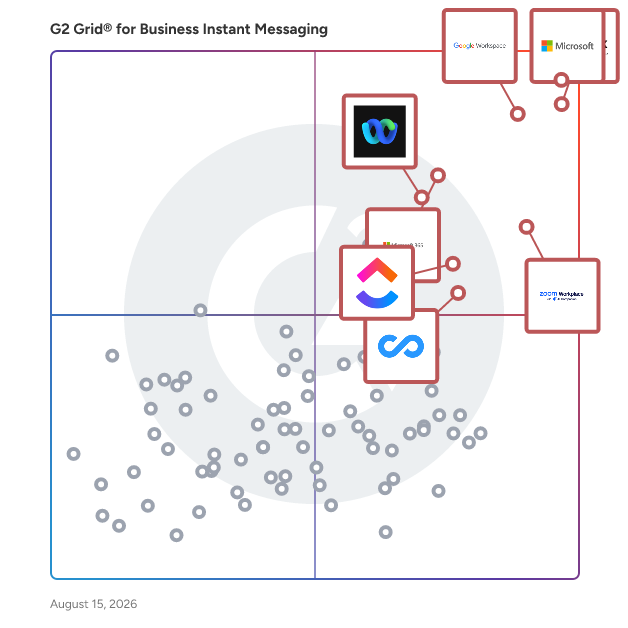
G2 Grid® for Business Instant Messaging Software

G2 Grid® for Business Instant Messaging Software plotting products by satisfaction and market presence

Highlighted products: Microsoft Teams, Slack, Google Workspace, Zoom Workplace, Microsoft 365, Webex Suite, ClickUp, and Connecteam.

Underlying data: [Grid® JSON](https://www.g2.com/categories/business-instant-messaging/grids.json?focus%5B%5D=microsoft-teams&focus%5B%5D=slack&focus%5B%5D=google-workspace&focus%5B%5D=zoom-workplace&focus%5B%5D=microsoft365&focus%5B%5D=cisco-webex-suite&focus%5B%5D=clickup&focus%5B%5D=connecteam)

MyChat

MyChat was developed in 2004 by the Ukrainian company Network Software Solutions. MyChat is a self-hosted corporate messenger for teams that need private communication, LAN/on-premise deployment, file sharing, calls, task boards, forums, integrations, and admin control without moving company conversations to a public cloud. MyChat has a suite of collaboration tools for working in teams: Project management, Bulletin board, Instant messaging, Voice/Video calls, Screen sharing, Remote control, Intranet forum (knowledge database). MyChat works reliably in areas with a slow Internet connection. The program does not require many resources.

Average Rating: 4.6/5.0

Total Reviews: 49

How Do G2 Users Rate MyChat?

  • Has the product been a good partner in doing business?: 8.3/10 (Category avg: 8.8/10)
  • Web Application: 9.0/10 (Category avg: 9.0/10)
  • Third-Party Integrations: 8.5/10 (Category avg: 8.4/10)
  • File Sharing: 9.2/10 (Category avg: 8.9/10)

Who Is the Company Behind MyChat?

Who Uses This Product?

  • Top Industries: Higher Education, Information Technology and Services
  • Company Size: 44% Small, 40% Medium

What Do G2 Reviewers Say About MyChat?

AI-generated summary from verified user reviews

Pros
  • Users appreciate the ease of use offered by MyChat, facilitating smooth communication and secure file sharing.
  • Users highlight the easy and secure file sharing capabilities of MyChat, enhancing collaboration on local networks.
  • Users appreciate the integrated collaboration features of MyChat, enhancing internal communication and keeping teams connected.
  • Users value the enhanced security of MyChat, ensuring safe and smooth collaboration across global teams.
  • Users value the advanced collaboration features of MyChat, enhancing teamwork across global team members.
Cons
  • Users experience file sharing issues with MyChat, noting limited functionality and slow transfer speeds for large files.
  • Users find missing features in MyChat, noting it lacks depth compared to dedicated project management or communication tools.
  • Users find the pricing of MyChat to be a bit costly, which affects its overall value proposition.
  • Users find frequent updates irritating, as they must update MyChat to continue using the application effectively.
  • Users experience limited file sharing capabilities in MyChat, impacting ease of collaboration, especially with large files.

What Are Recent G2 Reviews of MyChat?

What Are G2 Users Discussing About MyChat?

Trillian

Trillian is a powerful business and clinical communication platform used by companies and healthcare systems of all sizes. Whether you're a business still relying on texting or a healthcare organization that needs HIPAA-compliant secure messaging, Trillian's modern and secure business instant messaging will help modernize employee communication without compromising on security or control. Chat privately or in group chats, share files and images, and leverage status and presence features so co-workers know when you're available. Trillian offers native desktop clients on Windows, Mac, and Linux, and offers mobile clients on iOS and Android so that everyone stays connected even when on-the-go.

Average Rating: 4.4/5.0

Total Reviews: 122

How Do G2 Users Rate Trillian?

  • Has the product been a good partner in doing business?: 9.5/10 (Category avg: 8.8/10)
  • Web Application: 9.4/10 (Category avg: 9.0/10)
  • Third-Party Integrations: 7.7/10 (Category avg: 8.4/10)
  • File Sharing: 8.3/10 (Category avg: 8.9/10)

Who Is the Company Behind Trillian?

  • Seller: Cerulean Studios
  • Company Website:
  • Year Founded: 1998
  • HQ Location: Brookfield, CT
  • Twitter: @trillianastra
    7,805 Twitter followers
  • LinkedIn® Page: www.linkedin.com
    4 employees on LinkedIn®

Who Uses This Product?

  • Top Industries: Computer Software, Information Technology and Services
  • Company Size: 50% Small, 44% Medium

What Do G2 Reviewers Say About Trillian?

AI-generated summary from verified user reviews

Pros
  • Users find Trillian to be exceptionally easy to use, making team communication seamless and efficient.
  • Users value the reliable communication features of Trillian, which facilitate quick and easy messaging across various platforms.
  • Users appreciate the exceptional security and privacy of Trillian, thanks to its effective encryption measures.
  • Users find easy communication with Trillian, appreciating its quick messaging and team collaboration features.
  • Users value the reliability of Trillian, enjoying consistent uptime and seamless performance across multiple platforms.
Cons
  • Users find Trillian's limited features lackluster, outdated, and unsuitable for complex communication needs.
  • Users find Trillian to be not user-friendly, with an outdated interface and confusing features that hinder usability.
  • Users find the limited feature set of Trillian less suitable for complex communication needs.
  • Users find the difficult setup of Trillian frustrating, making it hard to add contacts and navigate the interface.
  • Users face integration issues with Trillian, experiencing frustrating delays that hinder effective use of the app.

What Are Recent G2 Reviews of Trillian?

What Are G2 Users Discussing About Trillian?

Talkspirit

Talkspirit is a collaborative platform for teamwork. Providing a full range of features to connect, communicate and collaborate in one simple overview. All the features are located right were you’d expect them to be, and cover three essential areas: 1) Collaboration Provide a collaborative workspace through groups: organise projects, gather feedback, create events and share ideas, knowledge & documents. 2) Communication Provide instant communication through work chat: ask questions, brainstorm ideas, form decisions, launch video chats, quickly send files and occasionally send GIFS to lighten the mood. 3) Connectivity Provide a personalized information hub through the newsfeed: every co-worker is always on top of new relevant information as soon as it happens, ready to take action. talkspirit works together seamlessly with all the apps, tools and services that your business already uses. It provides a bunch of native integrations that are easy to set up and easy to use – over 500 integrations are available. All content is searchable too, secure and available while on the move through the mobile app for Android and iOS. Available in 8 languages (FR, EN, DE, IT, PT, ES, NL & PL).

Average Rating: 4.6/5.0

Total Reviews: 116

How Do G2 Users Rate Talkspirit?

  • Has the product been a good partner in doing business?: 8.9/10 (Category avg: 8.8/10)
  • Web Application: 8.9/10 (Category avg: 9.0/10)
  • Third-Party Integrations: 8.5/10 (Category avg: 8.4/10)
  • File Sharing: 9.0/10 (Category avg: 8.9/10)

Who Is the Company Behind Talkspirit?

  • Seller: Talkspirit
  • Year Founded: 2004
  • HQ Location: Paris, Ile de France
  • Twitter: @talkSpirit
    9,346 Twitter followers
  • LinkedIn® Page: www.linkedin.com
    27 employees on LinkedIn®

Who Uses This Product?

  • Top Industries: Information Technology and Services, Computer Software
  • Company Size: 40% Small, 40% Medium

What Do G2 Reviewers Say About Talkspirit?

AI-generated summary from verified user reviews

Pros
  • Users value the efficient communication features of Talkspirit, enhancing seamless connectivity and collaboration within teams.
  • Users appreciate the ease of use of Talkspirit, finding the setup simple and the platform user-friendly.
  • Users value the fast networking of Talkspirit, facilitating efficient communication and connection within their organization.
  • Users value the user-friendly integration of Talkspirit, facilitating quick onboarding and real-time collaboration for teams.
  • Users appreciate the easy setup of Talkspirit, enabling quick onboarding and efficient communication from the start.
Cons
  • Users experience file sharing issues with Talkspirit, noting slow speeds and occasional unreliability in functionality.
  • Users note the limited features of Talkspirit, with concerns around third-party integrations and occasional performance lags.
  • Users find the limited third-party integrations and occasional lag frustrating, impacting the overall user experience.
  • Users find Talkspirit's features lacking in maturity, such as the underdeveloped slide editor and unreliable file sharing.
  • Users find the lack of communication features in Talkspirit hinders their ability to collaborate effectively.

What Are Recent G2 Reviews of Talkspirit?

What Are G2 Users Discussing About Talkspirit?

AI can help you find the answers. G2 helps you trust them.

Connect G2 to Claude or ChatGPT for answers grounded in G2's trusted reviews, comparisons, and pricing from real user insights.

How it works

Office Chat

Office Chat is a desktop & mobile HIPAA-compliant messaging solution for small & medium businesses. It comes with features like message delivery confirmation, priority messaging, group messaging, 1-to-1 messaging, broadcast messaging, secure attachments, built-in integrations and full administrative control for a broad range of industries from medical services, insurance, real estate, repair services, cleaning services, travel, legal, automotive, manufacturing, educational institutes & not-for-profit.

Average Rating: 4.3/5.0

Total Reviews: 64

How Do G2 Users Rate Office Chat?

  • Has the product been a good partner in doing business?: 8.3/10 (Category avg: 8.8/10)
  • Web Application: 8.6/10 (Category avg: 9.0/10)
  • Third-Party Integrations: 8.6/10 (Category avg: 8.4/10)
  • File Sharing: 9.3/10 (Category avg: 8.9/10)

Who Is the Company Behind Office Chat?

  • Seller: MangoApps
  • Year Founded: 2008
  • HQ Location: Issaquah, WA
  • Twitter: @mangoappsinc
    1,254 Twitter followers
  • LinkedIn® Page: www.linkedin.com
    169 employees on LinkedIn®

Who Uses This Product?

  • Top Industries: Information Technology and Services, Computer Software
  • Company Size: 51% Small, 31% Medium

What Do G2 Reviewers Say About Office Chat?

AI-generated summary from verified user reviews

Pros
  • Users appreciate the ease of use of Office Chat, simplifying communication and enhancing daily coordination.
  • Users value the speed and simplicity of Office Chat, enhancing communication while reducing the need for meetings.
  • Users value the simplicity and speed of Office Chat, enhancing clear and focused internal communication.
  • Users value the easy file sharing feature of Office Chat, enhancing team collaboration and streamlining communication.
  • Users appreciate the speedy and organized communication in Office Chat, enhancing collaboration and reducing unnecessary meetings.
Cons
  • Users believe that Office Chat has missing features like improved search filters and advanced customization options.
  • Users find that integration issues with other tools make it difficult to locate older messages and files effectively.
  • Users note a lack of clarity with inconsistent notifications and limited search capabilities for older conversations.
  • Users note the limited customization options in Office Chat, which may hinder tailoring the experience to their needs.
  • Users find the overwhelming experience of Office Chat distracting, with constant notifications disrupting focus and priority of messages.

What Are Recent G2 Reviews of Office Chat?

What Are G2 Users Discussing About Office Chat?

Element

Element is a secure communications platform built on Matrix: a decentralised and end-to-end encrypted protocol. Bring your teams together, boost productivity and workplace satisfaction, while retaining complete ownership of your data. Element is a leader in the Forrester Wave: Secure Communications report. Easily collaborate with your partners, suppliers or clients with video calls and instant messaging: like email for the 21st century. You can even connect your Slack, MS Teams, WhatsApp accounts. On the other hand Element can be closed for high security environments using secure border and cross domain gateways, and even air-gapped deployments. Being built on Matrix, there is no single point of failure for the network thanks to the decentralised network architecture, making it perfect for mission-critical environments. Please contact us to explore how your business can benefit from Element.

Average Rating: 4.2/5.0

Total Reviews: 39

How Do G2 Users Rate Element?

  • Has the product been a good partner in doing business?: 8.6/10 (Category avg: 8.8/10)
  • Web Application: 9.2/10 (Category avg: 9.0/10)
  • Third-Party Integrations: 8.6/10 (Category avg: 8.4/10)
  • File Sharing: 8.3/10 (Category avg: 8.9/10)

Who Is the Company Behind Element?

  • Seller: Element
  • Year Founded: 2017
  • HQ Location: Chiswick, London
  • Twitter: @element_hq
    20,909 Twitter followers
  • LinkedIn® Page: www.linkedin.com
    109 employees on LinkedIn®

Who Uses This Product?

  • Top Industries: Information Technology and Services
  • Company Size: 60% Small, 23% Medium

What Do G2 Reviewers Say About Element?

AI-generated summary from verified user reviews

Pros
  • Users appreciate the end-to-end encryption of Element, ensuring high privacy and control over data security.
  • Users appreciate the ease of use of Element, noting its straightforward setup and streamlined collaboration for teams.
  • Users value the excellent connectivity of Element, enhancing collaboration and communication across teams and organizations.
  • Users appreciate the customization options in Element, enhancing team communication while ensuring security and organization.
  • Users appreciate the configurability and security of Element, enjoying effective file transfer and search functionalities.
Cons
  • Users find elements of the interface not intuitive, leading to a frustrating learning curve compared to other platforms.
  • Users find the complexity overwhelming, especially non-tech users, facing delays and extra burden with self-hosting.
  • Users experience delayed notifications that hinder timely communication and lead to confusion about important messages.
  • Users find the learning difficulty of Element challenging, especially for non-tech users and complex features.
  • Users face significant status issues, experiencing delays in notifications and inadequate customer support during critical setups.

What Are Recent G2 Reviews of Element?

What Are G2 Users Discussing About Element?

Ryver

Ryver enables you to organize your team’s communication IN ONE APP with group chat, task management, and voice & video calls.

Average Rating: 4.4/5.0

Total Reviews: 156

How Do G2 Users Rate Ryver?

  • Has the product been a good partner in doing business?: 8.8/10 (Category avg: 8.8/10)
  • Web Application: 9.0/10 (Category avg: 9.0/10)
  • Third-Party Integrations: 8.5/10 (Category avg: 8.4/10)
  • File Sharing: 8.8/10 (Category avg: 8.9/10)

Who Is the Company Behind Ryver?

  • Seller: Ryver
  • Year Founded: 2015
  • HQ Location: Scottsdale, AZ
  • Twitter: @RyverApp
    2,807 Twitter followers
  • LinkedIn® Page: www.linkedin.com
    3 employees on LinkedIn®

Who Uses This Product?

  • Who Uses This: Owner
  • Top Industries: Computer Software, Information Technology and Services
  • Company Size: 65% Small, 27% Medium

What Do G2 Reviewers Say About Ryver?

AI-generated summary from verified user reviews

Pros
  • Users value the seamless team collaboration in Ryver, enhancing communication and task management all in one platform.
  • Users appreciate the effective communication in Ryver, enjoying seamless integration of chat, tasks, and collaboration.
  • Users appreciate the ease of use in Ryver, enjoying straightforward setup and seamless integration of chat and tasks.
  • Users value the seamless integration of chat and task management in Ryver, enhancing team collaboration and efficiency.
  • Users love the easy initial setup of Ryver, enabling quick collaboration and efficient project management from the start.
Cons
  • Users find the learning curve challenging, making the initial setup and understanding of Ryver quite difficult.
  • Users note the missing features in Ryver, highlighting the need for better tools and an improved interface.
  • Users report degrading audio quality in Ryver, which hampers the overall video conferencing experience.
  • Users find difficult navigation with Ryver, as understanding features and locating files can be challenging initially.
  • Users feel that Ryver is expensive, which influences their decision on future purchases and overall satisfaction.

What Are Recent G2 Reviews of Ryver?

What Are G2 Users Discussing About Ryver?

Deputy

Deputy is the leading workforce management software and unified end-to-end people platform for shift-based work.Trusted by over 390,000 workplaces globally, Deputy simplifies the entire employee lifecycle by combining HR, advanced scheduling, time tracking, and compliance tools into a single seamless software. Move beyond employee scheduling with a platform that provides a centralised source of visibility for navigating complex labor laws, streamlining team communication, and controlling costs in real-time. Whether you need to simplify recruitment and onboarding with Deputy HR, capture accurate timesheets with GPS verification, or bridge the gap to pay with 300+ payroll integrations, Deputy empowers you to manage your entire workforce infrastructure from anywhere.

Average Rating: 4.6/5.0

Total Reviews: 647

How Do G2 Users Rate Deputy?

  • Has the product been a good partner in doing business?: 9.2/10 (Category avg: 8.8/10)

Who Is the Company Behind Deputy?

  • Seller: Deputy
  • Company Website:
  • Year Founded: 2008
  • HQ Location: Sydney, Australia
  • Twitter: @deputyapp
    4,306 Twitter followers
  • LinkedIn® Page: www.linkedin.com
    470 employees on LinkedIn®

Who Uses This Product?

  • Who Uses This: Owner, Barista
  • Top Industries: Hospitality, Retail
  • Company Size: 53% Small, 33% Medium

What Do G2 Reviewers Say About Deputy?

AI-generated summary from verified user reviews

Pros
  • Users find Deputy to be extremely user-friendly, making it simple to manage shifts and availabilities effortlessly.
  • Users appreciate Deputy for its user-friendly scheduling, making employee management and notifications seamless and efficient.
  • Users appreciate the scheduling ease of Deputy, finding it simple and reliable for managing their shifts and time off.
  • Users appreciate the intuitive setup of Deputy, making it easy to manage shifts with minimal hassle.
  • Users find the intuitive user interface of Deputy easy to navigate, enhancing their shift management experience significantly.
Cons
  • Users find scheduling issues troublesome, citing long schedules and lack of a search feature as notable drawbacks.
  • Users find shift management tedious, struggling with unavailability settings and lack of transparency in schedule changes.
  • Users face clocking issues due to app loading delays and location pin changes, affecting timely shift starts.
  • Users are disappointed by the lack of essential features and the unresponsive technical support from Deputy.
  • Users experience slow loading times and glitches, affecting clock ins and overall app performance.

What Are Recent G2 Reviews of Deputy?

What Are G2 Users Discussing About Deputy?

Twist

Teamwork tools like email and group-chat are disorganized, dysfunctional and distracting. Twist is a team communication app that fosters mindful communication and gives modern teams a central place to grow their knowledge base and have organized, on-topic conversations that are accessible to everyone. Twist gives teams the space to fully discuss complex ideas and projects from start to finish without making people feel like they're missing out if they don't respond immediately.

Average Rating: 4.1/5.0

Total Reviews: 32

How Do G2 Users Rate Twist?

  • Has the product been a good partner in doing business?: 8.6/10 (Category avg: 8.8/10)
  • Web Application: 8.3/10 (Category avg: 9.0/10)
  • Third-Party Integrations: 7.1/10 (Category avg: 8.4/10)
  • File Sharing: 8.6/10 (Category avg: 8.9/10)

Who Is the Company Behind Twist?

Who Uses This Product?

  • Company Size: 59% Small, 32% Medium

What Do G2 Reviewers Say About Twist?

AI-generated summary from verified user reviews

Pros
  • Users appreciate the ease of use of Twist, enabling smooth onboarding and effective, organized communication.
  • Users love Twist for its structured communication, which keeps conversations organized and minimizes distractions effectively.
  • Users value the organized, thread-based communication in Twist, enhancing clarity and focus in team discussions.
  • Users appreciate the calm and organized collaboration in Twist, enhancing meaningful conversations and productivity in remote work.
  • Users love the customization options in Twist, creating organized and distraction-free communication tailored to their team needs.
Cons
  • Users experience integration issues with Twist, highlighting a need for more native integrations and improved real-time communication.
  • Users find Twist's slow loading and lack of real-time communication challenging during urgent discussions, often resorting to other apps.
  • Users feel that the limited customization options of Twist hinder its adaptability to their specific team needs.
  • Users find the limited features of Twist restrict productivity, particularly with basic functionality and reduced message search capabilities.
  • Users find Twist lacking in features and urgency handling, impacting communication efficiency and restricting engagement.

What Are Recent G2 Reviews of Twist?

HubEngage

HubEngage is a Unified Multi-channel Employee Engagement Platform for Employee Communications, Employee Recognition, Enterprise Social, Surveys, Instant Messaging and AI Chatbot. Companies of all sizes can reach and engage all their employees through an intranet, mobile Apps, emails, SMS / Text messaging, and digital displays. With HubEngage, organizations have the flexibility to pick and choose the modules they need—whether it’s the communications hub, recognitions hub, social hub, surveys hub, instant messaging, or the AI chatbot. And as your needs grow, you can easily add more hubs without the hassle of buying another platform, managing new integrations, or requiring employees to switch between multiple apps. Scale effortlessly within the same app! With ONE App for employees organizations can see improved productivity, high engagement, and lower costs. The HubEngage Difference: Comprehensive: Biggest feature set of any platform covering all aspects of Comms and Engagement Personalized: Fully branded, Pick and choose modules, Customize experience for employees Automation: AI content generation, AI moderation, Sentiment analysis, Scheduling, Automated recognitions and more… Gamification: Points system, Rewards integration, Integrated gift cards, Leaderboards Multi-Language: Available in 30+ languages Stellar Support: Training, Engagement strategy support, Webinars, Best practices and more. Learn more at HubEngage.com and book a demo today! Best For: Internal Communications, HR, Employee Engagement, Employee Experience, Employee Communications, Corporate Communications, Human Resources, Corporate Affairs, Employee Health & Safety, Operations

Average Rating: 4.7/5.0

Total Reviews: 78

How Do G2 Users Rate HubEngage?

  • Has the product been a good partner in doing business?: 9.4/10 (Category avg: 8.8/10)
  • Web Application: 8.3/10 (Category avg: 9.0/10)
  • Third-Party Integrations: 8.3/10 (Category avg: 8.4/10)
  • File Sharing: 6.7/10 (Category avg: 8.9/10)

Who Is the Company Behind HubEngage?

  • Seller: HubEngage
  • Year Founded: 2015
  • HQ Location: Cedar Park, Texas
  • Twitter: @HubEngage
    891 Twitter followers
  • LinkedIn® Page: www.linkedin.com
    35 employees on LinkedIn®

Who Uses This Product?

  • Top Industries: Manufacturing
  • Company Size: 28% Medium, 17% Large

What Do G2 Reviewers Say About HubEngage?

AI-generated summary from verified user reviews

Pros
  • Users value the smooth communication features of HubEngage, enhancing recognition and engagement among employees across locations.
  • Users appreciate the ease of use of HubEngage, which simplifies communication and fosters team unity across diverse locations.
  • Users value the effective communication capabilities of HubEngage, facilitating recognition and engagement across all employee locations.
  • Users value the smooth and efficient communication with HubEngage, enhancing teamwork and fostering a connected community.
  • Users appreciate the easy and straightforward setup of HubEngage, making it user-friendly and manageable.
Cons
  • Users find the learning curve quite steep, as setup and customization processes are often tedious and time-consuming.
  • Users find the difficult setup of HubEngage to be tedious, particularly in managing complex organizational structures.
  • Users report poor customer support due to occasional delays in response times and issues with message delivery.
  • Users find the complex setup of HubEngage to be time-consuming and in need of better guidance.
  • Users find the complexity of HubEngage challenging, particularly with slow code delivery and restrictive file size limits.

What Are Recent G2 Reviews of HubEngage?

Wimi

Wimi is the best all-in-one collaboration tool for businesses. This is not just words, Wimi includes into dedicated workspaces: social network, file sharing & drive, task management, calendar sharing, instant messaging and video conferencing. With this full set of features carefully crafted inside an intuitive and powerful solution, thousands of businesses ranging from small to Fortune 500 companies save time every day and allow their teams to be more productive.

Average Rating: 4.2/5.0

Total Reviews: 105

How Do G2 Users Rate Wimi?

  • Has the product been a good partner in doing business?: 8.6/10 (Category avg: 8.8/10)
  • Web Application: 9.3/10 (Category avg: 9.0/10)
  • Third-Party Integrations: 8.3/10 (Category avg: 8.4/10)
  • File Sharing: 8.8/10 (Category avg: 8.9/10)

Who Is the Company Behind Wimi?

  • Seller: Wimi
  • Year Founded: 2010
  • HQ Location: Paris, France
  • Twitter: @WimiPro
    928 Twitter followers
  • LinkedIn® Page: www.linkedin.com
    95 employees on LinkedIn®

Who Uses This Product?

  • Top Industries: Information Technology and Services, Hospital & Health Care
  • Company Size: 42% Large, 40% Medium

What Are Recent G2 Reviews of Wimi?

Orchestra

Orchestra is a chat-centric workspace that makes workflow simple for teams who build products and rely on communication. With messaging at its core, and a task tracker and AI agents natively built in, work contexts are aligned and teams are connected. https://orch.so/

Average Rating: 4.5/5.0

Total Reviews: 14

How Do G2 Users Rate Orchestra?

  • Has the product been a good partner in doing business?: 10.0/10 (Category avg: 8.8/10)
  • Web Application: 9.8/10 (Category avg: 9.0/10)
  • Third-Party Integrations: 9.2/10 (Category avg: 8.4/10)
  • File Sharing: 9.5/10 (Category avg: 8.9/10)

Who Is the Company Behind Orchestra?

  • Seller: Orchestra
  • Year Founded: 2023
  • HQ Location: San Francisco , US
  • LinkedIn® Page: www.linkedin.com
    10 employees on LinkedIn®

Who Uses This Product?

  • Company Size: 57% Small, 36% Medium

What Do G2 Reviewers Say About Orchestra?

AI-generated summary from verified user reviews

Pros
  • Users value the seamless collaboration in Orchestra, with organized tools and focused communication enhancing teamwork.
  • Users love the organized workspace of Orchestra, enhancing collaboration and making navigation simple and efficient.
  • Users appreciate the customization options in Orchestra, which enhance organization and streamline project coordination effectively.
  • Users appreciate the customizable project management features in Orchestra, making collaboration seamless for diverse teams.
  • Users value the integrated task management features of Orchestra, enhancing their productivity and organization.
Cons
  • Users find the learning curve steep, taking time to grasp advanced features and workflow adjustments in Orchestra.
  • Users find the complexity of Orchestra challenging initially, requiring significant time to grasp its features.
  • Users note integration issues with Orchestra, as niche tools may lack necessary native integrations for a seamless experience.
  • Users note the limited features of Orchestra, lacking the maturity found in specialized apps like Asana or Notion.
  • Users find missing features in Orchestra, particularly in automation setup and analytics tools for dashboards.

What Are Recent G2 Reviews of Orchestra?

Unipile

Integrating LinkedIn, Email, and WhatsApp with Unipile’s API into your software empowers your users to streamline their outreach and communication workflows. Enable advanced features like sending LinkedIn Invitations, InMails, and WhatsApp messages, while syncing inboxes across channels. Automate profile enrichment and data retrieval to enhance efficiency and deliver a unified communication experience. Optimize your users' workflows across LinkedIn, Email, and WhatsApp seamlessly!

Average Rating: 4.0/5.0

Total Reviews: 16

How Do G2 Users Rate Unipile?

  • Has the product been a good partner in doing business?: 10.0/10 (Category avg: 8.8/10)
  • Web Application: 9.0/10 (Category avg: 9.0/10)
  • Third-Party Integrations: 8.8/10 (Category avg: 8.4/10)
  • File Sharing: 8.3/10 (Category avg: 8.9/10)

Who Is the Company Behind Unipile?

  • Seller: Unipile
  • Year Founded: 2020
  • HQ Location: Riorges, FR
  • LinkedIn® Page: www.linkedin.com
    14 employees on LinkedIn®

Who Uses This Product?

  • Company Size: 38% Medium, 38% Small

What Do G2 Reviewers Say About Unipile?

AI-generated summary from verified user reviews

Pros
  • Users praise the excellent customer support of Unipile, appreciating quick access to knowledgeable assistance when needed.
  • Users find Unipile's ease of use exceptional, with a simple setup and prompt, helpful support for any inquiries.
  • Users find the easy setup of Unipile remarkably quick and straightforward, enhancing their overall experience.
  • Users appreciate the intuitive interface of Unipile, finding it easy to use and quick to set up.
  • Users find the setup ease of Unipile exceptional, allowing quick and simple initiation of the platform.
Cons
  • Users face significant connectivity issues due to lack of access to logs, complicating troubleshooting and performance.
  • Users feel that inadequate tracking hampers troubleshooting, as access to logs is crucial for a smoother experience.
  • Users desire access to logs in Unipile, as it would enhance troubleshooting and overall functionality.

What Are Recent G2 Reviews of Unipile?

What Are G2 Users Discussing About Unipile?

Edworking

Edworking is an AI powered workspace that brings project management, documents, team chat, video meetings, file sharing, and search together in one place. Teams plan work with list and kanban views, manage sprints, assign owners, set due dates and estimates, and break down tasks with subtasks and checklists. Conversations stay in context with chats inside tasks, private messages, team spaces, and meeting rooms. Start a video call from any conversation when sync is faster than typing. Share and preview files where work happens, and use quick video stories for async updates. AI is woven across the platform to help you move faster. In documents, AI assists with drafting, rephrasing, and summarizing so writing feels effortless. In search, AI finds answers across documents, images, PDFs, and files in seconds, not just keyword matches but intent aware results. In chat and tasks, smart suggestions help you keep work organized and progress unblocked. Edworking is designed for startups, agencies, and SMBs that want fewer tools and better alignment across product, marketing, operations, and client delivery. It reduces tool switching, preserves context, and gives clear visibility from planning to delivery. Pricing is flexible with per user plans for focused teams and a team license with a single flat rate for unlimited users. Choose monthly for flexibility or yearly for savings. Edworking helps you replace scattered apps with one integrated workspace so your team can collaborate clearly, deliver faster, and stay on the same page.

Average Rating: 4.7/5.0

Total Reviews: 28

How Do G2 Users Rate Edworking?

  • Has the product been a good partner in doing business?: 8.6/10 (Category avg: 8.8/10)
  • Web Application: 9.2/10 (Category avg: 9.0/10)
  • Third-Party Integrations: 8.3/10 (Category avg: 8.4/10)
  • File Sharing: 9.7/10 (Category avg: 8.9/10)

Who Is the Company Behind Edworking?

Who Uses This Product?

  • Top Industries: Information Technology and Services
  • Company Size: 83% Small, 21% Medium

What Do G2 Reviewers Say About Edworking?

AI-generated summary from verified user reviews

Pros
  • Users appreciate the user-friendly interface of Edworking, which simplifies business communication and task management.
  • Users appreciate the secure and efficient file sharing capabilities of Edworking, enhancing collaboration and productivity.
  • Users value the high security of Edworking, ensuring protected communication and safe document sharing for all operations.
  • Users value the secure and efficient communication features of Edworking, streamlining interactions with teams and clients.
  • Users value the easy access to business communication and tasks management centralized in Edworking, enhancing efficiency.
Cons
  • Users often face connectivity issues like dropped calls and poor internet connections, impacting their overall experience.
  • Users report frequent connectivity issues, including dropped calls and poor internet connectivity, affecting their experience.
  • Users feel that customer support response times need improvement, affecting overall satisfaction with Edworking.
  • Users feel that integration issues limit Edworking's performance, highlighting the need for better app compatibility and responsiveness.
  • Users feel the lack of integration hampers functionality, desiring better customer response and smoother interfaces.

What Are Recent G2 Reviews of Edworking?

What Are G2 Users Discussing About Edworking?

Spike

Spike is an AI-powered email and team communication platform that combines email, chat, meetings, and collaboration tools into a single, organized workspace. It is designed for professionals, small teams, and businesses that use email as their primary communication channel but want a faster, more streamlined way to manage daily interactions and tasks. By transforming traditional email into a chat-like format, Spike simplifies how users read and reply to messages. The platform removes repetitive headers, quoted text, and long chains, allowing conversations to appear as clean, continuous threads. Users can manage all email accounts, calendars, and contacts in one place while taking advantage of built-in AI to summarize conversations, draft replies, and organize the inbox automatically. Spike supports both individual and team use. Freelancers and professionals use it to manage clients and projects more efficiently, while teams rely on Spike to centralize communication, share files, and collaborate in real time without switching between multiple tools. Core Features: Conversational Email: Presents emails as natural chat-like conversations while remaining fully compatible with standard email protocols. AI Productivity Tools: Provides automatic summaries, suggested replies, translations, and content drafting to speed up workflow. Priority Inbox: Uses AI to sort incoming messages into relevant categories—Priority, Other, Notes, and Starred—helping users focus on what matters most. Integrated Meetings: Enables voice and video calls directly from email threads for faster coordination. Collaborative Notes and Docs: Allows users to create, edit, and share documents in real time within the inbox. Unified Inbox and Search: Consolidates multiple email accounts and calendars into a single interface with cross-account search. Shared Inbox: Helps teams manage customer and project communications collaboratively, ensuring faster response times. Compatibility: Works with Gmail, Outlook, iCloud, Office 365, Yahoo Mail, and all IMAP-supported accounts across desktop, mobile, and web platforms. Security and Privacy: Spike is ad-free and never sells or monetizes user data. All message data is encrypted using the AES-256 standard. Spike is suited for users seeking a unified communication platform that enhances productivity while maintaining the familiarity of email. It bridges the gap between traditional email clients and modern collaboration tools, offering a single, AI-enhanced workspace that helps individuals and teams stay focused and efficient.

Average Rating: 4.6/5.0

Total Reviews: 249

How Do G2 Users Rate Spike?

  • Has the product been a good partner in doing business?: 8.6/10 (Category avg: 8.8/10)
  • Web Application: 9.2/10 (Category avg: 9.0/10)
  • Third-Party Integrations: 8.1/10 (Category avg: 8.4/10)
  • File Sharing: 8.9/10 (Category avg: 8.9/10)

Who Is the Company Behind Spike?

  • Seller: Spike
  • Year Founded: 2014
  • HQ Location: Herzliya, IL
  • Twitter: @SpikeNowHQ
    3,036 Twitter followers
  • LinkedIn® Page: www.linkedin.com
    29 employees on LinkedIn®

Who Uses This Product?

  • Who Uses This: CEO, Owner
  • Top Industries: Information Technology and Services, Computer Software
  • Company Size: 72% Small, 15% Medium

What Do G2 Reviewers Say About Spike?

AI-generated summary from verified user reviews

Pros
  • Users find Spike's ease of use remarkable, simplifying communications and enhancing their productivity significantly.
  • Users love the easy email management of Spike, appreciating its simple interface and organized personal messages.
  • Users love Spike's modern chat-like communication, which simplifies email management and enhances productivity through its intuitive design.
  • Users appreciate the intuitive chat-style interface of Spike, enhancing email management and reducing inbox anxiety significantly.
  • Users love Spike's chat-style interface and unified inbox, significantly enhancing productivity and email management.
Cons
  • Users note a lack of essential features in Spike, particularly impacting usability for structured and professional environments.
  • Users highlight limited features in Spike, noting message history caps and lack of search for Japanese text as significant drawbacks.
  • Users note integration issues with Spike, citing limited third-party support and occasional syncing problems with external email providers.
  • Users find Spike expensive, particularly feeling pressured towards paid plans due to limitations on the free tier.
  • Users express frustration with the limited customization options in Spike, impacting notification management and overall experience.

What Are Recent G2 Reviews of Spike?

What Are G2 Users Discussing About Spike?

Teams.cc by 500apps

Teams.cc by 500apps is a Team Chat Software, it transforms the way your team collaborates with unlimited team messaging, secure file-sharing, channel management, in-app video calling, and powerful productivity tools, all under one platform. 1. Enhanced Channel Management - Teams.cc enables you to rapidly develop and maintain channels in order to increase the overall productivity of your team. The software's interface is simple to navigate, and you'll be adding new members with just a few clicks. 2. Third-party Integrations - With Teams.cc, you can also integrate the top apps on the market. The concept is that you don't have to switch between applications when working on different activities. Instead, integration is done to ensure that you work from a single dashboard, which is exactly what Teams.cc provides. 3. Voice and Video Calls - Teams.cc is backed by another powerful app by500 apps and that is 500Conference. You can initiate video chat in a channel or with the individual using any device even when you are far from your workplace. 4. Secure Messaging - Your communications will be safely stored in the cloud if you use secure messaging. This lets your team share files without having to be concerned about cyber threats affecting your system. 5. Stay in Sync - Teams.cc is a cloud-based service that can be accessed from anywhere with an internet connection. The mobile access feature also ensures that your team interacts effectively even if they are not physically present.

Average Rating: 4.4/5.0

Total Reviews: 35

How Do G2 Users Rate Teams.cc by 500apps?

  • Has the product been a good partner in doing business?: 7.8/10 (Category avg: 8.8/10)
  • Web Application: 8.7/10 (Category avg: 9.0/10)
  • Third-Party Integrations: 7.9/10 (Category avg: 8.4/10)
  • File Sharing: 8.4/10 (Category avg: 8.9/10)

Who Is the Company Behind Teams.cc by 500apps?

  • Seller: 500apps
  • Year Founded: 2019
  • HQ Location: New York, California
  • Twitter: @SitePing500apps
    26 Twitter followers
  • LinkedIn® Page: www.linkedin.com
    1 employees on LinkedIn®

Who Uses This Product?

  • Company Size: 46% Small, 37% Medium

What Do G2 Reviewers Say About Teams.cc by 500apps?

AI-generated summary from verified user reviews

Pros
  • Users value the organization and clarity of Teams.cc, enhancing communication and collaboration effortlessly among team members.
  • Users appreciate the ease of use of Teams.cc, enjoying organized communication and a straightforward setup process.
  • Users appreciate the effective team collaboration of Teams.cc, facilitating connectivity and productivity across devices.
  • Users find the setup process easy and quick, enabling seamless integration for effective team communication and collaboration.
  • Users appreciate the convenience of Teams.cc by 500apps, enhancing remote communication and saving time and resources.
Cons
  • Users experience slow loading with Teams.cc, affecting navigation speeds and overall efficiency when switching channels.
  • Users experience a steep learning curve, making full adoption and starting meetings somewhat challenging.
  • Users note the missing features in Teams.cc, hindering HR processes and overall collaboration efficiency.
  • Users report software glitches that cause unexpected shutdowns and notification issues, impacting their overall experience.
  • Users experience occasional connectivity issues, such as low call quality and video freezing during use.

What Are Recent G2 Reviews of Teams.cc by 500apps?

What Are G2 Users Discussing About Teams.cc by 500apps?

Neeraja Prakash
NP
Researched and written by Neeraja Prakash
Updated October 23, 2024