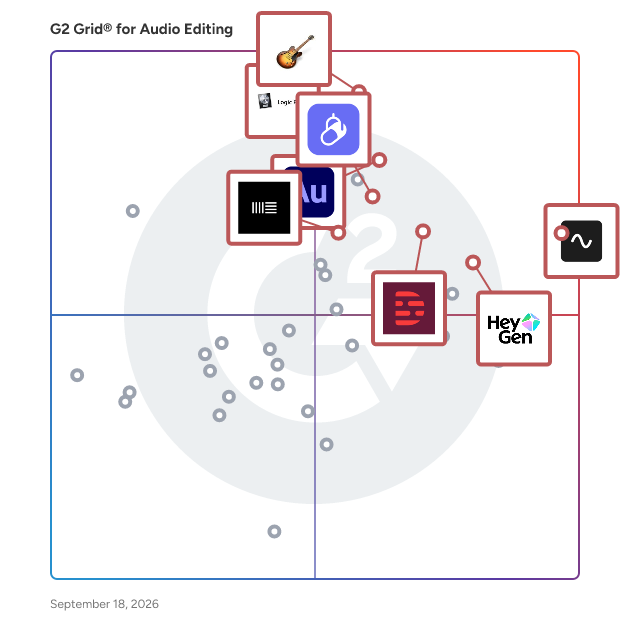
# Best Enterprise Audio Editing Software

  *By [Gauri Pawsey](https://research.g2.com/insights/author/gauri-pawsey)*

   Products classified in the overall Audio Editing category are similar in many regards and help companies of all sizes solve their business problems. However, enterprise business features, pricing, setup, and installation differ from businesses of other sizes, which is why we match buyers to the right Enterprise Business Audio Editing to fit their needs. Compare product ratings based on reviews from enterprise users or connect with one of G2&#39;s buying advisors to find the right solutions within the Enterprise Business Audio Editing category.

In addition to qualifying for inclusion in the Audio Editing Software category, to qualify for inclusion in the Enterprise Business Audio Editing Software category, a product must have at least 10 reviews left by a reviewer from an enterprise business.


## Category Overview

**Total Products under this Category:** 158


## Trust & Credibility Stats

**Why You Can Trust G2's Software Rankings:**

- 30 Analysts and Data Experts
- 8,100+ Authentic Reviews
- 158+ Products
- Unbiased Rankings

G2's software rankings are built on verified user reviews, rigorous moderation, and a consistent research methodology maintained by a team of analysts and data experts. Each product is measured using the same transparent criteria, with no paid placement or vendor influence. While reviews reflect real user experiences, which can be subjective, they offer valuable insight into how software performs in the hands of professionals. Together, these inputs power the G2 Score, a standardized way to compare tools within every category.


## Best Audio Editing Software At A Glance

- **Best for Small Businesses:** [GarageBand](https://www.g2.com/products/garageband/reviews)
- **Best for Mid-Market:** [GarageBand](https://www.g2.com/products/garageband/reviews)
- **Best for Enterprise:** [Adobe Audition](https://www.g2.com/products/adobe-audition/reviews)
- **Highest User Satisfaction:** [Riverside](https://www.g2.com/products/riverside/reviews)
- **Best Free Software:** [Riverside](https://www.g2.com/products/riverside/reviews)

## Top-Rated Products (Ranked by G2 Score)
  ### 1. [Adobe Audition](https://www.g2.com/products/adobe-audition/reviews)
  Adobe Audition is a professional digital audio workstation designed for creating, mixing, editing, and restoring audio content. It offers a comprehensive toolset that includes multitrack, waveform, and spectral display features, enabling users to produce high-quality audio for video production, podcasting, and sound design. With its intuitive interface and powerful capabilities, Audition streamlines audio workflows and delivers polished, pristine sound. Key Features and Functionality: - Multitrack Editing: Allows for recording and mixing multiple audio tracks simultaneously, facilitating complex audio projects. - Waveform and Spectral Display: Provides detailed visual representations of audio, enabling precise editing and restoration tasks. - Essential Sound Panel: Simplifies audio adjustments, making it accessible for users without extensive audio editing experience. - Remix Functionality: Automatically rearranges songs to fit a desired duration, ideal for adapting music to specific project lengths. - Noise Reduction and Restoration Tools: Offers advanced capabilities to clean up audio by removing unwanted sounds and repairing recordings. Primary Value and User Solutions: Adobe Audition addresses the needs of professionals and enthusiasts seeking a robust audio editing solution. It enhances video production workflows by providing seamless integration with other Adobe Creative Cloud applications, such as Adobe Premiere Pro. Users can achieve professional-quality audio without requiring extensive technical expertise, thanks to intuitive tools like the Essential Sound panel. Whether producing podcasts, designing sound effects, or restoring audio recordings, Audition delivers the necessary features to produce high-quality audio content efficiently.


  **Average Rating:** 4.4/5.0
  **Total Reviews:** 409

**User Satisfaction Scores:**

- **Has the product been a good partner in doing business?:** 8.5/10 (Category avg: 8.5/10)
- **Ease of Admin:** 8.6/10 (Category avg: 8.4/10)
- **Quality of Support:** 8.3/10 (Category avg: 8.1/10)
- **Ease of Use:** 8.0/10 (Category avg: 8.8/10)


**Seller Details:**

- **Seller:** [Adobe](https://www.g2.com/sellers/adobe)
- **Year Founded:** 1982
- **HQ Location:** San Jose, CA
- **Twitter:** @Adobe (956,297 Twitter followers)
- **LinkedIn® Page:** https://www.linkedin.com/company/1480/ (41,539 employees on LinkedIn®)
- **Ownership:** NASDAQ:ADBE

**Reviewer Demographics:**
  - **Who Uses This:** Owner, Graphic Designer
  - **Top Industries:** Media Production, Marketing and Advertising
  - **Company Size:** 62% Small-Business, 24% Mid-Market


#### Pros & Cons

**Pros:**

- Audio Editing (8 reviews)
- Audio Features (7 reviews)
- Workflow Efficiency (5 reviews)
- Audio Quality (4 reviews)
- Ease of Use (4 reviews)

**Cons:**

- Difficulty/Complexity (3 reviews)
- File Management (3 reviews)
- Performance Issues (3 reviews)
- Subscription Cost (3 reviews)
- Interface Issues (2 reviews)

  ### 2. [Riverside](https://www.g2.com/products/riverside/reviews)
  Riverside is an all-in-one podcast and video studio for businesses and content creators who demand professional quality without technical complexity. Podcasters, video creators, and businesses across the globe are producing studio-quality content in a fraction of the time it would take with traditional methods. Riverside puts professional production capabilities in your hands to: - Record crystal-clear audio and video regardless of internet connection - Edit content with intuitive, time-saving tools leveraging AI - Repurpose content automatically for multiple channels - Live stream to any social platforms (YouTube, Facebook, Instagram, Twitch, and more) - Transcribe audio and video files in 100+ languages with 99% accuracy - Host and distribute your podcast to major directories like Spotify, Apple, and YouTube. Forget about expensive studio setups, complex recording equipment, or unreliable video conferencing tools. Riverside is your complete solution for professional-grade content creation. Everyone from seasoned podcasters to first-time creators can use it to produce broadcast-quality recordings without technical expertise. Riverside&#39;s multi-track technology lets you: - Capture separate audio tracks for each participant - Maintain perfect quality even with unstable internet - Export professional files compatible with any editing software - Plus, Riverside&#39;s powerful AI tools make production dramatically more efficient. Riverside AI enables you to: - Edit recordings by simply editing text in the transcript - Automatically remove filler words and awkward pauses - Repurpose long-form content into social clips with a single click. Available in-browser on any device, plus dedicated Mac and mobile apps, Riverside integrates recording, editing, and publishing tools within a single user-friendly interface. Businesses and content creators use Riverside across diverse audio and video production scenarios: - Podcast recording, editing, hosting, and publishing - Remote interviews with experts - Marketing content such as testimonials and case studies - Live-streaming conferences with multiple presenters - Webinars with interactive elements and screen sharing - Screen capturing and solo recording for tutorials and product demos Riverside is the platform powering professional content for thousands of creators, from independent podcasters such as Tim Ferriss, Mel Robbins, Guy Raz, to Fortune 500 brands including Spotify, Marvel, Hubspot, GE Aerospace, Accenture and more..


  **Average Rating:** 4.8/5.0
  **Total Reviews:** 1,680

**User Satisfaction Scores:**

- **Has the product been a good partner in doing business?:** 9.5/10 (Category avg: 8.5/10)
- **Ease of Admin:** 9.5/10 (Category avg: 8.4/10)
- **Quality of Support:** 9.4/10 (Category avg: 8.1/10)
- **Ease of Use:** 9.4/10 (Category avg: 8.8/10)


**Seller Details:**

- **Seller:** [RiversideFM](https://www.g2.com/sellers/riversidefm)
- **Company Website:** https://riverside.com/
- **Year Founded:** 2019
- **HQ Location:** Tel Aviv, IL
- **Twitter:** @RiversidedotFM (10,455 Twitter followers)
- **LinkedIn® Page:** https://www.linkedin.com/company/riverside-fm/ (403 employees on LinkedIn®)

**Reviewer Demographics:**
  - **Who Uses This:** Founder, Owner
  - **Top Industries:** Entertainment, Media Production
  - **Company Size:** 88% Small-Business, 10% Mid-Market


#### Pros & Cons

**Pros:**

- Ease of Use (1086 reviews)
- Quality (782 reviews)
- High Quality (732 reviews)
- Recording (672 reviews)
- Video Quality (657 reviews)

**Cons:**

- Recording Issues (248 reviews)
- Missing Features (218 reviews)
- Feature Deficiency (214 reviews)
- Audio Issues (157 reviews)
- Editing Issues (143 reviews)

  ### 3. [GarageBand](https://www.g2.com/products/garageband/reviews)
  GarageBand is a comprehensive music creation studio available on Mac, iPhone, and iPad, designed to make music production accessible to everyone. It offers a complete sound library with instruments, presets for guitar and voice, and a diverse selection of session drummers and percussionists. With its intuitive interface, users can easily learn, play, record, and share their music worldwide. Whether you&#39;re a novice or a seasoned musician, GarageBand provides the tools to create professional-quality music. Key Features and Functionality: - Extensive Sound Library: Access a vast collection of instruments and loops across various genres, including EDM, Hip Hop, and Indie. - Touch Instruments: Play realistic keyboards, guitars, and drums using the Multi-Touch interface. - Live Loops: Create electronic music by tapping cells and columns in a grid to trigger musical loops. - Drummer Feature: Utilize virtual session drummers and percussionists to add dynamic rhythms to your tracks. - Recording and Editing: Record multiple tracks, edit performances, and apply professional mixing effects like reverb and compression. - Sound Library Expansion: Download additional free instruments, loops, and sound packs to expand your creative possibilities. Primary Value and Solutions: GarageBand democratizes music production by providing a user-friendly platform that caters to both beginners and experienced musicians. It eliminates the need for expensive studio equipment, allowing users to produce high-quality music from the comfort of their devices. By offering a wide range of instruments, loops, and professional features, GarageBand empowers users to bring their musical ideas to life, fostering creativity and enabling the sharing of music with a global audience.


  **Average Rating:** 4.3/5.0
  **Total Reviews:** 273

**User Satisfaction Scores:**

- **Has the product been a good partner in doing business?:** 9.1/10 (Category avg: 8.5/10)
- **Ease of Admin:** 8.9/10 (Category avg: 8.4/10)
- **Quality of Support:** 8.4/10 (Category avg: 8.1/10)
- **Ease of Use:** 8.7/10 (Category avg: 8.8/10)


**Seller Details:**

- **Seller:** [Apple](https://www.g2.com/sellers/apple)
- **Year Founded:** 1976
- **HQ Location:** Cupertino, CA
- **Twitter:** @Apple (9,940,472 Twitter followers)
- **LinkedIn® Page:** https://www.linkedin.com/company/162479/ (180,534 employees on LinkedIn®)
- **Ownership:** NASDAQ:AAPL

**Reviewer Demographics:**
  - **Who Uses This:** CEO
  - **Top Industries:** Music, Entertainment
  - **Company Size:** 73% Small-Business, 17% Mid-Market


#### Pros & Cons

**Pros:**

- Content Creation (1 reviews)
- Ease of Use (1 reviews)
- Podcasting (1 reviews)
- Recording Features (1 reviews)
- Track Separation (1 reviews)

**Cons:**

- Poor Guidance (1 reviews)

  ### 4. [Descript](https://www.g2.com/products/descript/reviews)
  In Descript you can make any video you want, any way you want. All you need is an idea; it helps if you know how to type. With the world’s first only AI co-editor, Underlord, you can make a video just by describing your vision. It will create, edit, and design your video—all under your direction. It’s got the taste and judgment you want in a creative partner and the expertise you need from a video editor. And it’s tireless—so you can stay focused on getting the result you’re after while it does all the dirty work. And when you want to get dirty, you don’t need special knowledge or skills. If you can edit text, you can edit video with Descript. It’s loaded with automated design tools, plus the friendliest timeline editor you’ve ever seen, a built-in recorder, and hosted publishing that makes collaboration as easy as sending a link. Create product demos, training videos, screen recordings, video messages, podcasts, or social clips. Join the 7 million+ creators and businesses using Descript, and create something impressive—something you can be proud of.


  **Average Rating:** 4.6/5.0
  **Total Reviews:** 858

**User Satisfaction Scores:**

- **Has the product been a good partner in doing business?:** 8.7/10 (Category avg: 8.5/10)
- **Ease of Admin:** 8.5/10 (Category avg: 8.4/10)
- **Quality of Support:** 8.4/10 (Category avg: 8.1/10)
- **Ease of Use:** 8.5/10 (Category avg: 8.8/10)


**Seller Details:**

- **Seller:** [Descript](https://www.g2.com/sellers/descript)
- **Company Website:** https://descript.com
- **Year Founded:** 2017
- **HQ Location:** San Francisco, CA
- **LinkedIn® Page:** https://www.linkedin.com/company/descript/ (187 employees on LinkedIn®)

**Reviewer Demographics:**
  - **Who Uses This:** Founder, Owner
  - **Top Industries:** Marketing and Advertising, Media Production
  - **Company Size:** 87% Small-Business, 7% Mid-Market


#### Pros & Cons

**Pros:**

- Easy Editing (280 reviews)
- Ease of Use (271 reviews)
- Video Editing (194 reviews)
- Features (192 reviews)
- Editing Features (189 reviews)

**Cons:**

- Learning Curve (81 reviews)
- Learning Difficulty (71 reviews)
- Difficulty/Complexity (69 reviews)
- Slow Performance (68 reviews)
- Editing Issues (65 reviews)

  ### 5. [Murf.ai](https://www.g2.com/products/murf-ai/reviews)
  Murf AI is a cloud-based realistic text-to-speech platform that can be used to create voiceovers for their content (YouTube videos, podcasts, advertisements/ commercials, e-learning content, presentations, audiobooks, etc.). We harness AI and deep machine learning technology to generate these ultra-realistic voiceovers across a range of 120+ voices in 20+ languages. Voiceover production traditionally is a time-consuming and complicated process that involves hiring a voice actor, getting a script ready, recording in a studio, editing, adding music, images, or videos, and finally, syncing them all together. This is where Murf steps in to simplify the entire process and reduce the overall cost and time by leveraging AI. Murf serves as an all-in-one platform where content creators/users can not only easily convert their script into natural-sounding audio within minutes but also add images, music, and video to their voice-over and sync them all in one place. Try out the Murf AI studio now - https://murf.ai


  **Average Rating:** 4.7/5.0
  **Total Reviews:** 1,405

**User Satisfaction Scores:**

- **Has the product been a good partner in doing business?:** 9.4/10 (Category avg: 8.5/10)
- **Ease of Admin:** 9.3/10 (Category avg: 8.4/10)
- **Quality of Support:** 9.2/10 (Category avg: 8.1/10)
- **Ease of Use:** 9.3/10 (Category avg: 8.8/10)


**Seller Details:**

- **Seller:** [Murf Inc.](https://www.g2.com/sellers/murf-inc)
- **Company Website:** https://murf.ai/
- **Year Founded:** 2020
- **HQ Location:** Salt Lake City, US
- **Twitter:** @MURFAISTUDIO (3,983 Twitter followers)
- **LinkedIn® Page:** https://www.linkedin.com/company/murf-ai/ (126 employees on LinkedIn®)

**Reviewer Demographics:**
  - **Who Uses This:** CEO
  - **Top Industries:** E-Learning, Marketing and Advertising
  - **Company Size:** 77% Small-Business, 14% Mid-Market


#### Pros & Cons

**Pros:**

- Ease of Use (169 reviews)
- Natural Sound (125 reviews)
- Natural Voices (124 reviews)
- Voice Customization (117 reviews)
- Quality (109 reviews)

**Cons:**

- Expensive (59 reviews)
- Pricing Issues (54 reviews)
- Limited Voices (53 reviews)
- Voice Quality (48 reviews)
- Pronunciation Issues (42 reviews)

  ### 6. [Audacity](https://www.g2.com/products/audacity/reviews)
  Audacity is a free, open-source, multi-track audio editor and recorder available for Windows, macOS, GNU/Linux, and other operating systems. Since its initial release in 2000, it has become a popular tool among musicians, podcasters, and audio enthusiasts for its comprehensive suite of features and user-friendly interface. Key Features and Functionality: - Recording and Playback: Audacity allows users to record live audio through a microphone or mixer, digitize recordings from other media, and capture streaming audio. - Editing Tools: Users can cut, copy, splice, and mix sounds together. The software supports non-destructive editing, enabling adjustments without altering the original audio file. - Effects and Plugins: Audacity offers a range of built-in effects, including noise reduction, equalization, and reverb. It also supports various plugins like LADSPA, LV2, VST, and Nyquist, allowing for extended functionality. - Import and Export: The software supports a wide array of file formats, including WAV, AIFF, MP3, and Ogg Vorbis. With the addition of the FFmpeg library, users can import and export even more formats, such as M4A (AAC) and WMA. - Analysis Tools: Audacity provides features like spectrogram views and frequency analysis, aiding users in detailed audio examination. - AI-Powered Effects: Recent updates have introduced AI-driven capabilities, including music separation, noise suppression, music generation, transcription, and audio super-resolution, enhancing the editing experience. Primary Value and User Solutions: Audacity&#39;s primary value lies in its ability to provide a robust and accessible platform for audio recording and editing without the cost associated with proprietary software. Its cross-platform compatibility ensures that users across different operating systems can utilize its features. The extensive support for plugins and effects allows for a customizable experience tailored to individual project needs. Additionally, the integration of AI-powered tools streamlines complex tasks, such as noise reduction and audio transcription, making high-quality audio production more efficient and accessible to a broader audience.


  **Average Rating:** 4.5/5.0
  **Total Reviews:** 456

**User Satisfaction Scores:**

- **Has the product been a good partner in doing business?:** 8.0/10 (Category avg: 8.5/10)
- **Ease of Admin:** 8.3/10 (Category avg: 8.4/10)
- **Quality of Support:** 7.9/10 (Category avg: 8.1/10)
- **Ease of Use:** 8.5/10 (Category avg: 8.8/10)


**Seller Details:**

- **Seller:** [Audacity](https://www.g2.com/sellers/audacity)
- **Year Founded:** 1999
- **HQ Location:** London, England
- **Twitter:** @getaudacity (3,896 Twitter followers)
- **LinkedIn® Page:** https://www.linkedin.com/company/1733433/ (8 employees on LinkedIn®)

**Reviewer Demographics:**
  - **Who Uses This:** Owner
  - **Top Industries:** Entertainment, Media Production
  - **Company Size:** 66% Small-Business, 21% Mid-Market


#### Pros & Cons

**Pros:**

- Ease of Use (7 reviews)
- Easy Editing (5 reviews)
- Easy Recording (4 reviews)
- Audio Editing (3 reviews)
- Audio Features (3 reviews)

**Cons:**

- AI Limitations (1 reviews)
- Audio Issues (1 reviews)
- Editing Difficulties (1 reviews)
- Feature Deficiency (1 reviews)
- Interface Issues (1 reviews)

  ### 7. [Avid Pro Tools](https://www.g2.com/products/avid-pro-tools/reviews)
  Avid Pro Tools is a digital audio workstation (DAW) renowned for its comprehensive capabilities in music production, sound design, and audio post-production. It offers a seamless environment for recording, editing, and mixing audio and MIDI tracks, catering to both professional studios and individual creators. Key Features and Functionality: - Extensive Track Support: Pro Tools supports up to 2,048 audio tracks, 512 instrument tracks, and 1,024 MIDI tracks, accommodating complex projects with ease. - Advanced Editing Tools: The software provides non-linear, non-destructive editing, allowing users to manipulate audio without altering the original files. Features like Elastic Audio enable time-stretching and pitch-shifting, facilitating creative flexibility. - High-Quality Mixing Environment: With a 64-bit floating-point mixer resolution, Pro Tools ensures precise and dynamic mixing capabilities. It supports various formats, including mono, stereo, surround sound, Dolby Atmos, and Ambisonics, making it suitable for diverse audio projects. - Integrated Hardware Compatibility: Pro Tools seamlessly integrates with Avid&#39;s hardware interfaces and control surfaces, offering high-quality recording, near-zero latency performance, and intuitive hands-on control. - Plugin and Sound Library: Users have access to a vast collection of plugins and sounds, with regular updates providing new tools and features to enhance creativity. Primary Value and User Solutions: Pro Tools stands as a comprehensive solution for audio professionals, offering a robust platform that combines recording, editing, and mixing functionalities. Its extensive track support and advanced editing tools enable users to handle complex projects efficiently. The high-quality mixing environment ensures precise audio output, while integration with Avid&#39;s hardware provides a seamless workflow. Regular updates and a vast plugin library keep the software at the forefront of audio production technology, addressing the evolving needs of its users.


  **Average Rating:** 4.3/5.0
  **Total Reviews:** 120

**User Satisfaction Scores:**

- **Has the product been a good partner in doing business?:** 7.6/10 (Category avg: 8.5/10)
- **Ease of Admin:** 7.6/10 (Category avg: 8.4/10)
- **Quality of Support:** 7.7/10 (Category avg: 8.1/10)
- **Ease of Use:** 7.5/10 (Category avg: 8.8/10)


**Seller Details:**

- **Seller:** [Avid Technology](https://www.g2.com/sellers/avid-technology)
- **Year Founded:** 1987
- **HQ Location:** Burlington, MA
- **Twitter:** @Avid (112,920 Twitter followers)
- **LinkedIn® Page:** https://www.linkedin.com/company/avid-technology/ (1,314 employees on LinkedIn®)
- **Ownership:** NASDAQ: AVID

**Reviewer Demographics:**
  - **Who Uses This:** Audio Engineer
  - **Top Industries:** Music, Entertainment
  - **Company Size:** 82% Small-Business, 9% Mid-Market


#### Pros & Cons

**Pros:**

- Cloud Storage (1 reviews)
- Options Variety (1 reviews)

**Cons:**

- File Management (1 reviews)
- Limited Capability (1 reviews)


## Parent Category

[Design Software](https://www.g2.com/categories/design)


## Related Categories

- [Content Creation Software](https://www.g2.com/categories/content-creation)
- [Transcription Software](https://www.g2.com/categories/transcription)
- [Text to Speech Software](https://www.g2.com/categories/text-to-speech)


---

## Buyer Guide

### What You Should Know About Audio Editing Software

Audio editing software empowers users to craft and refine audio files. They can delete, replace, cut, copy, and paste audio clips like text editing. This versatile tool can rearrange audio sections and generate new audio components.

Primarily employed for audio-centric projects such as podcasts, music, and spoken word, audio editing software is equally adept at enhancing the audio within video clips. Users can manipulate sound elements eclectically, offering a comprehensive suite of creative controls. Their widespread use underscores their pivotal role in shaping the auditory landscape across various media domains.

The software supports multiple [file types](https://www.g2.com/glossary/file-type), including MP3s, WAVE, Windows Media, and MPEG-4.

### What are common features of audio editing software?

Audio editing software has a wide range of features that vary by tool and use case. Some core components of audio editing software include:

- **Sound filters** apply advanced effects like amplification, normalization, and reverb. It enhances audio editing by removing background noise, limiting, compressing, and expanding.
- **Volume control** is essential for the precise control that makes fine adjustments for audio and video tracks possible. It prevents automatic volume reductions during narration or dialogue for seamless playback.
- **Leveling** automates volume alignment across a project’s diverse sound files. It simplifies the workflow for producers, swiftly balancing disparate audio file levels.
- **Clipping tools** enable editing start/stop times and duration to facilitate flawless transitions.&amp;nbsp;
- **Exporting files** is a feature that helps import and export audio files in various formats for easy editing and sharing. Audio editing solutions can convert files to different audio formats for enhanced accessibility and versatility. This ensures smooth collaboration and compatibility with other systems and platforms.
- **Noise reduction** eliminates or diminishes unwanted background noise from audio recordings. These features provide a cleaner and more polished final audio product.
- **Multichannel recording** allows users to experience the versatility of multichannel recording to capture audio from multiple sources concurrently. This feature provides flexibility for complex recording setups and helps maintain a cohesive and synchronized production.
- **The import/export format** ensures compatibility with multiple file formats. Enjoy the freedom to work with preferred audio sources and easily share creations across platforms.

### What types of audio editing software exist?

Various options exist within audio editing software, each presenting distinct advantages and disadvantages. Exploring the different kinds provides choices based on specific preferences and requirements.

- **Basic audio editors** are designed for simple audio editing tasks such as cutting, copying, and pasting segments. They are user-friendly and suitable for beginners or those with straightforward audio editing needs.
- **Professional digital audio workstations (DAWs)** are comprehensive software solutions for recording, editing, and mixing audio. They often include advanced features like multitrack editing, virtual instruments, MIDI capabilities, and various effects. Professional DAWs are commonly found in music production, film scoring, and audio post-production.
- **Audio restoration software** is specialized to repair and restore audio recordings. They offer features such as noise reduction – removing clicks, pops, and hums – making them essential for cleaning up and improving the quality of audio files.
- **Free and open-source software** provides accessible options for users with budget constraints. They often offer basic to intermediate audio editing capabilities, making them suitable for users who don&#39;t require advanced features.
- **Specialized audio editing tools** are designed with specific tasks in mind, like mastering or technical editing functions. They may offer advanced features tailored to the needs of professionals in fields like music production, sound design, or broadcasting.

### What are the benefits of audio editing software?

The benefits of using a text editor include:

- **Precise control.** Audio editing software lets mixers cut, copy, paste, and manipulate audio accurately. This precision is essential for trimming, arranging, and enhancing audio elements.
- **Enhanced quality:** Producers can apply various tools and effects that improve the overall quality of audio recordings. This includes removing background noise, reducing clicks and pops, and enhancing clarity.
- **Multitrack editing:** Many audio editing software applications support multitrack editing, enabling users to work simultaneously with multiple audio sources. This is crucial for tasks like mixing and arranging complex audio compositions.&amp;nbsp;
- **Compatibility and file management:** Most audio editing software supports various file formats, making importing and exporting audio files easy. This compatibility enhances collaboration and lets users integrate their work into different platforms and projects.
- **Real-time monitoring:** Editors can use these capabilities to hear the effects of their edits instantly, facilitating quick adjustments and achieving the desired outcome without time-consuming trial and error.
- **Time-saving:** Using audio editing software can significantly reduce the time a user takes to edit audio. Audio engineers can focus on the actual project instead of menial tasks by automating time-consuming tasks such as leveling, applying sound filters, or clipping audio files.
- [Version control:](https://www.g2.com/categories/version-control-software) Audio editing software can always undo or adjust edits made to projects without damaging the original audio files. Besides edits, editors can adjust the effects added to the original audio files to enhance the sound during playback.
- **Ease of use:** Most audio editing software platforms have an easy-to-use interface with some simple, standard features. Making it so simple allows anyone to become an audio engineer whether or not they strive to do it professionally.

### Who uses audio editing software?

The following professionals most often use audio editor software.

- **Musicians** use audio editing software for recording, editing, and mixing music tracks. Producers rely on these tools for creating and arranging compositions, applying effects, and ensuring the overall quality of the final audio output.
- **Sound engineers** record, manipulate, mix, and reproduce sound bites to make music, podcasts, or videos.
- **Video editors** incorporate audio editing software to enrich audio tracks in video projects. This involves synchronizing audio with video, adjusting volume levels, and adding sound effects.
- **Film and television teams** use audio editing software for dialogue editing, sound design, and adding and mixing background music and sound effects.
- **Podcasters** are sometimes music producers in disguise. They use audio editing software to refine the audio files for their podcast projects.&amp;nbsp;
- **Content creators** on platforms like YouTube edit and enhance the audio in their videos with these kinds of tools. They can remove background noise, adjust volume levels, and add music or sound effects.
- **Voiceover artists** use audio editing software to record, edit, and polish their voice recordings for various applications, including commercials, audiobooks, and animations.

### Audio editing software pricing

The cost of audio editing software depends on the following factors

- **Free and open-source software:** Some audio editing software is free. [Open-source audio editing solutions](https://www.g2.com/categories/audio-editing/free) offer features for fundamental editing needs without any cost.
- **Freemium versions:** Some audio editing tools offer a free version with limited features. Users can opt for premium or pro versions by paying for additional features or advanced capabilities.
- **Subscription-based professional software:** Many professional-grade digital audio workstations and advanced audio editing tools follow a subscription-based pricing model. Here, typically there’s a&amp;nbsp;monthly or annual fee to access the software.
- **One-time purchase software:** Certain audio editing software is available for a one-time fee. Users often have the option to purchase updates or upgrades separately.
- **Bundle pricing:** Larger bundles or software suites may include various tools for music production, mixing, and mastering. Users can purchase the entire bundle at a discounted price compared to individual software components.

### Challenges with audio editing software

Some common challenges with audio editor software are discussed here.

- **Steep learning curve:** Some professional-grade audio editing software has a complex interface with numerous features, leading to a steep learning curve. Understanding the full capabilities of the software requires time and dedication.
- **Resource requirements:** High-quality audio editing and processing can demand significant CPU and memory usage. This might lead to performance issues, especially on computers with limited hardware capabilities.
- **Compatibility issues:** Audio editing software may encounter compatibility issues with specific file formats, audio interfaces, or plugins. This can result in challenges when importing or exporting audio files or integrating external hardware.
- [File size](https://www.g2.com/glossary/file-size-definition) **limitations:** Some software may have limits on the size of audio files it can handle or export. This can be a constraint when working with large or high-resolution audio files.
- **Audio latency:** Latency issues refer to the delays between making an edit and hearing the result. These are hard to deal with, especially during real-time monitoring or scenarios when precise timing is essential.
- **Overwhelming features:** Feature-rich software can overwhelm users with its many options, making it challenging to locate specific tools or understand how to use them effectively. This hinders efficiency, particularly for users with simple editing needs.

### Which companies should buy audio editing software?

Below are some examples of companies that should consider buying text editor software.

- **Music production studios:** Companies involved in music production, including recording studios, music production houses, and independent music producers, can significantly benefit from advanced audio editing solutions integrated with [music-making software](https://www.g2.com/software/music-making).
- **Film and video production companies:** They often require audio editing software to enhance audio elements in movies, TV shows, commercials, and other video content.
- **Podcast production companies:** Companies that make podcasts turn to audio editing software to edit podcast episodes and ensure high-quality content for their audience.
- **Radio stations:** Producers rely on audio editing software to manage their broadcasts, create promotional materials, and improve the overall sound quality of their programs
- **Game development studios:** Game companies can use audio editing software integrated with [game development platforms](https://www.g2.com/categories/game-development) to create and edit sound effects, background music, and voiceovers for video games.
- **Educational institutions:** Schools with audio engineering or music production courses benefit from audio editing software for teaching and student projects.
- **Video editing studios:** Companies specializing in video editing often work on the audio components of their projects with audio editing tools for a synchronized and high-quality final product
- **Content creation agencies:** Agencies that produce content for various platforms, including YouTube, TikTok, and other online channels, can use audio editing software to improve quality.
- **Voiceover and dubbing studios:** Audio editing software can enhance voiceover work, dubbing, and audio localization.
- **Advertising agencies:** Advertising agencies edit and use audio to create compelling and polished spots for radio advertisements, online campaigns, and multimedia presentations.
- **Telecommunications and call centers:** Companies in telecommunications and [call centers](https://www.g2.com/categories/call-center-infrastructure-cci) may use audio editing software to manage and edit recorded customer service calls, voicemail greetings, and other audio communication.

### How to choose audio editing software

Choosing an audio editing software depends on the needs, preferences, and work. The following sections walk through the step-by-step process of finding suitable audio editing software.

#### Identify business needs and priorities

Start by understanding the business needs before exploring audio editing software. Evaluate specific requirements like the nature of projects, preferred features, and customization. This lays the groundwork for a solution that aligns with organizational objectives.

#### Choose the necessary technology and features

When compiling the initial list of potential audio editing software, prioritize projects that align with the company&#39;s fundamental feature requirements. At this stage, the focus should be on identifying options that meet essential needs, such as basic sound filters, audio file clipping, and exporting or importing.&amp;nbsp;

#### Review vendor vision, roadmap, viability, and support

Consider the long-term viability of the potential audio editing software by examining the vendor&#39;s vision and roadmap. Keep the team’s skills and experience in mind while choosing the right support level. Involve key stakeholders, including IT and finance, to understand technical capabilities, integrations, and financial implications.&amp;nbsp;

#### Evaluate the deployment and purchasing model

Conduct product demos to fully understand the audio editing software’s functionalities and integration within existing frameworks. Pay attention to end users&#39; feedback on workflow, usability, and departmental requirements.&amp;nbsp;

The audio or sound engineer and managing studio producer are excellent people to have on the selection team. Client managers or clients can also be a part of this decision to determine the most user-friendly platform capable of handling their projects for specific clients.&amp;nbsp;

Before finalizing deals, understand all costs to minimize the risk of unforeseen expenses.&amp;nbsp;

#### Put it all together

Research options based on the requirements and budget to select audio editing software. Evaluate features, pricing, functionality, and overall vision. Look for user reviews to gauge satisfaction.&amp;nbsp;

Consider compatibility with the existing operating system and specific hardware needs. After thoroughly assessing the options, decide on the software that fits the need.

### **Software related to audio editing platforms&amp;nbsp;**

Related solutions and services that can be used with audio editing software include:

- [Video editing](https://www.g2.com/categories/video-editing) software. Editors work with video editing software to create and edit video files digitally. Like audio editing software, video editing is more focused on editing video clips, but users can apply it to audio editing solutions for specific projects.&amp;nbsp;
- [Podcast hosting platforms](https://www.g2.com/categories/podcast-hosting). Users turn to these solutions for file hosting, RSS feeds, and substantial server storage space for large audio files like podcasts. They can be combined with audio editing software to publish podcasts and store the sound files long-term after the editing.&amp;nbsp;
- [Live stream software](https://www.g2.com/categories/live-stream). It allows the presentation of a live feed over the internet on a designated platform specifically for brands and influencers looking to promote themselves to a live audience. Live stream software can be used with audio editing software to publish music, video, podcasts, etc.

### Audio editing software trends

- **Increased use of cloud editing software:** A notable trend involves a growing preference for online cloud-based audio editing solutions. This shift highlights the industry&#39;s recognition of the advantages associated with cloud platforms, emphasizing collaborative and accessible editing needs.
- **Non-professional use:** Vendors have enhanced user-friendliness by reducing prices and offering trial versions with full application features. This trend is expected to persist, accelerating amateur use of editing software.
- **Editing software for mobile devices:** Vendors now provide audio editing software tailored for mobile. This shift is driven by the increased processing power of mobile devices, making them capable platforms for complex editing software.

_Researched and written by_[_Priya Patel_](https://research.g2.com/insights/author/priya-patel)

_Reviewed and edited by_ [_Aisha West_](https://www.linkedin.com/in/westeawest/)


