# Best Enterprise Assessment Software - Page 2

*By [Emma Stein](https://research.g2.com/insights/author/emma-stein)*

The best assessment software in 2026 is Canvas LMS, rated 4.5 out of 5 on G2 based on 1,800+ verified reviews. For real-time interactive formative assessment, Mentimeter leads with the highest user rating at 4.8 stars and excels at engaging audiences through gamified participation.

1. Canvas LMS — 4.5/5 (1,800+ reviews): Centralized course assessment with LTI-integrated grading
2. Mentimeter — 4.7/5 (700+ reviews): Anonymous real-time formative assessment with gamification
3. iSpring Suite — 4.6/5 (800+ reviews): PowerPoint-native quiz and SCORM authoring
4. Blackboard — 4/5 (1,000+ reviews): Centralized course assessment with LTI-integrated grading
5. AhaSlides — 4.7/5 (300+ reviews): Live audience assessment with gamified real-time feedback

*Updated June 2026. Based on 2026 G2 verified review data across 1,400+ products.*


Products classified in the overall Assessment category are similar in many regards and help companies of all sizes solve their business problems. However, enterprise business features, pricing, setup, and installation differ from businesses of other sizes, which is why we match buyers to the right Enterprise Business Assessment to fit their needs. Compare product ratings based on reviews from enterprise users or connect with one of G2&#39;s buying advisors to find the right solutions within the Enterprise Business Assessment category.

In addition to qualifying for inclusion in the Assessment Software category, to qualify for inclusion in the Enterprise Business Assessment Software category, a product must have at least 10 reviews left by a reviewer from an enterprise business.


## Top Assessment Software at a Glance
| # | Product | Rating | Best For | What Users Say |
|---|---------|--------|----------|----------------|
| 1 | [Canvas LMS](https://www.g2.com/products/canvas-lms/reviews) | 4.5/5.0 (1,732 reviews) | Centralized course assessment with LTI-integrated grading | "[Canvas LMS: Easy Modules, Smooth Integrations, and Reliable Performance](https://www.g2.com/survey_responses/canvas-lms-review-12595012)" |
| 2 | [D2L Brightspace](https://www.g2.com/products/d2l-brightspace/reviews) | 4.4/5.0 (665 reviews) | — | "[Brightspace Makes the Learning Experience Brighter](https://www.g2.com/survey_responses/d2l-brightspace-review-13051089)" |
| 3 | [Mentimeter](https://www.g2.com/products/mentimeter/reviews) | 4.7/5.0 (789 reviews) | Anonymous real-time formative assessment with gamification | "[very useful for Interactive Presentations, Surveys and Audience Feedback](https://www.g2.com/survey_responses/mentimeter-review-12803919)" |
| 4 | [iSpring Suite](https://www.g2.com/products/ispring-suite/reviews) | 4.6/5.0 (819 reviews) | PowerPoint-native quiz and SCORM authoring | "[Engaging PowerPoint Integration for Fast, Great-Looking Courses](https://www.g2.com/survey_responses/ispring-suite-review-13067643)" |
| 5 | [AhaSlides](https://www.g2.com/products/ahaslides/reviews) | 4.7/5.0 (372 reviews) | Live audience assessment with gamified real-time feedback | "[Easy, Versatile Quiz Platform with Great Free Options and Helpful AI Features](https://www.g2.com/survey_responses/ahaslides-review-13087472)" |
| 6 | [Blackboard](https://www.g2.com/products/blackboard/reviews) | 4.0/5.0 (1,016 reviews) | Centralized course assessment with LTI-integrated grading | "[Easy Course Materials and Training Video Sharing, Though There’s Room to Improve](https://www.g2.com/survey_responses/blackboard-review-12495764)" |
| 7 | [Toddle](https://www.g2.com/products/toddle/reviews) | 4.7/5.0 (63 reviews) | IB-aligned formative and summative assessment workflows | "[User-Friendly Platform with Great Support and a Strong Class Database](https://www.g2.com/survey_responses/toddle-review-12900926)" |
| 8 | [Kahoot!](https://www.g2.com/products/kahoot/reviews) | 4.6/5.0 (398 reviews) | Gamified formative assessment with real-time leaderboards | "[Kahoot’s AI Makes Creating Engaging Questions Fast and Effortless](https://www.g2.com/survey_responses/kahoot-review-12683146)" |
| 9 | [i-Ready Assessment](https://www.g2.com/products/i-ready-assessment/reviews) | 4.4/5.0 (56 reviews) | Adaptive diagnostic assessment with domain-level instructional next steps | "[I-Ready Review](https://www.g2.com/survey_responses/i-ready-assessment-review-8931617)" |
| 10 | [Vevox](https://www.g2.com/products/vevox/reviews) | 4.7/5.0 (447 reviews) | Real-time formative assessment with anonymous polling | "[Makes Health Educational Sessions More Interactive and Engaging](https://www.g2.com/survey_responses/vevox-review-12962133)" |


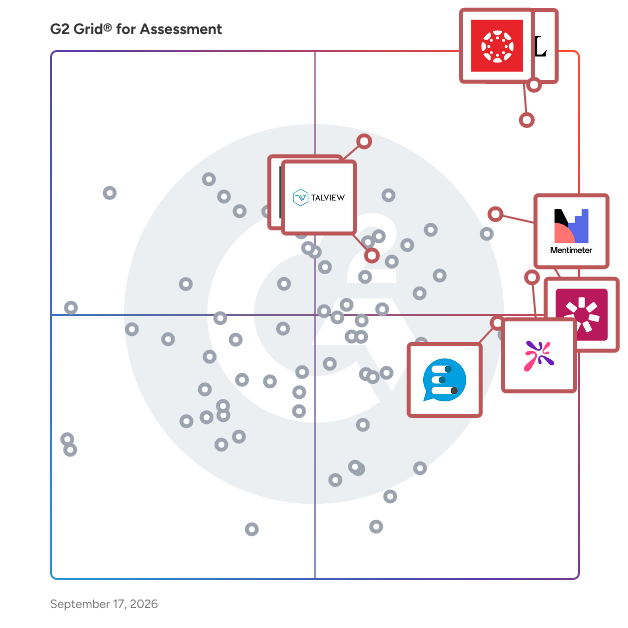
## G2 Grid® for Assessment Software
![G2 Grid® for Assessment Software plotting products by satisfaction and market presence](https://www.g2.com/categories/assessment/grids.png?focus%5B%5D=6800&focus%5B%5D=2319&focus%5B%5D=949&focus%5B%5D=53267&focus%5B%5D=5799&focus%5B%5D=6287&focus%5B%5D=13574&focus%5B%5D=6798)
Highlighted products: Canvas LMS, D2L Brightspace, Blackboard, Mentimeter, iSpring Suite, Talview, Vevox, and PowerSchool Schoology Learning.
Underlying data: [Grid® JSON](https://www.g2.com/categories/assessment/grids.json?focus%5B%5D=canvas-lms&amp;focus%5B%5D=d2l-brightspace&amp;focus%5B%5D=blackboard&amp;focus%5B%5D=mentimeter&amp;focus%5B%5D=ispring-suite&amp;focus%5B%5D=talview&amp;focus%5B%5D=vevox&amp;focus%5B%5D=powerschool-schoology-learning&amp;segment=enterprise)


## How Many Assessment Software Products Does G2 Track?
**Total Products under this Category:** 303

### Category Stats (Jul 2026)
- **Average Rating**: 4.27/5 (↑0.01 vs Jun 2026) The average rating of products in this category, based on all submitted ratings
- **Top Trending Product**: Explorance Blue (+4.07%) - Among all products in this category, Explorance Blue recorded the largest rating increase compared to last month
*Last updated: July 13, 2026*


## How Does G2 Rank Assessment Software Products?

**Why You Can Trust G2's Software Rankings:**

- 30 Analysts and Data Experts
- 10,700+ Authentic Reviews
- 303+ Products
- Unbiased Rankings

G2's software rankings are built on verified user reviews, rigorous moderation, and a consistent research methodology maintained by a team of analysts and data experts. Each product is measured using the same transparent criteria, with no paid placement or vendor influence. While reviews reflect real user experiences, which can be subjective, they offer valuable insight into how software performs in the hands of professionals. Together, these inputs power the G2 Score, a standardized way to compare tools within every category.


---

**Sponsored**

### Synap

Synap is an award-winning online exam and assessment platform trusted by universities, higher education institutions, corporate training teams, and global enterprises. Used by 300+ organisations worldwide, Synap makes it easy to deliver secure, scalable assessments across the full testing lifecycle. Used for certification exams, admission tests, recruitment assessments, language testing, exam preparation, and institutional assessments, Synap adapts to a wide range of high-stakes and everyday testing needs. Key features include: - Flexible assessment types: practice, formative, summative, and live proctored exams - Robust authoring tools for creating engaging courses and exams - Proctoring options from browser lockdown to AI-enhanced video monitoring - Online grading, visual analytics, and actionable performance insights - LMS, API, and Zapier integrations for workflow automation - ISO 27001 certified and GDPR compliant, with enterprise-grade security throughout Having delivered over 10 million tests and 300 million questions answered across 500,000+ users globally, Synap scales from focused training programmes to enterprise-wide assessment delivery, giving administrators full control while keeping the experience simple for learners.


[Visit website](https://www.g2.com/external_clickthroughs/record?secure%5Bad_program%5D=ppc&amp;secure%5Bad_slot%5D=category_product_list&amp;secure%5Bcategory_id%5D=326&amp;secure%5Bchosen_at%5D=2026-07-13T21%3A29%3A07Z&amp;secure%5Bdisplayable_resource_id%5D=326&amp;secure%5Bdisplayable_resource_type%5D=Category&amp;secure%5Bmedium%5D=sponsored&amp;secure%5Bplacement_reason%5D=page_category&amp;secure%5Bplacement_resource_ids%5D%5B%5D=326&amp;secure%5Bprioritized%5D=false&amp;secure%5Bproduct_id%5D=100984&amp;secure%5Bresource_id%5D=326&amp;secure%5Bresource_type%5D=Category&amp;secure%5Bsource_type%5D=category_page&amp;secure%5Bsource_url%5D=https%3A%2F%2Fwww.g2.com%2Fcategories%2Fassessment%2Fenterprise%3Fpage%3D2&amp;secure%5Btoken%5D=7acf006e631bde4c20f85b6825bebd7fe587e3e6ec0ad3af914eab81ecc673a9&amp;secure%5Burl%5D=https%3A%2F%2Fsynap.ac%2Fsolutions%2Fonline-exam-platform%2F%3Futm_medium%3Dpaid_listing%26utm_source%3Dg2%26utm_campaign%3Dg2_assessment&amp;secure%5Burl_type%5D=custom_url)

---

## What Are the Top-Rated Assessment Software Products in 2026?
### 1. [Socrative](https://www.g2.com/products/socrative/reviews)
Your classroom app for fun, effective engagement and on-the-fly assessments. Immediate feedback is a vital part of the learning process. Socrative gives you just that for the classroom or office – an efficient way to monitor and evaluate learning that saves time for educators while delivering fun and engaging interactions for learners. Quickly and easily create a library of personalized activities from quizzes to polls, to on-the-fly questions or whatever type of activity you need to quickly assess student understanding. Launch activities in secure and easy to create rooms to keep your class engaged, whether you&#39;re teaching in-person, remotely, or both. When activities are complete, quiz results can be distributed to learners with just a few clicks. Socrative quizzes are automatically graded in real time providing you with instant feedback. Socrative quiz reports allow to quickly identify where you need to adjust your teaching based on the results so you spend less time grading assignments and more time engaging your learners. Socrative is 100% free for students to use, on all devices.


**Average Rating:** 4.5/5.0
**Total Reviews:** 98
**How Do G2 Users Rate Socrative?**

- **Ease of Use:** 9.1/10 (Category avg: 8.4/10)
- **Real-time assessment:** 10.0/10 (Category avg: 8.5/10)
- **Analytics dashboard:** 10.0/10 (Category avg: 8.3/10)

**Who Is the Company Behind Socrative?**

- **Seller:** [Showbie](https://www.g2.com/sellers/showbie)
- **Year Founded:** 2012
- **HQ Location:** Edmonton, CA
- **Twitter:** @Showbie (11,656 Twitter followers)
- **LinkedIn® Page:** https://www.linkedin.com/company/2585024/ (56 employees on LinkedIn®)

**Who Uses This Product?**
- **Who Uses This:** Teacher
- **Top Industries:** Primary/Secondary Education, Education Management
- **Company Size:** 46% Mid-Market, 40% Small-Business


#### What Are Recent G2 Reviews of Socrative?

**"[Socrative Review](https://www.g2.com/survey_responses/socrative-review-4652976)"**

**Rating:** 5.0/5.0 stars
*— Bill A.*

[Read full review](https://www.g2.com/survey_responses/socrative-review-4652976)

---

**"[A VERY USEFUL SERVICE](https://www.g2.com/survey_responses/socrative-review-7366862)"**

**Rating:** 4.0/5.0 stars
*— Katia Lizeth S.*

[Read full review](https://www.g2.com/survey_responses/socrative-review-7366862)

---


#### What Are G2 Users Discussing About Socrative?

- [What is your experience with Socrative for classroom assessments, and what features do you find most useful?](https://www.g2.com/discussions/what-is-your-experience-with-socrative-for-classroom-assessments-and-what-features-do-you-find-most-useful)
- [What is Socrative used for?](https://www.g2.com/discussions/what-is-socrative-used-for)


## What Is Assessment Software?

[Education Software](https://www.g2.com/categories/education)

## What Software Categories Are Similar to Assessment Software?

- [Learning Management Systems](https://www.g2.com/categories/learning-management-system-lms)
- [Classroom Management Software](https://www.g2.com/categories/classroom-management)
- [Study Tools](https://www.g2.com/categories/study-tools)
- [Audience Response Software](https://www.g2.com/categories/audience-response)
- [Corporate Learning Management Systems](https://www.g2.com/categories/corporate-learning-management-systems)
- [Online Learning Platforms](https://www.g2.com/categories/online-learning-platform)
- [Digital Learning Platforms](https://www.g2.com/categories/digital-learning-platforms)


---

## How Do You Choose the Right Assessment Software?

### Why Use Assessment Software?

### Why Use Assessment Software?

Assessment software is useful for schools looking to switch over to digital exams. The implementation of assessment software is beneficial for everyone involved in the assessment process, including students, for whom it streamlines assessments. Teachers can leverage it to reduce the time it takes for them to create exams. Once delivered and the results collected, teachers can use analytical tools built in to the software to gain insight into the performance of their classes and individual students.

**Save time —** Automated grading is a key feature of assessment systems. Grading automation saves teachers a ton of time that would otherwise be spent arduously going through students’ exams. Teachers can use the time they save to develop more creative and effective ways of teaching their students. Assessment software provides users with the test creation features and exam templates, which play a central role in saving teachers’ time.

**Data consolidation —** Paper exams are incredibly inefficient and difficult to distribute, collect, and grade. With assessment software, all of the feedback teachers give students and all of the historical assessment data for the students can be housed in a single platform.

**Analytics —** All of the test data is housed in a single place, which makes it easier for the built-in analytics that typically come with assessment software to analyze large portions of student assessment results. These tools can help teachers identify struggling students and the subjects they may be struggling with.

### Who Uses Assessment Software?

There are three major groups that use assessment software: students, teachers, and administrators. Each group uses the software for different reasons and has varying levels of interaction with the applications.

**Students —** Students interact with assessment software as end users, actually going through and taking the assessments created by their teachers. They are the ones interacting with the software and seeing how effective it is at presenting questions and collecting answers in an efficient and sensible manner.

**Teachers —** Teachers use the full breadth of assessment software capabilities. They create and deliver exams to students via the platform. Teachers also use the software to grade exams, provided they are not open text answers.

**Administrators —** Administrators can use assessment software data to check up on different classes’ performance and use the information to drive policy-making decisions. While the teachers will be the ones making most of the decisions related to addressing students’ issues, administrators can act in more broad strokes. They can use the data gathered by assessment solutions and create a policy based on that data.

### What are the Different Kinds of Assessment Software?

The two main groups of assessment software are solutions that provide lesson creation features and those that simply focus on exam creation and administration. These solutions often include grading capabilities as well, but only within the tool itself and with the exam materials created using the tool. This distinguishes it from grading tools, which are designed to handle grading various types and formats of assessments.

**Lesson creation —** Solutions in this group allow users to create entire interactive lessons using the software. They can embed interactive assessment material within the lessons to gauge comprehension level.

**Point solution —** These assessment solutions are focused solely on assessment creation, administration, collection, and analytics. Because these focus on a single aspect of teaching, they often include integration capabilities with SIS.

### Assessment Software Features

Assessment software often includes, but is not limited to, the following features:

**Assessment creation —** This is the critical feature of assessment software, allowing users to create and administer custom and assessment templates to students.

**Assessment analytics —** Assessment software nearly always offers some analysis-focused features. The goal of this capability is to dive into data to discern what areas individual students or the class as a whole need to focus on.

**Reporting —** This feature involves creating prebuilt reports based on assessment data collected within the platform.

**Multilingual support —** Certain assessment solutions contain support for quiz and exam creation in multiple languages.

**White-labeling —** Users can brand their assessments and the platform they use with organization-specific imaging.

**Dashboards —** Users have access to dashboards that contain all relevant information.

**Adaptive assessments —** Solutions containing this feature provide assessments that adapt and change for individual learners based on their past performance. This feature is becoming increasingly prevalent in assessment solutions.

**Offline delivery —** This feature allows users to deliver assessments without requiring internet connectivity.

Other Features of Assessment Software: [Pre-made assessments](https://www.g2.com/categories/assessment/f/pre-made-assessments), [Real-time responses](https://www.g2.com/categories/assessment/f/real-time-responses), [Tests and quizzes](https://www.g2.com/categories/assessment/f/tests-and-quizzes), [User-created assessments](https://www.g2.com/categories/assessment/f/user-created-assessments)

Specific Subject Matters: [Corporate](https://www.g2.com/categories/assessment/f/corporate), [Higher education](https://www.g2.com/categories/assessment/f/higher-education), [K-12](https://www.g2.com/categories/assessment/f/k-12),

### Trends Related to Assessment Software

Assessment software has become increasingly popular in the edtech space. There are multiple use cases for the software, and as the education industry digitizes at scale, the adoption of assessment software will increase.

**Adaptive curriculum —** One industry trend has been toward creating and implementing adaptive curriculum. The key to implementing this tactic successfully is gathering consistent and accurate assessment data. Armed with this knowledge, teachers and administrators can alter course material and make appropriate changes to drive comprehension among learners.

**Digitization —** The digitization of education records has been occurring over the past decade. Now, with almost all relevant data housed in electronic form, there have been more and more solutions popping up that are taking advantage of that digitization. Assessment solutions are one group of such solutions. Students taking online assessments can have their assessment results automatically uploaded to the school’s SIS, and the data can be used to drive evidence-based alterations in curriculum.

**Interactive content —** Interactive content is becoming king in the edtech world. Schools are looking to engage students by shifting away from regular books and assignments, including more video content and digital material that students can interact with. Assessments, whether formal or not, are being included in these pieces of content. Student performance within the interactive content can help inform where teachers need to place their focus, from the class level all the way down to individual students.

**AI-powered grading —** Increasingly, artificial intelligence-powered assessment applications are able to grade long-form, open text answers. It may be a while before grading tools are able to provide an accurate grade for essay style work, and the technology may never be able to discern the creativity and originality that make a truly great piece of work, but it will likely be relied upon in the near future to tell whether a student has hit on the basic themes integral to answering a specific question.

### Software and Services Related to Assessment Software

There are multiple categories of education software that relate closely to assessment software.

[**Student information systems (SIS)**](https://www.g2.com/categories/student-information-systems-sis) **—** Assessment software almost always includes integrations with SIS.

[**Learning management systems (LMS)**](https://www.g2.com/categories/learning-management-system-lms) **—** LMS either include assessment capabilities or integrate with separate assessment software.

[**Online learning platform software**](https://www.g2.com/categories/online-learning-platform) **—** Similar to LMS, these solutions either provide integrations with assessment solutions or include assessment features on the platform.

[**Classroom management software**](https://www.g2.com/categories/classroom-management) **—** Classroom management software often includes less formal, in-class assessments for students to take in order to track their performance.


