Best Archive Storage Solutions

How Many Archive Storage Solutions Products Does G2 Track?

Total Products under this Category: 44

Category Stats (Sep 2026)

  • Average Rating: 4.4/5 The average rating of products in this category, based on all submitted ratings
  • Top Trending Product: Amazon S3 Glacier (+0.07%) - Among all products in this category, Amazon S3 Glacier recorded the largest rating increase compared to last month

Last updated: September 15, 2026

How Does G2 Rank Archive Storage Solutions Products?

Why You Can Trust G2's Software Rankings:

  • 30 Analysts and Data Experts
  • 2,700+ Authentic Reviews
  • 44+ Products
  • Unbiased Rankings

G2's software rankings are built on verified user reviews, rigorous moderation, and a consistent research methodology maintained by a team of analysts and data experts. Each product is measured using the same transparent criteria, with no paid placement or vendor influence. While reviews reflect real user experiences, which can be subjective, they offer valuable insight into how software performs in the hands of professionals. Together, these inputs power the G2 Score, a standardized way to compare tools within every category.

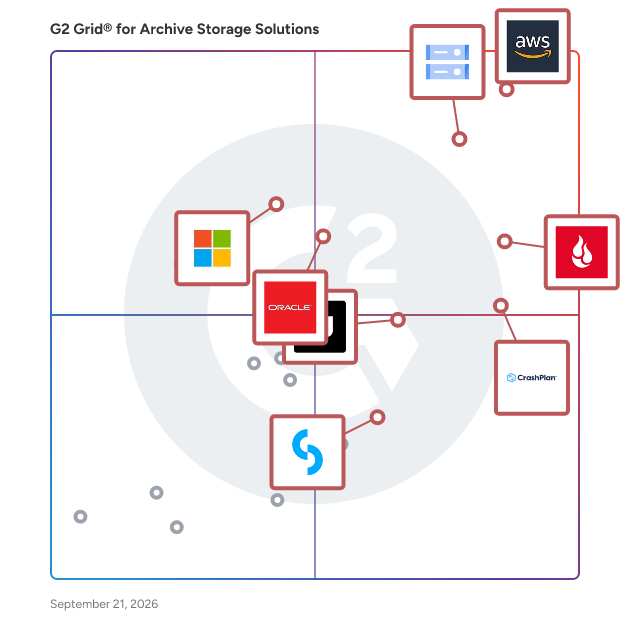
G2 Grid® for Archive Storage Solutions

G2 Grid® for Archive Storage Solutions plotting products by satisfaction and market presence

Highlighted products: Amazon S3 Glacier, Google Cloud Storage, Backblaze B2 Cloud Storage, CrashPlan Platform, Oracle Cloud Infrastructure Archive Storage Classic, Unitrends Backup and Recovery, Azure Archive Storage, and CyberSentriq.

Underlying data: [Grid® JSON](https://www.g2.com/categories/archive-storage-solutions/grids.json?focus%5B%5D=amazon-s3-glacier&focus%5B%5D=google-cloud-storage&focus%5B%5D=backblaze-b2-cloud-storage&focus%5B%5D=crashplan-platform&focus%5B%5D=oracle-cloud-infrastructure-archive-storage-classic&focus%5B%5D=unitrends-backup-and-recovery&focus%5B%5D=azure-archive-storage&focus%5B%5D=cybersentriq)

Amazon S3 Glacier

Amazon Glacier is a secure, durable, and extremely low-cost cloud storage service for data archiving and long-term backup. It is designed to deliver 99.999999999% durability, and provides comprehensive security and compliance capabilities that can help meet even the most stringent regulatory requirements. Amazon Glacier provides query-in-place functionality, allowing you to run powerful analytics directly on your archive data at rest. Customers can store data for as little as $0.004 per gigabyte per month, a significant savings compared to on-premises solutions. To keep costs low yet suitable for varying retrieval needs, Amazon Glacier provides three options for access to archives, from a few minutes to several hours.

Average Rating: 4.5/5.0

Total Reviews: 126

How Do G2 Users Rate Amazon S3 Glacier?

  • Quality of Support: 8.5/10 (Category avg: 8.8/10)
  • Has the product been a good partner in doing business?: 8.6/10 (Category avg: 8.8/10)

Who Is the Company Behind Amazon S3 Glacier?

  • Seller: Amazon Web Services (AWS)
  • Year Founded: 2006
  • HQ Location: Seattle, WA
  • Twitter: @awscloud
    2,232,483 Twitter followers
  • LinkedIn® Page: www.linkedin.com
    147,094 employees on LinkedIn®
  • Ownership: NASDAQ: AMZN

Who Uses This Product?

  • Who Uses This: Software Engineer, DevOps Engineer
  • Top Industries: Information Technology and Services, Computer Software
  • Company Size: 39% Small, 33% Large

What Do G2 Reviewers Say About Amazon S3 Glacier?

AI-generated summary from verified user reviews

Pros
  • Users appreciate the affordable storage costs of Amazon S3 Glacier, providing secure data solutions without breaking the bank.
  • Users appreciate the data security of Amazon S3 Glacier, enjoying reliable, durable storage for long-term archiving needs.
  • Users value the easy integrations of Amazon S3 Glacier, enhancing convenience for long-term data archiving and backups.
  • Users appreciate the low-cost, highly durable storage of Amazon S3 Glacier, ensuring secure data archiving and compliance.
  • Users value the high reliability of Amazon S3 Glacier, ensuring data security and durability for long-term storage needs.
Cons
  • Users find the high retrieval costs of Amazon S3 Glacier to be confusing and potentially unexpected without careful monitoring.
  • Users find the slow retrieval speed of Amazon S3 Glacier frustrating, especially compared to standard S3 buckets.
  • Users find pricing issues with Amazon S3 Glacier due to confusing retrieval fees and data transfer charges.
  • Users find the slow retrieval speed of Amazon S3 Glacier frustrating compared to S3 buckets.
  • Users find the instructions unclear, making it difficult to navigate S3 Glacier's retrieval options and pricing effectively.

What Are Recent G2 Reviews of Amazon S3 Glacier?

What Are G2 Users Discussing About Amazon S3 Glacier?

Google Cloud Storage

Cloud Storage is a managed service for storing unstructured data, like videos and documents. It is most commonly used for data lakes for analytics, storing AI data, or web hosting. With Cloud Storage you can store any amount of data, and retrieve it as often as you like. New customers can use $300 in free credits to try Cloud Storage. All customers get 5 GiB of US regional storage free per month, not charged against your credits. If you’re a consumer or business looking for file sharing, check out Workspace products like Google Drive (https://workspace.google.com/products/drive/). If you’re looking for photo storage, use Google Photos (www.google.com/photos)

Average Rating: 4.6/5.0

Total Reviews: 564

How Do G2 Users Rate Google Cloud Storage?

  • Quality of Support: 8.8/10 (Category avg: 8.8/10)
  • Has the product been a good partner in doing business?: 8.9/10 (Category avg: 8.8/10)

Who Is the Company Behind Google Cloud Storage?

  • Seller: Google
  • Year Founded: 1998
  • HQ Location: Mountain View, CA
  • Twitter: @google
    31,899,995 Twitter followers
  • LinkedIn® Page: www.linkedin.com
    301,144 employees on LinkedIn®
  • Ownership: NASDAQ:GOOG

Who Uses This Product?

  • Who Uses This: Software Engineer, CTO
  • Top Industries: Information Technology and Services, Computer Software
  • Company Size: 46% Small, 29% Large

What Do G2 Reviewers Say About Google Cloud Storage?

AI-generated summary from verified user reviews

Pros
  • Users appreciate the cost-effectiveness and ease of use of Google Cloud Storage for seamless data transfer.
  • Users appreciate the ease of use of Google Cloud Storage, enabling seamless website hosting and data management.
  • Users highlight the strong security features of Google Cloud Storage, ensuring data protection and peace of mind.
  • Users praise the excellent scalability of Google Cloud, easily adjusting resources to meet fluctuating business demands.
  • Users highlight the ease of use and integration with other Google services, enhancing their overall experience with Google Cloud Storage.
Cons
  • Users find Google Cloud Storage expensive, particularly when compared to other options on the market.
  • Users find the storage limitations inconvenient, as upgrading space incurs additional monthly costs.
  • Users find the complexity of management and pricing in Google Cloud Storage challenging, especially for beginners.
  • Users find the cost issues significant, noting that expenses increase with additional storage requirements.
  • Users find the learning difficulty in Google Cloud Storage challenging, especially for newcomers navigating its complex pricing and terminology.

What Are Recent G2 Reviews of Google Cloud Storage?

What Are G2 Users Discussing About Google Cloud Storage?

Backblaze B2 Cloud Storage

Backblaze B2 is S3 compatible cloud object storage built purposefully to unlock budgets, unburden administrators, and unleash innovators. Delivering performance at 1/5 the cost including free egress up to 3x monthly storage, it’s the easy choice for more than 85,000 organizations including Patagonia, UCLA, Fortune, and Streamlabs for backup, active archive, and application storage needs. Together with technology partners, Backblaze B2 helps customers break free from restrictive, overpriced legacy providers that hold them back, and blaze forward with the full power of the open cloud in their hands.

Average Rating: 4.6/5.0

Total Reviews: 114

How Do G2 Users Rate Backblaze B2 Cloud Storage?

  • Quality of Support: 8.7/10 (Category avg: 8.8/10)
  • Has the product been a good partner in doing business?: 8.9/10 (Category avg: 8.8/10)

Who Is the Company Behind Backblaze B2 Cloud Storage?

  • Seller: Backblaze
  • Company Website:
  • Year Founded: 2007
  • HQ Location: San Mateo, California
  • Twitter: @backblaze
    17,828 Twitter followers
  • LinkedIn® Page: www.linkedin.com
    377 employees on LinkedIn®

Who Uses This Product?

  • Who Uses This: Owner
  • Top Industries: Information Technology and Services, Computer Software
  • Company Size: 71% Small, 18% Medium

What Do G2 Reviewers Say About Backblaze B2 Cloud Storage?

AI-generated summary from verified user reviews

Pros
  • Users value the affordability of Backblaze B2 Cloud Storage, appreciating its simple pricing and great backup services.
  • Users appreciate the reliability of Backblaze B2 Cloud Storage, ensuring peace of mind with dependable backups and easy access.
  • Users love the ease of use of Backblaze B2 Cloud Storage, enjoying hassle-free setup and seamless integration.
  • Users appreciate the easy setup and integration of Backblaze B2, highlighting its intuitive and seamless workflow incorporation.
  • Users value the affordable storage capacity of Backblaze B2 Cloud Storage, ensuring reliable backup without unexpected fees.
Cons
  • Users find the poor interface design challenging, especially for newcomers navigating advanced features and options.
  • Users find poor navigation in Backblaze B2 Cloud Storage, making it challenging to browse and utilize features efficiently.
  • Users are frustrated by storage issues, facing difficulties in retrieving files and limited processing capabilities.
  • Users face storage limitations with Backblaze B2, impacting compatibility with large datasets and offline backup options.
  • Users face backup issues with Backblaze B2, finding it challenging to erase buckets and retrieve files efficiently.

What Are Recent G2 Reviews of Backblaze B2 Cloud Storage?

What Are G2 Users Discussing About Backblaze B2 Cloud Storage?

CrashPlan Platform

CrashPlan delivers enterprise-grade backup, recovery, and archiving to protect the data organizations cannot afford to lose. Our cloud-native platform helps businesses secure Microsoft 365, Google Workspace, endpoint, and server data with scalable protection that reduces risk, supports compliance, and controls storage costs. Built for modern IT environments, CrashPlan enables fast, reliable recovery while supporting long-term retention, legal hold, and broader data governance needs. We help enterprises strengthen resilience and maintain continuity without added complexity.

Average Rating: 4.9/5.0

Total Reviews: 265

How Do G2 Users Rate CrashPlan Platform?

  • Quality of Support: 9.9/10 (Category avg: 8.8/10)
  • Has the product been a good partner in doing business?: 9.9/10 (Category avg: 8.8/10)

Who Is the Company Behind CrashPlan Platform?

  • Seller: CrashPlan
  • Company Website:
  • Year Founded: 2001
  • HQ Location: Minneapolis, MN
  • Twitter: @crashplan
    24,528 Twitter followers
  • LinkedIn® Page: www.linkedin.com
    164 employees on LinkedIn®

Who Uses This Product?

  • Who Uses This: Administrator
  • Top Industries: Real Estate, Information Technology and Services
  • Company Size: 63% Medium, 36% Large

What Do G2 Reviewers Say About CrashPlan Platform?

AI-generated summary from verified user reviews

Pros
  • Users appreciate the good backup frequency of CrashPlan Platform, enhancing data protection without hassle.
  • Users enjoy the ease of use of CrashPlan Platform, appreciating its intuitive dashboard and simple report downloading.
  • Users value the robust security of CrashPlan Platform, ensuring data protection for all operating systems effectively.
  • Users praise the excellent customer support of CrashPlan Platform, noting responsiveness and helpfulness in addressing concerns.
  • Users appreciate the robust reporting system of CrashPlan Platform, providing real-time updates for peace of mind.
Cons
  • Users find the reporting features need improvement, as logs fetching and data mismatches complicate troubleshooting.
  • Users find the reporting process cumbersome, facing mismatches and difficulties in schedule creation and device allocation.
  • Users experience restoration issues with slow processes, though the support team's responsiveness is commendable.
  • Users experience slow performance with portal loading times and resource-intensive backups, which can hinder usage on older hardware.
  • Users experience backup issues that cause slowdowns or inconsistencies, though support helps mitigate these concerns.

What Are Recent G2 Reviews of CrashPlan Platform?

What Are G2 Users Discussing About CrashPlan Platform?

Oracle Cloud Infrastructure Archive Storage Classic

The most cost-effective storage in the industry, designed for infrequently accessed data with enterprise-grade security, resilience, and elastic scalability.

Average Rating: 4.4/5.0

Total Reviews: 33

How Do G2 Users Rate Oracle Cloud Infrastructure Archive Storage Classic?

  • Quality of Support: 8.4/10 (Category avg: 8.8/10)
  • Has the product been a good partner in doing business?: 9.2/10 (Category avg: 8.8/10)

Who Is the Company Behind Oracle Cloud Infrastructure Archive Storage Classic?

  • Seller: Oracle
  • Year Founded: 1977
  • HQ Location: Austin, TX
  • Twitter: @Oracle
    827,997 Twitter followers
  • LinkedIn® Page: www.linkedin.com
    207,576 employees on LinkedIn®
  • Ownership: NYSE:ORCL

Who Uses This Product?

  • Top Industries: Computer Software, Information Technology and Services
  • Company Size: 49% Medium, 34% Large

What Do G2 Reviewers Say About Oracle Cloud Infrastructure Archive Storage Classic?

AI-generated summary from verified user reviews

Pros
  • Users appreciate the ease of use of Oracle Cloud Infrastructure Archive Storage Classic, enhancing their overall experience and security.
  • Users value the enhanced security features of Oracle Cloud Infrastructure Archive Storage Classic for protecting data effectively.

What Are Recent G2 Reviews of Oracle Cloud Infrastructure Archive Storage Classic?

What Are G2 Users Discussing About Oracle Cloud Infrastructure Archive Storage Classic?

Unitrends Backup and Recovery

Unitrends Data Center Backup and Recovery offers a Unified BCDR solution enabling our users to address the challenges of today with a complete, agile solution designed to backup, secure and recover all workloads. The platform encompasses protection for traditional data center infrastructure as well as cloud-based IaaS workloads, SaaS applications and the data being generated on endpoint devices such as laptops and PCs. Purposeful integrations with security tools provide end-to-end protection against cybercrime and human error, while automation and artificial intelligence is injected into the platform to simplify complex systems and provide a unified experience with visibility across a complete backup infrastructure.

Average Rating: 4.2/5.0

Total Reviews: 444

How Do G2 Users Rate Unitrends Backup and Recovery?

  • Quality of Support: 8.5/10 (Category avg: 8.8/10)
  • Has the product been a good partner in doing business?: 8.5/10 (Category avg: 8.8/10)

Who Is the Company Behind Unitrends Backup and Recovery?

  • Seller: Kaseya
  • Company Website:
  • Year Founded: 2000
  • HQ Location: Miami, FL
  • Twitter: @KaseyaCorp
    17,411 Twitter followers
  • LinkedIn® Page: www.linkedin.com
    5,483 employees on LinkedIn®

Who Uses This Product?

  • Who Uses This: IT Manager, Network Administrator
  • Top Industries: Information Technology and Services, Hospital & Health Care
  • Company Size: 61% Medium, 28% Small

What Do G2 Reviewers Say About Unitrends Backup and Recovery?

AI-generated summary from verified user reviews

Pros
  • Users find Unitrends Backup and Recovery to be easy to use, with intuitive interfaces and smooth recovery processes.
  • Users highlight the reliability of Unitrends Backup and Recovery, praising its flawless backups and solid performance.
  • Users praise the flawless backup functionality of Unitrends Backup, appreciating its comprehensive VM support and management features.
  • Users appreciate the frequent and reliable backups of Unitrends, ensuring data protection and ease of management.
  • Users commend the exceptional customer support of Unitrends Backup and Recovery for its quick and knowledgeable assistance.
Cons
  • Users experience significant issues with poor customer support, leading to frustrating troubleshooting and unresolved problems.
  • Users find the poor interface design frustrating, making navigation difficult and complicating daily tasks.
  • Users struggle with backup issues, finding setup unintuitive and lacking sufficient troubleshooting guidance for persistent errors.
  • Users find the missing features of Unitrends Backup and Recovery frustrating, hindering effective management and resolution of issues.
  • Users find the UI needs improvement, citing navigation issues and a lack of customization and user permissions.

What Are Recent G2 Reviews of Unitrends Backup and Recovery?

What Are G2 Users Discussing About Unitrends Backup and Recovery?

Azure Archive Storage

Azure Archive Storage offers low-cost, durable, and highly available secure cloud storage for rarely accessed data with flexible latency requirements. Archive Storage provides secure data transfer to the cloud using HTTPS, and automatically secures that data at rest using 256-bit AES keys.

Average Rating: 4.5/5.0

Total Reviews: 52

How Do G2 Users Rate Azure Archive Storage?

  • Quality of Support: 9.1/10 (Category avg: 8.8/10)
  • Has the product been a good partner in doing business?: 8.2/10 (Category avg: 8.8/10)

Who Is the Company Behind Azure Archive Storage?

  • Seller: Microsoft
  • Year Founded: 1975
  • HQ Location: Redmond, Washington
  • Twitter: @microsoft
    13,091,739 Twitter followers
  • LinkedIn® Page: www.linkedin.com
    232,750 employees on LinkedIn®
  • Ownership: MSFT

Who Uses This Product?

  • Top Industries: Banking, Computer Software
  • Company Size: 41% Small, 31% Medium

What Are Recent G2 Reviews of Azure Archive Storage?

What Are G2 Users Discussing About Azure Archive Storage?

CyberSentriq

CyberSentriq is an integrated cybersecurity and data protection platform, leveraging solutions from two best-of breed vendors in the MSP space. Partnering with over 3,000 MSPs and protecting over 150,000 SMBs globally, CyberSentriq provides an unmatched combination of proactive AI-driven email and web security, advanced data protection, and operational resilience. The CyberSentriq platform offers: - Data backup & recovery for Microsoft M365 & Entra ID, Azure, Google workspace and more - AI-driven threat intelligence and detection - Advanced email security at both the Mail Exchange (MX) and Integrated Cloud Email Security (ICES) layers. - Security awareness services - Phishing simulation - Email archiving and encryption

Average Rating: 4.6/5.0

Total Reviews: 385

How Do G2 Users Rate CyberSentriq?

  • Quality of Support: 9.1/10 (Category avg: 8.8/10)
  • Has the product been a good partner in doing business?: 9.4/10 (Category avg: 8.8/10)

Who Is the Company Behind CyberSentriq?

  • Seller: CyberSentriq
  • Company Website:
  • Year Founded: 2025
  • HQ Location: Galway ,Galway
  • Twitter: @Redstor
    1,949 Twitter followers
  • LinkedIn® Page: www.linkedin.com
    206 employees on LinkedIn®

Who Uses This Product?

  • Who Uses This: IT Manager, Director
  • Top Industries: Information Technology and Services, Computer & Network Security
  • Company Size: 47% Medium, 41% Small

What Do G2 Reviewers Say About CyberSentriq?

AI-generated summary from verified user reviews

Pros
  • Users appreciate the ease of use of CyberSentriq, benefiting from its user-friendly interface and efficient cloud solutions.
  • Users commend the exceptional restore capability of CyberSentriq, allowing versatile recovery across multiple platforms effortlessly.
  • Users love the ease of tracking and reviewing backups with Redstore, enhancing data management efficiency and reliability.
  • Users value the exceptional backup and restore features of CyberSentriq, ensuring efficient data recovery across platforms.
  • Users appreciate the reliable daily backups of CyberSentriq, ensuring quick access and minimal downtime during recovery.
Cons
  • Users face backup issues due to vague reporting and no scheduled backups on user endpoints, complicating restoration efforts.
  • Users express the need for improved reporting features in CyberSentriq for better troubleshooting and transparency.
  • Users find the reporting inadequate for troubleshooting, lacking detail needed for effective error resolution and analysis.
  • Users struggle with backup failures, finding error resolution tedious and reporting on Office 365 insufficient for troubleshooting.
  • Users find the reporting issues in CyberSentriq unsatisfactory, lacking detail and options for effective auditing.

What Are Recent G2 Reviews of CyberSentriq?

What Are G2 Users Discussing About CyberSentriq?

Qumulo Core

Qumulo is the breakthrough leader in simplifying unstructured data management at massive scale across hybrid-cloud environments. Qumulo provides a high-performance file data platform designed to store, manage and create workflows and applications with data in its native file form. Qumulo’s File Data Platform is both future-proofed and seamlessly works with existing applications and technologies: It enables customers to easily manage the full data lifecycle from ingestion, transformation, publishing and archiving with cost-effective capacity, dynamic scalability, automatic encryption, real-time analytics, and an advanced API so they can easily integrate Qumulo into their technology ecosystem and workflows.

Average Rating: 4.6/5.0

Total Reviews: 17

How Do G2 Users Rate Qumulo Core?

  • Quality of Support: 9.2/10 (Category avg: 8.8/10)
  • Has the product been a good partner in doing business?: 9.3/10 (Category avg: 8.8/10)

Who Is the Company Behind Qumulo Core?

  • Seller: Qumulo
  • Year Founded: 2012
  • HQ Location: Seattle, WA
  • Twitter: @qumulo
    2,773 Twitter followers
  • LinkedIn® Page: www.linkedin.com
    698 employees on LinkedIn®

Who Uses This Product?

  • Company Size: 58% Medium, 37% Large

What Are Recent G2 Reviews of Qumulo Core?

What Are G2 Users Discussing About Qumulo Core?

IBM Spectrum Archive

IBM Spectrum Archive, a member of the IBM Spectrum Storage family, gives you direct, intuitive and graphical access to data stored in IBM tape drives and libraries by incorporating the Linear Tape File System (LTFS) format standard for reading, writing and exchanging descriptive metadata on formatted tape cartridges. Spectrum Archive eliminates the need for additional tape management and software to access data. Spectrum Archive offers three software solutions for managing your digital files with the LTFS format: Single Drive Edition, Library Edition and Enterprise Edition.

Average Rating: 4.2/5.0

Total Reviews: 11

How Do G2 Users Rate IBM Spectrum Archive?

  • Quality of Support: 8.5/10 (Category avg: 8.8/10)
  • Has the product been a good partner in doing business?: 9.6/10 (Category avg: 8.8/10)

Who Is the Company Behind IBM Spectrum Archive?

  • Seller: IBM
  • Year Founded: 1911
  • HQ Location: Armonk, New York, United States
  • Twitter: @IBMSecurity
    74,660 Twitter followers
  • LinkedIn® Page: www.linkedin.com
    344,328 employees on LinkedIn®
  • Ownership: SWX:IBM

Who Uses This Product?

  • Company Size: 45% Small, 36% Medium

What Are Recent G2 Reviews of IBM Spectrum Archive?

What Are G2 Users Discussing About IBM Spectrum Archive?

OpenText Core Business Communication Archive

OpenText Core Business Communication Archive is a cloud-based archiving solution that captures, stores, and preserves business communications for compliance, legal, and operational needs. It automatically archives emails and other communication data in a secure, tamper-proof environment, making it easy to search, retrieve, and manage information. The solution provides centralized access to archived data with powerful search and eDiscovery capabilities, helping organizations meet regulatory requirements and respond quickly to audits or legal requests. We ensure business communications are securely retained, easily accessible, and compliant with industry regulations.

Average Rating: 4.2/5.0

Total Reviews: 10

How Do G2 Users Rate OpenText Core Business Communication Archive?

  • Quality of Support: 9.7/10 (Category avg: 8.8/10)
  • Has the product been a good partner in doing business?: 9.3/10 (Category avg: 8.8/10)

Who Is the Company Behind OpenText Core Business Communication Archive?

  • Seller: OpenText
  • Year Founded: 1991
  • HQ Location: Waterloo, ON
  • Twitter: @OpenText
    21,565 Twitter followers
  • LinkedIn® Page: www.linkedin.com
    22,835 employees on LinkedIn®
  • Ownership: NASDAQ:OTEX

Who Uses This Product?

  • Company Size: 70% Small, 30% Medium

What Are Recent G2 Reviews of OpenText Core Business Communication Archive?

Redstor Backup for Microsoft 365

Redstor’s Microsoft 365 backup service includes market-leading 365 coverage, including complete protection for SharePoint, OneDrive, Email, Teams, OneNote and even Class and Staff Notebooks. AI infused throughout Redstor’s app highlights 365 data risks, protecting against malware, including preventing the recovery of ransomware, and continuously improves based on community shared insights. Designed for service provision as well as Enterprise environments, Redstor’s disruptive, smart, cloud-native suite of services deliver the new standard in data management and protection. Redstor protects data residing in the broadest range of environments, spanning infrastructure and an ever-widening array of SaaS platforms, through a single multi-tenanted app.

Average Rating: 4.6/5.0

Total Reviews: 110

How Do G2 Users Rate Redstor Backup for Microsoft 365?

  • Quality of Support: 9.1/10 (Category avg: 8.8/10)
  • Has the product been a good partner in doing business?: 9.3/10 (Category avg: 8.8/10)

Who Is the Company Behind Redstor Backup for Microsoft 365?

  • Seller: CyberSentriq
  • Year Founded: 2025
  • HQ Location: Galway ,Galway
  • Twitter: @Redstor
    1,949 Twitter followers
  • LinkedIn® Page: www.linkedin.com
    206 employees on LinkedIn®

Who Uses This Product?

  • Who Uses This: Director
  • Top Industries: Information Technology and Services, Computer & Network Security
  • Company Size: 43% Medium, 43% Small

What Are Recent G2 Reviews of Redstor Backup for Microsoft 365?

What Are G2 Users Discussing About Redstor Backup for Microsoft 365?

OpenText InfoArchive

InfoArchive also helps organizations quickly address dynamic new governance issues and compliance guidelines, such as data privacy regulations and eDiscovery requests, without costly changes to legacy applications and systems.

Average Rating: 4.5/5.0

Total Reviews: 10

How Do G2 Users Rate OpenText InfoArchive?

  • Quality of Support: 8.5/10 (Category avg: 8.8/10)
  • Has the product been a good partner in doing business?: 8.9/10 (Category avg: 8.8/10)

Who Is the Company Behind OpenText InfoArchive?

  • Seller: OpenText
  • Year Founded: 1991
  • HQ Location: Waterloo, ON
  • Twitter: @OpenText
    21,565 Twitter followers
  • LinkedIn® Page: www.linkedin.com
    22,835 employees on LinkedIn®
  • Ownership: NASDAQ:OTEX

Who Uses This Product?

  • Company Size: 50% Small, 30% Large

What Are Recent G2 Reviews of OpenText InfoArchive?

Disk Archive

Disk Archive provides easy, secure and affordable technology for archiving and cold data storage, ALTO - the Alternative to LTO.

Average Rating: 4.3/5.0

Total Reviews: 11

How Do G2 Users Rate Disk Archive?

  • Quality of Support: 9.1/10 (Category avg: 8.8/10)
  • Has the product been a good partner in doing business?: 8.3/10 (Category avg: 8.8/10)

Who Is the Company Behind Disk Archive?

Who Uses This Product?

  • Company Size: 45% Medium, 27% Large

What Are Recent G2 Reviews of Disk Archive?

BigMIND

BigMIND is a complete solution that meets all user needs through a secure, flexible, and smart system

Average Rating: 4.1/5.0

Total Reviews: 10

How Do G2 Users Rate BigMIND?

  • Quality of Support: 8.2/10 (Category avg: 8.8/10)
  • Has the product been a good partner in doing business?: 8.3/10 (Category avg: 8.8/10)

Who Is the Company Behind BigMIND?

  • Seller: Zoolz
  • Year Founded: 2011
  • HQ Location: London, GB
  • Twitter: @ZoolzCloud
    2,240 Twitter followers
  • LinkedIn® Page: www.linkedin.com
    6 employees on LinkedIn®

Who Uses This Product?

  • Company Size: 50% Small, 50% Medium

What Are Recent G2 Reviews of BigMIND?

What Are G2 Users Discussing About BigMIND?

Rachana Hasyagar
RH
Researched and written by Rachana Hasyagar
Updated October 3, 2024

Learn More About Archive Storage Solutions

Archive storage solutions act as storage systems for inactive data that businesses must retain but may only access occasionally. Data archiving or data tiering helps companies store and secure older information for regulatory compliance, information governance, business intelligence, lawsuit management, or future references. 

Archive file storage solutions, also known as information archiving solutions, are ideal for structured and unstructured data, such as financial reports, emails, web content, log data, historical data, retired application data, database records, and spreadsheets.

Primary storage demands high input/output operations per second (IOPS) levels for read/write activities. Archive storage systems, however, rely on low-performance, high-capacity storage mediums. These low-cost storage tiers reduce primary storage consumption costs, which is otherwise higher during long-term data retention. The result is cost-effective information storage with efficient data retrieval and transfer.

Some archive systems use write once, read many (WORM) functionality to offer read-only functionality and prevent data modification, while others also provide writing functionality.

What are the common features of archive storage solutions?

The following are some core features of archive storage solutions that users find helpful:

Searchability: Search capability is a must-have feature for data archiving software that lets users search data by type (email, pdf, spreadsheet, etc.), author, source (server, device, application, etc.), creation date, and data structure (social security numbers, bank routing numbers, etc). Archiving solutions also add metadata to each data file to help users find inactive data. 

Data deduplication: Archive software also reduce storage overhead by removing redundant data copies from disk, flash, or tape storage. The result is reduced storage capacity requirements, which translate into storage cost savings. Archiving solutions with data deduplication capabilities enable users to keep a baseline copy of changed and unchanged data and experience less redundancy.

Data lifecycle management: Many companies create archiving strategies that let them automatically move less frequently accessed data from primary storage to archive storage. This automation capability saves companies time that would otherwise be spent on creating, changing, and auditing archives throughout the data lifecycle.  

Access control: Organizations with large teams often need different permission levels to allow and restrict certain users from accessing archive data. Most archiving systems feature pre-set user roles to help these companies create role-specific access permissions. These solutions feature access logs for ease of user activity monitoring as well.

Flexibility: Archiving platforms also must allow businesses to write and retrieve different types of data, such as application logs, customer service requests, and social media posts, using multiple data platforms.

What types of archive storage solutions exist?

Archive data storage solutions use different mediums, including tapes, hard drives, cloud, disks, and flash storage. Traditionally, archival systems have been file-based but now use object storage.

On-premises archive storage

Companies deploy these solutions in their data centers to have complete control over data, hardware, and software. On-premises archive storage tools use a mix of object storage solutions, tape storage, and disk storage to archive large volumes of data in a scalable and cost-effective manner. 

Financial service providers, government agencies, and healthcare companies use this type of storage to retain sensitive data while meeting audit-related compliance requirements. 

Cloud archive storage

Cloud archive storage platforms enable large enterprises with global offices to archive and access data securely from different sources and locations. They eliminate the need for buying, or maintaining IT systems for storage, thus reducing long-term storage costs. These solutions also feature built-in encryption and application integration capabilities. 

Medical institutes, media companies, educational institutions, and government agencies use cloud solutions to archive patient records, video footage, student documents, and public records. However, businesses may need specialized software for data transfer and must be careful about vendor lock-in. 

Archive storage can be divided into the following media types depending on the physical device used for storage. 

Other archiving storage solutions

Below are other archiving solutions that companies use in a limited capacity but were quite popular.

Optical media storage

Optical disks like DVDs and CDs use the WORM technology to store data in a physically immutable manner. They rely on laser beams to write and read the data to and from spinning disks. Besides having a longer shelf life, this media is also portable because of its compact size. 

Organizations using optical media often struggle with low storage capacity and slower read/write speeds.

Tape archive storage

Tape storage systems use magnetic tapes to record and store data. Businesses use them because of their low cost, reliability, and ability to protect data from malware by working offline. Tapes also make error detection and correction easier with read-after-write verification functionality. 

The main challenge is that tapes use sequential access, slowing data searching and retrieval. Plus, tapes deteriorate with use and due to environmental conditions. 

Disk drive

Disk drives are electro-mechanical devices that use magnetism for data storage and retrieval. They feature data deduplication and remote replication capabilities. Users can also integrate them with indexing engines to search archived items faster. 

Despite offering an excellent storage-to-cost ratio, disk drives can be expensive to upgrade and maintain. Moreover, they experience a high failure rate without cooling and air filtering.

Removable disk

Removable disk storage features random access capabilities that ensure faster media reading and writing. Small and medium-sized companies primarily use removable disks like external hard drives, universal serial bus (USB) drives, and flash drives because of their portability and ease of usage. However, removable disks offer a poor cost-to-storage ratio and don't suit enterprises with large volumes of data.

What are the benefits of archive storage solutions?

The benefits of using an archiving solution include:

Reduced storage cost: Organizations with a rapidly growing amount of data spend a fortune on data storage. The cost is even higher as they store primary data in native formats. An effective archiving solution helps them compress and store primary data as cold data, allowing maximum cost savings. 

For example, a 2:1 compression ratio reduces hot data storage costs by 50%. Companies can also unlock additional savings by opting for cloud-based solutions.

Meeting regulatory compliance: Some companies may have to store data in archives for extended periods, depending on regulatory requirements. For example, the Fair Labor Standards Act (FLSA) requires employers to retain payroll records, sales/purchase documents, and collective bargaining agreements for up to three years. Another example is the Health Insurance Portability and Accountability Act (HIPAA), which requires fee-for-service healthcare providers to retain medical records for up to six years from the creation date. 

Data archiving platforms ease data retention and protection with built-in policies. This ease of meeting long-term archival mandates helps organizations prevent premature data destruction. 

Prevention of data loss: Data archiving moves in-circulation data to archives, limiting users' ability to modify it. Moreover, archive storage solutions feature robust security measures to protect sensitive information from malware infection, cyberattacks, unauthorized access, and breaches. 

Easy audit tracking: Data archiving solutions also feature audit trail tracking, offering organizations complete visibility over who is accessing and modifying what and when. 

High durability: Archive storage systems ensure data integrity during long-term preservation with redundancy and data replication features that protect companies from data loss.

Business agility: Archiving solutions make it easier for businesses to retrieve, extract, and push data to production while deploying new business models. 

Who uses archive storage solutions?

Archive storage solutions are used by the following professionals:

  • IT administrators: IT admins are responsible for maintaining networks, security systems, and data storage infrastructure. They use data archiving solutions to optimize the process of storing infrequently accessed data throughout its lifecycle. Besides reducing storage costs, these platforms also enable them to provision data and ensure data accessibility at all times. 
  • Compliance managers: Archiving platforms enable compliance professionals to adhere to national and international laws, industry-specific regulations, and data retention requirements. The result is efficient data management and timely response to legal requests. 
  • Data analysts: Data professionals use archiving solutions in tandem with statistical analysis software to analyze inactive data and discover business insights or historical trends.

Apart from these roles, the following teams use storage archiving systems for different purposes.

  • IT teams responsible for managing organizational data infrastructure rely on archiving solutions for securely storing inactive data and ensuring it's accessible. 
  • Compliance and legal teams ensure that their organizations adhere to industry-specific legal regulations. Archive storage helps them meet these data preservation requirements for compliance audits, legal investigations, and data retention.
  • Finance teams are tasked with improving efficiency by analyzing financial records. They use archiving solutions to maintain audit trails and inspect historical financial data. Accounting teams manage historical financial statements and analyze trends using archiving solutions.
  • Backup and recovery teams combine archiving and disaster recovery solutions for storing data backups and protecting critical data for an extended period. 
  • Data analysis and research teams rely on archived data for research projects, data mining, trend analysis, and creating historical benchmarks.
  • Security and data protection teams rely on data archiving platforms and data security software to protect preserved data from unauthorized access and breaches. 
  • Healthcare providers and medical records teams use archive storage platforms to store past patient records and infrequently accessed health data in compliance with state and federal laws. For example, the Health Information Portability and Accountability Act (HIPAA) requires health entities to store patient records for adults for six years and deceased patients for two years. Similarly, they must retain records of newborns until they reach the majority age.
  • Digital asset management teams that manage digital media at entertainment companies use archiving solutions for long-term retention of media assets like video, audio, and other content. They also use cloud storage solutions to enable users to stream audio or video across distributed regions.

Archive storage software pricing

The cost of archiving storage solutions depends on factors like:

  • Amount and type of data 
  • Desired data retrieval time
  • Security and compliance requirements

Data archiving solutions use one of the three cost models below.

Linear model: Vendors following this pricing model charge buyers on a per gigabyte (GB) basis for the data they store. The data storage cost increases linearly in this model, meaning that the cost per GB stays the same regardless of the data a company stores. Linear models are ideal for companies that don’t want the price to grow exponentially as the volume of data increases. 

Asymmetric model: The cost of storing and retrieving data differs in this model. Cloud-based archive storage solutions use the asymmetric model to charge buyers separately for data storage and retrieval. Companies may opt for this model when they need to archive a high volume of data but retrieve a different amount. 

Symmetric model: The cost of storing and retrieving data is the same in this model. On-premises archive storage solution providers use this pricing model to offer a fixed data storage and archival cost. This model suits companies that archive and retrieve data frequently.

Return on investment (ROI) for archive storage solutions 

The ROI of archive storage systems depends on the following factors:

  • Vendor discounts
  • Promotions
  • Pricing structure
  • Data growth
  • Data retrieval patterns
  • Long-term storage plan

Organizations must conduct a thorough cost analysis while budgeting for archive storage solutions. It’s highly recommended that buyers consult with vendors and solution consultants to make informed decisions. 

What are the alternatives to archive storage solutions?

Below are the archive storage software alternatives that companies typically use.

Archive storage solutions vs. backup software

Archive storage systems are different from backup software

Data backup involves copying active operational data, which businesses may access or modify regularly. Companies update backup files frequently to have a reliable data restoration source for data protection and disaster recovery. It's also worth noting that backup and original data often stay in the exact location. 

On the other hand, archived data is for retention purposes and may not be updated frequently. 

Challenges with archive storage solutions

Some common challenges with archive storage solutions are:

Future data growth: Archive data growth significantly impacts organizations that produce large volumes of operational data. They end up paying for additional storage capacity while storing unused data for longer periods. The growing volume of archive data also makes it difficult for them to access and retrieve data easily. 

The best way to tackle this challenge is to create an archive data management plan for easy data, access, retrieval, and deletion. Organizations can also deploy scalable, cloud-based archiving storage solutions to save administrative time while managing archive data workloads. 

Data security and compliance: Failing to comply with regulations while keeping data secure is another critical challenge in data archiving.

For example, businesses must determine the laws and regulations for their industry and country of operation. Next, they should set up data security and access control measures besides meeting GDPR and other compliance regulations. 

Archiving solutions with robust encryption, audit trail, and access control features ease how companies keep archived data secure and stay compliant. 

Data preservation: Most archived data undergo an extended retention period, which causes media format obsolescence and data decay. 

Moreover, archive systems go through technology upgrades during this time. That's why enterprises must implement data migration and refresh strategies, periodically validating data integrity.

Data storage and retrieval cost: Businesses using archive storage solutions also struggle with storing and retrieving data for extended periods. Companies can significantly reduce storage costs by implementing cost-effective storage tiers, data deduplication techniques, and data lifecycle management policies. Business owners should also consider understanding a solution's cost structure and factoring retrieval costs in budget planning. 

Data accessibility and format compatibility: Perhaps the biggest post-implementation challenge is to ensure data remains accessible and compatible with changing technologies. Companies typically solve this problem by periodically reviewing and refreshing data formats and migrating data when necessary.

Which companies should buy archive storage solutions?

Companies of all sizes use archive storage solutions for storing inactive data. Below are some examples of companies that should consider buying archiving solutions.

  • Financial institutions: Financial companies like brokerage firms, investment dealers, insurance providers, and banks buy archiving solutions to retain customer records and financial transactions longer.
  • Healthcare organizations: Healthcare companies, including hospitals, medical homes, pay-as-you-go clinics, and managed care organizations, use archiving platforms for retaining patient records and medical images securely. 
  • Legal firms: All legal practices rely on archive storage solutions to store court records, contracts, and client files.
  • Government agencies: Data archiving systems also help federal agencies store and protect sensitive information like census data, law enforcement records, and tax documents.
  • Educational companies: Education industry players use archiving platforms for storing old student records, transcripts, and academic documents in an organized manner. 
  • Retail and manufacturing companies: Retail companies and manufacturers depend on archiving solutions to store purchase records, inventory documents, product design files, and production records cost-effectively.
  • Media companies: Media and entertainment organizations use archiving platforms to store and retrieve audio and video files, production documents, and other vital data.

How to choose archive storage solutions

Buyers must evaluate their archived data storage, access, and retrieval requirements before discussing them with vendors. The following explains the step-by-step process that buyers can use to find suitable archiving storage tools. 

Identify business needs and priorities

Evaluating business needs is the first step in identifying long-term data archiving requirements. Companies start with business impact analysis to understand resources they want to archive. At this stage, they also look at factors like asset types, data formats, storage duration, access frequency, and retrieval requirements. This information helps organizations in outlining data archiving service requirements. Moreover, they can use this information to create a standardized data archiving and retrieval policy that meets audit and compliance requirements. 

Choose the necessary technology and features

This stage requires buyers to create a long list of suitable products that meet their archive data storage requirements. These solutions must have the necessary functionalities, such as:

  • Inactive information storage
  • Cold data retrieval upon request
  • Access control over sensitive data
  • Ability to handle growing data volumes
  • Indexing and searching for retrieving metadata
  • Tiered storage options for cost-effectiveness
  • Long-term data integrity and validation options
  • Compliance support, along with compliance task automation
  • Data protection against unauthorized access and other vulnerabilities

Now, buyers narrow down the long list based on company-specific requirements and must-have functionalities. For example, storage needs will differ for two companies, one storing operational data and another large databases. That's why it's best to consider organizational data complexity and expected data growth before choosing a vendor.

When looking for segment-specific archival solutions, buyers can evaluate small business archiving solutions, archive storage solutions for medium-sized businesses, and enterprise archiving platforms on G2.

Review vendor vision, roadmap, viability, and support

This stage involves vetting selected vendors and conducting demos to evaluate whether or not a product meets their requirements efficiently. Ideally, a buyer should share detailed requirements in advance so a vendor knows what features to showcase during the demo. 

Below are some questions buyers should ask vendors during the demo.

  • Technologies and security protocols: What procedures does the vendor follow to archive, access, and retrieve data? What security measures do they follow to protect data from unauthorized access? Does the platform support archive containers a company plans to use? 
  • Media type, redundancy, and accessibility: Will the data be stored on a cloud, tape, or disk? What are the accessibility requirements and redundancy options? Does the platform have a native file system format? 
  • Data abstraction: Can the company abstract data from hardware in case of platform obsolescence or vendor lock-in?
  • Administrative requirements: Does the platform support automation? What's the labor requirement in case there's no automation? 

Evaluate the deployment and purchasing model

Now, buyers bring IT planners and key decision makers into the evaluation discussion to understand whether a platform plugs into the existing workflow or needs to be custom-built for their requirements. The final evaluation should also consider end users’ feedback on workflow integration, usability, and departmental requirements. 

Buyers must also fully understand all costs, including data retrieval costs, recurring fees, and any other charges, before inking deals. They can ask the following questions:

  • What will be the estimated archiving service cost for a contract period? 
  • What are the tiered storage options available? 
  • Does the frequency of data retrieval or archiving influence the total cost of ownership (TCO)? 
  • What is the data migration cost?

Put it all together

A buyer makes a final decision after getting buy-in from everyone on the selection committee, including end users. This buy-in is essential for faster implementation and solution adoption. 

Implementation of archive storage solutions

Companies usually implement archive storage solutions after carefully reviewing organizational requirements and archiving needs. The following section outlines the steps businesses must consider during the implementation.

How is archive storage solution implemented?

Creating a data archiving strategy is crucial for efficient implementation of archiving solutions. Buyers start by identifying archiving needs and creating a data inventory. The next step is to create a retention schedule based on the data category. 

Finally, they use the data archiving product to store inactive data, maintain data integrity, and keep data secure. Further processes may vary depending on an organization's requirements and chosen archiving solution. 

Businesses must create a team of stakeholders responsible for the software implementation. This team typically comprises chief information officer (CIO), chief information security officer (CISO), compliance team, storage admins, and records management professionals. 

Who is responsible for archive storage solutions implementation?

IT, data management, compliance, and business teams are jointly responsible for ensuring successful archive storage solution implementation. They also must ensure that data is securely archived, compliant with regulations, and accessible when needed. 

What does the implementation process look like for archive storage solutions?

The implementation process starts with a detailed plan identifying a company's data archiving, retention, and retrieval needs. This plan is the foundation of how the solutions implementation team evaluates different archiving products based on capacity, performance, storage media, budget, and other features. 

The actual implementation starts with software or hardware installation, system configuration, and data migration to a company's new solution. Next, the implementation team tests the platform for data archival and retrieval. The post-testing phase involves training end users on archiving and retrieving data.

When should you implement archive storage solutions?

Businesses of all sizes usually implement archiving solutions as they experience a need to retain historical data or backups for an extended period. Below are other situations when companies may consider opting for these platforms:

  • Running out of primary storage space
  • Increased data retention needs
  • Infrequently accessed data consuming primary data storage space
  • Privacy regulation compliance-related requirements