AI-Generated Results
Finding matches…
WordPerfect is a comprehensive word processing application developed by Corel, designed to facilitate the creation of professional documents, presentations, and spreadsheets. Renowned for its robust features and user-friendly interface, WordPerfect has been a trusted tool for individuals and businesses seeking efficient document management solutions.
Key Features and Functionality:
- Reveal Codes: Provides a clear view of all formatting within a document, allowing users to easily identify and adjust formatting elements.
- Redaction: Enables the blacking out of sensitive or confidential information, ensuring that text cannot be retrieved or revealed.
- Metadata Removal: Strips confidential or sensitive metadata from files, keeping documents clean and secure.
- Bates Numbering: Facilitates the insertion of unique, incremental numbers on every page of a document or a folder of documents, commonly used in legal and medical fields.
- eBook Publisher: Supports the EPUB format, allowing users to create eBooks compatible with devices such as Kobo, Nook, and Sony Reader.
- Extensive File Compatibility: Offers compatibility with over 60 file types, including Microsoft Word, Excel, and PowerPoint files, ensuring seamless sharing and collaboration.
Primary Value and Solutions Provided:
WordPerfect addresses the need for a versatile and reliable word processing tool that caters to a wide range of document creation and management requirements. Its extensive file compatibility ensures that users can work with various file formats without compatibility issues. Features like Reveal Codes and Metadata Removal provide users with greater control over document formatting and security, while the eBook Publisher expands the scope of document distribution. Overall, WordPerfect enhances productivity by offering a suite of tools that streamline the document creation process, making it an invaluable asset for professionals across various industries.
Not seeing what you're looking for?
Dive deeper into "Word" on G2 AI

Microsoft Word is a comprehensive word processing application developed by Microsoft, first introduced in 1983. It enables users to create, edit, format, and share text documents efficiently. Over the years, Word has evolved into a versatile tool, offering a wide range of features that cater to both personal and professional document creation needs.
Key Features and Functionality:
- Text Editing and Formatting: Provides a rich set of tools for text manipulation, including font selection, size adjustment, color customization, and paragraph alignment.
- Templates: Offers a variety of pre-designed templates for resumes, reports, letters, and more, streamlining the document creation process.
- Collaboration Tools: Supports real-time co-authoring, allowing multiple users to work on the same document simultaneously.
- Review and Commenting: Includes features for tracking changes, adding comments, and comparing document versions to facilitate collaborative editing.
- Integration with Other Microsoft Office Applications: Seamlessly integrates with Excel, PowerPoint, and Outlook, enhancing productivity across the Office suite.
- Advanced Formatting: Supports the creation of tables, charts, and graphs, as well as the insertion of images and hyperlinks to enrich documents.
- Macros and Automation: Allows users to automate repetitive tasks through the use of macros, improving efficiency.
- File Compatibility: Supports various file formats, including its native DOCX, as well as PDF and ODF, ensuring compatibility across different platforms.
Primary Value and User Solutions:
Microsoft Word addresses the need for a reliable and user-friendly word processing tool that caters to a wide range of document creation and editing tasks. Its intuitive interface and robust feature set make it suitable for drafting simple letters, creating complex reports, designing newsletters, and more. The application's collaboration capabilities enhance teamwork by allowing multiple users to edit documents in real-time, while its integration with other Microsoft Office applications streamlines workflows. By offering extensive formatting options and support for various file formats, Word ensures that users can produce professional-quality documents that meet diverse requirements.

WordPress.org is the official platform offering the free, open-source WordPress software, enabling users to create and manage websites on their own web servers. This self-hosted solution provides complete control over website customization, functionality, and data management, making it ideal for individuals and businesses seeking flexibility and scalability.
Key Features and Functionality:
- Full Customization: Users can install custom themes and plugins to tailor their websites to specific needs and aesthetics.
- Open-Source Software: WordPress.org operates under the General Public License (GPL), allowing users to modify and distribute the software freely.
- Community Support: Access to extensive documentation, forums, and a global community of developers and users for assistance and collaboration.
- SEO-Friendly: Built-in features and plugins to optimize websites for search engines, enhancing online visibility.
- E-commerce Capabilities: Integration with plugins like WooCommerce to create and manage online stores efficiently.
Primary Value and Solutions Provided:
WordPress.org empowers users with complete ownership and control over their websites, eliminating restrictions imposed by third-party hosting services. This autonomy allows for extensive customization, scalability, and the ability to implement advanced features tailored to specific requirements. By leveraging the vast ecosystem of themes and plugins, users can create diverse websites ranging from personal blogs to complex e-commerce platforms. Additionally, the open-source nature fosters continuous improvement and innovation, ensuring that users benefit from the latest web technologies and security updates.

Word Cleaner is a solution for bulk converting Word files and other document formats into clean HTML.

WordPress.com is Automattic's WordPress hosting offering.

We provided a fully automated influencer marketing platform that enables your brand to seamlessly work with creators to promote your products on YouTube, Twitch, and TikTok.

Freely view and edit microsoft office nad PDF file formats in Polaries word
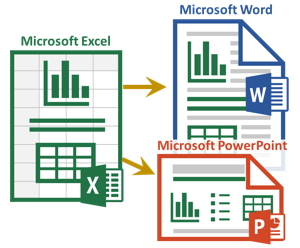
The Excel-to-Word Document Automation Add-in makes it easy to update text, tables and charts in Word and PowerPoint templates using Excel data and calculations. Save time and improve accuracy.
Word to HTML's Email Designer is an intuitive online tool that empowers users to create professional, responsive HTML emails without any coding knowledge. Whether starting from scratch or customizing one of the many built-in templates, users can design visually appealing emails tailored to their specific needs.
Key Features and Functionality:
- Drag-and-Drop Interface: Easily add and arrange sections such as columns, rows, images, videos, and buttons to craft the desired email layout.
- Predefined Templates: Access a variety of professionally designed templates that can be customized to align with your brand identity.
- Live Preview: Instantly preview email designs on both desktop and mobile devices to ensure optimal display across platforms.
- Test Email Sending: Send test emails to yourself or colleagues to verify appearance and functionality before final distribution.
- AI Assistance: Utilize the built-in AI Assistant to help generate and refine email content, enhancing efficiency and creativity.
Primary Value and User Solutions:
The Email Designer simplifies the email creation process, eliminating the need for complex coding or reliance on third-party designers. By offering a user-friendly platform with customizable templates and real-time previews, it enables businesses and individuals to produce high-quality, responsive emails efficiently. This tool addresses common challenges in email marketing by streamlining design workflows, ensuring brand consistency, and facilitating effective communication with audiences.
JPGtoWord.net is a transformative online platform that specializes in converting JPEG images into editable Word (DOC) documents, catering to the needs of professionals, students, and anyone in need of digitizing text content from images.

Word Pigeon is Your One Click Solution!
Instead of copying and pasting from Google Docs to WordPress and losing your images and formatting in the process, Word Pigeon makes it easy to compose your posts in Google Docs and publish to WordPress with your images, links and formatting intact. In a single click. No coding. No changes to your WordPress theme. No crazy code to break your site. Just massively increased productivity and HOURS saved.
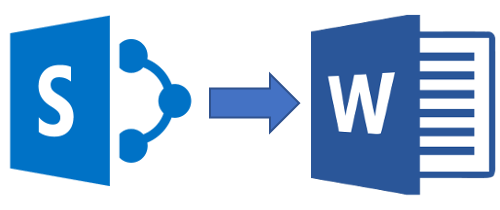
Export to Word for SharePoint Online is an application designed to export SharePoint data to Word documents, starting from your own Word templates.
Xodo's PDF to Word Converter is a free online tool designed to transform both native and scanned PDF documents into editable Word files. Utilizing Optical Character Recognition (OCR) technology, it accurately converts scanned PDFs, ensuring that text from images is extracted and editable. The platform emphasizes user security by keeping data confidential and permanently deleting files after one hour. Its rapid processing capabilities allow users to convert files in seconds, enhancing productivity. Additionally, Xodo's tools are compatible across various devices and operating systems, including Windows, Mac, Linux, Android, and iOS, providing a versatile solution for users needing to edit and repurpose PDF content efficiently.

The best, all-in-one writing platform
Instantly generate expert-level, high-quality content with a single click, as if you had a team of copywriting experts at your disposal.

Atlantis Word Processor enables users to create documents and reports and to publish e-books.

Geekersoft PDF to Word is a free online PDF to Word product that can be used directly without registration or installation. It is a browser-based application that can be run on Windows, Mac, Andriod, iOS and other devices. .
It only takes two steps to quickly convert PDF to Word.
1. Upload a converted PDF file.
2. Wait for the conversion to complete and download the following Word file.

The F* Word is an AI-powered fashion product development platform designed to streamline creative direction, production readiness, and product launch for fashion brands. This software provides a connected workflow for fashion teams. Users can define their Brand DNA, discover relevant trends, generate moodboards, create briefs, develop design directions, and convert approved designs into factory-ready tech packs. These tech packs include technical flats, bills of materials (BOM), points of measurement (POM), and production notes. The platform also enables the creation of AI-generated product visuals and on-model photoshoots, suitable for merchandising, e-commerce, and marketing applications. Workflows can initiate from various inputs, including trend data, sketches, existing garment images, or text prompts. This allows users to move from initial concept to production-ready documentation within a single tool, eliminating the need to switch between multiple software applications. The F* Word is specifically built for fashion designers, technical designers, product developers, and apparel brands, consolidating the entire product development process into one browser-based platform.

Provides translation and localization services for every person, every business, and every organization.

Word Counts is a free online word counter tool. It counts words, lines, and characters.
Word Counts is used by businesses and educational institutions around the world for uses such as marketing, SEO, company blogs, and advertising.

The easy way to batch convert your documents to clean, valid HTML