AI-Generated Results
Finding matches…
Luminance is an advanced AI platform designed to revolutionize the way businesses handle their contracts, offering comprehensive solutions from creation and negotiation to post-execution analysis. Developed by AI experts from the University of Cambridge, Luminance employs a 'Panel of Judges' approach, utilizing diverse models to ensure legal-grade accuracy across all contract-related tasks.
Key Features and Functionality:
- AI-Powered Negotiation: Luminance acts as an intelligent legal assistant, automatically analyzing contracts and highlighting deviations from standard terms, thereby identifying potential risks. It offers suggested precedent and fallback positions, enabling swift adjustments directly within Microsoft Word.
- Intelligent Contract Repository: The platform automatically extracts and organizes key information from all contracts, providing instant insights into over 1,000 legal concepts such as contract terms, clauses, and governing laws. This facilitates efficient risk assessment and opportunity identification.
- Legal-Grade™ Chatbot: Luminance's 'Ask Lumi' chatbot allows users to pose natural language questions about their documents, receiving immediate, legally accurate responses. It can summarize contracts, redraft clauses, and generate balanced clause wording, streamlining the contract management process.
Primary Value and User Solutions:
Luminance addresses the complexities and time-consuming nature of contract management by automating critical processes, reducing the risk of human error, and enhancing efficiency. Its AI-driven capabilities enable legal teams to focus on strategic decision-making rather than manual reviews, leading to significant cost savings and improved compliance. By providing real-time insights and facilitating seamless collaboration, Luminance empowers organizations to manage their contractual obligations effectively and mitigate potential risks.
Not seeing what you're looking for?
Dive deeper into "microsoft designer" on G2 AI

Conference Calling's video conferencing service offers a seamless, high-definition virtual meeting experience designed to replicate in-person interactions. With superior HD audio and video quality, users can engage in face-to-face communication that fosters genuine connections. The platform is browser-based, eliminating the need for downloads and allowing participants to join meetings directly from any popular browser with a single click. Key features include screen sharing, presenter controls, participant chat, file transfer capabilities, and meeting recording for future playback. Additionally, the service integrates with popular scheduling tools like Outlook, Google Calendar, and Microsoft 365, streamlining the meeting setup process. Users can customize their meeting environment with virtual backgrounds, ensuring professionalism and privacy during calls. The platform supports up to 25 video feeds per screen, with multiple viewing layouts to suit various conferencing needs. Mobile applications for iOS and Android devices enable on-the-go participation, complete with video conferencing, screen sharing, and file transfer functionalities. By providing a reliable and user-friendly solution, Conference Calling's video conferencing service addresses the need for effective remote communication, enhancing collaboration and productivity for businesses and individuals alike.

DRACOON is a German enterprise cloud platform designed for highly secure file sharing and collaboration. It offers end-to-end encryption, ensuring that only authorized users can access data, thereby meeting stringent data protection standards such as GDPR. With over 400,000 users across various industries, DRACOON provides a centralized solution for storing, managing, and sharing files securely.
Key Features and Functionality:
- End-to-End Encryption: Client-side encryption ensures that data remains confidential, with decryption keys retained solely by the data owner.
- Granular User and Rights Management: Administrators can assign precise access rights at the folder and file levels, ensuring that users have appropriate permissions.
- Secure Data Rooms: Create encrypted spaces for collaborative work, allowing internal and external users to share and edit files securely.
- Multi-Platform Access: Access files via web browsers, desktop applications for Windows and macOS, and mobile apps for iOS and Android.
- Integration with Existing Systems: Seamlessly integrates with Microsoft Outlook for encrypted email communication and Microsoft Teams for secure file sharing.
- Compliance and Certifications: Holds certifications such as ISO 27001 and BSI C5, demonstrating adherence to high security and compliance standards.
Primary Value and Solutions Provided:
DRACOON addresses the critical need for secure and compliant file sharing within organizations. By implementing robust encryption and comprehensive access controls, it ensures that sensitive data is protected against unauthorized access and breaches. The platform's integration capabilities allow businesses to enhance their existing workflows without compromising security. Additionally, DRACOON's compliance with international standards simplifies regulatory adherence, making it an ideal solution for industries with stringent data protection requirements.
Jet Reports is a comprehensive financial and business reporting solution seamlessly integrated with Microsoft Excel, designed to enhance reporting capabilities for Microsoft Dynamics users. It enables real-time, self-service reporting directly within Excel, allowing users to create and customize reports without the need for technical expertise or IT support. By connecting directly to live Dynamics ERP data, Jet Reports ensures that users have immediate access to accurate and up-to-date information, facilitating faster and more informed decision-making.
Key Features and Functionality:
- Real-Time Data Access: Direct integration with Microsoft Dynamics 365 Business Central, NAV, and GP allows users to access and analyze live data within Excel, ensuring reports reflect the most current information.
- Self-Service Reporting: Empowers non-technical users to build and customize reports and dashboards without relying on IT, using familiar Excel functions and an intuitive drag-and-drop interface.
- Cloud-Based Report Management: The Reports Center, a secure web portal, enables users to manage, schedule, and distribute reports from anywhere, enhancing collaboration and accessibility.
- AI-Powered Insights: Integration with Lineos AI provides advanced tools for uncovering trends and anomalies, streamlining report creation, and offering instant, AI-generated answers to product-related questions.
- Excel Online Integration: Seamless compatibility with Excel Online allows users to design, manage, and run reports in a browser, offering flexibility and adaptability for modern finance teams.
Primary Value and User Benefits:
Jet Reports addresses common challenges faced by finance teams, such as slow and rigid reporting processes, reliance on IT for report creation, and difficulties in accessing real-time data. By providing a user-friendly, Excel-based interface with direct access to live Dynamics data, Jet Reports streamlines the reporting process, reduces dependency on technical resources, and enables faster, data-driven decision-making. The addition of AI capabilities and cloud functionality further enhances productivity, allowing organizations to adapt to the evolving demands of the modern business environment.

Slack to Microsoft Teams Migration service is designed to automate the entire chat migration process, getting rid of rudimentary methods and ultimately saving time and money. With CloudFuze by your side, you don’t just migrate Slack channels but also direct messages (DMs), conversations, Workspaces, users, files, emojis, timestamps, and more.
Slack to Microsoft Teams Migration Features:
Direct Messages (DM) Migration
Emojis Migration
Files Migration
Migrate Workspace as Team
Migrate Channels as Team
Conversations Migration
Migrate Admins as owners
Migrate Members as Members
Migration of users in private channels
Delta sync for channels
Migrating all the emoji’s, files, mentions(of a user) in chats from Slack to MS Teams
Preserving the original timestamps of Direct Messages(DMs) from Slack to MS Teams post-migration
Preserving the original timestamps of files from Slack to MS Teams post-migration
Platform Features:
RESTful API platform
Cloud-native architecture
OAuth-based Slack/Microsoft 365 accounts authentication US-based SOC 1 and SOC 2 certified data centers
SaaS servers (ideal for small migrations), dedicated instances (for large migrations), and deployable in a customer’s cloud or data center (ideal for enterprises, universities, and government agencies)

Worldox GX4 is a comprehensive document and email management system designed to streamline the organization, retrieval, and security of digital content for law firms, corporate legal departments, and other professional services. With its intuitive interface and robust functionality, Worldox GX4 enhances productivity by simplifying document management processes.
Key Features and Functionality:
- Active Profiling® Technology: Utilizes recent and historical filing attributes to automate document profiling, reducing manual data entry and improving filing accuracy.
- Seamless Integration: Integrates with Microsoft Office applications, allowing users to open, save, and manage documents directly within familiar software environments.
- Enhanced Email Management: Monitors incoming and outgoing emails, assigns client matter information, and adds corresponding folders in Outlook, facilitating efficient email filing.
- Mobile Accessibility: Through Worldox Web 3.0 and dedicated iOS applications, users can access and manage documents remotely from various devices, ensuring flexibility and continuity of work.
- Advanced Search Capabilities: Offers broad document tagging and searching functionalities, enabling quick retrieval of files based on multiple criteria.
Primary Value and Solutions Provided:
Worldox GX4 addresses the challenges of managing vast amounts of digital documents and emails by providing a centralized, secure, and efficient system. It enhances collaboration among team members, ensures compliance with document retention policies, and reduces the time spent searching for files. By automating routine tasks and integrating seamlessly with existing tools, Worldox GX4 allows professionals to focus more on their core work, thereby increasing overall productivity and operational efficiency.
The Microsoft Build of OpenJDK is a free, open-source distribution of the Open Java Development Kit provided by Microsoft. It offers Long-Term Support binaries for Java versions 11, 17, and 21, compatible with x64 and AArch64/ARM64 architectures across Windows, macOS, and Linux platforms. Designed as a drop-in replacement for other OpenJDK distributions, it ensures seamless integration for developers and enterprises.
Key Features and Functionality:
- Cross-Platform Compatibility: Supports multiple operating systems, including Windows, macOS, and Linux, on both x64 and AArch64/ARM64 architectures.
- Long-Term Support : Provides LTS releases for Java 11, 17, and 21, with regular quarterly updates to ensure stability and security.
- Open Source and Free: Available at no cost, allowing unrestricted deployment and use across various environments.
- Azure Integration: Optimized for Microsoft Azure services, facilitating efficient deployment and management of Java applications in the cloud.
- Quality Assurance: Binaries are tested against the Eclipse Adoptium Quality Assurance suite and have passed the Java Technology Compatibility Kit , ensuring compliance with Java specifications.
Primary Value and Problem Solved:
The Microsoft Build of OpenJDK addresses the need for a reliable, secure, and well-supported Java development environment, particularly for enterprises and developers utilizing Microsoft products and services. By offering a free, open-source, and LTS-supported JDK, it ensures compatibility and performance across diverse platforms. Its seamless integration with Azure simplifies the deployment and management of Java applications in the cloud, providing a cohesive and efficient development experience.
Simply CRM is an integrated, all-in-one platform designed to streamline customer relationship management, sales, and marketing processes for businesses of all sizes. It offers a user-friendly interface that simplifies complex tasks, enabling organizations to manage leads, track communications, automate workflows, and generate insightful reports efficiently. With robust integration capabilities, Simply CRM connects seamlessly with popular tools like Google Gmail, Microsoft Outlook, Mailchimp, WordPress, and WooCommerce, ensuring a cohesive operational environment.
Key Features and Functionality:
- Lead and Deal Management: Capture and nurture leads through the sales pipeline, enhancing conversion rates.
- Communication Tracking: Monitor calls, emails, and contact history to maintain comprehensive visibility and control over client interactions.
- Automation: Design and implement workflows to automate repetitive tasks, increasing operational efficiency.
- Reporting and Analytics: Generate customizable reports and dashboards to gain real-time insights into business performance.
- Privacy and Security: Ensure data protection and compliance with privacy regulations.
- Mobile Accessibility: Access the platform via mobile devices, allowing work from anywhere.
Primary Value and Solutions Provided:
Simply CRM addresses the need for a comprehensive yet straightforward CRM solution that integrates seamlessly with existing tools, reducing the learning curve and implementation time. By automating routine tasks and providing real-time data insights, it empowers businesses to focus on strategic growth initiatives. The platform's extensive integration options and customizable features make it adaptable to various industries, ensuring that organizations can tailor it to their specific requirements. Ultimately, Simply CRM enhances customer relationships, boosts sales, and supports sustainable business growth by centralizing data, automating processes, and offering valuable insights.
Microsoft Dynamics 365 Commerce is a comprehensive, cloud-based solution designed to unify physical and digital retail operations, delivering seamless and personalized shopping experiences across all channels. By integrating in-store, online, and back-office functions, it empowers retailers to enhance customer engagement, optimize operations, and drive business growth.
Key Features and Functionality:
- Omnichannel Retail Engagement: Provides a consistent and personalized customer journey by connecting in-store, online, and mobile experiences on a unified commerce platform.
- Point of Sale (POS): Offers modern POS capabilities with mobile functionality, enabling efficient customer interactions, inventory searches, and transaction processing both online and offline.
- E-commerce Capabilities: Includes customizable storefronts, AI-driven product recommendations, and integrated payment gateways to build engaging online stores.
- AI-Powered Personalization: Utilizes artificial intelligence to analyze customer behavior, providing tailored product suggestions and targeted promotions to enhance engagement and loyalty.
- Inventory Management: Ensures real-time visibility across all channels, facilitating accurate stock levels and intelligent replenishment strategies.
- Order Management: Supports flexible fulfillment options, including buy online, pick up in-store, and home delivery, to meet diverse customer preferences.
- Loyalty and Marketing: Enables the creation of targeted campaigns and loyalty programs to foster customer retention and increase sales.
Primary Value and Solutions Provided:
Dynamics 365 Commerce addresses the challenges of fragmented retail systems by offering a unified platform that integrates all aspects of retail operations. This integration allows retailers to deliver consistent and personalized customer experiences, streamline operations, and make data-driven decisions. By leveraging AI and real-time data, businesses can enhance customer engagement, optimize inventory and supply chain management, and drive revenue growth. The solution's flexibility and scalability make it suitable for retailers of various sizes, enabling them to adapt to changing market demands and customer expectations effectively.

Zoho Calendar is a comprehensive online scheduling tool designed to streamline both personal and professional event management. It offers a unified platform where users can create, manage, and share events seamlessly across devices and integrate with various applications. With its intuitive interface and robust features, Zoho Calendar enhances productivity by simplifying the complexities of scheduling and collaboration.
Key Features and Functionality:
- Event Scheduling: Easily create appointments, team events, and more with powerful scheduling tools that facilitate coordination with others.
- Appointment Scheduling: Allow clients to book appointments directly through your site, while smart scheduling tools identify optimal times for all parties involved.
- Conferencing Integration: Schedule and initiate video conferences using Zoho Meeting or preferred third-party applications like Zoom or Microsoft Teams.
- Team Calendars: Quickly organize meetings or team activities with intuitive tools that suggest suitable times and automate availability checks.
- Resource Booking: Effortlessly reserve resources and manage them in one place, enabling your team to focus on essential tasks.
- Cross-Platform Synchronization: Access and manage your schedule across Windows, Mac, Android, and iOS devices, ensuring you're always up-to-date.
- Integration with Other Calendars: Sync with external calendars like Google Calendar, Outlook, and Apple Calendar to maintain a unified view of your commitments.
- Customization Options: Personalize your calendar with various themes, including a dark mode, and utilize drag-and-drop functionality for easy rescheduling.
Primary Value and User Solutions:
Zoho Calendar addresses the challenges of managing multiple schedules by providing a centralized, user-friendly platform that integrates seamlessly with other tools. It eliminates the hassle of coordinating meetings, managing resources, and juggling various calendars by offering intelligent automation and synchronization features. This ensures that users can focus on their tasks without the distractions of scheduling conflicts or missed appointments. By enhancing collaboration and streamlining event management, Zoho Calendar empowers individuals and teams to work more efficiently and effectively.
Microsoft Reading Coach is a free, AI-powered application designed to enhance reading fluency through personalized and engaging practice sessions. It offers learners the opportunity to create unique AI-generated stories by selecting characters and settings, ensuring content is age-appropriate and moderated for quality and safety. As users read aloud, the app analyzes their fluency, identifies challenging words, and provides targeted coaching to improve pronunciation and comprehension. Integrated with Immersive Reader, Reading Coach supports diverse learning needs by allowing customization of text display, including adjustments to text size, font, and background color. Additionally, learners can choose from a curated library of leveled passages or input their own content for practice. The app also features gamified elements such as unlocking new story settings and characters, earning badges, and tracking progress through detailed reports, all aimed at motivating learners and fostering consistent reading habits.
Key Features and Functionality:
- AI-Generated Stories: Learners create personalized narratives by selecting characters and settings, with content moderated for quality and age appropriateness.
- Real-Time Feedback: As users read aloud, the app analyzes fluency, identifies challenging words, and provides immediate coaching to improve pronunciation and comprehension.
- Immersive Reader Integration: Supports diverse learning needs by allowing customization of text display, including adjustments to text size, font, and background color.
- Curated Library and Custom Content: Offers a selection of leveled passages and the option for learners to input their own content for practice.
- Gamified Elements: Includes features such as unlocking new story settings and characters, earning badges, and tracking progress through detailed reports to motivate learners.
Primary Value and User Benefits:
Reading Coach addresses the challenge of improving reading fluency by providing personalized, engaging, and consistent practice opportunities. By leveraging AI to tailor content and feedback to individual learners, it helps users overcome reading difficulties, build confidence, and develop a love for reading. The integration with Immersive Reader ensures accessibility for diverse learning needs, while the gamified elements keep learners motivated and engaged. Educators benefit from the ability to monitor student progress through detailed reports, enabling targeted support and instruction.
Inforiver Analytics+ is the fastest way to visualize your data and share insightful stories in Microsoft Power BI. The intuitive no-code user experience (UX) helps even the casual users build dashboards and storyboards in minutes with 50+ charts, charts and tables integrated in a single visual.
Analytics+ is designed to help customers migrate their legacy dashboards from Tableau, Spotfire, Qlik, Cognos, SAP Lumira, or their static PowerPoint dashboards from Think-cell or Mekko Graphics and consolidate them within Microsoft Power BI.
Cameyo is a cloud-native Virtual Application Delivery (VAD platform that enables organizations to securely deliver Windows and internal web applications to any device directly through a browser, eliminating the need for traditional virtual desktops or VPNs. Designed to support remote and hybrid work environments, Cameyo provides a seamless, cost-effective, and highly secure digital workspace experience, allowing users to access business-critical applications from anywhere without compromising security or performance.
Key Features and Functionality:
- Application Delivery Without Virtual Desktops: Delivers Windows, Linux, internal web, and SaaS applications directly to any device via a browser, removing the necessity for full virtual desktop infrastructure (VDI.
- Enhanced Security: Implements a zero-trust security model with features like PortShield technology, which closes all server ports until user authentication, and Secure Cloud Tunneling, eliminating the need for VPNs and reducing the attack surface.
- Cross-Platform Compatibility: Supports access from any operating system, including Windows, Mac, Linux, and ChromeOS, ensuring flexibility across various devices.
- Flexible Deployment Options: Offers fully-hosted services on Google Cloud Platform and Microsoft Azure, as well as self-hosted solutions deployable in public clouds, private clouds, or on-premises environments.
- Seamless Integration: Integrates with existing identity providers like Microsoft Active Directory and Azure AD for user authentication, and supports cloud storage solutions for a unified user experience.
- Cost Efficiency: Utilizes elasticity and usage optimization to reduce infrastructure costs associated with virtual desktops, providing a more economical solution for application delivery.
Primary Value and User Solutions:
Cameyo addresses the challenges organizations face in enabling secure and efficient remote and hybrid work by simplifying the delivery of business-critical applications. By eliminating the complexities and high costs associated with traditional VDI and VPN solutions, Cameyo enhances productivity, strengthens security, and offers a scalable solution adaptable to various IT environments. Its application-focused delivery ensures that users have seamless access to necessary tools without the overhead of full desktop virtualization, making it an ideal choice for businesses aiming to modernize their digital workspace strategies.

Nagios XI is an enterprise-grade IT infrastructure monitoring and alerting solution designed to provide comprehensive oversight of servers, networks, applications, and services. Built upon the robust Nagios Core monitoring engine, Nagios XI offers a user-friendly web interface, advanced visualization tools, and customizable dashboards, enabling IT teams to proactively identify and resolve issues before they impact business operations. Its scalable architecture supports monitoring from small environments to large-scale infrastructures with thousands of devices.
Key Features and Functionality:
- Comprehensive Monitoring: Nagios XI delivers full-stack monitoring capabilities, covering networks, servers, databases, and applications. It supports native cloud and virtualization platforms, including AWS, Azure, VMware, and Hyper-V.
- Advanced Alerting and Reporting: The platform provides event-driven automation with multi-channel alerting options such as email, SMS, Slack, and Microsoft Teams. It includes customizable dashboards with performance graphs and capacity planning tools to aid in proactive infrastructure management.
- User Management and Security: Nagios XI features role-based access control with multi-tenant capabilities, ensuring secure and efficient user management across the organization.
- Flexible Deployment and Licensing: Offering hybrid deployment options, Nagios XI supports both on-premises and cloud environments. Its perpetual licensing model eliminates subscription fees, providing cost-effective monitoring solutions.
Primary Value and Problem Solving:
Nagios XI addresses the critical need for real-time visibility into IT infrastructures, enabling organizations to detect and resolve issues promptly, thereby minimizing downtime and maintaining optimal performance. By consolidating monitoring tools into a single platform, it reduces complexity and operational costs. The solution's proactive alerting and reporting capabilities empower IT teams to anticipate potential problems and implement corrective measures before they escalate, ensuring business continuity and enhancing overall efficiency.

LanguageTool is a comprehensive, AI-powered writing assistant designed to enhance the quality and professionalism of written content across more than 30 languages. It offers advanced grammar, spelling, punctuation, tone, and style suggestions, enabling users to produce clear and polished text.
Key Features and Functionality:
- Multilingual Support: Provides grammar and style checking for over 30 languages, including English, Spanish, French, German, and more.
- Platform Compatibility: Available as browser add-ons for Chrome, Edge, Firefox, Safari, and Opera; desktop applications for Windows and macOS; and integrations with Microsoft Word, Google Docs, LibreOffice, and various email clients.
- Advanced Error Detection: Utilizes AI-based technology to analyze text for grammar, spelling, punctuation, tone, and style errors, offering context-aware suggestions.
- Customization Options: Features a personal dictionary and style guide, allowing users to tailor the tool to their specific writing preferences.
- Premium Features: Offers advanced capabilities such as AI-based paraphrasing tools, Picky Mode for detailed punctuation and tone detection, and comprehensive error tracking, beneficial for academic and professional writing.
Primary Value and User Solutions:
LanguageTool empowers users to write with confidence by providing real-time, context-aware suggestions that improve the clarity, correctness, and style of their writing. Its extensive language support and seamless integration across various platforms make it an invaluable tool for individuals and organizations aiming to maintain high standards in their written communications.

MailDeck is an enterprise cold email infrastructure platform designed for high-volume outreach. It allows users to set up and manage Google Workspace and Microsoft Outlook inboxes, automate DNS and authentication protocols, and integrate with sequencers seamlessly.
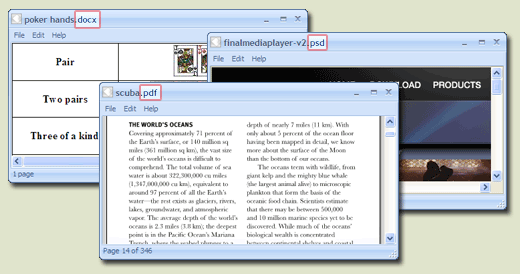
FreeFileViewer is a, all-in-one file viewer designed for Windows operating systems, supporting over 200 file formats. It enables users to open and view a wide array of documents, images, videos, and audio files without the need for multiple specialized software installations. This lightweight application is compatible with Windows 10, 8, 7, Vista, and XP, accommodating both 32-bit and 64-bit versions.
Key Features and Functionality:
- Extensive Format Support: FreeFileViewer can handle a diverse range of file types, including:
- Documents: DOC, DOCX, PDF, TXT, XLS, XLSX
- Images: JPG, PNG, GIF, PSD
- Videos: FLV, MP4, MOV, MPG
- Audio Files: FLAC, MP3, OGG, WMA
- Others: BIN, CFG, DAT, DIZ
- Standalone Operation: The software functions independently, allowing users to view files without requiring the original programs used to create them. For instance, it can display Adobe PDF files and Microsoft Office documents without needing Adobe Reader or Microsoft Office installed.
- User-Friendly Interface: Designed with simplicity in mind, FreeFileViewer offers an intuitive interface that facilitates easy navigation and file access.
- Comprehensive Installation: All necessary components are included within the installer, ensuring a seamless setup process without the need for additional software or plugins.
Primary Value and User Solutions:
FreeFileViewer addresses the common challenge of managing multiple file types by providing a unified solution that eliminates the need for numerous specialized applications. Users can effortlessly open and view a vast array of file formats, streamlining their workflow and enhancing productivity. This all-encompassing approach not only saves time but also conserves system resources, making it an ideal choice for individuals seeking a reliable and efficient file viewing tool.

Microsoft Cloud for Sustainability is a comprehensive suite of data and AI solutions designed to help organizations manage and reduce their environmental impact. By centralizing and standardizing complex environmental, social, and governance (ESG) data, it enables businesses to gain actionable insights, streamline reporting, and drive sustainability initiatives effectively.
Key Features and Functionality:
- Microsoft Sustainability Manager: This tool allows organizations to connect, analyze, and act on their environmental impact data. It offers capabilities such as automated data collection, carbon accounting, and performance tracking against sustainability goals.
- Sustainability Data Solutions in Microsoft Fabric: These solutions provide a unified analytics platform that integrates ESG data from various sources, enhancing data accuracy and simplifying reporting processes.
- Emissions Impact Dashboard: This dashboard offers transparency into the carbon emissions associated with the use of Microsoft cloud services, enabling organizations to monitor and manage their cloud-related environmental footprint.
- Environmental Credit Service: This service helps standardize and trace the origination process for carbon credits and other environmental assets, facilitating more efficient management of sustainability initiatives.
Primary Value and Solutions Provided:
Microsoft Cloud for Sustainability empowers organizations to accelerate their sustainability journey by providing tools to accurately record, report, and reduce environmental impacts. By leveraging advanced data analytics and AI, businesses can improve ESG data transparency, make informed decisions, and create new opportunities for sustainable growth. This comprehensive approach addresses the challenges of managing complex ESG data, enabling organizations to meet regulatory requirements, achieve net-zero goals, and drive positive environmental change.

Crunchafi Data Extraction is financial data extraction software designed specifically for CPA firms. It pulls client financials from QuickBooks, Xero, NetSuite, Sage Intacct, Microsoft Business Central, and more into standardized Excel workbooks for audit, CAS, and FDD work.
Microsoft Knowledge Exploration is an AI-powered tool designed to enhance interactive search experiences over structured data through natural language inputs. By integrating advanced natural language processing capabilities, it allows users to perform complex data queries using everyday language, making data exploration more intuitive and efficient. This service is particularly beneficial for organizations seeking to unlock insights from vast datasets without requiring extensive technical expertise.
Key Features and Functionality:
- Natural Language Understanding: Interprets user queries expressed in natural language and converts them into structured query expressions, facilitating precise data retrieval.
- Query Auto-Completion: Offers real-time suggestions as users type, reducing effort and aiding in the discovery of relevant information.
- Structured Query Evaluation: Efficiently processes and retrieves detailed information about matching objects within the dataset.
- Attribute Histograms: Generates visual representations of data patterns, enabling rich visualizations and interactive faceted experiences.
Primary Value and Problem Solved:
Microsoft Knowledge Exploration addresses the challenge of navigating and extracting meaningful insights from large, structured datasets. By allowing users to interact with data using natural language, it democratizes data access, enabling professionals across various industries—including data analysts, researchers, and business intelligence teams—to perform complex queries without specialized training. This leads to more informed decision-making, improved productivity, and a deeper understanding of the underlying data.