Best Learning Management Systems

How Many Learning Management Systems Products Does G2 Track?

Total Products under this Category: 296

Category Stats (Aug 2026)

  • Average Rating: 4.44/5 The average rating of products in this category, based on all submitted ratings
  • Top Trending Product: iSpring LMS (+0.31%) - Among all products in this category, iSpring LMS recorded the largest rating increase compared to last month

Last updated: August 04, 2026

How Does G2 Rank Learning Management Systems Products?

Why You Can Trust G2's Software Rankings:

  • 30 Analysts and Data Experts
  • 12,800+ Authentic Reviews
  • 296+ Products
  • Unbiased Rankings

G2's software rankings are built on verified user reviews, rigorous moderation, and a consistent research methodology maintained by a team of analysts and data experts. Each product is measured using the same transparent criteria, with no paid placement or vendor influence. While reviews reflect real user experiences, which can be subjective, they offer valuable insight into how software performs in the hands of professionals. Together, these inputs power the G2 Score, a standardized way to compare tools within every category.

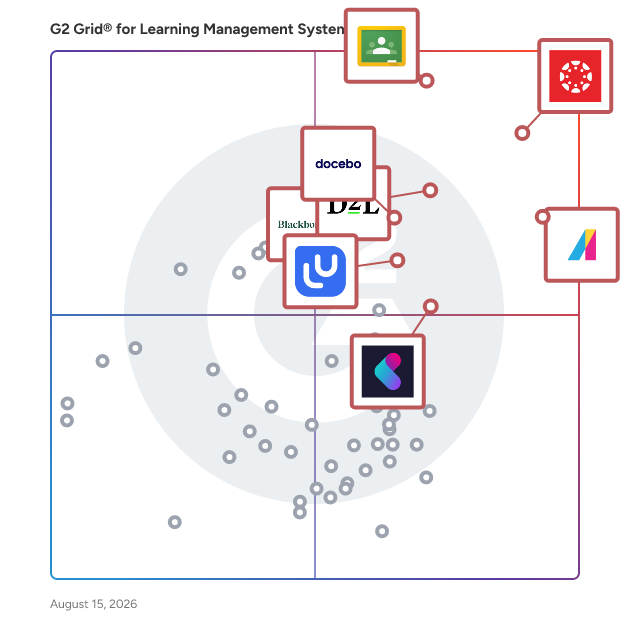
G2 Grid® for Learning Management Systems

G2 Grid® for Learning Management Systems plotting products by satisfaction and market presence

Highlighted products: Canvas LMS, Google Classroom, Absorb LMS, D2L Brightspace, Blackboard, Docebo, LearnUpon, and Kallidus Learn.

Underlying data: [Grid® JSON](https://www.g2.com/categories/learning-management-system-lms/grids.json?focus%5B%5D=canvas-lms&focus%5B%5D=google-classroom&focus%5B%5D=absorb-software-absorb-lms&focus%5B%5D=d2l-brightspace&focus%5B%5D=blackboard&focus%5B%5D=docebo&focus%5B%5D=learnupon&focus%5B%5D=kallidus-learn)

Sponsored

Momentum AMP, formerly Nowcerts

Momentum AMP is a modern, cloud-based Agency Management System (AMS) purpose-built for independent insurance agencies. Designed with input from real insurance professionals, Momentum AMP helps agencies streamline operations, automate follow-ups, and improve client communication—all within one intuitive, browser-based platform. Unlike legacy AMS platforms or generic business tools, Momentum AMP is built specifically for the workflows of independent agencies. With AI-powered features to surface key insights, automate tasks, and reduce manual data entry, the platform enables teams to work faster and more efficiently—whether they're focused on new business, renewals, or client service. Momentum AMP includes robust tools for email tracking, texting, task management, automation, and reporting, giving producers and service teams everything they need to stay on top of client needs and close more business. It's fully Mac-compatible and mobile-friendly, ensuring teams can access their work from anywhere, on any device. What truly sets Momentum AMP apart is our unified approach to agency operations. Agencies no longer need to juggle fragmented tools or spend time building workarounds. Instead, Momentum delivers a cohesive experience that simplifies day-to-day tasks, supports collaboration, and empowers users with smart, proactive workflows. With fast onboarding, a clean user interface, and ongoing enhancements based on real-world feedback, Momentum AMP gives agencies the flexibility and power they need to grow—without the complexity of traditional AMS systems. Whether you're looking to improve productivity, enhance client service, or modernize your operations, Momentum AMP delivers the tools and intelligence to help your agency thrive.

Visit website

Canvas LMS

Canvas von Instructure ist ein vielseitiges, cloudbasiertes Lernmanagementsystem (LMS), das entwickelt wurde, um das Online-Lernen in jeder Bildungsstufe zu transformieren. Seit seiner Einführung im Jahr 2011 ist Canvas zum grundlegenden Zentrum für digitale Klassenzimmer geworden und befähigt Institutionen, qualitativ hochwertigen Unterricht von K-12 bis hin zu Corporate Training zu bieten. Von Millionen weltweit vertraut, bleibt Canvas die Nummer 1 der Bildungssoftware und der Kern des Instructure-Ökosystems. Umfassende Lehrwerkzeuge für jede Umgebung Canvas ist mit Flexibilität im Kern gebaut, sodass Organisationen die Plattform an ihre einzigartigen Ziele anpassen können. Egal, ob Sie komplexe Lehrpläne in der Hochschulbildung verwalten oder die Primar-/Sekundarbildung (K-12) optimieren, unsere robusten Lehrwerkzeuge stellen sicher, dass jede Lernerfahrung wirkungsvoll und lernzentriert ist. Von Bildungsinitiativen bis hin zur beruflichen Weiterbildung passt sich Canvas Ihrer Mission an, indem es eine nahtlose Schnittstelle bietet, um: -Online-Kurse und hochwertige Lernmaterialien zu erstellen und zu verwalten. -Aufgaben, Quizze und Bewertungen zu liefern, die unterschiedlichen Lernstandards entsprechen. -Durch integrierte Diskussionen und Nachrichten die Zusammenarbeit zu ermöglichen, um das Engagement der Schüler zu steigern. -Den Fortschritt der Schüler und die Lernergebnisse durch Echtzeitdaten zu verfolgen. -Mit Drittanbieter-Bildungstools zu integrieren, mit über 900+ Partnern zur Auswahl. Erfolg durch virtuelles Lernen fördern Die Plattform bietet eine skalierbare, sichere Umgebung für virtuelles Lernen, die über das traditionelle Klassenzimmer hinausgeht. Durch die Kombination von Kursmanagement mit fortschrittlichen Bewertungs- und Benotungsfunktionen reduziert Canvas den administrativen Aufwand und ermöglicht es Pädagogen, sich auf das zu konzentrieren, was am wichtigsten ist: den Erfolg der Schüler. Hauptmerkmale & Vorteile Intuitives Design: Eine benutzerfreundliche Oberfläche reduziert den Aufwand und stellt sicher, dass Lernende auf ihre Ziele fokussiert bleiben. Mobile Zugänglichkeit: Die hoch bewertete Canvas Mobile App hält Lernende verbunden, sogar offline. Erweiterte Analysen: Erhalten Sie umsetzbare Einblicke, um das Engagement der Schüler zu überwachen und die institutionellen Ergebnisse zu verbessern. Skalierbares Ökosystem: Mit über 500+ Drittanbieter-Integrationen verbindet sich Canvas mit Ihrem bestehenden Technologie-Stack, um eine wirklich dynamische Lernumgebung zu schaffen. Branchen, die wir bedienen Canvas von Instructure ist der vertrauenswürdige Partner für Organisationen, die das volle Potenzial ihrer Lernenden ausschöpfen möchten in: -Hochschulbildung -Primar-/Sekundarbildung (K-12) -Corporate Training

Average Rating: 4.5/5.0

Total Reviews: 1,732

How Do G2 Users Rate Canvas LMS?

  • Einfache Bedienung: 8.5/10 (Category avg: 8.7/10)
  • War the product ein guter Geschäftspartner?: 8.6/10 (Category avg: 9.1/10)
  • Support-Qualität: 8.5/10 (Category avg: 8.8/10)
  • Einfache Verwaltung: 8.3/10 (Category avg: 8.7/10)

Who Is the Company Behind Canvas LMS?

  • Verkäufer: Instructure
  • Unternehmenswebsite:
  • Gründungsjahr: 2008
  • Hauptsitz: Salt Lake City, Utah
  • Twitter: @Instructure
    12,576 Twitter-Follower
  • LinkedIn®-Seite: www.linkedin.com
    2,229 Mitarbeiter*innen auf LinkedIn®

Who Uses This Product?

  • Who Uses This: Lehrer, Student
  • Top Industries: Höhere Bildung, Bildungsmanagement
  • Company Size: 45% Medium, 42% Large

What Do G2 Reviewers Say About Canvas LMS?

AI-generated summary from verified user reviews

Pros
  • Benutzer schätzen die Benutzerfreundlichkeit von Canvas LMS und finden es intuitiv und hilfreich für die Inhaltsintegration.
  • Benutzer schätzen die benutzerfreundliche Oberfläche von Canvas LMS, die es für alle technischen Fähigkeitsstufen zugänglich macht.
  • Benutzer genießen die intuitive Benutzeroberfläche von Canvas LMS, die Arbeitsabläufe verbessert und Verwirrung für alle demografischen Gruppen reduziert.
  • Benutzer schätzen die Merkmalsvielfalt von Canvas LMS, die Kreativität und effektive Beteiligung in der digitalen Bildung ermöglicht.
  • Benutzer lieben die intuitive Benutzeroberfläche von Canvas LMS, die das Lernen für alle zugänglich macht, von Studenten bis hin zu Dozenten.
Cons
  • Benutzer äußern den Wunsch nach mehr integrierten Funktionen in Canvas LMS und finden die Abhängigkeit von Add-ons frustrierend.
  • Benutzer finden den Mangel an Intuitivität im Canvas LMS frustrierend, was grundlegende Aufgaben und die Navigation erschwert.
  • Benutzer berichten von schlechtem Support bei Canvas LMS, was Frustration verursacht und die effektive Nutzung der Plattform behindert.
  • Benutzer äußern Frustration über begrenzte Anpassungsmöglichkeiten in Canvas LMS und benötigen mehr native Werkzeuge und Funktionen für ein effektives Kursdesign.
  • Benutzer haben oft Navigationsprobleme auf Canvas LMS aufgrund von Unordnung und unintuitiven Steuerungen, was ihre Gesamterfahrung beeinträchtigt.

What Are Recent G2 Reviews of Canvas LMS?

What Are G2 Users Discussing About Canvas LMS?

Google Classroom

Google Classroom ist eine kostenlose, webbasierte Plattform, die von Google entwickelt wurde, um Bildungsprozesse zu optimieren und die Kommunikation zwischen Lehrern und Schülern zu verbessern. Sie wurde 2014 eingeführt und integriert sich nahtlos mit anderen Google-Tools wie Drive, Docs und Kalender, was sie zu einer beliebten Wahl für Schulen und Pädagogen weltweit macht. Google Classroom wurde entwickelt, um das Aufgabenmanagement zu vereinfachen, die Zusammenarbeit zu fördern und die Effizienz im Klassenzimmer zu verbessern. Es ist auf jedem Gerät mit Internetverbindung zugänglich und bietet Flexibilität für sowohl Präsenz- als auch Fernlernumgebungen. Wichtige Funktionen und Merkmale: - Aufgabenmanagement: Lehrer können Aufgaben papierlos erstellen, verteilen und einsammeln, indem sie Google Docs, Drive und Gmail nutzen. Sie können schnell sehen, wer die Arbeit abgeschlossen hat oder nicht, und direktes, sofortiges Feedback an einzelne Schüler geben. - Klassenkommunikation: Pädagogen können Ankündigungen machen, Fragen stellen und in Echtzeit mit Schülern diskutieren, um die Kommunikation innerhalb und außerhalb des Klassenzimmers zu verbessern. - Organisation: Classroom erstellt automatisch Drive-Ordner für jede Aufgabe und für jeden Schüler, was sowohl Lehrern als auch Schülern hilft, organisiert zu bleiben. Schüler können leicht sehen, was auf ihrer Aufgaben-Seite fällig ist. - Integration mit Google Workspace: Die Plattform arbeitet nahtlos mit bekannten Apps wie Docs und Slides und integriert sich mit YouTube, was es Pädagogen ermöglicht, ihre Lehrmaterialien zu bereichern. - Videokonferenzen: Google Meet ist direkt über Classroom zugänglich und ermöglicht persönliche Verbindungen mit Einzelpersonen oder der gesamten Klasse von überall aus. - Integration von Drittanbieter-Apps: Classroom-Add-ons ermöglichen die Integration mit beliebten EdTech-Tools wie Kahoot!, Nearpod und BookWidgets, um das Lernerlebnis zu verbessern. Primärer Wert und bereitgestellte Lösungen: Google Classroom adressiert das Bedürfnis nach einer zentralisierten, effizienten und benutzerfreundlichen Plattform zur Verwaltung von Bildungsabläufen. Es reduziert die Abhängigkeit von Papier, spart Zeit und Ressourcen und erleichtert einen organisierten Ansatz für Lehren und Lernen. Durch die Integration mit verschiedenen Google-Tools und Drittanbieteranwendungen bietet es eine umfassende Lösung, die unterschiedliche Lehrmethoden und Lernstile unterstützt. Die Zugänglichkeit der Plattform über verschiedene Geräte stellt sicher, dass Bildung nahtlos fortgesetzt werden kann, sei es in traditionellen Klassenzimmern oder in Fernlernumgebungen. Insgesamt befähigt Google Classroom Pädagogen, sich mehr auf das Lehren zu konzentrieren, während es den Schülern eine strukturierte und interaktive Lernerfahrung bietet.

Average Rating: 4.5/5.0

Total Reviews: 1,473

How Do G2 Users Rate Google Classroom?

  • Einfache Bedienung: 9.0/10 (Category avg: 8.7/10)
  • War the product ein guter Geschäftspartner?: 8.9/10 (Category avg: 9.1/10)
  • Support-Qualität: 8.7/10 (Category avg: 8.8/10)
  • Einfache Verwaltung: 8.9/10 (Category avg: 8.7/10)

Who Is the Company Behind Google Classroom?

  • Verkäufer: Google
  • Gründungsjahr: 1998
  • Hauptsitz: Mountain View, CA
  • Twitter: @google
    31,899,995 Twitter-Follower
  • LinkedIn®-Seite: www.linkedin.com
    341,888 Mitarbeiter*innen auf LinkedIn®
  • Eigentum: NASDAQ:GOOG

Who Uses This Product?

  • Who Uses This: Lehrer, Student
  • Top Industries: Bildungsmanagement, Primär-/Sekundärbildung
  • Company Size: 49% Medium, 30% Small

What Do G2 Reviewers Say About Google Classroom?

AI-generated summary from verified user reviews

Pros
  • Benutzer schätzen das effiziente Aufgabenmanagement von Google Classroom, das die Organisation vereinfacht und das Lernerlebnis verbessert.
  • Benutzer loben Google Classroom für seine benutzerfreundliche Oberfläche, die das Klassenmanagement und die Kommunikation mühelos und organisiert macht.
  • Benutzer schätzen die Benutzerfreundlichkeit von Google Classroom und genießen die benutzerfreundliche Oberfläche und die effiziente Organisation.
  • Benutzer finden die einfache Einrichtung von Google Classroom praktisch, da sie schnellen Zugriff über College-E-Mail-Logins ermöglicht.
  • Benutzer schätzen die Barrierefreiheit und den Fernzugriff von Google Classroom, was effektives Lernen jederzeit und überall ermöglicht.
Cons
  • Benutzer berichten von Integrationsproblemen mit Google Classroom und weisen auf Schwierigkeiten bei der Verbindung mit anderen Plattformen sowie auf begrenzte Anpassungsmöglichkeiten hin.
  • Benutzer bemerken, dass die begrenzten Anpassungsmöglichkeiten in Google Classroom die Organisation und Flexibilität für ein besseres Erlebnis behindern.
  • Benutzer haben Integrationsprobleme mit Google Classroom und kämpfen mit der Kompatibilität und Abhängigkeit vom Google-System.
  • Benutzer haben häufig Probleme mit Benachrichtigungen, was dazu führt, dass sie unter den vielen Klassen in Google Classroom Updates verpassen.
  • Benutzer empfinden, dass die begrenzten Funktionen von Google Classroom fortgeschrittene Analysen und Anpassungen behindern, was die Effektivität bei der Verfolgung des Schülerfortschritts verringert.

What Are Recent G2 Reviews of Google Classroom?

What Are G2 Users Discussing About Google Classroom?

Absorb LMS

Absorb is an agentic AI-powered learning platform designed to deliver results for all learners — employees, partners, and customers alike. With AI agents that handle the heavy lifting across administration, content creation, and learner guidance, Absorb goes beyond traditional LMS capabilities to actively drive learning outcomes at scale. Seamless integrations across your tech stack, native content authoring, and advanced reporting and analytics simplify learning management while AI handles the routine. Personalized learning paths, automated workflows, and white-labeled experiences let your team focus on high-impact learning initiatives rather than managing the system. Absorb helps organizations improve time-to-productivity, ensure compliance, and scale training programs efficiently — whether you’re onboarding employees, training partners, or educating customers.

Average Rating: 4.6/5.0

Total Reviews: 946

How Do G2 Users Rate Absorb LMS?

  • Ease of Use: 8.8/10 (Category avg: 8.7/10)
  • Has the product been a good partner in doing business?: 9.4/10 (Category avg: 9.1/10)
  • Quality of Support: 9.6/10 (Category avg: 8.8/10)
  • Ease of Admin: 8.6/10 (Category avg: 8.7/10)

Who Is the Company Behind Absorb LMS?

  • Seller: Absorb Software
  • Company Website:
  • Year Founded: 2003
  • HQ Location: Calgary
  • Twitter: @AbsorbLMS
    1,463 Twitter followers
  • LinkedIn® Page: www.linkedin.com
    675 employees on LinkedIn®

Who Uses This Product?

  • Who Uses This: Instructional Designer, Training Manager
  • Top Industries: Hospital & Health Care, Non-Profit Organization Management
  • Company Size: 44% Medium, 37% Large

What Do G2 Reviewers Say About Absorb LMS?

AI-generated summary from verified user reviews

Pros
  • Users find the ease of use of Absorb LMS invaluable for creating effective training materials effortlessly.
  • Users praise the exceptional customer support of Absorb LMS, highlighting its attentiveness and helpfulness in addressing needs.
  • Users praise the outstanding support from knowledgeable staff, enhancing the Absorb LMS experience significantly.
  • Users find Absorb LMS to be incredibly user-friendly, allowing seamless navigation and efficient reporting for daily tasks.
  • Users praise the excellent support from Marcia, appreciating her patience, guidance, and friendly partnership throughout their learning journey.
Cons
  • Users find limited features difficult to discover, which complicates usability and often leads to frustration.
  • Users find the limited customization options of Absorb LMS restrictive, impacting their overall experience and creativity.
  • Users point out the missing features in Absorb LMS, such as audience mapping and tracking learner interactions.
  • Users find the learning curve steep, requiring significant time and practice to navigate Absorb LMS effectively.
  • Users find the reporting features confusing and limited, impacting their experience and flexibility with the LMS.

What Are Recent G2 Reviews of Absorb LMS?

What Are G2 Users Discussing About Absorb LMS?

D2L Brightspace

Learning That Transforms Lives D2L Brightspace is a powerful, flexible learning platform designed to put learners first. Whether you’re supporting students, employees, or members, Brightspace helps you create personalized, engaging, and measurable learning experiences that drive success. Built for Your World Brightspace adapts to the needs of every learning environment: K–12: Empower teachers and inspire every learner Higher Education: Deliver personalized learning at scale Corporate: Drive business results through smarter learning Associations: Turn training into a competitive advantage Training Providers: Deliver scalable, high-impact learning programs Modernize with Confidence Easily digitize your courses and adopt intuitive tools designed to enhance engagement, accessibility, and outcomes—no technical background required. Scale Personalized Learning Automate routine tasks, unlock actionable insights, and build learning paths that adapt to each learner’s needs. Brightspace helps you save time while improving outcomes. Support Advanced Learning Models From mastery-based progressions to competency-based learning, Brightspace has the power and flexibility to support even the most advanced online and blended strategies. A True Partner in Your Success More than a platform, Brightspace comes with a team dedicated to helping you succeed. From onboarding to optimization, we align our support and services to your goals—every step of the way.

Average Rating: 4.4/5.0

Total Reviews: 668

How Do G2 Users Rate D2L Brightspace?

  • Ease of Use: 8.4/10 (Category avg: 8.7/10)
  • Has the product been a good partner in doing business?: 8.9/10 (Category avg: 9.1/10)
  • Quality of Support: 8.5/10 (Category avg: 8.8/10)
  • Ease of Admin: 8.2/10 (Category avg: 8.7/10)

Who Is the Company Behind D2L Brightspace?

  • Seller: Desire2Learn
  • Company Website:
  • Year Founded: 1999
  • HQ Location: Kitchener, ON
  • Twitter: @D2L
    23,447 Twitter followers
  • LinkedIn® Page: www.linkedin.com
    1,272 employees on LinkedIn®

Who Uses This Product?

  • Who Uses This: Instructional Designer, Teacher
  • Top Industries: Higher Education, Education Management
  • Company Size: 45% Medium, 40% Large

What Do G2 Reviewers Say About D2L Brightspace?

AI-generated summary from verified user reviews

Pros
  • Users appreciate the user-friendly interface of D2L Brightspace, making navigation and setup effortless for both teachers and students.
  • Users appreciate the supportive customer service from D2L Brightspace, ensuring a smooth and effective administrative experience.
  • Users appreciate the excellent customer support from D2L Brightspace, which significantly enhances their overall experience.
  • Users value the responsive customer support of D2L Brightspace, ensuring prompt assistance and effective solutions.
  • Users appreciate the customizability of D2L Brightspace, enjoying diverse templates and widgets for tailored learning experiences.
Cons
  • Users desire more customization options in D2L Brightspace, feeling limited by the current tools and features available.
  • Users experience navigation issues due to complex structures and excessive clicks needed to access discussions efficiently.
  • Users express frustration over feature inconsistencies in D2L Brightspace, hindering seamless integration and usability across tools.
  • Users report integration issues with D2L Brightspace, complicating access to certain external content and requiring multiple logins.
  • Users experience limited functionality with outdated forums and few collaborative options, impacting engagement and learning quality.

What Are Recent G2 Reviews of D2L Brightspace?

What Are G2 Users Discussing About D2L Brightspace?

Blackboard

Jeden Tag lernen, arbeiten und wachsen Millionen von Studenten weltweit mit Blackboard. Mehr als nur ein LMS, ist Blackboard der Ort, an dem Lernen lebendig wird – wo Studenten Fähigkeiten aufbauen, Selbstvertrauen gewinnen und sich auf das Kommende vorbereiten. Es unterstützt modernes Lehren und Lernen, indem es Institutionen hilft, ansprechenden Unterricht zu liefern, die Zugänglichkeit zu verbessern und den Lernfortschritt besser zu verstehen. Blackboard wird von Lernenden, Lehrern und Administratoren in mehr als 70 Ländern genutzt und ist in enger Partnerschaft mit Pädagogen entwickelt worden, um sicherzustellen, dass Innovationen auf bewährten Lehrpraktiken basieren und mit den Bedürfnissen der Institutionen übereinstimmen. Blackboard unterstützt den gesamten Lehrzyklus, von der Kurs- und Inhaltserstellung bis hin zu Bewertung, Benotung und fortlaufendem Engagement – über Online-, Präsenz- und Hybrid-Lernmodelle hinweg. Ein Hauptziel von Blackboard ist es, die administrative Belastung der Lehrkräfte zu reduzieren, damit sie mehr Zeit für das Lehren und die Unterstützung der Studenten aufwenden können. Mit nativen KI-Funktionen hilft Blackboard, praktische Aufgaben beim Kursaufbau und bei der Bewertung zu rationalisieren, indem es einen starken Ausgangspunkt bietet, den Lehrkräfte an ihren eigenen Lehrstil anpassen können. Blackboard beinhaltet auch Unterstützung für Barrierefreiheit, die Lehrkräften hilft, inklusivere Lernerfahrungen zu schaffen, während Institutionen einen klareren Weg zu messbarem Fortschritt im großen Maßstab erhalten. Blackboard entwickelt sich schnell weiter. Es hat die schnellste Innovationsrate auf dem LMS-Markt vier Jahre in Folge geliefert und häufige Updates veröffentlicht, die direkt von der globalen Lerngemeinschaft informiert werden. In Kombination mit tiefen Integrationen im breiteren Bildungssystem, mobilem Zugang und umsetzbaren Erkenntnissen hilft Blackboard Institutionen, das Lehren und Lernen kontinuierlich zu verbessern. Besuchen Sie www.anthology.com/why-choose-blackboard, um zu sehen, was Blackboard auszeichnet.

Average Rating: 4.0/5.0

Total Reviews: 1,016

How Do G2 Users Rate Blackboard?

  • Einfache Bedienung: 7.8/10 (Category avg: 8.7/10)
  • War the product ein guter Geschäftspartner?: 7.9/10 (Category avg: 9.1/10)
  • Support-Qualität: 7.5/10 (Category avg: 8.8/10)
  • Einfache Verwaltung: 7.4/10 (Category avg: 8.7/10)

Who Is the Company Behind Blackboard?

  • Verkäufer: Blackboard
  • Gründungsjahr: 1997
  • Hauptsitz: Washington, DC
  • Twitter: @Blackboard
    38,486 Twitter-Follower
  • LinkedIn®-Seite: www.linkedin.com
    2,752 Mitarbeiter*innen auf LinkedIn®
  • Telefon: 800.483.9106

Who Uses This Product?

  • Who Uses This: Student, Lehrer
  • Top Industries: Höhere Bildung, Bildungsmanagement
  • Company Size: 46% Large, 38% Medium

What Do G2 Reviewers Say About Blackboard?

AI-generated summary from verified user reviews

Pros
  • Benutzer schätzen die Benutzerfreundlichkeit von Blackboard, die mühelose Inhaltsergänzung und die Navigation für Studenten ermöglicht.
  • Benutzer finden die Navigation einfach in Blackboard, was das gesamte Studentenerlebnis verbessert und das Lernen zugänglicher macht.
  • Benutzer heben die benutzerfreundliche Natur von Blackboard hervor und loben seine einfache Navigation und Effizienz.
  • Benutzer schätzen die Funktionsvielfalt von Blackboard und profitieren von ständigen Updates und innovativen Integrationen für die Bildung.
  • Benutzer schätzen das robuste Set an Werkzeugen in Blackboard, das das Kursmanagement und die Integration mit Bildungstechnologien verbessert.
Cons
  • Benutzer finden die begrenzten Funktionen von Blackboard umständlich, was die Bewertungs- und Kommunikationsprozesse unnötig verkompliziert.
  • Benutzer finden es frustrierend, dass Blackboard wesentliche moderne Funktionen vermisst und Schwierigkeiten hat, mit Konkurrenten wie Canvas mitzuhalten.
  • Benutzer finden die begrenzte Anpassungsmöglichkeit in Blackboard einschränkend, was die Flexibilität für unterschiedliche akademische Bedürfnisse und Lernstile behindert.
  • Benutzer finden die Oberfläche von Blackboard mangelnd an Intuitivität, was zu Frustration und einer steilen Lernkurve für Neulinge führt.
  • Benutzer finden die Benutzeroberfläche von Blackboard nicht intuitiv, insbesondere neue Benutzer, die mit ihrer Komplexität und Lernkurve zu kämpfen haben.

What Are Recent G2 Reviews of Blackboard?

What Are G2 Users Discussing About Blackboard?

Docebo

Docebo is an AI-powered learning platform designed to support continuous learning across employees, partners, and customers. More than 3,900 organizations use Docebo to deliver onboarding, enablement, compliance, and customer education from a single platform. Learning experiences are personalized at scale, with AI improving content discovery, recommendations, and automation to reduce manual administration. With skills-based insights, flexible delivery, and built-in analytics, Docebo helps organizations keep learning aligned to evolving roles and business goals, so people never stop learning as work changes.

Average Rating: 4.3/5.0

Total Reviews: 731

How Do G2 Users Rate Docebo?

  • Ease of Use: 8.4/10 (Category avg: 8.7/10)
  • Has the product been a good partner in doing business?: 8.7/10 (Category avg: 9.1/10)
  • Quality of Support: 8.6/10 (Category avg: 8.8/10)
  • Ease of Admin: 8.0/10 (Category avg: 8.7/10)

Who Is the Company Behind Docebo?

  • Seller: Docebo Inc.
  • Company Website:
  • Year Founded: 2005
  • HQ Location: Toronto
  • Twitter: @docebo
    6,629 Twitter followers
  • LinkedIn® Page: www.linkedin.com
    1,009 employees on LinkedIn®

Who Uses This Product?

  • Who Uses This: Instructional Designer, Training Manager
  • Top Industries: Information Technology and Services, Computer Software
  • Company Size: 45% Large, 44% Medium

What Do G2 Reviewers Say About Docebo?

AI-generated summary from verified user reviews

Pros
  • Users love the intuitive user experience of Docebo, allowing easy adaptation for new hires and streamlined training management.
  • Users appreciate the powerful course management features in Docebo, enhancing efficiency and customization in training operations.
  • Users benefit from the efficient course management capabilities of Docebo, enhancing training operations and speeding up delivery.
  • Users value the highly customizable platform of Docebo, enhancing the learning experience to suit their unique needs.
  • Users love Docebo for its intuitive navigation, making platform usage easy and efficient for all employees.
Cons
  • Users often face a steep learning curve with Docebo due to its many features and configuration demands.
  • Users find the limited customization options in Docebo challenging, especially for content and reporting features.
  • Users highlight the limited features of Docebo, particularly in batch actions and content authoring tools.
  • Users find the complexity of configurations daunting, leading to a steep learning curve for newcomers to Docebo.
  • Users find the missing features in Docebo, such as insufficient batch actions and weak content authoring tools, limiting.

What Are Recent G2 Reviews of Docebo?

What Are G2 Users Discussing About Docebo?

LearnUpon

LearnUpons Agentic Learning Platform ist das LMS der Zukunft, entwickelt, um die menschliche Fähigkeit im KI-Zeitalter zu steigern. Durch die Kombination menschlicher Kreativität mit spezialisierten KI-Agenten automatisiert unsere Plattform schwere administrative Arbeitsabläufe, um hyper-personalisierte Lernerfahrungen zu bieten, die Lernleiter befähigen, Energie zurückzugewinnen und strategische Wirkung zu erhöhen.

Average Rating: 4.5/5.0

Total Reviews: 247

How Do G2 Users Rate LearnUpon?

  • Einfache Bedienung: 9.1/10 (Category avg: 8.7/10)
  • War the product ein guter Geschäftspartner?: 9.6/10 (Category avg: 9.1/10)
  • Support-Qualität: 9.4/10 (Category avg: 8.8/10)
  • Einfache Verwaltung: 9.1/10 (Category avg: 8.7/10)

Who Is the Company Behind LearnUpon?

  • Verkäufer: LearnUpon
  • Unternehmenswebsite:
  • Gründungsjahr: 2012
  • Hauptsitz: Dublin , Ireland
  • Twitter: @learnupon
    2,432 Twitter-Follower
  • LinkedIn®-Seite: www.linkedin.com
    325 Mitarbeiter*innen auf LinkedIn®

Who Uses This Product?

  • Top Industries: E-Learning, Computersoftware
  • Company Size: 44% Medium, 26% Large

What Do G2 Reviewers Say About LearnUpon?

AI-generated summary from verified user reviews

Pros
  • Benutzer schätzen die Benutzerfreundlichkeit von LearnUpon, da die Kurserstellung intuitiv und die Einrichtung von Sitzungen schnell ist.
  • Benutzer schätzen den reaktionsschnellen Kundensupport von LearnUpon, der schnelle Lösungen und umfassende Unterstützung bei Anfragen gewährleistet.
  • Benutzer lieben das intuitive Design von LearnUpon, das ein nahtloses Onboarding erleichtert und das Engagement beim Online-Lernen erhöht.
  • Benutzer schätzen das benutzerfreundliche Design von LearnUpon, das ihr gesamtes Lernerlebnis und Engagement verbessert.
  • Benutzer finden den Kurs-Erstellungsprozess unkompliziert und schätzen die Flexibilität und Benutzerfreundlichkeit von LearnUpon.
Cons
  • Benutzer finden die begrenzten Forenfunktionen von LearnUpon veraltet und nicht intuitiv genug für moderne Lernende.
  • Benutzer finden begrenzte Anpassungsoptionen frustrierend, insbesondere für Foren, E-Mail und Benutzerberichtsfunktionen.
  • Benutzer stehen vor Navigationsschwierigkeiten aufgrund begrenzter Forenoptionen und verwirrender Anforderungen der mobilen App, was ihre Erfahrung beeinträchtigt.
  • Benutzer finden das Kursmanagement herausfordernd, insbesondere mit Einschreibeschwierigkeiten und Einschränkungen im Kursangebot.
  • Benutzer bemerken den Bedarf an verbesserter Berichtsfunktionalität und Massenverwaltungstools in LearnUpon für ein besseres Erlebnis.

What Are Recent G2 Reviews of LearnUpon?

What Are G2 Users Discussing About LearnUpon?

Kallidus Learn

At Kallidus, we believe learning should be measured by what changes in the organisation - not what was delivered, but what improved. Trusted by over 1,000 organisations worldwide, we help organisations escape The Activity Trap: measuring learning by completion rather than real performance change. Because when learning mitigates risk, key people stay, teams become more productive, and business metrics begin to move. Our award-winning LMS and eLearning content have an intentional AI data layer to make learning, skills, and performance data valuable for the whole business. This helps link L&D initiatives to the goals and objectives of your organisation and your team. Backed by dedicated, in-house support and implementation specialists, we're with you every step, from simplifying mandatory compliance to building the future-ready workforce your business needs to grow and deliver impact.

Average Rating: 4.4/5.0

Total Reviews: 254

How Do G2 Users Rate Kallidus Learn?

  • Ease of Use: 8.9/10 (Category avg: 8.7/10)
  • Has the product been a good partner in doing business?: 8.9/10 (Category avg: 9.1/10)
  • Quality of Support: 9.1/10 (Category avg: 8.8/10)
  • Ease of Admin: 8.1/10 (Category avg: 8.7/10)

Who Is the Company Behind Kallidus Learn?

  • Seller: Kallidus Ltd
  • Company Website:
  • Year Founded: 2000
  • HQ Location: Bristol, GB
  • Twitter: @Kallidus
    3,110 Twitter followers
  • LinkedIn® Page: www.linkedin.com
    215 employees on LinkedIn®

Who Uses This Product?

  • Who Uses This: Learning and Development Manager, Head of HR
  • Top Industries: Hospital & Health Care, Financial Services
  • Company Size: 59% Medium, 28% Large

What Do G2 Reviewers Say About Kallidus Learn?

AI-generated summary from verified user reviews

Pros
  • Users appreciate the ease of use of Kallidus Learn, which supports efficient navigation and quick team adoption.
  • Users appreciate the user-friendly interface of Kallidus Learn, valuing its flexibility and ease of navigation.
  • Users appreciate the responsive customer support of Kallidus Learn, enhancing their overall experience and satisfaction.
  • Users value the helpful support network of Kallidus Learn, making integration and training straightforward and effective.
  • Users appreciate the intuitive design of Kallidus Learn, making navigation and management effortless for all.
Cons
  • Users find Kallidus Learn has limited features, making event bookings and role assignments unnecessarily complicated.
  • Users face feature issues such as limitations on eTests, group rules, and integration challenges with proctoring services.
  • Users experience reporting issues with Kallidus Learn, including delays and cumbersome sharing processes for reports.
  • Users find the inadequate reporting options challenging, complicating access and usability for effective data sharing.
  • Users find the reporting capabilities inadequate, noting difficulties with mixed data sets and access for managers.

What Are Recent G2 Reviews of Kallidus Learn?

What Are G2 Users Discussing About Kallidus Learn?

LearnWorlds

LearnWorlds hilft Schulungsunternehmen, professionelle Lernprogramme aus einer flexiblen Einrichtung heraus anzubieten, egal ob sie eine neue Akademie starten, Kundenschulungen skalieren oder Lernen in einen bestehenden Technologie-Stack integrieren. Die meisten LMS-Plattformen sind für einen Anwendungsfall gebaut. LearnWorlds ist für Schulungsunternehmen gebaut, die mehrere Anwendungsfälle haben. Eine einzige Plattform für gebrandete Akademien, B2B-Kundenprogramme, Unternehmensbildung und bezahltes Lernen – mit Benutzergruppen, Rollen, E-Commerce, Berichterstattung und Automatisierungstools, die es Ihnen ermöglichen, jedes Programm unterschiedlich zu konfigurieren, ohne von vorne zu beginnen. KI-Inhaltserstellung, Integrationen und geplante Berichterstattung bedeuten weniger Zeit für Arbeiten, die keinen Menschen benötigen, und mehr Zeit für Arbeiten, die es tun. Wenn Sie einer einfachen Kursplattform oder einem Standard-LMS entwachsen, liegt das Problem selten nur in der Kurserstellung. Jeder neue Kunde bringt neue Lerngruppen, Zugriffsregeln, Plätze, Berichte, Zertifikate, Stakeholder-Sichtbarkeit und Rollout-Arbeiten mit sich. LearnWorlds bietet Schulungsunternehmen die Bereitstellungs-, Berichterstattungs-, Handels- und Betriebskontrolle, um Programme über mehrere Kundenorganisationen hinweg zu betreiben, ohne von Grund auf neu zu beginnen oder mehr manuelle Arbeit hinzuzufügen. Ein zentrales Angebot, angepasst für jeden Kunden. Mit gebrandeten Akademien, Benutzerrollen, Zugriffsregeln, Zertifikaten, E-Commerce, Analysen und geplanten Berichten können Teams wiederholbare Schulungserfahrungen konfigurieren, die verschiedenen Kunden, Kohorten, Partnern, Kunden, Mitarbeitern, Mitgliedern und bezahlten Lernenden dienen. Die meisten Schulungsteams haben bereits die Inhalte – sie sind nur über Dokumente, Präsentationen, Notizen und vorhandene Materialien verteilt. Die KI von LearnWorlds hilft dabei, dieses Wissen in kursbereites Material zu verwandeln, einschließlich Gliederungen, Aktivitäten, Bewertungen, Seiten, E-Mails und visuellen Elementen, während es den Teams ermöglicht wird, spezifische Abschnitte zu verfeinern und Inhalte in der gesamten Akademie konsistent zu halten. LearnWorlds hilft kommerziellen Schulungsunternehmen, neue Kunden schneller zu starten, Auswirkungen klar zu beweisen, komplexere Bereitstellungsmodelle zu unterstützen und den Betrieb zu skalieren, ohne die Mitarbeiterzahl zu erhöhen.

Average Rating: 4.7/5.0

Total Reviews: 377

How Do G2 Users Rate LearnWorlds?

  • Einfache Bedienung: 8.8/10 (Category avg: 8.7/10)
  • War the product ein guter Geschäftspartner?: 9.3/10 (Category avg: 9.1/10)
  • Support-Qualität: 9.6/10 (Category avg: 8.8/10)
  • Einfache Verwaltung: 8.7/10 (Category avg: 8.7/10)

Who Is the Company Behind LearnWorlds?

  • Verkäufer: LearnWorlds
  • Unternehmenswebsite:
  • Gründungsjahr: 2014
  • Hauptsitz: Limassol, Greece
  • Twitter: @LearnWorlds
    2,948 Twitter-Follower
  • LinkedIn®-Seite: www.linkedin.com
    195 Mitarbeiter*innen auf LinkedIn®

Who Uses This Product?

  • Who Uses This: CEO, Eigentümer
  • Top Industries: E-Learning, Professionelle Ausbildung & Coaching
  • Company Size: 87% Small, 11% Medium

What Do G2 Reviewers Say About LearnWorlds?

AI-generated summary from verified user reviews

Pros
  • Benutzer schwärmen von dem schnellen und persönlichen Kundensupport von LearnWorlds, der die Erwartungen mit schneller Hilfe konsequent übertrifft.
  • Benutzer schätzen die Benutzerfreundlichkeit von LearnWorlds und loben das intuitive Design und die schnelle Einrichtung für Online-Kurse.
  • Benutzer lieben die vielfältigen Funktionen von LearnWorlds, die die Funktionalität und Anpassung für Online-Bildung verbessern.
  • Benutzer loben den ausgezeichneten Support von LearnWorlds und heben die persönliche Unterstützung und die schnellen Reaktionszeiten hervor.
  • Benutzer heben den hervorragenden Kundensupport von LearnWorlds hervor und schätzen die persönliche und zeitnahe Unterstützung.
Cons
  • Benutzer empfinden, dass LearnWorlds eingeschränkte Funktionen hat und es an wesentlichen Werkzeugen fehlt, die die Benutzerfreundlichkeit und Funktionalität verbessern.
  • Benutzer finden begrenzte Anpassungsoptionen frustrierend, insbesondere für mehrsprachige Setups und mobile Reaktionsfähigkeit.
  • Benutzer bemerken das Fehlen von wichtigen Integrationen und Funktionen zur Massenbearbeitung, was die Funktionalität einschränkt und die Benutzerfreundlichkeit beeinträchtigt.
  • Benutzer finden die Plattform nicht intuitiv und sind anfangs verwirrt, insbesondere bei der mobilen Navigation und der mehrsprachigen Einrichtung.
  • Benutzer berichten, dass LearnWorlds nicht benutzerfreundlich ist, mit frustrierenden Bearbeitungswerkzeugen und schlechten mobilen Navigationserfahrungen.

What Are Recent G2 Reviews of LearnWorlds?

What Are G2 Users Discussing About LearnWorlds?

CYPHER Learning

CYPHER Learning ist die KI-native Plattform, die entwickelt wurde, um moderne Schulungsoperationen zu unterstützen. Organisationen nutzen CYPHER, um kommerzielle Schulungen für Mitarbeiter, Partner, Kunden, Agenten, Franchisenehmer und Mitglieder schnell zu erstellen, zu verwalten und zu skalieren. Durch die Kombination von KI-gestützter Inhaltserstellung, Orchestrierung und Personalisierung in einer integrierten Plattform hilft CYPHER Organisationen, schneller zu agieren und stärkere Geschäftsergebnisse zu erzielen.

Average Rating: 4.4/5.0

Total Reviews: 288

How Do G2 Users Rate CYPHER Learning?

  • Einfache Bedienung: 8.8/10 (Category avg: 8.7/10)
  • War the product ein guter Geschäftspartner?: 8.9/10 (Category avg: 9.1/10)
  • Support-Qualität: 9.1/10 (Category avg: 8.8/10)
  • Einfache Verwaltung: 8.7/10 (Category avg: 8.7/10)

Who Is the Company Behind CYPHER Learning?

  • Verkäufer: CYPHER Learning
  • Gründungsjahr: 2009
  • Hauptsitz: Plano, TX
  • Twitter: @CypherLearning
    10,539 Twitter-Follower
  • LinkedIn®-Seite: www.linkedin.com
    103 Mitarbeiter*innen auf LinkedIn®

Who Uses This Product?

  • Who Uses This: Lehrer, Lehrer
  • Top Industries: Bildungsmanagement, Höhere Bildung
  • Company Size: 56% Medium, 28% Small

What Do G2 Reviewers Say About CYPHER Learning?

AI-generated summary from verified user reviews

Pros
  • Benutzer finden die NEO-Plattform von CYPHER Learning unglaublich einfach zu bedienen, was die Lehr- und Lernerfahrungen mühelos verbessert.
  • Benutzer loben den zuverlässigen und hilfreichen Kundensupport von CYPHER Learning, was ihr Vertrauen in die Nutzung der Plattform stärkt.
  • Benutzer schätzen das intuitive Design und den zuverlässigen Support von CYPHER Learning, was die Unterrichtsplanung und das Engagement der Schüler verbessert.
  • Benutzer schätzen das benutzerfreundliche Design von CYPHER Learning, das die Unterrichtseffizienz und das Engagement der Schüler verbessert.
  • Benutzer schätzen das intuitive Design von CYPHER Learning, das die Benutzerfreundlichkeit sowohl für Lehrkräfte als auch für Studierende verbessert.
Cons
  • Benutzer finden, dass die begrenzten Funktionen von CYPHER Learning die Benutzerfreundlichkeit verringern und das Benutzererlebnis beeinträchtigen können.
  • Benutzer äußern Frustration über das Fehlen einer Zwischensummenspalte für Anwesenheit, was die Notenverfolgung erschwert.
  • Benutzer wünschen sich bessere Kommunikationstransparenz von CYPHER Learning, um ihre Gesamterfahrung mit dem Produkt zu verbessern.
  • Benutzer finden die schwierige Lernkurve von CYPHER Learning herausfordernd, was eine konsequente Nutzung erfordert, um seine Funktionen zu meistern.
  • Benutzer finden CYPHER Learning schwierig zu bedienen und benötigen ständige Interaktion, um sich mit seinen Funktionen vertraut zu machen.

What Are Recent G2 Reviews of CYPHER Learning?

What Are G2 Users Discussing About CYPHER Learning?

iSpring LMS

iSpring LMS ist eine funktionsreiche Plattform, die Unternehmen dabei hilft, ihr Geschäftstempo durch ROI-effizientes Training zu beschleunigen. Das LMS ermöglicht den gesamten Trainingszyklus mit Klarheit und Konsistenz, von der strukturierten Einarbeitung bis zur kontinuierlichen Mitarbeiterentwicklung. Es hilft, die Mitarbeiterfluktuation zu reduzieren, die Leistung zu verbessern und sicherzustellen, dass Teams abgestimmt, qualifiziert und bereit sind, das langfristige Wachstum des Unternehmens zu unterstützen. iSpring LMS bietet Managern und Trainern eine einfache Möglichkeit, Schulungen zu organisieren, Mitarbeiter durch den Kompetenzaufbau zu führen und genau zu sehen, wie ihre Lernenden vorankommen. Mitarbeiter erhalten einen klaren Weg, dem sie folgen können, und Führungskräfte erhalten die Sichtbarkeit, die sie benötigen, um Wachstum zu unterstützen, Standards aufrechtzuerhalten und die Leistung auf Kurs zu halten. Hier sind die Kernfunktionen, die dies ermöglichen: - Die gespiegelte Organisationsstruktur spiegelt wider, wie Ihr Unternehmen arbeitet, sodass das Training mit Rollen und Teams abgestimmt bleibt. - Spezifizierte Lernpfade führen Lernende Schritt für Schritt durch erforderliche Kurse und Programme. - Detaillierte Berichte heben Fortschritte, Fristen und Wissenslücken mit umsetzbaren Erkenntnissen hervor. - Das Supervisor-Dashboard bietet Managern sofortige Sichtbarkeit der Teamleistung ohne zusätzlichen Verwaltungsaufwand. - Automatisierte Workflows übernehmen Einschreibungen, Erinnerungen und Zuweisungen, sparen Zeit und reduzieren manuelle Aufgaben. - Das Unternehmensportal und der Newsfeed zentralisieren Updates und Ankündigungen, um alle auf dem Laufenden zu halten. - 360-Grad-Bewertungen sammeln umfassendes Leistungsfeedback von Kollegen und Vorgesetzten. - On-the-Job-Training validiert reale Fähigkeiten mit strukturierten Checklisten. - Die Wissensdatenbank bietet Mitarbeitern schnellen Zugriff auf SOPs, Produktinformationen und interne Dokumentation. - Entwicklungspläne erstellen personalisierte Wachstumspfade, die Training mit langfristiger Kompetenzentwicklung verbinden.

Average Rating: 4.6/5.0

Total Reviews: 162

How Do G2 Users Rate iSpring LMS?

  • Einfache Bedienung: 9.1/10 (Category avg: 8.7/10)
  • War the product ein guter Geschäftspartner?: 9.3/10 (Category avg: 9.1/10)
  • Support-Qualität: 9.4/10 (Category avg: 8.8/10)
  • Einfache Verwaltung: 9.0/10 (Category avg: 8.7/10)

Who Is the Company Behind iSpring LMS?

  • Verkäufer: iSpring
  • Unternehmenswebsite:
  • Gründungsjahr: 2001
  • Hauptsitz: Alexandria, VA
  • Twitter: @iSpringPro
    6,522 Twitter-Follower
  • LinkedIn®-Seite: www.linkedin.com
    268 Mitarbeiter*innen auf LinkedIn®

Who Uses This Product?

  • Top Industries: E-Learning, Informationstechnologie und Dienstleistungen
  • Company Size: 53% Medium, 38% Small

What Do G2 Reviewers Say About iSpring LMS?

AI-generated summary from verified user reviews

Pros
  • Benutzer schätzen die Benutzerfreundlichkeit von iSpring LMS, die eine schnelle Kurserstellung und -verwaltung ohne umfangreiche Schulung ermöglicht.
  • Benutzer loben die intuitive Kurserstellungserfahrung von iSpring LMS, die eine schnelle und effiziente Inhaltsentwicklung ohne Aufwand ermöglicht.
  • Benutzer loben den schnellen und effektiven Kundensupport von iSpring LMS, was ihre Gesamterfahrung und Zufriedenheit verbessert.
  • Benutzer schätzen die benutzerfreundliche Oberfläche von iSpring LMS, die eine schnelle Einrichtung und intuitive Verwaltung von Kursen ermöglicht.
  • Benutzer schätzen das intuitive Layout von iSpring LMS, wodurch es für Administratoren auf jedem Erfahrungsniveau zugänglich ist.
Cons
  • Benutzer finden, dass die begrenzten Funktionen von iSpring LMS ihre Fähigkeit einschränken, umfassendes Feedback von Lernenden zu sammeln und fortgeschrittene Integrationen durchzuführen.
  • Benutzer finden begrenzte Anpassungsmöglichkeiten in iSpring LMS, insbesondere fehlen fortgeschrittene Integrationen und flexible Entwicklungsmöglichkeiten.
  • Benutzer finden, dass der Mangel an Rückmeldemöglichkeiten für Lernende und die Funktionsbeschränkungen das iSpring LMS weniger effektiv für Schulungen machen.
  • Benutzer berichten von Integrationsproblemen mit HR-Systemen und virtuellen Schulungen, die das Benutzererlebnis erheblich erschweren.
  • Benutzer stehen vor Einschränkungen bei den Berichtsfunktionen, was eine effektive Nachverfolgung behindert und es schwierig macht, Daten zu konsolidieren.

What Are Recent G2 Reviews of iSpring LMS?

Learn:Up

Learn:Up by Confirm (formerly Learning Pool) Learn:Up (formerly WorkRamp), is an AI-powered learning platform that brings employee onboarding, revenue enablement, and customer education together. Growing businesses have more people to onboard, more knowledge to share, and more customers to support. Keeping all of that learning consistent can quickly become a challenge. Learn:Up gives teams one place to build, deliver, and measure learning for employees, customers, and partners. Key capabilities include: - Create faster: Use AI-assisted authoring to turn ideas and source material into learning content quickly. - Practice in the real world: Give sales teams AI conversation simulations to rehearse pitches, handle objections, and build confidence. - Build learning that fits: Create branded academies for employees, customers, and channel partners, with tailored access and content. - Make learning part of work: Connect with Salesforce, Slack, Microsoft Teams, Zoom, and other everyday tools. - Build and prove capability: Use assessments, certifications, video assignments, and instructor-led learning to build and test skills. - See the difference: Track completion, assessment results, ramp time, and other outcomes to understand whether learning is moving the needle. Learn:Up helps growing organizations connect internal and external learning without adding another collection of disconnected systems. Find out more at https://www.confirm.com/scale-up/products/learn-up

Average Rating: 4.4/5.0

Total Reviews: 617

How Do G2 Users Rate Learn:Up?

  • Ease of Use: 8.8/10 (Category avg: 8.7/10)
  • Has the product been a good partner in doing business?: 9.4/10 (Category avg: 9.1/10)
  • Quality of Support: 9.3/10 (Category avg: 8.8/10)
  • Ease of Admin: 8.7/10 (Category avg: 8.7/10)

Who Is the Company Behind Learn:Up?

  • Seller: Confirm
  • Company Website:
  • Year Founded: 2006
  • HQ Location: Derry, Northern Ireland
  • LinkedIn® Page: www.linkedin.com
    445 employees on LinkedIn®
  • Phone: +44 207 101 9383

Who Uses This Product?

  • Who Uses This: Customer Success Manager, Account Executive
  • Top Industries: Computer Software, Information Technology and Services
  • Company Size: 72% Medium, 16% Large

What Do G2 Reviewers Say About Learn:Up?

AI-generated summary from verified user reviews

Pros
  • Users find WorkRamp to be easy to navigate, facilitating quick onboarding and efficient content creation.
  • Users appreciate the ease of use in course creation, benefiting from a user-friendly system and responsive support.
  • Users value the responsive customer support of WorkRamp, enhancing the implementation process and ongoing assistance.
  • Users appreciate the intuitive interface of WorkRamp, making navigation and content creation seamless and enjoyable.
  • Users value the superb customer support from WorkRamp, which is quick to assist with any inquiries or issues.
Cons
  • Users find the missing features frustrating, such as lacking copy-paste for images and course linking options.
  • Users note limited features in WorkRamp, especially for automation and reporting, impacting overall usability compared to competitors.
  • Users desire more customization options for branding and communications in WorkRamp's features and aesthetics.
  • Users find the inadequate reporting in WorkRamp limits efficiency and hampers data accessibility for course responses.
  • Users face feature issues with WorkRamp, including poor analytics and a lack of interactive elements.

What Are Recent G2 Reviews of Learn:Up?

What Are G2 Users Discussing About Learn:Up?

Moodle

Moodle is an open source, feature-rich, secure and scalable learning management system that integrates seamlessly with other platforms and can be customised for any teaching or training method you choose. With fresh and intuitive interfaces, Moodle has solutions suitable for K-12, higher education, vocational training, corporates, and all types of enterprise learning. From improving your teaching and student outcomes to streamlining training, onboarding, and compliance management, you'll build more active and engaging online learning spaces with Moodle. When you choose Moodle, you benefit from Moodle's 20+ years of expertise in educational technology and you become part of a global community of people who love our online learning platform and our values. You can get support from our active community forums, access Moodle's certified integrations, and explore over 2000 open source plugins. Or, for expert advice, end-to-end support, and services, including site setup and hosting, customisations, and training, unlock unparalleled expertise and dedicated 24/7 support through our global network of Moodle Certified Partners and Service Providers.

Average Rating: 4.1/5.0

Total Reviews: 431

How Do G2 Users Rate Moodle?

  • Ease of Use: 7.7/10 (Category avg: 8.7/10)
  • Has the product been a good partner in doing business?: 8.6/10 (Category avg: 9.1/10)
  • Quality of Support: 7.6/10 (Category avg: 8.8/10)
  • Ease of Admin: 7.8/10 (Category avg: 8.7/10)

Who Is the Company Behind Moodle?

  • Seller: Moodle
  • Company Website:
  • Year Founded: 2001
  • HQ Location: West Perth, Western Australia
  • Twitter: @moodle
    35,811 Twitter followers
  • LinkedIn® Page: www.linkedin.com
    477 employees on LinkedIn®

Who Uses This Product?

  • Who Uses This: Teacher, Assistant Professor
  • Top Industries: Higher Education, Education Management
  • Company Size: 48% Medium, 28% Small

What Do G2 Reviewers Say About Moodle?

AI-generated summary from verified user reviews

Pros
  • Users value the ease of use of Moodle, enabling seamless course creation and training delivery after initial setup.
  • Users appreciate Moodle's user-friendly design and extensive features that enhance collaborative and supportive learning experiences.
  • Users love the ease of course creation in Moodle, allowing seamless integration and efficient management of training programs.
  • Users value Moodle's feature diversity, which supports various teaching styles and enhances collaborative learning opportunities.
  • Users appreciate the flexibility and customization of Moodle, enhancing control over course design and learning experiences.
Cons
  • Users find Moodle's interface not user-friendly, often overwhelmed by complex settings and a steep learning curve.
  • Users find Moodle has a lack of intuitiveness, making it difficult for beginners to navigate and utilize effectively.
  • Users find Moodle's limited features challenging, with complex setups and accessibility issues affecting overall usability.
  • Users find the complexity of Moodle's administration challenging, particularly for newcomers, requiring considerable technical expertise.
  • Users find Moodle's interface slow and cluttered, often describing it as outdated and lacking intuitiveness compared to competitors.

What Are Recent G2 Reviews of Moodle?

What Are G2 Users Discussing About Moodle?

ProProfs Training Maker

ProProfs Training Maker is a LMS that is specially designed for businesses, corporate trainers and educational institutions. The sole objective of this unique software is to help users create engaging courses for learners and provide them with a holistic learning solution. A powerful tool comprising cutting-edge features, ProProfs Training Maker enables educators to manage thousands of learners effortlessly. It supports 70+ languages that help in creating multi-lingual courses for learners spread across the globe. Backed by powerful technology, the software assists in launching surveys to get feedback for performance improvement and at the same time embed quizzes to gauge the progress of learners. Besides this, it also empowers users to make announcements and send notifications or reminders to keep learners informed of any important changes. With a record of having over 4 million learners and 1,00,000+ courses and tests created, ProProfs Training Maker has proved to be a compelling learning management solution. Product Offerings - ----------------------------- OSHA Safety Compliance Training Software eLearning authoring tool Online Employee Training Software Cloud-based LMS Online Customer Service Training Software Online Harassment Training Software for the Workplace Online HR Training & Course Software Important Features - --------------------------------- Create online courses Develop online Assessments/Surveys/Polls/Flashcards Create online training certification No HTML skills required Custom branding / White label Easy to add documents, articles, videos, PPTs, PDFs, wikis & blogs Automated grading A cost-effective and flexible pricing model No software to download or learn Supports all browsers- Chrome, Firefox, Internet Ex Supports all Operating Systems - Windows or Mac or Linux Fully hosted and managed service Compatible with different mobile devices - iPhone, iPad, Android

Average Rating: 4.6/5.0

Total Reviews: 35

How Do G2 Users Rate ProProfs Training Maker?

  • Ease of Use: 9.5/10 (Category avg: 8.7/10)
  • Has the product been a good partner in doing business?: 8.5/10 (Category avg: 9.1/10)
  • Quality of Support: 9.4/10 (Category avg: 8.8/10)
  • Ease of Admin: 8.3/10 (Category avg: 8.7/10)

Who Is the Company Behind ProProfs Training Maker?

  • Seller: ProProfs
  • Year Founded: 2009
  • HQ Location: Los Angeles, CA
  • Twitter: @ProProfs
    4,731 Twitter followers
  • LinkedIn® Page: www.linkedin.com
    215 employees on LinkedIn®

Who Uses This Product?

  • Top Industries: Information Technology and Services, Marketing and Advertising
  • Company Size: 55% Small, 50% Medium

What Do G2 Reviewers Say About ProProfs Training Maker?

AI-generated summary from verified user reviews

Pros
  • Users value the simplicity of ProProfs Training Maker, enabling easy management of training sessions for diverse skill levels.
  • Users value the high customization options of ProProfs Training Maker, enabling tailored courses for effective learning outcomes.
  • Users value the impactful learning outcomes from ProProfs, noting improvements in knowledge retention and job performance.
  • Users appreciate the assignment management feature of ProProfs Training Maker for its organization and tracking capabilities.
  • Users love the course creation flexibility of ProProfs Training Maker, enabling quick and scalable training solutions.
Cons
  • Users face a steep learning curve with ProProfs Training Maker, requiring significant time to become proficient initially.
  • Users experience a steep learning curve initially with ProProfs Training Maker, requiring significant time to master the platform.
  • Users find that complexity issues in structuring modules hinder their ability to manage intricate courses effectively.
  • Users find the difficult setup of ProProfs Training Maker frustrating, requiring significant time to learn the platform effectively.
  • Users face a challenging initial learning curve with ProProfs Training Maker, requiring significant time investment for mastery.

What Are Recent G2 Reviews of ProProfs Training Maker?

What Are G2 Users Discussing About ProProfs Training Maker?

CustomGuide

CustomGuide hilft Verbänden, Regierungen, gemeinnützigen Organisationen und öffentlichen Bibliotheken dabei, ihr Personal und ihre Gemeinschaften zu schulen. CustomGuide ist eine All-in-One-Online-Lernplattform, die es einfach macht, Mitarbeiterschulungen zu erstellen, bereitzustellen und zu verfolgen. Sie kombiniert interaktive eLearning-Kurse, Kompetenzbewertungen und KI-gestützte Kursentwicklungstools, um Organisationen beim Aufbau effektiver Schulungsprogramme zu unterstützen. Wählen Sie aus über 300 LMS-fähigen Kursen zu Microsoft, Google und Geschäftskompetenzen oder erstellen Sie Ihre eigenen in wenigen Minuten mit dem AI Course Builder. Messen Sie den Fortschritt, vergeben Sie Zertifikate und verstärken Sie das Lernen mit gebrandeten Spickzetteln. Von G2 als eines der Top 50 Education Software Produkte anerkannt und von mehr als 3.000 Organisationen weltweit vertraut, bietet CustomGuide einfache, flexible und messbare Online-Schulungslösungen für jedes Team und jede Gemeinschaft.

Average Rating: 4.9/5.0

Total Reviews: 69

How Do G2 Users Rate CustomGuide?

  • Einfache Bedienung: 9.9/10 (Category avg: 8.7/10)
  • War the product ein guter Geschäftspartner?: 9.8/10 (Category avg: 9.1/10)
  • Support-Qualität: 9.9/10 (Category avg: 8.8/10)
  • Einfache Verwaltung: 9.8/10 (Category avg: 8.7/10)

Who Is the Company Behind CustomGuide?

  • Verkäufer: CustomGuide, Inc.
  • Unternehmenswebsite:
  • Gründungsjahr: 1999
  • Hauptsitz: Plymouth, US
  • Twitter: @CustomGuide
    259 Twitter-Follower
  • LinkedIn®-Seite: www.linkedin.com
    29 Mitarbeiter*innen auf LinkedIn®

Who Uses This Product?

  • Top Industries: Buchhaltung, Computersoftware
  • Company Size: 61% Small, 23% Medium

What Do G2 Reviewers Say About CustomGuide?

AI-generated summary from verified user reviews

Pros
  • Benutzer schätzen die Benutzerfreundlichkeit von CustomGuide und finden die Materialien klar, ansprechend und unterstützend für verschiedene Lernstile.
  • Benutzer lieben Fortschrittsverfolgung, die sie motiviert und klare Indikatoren für ihren Lernweg bietet.
  • Benutzer schätzen die große Vielfalt an Kursen, die von CustomGuide angeboten werden, was ihr Lernerlebnis erheblich verbessert.
  • Benutzer schätzen die interaktiven Kurse von CustomGuide, die eine schnelle Verbesserung der Fähigkeiten ermöglichen und mit persönlichen Wachstumszielen übereinstimmen.
  • Benutzer schätzen den Aspekt der Selbstbestimmung von CustomGuide, der es ihnen ermöglicht, Fähigkeiten in ihrem eigenen Tempo zu erlernen und zu meistern.
Cons
  • Benutzer empfinden, dass CustomGuide begrenzte Kursangebote hat und von fortgeschritteneren IT-Themen profitieren würde.
  • Benutzer berichten von Ungenauigkeiten in der Antwortqualität, was zu Verwirrung und Frustration bei falschen Bewertungen während der Kurse führt.
  • Benutzer wünschen sich mehrsprachige Untertitel oder Bildunterschriften, um das Verständnis für Nicht-Muttersprachler zu verbessern.
  • Benutzer berichten von Problemen bei der Videowiedergabe, die das Lernerlebnis stören und effektives Training mit CustomGuide behindern.

What Are Recent G2 Reviews of CustomGuide?

What Are G2 Users Discussing About CustomGuide?

Emma Stein
ES
Researched and written by Emma Stein
Updated October 3, 2024

Learn More About Learning Management Systems

What is a Learning Management System (LMS)?

A learning management system (LMS) helps instructors deliver and manage online learning by creating a streamlined communication channel between instructors and students. These software applications manage all types of content, including video, courses, and documents, and allow students to access all course content from any device. Instructors can use an LMS to manage rubrics, student discussion boards, and course syllabi, and they provide key features for reporting, progress tracking, and assignments and assessments.

LMS is the software backbone for many educational institutions, particularly for those that primarily offer online courses. These solutions are designed for academic use and give schools a valuable tool that allows students to access course material from anywhere. As eLearning has grown in prominence at all levels of education, an LMS has become an even more central part of an institution’s digital instruction efforts. Instructors rely on these tools for content management, diversifying their learning activities, and giving students more control over the learning process.

What Types of Learning Management System (LMS) Exist?

Proprietary LMS

A proprietary LMS is a closed-source platform sold and maintained by a vendor. These LMS products are often more expensive than closed source due to the licensing fee that must be paid per user, in addition to annual and ongoing fees related to the subscription. Proprietary LMS is hosted by vendors on their own server, and they are responsible for managing and maintaining the platform. They also offer the benefit of strong external support in terms of tech support if anything goes wrong with the product, though this comes at an additional cost. The downside to a proprietary LMS is the limited integrations and customization, and that security and stability rests in the vendor’s hands.

Open-source LMS

An open-source LMS is freely distributed, does not require a licensing fee, and can be maintained and customized by the user. Compared to proprietary products, these open-source solutions allow for a greater level of accessibility and control. Users can personalize the platform to suits their specific needs, with plugins and new functionalities able to be added immediately and for free. The caveat is that organizations must have the infrastructure in place to run and support their open-source solution, as well as an IT team that is familiar with the platform. Managed service providers do exist for open-source LMS, though. While there are no hard costs with an open-source LMS, organizations may still find themselves spending just as much, if not more, as a proprietary LMS to implement and manage an open-source platform.

What are the Common Features of Learning Management System (LMS)?

Course creation and management: Instructors can create and manage structured learning content and set user permissions to control how students access content. With an LMS, instructors can add a variety of media to enhance their syllabus, including text, images, videos, links, interactive tests, slideshows, and more. Teachers can upload entire courses and modules, enroll students or enable self-enrollment, and see individual reports on each student. These learning materials can be uploaded all at once, allowing students to follow along with content for the course's length synchronously or asynchronously.

Course calendars: Instructors can set all upcoming course activities on a calendar for student access. This allows students to stay on top of all assignments and upcoming tests, and to see real-time updates when due dates change.

Online assessment: Instructors can create and customize tests for students to access and submit online. Most platforms will support a variety of question types, such as multiple choice, drag and drop, essay, true or false, and agreement scale. From there, instructors can grade assignments and post scores online for students to access. Additionally, in-person assessments can also be uploaded and graded on the LMS. 

Attendance management: Some LMS products allow instructors to track student attendance for classes and events, whether the student was late or absent. These attendance reports can then be viewed online by students to see where they stand in the class.

Discussion boards: Instructors and students can create discussion topics for the purpose of completing specific assignments, continuing in-class discussions, or soliciting end-of-semester feedback. Students can respond to individual threads and edit their comments. Instructors can also set time limits on discussion access, which motivates students to respond within the given timeframe. Typically, all discussions will also be timestamped. Discussion boards give teachers one more tool to assess overall student competency in a particular subject.

Gamification: Certain LMSs contain gaming elements, which may include badges and leaderboards. The gamified environment is designed to create a more engaging learning experience for students and promote social learning. In addition to tracking their grades, students are encouraged to work toward acquiring various pieces of digital approval directly in the system.

Teacher communications: Instructors can send messages to students directly within the LMS or via email, which usually integrates with the LMS. This allows teachers and students to have 1:1 discussions related to student performance or further discussion of class topics. Teachers can also set reminders and notifications to alert students of upcoming deadlines whenever they access the LMS.

Dashboards: Dashboards allow instructors to organize all relevant information and keep it clean for viewing and tracking specific data. These interfaces can be customized to suit user needs and could include data such as average class grade, student attendance, assignment submission statistics, and student access time.

Reporting: All LMS products contain some type of reporting feature. These reports are either prebuilt (in which case the user has only a limited number of offerings that are already in existence) or customizable. These may include reports on participation, learner progress, access time, quizzes, course activity, and more.

Student profiles: Students can create and manage their own user profile within the LMS, which helps build social relationships with classmates during discussions and helps instructors to recognize their students more easily. These profiles can also contain contact information if teachers or classmates need to reach out to them.

Other Features of Learning Management Systems: Cloud, Higher education, On-premises,

What are the Benefits of Learning Management System (LMS)?

An LMS provides a centralized repository for digital content, allowing students and instructors to access and manage all required course materials in one place, from any device. These tools allow for automation of the assessment process and tracking of student progress while facilitating collaboration and communication among students, teachers, and parents.

Consolidate digital content: The primary reason to use an LMS is that it is a living repository for all digital learning content that the organization offers. It enables teachers to upload documents, create presentations, and share all course material directly through the application.

Assess student progress: Instructors can track student progress by uploading grades and assignment scores. The LMS gives them a single place where they may create, distribute, and grade assessments and assignments for their courses. Most platforms include automatic grading functions that allow instructors to mark student work and input the scores directly into a gradebook.

Distribute content: Instructors can create new content or upload existing content as needed within the application. This lets students immediately see exactly what they need to study, without having to wait until the next class session.

Facilitate communication: Typically, LMS platforms come with standard communication features that allow instructors to send messages to students or parents and vice versa. Instructors communicate information about upcoming assignments to an entire class, or they message an individual student about their progress or any concerns. Mass notification features allow instructors to get in touch with many members of the school community with one click.

Encourage collaboration: An LMS helps create a digital community that fosters meaningful collaboration among peers, both for teachers and students. Instructors use an LMS to share lesson plans and materials, tell colleagues about an instructional strategy they are trying out, or ask a question to the community. Students use discussion forums built into LMS platforms to participate in online discussions, work together on group projects, or seek help with an assignment. Learning is a social process, so encouraging collaboration can lead to a richer learning experience for students and improve retention rates.

Who Uses Learning Management System (LMS)?

Teachers: Teachers use LMS software to upload and house digital course content. Those who teach online courses often use only an LMS for all of their teaching-related needs. In an LMS, teachers can upload and collect assignments and assessments, update student grades, track student progress, and more.

Students: Students use LMS tools to access course material, take online assessments, submit assignments, and track their progress throughout the duration of a course. The LMS, particularly for an online student, acts as the hub for all school-related activities.

Administrators: School administrators use the data gathered by LMS software to track student progress and report on key metrics. Often, administrators may integrate existing student information systems (SIS) with the LMS to facilitate a seamless transition of data from one system to another. In this way, they use an LMS to maintain a holistic view of student performance throughout their tenure at the educational institution.

What are the Alternatives to Learning Management System (LMS)?

Online learning platform: Online learning platforms provide an architecture to create online courses and other educational products, and are often sold as an integration within LMS products. These products allow instructors to create customizable study materials and streamline tasks, freeing up educators to focus on providing engaging, high-quality lessons. For smaller institutions, an online learning platform might be a cheaper option to provide engaging online learning experiences for students.

Software Related to Learning Management System (LMS)

Student information systems (SIS): SIS stores and tracks all student information, including grades, attendance records, and more. The software functions as a digital dropbox for school-related information. An LMS offers some of the same features as SIS, but while SIS is focused on tracking and storing information, an LMS is entirely focused on the creation and consumption of online content. Most LMS products allow for SIS data migration.

Virtual classroom: Virtual classroom software is used by educational institutions to host classes remotely while maintaining the functionality available in a traditional classroom environment. Through the virtual classroom environment, teachers can interact with students, and students can engage with lesson materials, view presentations and videos, and take tests, all in real time. Virtual classrooms may come as an integrated part of an LMS or integrate with one.

Online proctoring: Online proctoring software allows instructors to monitor test takers remotely during online exams. Many proctoring products integrate with LMSs to streamline the delivery of exams to test takers.

Challenges with Learning Management System (LMS)

Compared to an open-source LMS, a proprietary LMS comes with several challenges:

Integrations: LMS products often have integrations with a variety of other education software, which allow for improved communication and sharing of data. Particularly when using a proprietary LMS, users may find a frustrating lack of supported integrations with their other tools. Taking stock of all products in the existing tech stack prior to purchase can help identify LMS products that would allow for integration with all other tools. Vendors may also charge for additional integrations.

Data migration: It is significantly harder to move from a proprietary LMS to another LMS product, due to the exclusivity of the vendor’s hosted platform. Users may face difficulty in migrating their data successfully to and from a proprietary LMS.

Security and stability: Proprietary LMS vendors take full ownership of the security and stable hosting of their product. Users are therefore at the mercy of vendors to keep the servers operational, and to ensure data breaches do not occur. If a proprietary LMS platform suddenly shutters, users would have little recourse to retrieve all their data safely and efficiently. 

Scalability: Proprietary LMS products charge per user, and having to add users as time goes on will incur additional registration and maintenance fees. Open-source LMS products, on the other hand, are often free and allow for smooth scaling up to tens of thousands of users. 

Which Companies Should Buy Learning Management System (LMS)?

Any educational institution that needs to manage coursework content online and improve online learning delivery should consider using an LMS. These platforms automate the administrative tasks that can detract educators from focusing more time on improving their syllabi and class engagement. 

Corporate organizations seeking a similar platform to manage their training content can find relevant products in the Corporate Learning Management Systems category. As opposed to an academic LMS, corporate LMS products are designed to support a business's onboarding, employee training, and compliance training programs. 

How to Buy Learning Management System (LMS)

Requirements Gathering (RFI/RFP) for Learning Management System (LMS)

Open-source LMS products are developed through developer collaboration and the source code is made publicly available for download. If schools are seeking an open-source LMS, they can either download and host the platform on their own on-premise servers or have a third-party vendor manage that process for them. That process will look different than a traditional buying process for proprietary LMS products, which is detailed below.

Since an LMS is often the most expensive software in a school’s tech ecosystem, the buying process can feel stressful and complicated. Schools in the process of purchasing a new proprietary LMS should consider factors such as hard costs and recurring costs, required versus nice-to-have features, and ease of use. Interoperability is also an important consideration; will the school’s existing tools and course content be able to integrate and transfer over to the new LMS? Furthermore, the platform should support an institution’s model for tracking and assessing student performance.

An intuitive platform is also critical, as both teachers and students must be able to navigate the platform with relatively minimal training, or else LMS adoption is likely to fail. Some LMS products are more optimized to suit the needs of smaller schools or vice versa. It’s important for teachers to be included in the conversation about what features an LMS should have to be useful for them, as their user experience will be the deciding factor of success or failure.

Schools should also consider both current and future goals with using an LMS. If a school is looking to massively grow its student base over a given span of time, certain LMS products may only be useful to them in the interim. A school may also desire to grow its virtual classroom capabilities and shift more substantially towards fully-online course models, in which case it would be even more important to have a platform that supports online collaboration and communication.

Once a school has considered these factors and developed their list of requirements, the next step is to develop long lists and short lists for potential vendors.

Compare Learning Management System (LMS) Products

Create a long list

Long lists are created by eliminating the options that do not provide critical functionality. For example, a K-12 school looking for an LMS shouldn’t bother with platforms intended for higher education, as they likely will offer far more features than needed and come with higher costs. They may need an LMS with built-in course authoring tools, which is not a present feature in every LMS. A typical long list should not include more than 10 products unless there are many options that are very similar. In this case, additional details like the geographical presence of the company or its reputation can be used to eliminate vendors.

What to ask vendors of learning management system (LMS)?

When narrowing down the list of vendors, buyers should consider questions such as:

  • How does the pricing model for this product work? Are there capital and recurring costs? What are the annual licensing and maintenance costs? Can the vendor offer a SaaS model?
  • How well known is the vendor? Do they have a sizable amount of clientele in the given education market?
  • If the LMS is open source, is there a reliable community of active developers that still maintain it and can respond to questions? How active is the user community for this LMS?
  • Is the LMS customizable? How much do additional modules or plug-ins cost? Can certain features be turned off or modified?
  • Can specific user restrictions be assigned depending on user type (student, teacher, administrator)?
  • What type of eLearning content does the LMS support? What languages does it support for content? Are there course templates available?
  • How well does the LMS work on mobile devices?
  • How easily can the LMS be grown to support a larger number of users and content?
  • How does the LMS handle assessment?
  • Is the LMS compliant with the school's and nation's security and privacy protocols around eLearning courses, such as SCORM, AICC, and xAPI? Is there a disaster recovery plan? Where are the servers hosted?

Create a short list

Short lists are created by reviewing the RFI information received from vendors. It is possible that some vendors decline to participate and don’t respond to RFIs. These vendors are usually eliminated from the selection process. From there, this short list steers the buying decision closer to completion, leaving only a couple of vendors to choose between based on small, key factors that fulfill all the requirements and considerations a school has for implementing an LMS.

Conduct demos

Demos are a great opportunity for buyers to see how the LMS works. Only the shortlisted vendors are invited to demonstrate their solutions. Demos should be performed live, using the system, and not through slide decks and screenshots. All vendors should follow a predetermined scenario that simulates the business processes of the buyer. For schools, they should specifically request a walkthrough of a student versus teacher experience of using the platform.

Selection of Learning Management System (LMS)

Choose a selection team

To choose a selection team, decision makers need to involve subject matter experts from all teams that will use the system. This will likely involve the principal or dean, as well as a select number of teachers who represent the larger faculty's needs. The IT department may also be present, especially if going with an open-source LMS.

Negotiation

Negotiation happens between the buyer and the short list of vendors. In some cases, there are only two vendors that make it to this stage, which means that they offer similar products. At this point, the dealbreaker is the price of the product, which can vary based on the discounts offered by each vendor. Buyers should consider upfront costs, price per user costs, and any associated content hosting costs with the LMS.

The final decision should be based on all the information gathered previously.