# Best Webinar Platforms for Small Business - Page 2

*By [Alanna Iwuh](https://research.g2.com/insights/author/alanna-iwuh)*


Products classified in the overall Webinar category are similar in many regards and help companies of all sizes solve their business problems. However, small business features, pricing, setup, and installation differ from businesses of other sizes, which is why we match buyers to the right Small Business Webinar to fit their needs. Compare product ratings based on reviews from enterprise users or connect with one of G2&#39;s buying advisors to find the right solutions within the Small Business Webinar category.

In addition to qualifying for inclusion in the Webinar Platforms category, to qualify for inclusion in the Small Business Webinar Platforms category, a product must have at least 10 reviews left by a reviewer from a small business.


## Top Webinar Platforms at a Glance
| # | Product | Rating | Best For | What Users Say |
|---|---------|--------|----------|----------------|
| 1 | [Microsoft Teams Webinars](https://www.g2.com/products/microsoft-teams-webinars/reviews) | 4.6/5.0 (131 reviews) | Microsoft 365-native webinar registration and delivery | "[Managing Health Education Webinars Became More Organized and Professional](https://www.g2.com/survey_responses/microsoft-teams-webinars-review-12824540)" |
| 2 | [Zoho Meeting](https://www.g2.com/products/zoho-meeting/reviews) | 4.5/5.0 (1,139 reviews) | Browser-based webinars with Zoho CRM integration | "[Sharing my screen saves me from a lot of back-and-forth](https://www.g2.com/survey_responses/zoho-meeting-review-13064237)" |
| 3 | [WebinarGeek](https://www.g2.com/products/webinargeek/reviews) | 4.5/5.0 (558 reviews) | Browser-based webinars with automated replay funnels | "[Flexible, Easy-to-Use Platform with Great Stats and Responsive Support](https://www.g2.com/survey_responses/webinargeek-review-13107286)" |
| 4 | [Wistia](https://www.g2.com/products/wistia/reviews) | 4.6/5.0 (1,132 reviews) | Webinar hosting with video marketing analytics | "[Seamless Video Hosting with User-Friendly Interface](https://www.g2.com/survey_responses/wistia-review-4364873)" |
| 5 | [ON24](https://www.g2.com/products/on24/reviews) | 4.3/5.0 (1,160 reviews) | Branded webinars with on-demand engagement tracking | "[Intuitive Platform with Engaging Features, Room for Interface Improvement](https://www.g2.com/survey_responses/on24-review-12952499)" |
| 6 | [Contrast](https://www.g2.com/products/contrast-contrast/reviews) | 4.8/5.0 (163 reviews) | HubSpot-native webinar engagement and lead tracking | "[Frictionless Webinars with Polished Studio and Powerful Marketing Automation](https://www.g2.com/survey_responses/contrast-review-12932350)" |
| 7 | [Riverside](https://www.g2.com/products/riverside/reviews) | 4.8/5.0 (1,733 reviews) | Remote podcast recording with local 4K capture | "[Studio-quality remote recording that keeps our crew connected across the US](https://www.g2.com/survey_responses/riverside-review-13100500)" |
| 8 | [Zoom Events and Webinars](https://www.g2.com/products/zoom-events-and-webinars/reviews) | 4.5/5.0 (381 reviews) | Familiar webinar delivery with large-scale capacity | "[Efficient Event Management with Reliable Performance](https://www.g2.com/survey_responses/zoom-events-and-webinars-review-12701276)" |
| 9 | [Adobe Connect](https://www.g2.com/products/adobe-connect/reviews) | 4.0/5.0 (918 reviews) | Persistent webinar rooms with customizable pod layouts | "[Adobe Connect, a platform that helps you advance your projects and work goals.](https://www.g2.com/survey_responses/adobe-connect-review-11711543)" |
| 10 | [Livestorm](https://www.g2.com/products/livestorm/reviews) | 4.4/5.0 (1,649 reviews) | Browser-based webinars with automated email workflows | "[Livestorm made our webinars more structured, but still has a few rough edges](https://www.g2.com/survey_responses/livestorm-review-12764411)" |

---
## What Are the Most Common Questions About Webinar Platforms?
*AI-generated · Last updated: May 26, 2026*
### What webinar software with reliable Q&amp;A and polling features that don&#39;t lag during high-attendance events?
Based on G2 reviews, buyers looking for reliable Q&amp;A and polling in high-attendance webinar platforms consistently mention tools that keep audience interaction organized while maintaining stable delivery. According to verified users, ON24 is frequently praised for interactive polls, Q&amp;A, and engagement tools during large virtual events, while Zoom Events and Webinars is often noted for smooth audience management and built-in engagement features. G2 reviewers mention Microsoft Teams Webinars for polls, Q&amp;A, and structured attendee controls, though some users note the interface can feel busy during more interactive sessions. For teams prioritizing live engagement, the most common review themes are dependable performance, simple moderation, and interaction tools that stay manageable as audiences grow.


### Which webinar software actually delivers on attendee experience without dropped connections or audio delays?
Based on G2 reviews, [Microsoft Teams Webinars](https://www.g2.com/products/microsoft-teams-webinars/reviews) stands out here because it has the strongest recent review volume among products in this category data and is repeatedly described as easy to join, familiar for attendees, and stable for regular webinar use. According to verified users, attendee experience improves when the platform minimizes downloads, keeps audio and video clear, and makes registration, reminders, and replays easy to access. G2 reviewers mention that smooth attendee experiences are often tied to browser access, clear navigation, and dependable audio during larger sessions. At the same time, some reviews across products still note occasional lag, cluttered interfaces, or mobile limitations, so the best fit depends on audience expectations and event format.


### What best webinar platforms for non-technical teams managing recurring monthly product training and customer onboarding sessions?
Based on G2 reviews, the webinar platforms most often praised by non-technical teams are the ones described as quick to learn, simple to set up, and easy to repeat for ongoing training programs. According to verified users, Microsoft Teams Webinars is often valued for familiar workflows, built-in scheduling, and keeping registration, reminders, recordings, and follow-up in one place. G2 reviewers also highlight Zoho Meeting for browser-based access and straightforward setup, especially for smaller teams, while Zoom Events and Webinars is frequently mentioned for user familiarity and recurring training use cases. Reviewers consistently point to ease of setup, clear attendee management, and dependable recordings as the biggest factors for teams running monthly onboarding and product education sessions.

**Here are some of the top-rated products on G2:**

- [Microsoft Teams Webinars](https://www.g2.com/products/microsoft-teams-webinars/reviews) – often used for recurring trainings, onboarding, and follow-up workflows in one place
- [Zoho Meeting](https://www.g2.com/products/zoho-meeting/reviews) – commonly praised for browser-based access and simple setup for non-technical groups
- [Zoom Events and Webinars](https://www.g2.com/products/zoom-events-and-webinars/reviews) – frequently cited for familiar attendee experience and ongoing customer training sessions


### What most trusted webinar tools by marketing and sales teams based on user reviews from mid-market companies?
Based on G2 reviews, marketing and sales teams most often trust webinar platforms that combine dependable hosting with integrations for CRM, follow-up, and attendee tracking. According to verified users, ON24 is regularly described as a strong fit for lead generation, engagement tracking, and marketing workflows, while Wistia is often valued for video hosting, webinar management, and integrations that support follow-up. G2 reviewers also mention Contrast for smooth HubSpot connectivity and webinar workflows that reduce manual work for lean teams. Across mid-market use cases, trust is usually tied to simple event setup, strong reporting visibility, and easier coordination between marketing, sales, and customer-facing teams after the event.


### What highest rated webinar platforms for B2B SaaS teams managing customer success training at scale?
Based on G2 reviews, B2B SaaS teams managing customer success training at scale tend to favor webinar platforms that make registration, follow-up, analytics, and on-demand sharing easy to manage. According to verified users, Wistia is often mentioned for webinar hosting, immediate replay availability, and integrations that help marketing and customer teams work from one video platform. G2 reviewers also highlight Zoom Events and Webinars for large virtual training sessions and structured attendee management, while Microsoft Teams Webinars is repeatedly noted for scheduling, reminders, reports, recordings, and training delivery in one place. Reviews suggest the strongest options are the ones that reduce tool switching and help teams scale repeatable customer education programs.


### What top webinar platforms for B2B companies needing quick setup and attendee experience that minimizes technical friction?
Based on G2 reviews, B2B buyers most often describe low-friction webinar platforms as the ones that reduce downloads, simplify registration, and let hosts launch events without much technical overhead. According to verified users, Microsoft Teams Webinars is often praised for familiar workflows and quick event setup, while Livestorm is repeatedly noted for browser-based access that helps attendees join with fewer barriers. G2 reviewers also mention Contrast for intuitive setup and a streamlined experience for both hosts and registrants. Across these products, the common themes are simple onboarding, dependable reminder flows, and attendee experiences that avoid extra installs or confusing steps before joining a live session.

**Here are some of the top-rated products on G2:**

- [Microsoft Teams Webinars](https://www.g2.com/products/microsoft-teams-webinars/reviews) – frequently used for fast setup and familiar meeting-based webinar workflows
- [Livestorm](https://www.g2.com/products/livestorm/reviews) – often highlighted for browser-based joining and reducing technical friction for attendees
- [Contrast](https://www.g2.com/products/contrast-contrast/reviews) – praised for intuitive setup, smooth registration, and easy host management


### What webinar tools offering native recording and on-demand replay without requiring separate video hosting?
Based on G2 reviews, buyers looking for native recording and on-demand replay often favor webinar platforms that keep live delivery and replay management in one workflow. According to verified users, Wistia is frequently praised for hosting webinars, generating replays quickly, and managing video content without relying on a separate platform. G2 reviewers also mention Microsoft Teams Webinars for recordings that can be shared after live sessions, while GoTo Webinar is noted for combining live webinars, analytics, and stored webinar content in one environment. Across reviews, the main value comes from faster post-event sharing, less manual file handling, and simpler content reuse for teams that run recurring sessions.


### Which webinar platforms prioritize mobile attendee experience and work reliably on smartphones and tablets?
Based on G2 reviews, mobile-friendly webinar platforms are usually the ones buyers describe as simple to join, stable on smaller screens, and accessible without complicated setup. According to verified users, Zoom Events and Webinars is often praised for letting attendees stay connected while traveling and for making sessions easy to join from phones. G2 reviewers also mention ON24 for mobile device compatibility and dependable streaming, and Zoho Webinar is noted for browser-based access that reduces app download friction for attendees. Review themes suggest that strong mobile experience depends on quick access, readable navigation, and stable audio and video for participants joining on smartphones or tablets.


### What webinar platforms with proven uptime and stability based on reviews from companies hosting 500+ attendees monthly?
Based on G2 reviews, platforms associated with higher-volume events are most often described in terms of stability, large-audience handling, and reliable production controls. According to verified users, ON24 is frequently used for large webinars and virtual events with strong emphasis on engagement and reporting, while Zoom Events and Webinars is often praised for handling large audiences with consistent delivery. G2 reviewers also mention Webex Events &amp; Webinars for large-scale event management and dependable event-day performance. Across these reviews, uptime and stability are usually reflected in comments about smooth streaming, fewer interruptions, easier host controls, and confidence running recurring high-attendance sessions without needing a complex workaround stack.

**Here are some of the top-rated products on G2:**

- [ON24](https://www.g2.com/products/on24/reviews) – commonly used for polished large-scale webinars with engagement and reporting tools
- [Zoom Events and Webinars](https://www.g2.com/products/zoom-events-and-webinars/reviews) – often chosen for large virtual sessions with reliable audience management
- [Webex Events &amp; Webinars](https://www.g2.com/products/webex-events-webinars/reviews) – frequently cited for large event coordination and stable all-day performance


### Which webinar platforms integrate directly with major CRM and marketing automation tools?
Based on G2 reviews, webinar platforms with the strongest CRM and marketing automation reputation are the ones users repeatedly connect to HubSpot, Salesforce, Marketo, or similar systems for registration sync and follow-up. According to verified users, Contrast is often highlighted for smooth HubSpot integration and easier webinar attribution, while ON24 is regularly mentioned for integrations that support lead tracking and campaign workflows. G2 reviewers also cite Wistia for connecting webinar and video engagement with CRM and marketing tools. Across reviews, the main buyer value is less manual data transfer, cleaner registration tracking, and better visibility for marketing and sales teams after each event.


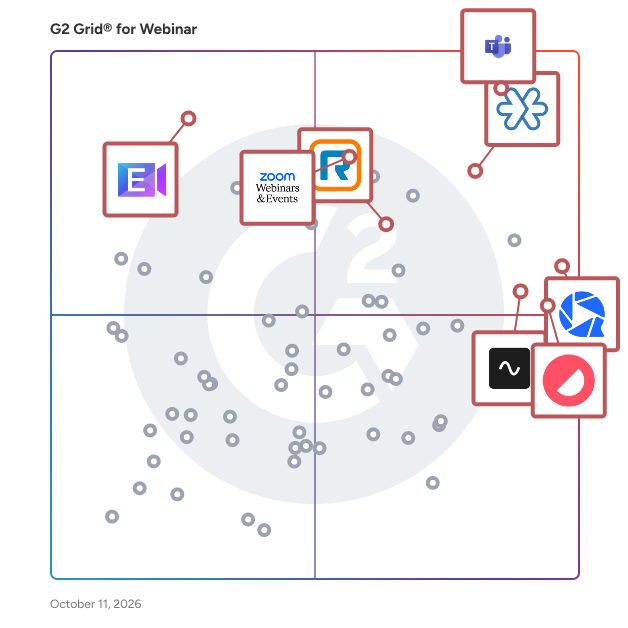
## G2 Grid® for Webinar Platforms
![G2 Grid® for Webinar Platforms plotting products by satisfaction and market presence](https://www.g2.com/categories/webinar/grids.png?focus%5B%5D=5029&focus%5B%5D=123238&focus%5B%5D=136204&focus%5B%5D=1329721&focus%5B%5D=1207461&focus%5B%5D=54310&focus%5B%5D=76290&focus%5B%5D=1173)
Highlighted products: Zoho Meeting, WebinarGeek, Riverside, Microsoft Teams Webinars, Contrast, Zoom Events and Webinars, BlueJeans Virtual Events, and RingEX.
Underlying data: [Grid® JSON](https://www.g2.com/categories/webinar/grids.json?focus%5B%5D=zoho-meeting&amp;focus%5B%5D=webinargeek&amp;focus%5B%5D=riverside&amp;focus%5B%5D=microsoft-teams-webinars&amp;focus%5B%5D=contrast-contrast&amp;focus%5B%5D=zoom-events-and-webinars&amp;focus%5B%5D=bluejeans-virtual-events&amp;focus%5B%5D=ringex&amp;segment=small-business)


## How Many Webinar Platforms Products Does G2 Track?
**Total Products under this Category:** 131

### Category Stats (Jul 2026)
- **Average Rating**: 4.46/5 (↑0.01 vs Jun 2026) The average rating of products in this category, based on all submitted ratings
- **Top Trending Product**: Muvi Live (+1.75%) - Among all products in this category, Muvi Live recorded the largest rating increase compared to last month
*Last updated: July 15, 2026*


## How Does G2 Rank Webinar Platforms Products?

**Why You Can Trust G2's Software Rankings:**

- 30 Analysts and Data Experts
- 21,600+ Authentic Reviews
- 131+ Products
- Unbiased Rankings

G2's software rankings are built on verified user reviews, rigorous moderation, and a consistent research methodology maintained by a team of analysts and data experts. Each product is measured using the same transparent criteria, with no paid placement or vendor influence. While reviews reflect real user experiences, which can be subjective, they offer valuable insight into how software performs in the hands of professionals. Together, these inputs power the G2 Score, a standardized way to compare tools within every category.


## Which Webinar Platforms Is Best for Your Use Case?

- **Best for Small Businesses:** [Zoho Meeting](https://www.g2.com/products/zoho-meeting/reviews)
- **Best for Mid-Market:** [Microsoft Teams Webinars](https://www.g2.com/products/microsoft-teams-webinars/reviews)
- **Best for Enterprise:** [Microsoft Teams Webinars](https://www.g2.com/products/microsoft-teams-webinars/reviews)
- **Highest User Satisfaction:** [WebinarGeek](https://www.g2.com/products/webinargeek/reviews)
- **Best Free Software:** [Livestorm](https://www.g2.com/products/livestorm/reviews)


---

**Sponsored**

### Sequel.io

Sequel runs webinars directly on your website and turns the engagement into first-party data you can use to drive pipeline, personalization, and attribution. Webinars Belong on Your Website Webinars shouldn’t send your best prospects to a third-party destination. Sequel delivers the entire webinar experience on your website, so traffic, brand experience, and conversion paths stay under your control. Webinars are embedded directly into your CMS, not hosted on an external domain. Registration, viewing, CTAs, and follow-up all happen within your owned site—keeping attendees surrounded by your product pages, pricing, and next steps. Instead of siphoning traffic away, webinars contribute to organic traffic, SEO, and conversion. Actionable, First-Party Intent Data Attendance alone isn’t insight. When Sequel is embedded on your website, it unlocks access to a deep data layer that captures how people engage during the webinar and what they do on your website before and after, creating a single behavioral record per person and account. In-event actions like polls, questions, CTAs, and watch time are combined with website behavior and post-event actions such as pricing page visits or demo clicks to create a unified timeline with clean, configurable data pushed directly into CRM and MAP systems—enabling scoring, routing, and follow-up based on real behavior, not assumptions. Faster Follow-Up and Better Attribution Sequel is built to shorten the gap between engagement and action. With real-time sync to Salesforce, HubSpot, and Marketo, teams can map custom engagement fields, trigger alerts and nurture flows, and tie webinars directly to pipeline and revenue—not just MQLs. It’s designed for teams that care about forecast accuracy and ROI credibility. AI-Powered Content Repurposing Extends the Life of Every Event Webinars shouldn’t end when the live session does. Sequel uses AI to turn every event into a scalable content engine—automatically transforming long-form video into high-performing assets that drive ongoing engagement and pipeline. Studio-quality local recordings power better outputs, while AI generates clips, highlights, summaries, written content, and chapters that break replays into navigable, topic-based sections. Sales and marketing can share precise moments instead of entire recordings, fueling SEO, nurture, and on-site discovery without post-production bottlenecks or loss of brand control. Built for Global Audiences Modern B2B audiences are global. Sequel makes it easy to serve international viewers without duplicating programs or fragmenting data. Live AI-powered translations with captions support multiple spoken languages in a single session. On-demand replays include translated subtitles, viewers select their preferred language seamlessly, and AI dubbing enables multilingual versions of webinar content—all within the same owned-site experience. The Foundation of the Intelligent Website Sequel is not just a webinar tool. It’s the starting point for making the website adaptive, personalized, and revenue-aware. Webinars act as high-signal moments to identify intent and interests. Engagement data feeds personalization and recommendations over time. AI summarizes, repurposes, and operationalizes content—setting the groundwork for adaptive web experiences by role, account, or behavior, and evolving naturally into a broader Intelligent Website strategy.


[Visit website](https://www.g2.com/external_clickthroughs/record?secure%5Bad_program%5D=ppc&amp;secure%5Bad_slot%5D=category_product_list&amp;secure%5Bcategory_id%5D=1113&amp;secure%5Bchosen_at%5D=2026-07-15T15%3A54%3A06Z&amp;secure%5Bdisplayable_resource_id%5D=1113&amp;secure%5Bdisplayable_resource_type%5D=Category&amp;secure%5Bmedium%5D=sponsored&amp;secure%5Bplacement_reason%5D=page_category&amp;secure%5Bplacement_resource_ids%5D%5B%5D=1113&amp;secure%5Bprioritized%5D=false&amp;secure%5Bproduct_id%5D=170956&amp;secure%5Bresource_id%5D=1113&amp;secure%5Bresource_type%5D=Category&amp;secure%5Bsource_type%5D=category_page&amp;secure%5Bsource_url%5D=https%3A%2F%2Fwww.g2.com%2Fcategories%2Fwebinar%2Fsmall-business%3Fpage%3D2&amp;secure%5Btoken%5D=9c063f53cdd5e281a915a9c7c24ee6082ae02d2e847277c1b85cf1511d070ac2&amp;secure%5Burl%5D=https%3A%2F%2Fwww.sequel.io%3Futm_campaign%3DG2%26utm_source%3DG2%2520clicks%26utm_medium%3DJune%25202026%26utm_term%3DWebinar%2520category&amp;secure%5Burl_type%5D=custom_url)

---

## What Are the Top-Rated Webinar Platforms Products in 2026?
### 1. [Univid](https://www.g2.com/products/univid/reviews)
Univid lets you create engaging webinars in less than 60 seconds. No more boring events. Go live and get a ton of engagement, without the complexity of large event systems. Your favorite features re-imagined. The Univid interaction is built to be easy - no extra work for you as a host. Enjoy the benefits of a more engaging webinar, together with your participants. One click to launch polls, live reactions, Q&amp;A, call-to-actions, engagement leaderboard, and much more. Beautiful branding, in no time. Make the session, registration page, and email reminders your own - without being a designer. Your colors, your logos, and your backgrounds. Gather tons of great insights, powered by engagement. Take the right decisions. Connect to your CRM, with native Hubspot integration and more. Univid is trusted by companies of all sizes - from startups to leading Fortune 500 companies. Built for companies who want smooth operations, while delivering attendee experiences in top-class.


**Average Rating:** 4.8/5.0
**Total Reviews:** 46
**How Do G2 Users Rate Univid?**

- **Has the product been a good partner in doing business?:** 9.9/10 (Category avg: 9.0/10)
- **Social Media Integration:** 7.7/10 (Category avg: 8.3/10)
- **Software Integrations:** 8.8/10 (Category avg: 8.6/10)
- **Attendee Reports:** 9.0/10 (Category avg: 8.9/10)

**Who Is the Company Behind Univid?**

- **Seller:** [Univid](https://www.g2.com/sellers/univid)
- **Year Founded:** 2019
- **HQ Location:** Stockholm, SE
- **LinkedIn® Page:** https://www.linkedin.com/company/37393710 (3 employees on LinkedIn®)

**Who Uses This Product?**
- **Top Industries:** Computer Software, Information Technology and Services
- **Company Size:** 72% Small-Business, 22% Mid-Market


#### What Are Univid's Pros and Cons?

**Pros:**

- Easy Setup (2 reviews)
- Interactivity (2 reviews)
- Customer Support (1 reviews)
- Customization (1 reviews)
- Ease of Use (1 reviews)

**Cons:**

- Missing Features (1 reviews)


### What Do G2 Reviewers Say About Univid?
*AI-generated summary from verified user reviews*

**Pros:**

- Users find the **easy setup** of Univid perfect for launching engaging webinars without prior experience.
- Users enjoy the **high level of interactivity** in Univid, making webinars engaging and enjoyable for all attendees.
- Users value the **responsive customer support** from Univid, enhancing their experience during technical issues.
- Users love the **customizable branding** of Univid, enhancing their interactive webinar experience significantly while ensuring quick setup.
- Users find Univid to be a **very intuitive and easy platform** , enhancing their overall experience with its features.

**Cons:**

- Users note a desire for **more features** in Univid to enhance the behind-the-scenes production experience.

#### What Are Recent G2 Reviews of Univid?

**"[Effortless Webinars with Top-Notch Support](https://www.g2.com/survey_responses/univid-review-12780408)"**

**Rating:** 5.0/5.0 stars
*— Emelie D.*

[Read full review](https://www.g2.com/survey_responses/univid-review-12780408)

---

**"[Intuitive Webinar Hosting with Stellar Support](https://www.g2.com/survey_responses/univid-review-12579279)"**

**Rating:** 4.5/5.0 stars
*— Alexander G.*

[Read full review](https://www.g2.com/survey_responses/univid-review-12579279)

---


### 2. [Chati](https://www.g2.com/products/get-chati/reviews)
Chati is a flexible, highly scalable virtual event platform designed to help users create immersive and engaging online experiences. This software solution caters to a diverse array of event organizers, including corporate professionals, educators, and anyone looking to host impactful virtual gatherings. With decades of experience in producing virtual events, Chati equips users with the necessary tools to ensure their events are both successful and memorable. The platform&#39;s target audience encompasses businesses hosting conferences, trade shows, webinars, and workshops, as well as educational institutions conducting online classes and seminars. Chati is particularly beneficial for organizations seeking a customizable solution to meet specific event objectives. With a variety of templates available, users can also create their own unique experiences, allowing for tailored events that resonate with their intended audience and purpose. Chati distinguishes itself in the virtual event software landscape through its user-friendly interface and extensive customization options. Users can easily navigate the platform to design events that align with their brand identity. The platform also features interactive tools that enhance attendee engagement, such as customizable event layouts, real-time analytics, and integrated communication features. These functionalities not only enrich the attendee experience but also enable organizers to monitor engagement levels and adapt their strategies to maintain participant involvement throughout the event. Accessibility is another cornerstone of Chati&#39;s design philosophy. The platform is built to ensure that attendees from various backgrounds and locations can participate without barriers. Chati&#39;s commitment to inclusivity is evident in its functionality across different devices and internet speeds, facilitating a seamless experience for all users. By prioritizing accessibility and immersion, Chati enhances the overall attendee experience and fosters a sense of community, encouraging participants to look forward to future events. Chati provides a comprehensive solution for hosting virtual events that are engaging and tailored to specific needs. Its combination of flexibility, scalability, and focus on user experience empowers event organizers to create memorable experiences that leave a lasting impression on attendees. With Chati, users can confidently navigate the complexities of virtual event planning, ensuring that every gathering is not only successful but also impactful.


**Average Rating:** 4.4/5.0
**Total Reviews:** 117
**How Do G2 Users Rate Chati?**

- **Has the product been a good partner in doing business?:** 9.4/10 (Category avg: 9.0/10)

**Who Is the Company Behind Chati?**

- **Seller:** [Chati](https://www.g2.com/sellers/chati)
- **Company Website:** https://chati.com
- **Year Founded:** 2021
- **HQ Location:** Yorba Linda, California
- **Twitter:** @getchati (44 Twitter followers)
- **LinkedIn® Page:** https://www.linkedin.com/company/getchati/ (28 employees on LinkedIn®)

**Who Uses This Product?**
- **Who Uses This:** Researcher, Medical Laboratory Scientist
- **Top Industries:** Hospital &amp; Health Care, Biotechnology
- **Company Size:** 48% Small-Business, 26% Mid-Market


#### What Are Chati's Pros and Cons?

**Pros:**

- Ease of Use (55 reviews)
- Interaction (19 reviews)
- Navigation Ease (19 reviews)
- Intuitive (17 reviews)
- Virtual Meetings (17 reviews)

**Cons:**

- Information Overload (5 reviews)
- Missing Features (5 reviews)
- Presentation Problems (5 reviews)
- Improvement Needed (4 reviews)
- Chat Functionality (3 reviews)


### What Do G2 Reviewers Say About Chati?
*AI-generated summary from verified user reviews*

**Pros:**

- Users find Chati to be **user-friendly** , with an easy initial setup that enhances their virtual training experience.
- Users value how Chati enhances events with **real-time interactions** , making discussions more engaging and structured.
- Users love the **easy navigation** of Chati, facilitating a seamless experience during virtual events.
- Users praise Chati for its **intuitive interaction** , making it easy and accessible for anyone to use.
- Users appreciate how Chati enhances virtual events, providing **interactive experiences** that foster real-time engagement and smooth navigation.

**Cons:**

- Users experience **information overload** with lengthy and general responses, making it difficult to find concise, specific answers.
- Users express disappointment over Chati&#39;s **missing features** like schedule links and closed captioning, which limit usability.
- Users face significant **presentation problems** due to cramped sub-window arrangements, complicating visibility and accessibility during sessions.
- Users find that **improvement is needed** as Chati struggles with precise technical responses and integration with academic tools.
- Users express frustration with the **inconsistent chat functionality** of Chati, leading to a less effective communication experience.

#### What Are Recent G2 Reviews of Chati?

**"[User-Friendly and Easy to Use](https://www.g2.com/survey_responses/chati-review-12339520)"**

**Rating:** 5.0/5.0 stars
*— Bo K.*

[Read full review](https://www.g2.com/survey_responses/chati-review-12339520)

---

**"[Smooth, Professional Webinars with Great Networking Features](https://www.g2.com/survey_responses/chati-review-12272689)"**

**Rating:** 4.0/5.0 stars
*— anitha p.*

[Read full review](https://www.g2.com/survey_responses/chati-review-12272689)

---


### 3. [SpotMe](https://www.g2.com/products/spotme/reviews)
SpotMe is the enterprise event platform that helps global brands run engaging in-person, hybrid, and virtual events that allow enterprises to increase the commercial impact of their events. With SpotMe, you get a branded and compliant event app, personalized experiences for every participant, and deep engagement data that flows in real time to your CRM. From registration and lead capture to appointment scheduling and content engagement, SpotMe is built to support complex enterprise use cases with consumer-grade ease. Trusted by 12,000+ enterprise users, including 15 of the top 20 life science companies, the Big Four, and global leaders in tech, finance, and manufacturing, SpotMe&#39;s product and services allows enterprises to deliver high-impact experiences. The robust CRM and marketing automation integrations ensure that every event becomes a high-performing asset that generates a measurable increase in ROI.


**Average Rating:** 4.7/5.0
**Total Reviews:** 194
**How Do G2 Users Rate SpotMe?**

- **Has the product been a good partner in doing business?:** 9.5/10 (Category avg: 9.0/10)
- **Social Media Integration:** 8.5/10 (Category avg: 8.3/10)
- **Software Integrations:** 8.2/10 (Category avg: 8.6/10)
- **Attendee Reports:** 9.0/10 (Category avg: 8.9/10)

**Who Is the Company Behind SpotMe?**

- **Seller:** [SpotMe](https://www.g2.com/sellers/spotme)
- **Year Founded:** 2001
- **HQ Location:** Lausanne, Switzerland
- **Twitter:** @SpotMe (959 Twitter followers)
- **LinkedIn® Page:** https://www.linkedin.com/company/1057848/ (145 employees on LinkedIn®)

**Who Uses This Product?**
- **Top Industries:** Pharmaceuticals, Accounting
- **Company Size:** 55% Enterprise, 27% Mid-Market


#### What Are SpotMe's Pros and Cons?

**Pros:**

- Ease of Use (6 reviews)
- Customer Support (5 reviews)
- Event Management (5 reviews)
- Customization (4 reviews)
- Reliability (4 reviews)

**Cons:**

- Poor Usability (2 reviews)
- App Availability (1 reviews)
- App Functionality Issues (1 reviews)
- Attendee Management (1 reviews)
- Chat Functionality (1 reviews)


### What Do G2 Reviewers Say About SpotMe?
*AI-generated summary from verified user reviews*

**Pros:**

- Users appreciate the **ease of use** with SpotMe, benefiting from its user-friendly design and excellent functionality.
- Users praise SpotMe for its **exceptional customer support** , enhancing their overall experience and ensuring successful events.
- Users value the **seamless event management** of SpotMe, appreciating its organization and exceptional support throughout their experiences.
- Users appreciate the **customization options** in SpotMe, enjoying tailored agendas and a user-friendly layout.
- Users value the **reliability and excellent support** of SpotMe, enhancing their overall experience and event success.

**Cons:**

- Users find **poor usability** in SpotMe, noting challenges in user experience and customization for newcomers.
- Users wish there was a way to **access backstage features via the app** for easier event management on-the-go.
- Users desire **app functionality improvements** to manage event updates efficiently without needing a computer.
- Users express a desire for **better speaker-user connection** features for easier communication at events.
- Users desire a way to **link speakers with user accounts** for improved chat functionality and seamless connections.

#### What Are Recent G2 Reviews of SpotMe?

**"[SpotMe Turns Events Into Interactive, Data-Driven Experiences](https://www.g2.com/survey_responses/spotme-review-12889465)"**

**Rating:** 5.0/5.0 stars
*— Verified User in Pharmaceuticals*

[Read full review](https://www.g2.com/survey_responses/spotme-review-12889465)

---

**"[Exceptionally Helpful Support That Resolves Issues Fast](https://www.g2.com/survey_responses/spotme-review-12883584)"**

**Rating:** 5.0/5.0 stars
*— Antonija Z.*

[Read full review](https://www.g2.com/survey_responses/spotme-review-12883584)

---


#### What Are G2 Users Discussing About SpotMe?

- [What is SpotMe used for?](https://www.g2.com/discussions/what-is-spotme-used-for) - 1 comment, 1 upvote

### 4. [BrightTALK (Informa TechTarget)](https://www.g2.com/products/brighttalk-informa-techtarget/reviews)
Informa TechTarget&#39;s BrightTALK® is an all-in-one solution for marketers, helping you create quality content and drive demand. Unlike other webinar platforms, BrightTALK has a built-in audience of active B2B buyers, enabling you to easily engage with new and existing prospects to build community, demand and revenue.


**Average Rating:** 4.0/5.0
**Total Reviews:** 93
**How Do G2 Users Rate BrightTALK (Informa TechTarget)?**

- **Has the product been a good partner in doing business?:** 8.3/10 (Category avg: 9.0/10)
- **Social Media Integration:** 7.4/10 (Category avg: 8.3/10)
- **Software Integrations:** 7.7/10 (Category avg: 8.6/10)
- **Attendee Reports:** 8.2/10 (Category avg: 8.9/10)

**Who Is the Company Behind BrightTALK (Informa TechTarget)?**

- **Seller:** [Informa TechTarget](https://www.g2.com/sellers/informa-techtarget)
- **Company Website:** https://www.informatechtarget.com/
- **Year Founded:** 1999
- **HQ Location:** Newton, MA
- **Twitter:** @InformaTTGT (26,142 Twitter followers)
- **LinkedIn® Page:** https://www.linkedin.com/company/informatechtarget/ (1,483 employees on LinkedIn®)

**Who Uses This Product?**
- **Who Uses This:** Marketing Manager
- **Top Industries:** Computer Software, Information Technology and Services
- **Company Size:** 46% Mid-Market, 28% Enterprise


#### What Are BrightTALK (Informa TechTarget)'s Pros and Cons?

**Pros:**

- Ease of Use (8 reviews)
- Webinars (7 reviews)
- Customer Support (4 reviews)
- Attendee Management (3 reviews)
- Easy Setup (3 reviews)

**Cons:**

- Missing Features (3 reviews)
- Poor Customer Support (3 reviews)
- Improvement Needed (2 reviews)
- Learning Curve (2 reviews)
- Limitations (2 reviews)


### What Do G2 Reviewers Say About BrightTALK (Informa TechTarget)?
*AI-generated summary from verified user reviews*

**Pros:**

- Users appreciate the **intuitive and easy-to-use interface** of BrightTALK, enhancing their overall experience and engagement.
- Users appreciate the **helpful vendor support** and intuitive platform of BrightTALK for hosting webinars effectively.
- Users commend BrightTALK for its **excellent customer support** , enhancing their marketing efforts and lead generation success.
- Users find BrightTALK&#39;s **efficient attendee management** essential for seamless webinar hosting and targeted B2B marketing.
- Users value the **easy setup** of BrightTALK, allowing quick webinar launches and seamless integration with tools.

**Cons:**

- Users note a lack of **advanced editing features** and permissions on BrightTALK, affecting user experience and customization.
- Users often experience **poor customer support** , particularly when facing technical issues or limitations with the platform.
- Users find BrightTALK&#39;s **disjointed systems and operational confusion** hinder their overall experience and setup efficiency.
- Users find the **learning curve challenging** due to the tool&#39;s complex features, often requiring additional support.
- Users note **limitations in editing and team communication** , leading to confusion and slower operational processes.

#### What Are Recent G2 Reviews of BrightTALK (Informa TechTarget)?

**"[Solid Platform with Great Support](https://www.g2.com/survey_responses/brighttalk-informa-techtarget-review-9363110)"**

**Rating:** 5.0/5.0 stars
*— Vasanth R.*

[Read full review](https://www.g2.com/survey_responses/brighttalk-informa-techtarget-review-9363110)

---

**"[Excellent Data and Programs](https://www.g2.com/survey_responses/brighttalk-informa-techtarget-review-10869038)"**

**Rating:** 4.0/5.0 stars
*— Kristi A.*

[Read full review](https://www.g2.com/survey_responses/brighttalk-informa-techtarget-review-10869038)

---


#### What Are G2 Users Discussing About BrightTALK (Informa TechTarget)?

- [What is a BrightTALK channel?](https://www.g2.com/discussions/what-is-a-brighttalk-channel)
- [How does BrightTALK make money?](https://www.g2.com/discussions/how-does-brighttalk-make-money)
- [What does BrightTALK sell?](https://www.g2.com/discussions/what-does-brighttalk-sell)
- [What does BrightTALK do?](https://www.g2.com/discussions/what-does-brighttalk-do) - 1 comment

### 5. [Sequel.io](https://www.g2.com/products/sequel-io/reviews)
Sequel runs webinars directly on your website and turns the engagement into first-party data you can use to drive pipeline, personalization, and attribution. Webinars Belong on Your Website Webinars shouldn’t send your best prospects to a third-party destination. Sequel delivers the entire webinar experience on your website, so traffic, brand experience, and conversion paths stay under your control. Webinars are embedded directly into your CMS, not hosted on an external domain. Registration, viewing, CTAs, and follow-up all happen within your owned site—keeping attendees surrounded by your product pages, pricing, and next steps. Instead of siphoning traffic away, webinars contribute to organic traffic, SEO, and conversion. Actionable, First-Party Intent Data Attendance alone isn’t insight. When Sequel is embedded on your website, it unlocks access to a deep data layer that captures how people engage during the webinar and what they do on your website before and after, creating a single behavioral record per person and account. In-event actions like polls, questions, CTAs, and watch time are combined with website behavior and post-event actions such as pricing page visits or demo clicks to create a unified timeline with clean, configurable data pushed directly into CRM and MAP systems—enabling scoring, routing, and follow-up based on real behavior, not assumptions. Faster Follow-Up and Better Attribution Sequel is built to shorten the gap between engagement and action. With real-time sync to Salesforce, HubSpot, and Marketo, teams can map custom engagement fields, trigger alerts and nurture flows, and tie webinars directly to pipeline and revenue—not just MQLs. It’s designed for teams that care about forecast accuracy and ROI credibility. AI-Powered Content Repurposing Extends the Life of Every Event Webinars shouldn’t end when the live session does. Sequel uses AI to turn every event into a scalable content engine—automatically transforming long-form video into high-performing assets that drive ongoing engagement and pipeline. Studio-quality local recordings power better outputs, while AI generates clips, highlights, summaries, written content, and chapters that break replays into navigable, topic-based sections. Sales and marketing can share precise moments instead of entire recordings, fueling SEO, nurture, and on-site discovery without post-production bottlenecks or loss of brand control. Built for Global Audiences Modern B2B audiences are global. Sequel makes it easy to serve international viewers without duplicating programs or fragmenting data. Live AI-powered translations with captions support multiple spoken languages in a single session. On-demand replays include translated subtitles, viewers select their preferred language seamlessly, and AI dubbing enables multilingual versions of webinar content—all within the same owned-site experience. The Foundation of the Intelligent Website Sequel is not just a webinar tool. It’s the starting point for making the website adaptive, personalized, and revenue-aware. Webinars act as high-signal moments to identify intent and interests. Engagement data feeds personalization and recommendations over time. AI summarizes, repurposes, and operationalizes content—setting the groundwork for adaptive web experiences by role, account, or behavior, and evolving naturally into a broader Intelligent Website strategy.


**Average Rating:** 4.4/5.0
**Total Reviews:** 146
**How Do G2 Users Rate Sequel.io?**

- **Has the product been a good partner in doing business?:** 8.9/10 (Category avg: 9.0/10)
- **Social Media Integration:** 7.8/10 (Category avg: 8.3/10)
- **Software Integrations:** 8.8/10 (Category avg: 8.6/10)
- **Attendee Reports:** 9.0/10 (Category avg: 8.9/10)

**Who Is the Company Behind Sequel.io?**

- **Seller:** [Sequel](https://www.g2.com/sellers/sequel)
- **Company Website:** https://www.sequel.io/
- **Year Founded:** 2021
- **HQ Location:** San Francisco, CA
- **Twitter:** @sequel_io (231 Twitter followers)
- **LinkedIn® Page:** https://www.linkedin.com/company/sequelio/ (26 employees on LinkedIn®)

**Who Uses This Product?**
- **Top Industries:** Computer Software, Information Technology and Services
- **Company Size:** 58% Mid-Market, 33% Small-Business


#### What Are Sequel.io's Pros and Cons?

**Pros:**

- Webinars (17 reviews)
- Customer Support (16 reviews)
- Attendee Management (15 reviews)
- Ease of Use (12 reviews)
- Easy Setup (10 reviews)

**Cons:**

- Missing Features (7 reviews)
- Integration Issues (4 reviews)
- Limited Customization (4 reviews)
- Feature Deficiency (3 reviews)
- Feature Limitations (3 reviews)


### What Do G2 Reviewers Say About Sequel.io?
*AI-generated summary from verified user reviews*

**Pros:**

- Users value the **seamless integration for webinars** on their website, enhancing engagement and attendee experience significantly.
- Users commend Sequel.io&#39;s **responsive customer support** , making setup and integration seamless throughout the process.
- Users value the **efficient attendee management** of Sequel.io, enhancing their event experiences and integrations seamlessly.
- Users appreciate the **ease of use** of Sequel.io, finding it intuitive for hosting webinars and managing events smoothly.
- Users appreciate the **easy setup** of Sequel.io, enabling quick and efficient integration into their existing systems.

**Cons:**

- Users note several **missing features** in Sequel.io, like enhanced filtering and advanced reporting capabilities, complicating user experience.
- Users experience occasional **integration issues** with Salesforce and CRM, but support efficiently resolves these challenges.
- Users find **limited customization** in Sequel.io for reporting, relying on manual processes for effective data analysis.
- Users find the **feature deficiencies** in Sequel.io, such as limited email additions and download quality, frustrating.
- Users desire **enhanced email analytics** and filtering options for better visibility in Sequel.io&#39;s features.

#### What Are Recent G2 Reviews of Sequel.io?

**"[Easy to Implement, User-Friendly, and Backed by Exceptional Customer Service](https://www.g2.com/survey_responses/sequel-io-review-13085915)"**

**Rating:** 5.0/5.0 stars
*— Francesca A.*

[Read full review](https://www.g2.com/survey_responses/sequel-io-review-13085915)

---

**"[Sequel: #1 Webinar Platform — Seamless Marketo Integration, Higher Conversions &amp; Intuitive UI](https://www.g2.com/survey_responses/sequel-io-review-13053163)"**

**Rating:** 5.0/5.0 stars
*— Ciera C.*

[Read full review](https://www.g2.com/survey_responses/sequel-io-review-13053163)

---


### 6. [Restream](https://www.g2.com/products/restream/reviews)
Restream is a cloud-based studio for video creation, live streaming, and podcast recording. Everything runs right in your browser — record in 4K, produce professional live video, interview remote guests, and go live on 30+ platforms at once, with no downloads or extra hardware. Create in our browser-based Studio or connect tools you already use, like OBS, Zoom, vMix, or Ecamm Live. Made for content creators, podcasters, marketers, and teams who want to record, stream, and repurpose great video all in one place. What you can do with Restream: → Restream Studio — an online studio for live streaming and video production. 4K recording, custom scenes, branded overlays, backgrounds, screen sharing, and live captions, with nothing to install. → Multistreaming — stream one live video to YouTube, LinkedIn, X, Twitch, Facebook, Instagram, TikTok, and 30+ platforms at the same time, and read every live chat in one place. No extra bandwidth needed. → Podcast recording — record video podcasts in 4K resolution with clear 48kHz audio, solo or with guests. → Guest interviews — bring up to 10 remote guests on screen for interviews, panels, and co-hosted shows. → Vertical and horizontal — stream in both portrait and landscape from one setup, so your video fits every feed from YouTube to TikTok. → Pre-recorded and simulive — schedule and loop pre-recorded videos to play as live, so your channels stay on even when you&#39;re away. → AI Clips — turn long streams into short, captioned vertical clips and post them across channels automatically — including live clips that publish while you&#39;re still broadcasting. → Analytics — track views, engagement, and growth across every platform in one place with AI-powered insights. Ask AI to show missed questions, chat sentiment, or peak viewers moments. → Collaboration — shared workspaces and assign seats so co-hosts and producers can plan, run, and repurpose streams together. Who Restream is for ✔︎ Creators &amp; podcasters — grow your audience everywhere. Record video podcasts in 4K, go live and record at the same time, run solo shows and guest interviews, and turn every episode into short clips for TikTok, Reels, and Shorts. ✔︎ Tech &amp; product teams — build in public. Stream live coding and build-in-public sessions, run product launches, demos, and webinars, and host developer Q&amp;As and AMAs your marketing team can repurpose into social content. ✔︎ Media &amp; entertainment — a modern broadcast engine. Take professional, multi-camera broadcasts of sports, news, and shows straight to YouTube, X, TikTok, and 30+ platforms. ✔︎ Founders &amp; business leaders — lead the conversation. Build thought leadership with live talks, fireside chats, and audience Q&amp;As, and reach every channel at once. ✔︎ Government &amp; public sector — speak to millions. Stream town halls, public meetings, briefings, and announcements live to the audiences you serve. ✔︎ Community organizations — share your message. Broadcast services, gatherings, and member events to your community everywhere they watch.


**Average Rating:** 4.4/5.0
**Total Reviews:** 67
**How Do G2 Users Rate Restream?**

- **Has the product been a good partner in doing business?:** 8.3/10 (Category avg: 9.0/10)
- **Social Media Integration:** 10.0/10 (Category avg: 8.3/10)
- **Software Integrations:** 10.0/10 (Category avg: 8.6/10)

**Who Is the Company Behind Restream?**

- **Seller:** [Restream](https://www.g2.com/sellers/restream)
- **Company Website:** https://restream.io
- **Year Founded:** 2015
- **HQ Location:** Austin, TX
- **Twitter:** @Restreamio (190,188 Twitter followers)
- **LinkedIn® Page:** https://www.linkedin.com/company/10559670/ (120 employees on LinkedIn®)

**Who Uses This Product?**
- **Top Industries:** Marketing and Advertising, Religious Institutions
- **Company Size:** 81% Small-Business, 14% Mid-Market


#### What Are Restream's Pros and Cons?

**Pros:**

- Setup Ease (2 reviews)
- Content Management (1 reviews)
- Ease of Use (1 reviews)
- Easy Integrations (1 reviews)
- Easy Management (1 reviews)

**Cons:**

- Access Limitations (1 reviews)
- Expensive (1 reviews)
- Feature Deficiency (1 reviews)
- Streaming Issues (1 reviews)


### What Do G2 Reviewers Say About Restream?
*AI-generated summary from verified user reviews*

**Pros:**

- Users commend the **setup ease** of Restream, enabling quick connections and a hassle-free experience for livestreaming.
- Users value Restream for its **user-friendly content management** , simplifying podcasting and livestreaming across multiple platforms.
- Users value the **user-friendly interface** of Restream, making content management and livestreaming effortlessly straightforward.
- Users value Restream for its **easy integrations** , enhancing their podcast and video management experience seamlessly across platforms.
- Users value the **easy management** of Restream, simplifying content creation and livestreaming across multiple platforms effortlessly.

**Cons:**

- Users express frustration over **access limitations** , specifically 15-day recording storage and cumbersome reupload processes.
- Users find Restream **too expensive** for limited storage options, leading to frustration and cancellation of accounts.
- Users are frustrated by Restream&#39;s **limited recording storage** , requiring cumbersome workarounds to manage their content effectively.
- Users face **streaming issues** with Restream, including inflexible event scheduling and timezone application problems.

#### What Are Recent G2 Reviews of Restream?

**"[Easy-to-Use Streaming Platform with Helpful Support.](https://www.g2.com/survey_responses/restream-review-13022005)"**

**Rating:** 5.0/5.0 stars
*— David S.*

[Read full review](https://www.g2.com/survey_responses/restream-review-13022005)

---

**"[User-Friendly Interface with a Seamless, Professional Broadcast-Style Stream](https://www.g2.com/survey_responses/restream-review-13042142)"**

**Rating:** 5.0/5.0 stars
*— Rob D.*

[Read full review](https://www.g2.com/survey_responses/restream-review-13042142)

---


#### What Are G2 Users Discussing About Restream?

- [What is Restream used for?](https://www.g2.com/discussions/what-is-restream-used-for)
- [How long can you stream on Restream?](https://www.g2.com/discussions/how-long-can-you-stream-on-restream)
- [Does Restream reduce quality?](https://www.g2.com/discussions/does-restream-reduce-quality)
- [Is Restream IO free?](https://www.g2.com/discussions/is-restream-io-free)
- [What platforms does Restream stream to?](https://www.g2.com/discussions/what-platforms-does-restream-stream-to) - 1 comment

### 7. [WebinarNinja](https://www.g2.com/products/webinarninja/reviews)
WebinarNinja is a delightfully easy webinar platform that helps teach online, improve marketing, and grow sales without breaking the bank. The tool helps generate leads, train and communicate effectively, boost audience engagement, and help presenters get paid for their expertise while they build credibility among their audience. It also helps create, manage, and deliver live and on-demand courses with CourseNinja, a built-in platform that has a smart performance-tracking feature. WebinarNinja is used by over 30,000 businesses, including leading brands like AppSumo, Podia, Barametrics, etc., and has helped deliver 3 million+ webinars that captured 10 million+ leads. Established in 2014 by Omar Zenhom (a former educator and university manager) and Nicole Baldinu, the platform was born out of a desire to provide a more streamlined and user-friendly webinar solution. WebinarNinja was acquired by ProProfs in 2023. This acquisition marked a significant milestone for the platform, allowing it to leverage ProProfs&#39; extensive resources and broader market presence. As part of ProProfs, a leading provider of SaaS products, WebinarNinja delivers high-quality webinar experiences to its users.


**Average Rating:** 3.3/5.0
**Total Reviews:** 49
**How Do G2 Users Rate WebinarNinja?**

- **Has the product been a good partner in doing business?:** 5.5/10 (Category avg: 9.0/10)
- **Social Media Integration:** 7.6/10 (Category avg: 8.3/10)
- **Software Integrations:** 7.1/10 (Category avg: 8.6/10)
- **Attendee Reports:** 7.5/10 (Category avg: 8.9/10)

**Who Is the Company Behind WebinarNinja?**

- **Seller:** [WebinarNinja](https://www.g2.com/sellers/webinarninja)
- **Year Founded:** 2014
- **HQ Location:** California, USA
- **Twitter:** @WebinarNinja (846 Twitter followers)
- **LinkedIn® Page:** https://www.linkedin.com/company/webinarninjasoftware/about (1 employees on LinkedIn®)

**Who Uses This Product?**
- **Top Industries:** Marketing and Advertising, Professional Training &amp; Coaching
- **Company Size:** 80% Small-Business, 14% Mid-Market


#### What Are WebinarNinja's Pros and Cons?

**Pros:**

- Email Management (2 reviews)
- Polling (2 reviews)
- Webinars (2 reviews)
- Customer Support (1 reviews)
- Customization Options (1 reviews)

**Cons:**

- Application Instability (1 reviews)
- Lack of Guidance (1 reviews)
- Poor Interface Design (1 reviews)


### What Do G2 Reviewers Say About WebinarNinja?
*AI-generated summary from verified user reviews*

**Pros:**

- Users value the **email automation** in WebinarNinja, streamlining engagement and reducing manual tasks for seamless webinars.
- Users appreciate the **easy audience engagement** through polls and other interactive features in WebinarNinja.
- Users value the **easy setup and interactive features** of WebinarNinja, enhancing audience engagement effortlessly.
- Users value the **excellent customer support** from WebinarNinja, enhancing their overall experience and satisfaction.
- Users value the **customizable registration pages** of WebinarNinja, enhancing their unique branding and engagement.

**Cons:**

- Users are frustrated by the **application instability** in WebinarNinja, which affects functionality and value significantly.
- Users highlight the **lack of guidance** with WebinarNinja, affecting their overall experience and product effectiveness.
- Users report **poor interface design** that contributes to instability and a lack of essential functionality in WebinarNinja.

#### What Are Recent G2 Reviews of WebinarNinja?

**"[Powerful Webinar Call-to-Action and All-in-One Engagement Tracking Dashboard](https://www.g2.com/survey_responses/webinarninja-review-12894249)"**

**Rating:** 5.0/5.0 stars
*— Damon R.*

[Read full review](https://www.g2.com/survey_responses/webinarninja-review-12894249)

---

**"[Finally a Webinar Tool That Just Works](https://www.g2.com/survey_responses/webinarninja-review-12860702)"**

**Rating:** 5.0/5.0 stars
*— Rumbi F.*

[Read full review](https://www.g2.com/survey_responses/webinarninja-review-12860702)

---


#### What Are G2 Users Discussing About WebinarNinja?

- [What is WebinarNinja used for?](https://www.g2.com/discussions/what-is-webinarninja-used-for)
- [How do you make an evergreen webinar?](https://www.g2.com/discussions/how-do-you-make-an-evergreen-webinar)
- [Is Demio free?](https://www.g2.com/discussions/webinarninja-is-demio-free)
- [What should I look for in a webinar platform?](https://www.g2.com/discussions/what-should-i-look-for-in-a-webinar-platform)
- [What is WebinarNinja?](https://www.g2.com/discussions/what-is-webinarninja)

### 8. [Zuddl](https://www.g2.com/products/zuddl/reviews)
Event leaders have never had a purpose-built, flexible, unified platform that can handle events of all sizes, formats, and complexities – until now. Simplify event management for conferences, field events, and webinars with Zuddl. Unlike complex, legacy platforms, Zuddl offers an intuitive, on-brand, and user-friendly experience that drives real results from your events. With Zuddl, adaptability and quick adjustments are at your fingertips. It&#39;s built for the ever-changing nature of events, letting you pivot plans on the fly from one central hub. You get the flexibility to craft impactful experiences without the stress, all in your brand&#39;s style, and easily report on business outcomes like lead generation and ROI Designed with insights from top event marketers, Zuddl’s comprehensive suite empowers event marketers to seamlessly oversee every aspect of event management, from pre-event preparations to post-event reporting and analysis, with dedicated support along the way.


**Average Rating:** 4.8/5.0
**Total Reviews:** 184
**How Do G2 Users Rate Zuddl?**

- **Has the product been a good partner in doing business?:** 9.7/10 (Category avg: 9.0/10)
- **Social Media Integration:** 8.8/10 (Category avg: 8.3/10)
- **Software Integrations:** 9.4/10 (Category avg: 8.6/10)
- **Attendee Reports:** 9.5/10 (Category avg: 8.9/10)

**Who Is the Company Behind Zuddl?**

- **Seller:** [Zuddl](https://www.g2.com/sellers/zuddl)
- **Year Founded:** 2020
- **HQ Location:** San Francisco, US
- **Twitter:** @WeareZuddl (250 Twitter followers)
- **LinkedIn® Page:** https://www.linkedin.com/company/zuddl/ (121 employees on LinkedIn®)

**Who Uses This Product?**
- **Who Uses This:** Product Manager, Manager
- **Top Industries:** Computer Software, Information Technology and Services
- **Company Size:** 42% Mid-Market, 38% Small-Business


#### What Are Zuddl's Pros and Cons?

**Pros:**

- Ease of Use (7 reviews)
- Features (6 reviews)
- Customer Support (5 reviews)
- Attendee Management (4 reviews)
- Design Aesthetics (4 reviews)

**Cons:**

- Confusing Processes (3 reviews)
- Learning Curve (3 reviews)
- Limited Customization (3 reviews)
- Complexity (2 reviews)
- Design Limitations (2 reviews)


### What Do G2 Reviewers Say About Zuddl?
*AI-generated summary from verified user reviews*

**Pros:**

- Users find Zuddl&#39;s **ease of use** exceptional, with helpful support easing any minor learning curves.
- Users appreciate Zuddl&#39;s **responsive support and extensive customization** , making event management simple and efficient.
- Users rave about Zuddl&#39;s **exceptional customer support** , highlighting their speedy responses and willingness to collaborate on improvements.
- Users value the **efficient attendee management** of Zuddl, praising its intuitive UI and quick support response times.
- Users love the **polished and professional UI** of Zuddl, appreciating its ease of navigation and customizability.

**Cons:**

- Users find the **confusing processes** in Zuddl make event setup challenging without additional support or clarity.
- Users find the **learning curve steep** , especially when transitioning from simpler tools without support teams.
- Users find that the **limited customization options** can be restrictive without additional support from their team.
- Users find the **initial setup overwhelming** , citing complexity and excess steps that hinder a smooth experience.
- Users notice **design limitations** in Zuddl, including complexity in event setup and suggestions for a smoother design system.

#### What Are Recent G2 Reviews of Zuddl?

**"[Exceptional Support and Unmatched Responsiveness: Zuddl Sets the Standard](https://www.g2.com/survey_responses/zuddl-review-11149428)"**

**Rating:** 5.0/5.0 stars
*— Bri M.*

[Read full review](https://www.g2.com/survey_responses/zuddl-review-11149428)

---

**"[One stop shop for events!](https://www.g2.com/survey_responses/zuddl-review-11380998)"**

**Rating:** 5.0/5.0 stars
*— Jules K.*

[Read full review](https://www.g2.com/survey_responses/zuddl-review-11380998)

---


#### What Are G2 Users Discussing About Zuddl?

- [What is Zuddl used for?](https://www.g2.com/discussions/what-is-zuddl-used-for)

### 9. [Bizzabo](https://www.g2.com/products/bizzabo/reviews)
Plan, deliver, and measure impactful events with Bizzabo&#39;s Event Experience OS. From intimate summits to 10,000+ attendee conferences, event organizers can streamline workflows, elevate attendee experiences, and capture the insights that matter. Recognized as a Leader in the 2025 GartnerⓇ Magic Quadrant™ and the only Customer Favorite in the 2024 Forrester Wave™, Bizzabo is trusted by the world’s top brands to deliver immersive experiences that connect and convert. With advanced customization, innovative smart wearables, and powerful event intelligence, organizers can scale their entire event portfolio with ease. And with enterprise-grade infrastructure and 99.99% uptime, event professionals can focus on creating memorable events, while Bizzabo handles the complexity behind the scenes.


**Average Rating:** 4.3/5.0
**Total Reviews:** 442
**How Do G2 Users Rate Bizzabo?**

- **Has the product been a good partner in doing business?:** 9.1/10 (Category avg: 9.0/10)
- **Social Media Integration:** 7.2/10 (Category avg: 8.3/10)
- **Software Integrations:** 8.0/10 (Category avg: 8.6/10)
- **Attendee Reports:** 8.4/10 (Category avg: 8.9/10)

**Who Is the Company Behind Bizzabo?**

- **Seller:** [Bizzabo](https://www.g2.com/sellers/bizzabo)
- **Company Website:** https://www.bizzabo.com
- **Year Founded:** 2011
- **HQ Location:** New York
- **Twitter:** @Bizzabo (15,295 Twitter followers)
- **LinkedIn® Page:** https://www.linkedin.com/company/1588586/ (198 employees on LinkedIn®)

**Who Uses This Product?**
- **Who Uses This:** Marketing Director, Marketing Manager
- **Top Industries:** Events Services, Computer Software
- **Company Size:** 38% Small-Business, 37% Mid-Market


#### What Are Bizzabo's Pros and Cons?

**Pros:**

- Ease of Use (34 reviews)
- Event Management (21 reviews)
- Customer Support (15 reviews)
- Attendee Management (14 reviews)
- Easy Setup (14 reviews)

**Cons:**

- Limited Customization (17 reviews)
- Confusing Processes (12 reviews)
- Lack of Customization (11 reviews)
- Event Management (9 reviews)
- Learning Curve (9 reviews)


### What Do G2 Reviewers Say About Bizzabo?
*AI-generated summary from verified user reviews*

**Pros:**

- Users value the **ease of use** of Bizzabo, with intuitive setup and efficient event planning tools enhancing their experience.
- Users value Bizzabo for its **simple and efficient event planning** , enabling quicker setups and seamless user experience.
- Users appreciate the **excellent customer support** from Bizzabo, highlighting quick responses and effective guidance for troubleshooting.
- Users appreciate the **easy-to-use attendee management** features of Bizzabo, enhancing their event registration and tracking experience.
- Users value the **easy setup** of Bizzabo, appreciating its straightforward process and useful templates for quick event planning.

**Cons:**

- Users find **limited customization** in Bizzabo, particularly in templates and report functionalities, restricting their creative expression.
- Users often experience **confusing processes** with Bizzabo, particularly around automation and integration features.
- Users express frustration over the **lack of customization** in Bizzabo, limiting personalization and workflow efficiency.
- Users face **limitations in event management and customization** , impacting the overall user experience and efficiency.
- Users find the **learning curve steep** , especially for those not tech-savvy, requiring time-consuming training sessions.

#### What Are Recent G2 Reviews of Bizzabo?

**"[Streamlined Event Management with Flexible API](https://www.g2.com/survey_responses/bizzabo-review-12995588)"**

**Rating:** 4.5/5.0 stars
*— Hudyakova I.*

[Read full review](https://www.g2.com/survey_responses/bizzabo-review-12995588)

---

**"[Consolidated Our Event Stack, Delighted Sponsors](https://www.g2.com/survey_responses/bizzabo-review-13047886)"**

**Rating:** 4.5/5.0 stars
*— Kaprizyla A.*

[Read full review](https://www.g2.com/survey_responses/bizzabo-review-13047886)

---


#### What Are G2 Users Discussing About Bizzabo?

- [What is Bizzabo used for?](https://www.g2.com/discussions/what-is-bizzabo-used-for) - 1 comment

### 10. [webinar.net](https://www.g2.com/products/webinar-net/reviews)
Webinar.net launched in 2019, designed to be a modern alternative to the dated Meeting tools that are often used for marketing and training applications, It is a powerful, easy-to-use online presentation platform with polished user interfaces. Webinar.net is the first online presentation platform fully hosted in the cloud. This architecture allows our customers reach to very large audiences without capacity concerns, and enjoy simple, cost-effective pricing. Your brand is fully represented when delivering online presentations via webinar.net, not your technology provider’s. You should expect that users will be able to join presentations from their mobile device or desktop with no app downloads or hassles. Webinar.net provides companies with a simple and cost-effective solution to deliver powerful audio and video presentations to a global audience. With live, simulive, and on-demand broadcasting options, you have the power to control when and how your content is delivered.


**Average Rating:** 4.7/5.0
**Total Reviews:** 81
**How Do G2 Users Rate webinar.net?**

- **Has the product been a good partner in doing business?:** 9.3/10 (Category avg: 9.0/10)
- **Social Media Integration:** 9.5/10 (Category avg: 8.3/10)
- **Software Integrations:** 9.5/10 (Category avg: 8.6/10)
- **Attendee Reports:** 9.6/10 (Category avg: 8.9/10)

**Who Is the Company Behind webinar.net?**

- **Seller:** [webinar.net](https://www.g2.com/sellers/webinar-net)
- **Year Founded:** 2019
- **HQ Location:** Pleasanton, CA
- **Twitter:** @webinarnet (45 Twitter followers)
- **LinkedIn® Page:** https://www.linkedin.com/company/28556952/ (36 employees on LinkedIn®)

**Who Uses This Product?**
- **Top Industries:** Events Services, Information Technology and Services
- **Company Size:** 47% Small-Business, 36% Mid-Market


#### What Are webinar.net's Pros and Cons?

**Pros:**

- Ease of Use (1 reviews)
- Easy Management (1 reviews)
- Event Management (1 reviews)
- Experience (1 reviews)
- Reliability (1 reviews)

**Cons:**

- Limited Analytics (1 reviews)
- Limited Branding (1 reviews)
- Limited Customization (1 reviews)
- Limited Features (1 reviews)


### What Do G2 Reviewers Say About webinar.net?
*AI-generated summary from verified user reviews*

**Pros:**

- Users praise the **reliable and easy management** of Webinar.net, ensuring smooth webinars for large audiences.
- Users appreciate the **reliable and easy management** of Webinar.net, ensuring smooth experiences for all attendees and presenters.
- Users highlight the **reliability and ease of management** of Webinar.net, ensuring smooth experiences for large-scale events.
- Users appreciate the **reliability and ease of management** of Webinar.net, ensuring smooth experiences for large audiences.
- Users value the **reliability** of Webinar.net, ensuring smooth experiences for both presenters and attendees at scale.

**Cons:**

- Users find **limited analytics** on Webinar.net, lacking deeper customization and reporting features compared to other platforms.
- Users feel that Webinar.net has **limited branding** and customization options compared to other webinar platforms.
- Users find the **limited customization** options in Webinar.net lacking compared to other platforms, impacting advanced features.
- Users find that the **limited features** of Webinar.net restrict advanced customization and comprehensive reporting options.

#### What Are Recent G2 Reviews of webinar.net?

**"[Reliable, Scalable Webinar Management with a Smooth Attendee Experience](https://www.g2.com/survey_responses/webinar-net-review-12275200)"**

**Rating:** 5.0/5.0 stars
*— Marian C.*

[Read full review](https://www.g2.com/survey_responses/webinar-net-review-12275200)

---

**"[Project manager (Oil &amp; Gas)](https://www.g2.com/survey_responses/webinar-net-review-5366835)"**

**Rating:** 5.0/5.0 stars
*— Alejandra F.*

[Read full review](https://www.g2.com/survey_responses/webinar-net-review-5366835)

---


#### What Are G2 Users Discussing About webinar.net?

- [What do you recommend for those considering webinar.net for hosting virtual events?](https://www.g2.com/discussions/what-do-you-recommend-for-those-considering-webinar-net-for-hosting-virtual-events)
- [What is webinar.net used for?](https://www.g2.com/discussions/what-is-webinar-net-used-for)
- [What is DoorDash top Dasher?](https://www.g2.com/discussions/what-is-doordash-top-dasher)
- [Can the presenter see you in a zoom webinar?](https://www.g2.com/discussions/can-the-presenter-see-you-in-a-zoom-webinar)
- [Can they see your face in a webinar?](https://www.g2.com/discussions/can-they-see-your-face-in-a-webinar)

### 11. [Goldcast](https://www.g2.com/products/goldcast/reviews)
Goldcast is an AI-powered B2B Video Content Platform that puts video at the heart of the customer journey. Effectively capture attention and engage your audience, efficiently create and repurpose video content, and capitalize on intent. Elevate your video content strategy with Goldcast for true audience engagement, brand development, and revenue growth.


**Average Rating:** 4.7/5.0
**Total Reviews:** 230
**How Do G2 Users Rate Goldcast?**

- **Has the product been a good partner in doing business?:** 9.5/10 (Category avg: 9.0/10)
- **Social Media Integration:** 8.3/10 (Category avg: 8.3/10)
- **Software Integrations:** 8.7/10 (Category avg: 8.6/10)
- **Attendee Reports:** 9.2/10 (Category avg: 8.9/10)

**Who Is the Company Behind Goldcast?**

- **Seller:** [Cvent](https://www.g2.com/sellers/cvent)
- **Company Website:** https://www.cvent.com/
- **Year Founded:** 1999
- **HQ Location:** Tysons Corner, VA
- **Twitter:** @cvent (42,011 Twitter followers)
- **LinkedIn® Page:** https://www.linkedin.com/company/18125/ (6,778 employees on LinkedIn®)

**Who Uses This Product?**
- **Who Uses This:** CEO, Founder
- **Top Industries:** Computer Software, Information Technology and Services
- **Company Size:** 51% Mid-Market, 32% Small-Business


#### What Are Goldcast's Pros and Cons?

**Pros:**

- Ease of Use (8 reviews)
- Webinars (7 reviews)
- Easy Setup (6 reviews)
- Features (6 reviews)
- Engagement (5 reviews)

**Cons:**

- Event Management (4 reviews)
- Learning Curve (4 reviews)
- Navigation Difficulty (4 reviews)
- Design Issues (2 reviews)
- Design Limitations (2 reviews)


### What Do G2 Reviewers Say About Goldcast?
*AI-generated summary from verified user reviews*

**Pros:**

- Users love the **ease of use** of Goldcast, making virtual events seamless and accessible for all attendees.
- Users commend Goldcast for its **great integration and user-friendly webinar setup** , enhancing participant experience and analytics.
- Users appreciate the **easy setup** of Goldcast, making webinar creation seamless and efficient with clear guidance.
- Users appreciate the **seamless integrations** and **personalized experiences** offered by Goldcast for both attendees and speakers.
- Users value the **dynamic engagement features** of Goldcast, creating memorable experiences for both speakers and audiences.

**Cons:**

- Users find aspects of **event management** to be annoyingly manual, lacking flexibility in permissions and integrations.
- Users experience a **significant learning curve** with Goldcast, requiring training to navigate its numerous features effectively.
- Users find **navigation difficult** , needing training to use Goldcast effectively amidst constant updates and UI changes.
- Users find **design issues** frustrating due to frequent changes and an inconsistent user interface on Goldcast.
- Users are frustrated by **design limitations** in Goldcast, noting the frequent changes disrupt user experience and functionality.

#### What Are Recent G2 Reviews of Goldcast?

**"[Gold cast Brought New Life to Our Video Library](https://www.g2.com/survey_responses/goldcast-review-13104034)"**

**Rating:** 4.5/5.0 stars
*— Patrick M.*

[Read full review](https://www.g2.com/survey_responses/goldcast-review-13104034)

---

**"[Effortless Digital Events and Seamless HubSpot Integration](https://www.g2.com/survey_responses/goldcast-review-10166608)"**

**Rating:** 5.0/5.0 stars
*— Verified User in Information Technology and Services*

[Read full review](https://www.g2.com/survey_responses/goldcast-review-10166608)

---


#### What Are G2 Users Discussing About Goldcast?

- [What does Goldcast do?](https://www.g2.com/discussions/what-does-goldcast-do)
- [What is an event platform?](https://www.g2.com/discussions/what-is-an-event-platform)
- [What is virtual event platform?](https://www.g2.com/discussions/goldcast-what-is-virtual-event-platform)
- [What is Goldcast io?](https://www.g2.com/discussions/what-is-goldcast-io) - 1 comment

### 12. [GoTo Webinar](https://www.g2.com/products/goto-webinar/reviews)
GoTo Webinar is trusted by more customers than any other online webinar solution and powers millions of webinars each year. Whether you use webinars for marketing, training, or corporate communications, GoTo Webinar puts the fun back into webinars with reliable technology that’s super simple to use. Get the features, integrations and analytics you need to engage your audience and make personal connections that drive your business.


**Average Rating:** 4.2/5.0
**Total Reviews:** 794
**How Do G2 Users Rate GoTo Webinar?**

- **Has the product been a good partner in doing business?:** 8.4/10 (Category avg: 9.0/10)
- **Social Media Integration:** 8.3/10 (Category avg: 8.3/10)
- **Software Integrations:** 8.3/10 (Category avg: 8.6/10)
- **Attendee Reports:** 8.8/10 (Category avg: 8.9/10)

**Who Is the Company Behind GoTo Webinar?**

- **Seller:** [GoTo](https://www.g2.com/sellers/goto-e9cfa0d5-5de0-41fa-9bc6-a0e0ce54cb86)
- **Year Founded:** 2003
- **HQ Location:** Boston, MA
- **Twitter:** @goto (41,211 Twitter followers)
- **LinkedIn® Page:** https://www.linkedin.com/company/37788/ (994 employees on LinkedIn®)

**Who Uses This Product?**
- **Who Uses This:** Marketing Manager, Director of Marketing
- **Top Industries:** Computer Software, Information Technology and Services
- **Company Size:** 41% Mid-Market, 37% Small-Business


#### What Are GoTo Webinar's Pros and Cons?

**Pros:**

- Ease of Use (3 reviews)
- Webinars (3 reviews)
- Easy Setup (2 reviews)
- Tracking Features (2 reviews)
- Access Ease (1 reviews)

**Cons:**

- Limited Features (3 reviews)
- Limited Flexibility (3 reviews)
- Missing Features (3 reviews)
- Expensive (2 reviews)
- Webinar Issues (2 reviews)


### What Do G2 Reviewers Say About GoTo Webinar?
*AI-generated summary from verified user reviews*

**Pros:**

- Users find the **ease of use** of GoTo Webinar refreshing, thanks to its simple setup and hassle-free access for attendees.
- Users love the **ease of setup** and manageable tools of GoTo Webinar, ensuring smooth and engaging experiences for all attendees.
- Users praise the **easy setup** of GoTo Webinar, making it hassle-free for large audiences to join events.
- Users value the **easy tracking features** of GoTo Webinar, enhancing participation and minimizing attendee issues during events.
- Users value the **access ease** of GoTo Webinar, allowing seamless participation without downloads or compatibility issues.

**Cons:**

- Users are frustrated by the **limited features** of GoTo Webinar, affecting functionality and overall user experience.
- Users express frustration with **limited flexibility** , noting issues with features and customization that hinder their experience.
- Users express frustration over **missing features** in GoTo Webinar, impacting user experience and functionality during webinars.
- Users find the **cost of GoTo Webinar expensive** , especially smaller users, which impacts overall value and accessibility.
- Users report frequent **webinar issues** with GoTo Webinar, including poor support and persistent technical difficulties.

#### What Are Recent G2 Reviews of GoTo Webinar?

**"[GoTo Webinar is the answer for a stable webinar experience](https://www.g2.com/survey_responses/goto-webinar-review-11770380)"**

**Rating:** 5.0/5.0 stars
*— Ty P.*

[Read full review](https://www.g2.com/survey_responses/goto-webinar-review-11770380)

---

**"[Effortless Webinars, Powerful Marketing Tool](https://www.g2.com/survey_responses/goto-webinar-review-12715162)"**

**Rating:** 4.5/5.0 stars
*— James C.*

[Read full review](https://www.g2.com/survey_responses/goto-webinar-review-12715162)

---


#### What Are G2 Users Discussing About GoTo Webinar?

- [What is GoTo Webinar used for?](https://www.g2.com/discussions/what-is-goto-webinar-used-for) - 2 comments
- [What is difference between GoToMeeting and GoToWebinar?](https://www.g2.com/discussions/what-is-difference-between-gotomeeting-and-gotowebinar) - 2 comments
- [Is GoToWebinar app free?](https://www.g2.com/discussions/is-gotowebinar-app-free) - 2 comments
- [Is GoToWebinar legit?](https://www.g2.com/discussions/is-gotowebinar-legit)
- [What are the features of GoToMeeting?](https://www.g2.com/discussions/what-are-the-features-of-gotomeeting)

### 13. [Eventcombo](https://www.g2.com/products/eventcombo/reviews)
Eventcombo is a comprehensive event management platform that simplifies event planning and amplifies marketing success. It is custom-built to automate event workflows, eliminating the need to juggle multiple tools. Manage everything from seamless registrations and check-ins to attendee engagement, 100% white-labeled event branding &amp; marketing, automated custom reporting, and analytics—all from a single dashboard. Our 24/7 human support and unwavering commitment to customer satisfaction set us apart. As an ISACA award-winning solution, Eventcombo empowers corporate entities, associations, and public and private sector organizations to create impactful event experiences that strengthen attendee loyalty, boost retention, and drive continuous ROI growth.


**Average Rating:** 4.9/5.0
**Total Reviews:** 122
**How Do G2 Users Rate Eventcombo?**

- **Has the product been a good partner in doing business?:** 9.1/10 (Category avg: 9.0/10)
- **Social Media Integration:** 10.0/10 (Category avg: 8.3/10)
- **Software Integrations:** 9.8/10 (Category avg: 8.6/10)
- **Attendee Reports:** 10.0/10 (Category avg: 8.9/10)

**Who Is the Company Behind Eventcombo?**

- **Seller:** [Eventcombo](https://www.g2.com/sellers/eventcombo)
- **Year Founded:** 2015
- **HQ Location:** New Jersey, NJ
- **Twitter:** @Eventcombo (855 Twitter followers)
- **LinkedIn® Page:** https://www.linkedin.com/company/eventcombo (80 employees on LinkedIn®)

**Who Uses This Product?**
- **Top Industries:** Information Technology and Services, Financial Services
- **Company Size:** 56% Small-Business, 34% Mid-Market


#### What Are Eventcombo's Pros and Cons?

**Pros:**

- Customization (3 reviews)
- Ease of Use (3 reviews)
- Event Management (3 reviews)
- Features (3 reviews)
- Affordable (2 reviews)

**Cons:**

- Customization Difficulty (1 reviews)
- Loading Issues (1 reviews)
- Performance Issues (1 reviews)
- Slow Loading (1 reviews)
- Slow Performance (1 reviews)


### What Do G2 Reviewers Say About Eventcombo?
*AI-generated summary from verified user reviews*

**Pros:**

- Users love the **customization options** in Eventcombo, allowing tailored solutions for diverse event needs and engagement tools.
- Users find Eventcombo&#39;s platform to be **user-friendly and navigable** , streamlining event management with ease.
- Users value the **budget-friendly, customizable event management** features of Eventcombo, enhancing their overall event experience.
- Users love the **fully customizable features** of Eventcombo, including branded pages, engagement tools, and dedicated support.
- Users value the **affordable pricing** and extensive features of Eventcombo, enhancing their event management experience successfully.

**Cons:**

- Users find the **customization difficulty** frustrating, needing manual edits when creating events from scratch on Eventcombo.
- Users experience **loading issues** with Eventcombo, noting it often takes longer to load than expected.
- Users report occasional **performance issues** with Eventcombo, particularly with slow loading times that need addressing.
- Users experience **slow loading times** , indicating potential coding issues that require urgent attention to enhance performance.
- Users experience **slow performance** with Eventcombo due to prolonged loading times, indicating potential coding issues that need addressing.

#### What Are Recent G2 Reviews of Eventcombo?

**"[Eventcombo for LA&amp;PS events](https://www.g2.com/survey_responses/eventcombo-review-11552012)"**

**Rating:** 4.5/5.0 stars
*— Verified User in Education Management*

[Read full review](https://www.g2.com/survey_responses/eventcombo-review-11552012)

---

**"[Good overall solution for event software](https://www.g2.com/survey_responses/eventcombo-review-11489122)"**

**Rating:** 5.0/5.0 stars
*— Olivia  C.*

[Read full review](https://www.g2.com/survey_responses/eventcombo-review-11489122)

---


#### What Are G2 Users Discussing About Eventcombo?

- [What are the benefits and drawbacks of using Eventcombo for event management?](https://www.g2.com/discussions/what-are-the-benefits-and-drawbacks-of-using-eventcombo-for-event-management)
- [What is Eventcombo used for?](https://www.g2.com/discussions/what-is-eventcombo-used-for)

### 14. [streamGo](https://www.g2.com/products/streamgo/reviews)
We Want To Be Different. We started streamGo to make online events better. Better for brands and better for attendees. For a long time online events meant that presenters had to spend more time learning systems than learning their content. Attendees would have to download and install programs to watch the event. During the event, video and audio streams would drop, buffer and altogether disappear without warning. Frankly, it was a mess, and we can do better. Our goal now, is the same as when we started; to help brands engage their online event audiences with our focus on outstanding customer service. streamGo help brands including Sony, Pfizer, Retail Week and Speedo to tell their most important stories. We’d love to help you too.


**Average Rating:** 4.5/5.0
**Total Reviews:** 31
**How Do G2 Users Rate streamGo?**

- **Has the product been a good partner in doing business?:** 9.6/10 (Category avg: 9.0/10)
- **Social Media Integration:** 8.9/10 (Category avg: 8.3/10)
- **Software Integrations:** 8.8/10 (Category avg: 8.6/10)
- **Attendee Reports:** 9.6/10 (Category avg: 8.9/10)

**Who Is the Company Behind streamGo?**

- **Seller:** [streamGo](https://www.g2.com/sellers/streamgo)
- **Year Founded:** 2016
- **HQ Location:** Manchester, United Kingdom
- **Twitter:** @streamGo (1,008 Twitter followers)
- **LinkedIn® Page:** https://www.linkedin.com/company/10775160/ (5 employees on LinkedIn®)

**Who Uses This Product?**
- **Top Industries:** Events Services, Marketing and Advertising
- **Company Size:** 48% Small-Business, 27% Mid-Market


#### What Are streamGo's Pros and Cons?

**Pros:**

- Attendee Management (2 reviews)
- Customer Support (2 reviews)
- Customization (2 reviews)
- Ease of Use (2 reviews)
- Easy Setup (2 reviews)


### What Do G2 Reviewers Say About streamGo?
*AI-generated summary from verified user reviews*

**Pros:**

- Users appreciate the **responsive attendee management** of StreamGo, enhancing their event planning and execution experience significantly.
- Users commend the **diligent customer support** of StreamGo, consistently finding the team helpful and attentive to their needs.
- Users appreciate the **customization options** of StreamGo, allowing for professional branding and tailored event experiences.
- Users find Stream Go to be **extremely intuitive** , making event management and navigation effortless for all team members.
- Users find the **easy setup** of StreamGo intuitive, enabling seamless event management and efficient workflow integration.


#### What Are Recent G2 Reviews of streamGo?

**"[Great People, Great Platform](https://www.g2.com/survey_responses/streamgo-review-12964474)"**

**Rating:** 5.0/5.0 stars
*— Matt E.*

[Read full review](https://www.g2.com/survey_responses/streamgo-review-12964474)

---

**"[Exceptional Platform and Team for Seamless Hybrid Events](https://www.g2.com/survey_responses/streamgo-review-11952307)"**

**Rating:** 5.0/5.0 stars
*— Jodie P.*

[Read full review](https://www.g2.com/survey_responses/streamgo-review-11952307)

---


#### What Are G2 Users Discussing About streamGo?

- [What is streamGo used for?](https://www.g2.com/discussions/what-is-streamgo-used-for)

### 15. [GlobalMeet Webcast](https://www.g2.com/products/globalmeet-webcast/reviews)
GlobalMeet is the premium webcasting solution for flawlessly executing polished, versatile communications at scale. Our webcasting software ensures companies have a partner in delivering memorable experiences that bring employees, investors and customers together. GlobalMeet allows you to plan, manage and execute your business’s most important moments producing impactful and engaging events. For more information, visit https://www.globalmeet.com/.


**Average Rating:** 4.2/5.0
**Total Reviews:** 49
**How Do G2 Users Rate GlobalMeet Webcast?**

- **Has the product been a good partner in doing business?:** 9.1/10 (Category avg: 9.0/10)
- **Social Media Integration:** 6.2/10 (Category avg: 8.3/10)
- **Software Integrations:** 7.3/10 (Category avg: 8.6/10)
- **Attendee Reports:** 8.9/10 (Category avg: 8.9/10)

**Who Is the Company Behind GlobalMeet Webcast?**

- **Seller:** [GlobalMeet](https://www.g2.com/sellers/globalmeet)
- **Year Founded:** 2004
- **HQ Location:** Phoenix, Arizona
- **Twitter:** @globalmeet (36 Twitter followers)
- **LinkedIn® Page:** https://www.linkedin.com/company/globalmeet (100 employees on LinkedIn®)

**Who Uses This Product?**
- **Top Industries:** Financial Services
- **Company Size:** 40% Enterprise, 36% Small-Business


#### What Are GlobalMeet Webcast's Pros and Cons?

**Pros:**

- Experience (10 reviews)
- Customer Support (6 reviews)
- Reliability (5 reviews)
- Ease of Use (4 reviews)
- Event Management (4 reviews)

**Cons:**

- Missing Features (6 reviews)
- Limited Features (4 reviews)
- Improvement Needed (3 reviews)
- Not User-Friendly (3 reviews)
- Outdated Technology (3 reviews)


### What Do G2 Reviewers Say About GlobalMeet Webcast?
*AI-generated summary from verified user reviews*

**Pros:**

- Users value the **responsive and professional support** of GlobalMeet Webcast, ensuring a seamless and consistent experience.
- Users value the **quick and effective customer support** of GlobalMeet Webcast, enhancing their overall experience.
- Users value the **reliability** of GlobalMeet Webcast, ensuring seamless webcasting and trusted service for various needs.
- Users praise the **ease of use** of GlobalMeet Webcast, enabling seamless presentations and efficient guest introductions.
- Users appreciate the **customizable event features** of GlobalMeet Webcast, ensuring smooth and successful webinars or meetings.

**Cons:**

- Users feel the **missing features** in GlobalMeet Webcast hinder the user experience compared to competitors.
- Users find the **limited features** of GlobalMeet Webcast inadequate compared to competitors, affecting user experience and functionality.
- Users find the **user experience lacking** , citing outdated layout and limited audience interaction features of GlobalMeet Webcast.
- Users find GlobalMeet Webcast **not user-friendly** , describing the interface as outdated and overly complex for basic tasks.
- Users find the **outdated technology** of GlobalMeet Webcast frustrating, citing poor user experience and lack of modern features.

#### What Are Recent G2 Reviews of GlobalMeet Webcast?

**"[Easy to use and feature-packed for hosting professional webcasts.](https://www.g2.com/survey_responses/globalmeet-webcast-review-10239808)"**

**Rating:** 5.0/5.0 stars
*— Verified User in Computer Software*

[Read full review](https://www.g2.com/survey_responses/globalmeet-webcast-review-10239808)

---

**"[Our Eighth Event with GlobalMeet Webcast](https://www.g2.com/survey_responses/globalmeet-webcast-review-8908902)"**

**Rating:** 5.0/5.0 stars
*— Carol F.*

[Read full review](https://www.g2.com/survey_responses/globalmeet-webcast-review-8908902)

---


#### What Are G2 Users Discussing About GlobalMeet Webcast?

- [What is GlobalMeet Webcast used for?](https://www.g2.com/discussions/what-is-globalmeet-webcast-used-for) - 1 comment
- [How do I use GlobalMeet?](https://www.g2.com/discussions/how-do-i-use-globalmeet)
- [What is the difference between a webcast and a webinar?](https://www.g2.com/discussions/what-is-the-difference-between-a-webcast-and-a-webinar) - 1 comment
- [What is GlobalMeet?](https://www.g2.com/discussions/what-is-globalmeet)
- [What Webcast means?](https://www.g2.com/discussions/what-webcast-means)

### 16. [InEvent](https://www.g2.com/products/inevent/reviews)
InEvent is made of event professionals and A/V specialists inspired to push the boundaries of webinars and event technology. Our product delivers outstanding experiences for enterprise companies, empowering them with a white-label solution to create in-person, virtual and hybrid events through software and hardware solutions. All backed up by a dedicated 24/7 customer service made 100% of humans. The InEvent integrated platform includes hospitality and housing, travel and logistics, web broadcasting, live engagement, smooth registration, dynamic networking, robust marketing automation, custom websites and mobile apps, real-time analytics, high-powered beacons and 100+ other features to power interactive and immersive experiences. We have successfully serviced more than 50,000 events and webinars with over 2 million attendees and 60 +million streaming minutes globally. Whether you are hosting a webinar, virtual hands-on meeting or a month-long event, our flexible solution will help your ideal event come to life.


**Average Rating:** 4.5/5.0
**Total Reviews:** 132
**How Do G2 Users Rate InEvent?**

- **Has the product been a good partner in doing business?:** 8.8/10 (Category avg: 9.0/10)
- **Social Media Integration:** 8.0/10 (Category avg: 8.3/10)
- **Software Integrations:** 8.3/10 (Category avg: 8.6/10)
- **Attendee Reports:** 9.3/10 (Category avg: 8.9/10)

**Who Is the Company Behind InEvent?**

- **Seller:** [InEvent](https://www.g2.com/sellers/inevent)
- **Year Founded:** 2013
- **HQ Location:** Atlanta, Georgia
- **Twitter:** @ineventapp (573 Twitter followers)
- **LinkedIn® Page:** https://www.linkedin.com/company/ineventapp (97 employees on LinkedIn®)

**Who Uses This Product?**
- **Top Industries:** Events Services, Education Management
- **Company Size:** 64% Small-Business, 25% Mid-Market


#### What Are InEvent's Pros and Cons?

**Pros:**

- Customer Support (2 reviews)
- Ease of Use (2 reviews)
- Experience (2 reviews)
- Features (2 reviews)
- Platform Quality (2 reviews)

**Cons:**

- Complexity (1 reviews)
- Improvement Needed (1 reviews)
- Inadequate Reporting (1 reviews)
- Lack of Tutorials (1 reviews)
- Learning Curve (1 reviews)


### What Do G2 Reviewers Say About InEvent?
*AI-generated summary from verified user reviews*

**Pros:**

- Users value the **exceptional customer support** of InEvent, highlighting responsiveness and 24/7 availability for seamless service.
- Users praise the **ease of use** of InEvent, benefiting from structured onboarding and comprehensive resources for support.
- Users highlight the **exceptional support** and robust functionality of InEvent, ensuring a seamless event management experience.
- Users appreciate the **strong functionality and exceptional support** of InEvent, ensuring a smooth and reliable experience.
- Users value the **powerful and reliable functionality** of InEvent, alongside exceptional customer support that enhances overall usability.

**Cons:**

- Users face a **big learning curve** with InEvent, leading to challenges during initial setup and usage.
- Users note that **improvements are needed** in certain systems, despite recent adjustments made by InEvent.
- Users note the **inadequate reporting** capabilities of InEvent, pointing out the need for further improvements.
- Users face a significant **lack of tutorials** , making the learning curve for InEvent steep and challenging.
- Users face a significant **learning curve** with InEvent, making it challenging for staff to adapt initially.

#### What Are Recent G2 Reviews of InEvent?

**"[New InEvent Association Client](https://www.g2.com/survey_responses/inevent-review-12073042)"**

**Rating:** 4.5/5.0 stars
*— Atoosa M.*

[Read full review](https://www.g2.com/survey_responses/inevent-review-12073042)

---

**"[Excellent Support and a Platform That Keeps Getting Better](https://www.g2.com/survey_responses/inevent-review-12135402)"**

**Rating:** 5.0/5.0 stars
*— Verified User in Government Administration*

[Read full review](https://www.g2.com/survey_responses/inevent-review-12135402)

---


#### What Are G2 Users Discussing About InEvent?

- [What is InEvent used for?](https://www.g2.com/discussions/what-is-inevent-used-for)

### 17. [Digital Samba](https://www.g2.com/products/digital-samba/reviews)
Since its foundation in 2003, Digital Samba has been a trusted provider of secure video conferencing solutions in the European market. Entirely built and hosted within the European Union, it guarantees full GDPR compliance and delivers a robust platform for modern digital communication. With both a free, ready-to-use platform and an embeddable API/SDK, Digital Samba is designed for effortless use or seamless integration into applications across industries, from healthcare to event management. Digital Samba stands out for its minimalist design combined with a feature-rich conferencing experience. Core features include high-definition group video calls, customisable roles and permissions, screen sharing, interactive hand raise, AI-powered captions, and secure cloud recordings. The platform also offers multilingual support in English, German, and Spanish. For organisations requiring deeper integration, Digital Samba Embedded extends these capabilities with advanced options such as full white labelling, CNAME support, and extensive developer tools for custom branding and workflow integration. Known for its reliability, Digital Samba ensures smooth connectivity with negligible downtime and swift resolution of any technical issues. The platform emphasises security, featuring anonymised user IDs and token-based authentication to safeguard user data. To discover more about Digital Samba, visit www.digitalsamba.com.


**Average Rating:** 4.3/5.0
**Total Reviews:** 58
**How Do G2 Users Rate Digital Samba?**

- **Has the product been a good partner in doing business?:** 9.4/10 (Category avg: 9.0/10)
- **Social Media Integration:** 9.7/10 (Category avg: 8.3/10)
- **Software Integrations:** 9.3/10 (Category avg: 8.6/10)
- **Attendee Reports:** 10.0/10 (Category avg: 8.9/10)

**Who Is the Company Behind Digital Samba?**

- **Seller:** [Digital Samba SL](https://www.g2.com/sellers/digital-samba-sl)
- **Year Founded:** 2003
- **HQ Location:** Barcelona, ES
- **LinkedIn® Page:** https://www.linkedin.com/company/2709780/ (10 employees on LinkedIn®)

**Who Uses This Product?**
- **Top Industries:** E-Learning, Marketing and Advertising
- **Company Size:** 54% Small-Business, 37% Mid-Market


#### What Are Digital Samba's Pros and Cons?

**Pros:**

- Ease of Use (15 reviews)
- Easy Setup (13 reviews)
- Video Quality (12 reviews)
- Features (11 reviews)
- Reliability (11 reviews)

**Cons:**

- Limited Features (9 reviews)
- Limited Customization (8 reviews)
- Missing Features (8 reviews)
- Learning Curve (6 reviews)
- Integration Issues (5 reviews)


### What Do G2 Reviewers Say About Digital Samba?
*AI-generated summary from verified user reviews*

**Pros:**

- Users appreciate the **ease of use** of Digital Samba, allowing quick setup and a seamless video conferencing experience.
- Users appreciate the **easy setup** of Digital Samba, enabling quick and efficient meeting organization without hassle.
- Users value the **high video quality** of Digital Samba, ensuring smooth experiences during webinars and client interactions.
- Users value the **reliable and secure video communication** of Digital Samba, offering ease of use and great control features.
- Users value the **reliability** of Digital Samba, ensuring consistent performance and security in video conferencing.

**Cons:**

- Users find the **limited features** of Digital Samba hinder improvement in integrations and overall user experience.
- Users feel the **limited customization** options hinder their efficiency and could greatly benefit from more flexibility.
- Users note that Digital Samba lacks **feature richness and native integrations** , affecting overall user experience and functionality.
- Users find the **learning curve steep** for setting up webinars, requiring extra steps and time for advanced features.
- Users face **integration issues** with Digital Samba, highlighting the need for better documentation and advanced customization options.

#### What Are Recent G2 Reviews of Digital Samba?

**"[EU-Hosted Privacy Solution with Room for Integration](https://www.g2.com/survey_responses/digital-samba-review-13058801)"**

**Rating:** 4.5/5.0 stars
*— Paloma E.*

[Read full review](https://www.g2.com/survey_responses/digital-samba-review-13058801)

---

**"[Health Education Sessions and Consultation Calls Stay Better Organized](https://www.g2.com/survey_responses/digital-samba-review-12876825)"**

**Rating:** 4.5/5.0 stars
*— Ishan S.*

[Read full review](https://www.g2.com/survey_responses/digital-samba-review-12876825)

---


#### What Are G2 Users Discussing About Digital Samba?

- [What is Samba Live used for?](https://www.g2.com/discussions/what-is-samba-live-used-for) - 1 upvote

### 18. [EverWebinar](https://www.g2.com/products/everwebinar/reviews)
Is it live or is it Everwebinar? Create Pre-Recorded Evergreen Webinars That Look And Feel Live EverWebinar simulates the live webinar experience for customers and operates completely automated. It&#39;s a software service with nothing for you to install, upload, host... EverWebinar handles it all.


**Average Rating:** 3.9/5.0
**Total Reviews:** 21
**How Do G2 Users Rate EverWebinar?**

- **Has the product been a good partner in doing business?:** 7.8/10 (Category avg: 9.0/10)
- **Social Media Integration:** 8.9/10 (Category avg: 8.3/10)
- **Software Integrations:** 8.7/10 (Category avg: 8.6/10)
- **Attendee Reports:** 8.7/10 (Category avg: 8.9/10)

**Who Is the Company Behind EverWebinar?**

- **Seller:** [Genesis Digital](https://www.g2.com/sellers/genesis-digital-53b4178b-7793-40cd-ade8-dfce06593b87)
- **Year Founded:** 2013
- **HQ Location:** Las Vegas, NV
- **Twitter:** @genn_digital (489 Twitter followers)
- **LinkedIn® Page:** https://www.linkedin.com/company/7943001/ (104 employees on LinkedIn®)

**Who Uses This Product?**
- **Top Industries:** Marketing and Advertising
- **Company Size:** 90% Small-Business, 10% Mid-Market


#### What Are EverWebinar's Pros and Cons?

**Pros:**

- Ease of Use (1 reviews)
- Easy Setup (1 reviews)
- Intuitive (1 reviews)
- User Interface (1 reviews)

**Cons:**

- Missing Features (1 reviews)


### What Do G2 Reviewers Say About EverWebinar?
*AI-generated summary from verified user reviews*

**Pros:**

- Users appreciate the **ease of use** of EverWebinar, enjoying simple navigation and quick setup for webinars.
- Users find **easy setup** of EverWebinar enjoyable, thanks to its intuitive design and clear navigation for a smooth experience.
- Users appreciate the **intuitive interface** of EverWebinar, making webinar setup quick and hassle-free.
- Users enjoy the **simple and intuitive interface** of EverWebinar, making webinar configuration quick and hassle-free.

**Cons:**

- Users highlight the **lack of automatic caption generation** , requiring manual effort to ensure accessibility in webinars.

#### What Are Recent G2 Reviews of EverWebinar?

**"[Automated webinars which look like live events](https://www.g2.com/survey_responses/everwebinar-review-6599823)"**

**Rating:** 4.0/5.0 stars
*— Verified User in Retail*

[Read full review](https://www.g2.com/survey_responses/everwebinar-review-6599823)

---

**"[EverWebinar is a game-changer for education-based companies](https://www.g2.com/survey_responses/everwebinar-review-7961427)"**

**Rating:** 4.5/5.0 stars
*— Carlos E.*

[Read full review](https://www.g2.com/survey_responses/everwebinar-review-7961427)

---


#### What Are G2 Users Discussing About EverWebinar?

- [What is the difference between zoom and WebinarJam?](https://www.g2.com/discussions/what-is-the-difference-between-zoom-and-webinarjam)
- [How many people can attend EverWebinar?](https://www.g2.com/discussions/how-many-people-can-attend-everwebinar)
- [What is EverWebinar?](https://www.g2.com/discussions/what-is-everwebinar)
- [What is the difference between WebinarJam and EverWebinar?](https://www.g2.com/discussions/what-is-the-difference-between-webinarjam-and-everwebinar)

### 19. [Dreamcast](https://www.g2.com/products/dreamcast/reviews)
Dreamcast is a large-scale and enterprise event technology solution provider with over 12+ years of experience, delivering 5000+ successful events to 1000+ satisfied clients globally. We specialize in a wide range of large-scale on-ground event tech solutions, including on-site event registration, on-demand badge printing, attendee access management, crowd management systems, secure cashless payment systems, and more. Our solutions are built to handle high attendee volumes with speed, accuracy, and reliability. We help organizers simplify mega event operations while improving the overall experience for every attendee. We combine innovation with practicality to deliver technology that enhances every aspect of event execution.&amp;nbsp; With a proven track record across diverse industries, Dreamcast ensures that every event is powered by efficiency and impact. We provide advanced on-ground event technology solutions, such as: Onspot Event Registration Event Badge Printing Solutions Attendee Access Management Mobile Event App Cashless Payment System QR Code Badges &amp; Fast Check-In Turnstile Access for Events Facial Recognition for Enhanced Security Event Badges &amp; RFID WhatsApp-Based Automation Social Media Walls Branded Game Engagements Insightful Data and Analytics Real-Time Audience Interaction Third-Party Integrations Dreamcast continuously strives to build industry-leading solutions that ensure smooth event execution and memorable attendee experiences. Our on-ground event technology has empowered global organizations like PWC, TOI, ISRO, ISB, FICCI, Johnson &amp; Johnson, Dell, Lenovo, and many others to host fully customizable, enterprise-grade events. With no geographical limitations, Dreamcast enables organizations to deliver impactful, large-scale, and multi-day events through user-friendly, reliable technology- bringing every event vision to life with efficiency and innovation.


**Average Rating:** 4.8/5.0
**Total Reviews:** 68
**How Do G2 Users Rate Dreamcast?**

- **Has the product been a good partner in doing business?:** 9.6/10 (Category avg: 9.0/10)
- **Social Media Integration:** 8.3/10 (Category avg: 8.3/10)
- **Software Integrations:** 8.3/10 (Category avg: 8.6/10)
- **Attendee Reports:** 10.0/10 (Category avg: 8.9/10)

**Who Is the Company Behind Dreamcast?**

- **Seller:** [Dreamcast Global](https://www.g2.com/sellers/dreamcast-global)
- **Year Founded:** 2010
- **HQ Location:** Jaipur, IN
- **LinkedIn® Page:** https://www.linkedin.com/company/dreamcastglobal/ (248 employees on LinkedIn®)

**Who Uses This Product?**
- **Top Industries:** Information Technology and Services, Accounting
- **Company Size:** 35% Mid-Market, 34% Small-Business


#### What Are Dreamcast's Pros and Cons?

**Pros:**

- Customer Support (1 reviews)
- Ease of Use (1 reviews)
- Event Management (1 reviews)
- Registration Process (1 reviews)
- Response Time (1 reviews)

**Cons:**

- Expensive (1 reviews)


### What Do G2 Reviewers Say About Dreamcast?
*AI-generated summary from verified user reviews*

**Pros:**

- Users praise the **quick and expert customer support** of Dreamcast, enhancing their overall event experience.
- Users value the **ease of use** in Dreamcast&#39;s event registration, praising the fast check-in and responsive support.
- Users praise the **advanced event tech solutions** of Dreamcast for its easy registration and fast check-in experience.
- Users highlight the **easy-to-use event registration process** with Dreamcast, benefiting from quick check-ins and expert support.
- Users praise the **fast response time** of Dreamcast, benefiting from swift check-in and excellent customer support.

**Cons:**

- Users find the **cost to be high** , especially when hosting smaller gathering events with the Dreamcast.

#### What Are Recent G2 Reviews of Dreamcast?

**"[Awesome Immersive Experience Delivered by Dreamcast for our Annual Virtual Event](https://www.g2.com/survey_responses/dreamcast-review-7388877)"**

**Rating:** 4.5/5.0 stars
*— Verified User in Electrical/Electronic Manufacturing*

[Read full review](https://www.g2.com/survey_responses/dreamcast-review-7388877)

---

**"[Fastest Event Registration &amp; Check-in Platform](https://www.g2.com/survey_responses/dreamcast-review-11459942)"**

**Rating:** 4.5/5.0 stars
*— Mayra S.*

[Read full review](https://www.g2.com/survey_responses/dreamcast-review-11459942)

---


#### What Are G2 Users Discussing About Dreamcast?

- [Can you still use Dreamcast web browser?](https://www.g2.com/discussions/can-you-still-use-dreamcast-web-browser) - 1 comment
- [Did Dreamcast have better graphics?](https://www.g2.com/discussions/did-dreamcast-have-better-graphics) - 1 comment
- [What was special about the Dreamcast?](https://www.g2.com/discussions/what-was-special-about-the-dreamcast)
- [What can a Dreamcast do?](https://www.g2.com/discussions/what-can-a-dreamcast-do) - 2 comments

### 20. [Webinar+](https://www.g2.com/products/webinar-plus/reviews)
Webinar+ is a modern webinar platform built for marketing teams who want to create engaging, video-first experiences without the friction of legacy webinar software. Designed for how audiences watch today, Webinar+ replaces static slide-based presentations with cinematic layouts, branded visuals, and story-driven programming. It supports live, pre-recorded, and hybrid webinar formats, giving teams the flexibility to produce polished content that feels intentional and professional rather than improvised or transactional. Webinar+ includes powerful creative and production tools that make it easy to build high-quality webinars at scale. Teams can design dynamic layouts, apply branded elements like intros, lower thirds, and transitions, and structure content into modular segments that guide audience attention. Built-in pre-recording and media management workflows allow producers to mix live and recorded content seamlessly, reducing risk while improving consistency. The audience experience is video-forward and interactive, with features like polls, reactions, and engagement tools that encourage participation and keep viewers focused throughout the program. At its core, Webinar+ solves the problem of webinars that underperform and underrepresent the brand. Marketing teams are under pressure to produce more content, drive stronger results, and do it with limited time and resources. Webinar+ helps teams move faster without sacrificing quality by combining creative flexibility, streamlined production, and AI-powered insights in one platform. Engagement data and performance signals are captured in real time, giving marketers clearer visibility into audience behavior and intent. The result is webinars that look better, hold attention longer, and deliver measurable impact across demand generation, product marketing, customer education, and thought leadership programs.


**Average Rating:** 4.4/5.0
**Total Reviews:** 247
**How Do G2 Users Rate Webinar+?**

- **Has the product been a good partner in doing business?:** 9.4/10 (Category avg: 9.0/10)
- **Social Media Integration:** 8.7/10 (Category avg: 8.3/10)
- **Software Integrations:** 8.5/10 (Category avg: 8.6/10)
- **Attendee Reports:** 8.7/10 (Category avg: 8.9/10)

**Who Is the Company Behind Webinar+?**

- **Seller:** [Brandlive](https://www.g2.com/sellers/brandlive)
- **Year Founded:** 2010
- **HQ Location:** Portland, Oregon
- **LinkedIn® Page:** https://www.linkedin.com/company/yourbrandlive/ (131 employees on LinkedIn®)

**Who Uses This Product?**
- **Company Size:** 45% Small-Business, 30% Mid-Market


#### What Are Webinar+'s Pros and Cons?

**Pros:**

- Ease of Use (42 reviews)
- Experience (36 reviews)
- Event Management (35 reviews)
- Customer Support (25 reviews)
- Customization (24 reviews)

**Cons:**

- Missing Features (21 reviews)
- Limited Customization (16 reviews)
- Expensive (12 reviews)
- Design Limitations (11 reviews)
- Learning Curve (11 reviews)


### What Do G2 Reviewers Say About Webinar+?
*AI-generated summary from verified user reviews*

**Pros:**

- Users love the **ease of use** of Webinar+, appreciating its intuitive design and fast access to events.
- Users value the **excellent project plan experience** with 6Connex, highlighting supportive guidance throughout the process.
- Users find Webinar+ delivers **effective event management** with superb support and easy navigation for seamless interaction.
- Users commend the **superb customer support** of Webinar+, especially for setup and live streaming management.
- Users value the **customization capabilities** of Webinar+, enabling granular control and agility throughout the entire process.

**Cons:**

- Users find the **missing features** in Webinar+ frustrating, particularly with integration and user-friendliness issues.
- Users express frustration with **limited customization** options in Webinar+, seeking more flexibility and modern design improvements.
- Users find the service to be **expensive** , considering it overpriced compared to other webcast platforms.
- Users highlight the **design limitations** of Webinar+, particularly its outdated appearance and restricted user controls.
- Users find the **learning curve steep** , struggling with implementation and user-friendly features in Webinar+.

#### What Are Recent G2 Reviews of Webinar+?

**"[Polished, reliable, and professional webcasting platform for branded events](https://www.g2.com/survey_responses/webinar-review-11796831)"**

**Rating:** 4.5/5.0 stars
*— Voggu A.*

[Read full review](https://www.g2.com/survey_responses/webinar-review-11796831)

---

**"[Professional Events Made Easy with Brandlive](https://www.g2.com/survey_responses/webinar-review-11965928)"**

**Rating:** 4.0/5.0 stars
*— Kshtriya7773 .*

[Read full review](https://www.g2.com/survey_responses/webinar-review-11965928)

---


#### What Are G2 Users Discussing About Webinar+?

- [What is Notified Webcast Solutions - Studio used for?](https://www.g2.com/discussions/what-is-notified-webcast-solutions-studio-used-for)

### 21. [WebinarJam](https://www.g2.com/products/webinarjam/reviews)
Reach more people from anywhere in the world with the most powerful all-in-one webinar platform. Host events, teach classes, broadcast to your team, and increase your sales and attendance with the only webinar system that produces a complete live stream event from registration to replay. WebinarJam has the most features at the best price. Trusted by over 50,000 professionals across 40 different industries.


**Average Rating:** 3.6/5.0
**Total Reviews:** 58
**How Do G2 Users Rate WebinarJam?**

- **Has the product been a good partner in doing business?:** 6.3/10 (Category avg: 9.0/10)
- **Social Media Integration:** 5.0/10 (Category avg: 8.3/10)
- **Software Integrations:** 7.3/10 (Category avg: 8.6/10)
- **Attendee Reports:** 7.7/10 (Category avg: 8.9/10)

**Who Is the Company Behind WebinarJam?**

- **Seller:** [Genesis Digital](https://www.g2.com/sellers/genesis-digital-53b4178b-7793-40cd-ade8-dfce06593b87)
- **Year Founded:** 2013
- **HQ Location:** Las Vegas, NV
- **Twitter:** @genn_digital (489 Twitter followers)
- **LinkedIn® Page:** https://www.linkedin.com/company/7943001/ (104 employees on LinkedIn®)

**Who Uses This Product?**
- **Top Industries:** Professional Training &amp; Coaching, Financial Services
- **Company Size:** 81% Small-Business, 12% Mid-Market


#### What Are WebinarJam's Pros and Cons?


**Cons:**

- Account Issues (1 reviews)
- Communication Delays (1 reviews)
- Delay Issues (1 reviews)
- Expensive (1 reviews)
- Payment Issues (1 reviews)


### What Do G2 Reviewers Say About WebinarJam?
*AI-generated summary from verified user reviews*


**Cons:**

- Users express frustration with the **difficulty in canceling accounts** and the lack of free alternatives in WebinarJam.
- Users experience **communication delays** when transitioning from live streams to pre-recorded videos in WebinarJam.
- Users experience frustrating **delay issues** when transitioning from live stream to pre-recorded videos in WebinarJam.
- Users find the **high cost** of WebinarJam unwarranted, especially since similar free options exist and cancellation is difficult.
- Users experience **payment issues** , finding it hard to cancel services and feeling overcharged compared to alternatives.

#### What Are Recent G2 Reviews of WebinarJam?

**"[Perfect for Simulating Live Events with Pre-Recorded Content](https://www.g2.com/survey_responses/webinarjam-review-12232705)"**

**Rating:** 5.0/5.0 stars
*— Kim P.*

[Read full review](https://www.g2.com/survey_responses/webinarjam-review-12232705)

---

**"[WebinarJam’s Intuitive UI and Seamless Kartra Integration](https://www.g2.com/survey_responses/webinarjam-review-12611386)"**

**Rating:** 5.0/5.0 stars
*— Diana O.*

[Read full review](https://www.g2.com/survey_responses/webinarjam-review-12611386)

---


#### What Are G2 Users Discussing About WebinarJam?

- [What is WebinarJam used for?](https://www.g2.com/discussions/what-is-webinarjam-used-for)
- [How do I use a WebinarJam?](https://www.g2.com/discussions/how-do-i-use-a-webinarjam)
- [Does WebinarJam show your face?](https://www.g2.com/discussions/does-webinarjam-show-your-face)
- [How much does WebinarJam cost?](https://www.g2.com/discussions/how-much-does-webinarjam-cost)
- [What is a WebinarJam?](https://www.g2.com/discussions/what-is-a-webinarjam)

### 22. [Demio](https://www.g2.com/products/demio/reviews)
Demio is the easy way for marketing and customer-education teams to effectively scale their efforts through live video in less time than ever before. Whether you are looking to Generate &amp; Qualify Leads/Customers, Activate Users &amp; Increase Trial Conversions, or Educate Customers &amp; Reduce Churn, Demio is the perfect platform for you. Learn why Demio is trusted by some of the leading SaaS companies around the world. Take an interactive tour here: https://hubs.li/Q01KrHC90. Demio is a certified app in the HubSpot App Marketplace! Check out our app here: https://ecosystem.hubspot.com/marketplace/apps/marketing/webinar/demio-418995


**Average Rating:** 4.6/5.0
**Total Reviews:** 170
**How Do G2 Users Rate Demio?**

- **Has the product been a good partner in doing business?:** 9.3/10 (Category avg: 9.0/10)
- **Social Media Integration:** 6.8/10 (Category avg: 8.3/10)
- **Software Integrations:** 8.4/10 (Category avg: 8.6/10)
- **Attendee Reports:** 8.8/10 (Category avg: 8.9/10)

**Who Is the Company Behind Demio?**

- **Seller:** [Banzai International, Inc.](https://www.g2.com/sellers/banzai-international-inc)
- **Year Founded:** 2015
- **HQ Location:** Seattle, US
- **Twitter:** @getbanzai (1,037 Twitter followers)
- **LinkedIn® Page:** https://www.linkedin.com/company/banzai-inc./ (112 employees on LinkedIn®)

**Who Uses This Product?**
- **Who Uses This:** CEO
- **Top Industries:** Information Technology and Services, Marketing and Advertising
- **Company Size:** 74% Small-Business, 19% Mid-Market


#### What Are Demio's Pros and Cons?

**Pros:**

- Ease of Use (3 reviews)
- Webinars (3 reviews)
- Breakout Rooms (2 reviews)
- Easy Setup (2 reviews)
- Interactivity (2 reviews)

**Cons:**

- Delay Issues (3 reviews)
- Access Issues (1 reviews)
- App Crashes (1 reviews)
- Audio Issues (1 reviews)
- Billing Issues (1 reviews)


### What Do G2 Reviewers Say About Demio?
*AI-generated summary from verified user reviews*

**Pros:**

- Users find Demio&#39;s **ease of use** exceptional, enabling quick setup and smooth, engaging webinars effortlessly.
- Users find Demio&#39;s **easy and bug-free webinars** help in generating high-quality leads and engaging audiences effectively.
- Users love the **Breakout Rooms** feature in Demio for fostering deeper engagement and seamless audience interaction.
- Users find Demio&#39;s **easy setup** incredibly beneficial, allowing for quick sessions and seamless client interaction.
- Users love the **high level of interactivity** in Demio, enhancing engagement and participation during webinars and meetings.

**Cons:**

- Users report **delay issues** during webinars, with some experiencing streaming problems affecting overall engagement.
- Users experience **access issues** with Demio, feeling unfairly blocked from their own data after canceling the service.
- Users report frequent **app crashes** and issues, leading to frustrating experiences during important sessions.
- Users often face **audio issues** , including microphone recognition problems and connectivity challenges during calls.
- Users express frustration with **bidding access to data post-cancellation** , feeling unfairly locked out despite previous payment.

#### What Are Recent G2 Reviews of Demio?

**"[Totally revamped our digital capture and webinars](https://www.g2.com/survey_responses/demio-review-11177536)"**

**Rating:** 4.5/5.0 stars
*— Yevhen H.*

[Read full review](https://www.g2.com/survey_responses/demio-review-11177536)

---

**"[We’ve turned our meetings into sales!](https://www.g2.com/survey_responses/demio-review-10897883)"**

**Rating:** 4.5/5.0 stars
*— Carletta C.*

[Read full review](https://www.g2.com/survey_responses/demio-review-10897883)

---


#### What Are G2 Users Discussing About Demio?

- [What is Demio used for?](https://www.g2.com/discussions/what-is-demio-used-for)
- [Which webinar software is the best?](https://www.g2.com/discussions/which-webinar-software-is-the-best)
- [What is WebinarNinja?](https://www.g2.com/discussions/demio-what-is-webinarninja)
- [Is Demio free?](https://www.g2.com/discussions/is-demio-free) - 1 comment
- [What is Demio?](https://www.g2.com/discussions/what-is-demio) - 1 comment

### 23. [LiveWebinar](https://www.g2.com/products/livewebinar/reviews)
LiveWebinar.com is a cloud-based webinar software that helps both small teams and enterprises manage webinars and online meetings. It lets any sales, HR, or marketing team easily perform online events for their audiences. Its features range from live streaming, presentation and screen sharing possibility, and fully customizable branding option, to user engagement features like polls and surveys, voting, and Call To Action. LiveWebinar also enables organizations to analyze audience engagement delivering valuable insights, and record sessions in HD, using it later for analysis or as an Evergreen Webinar. Try LiveWebinar if you need a webinar platform tailored to your needs!


**Average Rating:** 4.4/5.0
**Total Reviews:** 178
**How Do G2 Users Rate LiveWebinar?**

- **Has the product been a good partner in doing business?:** 8.9/10 (Category avg: 9.0/10)
- **Social Media Integration:** 7.3/10 (Category avg: 8.3/10)
- **Software Integrations:** 7.0/10 (Category avg: 8.6/10)
- **Attendee Reports:** 7.7/10 (Category avg: 8.9/10)

**Who Is the Company Behind LiveWebinar?**

- **Seller:** [RTCLab](https://www.g2.com/sellers/rtclab)
- **Year Founded:** 2016
- **HQ Location:** Gdańsk, PL
- **Twitter:** @rtclaboratory (6 Twitter followers)
- **LinkedIn® Page:** https://www.linkedin.com/company/17954923/ (12 employees on LinkedIn®)

**Who Uses This Product?**
- **Who Uses This:** Owner, President
- **Top Industries:** Marketing and Advertising, Professional Training &amp; Coaching
- **Company Size:** 82% Small-Business, 10% Mid-Market


#### What Are LiveWebinar's Pros and Cons?


**Cons:**

- Improvement Needed (1 reviews)
- User Interface (1 reviews)


#### What Are Recent G2 Reviews of LiveWebinar?

**"[Reliable product with excellent support](https://www.g2.com/survey_responses/livewebinar-review-8678820)"**

**Rating:** 4.5/5.0 stars
*— Tibor K.*

[Read full review](https://www.g2.com/survey_responses/livewebinar-review-8678820)

---

**"[Comprehensive and User-Friendly Webinar Solution](https://www.g2.com/survey_responses/livewebinar-review-9898957)"**

**Rating:** 5.0/5.0 stars
*— Iwona P.*

[Read full review](https://www.g2.com/survey_responses/livewebinar-review-9898957)

---


#### What Are G2 Users Discussing About LiveWebinar?

- [What is LiveWebinar used for?](https://www.g2.com/discussions/what-is-livewebinar-used-for)

### 24. [Hapony](https://www.g2.com/products/hapony/reviews)
Create high impact webinars and training courses that increase conversions and drive growth. Connect your CRM, capture actionable data, and up your webinar game today! Make your meetings and webinars your own - white labelled &amp; custom branded for all your organisations communications. Streamline and simplify online meetings, presentations and webinars. No need for multiple platforms, or separate accounts - you can do it all within Hapony. Content sharing, co-presenting, polls, role allocation, whiteboard, chat, Q&amp;A, analytics, breakout rooms, registration and AI Assistant to streamline everything - all you need for successful meetings, webinars and training courses.


**Average Rating:** 4.5/5.0
**Total Reviews:** 50
**How Do G2 Users Rate Hapony?**

- **Has the product been a good partner in doing business?:** 9.5/10 (Category avg: 9.0/10)
- **Social Media Integration:** 10.0/10 (Category avg: 8.3/10)
- **Software Integrations:** 10.0/10 (Category avg: 8.6/10)
- **Attendee Reports:** 9.0/10 (Category avg: 8.9/10)

**Who Is the Company Behind Hapony?**

- **Seller:** [Hapony](https://www.g2.com/sellers/hapony)
- **Year Founded:** 2024
- **HQ Location:** London, Greater London
- **Twitter:** @haponyhq (3 Twitter followers)
- **LinkedIn® Page:** https://www.linkedin.com/company/hapony/ (1 employees on LinkedIn®)

**Who Uses This Product?**
- **Company Size:** 56% Small-Business, 20% Mid-Market


#### What Are Hapony's Pros and Cons?

**Pros:**

- Ease of Use (10 reviews)
- Easy Setup (10 reviews)
- Quick Setup (9 reviews)
- Intuitive (8 reviews)
- Features (6 reviews)

**Cons:**

- Missing Features (5 reviews)
- Limited Analytics (4 reviews)
- Limited Customization (4 reviews)
- Limited Features (4 reviews)
- Event Management (3 reviews)


### What Do G2 Reviewers Say About Hapony?
*AI-generated summary from verified user reviews*

**Pros:**

- Users admire Hapony for its **ease of use** , enabling smooth navigation and quick setup without technical hurdles.
- Users appreciate the **easy setup** of Hapony, allowing for a quick start with minimal technical assistance required.
- Users appreciate the **quick setup** of Hapony, allowing them to start smoothly and effortlessly.
- Users appreciate Hapony&#39;s **intuitive interface** , making navigation effortless and enhancing employee engagement and productivity.
- Users love Hapony for its **interactive tools** that enhance engagement, making meetings and webinars dynamic and effective.

**Cons:**

- Users note **missing features** in Hapony, including limited profile customization and underdeveloped advanced functionalities.
- Users find the **limited analytics** in Hapony restricts a deeper understanding of participant engagement and organizational needs.
- Users note the **limited customization options** in Hapony, wishing for enhancements to better meet diverse needs.
- Users find Hapony&#39;s **limited features** a drawback, lacking advanced analytics and customization options compared to competitors.
- Users report **limited event management capabilities** with no tiered access for different audience segments, complicating organization.

#### What Are Recent G2 Reviews of Hapony?

**"[Easy Onboarding, Interactive Polls, and Solid Security for Meetings &amp; Webinars](https://www.g2.com/survey_responses/hapony-review-12710963)"**

**Rating:** 4.0/5.0 stars
*— Prabhat C.*

[Read full review](https://www.g2.com/survey_responses/hapony-review-12710963)

---

**"[HR-Focused with Robust GDPR Compliance, Needs Localized UI](https://www.g2.com/survey_responses/hapony-review-13042673)"**

**Rating:** 4.5/5.0 stars
*— Cunliffe S.*

[Read full review](https://www.g2.com/survey_responses/hapony-review-13042673)

---


### 25. [WorkCast](https://www.g2.com/products/workcast/reviews)
WorkCast is a cloud-based platform used for creating fully branded webinars, live streams, and virtual events. We’ve been helping businesses grow in the publication, fintech, association, and education spaces since 2008 by making it simple for them to engage with their audiences on a truly global scale using digital event experiences. Our technology is easy to start and powerful at scale, providing businesses with the tools they need to unleash their digital event potential, with outstanding support every step of the way. WorkCast&#39;s headquarters are in the North East, UK, acting as the central hub for supporting WorkCast customers around the world. For more information, visit https://info.workcast.com.


**Average Rating:** 4.3/5.0
**Total Reviews:** 55
**How Do G2 Users Rate WorkCast?**

- **Has the product been a good partner in doing business?:** 9.1/10 (Category avg: 9.0/10)
- **Social Media Integration:** 8.1/10 (Category avg: 8.3/10)
- **Software Integrations:** 7.5/10 (Category avg: 8.6/10)
- **Attendee Reports:** 8.7/10 (Category avg: 8.9/10)

**Who Is the Company Behind WorkCast?**

- **Seller:** [WorkCast](https://www.g2.com/sellers/workcast)
- **Year Founded:** 2008
- **HQ Location:** Gateshead
- **Twitter:** @WorkCast (2,468 Twitter followers)
- **LinkedIn® Page:** https://www.linkedin.com/company/227932/ (33 employees on LinkedIn®)

**Who Uses This Product?**
- **Top Industries:** Publishing, Pharmaceuticals
- **Company Size:** 52% Small-Business, 33% Mid-Market


#### What Are WorkCast's Pros and Cons?

**Pros:**

- Customer Support (1 reviews)
- Professionalism (1 reviews)
- Solutions (1 reviews)

**Cons:**

- Improvement Needed (1 reviews)
- Integration Issues (1 reviews)


### What Do G2 Reviewers Say About WorkCast?
*AI-generated summary from verified user reviews*

**Pros:**

- Users praise WorkCast for its **prompt and professional customer support** , always focused on providing effective solutions.
- Users value the **prompt and professional support** from WorkCast, enhancing their overall experience with the product.
- Users commend the **prompt and professional support** of WorkCast, highlighting its solutions-focused approach to assistance.

**Cons:**

- Users feel that the **HubSpot integration needs improvement** to enhance functionality and streamline their processes.
- Users feel that the **HubSpot integration needs improvement** , affecting their overall experience with WorkCast.

#### What Are Recent G2 Reviews of WorkCast?

**"[The WorkCast team are always incredibly efficient and helpful.](https://www.g2.com/survey_responses/workcast-review-11551862)"**

**Rating:** 5.0/5.0 stars
*— Yutong G.*

[Read full review](https://www.g2.com/survey_responses/workcast-review-11551862)

---

**"[Professional system, reflects well on our brand, and good support for live events.](https://www.g2.com/survey_responses/workcast-review-7257953)"**

**Rating:** 4.5/5.0 stars
*— Siobhan O.*

[Read full review](https://www.g2.com/survey_responses/workcast-review-7257953)

---


#### What Are G2 Users Discussing About WorkCast?

- [Are Workcasts free?](https://www.g2.com/discussions/are-workcasts-free)
- [Are Workcasts good?](https://www.g2.com/discussions/are-workcasts-good)
- [How much does WorkCast cost?](https://www.g2.com/discussions/how-much-does-workcast-cost) - 1 comment
- [What is WorkCast?](https://www.g2.com/discussions/what-is-workcast) - 1 comment


## What Is Webinar Platforms?

[Marketing Software](https://www.g2.com/categories/marketing)

## What Software Categories Are Similar to Webinar Platforms?

- [Video Conferencing Software](https://www.g2.com/categories/video-conferencing)
- [Event Registration and Ticketing Software](https://www.g2.com/categories/event-registration-ticketing)
- [Mobile Event Apps](https://www.g2.com/categories/mobile-event-apps)
- [Event Management Platforms](https://www.g2.com/categories/event-management-platforms)
- [Event Marketing Software](https://www.g2.com/categories/event-marketing)
- [Live Stream Software](https://www.g2.com/categories/live-stream-software)
- [Virtual Event Platforms](https://www.g2.com/categories/virtual-event-platforms)


---

## How Do You Choose the Right Webinar Platforms?

### What You Should Know About Webinar Software

### What are Webinar Platforms?

The beauty of [webinar software](https://www.g2.com/articles/best-webinar-software) is its potential to reach big audiences. Webinar platforms are intended for communications between a single conductor and a large audience. Before choosing a webinar tool, ensure it can handle the scale of your conference or broadcast size. A conference with 100 viewers will require less bandwidth than a conference with 10,000 viewers, and administrators shouldn’t have to pay extra costs associated with a larger-scale audience. Webinars are also not meant for one-on-one meetings or small-scale team meetings. Consider the style of communication you’ll need, as well as the number of people you’re communicating with. Both of these factors will play a significant role in your webinar decision.

You may also want to communicate with the audience during the webinar via surveys, polls, or other kinds of questionnaires. If so, you’ll want to find a webinar platform that provides this functionality. Interaction during a webinar has been known to increase engagement and send viewers home with a concrete takeaway or plan of action. A well-done webinar used for marketing or sales will leave an audience with a complete understanding of a product, a company’s brand, and what sets it apart. Webinars for education give students the face-to-face learning environment that best facilitates understanding. Explore a tool’s options for audience response and engagement before making your decision.

While a speaker is being broadcast, they may also want to share a screen or display certain media content. If you’d like a particular feature to be included in your webinars, you’ll need a tool that can deliver it. Additionally, some webinar software will allow you to conference with other speakers. This feature is beneficial when a correspondent or panel member cannot be physically present. By allowing others to video conference in, webinars can include remote participants.

Some webinars are simple product walkthroughs, while others are broadcasts meant to entertain or inform a large audience. Administrators will likely want these large broadcasts recorded and maintained, either for later use or to distribute among a wider audience. Oftentimes, webinars are saved and uploaded to a website for simple access. If you want the content of your webinar to be accessible after the event, consider a webinar software with recording capabilities. Even for the smallest webinar, it could be helpful to review the content at a later date.

Webinars are also an excellent opportunity to establish an individual or a company as a thought leader in a space. Hosting webinars on a given topic allows a speaker to broadcast their own thoughts or research on a topic without the hassle of finding or hosting an event. Thought pieces delivered through webinars are often recorded by the speaker and posted afterwards so others can download it. This can further cement status as a thought leader, since a message can be heard long after the initial recording.

Key Benefits of Webinar Platforms

- Conduct ticketed webinars
- Communicate directly with your audience on a large scale
- Deliver personalized teaching sessions
- Break down barriers to attendance such as an attendee’s location
- Offer audience interaction tools to increase engagement
- Develop names of interested buyers and leads
- Real-time communication with a live audience, whether present or remote
- Toll-free calling for remote attendees
- Capacity to connect quickly
- Ability to leverage various viewpoints
- Lead generation

### Why Use Webinar Platforms?

Webinar software puts you in the office spaces and living areas of people around the world. It helps you go live at a conference in Tokyo while you’re on the western coast of California. It helps you communicate with your entire team, or entire company, at once despite having offices in multiple locations.

Video communication has come a long way from the initial glitchy calls to faraway family. It’s now a necessary, daily-used piece of professional communication. But beyond standard web conferencing use cases, webinar software makes content led by one speaker or moderator available to audiences on a large scale.

**Marketing —** Webinar platforms can bring about awareness to a business, organization, or even idea. The whole point of webinar software is the dissemination of information. The content itself can range from life-changing valuable to casual yet thought-provoking. Businesses have used webinar tools to get their employees or spokespeople in front of large audiences to build initial interest in a product or service.

**Education —** Webinars are an invaluable teaching tool. Many people prefer to learn visually. Webinar platforms allow presenters to walk audiences through an explanation or a concept bit by bit. They can share presentations or videos within the webinar solution in order to give understanding to what they’re talking about. Visuals are engaging and leave viewers with concepts to remember or think about later.

**Meetings —** Although webinars are used to broadcast presentations to large audiences, they’re not always public. Webinar software can be used within a large organization to broadcast important meetings or company-wide announcements. They can also be stored and archived for later, providing valuable resources for employees to self-serve. Storage features are helpful in any webinar use case, as it helps the presentation be an ongoing resource for awareness, education, or internal communication.

**Drive Demand —** Perhaps one of the major business benefits to webinars is the opportunity to drive consumer interest. By presenting ideas or products in an impassioned, entertaining format, companies, nonprofits, and other financially dependent organizations can get face to face with potential buyers. This face time is vital, as consumers often feel more connected to a company whose ideas they understand or agree with. Webinars can help key speakers and consumers get on the same page and develop a mutual understanding that could potentially lead to a loyal customer relationship.

**Engage Your Audience —** Webinars get people amped, or relatively so. There’s something about knowing a presentation or conference lecture will be broadcast live that adds import to the subject matter. It makes audience members feel like they’re participating in something important, exciting, or newsworthy.

Because of this, webinar audiences are more likely to be engaged. Presenters can use this with other engagement-driving tactics, such as surveys and live audience communication. This is bound to pique viewer interest and provide more stand-out moments and vivid takeaways for audience members. Surveys and polls make viewers feel more involved and can help ideas sink in further.

**Establish Credentials —** Hosting a webinar on a topic one is well-versed in can help establish them as a thought leader in a given space. Webinars allow individuals or companies to attach their face or brand to a given topic or space, cementing their knowledge in a shareable video afterwards.

### Who Uses Webinar Platforms?

Webinars are an excellent tool to disseminate information while also interacting with an audience. This can be useful in any number of situations to a plethora of different people.

However, some professions have adopted webinars into their standard repertoire of technology tools. Webinar products have been developed that cater specifically to these use cases and as a result provide features outside of the norm. These professionals can include:

**Marketing and Sales Representatives —** For those in marketing or sales, webinars can serve as a convenient, personalizable tool to pitch your brand or product. With the features webinar software provides, reps can use webinars to modify their pitch and cater to the specific group they’re speaking to. This makes their presentation more engaging and more relevant to their audience, correlating to more lead generation and brand awareness.

Webinar platforms that cater to the needs of marketing and sales representatives will often feature branding options and integration with outside digital asset management software to pull branded assets.

**Educators —** Webinars have become a staple of the online learning environment. Educators using a learning management system (LMS) can post webinars in real time to simulate a physical classroom or post previously recorded webinars so students can learn on their own time.

Webinar platforms intended specifically for educational purposes are often built directly into an LMS, integrating with additional quiz and note-taking features within the platform. However, standalone educational webinar tools are available that can integrate with other outside LMS if necessary.

### Webinar Platform Features

**Branding —** Allows hosts to add official branding to their webinar. Branding helps attach a company to the ideas or product being presented.

**Role-Based Access —** Allows hosts to gate access to specific tools based on role. This ensures that audience participation is always on the speaker’s terms, and the audience’s attention is where the speaker wants it at a given time.

**Recording —** Allows hosts to record webinars for later viewing. Recorded webinars can be posted on a personal website or elsewhere on the web for others to download and view later. Some tools even allow for payment gateways where viewers must pay a fee first before downloading a webinar.

**Registration —** Allows attendees to register for webinar attendance within the application. Built-in registration allows a speaker to check attendance without ever leaving the app. Some webinar platforms even allow presenters to send collateral materials or automatically send emails to registered attendees.

**Attendee Live Chat —** Allows attendees to interact with one another via chat in real time. A live attendee chat allows the audience to remain engaged, especially if attendees are also not in a shared location. A speaker can also use a live chat to pull questions from the audience seamlessly.

**Polls and Surveys —** Allows attendees to participate in polls and surveys posted by the host. Polls and surveys offered to the audience in real time give the speaker personalized talking points, allowing them to tailor their message or presentation to those present.

#### Additional Webinar Features

**Event Analytics —** Provides insights into event performance (viewers, downloads, etc.). This information can indicate the success of a webinar at launch and over time if it was posted after recording. These insights can give speakers an idea of what they can improve and what they did well.

**Attendee Reports —** Consolidates attendee information for analysis. Attendee information can be used to send follow-up emails or consolidated into a list of leads that can be contacted later. If the list provides demographic information, further analysis can be done on a given audience.

**Social Media Integration —** Integrates with social media sites to allow for streaming across sites. Easy social media integration can spread a message across multiple channels, making for easy viewing and extra channel coverage. Streams on social media are also typically easy to share, which could equate to more generated interest than originally anticipated.

**Software Integration —** Integrates with outside software to provide other features. Webinar platforms will typically integrate with software reflective of its use case. Even generalized webinar software will integrate with more industry-specific tools like [learning management systems (LMS)](https://www.g2.com/categories/learning-management-system-lms), [corporate LMS](https://www.g2.com/categories/corporate-lms), and [digital asset management (DAM) software](https://www.g2.com/categories/digital-asset-management).

### What is the best webinar software for small businesses in 2025?

Running webinars on a tight budget? [Small businesses](https://www.g2.com/categories/webinar) praise these tools on G2 for their ease of use, essential features, and solid performance:

- [Webex Events &amp; Webinars](https://www.g2.com/products/webex-events-webinars/reviews): Offers scalable webinar functionality with HD video, Q&amp;A, and automated registration workflows—ideal for small businesses needing enterprise-grade reliability on a modest budget.
- [Livestorm](https://www.g2.com/products/livestorm/reviews): A browser-based solution with no downloads required, Livestorm makes it easy to host live and on-demand webinars with features like polls, automated emails, and analytics for tracking attendee engagement.
- [Zoho Webinar](https://www.g2.com/products/zoho-webinar/reviews): Part of the Zoho ecosystem, this lightweight platform is designed for small teams, offering essential webinar tools like screen sharing, chat, and CRM integration at an accessible price point.

### What is the top-rated webinar platform in 2025?

The top-rated webinar platforms in 2025 stand out for their user satisfaction, interactive features, and ability to support high-quality virtual events. According to G2 reviews, these platforms are recognized as leaders in the space:

- [ON24](https://www.g2.com/products/on24/reviews): Designed for engagement-driven webinars, ON24 offers advanced interactivity, including polls, Q&amp;A, and resource downloads, making it a favorite among marketers and content teams focused on lead generation.
- [RingCentral Events (formerly Hopin)](https://www.g2.com/products/ringcentral-events/reviews): Provides an all-in-one virtual event experience with tools for webinars, expos, and networking, ideal for companies hosting large-scale webinars with breakout sessions and sponsor booths.
- [Riverside.fm](https://www.g2.com/products/riverside-fm-riverside-fm/reviews): Known for studio-quality recording and live streaming, Riverside is ideal for brands that want to combine webinar delivery with podcast-level audio and video fidelity.
- [Zoom Webinars](https://www.g2.com/products/zoom-events-and-webinars/reviews): Offers an easy-to-use experience with robust features like registration, panellist management, and breakout sessions, earning consistently high user ratings across industries.

### Software and Services Related to Webinar Platforms

**Video Conferencing —** In terms of functionality, webinar software is similar to video conferencing software. Both connect relevant parties via a video feed over an internet connection and provide additional tools that facilitate communication. However, video conferencing software is used for smaller groups, while webinar platforms can host thousands of attendees if need be. Webinar software also provides more features specific to presenting than video conferencing products which are typically used for meetings.

**Video Hosting —** Many webinar software tools will allow hosts to record their webinars so they can be posted and viewed elsewhere. Some tools with this capability will have a built-in video hosting platform for hosts to upload their video to. However, those without it will often integrate with outside video hosting software to provide seamless coverage from recording to upload.


