Best Project Management Software - Page 8

How Many Project Management Software Products Does G2 Track?

Total Products under this Category: 1,422

Category Stats (Oct 2026)

  • Average Rating: 4.39/5 The average rating of products in this category, based on all submitted ratings
  • Top Trending Product: Semsto (+11.11%) - Among all products in this category, Semsto recorded the largest rating increase compared to last month

Last updated: October 14, 2026

How Does G2 Rank Project Management Software Products?

Why You Can Trust G2's Software Rankings:

  • 30 Analysts and Data Experts
  • 152,100+ Authentic Reviews
  • 1,422+ Products
  • Unbiased Rankings

G2's software rankings are built on verified user reviews, rigorous moderation, and a consistent research methodology maintained by a team of analysts and data experts. Each product is measured using the same transparent criteria, with no paid placement or vendor influence. While reviews reflect real user experiences, which can be subjective, they offer valuable insight into how software performs in the hands of professionals. Together, these inputs power the G2 Score, a standardized way to compare tools within every category.

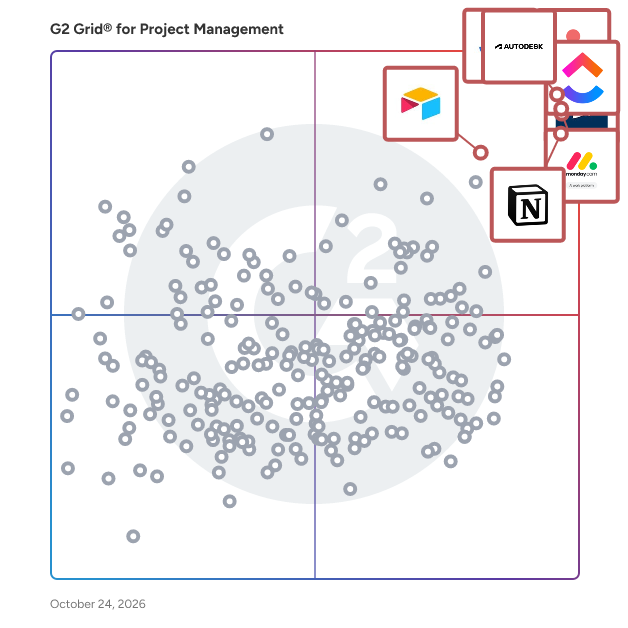
G2 Grid® for Project Management Software

G2 Grid® for Project Management Software plotting products by satisfaction and market presence

Highlighted products: Jira, Autodesk Forma (formerly Autodesk Construction Cloud), Asana, monday AI Work Platform, Smartsheet, ClickUp, Notion, and Airtable.

Underlying data: [Grid® JSON](https://www.g2.com/categories/project-management/grids.json?focus%5B%5D=jira&focus%5B%5D=autodesk-forma-formerly-autodesk-construction-cloud&focus%5B%5D=asana&focus%5B%5D=monday-com&focus%5B%5D=smartsheet&focus%5B%5D=clickup&focus%5B%5D=notion&focus%5B%5D=airtable)

OneDeck

OneDeck is a business management platform designed to help users efficiently manage their business information and data. This comprehensive solution enables organizations to publish documents, automate workflows, and gain valuable insights, ultimately streamlining operations and enhancing productivity. By integrating various functionalities into a single platform, OneDeck serves as a centralized hub for businesses looking to optimize their management processes. Targeted towards small to medium-sized enterprises, OneDeck caters to a diverse range of industries that require effective management of their operational data. The platform is particularly beneficial for teams seeking to improve collaboration and communication while simplifying their workflows. With its user-friendly interface and customizable features, OneDeck allows businesses to tailor their management solutions to meet specific requirements, making it an ideal choice for organizations aiming to enhance their efficiency. OneDeck's core features include document publishing, workflow automation, data management, and analytical insights. Each feature is designed to be intuitive and flexible, allowing users to create a management system that aligns with their unique business needs. Document publishing enables teams to share important information seamlessly, while workflow automation reduces the time spent on repetitive tasks, allowing employees to focus on more strategic initiatives. The platform's data management capabilities ensure that all business information is organized and easily accessible, promoting informed decision-making. Additionally, OneDeck provides analytical insights that empower users to monitor performance metrics and identify areas for improvement. By leveraging these insights, businesses can make data-driven decisions that enhance operational efficiency and drive growth. The combination of these features not only simplifies the management process but also fosters a culture of collaboration and innovation within teams. Overall, OneDeck stands out in the business management software category by offering a highly customizable and user-friendly platform that adapts to the evolving needs of organizations. Its focus on enhancing collaboration, simplifying workflows, and providing actionable insights makes it a valuable tool for businesses looking to optimize their management practices and achieve their goals.

Average Rating: 5.0/5.0

Total Reviews: 24

How Do G2 Users Rate OneDeck?

  • Has the product been a good partner in doing business?: 9.7/10 (Category avg: 8.9/10)
  • Planning: 10.0/10 (Category avg: 8.8/10)
  • Creation & Assignment: 10.0/10 (Category avg: 8.9/10)
  • Resource Allocation: 10.0/10 (Category avg: 8.4/10)

Who Is the Company Behind OneDeck?

Who Uses This Product?

  • Top Industries: Facilities Services
  • Company Size: 96% Small, 4% Medium

What Do G2 Reviewers Say About OneDeck?

AI-generated summary from verified user reviews

Pros
  • Users value the intuitive task management of OneDeck, enhancing workflow efficiency and overall organization.
  • Users appreciate the ease of use of OneDeck, finding it intuitive and efficient for daily operations.
  • Users appreciate the excellent organization of OneDeck, enhancing collaboration and efficiency across various projects and tasks.
  • Users commend the fast and efficient customer service of OneDeck, enhancing their overall experience with the platform.
  • Users value the ease of use and efficiency of OneDeck, enhancing project management and customer service experience.
Cons
  • Users feel limited by the lack of essential features like user flow visualization and direct payment integrations.
  • Users find OneDeck to be expensive, especially since essential features require purchasing a higher-tier plan.
  • Users desire more integration options, noting reliance on additional tools for essential functions.
  • Users desire more integrations with essential tools, as the lack complicates processes and workflows.
  • Users wish for limited integrations with other tools, finding it less convenient but not critical to usage.

What Are Recent G2 Reviews of OneDeck?

SmartCore

SmartCore is a comprehensive, web-based Project Portfolio Management (PPM) solution designed to streamline the entire project lifecycle—from initial idea capture to benefits realization. It offers a consolidated view of programs and projects, enabling users to drill down into any data item for enhanced understanding. With tools for creating, updating, and tracking plans, milestones, and resources, SmartCore ensures projects are delivered on time and within budget. Its intuitive dashboards and intelligent workflows facilitate agile, waterfall, and hybrid project methodologies, promoting efficient collaboration and decision-making. Key Features and Functionality: - Program and Project Management: Manage the entire project lifecycle with analytics, workflows, and toolsets to deliver projects on time and within budget. - Portfolio Management: Analyze, select, prioritize, and manage programs and projects in alignment with strategic objectives and delivery capacity. - Resource Management: Gain control over resources and their utilization using intuitive dashboards and intelligent skills matching capabilities. - Agile Delivery: Support agile, waterfall, and hybrid project methodologies with configured views and workflows for cross-functional teams. - Process Management: Streamline processes with intelligent workflows that connect teams and systems, aligning communications and boosting productivity. - Risk Management: Identify, evaluate, prioritize, and escalate risks and issues across the portfolio to improve visibility and resolution. Primary Value and User Solutions: SmartCore addresses the complexities of managing multiple projects and resources by providing a unified platform that enhances visibility, collaboration, and efficiency. It enables organizations to make informed decisions with real-time data, optimize resource allocation, and align projects with strategic goals. By integrating various project management aspects into a single solution, SmartCore reduces administrative overhead, minimizes risks, and ensures projects are delivered successfully, thereby maximizing return on investment.

Average Rating: 4.3/5.0

Total Reviews: 18

How Do G2 Users Rate SmartCore?

  • Has the product been a good partner in doing business?: 9.6/10 (Category avg: 8.9/10)

Who Is the Company Behind SmartCore?

Who Uses This Product?

  • Company Size: 47% Medium, 32% Small

What Do G2 Reviewers Say About SmartCore?

AI-generated summary from verified user reviews

Pros
  • Users find SmartCore to provide ease of use, simplifying tasks and enhancing efficiency across multiple applications.
  • Users find SmartCore's implementation very easy, appreciating its user-friendly interface for multiple applications.
  • Users find SmartCore's intuitive user interface accessible, making it easy for everyone to navigate.
  • Users value the real-time collaboration in SmartCore, enhancing efficiency and ease of use for all team members.
  • Users value the seamless integration of SmartCore, enhancing compatibility and security across various smart devices.
Cons
  • Users face integration difficulties, such as connection drops and inconsistent voice assistant functionality, impacting overall experience.
  • Users struggle with the internet dependence of SmartCore, as it ceases to function without a stable connection.
  • Users express concern over high pricing, suggesting it hinders broader adoption of SmartCore.
  • Users report syncing issues with devices, leading to inconsistent performance and frustration during usage.

What Are Recent G2 Reviews of SmartCore?

IBM Targetprocess

IBM Targetprocess, is a platform for enterprise agile planning (EAP) and strategic portfolio management (SPM) solutions that allows business and technology planners at all levels to dynamically plan and manage work, resources, investments, programs, and portfolios while ensuring continuous alignment to the enterprise strategy in a single source of truth. IBM Targetprocess is a platform for enterprise agile planning (EAP) and strategic portfolio management (SPM) solutions that allows business and technology planners at all levels to dynamically plan and manage work, resources, investments, programs, and portfolios while ensuring continuous alignment to the enterprise strategy in a single source of truth. The combination of flexible architecture and Solutions Library helps to ensure the fastest time to value for every solution. IBM Targetprocess integrates directly with the financial management platform to provide financial insights into labor allocations, labor capitalization, and labor forecasts to improve how a company measures, plans, and invests in their workforce. Solutions: IBM Targetprocess' solutions-led strategy to make Enterprise Agile easier, allowing teams to take a building-block style approach to their agile transformation. Strategic planning solutions allow business leaders to capture strategy and OKRs in a single source of truth, and even update priorities with confidence that portfolio, product managers, and even autonomous Agile teams will see and align their work to the new priorities. Resource Management solutions allow portfolio and product teams to plan and forecast capacity and dynamically manage resources while minimizing risks and optimizing resource utilization. The Portfolio budgeting solutions enabled by IBM Targetprocess partners financial teams with product and portfolio managers to enable a shift to continuous product funding, and Program Management solutions ensure the successful execution of Agile programs across hybrid and strategic portfolios. Strategic Planning: Align work, labor, and investments to the strategic objectives of the business and maximize execution. • Capture and communicate corporate objectives in a persistent tool visible by the entire organization. • Link specific elements of execution to strategic objectives (i.e. initiatives, epics, features, teams, budgets, etc.). • View the split between Run-the-Business and Change-the-Business goals and pivot investments. • Easily track and view progress of strategic objectives. Portfolio Budgeting: Align with finance as you shift from annual funding of projects to continuous product funding. • View portfolio totals, actuals, OpEx, and CapEx, budgeted costs, and labor and non-labor costs in one place. • One source of truth to view portfolio budgets and their initiatives. • View the split between labor and non-labor actuals on a monthly basis. • Quickly change Funded costs and labor/non-labor costs in the initiative breakdown. Resource Management: Optimize resources, capacity, and demand to reduce risk and maximize utilization of headcount. • Monitor the impact of changes in real-time, with multiple views of reports to minimize inefficiency and overutilization. • Dashboards allow optimization of incoming demand against capacity. • Connect resource bill rates, team rates, and blended rates and utilization with automatic cost forecasting. Program Management: Digitize and automate quarterly business and program increment planning. • Seamlessly setup PI Planning with connected backlogs for Portfolio, Product, and Teams. • Visualize key metrics and flow of value with Flow metrics in a customizable dashboard. • Execute confidently by easily tracking progress in real-time, quickly identifying dependencies, and adapting to changes through the Program Board. Market Differentiators: - Flexible architecture: Targetprocess flexible architecture adapts to your organizations operating models – no matter how unique. - Time to value: Targetprocess Solutions Library minimizes administrative overhead and delivers rapid time to value for every solution. - Holistic financials: Targetprocess and IBM Apptio provide visibility to labor and non-labor costs for planning and managing investments.

Average Rating: 4.3/5.0

Total Reviews: 236

How Do G2 Users Rate IBM Targetprocess?

  • Has the product been a good partner in doing business?: 9.0/10 (Category avg: 8.9/10)
  • Planning: 7.6/10 (Category avg: 8.8/10)
  • Creation & Assignment: 8.5/10 (Category avg: 8.9/10)
  • Resource Allocation: 7.5/10 (Category avg: 8.4/10)

Who Is the Company Behind IBM Targetprocess?

Who Uses This Product?

  • Who Uses This: Software Developer
  • Top Industries: Computer Software, Information Technology and Services
  • Company Size: 42% Medium, 35% Small

What Do G2 Reviewers Say About IBM Targetprocess?

AI-generated summary from verified user reviews

Pros
  • Users value the clear visibility across all work and teams, facilitating better coordination and project management.
  • Users appreciate the flexibility of IBM Targetprocess, as it adapts well to various frameworks and organizational needs.
  • Users value the clear visibility across all work and teams, enhancing coordination and strategic decision-making.
  • Users value the clear visibility across all work and teams, enhancing coordination and project management efficiency.
  • Users commend the seamless team collaboration of IBM Targetprocess, enhancing communication and project tracking effectively.
Cons
  • Users experience a challenging learning curve due to lack of clear documentation and insufficient training resources.
  • Users find the learning difficulty problematic due to unclear documentation and inadequate training resources, hindering best practices.
  • Users find the complexity of IBM Targetprocess challenging, particularly during setup and navigation in large implementations.
  • Users find the difficult navigation in IBM Targetprocess frustrating, hindering their ability to easily access information.
  • Users struggle with navigation difficulty in IBM Targetprocess, finding it hard to locate essential features and information.

What Are Recent G2 Reviews of IBM Targetprocess?

What Are G2 Users Discussing About IBM Targetprocess?

AI can help you find the answers. G2 helps you trust them.

Connect G2 to Claude or ChatGPT for answers grounded in G2's trusted reviews, comparisons, and pricing from real user insights.

How it works

Mysaasplace

With MySaaSPlace you can hire a complete Integrated Project Management (GIP) by paying an annual or monthly fee, without installing programs, or maintain servers, all over the Internet, from PCs, MACc or mobile phones with Windows Phone.

Average Rating: 4.1/5.0

Total Reviews: 14

How Do G2 Users Rate Mysaasplace?

  • Has the product been a good partner in doing business?: 9.7/10 (Category avg: 8.9/10)
  • Planning: 9.2/10 (Category avg: 8.8/10)
  • Creation & Assignment: 8.8/10 (Category avg: 8.9/10)
  • Resource Allocation: 8.8/10 (Category avg: 8.4/10)

Who Is the Company Behind Mysaasplace?

  • Seller: MySaaSPlace
  • Year Founded: 1994
  • HQ Location: San Sebastian, Pais Vasco, Spain
  • Twitter: @mysaasplace
    1,673 Twitter followers
  • LinkedIn® Page: www.linkedin.com
    1 employees on LinkedIn®

Who Uses This Product?

  • Company Size: 67% Medium, 40% Small

What Are Recent G2 Reviews of Mysaasplace?

Monograph

Monograph is a firm management platform built specifically for architecture and engineering firms. Bring your projects, teams, and finances together in one connected platform so you can spend less time managing disconnected tools and spreadsheets and get a clearer view of what’s happening across your firm. Built around how A&E firms actually work, Monograph connects the full project lifecycle, from building your pipeline and planning projects to managing resources, getting paid, and understanding firm performance. With Monograph, firms can: • Manage opportunities, build proposals, and forecast upcoming work • Plan project budgets, phases, schedules, and deliverables • Staff projects, understand team capacity, and balance workloads • Track time, expenses, utilization, and project progress • Streamline invoicing, payments, and project accounting • Monitor project profitability and firm performance with connected reporting The impact goes beyond saving time. Firms using Monograph have seen $25K more revenue per employee, 44% less budget overage, and 2.3x faster time to payment. Trusted by 16,000+ A&E professionals, Monograph helps firms run with greater visibility, make better decisions, and stay ahead of what’s next.

Average Rating: 4.5/5.0

Total Reviews: 35

How Do G2 Users Rate Monograph?

  • Has the product been a good partner in doing business?: 8.4/10 (Category avg: 8.9/10)
  • Planning: 7.8/10 (Category avg: 8.8/10)
  • Creation & Assignment: 10.0/10 (Category avg: 8.9/10)
  • Resource Allocation: 9.4/10 (Category avg: 8.4/10)

Who Is the Company Behind Monograph?

  • Seller: Monograph
  • Company Website:
  • Year Founded: 2019
  • HQ Location: San Francisco , US
  • LinkedIn® Page: www.linkedin.com
    114 employees on LinkedIn®

Who Uses This Product?

  • Top Industries: Architecture & Planning
  • Company Size: 80% Small, 6% Large

What Do G2 Reviewers Say About Monograph?

AI-generated summary from verified user reviews

Pros
  • Users appreciate the ease of use of Monograph, benefiting from its user-friendly interface and all-in-one access.
  • Users value the effective time tracking that Monograph provides, ensuring projects stay on schedule and within budget.
  • Users commend the easy setup of Monograph, finding it user-friendly and efficient for managing various tasks.
  • Users value the visual project tracking in Monograph, which provides clear insights on team capacity and budgeting.
  • Users value the time-saving capabilities of Monograph, streamlining invoicing and project management for efficiency.
Cons
  • Users express a desire for missing features like enhanced visuals, easier exports, and better project tracking in Monograph.
  • Users express frustration with limited report customization in Monograph, finding it difficult to extract and visualize data effectively.
  • Users report frequent date issues causing project info display errors and complicating the tracking of active tasks.
  • Users feel Monograph has limited features, lacking in visual data representation and customization options for reports.
  • Users face challenges with reporting issues, including limitations in custom reports and difficulties finding necessary information.

What Are Recent G2 Reviews of Monograph?

What Are G2 Users Discussing About Monograph?

Precursive

Turn services delivery into your growth engine — the AI-powered PSA platform, 100% native to Salesforce. Precursive helps professional services teams and delivery leaders connect demand with delivery, improve execution and grow recurring revenue. Run your services operation on Salesforce - no integration gaps, no silos -- from bookings to revenue recognition. Forecast demand and capacity, resource the right people with AI and skills-matching, and deliver standardized work that accelerates time-to-value. Track budget, cost and margin in real time, with AI alerts the moment overrun appears. Give the board visibility on services P&L - turn services from a cost center to a profit center. ✨ BRING ZEN TO SERVICES CHAOS WITH AI Precursive AI agents spot delivery risk and margin erosion early, powers smarter project management, and surfaces upsell opportunities across sales, services and CS. BOARD-READY SERVICES P&L See services bookings, revenue, cost and margin in real-time dashboards. Forecast revenue and rev rec, keep customers on track with a collaborative workspace, and bill accurately to protect cashflow - all 100% native to Salesforce CAPABILITIES • Services sales • Demand & capacity forecasting • Project & resource management • Utilization tracking • Customer collaboration • Revenue, rev rec & billing • Precursive AI for risk & margin insights PROVEN RESULTS • $1M saving, 85% on-time delivery - Dealertrack • $500K saved, zero staff cuts - Relias • 20% revenue growth - IT Consultancy • EOM reconciliation cut 3 weeks to 3 days

Average Rating: 4.2/5.0

Total Reviews: 64

How Do G2 Users Rate Precursive?

  • Has the product been a good partner in doing business?: 8.9/10 (Category avg: 8.9/10)
  • Planning: 8.3/10 (Category avg: 8.8/10)
  • Creation & Assignment: 9.0/10 (Category avg: 8.9/10)
  • Resource Allocation: 8.5/10 (Category avg: 8.4/10)

Who Is the Company Behind Precursive?

  • Seller: Precursive
  • Year Founded: 2011
  • HQ Location: London
  • Twitter: @precursive
    2,598 Twitter followers
  • LinkedIn® Page: www.linkedin.com
    36 employees on LinkedIn®

Who Uses This Product?

  • Top Industries: Computer Software, Information Technology and Services
  • Company Size: 73% Medium, 16% Small

What Do G2 Reviewers Say About Precursive?

AI-generated summary from verified user reviews

Pros
  • Users commend the exceptional customer support from Precursive, appreciating their responsiveness and commitment to success.
  • Users appreciate the ease of use of Precursive, enjoying seamless access and intuitive navigation within Salesforce.
  • Users appreciate the seamless integration of Precursive with SFDC, enhancing project management with minimal learning curve.
  • Users admire the user-friendly design of Precursive, finding it intuitive and easy to navigate within Salesforce.
  • Users find Precursive incredibly intuitive, enjoying the seamless integration with Salesforce and efficient project management tools.
Cons
  • Users face access limitations with Precursive, experiencing challenges with editing permissions and mobile functionality.
  • Users find the limited reporting capabilities frustrating, wishing for more flexibility and ease of access to data.
  • Users experience reporting issues due to restrictive capabilities and inefficient workflows, impacting overall efficiency with data access.
  • Users find reporting limitations restrictive, feeling the need for multi-object data visibility and simpler navigation.
  • Users find the app functionality lacking, with too many clicks and limited mobile experience hindering usability.

What Are Recent G2 Reviews of Precursive?

What Are G2 Users Discussing About Precursive?

Planview AdaptiveWork

Planview® AdaptiveWork: Adapt and Deliver with Confidence Any Portfolio, Any Project, Any Team. Planview AdaptiveWork (formerly Clarizen) is a versatile portfolio, project, and work management software embedded with practical AI capabilities that adapts to how you operate so you can proactively plan and deliver any type and size of portfolio, project, and work. Whether you manage IT initiatives, business projects, R&D programs, or professional services, AdaptiveWork provides ready-to-use capabilities whether you’re just starting, expanding and growing, or ready to scale into a full enterprise-wide strategy execution machine. Planview Anvi™, the AI for Connected Work, delivers expert-level guidance and intelligent actions powered by deep domain expertise and contextual data intelligence across your work ecosystem. This AI-driven capability enables strategic work execution by understanding your unique business context, helping organizations make more informed decisions and optimize their workflows. Built for (Nearly) Any Project Type Examples on projects include: - IT Portfolios - Business Projects - R&D Programs - Professional Services Key Capabilities Ready on Day One - Artificial Intelligence - Portfolio Management - Project Management - Resource Planning - Team Collaboration Quick to Start, Ready to Adapt Start with out-of-box templates and workflows, then adjust as needed. AdaptiveWork grows with your organization while maintaining consistency across all portfolios.

Average Rating: 4.1/5.0

Total Reviews: 521

How Do G2 Users Rate Planview AdaptiveWork?

  • Has the product been a good partner in doing business?: 8.3/10 (Category avg: 8.9/10)
  • Planning: 9.2/10 (Category avg: 8.8/10)
  • Creation & Assignment: 9.2/10 (Category avg: 8.9/10)
  • Resource Allocation: 8.9/10 (Category avg: 8.4/10)

Who Is the Company Behind Planview AdaptiveWork?

  • Seller: Planview
  • Company Website:
  • Year Founded: 1989
  • HQ Location: Austin, TX
  • Twitter: @Planview
    3,049 Twitter followers
  • LinkedIn® Page: www.linkedin.com
    1,834 employees on LinkedIn®

Who Uses This Product?

  • Who Uses This: Project Manager, Senior Project Manager
  • Top Industries: Information Technology and Services, Computer Software
  • Company Size: 49% Medium, 41% Large

What Do G2 Reviewers Say About Planview AdaptiveWork?

AI-generated summary from verified user reviews

Pros
  • Users value the easy management features of Planview AdaptiveWork, allowing seamless tracking and customization of projects.
  • Users appreciate the customizability and ease of use in Project Management with Planview AdaptiveWork for seamless tracking.
  • Users value the high customizability of Planview AdaptiveWork, allowing easy creation of workflows without coding skills.
  • Users value the extensive customization options of Planview AdaptiveWork, enabling easy creation of tailored workflows and views.
  • Users love the ease of use in Planview AdaptiveWork, making customization and workflow creation accessible to everyone.
Cons
  • Users face significant access limitations with Planview AdaptiveWork, often having to rely on external processes and lacking support.
  • Users face subpar app functionality with many processes needing to be completed externally before entering the tool.
  • Users find that change adjustments are problematic, with many processes needing to be handled outside the tool.
  • Users find that inadequate tools lead to reliance on external processes, hampering efficiency and support experiences.
  • Users find the manual data entry troublesome as many processes must be done outside the tool before entry.

What Are Recent G2 Reviews of Planview AdaptiveWork?

What Are G2 Users Discussing About Planview AdaptiveWork?

Planview ProjectPlace

Planview ProjectPlace is a collaborative work management software solution that helps project management offices (PMOs) and delivery teams plan, execute, and report on project work in a single workspace. It covers the full project delivery lifecycle, from structured intake through execution, team collaboration, and portfolio reporting, and is designed for project managers and teams across any business function, not only IT. ProjectPlace brings project plans, team boards, documents, and communication into one workspace, so project managers and stakeholders work from the same data. A formal business request process replaces ad hoc intake, with every request categorized, sized, and routed for approval before work begins. External collaborators, such as vendors, contractors, and partners, can also be invited into individual workspaces with scoped access. Main capabilities include: • Gantt-based project planning with milestones, activities, resources, and schedule templates, alongside Kanban boards for team-level task management linked directly to plan activities • Structured business request intake with categorization, sizing, and approval routing, plus project-level financial plans that capture and baseline estimated costs and benefits • A single repository for change requests, risks, and issues that consolidates automatically into project status reports • Document management with version control, review workflows, and e-signature integration, along with in-workspace collaboration tools including comments, mentions, and real-time notifications • Project, portfolio, and personal dashboards, a workload view across account members, and AI-assisted reporting through Planview Anvi, including automated risk summaries and sentiment analysis of project status updates ProjectPlace connects to Planview Portfolios and Planview PPM Pro for organizations that also manage a broader project portfolio, and integrates with commonly used collaboration, document management, and productivity tools, including Microsoft Teams, Slack, Microsoft SharePoint, Google Drive, and Microsoft Power BI. It is available on iOS and Android with offline access, supports eight languages, and runs on ISO-27001 certified infrastructure with 256-bit AES encryption, single sign-on, and role-based access controls.

Average Rating: 4.2/5.0

Total Reviews: 30

How Do G2 Users Rate Planview ProjectPlace?

  • Has the product been a good partner in doing business?: 9.2/10 (Category avg: 8.9/10)
  • Planning: 9.2/10 (Category avg: 8.8/10)
  • Creation & Assignment: 8.6/10 (Category avg: 8.9/10)

Who Is the Company Behind Planview ProjectPlace?

  • Seller: Planview
  • Year Founded: 1989
  • HQ Location: Austin, TX
  • Twitter: @Planview
    3,049 Twitter followers
  • LinkedIn® Page: www.linkedin.com
    1,834 employees on LinkedIn®

Who Uses This Product?

  • Top Industries: Information Technology and Services
  • Company Size: 39% Medium, 35% Large

What Are Recent G2 Reviews of Planview ProjectPlace?

What Are G2 Users Discussing About Planview ProjectPlace?

Avaza

Avaza provides an integrated suite of functionality for running your client-focused business. This includes Project Management & Collaboration, Team Chat, Resource Scheduling, Time Tracking, Expense Management, Quoting & Invoicing. Each of these modules can be used together or independently to suit a wide range of businesses. Avaza is particularly useful for consulting & professional services companies that need all these functions, and enjoy having a single source of truth & powerful reporting. Avaza is built in the cloud and available on any device.

Average Rating: 4.5/5.0

Total Reviews: 376

How Do G2 Users Rate Avaza?

  • Has the product been a good partner in doing business?: 9.3/10 (Category avg: 8.9/10)
  • Planning: 8.4/10 (Category avg: 8.8/10)
  • Creation & Assignment: 9.0/10 (Category avg: 8.9/10)
  • Resource Allocation: 8.1/10 (Category avg: 8.4/10)

Who Is the Company Behind Avaza?

  • Seller: Avaza Software
  • Company Website:
  • Year Founded: 2014
  • HQ Location: Neutral Bay
  • Twitter: @AvazaHQ
    1,038 Twitter followers
  • LinkedIn® Page: www.linkedin.com
    20 employees on LinkedIn®

Who Uses This Product?

  • Who Uses This: Owner, Project Manager
  • Top Industries: Marketing and Advertising, Information Technology and Services
  • Company Size: 74% Small, 22% Medium

What Do G2 Reviewers Say About Avaza?

AI-generated summary from verified user reviews

Pros
  • Users find Avaza easy to use, enabling collaboration and clarity while managing multiple projects effectively.
  • Users appreciate the effective time tracking in Avaza, enhancing team utilization insights and simplifying budget management.
  • Users praise the world-class customer support of Avaza for its quick responses and effective issue resolution.
  • Users praise Avaza for its time-saving features, facilitating effective team collaboration and project management.
  • Users love Avaza's intuitive user interface, appreciating its simplicity and powerful functionality for business management.
Cons
  • Users find the limited features of Avaza restrict customization and complicate project management and reporting.
  • Users find the missing features in Avaza limiting, particularly regarding time entry grouping and sub-task management.
  • Users find limited customization options frustrating, especially for invoices, tasks, and project management features.
  • Users find reporting challenging in Avaza due to complexity and difficulties in pulling relevant data.
  • Users face challenges with reporting issues due to lack of customization and complex data pulls in Avaza.

What Are Recent G2 Reviews of Avaza?

What Are G2 Users Discussing About Avaza?

ActiveCollab

ActiveCollab is the work management platform for agencies and service businesses — from the first task to the paid invoice, in one place. Plan projects in List, Kanban or Gantt view, track time on every task with a built-in stopwatch, manage workload and capacity, and turn tracked time into estimates, invoices and profitability reports. Budgets, expenses, billable rates and online payments (Stripe, PayPal) are built in — no bolt-ons. Bring clients inside: client seats are unlimited and free on every plan, with their own view of progress, files and approvals, so feedback stops living in email threads. Connect the tools you use — Google Drive, Dropbox, Slack, Zapier, QuickBooks — and let your AI assistant work in your workspace through the built-in MCP server. Available in the cloud or self-hosted on your own server. 14-day free trial, no credit card required.

Average Rating: 4.2/5.0

Total Reviews: 93

How Do G2 Users Rate ActiveCollab?

  • Has the product been a good partner in doing business?: 8.6/10 (Category avg: 8.9/10)
  • Planning: 8.5/10 (Category avg: 8.8/10)
  • Creation & Assignment: 8.5/10 (Category avg: 8.9/10)
  • Resource Allocation: 8.4/10 (Category avg: 8.4/10)

Who Is the Company Behind ActiveCollab?

  • Seller: Active Collab
  • Year Founded: 2007
  • HQ Location: Norfolk, VA
  • Twitter: @activecollab
    19,644 Twitter followers
  • LinkedIn® Page: www.linkedin.com
    12 employees on LinkedIn®

Who Uses This Product?

  • Who Uses This: Project Manager
  • Top Industries: Marketing and Advertising, Computer Software
  • Company Size: 68% Small, 26% Medium

What Do G2 Reviewers Say About ActiveCollab?

AI-generated summary from verified user reviews

Pros
  • Users appreciate the automation features of ActiveCollab, simplifying task management and enhancing team collaboration.
  • Users love the comprehensive features of ActiveCollab, making team management and integration effortless.
  • Users find ActiveCollab to be easy to use and implement, benefiting from its seamless integration and feature-rich platform.
  • Users find Ease of Management in ActiveCollab, praising its user-friendly implementation and seamless integration with Hubstaff.
  • Users find ActiveCollab to be very easy to use, facilitating smooth implementation and seamless integration with Hubstaff.
Cons
  • Users find the bulk file deletion process tedious, as selecting and removing old files individually is frustrating.
  • Users find the deletion difficulty frustrating, as bulk selection for deleting old files is not available.
  • Users find the limited functionality of ActiveCollab cumbersome, struggling with bulk file deletion capabilities.
  • Users find the limited options for bulk file deletion frustrating, as selecting files individually is time-consuming.
  • Users find the limited storage problematic, as deleting old files requires tedious individual selection.

What Are Recent G2 Reviews of ActiveCollab?

What Are G2 Users Discussing About ActiveCollab?

Swatle

Swatle: The Modern Work Management Tool for Fast Paced Startups Swatle is designed to streamline work for dynamic startup teams, enabling seamless communication, work management, and organization all in real time with the power of AI. With Swatle, you can: Manage portfolios, projects, and tasks effortlessly to stay organized and prioritize effectively. Eliminate delays with actionable reminders for incomplete tasks before their due dates. Loved by over 200+ brands, Swatle is a favorite among product based companies. Its conversational task creation and AI-assisted task management reduce task completion time by 50% and minimize miscommunication by 90%. Why Choose Swatle? Swatle stands out with its innovative features that redefine work management: 1. Conversational Task Creation – Create tasks naturally and intuitively. 2. AI-Assisted Task Management – Get smart recommendations for faster execution. 3. Data Visualization Reports – Gain insights into performance and progress. 4. Real-Time Communication – Keep everyone connected, anytime, anywhere. 5. Automated Reminders – Never miss a deadline again. Swatle also includes AI-powered time estimation, helping teams plan and allocate time efficiently for every task. Elevate your team's productivity and collaboration with Swatle—the tool that keeps your fast-paced startup ahead of the curve!

Average Rating: 4.9/5.0

Total Reviews: 10

How Do G2 Users Rate Swatle?

  • Has the product been a good partner in doing business?: 10.0/10 (Category avg: 8.9/10)
  • Planning: 9.5/10 (Category avg: 8.8/10)
  • Creation & Assignment: 9.7/10 (Category avg: 8.9/10)
  • Resource Allocation: 9.7/10 (Category avg: 8.4/10)

Who Is the Company Behind Swatle?

  • Seller: Swatle
  • Year Founded: 2024
  • HQ Location: Chennai, IN
  • LinkedIn® Page: www.linkedin.com
    2 employees on LinkedIn®

Who Uses This Product?

  • Top Industries: Marketing and Advertising
  • Company Size: 50% Small, 42% Medium

What Do G2 Reviewers Say About Swatle?

AI-generated summary from verified user reviews

Pros
  • Users find Swatle's easy project management features valuable for effective communication and client portfolio management.
  • Users appreciate the time-saving features of Swatle, streamlining task management and enhancing productivity through real-time messaging.
  • Users value the real-time updates from Swatle, simplifying project management and enhancing team communication.
  • Users find task assignment efficiency enhanced in Swatle, allowing direct creation from inbox for improved client management.
  • Users value the efficient task management of Swatle, simplifying explanations and streamlining task creation directly from Inbox.

What Are Recent G2 Reviews of Swatle?

Odoo Project Management

Manage projects and offer efficient customer service with Odoo Project. Odoo Project enables the real-time management of projects. From the signing of the contract to the final billing, teams are assisted in completing their tasks with Odoo's efficient planning tool. Communication: Thanks to Odoo Project's open chat feature, teams can communicate directly with customers, share documents, feedback, and issues. In addition, Odoo Project offers email integration. Planning: Users can prioritize different tasks. The application also uses Gantt charts, the Kanban view, and an updated the calendars. This helps companies to schedule different projects, subdivide them into tasks and do forecasting. Customer services: Notify customers of changes and receive their feedback directly by configuring automatic emails. Access their bills and invoices online. Sales integration: Odoo Project is also fully integrated with the Odoo Sales app. This enables the sales users to invoice customers based on products ordered and time spent on tasks or issues. As a complement to the project management app, Odoo Timesheet app supports workflows and the productivity forecast. It is fast, secure and works offline. Available on Chrome, employees can sign in/out and encode their work. Managers can validate the work before invoicing.

Average Rating: 4.4/5.0

Total Reviews: 16

How Do G2 Users Rate Odoo Project Management?

  • Has the product been a good partner in doing business?: 10.0/10 (Category avg: 8.9/10)
  • Planning: 9.2/10 (Category avg: 8.8/10)
  • Creation & Assignment: 10.0/10 (Category avg: 8.9/10)
  • Resource Allocation: 9.2/10 (Category avg: 8.4/10)

Who Is the Company Behind Odoo Project Management?

  • Seller: Odoo
  • Year Founded: 2005
  • HQ Location: Brussels, Belgium
  • Twitter: @Odoo
    55,391 Twitter followers
  • LinkedIn® Page: www.linkedin.com
    8,815 employees on LinkedIn®

Who Uses This Product?

  • Top Industries: Information Technology and Services
  • Company Size: 53% Small, 47% Medium

What Are Recent G2 Reviews of Odoo Project Management?

Fluid

Fluid is the all-in-one PMO platform to manage your projects, programs, portfolio’s and resources in one unified space. Fluid provides a single solution to manage every aspect of your projects from ideation through to delivery, execution, benefits and closure. • Automated Reporting • Executive Portfolio Dashboards • Resource Capacity & Utilization • Accurate Project Cost Tracking • Unified Project Management Workspace (Health, Scheduling, Risks, Tasks etc.) • AI Governance & Insights

Average Rating: 4.7/5.0

Total Reviews: 28

How Do G2 Users Rate Fluid?

  • Has the product been a good partner in doing business?: 10.0/10 (Category avg: 8.9/10)
  • Planning: 8.8/10 (Category avg: 8.8/10)
  • Creation & Assignment: 9.2/10 (Category avg: 8.9/10)
  • Resource Allocation: 8.5/10 (Category avg: 8.4/10)

Who Is the Company Behind Fluid?

  • Seller: Fluid
  • Year Founded: 2014
  • HQ Location: London, GB
  • Twitter: @fluidworkapp
    5 Twitter followers
  • LinkedIn® Page: www.linkedin.com
    15 employees on LinkedIn®

Who Uses This Product?

  • Top Industries: Information Technology and Services, Financial Services
  • Company Size: 50% Small, 25% Medium

What Do G2 Reviewers Say About Fluid?

AI-generated summary from verified user reviews

Pros
  • Users value the responsive customer support of Fluid, providing reliable assistance and partnership for project success.
  • Users value the effective communication features of Fluid, facilitating seamless project reporting and collaboration.
  • Users find daily use effortless with consolidated dashboards, streamlining project reporting and maintenance effectively.
  • Users commend the effortless project reporting with Fluid, benefiting from consolidated dashboards that streamline information access.
  • Users value the effortless project reporting with Fluid, thanks to consolidated dashboards providing essential information at a glance.
Cons
  • Users find the meeting functionality lacking, particularly with integration for Teams and Outlook scheduling.
  • Users find the email integration lacking, wishing for better setup options with Teams and Outlook scheduling.
  • Users face integration issues with Fluid, particularly in meeting setups with Teams and Outlook scheduling.
  • Users find the lack of integration with Teams affects meeting setup and scheduling functionality negatively.
  • Users find the limited integrations of Fluid hinder meeting setup and scheduling with Teams and Outlook.

What Are Recent G2 Reviews of Fluid?

Paymo

Paymo is a complete time-tracking, project-management, and invoicing & payments solution for client-focused teams of up to 20 people. From task planning to payment, Paymo helps agencies and independent professionals deliver work on time, stay profitable, and manage projects without multiple tools. It is ideal for digital, creative, and marketing agencies, consulting businesses, and architecture firms. It allows you to manage client projects and business tasks, track work time, and invoice clients from one place, wherever you are. The primary focus of the software is helping teams track work time and manage projects from start to finish: - split projects into task lists and tasks and assign them to your employees or co-workers - automatically track work time at the office via web timer or on the go via mobile apps - submit and approve timesheets - keep everyone involved in a project up to date with what's happening through discussions - create customizable static and live reports and track business performance - store all the files related to the project - so everyone can access them anytime - visualize your team's work, eliminate bottlenecks, and reduce the idle time in your projects - keep track of time spent on all computer activities and allocate that time to projects - track expenses, generate estimates and invoices for the client, and get paid online - with milestones, the team knows when major project stages are due to be completed - save projects as templates and use them when you need to create a similar project - track project and client profitability

Average Rating: 4.6/5.0

Total Reviews: 584

G2 Deal: G2 users get a 20% discount on Paymo for three months!

Paymo is a work management software dedicated to digital, creative, and marketing agencies, consulting businesses, software & engineering firms, and architecture firms. This discount for G2 users is for three months for new customers only and applies to any monthly plan.

View this exclusive G2 deal

How Do G2 Users Rate Paymo?

  • Has the product been a good partner in doing business?: 9.1/10 (Category avg: 8.9/10)
  • Planning: 8.7/10 (Category avg: 8.8/10)
  • Creation & Assignment: 9.2/10 (Category avg: 8.9/10)
  • Resource Allocation: 7.8/10 (Category avg: 8.4/10)

Who Is the Company Behind Paymo?

  • Seller: Paymo
  • Year Founded: 2008
  • HQ Location: Bihor, Romania
  • Twitter: @Paymo
    3,121 Twitter followers
  • LinkedIn® Page: www.linkedin.com
    16 employees on LinkedIn®

Who Uses This Product?

  • Who Uses This: Owner, CEO
  • Top Industries: Marketing and Advertising, Information Technology and Services
  • Company Size: 83% Small, 11% Medium

What Do G2 Reviewers Say About Paymo?

AI-generated summary from verified user reviews

Pros
  • Users appreciate the precise time tracking of Paymo, which simplifies billing and enhances productivity effortlessly.
  • Users love the intuitive interface of Paymo, which enhances productivity and simplifies time tracking and invoicing.
  • Users value the customizable and intuitive invoicing feature of Paymo, enhancing ease of billing and tracking.
  • Users appreciate the effective progress tracking in Paymo, which enhances billing and project management efficiency.
  • Users enjoy the time-saving features of Paymo, streamlining task management, invoicing, and productivity tracking effortlessly.
Cons
  • Users express frustration over poor customer support, feeling ignored and unsupported during critical issues and inquiries.
  • Users express frustration over limited recovery options for deleted tasks and inadequate customer service response times.
  • Users face significant integration issues due to lack of responsiveness from customer support, hindering overall satisfaction.
  • Users find the lack of customization in Paymo frustrating, limiting functionality compared to alternatives.
  • Users note the limited features in Paymo, particularly missing dark mode and basic reporting functionalities.

What Are Recent G2 Reviews of Paymo?

What Are G2 Users Discussing About Paymo?

Flow

Flow is an all-in-one tool that helps you coordinate all of your team’s work. It brings together your tasks, projects, timelines, files, and conversations, and integrates with your favorite tools, to help you achieve more together. Flow is available on web, desktop, ios and android. With over 2 million projects and 18 million tasks completed to date, the world's most innovative companies trust Flow to help them to get more done. Companies like TED, Shopify, Bumble, RedBull and thousands more. Teams choose Flow when spreadsheets, whiteboards and sticky notes aren’t enough, but task management apps like Todoist and Trello are too lean, and project management tools like Wrike, JIRA and Asana are overkill.

Average Rating: 4.3/5.0

Total Reviews: 54

How Do G2 Users Rate Flow?

  • Has the product been a good partner in doing business?: 8.6/10 (Category avg: 8.9/10)
  • Planning: 8.3/10 (Category avg: 8.8/10)
  • Creation & Assignment: 9.0/10 (Category avg: 8.9/10)
  • Resource Allocation: 9.4/10 (Category avg: 8.4/10)

Who Is the Company Behind Flow?

  • Seller: Flow
  • Year Founded: 2010
  • HQ Location: Victoria, British Columbia
  • Twitter: @flowapp
    3,480 Twitter followers
  • LinkedIn® Page: www.linkedin.com
    4 employees on LinkedIn®

Who Uses This Product?

  • Top Industries: Marketing and Advertising, Computer Software
  • Company Size: 64% Small, 31% Medium

What Are Recent G2 Reviews of Flow?

What Are G2 Users Discussing About Flow?

Subhransu Sahu
SS
Researched and written by Subhransu Sahu
Updated April 9, 2026