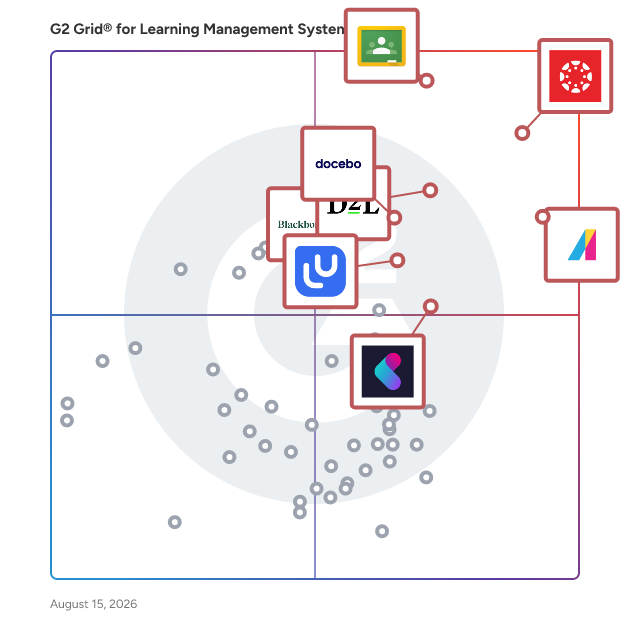
# Best Enterprise Learning Management Systems

  *By [Emma Stein](https://research.g2.com/insights/author/emma-stein)*

   Products classified in the overall Learning Management System (LMS) category are similar in many regards and help companies of all sizes solve their business problems. However, enterprise business features, pricing, setup, and installation differ from businesses of other sizes, which is why we match buyers to the right Enterprise Business Learning Management System (LMS) to fit their needs. Compare product ratings based on reviews from enterprise users or connect with one of G2&#39;s buying advisors to find the right solutions within the Enterprise Business Learning Management System (LMS) category.

In addition to qualifying for inclusion in the Learning Management Systems category, to qualify for inclusion in the Enterprise Business Learning Management Systems category, a product must have at least 10 reviews left by a reviewer from an enterprise business.


  ## How Many Learning Management Systems Products Does G2 Track?
**Total Products under this Category:** 282

  
## How Does G2 Rank Learning Management Systems Products?

**Why You Can Trust G2's Software Rankings:**

- 30 Analysts and Data Experts
- 13,700+ Authentic Reviews
- 282+ Products
- Unbiased Rankings

G2's software rankings are built on verified user reviews, rigorous moderation, and a consistent research methodology maintained by a team of analysts and data experts. Each product is measured using the same transparent criteria, with no paid placement or vendor influence. While reviews reflect real user experiences, which can be subjective, they offer valuable insight into how software performs in the hands of professionals. Together, these inputs power the G2 Score, a standardized way to compare tools within every category.

  
## Which Learning Management Systems Is Best for Your Use Case?

- **Best for Small Businesses:** [Google Classroom](https://www.g2.com/products/google-classroom/reviews)
- **Best for Mid-Market:** [Canvas LMS](https://www.g2.com/products/canvas-lms/reviews)
- **Best for Enterprise:** [Canvas LMS](https://www.g2.com/products/canvas-lms/reviews)
- **Highest User Satisfaction:** [Absorb LMS](https://www.g2.com/products/absorb-software-absorb-lms/reviews)
- **Best Free Software:** [Canvas LMS](https://www.g2.com/products/canvas-lms/reviews)

  
---

**Sponsored**

### iSpring LMS

iSpring LMS is a feature-rich platform that helps companies accelerate their business momentum through ROI-efficient training. The LMS enables the entire training cycle with clarity and consistency, from structured onboarding to continuous employee development. It helps reduce employee turnover, improve performance, and ensure that teams stay aligned, skilled, and ready to support the company’s long-term growth. iSpring LMS gives managers and trainers a simple way to organize training, guide employees through skill-building, and see exactly how their learners are progressing. Employees get a clear path to follow, and leaders get the visibility they need to support growth, maintain standards, and keep performance on track. Here are the core capabilities that make this possible: - The mirrored organizational structure reflects how your company works, so training stays aligned with roles and teams. - Specified learning tracks guide learners step by step through required courses and programs. - Detailed reporting highlights progress, deadlines, and knowledge gaps with actionable insights. - The Supervisor Dashboard gives managers instant visibility into team performance without extra admin work. - Automated workflows handle enrollments, reminders, and assignments, saving time and reducing manual tasks. - The corporate portal and newsfeed centralize updates and announcements to keep everyone aligned. - 360-Degree Reviews gather well-rounded performance feedback from peers and supervisors. - On-The-Job Training validates real-world skills with structured checklists. - Knowledge Base gives employees quick access to SOPs, product info, and internal documentation. - Development Plans build personalized growth paths that connect training to long-term skill development.


[Visit website](https://www.g2.com/external_clickthroughs/record?secure%5Bad_program%5D=ppc&amp;secure%5Bad_slot%5D=category_product_list&amp;secure%5Bcategory_id%5D=322&amp;secure%5Bdisplayable_resource_id%5D=322&amp;secure%5Bdisplayable_resource_type%5D=Category&amp;secure%5Bmedium%5D=sponsored&amp;secure%5Bplacement_reason%5D=page_category&amp;secure%5Bplacement_resource_ids%5D%5B%5D=322&amp;secure%5Bprioritized%5D=false&amp;secure%5Bproduct_id%5D=20042&amp;secure%5Bresource_id%5D=322&amp;secure%5Bresource_type%5D=Category&amp;secure%5Bsource_type%5D=category_page&amp;secure%5Bsource_url%5D=https%3A%2F%2Fwww.g2.com%2Fcategories%2Flearning-management-system-lms%3Fpage%3D9&amp;secure%5Btoken%5D=321dfb4c487c9a946cea8a96c1ac861d79b93bb54427f7d8d4f6e3cb2ba04fd0&amp;secure%5Burl%5D=https%3A%2F%2Fwww.ispring.com%2F%3Futm_source%3Dg2%26utm_medium%3Dpartner%26utm_campaign%3Dlearning_management_system_paid_clicks&amp;secure%5Burl_type%5D=custom_url)

---

  ## What Are the Top-Rated Learning Management Systems Products in 2026?
### 1. [Canvas LMS](https://www.g2.com/products/canvas-lms/reviews)
  Canvas by Instructure is a versatile, cloud-based learning management system (LMS) designed to transform online learning across every stage of education. Since its launch in 2011, Canvas has become the foundational hub for digital classrooms, empowering institutions to deliver high-quality instruction from K-12 to Corporate Training. Trusted by millions worldwide, Canvas remains the #1 educational software and the core of the Instructure ecosystem. Comprehensive Instructor Tools for Every Environment Canvas is built with flexibility at its core, allowing organizations to tailor the platform to their unique goals. Whether you are managing complex curricula in Higher Education or streamlining Primary/Secondary Education (K-12), our robust instructor tools ensure that every learning experience is impactful and learner-centered. From educational initiatives to professional development, Canvas adapts to your mission by providing a seamless interface to: -Create and manage online courses and high-quality learning materials. -Deliver assignments, quizzes, and assessments that meet diverse learning standards. -Enable collaboration through integrated discussions and messaging to boost student engagement. -Track student progress and learning outcomes through real-time data. -Integrate with third-party education tools, with over 900+ partners to choose from. Empowering Success Through Virtual Learning The platform provides a scalable, secure environment for virtual learning that goes beyond the traditional classroom. By combining course management with advanced assessments and grading features, Canvas reduces administrative friction and allows educators to focus on what matters most: student success. Key Features &amp; Benefits Intuitive Design: An easy-to-use interface reduces overhead and ensures learners stay focused on their goals. Mobile Accessibility: The top-rated Canvas mobile app keeps learners connected, even offline. Advanced Analytics: Gain actionable insights to monitor student engagement and improve institutional outcomes. Scalable Ecosystem: With 500+ third-party integrations, Canvas connects with your existing tech stack to build a truly dynamic learning environment. Industries We Serve Canvas by Instructure is the trusted partner for organizations aiming to unlock the full potential of their learners across: -Higher Education -Primary/Secondary Education (K-12) -Corporate Training


  **Average Rating:** 4.5/5.0
  **Total Reviews:** 1,730
**How Do G2 Users Rate Canvas LMS?**

- **Ease of Use:** 8.5/10 (Category avg: 8.7/10)
- **Has the product been a good partner in doing business?:** 8.6/10 (Category avg: 9.1/10)
- **Quality of Support:** 8.5/10 (Category avg: 8.8/10)
- **Ease of Admin:** 8.3/10 (Category avg: 8.7/10)

**Who Is the Company Behind Canvas LMS?**

- **Seller:** [Instructure](https://www.g2.com/sellers/instructure)
- **Company Website:** https://www.instructure.com
- **Year Founded:** 2008
- **HQ Location:** Salt Lake City, Utah
- **Twitter:** @Instructure (12,582 Twitter followers)
- **LinkedIn® Page:** https://www.linkedin.com/company/1410999/ (2,172 employees on LinkedIn®)

**Who Uses This Product?**
  - **Who Uses This:** Teacher, Student
  - **Top Industries:** Higher Education, Education Management
  - **Company Size:** 45% Mid-Market, 42% Enterprise


#### What Are Canvas LMS's Pros and Cons?

**Pros:**

- Ease of Use (120 reviews)
- User-Friendly (68 reviews)
- Intuitive Experience (63 reviews)
- Feature Diversity (45 reviews)
- Intuitive Interface (34 reviews)

**Cons:**

- Limited Features (52 reviews)
- Lack of Intuitiveness (31 reviews)
- Poor Support (29 reviews)
- Limited Customization (28 reviews)
- Navigation Issues (26 reviews)

### 2. [Absorb LMS](https://www.g2.com/products/absorb-software-absorb-lms/reviews)
  Absorb LMS is a market-leading AI-powered strategic learning system designed to deliver results for all learners—employees, partners, and customers alike. Built to simplify learning management while amplifying impact, Absorb ensures that every learner has access to the tools and knowledge they need to succeed. Trusted by over 3,000 organizations, Absorb LMS drives productivity, retention, and scalable growth. Its streamlined administration empowers teams to focus on crafting meaningful learning experiences. Advanced reporting and analytics ensure measurable impact and a clear return on investment for learning programs. From onboarding new employees to equipping partners with the skills they need and educating customers to make the most of your products, Absorb supports continuous learning at every stage. With a flexible, user-friendly design and innovative features, Absorb LMS is the trusted partner for organizations looking to drive engagement, enhance operational efficiency, and foster long-term success. These top features and benefits make Absorb LMS the leading eLearning solution: Absorb Analyze – Build custom reports, dashboards, and charts to guide decision-making. eCommerce – Easily sell and manage your online courses. Integrations – Connect with a wide range of tools to fit your business needs. Multi-tenancy – Designed for shared, collaborative learning environments. Absorb Skills – AI-driven learning paths tailored to each role and skillset. Absorb Content – Access 20,000+ ready-made courses to save time and support upskilling at scale. Create AI – Generate course content in minutes using AI. Globalization &amp; Translations – Deliver learning in multiple languages for global teams. Mentorship – Match employees with mentors, peers, or experts to support social learning. Communities – Foster collaboration and engagement through built-in discussion tools. Instructor-Led Training (ILT) – Simplify administration while delivering impactful live sessions. Learning in the Flow of Work – Give learners quick access to microlearning without switching apps. AI Coach – Keep learners on track with an adaptive coach that offers real-time guidance and nudges Exercises &amp; Checklists – Reinforce knowledge with AI-generated quizzes and task lists. Reliable support—Count on award-winning 24/7/365 support from anywhere.


  **Average Rating:** 4.6/5.0
  **Total Reviews:** 885
**How Do G2 Users Rate Absorb LMS?**

- **Ease of Use:** 8.8/10 (Category avg: 8.7/10)
- **Has the product been a good partner in doing business?:** 9.4/10 (Category avg: 9.1/10)
- **Quality of Support:** 9.5/10 (Category avg: 8.8/10)
- **Ease of Admin:** 8.7/10 (Category avg: 8.7/10)

**Who Is the Company Behind Absorb LMS?**

- **Seller:** [Absorb Software](https://www.g2.com/sellers/absorb-software)
- **Company Website:** https://www.absorbLMS.com
- **Year Founded:** 2003
- **HQ Location:** Calgary
- **Twitter:** @AbsorbLMS (1,464 Twitter followers)
- **LinkedIn® Page:** https://www.linkedin.com/company/1005904/ (676 employees on LinkedIn®)

**Who Uses This Product?**
  - **Who Uses This:** Instructional Designer, LMS Administrator
  - **Top Industries:** Hospital &amp; Health Care, Non-Profit Organization Management
  - **Company Size:** 44% Mid-Market, 38% Enterprise


#### What Are Absorb LMS's Pros and Cons?

**Pros:**

- Ease of Use (233 reviews)
- Customer Support (182 reviews)
- Helpful (139 reviews)
- User-Friendly (127 reviews)
- Excellent Support (121 reviews)

**Cons:**

- Limited Features (87 reviews)
- Limited Customization (71 reviews)
- Missing Features (54 reviews)
- Learning Curve (48 reviews)
- Reporting Issues (45 reviews)

### 3. [Google Classroom](https://www.g2.com/products/google-classroom/reviews)
  Google Classroom is a free, web-based platform developed by Google to streamline educational processes and enhance communication between teachers and students. Launched in 2014, it integrates seamlessly with other Google tools like Drive, Docs, and Calendar, making it a popular choice for schools and educators worldwide. Designed to simplify assignment management, foster collaboration, and improve classroom efficiency, Google Classroom is accessible on any device with an internet connection, offering flexibility for both in-person and remote learning environments. Key Features and Functionality: - Assignment Management: Teachers can create, distribute, and collect assignments paperlessly, utilizing Google Docs, Drive, and Gmail. They can quickly see who has or hasn&#39;t completed the work and provide direct, real-time feedback to individual students. - Class Communication: Educators can make announcements, ask questions, and engage in real-time discussions with students, enhancing communication inside and outside the classroom. - Organization: Classroom automatically creates Drive folders for each assignment and for each student, helping both teachers and students stay organized. Students can easily see what’s due on their Assignments page. - Integration with Google Workspace: The platform works seamlessly with familiar apps like Docs and Slides, and integrates with YouTube, allowing educators to enrich their teaching materials. - Video Conferencing: Google Meet is accessible directly through Classroom, enabling face-to-face connections with individuals or the entire class from anywhere. - Third-Party App Integration: Classroom add-ons allow integration with popular EdTech tools like Kahoot!, Nearpod, and BookWidgets, enhancing the learning experience. Primary Value and Solutions Provided: Google Classroom addresses the need for a centralized, efficient, and user-friendly platform for managing educational workflows. It reduces the reliance on paper, saving time and resources, and facilitates a more organized approach to teaching and learning. By integrating with various Google tools and third-party applications, it offers a comprehensive solution that supports diverse teaching methods and learning styles. The platform&#39;s accessibility across devices ensures that education can continue seamlessly, whether in traditional classroom settings or remote learning environments. Overall, Google Classroom empowers educators to focus more on teaching while providing students with a structured and interactive learning experience.


  **Average Rating:** 4.5/5.0
  **Total Reviews:** 1,467
**How Do G2 Users Rate Google Classroom?**

- **Ease of Use:** 9.0/10 (Category avg: 8.7/10)
- **Has the product been a good partner in doing business?:** 8.9/10 (Category avg: 9.1/10)
- **Quality of Support:** 8.7/10 (Category avg: 8.8/10)
- **Ease of Admin:** 8.9/10 (Category avg: 8.7/10)

**Who Is the Company Behind Google Classroom?**

- **Seller:** [Google](https://www.g2.com/sellers/google)
- **Year Founded:** 1998
- **HQ Location:** Mountain View, CA
- **Twitter:** @google (31,890,350 Twitter followers)
- **LinkedIn® Page:** https://www.linkedin.com/company/1441/ (336,169 employees on LinkedIn®)
- **Ownership:** NASDAQ:GOOG

**Who Uses This Product?**
  - **Who Uses This:** Teacher, Student
  - **Top Industries:** Education Management, Primary/Secondary Education
  - **Company Size:** 49% Mid-Market, 30% Small-Business


#### What Are Google Classroom's Pros and Cons?

**Pros:**

- Assignment Management (12 reviews)
- User-Friendly (12 reviews)
- Ease of Use (11 reviews)
- Easy Setup (7 reviews)
- Student Monitoring (7 reviews)

**Cons:**

- Limited Customization (6 reviews)
- Integration Issues (5 reviews)
- Notification Issues (5 reviews)
- Google Integration Issues (4 reviews)
- Limited Features (4 reviews)

### 4. [Docebo](https://www.g2.com/products/docebo/reviews)
  Docebo is an AI-powered learning platform designed to support continuous learning across employees, partners, and customers. More than 3,900 organizations use Docebo to deliver onboarding, enablement, compliance, and customer education from a single platform. Learning experiences are personalized at scale, with AI improving content discovery, recommendations, and automation to reduce manual administration. With skills-based insights, flexible delivery, and built-in analytics, Docebo helps organizations keep learning aligned to evolving roles and business goals, so people never stop learning as work changes.


  **Average Rating:** 4.3/5.0
  **Total Reviews:** 724
**How Do G2 Users Rate Docebo?**

- **Ease of Use:** 8.4/10 (Category avg: 8.7/10)
- **Has the product been a good partner in doing business?:** 8.7/10 (Category avg: 9.1/10)
- **Quality of Support:** 8.6/10 (Category avg: 8.8/10)
- **Ease of Admin:** 7.9/10 (Category avg: 8.7/10)

**Who Is the Company Behind Docebo?**

- **Seller:** [Docebo Inc.](https://www.g2.com/sellers/docebo-inc)
- **Company Website:** https://www.docebo.com
- **Year Founded:** 2005
- **HQ Location:** Toronto
- **Twitter:** @docebo (6,645 Twitter followers)
- **LinkedIn® Page:** https://www.linkedin.com/company/docebo/ (1,025 employees on LinkedIn®)

**Who Uses This Product?**
  - **Who Uses This:** Instructional Designer, Training Manager
  - **Top Industries:** Information Technology and Services, Computer Software
  - **Company Size:** 45% Enterprise, 44% Mid-Market


#### What Are Docebo's Pros and Cons?

**Pros:**

- Ease of Use (127 reviews)
- Course Creation (74 reviews)
- Features (74 reviews)
- Customization (68 reviews)
- Intuitive (64 reviews)

**Cons:**

- Limited Features (47 reviews)
- Learning Curve (46 reviews)
- Limited Customization (45 reviews)
- Missing Features (38 reviews)
- Complexity (36 reviews)

### 5. [Blackboard](https://www.g2.com/products/blackboard/reviews)
  Every day, millions of students around the world learn, collaborate, and grow with Blackboard. More than an LMS, Blackboard is where learning comes to life—where students build skills, gain confidence, and prepare for what’s next. It supports modern teaching and learning by helping institutions deliver engaging instruction, improve accessibility, and better understand learner progress. Used by learners, instructors, and administrators across more than 70 countries, Blackboard is designed in close partnership with educators, helping ensure innovation is grounded in proven teaching practices and aligned with what institutions need most. Blackboard supports the full teaching lifecycle, from course and content creation to assessment, grading, and ongoing engagement—across online, in-person, and hybrid learning models. A key priority for Blackboard is reducing the administrative burden on instructors so they can spend more time on teaching and student support. With native AI capabilities, Blackboard helps streamline practical course-building and assessment tasks by offering a strong starting point that instructors can tailor to their own teaching style. Blackboard also includes accessibility support that helps instructors create more inclusive learning experiences, while giving institutions a clearer path toward measurable progress at scale. Blackboard is evolving quickly. It has delivered the fastest rate of innovation in the LMS market for four years in a row, releasing frequent updates informed directly by the global learning community. Combined with deep integrations across the broader education ecosystem, mobile-first access, and actionable insights, Blackboard helps institutions continuously improve teaching and learning. Visit www.anthology.com/why-choose-blackboard to see what sets Blackboard apart.


  **Average Rating:** 4.0/5.0
  **Total Reviews:** 1,015
**How Do G2 Users Rate Blackboard?**

- **Ease of Use:** 7.8/10 (Category avg: 8.7/10)
- **Has the product been a good partner in doing business?:** 7.9/10 (Category avg: 9.1/10)
- **Quality of Support:** 7.4/10 (Category avg: 8.8/10)
- **Ease of Admin:** 7.4/10 (Category avg: 8.7/10)

**Who Is the Company Behind Blackboard?**

- **Seller:** [Blackboard](https://www.g2.com/sellers/blackboard-8ff96765-30c9-4fbe-9a57-1c6efdd3e228)
- **Year Founded:** 1997
- **HQ Location:** Washington, DC 
- **Twitter:** @Blackboard (38,559 Twitter followers)
- **LinkedIn® Page:** https://www.linkedin.com/company/blackboardco/ (2,650 employees on LinkedIn®)
- **Phone:** 800.483.9106

**Who Uses This Product?**
  - **Who Uses This:** Student, Teacher
  - **Top Industries:** Higher Education, Education Management
  - **Company Size:** 46% Enterprise, 38% Mid-Market


#### What Are Blackboard's Pros and Cons?

**Pros:**

- Ease of Use (48 reviews)
- Navigation Ease (27 reviews)
- User-Friendly (23 reviews)
- Feature Diversity (20 reviews)
- Features (15 reviews)

**Cons:**

- Limited Features (24 reviews)
- Missing Features (15 reviews)
- Limited Customization (13 reviews)
- Lack of Intuitiveness (12 reviews)
- Not Intuitive (12 reviews)

### 6. [D2L Brightspace](https://www.g2.com/products/d2l-brightspace/reviews)
  Learning That Transforms Lives D2L Brightspace is a powerful, flexible learning platform designed to put learners first. Whether you’re supporting students, employees, or members, Brightspace helps you create personalized, engaging, and measurable learning experiences that drive success. Built for Your World Brightspace adapts to the needs of every learning environment: K–12: Empower teachers and inspire every learner Higher Education: Deliver personalized learning at scale Corporate: Drive business results through smarter learning Associations: Turn training into a competitive advantage Training Providers: Deliver scalable, high-impact learning programs Modernize with Confidence Easily digitize your courses and adopt intuitive tools designed to enhance engagement, accessibility, and outcomes—no technical background required. Scale Personalized Learning Automate routine tasks, unlock actionable insights, and build learning paths that adapt to each learner’s needs. Brightspace helps you save time while improving outcomes. Support Advanced Learning Models From mastery-based progressions to competency-based learning, Brightspace has the power and flexibility to support even the most advanced online and blended strategies. A True Partner in Your Success More than a platform, Brightspace comes with a team dedicated to helping you succeed. From onboarding to optimization, we align our support and services to your goals—every step of the way.


  **Average Rating:** 4.4/5.0
  **Total Reviews:** 641
**How Do G2 Users Rate D2L Brightspace?**

- **Ease of Use:** 8.4/10 (Category avg: 8.7/10)
- **Has the product been a good partner in doing business?:** 8.9/10 (Category avg: 9.1/10)
- **Quality of Support:** 8.5/10 (Category avg: 8.8/10)
- **Ease of Admin:** 8.3/10 (Category avg: 8.7/10)

**Who Is the Company Behind D2L Brightspace?**

- **Seller:** [Desire2Learn](https://www.g2.com/sellers/desire2learn)
- **Company Website:** https://www.d2l.com/
- **Year Founded:** 1999
- **HQ Location:** Kitchener, ON
- **Twitter:** @D2L (23,515 Twitter followers)
- **LinkedIn® Page:** https://www.linkedin.com/company/19667/ (1,250 employees on LinkedIn®)

**Who Uses This Product?**
  - **Who Uses This:** Instructional Designer, Teacher
  - **Top Industries:** Higher Education, Education Management
  - **Company Size:** 45% Mid-Market, 40% Enterprise


#### What Are D2L Brightspace's Pros and Cons?

**Pros:**

- Ease of Use (20 reviews)
- User-Friendly (17 reviews)
- Intuitive (13 reviews)
- Feature Diversity (12 reviews)
- Integrations (11 reviews)

**Cons:**

- Limited Customization (9 reviews)
- Limited Features (9 reviews)
- Integration Issues (7 reviews)
- Complexity Issues (6 reviews)
- Learning Difficulty (6 reviews)

### 7. [LearnUpon LMS](https://www.g2.com/products/learnupon-lms/reviews)
  LearnUpon helps businesses deliver training that performs fast, focused, and built for impact. L&amp;D teams rely on our tightly integrated LMS to deliver learning that sticks, upskills teams, and drives measurable business results. Whether it’s accelerating employee ramp-up, improving customer retention, or increasing partner performance, LearnUpon turns training into a performance driver rather than a check-the-box.


  **Average Rating:** 4.5/5.0
  **Total Reviews:** 243
**How Do G2 Users Rate LearnUpon LMS?**

- **Ease of Use:** 9.1/10 (Category avg: 8.7/10)
- **Has the product been a good partner in doing business?:** 9.6/10 (Category avg: 9.1/10)
- **Quality of Support:** 9.4/10 (Category avg: 8.8/10)
- **Ease of Admin:** 9.1/10 (Category avg: 8.7/10)

**Who Is the Company Behind LearnUpon LMS?**

- **Seller:** [LearnUpon](https://www.g2.com/sellers/learnupon)
- **Company Website:** https://www.learnupon.com
- **Year Founded:** 2012
- **HQ Location:** Dublin , Ireland
- **Twitter:** @learnupon (2,442 Twitter followers)
- **LinkedIn® Page:** https://www.linkedin.com/company/2575430/ (329 employees on LinkedIn®)

**Who Uses This Product?**
  - **Top Industries:** Computer Software, E-Learning
  - **Company Size:** 44% Mid-Market, 25% Enterprise


#### What Are LearnUpon LMS's Pros and Cons?

**Pros:**

- Ease of Use (86 reviews)
- Customer Support (52 reviews)
- User-Friendly (49 reviews)
- Course Creation (44 reviews)
- Intuitive (43 reviews)

**Cons:**

- Limited Features (41 reviews)
- Limited Customization (29 reviews)
- Navigation Difficulties (25 reviews)
- Missing Features (23 reviews)
- Course Management (21 reviews)

### 8. [Kallidus Learn](https://www.g2.com/products/kallidus-learn/reviews)
  Kallidus Learn is an award-winning Learning Management System that accelerates the way you build compliant, skilled, and high-performing teams. We partner with organisations of all sizes and industries to simplify compliance and unlock their true potential. Our award-winning LMS and L&amp;D solutions support every step of your development journey. Whether it’s tracking outcomes or harnessing AI to streamline skills, we help you build a future-ready workforce. With industry-leading compliance, robust reporting, and data-driven intelligence, we make it easy to prove ROI, identify areas for growth, and achieve lasting success. Join over 1,000 customers worldwide who trust Kallidus as their strategic partner in learning and development.&amp;nbsp; Kallidus helps organisations deliver compliance training and drive people development with ease. Designed for seamless user experience across devices, Learn empowers learners, managers, and L&amp;D leaders with intuitive navigation, automated workflows, and real-time reporting. It supports WCAG-compliant content, integrates with HR systems, and offers multilingual access in 30+ languages. Whether it’s tracking outcomes or harnessing AI to streamline skills, we help you build a future-ready workforce. With industry-leading compliance, robust reporting, and data-driven intelligence, we make it easy to prove ROI, identify areas for growth, and achieve lasting success. Leading brands trust Kallidus Learn to build skills, track progress, and stay audit-ready, all in one modern, scalable platform.


  **Average Rating:** 4.4/5.0
  **Total Reviews:** 254
**How Do G2 Users Rate Kallidus Learn?**

- **Ease of Use:** 8.9/10 (Category avg: 8.7/10)
- **Has the product been a good partner in doing business?:** 8.9/10 (Category avg: 9.1/10)
- **Quality of Support:** 9.1/10 (Category avg: 8.8/10)
- **Ease of Admin:** 8.1/10 (Category avg: 8.7/10)

**Who Is the Company Behind Kallidus Learn?**

- **Seller:** [Kallidus Ltd](https://www.g2.com/sellers/kallidus-ltd)
- **Company Website:** https://www.kallidus.com
- **Year Founded:** 2000
- **HQ Location:** Bristol, GB
- **Twitter:** @Kallidus (3,114 Twitter followers)
- **LinkedIn® Page:** https://www.linkedin.com/company/97321/ (229 employees on LinkedIn®)

**Who Uses This Product?**
  - **Who Uses This:** Learning and Development Manager, Head of HR
  - **Top Industries:** Hospital &amp; Health Care, Financial Services
  - **Company Size:** 59% Mid-Market, 28% Enterprise


#### What Are Kallidus Learn's Pros and Cons?

**Pros:**

- Ease of Use (161 reviews)
- User-Friendly (102 reviews)
- Customer Support (75 reviews)
- Helpful (74 reviews)
- Intuitive (71 reviews)

**Cons:**

- Limited Features (26 reviews)
- Feature Issues (25 reviews)
- Reporting Issues (23 reviews)
- Inadequate Reporting (22 reviews)
- Poor Reporting (21 reviews)

### 9. [WorkRamp](https://www.g2.com/products/workramp/reviews)
  WorkRamp, a Learning Pool company, is the AI-first LMS built for the modern enterprise. Through self-guided learning modules, interactive coaching functionalities, and robust certification paths, WorkRamp allows teams to build customized learning experiences at scale for employees, customers, and partners. With WorkRamp, training is easy to build and deploy for learning teams--and businesses save on costs and resources by consolidating learning across the entire business. Learn more by visiting workramp.com.


  **Average Rating:** 4.4/5.0
  **Total Reviews:** 617
**How Do G2 Users Rate WorkRamp?**

- **Ease of Use:** 8.8/10 (Category avg: 8.7/10)
- **Has the product been a good partner in doing business?:** 9.4/10 (Category avg: 9.1/10)
- **Quality of Support:** 9.3/10 (Category avg: 8.8/10)
- **Ease of Admin:** 8.7/10 (Category avg: 8.7/10)

**Who Is the Company Behind WorkRamp?**

- **Seller:** [Learning Pool](https://www.g2.com/sellers/learning-pool)
- **Company Website:** https://learningpool.com/
- **Year Founded:** 2006
- **HQ Location:** Derry, IE
- **Twitter:** @LearningPool (6,585 Twitter followers)
- **LinkedIn® Page:** https://www.linkedin.com/company/learning-pool-ltd/ (414 employees on LinkedIn®)

**Who Uses This Product?**
  - **Who Uses This:** Customer Success Manager, Account Executive
  - **Top Industries:** Computer Software, Information Technology and Services
  - **Company Size:** 72% Mid-Market, 16% Enterprise


#### What Are WorkRamp's Pros and Cons?

**Pros:**

- Ease of Use (138 reviews)
- Course Creation (70 reviews)
- Customer Support (61 reviews)
- Intuitive (57 reviews)
- Helpful (51 reviews)

**Cons:**

- Missing Features (47 reviews)
- Limited Features (40 reviews)
- Limited Customization (38 reviews)
- Inadequate Reporting (25 reviews)
- Feature Issues (23 reviews)

### 10. [CYPHER Learning](https://www.g2.com/products/cypher-learning-cypher-learning/reviews)
  CYPHER Learning exists to give learners the power to succeed in a rapidly changing world. Trainers, learning and development (L&amp;D) pros, HR pros, and educators get everything they need in one platform to deliver faster, more personalized, and better learning outcomes. We provide the only all-in-one AI-powered learning platform that is easy-to-use, beautifully designed, and built to power billions of learning moments every day. Create courses faster. Train and teach better. Learn even quicker. Experience our &quot;just in time, just for you, just the way you want to learn&quot; approach that puts people first. ﻿Brandon Hall Group says: &quot;CYPHER Learning is not your typical “way inside the box” parochial learning tech. This is a supercharged next-generation technology platform that rocks competency and skills-based learning.” “The best way to describe the tech is to say it anticipates the moves of the learner. And it’s super powerful. Like a Ferrari, the tech effortlessly combines beauty with the beast to deliver an elegant and stylish learning environment. This is what modern learning is supposed to be.” ﻿Forbes Advisor says: “The intuitive user interface (UI) and multiple ways to award learners for using the CYPHER Learning platform scores major points—it’s visually pleasing and keeps learners engaged. Aside from the user experience (UX) though, it’s a comprehensive platform that’s simple to use to create courses and track analytics of learner performance.” IDC says: “Organizations using the CYPHER Learning platform experience an average annual benefit of $724,000, achieve a 640% three-year ROI, and see an 18% higher course completion rate. The platform enables faster, more cost-effective course creation, broader course offerings, and improved learner engagement and skill development.”


  **Average Rating:** 4.4/5.0
  **Total Reviews:** 288
**How Do G2 Users Rate CYPHER Learning?**

- **Ease of Use:** 8.8/10 (Category avg: 8.7/10)
- **Has the product been a good partner in doing business?:** 8.9/10 (Category avg: 9.1/10)
- **Quality of Support:** 9.1/10 (Category avg: 8.8/10)
- **Ease of Admin:** 8.7/10 (Category avg: 8.7/10)

**Who Is the Company Behind CYPHER Learning?**

- **Seller:** [CYPHER Learning](https://www.g2.com/sellers/cypher-learning)
- **Year Founded:** 2009
- **HQ Location:** Plano, TX
- **Twitter:** @CypherLearning (10,556 Twitter followers)
- **LinkedIn® Page:** https://www.linkedin.com/company/10388943/ (98 employees on LinkedIn®)

**Who Uses This Product?**
  - **Who Uses This:** Teacher, Docente
  - **Top Industries:** Education Management, Higher Education
  - **Company Size:** 56% Mid-Market, 28% Small-Business


#### What Are CYPHER Learning's Pros and Cons?

**Pros:**

- Ease of Use (6 reviews)
- Customer Support (5 reviews)
- Helpful (5 reviews)
- User-Friendly (5 reviews)
- Intuitive (4 reviews)

**Cons:**

- Limited Features (2 reviews)
- Attendance Issues (1 reviews)
- Communication Issues (1 reviews)
- Difficult Learning (1 reviews)
- Difficulty (1 reviews)

### 11. [iSpring LMS](https://www.g2.com/products/ispring-lms/reviews)
  iSpring LMS is a feature-rich platform that helps companies accelerate their business momentum through ROI-efficient training. The LMS enables the entire training cycle with clarity and consistency, from structured onboarding to continuous employee development. It helps reduce employee turnover, improve performance, and ensure that teams stay aligned, skilled, and ready to support the company’s long-term growth. iSpring LMS gives managers and trainers a simple way to organize training, guide employees through skill-building, and see exactly how their learners are progressing. Employees get a clear path to follow, and leaders get the visibility they need to support growth, maintain standards, and keep performance on track. Here are the core capabilities that make this possible: - The mirrored organizational structure reflects how your company works, so training stays aligned with roles and teams. - Specified learning tracks guide learners step by step through required courses and programs. - Detailed reporting highlights progress, deadlines, and knowledge gaps with actionable insights. - The Supervisor Dashboard gives managers instant visibility into team performance without extra admin work. - Automated workflows handle enrollments, reminders, and assignments, saving time and reducing manual tasks. - The corporate portal and newsfeed centralize updates and announcements to keep everyone aligned. - 360-Degree Reviews gather well-rounded performance feedback from peers and supervisors. - On-The-Job Training validates real-world skills with structured checklists. - Knowledge Base gives employees quick access to SOPs, product info, and internal documentation. - Development Plans build personalized growth paths that connect training to long-term skill development.


  **Average Rating:** 4.5/5.0
  **Total Reviews:** 146
**How Do G2 Users Rate iSpring LMS?**

- **Ease of Use:** 9.0/10 (Category avg: 8.7/10)
- **Has the product been a good partner in doing business?:** 9.2/10 (Category avg: 9.1/10)
- **Quality of Support:** 9.3/10 (Category avg: 8.8/10)
- **Ease of Admin:** 8.9/10 (Category avg: 8.7/10)

**Who Is the Company Behind iSpring LMS?**

- **Seller:** [iSpring](https://www.g2.com/sellers/ispring)
- **Company Website:** https://www.ispringsolutions.com
- **Year Founded:** 2001
- **HQ Location:** Alexandria, VA
- **Twitter:** @iSpringPro (6,527 Twitter followers)
- **LinkedIn® Page:** https://www.linkedin.com/company/876420/ (261 employees on LinkedIn®)

**Who Uses This Product?**
  - **Top Industries:** E-Learning, Computer Software
  - **Company Size:** 52% Mid-Market, 38% Small-Business


#### What Are iSpring LMS's Pros and Cons?

**Pros:**

- Ease of Use (48 reviews)
- Course Creation (34 reviews)
- User-Friendly (32 reviews)
- Customer Support (30 reviews)
- Intuitive (28 reviews)

**Cons:**

- Limited Features (19 reviews)
- Missing Features (18 reviews)
- Integration Issues (13 reviews)
- Limited Customization (12 reviews)
- Limited Functionality (12 reviews)

### 12. [Workleap](https://www.g2.com/products/workleap/reviews)
  Workleap is the agentic platform that makes managers the most impactful role in your organization. It proactively handles the work that slows down leaders and drives high-performing teams. From preparing 1:1s, drafting performance reviews, spotting engagement trends, recognizing employees, or keeping track of action items, Workleap is the agent that always takes the right action to keep managers on top of their game. With Workleap, smaller HR teams punch above their weight. We bring essential people programs like engagement, performance management, and compensation into one system, which makes listening, connecting the dots, and making smart decisions routine. Over 70,000 leaders worldwide choose Workleap. Don’t leave great management to chance. Engagement Workleap has always-on engagement &amp; feedback features built for HR and managers. We combine surveys, feedback, and recognition data to deliver clear insights on who&#39;s thriving and who’s about to disengage. Performance management Workleap puts a stop to ineffective end-of-the-year reviews. We offer flexible review cycles, customizable workflows, peer feedback summaries, and review drafting that create recurrent moments for growth between leaders and teams. Compensation Workleap is the intuitive compensation engine that empowers HR, Finance, and people managers to make smarter, faster pay decisions through one purpose-built, streamlined workflow.


  **Average Rating:** 4.3/5.0
  **Total Reviews:** 1,043
**How Do G2 Users Rate Workleap?**

- **Ease of Use:** 9.2/10 (Category avg: 8.7/10)
- **Has the product been a good partner in doing business?:** 8.9/10 (Category avg: 9.1/10)
- **Quality of Support:** 8.7/10 (Category avg: 8.8/10)
- **Ease of Admin:** 8.8/10 (Category avg: 8.7/10)

**Who Is the Company Behind Workleap?**

- **Seller:** [Workleap](https://www.g2.com/sellers/workleap)
- **Company Website:** https://workleap.com/
- **Year Founded:** 2006
- **HQ Location:** Montréal, Québec, Canada
- **Twitter:** @WorkleapHQ (1,132 Twitter followers)
- **LinkedIn® Page:** https://www.linkedin.com/company/workleaphq/ (411 employees on LinkedIn®)

**Who Uses This Product?**
  - **Who Uses This:** Operations Manager, Software Engineer
  - **Top Industries:** Computer Software, Information Technology and Services
  - **Company Size:** 59% Mid-Market, 24% Small-Business


#### What Are Workleap's Pros and Cons?

**Pros:**

- Ease of Use (31 reviews)
- Communication (16 reviews)
- Employee Engagement (14 reviews)
- Helpful (14 reviews)
- Intuitive (12 reviews)

**Cons:**

- Limited Features (7 reviews)
- Missing Features (7 reviews)
- Reporting Issues (6 reviews)
- Integration Issues (4 reviews)
- Learning Curve (4 reviews)

### 13. [PowerSchool Schoology Learning](https://www.g2.com/products/powerschool-schoology-learning/reviews)
  Schoology Learning, the leading K-12 learning management system (LMS), is part of the PowerSchool Unified Classroom solution. The system is designed to help schools and districts improve student performance, parent engagement, and overall communication and collaboration. With Schoology Learning, you can support student growth with individualized instruction and equitable access to learning for every student—at home, at school, or anywhere in between.


  **Average Rating:** 4.4/5.0
  **Total Reviews:** 382
**How Do G2 Users Rate PowerSchool Schoology Learning?**

- **Ease of Use:** 8.5/10 (Category avg: 8.7/10)
- **Has the product been a good partner in doing business?:** 8.9/10 (Category avg: 9.1/10)
- **Quality of Support:** 8.3/10 (Category avg: 8.8/10)
- **Ease of Admin:** 8.5/10 (Category avg: 8.7/10)

**Who Is the Company Behind PowerSchool Schoology Learning?**

- **Seller:** [PowerSchool](https://www.g2.com/sellers/powerschool)
- **HQ Location:** Folsom, CA
- **Twitter:** @MyPowerSchool (12,167 Twitter followers)
- **LinkedIn® Page:** https://www.linkedin.com/company/10114126/ (3,365 employees on LinkedIn®)
- **Ownership:** NYSE: PWSC

**Who Uses This Product?**
  - **Who Uses This:** Teacher, Educator
  - **Top Industries:** Primary/Secondary Education, Education Management
  - **Company Size:** 48% Mid-Market, 34% Enterprise


#### What Are PowerSchool Schoology Learning's Pros and Cons?

**Pros:**

- Education Platform (3 reviews)
- Assessments (2 reviews)
- Assignment Management (2 reviews)
- Ease of Use (2 reviews)
- Features (2 reviews)

**Cons:**

- Lack of Intuitiveness (2 reviews)
- Not Intuitive (2 reviews)
- Not User-Friendly (2 reviews)
- Technical Glitches (2 reviews)
- Integration Issues (1 reviews)

### 14. [Moodle](https://www.g2.com/products/moodle/reviews)
  Moodle is an open source, feature-rich, secure and scalable learning management system that integrates seamlessly with other platforms and can be customised for any teaching or training method you choose. With fresh and intuitive interfaces, Moodle has solutions suitable for K-12, higher education, vocational training, corporates, and all types of enterprise learning. From improving your teaching and student outcomes to streamlining training, onboarding, and compliance management, you&#39;ll build more active and engaging online learning spaces with Moodle. When you choose Moodle, you benefit from Moodle&#39;s 20+ years of expertise in educational technology and you become part of a global community of people who love our online learning platform and our values. You can get support from our active community forums, access Moodle&#39;s certified integrations, and explore over 2000 open source plugins. Or, for expert advice, end-to-end support, and services, including site setup and hosting, customisations, and training, unlock unparalleled expertise and dedicated 24/7 support through our global network of Moodle Certified Partners and Service Providers.


  **Average Rating:** 4.1/5.0
  **Total Reviews:** 431
**How Do G2 Users Rate Moodle?**

- **Ease of Use:** 7.7/10 (Category avg: 8.7/10)
- **Has the product been a good partner in doing business?:** 8.6/10 (Category avg: 9.1/10)
- **Quality of Support:** 7.6/10 (Category avg: 8.8/10)
- **Ease of Admin:** 7.8/10 (Category avg: 8.7/10)

**Who Is the Company Behind Moodle?**

- **Seller:** [Moodle](https://www.g2.com/sellers/moodle)
- **Company Website:** https://moodle.com
- **Year Founded:** 2001
- **HQ Location:** West Perth, Western Australia
- **Twitter:** @moodle (35,766 Twitter followers)
- **LinkedIn® Page:** https://www.linkedin.com/company/202726/ (469 employees on LinkedIn®)

**Who Uses This Product?**
  - **Who Uses This:** Teacher, Assistant Professor
  - **Top Industries:** Higher Education, Education Management
  - **Company Size:** 48% Mid-Market, 28% Small-Business


#### What Are Moodle's Pros and Cons?

**Pros:**

- Ease of Use (24 reviews)
- Features (15 reviews)
- Course Creation (12 reviews)
- Customizability (12 reviews)
- Customization (12 reviews)

**Cons:**

- Limited Features (11 reviews)
- Not User-Friendly (11 reviews)
- Complexity (9 reviews)
- Learning Difficulty (9 reviews)
- Lack of Intuitiveness (7 reviews)

### 15. [Open LMS](https://www.g2.com/products/learning-technologies-group-plc-open-lms/reviews)
  Open LMS is a highly configurable learning management system (LMS) designed to help organizations achieve their educational and training goals. It serves a diverse range of users, from corporate training departments to higher education institutions, by providing a user-friendly experience that caters to the unique needs of each organization. With its robust features and tools, Open LMS enables users to create, manage, and deliver effective learning experiences while simplifying the complexities often associated with digital education. The platform is particularly beneficial for organizations seeking to implement a scalable solution that can adapt to their evolving requirements. Open LMS supports thousands of customers worldwide, offering a familiar interface that enhances learner engagement. Its integration with Amazon Web Services (AWS) ensures reliable performance and security, making it a trusted choice for organizations looking to leverage open-source technology. By utilizing Open LMS, organizations can focus on delivering quality education rather than navigating technical challenges. Key features of Open LMS include in-app authoring tools, which allow users to create and customize course content directly within the platform. This feature streamlines the course development process, enabling educators and trainers to produce engaging materials without needing extensive technical expertise. Additionally, the platform offers comprehensive reporting and analytics capabilities, providing insights into learner progress and engagement. This data-driven approach helps organizations assess the effectiveness of their training programs and make informed decisions to enhance learning outcomes. Open LMS also emphasizes the importance of compliance training and reporting, making it an ideal choice for industries that require adherence to specific regulations and standards. The learning pathways feature allows organizations to design structured learning experiences that guide learners through a series of courses or modules, ensuring they acquire the necessary skills and knowledge in a logical sequence. This tailored approach not only improves learner retention but also aligns training initiatives with organizational objectives. As part of Learning Technologies Group, Open LMS benefits from a wealth of expertise in learning technology and talent management. This affiliation enhances its offerings, ensuring that users have access to innovative solutions and ongoing support. By choosing Open LMS, organizations can confidently deliver exceptional learning experiences while fostering a culture of continuous improvement and development.


  **Average Rating:** 4.0/5.0
  **Total Reviews:** 87
**How Do G2 Users Rate Open LMS?**

- **Ease of Use:** 7.4/10 (Category avg: 8.7/10)
- **Has the product been a good partner in doing business?:** 8.0/10 (Category avg: 9.1/10)
- **Quality of Support:** 7.6/10 (Category avg: 8.8/10)
- **Ease of Admin:** 7.6/10 (Category avg: 8.7/10)

**Who Is the Company Behind Open LMS?**

- **Seller:** [Learning Technologies Group Plc](https://www.g2.com/sellers/learning-technologies-group-plc)
- **Company Website:** https://ltgplc.com/
- **Year Founded:** 2013
- **HQ Location:** London, England
- **LinkedIn® Page:** https://www.linkedin.com/company/ltg-plc/ (147 employees on LinkedIn®)

**Who Uses This Product?**
  - **Top Industries:** Higher Education, Education Management
  - **Company Size:** 50% Mid-Market, 31% Enterprise


#### What Are Open LMS's Pros and Cons?

**Pros:**

- Helpful (7 reviews)
- Ease of Learning (4 reviews)
- Responsive Support (4 reviews)
- Ease of Use (3 reviews)
- Excellent Support (3 reviews)

**Cons:**

- Feature Issues (5 reviews)
- Navigation Issues (3 reviews)
- Performance Issues (2 reviews)
- Poor Customer Support (2 reviews)
- Poor Design/Functionality (2 reviews)

### 16. [GoSkills](https://www.g2.com/products/goskills/reviews)
  GoSkills is a modern, AI-first Learning Management System (LMS) and Learning Experience Platform (LXP) that helps organizations create, deliver, track, and scale employee training quickly, easily, and affordably. The #1-rated LMS for growing startups, SMBs, and mid-market organizations that want to launch training fast, without the complexity of a traditional LMS. Easy to implement, easy to manage, and comes with a free plan and flexible pricing. Key capabilities • Built-in course library: 500+ expert-led courses in business, technology, software, soft skills, leadership, and professional development, continuously updated. • Gamified microlearning: 3–7 minute lessons with quizzes, exercises, and reference materials that drive engagement and retention. • Course builder: Build custom courses with an intuitive block-based editor; import SCORM, xAPI, AICC, and CMI5 content; export courses to other LMS platforms. • AI course creation (Genie AI): Generate full courses with a conversational AI assistant, or turn PDFs and PowerPoints into structured training in minutes, in multiple languages. • Learning paths: Curated sequences that take learners from novice to expert, or guide them through skills needed for career advancement and role transitions. • AI tutor and recommender: On-demand 24/7 learner support and personalized course suggestions based on goals. • Reporting and analytics: Granular tracking from learner progress to individual lesson level; identify and close skills gaps; collect feedback with customizable review forms. • Automated workflows: Manage learners by role or team, assign courses, set due dates, and schedule reminders. • Certification and compliance: Issue certificates on completion; log offline and live training; maintain audit-ready records. • Custom branding: Personalize your platform with custom logos, login pages, and certificates. • SSO and integrations: Google, Microsoft, and Okta SSO; SCIM 2.0; REST API and Zapier; SOC 2 compliant. Use cases Employee onboarding, upskilling and reskilling, leadership development, compliance training, and partner or customer training. Who GoSkills is for L&amp;D professionals, HR teams, operations managers, team managers, and company owners. Its intuitive design makes it easy for roles outside of L&amp;D to deploy and manage a successful training program. Used across technology, professional services, retail, construction, manufacturing, healthcare, nonprofits, government, and more. Problems GoSkills solves GoSkills replaces the fragmented combination of a learning library, authoring tool, and LMS with one intuitive platform launchable in minutes. Its microlearning format drives completion rates above 40% — more than 3x the industry average — tackling the engagement challenges most organizations face. Built-in AI tools and simple admin workflows significantly reduce course creation and management time. Why teams choose GoSkills GoSkills uniquely combines two essentials in one platform: a built-in library of 500+ expert-led courses, with a modern LMS for creating and managing custom training. Teams can get started fast with ready-made content, then build their own onboarding, compliance, SOP, customer education, and role-specific training in the same system. Unlike traditional LMS platforms, GoSkills is fast to set up, genuinely enjoyable to use, and priced for teams of any size, including small teams that other platforms won’t serve. Trusted by 10,000+ teams worldwide, GoSkills is consistently rated #1 on G2 for Ease of Use, Setup, and Support.


  **Average Rating:** 4.7/5.0
  **Total Reviews:** 293
**How Do G2 Users Rate GoSkills?**

- **Ease of Use:** 9.6/10 (Category avg: 8.7/10)
- **Has the product been a good partner in doing business?:** 9.4/10 (Category avg: 9.1/10)
- **Quality of Support:** 9.4/10 (Category avg: 8.8/10)
- **Ease of Admin:** 9.3/10 (Category avg: 8.7/10)

**Who Is the Company Behind GoSkills?**

- **Seller:** [GoSkills](https://www.g2.com/sellers/goskills)
- **Company Website:** https://www.goskills.com/
- **Year Founded:** 2013
- **HQ Location:** Palo Alto, CA
- **Twitter:** @getgoskills (4,141 Twitter followers)
- **LinkedIn® Page:** https://www.linkedin.com/company/3053820/ (23 employees on LinkedIn®)

**Who Uses This Product?**
  - **Who Uses This:** Project Manager
  - **Top Industries:** Accounting, Hospital &amp; Health Care
  - **Company Size:** 61% Small-Business, 24% Mid-Market


#### What Are GoSkills's Pros and Cons?

**Pros:**

- Ease of Use (73 reviews)
- Courses (48 reviews)
- Content Quality (41 reviews)
- Ease of Learning (40 reviews)
- Course Quality (26 reviews)

**Cons:**

- Limited Courses (12 reviews)
- Limited Content (11 reviews)
- Limited Course Variety (8 reviews)
- Expensive (7 reviews)
- High Subscription Cost (6 reviews)

### 17. [Acorn PLMS](https://www.g2.com/products/acorn-plms/reviews)
  Acorn PLMS (Performance Learning Management System) is a dynamic AI-powered platform that connects performance and learning. It’s the only solution that shows learners how to be successful in their role, guides leaders through productive performance conversations and ties development plans to organizational goals. Acorn captures things that are already happening and makes them easy to find. It facilitates knowledge transfer between employees and fosters a learning-in-the-flow culture where everyone helps each other get better. By presenting contextual learning opportunities while linking learning and performance, Acorn equips people to excel in precisely the ways that positively impact outcomes. Acorn enables companies, governments and other institutions worldwide to consistently align individual growth with business objectives through a performance-oriented LMS. Designed to codify and operationalize capabilities to improve organizational efficiency, Acorn curates internal and third party sources and intelligently serves up the right learning recipe for each person’s betterment. It also captures key interactions hidden within organizations, transforming them into shareable learning assets that promote knowledge exchange at scale. Acorn’s AI collects tangible evidence of behavior change, creating a comprehensive record of individual learning experiences mapped to their impact on performance. It facilitates continual employee assessment in a feedback loop that measures improvement not completions. This enables companies to identify people with desired capabilities, promote from within and enhance retention, engagement and satisfaction. Uniquely, Acorn addresses the issue of multiple LMSs plaguing organizations, providing one PLMS for employee, partner, customer, member and citizen use cases.


  **Average Rating:** 4.6/5.0
  **Total Reviews:** 78
**How Do G2 Users Rate Acorn PLMS?**

- **Ease of Use:** 8.9/10 (Category avg: 8.7/10)
- **Has the product been a good partner in doing business?:** 9.6/10 (Category avg: 9.1/10)
- **Quality of Support:** 9.6/10 (Category avg: 8.8/10)
- **Ease of Admin:** 8.7/10 (Category avg: 8.7/10)

**Who Is the Company Behind Acorn PLMS?**

- **Seller:** [Acorn](https://www.g2.com/sellers/acorn)
- **Company Website:** https://acorn.works/
- **Year Founded:** 2014
- **HQ Location:** Canberra, AU
- **Twitter:** @acornplms (58 Twitter followers)
- **LinkedIn® Page:** https://www.linkedin.com/company/acorn-plms (95 employees on LinkedIn®)

**Who Uses This Product?**
  - **Top Industries:** Government Administration, Non-Profit Organization Management
  - **Company Size:** 54% Mid-Market, 24% Enterprise


#### What Are Acorn PLMS's Pros and Cons?

**Pros:**

- Ease of Use (30 reviews)
- Customer Support (24 reviews)
- Helpful (19 reviews)
- User-Friendly (19 reviews)
- User Interface (16 reviews)

**Cons:**

- Limited Features (9 reviews)
- Missing Features (7 reviews)
- Limitations (6 reviews)
- Integration Issues (5 reviews)
- Not User-Friendly (5 reviews)

### 18. [My Learning Hub](https://www.g2.com/products/my-learning-hub/reviews)
  My Learning Hub is a cloud-based suite of learning tools that allows you to create, distribute, track and recommend the knowledge your employees, partners and customers need to grow. With each hub, you build a custom learning space in minutes and ensure efficient training within your organisation and your growing business network. With the HQ in London and a growing remote team worldwide, My Learning Hub works with companies of all sizes and industries across Europe, North America, Australia, UAE and South Africa. Placing design, accessibility and co-creation at the heart of our product development, our team envisions a workplace where everyone, no matter their skill and job role, can facilitate, create and enjoy a delightful learning experience.


  **Average Rating:** 4.7/5.0
  **Total Reviews:** 55
**How Do G2 Users Rate My Learning Hub?**

- **Ease of Use:** 9.5/10 (Category avg: 8.7/10)
- **Has the product been a good partner in doing business?:** 9.4/10 (Category avg: 9.1/10)
- **Quality of Support:** 9.2/10 (Category avg: 8.8/10)
- **Ease of Admin:** 9.2/10 (Category avg: 8.7/10)

**Who Is the Company Behind My Learning Hub?**

- **Seller:** [My Learning Hub](https://www.g2.com/sellers/my-learning-hub)
- **Year Founded:** 2010
- **HQ Location:** London
- **LinkedIn® Page:** https://www.linkedin.com/company/my-learning-hub/ (21 employees on LinkedIn®)

**Who Uses This Product?**
  - **Top Industries:** Automotive, Information Technology and Services
  - **Company Size:** 41% Mid-Market, 38% Enterprise


### 19. [Learning Pool - Platform](https://www.g2.com/products/learning-pool-platform/reviews)
  Learning Pool creates learning experiences that deliver extraordinary outcomes for workplaces investing in the performance and skills of their people. Supporting thousands of businesses investing in learning experiences for their global learners, Learning Pool’s innovative AI learning platforms and skills solutions, combine integrated technology and adaptive content to produce actionable insight on every learner’s performance. Its world-class customer experience makes sure clients can harness its unique ability to produce a highly skilled workforce, new competitive advantages, and an organization prepared for whatever the future might bring. Wherever you find ambitious workplaces investing in their people, you’ll find Learning Pool.


  **Average Rating:** 4.4/5.0
  **Total Reviews:** 156
**How Do G2 Users Rate Learning Pool - Platform?**

- **Ease of Use:** 8.2/10 (Category avg: 8.7/10)
- **Has the product been a good partner in doing business?:** 8.8/10 (Category avg: 9.1/10)
- **Quality of Support:** 8.9/10 (Category avg: 8.8/10)
- **Ease of Admin:** 8.1/10 (Category avg: 8.7/10)

**Who Is the Company Behind Learning Pool - Platform?**

- **Seller:** [Learning Pool](https://www.g2.com/sellers/learning-pool)
- **Company Website:** https://learningpool.com/
- **Year Founded:** 2006
- **HQ Location:** Derry, IE
- **Twitter:** @LearningPool (6,585 Twitter followers)
- **LinkedIn® Page:** https://www.linkedin.com/company/learning-pool-ltd/ (414 employees on LinkedIn®)

**Who Uses This Product?**
  - **Top Industries:** Government Administration, Hospital &amp; Health Care
  - **Company Size:** 48% Enterprise, 37% Mid-Market


#### What Are Learning Pool - Platform's Pros and Cons?

**Pros:**

- Ease of Use (22 reviews)
- Customer Support (18 reviews)
- User-Friendly (14 reviews)
- Helpful (13 reviews)
- Customization (12 reviews)

**Cons:**

- Limited Customization (9 reviews)
- Limited Features (8 reviews)
- Feature Issues (7 reviews)
- Inadequate Reporting (6 reviews)
- Limited Functionality (6 reviews)

### 20. [WizIQ](https://www.g2.com/products/wiziq/reviews)
  WizIQ LMS provides a complete solution to tutors, institutes and organizations to deliver live online classes and launch self-paced courses. WizIQ is easy-to-use, affordable and gives the freedom to learners to access the courses from any location and device. With WizIQ, businesses can launch their own custom-branded learning/training portal with features such as virtual classroom, course builder, tests and assessment builder, customized mobile application, eCommerce and reports.


  **Average Rating:** 4.2/5.0
  **Total Reviews:** 45
**How Do G2 Users Rate WizIQ?**

- **Ease of Use:** 8.3/10 (Category avg: 8.7/10)
- **Has the product been a good partner in doing business?:** 6.9/10 (Category avg: 9.1/10)
- **Quality of Support:** 8.0/10 (Category avg: 8.8/10)
- **Ease of Admin:** 7.0/10 (Category avg: 8.7/10)

**Who Is the Company Behind WizIQ?**

- **Seller:** [WizIQ](https://www.g2.com/sellers/wiziq)
- **Year Founded:** 2007
- **HQ Location:** Gurugram, Haryana
- **Twitter:** @WizIQ (6,445 Twitter followers)
- **LinkedIn® Page:** https://www.linkedin.com/company/510181/ (150 employees on LinkedIn®)

**Who Uses This Product?**
  - **Top Industries:** Education Management, E-Learning
  - **Company Size:** 50% Small-Business, 26% Mid-Market


### 21. [Edsby](https://www.g2.com/products/edsby/reviews)
  The Edsby® digital learning platform for K-12 is built specifically for school districts, regional governments and independent schools. They love Edsby for its modern, pedagogically sound K-12 assessment &amp; reporting, family engagement, personalized learning and analytics. Edsby transforms every organization that adopts it. Teachers and administrators live in it all day. Students and parents make extensive use of it for all aspects of school life, all within a single, familiar, social-style user experience. It integrates closely with existing systems and extends the breadth of what a learning organization can achieve. Edsby addresses several critical challenges faced by K-12 institutions. It modernizes assessment and reporting processes, allowing educators to track student progress effectively and provide timely feedback. The platform also improves family engagement by facilitating communication between schools and families, ensuring parents are informed and involved in their children&#39;s education. Additionally, Edsby streamlines communication channels, enhances student engagement through interactive features, and builds capacity for educators by providing tools that support professional development. Other challenges solved by Edsby include data-driven insights into student performance and engagement via robust analytics capabilities. This allows educators to make informed decisions based on real-time data, ultimately improving educational outcomes. The platform also helps improve privacy and security, ensuring that sensitive information is protected while maintaining compliance with relevant regulations. With its extensive integration capabilities, Edsby is built to work alongside existing systems, extending the functionality of K-12 organizations and enabling them to achieve more. Edsby is deployed by organizations around the world. It has been licensed for national use by the New Zealand Ministry of Education and the country of Georgia. With over 80 industry awards and distinctions, it stands out for its comprehensive set of features tailored specifically for K-12 learning environments. With Edsby, educational institutions can enhance their operational efficiency, foster stronger relationships among stakeholders, and ultimately create a more effective learning environment for students.


  **Average Rating:** 4.4/5.0
  **Total Reviews:** 117
**How Do G2 Users Rate Edsby?**

- **Ease of Use:** 8.6/10 (Category avg: 8.7/10)
- **Has the product been a good partner in doing business?:** 8.7/10 (Category avg: 9.1/10)
- **Quality of Support:** 8.2/10 (Category avg: 8.8/10)
- **Ease of Admin:** 8.2/10 (Category avg: 8.7/10)

**Who Is the Company Behind Edsby?**

- **Seller:** [Edsby](https://www.g2.com/sellers/edsby)
- **Company Website:** https://www.edsby.com
- **Year Founded:** 2010
- **HQ Location:** Andover, Massachusetts
- **Twitter:** @edsby (4,060 Twitter followers)
- **LinkedIn® Page:** https://www.linkedin.com/company/edsby (41 employees on LinkedIn®)

**Who Uses This Product?**
  - **Who Uses This:** Teacher
  - **Top Industries:** Primary/Secondary Education, Education Management
  - **Company Size:** 54% Mid-Market, 34% Small-Business


#### What Are Edsby's Pros and Cons?

**Pros:**

- Ease of Use (26 reviews)
- Communication (21 reviews)
- Communication Efficiency (18 reviews)
- Features (16 reviews)
- Parent Communication (15 reviews)

**Cons:**

- Limited Features (10 reviews)
- Technical Issues (8 reviews)
- Difficulty (7 reviews)
- Limited Functionality (7 reviews)
- Software Bugs (7 reviews)

### 22. [Infinite Campus](https://www.g2.com/products/infinite-campus/reviews)
  Infinite Campus is a comprehensive, Web-based K-12 student information system (SIS) with real-time access to administration, instruction, communication, curriculum, reporting and more.


  **Average Rating:** 3.7/5.0
  **Total Reviews:** 200
**How Do G2 Users Rate Infinite Campus?**

- **Ease of Use:** 7.1/10 (Category avg: 8.7/10)
- **Has the product been a good partner in doing business?:** 6.3/10 (Category avg: 9.1/10)
- **Quality of Support:** 7.0/10 (Category avg: 8.8/10)
- **Ease of Admin:** 5.6/10 (Category avg: 8.7/10)

**Who Is the Company Behind Infinite Campus?**

- **Seller:** [Infinite Campus](https://www.g2.com/sellers/infinite-campus)
- **Year Founded:** 1993
- **HQ Location:** Blaine, MN
- **Twitter:** @InfiniteCampus (2,766 Twitter followers)
- **LinkedIn® Page:** https://www.linkedin.com/company/36110/ (634 employees on LinkedIn®)

**Who Uses This Product?**
  - **Who Uses This:** Teacher, Educator
  - **Top Industries:** Education Management, Primary/Secondary Education
  - **Company Size:** 53% Mid-Market, 33% Enterprise


### 23. [Tovuti LMS](https://www.g2.com/products/tovuti-lms/reviews)
  Tovuti is an AI-powered learning management system (LMS) that helps organizations create, deliver, track, and manage training programs across multiple audiences. Teams use Tovuti for employee onboarding, employee training, compliance training, customer education, partner enablement, certification programs, and extended enterprise learning. The platform brings course creation, learning delivery, learner tracking, reporting, administration, and support into one system, helping organizations centralize training and manage scalable learning programs more efficiently. Tovuti is built for growing organizations with expanding training needs, including mid-market businesses, distributed teams, public-sector groups, and organizations training both internal and external audiences. Common users include L&amp;D teams, HR leaders, LMS administrators, compliance teams, customer education teams, and partner enablement teams. Tovuti supports organizations that are replacing a legacy LMS, centralizing training across departments, scaling programs for employees, customers, or partners, or managing compliance and certification requirements. One of Tovuti’s key capabilities is native AI course authoring, which helps users turn a topic, outline, or uploaded document into structured course content. Teams can generate learning outcomes, lessons, quizzes, flashcards, narration, final exams, and SCORM-ready course output. This helps reduce manual course production work and gives training teams a faster way to move from source material to learner-ready content while keeping content editable before publishing. Tovuti also includes LMS tools for building and managing learning programs across multiple use cases. Users can create learning paths, assign courses, manage users and permissions, customize the learner experience, issue certificates, track learner progress, and view reporting dashboards. The platform also supports mobile learning, branded portals, ecommerce tools, gamification, social learning features, SCORM/xAPI/cmi5 content, native integrations, API access, SSO, role-based access control, MFA, and accessibility-aligned learning experiences. For organizations that need additional operational support, Tovuti LMS-as-a-Service provides expert assistance with LMS administration, reporting, configuration, integrations, user workflows, launch support, and ongoing platform optimization. This service helps teams reduce the administrative burden of managing an LMS while maintaining visibility into learning activity, compliance progress, and program performance. Tovuti combines LMS software, native AI course creation, implementation support, customer success, and optional managed services for organizations that need scalable, multi-audience training with measurable outcomes.


  **Average Rating:** 4.6/5.0
  **Total Reviews:** 290
**How Do G2 Users Rate Tovuti LMS?**

- **Ease of Use:** 8.9/10 (Category avg: 8.7/10)
- **Has the product been a good partner in doing business?:** 8.9/10 (Category avg: 9.1/10)
- **Quality of Support:** 9.2/10 (Category avg: 8.8/10)
- **Ease of Admin:** 7.9/10 (Category avg: 8.7/10)

**Who Is the Company Behind Tovuti LMS?**

- **Seller:** [Tovuti Inc.](https://www.g2.com/sellers/tovuti-inc)
- **Company Website:** https://www.tovutilms.com/
- **Year Founded:** 2017
- **HQ Location:** Eagle, Idaho
- **Twitter:** @LearnTOVUTI (300 Twitter followers)
- **LinkedIn® Page:** https://www.linkedin.com/company/18192826/ (58 employees on LinkedIn®)

**Who Uses This Product?**
  - **Who Uses This:** Software Engineer, Software Developer
  - **Top Industries:** Information Technology and Services, Computer Software
  - **Company Size:** 45% Mid-Market, 32% Small-Business


#### What Are Tovuti LMS's Pros and Cons?

**Pros:**

- Customer Support (14 reviews)
- Ease of Use (11 reviews)
- Helpful (11 reviews)
- Responsive Support (10 reviews)
- Customization (9 reviews)

**Cons:**

- Not Intuitive (9 reviews)
- Navigation Difficulties (8 reviews)
- Learning Curve (7 reviews)
- Not User-Friendly (7 reviews)
- Lack of Intuitiveness (6 reviews)

### 24. [Lambda Suite](https://www.g2.com/products/lambda-suite/reviews)
  Company Overview Lambda Learning is the creator of the Lambda Suite, a powerful all-in-one platform designed specifically for online training businesses. Our mission is to help training providers streamline operations, boost learner engagement, and grow revenue with integrated tools for e-Commerce, Learning Management, and Analytics. Product Description Lambda Suite is a comprehensive solution that combines an e-Commerce platform, a robust Learning Management System (LMS), and powerful Analytics tools—all in one place. Designed to support the unique needs of digital training companies, Lambda Suite enables you to sell, deliver, and optimize online learning experiences with ease. Key Features Integrated e-Commerce for Online Training \* Sell both physical and digital learning content \* Offer custom pricing models and subscription plans \* Manage inventory, fulfillment, and transactions in one place \* Support international sales and multiple currencies Built-In Analytics and Reporting \* Use drag-and-drop tools to create custom reports \* Build interactive dashboards to track business and learner performance \* Monitor course completion, engagement, and ROI \* Make data-driven decisions with real-time insights Learning Management System (LMS) \* Design personalized learning paths based on user roles or behavior \* Deliver engaging, interactive course content \* Support multiple media formats and learning styles \* Enable self-paced, blended, or instructor-led training Exceptional Customer Support \* Get help from a results-driven support team \* Benefit from collaborative onboarding and training \* Resolve technical issues quickly with dedicated assistance \* Minimize downtime and maximize platform performance Value Proposition Lambda Suite empowers online training providers by delivering a scalable, end-to-end solution for managing the business of learning. With seamless integration between e-Commerce, LMS, and Analytics, our platform helps you focus on what matters most—creating exceptional learning experiences and growing your business.


  **Average Rating:** 4.3/5.0
  **Total Reviews:** 91
**How Do G2 Users Rate Lambda Suite?**

- **Ease of Use:** 8.3/10 (Category avg: 8.7/10)
- **Has the product been a good partner in doing business?:** 9.4/10 (Category avg: 9.1/10)
- **Quality of Support:** 9.5/10 (Category avg: 8.8/10)
- **Ease of Admin:** 7.9/10 (Category avg: 8.7/10)

**Who Is the Company Behind Lambda Suite?**

- **Seller:** [Lambda Solutions](https://www.g2.com/sellers/lambda-solutions-1171cb65-a311-4530-ad44-3fafcc592a0a)
- **Year Founded:** 2002
- **HQ Location:** North Vancouver, CA
- **Twitter:** @lambdasolutions (1,467 Twitter followers)
- **LinkedIn® Page:** https://www.linkedin.com/company/117064/ (26 employees on LinkedIn®)

**Who Uses This Product?**
  - **Top Industries:** Higher Education, Non-Profit Organization Management
  - **Company Size:** 40% Mid-Market, 34% Small-Business


### 25. [Sakai](https://www.g2.com/products/sakai/reviews)
  Sakai is an open-source Learning Management System (LMS) designed to support teaching, learning, and collaboration in educational settings. Developed by a global community of academic institutions and organizations, Sakai offers a flexible and scalable platform that empowers educators to create engaging and effective online learning experiences. Its comprehensive suite of tools facilitates course development, assessment, communication, and system administration, making it a robust solution for institutions seeking a customizable and user-centric LMS. Key Features and Functionality: - Course Development and Delivery: Sakai enables instructors to create and organize course content, including text, multimedia resources, quizzes, and assignments, into structured lessons or modules. It supports conditional release of materials, allowing educators to control access based on specific criteria. The platform also offers tools for uploading, storing, and sharing files, enhancing resource management. - Grading and Assessment: The system provides advanced grading and assessment capabilities, including support for high-stakes testing, formative assessments, online assignments, and rubric-based scoring. Instructors can collect student submissions and offer detailed feedback efficiently. - Communications and Collaboration: Sakai offers a variety of synchronous and asynchronous communication tools, such as messaging, discussion forums, social connections, and collaborative workspaces. These features facilitate effective interaction and teamwork among students and instructors. - System Administration: The platform includes powerful administrative tools for managing courses and users. Its configurable system of roles and permissions allows institutions to tailor the platform to their specific business processes. - Integration with External Applications: Sakai supports integration with third-party applications through the IMS Learning Tools Interoperability (LTI) specification and offers an extensive API for developing deep, native integrations. Primary Value and User Solutions: Sakai addresses the need for a flexible, scalable, and customizable LMS that supports diverse teaching and learning methodologies. By providing a comprehensive suite of tools for course development, assessment, communication, and administration, Sakai empowers educators to create engaging and effective online learning environments. Its open-source nature ensures that institutions have control over their learning platform, allowing for continuous improvement and adaptation to emerging educational needs. Additionally, Sakai&#39;s commitment to accessibility and user-centered design ensures an inclusive learning experience for all users.


  **Average Rating:** 3.7/5.0
  **Total Reviews:** 96
**How Do G2 Users Rate Sakai?**

- **Ease of Use:** 7.4/10 (Category avg: 8.7/10)
- **Has the product been a good partner in doing business?:** 7.8/10 (Category avg: 9.1/10)
- **Quality of Support:** 7.3/10 (Category avg: 8.8/10)
- **Ease of Admin:** 7.9/10 (Category avg: 8.7/10)

**Who Is the Company Behind Sakai?**

- **Seller:** [Apereo Foundation](https://www.g2.com/sellers/apereo-foundation)
- **Year Founded:** 2000
- **HQ Location:** Westminster, CO
- **Twitter:** @Apereo (1,467 Twitter followers)
- **LinkedIn® Page:** https://www.linkedin.com/company/3113971/ (17 employees on LinkedIn®)

**Who Uses This Product?**
  - **Top Industries:** Higher Education, Education Management
  - **Company Size:** 48% Enterprise, 28% Small-Business


#### What Are Sakai's Pros and Cons?

**Pros:**

- App Functionality (1 reviews)
- Ease of Use (1 reviews)
- Easy Setup (1 reviews)
- Navigation Ease (1 reviews)
- User-Friendly (1 reviews)

**Cons:**

- Navigation Issues (1 reviews)
- User Experience (1 reviews)


    ## What Is Learning Management Systems?
  [Education Software](https://www.g2.com/categories/education)
  ## What Software Categories Are Similar to Learning Management Systems?
    - [Course Authoring Software](https://www.g2.com/categories/course-authoring)
    - [Corporate Learning Management Systems](https://www.g2.com/categories/corporate-learning-management-systems)
    - [Online Learning Platforms](https://www.g2.com/categories/online-learning-platform)
    - [Training Management Software](https://www.g2.com/categories/training-management-systems)
    - [Learning Experience Platforms (LXP)](https://www.g2.com/categories/learning-experience-platforms-lxp)
    - [Healthcare Learning Management Systems (LMS)](https://www.g2.com/categories/healthcare-learning-management-systems-lms)
    - [Customer Education Software](https://www.g2.com/categories/customer-education)

  
---

## How Do You Choose the Right Learning Management Systems?

### What You Should Know About Learning Management Systems (LMS)

### What is a Learning Management System (LMS)?

A learning management system (LMS) helps instructors deliver and manage online learning by creating a streamlined communication channel between instructors and students. These software applications manage all types of content, including video, courses, and documents, and allow students to access all course content from any device. Instructors can use an LMS to manage rubrics, student discussion boards, and course syllabi, and they provide key features for reporting, progress tracking, and assignments and assessments.

LMS is the software backbone for many educational institutions, particularly for those that primarily offer online courses. These solutions are designed for academic use and give schools a valuable tool that allows students to access course material from anywhere. As eLearning has grown in prominence at all levels of education, an LMS has become an even more central part of an institution’s digital instruction efforts. Instructors rely on these tools for content management, diversifying their learning activities, and giving students more control over the learning process.

#### What Types of Learning Management System (LMS) Exist?

**Proprietary LMS**

A [proprietary LMS](https://www.g2.com/categories/learning-management-system-lms/f/proprietary) is a closed-source platform sold and maintained by a vendor. These LMS products are often more expensive than closed source due to the licensing fee that must be paid per user, in addition to annual and ongoing fees related to the subscription. Proprietary LMS is hosted by vendors on their own server, and they are responsible for managing and maintaining the platform. They also offer the benefit of strong external support in terms of tech support if anything goes wrong with the product, though this comes at an additional cost. The downside to a proprietary LMS is the limited integrations and customization, and that security and stability rests in the vendor’s hands.

**Open-source LMS**

An [open-source LMS](https://www.g2.com/categories/learning-management-system-lms/f/open-source) is freely distributed, does not require a licensing fee, and can be maintained and customized by the user. Compared to proprietary products, these open-source solutions allow for a greater level of accessibility and control. Users can personalize the platform to suits their specific needs, with plugins and new functionalities able to be added immediately and for free. The caveat is that organizations must have the infrastructure in place to run and support their open-source solution, as well as an IT team that is familiar with the platform. Managed service providers do exist for open-source LMS, though. While there are no hard costs with an open-source LMS, organizations may still find themselves spending just as much, if not more, as a proprietary LMS to implement and manage an open-source platform.

### What are the Common Features of Learning Management System (LMS)?

**Course creation and management:** Instructors can create and manage structured learning content and set user permissions to control how students access content. With an LMS, instructors can add a variety of media to enhance their syllabus, including text, images, videos, links, interactive tests, slideshows, and more. Teachers can upload entire courses and modules, enroll students or enable self-enrollment, and see individual reports on each student. These learning materials can be uploaded all at once, allowing students to follow along with content for the course&#39;s length synchronously or asynchronously.

**Course calendars:** Instructors can set all upcoming course activities on a calendar for student access. This allows students to stay on top of all assignments and upcoming tests, and to see real-time updates when due dates change.

**Online assessment:** Instructors can create and customize tests for students to access and submit online. Most platforms will support a variety of question types, such as multiple choice, drag and drop, essay, true or false, and agreement scale. From there, instructors can grade assignments and post scores online for students to access. Additionally, in-person assessments can also be uploaded and graded on the LMS.&amp;nbsp;

**Attendance management:** Some LMS products allow instructors to track student attendance for classes and events, whether the student was late or absent. These attendance reports can then be viewed online by students to see where they stand in the class.

**Discussion boards:** Instructors and students can create discussion topics for the purpose of completing specific assignments, continuing in-class discussions, or soliciting end-of-semester feedback. Students can respond to individual threads and edit their comments. Instructors can also set time limits on discussion access, which motivates students to respond within the given timeframe. Typically, all discussions will also be timestamped. Discussion boards give teachers one more tool to assess overall student competency in a particular subject.

**Gamification:** Certain LMSs contain gaming elements, which may include badges and leaderboards. The gamified environment is designed to create a more engaging learning experience for students and promote social learning. In addition to tracking their grades, students are encouraged to work toward acquiring various pieces of digital approval directly in the system.

**Teacher communications:** Instructors can send messages to students directly within the LMS or via email, which usually integrates with the LMS. This allows teachers and students to have 1:1 discussions related to student performance or further discussion of class topics. Teachers can also set reminders and notifications to alert students of upcoming deadlines whenever they access the LMS.

**Dashboards:** Dashboards allow instructors to organize all relevant information and keep it clean for viewing and tracking specific data. These interfaces can be customized to suit user needs and could include data such as average class grade, student attendance, assignment submission statistics, and student access time.

**Reporting:** All LMS products contain some type of reporting feature. These reports are either prebuilt (in which case the user has only a limited number of offerings that are already in existence) or customizable. These may include reports on participation, learner progress, access time, quizzes, course activity, and more.

**Student profiles:** Students can create and manage their own user profile within the LMS, which helps build social relationships with classmates during discussions and helps instructors to recognize their students more easily. These profiles can also contain contact information if teachers or classmates need to reach out to them.

Other Features of Learning Management Systems: [Cloud](https://www.g2.com/categories/learning-management-system-lms/f/cloud), [Higher education](https://www.g2.com/categories/learning-management-system-lms/f/higher-education), [On-premises](https://www.g2.com/categories/learning-management-system-lms/f/on-premises),

### What are the Benefits of Learning Management System (LMS)?

An LMS provides a centralized repository for digital content, allowing students and instructors to access and manage all required course materials in one place, from any device. These tools allow for automation of the assessment process and tracking of student progress while facilitating collaboration and communication among students, teachers, and parents.

**Consolidate digital content:** The primary reason to use an LMS is that it is a living repository for all digital learning content that the organization offers. It enables teachers to upload documents, create presentations, and share all course material directly through the application.

**Assess student progress:** Instructors can track student progress by uploading grades and assignment scores. The LMS gives them a single place where they may create, distribute, and grade assessments and assignments for their courses. Most platforms include automatic grading functions that allow instructors to mark student work and input the scores directly into a gradebook.

**Distribute content:** Instructors can create new content or upload existing content as needed within the application. This lets students immediately see exactly what they need to study, without having to wait until the next class session.

**Facilitate communication:** Typically, LMS platforms come with standard communication features that allow instructors to send messages to students or parents and vice versa. Instructors communicate information about upcoming assignments to an entire class, or they message an individual student about their progress or any concerns. Mass notification features allow instructors to get in touch with many members of the school community with one click.

**Encourage collaboration:** An LMS helps create a digital community that fosters meaningful collaboration among peers, both for teachers and students. Instructors use an LMS to share lesson plans and materials, tell colleagues about an instructional strategy they are trying out, or ask a question to the community. Students use discussion forums built into LMS platforms to participate in online discussions, work together on group projects, or seek help with an assignment. Learning is a social process, so encouraging collaboration can lead to a richer learning experience for students and improve retention rates.

### Who Uses Learning Management System (LMS)?

**Teachers:** Teachers use LMS software to upload and house digital course content. Those who teach online courses often use only an LMS for all of their teaching-related needs. In an LMS, teachers can upload and collect assignments and assessments, update student grades, track student progress, and more.

**Students:** Students use LMS tools to access course material, take online assessments, submit assignments, and track their progress throughout the duration of a course. The LMS, particularly for an online student, acts as the hub for all school-related activities.

**Administrators:** School administrators use the data gathered by LMS software to track student progress and report on key metrics. Often, administrators may integrate existing student information systems (SIS) with the LMS to facilitate a seamless transition of data from one system to another. In this way, they use an LMS to maintain a holistic view of student performance throughout their tenure at the educational institution.

### What are the Alternatives to Learning Management System (LMS)?

[Online learning platform](https://www.g2.com/categories/online-learning-platform): Online learning platforms provide an architecture to create online courses and other educational products, and are often sold as an integration within LMS products. These products allow instructors to create customizable study materials and streamline tasks, freeing up educators to focus on providing engaging, high-quality lessons. For smaller institutions, an online learning platform might be a cheaper option to provide engaging online learning experiences for students.

#### Software Related to Learning Management System (LMS)

[Student information systems (SIS)](https://www.g2.com/categories/student-information-systems-sis) **:** SIS stores and tracks all student information, including grades, attendance records, and more. The software functions as a digital dropbox for school-related information. An LMS offers some of the same features as SIS, but while SIS is focused on tracking and storing information, an LMS is entirely focused on the creation and consumption of online content. Most LMS products allow for SIS data migration.

[Virtual classroom](https://www.g2.com/categories/virtual-classroom) **:** Virtual classroom software is used by educational institutions to host classes remotely while maintaining the functionality available in a traditional classroom environment. Through the virtual classroom environment, teachers can interact with students, and students can engage with lesson materials, view presentations and videos, and take tests, all in real time. Virtual classrooms may come as an integrated part of an LMS or integrate with one.

[Online proctoring](https://www.g2.com/categories/online-proctoring) **:** Online proctoring software allows instructors to monitor test takers remotely during online exams. Many proctoring products integrate with LMSs to streamline the delivery of exams to test takers.

### Challenges with Learning Management System (LMS)

Compared to an open-source LMS, a proprietary LMS comes with several challenges:

**Integrations:** LMS products often have integrations with a variety of other education software, which allow for improved communication and sharing of data. Particularly when using a proprietary LMS, users may find a frustrating lack of supported integrations with their other tools. Taking stock of all products in the existing tech stack prior to purchase can help identify LMS products that would allow for integration with all other tools. Vendors may also charge for additional integrations.

**Data migration:** It is significantly harder to move from a proprietary LMS to another LMS product, due to the exclusivity of the vendor’s hosted platform. Users may face difficulty in migrating their data successfully to and from a proprietary LMS.

**Security and stability:** Proprietary LMS vendors take full ownership of the security and stable hosting of their product. Users are therefore at the mercy of vendors to keep the servers operational, and to ensure data breaches do not occur. If a proprietary LMS platform suddenly shutters, users would have little recourse to retrieve all their data safely and efficiently.&amp;nbsp;

**Scalability:** Proprietary LMS products charge per user, and having to add users as time goes on will incur additional registration and maintenance fees. Open-source LMS products, on the other hand, are often free and allow for smooth scaling up to tens of thousands of users.&amp;nbsp;

### Which Companies Should Buy Learning Management System (LMS)?

Any educational institution that needs to manage coursework content online and improve online learning delivery should consider using an LMS. These platforms automate the administrative tasks that can detract educators from focusing more time on improving their syllabi and class engagement.&amp;nbsp;

Corporate organizations seeking a similar platform to manage their training content can find relevant products in the [Corporate Learning Management Systems](https://www.g2.com/categories/corporate-learning-management-systems) category. As opposed to an academic LMS, corporate LMS products are designed to support a business&#39;s onboarding, employee training, and compliance training programs.&amp;nbsp;

### How to Buy Learning Management System (LMS)

#### Requirements Gathering (RFI/RFP) for Learning Management System (LMS)

Open-source LMS products are developed through developer collaboration and the source code is made publicly available for download. If schools are seeking an open-source LMS, they can either download and host the platform on their own on-premise servers or have a third-party vendor manage that process for them. That process will look different than a traditional buying process for proprietary LMS products, which is detailed below.

Since an LMS is often the most expensive software in a school’s tech ecosystem, the buying process can feel stressful and complicated. Schools in the process of purchasing a new proprietary LMS should consider factors such as hard costs and recurring costs, required versus nice-to-have features, and ease of use. Interoperability is also an important consideration; will the school’s existing tools and course content be able to integrate and transfer over to the new LMS? Furthermore, the platform should support an institution’s model for tracking and assessing student performance.

An intuitive platform is also critical, as both teachers and students must be able to navigate the platform with relatively minimal training, or else LMS adoption is likely to fail. Some LMS products are more optimized to suit the needs of smaller schools or vice versa. It’s important for teachers to be included in the conversation about what features an LMS should have to be useful for them, as their user experience will be the deciding factor of success or failure.

Schools should also consider both current and future goals with using an LMS. If a school is looking to massively grow its student base over a given span of time, certain LMS products may only be useful to them in the interim. A school may also desire to grow its virtual classroom capabilities and shift more substantially towards fully-online course models, in which case it would be even more important to have a platform that supports online collaboration and communication.

Once a school has considered these factors and developed their list of requirements, the next step is to develop long lists and short lists for potential vendors.

#### Compare Learning Management System (LMS) Products

**Create a long list**

Long lists are created by eliminating the options that do not provide critical functionality. For example, a [K-12 school](https://www.g2.com/categories/learning-management-system-lms/f/k-12%09https://www.g2.com/categories/learning-management-system-lms%09What%20are%20Learning%20Management%20Systems?%09Hayata%09Best%20Learning%20Management%20Systems%20with%20K-12%20Capabilities%20%7C%20G2%09Top%20Learning%20Management%20Systems.%20Choose%20the%20right%20Learning%20Management%20Systems%20using%20real-time,%20up-to-date%20product%20reviews%20from%207153%20verified%20user%20reviews.) looking for an LMS shouldn’t bother with platforms intended for higher education, as they likely will offer far more features than needed and come with higher costs. They may need an LMS with built-in course authoring tools, which is not a present feature in every LMS. A typical long list should not include more than 10 products unless there are many options that are very similar. In this case, additional details like the geographical presence of the company or its reputation can be used to eliminate vendors.

**What to ask vendors of learning management system (LMS)?**

When narrowing down the list of vendors, buyers should consider questions such as:

- How does the pricing model for this product work? Are there capital and recurring costs? What are the annual licensing and maintenance costs? Can the vendor offer a SaaS model?
- How well known is the vendor? Do they have a sizable amount of clientele in the given education market?
- If the LMS is open source, is there a reliable community of active developers that still maintain it and can respond to questions? How active is the user community for this LMS?
- Is the LMS customizable? How much do additional modules or plug-ins cost? Can certain features be turned off or modified?
- Can specific user restrictions be assigned depending on user type (student, teacher, administrator)?
- What type of eLearning content does the LMS support? What languages does it support for content? Are there course templates available?
- How well does the LMS work on mobile devices?
- How easily can the LMS be grown to support a larger number of users and content?
- How does the LMS handle assessment?
- Is the LMS compliant with the school&#39;s and nation&#39;s security and privacy protocols around eLearning courses, such as SCORM, AICC, and xAPI? Is there a disaster recovery plan? Where are the servers hosted?

**Create a short list**

Short lists are created by reviewing the RFI information received from vendors. It is possible that some vendors decline to participate and don’t respond to RFIs. These vendors are usually eliminated from the selection process. From there, this short list steers the buying decision closer to completion, leaving only a couple of vendors to choose between based on small, key factors that fulfill all the requirements and considerations a school has for implementing an LMS.

**Conduct demos**

Demos are a great opportunity for buyers to see how the LMS works. Only the shortlisted vendors are invited to demonstrate their solutions. Demos should be performed live, using the system, and not through slide decks and screenshots. All vendors should follow a predetermined scenario that simulates the business processes of the buyer. For schools, they should specifically request a walkthrough of a student versus teacher experience of using the platform.

#### Selection of Learning Management System (LMS)

**Choose a selection team**

To choose a selection team, decision makers need to involve subject matter experts from all teams that will use the system. This will likely involve the principal or dean, as well as a select number of teachers who represent the larger faculty&#39;s needs. The IT department may also be present, especially if going with an open-source LMS.

**Negotiation**

Negotiation happens between the buyer and the short list of vendors. In some cases, there are only two vendors that make it to this stage, which means that they offer similar products. At this point, the dealbreaker is the price of the product, which can vary based on the discounts offered by each vendor. Buyers should consider upfront costs, price per user costs, and any associated content hosting costs with the LMS.

The final decision should be based on all the information gathered previously.

### Learning Management System (LMS) Trends

**Mobile compatibility** : One of the primary trends in the LMS software market today is the inclusion of mobile apps and the increase in multimedia content types supported by these applications. Mobile learning is on the rise and LMS vendors are recognizing this trend by creating mobile versions of their software for users. This will enable students and teachers to access the platforms on the go from their mobile devices.

**Blended learning** : The increased ability of teachers to distribute digital content through an LMS has helped develop their adoption of blended learning, which is an education model where some of the student’s learning is done online and away from a traditional classroom setting. An LMS helps promote this new learning environment by allowing for increased flexibility in the kinds of content teachers can put in front of their students and for how students interact with the material, creating a more personalized experience for each student that can improve learning outcomes.

Depending on their learners’ needs, teachers use modern LMS platforms to deliver video lectures, audio recordings, photos, documents, spreadsheets, and more. One emerging content type is interactive video, in which learners engage with the content by answering questions. A teacher may assign students with interactive video lessons, exposing them to a new topic before class hours. This flipped classroom model ensures that both parties can spend their time in class on a more in-depth discussion of the issue rather than an overview lecture. LMS discussion forums or social media integrations allow the learning to continue outside of class. Blended learning will likely continue to grow in popularity, fueled by LMS software features that help streamline that content delivery.

**Learning data analytics** : With many educators aiming to deliver more personalized learning experiences for students, teachers are looking for new ways to gather and analyze data on their students’ activities and performance. Built-in assessment tools allow teachers to deliver formative assessments to gauge how effectively their students have mastered the material and identify which students need additional support. A growing number of LMS platforms are including more advanced analytics tools, allowing the instructor to analyze how students are interacting with the content and their mastery of it. Instructors can see how often students are logging in, how they are interacting with the content and participating in discussions, who have submitted assignments on time, and how students performed on assessments. That data is then analyzed by dashboards built into the LMS. Besides analyzing learning data, the institution’s leaders may analyze how faculty are using the LMS in their courses and determine whether instructors are taking full advantage of the software or if administrators should organize further training.


---
## What Are the Most Common Questions About Learning Management Systems?

### How can I assess the user experience of different LMS options?

To assess the user experience of different LMS options, consider analyzing user reviews focusing on ease of use, customer support, and feature satisfaction. For instance, platforms like Moodle and Canvas are often praised for their user-friendly interfaces, while Blackboard is noted for its robust support. Look at ratings for mobile accessibility and integration capabilities, as these factors significantly impact user experience. Additionally, comparing user feedback on specific features such as reporting tools and customization options can provide deeper insights into overall satisfaction.


### How do I evaluate the reporting and analytics capabilities of an LMS?

To evaluate the reporting and analytics capabilities of an LMS, consider user feedback on features like customizable reports, real-time data tracking, and user engagement metrics. Products such as Moodle, TalentLMS, and Docebo are noted for their robust analytics, with users highlighting the importance of visual dashboards and detailed performance insights. Look for systems that allow integration with other tools for enhanced data analysis, as this is frequently mentioned in reviews. Additionally, assess user satisfaction ratings specifically related to reporting features to gauge effectiveness.


### How do LMS platforms handle compliance and certification tracking?

LMS platforms typically offer robust compliance and certification tracking features, allowing organizations to monitor employee progress and ensure adherence to regulatory requirements. For instance, platforms like TalentLMS and Docebo provide automated reminders for certification renewals and detailed reporting capabilities to track compliance status. Additionally, systems such as Cornerstone OnDemand and SAP Litmos enable users to create custom compliance courses and maintain records of completed certifications, ensuring that organizations can easily manage their compliance obligations.


### How do LMS pricing models typically work?

LMS pricing models typically include subscription-based, per-user, and tiered pricing structures. Subscription-based models are prevalent, with monthly or annual fees that can range from $5 to $20 per user, depending on features. Per-user pricing is common among platforms like Moodle and TalentLMS, where costs increase with the number of users. Tiered pricing is also seen, offering different feature sets at varying price points, which allows organizations to choose plans that best fit their needs. Overall, flexibility in pricing is a key trend, accommodating various organizational sizes and budgets.


### How do LMS vendors ensure data security and privacy compliance?

LMS vendors prioritize data security and privacy compliance by implementing robust encryption protocols, regular security audits, and adherence to regulations such as GDPR and FERPA. For instance, platforms like Moodle and Canvas emphasize user data protection through customizable privacy settings and secure access controls. Additionally, many vendors offer features like single sign-on (SSO) and two-factor authentication to enhance security. User reviews highlight the importance of these features, with many users noting their satisfaction with the security measures in place, which fosters trust in the platform.


### How scalable are most LMS solutions for growing organizations?

Most LMS solutions are designed to be highly scalable, accommodating the needs of growing organizations. For instance, platforms like Moodle and TalentLMS are frequently praised for their ability to handle increasing user loads without performance degradation. Users report that systems such as Docebo and Cornerstone OnDemand offer robust features that support scalability, including customizable user roles and extensive integrations. Additionally, platforms like SAP Litmos and Absorb LMS are noted for their flexibility in managing large volumes of learners and content, making them suitable for organizations anticipating growth.


### What are common use cases for implementing an LMS?

Common use cases for implementing a Learning Management System (LMS) include employee onboarding, where organizations streamline training processes; compliance training, ensuring staff meet regulatory requirements; and ongoing professional development, allowing users to access courses and resources for skill enhancement. Additionally, LMS platforms are utilized for tracking learner progress and performance analytics, which help organizations assess training effectiveness. Popular LMS solutions like Moodle, TalentLMS, and Docebo are frequently highlighted for their robust features supporting these use cases.


### What are the differences between cloud-based and on-premise LMS?

Cloud-based LMS solutions, such as TalentLMS and Docebo, offer flexibility, automatic updates, and lower upfront costs, making them ideal for remote access and scalability. In contrast, on-premise LMS like Moodle and SAP Litmos provide greater control over data security and customization but require significant initial investment and ongoing maintenance. Users often cite ease of use and integration capabilities as advantages of cloud-based systems, while on-premise solutions are preferred for organizations with strict compliance requirements.


### What are the key features to look for in an LMS?

Key features to look for in a Learning Management System include user-friendly interface, mobile accessibility, robust reporting and analytics, integration capabilities with other tools, customizable learning paths, and strong customer support. High user ratings highlight the importance of mobile access and reporting features, with many users emphasizing the need for seamless integration with existing systems. Additionally, customizable options are frequently mentioned as essential for tailoring the learning experience to specific organizational needs.


### What factors influence the total cost of ownership for an LMS?

The total cost of ownership for an LMS is influenced by several factors, including subscription fees, implementation costs, training expenses, and ongoing support. User reviews indicate that platforms like Moodle and TalentLMS are often praised for their affordability, while others like Blackboard and Canvas may incur higher costs due to extensive features and support services. Additionally, customization and scalability can significantly impact overall expenses, as noted by users who emphasize the importance of aligning LMS capabilities with organizational needs.


### What integrations should I consider for my LMS?

When selecting an LMS, consider integrations with tools like Zoom for virtual classrooms, Salesforce for CRM capabilities, Google Workspace for collaboration, and Microsoft Teams for communication. Additionally, look for compatibility with content creation tools such as Articulate and Adobe Captivate, as well as assessment platforms like ProProfs and SurveyMonkey. These integrations enhance functionality and user experience, as highlighted by user reviews that emphasize the importance of seamless connectivity with existing tools.


### What support options are commonly available with LMS providers?

Common support options available with LMS providers include 24/7 customer support, live chat, email support, and extensive knowledge bases. Many platforms also offer onboarding assistance and training resources. For instance, platforms like Moodle and TalentLMS are noted for their comprehensive support documentation, while platforms such as Docebo and Cornerstone OnDemand provide dedicated account managers and personalized training sessions. User reviews highlight the importance of responsive support teams, with many users emphasizing the value of timely assistance in resolving technical issues.