Best Hyperconverged Infrastructure (HCI) Solutions

How Many Hyperconverged Infrastructure (HCI) Solutions Products Does G2 Track?

Total Products under this Category: 29

Category Stats (Sep 2026)

  • Average Rating: 4.49/5 (↑0.01 vs Aug 2026) The average rating of products in this category, based on all submitted ratings
  • Top Trending Product: Verge.io (+5.56%) - Among all products in this category, Verge.io recorded the largest rating increase compared to last month

Last updated: September 26, 2026

How Does G2 Rank Hyperconverged Infrastructure (HCI) Solutions Products?

Why You Can Trust G2's Software Rankings:

  • 30 Analysts and Data Experts
  • 4,500+ Authentic Reviews
  • 29+ Products
  • Unbiased Rankings

G2's software rankings are built on verified user reviews, rigorous moderation, and a consistent research methodology maintained by a team of analysts and data experts. Each product is measured using the same transparent criteria, with no paid placement or vendor influence. While reviews reflect real user experiences, which can be subjective, they offer valuable insight into how software performs in the hands of professionals. Together, these inputs power the G2 Score, a standardized way to compare tools within every category.

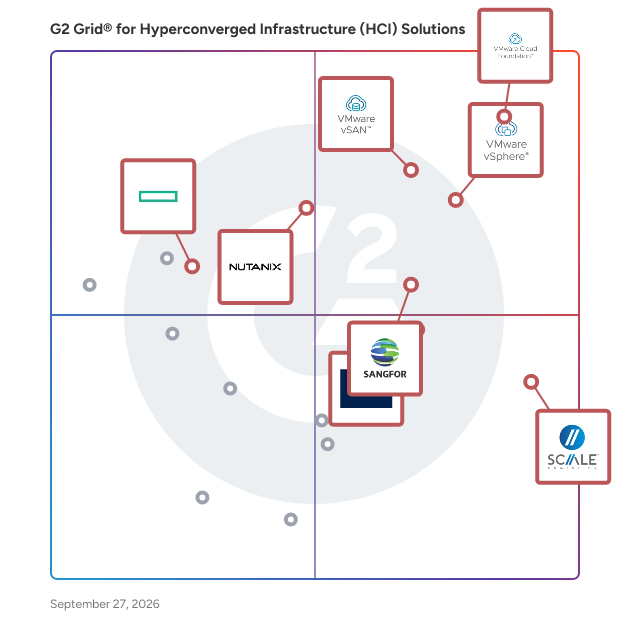
G2 Grid® for Hyperconverged Infrastructure (HCI) Solutions

G2 Grid® for Hyperconverged Infrastructure (HCI) Solutions  plotting products by satisfaction and market presence

Highlighted products: VMware Cloud Foundation (VCF), VMware vSphere, VMware vSAN, SC// HyperCore Virtualization Suite, Sangfor Cloud Platform, Nutanix Cloud Infrastructure (NCI), Acronis Cyber Protect Cloud, and HPE SimpliVity.

Underlying data: [Grid® JSON](https://www.g2.com/categories/hyperconverged-infrastructure-hci-solutions/grids.json?focus%5B%5D=vmware-cloud-foundation-vcf&focus%5B%5D=vmware-vsphere&focus%5B%5D=vmware-vsan&focus%5B%5D=sc-hypercore-virtualization-suite&focus%5B%5D=sangfor-cloud-platform&focus%5B%5D=nutanix-cloud-infrastructure-nci&focus%5B%5D=acronis-cyber-protect-cloud&focus%5B%5D=hpe-simplivity)

VMware Cloud Foundation (VCF)

VMware Cloud Foundation VMware Cloud Foundation (VCF) is the industry’s first private cloud platform to deliver public cloud scale and agility with on-premises security, resilience and performance, while lowering total cost of ownership. VCF accelerates customers’ digital innovation with faster infrastructure modernization, a unified cloud experience, along with stronger cyber resilience and platform security. VMware Cloud Foundation delivers a consistent private cloud experience across ANY Environment - whether it’s a customer managed data center, edge location or any cloud endpoint. VCF supports both traditional as well as modern workloads such as containers, AI/ML workloads and brings modern applications faster to the market with self-service IaaS consumption experience for the application teams. VMware Cloud Foundation integrates leading products including vSphere (compute), vSAN (storage), NSX (networking), VCF Operations and VCF Automation into a single solution, while providing access to high-value advanced services for Application and Network Security, App Platforms, Ransomware Recovery and Private AI. Core VMware Cloud Foundation Components • VMware Cloud Foundation Infrastructure Stack: Incorporates VMware’s industry-leading solutions – virtualization and compute through vSphere for compute, storage through vSAN, and networking by NSX. • VCF Operations Fleet Management: Automate the installation, operations, and lifecycle management of the VCF stack, streamlining deployment, configuration, and updating processes. • VCF Automation Orchestration: Deliver comprehensive operations, automation, and analysis, across the full stack infrastructure platform. • VMware vSphere Kubernetes Service: Built-in Kubernetes runtime that enables enterprises to run modern applications and traditional workloads on a single platform. How VMware Cloud Foundation Works • Workload Compute Platform: At its core, VMware Cloud Foundation leverages vSphere to create and manage virtual machines and containers, providing a flexible, secure, and scalable compute platform. • Storage Optimization: By integrating vSAN into the platform, VMware Cloud Foundation offers integrated, secure, scalable storage solutions that enhance resource efficiency and reduce operational complexity. • Network Integration: Leverages NSX to provide a secure, software-defined networking layer capable of handling the dynamic needs of modern cloud- based applications using virtual private clouds (VPCs) to isolate apps and users. • Automated Provisioning and Management: VMware Cloud Foundation Automation orchestrates key operational tasks in a cloud operating model, reducing the time and complexity associated with deploying, managing, and maintaining private cloud environments. How VMware Cloud Foundation helps you solve your toughest challenges • Infrastructure Modernization: VMware Cloud Foundation plays a crucial role in transforming traditional IT infrastructures into a more agile and scalable private cloud environment. This transformation is key to enabling organizations to deploy core Private Cloud use cases that deliver strategic outcomes that lower Total Cost of Ownership (TCO), improved efficiency and accelerated innovation. • Application Modernization: Update and transform legacy software to meet modern business, technology and infrastructure needs. Replace outdated, monolithic applications with modern technologies like containers, microservices, APIs, AI/ML and DevOps Automation - improving scalability, performance, security and user experience. • Security Modernization: VMware Cloud Foundation provides a consistent, secure platform with the ability to extend the security architecture even further with intrusion detection and recovery, addressing key challenges such as ransomware threats, disaster scenarios, and the need for advanced security architectures.

Average Rating: 4.4/5.0

Total Reviews: 676

How Do G2 Users Rate VMware Cloud Foundation (VCF)?

  • Server Virtualization: 9.2/10 (Category avg: 9.2/10)
  • High Availability: 9.3/10 (Category avg: 9.3/10)
  • Ease of Use: 8.3/10 (Category avg: 8.8/10)
  • Storage Virtualization: 9.2/10 (Category avg: 9.2/10)

Who Is the Company Behind VMware Cloud Foundation (VCF)?

  • Seller: Broadcom
  • Company Website:
  • Year Founded: 1991
  • HQ Location: San Jose, CA
  • Twitter: @broadcom
    63,909 Twitter followers
  • LinkedIn® Page: www.linkedin.com
    44,602 employees on LinkedIn®

Who Uses This Product?

  • Who Uses This: System Administrator, System Engineer
  • Top Industries: Information Technology and Services, Computer Software
  • Company Size: 38% Medium, 37% Large

What Do G2 Reviewers Say About VMware Cloud Foundation (VCF)?

AI-generated summary from verified user reviews

Pros
  • Users appreciate the ease of use of VMware Cloud Foundation, simplifying complex operations and enhancing overall efficiency.
  • Users value the tight integration of compute, storage, networking, and security in VMware Cloud Foundation, enhancing efficiency and predictability.
  • Users value the integrated, automated lifecycle management in VMware Cloud Foundation, simplifying operations and enhancing security.
  • Users praise VMware Cloud Foundation for its integrated security features that simplify management and reduce operational risk.
  • Users value the easy integrations of VMware Cloud Foundation, simplifying management and enhancing operational efficiency across environments.
Cons
  • Users find the expensive licensing and implementation costs challenging, especially for smaller companies with limited budgets.
  • Users find the difficult setup of VMware Cloud Foundation a challenge, especially for teams unfamiliar with the platform.
  • Users find the complexity of VMware Cloud Foundation challenging, requiring extensive expertise for setup and management.
  • Users find the learning difficulty of VMware Cloud Foundation challenging, especially for those without prior VMware experience.
  • Users find the limitations for small businesses concerning VMware Cloud Foundation's complexity and costs quite challenging to navigate.

What Are Recent G2 Reviews of VMware Cloud Foundation (VCF)?

What Are G2 Users Discussing About VMware Cloud Foundation (VCF)?

VMware vSphere

VMware vSphere with VCF 9.1 is the enterprise workload engine that modernizes compute infrastructure with a future-ready, scalable infrastructure and simplified management that enables organizations to extract maximum value from their current server investments and hardware footprint, rather than requiring a total refresh. vSphere provides a powerful foundation for modern, AI and traditional workloads, while enabling intrinsic security out-of-the-box.

Average Rating: 4.5/5.0

Total Reviews: 762

How Do G2 Users Rate VMware vSphere?

  • Server Virtualization: 10.0/10 (Category avg: 9.2/10)
  • High Availability: 10.0/10 (Category avg: 9.3/10)
  • Ease of Use: 8.9/10 (Category avg: 8.8/10)
  • Storage Virtualization: 10.0/10 (Category avg: 9.2/10)

Who Is the Company Behind VMware vSphere?

  • Seller: Broadcom
  • Company Website:
  • Year Founded: 1991
  • HQ Location: San Jose, CA
  • Twitter: @broadcom
    63,909 Twitter followers
  • LinkedIn® Page: www.linkedin.com
    44,602 employees on LinkedIn®

Who Uses This Product?

  • Who Uses This: System Administrator, Systems Administrator
  • Top Industries: Information Technology and Services, Hospital & Health Care
  • Company Size: 44% Large, 42% Medium

What Do G2 Reviewers Say About VMware vSphere?

AI-generated summary from verified user reviews

Pros
  • Users highlight the intuitive interface of VMware vSphere, making setup and management straightforward and efficient.
  • Users appreciate the robust features of VMware vSphere, enhancing versatility and ensuring high uptime of virtual infrastructure.
  • Users value the intuitive interface and robust feature set of VMware vSphere, enhancing virtualization management across industries.
  • Users value the easy administration and management of VMware vSphere, enhancing overall usability and integration.
Cons
  • Users express concerns about the high cost of VMware vSphere, which can be a barrier to access its benefits.
  • Users are concerned about high licensing costs and potential vendor lock-in with VMware vSphere, affecting budget and flexibility.
  • Users find the high licensing costs of VMware vSphere burdensome, especially for small and medium-sized organizations.
  • Users are concerned about the increased costs of VMware vSphere, making long-term use difficult for smaller groups.
  • Users are concerned about the pricing issues with VMware vSphere, noting frequent increases and high renewal costs.

What Are Recent G2 Reviews of VMware vSphere?

What Are G2 Users Discussing About VMware vSphere?

VMware vSAN

VMware vSAN is VMware’s integrated, hyperconverged storage software in VMware Cloud Foundation, enabling a cloud operational model for storage within VMware's premier private cloud platform. vSAN, as a part of VMware vSphere Foundation (VVF), enables management of compute and storage with a single, integrated platform. vSAN delivers the agility, scalability, and performance essential for today’s dynamic applications and workloads. With direct integration into VCF and VVF, vSAN ensures unmatched storage efficiency, performance, and operational simplicity. vSAN empowers organizations to build, manage, and optimize private clouds using standardized storage building blocks, with the added flexibility to integrate seamlessly with edge and hybrid cloud environments.

Average Rating: 4.4/5.0

Total Reviews: 286

How Do G2 Users Rate VMware vSAN?

  • Server Virtualization: 9.2/10 (Category avg: 9.2/10)
  • High Availability: 9.1/10 (Category avg: 9.3/10)
  • Ease of Use: 8.7/10 (Category avg: 8.8/10)
  • Storage Virtualization: 9.2/10 (Category avg: 9.2/10)

Who Is the Company Behind VMware vSAN?

  • Seller: Broadcom
  • Company Website:
  • Year Founded: 1991
  • HQ Location: San Jose, CA
  • Twitter: @broadcom
    63,909 Twitter followers
  • LinkedIn® Page: www.linkedin.com
    44,602 employees on LinkedIn®

Who Uses This Product?

  • Who Uses This: System Engineer
  • Top Industries: Information Technology and Services, Financial Services
  • Company Size: 42% Large, 39% Medium

What Are Recent G2 Reviews of VMware vSAN?

SC// HyperCore Virtualization Suite

Scale Computing™ was founded to fulfill an IT infrastructure need often hindered by the complexity, time, and resources that traditional virtualized IT environments demand. Today, Scale Computing delivers a platform solution for data center, edge computing, virtualization technology, and hyperconverged infrastructure to customers worldwide. Award-winning SC//Platform™ edge computing solution eliminates the need for traditional virtualization software, disaster recovery software, servers, and shared storage, replacing these with a fully integrated, highly available system for running applications. 1. Simplicity Engineered Eliminate mundane management tasks and save IT administrators valuable time. SC//Platform's simplicity directly impacts IT with higher productivity and lower costs. Using patented SC//HyperCore™ virtualization suite technology, the self-healing platform automatically identifies, mitigates, and corrects problems in the infrastructure in real time, enabling applications to achieve maximum uptime even when local IT resources and staff are scarce. 2. Scalable Plan the perfect future by not predicting it. Simply mix and match old and new hardware and applications on the same infrastructure for a future-proof environment that can scale up or down as needed. The storage system avoids issues inherent in traditional network storage approaches (SAN and NAS). By embedding storage with the hypervisor, resources can be automatically pooled across an entire cluster, and new storage is automatically added when new nodes are introduced. 3. Secure SC//Platform is designed to be 'Secure by Default,' meaning security isn't an option—it's a fundamental component ingrained in every aspect of the system. This approach eliminates the need for extensive configuration or additional security layers post-deployment. Unlike alternative solutions that require a long and complex “security best practices” checklist, SC//Platform limits the potential for misconfiguration vulnerabilities. 4. Manageable SC//Fleet Manager™ edge orchestration software combines centralized management with cloud and local automation, allowing infrastructure and applications to achieve and maintain the desired state throughout the entire life of the environment. Zero-touch provisioning decreases the time of installation by 90% or more Secure Link allows access to the HyperCore UI for in-depth cluster management with the click of a button without needing expensive or complex remote access solutions such as VPN or RDP Real-time monitoring of all workloads across a global fleet of SC//HyperCore clusters is made even easier with a searchable and customizable view 5. Cost-Effective Reduce IT infrastructure costs in almost every way. Hidden IT infrastructure costs associated with downtime, management, maintenance, training, and consulting are reduced to almost nothing. For more information: SC//Platform - https://www.scalecomputing.com/sc-platform SC//Fleet Manager - https://www.scalecomputing.com/sc-fleet-manager SC//HyperCore - https://www.scalecomputing.com/sc-hypercore

Average Rating: 4.7/5.0

Total Reviews: 331

How Do G2 Users Rate SC// HyperCore Virtualization Suite?

  • Server Virtualization: 9.6/10 (Category avg: 9.2/10)
  • High Availability: 9.7/10 (Category avg: 9.3/10)
  • Ease of Use: 9.6/10 (Category avg: 8.8/10)
  • Storage Virtualization: 9.4/10 (Category avg: 9.2/10)

Who Is the Company Behind SC// HyperCore Virtualization Suite?

  • Seller: Scale Computing
  • Company Website:
  • Year Founded: 2002
  • HQ Location: Austin, TX
  • Twitter: @ScaleComputing
    4,120 Twitter followers
  • LinkedIn® Page: www.linkedin.com
    361 employees on LinkedIn®

Who Uses This Product?

  • Who Uses This: IT Manager, Systems Administrator
  • Top Industries: Primary/Secondary Education, Manufacturing
  • Company Size: 74% Medium, 14% Small

What Do G2 Reviewers Say About SC// HyperCore Virtualization Suite?

AI-generated summary from verified user reviews

Pros
  • Users find the ease of use of SC// HyperCore Virtualization Suite enhances virtualization management and implementation significantly.
  • Users value the exceptional customer support from Scale, appreciating prompt responses and ease of use.
  • Users find the setup ease of SC// HyperCore Virtualization Suite impressive, complemented by responsive and helpful support.
  • Users value the scalability of SC// HyperCore, enabling effortless management of multiple VMs without complex configurations.
  • Users commend the reliability of SC// HyperCore, highlighting its high uptime and exceptional support responsiveness.
Cons
  • Users find the limited features of SC// HyperCore restrict their flexibility and ease of use when working with VMs.
  • Users face VM management issues with Scale Computing, particularly in deployment and lack of automatic startup options.
  • Users desire more customization options in the SC// HyperCore Suite, particularly for personalized views and configurations.
  • Users find migration cumbersome, requiring extra tools and planning, particularly when transitioning from other VM technologies.
  • Users face challenges due to network issues limiting advanced features like DMZ creation and networking automation.

What Are Recent G2 Reviews of SC// HyperCore Virtualization Suite?

What Are G2 Users Discussing About SC// HyperCore Virtualization Suite?

Sangfor Cloud Platform

Sangfor Technologies is a rising global challenger in enterprise IT, helping organizations simplify Digital and AI transformation with secure, AI-enabled cloud infrastructure. Headquartered in Shenzhen (China), Sangfor serves over 100,000 customers worldwide across 100+ countries and regions. Sangfor has 22+ international offices across Asia-Pacific, Middle East, Europe and Latin America regions. Sangfor Cloud Platform (SCP) is built for large and mid-sized enterprises, based on a business-centric HCI architecture that integrates compute, storage, networking, virtualization, and security into a unified, software-defined platform. Sangfor Cloud Platform enables organizations to build secure, scalable, and flexible private and hybrid cloud environments. With centralized management, intelligent resource scheduling, and elastic infrastructure capabilities, Sangfor Cloud Platform simplifies cloud operations and reduces management complexity through standardized and automated processes. Built on a secure, reliable, and scalable architecture, it enables businesses to efficiently run mission-critical workloads while supporting future growth and expansion. To strengthen data protection and business continuity, Sangfor Cloud Platform also combines built-in security and resilience capabilities, including anti-ransomware protection, high availability, disaster recovery, and automated resource optimization, with seamless integration to leading backup solutions from Veeam and Cohesity. Sangfor Cloud Platform is trusted by large and mid-market enterprises across APAC, the Middle East, Europe, and LATAM. It is recognized as a Leader in the G2 Grid® for Server Virtualization and Hyperconverged Infrastructure in the Summer 2026 report. Sangfor Technologies has also been widely recognized by Gartner for its innovation, market presence, and customer satisfaction across the cloud and hyperconverged infrastructure landscape: ▪ Sangfor Recognized as a Representative Vendor in 2026 Gartner® Market Guide for Cloud Infrastructure Sovereign Solutions ▪ Sangfor Technologies Ranked among Top 5 Largest HCIS Vendors by Revenue in Asia-Pacific in the 2026 Gartner® Market Share Report ▪ Sample Vendor for VMware Alternative in Hyperconverged Infrastructure by Gartner ▪ Strong Performer in the Gartner® Peer Insights™ Voice of the Customer for Full-Stack HCI Software Whether you're modernizing legacy infrastructure, building a private or hybrid cloud, or seeking a powerful VMware alternative, Sangfor Cloud Platform delivers the performance, security, and simplicity needed to accelerate digital and AI transformation.

Average Rating: 4.7/5.0

Total Reviews: 100

How Do G2 Users Rate Sangfor Cloud Platform?

  • Server Virtualization: 9.6/10 (Category avg: 9.2/10)
  • High Availability: 9.6/10 (Category avg: 9.3/10)
  • Ease of Use: 9.1/10 (Category avg: 8.8/10)
  • Storage Virtualization: 9.6/10 (Category avg: 9.2/10)

Who Is the Company Behind Sangfor Cloud Platform?

  • Seller: Sangfor Technologies
  • Company Website:
  • Year Founded: 2000
  • HQ Location: Shenzhen, China
  • Twitter: @SANGFOR
    13,224 Twitter followers
  • LinkedIn® Page: www.linkedin.com
    2,344 employees on LinkedIn®

Who Uses This Product?

  • Top Industries: Information Technology and Services, Higher Education
  • Company Size: 43% Medium, 28% Large

What Do G2 Reviewers Say About Sangfor Cloud Platform?

AI-generated summary from verified user reviews

Pros
  • Users find the ease of use in Sangfor Cloud Platform makes integration and management straightforward and efficient.
  • Users value the advanced yet cost-effective features of Sangfor Cloud Platform, appreciating its ease of use and practical integration.
  • Users enjoy the enterprise-class performance of Sangfor Cloud Platform, simplifying management and enhancing operational efficiency.
  • Users admire the easy setup of Sangfor Cloud Platform, allowing for quick deployment and streamlined management.
  • Users value the ease of integration within Sangfor Cloud Platform, simplifying IT operations and enhancing efficiency.
Cons
  • Users face integration issues with third-party solutions and limited documentation, complicating flexibility and support.
  • Users note limited features, particularly in integration and object storage, hindering flexibility in diverse IT setups.
  • Users experience performance issues with slow UI and response during heavy load, impacting virtual machine management.
  • Users find the poor documentation of Sangfor Cloud Platform challenging, limiting support and resource accessibility.
  • Users note the complex documentation for Sangfor Cloud Platform can make finding support and resources challenging.

What Are Recent G2 Reviews of Sangfor Cloud Platform?

Nutanix Cloud Infrastructure (NCI)

Nutanix Acropolis has 5 key components that make it a complete solution for delivering any infrastructure service: 1. Built-in AHV Virtualization Nutanix Acropolis includes AHV, our native virtualization solution, and additionally supports the virtualization solutions of VMware ESXi, Microsoft Hyper-V. Nutanix AHV is a comprehensive enterprise virtualization solution tightly integrated into Acropolis and is provided with no additional license cost. AHV delivers the features required to run enterprise applications. 2. Platform Services Nutanix Acropolis delivers a comprehensive set of software-defined platform services so that IT organizations can consolidate all their workloads on the Nutanix platform and manage them centrally. 3. Enterprise Storage Capabilities Nutanix provides a distributed storage fabric providing enterprise-class storage services to all types of applications, including de-duplication, compression, encryption, erasure coding and more. Additionally, data locality ensures the fastest possible performance. 4. Networking Services Nutanix Acropolis provides a comprehensive set of services to secure applications with native microsegmentation, visualize the network and network performance, and automate common network operations. 5. Enterprise Cloud is the Future of IT More than 40% of Global 2000 companies rely on Nutanix software to power their applications at any scale. It’s time for businesses to modernize the datacenter with web-scale technology. Eliminate standalone SAN or NAS-based storage and expensive virtualization for greater efficiency, and collapse IT silos for more agility. Nutanix runs any application, in nearly any cloud, at any scale.

Average Rating: 4.5/5.0

Total Reviews: 299

How Do G2 Users Rate Nutanix Cloud Infrastructure (NCI)?

  • Server Virtualization: 9.4/10 (Category avg: 9.2/10)
  • High Availability: 9.3/10 (Category avg: 9.3/10)
  • Ease of Use: 9.1/10 (Category avg: 8.8/10)
  • Storage Virtualization: 9.4/10 (Category avg: 9.2/10)

Who Is the Company Behind Nutanix Cloud Infrastructure (NCI)?

  • Seller: Nutanix
  • Company Website:
  • Year Founded: 2009
  • HQ Location: San Jose, US
  • Twitter: @nutanix
    90,520 Twitter followers
  • LinkedIn® Page: www.linkedin.com
    10,042 employees on LinkedIn®

Who Uses This Product?

  • Who Uses This: System Engineer, IT Manager
  • Top Industries: Information Technology and Services, Telecommunications
  • Company Size: 44% Large, 38% Medium

What Do G2 Reviewers Say About Nutanix Cloud Infrastructure (NCI)?

AI-generated summary from verified user reviews

Pros
  • Users find Nutanix Cloud Infrastructure (NCI) to be incredibly easy to use, thanks to its intuitive and clear interface.
  • Users appreciate the seamless resource management of Nutanix Cloud Infrastructure, simplifying operations and enhancing efficiency.
  • Users value the easy scalability of Nutanix Cloud Infrastructure, enhancing efficiency and simplifying resource management.
  • Users value the efficiency of Nutanix Cloud Infrastructure (NCI) for quick setup and streamlined access to crucial information.
  • Users love the quick and easy setup of Nutanix Cloud Infrastructure, enhancing efficiency and reducing downtime significantly.
Cons
  • Users find the complexity of configuration and licensing for Nutanix Cloud Infrastructure challenging, especially for smaller environments.
  • Users find Nutanix Cloud Infrastructure expensive, noting high costs for scaling and advanced features that may go unused.
  • Users note the high licensing costs of Nutanix Cloud Infrastructure, particularly challenging for smaller organizations as they scale.
  • Users face a steep learning curve with Nutanix Cloud Infrastructure, particularly when configuring advanced features and troubleshooting.
  • Users find that NCI has limited features, particularly with complex setups and slow performance during upgrades.

What Are Recent G2 Reviews of Nutanix Cloud Infrastructure (NCI)?

What Are G2 Users Discussing About Nutanix Cloud Infrastructure (NCI)?

Acronis Cyber Protect Cloud

Acronis delivers the world’s most complete cyber resilience platform, combining backup, disaster recovery, cybersecurity, RMM, and business operations tools into a single, natively integrated solution. Built specifically for Managed Service Providers (MSPs) and IT teams, Acronis simplifies operations with one agent, one console, and one license model. Automation, AI-driven insights, and multi-tenant management ensure that fewer technicians can manage more clients at lower cost. With predictable pricing and transparent billing, Acronis enables partners and IT teams to scale efficiently, comply with regulations, and deliver unmatched resilience. No other vendor delivers this level of integration, efficiency, and MSP alignment. Acronis Cyber Protect Cloud unites backup and next-generation, AI-based anti-malware, antivirus, and endpoint protection management in one solution. Integration and automation provide unmatched ease for service providers — reducing complexity while increasing productivity and decreasing operating costs. Acronis Cyber Protect Cloud is the single service provider solution that combines backup, anti-malware (including anti-virus, anti-ransomware, and anti-cryptojacking) and security and management capabilities such as vulnerability assessments, patch management, URL filtering and more. Now, service providers can eliminate complexity and make security a centerpiece of their offerings while increasing SLAs, decreasing churn, and generating more recurring revenue. Get upgraded security with integrated AI-based defenses that protect clients from modern threats, make smarter use of resources so your team can focus on clients, and earn new recurring revenue and higher margins that strengthen your business. Enriched with next-gen, full-stack anti-malware protection and comprehensive yet simple management tools, built on top of our industry-leading backup and data recovery solution, Acronis Cyber Protect Cloud simplifies onboarding, daily operations, and reporting, and combats advanced attacks with new use cases enabled by integration. Acronis Cyber Protect Cloud makes it easy to deliver the modern cyber protection your clients seek. Acronis is majority-owned by EQT.

Average Rating: 4.7/5.0

Total Reviews: 1,390

How Do G2 Users Rate Acronis Cyber Protect Cloud?

  • Server Virtualization: 10.0/10 (Category avg: 9.2/10)
  • High Availability: 10.0/10 (Category avg: 9.3/10)
  • Ease of Use: 9.1/10 (Category avg: 8.8/10)
  • Storage Virtualization: 10.0/10 (Category avg: 9.2/10)

Who Is the Company Behind Acronis Cyber Protect Cloud?

  • Seller: Acronis
  • Company Website:
  • Year Founded: 2003
  • HQ Location: Schaffhausen
  • Twitter: @acronis
    94,498 Twitter followers
  • LinkedIn® Page: www.linkedin.com
    1,923 employees on LinkedIn®

Who Uses This Product?

  • Who Uses This: CEO, Director
  • Top Industries: Information Technology and Services, Computer & Network Security
  • Company Size: 68% Small, 28% Medium

What Do G2 Reviewers Say About Acronis Cyber Protect Cloud?

AI-generated summary from verified user reviews

Pros
  • Users appreciate the ease of use of Acronis Cyber Protect Cloud, making management and customization straightforward and efficient.
  • Users value the effective backup solutions of Acronis Cyber Protect Cloud for their simplicity and integration.
  • Users value the robust security features of Acronis Cyber Protect Cloud, ensuring safe data management and ransomware protection.
  • Users value the ease of backup management with Acronis Cyber Protect Cloud's all-in-one platform, simplifying their operations.
  • Users value the all-in-one platform of Acronis Cyber Protect Cloud, integrating backup, cybersecurity, and management seamlessly.
Cons
  • Users often experience slow performance with Acronis Cyber Protect Cloud, affecting the efficiency of backups and restores.
  • Users find Acronis Cyber Protect Cloud expensive compared to competitors, complicating their decision-making due to unclear pricing.
  • Users are frustrated with the poor customer support, especially due to unavailability on weekends during critical backup tests.
  • Users find the complexity of the interface and pricing confusing, which complicates their overall experience with Acronis Cyber Protect Cloud.
  • Users report backup issues with Acronis Cyber Protect Cloud, particularly concerning multiple export files and limited weekend support.

What Are Recent G2 Reviews of Acronis Cyber Protect Cloud?

What Are G2 Users Discussing About Acronis Cyber Protect Cloud?

HPE SimpliVity

The HPE SimpliVity 380 gives IT leaders the agility and economics of the cloud with the control and governance of on-premises IT.

Average Rating: 4.4/5.0

Total Reviews: 22

How Do G2 Users Rate HPE SimpliVity?

  • Server Virtualization: 9.2/10 (Category avg: 9.2/10)
  • High Availability: 9.4/10 (Category avg: 9.3/10)
  • Ease of Use: 9.3/10 (Category avg: 8.8/10)
  • Storage Virtualization: 8.9/10 (Category avg: 9.2/10)

Who Is the Company Behind HPE SimpliVity?

  • Seller: HP Development Company
  • Year Founded: 1939
  • HQ Location: Palo Alto, CA
  • Twitter: @HPE
    92,685 Twitter followers
  • LinkedIn® Page: www.linkedin.com
    92,617 employees on LinkedIn®
  • Ownership: NYSE: HPQ

Who Uses This Product?

  • Top Industries: Information Technology and Services
  • Company Size: 46% Medium, 33% Large

What Are Recent G2 Reviews of HPE SimpliVity?

What Are G2 Users Discussing About HPE SimpliVity?

VxRail

As the only fully integrated, preconfigured, and pre-tested VMware hyper-converged infrastructure appliance family on the market, VxRail dramatically simplifies IT operations, accelerates time to market, and delivers incredible return on investment.

Average Rating: 4.3/5.0

Total Reviews: 32

How Do G2 Users Rate VxRail?

  • Server Virtualization: 8.8/10 (Category avg: 9.2/10)
  • High Availability: 9.0/10 (Category avg: 9.3/10)
  • Ease of Use: 8.5/10 (Category avg: 8.8/10)
  • Storage Virtualization: 8.9/10 (Category avg: 9.2/10)

Who Is the Company Behind VxRail?

  • Seller: Dell Technologies
  • Year Founded: 1984
  • HQ Location: Round Rock, TX
  • Twitter: @Dell
    799,086 Twitter followers
  • LinkedIn® Page: www.linkedin.com
    124,254 employees on LinkedIn®
  • Ownership: NYSE: DELL

Who Uses This Product?

  • Top Industries: Information Technology and Services
  • Company Size: 49% Medium, 32% Small

What Are Recent G2 Reviews of VxRail?

What Are G2 Users Discussing About VxRail?

StarWind Virtual SAN

StarWind is the pioneer of hyperconvergence and storage virtualization, offering customizable SDS and turnkey (software+hardware) solutions to optimize underlying storage capacity use, ensure fault tolerance, achieve IT infrastructure resilience and increase customer ROI. StarWind has over 150 employees and caters to more than 400,000 customers worldwide. StarWind Virtual SAN (VSAN) eliminates any need for physical storage by mirroring internal hard disks and flash between hypervisor servers. Thanks to its unique features, StarWind VSAN can be deployed on or integrated in any existing IT infrastructure. By acquiring a single solution, you will get a robust fault-tolerant storage pool, constant application uptime and endless scalability options with just 2 nodes. Key Features: - Allows to achieve high availability - Eliminates any downtime even if 1 or more nodes fail - Ties the cluster into a single storage pool - Overcomes HCLs and has no restrictions on sockets or features - Offers flexible scalability, up and out - Easy management through a web console or thick client

Average Rating: 4.7/5.0

Total Reviews: 202

How Do G2 Users Rate StarWind Virtual SAN?

  • Server Virtualization: 9.4/10 (Category avg: 9.2/10)
  • High Availability: 9.5/10 (Category avg: 9.3/10)
  • Ease of Use: 9.1/10 (Category avg: 8.8/10)
  • Storage Virtualization: 9.7/10 (Category avg: 9.2/10)

Who Is the Company Behind StarWind Virtual SAN?

  • Seller: StarWind, Inc.
  • Year Founded: 2003
  • HQ Location: Beverly, Massachusetts
  • Twitter: @starwindsan
    8,738 Twitter followers
  • LinkedIn® Page: www.linkedin.com
    92 employees on LinkedIn®

Who Uses This Product?

  • Who Uses This: IT Manager, Systems Administrator
  • Top Industries: Information Technology and Services, Computer & Network Security
  • Company Size: 49% Medium, 40% Small

What Are Recent G2 Reviews of StarWind Virtual SAN?

What Are G2 Users Discussing About StarWind Virtual SAN?

StorMagic

StorMagic delivers right-sized, purpose-built virtualization solutions. Our software cuts through complexity, scales easily, and is trusted by organizations worldwide to stay operational, always. What does this actually mean, though? Technology that works with you, not against you. Simple deployment means you have more time to focus on other aspects of your organization. No hidden complexity. StorMagic is easy to manage, so your teams stay confident and in control. Manage multiple sites from a single location. Built for real people in real-world situations. Reliable IT for the challenges your organization faces. We value your budget and time. StorMagic offers a lower total cost of ownership and deploys within minutes. Get the most out of your IT infrastructure and your budget. StorMagic offers organizations two paths to reliable, purpose-built virtualized infrastructure: StorMagic SvHCI is a hyperconverged infrastructure (HCI) solution that incorporates hypervisor, software-defined storage, and virtualized networking into a single software stack. With SvHCI, your organization can virtualize your entire infrastructure without the significant financial commitment required by other solutions on the market. StorMagic SvSAN is a virtualized storage solution that’s a component of SvHCI. If your organization is already committed to a virtualization partner but still requires highly available virtualized storage, SvSAN offers greater flexibility with unmatched affordability. SvSAN can be deployed on VMware vSphere or Microsoft Hyper-V hypervisors. Both SvHCI and SvSAN provide high availability with a unique cluster architecture of just 2 nodes. Data is synchronously mirrored between the two nodes, meaning an exact copy is always available on either node. If one node goes offline, the StorMagic witness maintains the cluster's health, keeping stores open, production lines moving and services running until the failed node is restored. A single StorMagic witness located anywhere in the world can service 1000 StorMagic clusters simultaneously. Whatever your virtualization needs, StorMagic can solve your challenges. Having empowered IT teams since 2006, we will work closely with you, by being grounded in clarity and consistency to serve, and configure a solution for your needs.

Average Rating: 4.7/5.0

Total Reviews: 98

How Do G2 Users Rate StorMagic?

  • Server Virtualization: 9.0/10 (Category avg: 9.2/10)
  • High Availability: 9.3/10 (Category avg: 9.3/10)
  • Ease of Use: 9.2/10 (Category avg: 8.8/10)
  • Storage Virtualization: 9.4/10 (Category avg: 9.2/10)

Who Is the Company Behind StorMagic?

  • Seller: StorMagic
  • Company Website:
  • Year Founded: 2006
  • HQ Location: Bristol, United Kingdom
  • Twitter: @stormagic
    2,971 Twitter followers
  • LinkedIn® Page: www.linkedin.com
    80 employees on LinkedIn®

Who Uses This Product?

  • Top Industries: Information Technology and Services, Computer & Network Security
  • Company Size: 52% Medium, 31% Small

What Do G2 Reviewers Say About StorMagic?

AI-generated summary from verified user reviews

Pros
  • Users find StorMagic's ease of use and flexibility greatly enhance their operational efficiency and user experience.
  • Users appreciate the reliability of StorMagic, highlighting its dependable performance and excellent technical support.
  • Users commend StorMagic for its top-rated customer support, ensuring quick resolutions and smooth operations for their virtual storage solutions.
  • Users find StorMagic's setup ease outstanding, with effective support making the process straightforward and hassle-free.
  • Users find StorMagic to be cost-effective, offering high availability at a fraction of traditional solutions' costs.
Cons
  • Users find the limited features of StorMagic restrict their capabilities in advanced storage and large cluster scenarios.
  • Users find StorMagic's interface difficult to navigate, requiring advanced IT knowledge for effective use.
  • Users find StorMagic not user-friendly, as its complexity requires extensive IT knowledge for effective navigation.
  • Users find the difficult learning curve of StorMagic challenging, especially for those new to software-defined storage.
  • Users find StorMagic expensive, especially when exceeding two nodes with limited features like deduplication or cloud replication.

What Are Recent G2 Reviews of StorMagic?

VMware HCI Software

Hyper converged infrastructure (HCI) allows the convergence of physical storage onto industry-standard x86 servers, enabling a building block approach with scale-out capabilities. All key data center functions run as software on the hypervisor in a tightly integrated software layer, delivering services that were previously provided via hardware through software.

Average Rating: 4.0/5.0

Total Reviews: 12

How Do G2 Users Rate VMware HCI Software?

  • Ease of Use: 9.2/10 (Category avg: 8.8/10)

Who Is the Company Behind VMware HCI Software?

  • Seller: Broadcom
  • Year Founded: 1991
  • HQ Location: San Jose, CA
  • Twitter: @broadcom
    63,909 Twitter followers
  • LinkedIn® Page: www.linkedin.com
    44,602 employees on LinkedIn®
  • Ownership: NASDAQ: CA

Who Uses This Product?

  • Company Size: 42% Large, 33% Small

What Are Recent G2 Reviews of VMware HCI Software?

What Are G2 Users Discussing About VMware HCI Software?

Huawei FusionCube Hyper-converged Infrastructure

The Huawei FusionCube hyper-converged infrastructure (HCI) brings compute, storage, network, virtualization, and management into one tightly integrated package to achieve high performance, low latency, and rapid deployment. FusionCube leverages Huawei-proprietary built-in distributed storage engines to enable deep convergence of compute and storage, eliminating performance bottlenecks while allowing for flexible capacity expansion.

Average Rating: 4.3/5.0

Total Reviews: 38

How Do G2 Users Rate Huawei FusionCube Hyper-converged Infrastructure?

  • Server Virtualization: 8.3/10 (Category avg: 9.2/10)
  • High Availability: 8.8/10 (Category avg: 9.3/10)
  • Ease of Use: 8.6/10 (Category avg: 8.8/10)
  • Storage Virtualization: 8.1/10 (Category avg: 9.2/10)

Who Is the Company Behind Huawei FusionCube Hyper-converged Infrastructure?

  • Seller: Huawei Technologies
  • Year Founded: 1987
  • HQ Location: Shenzhen, China
  • Twitter: @HuaweiEnt
    411,859 Twitter followers
  • LinkedIn® Page: www.linkedin.com
    141,830 employees on LinkedIn®

Who Uses This Product?

  • Company Size: 36% Large, 36% Medium

What Are Recent G2 Reviews of Huawei FusionCube Hyper-converged Infrastructure?

What Are G2 Users Discussing About Huawei FusionCube Hyper-converged Infrastructure?

Azure Stack HCI

The Azure Stack is a portfolio of products that extend Azure services and capabilities to your environment of choice—from the datacenter to edge locations and remote offices. The portfolio enables hybrid and edge computing applications to be built, deployed, and run consistently across location boundaries, providing choice and flexibility to address your diverse workloads.

Average Rating: 4.2/5.0

Total Reviews: 10

How Do G2 Users Rate Azure Stack HCI?

  • Server Virtualization: 8.6/10 (Category avg: 9.2/10)
  • High Availability: 8.1/10 (Category avg: 9.3/10)
  • Ease of Use: 7.4/10 (Category avg: 8.8/10)
  • Storage Virtualization: 8.3/10 (Category avg: 9.2/10)

Who Is the Company Behind Azure Stack HCI?

  • Seller: Microsoft
  • Year Founded: 1975
  • HQ Location: Redmond, Washington
  • Twitter: @microsoft
    13,091,739 Twitter followers
  • LinkedIn® Page: www.linkedin.com
    232,750 employees on LinkedIn®
  • Ownership: MSFT

Who Uses This Product?

  • Top Industries: Computer Software
  • Company Size: 42% Large, 42% Small

What Are Recent G2 Reviews of Azure Stack HCI?

What Are G2 Users Discussing About Azure Stack HCI?

StarWind HyperConverged Appliance

StarWind is the pioneer of hyperconvergence and storage virtualization, offering customizable SDS and turnkey (software+hardware) solutions to optimize underlying storage capacity use, ensure fault tolerance, achieve IT infrastructure resilience and increase customer ROI. StarWind has over 2,000 employees and caters to more than 400,000 customers worldwide. StarWind HyperConverged Appliance (HCA) is a turnkey hyper-converged platform that merges compute, storage, network, and software into a small 2-node configuration. Thanks to having one on-prem node and one in the cloud, customers significantly reduce their TCO while increasing ROI without sacrificing any performance. StarWind HCA is hyperconvergence at its finest, achieving 99.9999% uptime, simplifying HCI orchestration and management, and more for an affordable price. Key Features: - Data Locality - Server-Side Caching - Multiprotocol - High Availability and Fault Tolerance - StarWind Command Center - Unified Support Umbrella

Average Rating: 4.8/5.0

Total Reviews: 68

How Do G2 Users Rate StarWind HyperConverged Appliance?

  • Server Virtualization: 9.5/10 (Category avg: 9.2/10)
  • High Availability: 9.5/10 (Category avg: 9.3/10)
  • Ease of Use: 9.3/10 (Category avg: 8.8/10)
  • Storage Virtualization: 9.6/10 (Category avg: 9.2/10)

Who Is the Company Behind StarWind HyperConverged Appliance?

  • Seller: StarWind, Inc.
  • Year Founded: 2003
  • HQ Location: Beverly, Massachusetts
  • Twitter: @starwindsan
    8,738 Twitter followers
  • LinkedIn® Page: www.linkedin.com
    92 employees on LinkedIn®

Who Uses This Product?

  • Who Uses This: IT Manager
  • Top Industries: Information Technology and Services, Retail
  • Company Size: 70% Medium, 20% Small

What Are Recent G2 Reviews of StarWind HyperConverged Appliance?

What Are G2 Users Discussing About StarWind HyperConverged Appliance?

Rachana Hasyagar
RH
Researched and written by Rachana Hasyagar
Updated November 14, 2024

Learn More About Hyperconverged Infrastructure (HCI) Solutions

What are Hyperconverged Infrastructure (HCI) Solutions?

Hyperconverged infrastructure (HCI) solutions are a software-defined, unified system that combines server, storage resources, networking components, and management software. It combines traditional IT hardware into a unified platform powered by a software layer. 

Traditionally, IT hardware and software were treated in siloes. They can be viewed as pieces of a puzzle, where standalone pieces did not make much sense, but together they make a complete picture. But handling each piece and making sure how it fits together is a time-consuming task. Having separate components also means requiring different teams specialized in managing that particular component. This is where hyperconverged infrastructure comes in.

HCI software converge all these components and offer it as a single unified system. An application or workload uses a server CPU to compute or process information, data is stored in a conventional storage offering, and networking manages the communication between all different components in the IT infrastructure realm. With hyperconverged solutions, servers and storage resources are combined within a distributed infrastructure platform. The combination of server and storage and network is powered overall by a software layer.

A HCI solution converges the entire single data infrastructure components, which includes server, storage, networking, and virtualization. The solution acts as a single distributed platform running on standard servers that can scale and support flexibility as required. A software layer running across multiple server nodes is used to manage and distribute all the operating functions within the server cluster. Having software to act as a control layer helps improve performance and build IT infrastructure resilience.

Hyperconverged software systems are available in a variety of configurations, which include all flash or hybrid flash storage, with or without GPU cards. These myriad configurations provided by HCI solution vendors offer customers several different options that they can opt for to improve their IT infrastructure. Using these solutions allows customers to improve maximum input/output (I/O) throughput with reduced latency.

What can a user run on an HCI software?

One of the first applications that were run for HCI was a virtual desktop infrastructure (VDI) solution. At present, however, HCI solutions have developed and expanded to ensure more different and complex workloads are being run. Some of the key examples include databases, cloud-native applications, mission-critical applications, big data, VDI, remote office/branch office (ROBO), and collaboration applications.

The relationship between hyperconverged infrastructure (HCI) and cloud 

To support private cloud and hybrid cloud deployments, the underlying infrastructure needs to be designed in such a way that it supports cloud capabilities such as scaling up. Workloads thrive in an environment where they can operate continuously without any faults or errors. If a workload or application needs to scale up, then the underlying infrastructure needs to support this. This is where HCI solutions come in since it provides agility to leverage scale-out storage as required by the user.

What Does HCI Stand For?

HCI stands for hyperconverged infrastructure. This platform usually supports a single pane of view to ensure infrastructure management. HCI is different from converged infrastructure (CI). 

The main difference between HCI and CI is that the latter is usually preintegrated by a vendor and is still built on the same IT hardware components. In contrast, hyperconverged systems are built from the ground up, and the components cannot be separated since the elements are software defined. These software capabilities allow IT infrastructure to scale and be flexible as required by growing workloads. 

What are the Common Features of Hyperconverged Infrastructure (HCI) Software?

The following are some core features within HCI solutions that can help users in numerous ways:

Consolidation: Consolidation is a key feature of hyperconverged infrastructure. Data centers are stacked with numerous servers, storage solutions, and networks which can be replaced with HCI. Consolidation has several advantages such as reduction of complexity, compatibility issues, easier administration, and so on.

Simplicity and flexibility: HCI platforms ensure simplicity in IT operations. Complexities associated with managing and monitoring several IT hardware components are reduced.

Greater ability to scale: The ability of hyperconverged systems to scale as a business needs change is one of the key features of this software. Engineers can scale up their IT infrastructure capabilities in a matter of minutes using software-defined storage capabilities. By using HCI solutions, companies can ensure that their IT infrastructure is future proof since applications can scale up or scale out as required.

Space optimization: When traditional IT infrastructure is replaced by scalable blocks, data center footprint is drastically reduced. Since HCI solutions take up much less space, these are being looked at for edge infrastructure as well.

Predictability: HCI software keep track of every single application. The control is granular in nature, which means that HCI solutions are able to predict which applications would require more resources, which one performs better under different circumstances, and other possibilities. This predictable nature of HCI helps organizations to solve various challenges that they might face with regard to capacity utilization and resource allocation.

What are the Benefits of Hyperconverged Infrastructure (HCI) Software?

Lower costs: A key benefit of HCI software solutions is the lower cost involved in deploying this solution. A company does not need to spend on server, storage infrastructure, networking, and management capabilities separately since they only need to purchase the hyperconverged systems which combine all these commodity hardware. In addition, when a customer chooses to scale a traditional IT infrastructure environment (SAN environment), there are a ton of costs that need to be considered such as licensing costs, increasing power and cooling costs, and hiring costs since more specialists and additional employees are needed to handle the growing IT infrastructure. By choosing a highly scalable and flexible HCI solution, customers can obtain significant savings.

Improved IT efficiency: Since IT components are not in silos but are consolidated under a single hypervisor software layer, hyperconverged infrastructure eliminates any need for processing each component separately. There is no latency in communication between different components, helping to increase overall IT efficiency. In addition, the management structure is simplified since it is a single solution, which reduces complex maintenance and integration challenges.

Single pane of view: HCI solutions often come with a management pane that the user can use to view and control all HCI sources from a single control panel. The biggest benefit of having a unified view is that there is no need for different management tools and software separately to manage and monitor servers, storage, networks, and virtualization.

Faster deployment times: While opting for a HCI solution, infrastructure plans can be deployed within minutes. Once the infrastructure has been set, teams can immediately work on applications and workloads rather than spend time figuring out how to install IT infrastructure and face several technical challenges. In addition, HCI systems support infrastructure automation, governance, and smooth, consistent operations.

Virtualization: Virtual environments, virtual servers, virtual desktops are key use cases of HCI solutions. This is achievable since a key benefit of HCI solutions is virtualization. Virtualization is used for high-performance sensitive applications, where there is a need to deploy hardware. 

Software-defined data center: The HCI solution can support numerous hardware platforms offered by different vendors. The software capabilities of the HCI software ensure that the underlying hardware does not pose a problem to the user, but instead allows HCI solutions to be deployed anywhere.

Reduces complexity: Although the conversation lies around consolidating server, storage, and networking, there are numerous other hardware and software components that add complexity to the environment. These include cables, hypervisors, server frame and cabinets, network server racks, server enclosures, and others. Since HCI is a single-point offering, it helps to consolidate the data center by reducing its footprint.

Improved productivity: With the integration of HCI into an IT environment, users do not need to babysit the infrastructure to manage alerts, schedule maintenance, and identify upgrade or downgrade times. Instead, HCI is a self-healing solution. Upgrades are just a click away, can be done remotely, and there is no need to physically visit the data center to resolve any hardware issues.

Multicloud services support: HCI solutions make it simple to move data between multiple clouds, or from on premises to private and public cloud platforms. It simplifies the hybrid cloud environment.

Helps shift focus toward business priorities: When businesses have a solid, self-healing IT infrastructure in place, time and resources of the organization can be moved to other business priorities. HCI shifts the focus off infrastructure and more on using the infrastructure—either to automate applications, deploy methodologies to improve workload processing, integrating IoT practices, and several other value-added activities.

Who Uses Hyperconverged Infrastructure (HCI) Software?

IT team: A team of IT professionals will constantly handle the HCI solution for the firm. Under this persona, there are several roles which include but are not limited to hyperconverged or SAN administrator, IT admins, HCI solution architect, HCI solution specialist, and HCI engineer.

Virtualization administrators: Virtualization admins can extend the benefits of hyperconverged infrastructure to virtual workloads. Admins are provided flexibility when deploying and moving virtual workloads.

Developers and programmers: Although this persona is not directly using an HCI solution, they would ideally be impacted the most. Ideally, with the introduction of HCI solutions, software developers and engineers can expect their jobs to be more efficient since the underlying infrastructure has improved drastically.

Challenges with Hyperconverged Infrastructure (HCI) Solutions

HCI solutions can come with their own set of challenges. 

True integration is a challenge: Hyperconvergence integration happens at the hypervisor layer, and all the different components are connected together via the software. There is no further integration at an OS level or application level. In order to achieve true integration, third-party hardware, additional configuration, and expertise would need to be installed which defeats the purpose of HCI’s promise to reduce complexity.

Backlash from employees or IT teams: There are separate networking architects and IT teams to handle storage, CPU, virtualization, and other tasks. Using a HCI solution would ideally bring all these personas under one roof, leading to team reorganization. This could cause some hostility from employees who might feel that their jobs will be made redundant. Another challenge is identifying who would be in charge of the HCI solution since legacy infrastructures were in silos.

Vendor lock-in: To truly get the complete benefit of HCI solutions, buyers are often pushed to selecting a single vendor platform. This limits buyers from being able to add any future innovations that might come in the HCI space until the vendor integrates it as well.

Virtual machines integration: If virtual machines are being moved onto the new platform, it is imperative that the hypervisor being used at present will be supported on the new platform. The process of migrating virtual machines will be easier if the HCI solution supports multiple hypervisors.

How to Buy Hyperconverged Infrastructure (HCI) Solutions

Requirements Gathering (RFI/RFP) for Hyperconverged Infrastructure (HCI) Solutions

The main step before deciding to begin the HCI journey is to carefully evaluate the HCI requirements of the organization. This step is necessary to match business requirements with key features of HCI solutions and ensure that HCI is the best fit for the organization.

HCI software systems are comparatively less complicated than other IT infrastructure deployments. The reason for this is there is no need to replace any hardware, which is instead added. The first decision when planning to buy a HCI solution is to decide whether the solution will be deployed on premises or in the public, private, or hybrid cloud. This is an important comparison to be made since each type has its own pros and cons. For example, cloud services work on a subscription basis, but in the long run, it can be an expensive option. A vendor could have purchased an on-premises infrastructure component with the total amount.

A good suggestion would be to keep track of when data center hardware is being replaced. When old server products reach their end of life, instead of purchasing new servers, the vendor can opt for HCI solutions. While evaluating different HCI solution offerings, it is important to identify the storage aspect that is critical for the business. If a user needs their workloads and applications to be of high availability (HA), responsive and highly flexible, they can opt for all-flash based storage systems.

Compare Hyperconverged Infrastructure (HCI) Solutions Products

Selecting the right Hyper-Converged Infrastructure (HCI) software involves several key considerations to ensure it meets your organization's needs. Here are some steps to guide you through the process:

Assess Your Needs:

  • Workload requirements: Determine the types of applications and workloads you plan to run.
  • Scalability: Evaluate how easily the system can expand in terms of resources like compute, storage, and networking without disrupting operations.
  • Performance: Focus on how each solution handles workloads under different conditions, paying attention to metrics such as I/O operations, latency, and throughput. 

Evaluate Features:

  • Integration: Assess how seamlessly the HCI solution can integrate with existing IT ecosystems, including compatibility with current virtualization platforms and management tools.
  • Storage architecture: Consider evaluating whether the vendor has a scale-out storage system that pools direct-attached storage (DAS) across nodes. Investigate the data optimization techniques, such as deduplication, compression, and erasure coding, which vary among different HCI solutions and affect both performance and storage efficiency. Additionally, confirm whether the system supports software-defined storage (SDS) capabilities to improve flexibility and resource allocation.
  • Management and orchestration capabilities: Comprehensive HCI software often offer a unified management console, facilitating centralized monitoring and control. Automation features and APIs available for DevOps integration can also enhance operational efficiency, shifting the focus toward cloud-native workloads and container support.
  • Resiliency and security: Consider the architecture's resilience and security features, such as replication factors, failover policies, and data encryption in transit and at rest—critical elements for business continuity and data protection.

Consider Deployment Options:

  • On-Premises vs. cloud: Decide whether you need an on-premises solution, a cloud-based one, or a hybrid approach.
  • Hardware compatibility: Verify that the solution is compatible with your current hardware or if new hardware is required.

Vendor Support and Reputation:

  • Support services: Choose vendors that provide robust support services and are known for being reliable. Also, consider looking into the vendor's roadmap for innovation and updates.
  • Reputation: Research vendor reputation and customer reviews on platforms like G2.com to gauge reliability and performance.

Cost Analysis:

  • Initial costs: Consider the upfront costs of the solution.
  • Operational costs: Evaluate ongoing operational costs, including maintenance and support.
  • Total cost of ownership (TCO): Evaluate the total cost of ownership while considering factors such as energy consumption, staff training, and licensing fees.

Compliance and Security:

  • Regulatory compliance: Ensure the solution complies with relevant regulations and standards.
  • Security features: Evaluate the security features to protect your data and infrastructure.

By carefully considering these factors, you can select an HCI software that aligns with your organization's needs and goals.

Cost of HCI Solutions

The cost of HCI solutions varies depending on the vendor, configuration, scale, and specific features required. 

Entry-level HCI solutions may start at around $25,000 to $30,000 for minimal configurations suitable for small to medium-sized deployments. These base configurations typically include enough infrastructure to support basic workloads and minimal scalability.

Advanced HCI solutions may range from $100,000 to over $250,000 for more robust deployments with higher performance, advanced features, and greater scalability needs. This range could include additional nodes, storage capacity, and advanced software licenses for features like enhanced data management, replication, and disaster recovery.

Ultimately, the price can escalate depending on the enterprise's specific needs, like additional compute resources, expanded storage requirements, integration with existing systems, and extended support or service packages.