Best Enterprise Endpoint Management Software

How Many Endpoint Management Software Products Does G2 Track?

Total Products under this Category: 136

Category Stats (Sep 2026)

  • Average Rating: 4.46/5 (↑0.01 vs Aug 2026) The average rating of products in this category, based on all submitted ratings
  • Top Trending Product: Tanium (+0.83%) - Among all products in this category, Tanium recorded the largest rating increase compared to last month

Last updated: September 01, 2026

How Does G2 Rank Endpoint Management Software Products?

Why You Can Trust G2's Software Rankings:

  • 30 Analysts and Data Experts
  • 25,700+ Authentic Reviews
  • 136+ Products
  • Unbiased Rankings

G2's software rankings are built on verified user reviews, rigorous moderation, and a consistent research methodology maintained by a team of analysts and data experts. Each product is measured using the same transparent criteria, with no paid placement or vendor influence. While reviews reflect real user experiences, which can be subjective, they offer valuable insight into how software performs in the hands of professionals. Together, these inputs power the G2 Score, a standardized way to compare tools within every category.

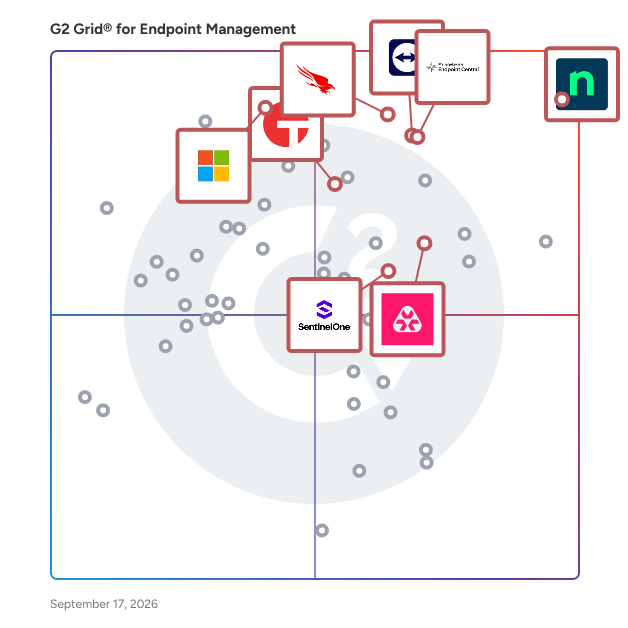
G2 Grid® for Endpoint Management Software

G2 Grid® for Endpoint Management Software plotting products by satisfaction and market presence

Highlighted products: NinjaOne, CrowdStrike Falcon Endpoint Protection Platform, ManageEngine Endpoint Central, Microsoft Intune Enterprise Application Management, Atera, TeamViewer, Tanium, and Trellix Endpoint Security.

Underlying data: [Grid® JSON](https://www.g2.com/categories/endpoint-management/grids.json?focus%5B%5D=ninjaone&focus%5B%5D=crowdstrike-falcon-endpoint-protection-platform&focus%5B%5D=manageengine-endpoint-central&focus%5B%5D=microsoft-intune-enterprise-application-management&focus%5B%5D=atera&focus%5B%5D=teamviewer&focus%5B%5D=tanium&focus%5B%5D=trellix-endpoint-security&segment=enterprise)

NinjaOne

NinjaOne is the unified IT operations platform that helps IT teams and managed service providers manage, secure, and support every endpoint from a single cloud-native console. Nearly 40,000 customers across 140+ countries use NinjaOne to replace fragmented point tools with one platform built to scale. The platform brings together the core work of modern IT operations: endpoint management, autonomous patch management, vulnerability management, endpoint and SaaS backup, remote access, and IT service desk. Teams monitor and control Windows, macOS, Linux, mobile, and virtual devices in one place, automate routine work with policy-based automation and human-centered AI, and cut the cost and risk that come from running many disconnected tools. NinjaOne serves internal IT teams and MSPs alike, from lean IT departments to mid-market and large enterprise organizations managing distributed, multi-site environments. Common uses include consolidating IT tooling, automating patching for security and compliance, managing distributed and hybrid workforces, improving endpoint visibility, and strengthening backup and ransomware readiness. NinjaOne has maintained a 98 percent customer satisfaction score for more than five years, backed by free unlimited onboarding and 24/7 support in seven languages. Organizations that move to NinjaOne report replacing four or more separate tools with the single platform. NinjaOne is FedRAMP Moderate Authorized and SOC 2 Type II and Type III compliant, and supports audit-ready compliance evidence across frameworks including CMMC, ISO 27001, and HIPAA. The mission behind the platform is simple: unify IT to simplify work, giving IT teams better tools and employees a great technology experience at work.

Average Rating: 4.7/5.0

Total Reviews: 4,988

How Do G2 Users Rate NinjaOne?

  • Has the product been a good partner in doing business?: 9.4/10 (Category avg: 9.2/10)
  • Ease of Admin: 9.1/10 (Category avg: 8.7/10)
  • Quality of Support: 9.1/10 (Category avg: 8.8/10)
  • Ease of Use: 9.1/10 (Category avg: 8.9/10)

Who Is the Company Behind NinjaOne?

  • Seller: NinjaOne
  • Company Website:
  • Year Founded: 2013
  • HQ Location: Austin, Texas
  • Twitter: @NinjaOne
    3,607 Twitter followers
  • LinkedIn® Page: www.linkedin.com
    2,376 employees on LinkedIn®

Who Uses This Product?

  • Who Uses This: IT Manager, Owner
  • Top Industries: Information Technology and Services, Computer & Network Security
  • Company Size: 47% Medium, 45% Small

What Do G2 Reviewers Say About NinjaOne?

AI-generated summary from verified user reviews

Pros
  • Users value the ease of use of NinjaOne, highlighting its seamless implementation and effective support for MSPs.
  • Users praise NinjaOne for its easy-to-navigate remote access and full visibility, enhancing IT support efficiency.
  • Users appreciate the ongoing feature enhancements of NinjaOne, ensuring the platform continuously evolves to meet our needs.
  • Users praise the powerful automation features of NinjaOne, enhancing efficiency and simplifying management tasks.
  • Users appreciate the exceptional customer support of NinjaOne, which simplifies learning and enhances overall usability.
Cons
  • Users notice the missing features in NinjaOne, specifically regarding client and customer portal capabilities.
  • Users find the limited features of NinjaOne frustrating, especially regarding user management and third-party software automation.
  • Users find the search function lacking and struggle with visibility and usability issues in NinjaOne.
  • Users feel the search function needs improvement and find the visibility of the NinjaOne icon inconsistent.
  • Users express concerns about feature issues, including confusion over roles, auto-installations, and OS compatibility challenges.

What Are Recent G2 Reviews of NinjaOne?

What Are G2 Users Discussing About NinjaOne?

CrowdStrike Falcon Endpoint Protection Platform

Las organizaciones de hoy enfrentan un desafío serio: gestionar numerosos proveedores y herramientas de seguridad mientras enfrentan un panorama de amenazas en constante evolución. Los adversarios sofisticados se están volviendo más inteligentes, rápidos y evasivos, lanzando ataques complejos que pueden ocurrir en minutos o incluso segundos. Los enfoques de seguridad tradicionales luchan por mantenerse al día, dejando a las empresas vulnerables. La Plataforma Falcon de CrowdStrike aborda esto ofreciendo una solución unificada y nativa de la nube. Consolida soluciones de seguridad previamente aisladas e incorpora datos de terceros en una sola plataforma con un agente eficiente y consciente de los recursos, aprovechando la inteligencia artificial avanzada y la inteligencia de amenazas en tiempo real. Este enfoque simplifica las operaciones de seguridad, acelera la toma de decisiones de los analistas y mejora la protección para detener la brecha, permitiendo a las organizaciones reducir el riesgo con menos complejidad y costos más bajos. La Plataforma Falcon de CrowdStrike incluye: - Seguridad de Endpoint: Asegura el endpoint, detén la brecha - Protección de Identidad: La identidad es la primera línea, defiéndela - SIEM de Nueva Generación: El futuro del SIEM, hoy - Protección de Datos: Protección de datos en tiempo real desde el endpoint hasta la nube - Gestión de Exposición: Comprende el riesgo para detener brechas - Charlotte AI: Impulsando la próxima evolución del SOC

Average Rating: 4.7/5.0

Total Reviews: 539

How Do G2 Users Rate CrowdStrike Falcon Endpoint Protection Platform?

  • ¿Ha sido the product un buen socio para hacer negocios?: 9.3/10 (Category avg: 9.2/10)
  • Facilidad de administración: 8.9/10 (Category avg: 8.7/10)
  • Calidad del soporte: 8.9/10 (Category avg: 8.8/10)
  • Facilidad de uso: 9.0/10 (Category avg: 8.9/10)

Who Is the Company Behind CrowdStrike Falcon Endpoint Protection Platform?

  • Vendedor: CrowdStrike
  • Sitio web de la empresa:
  • Año de fundación: 2011
  • Ubicación de la sede: Sunnyvale, CA
  • Twitter: @CrowdStrike
    110,809 seguidores en Twitter
  • Página de LinkedIn®: www.linkedin.com
    11,343 empleados en LinkedIn®

Who Uses This Product?

  • Who Uses This: Analista de Seguridad, Ingeniero de Seguridad
  • Top Industries: Tecnología de la información y servicios, Servicios Financieros
  • Company Size: 46% Large, 40% Medium

What Do G2 Reviewers Say About CrowdStrike Falcon Endpoint Protection Platform?

AI-generated summary from verified user reviews

Pros
  • Los usuarios aprecian el rendimiento ligero y la potente detección de amenazas de CrowdStrike Falcon, mejorando la seguridad sin ralentizar los sistemas.
  • Los usuarios elogian las eficaces capacidades de detección de amenazas de CrowdStrike Falcon, asegurando una seguridad robusta sin ralentizaciones del sistema.
  • Los usuarios aprecian la facilidad de uso de CrowdStrike Falcon, beneficiándose de su impacto ligero y su eficiente gestión de incidentes.
  • Los usuarios aprecian la protección avanzada contra amenazas en tiempo real de CrowdStrike Falcon, asegurando una seguridad eficiente sin problemas de rendimiento del sistema.
  • Los usuarios elogian la excepcional detección de amenazas de CrowdStrike Falcon, destacando su efectividad contra amenazas tanto conocidas como desconocidas.
Cons
  • Los usuarios encuentran el costo prohibitivo para organizaciones más pequeñas, especialmente con módulos adicionales que aumentan los gastos generales.
  • Los usuarios encuentran la complejidad de la interfaz de usuario y los costos adicionales desafiantes, complicando su experiencia general.
  • Los usuarios enfrentan una curva de aprendizaje pronunciada con el lenguaje de consulta de CrowdStrike, lo que hace que las transiciones desde otras plataformas sean desafiantes.
  • Los usuarios encuentran las características limitadas desafiantes, especialmente en lo que respecta al costo y la accesibilidad técnica para las empresas más pequeñas.
  • Los usuarios encuentran que el precio puede ser una barrera para las organizaciones más pequeñas, complicando el acceso a funciones avanzadas.

What Are Recent G2 Reviews of CrowdStrike Falcon Endpoint Protection Platform?

What Are G2 Users Discussing About CrowdStrike Falcon Endpoint Protection Platform?

ManageEngine Endpoint Central

ManageEngine Endpoint Central is an all-in-one unified endpoint management and security (UEMS) solution that delivers end-to-end life cycle management and endpoint protection. From automated multi-OS patching and software deployment to asset intelligence and mobile device management, it unifies the core workflows IT teams rely on every day. On the security side, its next-generation antivirus (NGAV) uses behavioral detection, AI, and real-time analytics to detect and stop advanced threats, while built-in attack surface management, browser security, and data loss prevention keep sensitive data protected across office, remote, and frontline endpoints alike. Endpoint Central also prioritizes productivity through digital employee experience (DEX) monitoring, delivering real-time insights into device health, application performance, and endpoint telemetry so IT teams can resolve issues before they impact employees. Recognized as a leader by Gartner®, IDC, and Forrester, Endpoint Central is trusted by over 31, 000 enterprises worldwide and available in both on-premises and SaaS editions. This solution streamlines the complex landscape of endpoint management, empowering IT and security teams to manage more with less, delivering intelligent automation and AI-powered threat mitigation through one unified platform. Business benefits and ROI A commissioned Forrester Total Economic Impact™ study found that organizations deploying Endpoint Central achieved several significant business benefits, including: - 442% return on investment over three years, driven by tool consolidation, automation, and reduced operational overhead. - $4.5 million in total quantified economic benefits (present value), a net present value of $3.7 million, and a payback period of under six months. - 95% reduction in manual patching time, as well as cut licensing and insurance costs through improved security posture and compliance. - Significant reductions in compliance violations and security-related disruptions driven by Endpoint Central’s capability to convert endpoint stability and risk reduction into measurable business outcomes.

Average Rating: 4.5/5.0

Total Reviews: 1,124

How Do G2 Users Rate ManageEngine Endpoint Central?

  • Has the product been a good partner in doing business?: 8.9/10 (Category avg: 9.2/10)
  • Ease of Admin: 8.8/10 (Category avg: 8.7/10)
  • Quality of Support: 8.5/10 (Category avg: 8.8/10)
  • Ease of Use: 8.7/10 (Category avg: 8.9/10)

Who Is the Company Behind ManageEngine Endpoint Central?

  • Seller: Zoho
  • Year Founded: 1996
  • HQ Location: Austin, TX
  • Twitter: @Zoho
    137,880 Twitter followers
  • LinkedIn® Page: www.linkedin.com
    30,766 employees on LinkedIn®
  • Phone: +1 (888) 900-9646

Who Uses This Product?

  • Who Uses This: IT Manager, System Administrator
  • Top Industries: Information Technology and Services, Financial Services
  • Company Size: 64% Medium, 24% Large

What Do G2 Reviewers Say About ManageEngine Endpoint Central?

AI-generated summary from verified user reviews

Pros
  • Users find the ease of use of ManageEngine Endpoint Central invaluable for efficient IT operations and streamlined management.
  • Users value the efficient patch management in ManageEngine Endpoint Central, simplifying endpoint updates and enhancing security.
  • Users appreciate the extensive features of ManageEngine Endpoint Central, enabling efficient endpoint and security management in one platform.
  • Users value the software deployment capabilities of ManageEngine Endpoint Central for efficient and streamlined management of endpoints.
  • Users value the comprehensive endpoint management features of ManageEngine Endpoint Central for efficient security and asset management.
Cons
  • Users feel the product lacks reporting functionality and dynamic group settings, which limits flexibility for managed service providers.
  • Users experience feature issues with Endpoint Central, particularly regarding Active Directory updates and unclear deployment remarks.
  • Users face patching issues with ManageEngine Endpoint Central, experiencing problems with updates and continuous review popups.
  • Users find the initial complexity of Endpoint Central challenging due to numerous features and unclear documentation.
  • Users find the learning curve and limited customization challenging, requiring time and training for effective use.

What Are Recent G2 Reviews of ManageEngine Endpoint Central?

What Are G2 Users Discussing About ManageEngine Endpoint Central?

Microsoft Intune Enterprise Application Management

Microsoft Intune Enterprise Application Management is a cloud-based solution designed to simplify the discovery, deployment, and updating of applications within an organization. By providing a securely hosted catalog of prepackaged Microsoft and third-party applications, it reduces the time and effort IT administrators spend on app management. This service ensures that applications remain current and secure, mitigating potential security risks associated with outdated software. Key Features and Functionality: - Enterprise App Catalog: Access a comprehensive collection of prepackaged applications, including both Microsoft and third-party apps, directly from the Intune console. - Streamlined Deployment: Easily discover, package, and deploy applications, reducing complexity and saving time for IT administrators. - Automated Updates: Keep applications up to date by leveraging a guided upgrade experience, proactively identifying and updating outdated apps. - Security Risk Mitigation: Deploy app fixes immediately when security vulnerabilities are discovered, reducing potential risks and ensuring compliance. - Integration with Windows Autopilot: Support for Windows Autopilot allows for seamless integration, enabling the selection of blocking apps from the Enterprise App Catalog in Enrollment Status Page (ESP) and Device Preparation Page (DPP) profiles. Primary Value and Problem Solved: Microsoft Intune Enterprise Application Management addresses the challenges organizations face in managing the lifecycle of applications across diverse endpoints. By offering a centralized, cloud-based platform, it simplifies the processes of app discovery, deployment, and maintenance. This not only enhances operational efficiency but also strengthens security by ensuring that applications are consistently updated and compliant with organizational policies. Ultimately, it empowers IT teams to focus on strategic initiatives rather than routine app management tasks.

Average Rating: 4.5/5.0

Total Reviews: 255

How Do G2 Users Rate Microsoft Intune Enterprise Application Management?

  • Has the product been a good partner in doing business?: 8.9/10 (Category avg: 9.2/10)
  • Ease of Admin: 8.6/10 (Category avg: 8.7/10)
  • Quality of Support: 8.4/10 (Category avg: 8.8/10)
  • Ease of Use: 8.6/10 (Category avg: 8.9/10)

Who Is the Company Behind Microsoft Intune Enterprise Application Management?

  • Seller: Microsoft
  • Year Founded: 1975
  • HQ Location: Redmond, Washington
  • Twitter: @microsoft
    13,091,739 Twitter followers
  • LinkedIn® Page: www.linkedin.com
    231,632 employees on LinkedIn®
  • Ownership: MSFT

Who Uses This Product?

  • Who Uses This: System Engineer, System Administrator
  • Top Industries: Information Technology and Services, Computer & Network Security
  • Company Size: 41% Medium, 40% Large

What Do G2 Reviewers Say About Microsoft Intune Enterprise Application Management?

AI-generated summary from verified user reviews

Pros
  • Users value the centralized management of Microsoft Intune, simplifying app lifecycle management and enhancing security effortlessly.
  • Users value the enhanced security and compliance capabilities of Microsoft Intune Enterprise Application Management for IT operations.
  • Users appreciate the ease of use of Microsoft Intune, allowing for seamless app lifecycle management and device setup.
  • Users value the centralized app lifecycle management of Microsoft Intune, boosting security and simplifying IT operations.
  • Users appreciate the streamlined software deployment capabilities of Microsoft Intune, enhancing security and compliance for all devices.
Cons
  • Users find the setup complexity challenging, with a steep learning curve and unclear feature activation times.
  • Users often face complexity in policy integration with Intune, making setup and management challenging for new administrators.
  • Users find the learning curve steep, as setup and policy configuration can be complex for beginners.
  • Users note the missing features in Microsoft Intune, particularly regarding cross-platform consistency and non-Microsoft app protection.
  • Users find cross-platform consistency lacking in Intune, hindering its usability and complicating management for new administrators.

What Are Recent G2 Reviews of Microsoft Intune Enterprise Application Management?

What Are G2 Users Discussing About Microsoft Intune Enterprise Application Management?

Atera

Atera is defining the category of Autonomous IT, where AI agents resolve technical incidents end to end, without a technician in the loop. Atera's AI-native IT management platform consolidates RMM, helpdesk, ticketing, advanced reporting, and automation, empowering IT teams and MSPs to manage and protect infrastructure, automate tasks, and boost service quality by reducing downtime and improving SLAs. Atera’s autonomous AI agent, Robin, detects, diagnoses, remediates, and verifies incidents by taking action directly on devices, servers, networks, and mainframes, resolving Tier-1 and complex Tier-2 incidents in full. 1) Resolution without the wait. Robin doesn't just suggest or assist, it acts and resolves, on its own, instantly. 2) Always-on coverage, day and night. Robin extends your team's reach around the clock, resolving issues at 2am just as reliably as at 2pm, so your team isn't the only line of defense when it comes to fighting downtime. 3) A personal IT tech for every employee. An intelligent, context-aware AI agent that understands your environment, adapts to each user, and responds instantly. Built on a patented architecture, Robin operates as a system of action within your existing enterprise environment, adhering to the highest enterprise-grade security and compliance standards. It's governed by configurable guardrails, a complete audit trail, and approval workflows, so autonomy never comes at the cost of control. More than 13,000 organizations across 120+ countries rely on Atera to keep their people working, uninterrupted. Discover how Atera can help you achieve unparalleled organizational efficiency at www.atera.com.

Average Rating: 4.6/5.0

Total Reviews: 1,245

How Do G2 Users Rate Atera?

  • Has the product been a good partner in doing business?: 9.2/10 (Category avg: 9.2/10)
  • Ease of Admin: 9.0/10 (Category avg: 8.7/10)
  • Quality of Support: 9.0/10 (Category avg: 8.8/10)
  • Ease of Use: 9.2/10 (Category avg: 8.9/10)

Who Is the Company Behind Atera?

  • Seller: Atera
  • Company Website:
  • Year Founded: 2011
  • HQ Location: Tel Aviv
  • Twitter: @AteraCloud
    1,675 Twitter followers
  • LinkedIn® Page: www.linkedin.com
    416 employees on LinkedIn®

Who Uses This Product?

  • Who Uses This: Owner, IT Manager
  • Top Industries: Information Technology and Services, Computer & Network Security
  • Company Size: 55% Small, 31% Medium

What Do G2 Reviewers Say About Atera?

AI-generated summary from verified user reviews

Pros
  • Users find Atera's ease of use exceptional, streamlining management and enhancing efficiency across various tasks.
  • Users appreciate the powerful automation tools of Atera, enabling efficient management and consistent setup for new employees.
  • Users appreciate the all-in-one dashboard of Atera, enhancing efficiency with seamless access to various tools and features.
  • Users praise Atera for its efficiency, streamlining processes and enhancing remote management of devices.
  • Users value the proactive monitoring and all-in-one platform of Atera, significantly enhancing productivity and efficiency.
Cons
  • Users find missing features in Atera, such as insufficient alert context and lack of essential ticketing tools.
  • Users find the limited features of Atera, especially in the mobile app, restrict overall functionality for freelancers.
  • Users find improvement needed in Atera's interface changes and agent installation process, along with remote access reliability.
  • Users note that report loading times and limited customization can hinder efficiency, revealing areas for improvement.
  • Users express concerns about feature issues in Atera, citing limitations and disruptions affecting their workflow.

What Are Recent G2 Reviews of Atera?

What Are G2 Users Discussing About Atera?

Tanium

Trusted by 40% of the Fortune 100, 8 of the top 10 U.S. Banks, and all 6 branches of the U.S. Armed Forces. Tanium is the platform the world's most security-conscious organizations trust. The Tanium Autonomous IT Platform unifies endpoint management and security on a single, unified platform. Driven by real-time intelligence and generative, agentic, and predictive AI, Tanium ensures every insight and automation is based on accurate, trustworthy data so IT operations and security teams can act faster, stay resilient, and drive better business outcomes with confidence. Built on Tanium’s patented Linear Chain Architecture, teams can deploy trusted automation progressively, then execute actions safely at speed and scale - without scans or manual workflows. Continuous visibility across IT, mobile, OT, and cloud environments helps organizations accelerate decision agility, save costs through integrated automation, and strengthen resilience with closed-loop security.

Average Rating: 4.5/5.0

Total Reviews: 78

How Do G2 Users Rate Tanium?

  • Has the product been a good partner in doing business?: 8.6/10 (Category avg: 9.2/10)
  • Ease of Admin: 8.1/10 (Category avg: 8.7/10)
  • Quality of Support: 8.9/10 (Category avg: 8.8/10)
  • Ease of Use: 8.6/10 (Category avg: 8.9/10)

Who Is the Company Behind Tanium?

  • Seller: Tanium
  • Company Website:
  • Year Founded: 2007
  • HQ Location: Emeryville, CA
  • Twitter: @Tanium
    7,243 Twitter followers
  • LinkedIn® Page: www.linkedin.com
    2,333 employees on LinkedIn®

Who Uses This Product?

  • Top Industries: Information Technology and Services, Hospital & Health Care
  • Company Size: 47% Large, 32% Medium

What Do G2 Reviewers Say About Tanium?

AI-generated summary from verified user reviews

Pros
  • Users value the ease of use of Tanium, enabling efficient device management and real-time endpoint visibility.
  • Users value the real-time visibility and comprehensive endpoint management features of Tanium for enhanced security and efficiency.
  • Users commend the reliability of Tanium for effective endpoint management and real-time visibility across assets.
  • Users value the strong security capabilities of Tanium, enhancing their endpoint security management significantly.
  • Users commend the real-time visibility provided by Tanium, enhancing their ability to manage endpoints effectively.
Cons
  • Users find the learning curve steep with Tanium, requiring significant time to become proficient in its features.
  • Users find Tanium's complexity challenging, especially those new to cybersecurity aiming for hands-on experience.
  • Users report limited features in Tanium, including outdated vulnerability databases and troublesome troubleshooting processes.
  • Users experience insufficient information during onboarding, making the initial use of Tanium challenging and time-consuming.
  • Users note that Tanium has a steep learning curve and lacks clear onboarding resources, making initial use overwhelming.

What Are Recent G2 Reviews of Tanium?

TeamViewer

TeamViewer is a leading provider of remote connectivity software for individuals and businesses of all sizes. Our remote software enables companies across various industries to enhance their efficiency and achieve their business goals by digitally transforming their processes. We offer a selection of bespoke solutions: TeamViewer Tensor, our enterprise remote connectivity solution, enables businesses to connect, manage, and protect computers, mobile devices, and embedded platforms – on site and around the globe. TeamViewer Remote, our remote access and support solution, enables secure access to devices for remote support in small and medium-sized businesses. A free version of TeamViewer Remote is available for personal use. TeamViewer is actively working to shape the digital revolution by innovating in the fields of augmented reality (AR) and the Internet of Things (IoT). Our AR platform, Frontline, brings digital technology onto the shop floor with industrial AR solutions designed to optimize manual processes. Strategic partnerships and software integrations with other industry leaders such as SAP, Google, and Microsoft let us provide our customers with a seamless experience, regardless of their device or operating system. Since TeamViewer was founded in Göppingen, Germany, in 2005, our solutions have been installed on more than 2.5 billion devices worldwide. For more information, visit www.teamviewer.com.

Average Rating: 4.5/5.0

Total Reviews: 4,076

How Do G2 Users Rate TeamViewer?

  • Has the product been a good partner in doing business?: 8.6/10 (Category avg: 9.2/10)
  • Ease of Admin: 8.9/10 (Category avg: 8.7/10)
  • Quality of Support: 8.6/10 (Category avg: 8.8/10)
  • Ease of Use: 9.1/10 (Category avg: 8.9/10)

Who Is the Company Behind TeamViewer?

  • Seller: TeamViewer
  • Company Website:
  • Year Founded: 2005
  • HQ Location: Goppingen
  • Twitter: @TeamViewer
    48,070 Twitter followers
  • LinkedIn® Page: www.linkedin.com
    2,769 employees on LinkedIn®

Who Uses This Product?

  • Who Uses This: Software Engineer, IT Manager
  • Top Industries: Information Technology and Services, Computer Software
  • Company Size: 41% Small, 34% Medium

What Do G2 Reviewers Say About TeamViewer?

AI-generated summary from verified user reviews

Pros
  • Users appreciate the ease of use of TeamViewer, enjoying a smooth experience for remote access and support.
  • Users appreciate the easy remote access provided by TeamViewer, simplifying connections and enhancing productivity.
  • Users value the easy remote access with TeamViewer, simplifying connections and control over devices effortlessly.
  • Users love the Easy Access feature of TeamViewer, making remote connections seamless and efficient.
  • Users appreciate the seamless remote access of TeamViewer, enhancing productivity through easy connections and cross-platform compatibility.
Cons
  • Users face significant connection issues with TeamViewer, impacting performance during slow or unstable internet conditions.
  • Users experience connectivity issues with TeamViewer, leading to poor performance during slow or bad connections.
  • Users find TeamViewer expensive in South Africa due to high subscription fees and limited performance on slow connections.
  • Users experience slow performance with TeamViewer, particularly during weak internet connections and after network disruptions.
  • Users often face remote access issues with TeamViewer, including connection failures and confusing control panel interfaces.

What Are Recent G2 Reviews of TeamViewer?

What Are G2 Users Discussing About TeamViewer?

Trellix Endpoint Security

La Suite de Seguridad de Endpoint de Trellix es un conjunto completo y unificado de soluciones que protege dispositivos y endpoints a lo largo de su red híbrida, permitiendo a su organización abordar problemas de seguridad complejos y distribuidos de manera exhaustiva, eficiente y rápida. Utiliza análisis y aprendizaje automático para lograr una protección contra amenazas líder en la industria, todo mientras ofrece la flexibilidad de conectarse a productos de otros proveedores. La solución le ayuda a unificar sus datos y defensas contra amenazas desde el dispositivo hasta la nube, para una seguridad integrada.

Average Rating: 4.3/5.0

Total Reviews: 319

How Do G2 Users Rate Trellix Endpoint Security?

  • ¿Ha sido the product un buen socio para hacer negocios?: 8.1/10 (Category avg: 9.2/10)
  • Facilidad de administración: 8.2/10 (Category avg: 8.7/10)
  • Calidad del soporte: 8.5/10 (Category avg: 8.8/10)
  • Facilidad de uso: 8.6/10 (Category avg: 8.9/10)

Who Is the Company Behind Trellix Endpoint Security?

  • Vendedor: Trellix
  • Año de fundación: 2004
  • Ubicación de la sede: Plano, TX
  • Twitter: @Trellix
    241,168 seguidores en Twitter
  • Página de LinkedIn®: www.linkedin.com
    3,811 empleados en LinkedIn®

Who Uses This Product?

  • Who Uses This: Ingeniero de Software Senior, Desarrollador de software
  • Top Industries: Tecnología de la información y servicios, Software de Computadora
  • Company Size: 42% Medium, 41% Large

What Do G2 Reviewers Say About Trellix Endpoint Security?

AI-generated summary from verified user reviews

Pros
  • Los usuarios encuentran que Trellix Endpoint Security es muy fácil de usar, lo que facilita una implementación sencilla y una gestión eficaz de amenazas.
  • Los usuarios aprecian la robusta protección multinivel de Trellix Endpoint Security contra una amplia gama de amenazas.
  • Los usuarios valoran la detección avanzada de amenazas de Trellix Endpoint Security, deteniendo ataques sofisticados antes de que puedan causar daño.
  • Los usuarios elogian el soporte al cliente receptivo de Trellix Endpoint Security, mejorando su experiencia general con el producto.
  • Los usuarios valoran la protección robusta y de múltiples capas de Trellix Endpoint Security contra una amplia gama de amenazas.
Cons
  • Los usuarios encuentran que la configuración difícil de Trellix Endpoint Security es abrumadora, especialmente para equipos nuevos o más pequeños.
  • Los usuarios encuentran Trellix Endpoint Security caro, señalando que los competidores ofrecen más características a un precio más bajo.
  • Los usuarios experimentan problemas con el agente que conducen a un alto uso de CPU y memoria durante el inicio, requiriendo habilidades avanzadas de configuración.
  • Los usuarios encuentran la instalación compleja de Trellix Endpoint Security desafiante, especialmente para aquellos que no están familiarizados con los sistemas empresariales.
  • Los usuarios encuentran la interfaz compleja de Trellix Endpoint Security abrumadora, especialmente para principiantes y equipos más pequeños.

What Are Recent G2 Reviews of Trellix Endpoint Security?

What Are G2 Users Discussing About Trellix Endpoint Security?

Right Click Tools

Right Click Tools es un conjunto poderoso de herramientas de gestión de endpoints, automatización y remediación diseñado para elevar lo que los equipos de TI pueden lograr con Microsoft ConfigMgr (SCCM) e Intune. Los entornos de TI modernos son complejos, distribuidos y están en constante cambio, y las consolas tradicionales a menudo no proporcionan la visibilidad o la velocidad necesarias para mantenerse a la vanguardia. Right Click Tools cierra esas brechas. Al llevar información en tiempo real, acciones con un solo clic y automatización escalable directamente a las herramientas que los equipos de TI ya utilizan, permite a los equipos ver los problemas claramente, solucionarlos rápidamente y seguir adelante con confianza. Right Click Tools está diseñado para los profesionales de TI responsables de mantener los endpoints saludables, seguros y en cumplimiento. Esto incluye a los administradores de sistemas que necesitan solucionar y remediar problemas rápidamente; directores de TI que se centran en reducir riesgos, mejorar la eficiencia y mantener el cumplimiento; y líderes de seguridad que requieren visibilidad en tiempo real de vulnerabilidades como la falta de cifrado, desviación de políticas o acceso privilegiado. Ya sea que una organización gestione miles de dispositivos en las instalaciones, a través de entornos híbridos o completamente en la nube, Right Click Tools proporciona a los equipos el control y la consistencia necesarios para apoyar a una fuerza laboral moderna y distribuida. Las características principales incluyen visibilidad en tiempo real, automatización masiva y capacidades de remediación poderosas que simplifican drásticamente la gestión de endpoints. Los equipos de TI pueden identificar instantáneamente dispositivos no conformes, verificar el estado de cifrado y parches, gestionar derechos de administrador local, desplegar software o eliminar procesos no deseados, todo sin necesidad de scripts o cambiar de herramientas. Right Click Tools se vuelve aún más poderoso con sus tres módulos adicionales especializados: el módulo de Parches ofrece informes avanzados de parches y aplicación de cumplimiento; el módulo de Acceso Privilegiado permite la elevación controlada y derechos de administrador temporales sin comprometer la seguridad; y el módulo de Insights proporciona paneles y análisis ricos que destacan vulnerabilidades, desviación de políticas y brechas operativas. Juntas, estas capacidades brindan a las organizaciones el control unificado, la velocidad y la inteligencia que necesitan para identificar problemas rápidamente y remediarlos a escala. Lo que distingue a Right Click Tools es su combinación única de velocidad, simplicidad y profundidad. Reúne capacidades que de otro modo requerirían múltiples herramientas desconectadas o un profundo conocimiento de PowerShell, y las hace intuitivas y accesibles para equipos de TI de cualquier nivel de habilidad. Su integración estrecha con ConfigMgr e Intune, incluyendo una extensión de navegador para la consola de Intune y automatización avanzada a través de Recast Management Server, ofrece a las organizaciones una experiencia fluida en entornos en la nube y en las instalaciones. Confiado por más de 60,000 profesionales de TI en todo el mundo, Right Click Tools reduce consistentemente el riesgo, mejora el cumplimiento y ahorra a los equipos cientos de horas anualmente. Es el conjunto de herramientas esencial para organizaciones que desean gestionar endpoints de manera más inteligente, rápida y segura, sin necesidad de scripts.

Average Rating: 4.8/5.0

Total Reviews: 68

How Do G2 Users Rate Right Click Tools?

  • ¿Ha sido the product un buen socio para hacer negocios?: 9.6/10 (Category avg: 9.2/10)
  • Facilidad de administración: 9.4/10 (Category avg: 8.7/10)
  • Calidad del soporte: 9.3/10 (Category avg: 8.8/10)
  • Facilidad de uso: 9.6/10 (Category avg: 8.9/10)

Who Is the Company Behind Right Click Tools?

  • Vendedor: Recast Software
  • Sitio web de la empresa:
  • Año de fundación: 2015
  • Ubicación de la sede: St. Louis Park
  • Twitter: @RecastSoftware
    2,103 seguidores en Twitter
  • Página de LinkedIn®: www.linkedin.com
    174 empleados en LinkedIn®

Who Uses This Product?

  • Top Industries: Tecnología de la información y servicios, Atención hospitalaria y sanitaria
  • Company Size: 75% Large, 21% Medium

What Do G2 Reviewers Say About Right Click Tools?

AI-generated summary from verified user reviews

Pros
  • Los usuarios encuentran que Right Click Tools es una solución fácil de usar que simplifica eficazmente las tareas diarias de gestión de TI.
  • A los usuarios les encanta el conjunto de funciones potentes de Right Click Tools, especialmente su Centro de Software Remoto y capacidades de automatización.
  • A los usuarios les encantan las capacidades de automatización de Right Click Tools, reduciendo significativamente el trabajo manual y mejorando la eficiencia.
  • Los usuarios aprecian el soporte al cliente receptivo y fácil de trabajar de Right Click Tools, mejorando su experiencia de gestión de TI.
  • Los usuarios celebran la utilidad de las funciones en Right Click Tools, mejorando enormemente sus rutinas diarias de trabajo.
Cons
  • Los usuarios notan problemas de integración con dispositivos remotos y la lenta migración a servicios en la nube que afectan las capacidades generales de gestión.
  • Los usuarios encuentran confusas las restricciones de acceso ya que los productos sin licencia saturan la interfaz innecesariamente.
  • Los usuarios enfrentan problemas de implementación con Right Click Tools, particularmente en lo que respecta a la migración a la nube y los esfuerzos necesarios para la configuración.
  • Los usuarios a menudo enfrentan problemas de acceso que complican la configuración de permisos y dificultan el funcionamiento fluido de Right Click Tools.
  • Los usuarios encuentran problemas de autenticación desafiantes a veces, afectando el acceso y la funcionalidad de Right Click Tools.

What Are Recent G2 Reviews of Right Click Tools?

What Are G2 Users Discussing About Right Click Tools?

SentinelOne Singularity Endpoint

SentinelOne Singularity Endpoint es un software diseñado para proteger los endpoints detectando, previniendo y respondiendo de manera autónoma a las amenazas en los dispositivos dentro de una organización. El software utiliza el aprendizaje automático y la inteligencia artificial conductual para identificar y mitigar una amplia gama de amenazas cibernéticas, incluyendo malware, ransomware y ataques sin archivos. Proporciona monitoreo continuo y capacidades de remediación automatizada para ayudar a reducir la intervención manual y el tiempo de respuesta durante los incidentes de seguridad. SentinelOne Singularity Endpoint se integra con los flujos de trabajo de seguridad y gestión de TI existentes, ofreciendo visibilidad de las actividades de los endpoints y ayudando a las organizaciones a mantener el cumplimiento asegurando que los dispositivos cumplan con los estándares de seguridad. El software está diseñado para abordar los desafíos empresariales relacionados con la protección de endpoints, la gestión de amenazas y la eficiencia operativa en entornos de ciberseguridad.

Average Rating: 4.7/5.0

Total Reviews: 206

How Do G2 Users Rate SentinelOne Singularity Endpoint?

  • ¿Ha sido the product un buen socio para hacer negocios?: 9.3/10 (Category avg: 9.2/10)
  • Facilidad de administración: 8.9/10 (Category avg: 8.7/10)
  • Calidad del soporte: 8.9/10 (Category avg: 8.8/10)
  • Facilidad de uso: 8.9/10 (Category avg: 8.9/10)

Who Is the Company Behind SentinelOne Singularity Endpoint?

  • Vendedor: SentinelOne
  • Sitio web de la empresa:
  • Año de fundación: 2013
  • Ubicación de la sede: Mountain View, CA
  • Twitter: @SentinelOne
    57,863 seguidores en Twitter
  • Página de LinkedIn®: www.linkedin.com
    3,426 empleados en LinkedIn®

Who Uses This Product?

  • Top Industries: Tecnología de la información y servicios, Seguridad de Redes y Computadoras
  • Company Size: 46% Medium, 36% Large

What Do G2 Reviewers Say About SentinelOne Singularity Endpoint?

AI-generated summary from verified user reviews

Pros
  • Los usuarios encuentran la facilidad de integración con Nable RMM y la configuración sencilla para las operaciones diarias.
  • Los usuarios valoran la eficiencia de la herramienta de SentinelOne Singularity Endpoint, apreciando su interfaz fácil de usar y su efectiva detección de amenazas.
  • Los usuarios valoran la facilidad de configuración de SentinelOne Singularity, apreciando su sencilla implementación y rápido proceso de puesta en marcha.
  • Los usuarios elogian la protección excepcional contra malware de SentinelOne, deteniendo eficazmente las amenazas antes de que puedan causar daño.
  • Los usuarios encuentran que SentinelOne Singularity Endpoint es una herramienta muy útil para la notificación e investigación de incidentes.
Cons
  • Los usuarios enfrentan problemas de actualización con SentinelOne Singularity, lo que lleva a problemas de inicio de sesión y una gestión de agentes engorrosa.
  • Los usuarios encuentran la difícil curva de aprendizaje de SentinelOne Singularity Endpoint desafiante, especialmente para los principiantes que navegan por sus características.
  • Los usuarios encuentran las actualizaciones frecuentes desafiantes, ya que los cambios rápidos conducen a problemas de inicio de sesión y una curva de aprendizaje pronunciada.
  • Los usuarios informan desafíos con problemas de eliminación de agentes que afectan la funcionalidad de la aplicación y requieren mejoras en los procesos de desinstalación.
  • Los usuarios informan de alertas ineficaces que dificultan la resolución de problemas y les impiden abordar eficazmente los problemas de la aplicación.

What Are Recent G2 Reviews of SentinelOne Singularity Endpoint?

What Are G2 Users Discussing About SentinelOne Singularity Endpoint?

PDQ Connect

PDQ is an endpoint management platform designed for IT administrators and sysadmins. Manage, secure, and automate endpoints across remote, hybrid, and on-site environments. Manage your organization's Windows and macOS machines from a central platform designed to make the grind of everyday IT workflows seamless and the thorny why-the-hell-isn’t-this-working issues easier to diagnose. Core capabilities include patch management, vulnerability remediation, remote desktop access and monitoring, and software deployment. In short, the stuff you actually tell us to build. Just look at our Discord. Vulnerabilities are continuously detected and prioritized using real-world exploit activity in addition to CVSS, enabling remediation based on real, not theoretical, business risk. Patch both Windows OS and over 1,000 Windows and macOS packages from a hand-built library sourced directly from publishers, virus-scanned, stripped of nonsense, and typically updated within hours of a new release. PDQ pre-built workflows and automations are running within minutes of onboarding, but most of our sysadmins combine custom multistep packages, advanced PowerShell scanners, dynamic device groups, vulnerability automations, and a community-shared script library to create an end-to-end system tailor-built for their situation, reducing what was once days into minutes. And for when all else fails, PDQ ships with a native device-level diagnostics and a remote desktop tool that fires up quickly to help you diagnose, fix, and move on, whether you’re dealing with an x64 Lenovo or an ARM Macbook Pro. Multi-tenant support allows IT teams managing multiple environments to operate from a single console. Real-time, event-driven automation allows IT teams to execute workflows based on device state and predefined conditions — deployments trigger the moment a condition is met, without waiting for a scheduled window. Offline device deployment queuing ensures no device is skipped regardless of connectivity at the time a deployment runs. And where compliance, regulatory, or org policy requires, PDQ’s core deployment and patching capabilities can also be deployed as an on-premise, agentless solution. PDQ is SOC 2 certified and includes security features including MFA, role-based access controls, encryption, and audit logging to support compliance requirements. Pricing is publicly available and supports self-service purchasing without requiring a sales call. A 14-day free trial is available with no credit card required.

Average Rating: 4.6/5.0

Total Reviews: 425

How Do G2 Users Rate PDQ Connect?

  • Has the product been a good partner in doing business?: 9.4/10 (Category avg: 9.2/10)
  • Ease of Admin: 9.4/10 (Category avg: 8.7/10)
  • Quality of Support: 9.2/10 (Category avg: 8.8/10)
  • Ease of Use: 9.1/10 (Category avg: 8.9/10)

Who Is the Company Behind PDQ Connect?

  • Seller: PDQ.com
  • Company Website:
  • Year Founded: 2001
  • HQ Location: Salt Lake City, Utah, United States
  • Twitter: @admarsenal
    987 Twitter followers
  • LinkedIn® Page: www.linkedin.com
    392 employees on LinkedIn®

Who Uses This Product?

  • Who Uses This: IT Manager, Systems Administrator
  • Top Industries: Manufacturing, Information Technology and Services
  • Company Size: 56% Medium, 15% Large

What Do G2 Reviewers Say About PDQ Connect?

AI-generated summary from verified user reviews

Pros
  • Users value the ease of use in PDQ Connect, simplifying deployment and management tasks effortlessly.
  • Users appreciate the ease of software deployment with PDQ Connect, enhancing efficiency and simplifying remote device management.
  • Users value the easy deployment capabilities of PDQ Connect, facilitating efficient software management across diverse environments.
  • Users find the easy setup of PDQ Connect a significant advantage, enhancing efficiency and user experience from the start.
  • Users value the remote access capabilities of PDQ Connect, enabling efficient management and support for off-site personnel.
Cons
  • Users express concerns about missing features in PDQ Connect, hindering efficiency in command execution and device management.
  • Users feel that improvement is needed in patch management and the user interface for PDQ Connect.
  • Users note the limited features of PDQ Connect, wishing for more options like vulnerability scanning and software deployment.
  • Users experience remote access issues due to internet dependency and subpar connection prompts hinder usability and speed.
  • Users face deployment issues with PDQ Connect, often finding package creation and device identification challenging and inconvenient.

What Are Recent G2 Reviews of PDQ Connect?

Check Point Infinity Platform

Check Point Infinity es la única arquitectura de ciberseguridad completamente consolidada que proporciona una protección sin precedentes contra los mega-ciberataques de la Generación V, así como contra futuras amenazas cibernéticas en todas las redes, puntos finales, la nube y dispositivos móviles. La arquitectura está diseñada para resolver las complejidades del creciente nivel de conectividad y la seguridad ineficiente.

Average Rating: 4.6/5.0

Total Reviews: 109

How Do G2 Users Rate Check Point Infinity Platform?

  • ¿Ha sido the product un buen socio para hacer negocios?: 8.8/10 (Category avg: 9.2/10)
  • Facilidad de administración: 8.6/10 (Category avg: 8.7/10)
  • Calidad del soporte: 8.8/10 (Category avg: 8.8/10)
  • Facilidad de uso: 9.1/10 (Category avg: 8.9/10)

Who Is the Company Behind Check Point Infinity Platform?

  • Vendedor: Check Point Software Technologies
  • Año de fundación: 1993
  • Ubicación de la sede: Redwood City, CA
  • Twitter: @CheckPointSW
    70,955 seguidores en Twitter
  • Página de LinkedIn®: www.linkedin.com
    8,554 empleados en LinkedIn®
  • Propiedad: NASDAQ:CHKP

Who Uses This Product?

  • Top Industries: Seguridad de Redes y Computadoras, Tecnología de la información y servicios
  • Company Size: 44% Large, 37% Medium

What Do G2 Reviewers Say About Check Point Infinity Platform?

AI-generated summary from verified user reviews

Pros
  • Los usuarios elogian las características avanzadas de seguridad de la Plataforma Check Point Infinity, previniendo eficazmente futuros ataques en infraestructuras en la nube.
  • Los usuarios valoran las características de seguridad en la nube de la Plataforma Check Point Infinity para auditorías eficientes y evaluaciones de infraestructura.
  • Los usuarios elogian la detección proactiva de amenazas de la Plataforma Check Point Infinity, mejorando la seguridad para aplicaciones en la nube.
  • Los usuarios destacan las características de seguridad integrales de la Plataforma Check Point Infinity, protegiendo eficazmente contra futuros ataques.
  • Los usuarios valoran las características avanzadas de seguridad de Check Point Infinity para proteger eficazmente su infraestructura en la nube.
Cons
  • Los usuarios encuentran la empinada curva de aprendizaje de la Plataforma Check Point Infinity desafiante debido a su complejidad y características extensas.
  • Los usuarios encuentran que el proceso de configuración complejo para la Plataforma Check Point Infinity puede ser a veces lento y confuso.
  • Los usuarios sienten que se necesita mejora en el soporte en tiempo real y la creación de conjuntos de reglas personalizados para una mejor funcionalidad.
  • Los usuarios expresan preocupaciones sobre los servicios de soporte deficientes, indicando una necesidad de mejora en la asistencia al cliente y la visibilidad de los registros.
  • Los usuarios encuentran las opciones de personalización limitadas desafiantes, lo que afecta su capacidad para adaptar la plataforma a sus necesidades.

What Are Recent G2 Reviews of Check Point Infinity Platform?

What Are G2 Users Discussing About Check Point Infinity Platform?

Ivanti Neurons for Unified Endpoint Management

Ivanti Neurons para UEM unifica la gestión y seguridad de cada dispositivo en toda la empresa: Windows, macOS, Linux, móviles, robustos, IoT y cascos de VR/XR, dentro de una sola plataforma. Impulsado por IA, automatiza el parcheo, el cumplimiento, la incorporación y la remediación, eliminando el esfuerzo manual mientras fortalece la protección en todo el conjunto de dispositivos. Con Ivanti Neurons para UEM, las organizaciones obtienen parcheo basado en riesgos, incorporación sin intervención, capacidades de auto reparación de dispositivos, optimización proactiva de la experiencia digital y cumplimiento continuo, todo reforzado por conocimientos automatizados de IA que detectan problemas antes de que impacten la productividad. Ivanti Neurons para UEM ofrece visibilidad completa en todo su entorno, eliminando puntos ciegos y permitiendo que los equipos de TI y Seguridad pasen de la lucha reactiva contra incendios a la acción estratégica. Sus integraciones nativas agilizan los flujos de trabajo, mejoran la alineación entre equipos y ayudan a fortalecer la postura de seguridad general de una organización. El resultado: las organizaciones reducen el riesgo, aumentan la eficiencia de TI y ofrecen experiencias digitales fluidas, resilientes y seguras para cada usuario.

Average Rating: 4.3/5.0

Total Reviews: 383

How Do G2 Users Rate Ivanti Neurons for Unified Endpoint Management?

  • ¿Ha sido the product un buen socio para hacer negocios?: 8.4/10 (Category avg: 9.2/10)
  • Facilidad de administración: 8.1/10 (Category avg: 8.7/10)
  • Calidad del soporte: 8.3/10 (Category avg: 8.8/10)
  • Facilidad de uso: 8.2/10 (Category avg: 8.9/10)

Who Is the Company Behind Ivanti Neurons for Unified Endpoint Management?

  • Vendedor: Ivanti
  • Sitio web de la empresa:
  • Año de fundación: 1985
  • Ubicación de la sede: South Jordan, UT
  • Twitter: @GoIvanti
    6,761 seguidores en Twitter
  • Página de LinkedIn®: www.linkedin.com
    3,023 empleados en LinkedIn®

Who Uses This Product?

  • Who Uses This: Ingeniero de software
  • Top Industries: Tecnología de la información y servicios, Seguridad de Redes y Computadoras
  • Company Size: 48% Large, 34% Medium

What Do G2 Reviewers Say About Ivanti Neurons for Unified Endpoint Management?

AI-generated summary from verified user reviews

Pros
  • Los usuarios aprecian las fuertes características de automatización de Ivanti Neurons, haciendo la gestión de endpoints fluida y eficiente.
  • Los usuarios valoran las fuertes características de automatización y auto-reparación de Ivanti Neurons, mejorando la gestión de dispositivos y la visibilidad.
  • Los usuarios valoran las fuertes características de automatización y basadas en IA de Ivanti Neurons, que agilizan la gestión de dispositivos y mejoran la productividad.
  • Los usuarios encuentran la facilidad de uso de Ivanti Neurons invaluable para una gestión sin problemas y operaciones eficientes en todos los entornos.
  • Los usuarios encuentran que la implementación fácil de Ivanti Neurons para la Gestión Unificada de Endpoints simplifica enormemente sus procesos de gestión.
Cons
  • Los usuarios experimentan un mal servicio de atención al cliente, con tiempos de respuesta inconsistentes que dificultan la resolución de problemas durante incidentes críticos.
  • Los usuarios experimentan retrasos en la comunicación en la capacidad de respuesta del soporte, lo que afecta la resolución de problemas críticos durante incidentes de alta prioridad.
  • Los usuarios informan de problemas de características como una interfaz de usuario desordenada y un rendimiento lento con un gran número de dispositivos.
  • Los usuarios encuentran la curva de aprendizaje pronunciada desafiante, particularmente con la configuración y la interfaz desordenada que dificulta la usabilidad.
  • Los usuarios enfrentan problemas de parcheo con cronogramas de implementación inconsistentes y un rendimiento lento durante actualizaciones críticas y tareas de gestión.

What Are Recent G2 Reviews of Ivanti Neurons for Unified Endpoint Management?

What Are G2 Users Discussing About Ivanti Neurons for Unified Endpoint Management?

Acronis Cyber Protect Cloud

Acronis ofrece la plataforma de ciberresiliencia más completa del mundo, combinando respaldo, recuperación ante desastres, ciberseguridad, RMM y herramientas de operaciones comerciales en una sola solución integrada de forma nativa. Diseñada específicamente para Proveedores de Servicios Gestionados (MSPs) y equipos de TI, Acronis simplifica las operaciones con un solo agente, una consola y un modelo de licencia. La automatización, los conocimientos impulsados por IA y la gestión multiinquilino aseguran que menos técnicos puedan gestionar más clientes a menor costo. Con precios predecibles y facturación transparente, Acronis permite a los socios y equipos de TI escalar eficientemente, cumplir con las regulaciones y ofrecer una resiliencia inigualable. Ningún otro proveedor ofrece este nivel de integración, eficiencia y alineación con MSP. Acronis Cyber Protect Cloud une la gestión de respaldo y protección de endpoints de próxima generación, basada en IA, anti-malware y antivirus en una sola solución. La integración y la automatización proporcionan una facilidad inigualable para los proveedores de servicios, reduciendo la complejidad mientras aumentan la productividad y disminuyen los costos operativos. Acronis Cyber Protect Cloud es la solución única para proveedores de servicios que combina respaldo, anti-malware (incluyendo antivirus, anti-ransomware y anti-cryptojacking) y capacidades de seguridad y gestión como evaluaciones de vulnerabilidad, gestión de parches, filtrado de URL y más. Ahora, los proveedores de servicios pueden eliminar la complejidad y hacer de la seguridad una pieza central de sus ofertas mientras aumentan los SLA, disminuyen la rotación y generan más ingresos recurrentes. Obtén seguridad mejorada con defensas integradas basadas en IA que protegen a los clientes de amenazas modernas, hacen un uso más inteligente de los recursos para que tu equipo pueda centrarse en los clientes, y generen nuevos ingresos recurrentes y márgenes más altos que fortalezcan tu negocio. Enriquecido con protección anti-malware de próxima generación y herramientas de gestión completas pero simples, construido sobre nuestra solución líder en la industria de respaldo y recuperación de datos, Acronis Cyber Protect Cloud simplifica la incorporación, las operaciones diarias y los informes, y combate ataques avanzados con nuevos casos de uso habilitados por la integración. Acronis Cyber Protect Cloud facilita la entrega de la protección cibernética moderna que tus clientes buscan. Acronis es propiedad mayoritaria de EQT.

Average Rating: 4.7/5.0

Total Reviews: 1,379

How Do G2 Users Rate Acronis Cyber Protect Cloud?

  • ¿Ha sido the product un buen socio para hacer negocios?: 9.2/10 (Category avg: 9.2/10)
  • Facilidad de administración: 9.1/10 (Category avg: 8.7/10)
  • Calidad del soporte: 8.8/10 (Category avg: 8.8/10)
  • Facilidad de uso: 9.1/10 (Category avg: 8.9/10)

Who Is the Company Behind Acronis Cyber Protect Cloud?

  • Vendedor: Acronis
  • Sitio web de la empresa:
  • Año de fundación: 2003
  • Ubicación de la sede: Schaffhausen
  • Twitter: @acronis
    94,498 seguidores en Twitter
  • Página de LinkedIn®: www.linkedin.com
    1,965 empleados en LinkedIn®

Who Uses This Product?

  • Who Uses This: Director Ejecutivo, Director
  • Top Industries: Tecnología de la información y servicios, Seguridad de Redes y Computadoras
  • Company Size: 68% Small, 28% Medium

What Do G2 Reviewers Say About Acronis Cyber Protect Cloud?

AI-generated summary from verified user reviews

Pros
  • Los usuarios aprecian la facilidad de uso de Acronis Cyber Protect Cloud, lo que hace que la gestión y personalización sean sencillas y eficientes.
  • Los usuarios valoran las soluciones de respaldo efectivas de Acronis Cyber Protect Cloud por su simplicidad e integración.
  • Los usuarios valoran las robustas características de seguridad de Acronis Cyber Protect Cloud, asegurando una gestión segura de datos y protección contra ransomware.
  • Los usuarios valoran la facilidad de gestión de copias de seguridad con la plataforma todo en uno de Acronis Cyber Protect Cloud, simplificando sus operaciones.
  • Los usuarios valoran la plataforma todo en uno de Acronis Cyber Protect Cloud, integrando copias de seguridad, ciberseguridad y gestión de manera fluida.
Cons
  • Los usuarios a menudo experimentan rendimiento lento con Acronis Cyber Protect Cloud, afectando la eficiencia de las copias de seguridad y las restauraciones.
  • Los usuarios encuentran Acronis Cyber Protect Cloud caro en comparación con los competidores, complicando su toma de decisiones debido a precios poco claros.
  • Los usuarios están frustrados con el pobre servicio al cliente, especialmente debido a la falta de disponibilidad los fines de semana durante pruebas críticas de respaldo.
  • Los usuarios encuentran la complejidad de la interfaz y los precios confusos, lo que complica su experiencia general con Acronis Cyber Protect Cloud.
  • Los usuarios informan de problemas de respaldo con Acronis Cyber Protect Cloud, particularmente en relación con múltiples archivos de exportación y soporte limitado los fines de semana.

What Are Recent G2 Reviews of Acronis Cyber Protect Cloud?

What Are G2 Users Discussing About Acronis Cyber Protect Cloud?

Action1

Action1 is an autonomous endpoint management platform trusted by many Fortune 500 companies. Cloud-native, infinitely scalable, highly secure, and configurable in 5 minutes—it just works and is always free for the first 200 endpoints, with no functional limits. By pioneering autonomous OS and third-party patching with peer-to-peer patch distribution and real-time vulnerability assessment without needing a VPN, it eliminates routine labor, preempts ransomware and security risks, and protects the digital employee experience. In 2025, Action1 was recognized by Inc. 5000 as the fastest-growing private software company in America. The company is founder-led by Alex Vovk and Mike Walters, American entrepreneurs who previously founded Netwrix, a multi-billion-dollar cybersecurity company.

Average Rating: 4.9/5.0

Total Reviews: 1,188

How Do G2 Users Rate Action1?

  • Has the product been a good partner in doing business?: 9.6/10 (Category avg: 9.2/10)
  • Ease of Admin: 9.5/10 (Category avg: 8.7/10)
  • Quality of Support: 9.3/10 (Category avg: 8.8/10)
  • Ease of Use: 9.5/10 (Category avg: 8.9/10)

Who Is the Company Behind Action1?

  • Seller: Action1
  • Company Website:
  • Year Founded: 2018
  • HQ Location: Houston, Texas
  • Twitter: @Action1corp
    609 Twitter followers
  • LinkedIn® Page: www.linkedin.com
    124 employees on LinkedIn®

Who Uses This Product?

  • Who Uses This: IT Manager, System Administrator
  • Top Industries: Information Technology and Services, Manufacturing
  • Company Size: 56% Medium, 37% Small

What Do G2 Reviewers Say About Action1?

AI-generated summary from verified user reviews

Pros
  • Users find Action1's ease of use exceptional, enabling quick setup and efficient remote management of devices.
  • Users value Action1 for its effective and reliable patch management, streamlining their endpoint management with remarkable ease.
  • Users find Action1's easy setup and configuration a significant advantage, simplifying device management and monitoring.
  • Users benefit from automated server updates in Action1, significantly reducing time and effort previously needed for manual updates.
  • Users value the automated update capabilities of Action1, significantly reducing time spent on server maintenance and management.
Cons
  • Users note the missing Linux agent, which limits functionality for server and client systems in Action1.
  • Users find the remote access issues needing improvement, citing speed and usability concerns with the connection.
  • Users note certain feature limitations in Action1, especially regarding customizations and missing support for Linux clients.
  • Users find the report generation and logging readability lacking, making the experience less user-friendly.
  • Users feel that Action1 requires improvement in report creation and readability to enhance overall user experience.

What Are Recent G2 Reviews of Action1?

What Are G2 Users Discussing About Action1?